battery SUBARU FORESTER 2004 Service Owner's Manual
[x] Cancel search | Manufacturer: SUBARU, Model Year: 2004, Model line: FORESTER, Model: SUBARU FORESTER 2004Pages: 2870, PDF Size: 38.67 MB
Page 76 of 2870

AC-20
HVAC SYSTEM (AUTO A/C)(DIAGNOSTIC)
Diagnostics for A/C System Malfunction
15 CHECK POWER SUPPLY TO SUB FAN MO-
TOR.
CAUTION:
Be careful not to overheat the engine during
repair.
1) Turn the ignition switch to OFF.
2) Disconnect the connector from sub fan
motor.
3) Start the engine, and warm it up until
engine coolant temperature increases over
100°C (212°F).
4) Stop the engine and turn ignition switch to
ON.
5) Measure the voltage between sub fan
motor harness connector and chassis ground.
Connector & terminal
Except turbo AT model:
(F16) No. 2 (+) — Chassis ground (
−):
Turbo AT model:
(F16) No. 1 (+) — Chassis ground (
−):Is the voltage more than 10 V? Go to step 16.Repair the har-
ness for sub fan
motor power sup-
ply circuit.
16 CHECK GROUND CIRCUIT OF SUB FAN
MOTOR.
Measure the resistance between sub fan motor
harness connector and chassis ground.
Connector & terminal
Except turbo AT model:
(F16) No. 1 — Chassis ground:
Turbo AT model:
(F16) No. 2 — Chassis ground:Is the resistance less than 1
Ω?Go to step 17.Repair the har-
ness for sub fan
motor ground cir-
cuit.
17 CHECK SUB FAN MOTOR.
Connect the battery positive (+) terminal to ter-
minal No. 2, and ground (−) terminal to termi-
nal No. 1 of sub fan motor connector to make
sure that sub fan motor rotate.Does the sub fan motor rotate? Go to step 18.Replace the sub
fan motor.
18 CHECK POOR CONTACT IN SUB FAN MO-
TOR CONNECTOR.
Check poor contact in sub fan motor connec-
tor.Is there poor contact in con-
nector?Go to step 19.Repair the poor
contact in sub fan
motor connector.
19 CHECK POOR CONTACT IN AUTO A/C
CONTROL MODULE CONNECTOR.
Check poor contact in auto A/C control module
connector.Is there poor contact in con-
nector?Replace the auto
A/C control mod-
ule.Repair the con-
nector. Step Check Yes No
Page 77 of 2870
AC-21
HVAC SYSTEM (AUTO A/C)(DIAGNOSTIC)
Diagnostic Procedure for Actuators
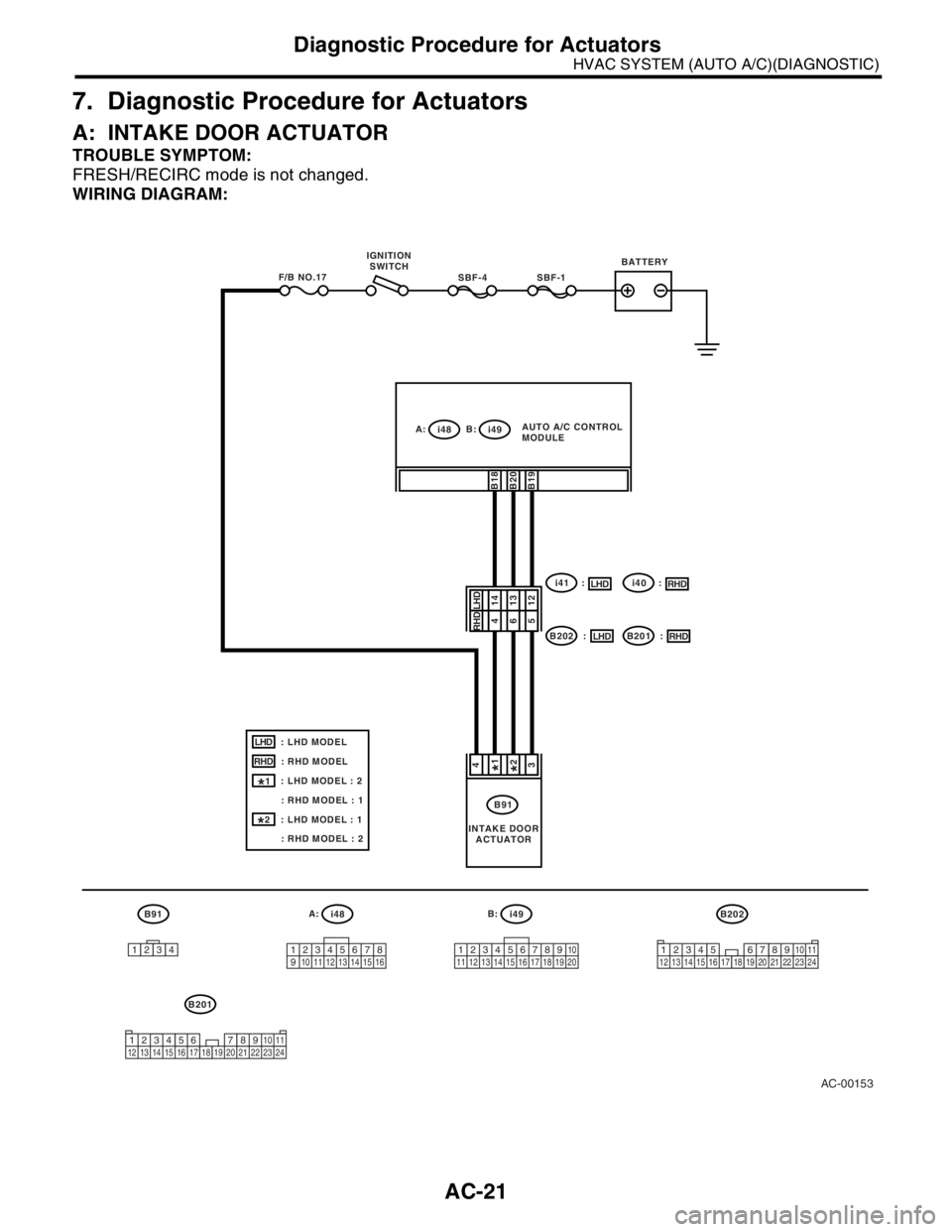
7. Diagnostic Procedure for Actuators
A: INTAKE DOOR ACTUATOR
TROUBLE SYMPTOM:
FRESH/RECIRC mode is not changed.
WIRING DIAGRAM:
AC-00153
B91A:
i48B:
i49
12345678
910 11 12 13 14 15 1612345678910
11 12 13 14 15 16 17 18 19 20
B91
i41 :
B202 : IGNITION
SWITCHBATTERY
SBF-1SBF-4F/B NO.17
43
141312
B18B20B19
1234
B202
34 12 8910 11
12 13 14 15 16 17 18 19 20 21 22 23 24567
A:
i48B:
i49AUTO A/C CONTROL
MODULE
INTAKE DOOR
ACTUATOR
B201
34 12 8910 11
12 13 14 15 16 17 18 19 20 21 22 23 2456 7
: LHD MODEL
: RHD MODELLHD
RHD
: LHD MODEL : 2
: RHD MODEL : 1
: LHD MODEL : 1
: RHD MODEL : 2
1*
2*
LHD465RHD
i40 :
B201 :
LHDRHD
LHDRHD
1*2*
Page 80 of 2870

AC-24
HVAC SYSTEM (AUTO A/C)(DIAGNOSTIC)
Diagnostic Procedure for Actuators
Step Check Yes No
1 CHECK POWER SUPPLY FOR AUTO A/C
CONTROL MODULE SIDE.
1) Turn the ignition switch to ON.
2) Turn the mode control dial to VENT posi-
tion.
3) Press the defroster switch and measure the
voltage between auto A/C control module and
chassis ground when VENT is changed to DEF
position.
Connector & terminal
(i49) No. 9 (+) — Chassis ground (
−):Is the voltage more than 12 V? Go to step 2.Replace the auto
A/C control mod-
ule.
2 CHECK POWER SUPPLY FOR ACTUATOR
SIDE.
1) Turn the mode control dial to VENT posi-
tion.
2) Press the defroster switch and measure the
voltage between mode door actuator harness
connector and chassis ground when VENT is
changed to DEF position.
Connector & terminal
(B77) No. 1 (+) — Chassis ground (
−):Is the voltage more than 7 V (at
normal temperature)?Go to step 3.Repair the har-
ness between auto
A/C control mod-
ule and mode door
actuator.
3 CHECK POWER SUPPLY FOR AUTO A/C
CONTROL MODULE SIDE.
1) Press the defroster switch.
2) Turn the mode control dial to VENT position
and measure the voltage between auto A/C
control module and chassis ground when DEF
is changed to VENT position.
Connector & terminal
(i49) No. 8 (+) — Chassis ground (
−):Is the voltage more than 12 V? Go to step 4.Replace the auto
A/C control mod-
ule.
4 CHECK POWER SUPPLY FOR ACTUATOR
SIDE.
1) Press the defroster switch.
2) Turn the mode control dial to VENT position
and measure the voltage between mode door
actuator harness connector and chassis
ground when DEF is changed to VENT posi-
tion.
Connector & terminal
(B77) No. 2 (+) — Chassis ground (
−):Is the voltage more than 7 V (at
normal temperature)?Go to step 5.Repair the har-
ness between auto
A/C control mod-
ule and mode door
actuator.
5 CHECK ACTUATOR.
1) Turn the ignition switch to OFF.
2) Disconnect the connector from mode door
actuator.
3) Connect the battery positive (+) terminal to
terminal No. 1 and ground (−) terminal to termi-
nal No. 2 of mode door actuator to make sure
that actuator operates.
4) Connect the battery positive (+) terminal to
terminal No. 2 and ground (−) terminal to termi-
nal No. 1 of mode door actuator to make sure
that actuator operates.Does the motor operate nor-
mally?Go to step 6.Replace the mode
door actuator.
Page 103 of 2870
AB-3
AIRBAG SYSTEM
General Description
B: CAUTION
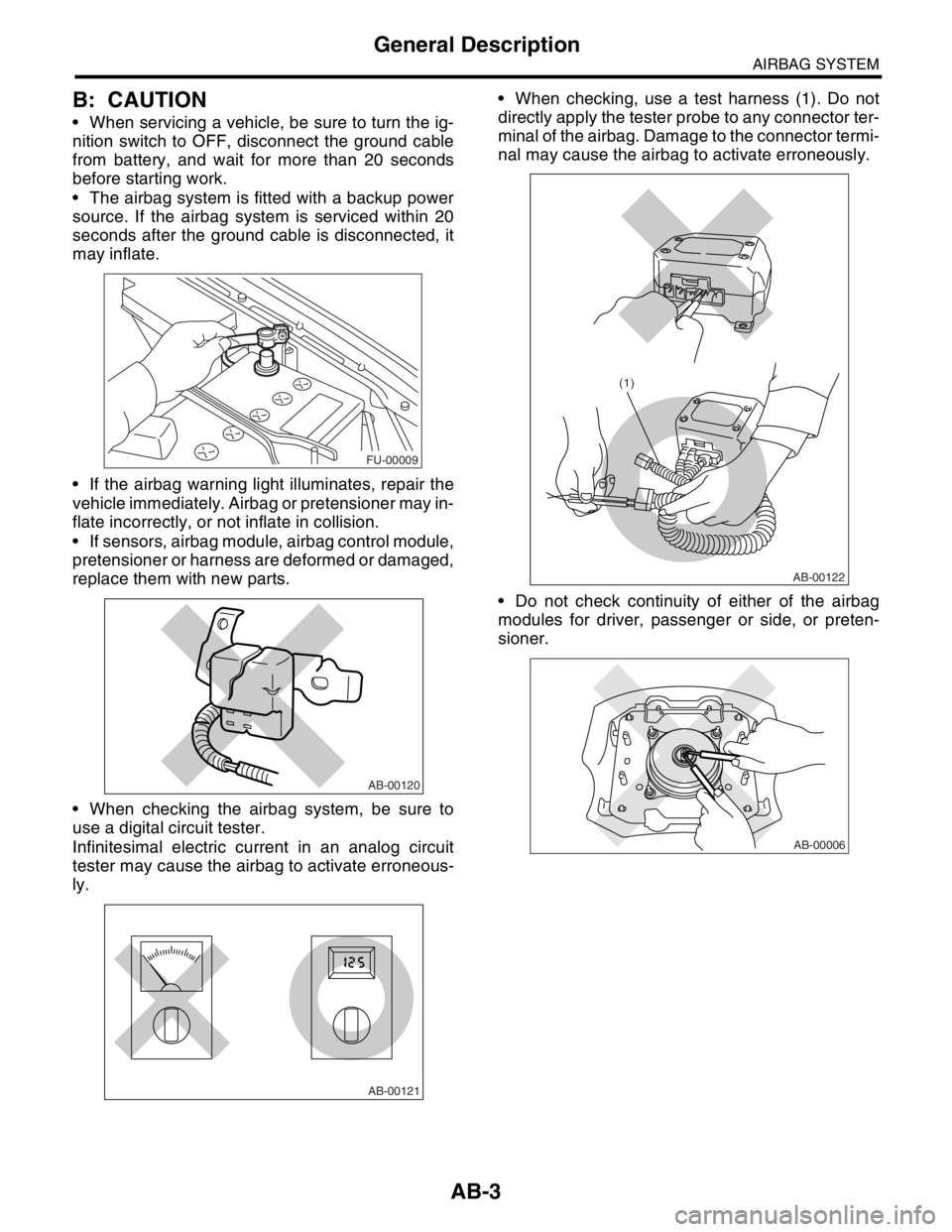
When servicing a vehicle, be sure to turn the ig-
nition switch to OFF, disconnect the ground cable
from battery, and wait for more than 20 seconds
before starting work.
The airbag system is fitted with a backup power
source. If the airbag system is serviced within 20
seconds after the ground cable is disconnected, it
may inflate.
If the airbag warning light illuminates, repair the
vehicle immediately. Airbag or pretensioner may in-
flate incorrectly, or not inflate in collision.
If sensors, airbag module, airbag control module,
pretensioner or harness are deformed or damaged,
replace them with new parts.
When checking the airbag system, be sure to
use a digital circuit tester.
Infinitesimal electric current in an analog circuit
tester may cause the airbag to activate erroneous-
ly. When checking, use a test harness (1). Do not
directly apply the tester probe to any connector ter-
minal of the airbag. Damage to the connector termi-
nal may cause the airbag to activate erroneously.
Do not check continuity of either of the airbag
modules for driver, passenger or side, or preten-
sioner.
FU-00009
AB-00120
AB-00121
AB-00122
(1)
AB-00006
Page 114 of 2870
AB-14
AIRBAG SYSTEM
Driver’s Airbag Module
4. Driver’s Airbag Module
A: REMOVAL
CAUTION:
Refer to “CAUTION” in General Description be-
fore handing the airbag module.
1) Position the front wheels straight ahead. (After
moving the vehicle more than 5 m (16 ft) with front
wheels positioned straight ahead, make sure that
the vehicle moves straight ahead).
2) Turn the ignition switch to OFF.
3) Disconnect the ground cable from battery, and
wait for at least 20 seconds before starting work.
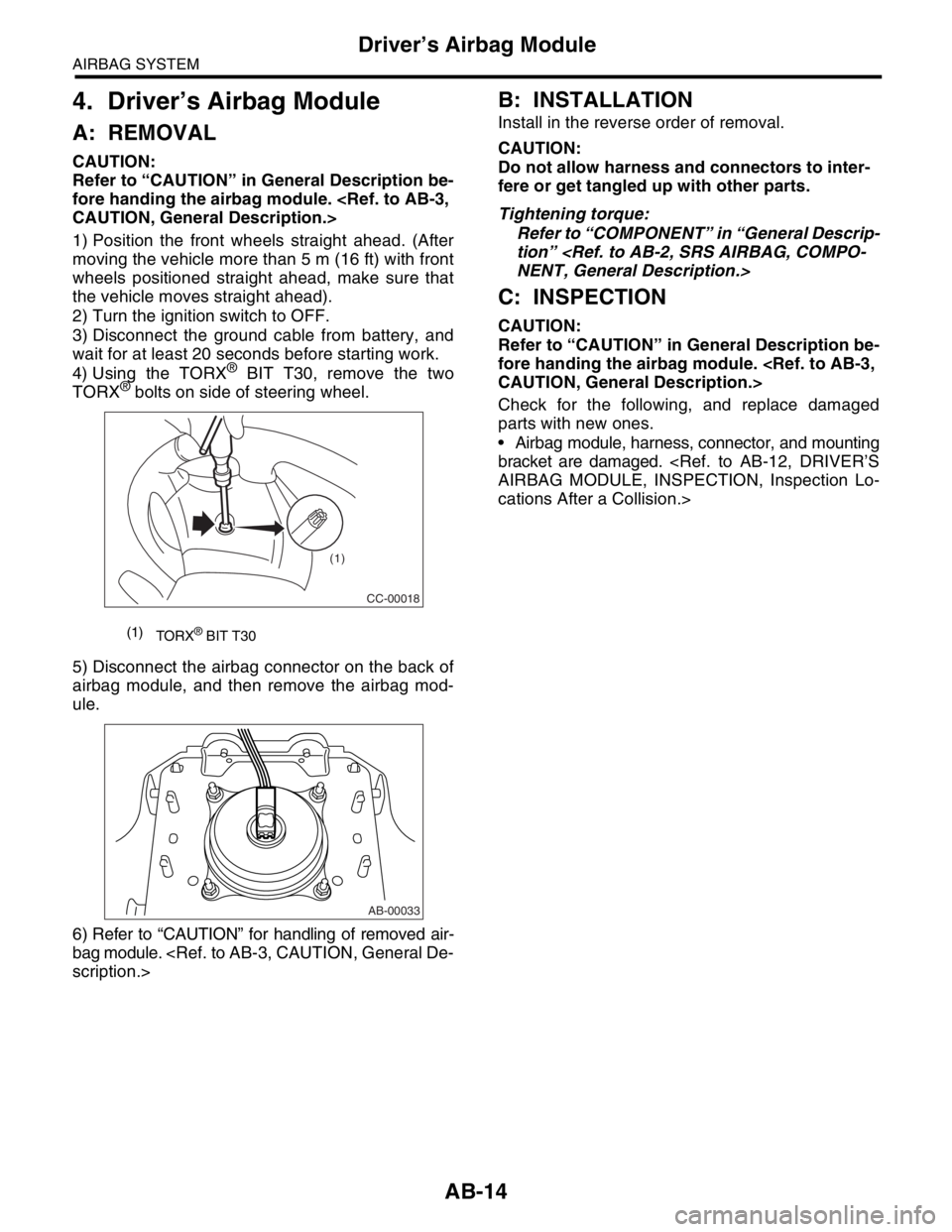
4) Using the TORX
® BIT T30, remove the two
TORX® bolts on side of steering wheel.
5) Disconnect the airbag connector on the back of
airbag module, and then remove the airbag mod-
ule.
6) Refer to “CAUTION” for handling of removed air-
bag module.
B: INSTALLATION
Install in the reverse order of removal.
CAUTION:
Do not allow harness and connectors to inter-
fere or get tangled up with other parts.
Tightening torque:
Refer to “COMPONENT” in “General Descrip-
tion”
C: INSPECTION
CAUTION:
Refer to “CAUTION” in General Description be-
fore handing the airbag module.
Check for the following, and replace damaged
parts with new ones.
Airbag module, harness, connector, and mounting
bracket are damaged.
cations After a Collision.>
(1)
TORX® BIT T30
CC-00018
(1)
AB-00033
Page 115 of 2870
AB-15
AIRBAG SYSTEM
Passenger’s Airbag Module
5. Passenger’s Airbag Module
A: REMOVAL
CAUTION:
Refer to “CAUTION” in General Description be-
fore handing the airbag module.
1) Turn the ignition switch to OFF.
2) Disconnect the ground cable from battery, and
wait for at least 20 seconds before starting work.
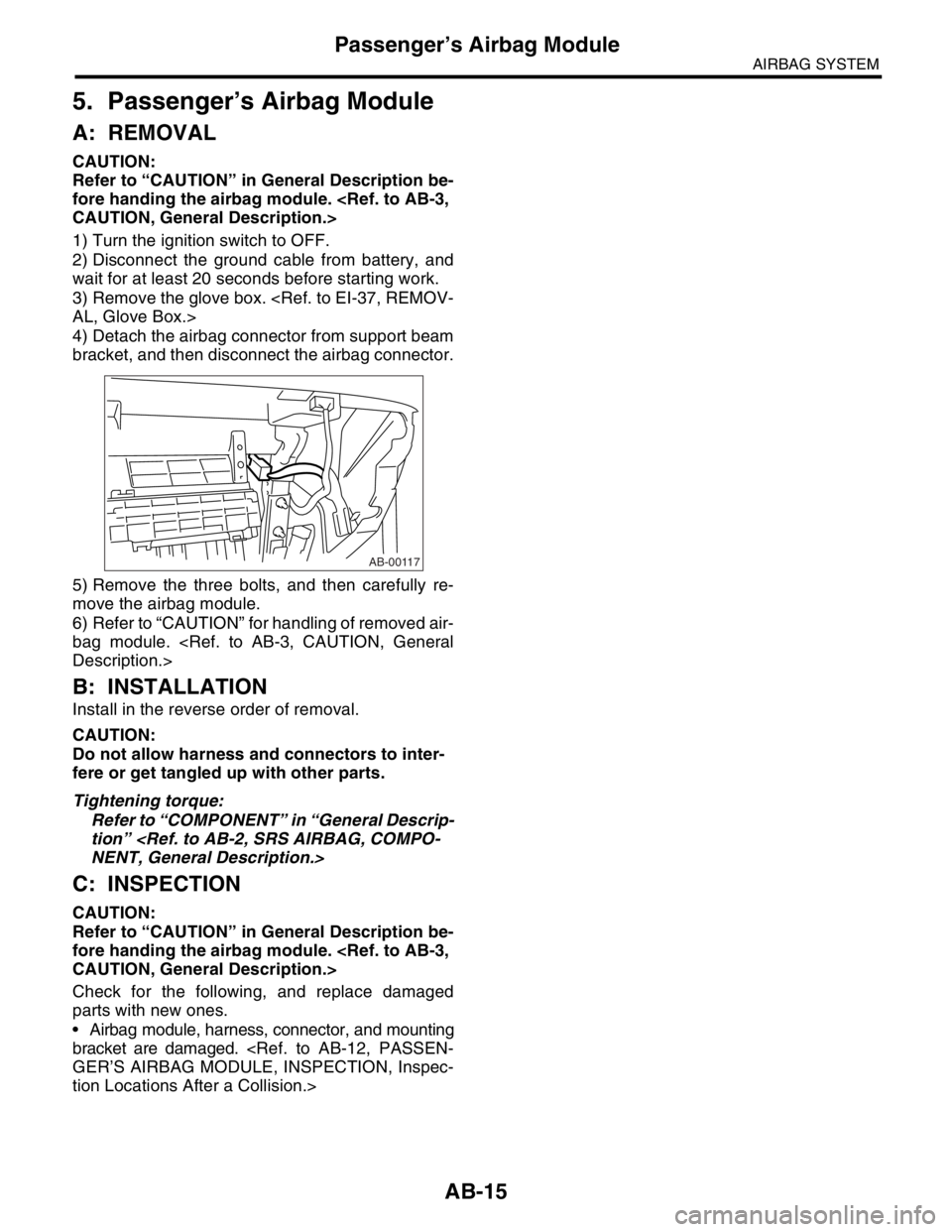
3) Remove the glove box.
4) Detach the airbag connector from support beam
bracket, and then disconnect the airbag connector.
5) Remove the three bolts, and then carefully re-
move the airbag module.
6) Refer to “CAUTION” for handling of removed air-
bag module.
B: INSTALLATION
Install in the reverse order of removal.
CAUTION:
Do not allow harness and connectors to inter-
fere or get tangled up with other parts.
Tightening torque:
Refer to “COMPONENT” in “General Descrip-
tion”
C: INSPECTION
CAUTION:
Refer to “CAUTION” in General Description be-
fore handing the airbag module.
Check for the following, and replace damaged
parts with new ones.
Airbag module, harness, connector, and mounting
bracket are damaged.
tion Locations After a Collision.>
AB-00117
Page 116 of 2870
AB-16
AIRBAG SYSTEM
Side Airbag Module
6. Side Airbag Module
A: REMOVAL
CAUTION:
Before working on the airbag module, refer to
the “CAUTION” in General Description.
NOTE:
Remove the passenger’s side by referring to driv-
er’s side.
1) Turn the ignition switch to OFF.
2) Disconnect the ground cable from battery, and
wait for at least 20 seconds before starting work.
3) Remove the front seat from the vehicle.
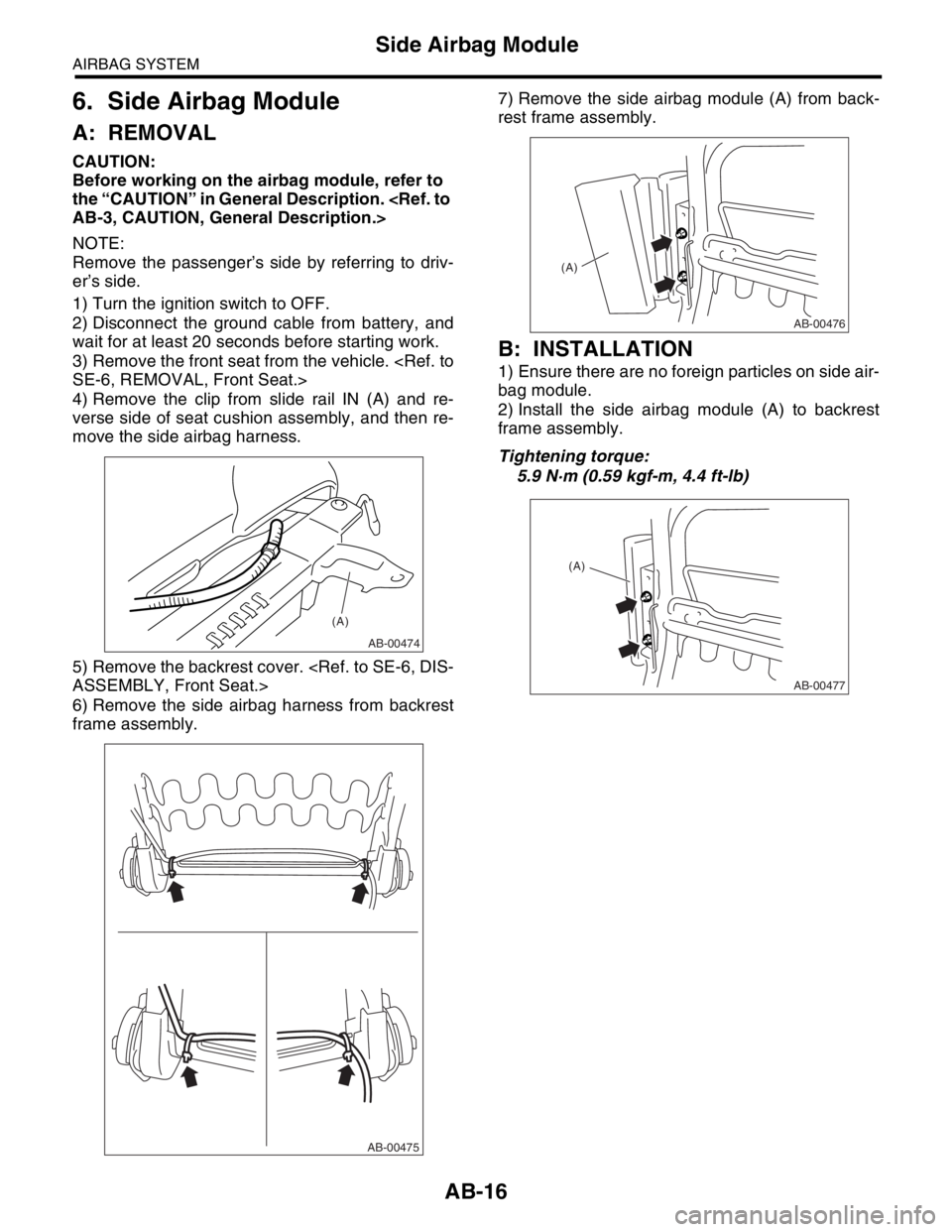
4) Remove the clip from slide rail IN (A) and re-
verse side of seat cushion assembly, and then re-
move the side airbag harness.
5) Remove the backrest cover.
6) Remove the side airbag harness from backrest
frame assembly.7) Remove the side airbag module (A) from back-
rest frame assembly.
B: INSTALLATION
1) Ensure there are no foreign particles on side air-
bag module.
2) Install the side airbag module (A) to backrest
frame assembly.
Tightening torque:
5.9 N·m (0.59 kgf-m, 4.4 ft-lb)
AB-00474
(A)
AB-00475
AB-00476
(A)
AB-00477
(A)
Page 118 of 2870
AB-18
AIRBAG SYSTEM
Airbag Control Module
7. Airbag Control Module
A: REMOVAL
CAUTION:
Do not disassemble the airbag control mod-
ule.
If the airbag control module is deformed or if
water damage is suspected, replace the airbag
control module with a new part.
Do not drop the airbag control module.
After removal, keep the airbag control mod-
ule on a dry, clean surface away from moisture,
heat, and dust.
1) Turn the ignition switch to OFF.
2) Disconnect the ground cable from battery, and
wait for at least 20 seconds before starting work.
3) Remove the console cover.
4) Remove the center console panel.
5) Disconnect the connector from airbag control
module.
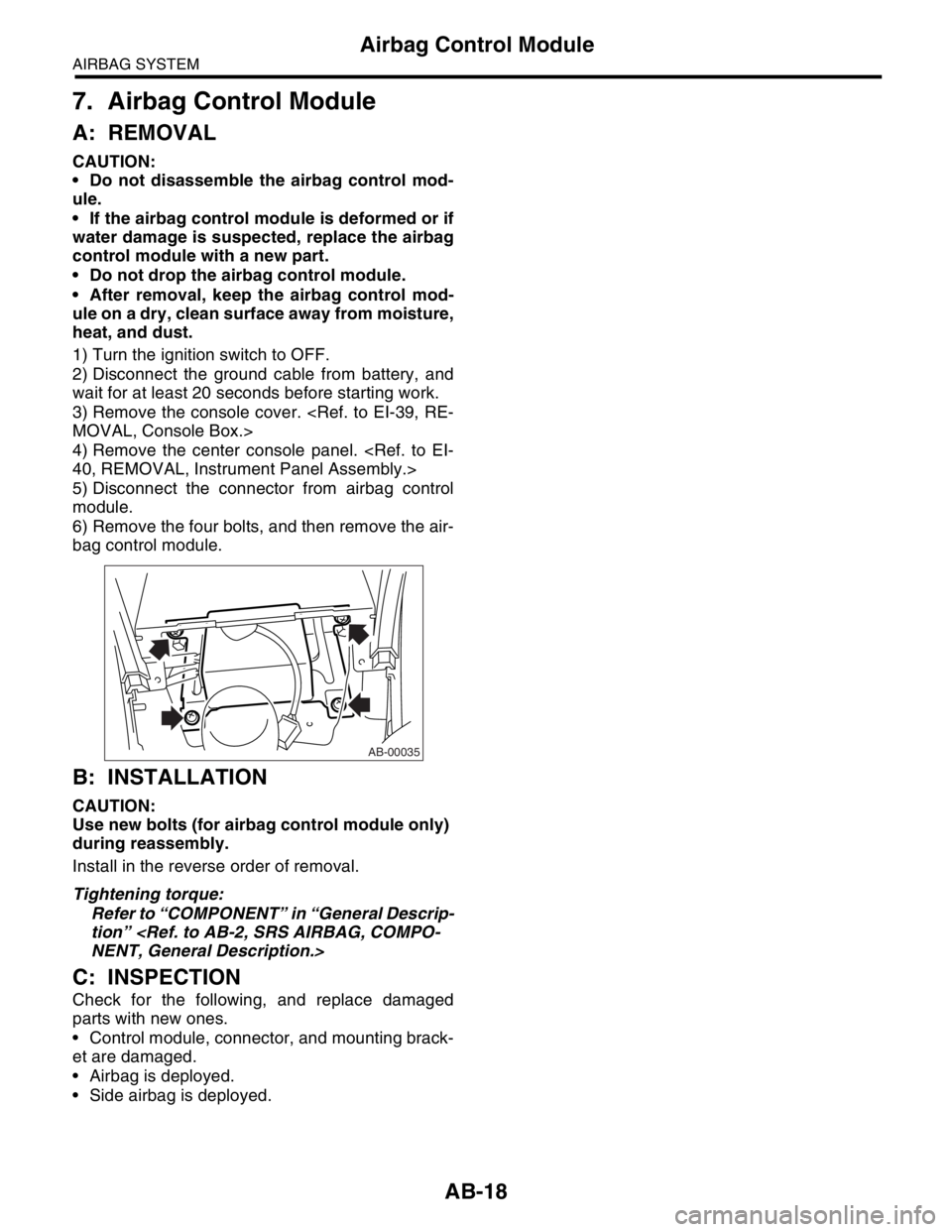
6) Remove the four bolts, and then remove the air-
bag control module.
B: INSTALLATION
CAUTION:
Use new bolts (for airbag control module only)
during reassembly.
Install in the reverse order of removal.
Tightening torque:
Refer to “COMPONENT” in “General Descrip-
tion”
C: INSPECTION
Check for the following, and replace damaged
parts with new ones.
Control module, connector, and mounting brack-
et are damaged.
Airbag is deployed.
Side airbag is deployed.
AB-00035
Page 119 of 2870
AB-19
AIRBAG SYSTEM
Side Airbag Sensor
8. Side Airbag Sensor
A: REMOVAL
1) Turn the ignition switch to OFF.
2) Disconnect the ground cable from battery, and
wait for at least 20 seconds before starting work.
3) Remove the outer belt (FRONT).
Belt.>
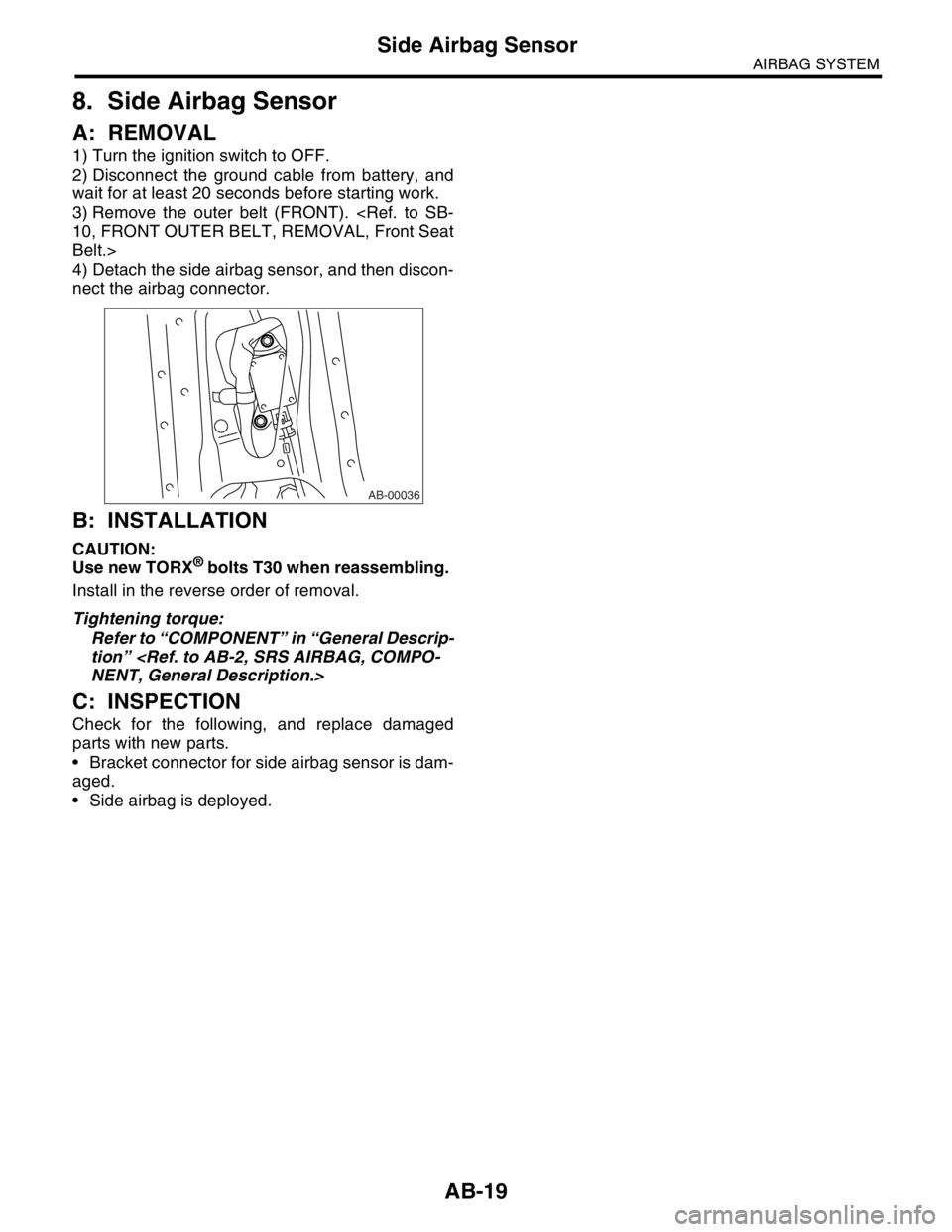
4) Detach the side airbag sensor, and then discon-
nect the airbag connector.
B: INSTALLATION
CAUTION:
Use new TORX® bolts T30 when reassembling.
Install in the reverse order of removal.
Tightening torque:
Refer to “COMPONENT” in “General Descrip-
tion”
C: INSPECTION
Check for the following, and replace damaged
parts with new parts.
Bracket connector for side airbag sensor is dam-
aged.
Side airbag is deployed.
AB-00036
Page 120 of 2870
AB-20
AIRBAG SYSTEM
Roll Connector
9. Roll Connector
A: REMOVAL
1) Turn the ignition switch to OFF.
2) Disconnect the ground cable from battery, and
wait for at least 20 seconds before starting work.
3) Remove the driver’s airbag module.
4) Remove the steering wheel.
5) Remove the steering column cover.
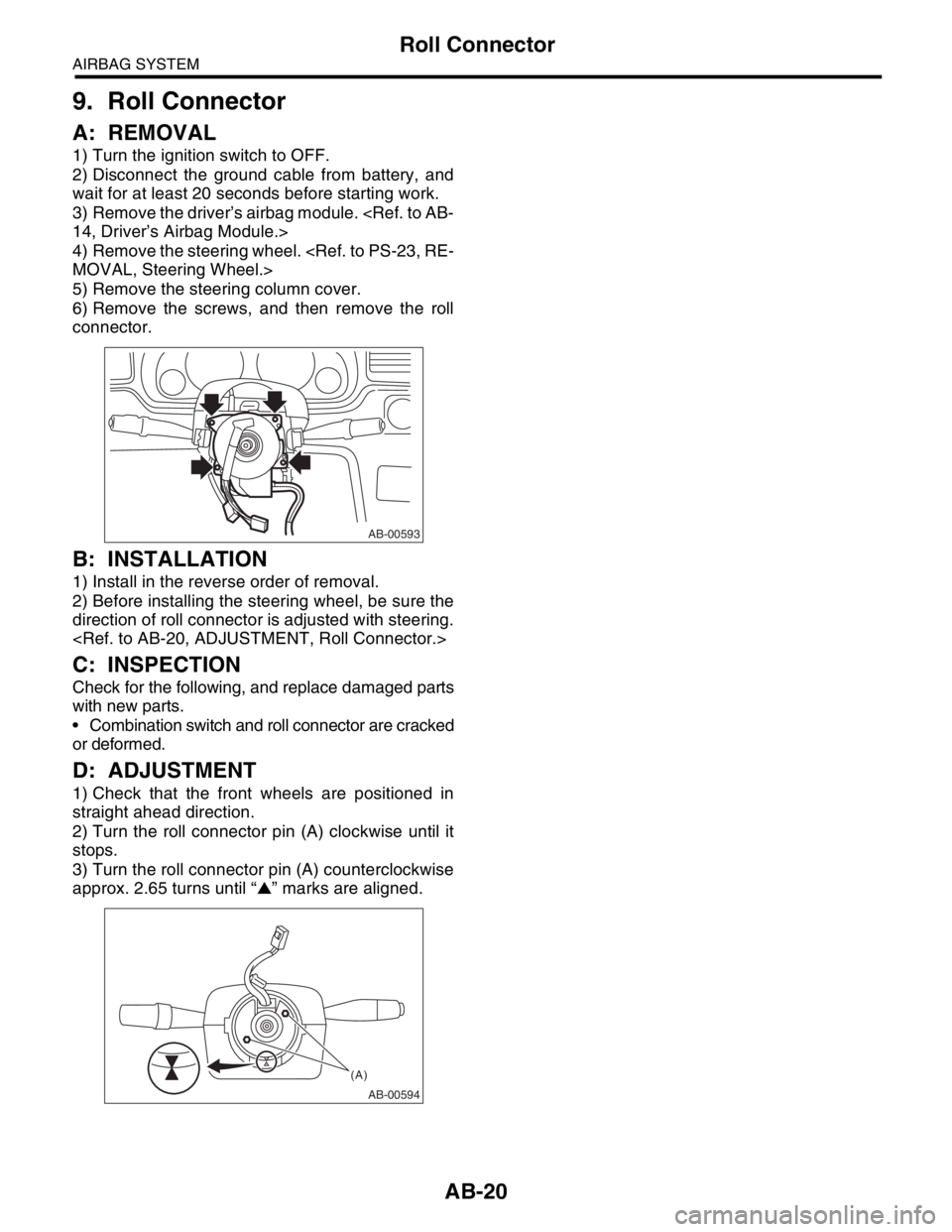
6) Remove the screws, and then remove the roll
connector.
B: INSTALLATION
1) Install in the reverse order of removal.
2) Before installing the steering wheel, be sure the
direction of roll connector is adjusted with steering.
C: INSPECTION
Check for the following, and replace damaged parts
with new parts.
Combination switch and roll connector are cracked
or deformed.
D: ADJUSTMENT
1) Check that the front wheels are positioned in
straight ahead direction.
2) Turn the roll connector pin (A) clockwise until it
stops.
3) Turn the roll connector pin (A) counterclockwise
approx. 2.65 turns until “▲” marks are aligned.
AB-00593
AB-00594
(A)