ECO mode SUBARU FORESTER 2004 Service Manual Online
[x] Cancel search | Manufacturer: SUBARU, Model Year: 2004, Model line: FORESTER, Model: SUBARU FORESTER 2004Pages: 2870, PDF Size: 38.67 MB
Page 1475 of 2870
ME(H4DOTC)-19
MECHANICAL
General Description
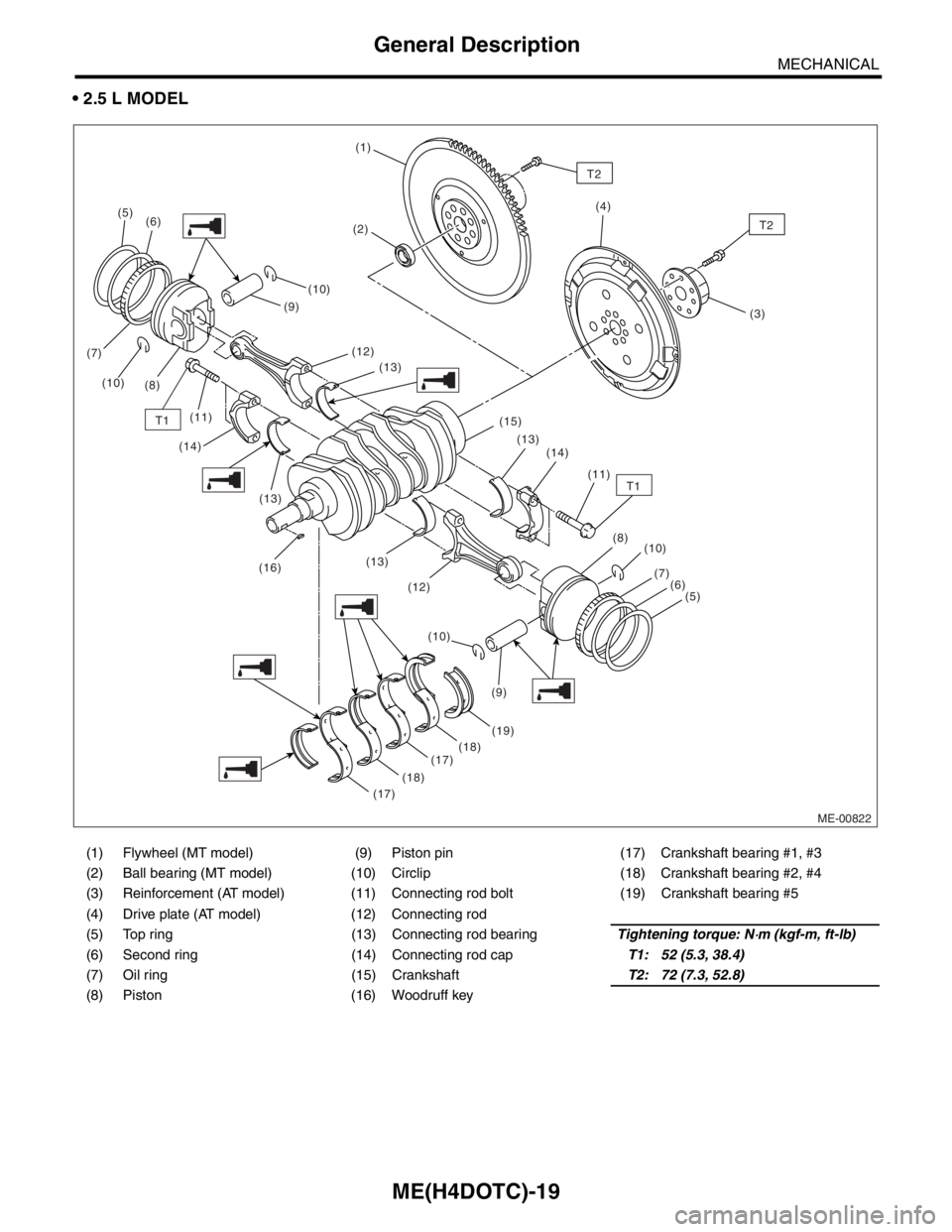
2.5 L MODEL
(1) Flywheel (MT model) (9) Piston pin (17) Crankshaft bearing #1, #3
(2) Ball bearing (MT model) (10) Circlip (18) Crankshaft bearing #2, #4
(3) Reinforcement (AT model) (11) Connecting rod bolt (19) Crankshaft bearing #5
(4) Drive plate (AT model) (12) Connecting rod
(5) Top ring (13) Connecting rod bearingTightening torque: N
⋅m (kgf-m, ft-lb)
(6) Second ring (14) Connecting rod capT1: 52 (5.3, 38.4)
(7) Oil ring (15) CrankshaftT2: 72 (7.3, 52.8)
(8) Piston (16) Woodruff key
ME-00822
T1
(5)
(6)
(7)
(10)
(8)(10)
(12)
(13)
(13)
(16)(13)
(12)
(19)
(18)
(17)
(17)(18)(10)(10)
(7)
(6)
(5)
(9)(8) (13) (15)
(14)
(11) (14)(9)
T1(11)
(1)
T2
(2)(4)
(3)
T2
Page 1539 of 2870
ME(H4DOTC)-81
MECHANICAL
Cylinder Head Assembly
6. INTAKE AND EXHAUST VALVE OIL
SEAL
1) Replace the oil seal with a new one in the follow-
ing condition, Refer to procedure 2) for replace-
ment procedure.
Lip portion is damaged.
Spring is out of place.
Valve and valve seat are reconditioned.
Valve guide is replaced.
2) Place the cylinder head on ST1.
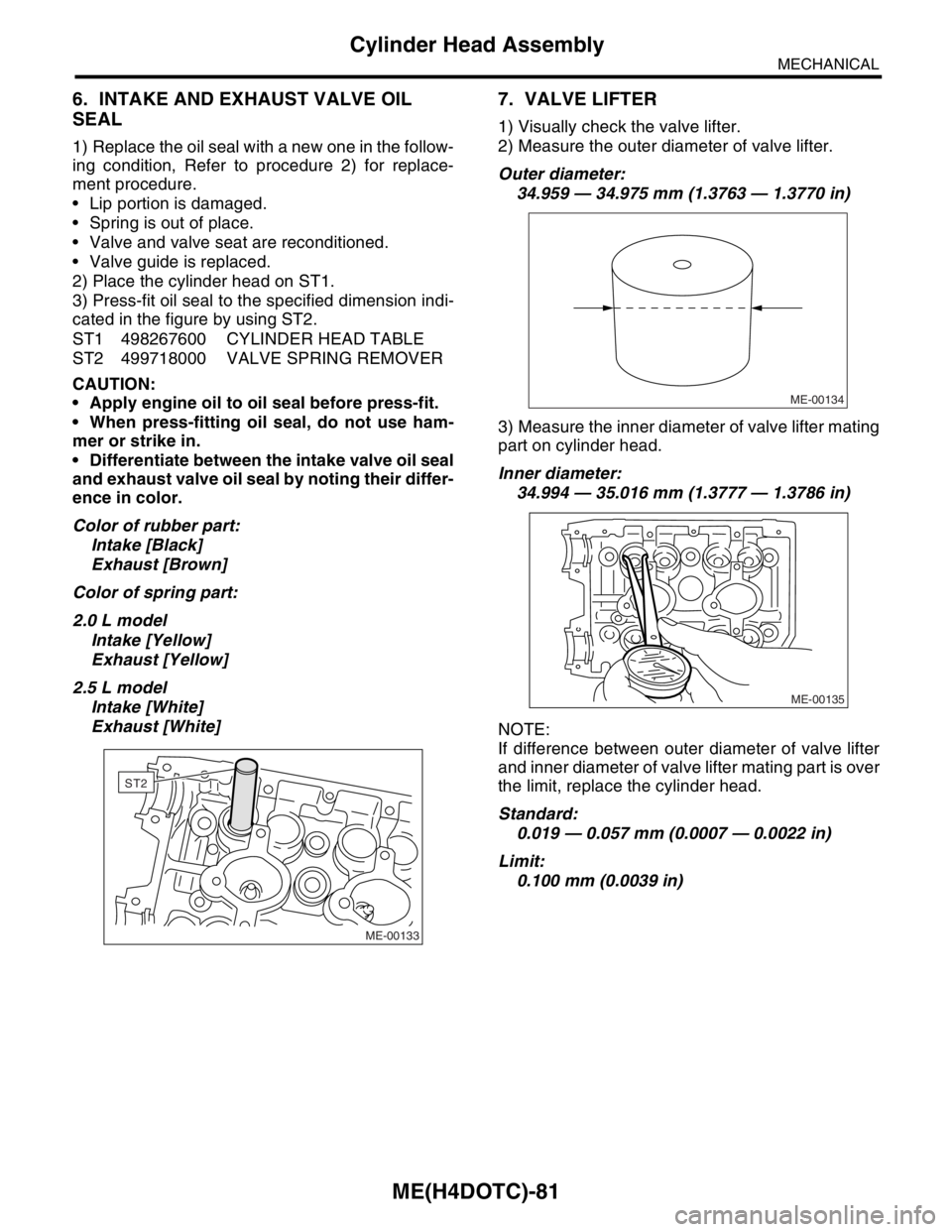
3) Press-fit oil seal to the specified dimension indi-
cated in the figure by using ST2.
ST1 498267600 CYLINDER HEAD TABLE
ST2 499718000 VALVE SPRING REMOVER
CAUTION:
Apply engine oil to oil seal before press-fit.
When press-fitting oil seal, do not use ham-
mer or strike in.
Differentiate between the intake valve oil seal
and exhaust valve oil seal by noting their differ-
ence in color.
Color of rubber part:
Intake [Black]
Exhaust [Brown]
Color of spring part:
2.0 L model
Intake [Yellow]
Exhaust [Yellow]
2.5 L model
Intake [White]
Exhaust [White]
7. VALVE LIFTER
1) Visually check the valve lifter.
2) Measure the outer diameter of valve lifter.
Outer diameter:
34.959 — 34.975 mm (1.3763 — 1.3770 in)
3) Measure the inner diameter of valve lifter mating
part on cylinder head.
Inner diameter:
34.994 — 35.016 mm (1.3777 — 1.3786 in)
NOTE:
If difference between outer diameter of valve lifter
and inner diameter of valve lifter mating part is over
the limit, replace the cylinder head.
Standard:
0.019 — 0.057 mm (0.0007 — 0.0022 in)
Limit:
0.100 mm (0.0039 in)
ME-00133
ST2
ME-00134
ME-00135
Page 1562 of 2870
ME(H4DOTC)-102
MECHANICAL
Cylinder Block
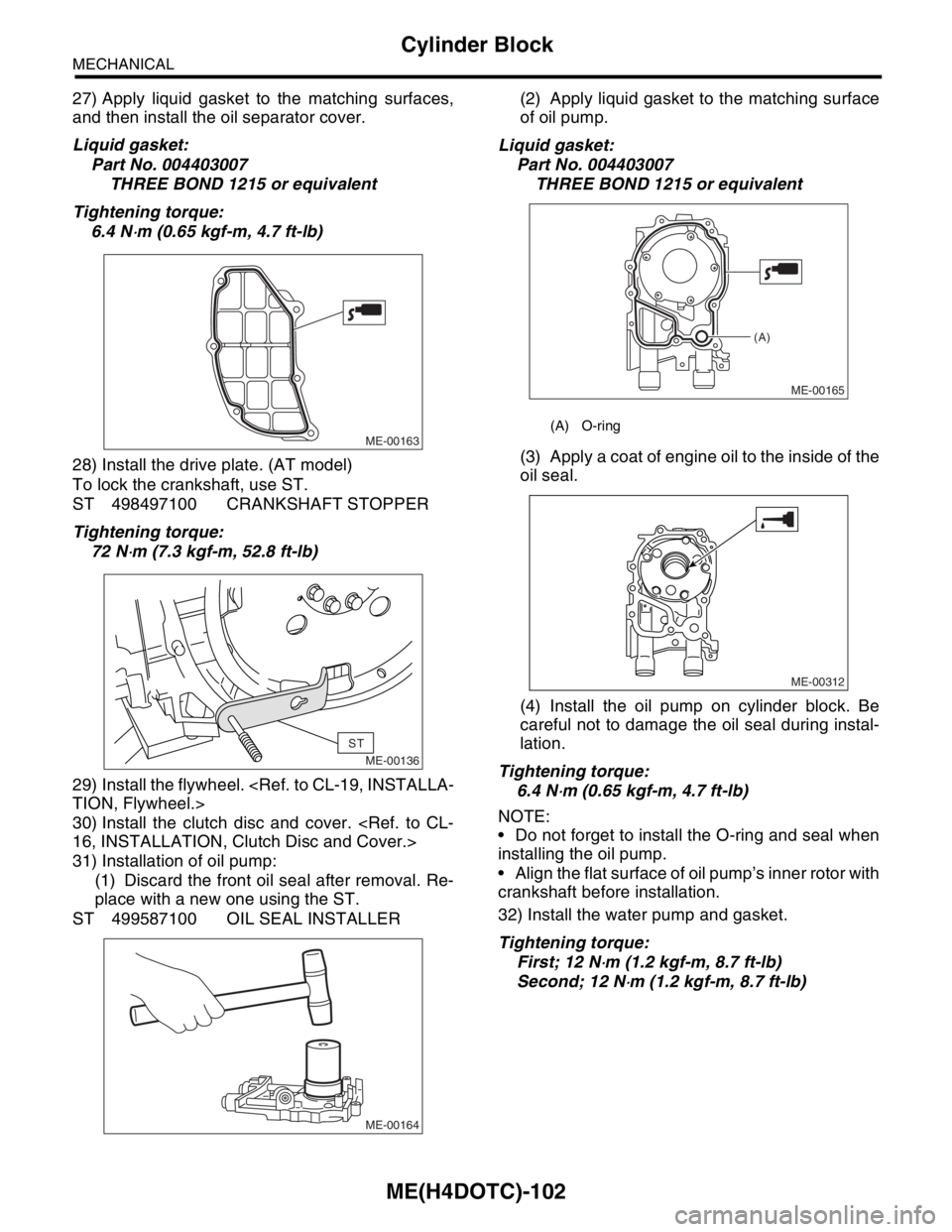
27) Apply liquid gasket to the matching surfaces,
and then install the oil separator cover.
Liquid gasket:
Part No. 004403007
THREE BOND 1215 or equivalent
Tightening torque:
6.4 N
⋅m (0.65 kgf-m, 4.7 ft-lb)
28) Install the drive plate. (AT model)
To lock the crankshaft, use ST.
ST 498497100 CRANKSHAFT STOPPER
Tightening torque:
72 N
⋅m (7.3 kgf-m, 52.8 ft-lb)
29) Install the flywheel.
30) Install the clutch disc and cover.
31) Installation of oil pump:
(1) Discard the front oil seal after removal. Re-
place with a new one using the ST.
ST 499587100 OIL SEAL INSTALLER(2) Apply liquid gasket to the matching surface
of oil pump.
Liquid gasket:
Part No. 004403007
THREE BOND 1215 or equivalent
(3) Apply a coat of engine oil to the inside of the
oil seal.
(4) Install the oil pump on cylinder block. Be
careful not to damage the oil seal during instal-
lation.
Tightening torque:
6.4 N
⋅m (0.65 kgf-m, 4.7 ft-lb)
NOTE:
Do not forget to install the O-ring and seal when
installing the oil pump.
Align the flat surface of oil pump’s inner rotor with
crankshaft before installation.
32) Install the water pump and gasket.
Tightening torque:
First; 12 N
⋅m (1.2 kgf-m, 8.7 ft-lb)
Second; 12 N
⋅m (1.2 kgf-m, 8.7 ft-lb)
ME-00163
ME-00136
ST
ME-00164
(A) O-ring
ME-00165
(A)
ME-00312
Page 1569 of 2870
ME(H4DOTC)-109
MECHANICAL
Cylinder Block
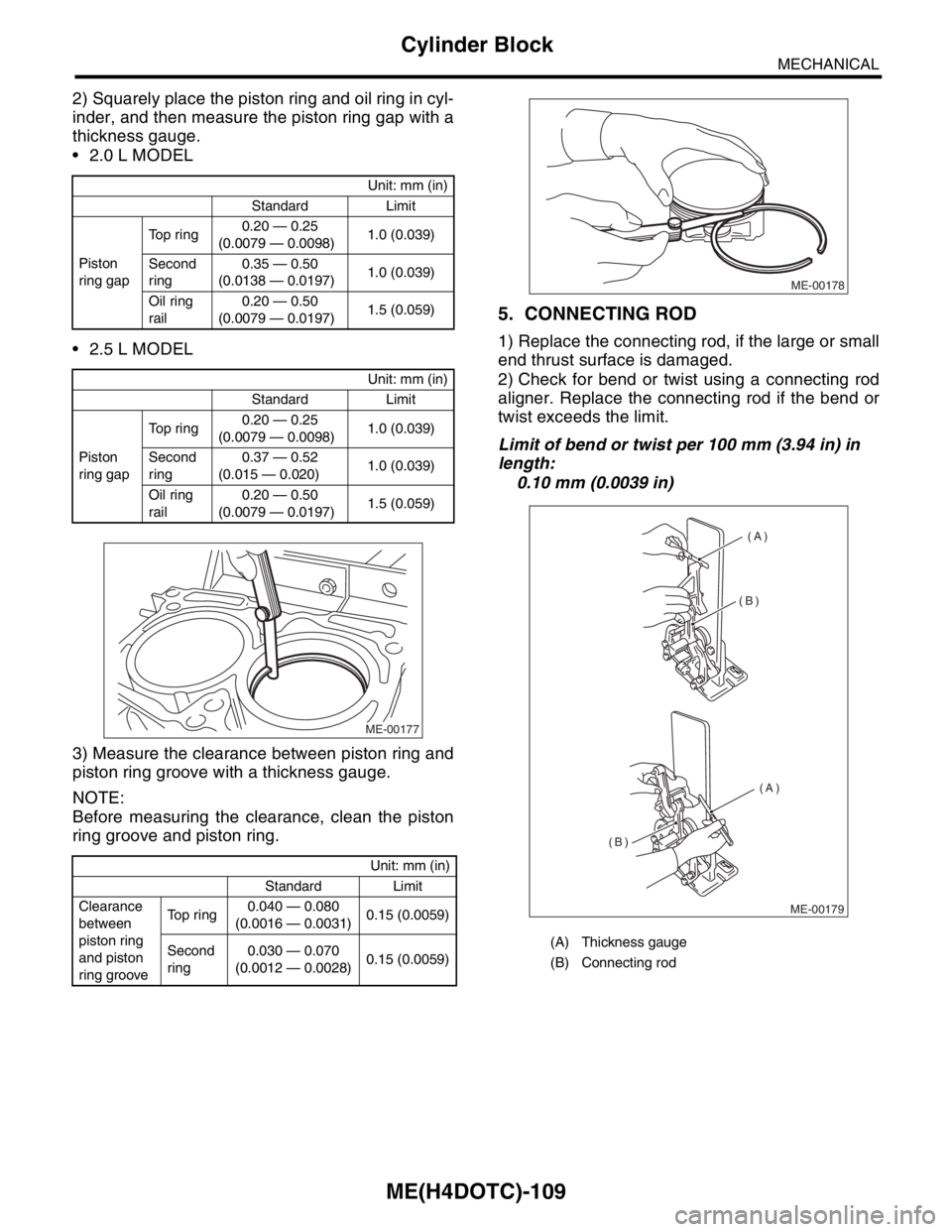
2) Squarely place the piston ring and oil ring in cyl-
inder, and then measure the piston ring gap with a
thickness gauge.
2.0 L MODEL
2.5 L MODEL
3) Measure the clearance between piston ring and
piston ring groove with a thickness gauge.
NOTE:
Before measuring the clearance, clean the piston
ring groove and piston ring.
5. CONNECTING ROD
1) Replace the connecting rod, if the large or small
end thrust surface is damaged.
2) Check for bend or twist using a connecting rod
aligner. Replace the connecting rod if the bend or
twist exceeds the limit.
Limit of bend or twist per 100 mm (3.94 in) in
length:
0.10 mm (0.0039 in)
Unit: mm (in)
Standard Limit
Piston
ring gapTop ring0.20 — 0.25
(0.0079 — 0.0098)1.0 (0.039)
Second
ring0.35 — 0.50
(0.0138 — 0.0197)1.0 (0.039)
Oil ring
rail0.20 — 0.50
(0.0079 — 0.0197)1.5 (0.059)
Unit: mm (in)
Standard Limit
Piston
ring gapTop ring0.20 — 0.25
(0.0079 — 0.0098)1.0 (0.039)
Second
ring0.37 — 0.52
(0.015 — 0.020)1.0 (0.039)
Oil ring
rail0.20 — 0.50
(0.0079 — 0.0197)1.5 (0.059)
Unit: mm (in)
Standard Limit
Clearance
between
piston ring
and piston
ring grooveTop ring0.040 — 0.080
(0.0016 — 0.0031)0.15 (0.0059)
Second
ring0.030 — 0.070
(0.0012 — 0.0028)0.15 (0.0059)
ME-00177
(A) Thickness gauge
(B) Connecting rod
ME-00178
(A)
(A) (B)
(B)
ME-00179
Page 1632 of 2870

EN(H4DOTC)-2
ENGINE (DIAGNOSTIC)
Basic Diagnostics Procedure
1. Basic Diagnostics Procedure
A: PROCEDURE
1. ENGINE
Step Check Yes No
1 CHECK ENGINE START FAILURE.
1) Ask the customer when and how the trou-
ble occurred using the interview check list.
2) Start the engine.Does the engine start? Go to step 2.Inspection using
“Diagnostics for
Engine Start Fail-
ure”.
Diagnostics for
Engine Starting
Fai lu r e.>
2 CHECK ILLUMINATION OF MALFUNCTION
INDICATOR LIGHT.Does malfunction indicator
light illuminate?Go to step 3.Inspection using
“General Diagnos-
tic Table”.
295, General Diag-
nostic Table.>
3 CHECK INDICATION OF DTC ON DISPLAY.
1) Turn the ignition switch to OFF.
2) Connect the Subaru Select Monitor or the
OBD-II general scan tool to data link connec-
tor.
3) Turn the ignition switch to ON and the Sub-
aru Select Monitor or OBD-II general scan tool
switch to ON.
4) Read the DTC on the Subaru Select Moni-
tor or OBD-II general scan tool.Does the Subaru Select Moni-
tor or OBD-II general scan tool
indicate DTC?Record the
DTC.Repair the
trouble cause.
List of Diagnostic
Trouble Code
(DTC).> Go to
step 4.Repair the related
parts.
N
OTE:
If DTC is not shown
on display although
the malfunction in-
dicator light illumi-
nates, perform the
diagnostics for mal-
function indicator
light circuit or com-
bination meter.
Malfunction Indica-
tor Light.>
4 PERFORM THE DIAGNOSIS.
1) Perform clear memory mode.
2) Perform the “INSPECTION MODE”.
tor or OBD-II general scan tool
indicate DTC?Check on “Diag-
nostic Chart with
Diagnostic Trou-
ble Code (DTC)”
Diagnostic Proce-
dure with Diagnos-
tic Trouble Code
(DTC).>Finish the diagno-
sis.
Page 1637 of 2870
EN(H4DOTC)-7
ENGINE (DIAGNOSTIC)
General Description
12) Observe the following cautions when installing
a radio in MFI equipped models.
CAUTION:
The antenna must be kept as far apart as pos-
sible from the control unit. (The ECM is located
under the steering column, inside of the instru-
ment panel lower trim panel.)
The antenna feeder must be placed as far
apart as possible from the ECM and MFI har-
ness.
Carefully adjust the antenna for correct
matching.
When mounting a large power type radio, pay
special attention to the three items above men-
tioned.
Incorrect installation of the radio may affect
the operation of the ECM.
13) Before disconnecting the fuel hose, disconnect
the fuel pump connector and crank the engine for
more than five seconds to release pressure in the
fuel system.If engine starts during this operation,
run it until it stops.
14) Problems in the electronic-controlled automatic
transmission may be caused by failure of the en-
gine, the electronic control system, the transmis-
sion proper, or by a combination of these.These
three causes (engine, electronic control system,
transmission) must be distinguished clearly when
performing diagnostics.
15) Diagnostics should be conducted by rotating
with simple, easy operations and proceeding to
complicated, difficult operations.The most impor-
tant thing in diagnostics is to understand the cus-
tomer’s complaint, and distinguish between the
three causes.
16) On the model with ABS, when performing driv-
ing test in jacked-up or lifted-up position, some-
times the warning light may be lit, but this is not a
malfunction of the system.The reason for this is the
speed difference between the front and rear
wheels.After diagnosis of engine control system,
perform the ABS memory clearance procedure of
self-diagnosis function.
B: INSPECTION
Before performing diagnostics, check the following
items which might affect engine problems:
1. BATTERY
1) Measure battery voltage and specific gravity of
electrolyte.
Standard voltage: 12 V
Specific gravity: Above 1.2602) Check the condition of the main and other fuses,
and harnesses and connectors.Also check for
proper grounding.
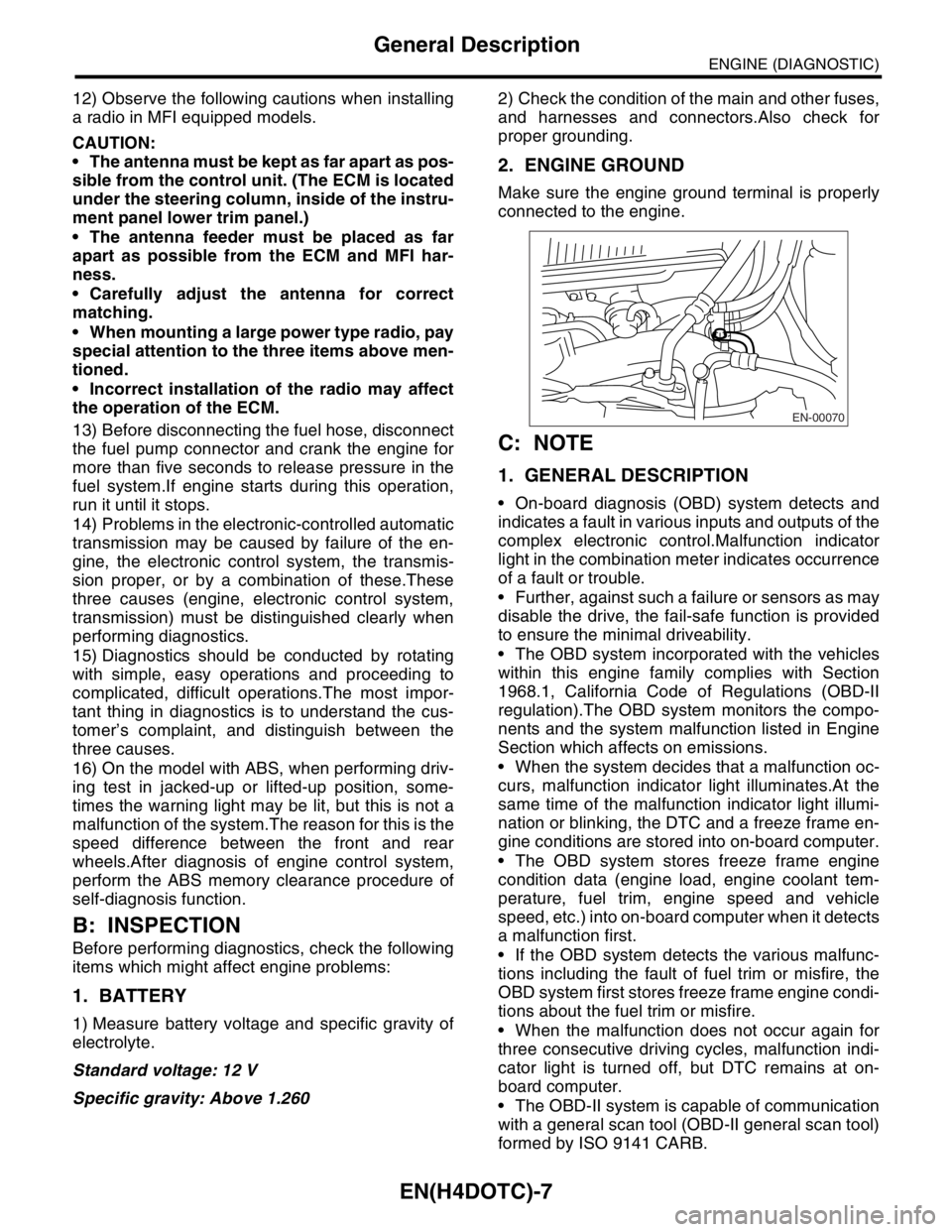
2. ENGINE GROUND
Make sure the engine ground terminal is properly
connected to the engine.
C: NOTE
1. GENERAL DESCRIPTION
On-board diagnosis (OBD) system detects and
indicates a fault in various inputs and outputs of the
complex electronic control.Malfunction indicator
light in the combination meter indicates occurrence
of a fault or trouble.
Further, against such a failure or sensors as may
disable the drive, the fail-safe function is provided
to ensure the minimal driveability.
The OBD system incorporated with the vehicles
within this engine family complies with Section
1968.1, California Code of Regulations (OBD-II
regulation).The OBD system monitors the compo-
nents and the system malfunction listed in Engine
Section which affects on emissions.
When the system decides that a malfunction oc-
curs, malfunction indicator light illuminates.At the
same time of the malfunction indicator light illumi-
nation or blinking, the DTC and a freeze frame en-
gine conditions are stored into on-board computer.
The OBD system stores freeze frame engine
condition data (engine load, engine coolant tem-
perature, fuel trim, engine speed and vehicle
speed, etc.) into on-board computer when it detects
a malfunction first.
If the OBD system detects the various malfunc-
tions including the fault of fuel trim or misfire, the
OBD system first stores freeze frame engine condi-
tions about the fuel trim or misfire.
When the malfunction does not occur again for
three consecutive driving cycles, malfunction indi-
cator light is turned off, but DTC remains at on-
board computer.
The OBD-II system is capable of communication
with a general scan tool (OBD-II general scan tool)
formed by ISO 9141 CARB.
EN-00070
Page 1663 of 2870
EN(H4DOTC)-33
ENGINE (DIAGNOSTIC)
Subaru Select Monitor
10.Subaru Select Monitor
A: OPERATION
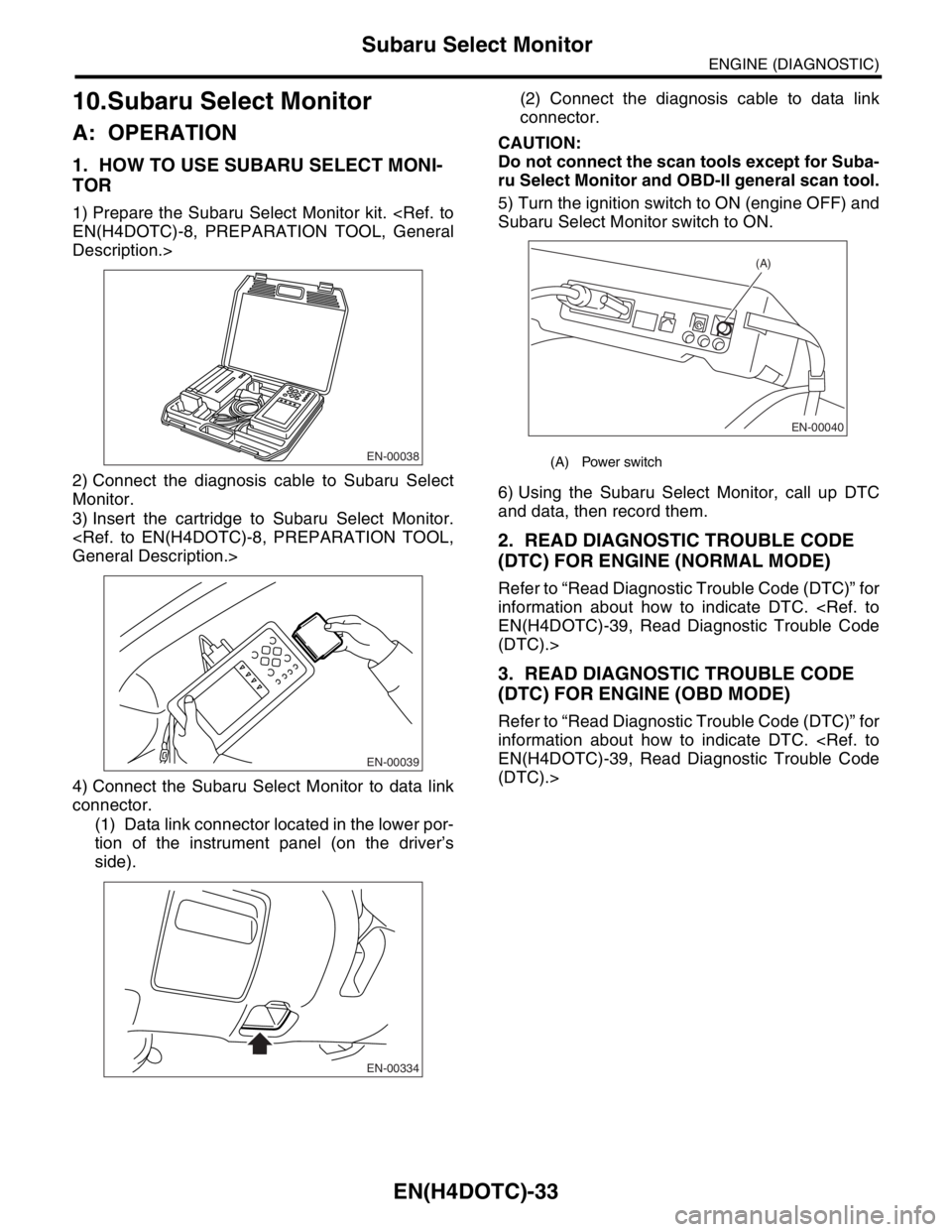
1. HOW TO USE SUBARU SELECT MONI-
TOR
1) Prepare the Subaru Select Monitor kit.
Description.>
2) Connect the diagnosis cable to Subaru Select
Monitor.
3) Insert the cartridge to Subaru Select Monitor.
4) Connect the Subaru Select Monitor to data link
connector.
(1) Data link connector located in the lower por-
tion of the instrument panel (on the driver’s
side).(2) Connect the diagnosis cable to data link
connector.
CAUTION:
Do not connect the scan tools except for Suba-
ru Select Monitor and OBD-II general scan tool.
5) Turn the ignition switch to ON (engine OFF) and
Subaru Select Monitor switch to ON.
6) Using the Subaru Select Monitor, call up DTC
and data, then record them.
2. READ DIAGNOSTIC TROUBLE CODE
(DTC) FOR ENGINE (NORMAL MODE)
Refer to “Read Diagnostic Trouble Code (DTC)” for
information about how to indicate DTC.
(DTC).>
3. READ DIAGNOSTIC TROUBLE CODE
(DTC) FOR ENGINE (OBD MODE)
Refer to “Read Diagnostic Trouble Code (DTC)” for
information about how to indicate DTC.
(DTC).>
EN-00038
EN-00039
EN-00334
(A) Power switch
EN-00040
(A)
Page 1665 of 2870

EN(H4DOTC)-35
ENGINE (DIAGNOSTIC)
Subaru Select Monitor
NOTE:
For detailed operation procedure, refer to the “SUBARU SELECT MONITOR OPERATION MANUAL”.
5. READ CURRENT DATA FOR ENGINE (OBD MODE)
1) On the «Main Menu» display screen, select the {Each System Check} and press the [YES] key.
2) On the «System Selection Menu» display screen, select the {Engine} and press the [YES] key.
3) Press the [YES] key after the information of engine type was displayed.
4) On the «Engine Diagnosis» display screen, select the {OBD System} and press the [YES] key.
5) On the «OBD Menu» screen, select the {Current Data Display/Save}, and then press the [YES] key.
6) On the «Data Display Menu» screen, select the {Data Display} and press the [YES] key.
7) Using the scroll key, move the display screen up or down until the desired data is shown.
A list of the support data is shown in the following table.
Air conditioning signal A/C Compressor Signal ON or OFF
Radiator main fan relay signal Radiator Fan Relay #1 ON or OFF
Knocking signal Knocking Signal ON or OFF
Radiator sub fan relay signal Radiator Fan Relay #2 ON or OFF
Power steering switch signal P/S Switch ON or OFF
Engine torque control permission signal Torque Permission Signal ON or OFF
Rear oxygen sensor rich signal Rear Oxygen Rich Signal ON or OFF
Starter switch signal Starter Switch ON or OFF
Idle switch signal Idle Switch ON or OFF
Crankshaft position sensor signal Crankshaft Position Sig. ON or OFF
Camshaft position sensor signal Camshaft Position Sig. ON or OFF
Rear defogger switch signal Rear Defogger SW ON or OFF
Blower fan switch signal Blower Fan SW ON or OFF
Small light switch signal Light Switch ON or OFF
Tumble generated valve output signal TGV Output ON or OFF
Exhaust temperature signal Exhaust Gas Temperature°C
Estimated cumulative driving distance Odd Meter km
Roughness Monitor for #1 cylinder Roughness Monitor #1 —
Roughness Monitor for #2 cylinder Roughness Monitor #2 —
Roughness Monitor for #3 cylinder Roughness Monitor #3 —
Roughness Monitor for #4 cylinder Roughness Monitor #4 —
Wiper switch signal Wiper Switch ON or OFF
A/C middle pressure switch signal A/C Mid pressure switch ON or OFF
AT retard angle demand signal Retard Signal from AT ON or OFF
AT fuel cut demand signal Fuel Cut Signal from AT ON or OFF
Description Display Unit of measure
Number of diagnosis code Number of Diag. Code —
Condition of malfunction indicator light MI (MIL) ON or OFF
Monitoring test of misfire Misfire monitoring Complete or incomplete
Monitoring test of fuel system Fuel system monitoring Complete or incomplete
Monitoring test of comprehensive component Component monitoring Complete or incomplete
Test of catalyst Catalyst Diagnosis Complete or incomplete
Test of heating-type catalyst Heated catalyst No support
Test of evaporative emission purge control system Evaporative purge system No support
Test of secondary air system Secondary air system No support
Test of air conditioning system refrigerant A/C system refrigerant No support
Test of oxygen sensor Oxygen sensor Complete or incomplete
Test of oxygen sensor heater Oxygen Heater Diagnosis Complete or incomplete
Test of EGR system EGR system No supportRemarks Display Unit of measure
Page 1674 of 2870

EN(H4DOTC)-44
ENGINE (DIAGNOSTIC)
Inspection Mode
5) Start the engine.
NOTE:
Ensure the select lever is placed in the “P” range
before starting.(AT model)
Depress the clutch pedal when starting the en-
gine.(MT model)
6) Using the selector lever or shift lever, turn the “P”
range switch and the “N” range switch to ON.
7) Depress the brake pedal to turn the brake switch
ON.(AT model)
8) Keep the engine speed in the 2,500 — 3,000
rpm range for 40 seconds.
9) Place the select lever or shift lever in the “D”
range (AT model) or “1st” gear (MT model) and
drive the vehicle at 5 to 10 km/h (3 to 6 MPH).
NOTE:
On AWD vehicles, release the parking brake.
The speed difference between front and rear
wheels may light either the ABS warning light, but
this indicates no malfunctions.When engine control
diagnosis is finished, perform the ABS memory
clearance procedure of self-diagnosis function.
10) Using the OBD-II general scan tool, check
DTC(s) and record the result(s).
NOTE:
For detailed operation procedures, refer to the
OBD-II General Scan Tool Operation Manual.
For details concerning DTCs, refer to the List of
Diagnostic Trouble Code (DTC).
Page 1675 of 2870

EN(H4DOTC)-45
ENGINE (DIAGNOSTIC)
Drive Cycle
13.Drive Cycle
A: OPERATION
There are three driving patterns on diagnosis.Following trouble can be diagnosed with driving specified pat-
terns.After repair the following trouble, be sure to check that the trouble is cleared correctly by the driving
specified patterns.
1. PREPARATION FOR DRIVE CYCLE
1) Check battery voltage is more than 12 V and fuel remains half [20 — 402 (5.3 — 10.6 US gal, 4.4 — 8.8
Imp gal)].
2) After performing the diagnostics and clearing the memory, check for any remaining unresolved trouble da-
ta.
3) Separate the test mode connector.
NOTE:
Be sure to perform the diagnosis after idling from starting the cooled engine except when the engine cool-
ant temperature is specified.
Perform the diagnosis twice when the DTC is marked * and after the completion of first diagnosis, stop the
engine and perform the second diagnosis in the same condition.
2. DRIVE THE VEHICLE 20 MINUTES AT THE SPEED OF 80 KM/H (50 MPH), AND THEN IDLE
THE ENGINE 1 MINUTE.
3. 10 MINUTES IDLING
NOTE:
Drive the vehicle more than 10 km/h (6 MPH) before diagnosis.
DTC Item On condition
*P0125 Insufficient Coolant Temperature For Closed Loop Fuel ControlEngine coolant temperature at
start is less than 20°C (68°F)
*P0133O
2 Sensor Circuit Slow Response (Bank 1 Sensor 1)
—
*P0420 Catalyst System Efficiency Below Threshold (Bank 1) —
P0459 Evaporative Emission Control System Purge Control Valve Circuit High —
P0461 Fuel Level Sensor Circuit Range/Performance —
P0546 Exhaust Gas Temperature Sensor Circuit High - Bank 1 —
P1312 Exhaust Gas Temperature Sensor MalfunctionEngine coolant temperature at
start is less than 30°C (86°F)
DTC Item On condition
P0111 Intake Air Temperature Circuit Range/Performance —
P0464 Fuel Level Sensor Circuit Intermittent —
P0508 Idle Control System Circuit Low —
*P0483 Cooling Fan Rationality Check —
*P0506 Idle Control System RPM Lower Than Expected —
*P0507 Idle Control System RPM Higher Than Expected —