ECO mode SUBARU FORESTER 2004 Service Service Manual
[x] Cancel search | Manufacturer: SUBARU, Model Year: 2004, Model line: FORESTER, Model: SUBARU FORESTER 2004Pages: 2870, PDF Size: 38.67 MB
Page 1105 of 2870
EN(H4SO)-7
ENGINE (DIAGNOSTIC)
General Description
The antenna feeder must be placed as far
apart as possible from the ECM and MFI har-
ness.
Carefully adjust the antenna for correct
matching.
When mounting a large power type radio, pay
special attention to the three items above men-
tioned.
Incorrect installation of the radio may affect
the operation of the ECM.
13) Before disconnecting the fuel hose, disconnect
the fuel pump connector and crank the engine for
more than five seconds to release pressure in the
fuel system. If engine starts during this operation,
run it until it stops.
14) Problems in the electronic-controlled automatic
transmission may be caused by failure of the en-
gine, the electronic control system, the transmis-
sion proper, or by a combination of these. These
three causes must be distinguished clearly when
performing diagnostics.
15) Diagnostics should be conducted by rotating
with simple, easy operations and proceeding to
complicated, difficult operations. The most impor-
tant thing in diagnostics is to understand the cus-
tomer’s complaint, and distinguish between the
three causes.
16) In AT models, do not continue the stall for more
than five seconds. (from closed throttle, fully open
throttle to stall engine speed.)
17) On the model with ABS, when performing driv-
ing test in jacked-up or lifted-up position, some-
times the warning light may be lit, but this is not a
malfunction of the system. The reason for this is the
speed difference between the front and rear
wheels. After diagnosis of engine control system,
perform the ABS memory clearance procedure of
self-diagnosis function.
B: INSPECTION
Before performing diagnostics, check the following
items which might affect engine problems:
1. BATTERY
1) Measure battery voltage and specific gravity of
electrolyte.
Standard voltage: 12 V
Specific gravity: Above 1.260
2) Check the condition of the main and other fuses,
and harnesses and connectors. Also check for
proper grounding.
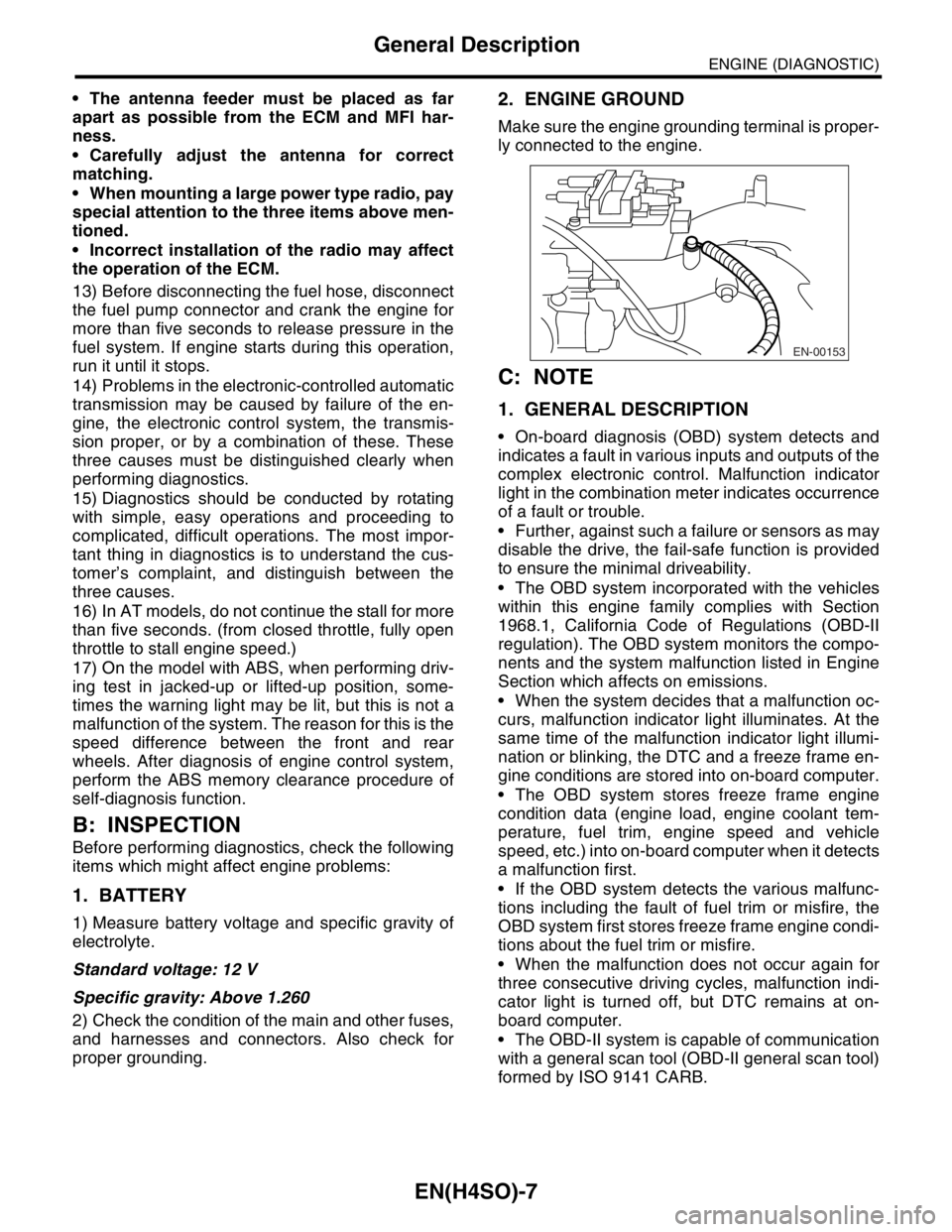
2. ENGINE GROUND
Make sure the engine grounding terminal is proper-
ly connected to the engine.
C: NOTE
1. GENERAL DESCRIPTION
On-board diagnosis (OBD) system detects and
indicates a fault in various inputs and outputs of the
complex electronic control. Malfunction indicator
light in the combination meter indicates occurrence
of a fault or trouble.
Further, against such a failure or sensors as may
disable the drive, the fail-safe function is provided
to ensure the minimal driveability.
The OBD system incorporated with the vehicles
within this engine family complies with Section
1968.1, California Code of Regulations (OBD-II
regulation). The OBD system monitors the compo-
nents and the system malfunction listed in Engine
Section which affects on emissions.
When the system decides that a malfunction oc-
curs, malfunction indicator light illuminates. At the
same time of the malfunction indicator light illumi-
nation or blinking, the DTC and a freeze frame en-
gine conditions are stored into on-board computer.
The OBD system stores freeze frame engine
condition data (engine load, engine coolant tem-
perature, fuel trim, engine speed and vehicle
speed, etc.) into on-board computer when it detects
a malfunction first.
If the OBD system detects the various malfunc-
tions including the fault of fuel trim or misfire, the
OBD system first stores freeze frame engine condi-
tions about the fuel trim or misfire.
When the malfunction does not occur again for
three consecutive driving cycles, malfunction indi-
cator light is turned off, but DTC remains at on-
board computer.
The OBD-II system is capable of communication
with a general scan tool (OBD-II general scan tool)
formed by ISO 9141 CARB.
EN-00153
Page 1127 of 2870
EN(H4SO)-29
ENGINE (DIAGNOSTIC)
Subaru Select Monitor
10.Subaru Select Monitor
A: OPERATION
1. HOW TO USE SUBARU SELECT MONI-
TOR
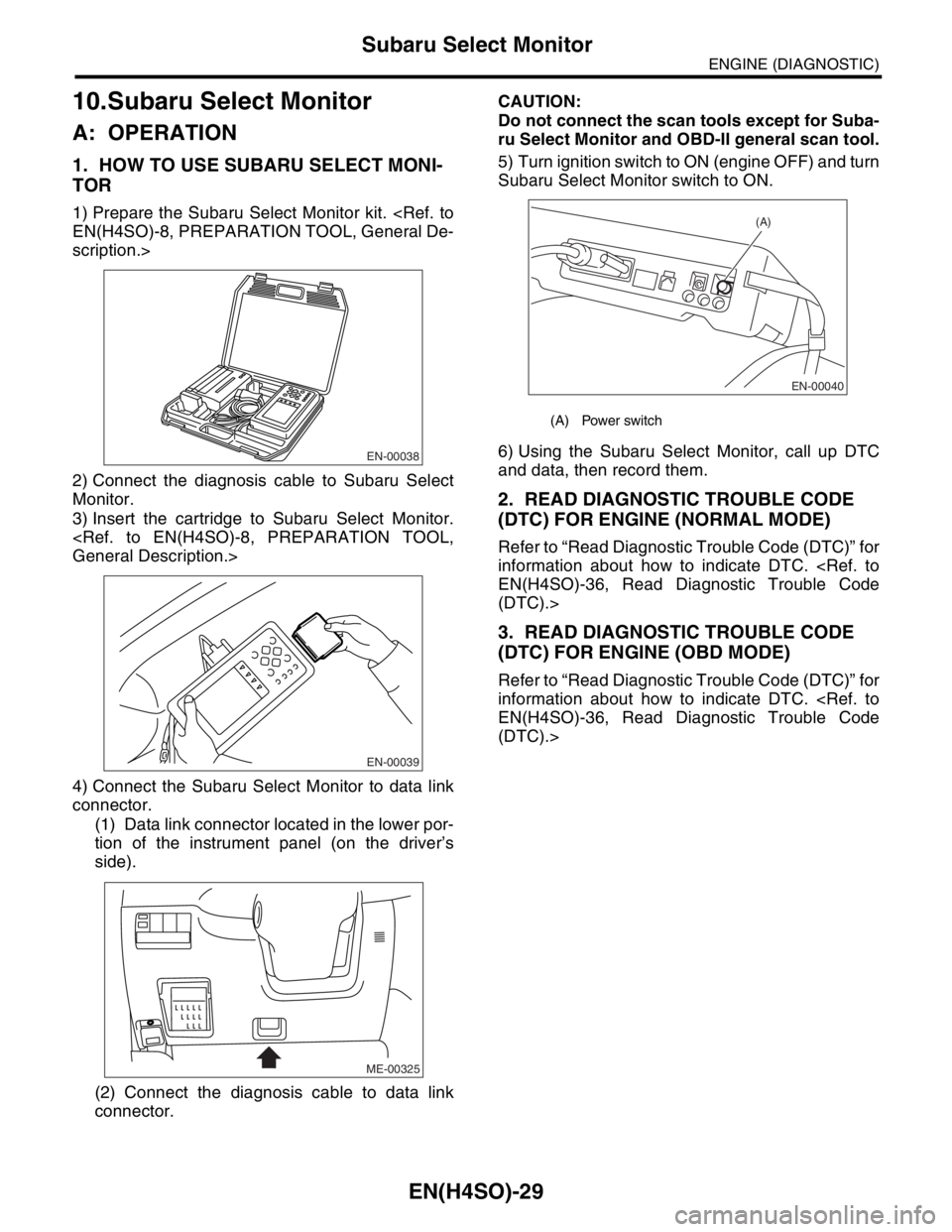
1) Prepare the Subaru Select Monitor kit.
scription.>
2) Connect the diagnosis cable to Subaru Select
Monitor.
3) Insert the cartridge to Subaru Select Monitor.
4) Connect the Subaru Select Monitor to data link
connector.
(1) Data link connector located in the lower por-
tion of the instrument panel (on the driver’s
side).
(2) Connect the diagnosis cable to data link
connector.CAUTION:
Do not connect the scan tools except for Suba-
ru Select Monitor and OBD-II general scan tool.
5) Turn ignition switch to ON (engine OFF) and turn
Subaru Select Monitor switch to ON.
6) Using the Subaru Select Monitor, call up DTC
and data, then record them.
2. READ DIAGNOSTIC TROUBLE CODE
(DTC) FOR ENGINE (NORMAL MODE)
Refer to “Read Diagnostic Trouble Code (DTC)” for
information about how to indicate DTC.
(DTC).>
3. READ DIAGNOSTIC TROUBLE CODE
(DTC) FOR ENGINE (OBD MODE)
Refer to “Read Diagnostic Trouble Code (DTC)” for
information about how to indicate DTC.
(DTC).>
EN-00038
EN-00039
ME-00325
(A) Power switch
EN-00040
(A)
Page 1130 of 2870
![SUBARU FORESTER 2004 Service Service Manual EN(H4SO)-32
ENGINE (DIAGNOSTIC)
Subaru Select Monitor
5. READ CURRENT DATA FOR ENGINE (OBD MODE)
1) On the «Main Menu» display screen, select the {Each System Check} and press the [YES] key.
2) On t](/img/17/57426/w960_57426-1129.png "SUBARU FORESTER 2004 Service Service Manual EN(H4SO)-32
ENGINE (DIAGNOSTIC)
Subaru Select Monitor
5. READ CURRENT DATA FOR ENGINE (OBD MODE)
1) On the «Main Menu» display screen, select the {Each System Check} and press the [YES] key.
2) On t")
EN(H4SO)-32
ENGINE (DIAGNOSTIC)
Subaru Select Monitor
5. READ CURRENT DATA FOR ENGINE (OBD MODE)
1) On the «Main Menu» display screen, select the {Each System Check} and press the [YES] key.
2) On the «System Selection Menu» display screen, select the {Engine} and press the [YES] key.
3) Press the [YES] key after the information of engine type was displayed.
4) On the «Engine Diagnosis» display screen, select the {OBD system} and press the [YES] key.
5) On the «OBD Menu» display screen, select the {Current Data Display & Save}, and press the [YES] key.
6) On the «Data Display Menu» display screen, select the {Data Display} and press the [YES] key.
7) Using the scroll key, scroll the display screen up or down until the desired data is shown.
A list of the support data is shown in the following table.
NOTE:
For detailed operation procedure, refer to the “SUBARU SELECT MONITOR OPERATION MANUAL”.
Description Display Unit of measure
Number of DTC Number of diagnosis code —
Condition of malfunction indicator light MI (MIL) ON or OFF
Monitoring test of misfire Misfire Monitoring Complete or incomplete
Monitoring test of fuel system Fuel System Diagnosis Complete or incomplete
Monitoring test of comprehensive component Component Diagnosis Complete or incomplete
Test of catalyst Catalyst diagnosis Complete or incomplete
Test of heating-type catalyst Heated catalyst diagnosis No support
Test of evaporative emission purge control system Evap. purge diagnosis Complete or incomplete
Test of secondary air system Secondary air diagnosis No support
Test of air conditioning system refrigerant A/C refrigerant diagnosis No support
Test of oxygen sensor O2 sensor diagnosis Complete or incomplete
Test of oxygen sensor heater O2 heater diagnosis Complete or incomplete
Test of EGR system EGR diagnosis —
Air fuel ratio control system for bank 1 Fuel System for bank 1 —
Engine load data Engine load %
Engine coolant temperature signal Engine coolant temperature°C or (°F)
Short term fuel trim by front oxygen (A/F) sensor Short term fuel trim B1 %
Long term fuel trim by front oxygen (A/F) sensor Long term fuel trim B1 %
Intake manifold absolute pressure signalIntake manifold absolute pres-
suremmHg, kPa, inHg or psi
Engine speed signal Engine speed rpm
Vehicle speed signal Meter vehicle speed km/h or MPH
Ignition timing advance for #1 cylinder Ignition timing adv. #1°
Intake air temperature signal Intake air temperature°C or (°F)
Amount of intake air Amount of intake air g/s
Throttle position signal Throttle valve angle %
Rear oxygen sensor output signal O2 sensor #12 V
Air fuel ratio correction by rear oxygen sensor Short term fuel trim #12 %
On-board diagnostic system OBD system —
Oxygen sensor #11 O2 sensor #11 With support
Oxygen sensor #12 O2 sensor #12 With support
A/F sensor #11 A/F sensor #11 —
Page 1139 of 2870

EN(H4SO)-41
ENGINE (DIAGNOSTIC)
Inspection Mode
7) Depress the brake pedal to turn the brake switch
ON. (AT model)
8) Keep the engine speed in the 2,500 — 3,000
rpm range for 40 seconds.
9) Place the select lever or shift lever in the “D”
range (AT model) or “1st” gear (MT model) and
drive the vehicle at 5 to 10 km/h (3 to 6 MPH).
NOTE:
On AWD vehicles, release the parking brake.
The speed difference between front and rear
wheels may light either the ABS warning light, but
this indicates no malfunctions. When engine con-
trol diagnosis is finished, perform the ABS memory
clearance procedure of self-diagnosis system.
10) Using the OBD-II general scan tool, check
DTC(s) and record the result(s).
NOTE:
For detailed operation procedures, refer to the
OBD-II General Scan Tool Operation Manual.
For details concerning DTCs, refer to the List of Di-
agnostic Trouble Code (DTC).
Page 1140 of 2870

EN(H4SO)-42
ENGINE (DIAGNOSTIC)
Drive Cycle
13.Drive Cycle
A: OPERATION
There are three driving patterns on diagnosis. Fol-
lowing trouble can be diagnosed with driving spec-
ified patterns. After repair the following trouble, be
sure to check that the trouble is cleared correctly by
the driving specified patterns.
1. PREPARATION FOR DRIVE CYCLE
1) Check battery voltage is more than 12 V and fuel
remains half [20 — 402 (5.3 — 10.6 US gal, 4.4 —
8.8 Imp gal)].2) After clearing the memory, check for any remain-
ing unresolved trouble data.
3) Separate the test mode connector.
NOTE:
Be sure to perform the diagnosis after idling from
starting the cooled engine except when the engine
coolant temperature is specified.
Perform the diagnosis twice when the DTC is
marked with *. After the completion of first diagno-
sis, stop the engine and perform the second diag-
nosis on same condition.
2. DRIVE THE VEHICLE 20 MINUTES AT THE SPEED OF 80 KM/H (50 MPH), AND THEN IDLE
THE ENGINE 1 MINUTE.
3. 10 MINUTES IDLING
NOTE:
Drive the vehicle more than 4 km/h (6 MPH) before diagnosis.
DTC Item On condition
*P0030 HO2S Heater Control Circuit (Bank 1 Sensor 1) —
*P0111Intake Air Temperature Sensor Circuit Range/Per-
formance ProblemEngine coolant temperature at start is less than 30°C (86°F)
*P0125Insufficient coolant temperature for closed loop
fuel controlEngine coolant temperature at start is less than 20°C (68°F)
*P0130O
2 Sensor Circuit (Bank 1 Sensor 1)
—
*P0133O
2 Sensor Circuit Slow Response (Bank 1 Sensor
1)—
*P0420Catalyst System Efficiency Below Threshold
(Bank 1)—
P0459Evaporative Emission Control System Purge Con-
trol Valve Circuit High—
*P0461 Fuel Level Sensor Circuit Range/Performance —
*P0464 Fuel Level Sensor Circuit Intermittent —
*P1137O
2 Sensor Circuit (Bank 1 Sensor 1)
—
DTC Item On condition
*P0483 Cooling Fan Rationality Check —
*P0506 Idle Control System RPM Lower Than Expected —
*P0507 Idle Control System RPM Higher Than Expected —
Page 1142 of 2870

EN(H4SO)-44
ENGINE (DIAGNOSTIC)
Clear Memory Mode
14.Clear Memory Mode
A: OPERATION
1. SUBARU SELECT MONITOR (NORMAL
MODE)
1) On the «Main Menu» display screen, select the
{Each System Check} and press the [YES] key.
2) On the «System Selection Menu» display
screen, select the {Engine} and press the [YES]
key.
3) Press the [YES] key after the information of en-
gine type was displayed.
4) On the «Engine Diagnosis» display screen, se-
lect the {Memory Clear} and press the [YES] key.
5) When the “Done” and “Turn Ignition Switch OFF”
are shown on the display screen, turn the ignition
switch to OFF and then Subaru Select Monitor
switch to OFF.
NOTE:
After the memory has been cleared, the idle air
control solenoid valve must be initialized. To do
this, turn the ignition switch to the ON position. Wait
3 seconds before starting the engine.
For detailed operation procedure, refer to the
“SUBARU SELECT MONITOR OPERATION
MANUAL”.
2. SUBARU SELECT MONITOR (OBD
MODE)
1) On the «Main Menu» display screen, select the
{Each System Check} and press the [YES] key.
2) On the «System Selection Menu» display
screen, select the {Engine} and press the [YES]
key.
3) Press the [YES] key after the information of en-
gine type was displayed.
4) On the «Engine Diagnosis» display screen, se-
lect the {OBD System} and press the [YES] key.
5) On the «OBD Menu» display screen, select the
{DTC Clear} and press the [YES] key.
6) When the “Perform Diagnostic Code(s) Clear?”
is shown on the screen, press the [YES] key.
7) Turn the ignition switch to OFF and then turn the
Subaru Select Monitor to OFF.
NOTE:
After the memory has been cleared, the idle air
control solenoid valve must be initialized. To do
this, turn the ignition switch to the ON position. Wait
3 seconds before starting the engine.
For detailed operation procedure, refer to the
“SUBARU SELECT MONITOR OPERATION
MANUAL”.
3. OBD-II GENERAL SCAN TOOL
For clear memory procedures using the OBD-II
general scan tool, refer to the OBD-II General Scan
Tool Instruction Manual.
After the memory has been cleared, the idle air
control solenoid valve must be initialized. To do
this, turn the ignition switch to the ON position. Wait
3 seconds before starting the engine.
Page 1146 of 2870
EN(H4SO)-48
ENGINE (DIAGNOSTIC)
Malfunction Indicator Light
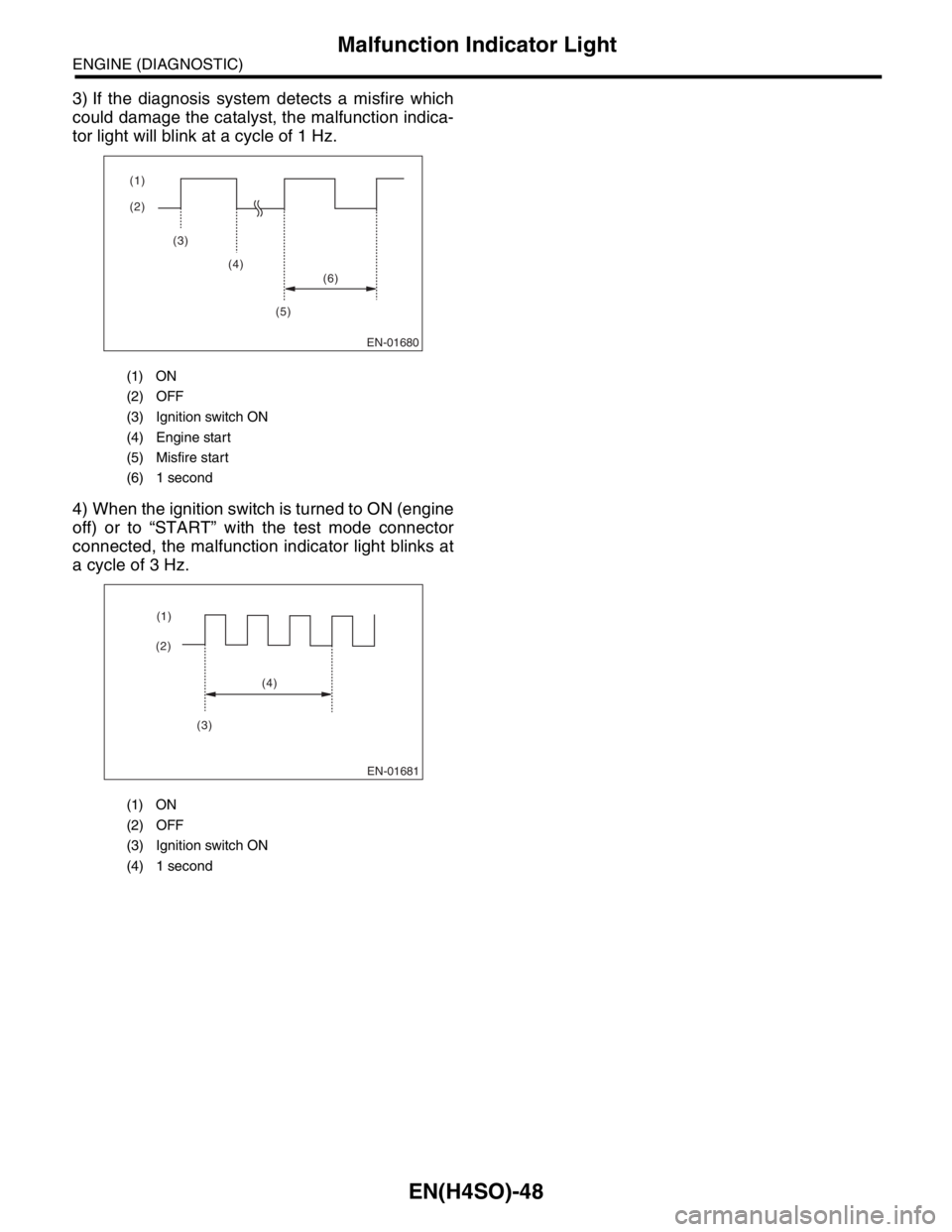
3) If the diagnosis system detects a misfire which
could damage the catalyst, the malfunction indica-
tor light will blink at a cycle of 1 Hz.
4) When the ignition switch is turned to ON (engine
off) or to “START” with the test mode connector
connected, the malfunction indicator light blinks at
a cycle of 3 Hz.
(1) ON
(2) OFF
(3) Ignition switch ON
(4) Engine start
(5) Misfire start
(6) 1 second
(1) ON
(2) OFF
(3) Ignition switch ON
(4) 1 second
EN-01680
(2) (1)
(3)
(4)
(5)(6)
EN-01681
(2)(1)
(4)
(3)
Page 1166 of 2870

EN(H4SO)-68
ENGINE (DIAGNOSTIC)
Diagnostics for Engine Starting Failure
Step Check Yes No
1 CHECK OPERATING SOUND OF FUEL
PUMP.
Check that the fuel pump is in operation for two
seconds when turning the ignition switch to
ON.
N
OTE:
Fuel pump operation can also be executed us-
ing Subaru Select Monitor.
Refer to “Compulsory Valve Operation Check
Mode” for procedures.
operating sound?Check the fuel
injector circuit.
FUEL INJECTOR
CIRCUIT, Diag-
nostics for Engine
Starting Failure.>Go to step 2.
2 CHECK GROUND CIRCUIT OF FUEL PUMP.
1) Turn the ignition switch to OFF.
2) Remove the fuel pump access hole lid.
3) Disconnect the connector from fuel pump.
4) Measure the resistance of harness connec-
tor between fuel pump and chassis ground.
Connector & terminal
(R58) No. 4 — Chassis ground:Is the resistance less than 5
Ω?Go to step 3.Repair harness
and connector.
N
OTE:
In this case repair
the following:
Open circuit in
harness between
fuel pump connec-
tor and chassis
grounding terminal
Poor contact in
coupling connector
3 CHECK POWER SUPPLY TO FUEL PUMP.
1) Turn the ignition switch to ON.
2) Measure the voltage of power supply circuit
between fuel pump connector and chassis
ground.
Connector & terminal
(R58) No. 1 (+) — Chassis ground (
−):Is the voltage more than 10 V? Replace the fuel
pump.
Fuel Pump.>Go to step 4.
4 CHECK HARNESS BETWEEN FUEL PUMP
AND FUEL PUMP RELAY CONNECTOR.
1) Turn the ignition switch to OFF.
2) Measure the resistance of harness connec-
tor between fuel pump and fuel pump relay.
Connector & terminal
(R58) No. 1 — (B46) No. 4:Is the resistance less than 1
Ω?Go to step 5.Repair harness
and connector.
N
OTE:
In this case repair
the following:
Open circuit in
harness between
fuel pump connec-
tor and chassis
grounding terminal
Poor contact in
coupling connector
5 CHECK HARNESS BETWEEN FUEL PUMP
AND FUEL PUMP RELAY CONNECTOR.
Measure the resistance of harness between
fuel pump and fuel pump relay connector.
Connector & terminal
(R58) No. 1 — Chassis ground:Is the resistance more than 1
MΩ?Go to step 6.Repair short circuit
in harness
between fuel pump
and fuel pump
relay connector.
6 CHECK FUEL PUMP RELAY.
1) Disconnect the connectors from fuel pump
relay and main relay.
2) Remove the fuel pump relay and main relay
with bracket.
3) Connect the battery to fuel pump relay con-
nector terminals No. 1 and No. 3.
4) Measure the resistance between connector
terminals of fuel pump relay.
Te r m i n a l s
No. 2 — No. 4:Is the resistance less than 10
Ω?Go to step 7.Replace the fuel
pump relay.
Fuel Pump.>
Page 1178 of 2870
EN(H4SO)-80
ENGINE (DIAGNOSTIC)
Diagnostic Procedure with Diagnostic Trouble Code (DTC)
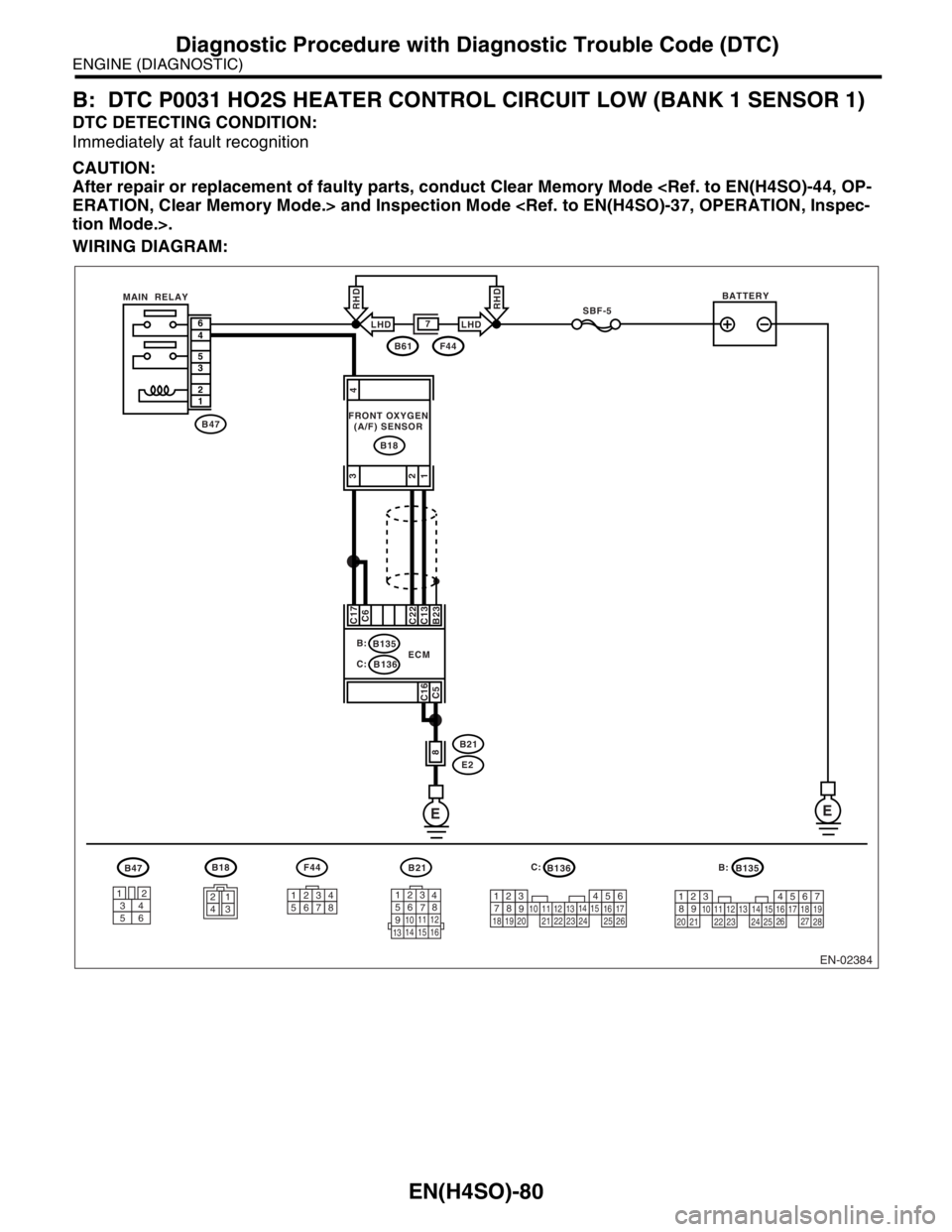
B: DTC P0031 HO2S HEATER CONTROL CIRCUIT LOW (BANK 1 SENSOR 1)
DTC DETECTING CONDITION:
Immediately at fault recognition
CAUTION:
After repair or replacement of faulty parts, conduct Clear Memory Mode
WIRING DIAGRAM:
EN-02384
B18
3412
56
B47F44
12345678
B136B135
1234
B21
123
4
56
78
9
1011 12
1314 15 16
SBF-5
EE
B47
B18
6
4
5
3
2
1
B23 C13
C22C6 C17
C16
C5
8
B:
C:B135
B136
B21
E2 ECMBATTERY
B61F44
7
FRONT OXYGEN
(A/F) SENSOR MAIN RELAY
567
82 1
94
310
24
22 23251112131415
26 27
281617181920 21
5
2
84
3923 20 211011
221617
24
2512136
261915
14
1
7
18
LHDLHD
RHDRHD
4
3
1 2
B: C:
Page 1190 of 2870
EN(H4SO)-92
ENGINE (DIAGNOSTIC)
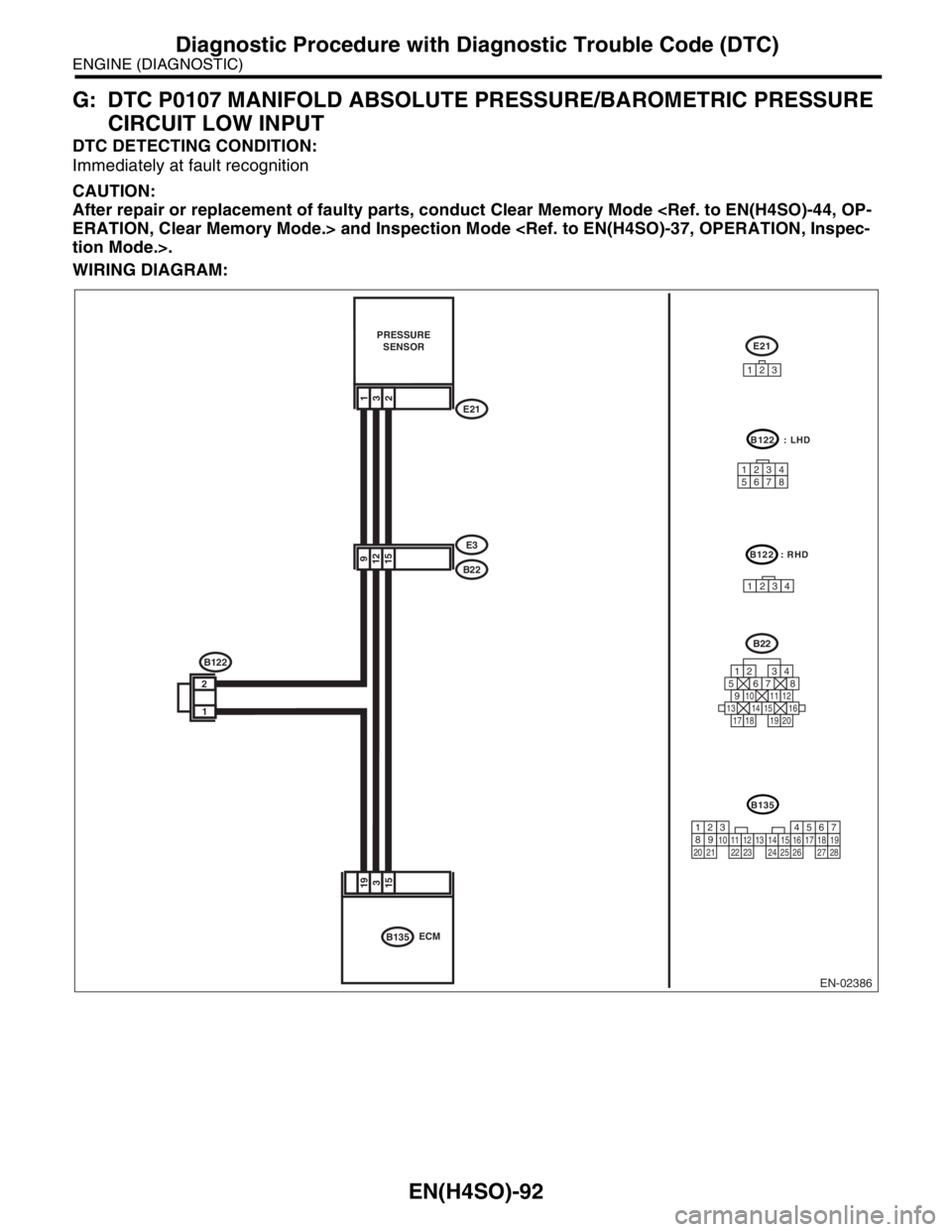
Diagnostic Procedure with Diagnostic Trouble Code (DTC)
G: DTC P0107 MANIFOLD ABSOLUTE PRESSURE/BAROMETRIC PRESSURE
CIRCUIT LOW INPUT
DTC DETECTING CONDITION:
Immediately at fault recognition
CAUTION:
After repair or replacement of faulty parts, conduct Clear Memory Mode
WIRING DIAGRAM:
193
15
PRESSURE
SENSOR
9
15 12B22
E3
123E21
E21
ECM
B22
125678
131415169101112
34
17181920
B135
B122
1
2
132
EN-02386
B135
567
82 1
94
310
24 22 23 251112131415
26 27
281617181920 21
B122 : LHD
12345678
B122 : RHD
1234