light SUBARU FORESTER 2017 SJ / 4.G Owners Manual
[x] Cancel search | Manufacturer: SUBARU, Model Year: 2017, Model line: FORESTER, Model: SUBARU FORESTER 2017 SJ / 4.GPages: 634, PDF Size: 11.77 MB
Page 463 of 634
Starting and operating/BSD/RCTA
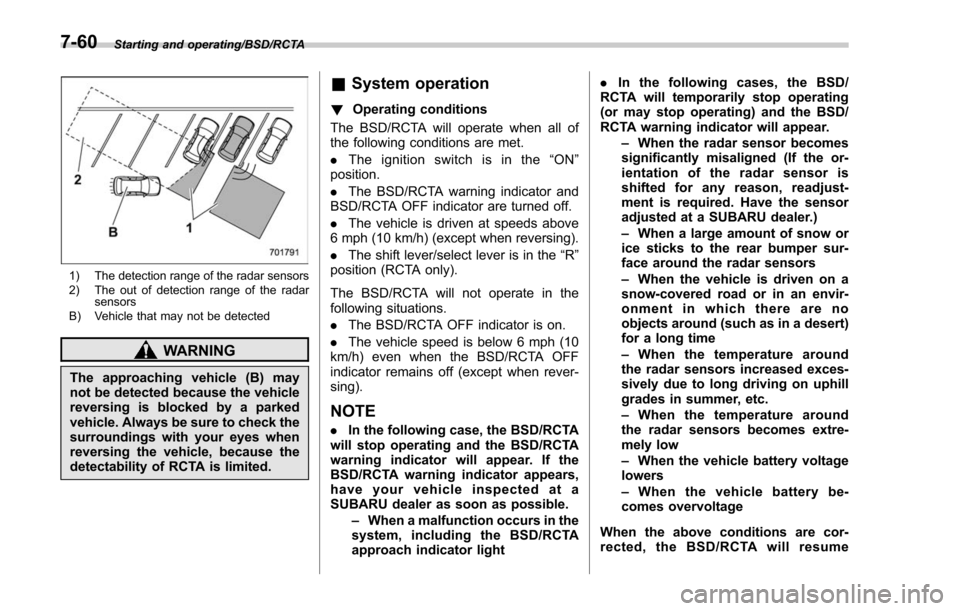
1) The detection range of the radar sensors
2) The out of detection range of the radarsensors
B) Vehicle that may not be detected
WARNING
The approaching vehicle (B) may
not be detected because the vehicle
reversing is blocked by a parked
vehicle. Always be sure to check the
surroundings with your eyes when
reversing the vehicle, because the
detectability of RCTA is limited.
& System operation
! Operating conditions
The BSD/RCTA will operate when all of
the following conditions are met.
. The ignition switch is in the “ON ”
position.
. The BSD/RCTA warning indicator and
BSD/RCTA OFF indicator are turned off.
. The vehicle is driven at speeds above
6 mph (10 km/h) (except when reversing).
. The shift lever/select lever is in the “R”
position (RCTA only).
The BSD/RCTA will not operate in the
following situations.
. The BSD/RCTA OFF indicator is on.
. The vehicle speed is below 6 mph (10
km/h) even when the BSD/RCTA OFF
indicator remains off (except when rever-
sing).
NOTE
. In the following case, the BSD/RCTA
will stop operating and the BSD/RCTA
warning indicator will appear. If the
BSD/RCTA warning indicator appears,
have your vehicle inspected at a
SUBARU dealer as soon as possible.
–When a malfunction occurs in the
system, including the BSD/RCTA
approach indicator light .
In the following cases, the BSD/
RCTA will temporarily stop operating
(or may stop operating) and the BSD/
RCTA warning indicator will appear.
–When the radar sensor becomes
significantly misaligned (If the or-
ientation of the radar sensor is
shifted for any reason, readjust-
ment is required. Have the sensor
adjusted at a SUBARU dealer.)
– When a large amount of snow or
ice sticks to the rear bumper sur-
face around the radar sensors
– When the vehicle is driven on a
snow-covered road or in an envir-
onment in which there are no
objects around (such as in a desert)
for a long time
– When the temperature around
the radar sensors increased exces-
sively due to long driving on uphill
grades in summer, etc.
– When the temperature around
the radar sensors becomes extre-
mely low
– When the vehicle battery voltage
lowers
– When the vehicle battery be-
comes overvoltage
When the above conditions are cor-
rected, the BSD/RCTA will resume
7-60
Page 464 of 634
operation and the BSD/RCTA warning
indicator will disappear. However, if the
BSD/RCTA warning indicator has ap-
peared for a prolonged time, have the
system inspected at a SUBARU dealer
as soon as possible.
.The detectability of the radar sen-
sors is restricted. The BSD/RCTA de-
tection may be impaired and the sys-
tem may not operate properly under the
following conditions.
–When the rear bumper around
the radar sensors is distorted
– When ice, snow or mud adheres
to the rear bumper surface around
the radar sensors
– When stickers, etc. are affixed on
the areas of the radar sensors on
the rear bumper
– During adverse weather condi-
tions such as rain, snow or fog
– When driving on wet roads such
as snow-covered roads and
through puddles
. The radar sensors may not detect or
may have difficulty detecting the fol-
lowing.
–Small motorcycles, bicycles, pe-
destrians, stationary objects on the
road or road side, etc.
– Vehicles with body shapes that
the radar may not reflect (vehicles with a low body height such as
sports cars or a trailer with no
cargo)
–
Vehicles that are not approach-
ing your vehicle even though they
are in the detection area (either on a
neighboring lane to the rear or
beside your vehicle when rever-
sing) (The system determines the
presence of approaching vehicles
based on data detected by the radar
sensors.)
– Vehicles traveling at significantly
different speeds
– Vehicles driving in parallel at
almost the same speed as your
vehicle for a prolonged time
– Oncoming vehicles
– Vehicles in a lane beyond the
neighboring lane
– Vehicles travelling at a signifi-
cantly lower speed that you are
trying to overtake
. On a road with extremely narrow
lanes, the system may detect vehicles
driving in a lane next to the neighbor-
ing lane.& BSD/RCTA approach indica-
tor light/warning buzzer
While the BSD/RCTA is active, the follow-
ing item(s) will operate to alert the driver.
. The BSD/RCTA approach indicator
light (when there are vehicles in the
neighboring lanes)
. The BSD/RCTA approach indicator
light and warning buzzer (when a vehicle
is approaching from the left or right side
while reversing)
! BSD/RCTA approach indicator light
BSD/RCTA approach indicator light
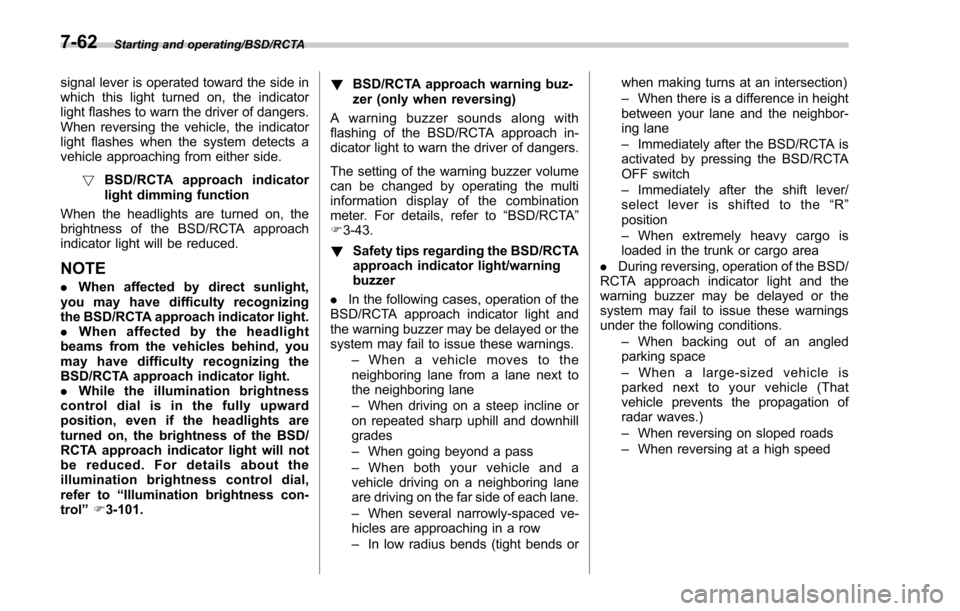
It is mounted in each side of the outside
mirrors and will illuminate when a vehicle
approaching from behind is detected. If an
indicator light is illuminated and the turn
Starting and operating/BSD/RCTA
–CONTINUED –7-61
Page 465 of 634
Starting and operating/BSD/RCTA
signal lever is operated toward the side in
which this light turned on, the indicator
light flashes to warn the driver of dangers.
When reversing the vehicle, the indicator
light flashes when the system detects a
vehicle approaching from either side.! BSD/RCTA approach indicator
light dimming function
When the headlights are turned on, the
brightness of the BSD/RCTA approach
indicator light will be reduced.
NOTE
. When affected by direct sunlight,
you may have difficulty recognizing
the BSD/RCTA approach indicator light.
. When affected by the headlight
beams from the vehicles behind, you
may have difficulty recognizing the
BSD/RCTA approach indicator light.
. While the illumination brightness
control dial is in the fully upward
position, even if the headlights are
turned on, the brightness of the BSD/
RCTA approach indicator light will not
be reduced. For details about the
illumination brightness control dial,
refer to “Illumination brightness con-
trol” F3-101. !
BSD/RCTA approach warning buz-
zer (only when reversing)
A warning buzzer sounds along with
flashing of the BSD/RCTA approach in-
dicator light to warn the driver of dangers.
The setting of the warning buzzer volume
can be changed by operating the multi
information display of the combination
meter. For details, refer to “BSD/RCTA”
F 3-43.
! Safety tips regarding the BSD/RCTA
approach indicator light/warning
buzzer
. In the following cases, operation of the
BSD/RCTA approach indicator light and
the warning buzzer may be delayed or the
system may fail to issue these warnings.
–Whenavehiclemovestothe
neighboring lane from a lane next to
the neighboring lane
– When driving on a steep incline or
on repeated sharp uphill and downhill
grades
– When going beyond a pass
– When both your vehicle and a
vehicle driving on a neighboring lane
are driving on the far side of each lane.
– When several narrowly-spaced ve-
hicles are approaching in a row
– In low radius bends (tight bends or when making turns at an intersection)
–
When there is a difference in height
between your lane and the neighbor-
ing lane
– Immediately after the BSD/RCTA is
activated by pressing the BSD/RCTA
OFF switch
– Immediately after the shift lever/
select lever is shifted to the “R ”
position
– When extremely heavy cargo is
loaded in the trunk or cargo area
. During reversing, operation of the BSD/
RCTA approach indicator light and the
warning buzzer may be delayed or the
system may fail to issue these warnings
under the following conditions.
–When backing out of an angled
parking space
– When a large-sized vehicle is
parked next to your vehicle (That
vehicle prevents the propagation of
radar waves.)
– When reversing on sloped roads
– When reversing at a high speed
7-62
Page 466 of 634
.The BSD/RCTA approach indicator
light may illuminate when driving close to
solid objects on the road or road side
(such as guardrails, tunnels and side-
walls).
. The BSD/RCTA approach indicator
light may flash when turning at an inter-
section in urban areas or a multilane
intersection.
. The BSD/RCTA approach indicator
light may flash and the warning buzzer
may sound if a building or a wall exists in
the reversing direction.
. In the following cases, the system may
detect a vehicle driving two lanes away
from your vehicle.
–When you are driving on the near
side of its lane from the corresponding
vehicle –
When the vehicle driving two lanes
away is driving on the near side of its
lane from your vehicle
& BSD/RCTA warning indicator
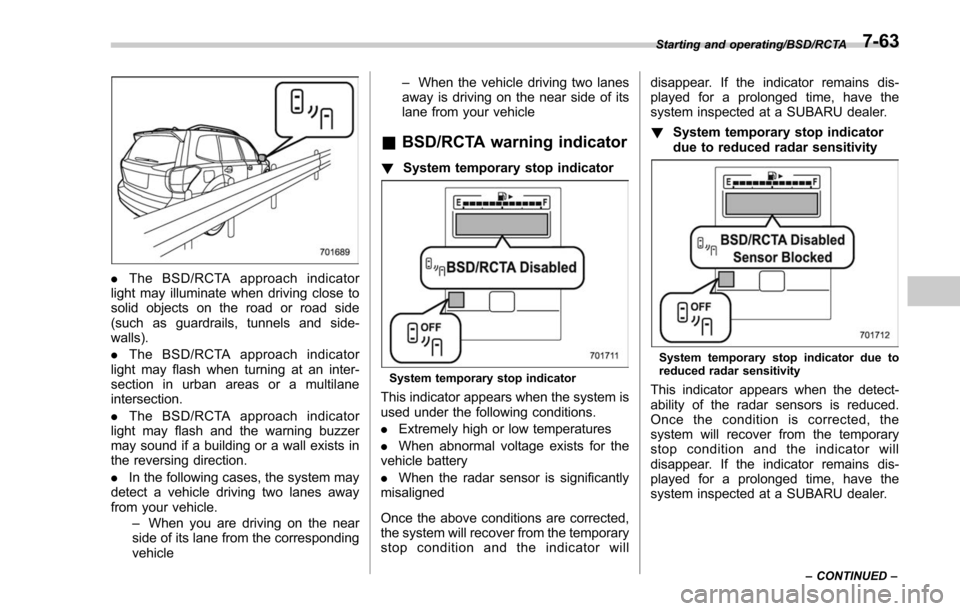
! System temporary stop indicator
System temporary stop indicator
This indicator appears when the system is
used under the following conditions.
.Extremely high or low temperatures
. When abnormal voltage exists for the
vehicle battery
. When the radar sensor is significantly
misaligned
Once the above conditions are corrected,
the system will recover from the temporary
stop condition and the indicator will disappear. If the indicator remains dis-
played for a prolonged time, have the
system inspected at a SUBARU dealer.
!
System temporary stop indicator
due to reduced radar sensitivity
System temporary stop indicator due to
reduced radar sensitivity
This indicator appears when the detect-
ability of the radar sensors is reduced.
Once the condition is corrected, the
system will recover from the temporary
stop condition and the indicator will
disappear. If the indicator remains dis-
played for a prolonged time, have the
system inspected at a SUBARU dealer.
Starting and operating/BSD/RCTA
–CONTINUED –7-63
Page 472 of 634
Parts attached to the rear bumper
near the sonar sensor– Commercial electronic parts (fog
light, fender pole, radio antenna) or
commercial attachment parts (trai-
ler hitch, bicycle carrier, bumper
guard) are attached
– Parts that emit high frequency
sound, such as a horn or speaker,
are attached
Vehicle conditions – The vehicle is significantly in-
clined
– The ground clearance is signifi-
cantly reduced due to the vehicle ’s
loading condition, etc.
– When the sonar sensor is mis-
aligned due to a collision or an
accident
Surrounding environment – A cloth banner, flag, hanging
branch or railroad crossing bars
are present in the reversing direc-
tion
– When reversing on a gravel or
grassy area
– When reversing in an area where
objects or walls are adjacent to the
vehicle such as narrow tunnels,
narrow bridges, narrow roads or narrow garages
–
Wheel tracks or a hole is present
in the ground of the reversing
direction
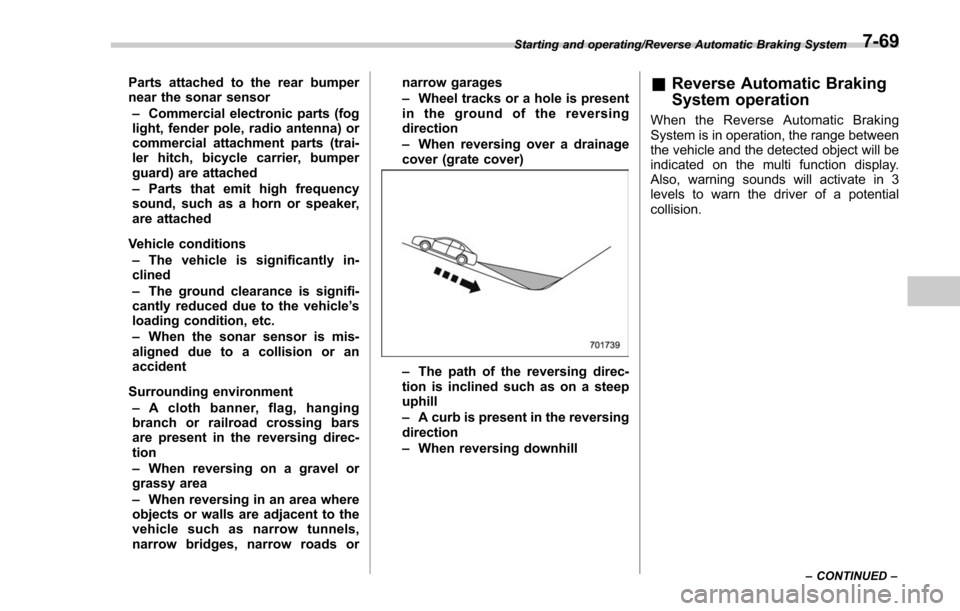
– When reversing over a drainage
cover (grate cover)
– The path of the reversing direc-
tion is inclined such as on a steep
uphill
– A curb is present in the reversing
direction
– When reversing downhill
& Reverse Automatic Braking
System operation
When the Reverse Automatic Braking
System is in operation, the range between
the vehicle and the detected object will be
indicated on the multi function display.
Also, warning sounds will activate in 3
levels to warn the driver of a potential
collision.
Starting and operating/Reverse Automatic Braking System
–CONTINUED –7-69
Page 484 of 634
common sense precautions such as those
in the following list should be taken.
.Make certain that you and all of your
passengers are wearing seatbelts.
. Carry some emergency equipment,
such as a towing rope or chain, a shovel,
wheel blocks, first aid kit and cell phone or
citizens band radio.
. Drive carefully. Do not take unneces-
sary risks by driving in dangerous areas or
over rough terrain.
. Slow down and employ extra caution at
all times. When driving off-road, you will
not have the benefit of marked traffic
lanes, banked curves, traffic signs and
the like.
. Do not drive across steep slopes.
Instead, drive either straight up or straight
down the slopes. A vehicle can much
more easily tip over sideways than it can
end over end. Avoid driving straight up or
down slopes that are too steep.
. Avoid sharp turning maneuvers, espe-
cially at higher speeds.
. Do not grip the inside or spokes of the
steering wheel. A bad bump could jerk the
wheel and injure your hands. Instead drive
with your fingers and thumbs on the
outside of the rim.
. If driving through water, such as when
crossing shallow streams, first check the depth of the water and the bottom of the
stream bed for firmness and ensure that
the bed of the stream is flat. Drive slowly
and cross the stream without stopping.
The water should be shallow enough that
it does not reach the vehicle’
s under-
carriage. Water entering the engine air
intake or the exhaust pipe or water
splashing onto electrical parts may da-
mage your vehicle and may cause it to
stall. Never attempt to drive through
rushing water; regardless of its depth, it
can wash away the ground from under
your tires, resulting in possible loss of
traction and even vehicle rollover.
. Always check your brakes for effec-
tiveness immediately after driving in sand,
mud or water. Do this by driving slowly
and stepping on the brake pedal. Repeat
that process several times to dry out the
brake discs and brake pads.
. Do not drive or park over or near
flammable materials such as dry grass or
fallen leaves, as they may burn easily. The
exhaust system is very hot while the
engine is running and right after engine
stops. This could create a fire hazard.
. After driving through tall grass, mud,
rocks, sand, rivers, etc., check that there
is no grass, bush, paper, rags, stones,
sand, etc. adhering to or trapped on the
underbody. Clear off any such matter from the underbody. If the vehicle is used with
these materials trapped or adhering to the
underbody, a mechanical breakdown or
fire could occur.
.
Secure all cargo carried inside the
vehicle and make certain that it is not
piled higher than the seatbacks. During
sudden stops or jolts, unsecured cargo
could be thrown around in the vehicle and
cause injury. Do not pile heavy loads on
the roof. Those loads raise the vehicle’ s
center of gravity and make it more prone
to tip over.
. If you must rock the vehicle to free it
from sand or mud, depress the accelerator
pedal slightly and move the shift lever/
select lever back and forth between “1”/
“D ”and “R”repeatedly. Do not race the
engine. For the best possible traction,
avoid spinning the wheels when trying to
free the vehicle.
. When the road surface is extremely
slippery, you can obtain better traction by
starting the vehicle with the transmission
in 2nd than 1st. For CVT models with
manual mode, refer to “Selection of
manual mode ”F 7-27.
. Never equip your vehicle with tires
larger than those specified in this manual.
. Wash the vehicle’ s underbody after off-
road driving. Suspension components are
particularly prone to dirt buildup, so they
Driving tips/On –road and off –road driving
–CONTINUED –8-7
Page 489 of 634
Driving tips/Loading your vehicle
NOTE
When tire chains cannot be used, use
of another type of traction device (such
as spring chains) may be acceptable if
use on your vehicle is recommended
by the device manufacturer, taking into
account tire size and road conditions.
Follow the device manufacturer’s in-
structions, especially regarding max-
imum vehicle speed.
To help avoid damage to your vehicle,
drive slowly, readjust or remove the
device if it is contacting your vehicle,
and do not spin your wheels. Damage
caused to your vehicle by use of a
traction device is not covered under
warranty.
Make certain that any traction device
you use is an SAE class S device, and
use it on the front wheels only. Always
use the utmost care when driving with
a traction device. Overconfidence be-
cause you are using a traction device
could easily lead to a serious accident.& Rocking the vehicle
If you must rock the vehicle to free it from
snow, sand, or mud, depress the accel-
erator pedal slightly and move the shift
lever/select lever back and forth between
“1”/“D ”and “R”repeatedly. Do not race the
engine. For the best possible traction,
avoid spinning the wheels when trying to
free the vehicle.
When the road surface is extremely
slippery, you can obtain better traction by
starting the vehicle with the transmission
in 2nd than in 1st (MT models and CVT
models with manual mode).
If your vehicle is a CVT model with manual
mode, for information about holding the
transmission in the 2nd position, refer to
“Selection of manual mode ”F 7-27.
Loading your vehicle
WARNING
. Never allow passengers to ride
on a folded rear seatback or in
the cargo area. Doing so may
result in serious injury.
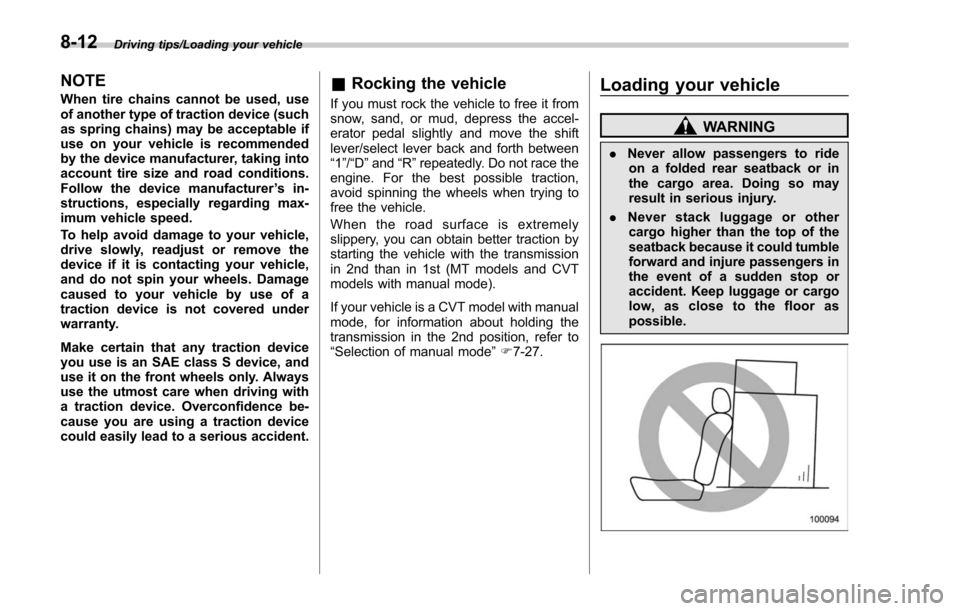
. Never stack luggage or other
cargo higher than the top of the
seatback because it could tumble
forward and injure passengers in
the event of a sudden stop or
accident. Keep luggage or cargo
low, as close to the floor as
possible.
8-12
Page 495 of 634
Driving tips/Trailer hitch (dealer option)
receiver tube.
2. Insert the hitch pin into the hole
located on the hitch receiver tube so that
the pin passes through the ball mount.
3. Insert the safety pin through the
provided hole on the hitch pin securely.
4. Check the ball mount assembly by
pulling on it to make sure it does not come
off the hitch receiver.
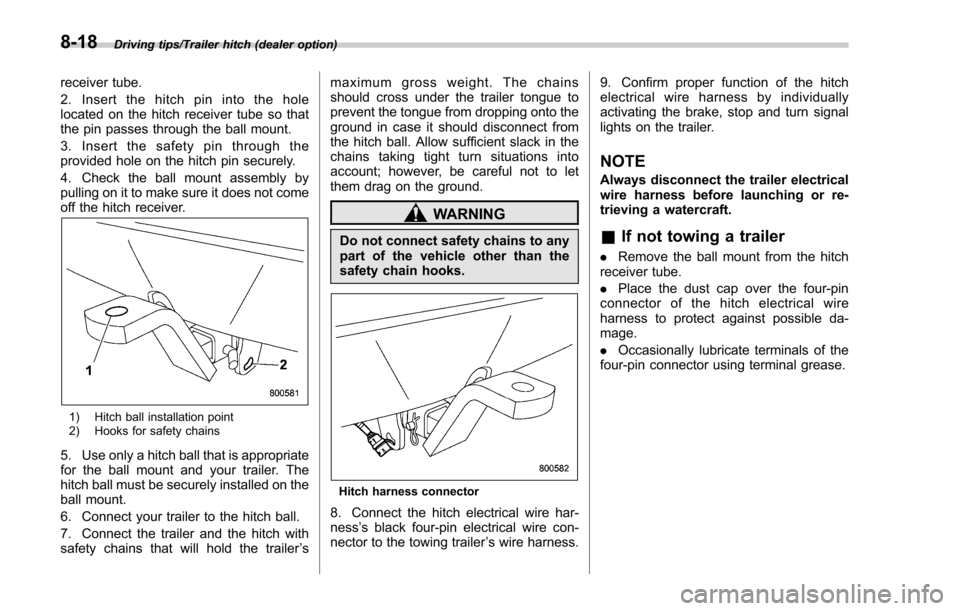
1) Hitch ball installation point
2) Hooks for safety chains
5. Use only a hitch ball that is appropriate
for the ball mount and your trailer. The
hitch ball must be securely installed on the
ball mount.
6. Connect your trailer to the hitch ball.
7. Connect the trailer and the hitch with
safety chains that will hold the trailer’s maximum gross weight. The chains
should cross under the trailer tongue to
prevent the tongue from dropping onto the
ground in case it should disconnect from
the hitch ball. Allow sufficient slack in the
chains taking tight turn situations into
account; however, be careful not to let
them drag on the ground.
WARNING
Do not connect safety chains to any
part of the vehicle other than the
safety chain hooks.
Hitch harness connector
8. Connect the hitch electrical wire har-
ness
’s black four-pin electrical wire con-
nector to the towing trailer ’s wire harness. 9. Confirm proper function of the hitch
electrical wire harness by individually
activating the brake, stop and turn signal
lights on the trailer.
NOTE
Always disconnect the trailer electrical
wire harness before launching or re-
trieving a watercraft.
&
If not towing a trailer
. Remove the ball mount from the hitch
receiver tube.
. Place the dust cap over the four-pin
connector of the hitch electrical wire
harness to protect against possible da-
mage.
. Occasionally lubricate terminals of the
four-pin connector using terminal grease.
8-18
Page 500 of 634
total, one to the right side and the other to
the left side trailer tongue. Pass the chains
crossing each other under the trailer
tongue to prevent the trailer from dropping
onto the ground in case the trailer tongue
should disconnect from the hitch ball.
Allow sufficient slack in the chains taking
tight turn situations into account; however,
be careful not to let them drag on the
ground.
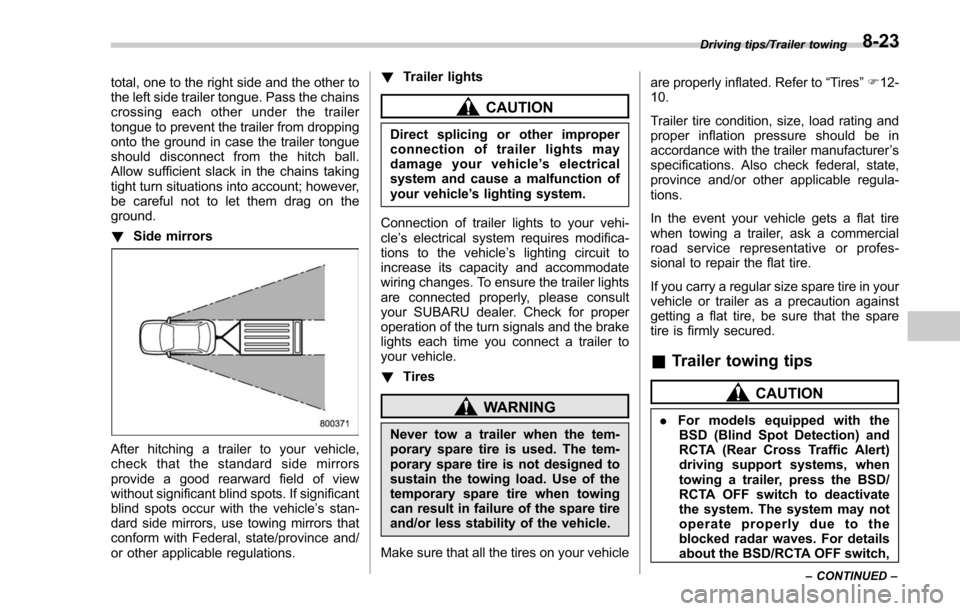
!Side mirrors
After hitching a trailer to your vehicle,
check that the standard side mirrors
provide a good rearward field of view
without significant blind spots. If significant
blind spots occur with the vehicle’ s stan-
dard side mirrors, use towing mirrors that
conform with Federal, state/province and/
or other applicable regulations. !
Trailer lights
CAUTION
Direct splicing or other improper
connection of trailer lights may
damage your vehicle’ s electrical
system and cause a malfunction of
your vehicle ’s lighting system.
Connection of trailer lights to your vehi-
cle ’s electrical system requires modifica-
tions to the vehicle ’s lighting circuit to
increase its capacity and accommodate
wiring changes. To ensure the trailer lights
are connected properly, please consult
your SUBARU dealer. Check for proper
operation of the turn signals and the brake
lights each time you connect a trailer to
your vehicle.
! Tires
WARNING
Never tow a trailer when the tem-
porary spare tire is used. The tem-
porary spare tire is not designed to
sustain the towing load. Use of the
temporary spare tire when towing
can result in failure of the spare tire
and/or less stability of the vehicle.
Make sure that all the tires on your vehicle are properly inflated. Refer to
“Tires”F 12-
10.
Trailer tire condition, size, load rating and
proper inflation pressure should be in
accordance with the trailer manufacturer ’s
specifications. Also check federal, state,
province and/or other applicable regula-
tions.
In the event your vehicle gets a flat tire
when towing a trailer, ask a commercial
road service representative or profes-
sional to repair the flat tire.
If you carry a regular size spare tire in your
vehicle or trailer as a precaution against
getting a flat tire, be sure that the spare
tire is firmly secured.
& Trailer towing tips
CAUTION
. For models equipped with the
BSD (Blind Spot Detection) and
RCTA (Rear Cross Traffic Alert)
driving support systems, when
towing a trailer, press the BSD/
RCTA OFF switch to deactivate
the system. The system may not
operate properly due to the
blocked radar waves. For details
about the BSD/RCTA OFF switch,
Driving tips/Trailer towing
–CONTINUED –8-23
Page 501 of 634
Driving tips/Trailer towing
refer to“BSD/RCTA OFF switch ”
F 7-64.
. For models equipped with RAB
(Reverse Automatic Braking)
system, consult your SUBARU
dealer for additional information
about towing a trailer.
. Never exceed 45 mph (72 km/h)
when towing a trailer in hilly
country on hot days.
. When towing a trailer, steering,
stability, stopping distance and
braking performance will be dif-
ferent when compared to normal
operation. You should never
drive at excessive speeds but
always employ extra caution
when towing a trailer. You should
also keep the following tips in
mind.
! Before starting out on a trip
. Check that the vehicle and vehicle-to-
hitch mounting are in good condition. If
any problems are apparent, do not tow the
trailer.
. Check that the vehicle rests horizon-
tally with the trailer attached. If the vehicle
is tipped sharply up at the front and down
at the rear, check the total trailer weight,
GVW, GAWs and tongue load again, then confirm that the load and its distribution
are acceptable.
.
Check that the tire rating and pressures
are correct.
. Check that the vehicle and trailer are
connected properly. Confirm that:
–the trailer tongue is connected
properly to the hitch ball.
– the trailer lights connector is con-
nected properly and trailer ’sbrake
lights illuminate when the vehicle ’s
brake pedal is pressed, and that the
trailer ’s turn signal lights flash when
the vehicle’ s turn signal lever is oper-
ated.
– the safety chains are connected
properly.
– all cargo in the trailer is secured
safety in position.
– the side mirrors provide a good
rearward field of view without a sig-
nificant blind spot.
. Sufficient time should be taken to learn
the “feel ”of the vehicle/trailer combination
before starting out on a trip. In an area free
of traffic, practice turning, stopping and
backing up.
! Driving with a trailer
. You should allow for considerably more
stopping distance when towing a trailer.
Avoid sudden braking because it may result in skidding or jackknifing and loss of
control.
.
Avoid abrupt starts and sudden accel-
erations. If your vehicle has a manual
transmission, always start out in first gear
and release the clutch at moderate engine
revolution.
. Avoid uneven steering, sharp turns and
rapid lane changes.
. Slow down before turning. Make a
longer than normal turning radius because
the trailer wheels will be closer than the
vehicle wheels to the inside of the turn. In
a tight turn, the trailer could hit your
vehicle.
. Crosswinds will adversely affect the
handling of your vehicle and trailer, caus-
ing sway. Crosswinds can be due to
weather conditions or the passing of large
trucks or buses. If swaying occurs, firmly
grip the steering wheel and promptly begin
decelerating your vehicle at a gradual
pace.
. When passing other vehicles, consid-
erable distance is required because of the
added weight and length caused by
attaching the trailer to your vehicle.
8-24