ignition SUBARU IMPREZA 2006 2.G User Guide
[x] Cancel search | Manufacturer: SUBARU, Model Year: 2006, Model line: IMPREZA, Model: SUBARU IMPREZA 2006 2.GPages: 365, PDF Size: 7.09 MB
Page 89 of 365
2-2 Keys and doors
Keys and doorsKeys
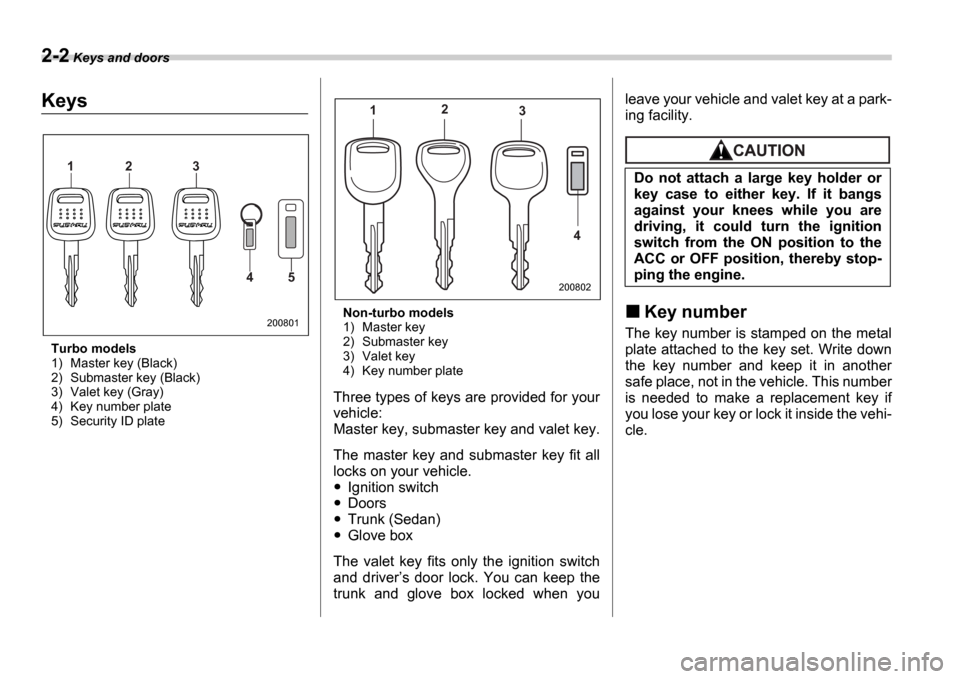
Turbo models
1) Master key (Black)
2) Submaster key (Black)
3) Valet key (Gray)
4) Key number plate
5) Security ID plate Non-turbo models
1) Master key
2) Submaster key
3) Valet key
4) Key number plate
Three types of keys are provided for your
vehicle:
Master key, submaster key and valet key.
The master key and submaster key fit all
locks on your vehicle.
Ignition switch
Doors
Trunk (Sedan)
Glove box
The valet key fits only the ignition switch
and driver s door lock. You can keep the
trunk and glove box locked when you leave your vehicle and valet key at a park-
ing facility.
Key number
The key number is stamped on the metal
plate attached to the key set. Write down
the key number and keep it in another
safe place, not in the vehicle. This number
is needed to make a replacement key if
you lose your key or lock it inside the vehi-
cle.
1 2 3
4 5
200801
12
3
4
200802
Do not attach a large key holder or
key case to either key. If it bangs
against your knees while you are
driving, it could turn the ignition
switch from the ON position to the
ACC or OFF position, thereby stop-
ping the engine.
Page 90 of 365
Keys and doors 2-3
CONTINUED
Immobilizer (Turbo models)
The immobilizer system is designed to
prevent an unauthorized person from
starting the engine. Only keys registered
with your vehicle s immobilizer system
can be used to operate your vehicle. Even
if an unregistered key fits into the ignition
switch and can be turned to the START
position, the engine will automatically stop
after several seconds.
Each immobilizer key contains a tran-
sponder in which the key s ID code is
stored. When a key is inserted into the ig-
nition switch and turned to the ON posi-
tion, the transponder transmits the key s
ID code to the immobilizer system s re-
ceiver. If the transmitted ID code matches
the ID code registered in the immobilizer
system, the system allows the engine to
be started. Since the ID code is transmit-
ted and acted upon almost instantly, the
immobilizer system does not impede nor-
mal starting of the engine.
If the engine fails to start, pull out the key
once before trying again. (Refer to the Ig-
nition switch section [chapter 3].)
This device complies with Part 15 of
the FCC Rules and with RSS-210 of In-
dustry Canada. Operation is subject to
the following two conditions: (1) This device may not cause harmful interfer-
ence, and (2) this device must accept
any interference received, including in-
terference that may cause undesired
operation.
Changes or modifications not express-
ly approved by the party responsible
for compliance could void the user
s
authority to operate the equipment.
NOTE
To protect your vehicle from theft,
please pay close attention to the fol-
lowing security precautions:
Never leave your vehicle unattended
with its keys inside.
Before leaving your vehicle, close all
windows and lock the doors and rear
gate.
Do not leave spare keys or any
record of your key number in the vehi-
cle.
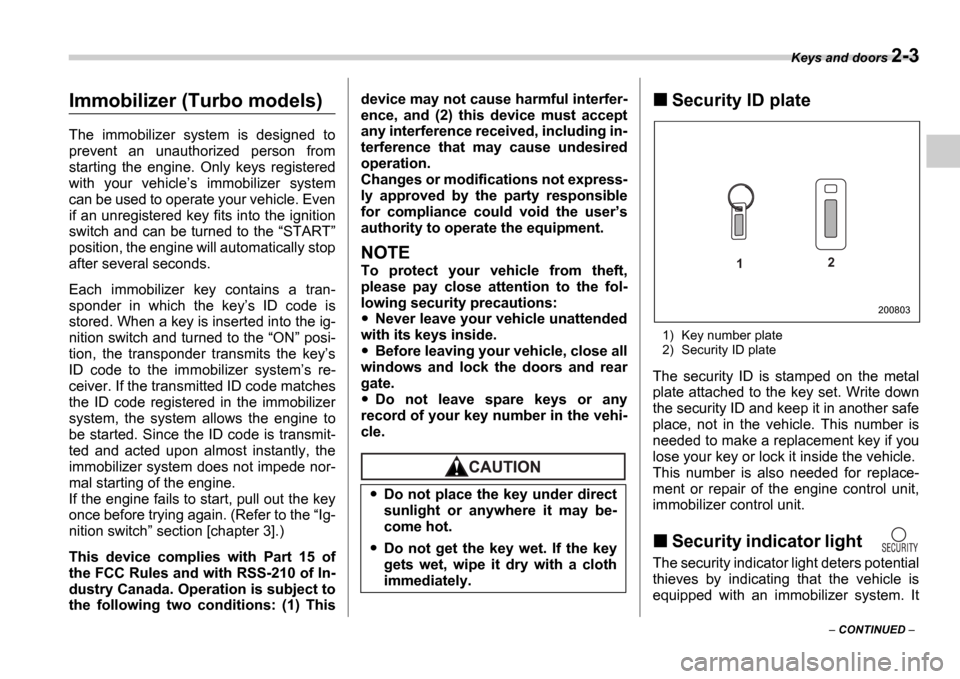
Security ID plate
1) Key number plate
2) Security ID plate
The security ID is stamped on the metal
plate attached to the key set. Write down
the security ID and keep it in another safe
place, not in the vehicle. This number is
needed to make a replacement key if you
lose your key or lock it inside the vehicle.
This number is also needed for replace-
ment or repair of the engine control unit,
immobilizer control unit.
Security indicator light
The security indicator light deters potential
thieves by indicating that the vehicle is
equipped with an immobilizer system. It
Do not place the key under direct
sunlight or anywhere it may be-
come hot.
Do not get the key wet. If the key
gets wet, wipe it dry with a cloth
immediately.
1 2
200803
Page 91 of 365
2-4 Keys and doors
begins flashing (approximately once every
three seconds) approximately 60 seconds
after the ignition switch is turned from theON position to the ACC or LOCK po-
sition or immediately after the key is pulled
out.
If the security indicator light does not
flash, the immobilizer system may be
faulty. If this occurs, we recommend that
you contact your SUBARU dealer as soon
as possible.
In case an unauthorized key is used (e.g.
an imitation key), the security indicator
light comes on.
NOTE
Even if the security indicator light
flashes irregularly or its fuse blows
(the light does not flash if its fuse is
blown), the immobilizer system will
function normally.
Key replacement
Your key number and security ID will be
required if you ever need a replacement
key made. Any new key must be regis-
tered for use with your vehicle s immobiliz-
er system before it can be used. Up to four
keys can be registered for use with one
vehicle.
For security, all the keys registered with your vehicle
s immobilizer system will
have their ID codes erased and re-regis-
tered when a new key is made. Therefore,
all of your vehicle s keys must be present-
ed when a new key is registered. Any key
that is not re-registered when a new key is
made cannot be used after the other keys
are re-registered. For information on re-
placement keys and on the registration of
keys with your immobilizer system, con-
tact your SUBARU dealer.
Door locks
Locking and unlocking from
the outside
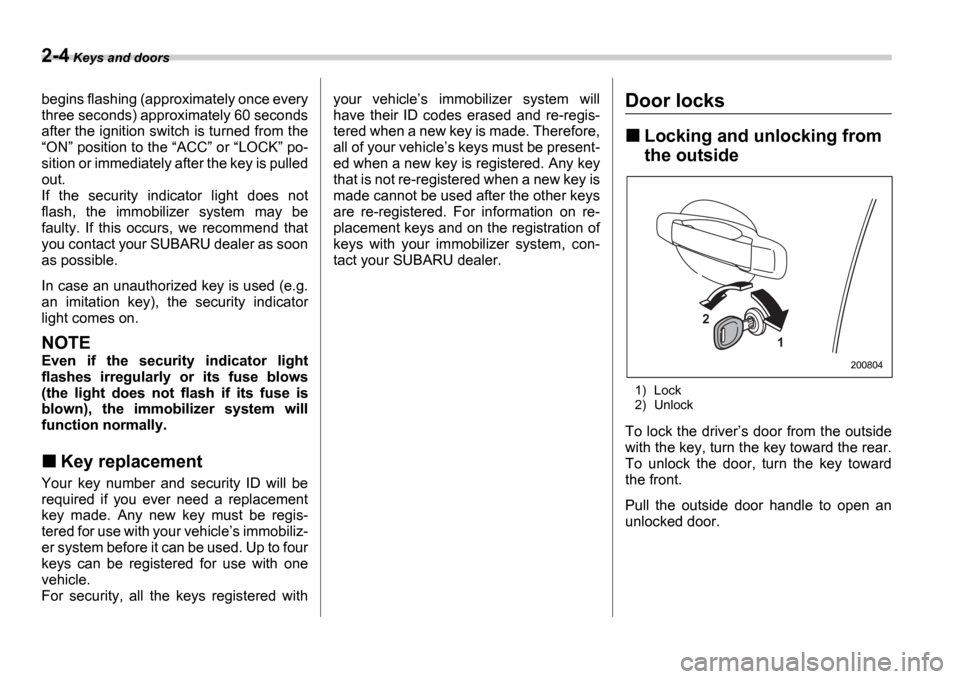
1) Lock
2) Unlock
To lock the driver s door from the outside
with the key, turn the key toward the rear.
To unlock the door, turn the key toward
the front.
Pull the outside door handle to open an
unlocked door.
2
1
200804
Page 92 of 365
Keys and doors 2-5
CONTINUED
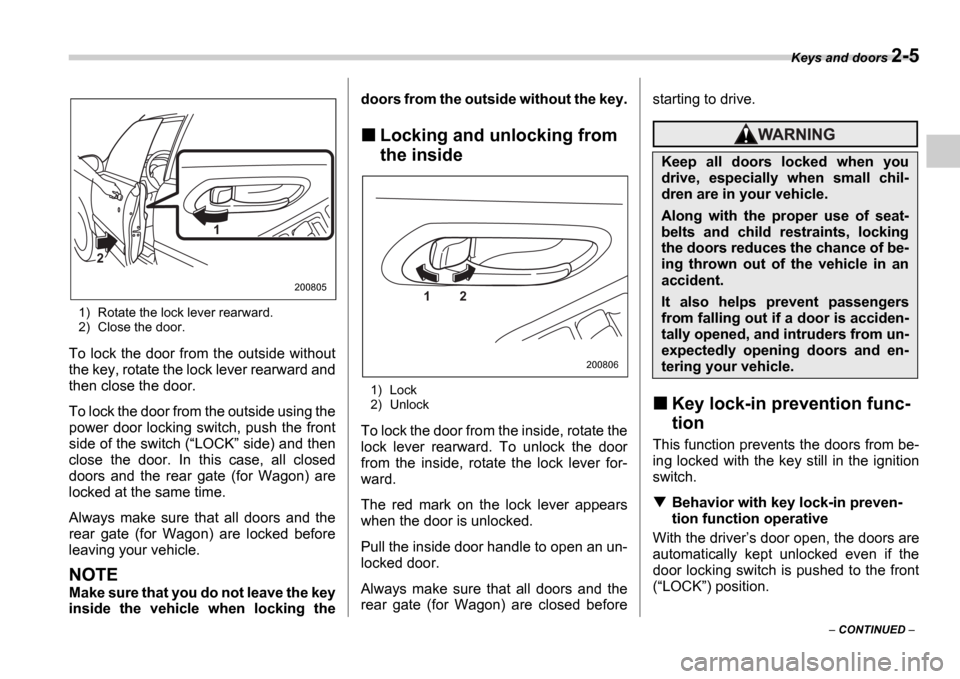
1) Rotate the lock lever rearward.
2) Close the door.
To lock the door from the outside without
the key, rotate the lock lever rearward and
then close the door.
To lock the door from the outside using the
power door locking switch, push the front
side of the switch ( LOCK side) and then
close the door. In this case, all closed
doors and the rear gate (for Wagon) are
locked at the same time.
Always make sure that all doors and the
rear gate (for Wagon) are locked before
leaving your vehicle.
NOTE
Make sure that you do not leave the key
inside the vehicle when locking the doors from the outside without the key.
Locking and unlocking from
the inside
1) Lock
2) Unlock
To lock the door from the inside, rotate the
lock lever rearward. To unlock the door
from the inside, rotate the lock lever for-
ward.
The red mark on the lock lever appears
when the door is unlocked.
Pull the inside door handle to open an un-
locked door.
Always make sure that all doors and the
rear gate (for Wagon) are closed before starting to drive.
Key lock-in prevention func-
tion
This function prevents the doors from be-
ing locked with the key still in the ignition
switch.
Behavior with key lock-in preven-
tion function operative
With the driver s door open, the doors are
automatically kept unlocked even if the
door locking switch is pushed to the front( LOCK ) position.
1
2
2008051 2
200806
Keep all doors locked when you
drive, especially when small chil-
dren are in your vehicle.
Along with the proper use of seat-
belts and child restraints, locking
the doors reduces the chance of be-
ing thrown out of the vehicle in an
accident.
It also helps prevent passengers
from falling out if a door is acciden-
tally opened, and intruders from un-
expectedly opening doors and en-
tering your vehicle.
Page 95 of 365

2-8 Keys and doors
If any of the doors (or the rear gate) is not
fully closed, an electronic chirp will sound
five times and the turn signal lights will
flash five times to alert you that the doors
(or the rear gate) are not properly closed.
When you close the door, it will automati-
cally lock.
NOTE
If the button is pressed for two
seconds or longer, the panic alarm will
sound. When locking the doors in nor-
mal circumstances, press the
button for less than two seconds. For
details on the panic alarm, refer to Sounding a panic alarm .
Unlocking the doors
Briefly press the button (for less
than two seconds) to unlock the driver s
door. An electronic chirp will sound twice
and the turn signal lights will flash twice.
To unlock all other doors (and rear gate on
the Wagon), briefly press the but-
ton a second time within 5 seconds.
NOTE
If the interval between the first and sec-
ond presses of the button (for
unlocking of all of the doors and the
rear gate) is extremely short, the sys-
tem may not respond.
Illuminated entry
The interior (dome) light and ignition
switch light (for turbo models) will illumi-
nate when the button is pressed.
These lights stay illuminated for approxi-
mately 30 seconds if any of the doors (or
the rear gate on the Wagon) is not
opened.
If the button is pressed before 30
seconds have elapsed, these lights will go
out. Also, these lights will go out if the key
is inserted in the ignition switch. The inte-
rior light switch must be set to the middle
position in order for this function to oper-
ate.
Vehicle finder function
Use this function to find your vehicle
parked among many vehicles in a large
parking lot. Provided you are within 30
feet (10 meters) of the vehicle, pressing
the button three times in a five-sec-
ond period will cause your vehicle s horn
to sound once and its turn signal lights to
flash three times.
NOTE
If the interval between presses is too
short when you press the button
three times, the system may not re-
spond to the signals from the remote transmitter.
Sounding a panic alarm
To activate the alarm, keep the
but-
ton pressed for more than two seconds .
The horn will sound and the turn signal
lights will flash.
To deactivate it, press the button or
button. Unless a button on the re-
mote is pressed, the alarm will be deacti-
vated after approximately 30 seconds.
Selecting audible signal op-
eration
Using an electronic chirp, the system will
give you an audible signal when the doors
lock and unlock. If desired, you may turn
the audible signal off.
Do the following to deactivate the audible
signal. You can also use the same steps
to restore the function.
1. Sit in the driver s seat and shut all
doors and the rear gate.
2. Open the driver s door, then remove
the key from the ignition switch.
3. Hold down the UNLOCK side of the
power door locking switch.
4. While holding down the UNLOCK
side of the power door locking switch, in-
sert the key into the ignition switch and re-
move it again at least 6 times within 10
Page 98 of 365
Keys and doors 2-11
CONTINUED
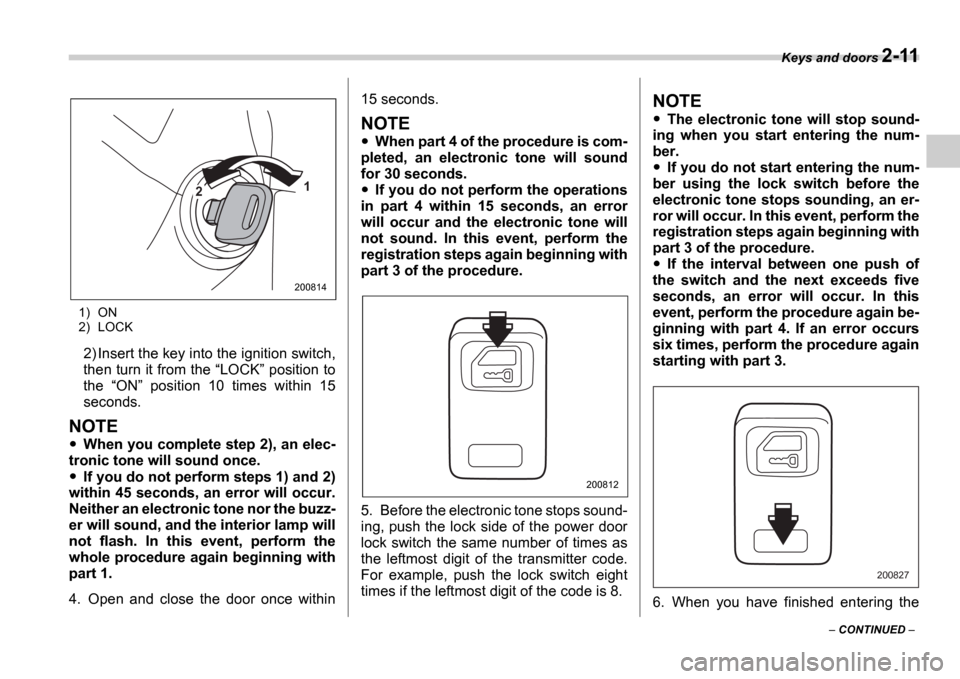
1) ON
2) LOCK
2) Insert the key into the ignition switch,
then turn it from the LOCK position to
the ON position 10 times within 15
seconds.
NOTE
When you complete step 2), an elec-
tronic tone will sound once.
If you do not perform steps 1) and 2)
within 45 seconds, an error will occur.
Neither an electronic tone nor the buzz-
er will sound, and the interior lamp will
not flash. In this event, perform the
whole procedure again beginning with
part 1.
4. Open and close the door once within 15 seconds.
NOTE
When part 4 of the procedure is com-
pleted, an electronic tone will sound
for 30 seconds.
If you do not perform the operations
in part 4 within 15 seconds, an error
will occur and the electronic tone will
not sound. In this event, perform the
registration steps again beginning with
part 3 of the procedure.
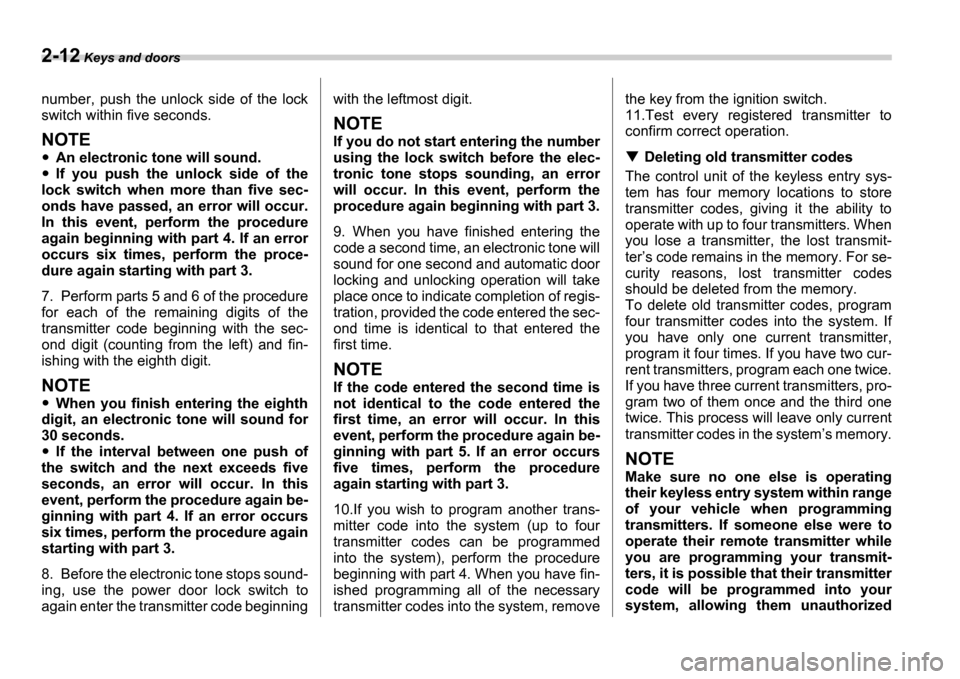
5. Before the electronic tone stops sound-
ing, push the lock side of the power door
lock switch the same number of times as
the leftmost digit of the transmitter code.
For example, push the lock switch eight
times if the leftmost digit of the code is 8.
NOTE
The electronic tone will stop sound-
ing when you start entering the num-
ber.
If you do not start entering the num-
ber using the lock switch before the
electronic tone stops sounding, an er-
ror will occur. In this event, perform the
registration steps again beginning with
part 3 of the procedure.
If the interval between one push of
the switch and the next exceeds five
seconds, an error will occur. In this
event, perform the procedure again be-
ginning with part 4. If an error occurs
six times, perform the procedure again
starting with part 3.
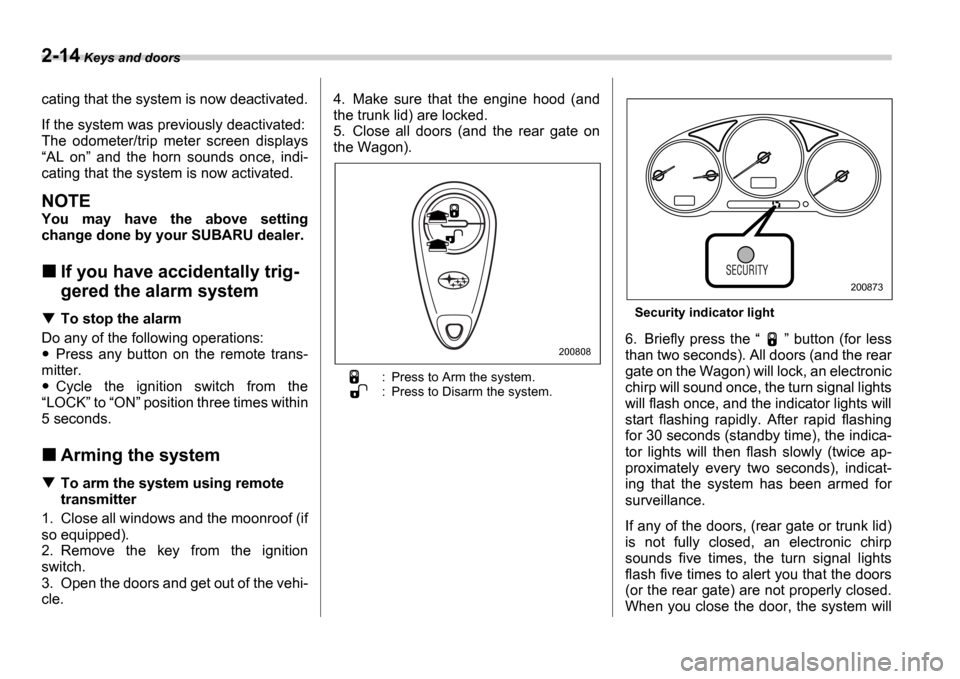
6. When you have finished entering the
1
2
200814
200812
200827
Page 99 of 365
2-12 Keys and doors
number, push the unlock side of the lock
switch within five seconds.
NOTE
An electronic tone will sound.
If you push the unlock side of the
lock switch when more than five sec-
onds have passed, an error will occur.
In this event, perform the procedure
again beginning with part 4. If an error
occurs six times, perform the proce-
dure again starting with part 3.
7. Perform parts 5 and 6 of the procedure
for each of the remaining digits of the
transmitter code beginning with the sec-
ond digit (counting from the left) and fin-
ishing with the eighth digit.
NOTE
When you finish entering the eighth
digit, an electronic tone will sound for
30 seconds.
If the interval between one push of
the switch and the next exceeds five
seconds, an error will occur. In this
event, perform the procedure again be-
ginning with part 4. If an error occurs
six times, perform the procedure again
starting with part 3.
8. Before the electronic tone stops sound-
ing, use the power door lock switch to
again enter the transmitter code beginning with the leftmost digit.
NOTE
If you do not start entering the number
using the lock switch before the elec-
tronic tone stops sounding, an error
will occur. In this event, perform the
procedure again beginning with part 3.
9. When you have finished entering the
code a second time, an electronic tone will
sound for one second and automatic door
locking and unlocking operation will take
place once to indicate completion of regis-
tration, provided the code entered the sec-
ond time is identical to that entered the
first time.
NOTE
If the code entered the second time is
not identical to the code entered the
first time, an error will occur. In this
event, perform the procedure again be-
ginning with part 5. If an error occurs
five times, perform the procedure
again starting with part 3.
10.If you wish to program another trans-
mitter code into the system (up to four
transmitter codes can be programmed
into the system), perform the procedure
beginning with part 4. When you have fin-
ished programming all of the necessary
transmitter codes into the system, removethe key from the ignition switch.
11.Test every registered transmitter to
confirm correct operation.
Deleting old transmitter codes
The control unit of the keyless entry sys-
tem has four memory locations to store
transmitter codes, giving it the ability to
operate with up to four transmitters. When
you lose a transmitter, the lost transmit-
ter s code remains in the memory. For se-
curity reasons, lost transmitter codes
should be deleted from the memory.
To delete old transmitter codes, program
four transmitter codes into the system. If
you have only one current transmitter,
program it four times. If you have two cur-
rent transmitters, program each one twice.
If you have three current transmitters, pro-
gram two of them once and the third one
twice. This process will leave only current
transmitter codes in the system s memory.
NOTE
Make sure no one else is operating
their keyless entry system within range
of your vehicle when programming
transmitters. If someone else were to
operate their remote transmitter while
you are programming your transmit-
ters, it is possible that their transmitter
code will be programmed into your
system, allowing them unauthorized
Page 100 of 365

Keys and doors 2-13
CONTINUED
access to your vehicle.
Alarm system
The alarm system helps to protect your
vehicle and valuables from theft. The horn
sounds and the turn signal lights flash if
someone attempts to break into your vehi-
cle. The starter motor is also interrupted to
prevent starting the vehicle without a key.
The system can be armed and disarmed
with the remote transmitter.
The system does not operate when the
key is inserted into the ignition switch.
Your vehicle
s alarm system has been set
for activation at the time of shipment from
the factory. You can set the system for de-
activation yourself or have it done by your
SUBARU dealer.
System alarm operation
The alarm system will give the following
alarms when triggered:
The vehicle s horn will sound and the
turn signal lights will flash for 30 seconds.
In addition, the starter motor will not oper-
ate.
If any door (or the rear gate/trunk lid) re-
mains open after the 30-second period,
the horn will continue to sound for a maxi-
mum of 3 minutes. If the door (or the rear
gate/trunk lid) is closed while the horn is sounding, the horn will stop sounding with
a delay of up to 30 seconds.
The alarm is triggered by:
Opening a door, the rear gate or trunk
lid
Physical impact to the vehicle, such as
forced entry (only vehicles with shock sen-
sors (dealer option))
Activating and deactivating
the alarm system
To change the setting of your vehicle s
alarm system for activation or deactiva-
tion, do the following.
1. Disarm the alarm system (see Disarm-
ing the system in this section).
2. Sit in the driver s seat and shut all
doors (and the rear gate if your vehicle is
a Wagon).
3. Turn the ignition switch to the ON po-
sition.
4. Hold down the UNLOCK side of the
driver s power door locking switch, open
the driver s door within the following 1 sec-
ond, and wait 10 seconds without releas-
ing the switch. The setting will then be
changed as follows:
If the system was previously activated:
The odometer/trip meter screen displays AL oF and the horn sounds twice, indi-
Page 101 of 365
2-14 Keys and doors
cating that the system is now deactivated.
If the system was previously deactivated:
The odometer/trip meter screen displays AL on and the horn sounds once, indi-
cating that the system is now activated.
NOTE
You may have the above setting
change done by your SUBARU dealer.
If you have accidentally trig-
gered the alarm system
To stop the alarm
Do any of the following operations:
Press any button on the remote trans-
mitter.
Cycle the ignition switch from the
LOCK to ON position three times within
5 seconds.
Arming the system
To arm the system using remote
transmitter
1. Close all windows and the moonroof (if
so equipped).
2. Remove the key from the ignition
switch.
3. Open the doors and get out of the vehi-
cle. 4. Make sure that the engine hood (and
the trunk lid) are locked.
5. Close all doors (and the rear gate on
the Wagon).
: Press to Arm the system.
: Press to Disarm the system.
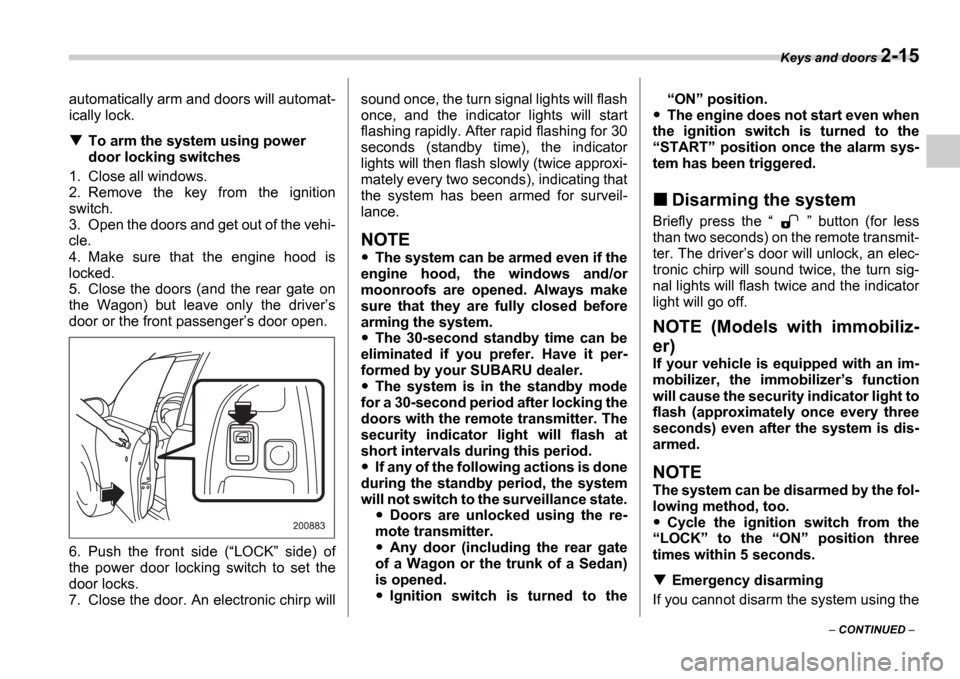
Security indicator light
6. Briefly press the
button (for less
than two seconds). All doors (and the rear
gate on the Wagon) will lock, an electronic
chirp will sound once, the turn signal lights
will flash once, and the indicator lights will
start flashing rapidly. After rapid flashing
for 30 seconds (standby time), the indica-
tor lights will then flash slowly (twice ap-
proximately every two seconds), indicat-
ing that the system has been armed for
surveillance.
If any of the doors, (rear gate or trunk lid)
is not fully closed, an electronic chirp
sounds five times, the turn signal lights
flash five times to alert you that the doors
(or the rear gate) are not properly closed.
When you close the door, the system will200808
200873
Page 102 of 365
Keys and doors 2-15
CONTINUED
automatically arm and doors will automat-
ically lock.
To arm the system using power
door locking switches
1. Close all windows.
2. Remove the key from the ignition
switch.
3. Open the doors and get out of the vehi-
cle.
4. Make sure that the engine hood is
locked.
5. Close the doors (and the rear gate on
the Wagon) but leave only the driver s
door or the front passenger s door open.
6. Push the front side ( LOCK side) of
the power door locking switch to set the
door locks.
7. Close the door. An electronic chirp will sound once, the turn signal lights will flash
once, and the indicator lights will start
flashing rapidly. After rapid flashing for 30
seconds (standby time), the indicator
lights will then flash slowly (twice approxi-
mately every two seconds), indicating that
the system has been armed for surveil-
lance.
NOTE
The system can be armed even if the
engine hood, the windows and/or
moonroofs are opened. Always make
sure that they are fully closed before
arming the system.
The 30-second standby time can be
eliminated if you prefer. Have it per-
formed by your SUBARU dealer.
The system is in the standby mode
for a 30-second period after locking the
doors with the remote transmitter. The
security indicator light will flash at
short intervals during this period.
If any of the following actions is done
during the standby period, the system
will not switch to the surveillance state.
Doors are unlocked using the re-
mote transmitter.
Any door (including the rear gate
of a Wagon or the trunk of a Sedan)
is opened.
Ignition switch is turned to the
ON position.
The engine does not start even when
the ignition switch is turned to the START position once the alarm sys-
tem has been triggered.
Disarming the system
Briefly press the button (for less
than two seconds) on the remote transmit-
ter. The driver s door will unlock, an elec-
tronic chirp will sound twice, the turn sig-
nal lights will flash twice and the indicator
light will go off.
NOTE (Models with immobiliz-
er)
If your vehicle is equipped with an im-
mobilizer, the immobilizer s function
will cause the security indicator light to
flash (approximately once every three
seconds) even after the system is dis-
armed.
NOTE
The system can be disarmed by the fol-
lowing method, too.
Cycle the ignition switch from the
LOCK to the ON position three
times within 5 seconds.
Emergency disarming
If you cannot disarm the system using the