ignition SUBARU IMPREZA 2006 2.G Workshop Manual
[x] Cancel search | Manufacturer: SUBARU, Model Year: 2006, Model line: IMPREZA, Model: SUBARU IMPREZA 2006 2.GPages: 365, PDF Size: 7.09 MB
Page 167 of 365
5-4 Audio
Type A audio set (if equipped)
The radio will operate only when the ignition switch i s in the ACC or ON position.
Radio operation
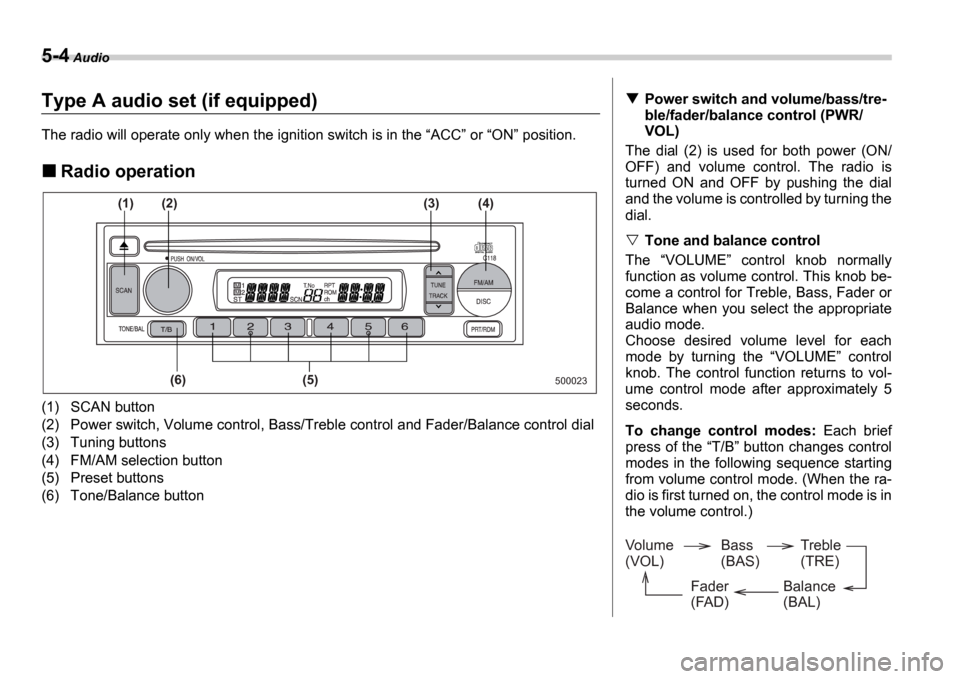
(1) SCAN button
(2) Power switch, Volume control, Bass/Treble control a nd Fader/Balance control dial
(3) Tuning buttons
(4) FM/AM selection button
(5) Preset buttons
(6) Tone/Balance button
500023
(1)
(6) (5)
(2)
(3) (4)
Power switch and volume/bass/tre-
ble/fader/balance control (PWR/
VOL)
The dial (2) is used for both power (ON/
OFF) and volume control. The radio is
turned ON and OFF by pushing the dial
and the volume is controlled by turning the
dial.
Tone and balance control
The VOLUME control knob normally
function as volume control. This knob be-
come a control for Treble, Bass, Fader or
Balance when you select the appropriate
audio mode.
Choose desired volume level for each
mode by turning the VOLUME control
knob. The control function returns to vol-
ume control mode after approximately 5
seconds.
To change control modes: Each brief
press of the T/B button changes control
modes in the following sequence starting
from volume control mode. (When the ra-
dio is first turned on, the control mode is in
the volume control.)
Volume
(VOL) Bass
(BAS)Treble
(TRE)
Balance
(BAL)
Fader
(FAD)
Page 171 of 365
5-8 Audio
(11) to skip to the beginning of the next
track. Each time this side of the button is
pressed, the indicated track number will
increase.
Backward direction
Briefly press the side of the button
(11) to skip to the beginning of the current
track. Each time this side of the button is
pressed, the indicated track number will
decrease.
Fast-forwarding and fast-reversing
Fast-forwarding
Press the side of the button (11)
continuously to fast-forward the disc.
Release the button to stop fast-forward-
ing.
Fast-reversing
Press the side of the button (11)
continuously to fast-reverse the disc.
Release the button to stop fast-reversing.
Repeat playback
Press the RPT/RDM button (10) and re-
lease it in less than 2 seconds while a
song is playing to play the song repeated-
ly. The RPT indicator will come on and
the song will be played continuously. To
cancel the repeat mode, press the button
again. Then the RPT indicator goes out, and normal playback mode is restored.
Random playback
Press the RPT/RDM button (10) and
hold it in for more than 2 seconds while a
disc is being played back to play all songs
on the disc in a random order. The RDM
indicator will come on and all songs on the
disc will be played in a random order.
To cancel the random mode, press the
button again. Then the RDM indicator
goes out, and normal playback mode is
restored.
To eject a disc from the player
When a disc is being played back or when
a disc is in the player, press the Eject
button (7). The disc will be ejected.
The disc may be removed even when the
ignition switch is in the LOCK position.
NOTE
Avoid driving the vehicle with a CD
sticking out, because vibration might
make it fall out.
Page 174 of 365
Audio 5-11
CONTINUED
Type B audio set (if equipped)
The radio will operate only when the ignition switch is in the ACC or ON position.
Radio operation
(1)
(8) (7) (6) (2) (3) (4) (5)
500247
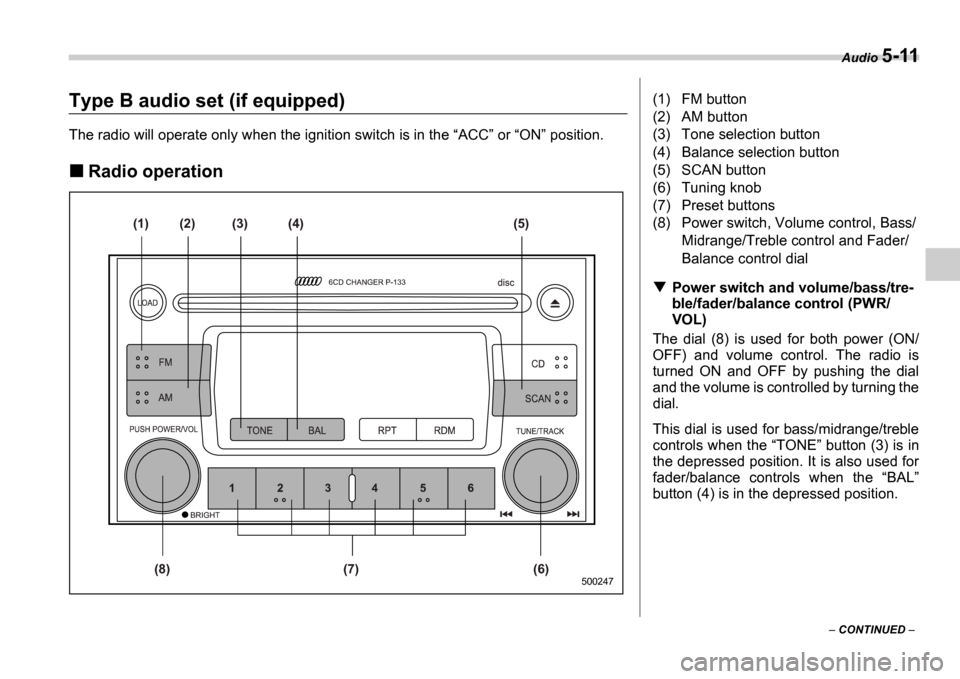
(1) FM button
(2) AM button
(3) Tone selection button
(4) Balance selection button
(5) SCAN button
(6) Tuning knob
(7) Preset buttons
(8) Power switch, Volume control, Bass/
Midrange/Treble control and Fader/
Balance control dial
Power switch and volume/bass/tre-
ble/fader/balance control (PWR/
VOL)
The dial (8) is used for both power (ON/
OFF) and volume control. The radio is
turned ON and OFF by pushing the dial
and the volume is controlled by turning the
dial.
This dial is used for bass/midrange/treble
controls when the TONE button (3) is in
the depressed position. It is also used for
fader/balance controls when the BAL
button (4) is in the depressed position.
Page 183 of 365

5-20 Audio
To insert a disc
1. Press one of the Disc select buttons
(3) (numbered from 1 to 6) for which the
disc indicator light (2) is OFF .
The disc indicator lights are located direct-
ly above the corresponding Disc select
buttons.
2. The indicator will begin blinking. The
blinking will last for 15 seconds.
During this period, insert a desired disc,
and the disc will begin to play. (If any disc
is not inserted during this period, the Disc
slot (1) door will close. Repeat Step 1.)
Be sure to hold a disc with the label side
(the side where titles are printed) up.
3. To insert another disc, repeat Steps 1
and 2 choosing a different disc select but-
ton.
To insert six discs at a time
1. Press and hold the Disc select button
number 1 until all disc indicators begin
blinking (approximately 1.5 seconds). 2. The indicators will blink for 15 seconds.
During this period, insert desired six discs.
3. When all discs are loaded, the first disc
will begin to play. (If no disc is inserted
within this 15 seconds, the entire disc load
sequence will be canceled.)
To remove a disc
1. Press the desired one of the Disc se-
lect buttons (3) (numbered from 1 to 6) for
which the disc indicator light is on.
2. Press the Eject button (4). The select-
ed disc will be ejected and the indicator
light will begin blinking.
3. To remove another disc, repeat Steps
1 and 2 choosing a different Disc select
button.
(To remove discs when the ignition switch
is in the Lock position, press the Eject
button, and the first disc will be ejected.
Press the Eject button again, and the
next disc will be ejected and so on. At this
time, the Disc select buttons are dis-
abled.)
To remove all discs at one time
1. Press and hold the Eject button (4)
until all Disc indicators begin blinking
(approximately 1.5 seconds), and the first
disc will be ejected.
2. When the disc is removed, the next
one will be ejected, and so on.
To replace a playing disc with an-
other
Simply press the desired one of Disc se-
lect buttons (3) (numbered from 1 to 6) or
press the Disc select button on the radio
unit to select the desired disc, and the disc
will begin to play.
Disc indicators
Lit: when the corresponding storage tray
is occupied by a disc.
Blinking: Disc player is either in loading,
eject or changing mode.
OFF: No disc is loaded or the ignition
switch is in the LOCK position.
Open/Closed disc slot indicator
When the disc slot is open, the disc indica-
tors on both sides of the slot illuminate.
Function control
Refer to CD changer control operating in-
structions described in the Type B audio
set (if equipped) section.
Do not insert or remove any disc
when the automatic transmission
selector lever is in the park posi-
tion; the selector lever in that po-
sition can interfere with disc in-
sertion or removal, causing
scratches on the disc surface (for
AT vehicles).
Page 187 of 365
6-2 Interior equipment
Interior equipm entInterior light
When leaving your vehicle, make sure the
light goes out to avoid battery discharge.
Dome light
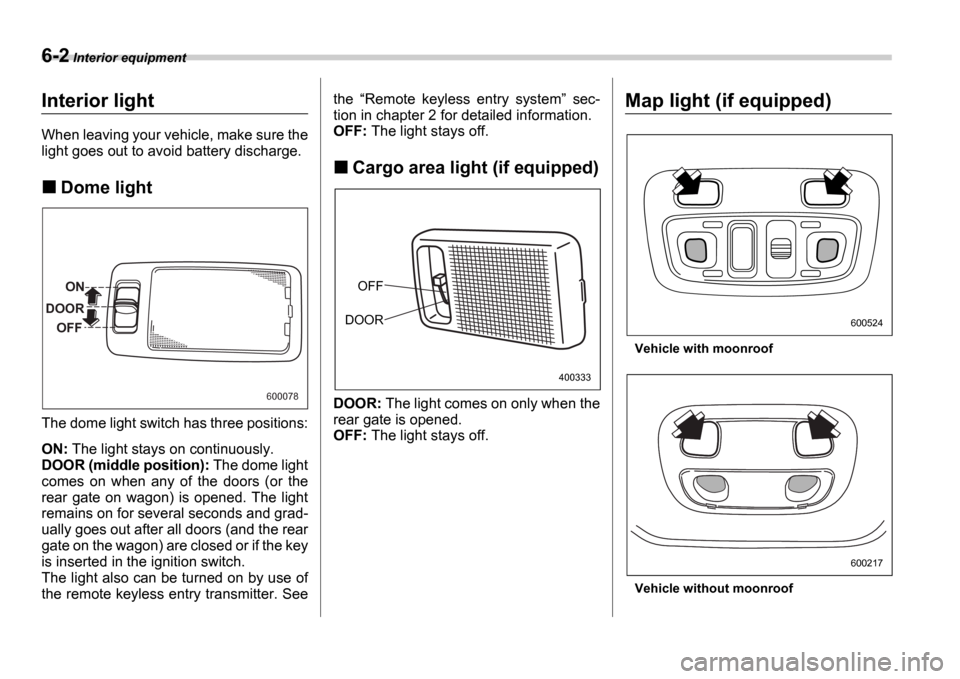
The dome light switch has three positions:
ON: The light stays on continuously.
DOOR (middle position): The dome light
comes on when any of the doors (or the
rear gate on wagon) is opened. The light
remains on for several seconds and grad-
ually goes out after all doors (and the rear
gate on the wagon) are closed or if the key
is inserted in the ignition switch.
The light also can be turned on by use of
the remote keyless entry transmitter. See the
Remote keyless entry system sec-
tion in chapter 2 for detailed information.
OFF: The light stays off.
Cargo area light (if equipped)
DOOR: The light comes on only when the
rear gate is opened.
OFF: The light stays off.
Map light (if equipped)
Vehicle with moonroof
Vehicle without moonroof
ON
DOOR OFF
600078
OFF
DOOR
400333
600524
600217
Page 190 of 365
Interior equipment 6-5
CONTINUED
Cup holder
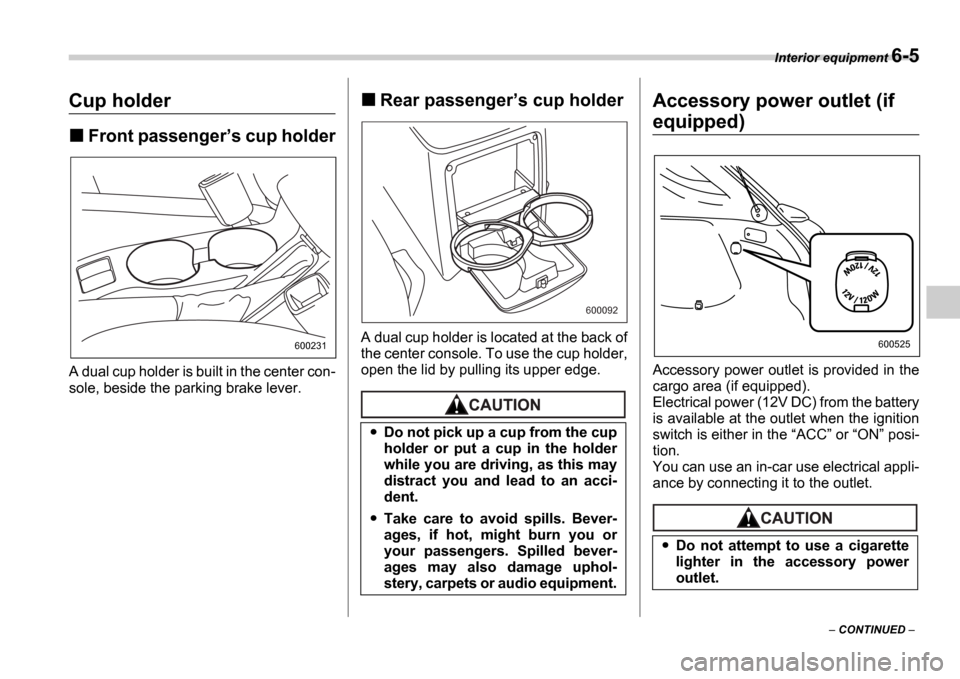
Front passenger s cup holder
A dual cup holder is built in the center con-
sole, beside the parking brake lever.
Rear passenger s cup holder
A dual cup holder is located at the back of
the center console. To use the cup holder,
open the lid by pulling its upper edge.
Accessory power outlet (if
equipped)
Accessory power outlet is provided in the
cargo area (if equipped).
Electrical power (12V DC) from the battery
is available at the outlet when the ignition
switch is either in the ACC or ON posi-
tion.
You can use an in-car use electrical appli-
ance by connecting it to the outlet.
600231
Do not pick up a cup from the cup
holder or put a cup in the holder
while you are driving, as this may
distract you and lead to an acci-
dent.
Take care to avoid spills. Bever-
ages, if hot, might burn you or
your passengers. Spilled bever-
ages may also damage uphol-
stery, carpets or audio equipment.
600092
Do not attempt to use a cigarette
lighter in the accessory power
outlet.
600525
Page 192 of 365
Interior equipment 6-7
CONTINUED
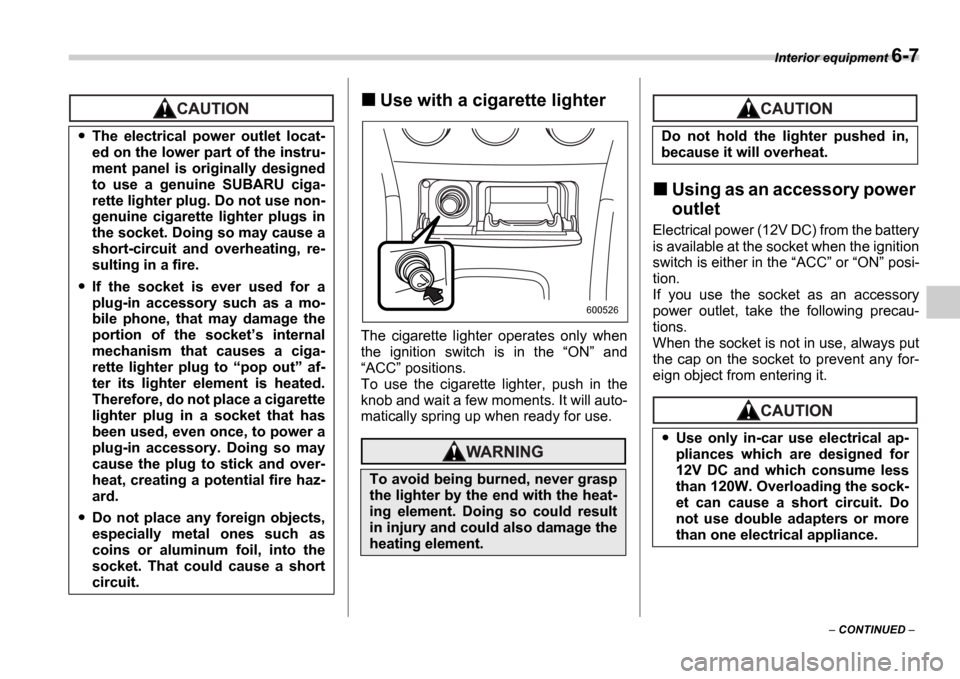
Use with a cigarette lighter
The cigarette lighter operates only when
the ignition switch is in the ON and
ACC positions.
To use the cigarette lighter, push in the
knob and wait a few moments. It will auto-
matically spring up when ready for use.
Using as an accessory power
outlet
Electrical power (12V DC) from the battery
is available at the socket when the ignition
switch is either in the ACC or ON posi-
tion.
If you use the socket as an accessory
power outlet, take the following precau-
tions.
When the socket is not in use, always put
the cap on the socket to prevent any for-
eign object from entering it.
The electrical power outlet locat-
ed on the lower part of the instru-
ment panel is originally designed
to use a genuine SUBARU ciga-
rette lighter plug. Do not use non-
genuine cigarette lighter plugs in
the socket. Doing so may cause a
short-circuit and overheating, re-
sulting in a fire.
If the socket is ever used for a
plug-in accessory such as a mo-
bile phone, that may damage the
portion of the socket s internal
mechanism that causes a ciga-
rette lighter plug to pop out af-
ter its lighter element is heated.
Therefore, do not place a cigarette
lighter plug in a socket that has
been used, even once, to power a
plug-in accessory. Doing so may
cause the plug to stick and over-
heat, creating a potential fire haz-
ard.
Do not place any foreign objects,
especially metal ones such as
coins or aluminum foil, into the
socket. That could cause a short
circuit.
To avoid being burned, never grasp
the lighter by the end with the heat-
ing element. Doing so could result
in injury and could also damage the
heating element.
600526
Do not hold the lighter pushed in,
because it will overheat.
Use only in-car use electrical ap-
pliances which are designed for
12V DC and which consume less
than 120W. Overloading the sock-
et can cause a short circuit. Do
not use double adapters or more
than one electrical appliance.
Page 203 of 365
7-6 Starting and operating
The EPA has issued regulations for in-
specting the On-Board Diagnostic (OBD)
system as part of the state emissions in-
spection. The OBD system is designed to
detect engine and transmission problems
that might cause vehicle emissions to ex-
ceed allowable limits. These inspections
apply to all 1996 model year and newer
passenger cars and light trucks. Over 30
states plus the District of Columbia have
implemented the OBD system inspection.
The inspection of the OBD system con-
sists of a visual operational check of the CHECK ENGINE warning light/malfunc-
tion indicator lamp (MIL) and an examina-
tion of the OBD system with an electronic
scan tool while the engine is running.
A vehicle passes the OBD system in-
spection if proper the CHECK ENGINE
warning light/MIL illumination is observed,
there is no stored diagnostic trouble
codes, and the OBD system readiness
monitors are complete.
A vehicle fails the OBD inspection if the
CHECK ENGINE warning light/MIL is
not properly operating or there is one or
more diagnostic trouble codes stored in
vehicle s computer with the CHECK EN-
GINE warning light/MIL illuminated.
A state emission inspection may reject
(not pass or fail) a vehicle if the number of
OBD system readiness monitors Not
Ready is greater than one. Under this
condition, the vehicle operator should be
instructed to drive his/her vehicle for a few
days to set the monitors and return for an
emission re-inspection.
Owners of rejected or failing vehicles
should contact their Subaru Dealer for
service.
Preparing to drive
You should perform the following checks
and adjustments every day before you
start driving.
1. Check that all windows, mirrors, and
lights are clean and unobstructed.
2. Check the appearance and condition of
the tires. Also check tires for proper infla-
tion.
3. Look under the vehicle for any sign of
leaks.
4. Check that the hood, trunk (Sedan)
and rear gate (Wagon) are fully closed.
5. Check the adjustment of the seat.
6. Check the adjustment of the inside and
outside mirrors.
7. Fasten your seatbelt. Check that your
passengers have fastened their seatbelts.
8. Check the operation of the warning and
indicator lights when the ignition switch is
turned to the ON position.
9. Check the gauges, indicator and warn-
ing lights after starting the engine.
NOTE
Engine oil, engine coolant, brake fluid,
washer fluid and other fluid levels
should be checked daily, weekly or at
fuel stops.
Resultant vehicle damage due to im-
proper testing is not covered under
the SUBARU Limited Warranty and
is the responsibility of the state in-
spection program or its contractors
or licensees.
Page 204 of 365
Starting and operating 7-7
CONTINUED
Starting the engine
Manual transmission vehicle
1. Apply the parking brake.
2. Turn off unnecessary lights and acces-
sories.
3. Press the clutch pedal to the floor and
shift the shift lever into neutral. Hold the
clutch pedal to the floor while starting the
engine.
The starter motor will only operate when
the clutch pedal is pressed fully to the
floor.
4. Turn the ignition switch to the ON po-
sition and check the operation of the warn-
ing and indicator lights. Refer to the Warning and indicator lights section
(chapter 3).
5. Turn the ignition switch to the START
position without depressing the accelera-
tor pedal. Release the key immediately af-
ter the engine has started. If the engine does not start, try the follow-
ing.
1) Turn the ignition switch to the OFF
position and wait for at least 10 sec-
onds. After checking that the parking
brake is firmly set, turn the ignition
switch to the START position while de-
pressing the accelerator pedal slightly
(approximately a quarter of the full
stroke). Release the accelerator pedal
as soon as the engine starts.
2) If this fails to start the engine, turn the
ignition switch back to the OFF posi-
tion and wait for at least 10 seconds.
Then fully depress the accelerator ped-
al and turn the ignition switch to the START position. If the engine starts,
quickly release the accelerator pedal.
3) If this fails to start the engine, turn the
ignition switch again to the OFF posi-
tion. After waiting for 10 seconds or
longer, turn the ignition switch to the START position without depressing
the accelerator pedal.
4) If the engine still refuses to start, con-
tact your nearest SUBARU dealer for
assistance.
6. Confirm that all warning and indicator
lights have gone off after the engine has
started. The fuel injection system auto-
matically lowers the idle speed as the en-
gine warms up.
NOTE
The engine may be difficult to start
when the battery has been disconnect-
ed and reconnected (for maintenance
or other purposes). This difficulty is
caused by the electronically controlled
throttle s self-diagnosis function. To
overcome it, keep the ignition switch in
the ON position for approximately 10
seconds before starting the engine.
Automatic transmission vehi-
cle
1. Apply the parking brake.
2. Turn off unnecessary lights and acces-
sories.
3. Shift the selector lever to the P or N
position (preferably P position).
The starter motor will only operate when
the select lever is at the P or N position.
4. Turn the ignition switch to the ON po-
sition and check the operation of the warn-
ing and indicator lights. Refer to the Warning and indicator lights section
(chapter 3).
5. Turn the ignition switch to the START
position without depressing the accelera-
tor pedal. Release the key immediately af-
ter the engine has started.
If the engine does not start, try the follow-
Do not operate the starter motor
continuously for more than ten sec-
onds. If the engine fails to start after
operating the starter for five to ten
seconds, wait for ten seconds or
more before trying again.
Page 205 of 365
7-8 Starting and operating
ing.
1) Turn the ignition switch to the OFF
position and wait for at least 10 sec-
onds. After checking that the parking
brake is firmly set, turn the ignition
switch to the START position while de-
pressing the accelerator pedal slightly
(approximately a quarter of the full
stroke). Release the accelerator pedal
as soon as the engine starts.
2) If this fails to start the engine, turn the
ignition switch back to the OFF posi-
tion and wait for at least 10 seconds.
Then fully depress the accelerator ped-
al and turn the ignition switch to the START position. If the engine starts,
quickly release the accelerator pedal.
3) If this fails to start the engine, turn the
ignition switch again to the OFF posi-
tion. After waiting for 10 seconds or
longer, turn the ignition switch to the START position without depressing
the accelerator pedal.
4) If the engine still refuses to start, con-
tact your nearest SUBARU dealer for
assistance.
6. Confirm that all warning and indicator
lights have gone out after the engine has
started. The fuel injection system auto-
matically lowers the idle speed as the en-
gine warms up.
While the engine is warming up, make sure that the selector lever is at the
P or
N position and that the parking brake is
applied.
NOTE
The engine may be difficult to start
when the battery has been disconnect-
ed and reconnected (for maintenance
or other purposes). This difficulty is
caused by the electronically controlled
throttle s self-diagnosis function. To
overcome it, keep the ignition switch in
the ON position for approximately 10
seconds before starting the engine.
Stopping the engine
The ignition switch should be turned off
only when the vehicle is stopped and the
engine is idling.
If you restart the engine while the
vehicle is moving, shift the selector
lever into the N position. Do not
attempt to place the selector lever of
a moving vehicle into the P posi-
tion.
Do not stop the engine when the ve-
hicle is moving. This will cause loss
of power to the power steering and
the brake booster, making steering
and braking more difficult. It could
also result in accidental activation
of the LOCK position on the igni-
tion switch, causing the steering
wheel to lock.