phone SUBARU IMPREZA 2011 4.G User Guide
[x] Cancel search | Manufacturer: SUBARU, Model Year: 2011, Model line: IMPREZA, Model: SUBARU IMPREZA 2011 4.GPages: 458, PDF Size: 16.22 MB
Page 234 of 458

&Tips for the Hands-free sys- tem
! Bluetooth
®
NOTE
The Bluetooth word mark and logo are
registered trademarks of Bluetooth
SIG, Inc.
It is possible to connect a cell phone to the
in-vehicle equipment through the Blue-
tooth
®format (wireless) to make a phone
call from the in-vehicle equipment or take
an incoming phone call.
Since the Bluetooth
®format is wireless, a
connection between the in-vehicle equip-
ment and the cell phone can be made
without placing them in close proximity of
each other. The cell phone can be used with it left in the breast pocket or bag.
NOTE . The Hands-free system may not
operate properly under the following conditions.
–The cell phone is turned off.
– The cell phone is not in the
phone call area. – The battery of the cell phone has
run down.– The cell phone is not connected
to the Hands-free system.– The cell phone is behind the seat
or in the glove box.– A metal material covers or
touches the cell phone.
. Depending on the type of cell phone
that is used, the screen on the cell
phone may remain illuminated while
the ignition switch is in the “ON ”
position. If this occurs, turn the illumi-
nation off by adjusting the cell phonesettings. . Depending on the setting of the cell
phone, the dial lock function may be
activated after making a call. Deacti-
vate the automatic dial lock function of
the cell phone before using the Hands-
free system. . Depending on the type of cell phone
that is used, operation and the sound volume may be different from those of
cell phones currently used. .
When the ignition switch is turned to
the “LOCK ”position during a call, the
call may be disconnected or continued
on the cell phone depending on the
type of cell phone that is used. Note
that operation of the cell phone may be
necessary if the call is continued on the
cell phone. . Do not speak at the same time as the
other party during a call. If you and the
party speak at the same time, it may be
difficult for the other party to hear your
voice and vice versa. This is normal. . The receiver sound volume should
be set as low as possible. Otherwise,
the party you are calling may notice an
undesirable echo sound. . Speak clearly and loudly.
. Your voice may be difficult to be
heard by the party under the following conditions.
–Driving on a rough road.
– Driving at a high speed.
– Driving with a window open.
– When air from the ventilator
blows directly towards the micro-phone. – When the sound coming from the
ventilator is loud. Audio
5-47
– CONTINUED –
Page 235 of 458

5-48Audio
–When the cell phone is too close
to the microphone.
. The sound quality may degrade due
to the influence of the cell phone that is
connected to the system or the circum-
stances of the Bluetooth network. . When another Bluetooth
®device is
simultaneously connected, noise may
be heard in the voice coming from the
hands-free phone. ! Corresponding profiles for the cell phone
. HFP (Hands Free Profile): Ver. 1.0
. OPP (Object Push Profile): Ver. 1.1
& Certification for the Hands-
free system
CAUTION
FCC WARNING
Changes or modifications not ex-
pressly approved by the party re-
sponsible for compliance could void
the user ’s authority to operate the
equipment.
NOTE
This device complies with Part 15 of
the FCC Rules and RSS-Gen of IC Rules. Operation is subject to the
following two conditions: (1) this de-
vice may not cause harmful interfer-
ence, and (2) this device must accept
any interference received, including
interference that may cause undesiredoperation.
NOTE
This equipment has been tested and
found to comply with the limits for a
Class B digital device, pursuant to Part
15 of the FCC Rules. These limits are
designed to provide reasonable protec-
tion against harmful interference in a
residential installation. This equipment
may cause harmful interference to
radio communications, if it is not
installed and used in accordance with
the instructions. However, there is no
guarantee that interference will not
occur in a particular installation. If this
equipment does cause harmful inter-
ference to radio or television reception,
which can be determined by turning the
equipment off and on, the user is
encouraged to try to correct the inter-
ference by one or more of the followingmeasures. . Reorient or relocate the receiving
antenna. . Increase the separation between the equipment and receiver..
Connect the equipment into an out-
let on a circuit different from that to
which the receiver is connected.. Consult the dealer or an experi-
enced radio/TV technician for help.. Changes or modifications not ex-
pressly approved by the party respon-
sible for compliance could void theuser ’s authority to operate the equip-
ment.. This equipment complies with FCC/
IC radiation exposure limits set forth
for an uncontrolled equipment and
meets the FCC radio frequency (RF)
Exposure Guidelines in Supplement C
to OET65 and RSS-102 of the IC radio
frequency (RF) Exposure rules. This
equipment has very low levels of RF
energy that it deemed to comply with-
out maximum permissive exposure
evaluation (MPE). But it is desirable
that it should be installed and operated
keeping the radiator at least 20 cm or
more away from person ’s body (ex-
cluding extremities: hands, wrists, feet
and ankles).. This transmitter must not be co-
located or operated in conjunction with
any other antenna or transmitter.
Page 236 of 458
&Safety precautions
WARNING
. For safety reasons, avoid operat-
ing the cell phone while driving.
. Do not make a phone call while
driving. When you have an in-
coming call, stop the vehicle in a
safe location before taking the
incoming phone call. When you
have to absolutely take a phone
call, tell the caller “I’ ll call you
back ”. And then call the caller
back after stopping the vehicle in
a safe location.
CAUTION
. Do not leave the cell phone in the
vehicle. The temperature in the
vehicle may become extremely
high and cause a malfunction of
the cell phone.
. When using the cell phone, be
careful not to get it close to the
in-vehicle equipment. Getting it
too close to the in-vehicle equip-
ment may result in deterioration
in tone quality or a poor connect-
ing condition. .
In the frequency band used by
this equipment, along with indus-
trial, scientific and medical
equipment such as a microwave
oven, radio stations (a license is
required) to be used by the
production line in the factory to
identify movable bodies, specific
small power radio stations (a
license is not required) and ama-
teur radio stations (a license is
required) are being operated.
(These three types of radio sta-
tions are hereinafter referred toas “other radio stations. ”) Before
using this equipment, be sure to
check to see if “other radio
stations ”are being operated in
the vicinity. If there is detrimental
radio interference from this
equipment to “other radio sta-
tions, ”move the equipment to
another location as soon as
possible to avoid radio interfer-
ence. The frequency band used
by this equipment is in the 2.4
GHz zone. The FH-SS modulation
is employed as a modulation
method. The expected inflicting
interference distance is less than
33 ft (10 m). This equipment uses
a full band and can avoid a band used by a movable body identifi-
cation device.
& Using the Hands-free system
NOTE
You can select the menus by operating the “TUNE/TRACK/CH ”dial or using
the voice command system. Refer to“ Menu list of the Hands-free system ”
F 5-55 or “Voice command system ”
F 5-58.
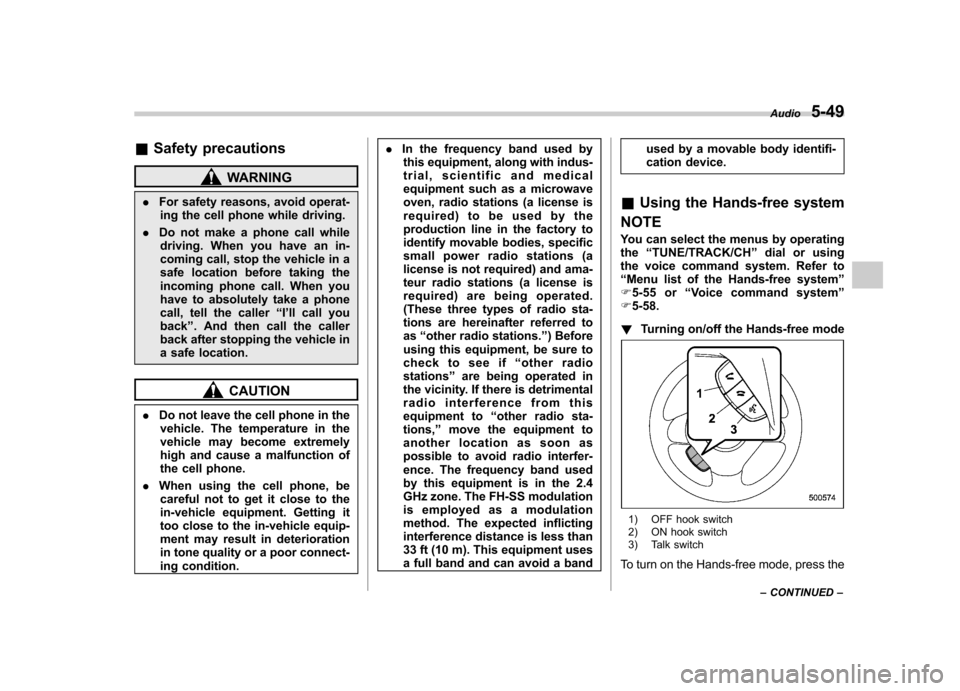
! Turning on/off the Hands-free mode
1) OFF hook switch
2) ON hook switch
3) Talk switch
To turn on the Hands-free mode, press the Audio
5-49
– CONTINUED –
Page 237 of 458

5-50Audio
OFF hook switch
. To turn off the
Hands-free mode, press the ON hook switch
.
! Preparation for using the Hands-
free system
Before using the Hands-free system, it is
necessary to register a cell phone in the
system. Perform the following procedure
to register a cell phone.
1. Press the OFF hook switch
.
2. Select “ENGLISH ”/“ FRANÇAIS ”by
operating the “TUNE/TRACK/CH ”dial.
Then “WELCOME! ”will be displayed.
3. Press the “TUNE/TRACK/CH ”dial or
the talk switch
.
4. Select the “RECORD NAME ”menu.
5. Say the name to be registered.
6. Select the “CONFIRM ”menu. After
“ CAR M_MEDIA ”is displayed, a pass key
is displayed.
7. Input the displayed pass key into the
cell phone while “PKY: **** ”is displayed. If
you input the correct pass key, “PAIRED ”
is displayed and the registration proce-
dure is finished. If you input an incorrect
pass key, “FAILED ”is displayed and the
registration procedure was not successful. !
Updating phonebook data
! Registering by voice
1. Select the “PHONE BOOK ”menu.
2. Select the “ADD ENTRY ”menu.
3. Select the “BY VOICE ”menu.
4. Press the talk switch
.
5. Say the phone number to be regis- tered.
6. Select the “CONFIRM ”menu.
7. Select the “RECORD NAME ”menu by
operating the “TUNE/TRACK/CH ”dial or
press the talk switch
.
8. Say the name (voice tag) to be registered.
9. Select the “CONFIRM ”menu. Then
“ STORED ”is displayed and the mode
changes to the registering speed dial
mode. Refer to “Registering speed dial ”
F 5-51.
! Registering by phone
1. Select the “PHONE BOOK ”menu.
2. Select the “ADD ENTRY ”menu.
3. Select the “BY PHONE ”menu.
4. Select the “CONFIRM ”menu. Then
“ TRANSFER ”is displayed.
5. Transfer the data from the cell phone.
For details about transferring the data,
refer to the Owner ’s Manual of the cell phone.
6. Select the
“RECORD NAME ”menu by
operating the “TUNE/TRACK/CH ”dial or
press the talk switch
.
7. Say the name (voice tag) to be registered.
8. Select the “CONFIRM ”menu. Then
“ STORED ”is displayed and the mode
changes to the registering speed dial
mode. Refer to “Registering speed dial ”
F 5-51.
! Registering by inputting manually
1. Select the “PHONE BOOK ”menu.
2. Select the “ADD ENTRY ”menu.
3. Select the “MANUAL INPUT ”menu by
operating the “TUNE/TRACK/CH ”dial.
4. Input the phone number to be regis-tered.
5. Select the “RECORD NAME ”menu by
operating the “TUNE/TRACK/CH ”dial or
press the talk switch
.
6. Say the name (voice tag) to be registered.
7. Select the “CONFIRM ”menu. Then
“ STORED ”is displayed and the mode
changes to the registering speed dial
mode. Refer to “Registering speed dial ”
F 5-51.
Page 238 of 458

NOTE
While inputting the phone numbers, if “GO BACK ”is chosen using the
“ TUNE/TRACK/CH ”dial, the character
that was input last is deleted. ! Registering from call history
1. Select the “PHONE BOOK ”menu.
2. Select the “ADD ENTRY ”menu.
3. Select the “CALL HISTORY ”menu.
4. Select “OUTGOING ”or “INCOMING ”
by operating the “TUNE/TRACK/CH ”dial.
5. Select the phone number by operating the “TUNE/TRACK/CH ”dial.
6. Select the “RECORD NAME ”menu by
operating the “TUNE/TRACK/CH ”dial or
press the talk switch
.
7. Say the name (voice tag) to be registered.
8. Select the “CONFIRM ”menu. Then
“ STORED ”is displayed and the mode
changes to the registering speed dial
mode. Refer to “Registering speed dial ”
F 5-51.
! Registering from redial
1. Select the “REDIAL ”menu.
2. Select the phone number by operatingthe “TUNE/TRACK/CH ”dial.
3. Select the “STORE ”menu. 4. Select the
“CONFIRM ”menu.
5. Select the “RECORD NAME ”menu by
operating the “TUNE/TRACK/CH ”dial or
press the talk switch
.
6. Say the name (voice tag) to be registered.
7. Select the “CONFIRM ”menu. Then
“ STORED ”is displayed and the mode
changes to the registering speed dial
mode. Refer to “Registering speed dial ”
F 5-51.
! Registering from call back
1. Select the “CALL BACK ”menu.
2. Select the phone number by operatingthe “TUNE/TRACK/CH ”dial.
3. Select the “STORE ”menu.
4. Select the “CONFIRM ”menu.
5. Select the “RECORD NAME ”menu by
operating the “TUNE/TRACK/CH ”dial or
press the talk switch
.
6. Say the name (voice tag) to be registered.
7. Select the “CONFIRM ”menu. Then
“ STORED ”is displayed and the mode
changes to the registering speed dial
mode. Refer to “Registering speed dial ”
F 5-51. !
Registering speed dial
1. After registering phonebook data, se-
lect the “SPEED DIAL ”menu.
Preset buttons
2. Press the preset button in which you
want to register the phone number. NOTE
If the number to be used is already
registered in speed dial, “OVER-
WRITE? ”will be displayed.
! List names function
The voice tags registered in the phone-
book are spoken by using the list names
function. To use the list names function,
perform the following procedure.
1. Select the “PHONE BOOK ”menu.
Audio
5-51
– CONTINUED –
Page 239 of 458

5-52Audio
2. Select the “LIST NAMES ”menu.
3. Choose the registered data by press-
ing the talk switch
or by operating the
“ TUNE/TRACK/CH ”dial. Then “SE-
LECTED ”is displayed. You can choose
the following menus. . “DIAL ”to make a phone call
. “CHANGE NAME ”to change the name
(voice tag) . “SET SPD DIAL ”/“ SET SPEED DIAL ”
to set the speed dial. “DELETE ENTRY ”to delete the name
(voice tag) from the phonebook. “GO BACK ”to go back to the menu
mode
NOTE . After “LIST NAMES ”is selected, if
the OFF hook switch
is pushed, the
selected number is called. . After “LIST NAMES ”is selected, if
no operation is performed, the mem-
ories are displayed and voice tags arespoken. ! Changing voice tag
1. Select the “PHONE BOOK ”menu.
2. Select the “CHANGE NAME ”menu.
3. Select the phone number by operating the “TUNE/TRACK/CH ”dial/by pressing
the talk switch
and saying the voice tag.
4. Select the
“CONFIRM ”menu. Then
the selected phone number/name is dis- played.
5. Press the talk switch
.
6. Say the new voice tag.
7. Select the “CONFIRM ”menu. Then
“ CHANGED ”is displayed.
! Set speed dial
1. Select the “PHONE BOOK ”menu.
2. Select “SET SPD DIAL ”by operating
the “TUNE/TRACK/CH ”dial or select
“ SET SPEED DIAL ”by using the voice
command system.
3. Select the phone number by operating the “TUNE/TRACK/CH ”dial/by pressing
the talk switch
and saying the voice
tag.
4. Select the “CONFIRM ”menu.
Preset buttons
5. Press the preset button in which you
want to register the phone number. NOTE
If the number to be used is already
registered in speed dial, “OVER-
WRITE? ”will be displayed.
! Deleting the phonebook data
1. Select the “PHONE BOOK ”menu.
2. Select the “DELETE ENTRY ”menu.
3. Select the phone number by operatingthe “TUNE/TRACK/CH ”dial/by pressing
the talk switch
and saying the voice
tag.
4. Select the “CONFIRM ”menu. Then
“ DELETED ”is displayed and the selected
Page 240 of 458

phonebook data is deleted. !Deleting the speed dial
1. Select the “PHONE BOOK ”menu.
2. Select “DEL SPD DIAL ”by operating
the “TUNE/TRACK/CH ”dial or select
“ DELETE SPEED DIAL ”by using the
voice command system.
Preset buttons
3. Press the preset button in which you
want to delete the speed dial.
4. Select the “CONFIRM ”menu. Then
“ DELETED ”is displayed and the selected
speed dial is deleted. ! Deleting the redial data
1. Select the “REDIAL ”menu.
2. Select the phone number by operating the
“TUNE/TRACK/CH ”dial.
3. Select the “DELETE ”menu.
4. Select the “CONFIRM ”menu. Then
“ DELETED ”is displayed and the selected
redial data is deleted.! Deleting the callback data
1. Select the “CALLBACK ”menu.
2. Select the phone number by operating the “TUNE/TRACK/CH ”dial.
3. Select the “DELETE ”menu.
4. Select the “CONFIRM ”menu. Then
“ DELETED ”is displayed and the selected
callback data is deleted. ! Making a phone call
! Making a phone call by saying name
1. Press the talk switch
.
2. Say “DIAL BY NAME ”.
3. Press the talk switch
again.
4. Say the desired name (voice tag) to be called.
5. Select the “DIAL ”menu or press the
OFF hook switch
.
! Making a phone call by saying number
1. Press the talk switch
.
2. Say “DIAL BY NUMBER ”. 3. Press the talk switch
again.
4. Say the desired phone number to be called.
5. Select the “DIAL ”menu or press the
OFF hook switch
.
! Making a phone call from speed dial
It is possible to select a phone number
from speed dial registered with the in-
vehicle equipment to make a phone call.
Preset buttons
1. Press the preset button in which the
desired number is registered.
2. Press the OFF hook switch
.
NOTE
When a preset button for which num-
bers are not registered is pressed, an Audio
5-53
– CONTINUED –
Page 241 of 458
5-54Audio
error message is indicated on the audio screen. !Redial
1. Select the “REDIAL ”menu.
2. Select the desired number by operat-
ing the “TUNE/TRACK/CH ”dial.
3. Select the “DIAL ”menu or press the
OFF hook switch
.
! Callback
1. Select the “CALL BACK ”menu.
2. Select the desired number by operat-
ing the “TUNE/TRACK/CH ”dial.
3. Select the “DIAL ”menu or press the
OFF hook switch
.
! Making a phone call from list name
It is possible to select a phone number
from the list name registered with the in-
vehicle equipment to make a phone call.
1. Select the “LIST NAMES ”menu.
2. Select the desired number by operat-
ing the “TUNE/TRACK/CH ”dial.
3. Select the “DIAL ”menu or press the
OFF hook switch
.
! Top redial
1. Press the OFF hook switch
and
load the outgoing call history.
2. Select the “DIAL ”menu or press the
OFF hook switch
.
! Taking a phone call and declining
an incoming call
To take a phone call: Press the OFF
hook switch
.
To put an incoming call on hold: Press
the ON hook switch
briefly. To decline an incoming call:
Press the
ON hook switch
for more than 1.5
seconds. ! Volume control
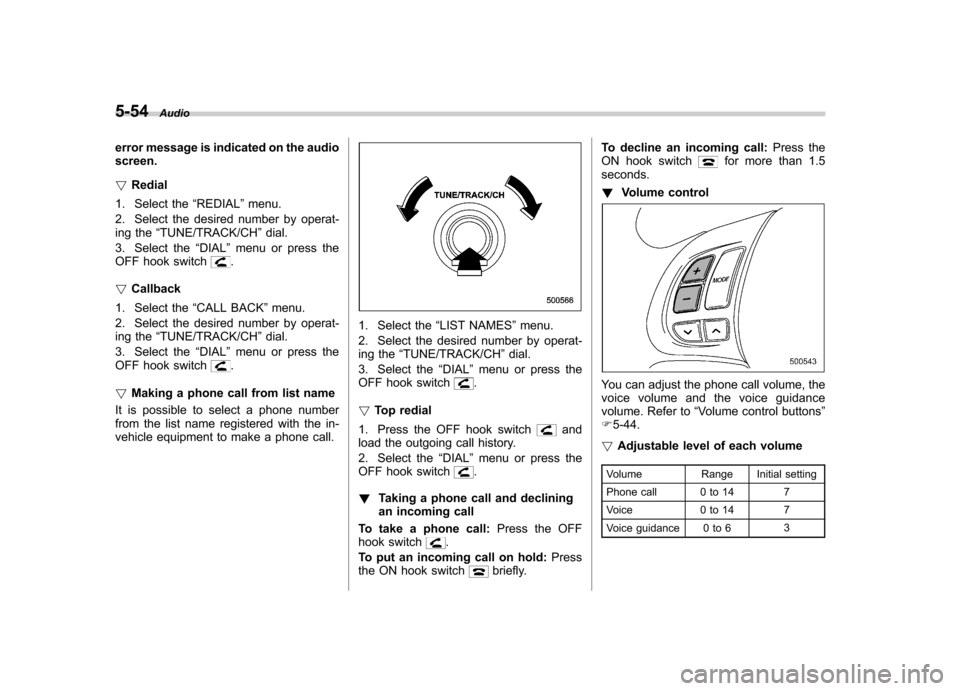
You can adjust the phone call volume, the
voice volume and the voice guidance
volume. Refer to “Volume control buttons ”
F 5-44.
! Adjustable level of each volume
Volume Range Initial setting
Phone call 0 to 14 7
Voice 0 to 14 7
Voice guidance 0 to 6 3
Page 243 of 458

5-56Audio
First menu Second menu Third menu Details
PHONE BOOK* ADD ENTRY BY VOICE Adding a new number by voice
BY PHONE Adding a new number by cell phone
MANUAL INPUT Adding a new number by inputting manually
CALL HISTORY Adding a new number from the call history
GO BACK
LIST NAMES —Showing the list of the names registered in the phonebook
CHANGE NAME —Changing a name registered in the phonebook
SET SPD DIAL —Registering a speed dial
DELETE ENTRY —Deleting phonebook data
DEL SPD DIAL —Deleting a registered speed dial
GO BACK —
REDIAL DIAL
—Redialing
STORE —Adding a new number stored in the outgoing call history memory
DELETE —Deleting a number stored in the outgoing call history memory
GO BACK —
CALLBACK DIAL
—Dialing a number stored in the incoming call history memory
STORE —Adding a new number stored in the incoming call history memory
DELETE —Deleting a number stored in the incoming call history memory
GO BACK —
*: If a cell phone is not registered, the menu described in the chart is not indicated.
Page 244 of 458

First menu Second menu Third menuDetails
SETUP SECURITY SET PIN Setting a PIN code
PHBK LOCK* Locking the phonebook
PHBK UNLOCK* Unlocking the phonebook
GO BACK
PHONE SETUP PAIR PHONE Registering a new cell phone
SELECT PHONE Selecting a cell phone to be used
CHANGE NAME Changing the registered name of the cell phone
LIST PHONES Showing the list of the registered cell phones
SET PASSKEY Changing the pass key
DELETE Deleting the registered cell phone
GO BACK
SYSTEM SETUP GUIDANCE VOL Setting the volume of the voice guidance
INITIALIZE Initialization
SEL LANGUAGE Selecting the language (using the Hands-free system)
GO BACK
GO BACK —
*: If a PIN code is not registered, the menu described in the chart is not available. Audio
5-57
– CONTINUED –