audio SUBARU LEGACY 2012 5.G Owner's Guide
[x] Cancel search | Manufacturer: SUBARU, Model Year: 2012, Model line: LEGACY, Model: SUBARU LEGACY 2012 5.GPages: 474, PDF Size: 17.45 MB
Page 208 of 474

.Skipping past the first track/file will
take you to the last track/file in the
folder. ! By using the dial (type A and B audio)
“ TRACK ”dial:
Type A audio
Type B audio
Turn the “TRACK ”dial clockwise to skip to
the beginning of the next track/file. Each
time the dial is turned, the indicated track/
file number will increase.
Turn the “TRACK ”dial counterclockwise
to skip to the beginning of the current
track/file. Each time the dial is turned, the
indicated track/file number will decrease. !
By using the button (type B and Caudio)
Type B audio:
Forward direction
Backward direction
Type C audio:
Forward direction
Backward direction
Press the “”button briefly to skip to the
beginning of the next track/file. Each time
the button is briefly pressed, the indicated
track/file number will increase.
Press the “
”button briefly to skip to the
beginning of the current track/file. Each
time the button is briefly pressed, the
indicated track/file number will decrease. &
Fast-forwarding and rewind- ing
Type A audio:
1) Fast-forwarding
2) Rewinding
Type B audio:
Fast-forwarding
Rewinding
Audio 5-25
– CONTINUED –
Page 209 of 474

5-26Audio
Type C audio:
Fast-forwarding
Rewinding
Press and hold the “”button to fast-
forward the track/file. Release the button
to stop fast-forwarding.
Press and hold the “
”button to rewind
the track/file. Release the button to stop rewinding.
NOTE . If you fast-forward to the end of the
last track/file, fast-forwarding will stop
and the player will start playback
beginning with the first track/file. For
an MP3, WMA or AAC folder, the player
will start playback beginning with the
first track/file of the next folder.. If you rewind to the beginning of the
first track/file, rewinding will stop and
the player will start playback. For an
MP3, WMA or AAC folder, the player
will start playback beginning with the
first track/file of the current folder. &
Repeating
Repeat button:
Type A audio
Type B audio
Type C audio
To repeat a track/file, briefly press the
repeat button while the track/file is playing.
Each time you briefly press the repeat
button, the mode changes in the followingsequences.
Type A and B audio:
Type C audio:
NOTE . The “TRACK RPT ”(type A and B
audio)/ “ONE ”(type C audio) indication
refers to the repeat playback of a single
track. It repeats the track that is play-ing.. The “FOLDER RPT ”(type A and B
audio)/ “FOLDER ”(type C audio) indi-
cation refers to the repeat playback of a
folder. It repeats the all of the tracks in
the folder. It is possible to select the
function when the MP3/WMA/AAC for-
mat track is playing.
To cancel the track/file repeat-play mode,
briefly press the repeat button and select
CANCEL. The “RPT ”indication will turn
off, and the normal playback mode will beresumed.
NOTE
The repeat-play mode will be cancelled
if you perform any of the followingsteps: . Press the “
”button.
. Press the “SCAN ”button.
. Turn the “TUNE ”dial during repeat
playback of a single track (type C audio).
Page 210 of 474

&Random playback
Random button:
Type A audio*
1
Type B audio*1
Type C audio*2
*1: Press and hold the button.
*2: Press the button briefly.
To play back a track/file(s) at random,
press the random button.
Each time you press the button, the mode
changes in the following sequences.
Type A audio:
Type B audio:
Type C audio:
NOTE . The “RDM ”indication refers to the
random playback of the tracks. It
randomly repeats the tracks on the
CD. It is possible to select the function
when formats other than the MP3/WMA/
AAC format CD is playing.. The “FOLDER RDM ”(type A and B
audio)/ “FOLDER ”(type C audio) indi-
cation refers to the random playback in
the folder. It randomly repeats the
tracks in the folder. It is possible to
select the function when an MP3/WMA/
AAC format track is playing.. The “DISC RDM ”(type A audio)/
“ ALL RDM ”(type B audio)/ “ALL ”(type
C audio) indication refers to the ran-
dom playback of a disc. It randomly
repeats the tracks on the CD. It is
possible to select the function when an MP3/WMA/AAC format track is play-ing.
To cancel the random playback mode,
press the random button and selectCANCEL. The
“RDM ”indication will turn off, and the
normal playback mode will be resumed.
NOTE
Random playback will be cancelled if
you perform any of the following steps: . Press the “”button.
. Press the “SCAN ”button.
. Press the “
”or “”side of the
“ FOLDER ”button when an MP3/WMA/
AAC format track is playing (type A and
B audio).. Turn the “TUNE ”dial during random
playback of the disc (type C audio). Audio
5-27
– CONTINUED –
Page 211 of 474

5-28Audio
&Scan
Type A audio
Type B audio
Type C audio
The scan mode lets you listen to the first
10 seconds of each track/file in succes-
sion. Press the “SCAN ”button to start
scanning upward beginning with the track/
file(s) following the currently selected one.
After all track/file(s) in the disk/folder have
been scanned, normal playback will be
resumed. To cancel the scan mode, pressthe “SCAN ”button again.
NOTE
The scan mode will be cancelled if you
perform any of the following steps. . Press the “RPT/RDM ”button (type A
and B audio). . Press the “RPT ”button (type C
audio).. Press the “RDM ”button (type C
audio). .
Turn the “TUNE ”dial.
. Press the “
”or “”side of the
“ FOLDER ”button (type A and B audio).
. Press the “
”button.
. Press the “”or “”side of the
“ SEEK ”button.
. Select the radio or AUX mode.
. Turn off the power of the audio
equipment. . Turn the ignition switch to the
“ LOCK ”position.
& Display selection (type A and
B audio)
Type A audio
Type B audio
If you press the “TEXT ”button during
playback, the indication will change to the
next one in the following sequence.
For CD-DA:
For MP3/WMA/AAC:
! Page (track/folder title) scroll
If you press and hold the “TEXT ”button
while displaying the title (name), the title
will be scrolled so you can see all of it. NOTE
The display is designed to show titles
for up to 30 characters. & Folder selection
NOTE . Selecting folders in this way is
possible only within a single disc. . Only MP3/WMA/AAC folders are re-
cognized when an attempt to select the
next or previous folder is made. If no
appropriate folder exists on the disc,
performing the following procedures
starts playback beginning with the firsttrack/file.
–Press the “
”or “”side of the
“ FOLDER ”button (type A and B
audio). – Tu r n t h e “TUNE ”dial (type C
audio).
Page 212 of 474

!Type A and B audio
Press the following buttons briefly.
Type A audio:
1) To select the next folder
2) To go back to the previous folder
Type B audio:
To select the next folder
To go back to the
previous folder
! Type C audio
“ TUNE ”dial
Turn the “TUNE ”dial clockwise to select
the next folder. Turn the dial counter-
clockwise to go back to the previous
folder. & How to eject a CD from the player
When a disc is being played back or when
a disc is in the player, press the ejectbutton
. The disc will be ejected.
NOTE . Avoid driving the vehicle with a CD
sticking out. The CD may fall out due to vibration.. If you do not remove the ejected
disc within approximately 15 seconds
(type A and B audio)/20 seconds (type
C audio), a disc protection function will
operate, automatically reloading the
disc. In this case, the disc is not played. &
When the following mes-
sages are displayed
If one of the following messages is
displayed while operating the CD player,
determine the cause based on the follow-
ing information. If you cannot clear those
messages, please contact your SUBARU
dealer. ! When “PUSH EJECT ”is displayed
Press the
button to eject the disc.
Check the disc for damage or deforma-
tion, and also check that the correct disc is
inserted. Do not try to eject the disc
forcibly. Mini CDs (i.e., 8 cm/3 inch CDs)
are not supported, and if inserted, they will
be immediately ejected. If the disc cannot
be ejected or this message remains
displayed, please contact your SUBARU
dealer. ! When “CHECK DISC ”is displayed
Press the
button to eject the discs.
Check that the disc is not damaged or
scratched, and also check that the disc is
inserted correctly. This message may
appear when using some CD-RW discs.
Check that the disc type (i.e., 8 cm/3 inch
CDs are not supported) and data format
are correct. This player can only play CD-
DA, MP3, WMA and AAC data formats. If
the disc cannot be ejected or this mes-
sage remains displayed, please contact Audio
5-29
– CONTINUED –
Page 213 of 474
5-30Audio
your SUBARU dealer. !When “No audio file ”is displayed
(type C audio)
Press the
button to eject the disc.
This message appears when a CD has
been loaded that does not contain any
playable files. Insert a CD that contains
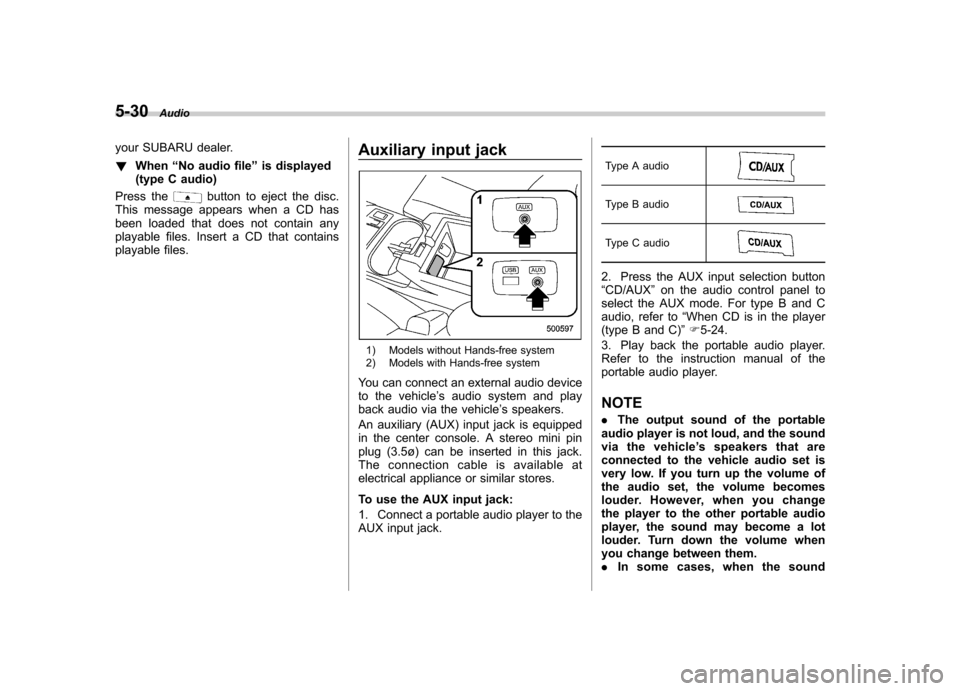
playable files. Auxiliary input jack
1) Models without Hands-free system
2) Models with Hands-free system
You can connect an external audio device
to the vehicle ’s audio system and play
back audio via the vehicle ’s speakers.
An auxiliary (AUX) input jack is equipped
in the center console. A stereo mini pin
plug (3.5ø) can be inserted in this jack.
The connection cable is available at
electrical appliance or similar stores.
To use the AUX input jack:
1. Connect a portable audio player to the
AUX input jack. Type A audio
Type B audio
Type C audio
2. Press the AUX input selection button “
CD/AUX ”on the audio control panel to
select the AUX mode. For type B and C
audio, refer to “When CD is in the player
(type B and C) ”F 5-24.
3. Play back the portable audio player.
Refer to the instruction manual of the
portable audio player. NOTE . The output sound of the portable
audio player is not loud, and the sound
via the vehicle ’s speakers that are
connected to the vehicle audio set is
very low. If you turn up the volume of
the audio set, the volume becomes
louder. However, when you change
the player to the other portable audio
player, the sound may become a lot
louder. Turn down the volume when
you change between them.. In some cases, when the sound
Page 214 of 474

volume of the portable audio player is
low, the sound quality may become
impaired when you turn up the volume
of the vehicle audio system. In this
case, adjust the sound volume of the
portable audio player..In some cases, noise occurs be-
cause of a bad connection between the
portable player and the audio system.
Try cleaning the stereo jack and audioplug.. If noise is not reduced, check for
disconnection of the cord or a malfunc-
tion of the portable player. Precautions to observe when
handling a compact disc
Use only compact discs (CDs, CD-Rs and
CD-RWs) that have the mark shown in the
following illustration. Also, some compact
discs cannot be played.
Audio
5-31
– CONTINUED –
Page 215 of 474
5-32Audio
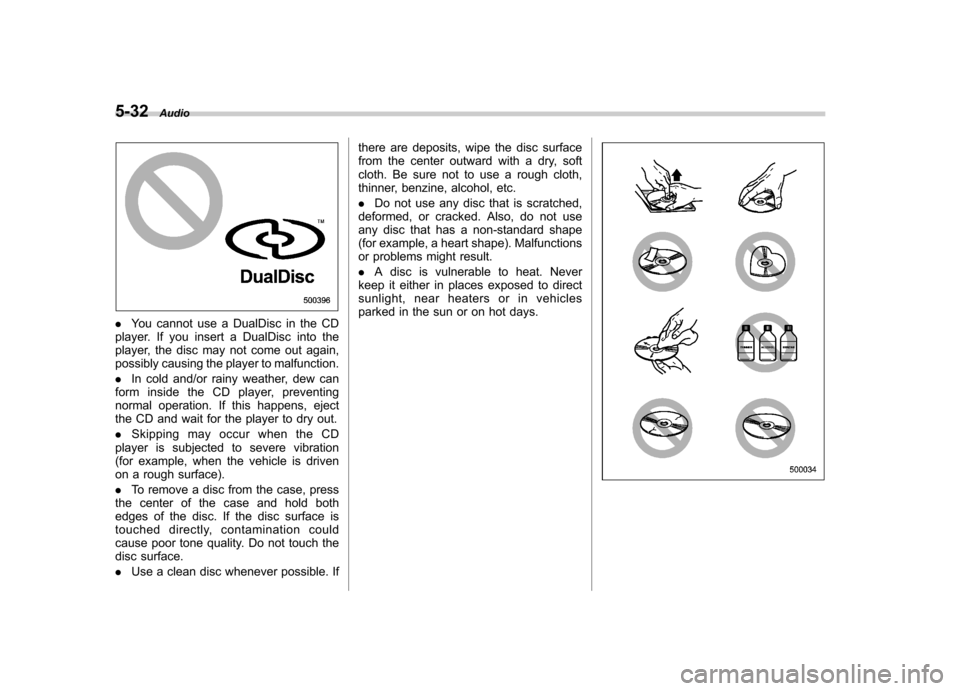
.You cannot use a DualDisc in the CD
player. If you insert a DualDisc into the
player, the disc may not come out again,
possibly causing the player to malfunction. . In cold and/or rainy weather, dew can
form inside the CD player, preventing
normal operation. If this happens, eject
the CD and wait for the player to dry out. . Skipping may occur when the CD
player is subjected to severe vibration
(for example, when the vehicle is driven
on a rough surface). . To remove a disc from the case, press
the center of the case and hold both
edges of the disc. If the disc surface is
touched directly, contamination could
cause poor tone quality. Do not touch the
disc surface. . Use a clean disc whenever possible. If there are deposits, wipe the disc surface
from the center outward with a dry, soft
cloth. Be sure not to use a rough cloth,
thinner, benzine, alcohol, etc. .
Do not use any disc that is scratched,
deformed, or cracked. Also, do not use
any disc that has a non-standard shape
(for example, a heart shape). Malfunctions
or problems might result. . A disc is vulnerable to heat. Never
keep it either in places exposed to direct
sunlight, near heaters or in vehicles
parked in the sun or on hot days.
Page 216 of 474

USB storage device / iPod®
operations (type B and C audio) &Play file
Refer to “Play file ”F 5-23.
& Connectable USB storage device
Mass storage class USB memory can be
connected. USB storage devices that can
be played back are accompanied by the
following restrictions. . Maximum directory layers: 8 layers
(including the ROOT). Maximum number of files in a folder:
255. Maximum number of folders: 512 (type
B audio)/255 (type C audio) (including the ROOT) . Maximum number of files on the
device: 130,560 (type B audio)/2,500
(type C audio) NOTE . HUB class USB memory cannot be
played. . ATAPI subclass USB cannot be
played.. High Speed USB 2.0 cannot be
played. .
A USB memory that is powered by a
source other than the USB power
supply (for example, an AC power
adapter, etc.) cannot be operated.. A USB memory that is connected to
the memory card reader or multi card
reader cannot be operated.. If the USB memory consists of two
drives or more, the system will recog-
nize only one of the drives after con-
necting the USB memory.. The contents stored on the USB
memory may not be played in the same
order as they appear on a personal
computer.. A personal computer cannot be
used even if it is connected to the
system using a USB cable.. If the USB memory has a security
function, the contents stored on the
USB memory cannot be played by thesystem.. A USB memory and an iPod
®cannot
be connected to the system at the
same time. &
Connectable iPod
®models
Type B audio:
Model Firmware version
iPod
®
5G 1.3
5.5G 1.3
classic 1G 2.0.4
classic 2G
nano 2G 1.1.3
nano 3G 1.1.3
nano 4G 1.0.4
nano 5G 1.0.2
touch 1G 3.1.2
touch 2G 3.1.2
iPhone
®1G 3.1.2
3G 3.1.2
3G S 3.1.2Audio
5-33
– CONTINUED –
Page 217 of 474
5-34Audio
Type C audio:
Model Firmware version
iPod
®
5G 1.2.1~1.3
classic 1.0.0~1.1.2
nano 1.3.1
nano 2G 1.1.3
nano 3G 1.0.0~1.1.3
nano 4G 1.0.0~1.0.3
touch 1.1~2.2.1
iPhone
®
1G 3.1.3
3G 4.2.1
3G S 4.2.1 4 4.2.1
CAUTION
Do not connect an iPod
®other than
the previously stated models. Doing
so may result in a malfunction or,
depending on conditions, cause afire.
NOTE . iPod
®is a registered trademark of
Apple Inc. . You are only permitted to personally
copy and play copyright-free material or material that is legally permitted to
be copied and played by using aniPod
®and iTunes. Copyright infringe-
ment is prohibited by law.. To check the firmware version of an
iPod
®, connect it to a computer and
check the device manager. For further
information, see the User ’s Guide that
comes with the iPod
®.
. To update the firmware version of an
iPod
®, visit the Apple Inc. website.
. Depending on the model and firm-
ware version of an iPod
®, it may not
work properly or not operate at all. & Connecting USB storage de-
vice / iPod
®
WARNING
Do not operate an iPod
®while
driving. Doing so may distract your
attention from driving and could
lead to an accident.
CAUTION
. If the data stored on an iPod
®is
deleted while it is connected to
the in-vehicle system, the data
cannot be recovered. .
Do not store an iPod
®in the
vehicle. If an iPod®is left in the
vehicle for a long period of time,
it may be deformed, discolored
or damaged by high temperature.
NOTE . Even if a USB storage device or
iPod
®is connected, it cannot be played
unless the USB/iPod®mode is se-
lected. . Movies stored on a USB storage
device or an iPod
®cannot be played
while the storage device or iPod®is
connected to the system.. While an iPod
®is connected, the
iPod®cannot be operated using the
click wheel on the iPod®(except some
models). . When using an iPod
®by connecting
it to in-vehicle equipment, the order of
the list items displayed on the in-
vehicle equipment may be different
from that on the iPod
®. However, this
does not indicate a malfunction.. An iPod
®battery that is connected
to in-vehicle equipment will be charged
when the ignition switch is in the “ON ”
or “Acc ”position. However, activation
of the iPod
®may be delayed if the
battery charge of the iPod®is low.
. If an iPod®does not activate after