audio SUBARU LEGACY 2012 5.G Service Manual
[x] Cancel search | Manufacturer: SUBARU, Model Year: 2012, Model line: LEGACY, Model: SUBARU LEGACY 2012 5.GPages: 474, PDF Size: 17.45 MB
Page 218 of 474
operation, disconnect the connection
cable from the iPod®and reset it. For
the resetting procedure, see the User ’s
Guide of the iPod
®.
. If an iPod®and the connection cable
are connected improperly, the iPod®
cannot be powered on or will not be
recognized by in-vehicle equipment. In
this case, disconnect the connection
cable from the iPod
®, and then connect
it again.
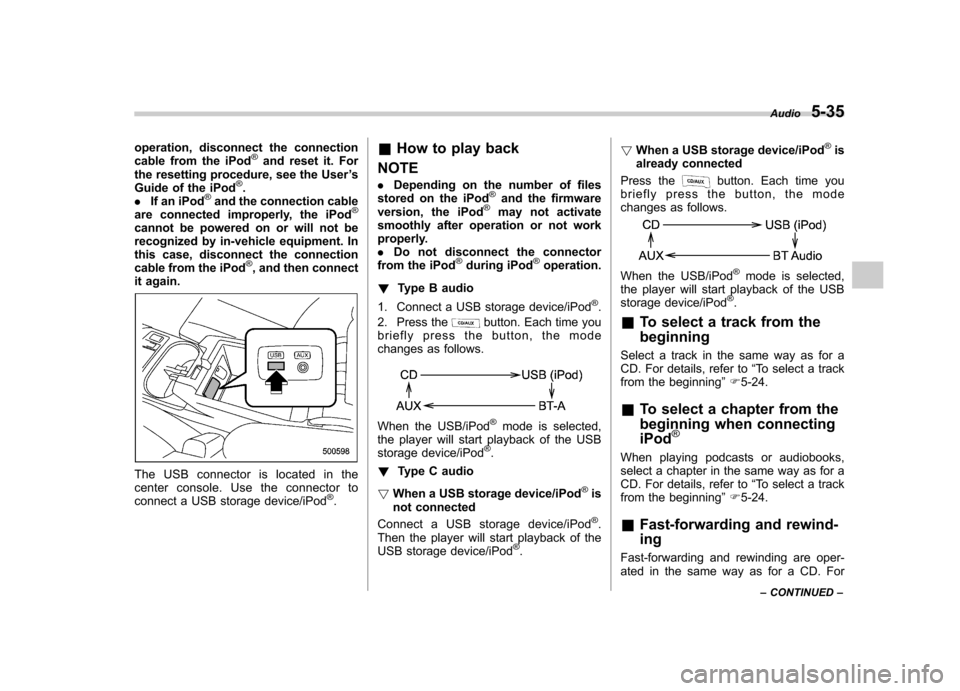
The USB connector is located in the
center console. Use the connector to
connect a USB storage device/iPod
®. &
How to play back
NOTE . Depending on the number of files
stored on the iPod
®and the firmware
version, the iPod®may not activate
smoothly after operation or not work
properly.. Do not disconnect the connector
from the iPod
®during iPod®operation.
! Type B audio
1. Connect a USB storage device/iPod
®.
2. Press the
button. Each time you
briefly press the button, the mode
changes as follows.
When the USB/iPod®mode is selected,
the player will start playback of the USB
storage device/iPod
®.
! Type C audio
! When a USB storage device/iPod
®is
not connected
Connect a USB storage device/iPod
®.
Then the player will start playback of the
USB storage device/iPod
®. !
When a USB storage device/iPod
®is
already connected
Press the
button. Each time you
briefly press the button, the mode
changes as follows.
When the USB/iPod®mode is selected,
the player will start playback of the USB
storage device/iPod
®.
& To select a track from the beginning
Select a track in the same way as for a
CD. For details, refer to “To select a track
from the beginning ”F 5-24.
& To select a chapter from the
beginning when connectingiPod
®
When playing podcasts or audiobooks,
select a chapter in the same way as for a
CD. For details, refer to “To select a track
from the beginning ”F 5-24.
& Fast-forwarding and rewind- ing
Fast-forwarding and rewinding are oper-
ated in the same way as for a CD. For Audio
5-35
– CONTINUED –
Page 219 of 474

5-36Audio
details, refer to “Fast-forwarding and
rewinding ”F 5-25.
NOTE
When connecting iPod
®:
. When the end of a track is reached
while fast-forwarding, fast-forwarding
ends and play begins from the begin-
ning of the next track.. When the beginning of a track is
reached while rewinding, rewinding
ends and play begins from the begin-
ning of the track. & Repeating
! When connecting USB storage de- vice
Repeating is operated in the same way as
for a CD. For details, refer to “Repeating ”
F 5-26.
! When connecting iPod
®
Repeat button:
Type B audio
Type C audio
Each time you briefly press the repeat
button, the mode changes in the followingsequence.
Type B audio:
Type C audio:
NOTE . The “ALL RPT ”(type B audio)/ “ALL ”
(type C audio) indication refers to the
repeat playback of all tracks in the
entire iPod
®(type B audio)/playing list
(type C audio).. The “SONG RPT ”(type B audio)/
“ ONE ”(type C audio) indication refers
to the repeat playback of a single track.
It repeats the track that is playing. . When an audiobook is playing, the
mode does not change even if you
press the repeat button. For type C
audio, refer to “Setting the playing
speed (only when the audiobook is
playing) (type C audio) ”F 5-39. &
Random playback
Random button:
Type B audio*
1
Type C audio*2
*1: Press and hold the button.
*2: Press the button briefly.
To playback a track at random, press the
random button while the track is playing.
Each time you press the button, the mode
changes in the following sequences.
When connecting USB storage device
(type B audio):
When connecting USB storage device
(type C audio):
Page 220 of 474

When connecting iPod®(type B audio):
When connecting iPod®(type C audio):
NOTE .The “FOLDER RDM ”(type B audio)/
“ Folder ”(type C audio) indication re-
fers to the random playback in the
folders. It randomly repeats all of the
tracks in the folder.. The “ALL RDM ”(type B audio)/ “All ”
(type C audio) indication refers to the
random playback on the entire USB
storage device. It randomly repeats all
of the tracks on the USB storage device.. The “ALBUM RDM ”(type B audio)/
“ Album ”(type C audio) indication re-
fers to the shuffle playback of the
album. It sequentially plays back all of
the tracks on the album.. The “SONG RDM ”(type B audio)/
“ Track ”(type C audio) indication refers
to the shuffle playback on the entireiPod
®. It randomly repeats all of the tracks on the iPod
®.
. When an iPod®is connected, the
files are played back at random by the
shuffle function of the iPod
®. There-
fore, iPod®operation may be different
depending on the model of the con-
nected iPod
®. Visit the Apple Inc.
website for details.. When an audiobook or a podcast is
playing, the mode does not change
even if you press the random button.
To cancel the random playback mode,
press the random button and select
CANCEL. The “RDM ”indication will turn
off, and the normal playback mode willresume. & SCAN (only when connecting
USB storage device)
Scan is operated in the same way as for a
CD. For details, refer to “Scan ”F 5-28.
NOTE
When an iPod
®is connected, you
cannot select the SCAN mode. &
Selecting category (only
when connecting iPod
®)
! Type B audio
“ LIST ”button
“TUNE ”dial
When the “LIST ”button is pressed briefly,
the iPod®menu is displayed.
Each time you turn the “TUNE ”dial clock-
wise, the displayed category changes in
the following sequence. Each time you
turn the dial counterclockwise, the dis-
played category changes in the oppositesequence. Audio
5-37
– CONTINUED –
Page 221 of 474

5-38Audio
To select the category, press the dial. To
close the iPod®menu, press and hold the
“ LIST ”button. To return to the previous
screen, briefly press the “LIST ”button.
! Type C audio
“ LIST ”button
“BACK ”button
“TUNE ”dial
When the “LIST ”button or “BACK ”button
is pressed briefly, the iPod®menu is
displayed as follows. 1st layer 2nd layer 3rd layer 4th layer 5th layer
Now playing ————
Playlists Playlists List Songs List ——
Artists Artists List Albums List Songs List —
Albums Albums List Songs List ——
Songs Songs List ———
Podcasts Podcasts List Songs List ——
Genres Genres List Artists List Albums List Songs List
Composers Composers List Albums List Songs List —
Audiobooks Audiobooks List ———
Shuffle Songs ——— —
Turn and press the “TUNE ”dial to select the category. To return to the upper layer, press
the “BACK ”button. To return to the 1st layer, press the “LIST ”button.
Page 222 of 474

&Display selection (type B audio)
If you press the
button during
playback, the indication will change to
the next one in the following sequence.
For USB storage device:
For iPod®:
! Page scroll
Refer to “Page (track/folder title) scroll ”
F 5-28.
& Folder selection (only when
connecting USB storage de-vice)
Refer to “Folder selection ”F 5-28.
NOTE
When an iPod
®is connected, you
cannot select a folder. &
Selection from list (only
when connecting USB sto-
rage device) (type C audio)
“ TUNE ”dial
“BACK ”button
You can select folder/track/file(s) from the
list. Turn and press the “TUNE ”dial to
select the folder/track/file. To return to the
upper layer, press the “BACK ”button.
& Setting the playing speed
(only when the audiobook is
playing) (type C audio)
Each time you briefly press the “RPT ”
button while the audiobook is playing, the
playing speed changes in the followingsequence.
& When the following mes-
sages are displayed
If one of the following messages is
displayed while connecting the USB sto-
rage device/iPod
®, determine the cause
based on the following information. If you
cannot clear those messages, please
contact your SUBARU dealer. Audio
5-39
– CONTINUED –
Page 223 of 474

5-40Audio
Message Cause Action
“ CHECK DEVICE ”
.When there is a short in the USB bus
. When an incompatible device (for example a USB mouse) is
connected
. When an incompatible iPod
®is connected
. When a connected iPod®is frozen
. When a transmission malfunction occurs
. When an iPod
®confirmation malfunction occurs
. When a HUB class USB storage device is connected Disconnect the USB storage device/iPod
®and
check it.
“ NO DEVICE ”(type B audio)
“ No USB ”(type C audio)
“ No iPod ”(type C audio) .
No USB storage devices/iPod
®are connected.
. An incompatible USB storage device/iPod®is connected. Connect a supported USB storage device/iPod
®.
“ NO FILE ”(type B audio)
“ No song ”(type C audio) There are no playable audio files on the connected USB storage device. Connect a USB storage device that has playable
audio files stored on it.
“ NO MUSIC ”(type B audio)
“ No Songs ”(type C audio) There are no playable audio files on the connected iPod
®.Connect an iPod®that has playable audio files
stored on it.
Page 224 of 474
Audio control buttons NOTE
For models with the genuine SUBARU
navigation system, refer to the Owner’s
Manual supplement for the navigationsystem.
Models without Hands-free system
Models with Hands-free system
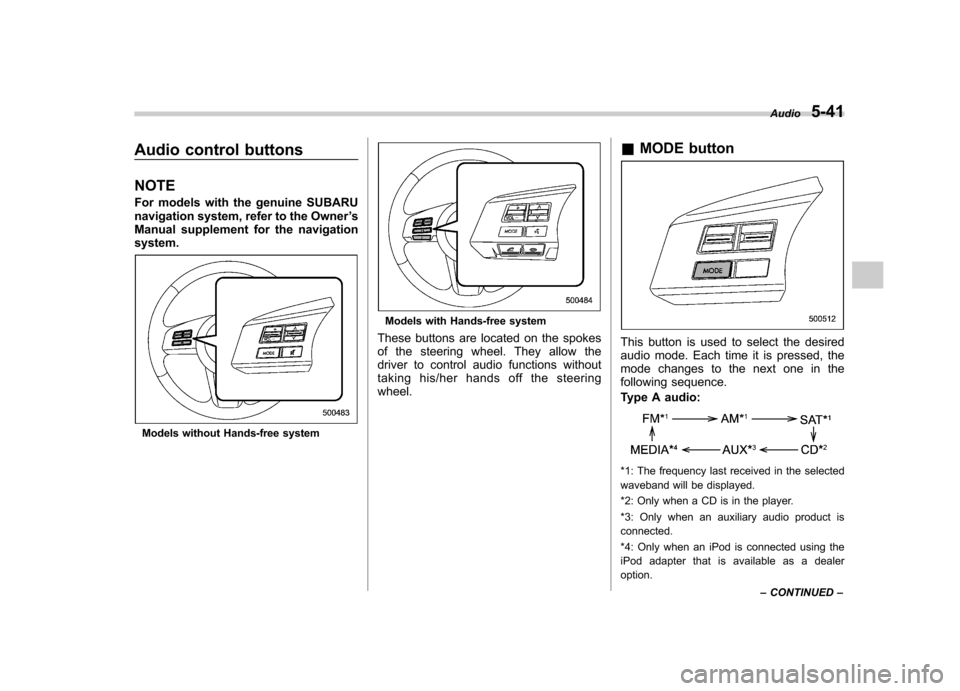
These buttons are located on the spokes
of the steering wheel. They allow the
driver to control audio functions without
taking his/her hands off the steeringwheel. &
MODE button
This button is used to select the desired
audio mode. Each time it is pressed, the
mode changes to the next one in the
following sequence.
Type A audio:
*1: The frequency last received in the selected
waveband will be displayed.
*2: Only when a CD is in the player.
*3: Only when an auxiliary audio product is connected.
*4: Only when an iPod is connected using the
iPod adapter that is available as a dealer option. Audio
5-41
– CONTINUED –
Page 225 of 474
5-42Audio
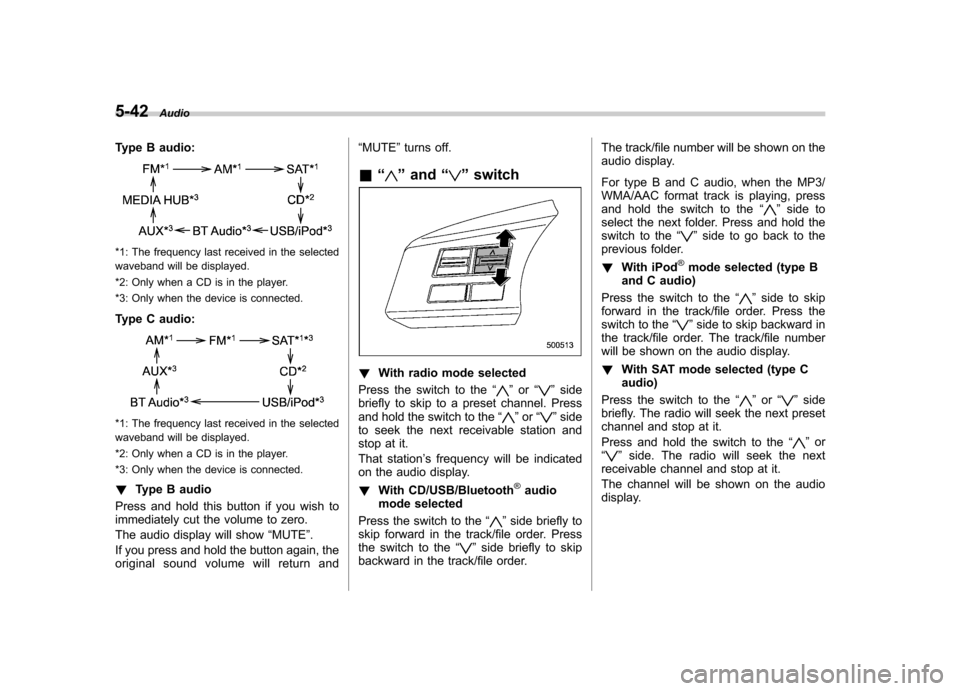
Type B audio:
*1: The frequency last received in the selected
waveband will be displayed.
*2: Only when a CD is in the player.
*3: Only when the device is connected.
Type C audio:
*1: The frequency last received in the selected
waveband will be displayed.
*2: Only when a CD is in the player.
*3: Only when the device is connected. ! Type B audio
Press and hold this button if you wish to
immediately cut the volume to zero.
The audio display will show “MUTE ”.
If you press and hold the button again, the
original sound volume will return and “
MUTE ”turns off.
& “
”and “”switch
! With radio mode selected
Press the switch to the “
”or “”side
briefly to skip to a preset channel. Press
and hold the switch to the “
”or “”side
to seek the next receivable station and
stop at it.
That station ’s frequency will be indicated
on the audio display. ! With CD/USB/Bluetooth
®audio
mode selected
Press the switch to the “
”side briefly to
skip forward in the track/file order. Press
the switch to the “
”side briefly to skip
backward in the track/file order. The track/file number will be shown on the
audio display.
For type B and C audio, when the MP3/
WMA/AAC format track is playing, press
and hold the switch to the
“
”side to
select the next folder. Press and hold the
switch to the “
”side to go back to the
previous folder. ! With iPod
®mode selected (type B
and C audio)
Press the switch to the “
”side to skip
forward in the track/file order. Press the
switch to the “
”side to skip backward in
the track/file order. The track/file number
will be shown on the audio display. ! With SAT mode selected (type C audio)
Press the switch to the “
”or “”side
briefly. The radio will seek the next preset
channel and stop at it.
Press and hold the switch to the “
”or
“” side. The radio will seek the next
receivable channel and stop at it.
The channel will be shown on the audio
display.
Page 226 of 474
&Volume control switch
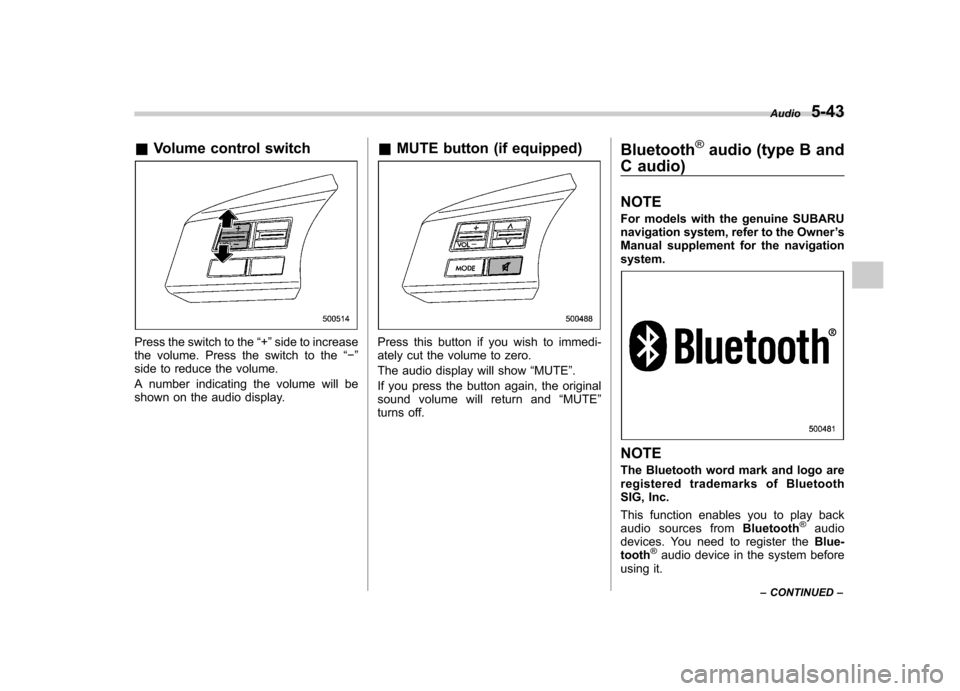
Press the switch to the “+ ”side to increase
the volume. Press the switch to the “ ”
side to reduce the volume.
A number indicating the volume will be
shown on the audio display. &
MUTE button (if equipped)Press this button if you wish to immedi-
ately cut the volume to zero.
The audio display will show “MUTE ”.
If you press the button again, the original
sound volume will return and “MUTE ”
turns off. Bluetooth
®audio (type B and
C audio) NOTE
For models with the genuine SUBARU
navigation system, refer to the Owner ’s
Manual supplement for the navigationsystem.
NOTE
The Bluetooth word mark and logo are
registered trademarks of Bluetooth
SIG, Inc.
This function enables you to play back
audio sources from Bluetooth
®audio
devices. You need to register the Blue-
tooth
®audio device in the system before
using it. Audio
5-43
– CONTINUED –
Page 227 of 474

5-44Audio
NOTE . The Bluetooth
®audio function may
not operate properly under the follow-
ing conditions.
–The device is turned off.
– The battery of the device has run
down. – The device is not connected to
the system.– The device is behind the seat or
in the glove box.– A metal material is covering or
touching the device.
. Depending on the type of device that
is used, operation and sound volume
may be different from normal use of
those devices. . The sound quality may degrade due
to the influence of the device that is
connected to the system or the circum-
stances of the Bluetooth network. . When another Bluetooth
®device is
simultaneously connected, noise may
be heard. & Media format
Bluetooth
®audio devices cannot be
connected if they are not compatible with
the following Bluetooth
®profiles.
. A2DP (Advanced Audio Distribution
Profile) .
AVRCP (Audio/Video Remote Control
Profile)
& Setting Bluetooth
®audio
(type B audio)
1. Select “BT-A SETUP ”by pressing the
“ MENU ”button.
2. Perform the following procedure by
operating the “TUNE ”dial while “BT-A ”is
displayed.
NOTE
You cannot set Bluetooth
®audio while
driving. ! Registering (pairing) device
NOTE
Only one device can be registered.
1. Select the “PAIR AUDIO ”menu.
– If a device is already registered,
“ MEMORY FULL ”is displayed and the
mode changes to the Bluetooth
®
audio setting mode.
2. After the passkey is shown on the
display, input the passkey into the device. –If the registering procedure is fin-
ished, “PAIRED ”and the name of the
device are displayed. – If the registering procedure was not
successful, “FAILED ”is displayed. After the name of the device or
“FAILED ”
is displayed, the mode changes to the Bluetooth
®audio setting mode.
NOTE
After the ignition switch is turned to the “ LOCK ”position, the registered device
is not automatically connected to the
system even if the ignition switch is
turned to the “Acc ”or “ON ”position.
! Selecting device
1. Select the “SELECT AUDIO ”menu.
– If no devices are registered,
“ EMPTY ”is displayed and the mode
changes to the Bluetooth
®audio
setting mode.
2. Select the “CONFIRM ”menu.
– Then the name of the selected
device is displayed. – If the device is connected, “SE-
LECTED ”is displayed and the mode
changes to the Bluetooth
®audio
setting mode.– If the device cannot be connected,
“ FAILED ”is displayed and the select-
ing procedure was not successful.
! Setting passkey
1. Select the “SET PASSKEY ”menu.
– After the currently set passkey is
displayed, a new passkey can be