door lock SUBARU OUTBACK 2007 4.G User Guide
[x] Cancel search | Manufacturer: SUBARU, Model Year: 2007, Model line: OUTBACK, Model: SUBARU OUTBACK 2007 4.GPages: 442, PDF Size: 13.39 MB
Page 94 of 442
Immobilizer
The immobilizer system is designed to
prevent an unauthorized person from
starting the engine. Only keys registered
with your vehicle’s immobilizer system can
be used to operate your vehicle. Even if
an unregistered key fits into the ignition
switch and can be turned to the “START ”
position, the engine will automatically stop
after several seconds.
Each immobilizer key contains a trans-
ponder in which the key ’s ID code is
stored. When a key is inserted into the
ignition switch and turned to the “ON ”
position, the transponder transmits thekey ’s ID code to the immobilizer system ’s
receiver. If the transmitted ID code
matches the ID code registered in the
immobilizer system, the system allows the
engine to be started. Since the ID code is
transmitted and acted upon almost in-
stantly, the immobilizer system does not
impede normal starting of the engine.
If the engine fails to start, pull out the key
once before trying again. (Refer to the“ Ignition switch ”section [chapter 3].)
This device complies with Part 15 of
the FCC Rules and with RSS-210 of
Industry Canada. Operation is subject
to the following two conditions: (1) This device may not cause harmful inter-
ference, and (2) this device must
accept any interference received, in-
cluding interference that may cause
undesired operation.
Changes or modifications not ex-
pressly approved by the party respon-
sible for compliance could void theuser
’s authority to operate the equip-
ment.
NOTE
To protect your vehicle from theft,
please pay close attention to the fol-
lowing security precautions: . Never leave your vehicle unattended
with its keys inside. . Before leaving your vehicle, close all
windows and lock the doors and rear
gate (Station wagon).. Do not leave spare keys or any
record of your key number in thevehicle.
CAUTION
. Do not place the key under direct
sunlight or anywhere it may
become hot. .
Do not get the key wet. If the key
gets wet, wipe it dry with a cloth
immediately.
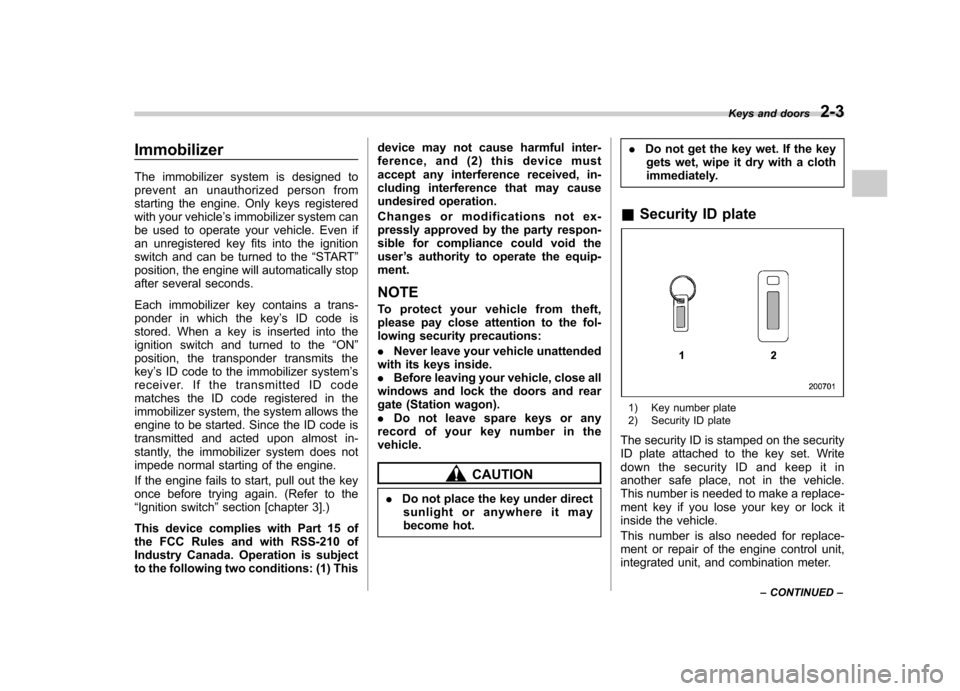
& Security ID plate
1) Key number plate
2) Security ID plate
The security ID is stamped on the security
ID plate attached to the key set. Write
down the security ID and keep it in
another safe place, not in the vehicle.
This number is needed to make a replace-
ment key if you lose your key or lock it
inside the vehicle.
This number is also needed for replace-
ment or repair of the engine control unit,
integrated unit, and combination meter. Keys and doors
2-3
– CONTINUED –
Page 95 of 442
2-4Keys and doors
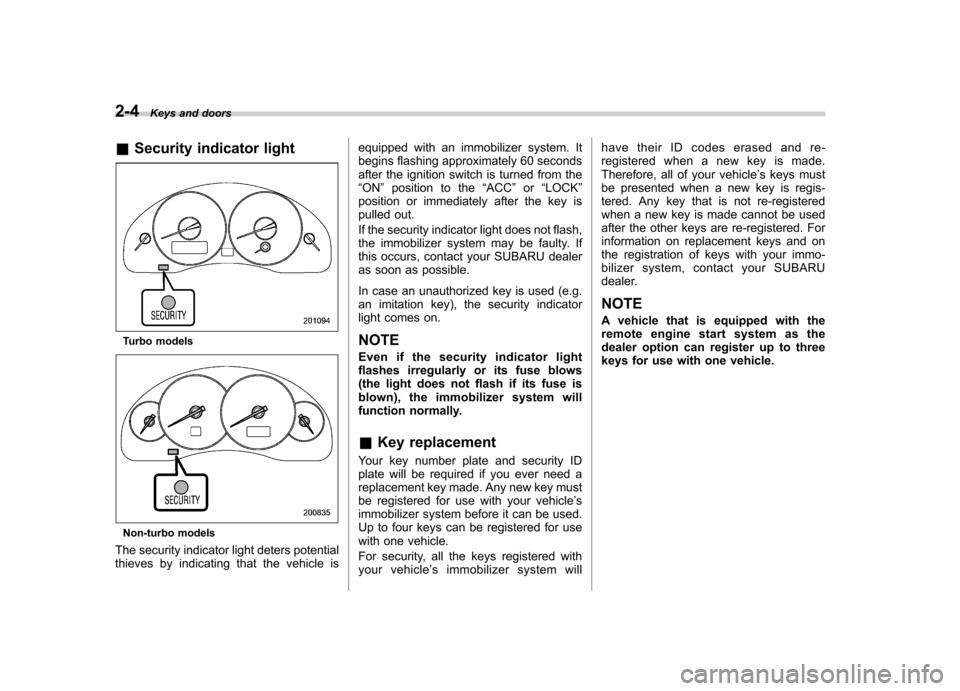
& Security indicator light
Turbo models
Non-turbo models
The security indicator light deters potential
thieves by indicating that the vehicle is equipped with an immobilizer system. It
begins flashing approximately 60 seconds
after the ignition switch is turned from the“
ON ”position to the “ACC ”or “LOCK ”
position or immediately after the key is
pulled out.
If the security indicator light does not flash,
the immobilizer system may be faulty. If
this occurs, contact your SUBARU dealer
as soon as possible.
In case an unauthorized key is used (e.g.
an imitation key), the security indicator
light comes on.
NOTE
Even if the security indicator light
flashes irregularly or its fuse blows
(the light does not flash if its fuse is
blown), the immobilizer system will
function normally. & Key replacement
Your key number plate and security ID
plate will be required if you ever need a
replacement key made. Any new key must
be registered for use with your vehicle ’s
immobilizer system before it can be used.
Up to four keys can be registered for use
with one vehicle.
For security, all the keys registered with
your vehicle ’s immobilizer system will have their ID codes erased and re-
registered when a new key is made.
Therefore, all of your vehicle
’s keys must
be presented when a new key is regis-
tered. Any key that is not re-registered
when a new key is made cannot be used
after the other keys are re-registered. For
information on replacement keys and on
the registration of keys with your immo-
bilizer system, contact your SUBARU
dealer.
NOTE
A vehicle that is equipped with the
remote engine start system as the
dealer option can register up to three
keys for use with one vehicle.
Page 96 of 442
Door locks &Locking and unlocking from
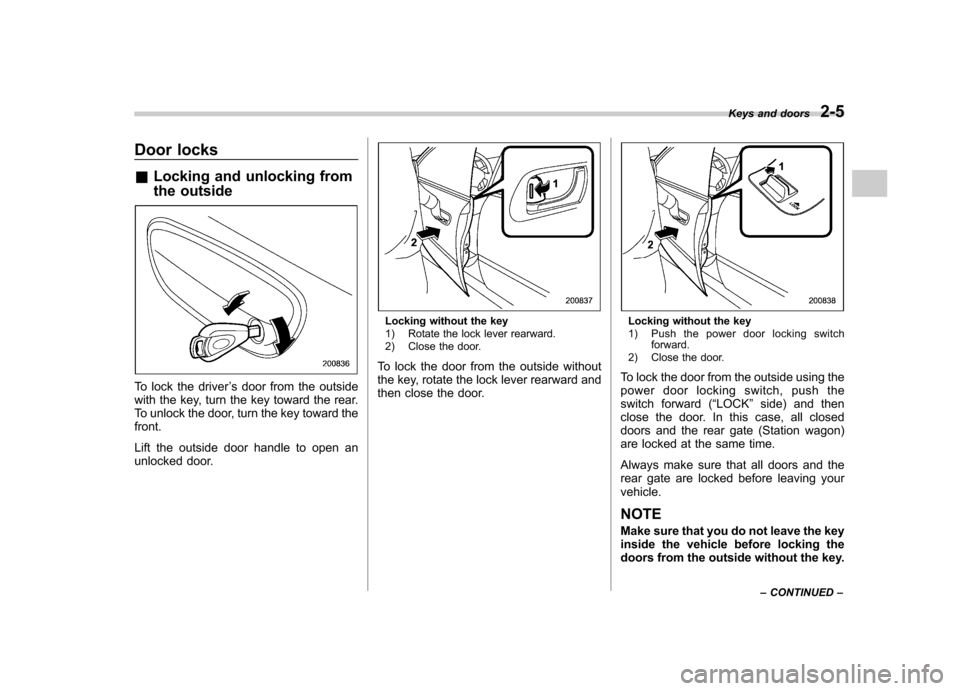
the outside
To lock the driver ’s door from the outside
with the key, turn the key toward the rear.
To unlock the door, turn the key toward thefront.
Lift the outside door handle to open an
unlocked door.
Locking without the key
1) Rotate the lock lever rearward.
2) Close the door.
To lock the door from the outside without
the key, rotate the lock lever rearward and
then close the door.Locking without the key
1) Push the power door locking switch forward.
2) Close the door.
To lock the door from the outside using the
power door locking switch, push the
switch forward ( “LOCK ”side) and then
close the door. In this case, all closed
doors and the rear gate (Station wagon)
are locked at the same time.
Always make sure that all doors and the
rear gate are locked before leaving yourvehicle. NOTE
Make sure that you do not leave the key
inside the vehicle before locking the
doors from the outside without the key. Keys and doors
2-5
– CONTINUED –
Page 97 of 442
2-6Keys and doors
&Locking and unlocking from
the inside
WARNING
Keep all doors locked when you
drive, especially when small chil-
dren are in your vehicle.
Along with the proper use of seat-
belts and child restraints, locking
the doors reduces the chance of
being thrown out of the vehicle in anaccident.
It also helps prevent passengers
from falling out if a door is acciden-
tally opened, and intruders from
unexpectedly opening doors and
entering your vehicle.
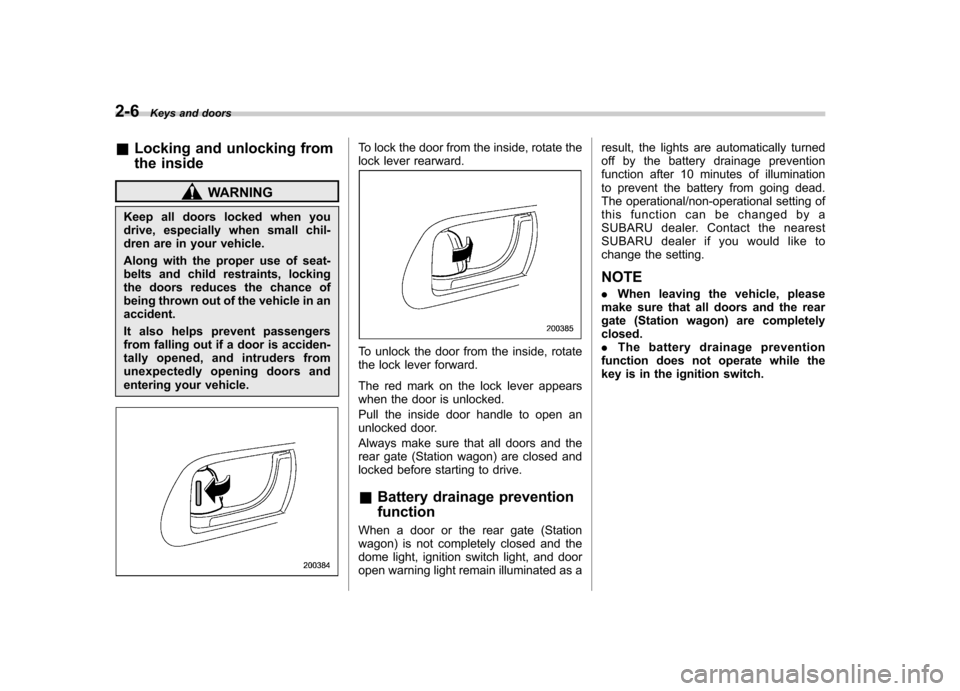
To lock the door from the inside, rotate the
lock lever rearward.
To unlock the door from the inside, rotate
the lock lever forward.
The red mark on the lock lever appears
when the door is unlocked.
Pull the inside door handle to open an
unlocked door.
Always make sure that all doors and the
rear gate (Station wagon) are closed and
locked before starting to drive. & Battery drainage prevention function
When a door or the rear gate (Station
wagon) is not completely closed and the
dome light, ignition switch light, and door
open warning light remain illuminated as a result, the lights are automatically turned
off by the battery drainage prevention
function after 10 minutes of illumination
to prevent the battery from going dead.
The operational/non-operational setting of
this function can be changed by a
SUBARU dealer. Contact the nearest
SUBARU dealer if you would like to
change the setting. NOTE .
When leaving the vehicle, please
make sure that all doors and the rear
gate (Station wagon) are completelyclosed.. The battery drainage prevention
function does not operate while the
key is in the ignition switch.
Page 98 of 442

Power door locking switches
Driver’s switch
Front passenger ’s switch All doors and the rear gate (Station
wagon) can be locked and unlocked by
the power door locking switches located at
the driver
’s side and the front passenger ’s
side doors.
To lock all doors (including the rear gate of
a Station wagon), push the switch to the
front ( “LOCK ”) position.
To unlock all doors (including the rear gate
of a Station wagon), pull the switch to the
rear position.
When you close the doors after you set
the door locks, the doors remain locked.
NOTE
Make sure that you do not leave the key
inside the vehicle before locking the
doors from the outside using the power
door locking switches. & Key lock-in prevention func- tion
This function prevents the doors from
being locked with the key still in the
ignition switch. ! Behavior with key lock-in preven-
tion function operative
With the driver ’s door open, the doors are
automatically kept unlocked even if the
door locking switch is pushed to the front (
“ LOCK ”) position.
! Behavior with key lock-in preven-
tion function non-operative
. If the lock lever is turned to the rear
( “LOCK ”) position with the driver ’s door
open and the driver ’s door is then closed
with the lock lever in that position, thedriver ’s door is locked.
. If the spare key is used to lock the
driver ’s door from the outside of the
vehicle, the door is locked.
This function ’s operative/non-operative
setting can be changed by a SUBARU
dealer. Contact a SUBARU dealer fordetails.
NOTE
When leaving the vehicle, make sure
you are holding the key before locking
the doors. Keys and doors
2-7
Page 99 of 442

2-8Keys and doors
Remote keyless entry system
CAUTION
. Do not expose the transmitter to
severe shocks, such as those
experienced as a result of drop-
ping or throwing.
. Do not take the transmitter apart
except when replacing the bat-
tery.
. Do not get the transmitter wet. If it
gets wet, wipe it dry with a cloth
immediately.
This device complies with Part 15 of
the FCC Rules and with RSS-210 of
Industry Canada. Operation is subject
to the following two conditions: (1) This
device may not cause harmful inter-
ference, and (2) this device must
accept any interference received, in-
cluding interference that may cause
undesired operation.
Changes or modifications not ex-
pressly approved by the party respon-
sible for compliance could void theuser ’s authority to operate the equip-
ment.
Two transmitters are provided for your vehicle.
The keyless entry system has the follow-
ing functions. .
Locking and unlocking the doors (and
rear gate on the Station wagon) without a key . Locking and unlocking the doors (and
trunk lid on the Sedan) without key. Unlocking the rear gate on the Station
wagon without key. Unlocking the trunk lid on the Sedan
without key. Sounding a panic alarm
. Arming and disarming the alarm sys-
tem. See the next section “Alarm system ”
for detailed information.
The operable distance of the keyless entry
system is approximately 30 feet (10
meters). However, this distance will vary
depending on environmental conditions.
The system ’s operable distance will be
shorter in areas near a facility or electronic
equipment emitting strong radio waves
such as a power plant, broadcast station,
TV tower, or remote controller of home
electronic appliances.
The keyless entry system does not oper-
ate when the key is inserted in the ignitionswitch.
: Trunk lid/rear gate unlock button: Unlock/disarm button: Lock/arm button
A: Panic button
1) Front
2) Back
Page 100 of 442

&Locking the doors
Press the “”button to lock all doors and
rear gate (Station wagon). An electronic
chirp will sound once and the turn signal
lights will flash once.
If any of the doors (or the rear gate/trunk
lid) is not fully closed, an electronic chirp
will sound five times and the turn signal
lights will flash five times to alert you that
the doors (or the rear gate/trunk lid) are
not properly closed. When you close the
door, it will automatically lock and then an
electronic chirp will sound once and the
turn signal lights will flash once. &
Unlocking the doorsPress the “”button to unlock the driver ’s
door. An electronic chirp will sound twice
and the turn signal lights will flash twice.
To unlock all doors and the rear gate
(Station wagon), briefly press the “
”
button a second time within 5 seconds. NOTE
If the interval between the first and
second presses of the “
”button (for
unlocking of all of the doors and the
rear gate) is extremely short, the sys-
tem may not respond. &
Unlocking the trunk lid/rear gate
! Sedan
The trunk lid unlocks when the “
”
button is pressed continuously for at least
2 seconds. An electronic chirp will sound
twice and the turn signal lights will flashtwice. ! Station wagon
Pressing the “
”button opens the rear
gate.
An electronic chirp will sound twice and
the turn signal lights will flash twice. & Illuminated entry
The interior (dome) light will illuminate Keys and doors
2-9
– CONTINUED –
Page 101 of 442

2-10Keys and doors
when the “”button is pressed. This light
stays illuminated for approximately 30
seconds if any of the doors or the rear
gate (Station wagon) is not opened.
If the “
”button is pressed before 30
seconds have elapsed, this light will go
out. The interior light must be set to the
middle position in order for this function
to operate.
A SUBARU dealer can change the illumi-
nation period setting of the interior light in
accordance with your preference. Contact
the nearest SUBARU dealer for details. & Vehicle finder function
Use this function to find your vehicle
parked among many vehicles in a large
parking lot. Provided you are within 30 feet
(10 meters) of the vehicle, pressing the “
”
button three times in a five-second period
will cause your vehicle ’s horn to sound
once and its turn signal lights to flash threetimes.
NOTE
If the interval between presses is too
short when you press the “
”button
three times, the system may not re-
spond to the signals from the remote
transmitter. &
Sounding a panic alarm
A“PANIC ”button is located on the back of
the transmitter.
To activate the alarm, press the “PANIC ”
button once.
The horn will sound and the turn signal
lights will flash.
To deactivate the panic alarm, press any
button on the remote transmitter. Unless a
button on the remote is pressed, the alarm
will be deactivated after approximately 30seconds. & Selecting audible signal op- eration
Using an electronic chirp, the system will
give you an audible signal when the doors
lock and unlock. If desired, you may turn the audible signal off.
Do the following to deactivate the audible
signal. You can also use the same steps
to restore the function.
1. Sit in the driver
’s seat and shut all
doors and the rear gate.
2. Hold down the UNLOCK side of the
power door locking switch.
3. While holding down the “UNLOCK ”
side of the power door locking switch, pull
the key out and re-insert it into the ignition
switch at least 6 times within 10 seconds
after Step 2.
4. Open and close the driver ’s door once
within 10 seconds after Step 3.
5. The turn signal lights flash 3 times to
indicate completion of the setting.
You may have the above settings done by
your SUBARU dealer.
& Replacing the battery
CAUTION
Do not let dust, oil or water get on or
in the transmitter when replacing
the battery.
When the transmitter battery begins to get
weak, transmitter range will begin to
decrease. Replace the battery as soon
Page 103 of 442
2-12Keys and doors
Transmitter circuit board
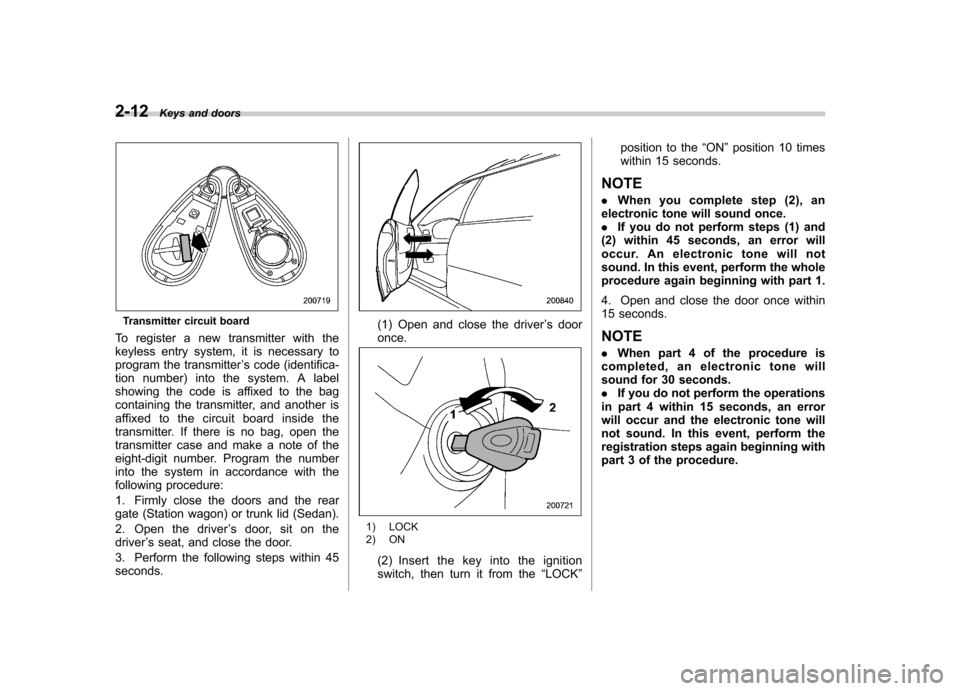
To register a new transmitter with the
keyless entry system, it is necessary to
program the transmitter ’s code (identifica-
tion number) into the system. A label
showing the code is affixed to the bag
containing the transmitter, and another is
affixed to the circuit board inside the
transmitter. If there is no bag, open the
transmitter case and make a note of the
eight-digit number. Program the number
into the system in accordance with the
following procedure:
1. Firmly close the doors and the rear
gate (Station wagon) or trunk lid (Sedan).
2. Open the driver ’s door, sit on the
driver ’s seat, and close the door.
3. Perform the following steps within 45 seconds.(1) Open and close the driver ’s door
once.
1) LOCK
2) ON
(2) Insert the key into the ignition
switch, then turn it from the “LOCK ” position to the
“ON ”position 10 times
within 15 seconds.
NOTE . When you complete step (2), an
electronic tone will sound once. . If you do not perform steps (1) and
(2) within 45 seconds, an error will
occur. An electronic tone will not
sound. In this event, perform the whole
procedure again beginning with part 1.
4. Open and close the door once within
15 seconds. NOTE . When part 4 of the procedure is
completed, an electronic tone will
sound for 30 seconds.. If you do not perform the operations
in part 4 within 15 seconds, an error
will occur and the electronic tone will
not sound. In this event, perform the
registration steps again beginning with
part 3 of the procedure.
Page 104 of 442

5. Before the electronic tone stops
sounding, press the power door lock knob
to the“LOCK ”side the same number of
times as the leftmost digit of the transmit-
ter code. For example, press the lock knob
eight times if the leftmost digit of the code
is 8. NOTE . The electronic tone will stop sound-
ing when you start entering the num-
ber.. If you do not start entering the
number using the lock knob before
the electronic tone stops sounding, an
error will occur. In this event, perform
the registration steps again beginning
with part 3 of the procedure.. If the interval between one push of the knob and the next exceeds five
seconds, an error will occur. In this
event, perform the procedure again
beginning with part 4. If an error occurs
six times, perform the procedure again
starting with part 3.
6. When you have finished entering the
number, pull the lock knob to the
“UN-
LOCK ”side within five seconds.
NOTE . An electronic tone will sound.
. If you pull the lock knob to the
“ UNLOCK ”side when more than five
seconds have passed, an error will
occur. In this event, perform the proce-
dure again beginning with part 4. If an
error occurs six times, perform the
procedure again starting with part 3. 7. Perform parts 5 and 6 of the procedure
for each of the remaining digits of the
transmitter code beginning with the sec-
ond digit (counting from the left) and
finishing with the eighth digit. NOTE .
When you finish entering the eighth
digit, an electronic tone will sound for
30 seconds.. If the interval between one push of
the knob and the next exceeds five
seconds, an error will occur. In this
event, perform the procedure again
beginning with part 4. If an error occurs
six times, perform the procedure again
starting with part 3.
8. Before the electronic tone stops
sounding, use the power door lock knob
to again enter the transmitter code begin-
ning with the leftmost digit. NOTE
If you do not start entering the number
using the lock knob before the electro-
nic tone stops sounding, an error will
occur. In this event, perform the proce-
dure again beginning with part 3.
9. When you have finished entering the
code a second time, an electronic tone will
sound for one second to indicate comple-
tion of registration, provided the code Keys and doors
2-13
– CONTINUED –