key SUBARU OUTBACK 2012 5.G Workshop Manual
[x] Cancel search | Manufacturer: SUBARU, Model Year: 2012, Model line: OUTBACK, Model: SUBARU OUTBACK 2012 5.GPages: 474, PDF Size: 17.45 MB
Page 245 of 474

5-62Audio
41 internal audio audio interne
42 list audio players lister lecteurs audio
43 list names lister noms
44 list phones lister téléphones
45 mute sourdine
46 next suivant
47 outgoing appel de départ
48 pair audio player jumeler lecteur audio
49 pair phone jumeler téléphone 50 phone book add entry annuaire ajouterentrée
51 phone book
change name annuaire changernom
52 phone book deleteentry annuaire suppri-
mer entrée
53 phone book listnames annuaire listernoms
54 phone book lock annuaire bloquer 55 phone book set
speed dial annuaire définir
composition rapide
56 phone book unlock annuaire déblo-quer
57 phone only téléphone unique-ment
58 phone setup configuration télé-phone59 phonebook annuaire 60
phonebook delete
speed dial annuaire suppri-
mer compositionrapide
61 previous précédent
62 redial recomposer
63 repeat répéter
64 security sécurité
65 select audio player sélectionner lec-
teur audio
66 select phone sélectionner télé-phone
67 send envoyer
68 set pass key définir mot de passe
69 set PIN définir NIP
70 set speed dial définir composition rapide
71 setup configurer
72 store enregistrer
73 turn on activer
74 turn off désactiver
! Updating phonebook data
NOTE . The maximum number of phone-
book entries that can be registered in the phonebook is 50 (type B audio)/20
(type C audio)..
After registering phonebook data,
you can add a phone number to the
speed dial memory. For details, refer to“ Registering speed dial ”F 5-64.
! Registering by voice
1. Select the “BY VOICE ”menu.
2. Press the talk switch
.
3. Say the phone number to be regis- tered.
4. Select the “CONFIRM ”menu.
5. Perform either of the following proce- dures. –Select the “RECORD NAME ”menu
by operating the “TUNE ”dial.
– Press the talk switch
.
6. Say the name (voice tag) to be registered.
7. Select the “CONFIRM ”menu.
– The phone number is then regis-
tered and “STORED ”(type B audio)/
“ Phone number stored. ”(type C audio)
is displayed.
! Registering by phone
1. Select the “BY PHONE ”menu.
2. Select the “CONFIRM ”(type B audio)/
“ Confirm Transfer phonebook entry? ”
(type C audio) menu.
Page 252 of 474

refer to“Preparation for using the Hands-
free system ”F 5-53.
! List phones function
The cell phone voice tags saved in the cell
phone list are displayed by using the list
phones function.
1. Select the “LIST PHONES ”menu.
– If no cell phones are registered,
“ EMPTY ”(type B audio)/ “No Phones
have been paired. ”(type C audio) is
displayed and the mode changes to the “PHONE SETUP ”mode.
2. Registered cell phones are displayed
in the saved order. While displayed, if the“ TUNE ”dial is turned, the next registered
cell phone is displayed. Press the ON
hook button
to close the Hands-free
menu.
3. Select a cell phone by performing
either of the following procedures.
–Operate the “TUNE ”dial.
– Press the talk switch
.
4. After “SELECTED ”(type B audio)/
“ Phone is selected. ”(type C audio) is
displayed, you can select the following menus. . “SELECT PHONE ”to connect the
selected cell phone . “CHANGE NAME ”(type B audio)/ “
Change Phone Name ”(type C audio) to
change the voice tag. “DELETE ”(type B audio)/ “Delete
Phone ”(type C audio) to delete the
selected cell phone from the list. “GO BACK ”to go back to the “PHONE
SETUP ”mode
! Setting passkey
1. Select the “SET PASSKEY ”menu.
– After the currently set passkey is
displayed, a new passkey can be entered.
2. Input the new passkey by performing
one of the following procedures. –Operate the “TUNE ”dial.
– Press the talk switch
and say
the passkey.
3. Select the “CONFIRM ”(type B audio)/
“ Confirm passkey? ”(type C audio) menu.
– The new passkey is displayed, the
passkey is changed and the mode
changes to the “PHONE SETUP ”
mode.
! Deleting registered cell phone from
the list
1. Select the “DELETE ”(type B audio)/
“ Delete Phone ”(type C audio) menu.
2. Select a cell phone to be deleted by
performing one of the following proce- dures.
–Operate the “TUNE ”dial.
– Press the talk switch
and say
the voice tag. – Press the talk switch
and use
the list phones function.
3. Select the “CONFIRM ”(type B audio)/
“ Confirm delete phone? ”(type C audio)
menu.
–“DELETED ”(type B audio)/ “Phone
has been deleted. ”(type C audio) is
displayed, the data is deleted and the
mode changes to the “PHONE SET-
UP ”mode.
! Turning the Hands-free power on/off
(type C audio)
You can turn the Hands-free power on or
off. If the Hands-free power is ON, the
registered cell phones are automatically
connected to the system when the ignition
switch is turned to the “Acc ”or “ON ”
position.
1. S e l e c t t h e “Hands-free Power ”/
“ Handsfree Power ”menu.
2. To turn off the Hands-free power when
the Hands-free power is ON, perform
either of the following procedures. –Press the talk switch
and say
“ Turn off ”.
– Select “Turn off ”by operating the Audio
5-69
– CONTINUED –
Page 255 of 474
6-2Interior equipment
Interior light
When leaving your vehicle, make sure the
lights are turned off to avoid batterydischarge. &Dome light
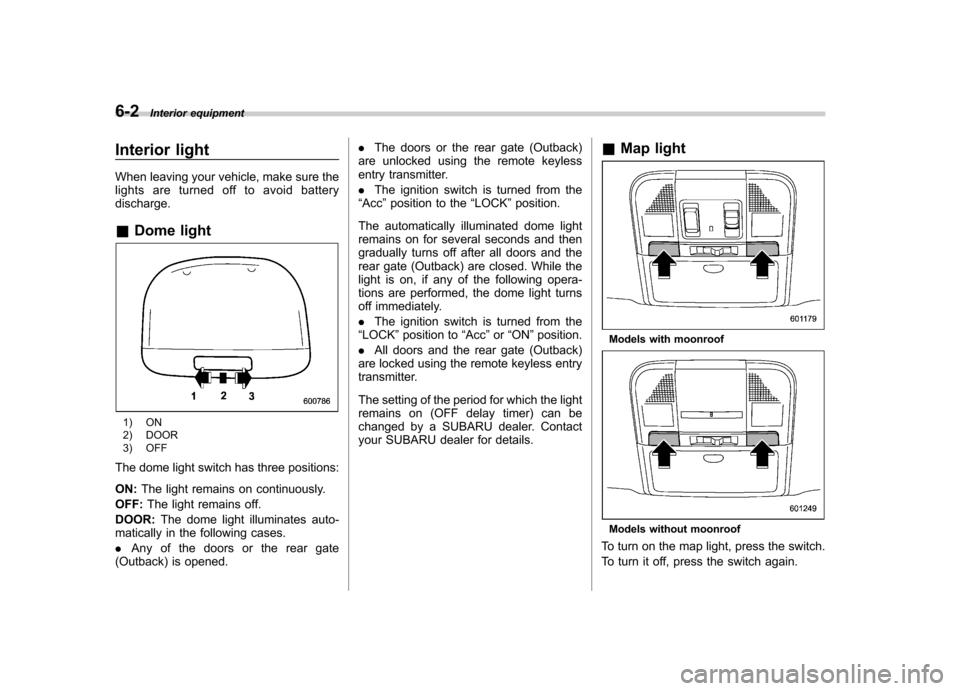
1) ON
2) DOOR
3) OFF
The dome light switch has three positions: ON: The light remains on continuously.
OFF: The light remains off.
DOOR: The dome light illuminates auto-
matically in the following cases. . Any of the doors or the rear gate
(Outback) is opened. .
The doors or the rear gate (Outback)
are unlocked using the remote keyless
entry transmitter. . The ignition switch is turned from the
“ Acc ”position to the “LOCK ”position.
The automatically illuminated dome light
remains on for several seconds and then
gradually turns off after all doors and the
rear gate (Outback) are closed. While the
light is on, if any of the following opera-
tions are performed, the dome light turns
off immediately. . The ignition switch is turned from the
“ LOCK ”position to “Acc ”or “ON ”position.
. All doors and the rear gate (Outback)
are locked using the remote keyless entry
transmitter.
The setting of the period for which the light
remains on (OFF delay timer) can be
changed by a SUBARU dealer. Contact
your SUBARU dealer for details. &
Map light
Models with moonroof
Models without moonroof
To turn on the map light, press the switch.
To turn it off, press the switch again.
Page 256 of 474
When leaving the vehicle, make sure the
lights are turned off to avoid batterydischarge. !Door interlock switch
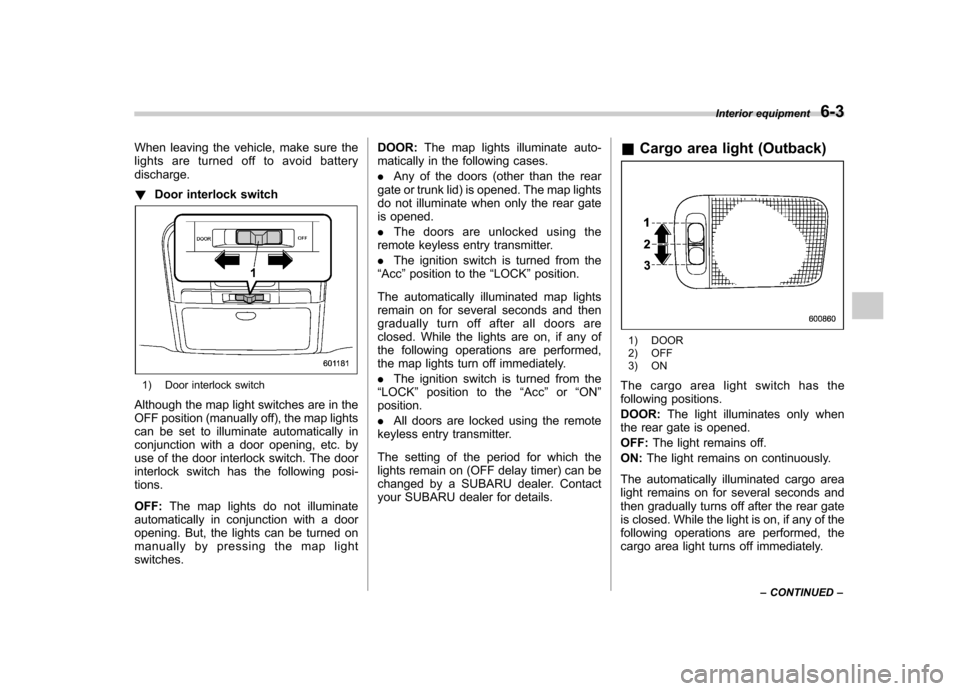
1) Door interlock switch
Although the map light switches are in the
OFF position (manually off), the map lights
can be set to illuminate automatically in
conjunction with a door opening, etc. by
use of the door interlock switch. The door
interlock switch has the following posi-tions. OFF: The map lights do not illuminate
automatically in conjunction with a door
opening. But, the lights can be turned on
manually by pressing the map lightswitches. DOOR:
The map lights illuminate auto-
matically in the following cases. . Any of the doors (other than the rear
gate or trunk lid) is opened. The map lights
do not illuminate when only the rear gate
is opened. . The doors are unlocked using the
remote keyless entry transmitter.. The ignition switch is turned from the
“ Acc ”position to the “LOCK ”position.
The automatically illuminated map lights
remain on for several seconds and then
gradually turn off after all doors are
closed. While the lights are on, if any of
the following operations are performed,
the map lights turn off immediately. . The ignition switch is turned from the
“ LOCK ”position to the “Acc ”or “ON ”
position. . All doors are locked using the remote
keyless entry transmitter.
The setting of the period for which the
lights remain on (OFF delay timer) can be
changed by a SUBARU dealer. Contact
your SUBARU dealer for details. &
Cargo area light (Outback)
1) DOOR
2) OFF
3) ON
The cargo area light switch has the
following positions. DOOR: The light illuminates only when
the rear gate is opened.OFF: The light remains off.
ON: The light remains on continuously.
The automatically illuminated cargo area
light remains on for several seconds and
then gradually turns off after the rear gate
is closed. While the light is on, if any of the
following operations are performed, the
cargo area light turns off immediately. Interior equipment
6-3
– CONTINUED –
Page 257 of 474
6-4Interior equipment
.The ignition switch is turned from the
“ LOCK ”position to the “Acc ”or “ON ”
position. . The rear gate is locked using the
remote keyless entry transmitter.
The setting of the period for which the
lights remain on (OFF delay timer) can be
changed by a SUBARU dealer. Contact
your SUBARU dealer for details. Sun visors
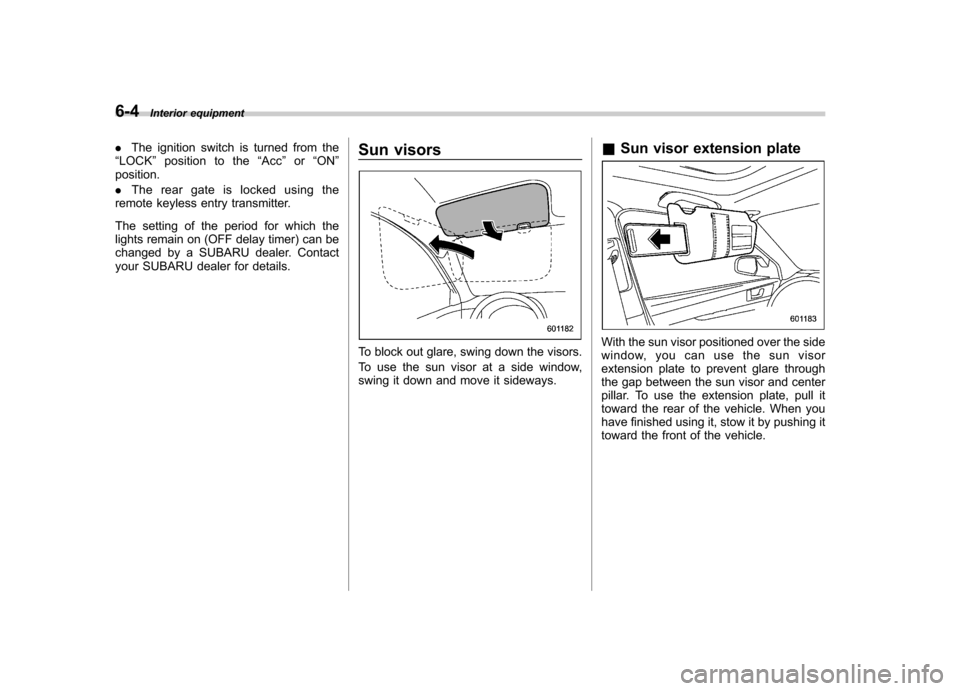
To block out glare, swing down the visors.
To use the sun visor at a side window,
swing it down and move it sideways.&
Sun visor extension plateWith the sun visor positioned over the side
window, you can use the sun visor
extension plate to prevent glare through
the gap between the sun visor and center
pillar. To use the extension plate, pull it
toward the rear of the vehicle. When you
have finished using it, stow it by pushing it
toward the front of the vehicle.
Page 259 of 474
6-6Interior equipment
& Glove box
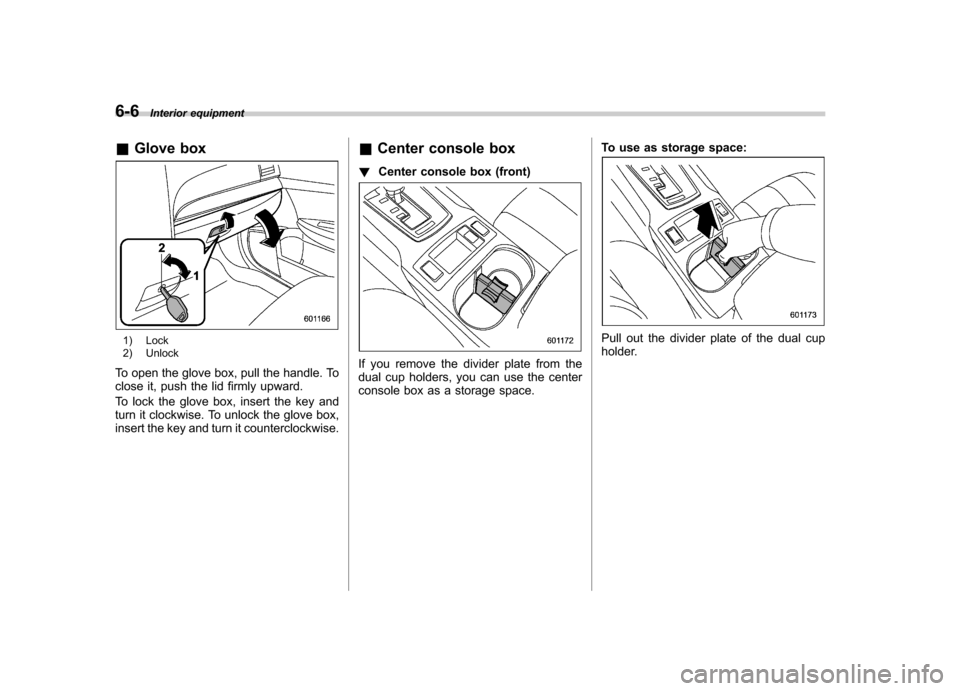
1) Lock
2) Unlock
To open the glove box, pull the handle. To
close it, push the lid firmly upward.
To lock the glove box, insert the key and
turn it clockwise. To unlock the glove box,
insert the key and turn it counterclockwise. &
Center console box
! Center console box (front)
If you remove the divider plate from the
dual cup holders, you can use the center
console box as a storage space. To use as storage space:
Pull out the divider plate of the dual cup
holder.
Page 285 of 474

7-8Starting and operating
NOTE
Engine oil, engine coolant, brake fluid,
washer fluid and other fluid levels
should be checked daily, weekly or at
fuel stops. Starting the engine
CAUTION
Do not operate the starter motor
continuously for more than 10 sec-
onds. If the engine fails to start after
operating the starter for 5 to 10
seconds, wait for 10 seconds or
more before trying again.
& MT models
1. Apply the parking brake.
2. Turn off unnecessary lights and ac- cessories.
3. Depress the clutch pedal to the floor
and shift the shift lever into neutral. Hold
the clutch pedal to the floor while starting
the engine. The starter motor will only
operate when the clutch pedal is de-
pressed fully to the floor.
4. Turn the ignition switch to the “ON ”
position and check the operation of the
warning and indicator lights. Refer to“ Warning and indicator lights ”F 3-9.
5. Turn the ignition switch to the “START ”
position without depressing the accelera-
tor pedal. Release the key immediately
after the engine has started.
If the engine does not start, perform the following procedure.
(1) Turn the ignition switch to the “LOCK ”position and wait for at least
10 seconds. After checking that the
parking brake is applied, turn the
ignition switch to the “START ”position
while depressing the accelerator pedal
slightly (approximately a quarter of the
full stroke). Release the accelerator
pedal as soon as the engine starts.
(2) If this fails to start the engine, turn
the ignition switch back to the “LOCK ”
position and wait for at least 10
seconds. Then fully depress the accel-
erator pedal and turn the ignition
switch to the “START ”position. If the
engine starts, quickly release the
accelerator pedal.
(3) If this does not start the engine,
turn the ignition switch again to the“ LOCK ”position. After waiting for 10
seconds or longer, turn the ignition
switch to the “START ”position without
depressing the accelerator pedal.
(4) If the engine still refuses to start,
contact your nearest SUBARU dealer
for assistance.
Page 286 of 474

6. Confirm that all warning and indicator
lights have turned off after the engine has
started. The fuel injection system auto-
matically lowers the idle speed as the
engine warms up.
NOTE (2.5 L non-turbo models)
To protect the engine while the shift
lever is in the neutral position, the
engine is controlled so that the engine
speed may not become too high even if
the accelerator pedal is depressedhard. &AT and CVT models
CAUTION
If you restart the engine while the
vehicle is moving, shift the select
lever into the “N ” position. Do not
attempt to place the select lever of a
moving vehicle into the “P ” posi-
tion.
1. Apply the parking brake.
2. Turn off unnecessary lights and ac- cessories.
3. Shift the select lever to the “P ” or “N ”
position (preferably “P ” position). The
starter will only operate when the select
lever is at the “P ”or “N ”position. 4. Turn the ignition switch to the
“ON ”
position and check the operation of the
warning and indicator lights. Refer to“ Warning and indicator lights ”F 3-9.
5. Turn the ignition switch to the “START ”
position without depressing the accelera-
tor pedal. Release the key immediately
after the engine has started.
If the engine does not start, perform the
following procedure.
(1) Turn the ignition switch to the“LOCK ”position and wait for at least
10 seconds. After checking that the
parking brake is applied, turn the
ignition switch to the “START ”position
while depressing the accelerator pedal
slightly (approximately a quarter of the
full stroke). Release the accelerator
pedal as soon as the engine starts.
(2) If this fails to start the engine, turn
the ignition switch back to the “LOCK ”
position and wait for at least 10
seconds. Then fully depress the accel-
erator pedal and turn the ignition
switch to the “START ”position. If the
engine starts, quickly release the
accelerator pedal.
(3) If this fails to start the engine, turn
the ignition switch again to the “LOCK ”
position. After waiting for 10 seconds
or longer, turn the ignition switch to the“ START ”position without depressing the accelerator pedal.
(4) If the engine still refuses to start,
contact your nearest SUBARU dealer
for assistance.
6. Confirm that all warning and indicator
lights have turned off after the engine has
started. The fuel injection system auto-
matically lowers the idle speed as the
engine warms up.
While the engine is warming up, make
sure that the select lever is at the “P ” or
“ N ”position and that the parking brake is
applied.
NOTE (2.5 L non-turbo and 3.6 L models)
To protect the engine while the select
lever is in the “P ” or “N ” position, the
engine is controlled so that the engine
speed may not become too high even if
the accelerator pedal is depressedhard. Starting and operating
7-9
Page 288 of 474

preconditions before starting, and if all
safety parameters are correct, the engine
will start within 5 seconds. Upon success-
ful engine start, the remote start confirma-
tion transmitter button will flash twice
every 5 seconds* and the vehicle will
honk the horn and flash the side marker
lights, tail lights and the front position
lights once, then the lights will illuminate
and remain illuminated, indicating that the
engine is running. While the vehicle is
operating via the remote engine start
function, the power window features will
be disabled. Also, the system has a timer
and will shut down after 15 minutes if you
do not operate the vehicle. Press and hold the“
”button for 2 seconds to turn the
engine off. The remote start confirmation
transmitter button will flash three times*
indicating that the engine has shut down.
If the starter cranks but does not start or
starts and stalls, the remote engine start
system will power off and then attempt to
start the engine an additional three times
unless the remote engine start system
determines that a vehicle malfunction is
preventing the system from starting. If the
engine does not start after additional
attempts, the remote engine start system
will abort and return to a non-activatestate.
*: Provided that the remote engine start transmitter is within the operating range of
the system. &
Remote start safety features
For safety and security reasons, the
system will fail to start and honk the horn
twice or shut down the engine during
remote start operation if any of the
following occur: . Any of the doors or the trunk / rear gate
are open / opened (*the vehicle ’s horn will
honk six times and the side marker lights,
tail lights and the front position lights will
flash six times indicating that a vehicle
door or trunk / rear gate was open when
the remote engine start system wasactivated). . The brake pedal is depressed
. The key was already in the ignition
switch. The engine hood is opened
. The remote start system “Service
mode ”is engaged
. The vehicle ’s engine idle speed has
reached a level over 3,500 RPM. The alarm is triggered by opening a
door or the rear gate.. The select lever is not in the “P ”
position (AT and CVT models)
In addition to the items above, if the vehicle
’s engine management system
determines there is a safety risk due to a
vehicle related problem, the vehicle will
shut down and the vehicle ’s horn will honk
three times.
NOTE . If the alarm system is armed at the
time of remote engine start activation
(the security indicator light on the
combination meter is flashing), the
alarm system will remain armed
throughout the remote start run cycle.. If the alarm system is disarmed at
the time of remote engine start activa-
tion (the security indicator light on the
combination meter is not flashing), the
alarm system will remain disarmed
throughout the remote start run cycle. & Entering the vehicle while it
is running via remote start
1. Unlock the vehicle doors using the
remote keyless entry system. If the vehi-cle ’s doors are unlocked manually using
the key, the vehicle ’s alarm system will
trigger (if the alarm system is armed prior
to activating the remote engine start
system) and the engine will turn off.
Inserting the key into the ignition switch
and turning it to the “ON ”position or
pressing the unlock button “
”on the
Starting and operating
7-11
– CONTINUED –
Page 289 of 474

7-12Starting and operating
remote keyless entry transmitter will dis-
arm the alarm system. Refer to “Alarm
system ”F 2-15.
2. Enter the vehicle.
3. The engine will shut down when any
door or trunk/rear gate is opened.
4. Insert the key into the ignition switch
and turn to the “START ”position to restart
the engine. & Remote start confirmation
transmitter feature
Your remote engine start transmitter is
equipped with a unique bidirectional con-
firmation feature. This feature will allow
the transmitter ’s backlit button to display
the status of the system under the condi-
tion that the vehicle and transmitter are
within the operational range of the system.
Typical transmitter button flash sequences
are outlined in the following chart. Transmitter flash sequence Feature description
Flashes when button is pressed Indicates that the system is transmitting an RF signal.
Two long flashes following re-
mote start activation (transmit-
ter button is pressed two times
within 3 seconds) Indicates that the transmitter did not receive the remote start
activation confirmation from the vehicle system. The transmitter
will automatically send one additional remote start activation
attempt. This usually occurs when the operational range is at its
limit or has been exceeded.
One flash following remote
start activation (transmitter
button is pressed two times
within 3 seconds) Indicates that the engine is running via remote start. If the
transmitter is moved outside of the operating range of the
system, this sequence will timeout after the normal 15-minute
vehicle run cycle.
2 flashes every 5 seconds Indicates that the engine is running via remote start. If the
transmitter is removed outside of the operating range of the
system, this sequence will timeout after the normal 15-minute
vehicle run cycle.
3 flashes Indicates that the engine has turned off due to a remote start
system 15-minute timeout, vehicle safety parameter or normal shutdown.