Power SUBARU OUTBACK 2016 6.G User Guide
[x] Cancel search | Manufacturer: SUBARU, Model Year: 2016, Model line: OUTBACK, Model: SUBARU OUTBACK 2016 6.GPages: 572, PDF Size: 21.79 MB
Page 103 of 572

Keys..................................................................... 2-3
Key number plate................................................ 2-3
Immobilizer.......................................................... 2-4Certification for immobilizer system..................... 2-4
Security indicator light........................................ 2-5
Key replacement................................................. 2-5
Door locks........................................................... 2-6Locking and unlocking from the outside .............. 2-6
Locking and unlocking from the inside................ 2-7
Battery drainage prevention function................... 2-8
Power door locking switches............................. 2-9Key lock-in prevention function........................... 2-9
Keyless access with push-button start
system (if equipped)....................................... 2-10
Safety precautions............................................. 2-10
Locking and unlocking with“keyless access”
entry function................................................... 2-13
Selecting audible signal operation...................... 2-18
Selecting hazard warning flasher operation......... 2-18
Warning chimes and warning indicator............... 2-18
Disabling keyless access function...................... 2-18
When access key does not operate properly....... 2-20
Replacing battery of access key......................... 2-20
Replacing access key......................................... 2-20
Certification for keyless access with push-button
start system..................................................... 2-20
PIN Code Access (models with“keyless
access with push-button start system”)........ 2-21
Registering a PIN code....................................... 2-22Unlocking.......................................................... 2-23
Remote keyless entry system........................... 2-23Operating the access key................................... 2-24
Operating the transmitter................................... 2-25
Replacing the battery......................................... 2-26
Replacing lost transmitters................................ 2-27
Certification for remote keyless entry system..... 2-27
Alarm system..................................................... 2-28
System alarm operation..................................... 2-28
Activating and deactivating the alarm system..... 2-28
If you have accidentally triggered the alarm
system............................................................ 2-29
Arming the system............................................ 2-29
Disarming the system........................................ 2-32
Valet mode........................................................ 2-32
Tripped sensor identification.............................. 2-32
Shock sensors (dealer option)............................ 2-32
Child safety locks.............................................. 2-33
Windows............................................................. 2-33
Power window operation by driver..................... 2-34
Power window operation by passengers............. 2-36
Initialization of power window ............................ 2-37
Trunk lid (Legacy).............................................. 2-38To open and close the trunk lid from outside ...... 2-38
To open the trunk lid from inside........................ 2-38
Internal trunk lid release handle......................... 2-39
Rear gate (Outback)........................................... 2-40Manual rear gate (if equipped) ............................ 2-40
Power rear gate (if equipped) ............................. 2-41
Keys and doors
2
Page 109 of 572
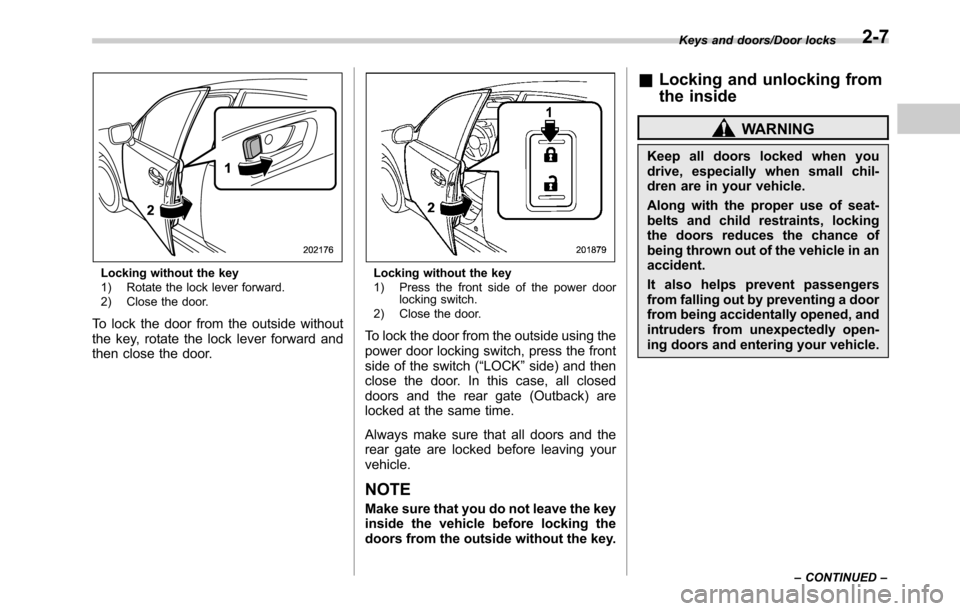
Locking without the key
1) Rotate the lock lever forward.
2) Close the door.
To lock the door from the outside without
the key, rotate the lock lever forward and
then close the door.
Locking without the key
1) Press the front side of the power door
locking switch.
2) Close the door.
To lock the door from the outside using the
power door locking switch, press the front
side of the switch (“LOCK”side) and then
close the door. In this case, all closed
doors and the rear gate (Outback) are
locked at the same time.
Always make sure that all doors and the
rear gate are locked before leaving your
vehicle.
NOTE
Make sure that you do not leave the key
inside the vehicle before locking the
doors from the outside without the key.
&Locking and unlocking from
the inside
WARNING
Keep all doors locked when you
drive, especially when small chil-
dren are in your vehicle.
Along with the proper use of seat-
belts and child restraints, locking
the doors reduces the chance of
being thrown out of the vehicle in an
accident.
It also helps prevent passengers
from falling out by preventing a door
from being accidentally opened, and
intruders from unexpectedly open-
ing doors and entering your vehicle.
Keys and doors/Door locks
–CONTINUED–2-7
Page 111 of 572
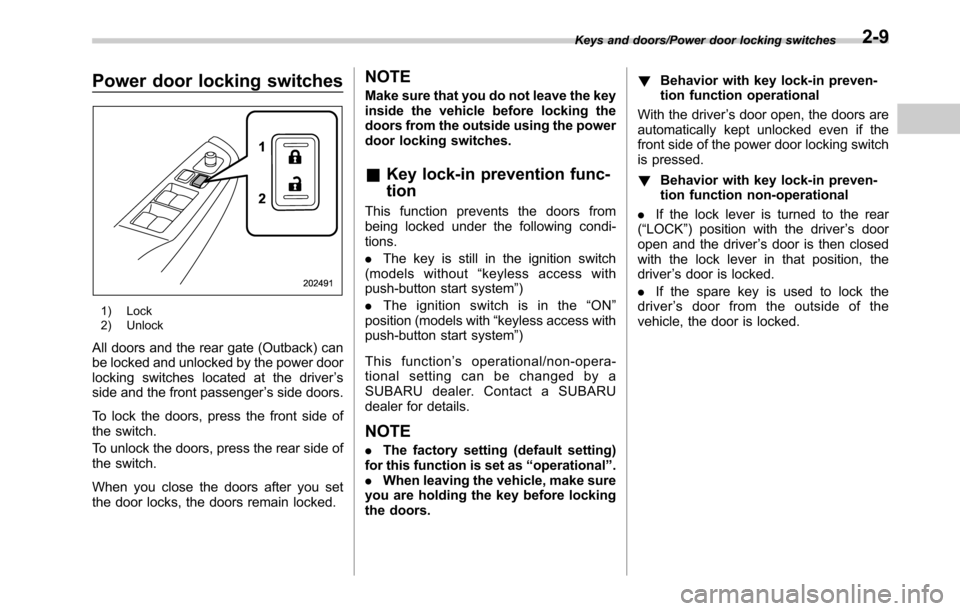
Power door locking switches
1) Lock
2) Unlock
All doors and the rear gate (Outback) can
be locked and unlocked by the power door
locking switches located at the driver’s
side and the front passenger’s side doors.
To lock the doors, press the front side of
the switch.
To unlock the doors, press the rear side of
the switch.
When you close the doors after you set
the door locks, the doors remain locked.
NOTE
Make sure that you do not leave the key
inside the vehicle before locking the
doors from the outside using the power
door locking switches.
&Key lock-in prevention func-
tion
This function prevents the doors from
being locked under the following condi-
tions.
.The key is still in the ignition switch
(models without“keyless access with
push-button start system”)
.Theignitionswitchisinthe“ON”
position (models with“keyless access with
push-button start system”)
This function’s operational/non-opera-
tional setting can be changed by a
SUBARU dealer. Contact a SUBARU
dealer for details.
NOTE
.The factory setting (default setting)
for this function is set as“operational”.
.When leaving the vehicle, make sure
you are holding the key before locking
the doors.!Behavior with key lock-in preven-
tion function operational
With the driver’s door open, the doors are
automatically kept unlocked even if the
front side of the power door locking switch
is pressed.
!Behavior with key lock-in preven-
tion function non-operational
.If the lock lever is turned to the rear
(“LOCK”) position with the driver’s door
open and the driver’s door is then closed
with the lock lever in that position, the
driver’s door is locked.
.If the spare key is used to lock the
driver’s door from the outside of the
vehicle, the door is locked.
Keys and doors/Power door locking switches2-9
Page 114 of 572

Keys and doors/Keyless access with push–button start system
6.6 ft (2 m) around the vehicle (e.
g., in the garage). The access key
may be locked inside the vehicle,
or the battery may discharge
rapidly.
.The access key contains electro-
nic components. Observe the
following precautions to prevent
malfunctions.
–Although you can replace the
battery of the access key
yourself, it is recommended
that the battery be replaced by
a SUBARU dealer to avoid the
risk of damage at the time of
replacement.
–Do not get the access key wet.
If the access key gets wet,
wipe it off immediately and let
it dry completely.
–Do not apply strong impacts
to the access key.
–Keep the access key away
from magnetic sources.
–Never leave the access key in
direct sunlight or anywhere
that may become hot, such
as on the dashboard. It may
damage the battery or cause
circuit malfunctions.–Do not wash the access key in
an ultrasonic washer.
–Do not leave the access key in
humid or dusty locations.
Doing so may cause malfunc-
tions.
–Do not leave the access key
near personal computers or
home electric appliances.
Doing so may cause the ac-
cess key to malfunction, re-
sulting in battery discharge.
.If the access key is dropped, the
integrated mechanical key inside
may become loose. Be careful
not to lose the mechanical key.
.When you carry the access key
on an airplane, do not press the
button of the access key while in
the airplane. When any button of
the access key is pressed, radio
waves are sent and may affect
the operation of the airplane.
When you carry the access key
in a bag on an airplane, take
measures to prevent the buttons
of the access key from being
pressed.NOTE
.The operational/non-operational
setting for the keyless access function
can be changed. For the setting proce-
dure, refer to“Disabling keyless ac-
cess function”F2-18. The setting can
also be changed by a SUBARU dealer.
For more details, contact a SUBARU
dealer.
.For detailed information about the
operation method for the push-button
ignition switch while the keyless ac-
cess function is switched to the non-
operational mode, refer to“Access key
–if access key does not operate
properly”F9-18.
.The keyless access with push-but-
ton start system uses weak radio
waves. The status of the access key
and environmental conditions may in-
terfere with the communication be-
tween the access key and the vehicle
under the following conditions, and it
may not be possible to lock or unlock
the doors or start the engine.
–When operating near a facility
where strong radio waves are trans-
mitted, such as a broadcast station
and power transmission lines
–When products that transmit
radio waves are used, such as an
access key or a remote transmitter
2-12
Page 115 of 572
key of another vehicle
–When carrying more than one
access key
–When the access key is placed
near wireless communication
equipment such as a cell phone
–When the access key is placed
near a metallic object
–When metallic accessories are
attached to the access key
–When carrying the access key
with electronic appliances such as
a laptop computer
–When the battery of the access
key is discharged
.The access key is always commu-
nicating with the vehicle and is con-
tinuously using the battery. Although
the life of the battery varies depending
on the operating conditions, it is ap-
proximately 1 to 2 years. If the battery
becomes fully discharged, replace it
with a new one.
.If an access key is lost, it is
recommended that the access key be
reregistered. For reregistration of an
access key, contact a SUBARU dealer.
.For a spare access key, contact a
SUBARU dealer.
.Up to 7 access keys can be regis-
tered for one vehicle.
.Carefully store the key number platesupplied with the access key. It is
necessary for vehicle repair.
.Do not leave the access key in the
storage spaces inside the vehicle, such
as the door pocket, dashboard and the
corner of the cargo area. Vibrations
may damage the key or turn on the
switch, possibly resulting in a lockout.
.After the vehicle battery is dis-
charged or replaced, initialization of
the steering lock system may be re-
quired to start the engine. In this case,
perform the following procedure to
initialize the steering lock.
(1) Turn the push-button ignition
switch to the“OFF”position. For
details, refer to“Switching power”
F3-6.
(2) Open and close the driver’s
door.
(3) Wait for approximately 10 sec-
onds.
When the steering is locked, the initi-
alization is completed.&Locking and unlocking with
“keyless access”entry func-
tion
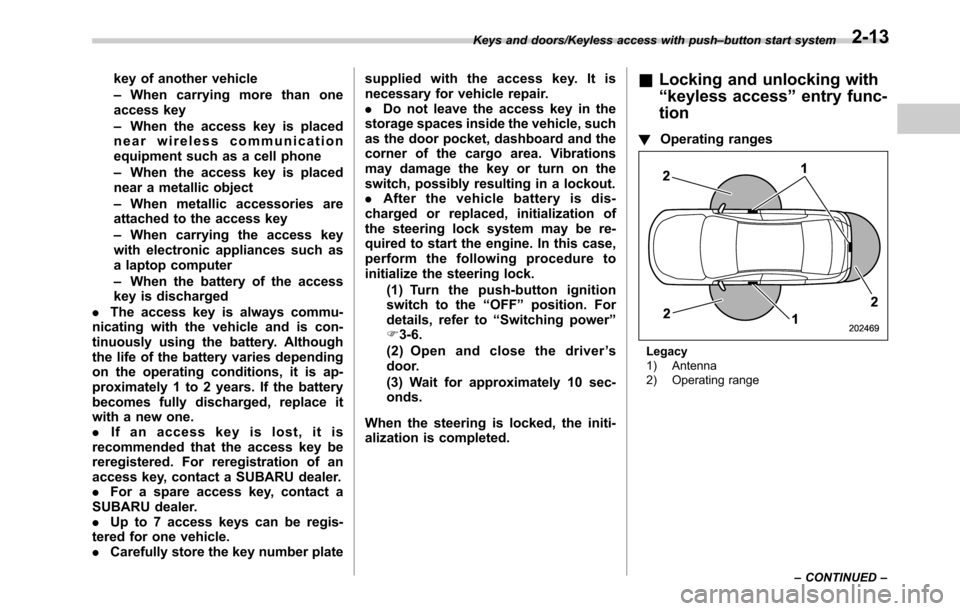
!Operating ranges
Legacy
1) Antenna
2) Operating range Keys and doors/Keyless access with push–button start system
–CONTINUED–
2-13
Page 116 of 572
Keys and doors/Keyless access with push–button start system
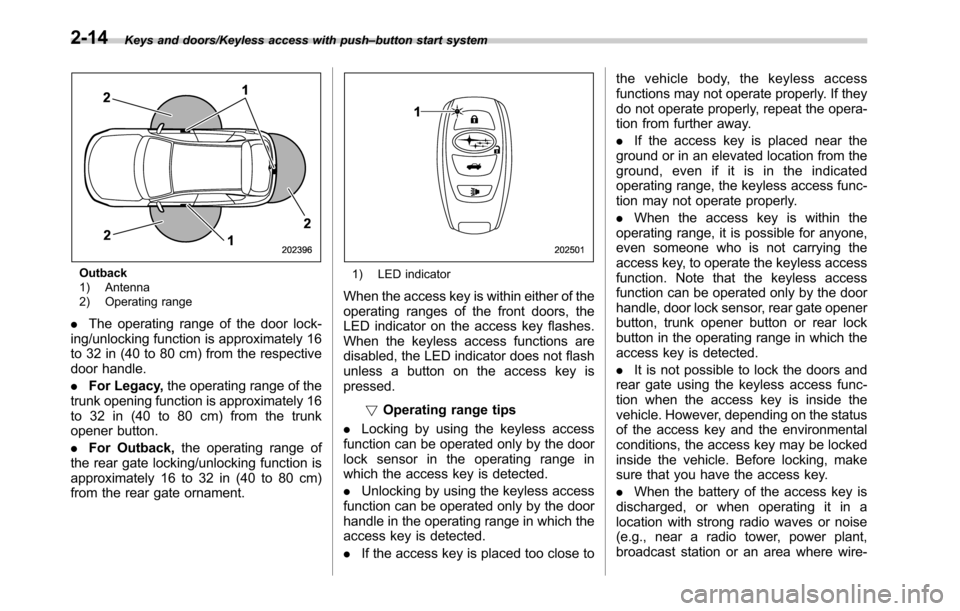
Outback
1) Antenna
2) Operating range
.The operating range of the door lock-
ing/unlocking function is approximately 16
to 32 in (40 to 80 cm) from the respective
door handle.
.For Legacy,the operating range of the
trunk opening function is approximately 16
to 32 in (40 to 80 cm) from the trunk
opener button.
.For Outback,the operating range of
the rear gate locking/unlocking function is
approximately 16 to 32 in (40 to 80 cm)
from the rear gate ornament.
1) LED indicator
When the access key is within either of the
operating ranges of the front doors, the
LED indicator on the access key flashes.
When the keyless access functions are
disabled, the LED indicator does not flash
unless a button on the access key is
pressed.
!Operating range tips
.Locking by using the keyless access
function can be operated only by the door
lock sensor in the operating range in
which the access key is detected.
.Unlocking by using the keyless access
function can be operated only by the door
handle in the operating range in which the
access key is detected.
.If the access key is placed too close tothe vehicle body, the keyless access
functions may not operate properly. If they
do not operate properly, repeat the opera-
tion from further away.
.If the access key is placed near the
ground or in an elevated location from the
ground, even if it is in the indicated
operating range, the keyless access func-
tion may not operate properly.
.When the access key is within the
operating range, it is possible for anyone,
even someone who is not carrying the
access key, to operate the keyless access
function. Note that the keyless access
function can be operated only by the door
handle, door lock sensor, rear gate opener
button, trunk opener button or rear lock
button in the operating range in which the
access key is detected.
.It is not possible to lock the doors and
rear gate using the keyless access func-
tion when the access key is inside the
vehicle. However, depending on the status
of the access key and the environmental
conditions, the access key may be locked
inside the vehicle. Before locking, make
sure that you have the access key.
.When the battery of the access key is
discharged, or when operating it in a
location with strong radio waves or noise
(e.g., near a radio tower, power plant,
broadcast station or an area where wire-
2-14
Page 117 of 572

less equipment is used), or while talking
on a cell phone, the operating ranges may
be reduced, or the keyless access func-
tion may not operate.
In such a case, perform the procedure
described in“Locking and unlocking”F9-
18.
.When an access key is in the operating
range, if the door handle becomes wet
due to exposure to a significant amount of
water when the vehicle is washed or
during heavy rain, the doors may be
locked or unlocked.
.The keyless access function may not
operate properly depending on the status
of the access key and the radio wave
conditions around the vehicle. In such a
case, perform the procedure described in
“Locking and unlocking”F9-18.
!How to use keyless access func-
tions
!Keyless access function tips
.When you lock the doors and rear gate
using the keyless access function, turn the
push-button ignition switch off. It is not
possible to lock the doors and rear gate
using the keyless access function when
the push-button ignition switch is on the
“ACC”or“ON”position. Refer to“Switch-
ing power”F3-6.
.If the door handle is gripped with agloved hand, the door lock may not be
released.
.If the door lock sensor is touched three
times or more repeatedly, the system will
ignore the sensor operation.
.When performing the locking proce-
dure too quickly, locking may not have
been completed. After locking the doors, it
is recommended to pull the REAR door
handles to confirm that the doors have
been locked.
.It is possible to lock the doors even
when one of the doors is open. After
performing the locking procedure, close
the opened door or rear gate to lock it.
.Within 3 seconds after locking the
doors and the rear gate by using the
keyless access function, it is not possible
to unlock doors and/or the rear gate by
using the keyless access function.
.When locking, be sure to carry the
access key to prevent locking the access
key in the vehicle.!Unlocking
Carry the access key, and grip the door
handle.
.When the driver’s door handle is
gripped, only the driver’s door will be
unlocked.
.When the front passenger’s door han-
dle is gripped, all doors (for Outback,
including the rear gate) will be unlocked.
Also, an electronic chirp will sound twice
and the hazard warning flashers will flash
twice.
Keys and doors/Keyless access with push–button start system
–CONTINUED–2-15
Page 119 of 572
perform the unlocking operation once
first. You can then touch the door lock
sensor to lock the doors.
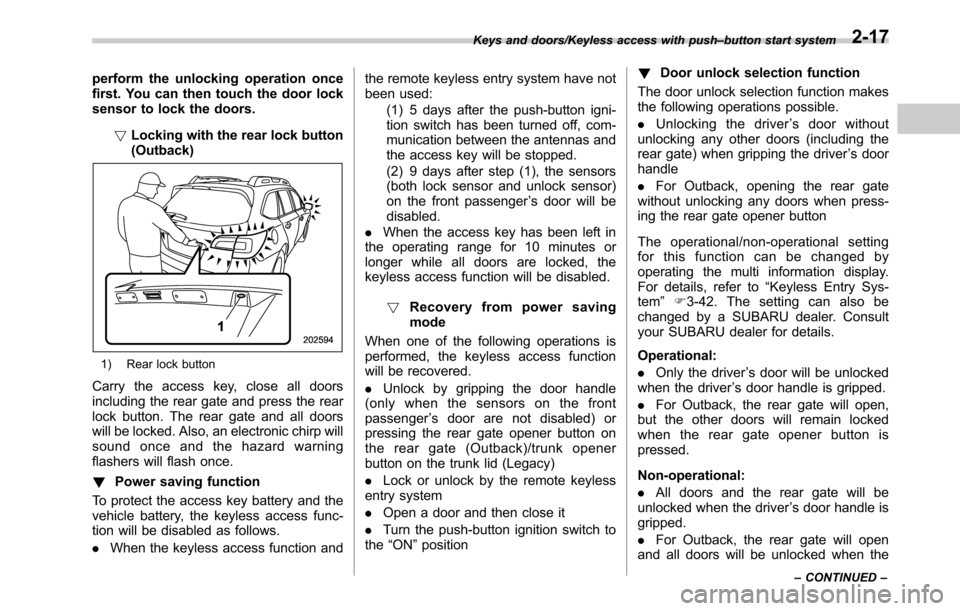
!Locking with the rear lock button
(Outback)
1) Rear lock button
Carry the access key, close all doors
including the rear gate and press the rear
lock button. The rear gate and all doors
will be locked. Also, an electronic chirp will
sound once and the hazard warning
flashers will flash once.
!Power saving function
To protect the access key battery and the
vehicle battery, the keyless access func-
tion will be disabled as follows.
.When the keyless access function andthe remote keyless entry system have not
been used:
(1) 5 days after the push-button igni-
tion switch has been turned off, com-
munication between the antennas and
the access key will be stopped.
(2) 9 days after step (1), the sensors
(both lock sensor and unlock sensor)
on the front passenger’s door will be
disabled.
.When the access key has been left in
the operating range for 10 minutes or
longer while all doors are locked, the
keyless access function will be disabled.
!Recovery from power saving
mode
When one of the following operations is
performed, the keyless access function
will be recovered.
.Unlock by gripping the door handle
(only when the sensors on the front
passenger’s door are not disabled) or
pressing the rear gate opener button on
the rear gate (Outback)/trunk opener
button on the trunk lid (Legacy)
.Lock or unlock by the remote keyless
entry system
.Open a door and then close it
.Turn the push-button ignition switch to
the“ON”position!Door unlock selection function
The door unlock selection function makes
the following operations possible.
.Unlocking the driver’s door without
unlocking any other doors (including the
rear gate) when gripping the driver’s door
handle
.For Outback, opening the rear gate
without unlocking any doors when press-
ing the rear gate opener button
The operational/non-operational setting
for this function can be changed by
operating the multi information display.
For details, refer to“Keyless Entry Sys-
tem”F3-42. The setting can also be
changed by a SUBARU dealer. Consult
your SUBARU dealer for details.
Operational:
.Only the driver’s door will be unlocked
when the driver’s door handle is gripped.
.For Outback, the rear gate will open,
but the other doors will remain locked
when the rear gate opener button is
pressed.
Non-operational:
.All doors and the rear gate will be
unlocked when the driver’s door handle is
gripped.
.For Outback, the rear gate will open
and all doors will be unlocked when the
Keys and doors/Keyless access with push–button start system
–CONTINUED–2-17
Page 121 of 572
–When the keyless access func-
tions are not going to be used
!Disabling functions
!By operating the access key
If you have registered a PIN code for PIN
Code Access, you can disable the keyless
access function by operating the access
key. For details about registering a PIN
code, refer to“Registering a PIN code”
F2-22.
1. Open the driver’s door.
2. Rotate the lock lever forward.
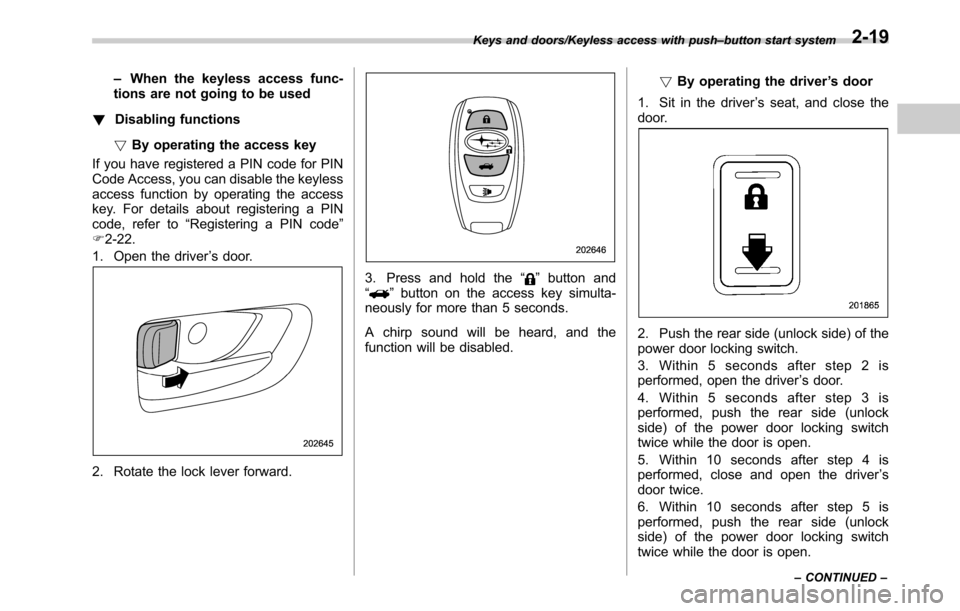
3. Press and hold the“”button and
“”button on the access key simulta-
neously for more than 5 seconds.
A chirp sound will be heard, and the
function will be disabled.!By operating the driver’s door
1. Sit in the driver’s seat, and close the
door.
2. Push the rear side (unlock side) of the
power door locking switch.
3. Within 5 seconds after step 2 is
performed, open the driver’s door.
4. Within 5 seconds after step 3 is
performed, push the rear side (unlock
side) of the power door locking switch
twice while the door is open.
5. Within 10 seconds after step 4 is
performed, close and open the driver’s
door twice.
6. Within 10 seconds after step 5 is
performed, push the rear side (unlock
side) of the power door locking switch
twice while the door is open.
Keys and doors/Keyless access with push–button start system
–CONTINUED–2-19
Page 122 of 572

Keys and doors/Keyless access with push–button start system
7. Within 10 seconds after step 6 is
performed, close and open the driver’s
door once.
8. Within 5 seconds after step 7 is
performed, close the door.
A chirp sound will be heard, and the
functions will be disabled.
NOTE
In steps 4 and 6, press the power door
locking switch slowly. If the switch is
pressed quickly, the functions may not
be disabled.
!Enabling functions
When the procedure to disable the func-
tions is performed again, a chirp sound will
be heard, and the functions are enabled.
NOTE
.The keyless access function will be
enabled only if you perform the proce-
dure in the same manner you disabled
the function (for example, when dis-
abling by operating the driver’s door,
the function will not be enabled even if
you operate the access key).
.Press the push-button ignition
switch if you do not know the proce-
dure in which the keyless access
function was disabled.
–When disabling by operating thedriver’s door: a chirp will not be
heard
–When disabling by operating the
access key: a chirp will be heard
&When access key does not
operate properly
Refer to“Access key–if access key does
not operate properly”F9-18.
&Replacing battery of access
key
Refer to“Replacing battery of access key”
F11-50.
&Replacing access key
Access keys can be replaced at SUBARU
dealers. For more details, contact a
SUBARU dealer.
&Certification for keyless ac-
cess with push-button start
system
.U.S.-spec. models
FCC ID: HYQ14AHC
FCC ID: Y8PFJ14–2
FCC ID: Y8PSSPIMB02
CAUTION
FCC WARNING
Changes or modifications not ex-
pressly approved by the party re-
sponsible for compliance could void
the user’s authority to operate the
equipment.
This device complies with part 15 of the
FCC Rules. Operation is subject to the
following two conditions: (1) This device
may not cause harmful interference, and
(2) this device must accept any interfer-
ence received, including interference that
may cause undesired operation.
.Canada-spec. models
This device complies with Industry
Canada licence-exempt RSS standard
(s). Operation is subject to the following
two conditions: (1) this device may not
cause interference, and (2) this device
must accept any interference, including
interference that may cause undesired
operation of the device.
Le présent appareil est conforme aux
CNR d’Industrie Canada applicables aux
appareils radio exempts de licence. L’ex-
ploitation est autorisée aux deux condi-
tions suivantes: (1) l’appareil ne doit pas
produire de brouillage, et (2) l’utilisateur
2-20