Power SUBARU OUTBACK 2016 6.G Workshop Manual
[x] Cancel search | Manufacturer: SUBARU, Model Year: 2016, Model line: OUTBACK, Model: SUBARU OUTBACK 2016 6.GPages: 572, PDF Size: 21.79 MB
Page 235 of 572

&Tips for operating the audio/
visual system
CAUTION
To avoid damage to the audio/visual
system:
.Be careful not to spill beverages
over the audio/visual system.
.Do not put anything other than an
appropriate disc into the disc
slot.
NOTE
The use of a cell phone inside or near
the vehicle may cause a noise from the
speakers of the audio/visual system
which you are listening to. However,
this does not indicate a malfunction.
!Radio
Usually, a problem with radio reception
does not mean there is a problem with the
radio—it is just the normal result of
conditions outside the vehicle.
For example, nearby buildings and terrain
can interfere with FM reception. Power
lines or phone wires can interfere with AM
signals. And of course, radio signals have
a limited range. The farther the vehicle isfrom a station, the weaker its signal will
be. In addition, reception conditions
change constantly as the vehicle moves.
Here, some common reception problems
that probably do not indicate a problem
with the radio are described.
!FM
Fading and drifting stations: Generally, the
effective range of FM is about 25 miles (40
km). Once outside this range, you may
notice fading and drifting, which increase
with the distance from the radio transmit-
ter. They are often accompanied by
distortion.
Multi-path: FM signals are reflective,
making it possible for 2 signals to reach
the vehicle’s antenna at the same time. If
this happens, the signals will cancel each
other out, causing a momentary flutter or
loss of reception.
Static and fluttering: These occur when
signals are blocked by buildings, trees or
other large objects. Increasing the bass
level may reduce static and fluttering.
Station swapping: If the FM signal being
listened to is interrupted or weakened, and
there is another strong station nearby on
the FM band, the radio may tune in the
second station until the original signal can
be picked up again.!AM
Fading: AM broadcasts are reflected by
the upper atmosphere—especially at
night. These reflected signals can inter-
fere with those received directly from the
radio station, causing the radio station to
sound alternately strong and weak.
Station interference: When a reflected
signal and a signal received directly from
a radio station are very nearly the same
frequency, they can interfere with each
other, making it difficult to hear the broad-
cast.
Static: AM is easily affected by external
sources of electrical noise, such as high
tension power lines, lightening or electrical
motors. This results in static.
!SiriusXM (if equipped)
.Cargo loaded on the roof luggage
carrier, especially metal objects, may
adversely affect the reception of SiriusXM
Satellite Radio.
.Alternation or modifications carried out
without appropriate authorization may in-
validate the user’s right to operate the
equipment.
Audio/Audio set
–CONTINUED–5-7
Page 245 of 572

!Initial screen
When the ignition switch is in the“ACC”or
“ON”position, the initial screen will be
displayed and the system will begin
operating.
.When using the STARLINK function (if
equipped), the display screen may be
different from the screen above.
.After a few seconds, the caution screen
will be displayed.
.After about 5 seconds, the caution
screen automatically switches to the next
screen.
!Connecting and disconnecting a
USB memory/portable device
The USB port and the AUX jack are
located as shown in the following illustra-
tion.
NOTE
.This unit does not support commer-
cially available USB hubs.
.Turn on the power of the device
when it is not turned on.
.This device has a USB port for USB
memory/portable device.
.For compatible USB memory de-
vices, refer to“USB memory device”
F5-10.
.For compatible iPod models, refer to
“iPod”F5-10.
.Even if a USB hub is used to
connect more than two USB devices,
Audio/Audio set
–CONTINUED–5-17
Page 246 of 572
Audio/Audio set
only the first two connected devices
will be recognized.
&Basic operation
This section describes some of the basic
features of the audio/visual system. Some
information may not pertain to your sys-
tem.
Your audio/visual system works when the
ignition switch is turned to the“ACC”or
“ON”position.
CAUTION
To prevent the battery from being
discharged, do not leave the audio/
visual system on longer than neces-
sary when the engine is not running.
NOTE
Some functions can also be operated
by using the voice command system.
For details, refer to“Voice command
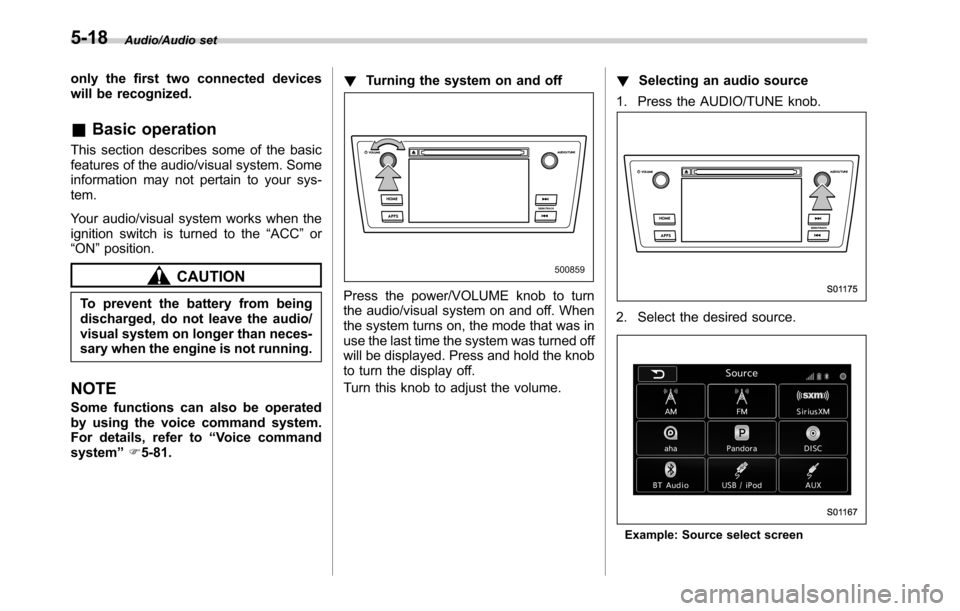
system”F5-81.!Turning the system on and off
Press the power/VOLUME knob to turn
the audio/visual system on and off. When
the system turns on, the mode that was in
use the last time the system was turned off
will be displayed. Press and hold the knob
to turn the display off.
Turn this knob to adjust the volume.!Selecting an audio source
1. Press the AUDIO/TUNE knob.
2. Select the desired source.
Example: Source select screen
5-18
Page 260 of 572
Audio/Audio set
select the desired multicast channel.
NOTE
.HD RadioTMstations can be preset.
.An orange
HD)(HD)) will be dis-
played on the screen when in digital.
The
HD)(HD)) will first appear in a gray
color indicating the station is indeed
(an analog and) a digital station. Once
the digital signal is acquired, the logo
will change to a bright orange color.
.The song title and artist name will
appear on the screen when available by
the radio station. The radio station can
send album pictures when available.
.As a user works through the analog
radio stations, (where applicable) the
radio receiver will automatically tune
from an analog signal to a digital signal
within 5 seconds.
!Preserving a music information
Tag information in the music broadcasting
is preserved in the system and transmits
to an iPod.
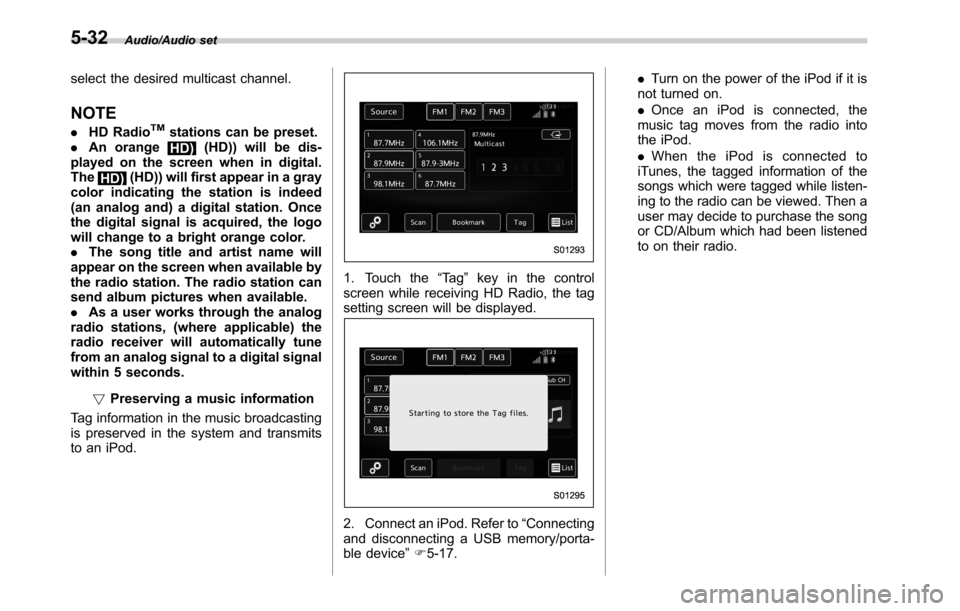
1. Touch the“Ta g”key in the control
screen while receiving HD Radio, the tag
setting screen will be displayed.
2. Connect an iPod. Refer to“Connecting
and disconnecting a USB memory/porta-
ble device”F5-17..Turn on the power of the iPod if it is
not turned on.
.Once an iPod is connected, the
music tag moves from the radio into
the iPod.
.When the iPod is connected to
iTunes, the tagged information of the
songs which were tagged while listen-
ing to the radio can be viewed. Then a
user may decide to purchase the song
or CD/Album which had been listened
to on their radio.
5-32
Page 323 of 572

Interior light......................................................... 6-2
Dome light.......................................................... 6-2
Map light............................................................. 6-2
Cargo area light (Outback)................................... 6-3
OFF delay timer.................................................. 6-4
Sun visors........................................................... 6-4Vanity mirror with light........................................ 6-5
Storage compartment......................................... 6-6Glove box........................................................... 6-6
Center console.................................................... 6-6
Overhead console............................................... 6-7
Pocket................................................................ 6-7
Cup holder........................................................... 6-8Front passenger’s cup holder.............................. 6-8
Rear passenger’s cup holder............................... 6-9
Bottle holders...................................................... 6-9
Accessory power outlets................................... 6-10
Ashtray (if equipped)......................................... 6-12
Coat hook........................................................... 6-13Shopping bag hook........................................... 6-14
Legacy.............................................................. 6-14
Outback............................................................ 6-14
Convenient grip (Outback)................................ 6-14
Floor mat............................................................ 6-15
Cargo area cover (Outback–if equipped)....... 6-16
Using the cover................................................. 6-16
To install the front cover.................................... 6-17
To remove the front cover.................................. 6-17
To remove the cover housing ............................. 6-17
Stowage of the cargo area cover........................ 6-18
To take out the stowed cover housing................ 6-19
To install the cover housing............................... 6-19
Convenient tie-down hooks (Outback)............. 6-19
Under-floor storage compartment.................... 6-20
Rear view camera.............................................. 6-21
How to use the rear view camera....................... 6-22
Viewing range on the screen.............................. 6-23
Help line............................................................ 6-24
Interior equipment
6
Page 332 of 572
Interior equipment/Accessory power outlets
trim can be used to hold beverage bottles
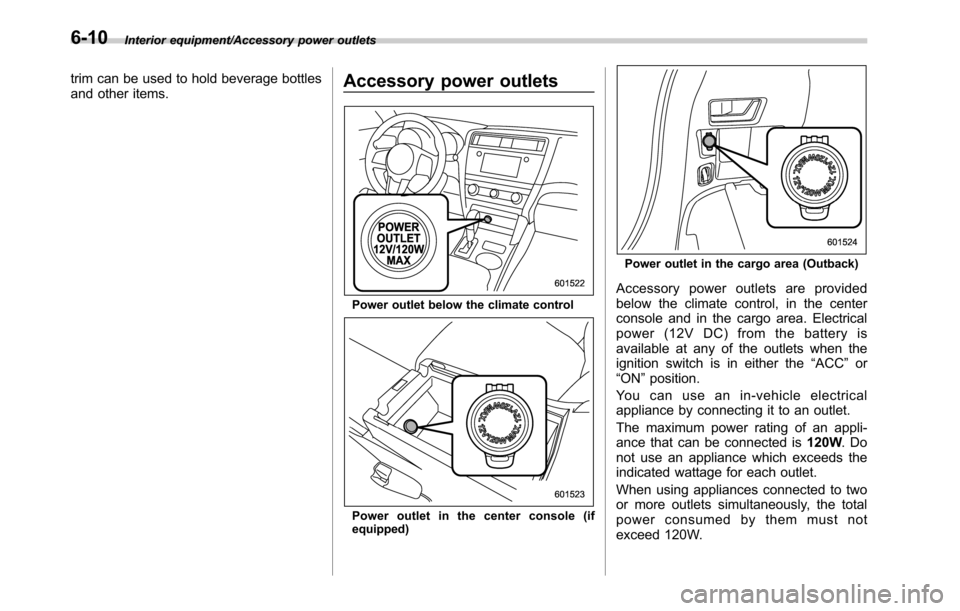
and other items.Accessory power outlets
Power outlet below the climate control
Power outlet in the center console (if
equipped)
Power outlet in the cargo area (Outback)
Accessory power outlets are provided
below the climate control, in the center
console and in the cargo area. Electrical
power (12V DC) from the battery is
available at any of the outlets when the
ignition switch is in either the“ACC”or
“ON”position.
You can use an in-vehicle electrical
appliance by connecting it to an outlet.
The maximum power rating of an appli-
ance that can be connected is120W.Do
not use an appliance which exceeds the
indicated wattage for each outlet.
When using appliances connected to two
or more outlets simultaneously, the total
power consumed by them must not
exceed 120W.
6-10
Page 333 of 572

CAUTION
.Do not attempt to use a cigarette
lighter in the accessory power
outlet.
.Do not place any foreign objects,
especially metal ones such as
coins or aluminum foil, into the
accessory power outlet. That
could cause a short circuit. Al-
ways put the cap on the acces-
sory power outlet when it is not
in use.
.Use only electrical appliances
which are designed for 12V DC.
The maximum power rating of an
appliance that can be connected
is 120W. Do not use an appliance
which exceeds the indicated wat-
tage for each outlet.
When using appliances con-
nected to two or more outlets
simultaneously, the total power
consumed by them must not
exceed 120W. Overloading the
accessory power outlet can
cause a short circuit. Do not use
double adapters or more than
one electrical appliance.
.If the plug on your electric appli-
ance is either too loose or tootight for the accessory power
outlet, this can result in a poor
contact or cause the plug to get
stuck. Only use plugs that fit
properly.
.Use of an electric appliance in the
accessory power outlet for a long
period of time while the engine is
not running can cause battery
discharge.
.Before driving your vehicle, make
sure that the plug and the cord
on your electrical appliance will
not interfere with your shifting
gears and operating the accel-
erator and brake pedals. If they
do, do not use the electrical
appliance while driving.
Upper compartment
Lower compartment
NOTE
When the lid of the center console is
closed, a gap remains between the
center console and the lid to allow the
Interior equipment/Accessory power outlets
–CONTINUED–6-11
Page 334 of 572

Interior equipment/Ashtray
power outlet in the center console to be
used. Pass the cord of the electrical
appliance through this gap.Ashtray (if equipped)
CAUTION
.Do not use ashtrays as waste
receptacles or leave a lighted
cigarette in an ashtray. This
could cause a fire.
.Always extinguish matches and
cigarettes before putting them
into the ashtray, and then close
the ashtray securely. If you keep
the ashtray open, the fire of the
cigarette may spread to another
cigarette butt and start a fire.
.Do not put flammable material in
the ashtray.
.Do not leave a lot of cigarette
butts in the ashtray.
The portable ashtray can be installed in
each cup holder. For the locations of the
cup holders, refer to“Cup holder”F6-8.
When using the ashtray, open the lid of the
ashtray. When removing the ashtray from
a cup holder, pull the ashtray upwards.
Fully close the lid after using the ashtray to
help reduce residual smoke.
NOTE
Particles of ash and tobacco will accu-
mulate around the hinges of the ash-
tray’s inner lid. Clean them off using a
toothbrush or another narrow-ended
implement.
6-12
Page 349 of 572

Fuel...................................................................... 7-3
Fuel requirements............................................... 7-3
Fuel filler lid and cap........................................... 7-4
State emission testing (U.S. only)...................... 7-7
Preparing to drive............................................... 7-8
Starting and stopping the engine (models
without push-button ignition switch).............. 7-9
Starting engine.................................................... 7-9
Stopping the engine........................................... 7-11
Steering lock (models without“keyless access
with push-button start system”)........................ 7-11
Starting and stopping engine (models with
push-button start system).............................. 7-12
Safety precautions............................................. 7-12
Operating range for push-button start
system............................................................. 7-12
Starting engine................................................... 7-12
Stopping engine................................................. 7-14
When access key does not operate properly....... 7-14
Steering lock (models with“keyless access with
push-button start system”) ............................... 7-15
Remote engine start system (dealer
option).............................................................. 7-15
Models with“keyless access with push-button
start system”................................................... 7-16
Models without“keyless access with push-button
start system”................................................... 7-17
Entering the vehicle while it is running via remote
start................................................................. 7-20
Entering the vehicle following remote engine start
shutdown......................................................... 7-20Pre-heating or pre-cooling the interior of the
vehicle............................................................ 7-20
Service mode (models without“keyless access
with push-button start system”) ....................... 7-20
Remote transmitter program (models without
“keyless access with push-button start
system”).......................................................... 7-20
System maintenance.......................................... 7-21
Manual transmission......................................... 7-23Selecting reverse gear....................................... 7-23
Shifting speeds.................................................. 7-23
Driving tips........................................................ 7-24
Continuously variable transmission................. 7-25Select lever....................................................... 7-26
Shift lock function............................................. 7-27
Selection of manual mode.................................. 7-29
Driving tips........................................................ 7-30
Power steering................................................... 7-31
Braking............................................................... 7-32
Braking tips....................................................... 7-32
Brake system.................................................... 7-32
Disc brake pad wear warning indicators............. 7-33
ABS (Anti-lock Brake System).......................... 7-33
ABS self-check.................................................. 7-33
ABS warning light.............................................. 7-33
Electronic Brake Force Distribution (EBD)
system............................................................. 7-34
Steps to take if EBD system malfunctions.......... 7-34
Vehicle Dynamics Control system.................... 7-35Vehicle Dynamics Control system monitor.......... 7-36
Vehicle Dynamics Control OFF switch................ 7-37
Starting and operating
7
Page 359 of 572
1. Apply the parking brake.
2. Turn off unnecessary lights and ac-
cessories.
3. Shift the select lever to the“P”or“N”
position (preferably“P”position). The
starter will only operate when the select
lever is at the“P”or“N”position.
4. Turn the ignition switch to the“ON”
position and check the operation of the
warning and indicator lights. Refer to
“Warning and indicator lights”F3-12.
5. Turn the ignition switch to the“START”
positionwithoutdepressing the accelera-
tor pedal. Release the key immediately
after the engine has started.
If the engine does not start, perform the
following procedure.
(1) Turn the ignition switch to the
“LOCK”position and wait for at least
10 seconds. After checking that the
parking brake is applied, turn the
ignition switch to the“START”position
while depressing the accelerator pedal
slightly (approximately a quarter of the
full stroke). Release the accelerator
pedal as soon as the engine starts.
(2) If this fails to start the engine, turn
the ignition switch back to the“LOCK”
position and wait for at least 10
seconds. Then fully depress the accel-
erator pedal and turn the ignition
switch to the“START”position. If theengine starts, quickly release the
accelerator pedal.
(3) If this fails to start the engine, turn
the ignition switch again to the“LOCK”
position. After waiting for 10 seconds
or longer, turn the ignition switch to the
“START”position without depressing
the accelerator pedal.
(4) If the engine still refuses to start,
contact your nearest SUBARU dealer
for assistance.
6. Confirm that all warning and indicator
lights have turned off after the engine has
started. The fuel injection system auto-
matically lowers the idle speed as the
engine warms up.
While the engine is warming up, make
sure that the select lever is at the“P”or
“N”position and that the parking brake is
applied.
&Stopping the engine
WARNING
Do not stop the engine when the
vehicle is moving. This will cause
loss of power to the power steering
and the brake booster, making steer-
ing and braking more difficult. It
could also result in accidental acti-
vation of the“LOCK”position on theignition switch, causing the steering
wheel to lock.
The ignition switch should be turned off
only when the vehicle is stopped and the
engine is idling.
&Steering lock (models with-
out“keyless access with
push-button start system”)
After stopping the engine and the key is
removed from ignition switch, the steering
wheel will be locked due to the steering
lock function.
When the engine is restarted, the steering
lock will be automatically canceled.
!When the steering lock cannot be
released
When you cannot restart the engine due to
the steering lock, perform the following
steps.
!MT models
1. Check that the parking brake is ap-
plied.
2. Turn off unnecessary lights and ac-
cessories.
3. Depress the clutch pedal to the floor
and shift the shift lever into neutral. Hold
the clutch pedal to the floor while starting
the engine.
Starting and operating/Starting and stopping the engine (models without push–button ignition switch)
–CONTINUED–7-11