remote start SUBARU OUTBACK 2016 6.G User Guide
[x] Cancel search | Manufacturer: SUBARU, Model Year: 2016, Model line: OUTBACK, Model: SUBARU OUTBACK 2016 6.GPages: 572, PDF Size: 21.79 MB
Page 130 of 572

Keys and doors/Alarm system
Alarm system
The alarm system helps to protect your
vehicle and valuables from theft. The horn
sounds and the hazard warning flashers
flash if someone attempts to break into
your vehicle.
For models with“keyless access with
push-button start system”:
The system can be armed or disarmed
with the keyless access function or access
key.
The system will not be activated when the
push-button ignition switch is in the“ACC”
or“ON”position.
For models without“keyless access
with push-button start system”:
The system can be armed and disarmed
with the remote transmitter.
The system will not be activated when the
key is inserted into the ignition switch.
Your vehicle’s alarm system has been set
for activation at the time of shipment from
the factory. You can set the system for
deactivation yourself or have it done by
your SUBARU dealer.
&System alarm operation
The alarm system will give the following
alarms when triggered.
.The vehicle’s horn will sound for 30
seconds.
.The hazard warning flashers will flash
for 30 seconds.
If any of the doors (or the rear gate/trunk
lid) remains open after the 30-second
period, the horn will continue to sound
for a maximum of 3 minutes. If the door (or
the rear gate/trunk lid) is closed while the
horn is sounding, the horn will stop
sounding with a delay of up to 30 seconds.
The alarm is triggered by:
.Opening any of the doors, rear gate or
the trunk lid
.Physical impact to the vehicle, such as
forced entry (only models with shock
sensors (dealer option))
NOTE
The alarm system can be set to trigger
the illumination of the following interior
lights.
.Map lights
.Dome light (illuminates only when
the dome light switch is in the“DOOR”
position)
.Cargo area light (Outback)The notifications regarding the map
lights, dome light and cargo area light
(Outback) are deactivated as the fac-
tory setting. A SUBARU dealer can
activate the system. Contact your
SUBARU dealer for details.
&Activating and deactivating
the alarm system
To change the setting of your vehicle’s
alarm system for activation or deactiva-
tion, do the following.
1. Disarm the alarm system. Refer to
“Disarming the system”F2-32.
2. Sit in the driver’s seat and shut all
doors (and the rear gate (Outback)).
3. Turn the ignition switch to the“ON”
position.
4. Hold down the REAR (UNLOCK) side
of the driver’s power door locking switch,
open the driver’s door within the following
1 second, and wait 10 seconds without
releasing the switch. The setting will then
be changed as follows:
If the system was previously activated:
The odometer screen displays“ALOF”
and the horn sounds twice, indicating that
the system is now deactivated.
2-28
Page 131 of 572

If the system was previously deacti-
vated:
The odometer screen displays“ALON”
and the horn sounds once, indicating that
the system is now activated.
NOTE
You may have the above setting
change done by your SUBARU dealer.
&If you have accidentally trig-
gered the alarm system
!To stop the alarm
Perform any of the following operations.
.Press any button on the access key/
remote transmitter.
.Turn the ignition switch to the“ON”
position (models without“keyless access
with push-button start system”).
.Turn the push-button ignition switch to
the“ACC”position (models with“keyless
access with push-button start system”).
NOTE
Only registered keys will stop the
alarm. If the key is not registered, the
alarm will not stop.
&Arming the system
NOTE
.The system can be armed even if the
engine hood, the windows and/or
moonroof are open. Always make sure
that they are fully closed before arming
the system.
.When arming the system, if any of
the doors or the rear gate/trunk lid is
not fully closed, an electronic chirp
sounds five times, the hazard warning
flashers flash five times to alert you
that the doors (or the rear gate/trunk
lid) are not properly closed. When you
close the door, doors will automatically
lock and the system will automatically
arm in 30 seconds.
.The 30-second standby time can be
eliminated if you prefer. Have it per-
formed by your SUBARU dealer.
.For Legacy, if you open the trunk
using the access key/remote transmit-
ter’s“
”button in the surveillance
state (or the standby state), the system
will be temporarily placed in a standby
state. The system will go back to the
surveillance state in 30 seconds upon
locking the trunk.
.The system is in the standby state
for a 30-second period before arming
the system. The security indicator light
will flash at short intervals during thisperiod.
.If any of the following actions is
done during the standby period, the
system will not switch to the surveil-
lance state.
–Doors (including the rear gate/
trunk lid) are unlocked using the
access key/remote transmitter.
–Doors (including the rear gate/
trunk lid) are unlocked using the
keyless access function (models
with“keyless access with push-
button start system”).
–Any door (including the rear gate/
trunk lid) is opened.
–The ignition switch is turned to
the“ON”position (models without
“keyless access with push-button
start system”).
–Push-button ignition switch is
turned to the“ACC”position (mod-
els with“keyless access with push-
button start system”).
!To arm the system using the access
key/remote transmitter
1. Close all windows and the moonroof (if
equipped).
2. Remove the key from the ignition
switch (models without“keyless access
with push-button start system”)/turn the
push-button ignition switch to the“OFF”
Keys and doors/Alarm system
–CONTINUED–2-29
Page 134 of 572

Keys and doors/Alarm system
system will automatically arm and doors
will automatically lock.
&Disarming the system
Perform either of the following procedures.
.Briefly press the disarm button (for less
than 2 seconds) on the access key/remote
transmitter.
.Carry the access key and perform
either of the following procedures (models
with“keyless access with push-button
start system”).
–Grip the front door handle.
–Press the rear gate opener button.
The flashing of the security indicator light
will then change slowly (once approxi-
mately every 3 seconds from twice ap-
proximately every 2 seconds), indicating
that the alarm system has been disarmed.
!Emergency disarming
If you cannot disarm the system using the
transmitter (i.e. the transmitter is lost,
broken or the transmitter battery is too
weak), you can disarm the system without
using the transmitter.
The system can be disarmed if you turn
the ignition switch from the“LOCK”/“OFF”
to the“ON”position with a registered key/
access key.
NOTE
For models with“keyless access with
push-button start system”, if the ac-
cess key battery is discharged, perform
the procedure described in“Switching
power”F9-18. In such a case, replace
the battery immediately. Refer to“Re-
placing battery of access key”F11-50.
&Valet mode
When you choose the valet mode, the
alarm system does not operate. In valet
mode, the access key/remote transmitter
is used only for locking and unlocking the
doors and rear gate (Outback) and panic
activation.
To enter the valet mode, change the
setting of your vehicle’s alarm system for
deactivation mode. Refer to“Activating
and deactivating the alarm system”F2-
28. The security indicator light will con-
tinue to flash once every 3 seconds
indicating that the system is in the valet
mode.
To exit valet mode, change the setting of
your vehicle’s alarm system for activation
mode. Refer to“Activating and deactivat-
ing the alarm system”F2-28.
&Tripped sensor identification
The security indicator light flashes when
the alarm system has been triggered.
Also, the number of flashes indicates the
location of unauthorized intrusion or the
severity of impact on the vehicle.
When the ignition switch is turned to the
“ON”position, the indicator light will
illuminate for 1 second and then flash as
follows:
.When a door or rear gate (Outback)
was opened: 5 times
.When the trunk (Legacy) was opened:
4 times
.When a strong impact or multiple
impacts were sensed: twice (only models
with shock sensors (dealer option))
.When a light impact was sensed: once
(only models with shock sensors (dealer
option))
&Shock sensors (dealer op-
tion)
The shock sensors trigger the alarm
system when they sense impacts applied
to the vehicle and when any of their
electric wires is cut. The alarm system
causes the horn to sound and the hazard
warning flashers to flash for a short time
when the sensed impact is weak, but it
warns of a strong impact or multiple
2-32
Page 140 of 572
Keys and doors/Trunk lid (Legacy)
Trunk lid (Legacy)
WARNING
.To prevent dangerous exhaust
gas from entering the vehicle,
always keep the trunk lid closed
while driving.
.Help prevent children, adults or
animals from locking themselves
in the trunk. On hot or sunny
days, the temperature in the
trunk could quickly become high
enough to cause death or serious
heat-related injuries including
brain damage to anyone locked
inside, particularly for small chil-
dren.
.When leaving the vehicle, close
all windows and lock all doors.
Also make certain that the trunk
is closed.
&To open and close the trunk
lid from outside
The trunk lid can be opened using the
keyless access function or remote keyless
entry system. For details, refer to the
following section.
.For models with“keyless access with
push-button start system”, refer to“Open-
ing trunk (Legacy)”F2-16,“Opening the
trunk lid (Legacy)”F2-25 or“Opening the
trunk lid (Legacy)”F2-26.
.For models without“keyless access
with push-button start system”, refer to
“Opening the trunk lid (Legacy)”F2-25 or
“Opening the trunk lid (Legacy)”F2-26.
To close the trunk lid, lightly press the
trunk lid down until the latch engages.
NOTE
.Do not leave your valuables in the
trunk when you leave your vehicle.
.Even when the trunk lid cannot be
opened using the remote keyless entry
system, you can open the trunk lid by
using the key. Refer to“Trunk lid
(Legacy)–if the trunk lid cannot be
opened”F9-19.
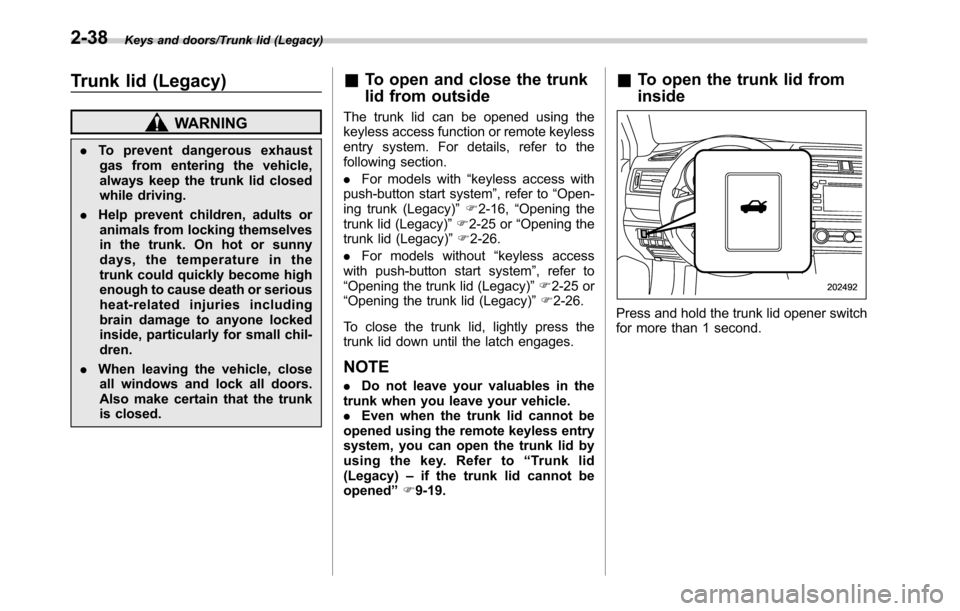
&To open the trunk lid from
inside
Press and hold the trunk lid opener switch
for more than 1 second.
2-38
Page 142 of 572
Keys and doors/Rear gate (Outback)
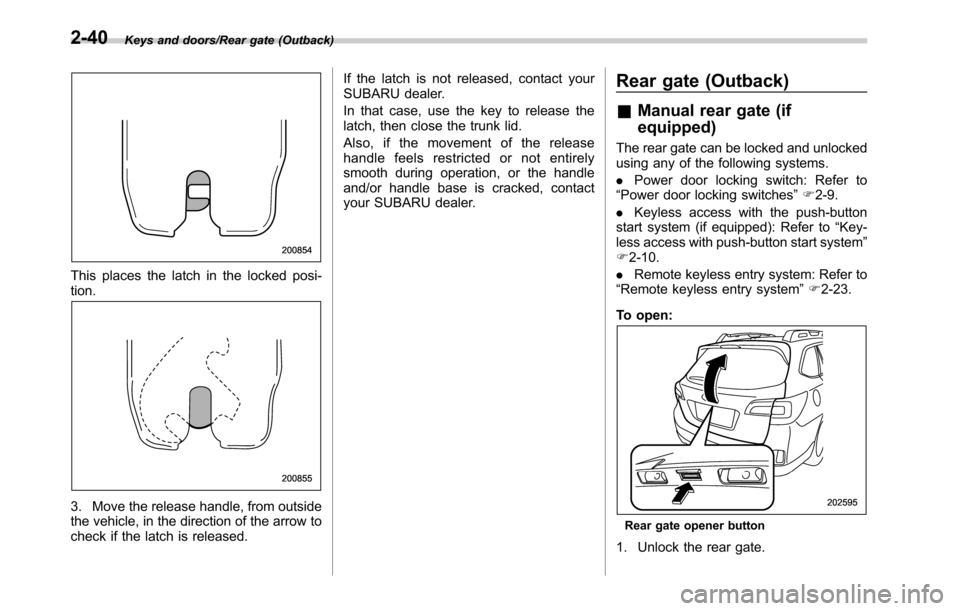
This places the latch in the locked posi-
tion.
3. Move the release handle, from outside
the vehicle, in the direction of the arrow to
check if the latch is released.If the latch is not released, contact your
SUBARU dealer.
In that case, use the key to release the
latch, then close the trunk lid.
Also, if the movement of the release
handle feels restricted or not entirely
smooth during operation, or the handle
and/or handle base is cracked, contact
your SUBARU dealer.
Rear gate (Outback)
&Manual rear gate (if
equipped)
The rear gate can be locked and unlocked
using any of the following systems.
.Power door locking switch: Refer to
“Power door locking switches”F2-9.
.Keyless access with the push-button
start system (if equipped): Refer to“Key-
less access with push-button start system”
F2-10.
.Remote keyless entry system: Refer to
“Remote keyless entry system”F2-23.
To open:
Rear gate opener button
1. Unlock the rear gate.
2-40
Page 150 of 572
Keys and doors/Moonroof
to“Keyless Entry System”F3-42.
The ON/OFF setting of the audible signal
also works as the audible signal settings
for the“remote keyless entry system”and
the“keyless access with push-button start
system”. However, for the warning chime
such as that caused by“Reverse function”
F2-46 or“Rear gate drop prevention
function”F2-47, it cannot be set as non-
operational.Moonroof (if equipped)
WARNING
Never let anyone’s hands, arms,
head or any objects protrude from
the moonroof. A person could be
seriously injured if the vehicle stops
suddenly or turns sharply or if the
vehicle is involved in an accident.
To avoid serious personal injury
caused by entrapment, you must
conform to the following instruc-
tions without exception.
.Before closing the moonroof,
make sure that no one’s hands,
arms, head or other objects will
be accidentally caught in the
moonroof.
.Before leaving the vehicle, al-
ways remove the key from the
ignition switch for safety (models
without“keyless access with
push-button start system”) and
never allow an unattended child
to remain in the vehicle. Failure
to follow this procedure could
result in injury to a child operat-
ing the moonroof..Never try to check the anti-en-
trapment function by deliberately
placing part of your body in the
moonroof.CAUTION
.Do not sit on the edge of the open
moonroof.
.Do not operate the moonroof if
falling snow or extremely cold
conditions have caused it to
freeze shut.
.The anti-entrapment function
does not operate when the moon-
roof is being tilted down. Be sure
to confirm that it is safe to do so
before tilting the moonroof down.
.If the moonroof does not close,
we recommend that you have the
system checked by a SUBARU
dealer.
The moonroof has both tilting and sliding
functions.
The moonroof operates only when the
ignition switch is in the“ON”position.
2-48
Page 156 of 572
Instruments and controls/Ignition switch (models without push–button start system)
while turning it (all models) and the select
lever is in the“P”position (CVT models).
&ACC
In this position the electrical accessories
(radio, accessory power outlet, etc.) can
be used.
&ON
This is the normal operating position after
the engine is started.
&START
CAUTION
Do not turn the ignition switch to the
“START”position while the engine
is running.
The engine is started in this position. The
starter cranks the engine to start it. When
the key is released (after the engine has
started), the key automatically returns to
the“ON”position.
If the engine does not start with your
registered key, pull out the key once (at
this time, the security indicator light will
blink), reinsert the key in the ignition
switch and then try to start the engine
again.
NOTE
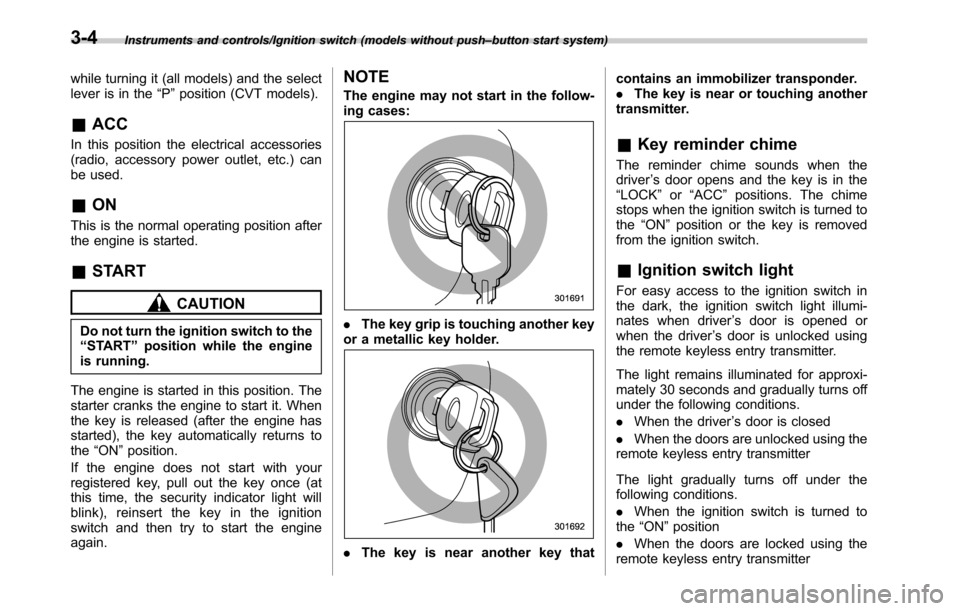
The engine may not start in the follow-
ing cases:
.The key grip is touching another key
or a metallic key holder.
.The key is near another key thatcontains an immobilizer transponder.
.The key is near or touching another
transmitter.
&Key reminder chime
The reminder chime sounds when the
driver’s door opens and the key is in the
“LOCK”or“ACC”positions. The chime
stops when the ignition switch is turned to
the“ON”position or the key is removed
from the ignition switch.
&Ignition switch light
For easy access to the ignition switch in
the dark, the ignition switch light illumi-
nates when driver’s door is opened or
when the driver’s door is unlocked using
the remote keyless entry transmitter.
The light remains illuminated for approxi-
mately 30 seconds and gradually turns off
under the following conditions.
.When the driver’s door is closed
.When the doors are unlocked using the
remote keyless entry transmitter
The light gradually turns off under the
following conditions.
.When the ignition switch is turned to
the“ON”position
.When the doors are locked using the
remote keyless entry transmitter
3-4
Page 349 of 572

Fuel...................................................................... 7-3
Fuel requirements............................................... 7-3
Fuel filler lid and cap........................................... 7-4
State emission testing (U.S. only)...................... 7-7
Preparing to drive............................................... 7-8
Starting and stopping the engine (models
without push-button ignition switch).............. 7-9
Starting engine.................................................... 7-9
Stopping the engine........................................... 7-11
Steering lock (models without“keyless access
with push-button start system”)........................ 7-11
Starting and stopping engine (models with
push-button start system).............................. 7-12
Safety precautions............................................. 7-12
Operating range for push-button start
system............................................................. 7-12
Starting engine................................................... 7-12
Stopping engine................................................. 7-14
When access key does not operate properly....... 7-14
Steering lock (models with“keyless access with
push-button start system”) ............................... 7-15
Remote engine start system (dealer
option).............................................................. 7-15
Models with“keyless access with push-button
start system”................................................... 7-16
Models without“keyless access with push-button
start system”................................................... 7-17
Entering the vehicle while it is running via remote
start................................................................. 7-20
Entering the vehicle following remote engine start
shutdown......................................................... 7-20Pre-heating or pre-cooling the interior of the
vehicle............................................................ 7-20
Service mode (models without“keyless access
with push-button start system”) ....................... 7-20
Remote transmitter program (models without
“keyless access with push-button start
system”).......................................................... 7-20
System maintenance.......................................... 7-21
Manual transmission......................................... 7-23Selecting reverse gear....................................... 7-23
Shifting speeds.................................................. 7-23
Driving tips........................................................ 7-24
Continuously variable transmission................. 7-25Select lever....................................................... 7-26
Shift lock function............................................. 7-27
Selection of manual mode.................................. 7-29
Driving tips........................................................ 7-30
Power steering................................................... 7-31
Braking............................................................... 7-32
Braking tips....................................................... 7-32
Brake system.................................................... 7-32
Disc brake pad wear warning indicators............. 7-33
ABS (Anti-lock Brake System).......................... 7-33
ABS self-check.................................................. 7-33
ABS warning light.............................................. 7-33
Electronic Brake Force Distribution (EBD)
system............................................................. 7-34
Steps to take if EBD system malfunctions.......... 7-34
Vehicle Dynamics Control system.................... 7-35Vehicle Dynamics Control system monitor.......... 7-36
Vehicle Dynamics Control OFF switch................ 7-37
Starting and operating
7
Page 357 of 572
CAUTION
Trapping small animals in the cool-
ing fan and belts of the engine may
result in a malfunction. Check that
no small animal enters the engine
compartment and under the vehicle
before starting the engine.
NOTE
Engine oil, engine coolant, brake fluid,
washer fluid and other fluid levels
should be checked daily, weekly or at
fuel stops.
Starting and stopping the
engine (models without
push-button ignition switch)
&Starting engine
CAUTION
Do not operate the starter motor
continuously for more than 10 sec-
onds. If the engine fails to start after
operating the starter for 5 to 10
seconds, wait for 10 seconds or
more before trying again.
NOTE
It may be difficult to start the engine
when the battery has been discon-
nected and reconnected (for mainte-
nance or other purposes). This diffi-
culty is caused by the electronically
controlled throttle’s self-diagnosis
function. To overcome it, keep the
ignition switch in the“ON”position
for approximately 10 seconds before
starting the engine.!General precautions when starting
engine
WARNING
.Never start the engine from out-
side the vehicle (except when
using the remote engine start
system). It may result in an
accident.
.Do not leave the engine running
in locations with poor ventilation,
such as a garage and indoors.
The exhaust gas may enter the
vehicle or indoors, and it may
result in carbon monoxide poi-
soning.
.Do not start the engine near dry
foliage, paper, or other flam-
mable substances. The exhaust
pipe and exhaust emissions can
create a fire hazard at high
temperatures.
CAUTION
.If the engine is stopped during
driving, the catalyst may over-
heat and burn.
.When starting the engine, be sure
to sit in the driver’s seat (except
Starting and operating/Starting and stopping the engine (models without push–button ignition switch)
–CONTINUED–7-9
Page 358 of 572

Starting and operating/Starting and stopping the engine (models without push–button ignition switch)
when using the remote engine
start system).
NOTE
.Avoid rapid racing and rapid accel-
eration immediately after the engine
has started.
.For a short time after the engine has
started, the engine speed is kept high.
When the warm-up is completed, the
engine speed lowers automatically.
.On rare occasions, it may be difficult
to start the engine depending on the
fuel and the usage condition (repeated
driving of a distance in which the
engine has not warmed up sufficiently).
In such a case, it is recommended that
you change to a different brand of fuel.
.On rare occasions, transient knock-
ing may be heard from the engine when
the accelerator is operated rapidly
such as a rapid start-up and a rapid
acceleration. This is not a malfunction.
.The engine starts more easily when
the headlights, air conditioner and rear
window defogger are turned off.
.After the engine starts, the engine
speed will be kept high until the engine
has warmed up sufficiently.!MT models
1. Apply the parking brake.
2. Turn off unnecessary lights and ac-
cessories.
3. Depress the clutch pedal to the floor
and shift the shift lever into neutral. Hold
the clutch pedal to the floor while starting
the engine. The starter motor will only
operate when the clutch pedal is de-
pressed fully to the floor.
4. Turn the ignition switch to the“ON”
position and check the operation of the
warning and indicator lights. Refer to
“Warning and indicator lights”F3-12.
5. Turn the ignition switch to the“START”
positionwithoutdepressing the accelera-
tor pedal. Release the key immediately
after the engine has started.
If the engine does not start, perform the
following procedure.
(1) Turn the ignition switch to the
“LOCK”position and wait for at least
10 seconds. After checking that the
parking brake is applied, turn the
ignition switch to the“START”position
while depressing the accelerator pedal
slightly (approximately a quarter of the
full stroke). Release the accelerator
pedal as soon as the engine starts.
(2) If this fails to start the engine, turn
the ignition switch back to the“LOCK”position and wait for at least 10
seconds. Then fully depress the accel-
erator pedal and turn the ignition
switch to the“START”position. If the
engine starts, quickly release the
accelerator pedal.
(3) If this does not start the engine,
turn the ignition switch again to the
“LOCK”position. After waiting for 10
seconds or longer, turn the ignition
switch to the“START”position without
depressing the accelerator pedal.
(4) If the engine still refuses to start,
contact your nearest SUBARU dealer
for assistance.
6. Confirm that all warning and indicator
lights have turned off after the engine has
started. The fuel injection system auto-
matically lowers the idle speed as the
engine warms up.
!CVT models
CAUTION
If you restart the engine while the
vehicle is moving, shift the select
lever into the“N”position. Do not
attempt to place the select lever of a
moving vehicle into the“P”posi-
tion.
7-10