display SUBARU OUTBACK 2016 6.G Repair Manual
[x] Cancel search | Manufacturer: SUBARU, Model Year: 2016, Model line: OUTBACK, Model: SUBARU OUTBACK 2016 6.GPages: 572, PDF Size: 21.79 MB
Page 275 of 572

–Outside wireless communication
range, such as some countryside
areas
–Where the wireless communica-
tion network is congested, or where
communications are restricted
.Depending on the circumstances
and environment, the signal may be
weak or not be received. In such cases,
an error may occur.
.Top 35 entries in the preset station
list on the smartphone are displayed.
When there are more than 35 entries in
the preset station list, change the order
of the entries in the list on the smart-
phone. You can change the priority of
your preset stations within the aha
application (after disconnected from
this system) to modify the station list
shown on the screen. Please see your
smartphone aha application“Edit Pre-
sets (in Main menu)”to modify this list.
.For operating the smartphone, see
the instruction manual that comes with
it.
.If there are multiple music files
stored on your iPhone or iPod touch,
it may take some time until playback
starts.
.Playback may be intermittent when
you switch to streaming Bluetooth
audio from aha on your smartphonedevice.
.When connecting the device via
Bluetooth, the communication speed
may become slower than via USB.
!Before using aha application
In order to use the aha application on this
system, the application must be installed
on the smartphone.
!Settings required to use aha
application
.Search and download the aha applica-
tion from your smartphone app store.
–iPhone and iPod touch: Apple App
Store via iTunes
–Android device: Google Play Store
.Create an account and login to the aha
application on the smartphone.
NOTE
Please use the latest version of the aha
application.
!About app-based connected con-
tent
Requirements for using the connected
content services of the aha application
on this system.
.Latest version of the system is compa-
tible with connected content application(s)
for the smartphone, available from aha,downloaded to your smartphone.
.A current account with a wireless
content service provider.
.A smartphone data plan: If the data
plan for your smartphone does not provide
for unlimited data usage, additional
charges from your carrier may apply for
accessing app-based connected content
via 3G, 4G, Wi-Fi or 4G LTE wireless
networks.
.Connection to the internet via 3G, 4G,
Wi-Fi or 4G LTE networks.
NOTE
.Changes to product specifications
may result in differences between the
content of the manual and features of
the product.
.Be careful not to exceed the data
usage limits for your smartphone.
Doing so will result in additional data
usage charges from your phone car-
rier.
.Access to app-based connected
content will depend on the availability
of wireless cell and/or Wi-Fi network
coverage for the purpose of allowing
your smartphone to connect to the
internet.
.Service availability may be geogra-
phically limited by region. Consult the
wireless connected content service
Audio/Audio set
–CONTINUED–5-47
Page 276 of 572

Audio/Audio set
provider for additional information.
.Ability of this product to access
connected content is subject to change
without notice and could be affected by
any of the following: compatibility
issues with future firmware versions
of the smartphone; compatibility is-
sues with future versions of the con-
nected content application(s) for the
smartphone; changes to or disconti-
nuation of the connected content ap-
plication(s) or service by its provider.
.Communication and phone call
charges for smartphones should be
paid by the wireless subscriber.
.If you lose the data in a smartphone
or other device while using it with the
system, no compensation will be given
for the lost data.
.Fuji Heavy Industries makes no
guarantee regarding the content pro-
vided by aha.
.aha may not work due to factors on
smartphones, smartphone applications
or stations. Fuji Heavy Industries is not
responsible for it.!About the supported devices
This system supports the following de-
vices.
.For iPhone/iPod touch users
Type GenerationFirmware
version or
OS
iPhoneiPhone 3G iOS 4.2.x
iPhone 3GS iOS 6.1.x
iPhone 4 iOS 7.0.x
iPhone 4s iOS 7.0.x
iPhone 5 iOS 7.0.x
iPhone 5c iOS 7.0.x
iPhone 5s iOS 7.0.x
iPod touchiPod touch iOS 3.1.x
iPod touch 2 iOS 4.2.x
iPod touch 3 iOS 5.1.x
iPod touch 4 iOS 6.1.x
iPod touch 5iOS 7.0.x
NOTE
Note that the warranty does not apply if
an unsupported iPhone/iPod touch is
connected..For Android device users
Android OS Specification Profile
Android Ver.
2.2 or Ver.
2.3Bluetooth
Specification
Ver. 1.1 or
higher
(Ver. 2.0 +
EDR or higher
is recom-
mended).aha Con-
nect Bin-
ary API
over SPP
.Digital
audio by
A2DP
NOTE
The available functions may vary de-
pending on the type of Android device.
!Connecting a smartphone
If you connect a smartphone to this
system after starting a supported aha
application on the smartphone, you can
display and operate the aha application
displayed on the smartphone on the
system screen.
1. Run the aha application on your
smartphone.
2. Connect the iPhone/iPod touch to the
USB port or connect the Android device
by utilizing the Bluetooth connection (SPP
and A2DP profile).
.For details about connecting an
iPhone/iPod touch: Refer to“Connect-
ing and disconnecting a USB memory/
portable device”F5-17.
.For details about registering or con-
5-48
Page 277 of 572
necting an Android device: Refer to
“Registering/connecting Bluetooth®
device”F5-66.
NOTE
When iPhone/iPod touch and Android
devices are connected at the same
time, iPhone/iPod touch is prioritized.
!How to change the source
.Select the“aha”key on the source
select screen. Refer to“Basic operation”
F5-18.
.Select the“aha”key on the APPS
screen. Refer to“STARLINK”F5-26.
NOTE
When starting-up“aha”,thereare
some smartphone models for which
“aha”application does not start up
automatically.!Using aha application
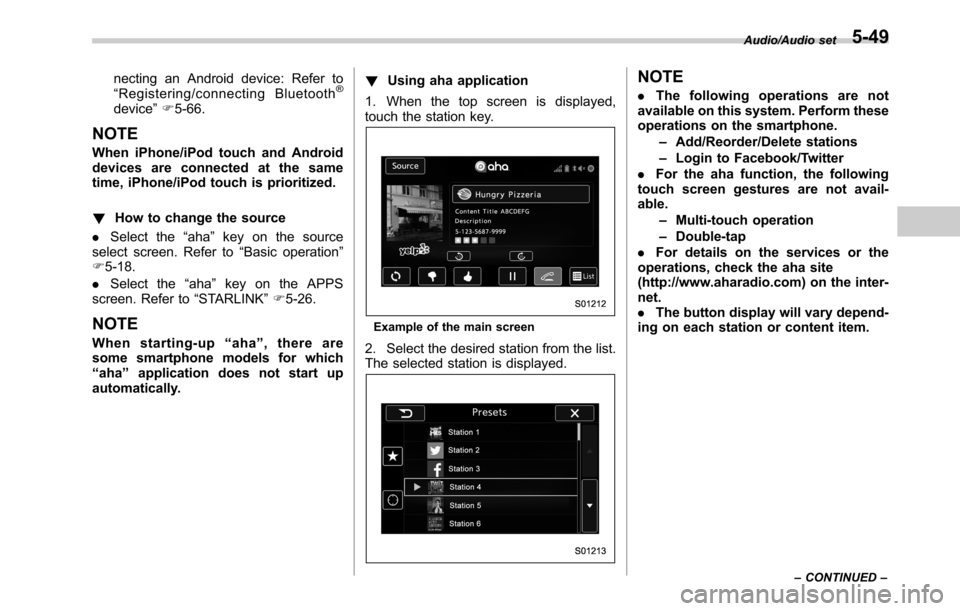
1. When the top screen is displayed,
touch the station key.
Example of the main screen
2. Select the desired station from the list.
The selected station is displayed.
NOTE
.The following operations are not
available on this system. Perform these
operations on the smartphone.
–Add/Reorder/Delete stations
–Login to Facebook/Twitter
.For the aha function, the following
touch screen gestures are not avail-
able.
–Multi-touch operation
–Double-tap
.For details on the services or the
operations, check the aha site
(http://www.aharadio.com) on the inter-
net.
.The button display will vary depend-
ing on each station or content item.
Audio/Audio set
–CONTINUED–5-49
Page 279 of 572
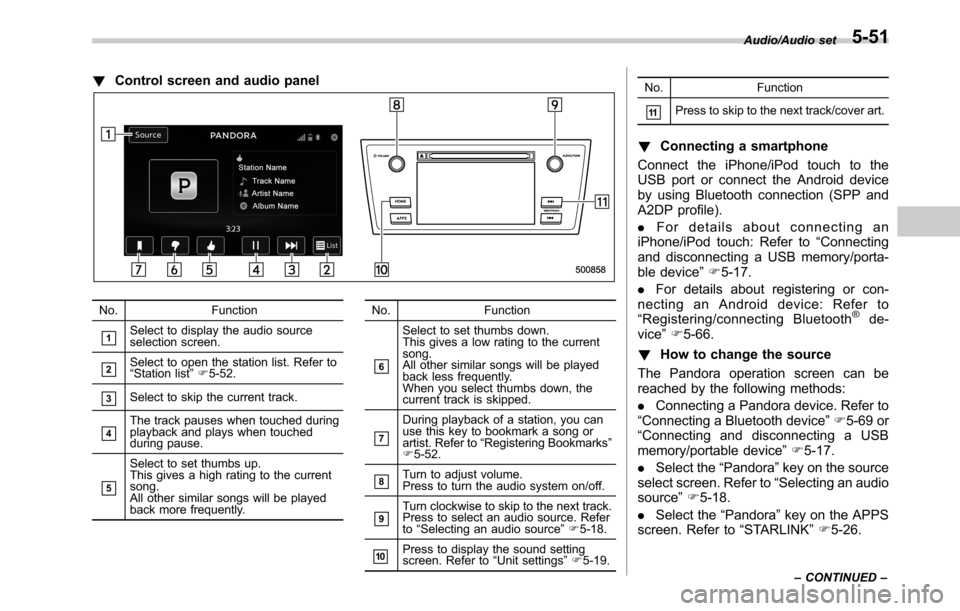
!Control screen and audio panel
No. Function
&1Select to display the audio source
selection screen.
&2Select to open the station list. Refer to
“Station list”F5-52.
&3Select to skip the current track.
&4The track pauses when touched during
playback and plays when touched
during pause.
&5
Select to set thumbs up.
This gives a high rating to the current
song.
All other similar songs will be played
back more frequently.No. Function
&6
Select to set thumbs down.
This gives a low rating to the current
song.
All other similar songs will be played
back less frequently.
When you select thumbs down, the
current track is skipped.
&7
During playback of a station, you can
use this key to bookmark a song or
artist. Refer to“Registering Bookmarks”
F5-52.
&8Turn to adjust volume.
Press to turn the audio system on/off.
&9Turn clockwise to skip to the next track.
Press to select an audio source. Refer
to“Selecting an audio source”F5-18.
&10Press to display the sound setting
screen. Refer to“Unit settings”F5-19.No. Function
&11Press to skip to the next track/cover art.
!Connecting a smartphone
Connect the iPhone/iPod touch to the
USB port or connect the Android device
by using Bluetooth connection (SPP and
A2DP profile).
.For details about connecting an
iPhone/iPod touch: Refer to“Connecting
and disconnecting a USB memory/porta-
ble device”F5-17.
.For details about registering or con-
necting an Android device: Refer to
“Registering/connecting Bluetooth
®de-
vice”F5-66.
!How to change the source
The Pandora operation screen can be
reached by the following methods:
.Connecting a Pandora device. Refer to
“Connecting a Bluetooth device”F5-69 or
“Connecting and disconnecting a USB
memory/portable device”F5-17.
.Select the“Pandora”key on the source
select screen. Refer to“Selecting an audio
source”F5-18.
.Select the“Pandora”key on the APPS
screen. Refer to“STARLINK”F5-26.
Audio/Audio set
–CONTINUED–5-51
Page 280 of 572
Audio/Audio set
NOTE
When starting-up Pandora, there are
some smartphone models for which
Pandora application does not start up
automatically.
!Registering Bookmarks
You can register the music and artist now
being played in Bookmark.
1. Touch the
tab.
2. Select the desired key. The following
items are appeared on the screen.
Item Function
TrackWhen selected after the Book-
mark key is pressed, the current
track is bookmarked.
ArtistWhen selected after the Book-
mark key is pressed, the current
artist is bookmarked.
CancelSelect to cancel the bookmark
operation.
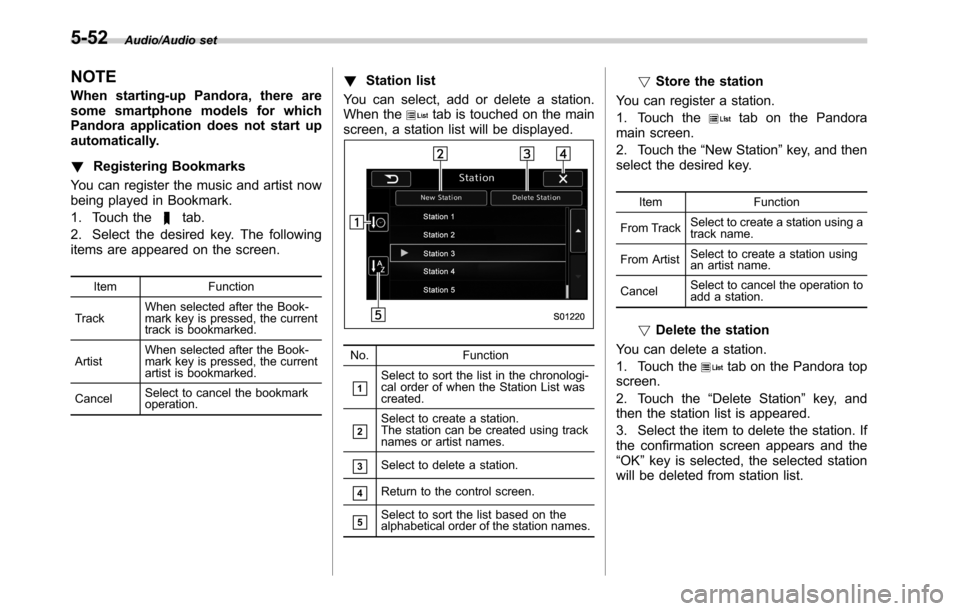
!Station list
You can select, add or delete a station.
When the
tab is touched on the main
screen, a station list will be displayed.
No. Function
&1Select to sort the list in the chronologi-
cal order of when the Station List was
created.
&2Select to create a station.
The station can be created using track
names or artist names.
&3Select to delete a station.
&4Return to the control screen.
&5Select to sort the list based on the
alphabetical order of the station names.
!Store the station
You can register a station.
1. Touch the
tab on the Pandora
main screen.
2. Touch the“New Station”key, and then
select the desired key.
Item Function
From TrackSelect to create a station using a
track name.
From ArtistSelect to create a station using
an artist name.
CancelSelect to cancel the operation to
add a station.
!Delete the station
You can delete a station.
1. Touch the
tab on the Pandora top
screen.
2. Touch the“Delete Station”key, and
then the station list is appeared.
3. Select the item to delete the station. If
the confirmation screen appears and the
“OK”key is selected, the selected station
will be deleted from station list.
5-52
Page 281 of 572
&CD
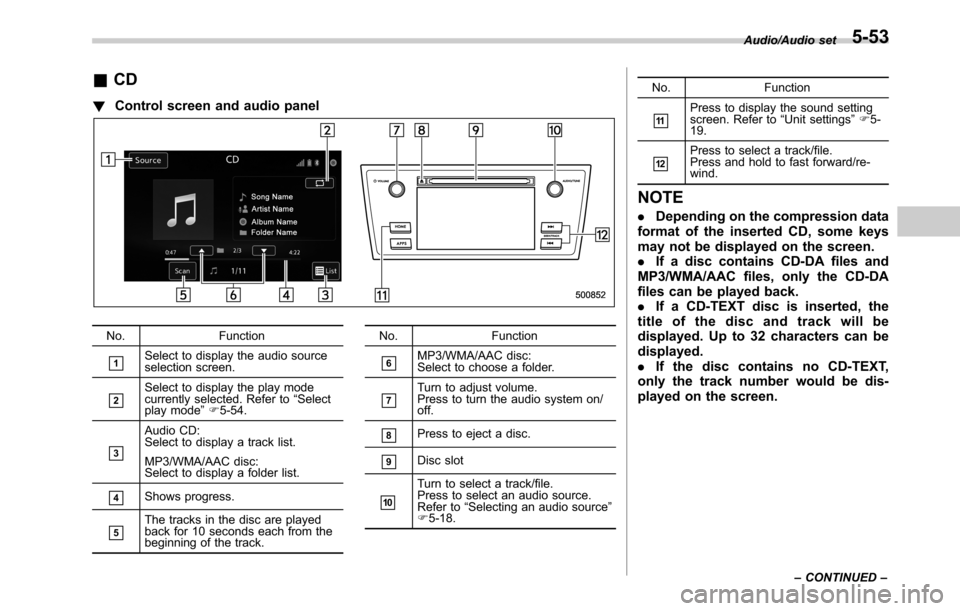
!Control screen and audio panel
No. Function
&1Select to display the audio source
selection screen.
&2Select to display the play mode
currently selected. Refer to“Select
play mode”F5-54.
&3
Audio CD:
Select to display a track list.
MP3/WMA/AAC disc:
Select to display a folder list.
&4Shows progress.
&5The tracks in the disc are played
back for 10 seconds each from the
beginning of the track.No. Function
&6MP3/WMA/AAC disc:
Select to choose a folder.
&7Turn to adjust volume.
Press to turn the audio system on/
off.
&8Press to eject a disc.
&9Disc slot
&10
Turn to select a track/file.
Press to select an audio source.
Refer to“Selecting an audio source”
F5-18.No. Function
&11Press to display the sound setting
screen. Refer to“Unit settings”F5-
19.
&12Press to select a track/file.
Press and hold to fast forward/re-
wind.
NOTE
.Depending on the compression data
format of the inserted CD, some keys
may not be displayed on the screen.
.If a disc contains CD-DA files and
MP3/WMA/AAC files, only the CD-DA
files can be played back.
.If a CD-TEXT disc is inserted, the
title of the disc and track will be
displayed. Up to 32 characters can be
displayed.
.If the disc contains no CD-TEXT,
only the track number would be dis-
played on the screen.
Audio/Audio set
–CONTINUED–5-53
Page 282 of 572
Audio/Audio set
!Loading a disc
CAUTION
Never try to disassemble the audio
kit or lubricate any part of the CD
player. Do not insert anything other
than a disc into the slot.
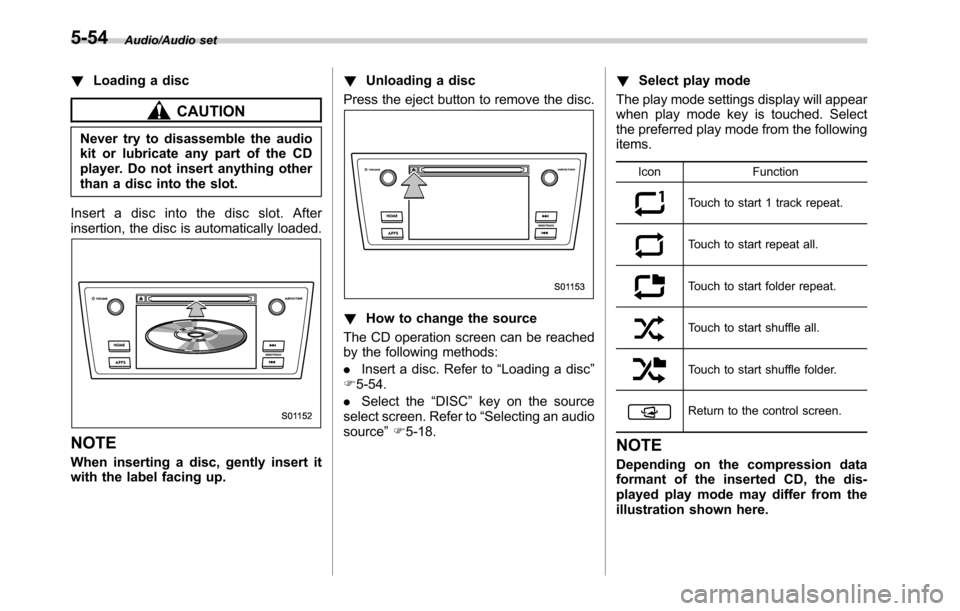
Insert a disc into the disc slot. After
insertion, the disc is automatically loaded.
NOTE
When inserting a disc, gently insert it
with the label facing up.!Unloading a disc
Press the eject button to remove the disc.
!How to change the source
The CD operation screen can be reached
by the following methods:
.Insert a disc. Refer to“Loading a disc”
F5-54.
.Select the“DISC”key on the source
select screen. Refer to“Selecting an audio
source”F5-18.!Select play mode
The play mode settings display will appear
when play mode key is touched. Select
the preferred play mode from the following
items.
Icon Function
Touch to start 1 track repeat.
Touch to start repeat all.
Touch to start folder repeat.
Touch to start shuffle all.
Touch to start shuffle folder.
Return to the control screen.
NOTE
Depending on the compression data
formant of the inserted CD, the dis-
played play mode may differ from the
illustration shown here.
5-54
Page 283 of 572
&USB memory
Audio files on the USB memory can be
played.
WARNING
Do not operate the player’s controls
or connect the USB memory while
driving. Doing so may result in
losing control of your vehicle and
cause an accident or serious injury.
CAUTION
.Do not leave your USB memory
in the car. In particular, high
temperatures inside the vehicle
may damage the USB memory.
.Do not push down on or apply
unnecessary pressure to the
USB memory while it is con-
nected as this may damage the
portable player or its terminal.
.Do not insert foreign objects into
the port as this may damage the
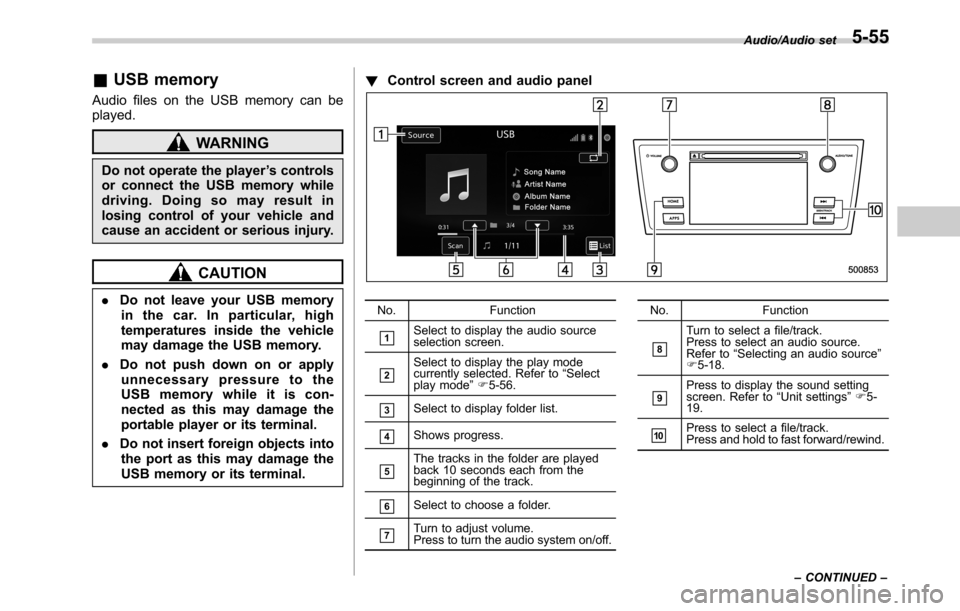
USB memory or its terminal.!Control screen and audio panelNo. Function
&1Select to display the audio source
selection screen.
&2Select to display the play mode
currently selected. Refer to“Select
play mode”F5-56.
&3Select to display folder list.
&4Shows progress.
&5The tracks in the folder are played
back 10 seconds each from the
beginning of the track.
&6Select to choose a folder.
&7Turn to adjust volume.
Press to turn the audio system on/off.No. Function
&8
Turn to select a file/track.
Press to select an audio source.
Refer to“Selecting an audio source”
F5-18.
&9Press to display the sound setting
screen. Refer to“Unit settings”F5-
19.
&10Press to select a file/track.
Press and hold to fast forward/rewind.Audio/Audio set
–CONTINUED–
5-55
Page 284 of 572
Audio/Audio set
!Connecting a USB device
You can connect a USB device to the
vehicle USB port. Refer to“Connecting
and disconnecting a USB memory/porta-
ble device”F5-17.
!How to change the source
The USB Audio playback screen can be
reached by the following methods:
.Connect a USB memory. Refer to
“Connecting and disconnecting a USB
memory/portable device”F5-17.
.Select the“USB/iPod”key on the
source select screen. Refer to“Selecting
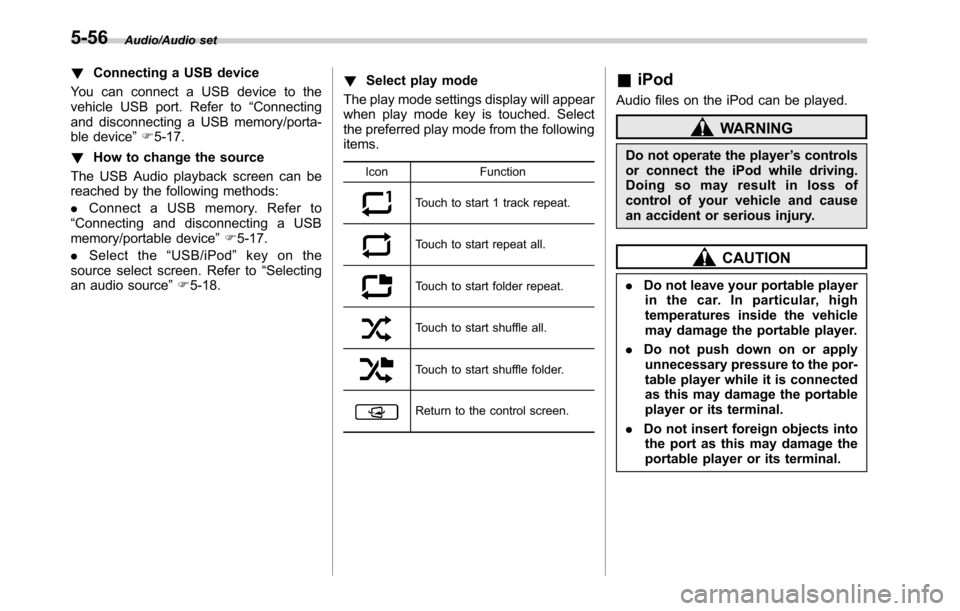
an audio source”F5-18.!Select play mode
The play mode settings display will appear
when play mode key is touched. Select
the preferred play mode from the following
items.
Icon Function
Touch to start 1 track repeat.
Touch to start repeat all.
Touch to start folder repeat.
Touch to start shuffle all.
Touch to start shuffle folder.
Return to the control screen.
&iPod
Audio files on the iPod can be played.
WARNING
Do not operate the player’s controls
or connect the iPod while driving.
Doing so may result in loss of
control of your vehicle and cause
an accident or serious injury.
CAUTION
.Do not leave your portable player
in the car. In particular, high
temperatures inside the vehicle
may damage the portable player.
.Do not push down on or apply
unnecessary pressure to the por-
table player while it is connected
as this may damage the portable
player or its terminal.
.Do not insert foreign objects into
the port as this may damage the
portable player or its terminal.
5-56
Page 285 of 572
!Control screen and audio panel
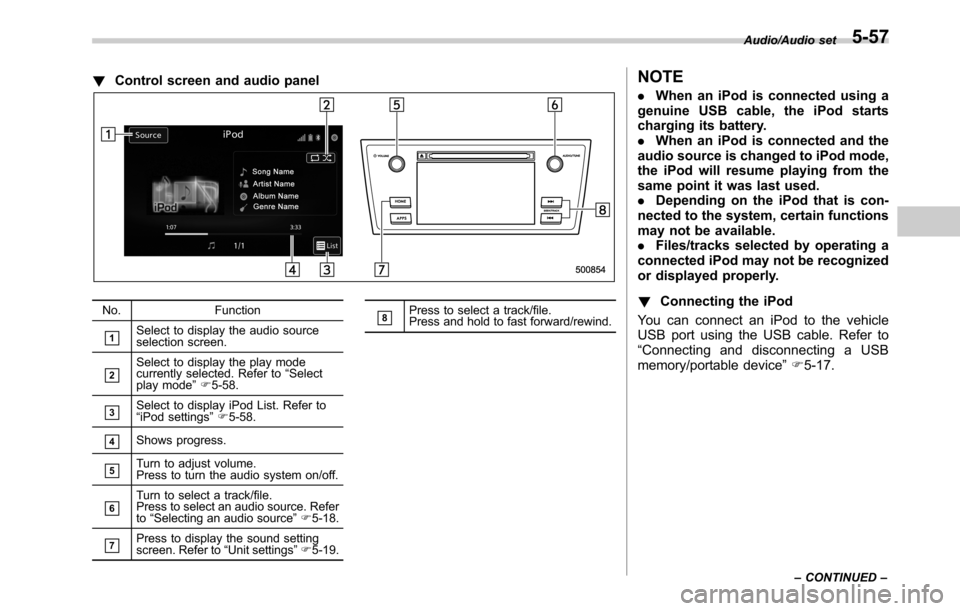
No. Function
&1Select to display the audio source
selection screen.
&2Select to display the play mode
currently selected. Refer to“Select
play mode”F5-58.
&3Select to display iPod List. Refer to
“iPod settings”F5-58.
&4Shows progress.
&5Turn to adjust volume.
Press to turn the audio system on/off.
&6Turn to select a track/file.
Press to select an audio source. Refer
to“Selecting an audio source”F5-18.
&7Press to display the sound setting
screen. Refer to“Unit settings”F5-19.
&8Press to select a track/file.
Press and hold to fast forward/rewind.
NOTE
.When an iPod is connected using a
genuine USB cable, the iPod starts
charging its battery.
.When an iPod is connected and the
audio source is changed to iPod mode,
the iPod will resume playing from the
same point it was last used.
.Depending on the iPod that is con-
nected to the system, certain functions
may not be available.
.Files/tracks selected by operating a
connected iPod may not be recognized
or displayed properly.
!Connecting the iPod
You can connect an iPod to the vehicle
USB port using the USB cable. Refer to
“Connecting and disconnecting a USB
memory/portable device”F5-17.
Audio/Audio set
–CONTINUED–5-57