ignition SUBARU OUTBACK 2016 6.G Repair Manual
[x] Cancel search | Manufacturer: SUBARU, Model Year: 2016, Model line: OUTBACK, Model: SUBARU OUTBACK 2016 6.GPages: 572, PDF Size: 21.79 MB
Page 189 of 572
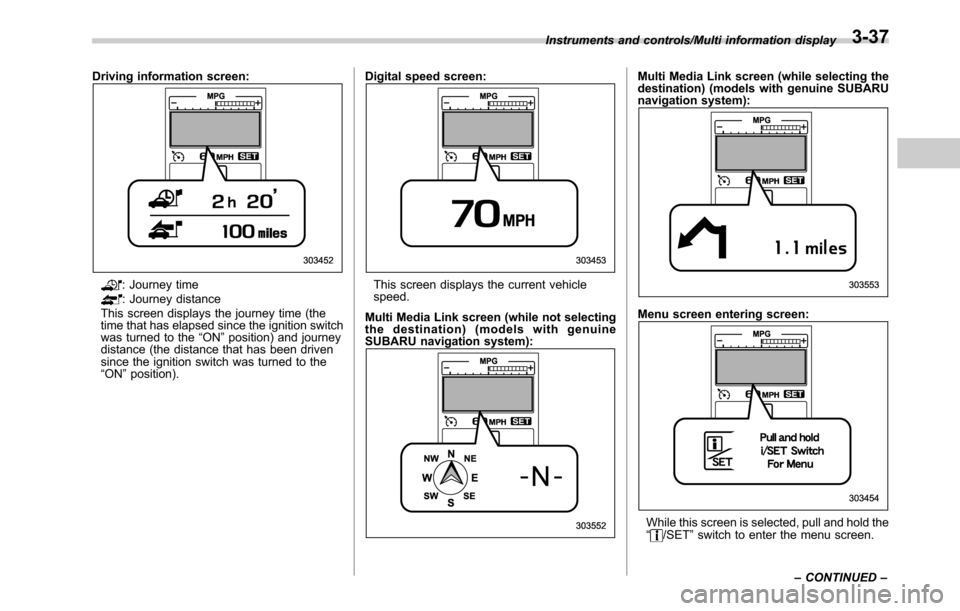
Driving information screen:
: Journey time: Journey distance
This screen displays the journey time (the
time that has elapsed since the ignition switch
was turned to the“ON”position) and journey
distance (the distance that has been driven
since the ignition switch was turned to the
“ON”position).Digital speed screen:This screen displays the current vehicle
speed.
Multi Media Link screen (while not selecting
the destination) (models with genuine
SUBARU navigation system):
Multi Media Link screen (while selecting the
destination) (models with genuine SUBARU
navigation system):
Menu screen entering screen:
While this screen is selected, pull and hold the
“/SET”switch to enter the menu screen. Instruments and controls/Multi information display
–CONTINUED–
3-37
Page 193 of 572

!Screen Settings
After entering the“Screen Settings”menu,
select one of the following menus.
!Welcome Screen
The welcome screen can be activated or
deactivated. Select“On (with Sound)”to
activate the screen and sound. Select“On
(without Sound)”to activate the screen
and deactivate the sound. Select“Off”to
deactivate the screen.
!Good-bye Screen
The Good-bye screen can be activated or
deactivated. Select“On”to activate the
screen. Select“Off”to deactivate the
screen.
!Gauge Initial Movement
The movement of the meter needles and
gauge needles that occurs when the
ignition switch is turned to the“ON”
position can be activated or deactivated.
Select“On”to activate. Select“Off”to
deactivate.
!Gear Position Indicator Settings
(MT models)
The gear position indicator light can be
activated or deactivated. Select“On”to
activate. Select“Off”to deactivate.!Units
You can select the displayed units of the
distance, vehicle speed and volume.
Operate the“
”or“”switch on the
steering wheel to display the preferred
units. Then pull the“
/SET”switch to
select the displayed units.
!Languages
Operate the“
”or“”switch on the
steering wheel to display the preferred
language. Then pull the“
/SET”switch to
select the displayed language.
!Combination Meter Illumination (if
equipped)
After entering the“Combination Meter
Illumination”menu, select the following
menu.
!Meter Ring Illumination
The illumination of the combination meter
rings can be activated or deactivated.
Select“On”to activate the illumination.
Select“Off”to deactivate the illumination.
!EyeSight (models with EyeSight
system)
NOTE
For models with the EyeSight system,
refer to the Owner’s Manual supple-
ment for the EyeSight system.After entering the“EyeSight”menu, select
one of the following menus.
!Warning Volume
The volume of the warning buzzer that
sounds when the EyeSight system is in
use can be set in 3 stages (“Max”,“Mid”
and“Min”).
!Lead Vehicle Acquisition Sound
When adaptive cruise control is used, the
buzzer that sounds under any of the
following conditions can be activated or
deactivated.
.A vehicle is detected in front
.Detection is not possible
Select“On”to activate the buzzer. Select
“Off”to deactivate the buzzer.
!Lead Vehicle Moving Monitor
Function
When adaptive cruise control is used, the
buzzer that sounds if a vehicle in front has
started can be activated or deactivated.
Select“On”to activate the buzzer. Select
“Off”to deactivate the buzzer.
!Vehicle Icon
The vehicle icon indication can be acti-
vated or deactivated. Select“On”to
activate. Select“Off”to deactivate.
Instruments and controls/Multi information display
–CONTINUED–3-41
Page 195 of 572

to customize the operation period. Select
“Off”to deactivate the welcome lighting
function when approaching.
.Leaving Time Set:
The setting for the period of time in which
the low beam headlights remain on when
exiting the vehicle can be set or custo-
mized. Select the preferred seconds to
customize the operation period. Select
“Off”to deactivate the welcome lighting
function when exiting.
!Default Settings
Select“Ye s”to use the menu screen to
restore customized settings to the factory
default settings. Select“No”to return to
the previous screen without restoring to
the factory default settings.Light control switch
CAUTION
.Use of any lights for a long period
of time while the engine is not
running can cause the battery to
discharge.
.Before leaving the vehicle, make
sure that the light control switch
is turned to the off position. If the
vehicle is left unattended for a
long time with the light control
switch set to a position other
than the off position, the battery
may be discharged.
Models with“keyless access with
push-button start system”:
The light control switch operates when the
push-button ignition switch is in the“ACC”
or“ON”position.
Regardless of the position of the light
control switch, the illuminated lights are
turned off when the push-button ignition
switch is turned off.
Models without“keyless access with
push-button start system”:
The light control switch operates when the
key is inserted in the ignition switch.Regardless of the position of the light
control switch, the illuminated lights are
turned off when the key is removed from
the ignition switch.NOTE
The light control switch can be oper-
ated (except auto on/off headlights),
even under the following conditions.
.when the key is not inserted into the
ignition switch (models without“key-
less access with push-button start
system”)
.when the push-button ignition
switch is turned off (models with“key-
less access with push-button start
system”)
If the driver’s door is opened while the
headlights are illuminated under such
conditions, a chirp sound will inform
the driver that the lights are illumi-
nated.
Instruments and controls/Light control switch
–CONTINUED–3-43
Page 196 of 572
Instruments and controls/Light control switch
&Headlights
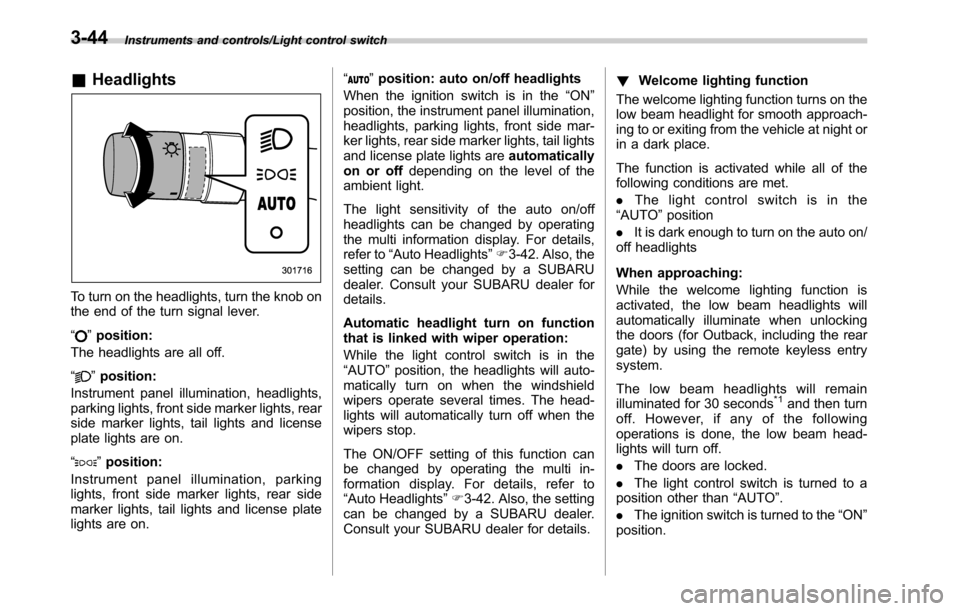
To turn on the headlights, turn the knob on
the end of the turn signal lever.
“
”position:
The headlights are all off.
“
”position:
Instrument panel illumination, headlights,
parking lights, front side marker lights, rear
side marker lights, tail lights and license
plate lights are on.
“
”position:
Instrument panel illumination, parking
lights, front side marker lights, rear side
marker lights, tail lights and license plate
lights are on.“
”position: auto on/off headlights
When the ignition switch is in the“ON”
position, the instrument panel illumination,
headlights, parking lights, front side mar-
ker lights, rear side marker lights, tail lights
and license plate lights areautomatically
on or offdepending on the level of the
ambient light.
The light sensitivity of the auto on/off
headlights can be changed by operating
the multi information display. For details,
refer to“Auto Headlights”F3-42. Also, the
setting can be changed by a SUBARU
dealer. Consult your SUBARU dealer for
details.
Automatic headlight turn on function
that is linked with wiper operation:
While the light control switch is in the
“AUTO”position, the headlights will auto-
matically turn on when the windshield
wipers operate several times. The head-
lights will automatically turn off when the
wipers stop.
The ON/OFF setting of this function can
be changed by operating the multi in-
formation display. For details, refer to
“Auto Headlights”F3-42. Also, the setting
can be changed by a SUBARU dealer.
Consult your SUBARU dealer for details.!Welcome lighting function
The welcome lighting function turns on the
low beam headlight for smooth approach-
ing to or exiting from the vehicle at night or
in a dark place.
The function is activated while all of the
following conditions are met.
.The light control switch is in the
“AUTO”position
.It is dark enough to turn on the auto on/
off headlights
When approaching:
While the welcome lighting function is
activated, the low beam headlights will
automatically illuminate when unlocking
the doors (for Outback, including the rear
gate) by using the remote keyless entry
system.
The low beam headlights will remain
illuminated for 30 seconds
*1and then turn
off. However, if any of the following
operations is done, the low beam head-
lights will turn off.
.The doors are locked.
.The light control switch is turned to a
position other than“AUTO”.
.The ignition switch is turned to the“ON”
position.
3-44
Page 197 of 572
When exiting:
While the welcome lighting function is
activated, the low beam headlights will
remain illuminated even when either of the
following operation is done.
.Thepush-buttonignitionswitchis
turned to the“OFF”status (models with
“keyless access with push-button start
system”)
.The key is pulled out from the ignition
switch (models without“keyless access
with push-button start system”)
The low beam headlights will turn off
under any of the following conditions.
.3 minutes have passed since the low
beam headlights were illuminated by the
welcome lighting function.
.30 seconds have passed since the
door is opened and closed.
*1
.The light control switch is turned to a
position other than“AUTO”.
.The locking procedure is performed
twice. When performing the unlocking
procedure after performing the locking
procedure, perform the locking procedure
twice again.
*1: The setting for the period of time in which
the low beam headlights remain on by the
welcome lighting function can be changed by a
SUBARU dealer. Contact your SUBARU dealerfor details. Also, you can change the setting by
operating the multi information display. For
details, refer to“Welcome Lighting”F3-42
.For models with the genuine SUBARU naviga-
tion system, you can change the setting by
using the navigation system. For details, refer to
the Owner’s Manual supplement for the naviga-
tion system.
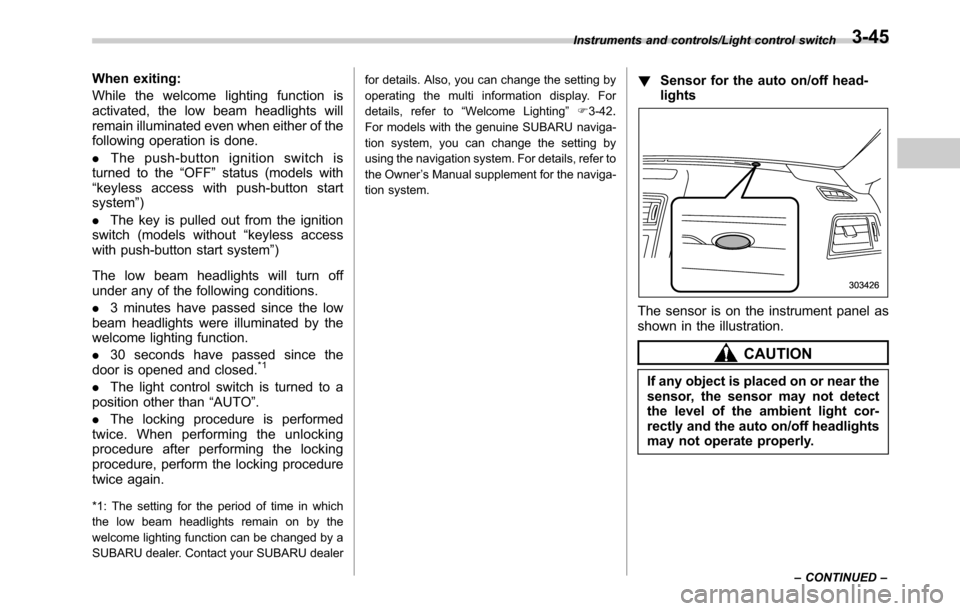
!Sensor for the auto on/off head-
lights
The sensor is on the instrument panel as
shown in the illustration.
CAUTION
If any object is placed on or near the
sensor, the sensor may not detect
the level of the ambient light cor-
rectly and the auto on/off headlights
may not operate properly.
Instruments and controls/Light control switch
–CONTINUED–3-45
Page 200 of 572
Instruments and controls/Illumination brightness control
&One-touch lane changer
To flash the turn signal and turn signal
indicator light three times, push the turn
signal lever up or down slightly and
immediately release it.
The operational/non-operational setting of
the one-touch lane changer’s can be
changed by a SUBARU dealer. Contact
the nearest SUBARU dealer for details.
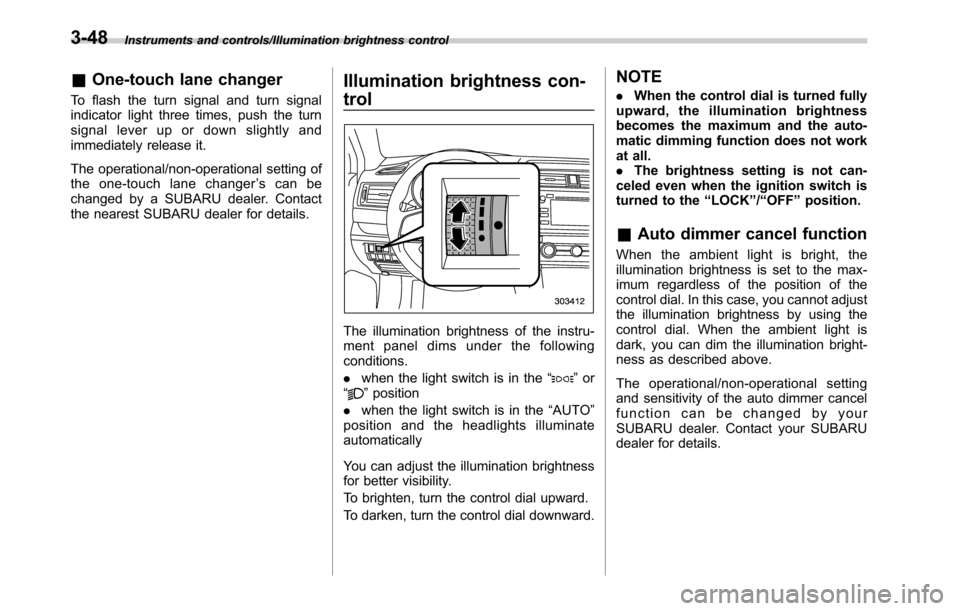
Illumination brightness con-
trol
The illumination brightness of the instru-
ment panel dims under the following
conditions.
.when the light switch is in the“
”or
“”position
.when the light switch is in the“AUTO”
position and the headlights illuminate
automatically
You can adjust the illumination brightness
for better visibility.
To brighten, turn the control dial upward.
To darken, turn the control dial downward.
NOTE
.When the control dial is turned fully
upward, the illumination brightness
becomes the maximum and the auto-
matic dimming function does not work
at all.
.The brightness setting is not can-
celed even when the ignition switch is
turned to the“LOCK”/“OFF”position.
&Auto dimmer cancel function
When the ambient light is bright, the
illumination brightness is set to the max-
imum regardless of the position of the
control dial. In this case, you cannot adjust
the illumination brightness by using the
control dial. When the ambient light is
dark, you can dim the illumination bright-
ness as described above.
The operational/non-operational setting
and sensitivity of the auto dimmer cancel
function can be changed by your
SUBARU dealer. Contact your SUBARU
dealer for details.
3-48
Page 203 of 572

.In freezing weather, be sure that
the wiper blades are not frozen to
the windshield or rear window
before switching on the wipers.
Attempting to operate the wiper
with the blades frozen to the
window glass could cause not
only the wiper blades to be
damaged but also might cause
the wiper motor to fail. If the
wiper blades are frozen to the
window glass, be sure to operate
the defroster, windshield wiper
deicer (if equipped) or rear win-
dow defogger before turning on
the wiper.
.If the wipers stop during opera-
tion because of ice or some other
obstruction on the window, this
might cause the wiper motor to
fail even if the wiper switch is
turned off. If this occurs,
promptly stop the vehicle in a
safe location, turn the ignition
switch to the“LOCK”/“OFF”po-
sition and clean the window
glass to allow proper wiper op-
eration.
.Use clean water if windshield
washer fluid is unavailable. In
areas where water freezes in
winter, use SUBARU WindshieldWasher Fluid or the equivalent.
Refer to“Windshield washer
fluid”F11-32.
Also, when driving the vehicle
when there are freezing tempera-
tures, use non-freezing type wi-
per blades.
.Do not clean the wiper blades
with gasoline or a solvent, such
as paint thinner or benzine. This
will cause deterioration of the
wiper blades.
NOTE
.The windshield wiper motor is pro-
tected against overloads by a circuit
breaker. If the motor operates continu-
ously under an unusually heavy load,
the circuit breaker may trip to stop the
motor temporarily. If this happens, park
your vehicle in a safe location, turn off
the wiper switch, and wait for approxi-
mately 10 minutes. The circuit breaker
will reset itself, and the wipers will
again operate normally.
.Clean your wiper blades and win-
dow glass periodically with a washer
solution to prevent streaking, and to
remove accumulations of road salt or
road film. Operate the windshield
washer for at least 1 second so thatwasher solution will be sprinkled all
over the windshield or rear window.
.Grease, wax, insects or other mate-
rial on the windshield or the wiper
blades results in jerky wiper operation
and streaking on the glass. If you
cannot remove those streaks after
operating the washer or if the wiper
operation is jerky, clean the outer sur-
face of the windshield or rear window
and the wiper blades using a sponge or
soft cloth with a neutral detergent or
mild abrasive cleaner. After cleaning,
rinse the window glass and wiper
blades with clean water. The glass is
clean if no beads form on the glass
when you rinse with water.
.If you cannot eliminate the streaking
even after following this procedure,
replace the wiper blades with new
ones. For replacement instructions,
refer to“Replacement of wiper blades”
F11-33.
Instruments and controls/Wiper and washer
–CONTINUED–3-51
Page 204 of 572
Instruments and controls/Wiper and washer
&Windshield wiper and washer
switches
The wiper operates only when the ignition
switch is in the“ON”position.
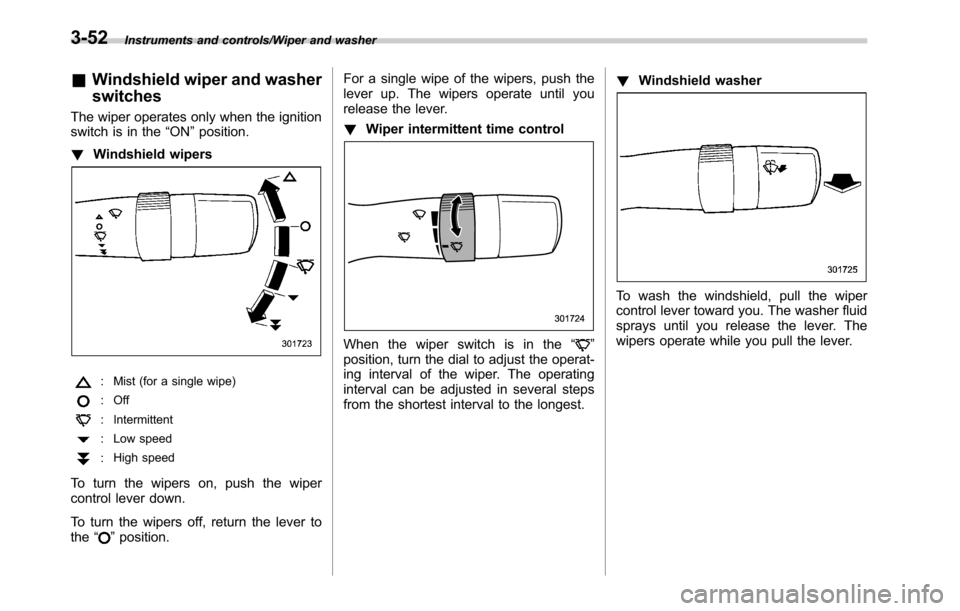
!Windshield wipers
: Mist (for a single wipe)
: Off
: Intermittent
: Low speed
:High speed
To turn the wipers on, push the wiper
control lever down.
To turn the wipers off, return the lever to
the“
”position.For a single wipe of the wipers, push the
lever up. The wipers operate until you
release the lever.
!Wiper intermittent time control
When the wiper switch is in the“”
position, turn the dial to adjust the operat-
ing interval of the wiper. The operating
interval can be adjusted in several steps
from the shortest interval to the longest.!Windshield washer
To wash the windshield, pull the wiper
control lever toward you. The washer fluid
sprays until you release the lever. The
wipers operate while you pull the lever.
3-52
Page 206 of 572
Instruments and controls/Defogger and deicer
gate. Doing so may damage the rear
wiper when it operates.
!Washer
To wash the rear window while the rear
wiper is operating, turn the knob switch
upward to the“
”position. The washer
fluid sprays until you release the knob.
To wash the rear window when the rear
wiper is not in use, turn the knob switch
downward to the“
”position. The washer
fluid sprays and the wiper operates until
you release the knob.
NOTE
When the amount of washer fluid is
getting low, the rear washer fluid will
first be stopped. This means that the
amount of washer fluid is low, and it
should be added immediately.
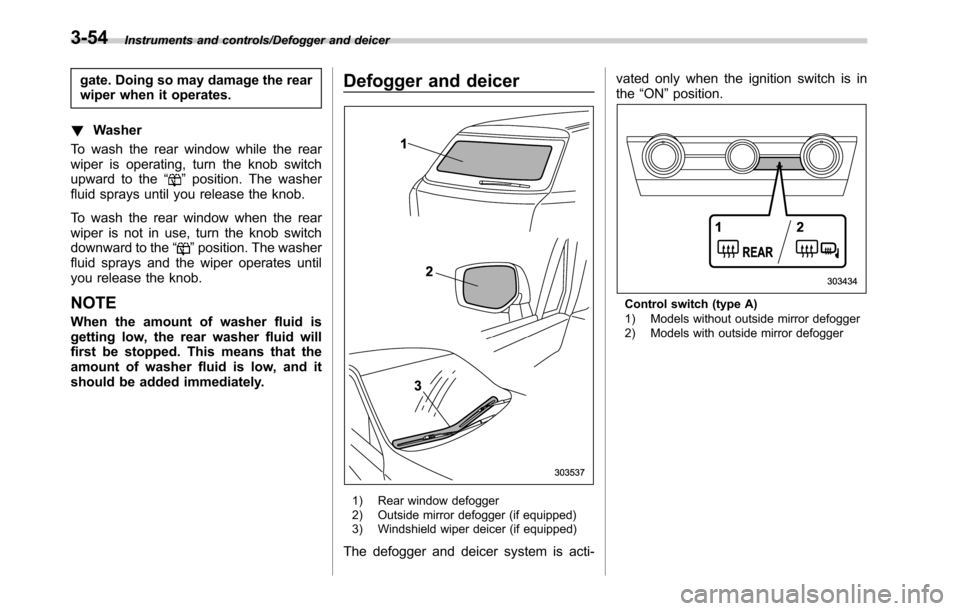
Defogger and deicer
1) Rear window defogger
2) Outside mirror defogger (if equipped)
3) Windshield wiper deicer (if equipped)
The defogger and deicer system is acti-vated only when the ignition switch is in
the“ON”position.
Control switch (type A)
1) Models without outside mirror defogger
2) Models with outside mirror defogger
3-54
Page 207 of 572
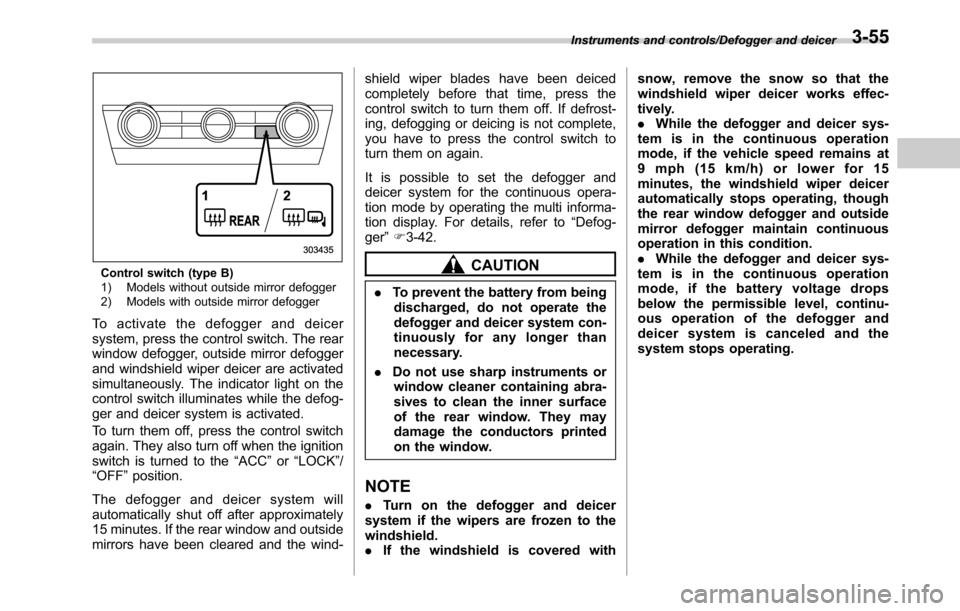
Control switch (type B)
1) Models without outside mirror defogger
2) Models with outside mirror defogger
To activate the defogger and deicer
system, press the control switch. The rear
window defogger, outside mirror defogger
and windshield wiper deicer are activated
simultaneously. The indicator light on the
control switch illuminates while the defog-
ger and deicer system is activated.
To turn them off, press the control switch
again. They also turn off when the ignition
switch is turned to the“ACC”or“LOCK”/
“OFF”position.
The defogger and deicer system will
automatically shut off after approximately
15 minutes. If the rear window and outside
mirrors have been cleared and the wind-shield wiper blades have been deiced
completely before that time, press the
control switch to turn them off. If defrost-
ing, defogging or deicing is not complete,
you have to press the control switch to
turn them on again.
It is possible to set the defogger and
deicer system for the continuous opera-
tion mode by operating the multi informa-
tion display. For details, refer to“Defog-
ger”F3-42.
CAUTION
.To prevent the battery from being
discharged, do not operate the
defogger and deicer system con-
tinuously for any longer than
necessary.
.Do not use sharp instruments or
window cleaner containing abra-
sives to clean the inner surface
of the rear window. They may
damage the conductors printed
on the window.
NOTE
.Turn on the defogger and deicer
system if the wipers are frozen to the
windshield.
.If the windshield is covered withsnow, remove the snow so that the
windshield wiper deicer works effec-
tively.
.While the defogger and deicer sys-
tem is in the continuous operation
mode, if the vehicle speed remains at
9 mph (15 km/h) or lower for 15
minutes, the windshield wiper deicer
automatically stops operating, though
the rear window defogger and outside
mirror defogger maintain continuous
operation in this condition.
.While the defogger and deicer sys-
tem is in the continuous operation
mode, if the battery voltage drops
below the permissible level, continu-
ous operation of the defogger and
deicer system is canceled and the
system stops operating.
Instruments and controls/Defogger and deicer3-55