display SUBARU OUTBACK 2017 6.G User Guide
[x] Cancel search | Manufacturer: SUBARU, Model Year: 2017, Model line: OUTBACK, Model: SUBARU OUTBACK 2017 6.GPages: 610, PDF Size: 10.28 MB
Page 165 of 610
Instruments and controls/Meters and gauges
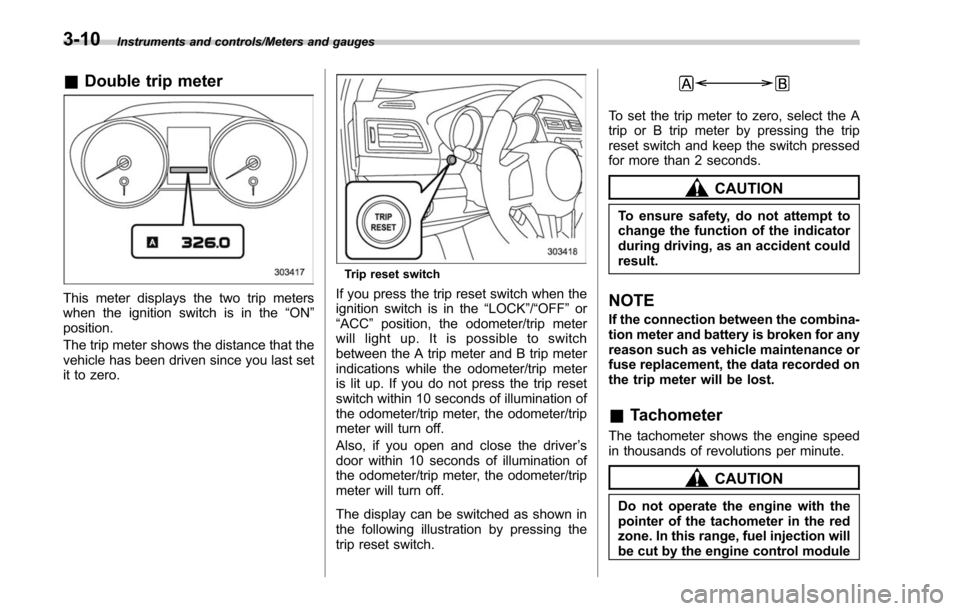
&Double trip meter
This meter displays the two trip meters
when the ignition switch is in the “ON”
position.
The trip meter shows the distance that the
vehicle has been driven since you last set
it to zero.
Trip reset switch
If you press the trip reset switch when the
ignition switch is in the “LOCK”/“OFF ”or
“ACC ”position, the odometer/trip meter
will light up. It is possible to switch
between the A trip meter and B trip meter
indications while the odometer/trip meter
is lit up. If you do not press the trip reset
switch within 10 seconds of illumination of
the odometer/trip meter, the odometer/trip
meter will turn off.
Also, if you open and close the driver ’s
door within 10 seconds of illumination of
the odometer/trip meter, the odometer/trip
meter will turn off.
The display can be switched as shown in
the following illustration by pressing the
trip reset switch.
To set the trip meter to zero, select the A
trip or B trip meter by pressing the trip
reset switch and keep the switch pressed
for more than 2 seconds.
CAUTION
To ensure safety, do not attempt to
change the function of the indicator
during driving, as an accident could
result.
NOTE
If the connection between the combina-
tion meter and battery is broken for any
reason such as vehicle maintenance or
fuse replacement, the data recorded on
the trip meter will be lost.
& Tachometer
The tachometer shows the engine speed
in thousands of revolutions per minute.
CAUTION
Do not operate the engine with the
pointer of the tachometer in the red
zone. In this range, fuel injection will
be cut by the engine control module
3-10
Page 167 of 610
Instruments and controls/Meters and gauges
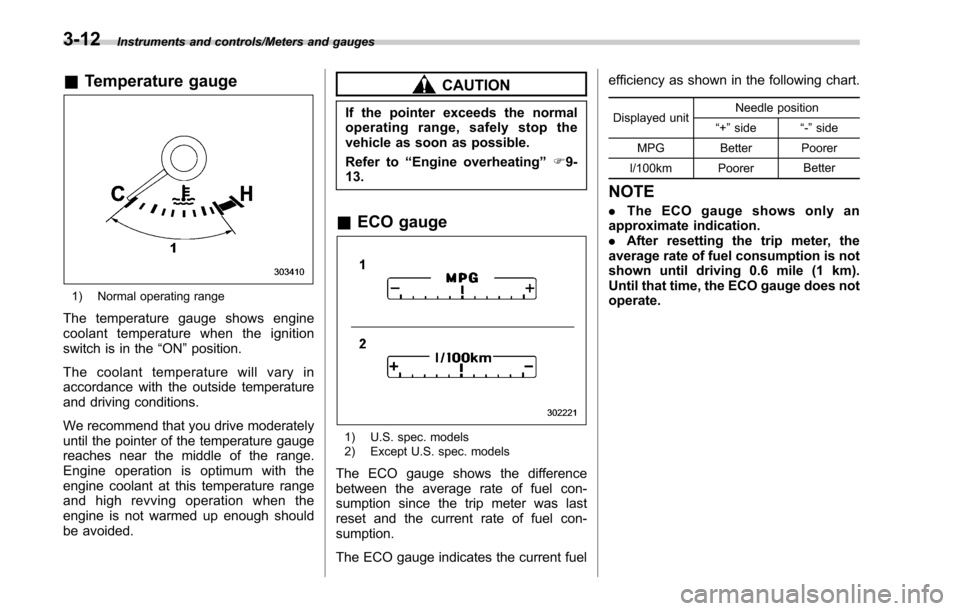
&Temperature gauge
1) Normal operating range
The temperature gauge shows engine
coolant temperature when the ignition
switch is in the “ON”position.
The coolant temperature will vary in
accordance with the outside temperature
and driving conditions.
We recommend that you drive moderately
until the pointer of the temperature gauge
reaches near the middle of the range.
Engine operation is optimum with the
engine coolant at this temperature range
and high revving operation when the
engine is not warmed up enough should
be avoided.
CAUTION
If the pointer exceeds the normal
operating range, safely stop the
vehicle as soon as possible.
Refer to “Engine overheating ”F9-
13.
& ECO gauge
1) U.S. spec. models
2) Except U.S. spec. models
The ECO gauge shows the difference
between the average rate of fuel con-
sumption since the trip meter was last
reset and the current rate of fuel con-
sumption.
The ECO gauge indicates the current fuel efficiency as shown in the following chart.
Displayed unit
Needle position
“ +” side “-” side
MPG Better Poorer
l/100km Poorer Better
NOTE
.
The ECO gauge shows only an
approximate indication.
. After resetting the trip meter, the
average rate of fuel consumption is not
shown until driving 0.6 mile (1 km).
Until that time, the ECO gauge does not
operate.
3-12
Page 186 of 610
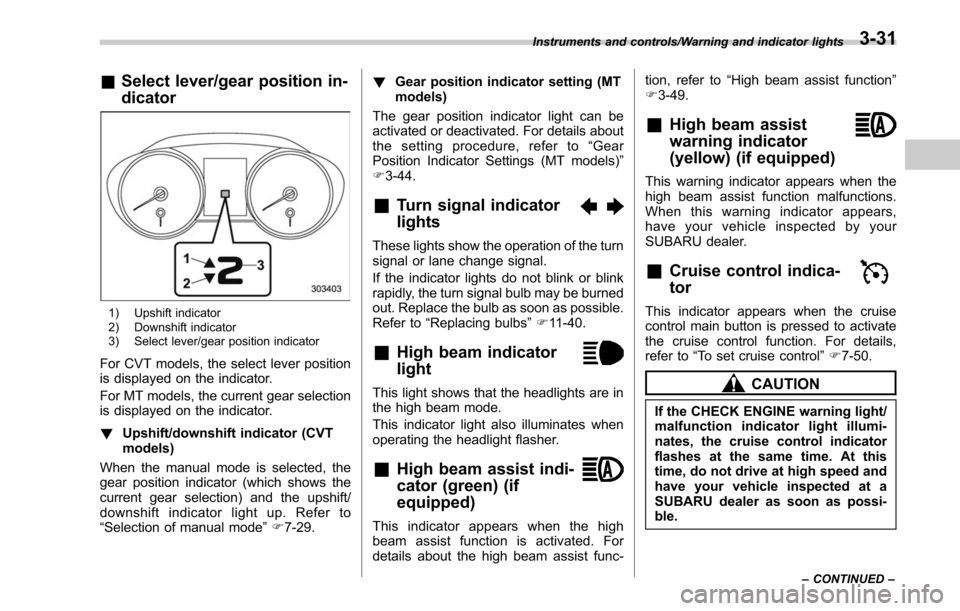
&Select lever/gear position in-
dicator
1) Upshift indicator
2) Downshift indicator
3) Select lever/gear position indicator
For CVT models, the select lever position
is displayed on the indicator.
For MT models, the current gear selection
is displayed on the indicator.
! Upshift/downshift indicator (CVT
models)
When the manual mode is selected, the
gear position indicator (which shows the
current gear selection) and the upshift/
downshift indicator light up. Refer to
“Selection of manual mode ”F 7-29. !
Gear position indicator setting (MT
models)
The gear position indicator light can be
activated or deactivated. For details about
the setting procedure, refer to “Gear
Position Indicator Settings (MT models) ”
F 3-44.
&Turn signal indicator
lights
These lights show the operation of the turn
signal or lane change signal.
If the indicator lights do not blink or blink
rapidly, the turn signal bulb may be burned
out. Replace the bulb as soon as possible.
Refer to “Replacing bulbs ”F 11-40.
&High beam indicator
light
This light shows that the headlights are in
the high beam mode.
This indicator light also illuminates when
operating the headlight flasher.
&High beam assist indi-
cator (green) (if
equipped)
This indicator appears when the high
beam assist function is activated. For
details about the high beam assist func- tion, refer to
“High beam assist function ”
F 3-49.
&High beam assist
warning indicator
(yellow) (if equipped)
This warning indicator appears when the
high beam assist function malfunctions.
When this warning indicator appears,
have your vehicle inspected by your
SUBARU dealer.
&Cruise control indica-
tor
This indicator appears when the cruise
control main button is pressed to activate
the cruise control function. For details,
refer to “To set cruise control ”F 7-50.
CAUTION
If the CHECK ENGINE warning light/
malfunction indicator light illumi-
nates, the cruise control indicator
flashes at the same time. At this
time, do not drive at high speed and
have your vehicle inspected at a
SUBARU dealer as soon as possi-
ble.
Instruments and controls/Warning and indicator lights
–CONTINUED –3-31
Page 187 of 610
Instruments and controls/Warning and indicator lights
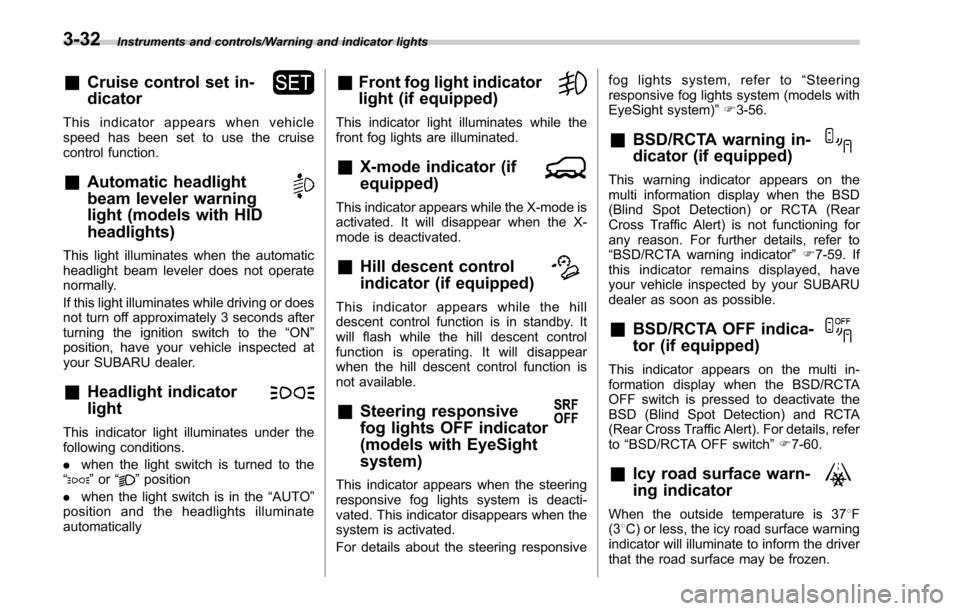
&Cruise control set in-
dicator
This indicator appears when vehicle
speed has been set to use the cruise
control function.
&Automatic headlight
beam leveler warning
light (models with HID
headlights)
This light illuminates when the automatic
headlight beam leveler does not operate
normally.
If this light illuminates while driving or does
not turn off approximately 3 seconds after
turning the ignition switch to the“ON”
position, have your vehicle inspected at
your SUBARU dealer.
&Headlight indicator
light
This indicator light illuminates under the
following conditions.
. when the light switch is turned to the
“
” or “”position
. when the light switch is in the “AUTO”
position and the headlights illuminate
automatically
&Front fog light indicator
light (if equipped)
This indicator light illuminates while the
front fog lights are illuminated.
&X-mode indicator (if
equipped)
This indicator appears while the X-mode is
activated. It will disappear when the X-
mode is deactivated.
&Hill descent control
indicator (if equipped)
This indicator appears while the hill
descent control function is in standby. It
will flash while the hill descent control
function is operating. It will disappear
when the hill descent control function is
not available.
&Steering responsive
fog lights OFF indicator
(models with EyeSight
system)
This indicator appears when the steering
responsive fog lights system is deacti-
vated. This indicator disappears when the
system is activated.
For details about the steering responsive fog lights system, refer to
“Steering
responsive fog lights system (models with
EyeSight system) ”F 3-56.
&BSD/RCTA warning in-
dicator (if equipped)
This warning indicator appears on the
multi information display when the BSD
(Blind Spot Detection) or RCTA (Rear
Cross Traffic Alert) is not functioning for
any reason. For further details, refer to
“BSD/RCTA warning indicator ”F 7-59. If
this indicator remains displayed, have
your vehicle inspected by your SUBARU
dealer as soon as possible.
&BSD/RCTA OFF indica-
tor (if equipped)
This indicator appears on the multi in-
formation display when the BSD/RCTA
OFF switch is pressed to deactivate the
BSD (Blind Spot Detection) and RCTA
(Rear Cross Traffic Alert). For details, refer
to “BSD/RCTA OFF switch ”F 7-60.
&Icy road surface warn-
ing indicator
When the outside temperature is 37 8F
(3 8C) or less, the icy road surface warning
indicator will illuminate to inform the driver
that the road surface may be frozen.
3-32
Page 188 of 610
NOTE
.The outside temperature indicator
shows the temperature in the area
around the sensor. Therefore, the tem-
perature indication may differ from the
actual outside air temperature.
. The icy road surface warning indi-
cator should be treated only as a guide.
Be sure to check the condition of the
road surface before driving.
. Once the icy road surface warning
indicator appears, it will not disappear
unless the outside temperature has
increased to 41 8F(5 8C) or higher.
&RAB warning
indicator (if equipped)
This indicator illuminates if the Reverse
Automatic Braking System malfunctions.
Refer to “Reverse Automatic Braking
System ”F 7-63.
&RAB OFF indicator (if
equipped)
This indicator illuminates when the Re-
verse Automatic Braking System is turned
OFF, or when the Reverse Automatic
Braking System is suspended temporarily.
Refer to “Reverse Automatic Braking
System ”F 7-63.
&Sonar audible alarm
OFF indicator (if
equipped)
This indicator illuminates when the sonar
audible alarm is turned OFF. For the
setting procedure, refer to “Sonar Audible
Alarm” F3-45.
Information display
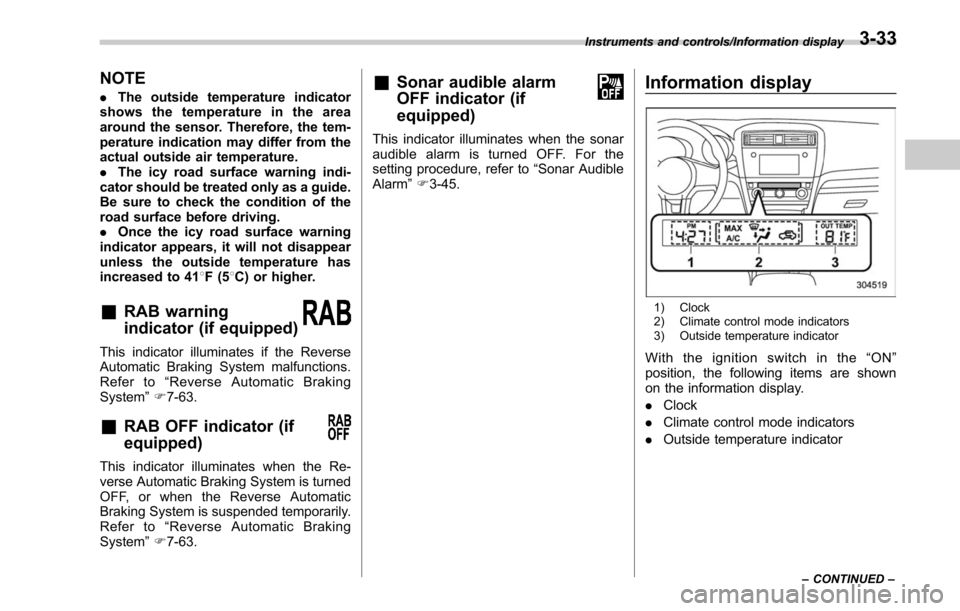
1) Clock
2) Climate control mode indicators
3) Outside temperature indicator
With the ignition switch in the “ON ”
position, the following items are shown
on the information display.
. Clock
. Climate control mode indicators
. Outside temperature indicator
Instruments and controls/Information display
–CONTINUED –3-33
Page 189 of 610
Instruments and controls/Information display
&Clock
NOTE
Your SUBARU dealer can change the
settings of activating/deactivating the
automatic adjustment of the clock by
the GPS (Global Positioning System)
(for models with the genuine SUBARU
navigation system). While the auto-
matic adjustment is activated, you
cannot adjust the time shown on the
clock manually. If you press the “+ ”
button or “-” button, the “--- ”indication
will be displayed to inform you that you
cannot adjust it manually. Contact your
SUBARU dealer for details.
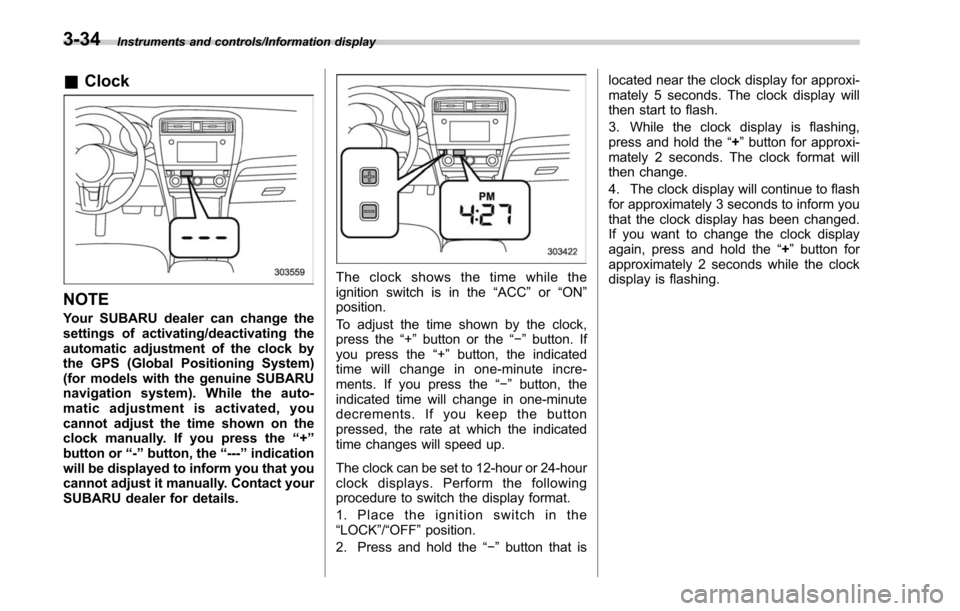
The clock shows the time while the
ignition switch is in the “ACC”or “ON ”
position.
To adjust the time shown by the clock,
press the “+”button or the “− ” button. If
you press the “+”button, the indicated
time will change in one-minute incre-
ments. If you press the “−”button, the
indicated time will change in one-minute
decrements. If you keep the button
pressed, the rate at which the indicated
time changes will speed up.
The clock can be set to 12-hour or 24-hour
clock displays. Perform the following
procedure to switch the display format.
1. Place the ignition switch in the
“LOCK”/ “OFF”position.
2. Press and hold the “−”button that is located near the clock display for approxi-
mately 5 seconds. The clock display will
then start to flash.
3. While the clock display is flashing,
press and hold the
“+”button for approxi-
mately 2 seconds. The clock format will
then change.
4. The clock display will continue to flash
for approximately 3 seconds to inform you
that the clock display has been changed.
If you want to change the clock display
again, press and hold the “+”button for
approximately 2 seconds while the clock
display is flashing.
3-34
Page 190 of 610
&Climate control mode indica-
tors
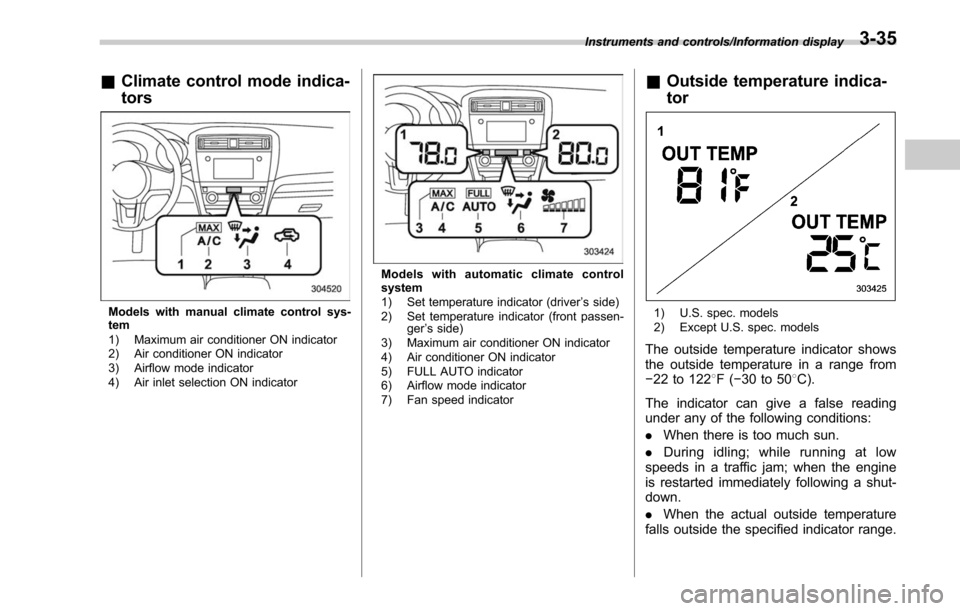
Models with manual climate control sys-
tem
1) Maximum air conditioner ON indicator
2) Air conditioner ON indicator
3) Airflow mode indicator
4) Air inlet selection ON indicator
Models with automatic climate control
system
1) Set temperature indicator (driver ’s side)
2) Set temperature indicator (front passen- ger’s side)
3) Maximum air conditioner ON indicator
4) Air conditioner ON indicator
5) FULL AUTO indicator
6) Airflow mode indicator
7) Fan speed indicator
& Outside temperature indica-
tor
1) U.S. spec. models
2) Except U.S. spec. models
The outside temperature indicator shows
the outside temperature in a range from
−22 to 122 8F( −30 to 50 8C).
The indicator can give a false reading
under any of the following conditions:
. When there is too much sun.
. During idling; while running at low
speeds in a traffic jam; when the engine
is restarted immediately following a shut-
down.
. When the actual outside temperature
falls outside the specified indicator range.
Instruments and controls/Information display3-35
Page 191 of 610
Instruments and controls/Multi information display
Multi information display
WARNING
Always pay adequate attention to
safe driving when operating the
multi information display while the
vehicle is in motion. When operation
of the multi information display
interferes with your ability to con-
centrate on driving, stop the vehicle
before performing operations on the
screen. Also, do not concentrate on
the display while driving. Doing so
may cause you to look away from
the road and could result in an
accident.
Various information will be shown on the
multi information display. Also, a warning
message will appear on the display if a
malfunction, etc. is detected. In addition,
several settings for the displayed content
can be performed.
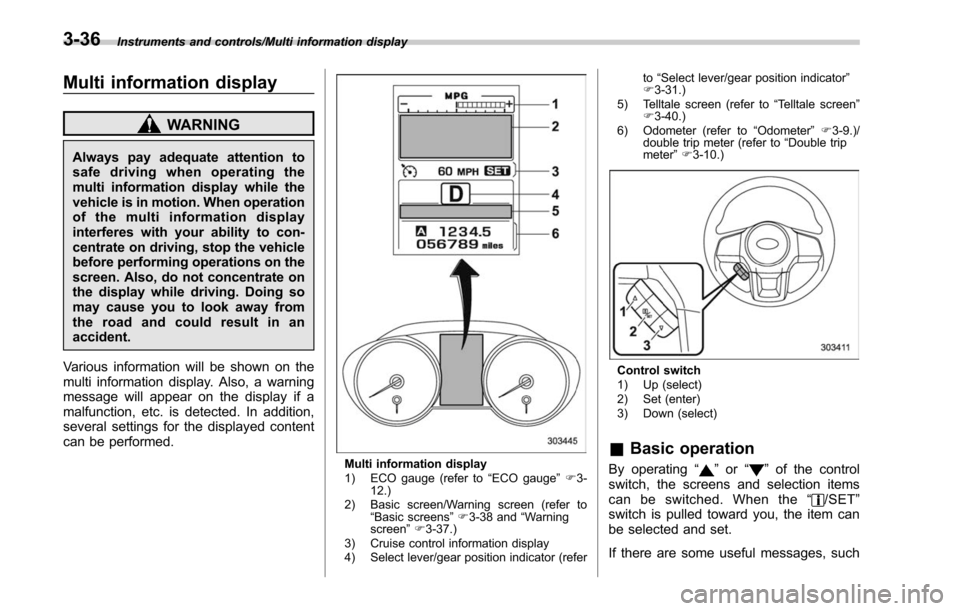
Multi information display
1) ECO gauge (refer to “ECO gauge ”F 3-
12.)
2) Basic screen/Warning screen (refer to “Basic screens ”F 3-38 and “Warning
screen ”F 3-37.)
3) Cruise control information display
4) Select lever/gear position indicator (refer to
“Select lever/gear position indicator ”
F 3-31.)
5) Telltale screen (refer to “Telltale screen ”
F 3-40.)
6) Odometer (refer to “Odometer ”F 3-9.)/
double trip meter (refer to “Double trip
meter” F3-10.)
Control switch
1) Up (select)
2) Set (enter)
3) Down (select)
& Basic operation
By operating “”or “”of the control
switch, the screens and selection items
can be switched. When the “
/SET”
switch is pulled toward you, the item can
be selected and set.
If there are some useful messages, such
3-36
Page 192 of 610
as vehicle information, warning informa-
tion, etc., they will interrupt the current
screen, and appear on the display accom-
panied by a beep. If such a screen is
displayed, take proper action according to
the message shown on the screen.
The warning screen will return to the
original screen after a few seconds. While
the“
”information reminder is shown on
the display, it may be possible to display
the warning screen again. To recall the
message marked with “
”on the display,
pull the “/SET”switch on the steering
wheel toward you.
& Welcome screen and Good-
bye screen
When the driver ’s door is opened and
closed after unlocking the door, the
welcome screen will appear on the multi
information display for approximately 20
seconds.
When the ignition switch is turned to the
“LOCK”/ “OFF ”position, the multi informa-
tion display gradually turns off (Good-bye
screen).
NOTE
. The basic screen will be shown
when the ignition switch is turned to
the “ON ”position while the welcome screen is displayed.
.
Once the welcome screen appears,
it takes a certain period of time to
display it again.
. If the ignition switch is operated
after unlocking the driver ’s door, the
welcome screen will not appear even
when the driver ’s door is opened and
closed.
. The welcome screen will disappear
when you lock the driver ’s door by
using the remote keyless entry system
(all models) or the keyless access
function (if equipped) while the wel-
come screen is displayed.
. If any of the doors (including the
rear gate) is opened while the welcome
screen is displayed, the door ajar
warning will appear.
. The welcome screen can be set to
on or off. For details, refer to “Welcome
Screen ”F 3-44.
. The Good-bye screen can be set to
on or off. For details, refer to “Good-
bye Screen ”F 3-44.
& Warning screen
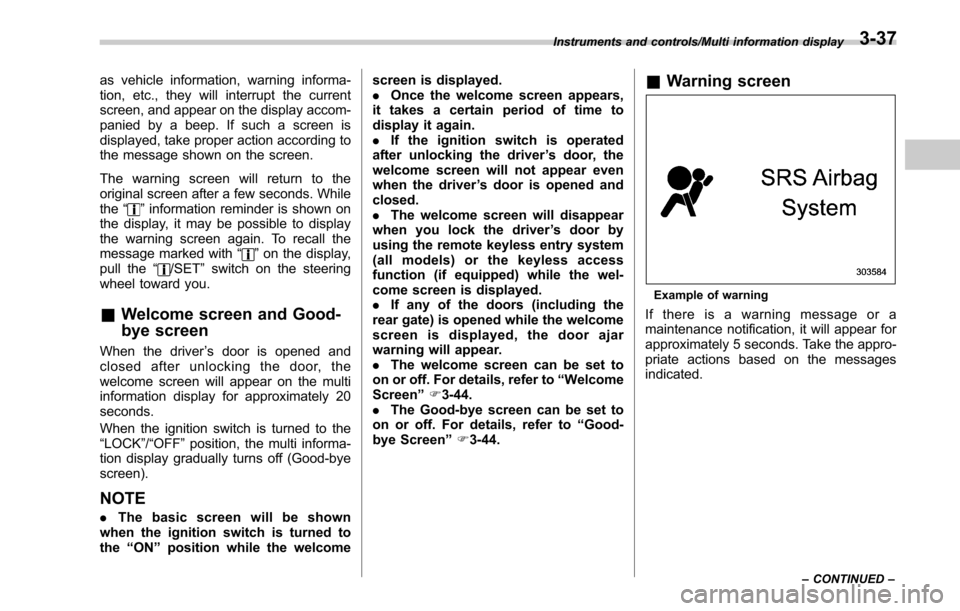
Example of warning
If there is a warning message or a
maintenance notification, it will appear for
approximately 5 seconds. Take the appro-
priate actions based on the messages
indicated.
Instruments and controls/Multi information display
–CONTINUED –3-37
Page 193 of 610
Instruments and controls/Multi information display
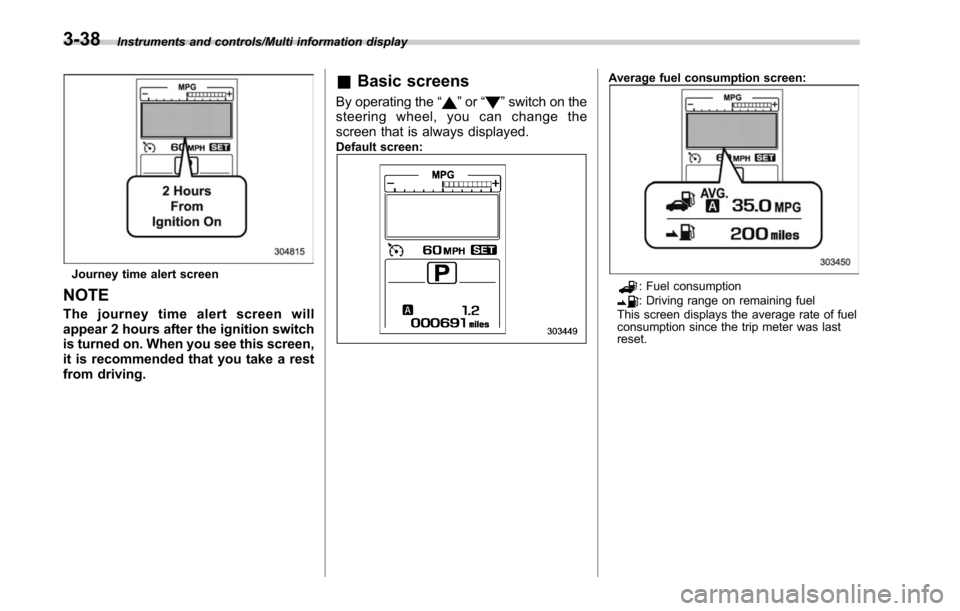
Journey time alert screen
NOTE
The journey time alert screen will
appear 2 hours after the ignition switch
is turned on. When you see this screen,
it is recommended that you take a rest
from driving.
&Basic screens
By operating the “”or “”switch on the
steering wheel, you can change the
screen that is always displayed.
Default screen:
Average fuel consumption screen:
: Fuel consumption: Driving range on remaining fuel
This screen displays the average rate of fuel
consumption since the trip meter was last
reset.
3-38