load SUBARU OUTBACK 2017 6.G Owner's Manual
[x] Cancel search | Manufacturer: SUBARU, Model Year: 2017, Model line: OUTBACK, Model: SUBARU OUTBACK 2017 6.GPages: 610, PDF Size: 10.28 MB
Page 343 of 610
Audio/Appendix
Appendix
&Certification
. Bluetooth
The Bluetooth word mark and logo are
registered trademarks of Bluetooth SIG,
Inc. and any use of such marks by Clarion
Co., Ltd. is under license.
. SiriusXM Satellite Radio (if
equipped)
SiriusXM
TMand all related marks and
logos are trademarks of SiriusXM Radio
Inc. All rights reserved.
. Pandora (if equipped)
Pandora, the Pandora logo, and other
Pandora marks are trademarks or regis-
tered trademarks of Pandora Media, Inc.,
or its subsidiaries worldwide.
If you have any issues with the Pandora
application on your mobile phone, please
direct them to
[email protected].
. iPod
“Made for iPod ”and “Made for iPhone”
mean that an electronic accessory has
been designed to connect specifically to
iPod or iPhone respectively, and has been
certified by the developer to meet Apple
performance standards. Apple is not
responsible for the operation of this device
or its compliance with safety and regula-
tory standards. Please note that the use of
this accessory with iPod or iPhone may
affect wireless performance.
iPhone, iPod, iPod classic, iPod nano,
iPod touch, and iTunes are trademarks of
Apple Inc., registered in the U.S. and other
countries.
. How to get the source code using
the open source
This system implements software using
the open source. For customers who
would like to get the source code of the
software, it is available by downloading it
from the web site of Clarion Co., Ltd.
For details, refer to the following web site. http://www.clarion.com/us/en/support/in-
dex.html
&
Certification for the Hands-
free system
This device complies with Part 15 of FCC
Rules and Industry Canada licence-ex-
empt RSS standard(s). Operation is sub-
ject to the following two conditions: (1) this
device may not cause harmful interfer-
ence, and (2) this device must accept any
interference received, including interfer-
ence that may cause undesired operation.
Le présent appareil est conforme à la
partie 15 des règles de la FCC et CNR
d’Industrie Canada applicables aux appa-
reils radio exempts de licence. L ’exploita-
tion est autorisée aux deux conditions
suivantes : (1) l ’appareil ne doit pas
produire de brouillage, et (2) l ’utilisateur
de l ’appareil doit accepter tout brouillage
radioélectrique subi, même si le brouillage
est susceptible d ’en compromettre le
fonctionnement.
This equipment complies with FCC/IC
radiation exposure limits set forth for an
uncontrolled environment and meets the
FCC radio frequency (RF) Exposure
Guidelines in Supplement C to OET65
and RSS-102 of the IC radio frequency
(RF) Exposure rules. This equipment has
5-92
Page 355 of 610
Interior equipment/Accessory power outlets
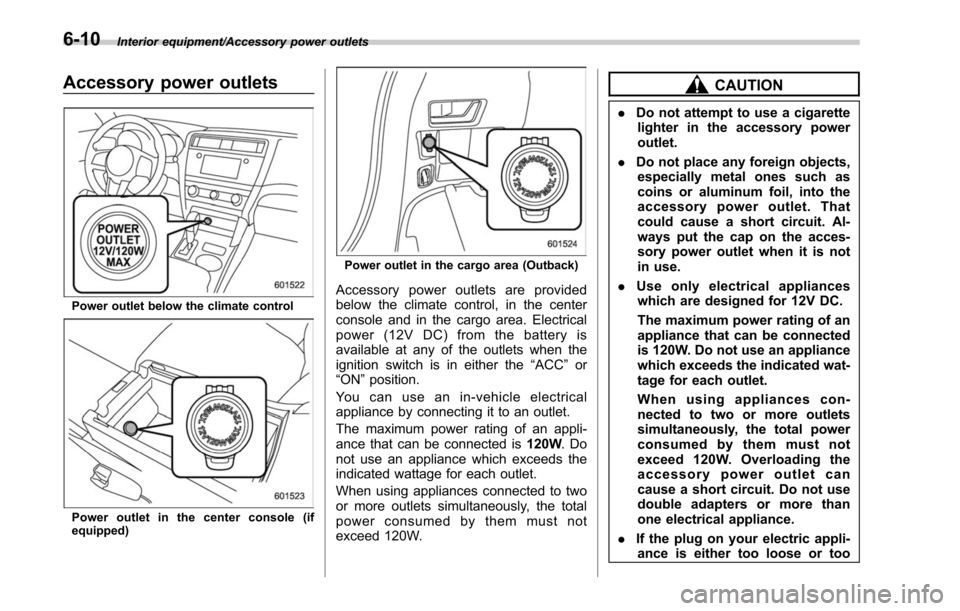
Accessory power outlets
Power outlet below the climate control
Power outlet in the center console (if
equipped)
Power outlet in the cargo area (Outback)
Accessory power outlets are provided
below the climate control, in the center
console and in the cargo area. Electrical
power (12V DC) from the battery is
available at any of the outlets when the
ignition switch is in either the“ACC”or
“ON ”position.
You can use an in-vehicle electrical
appliance by connecting it to an outlet.
The maximum power rating of an appli-
ance that can be connected is 120W.Do
not use an appliance which exceeds the
indicated wattage for each outlet.
When using appliances connected to two
or more outlets simultaneously, the total
power consumed by them must not
exceed 120W.
CAUTION
. Do not attempt to use a cigarette
lighter in the accessory power
outlet.
. Do not place any foreign objects,
especially metal ones such as
coins or aluminum foil, into the
accessory power outlet. That
could cause a short circuit. Al-
ways put the cap on the acces-
sory power outlet when it is not
in use.
. Use only electrical appliances
which are designed for 12V DC.
The maximum power rating of an
appliance that can be connected
is 120W. Do not use an appliance
which exceeds the indicated wat-
tage for each outlet.
When using appliances con-
nected to two or more outlets
simultaneously, the total power
consumed by them must not
exceed 120W. Overloading the
accessory power outlet can
cause a short circuit. Do not use
double adapters or more than
one electrical appliance.
. If the plug on your electric appli-
ance is either too loose or too
6-10
Page 359 of 610
Interior equipment/Convenient grip (Outback)
&Outback
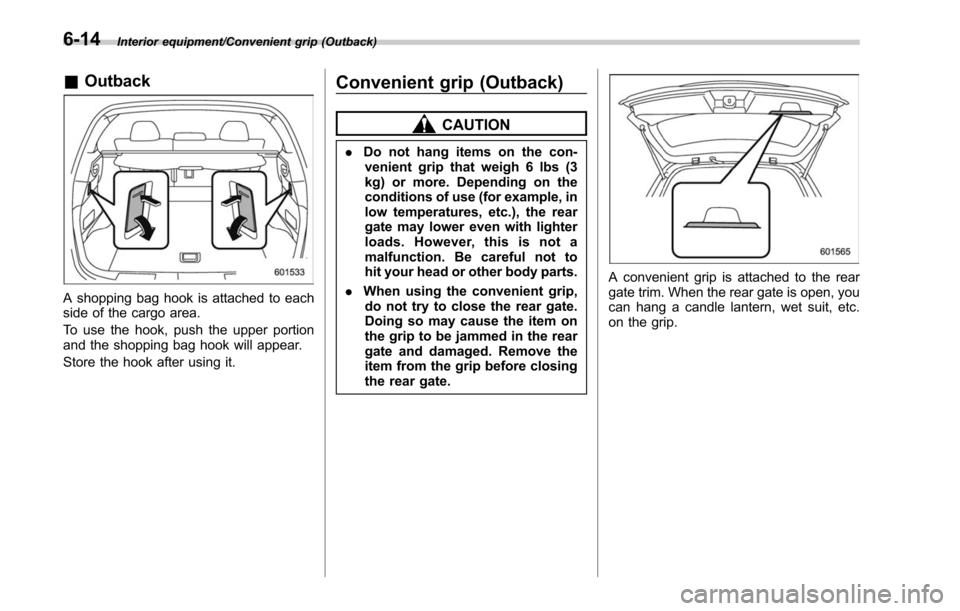
A shopping bag hook is attached to each
side of the cargo area.
To use the hook, push the upper portion
and the shopping bag hook will appear.
Store the hook after using it.
Convenient grip (Outback)
CAUTION
. Do not hang items on the con-
venient grip that weigh 6 lbs (3
kg) or more. Depending on the
conditions of use (for example, in
low temperatures, etc.), the rear
gate may lower even with lighter
loads. However, this is not a
malfunction. Be careful not to
hit your head or other body parts.
. When using the convenient grip,
do not try to close the rear gate.
Doing so may cause the item on
the grip to be jammed in the rear
gate and damaged. Remove the
item from the grip before closing
the rear gate.
A convenient grip is attached to the rear
gate trim. When the rear gate is open, you
can hang a candle lantern, wet suit, etc.
on the grip.
6-14
Page 364 of 610
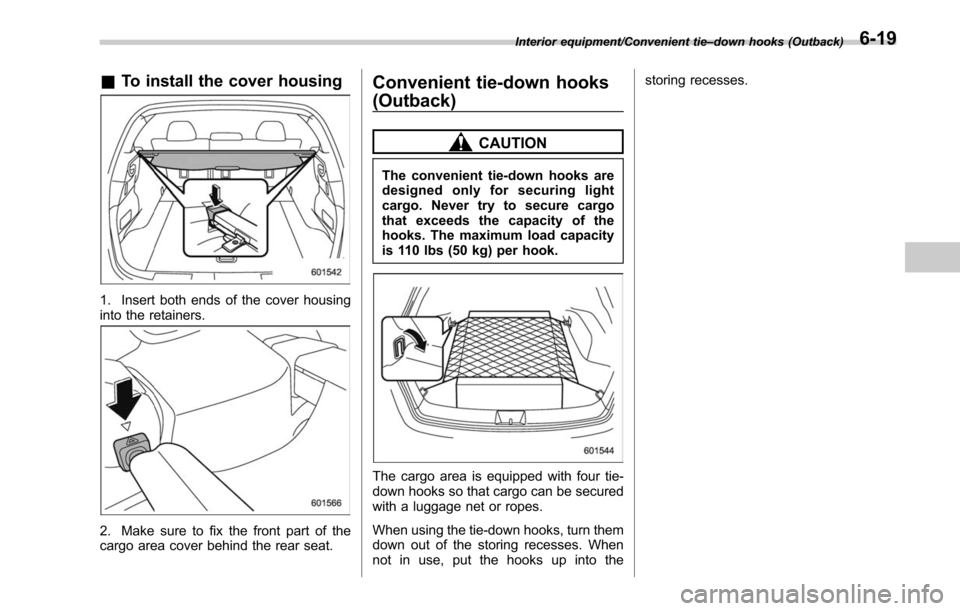
&To install the cover housing
1. Insert both ends of the cover housing
into the retainers.
2. Make sure to fix the front part of the
cargo area cover behind the rear seat.
Convenient tie-down hooks
(Outback)
CAUTION
The convenient tie-down hooks are
designed only for securing light
cargo. Never try to secure cargo
that exceeds the capacity of the
hooks. The maximum load capacity
is 110 lbs (50 kg) per hook.
The cargo area is equipped with four tie-
down hooks so that cargo can be secured
with a luggage net or ropes.
When using the tie-down hooks, turn them
down out of the storing recesses. When
not in use, put the hooks up into the storing recesses.
Interior equipment/Convenient tie
–down hooks (Outback)6-19
Page 369 of 610
Interior equipment/Rear view camera
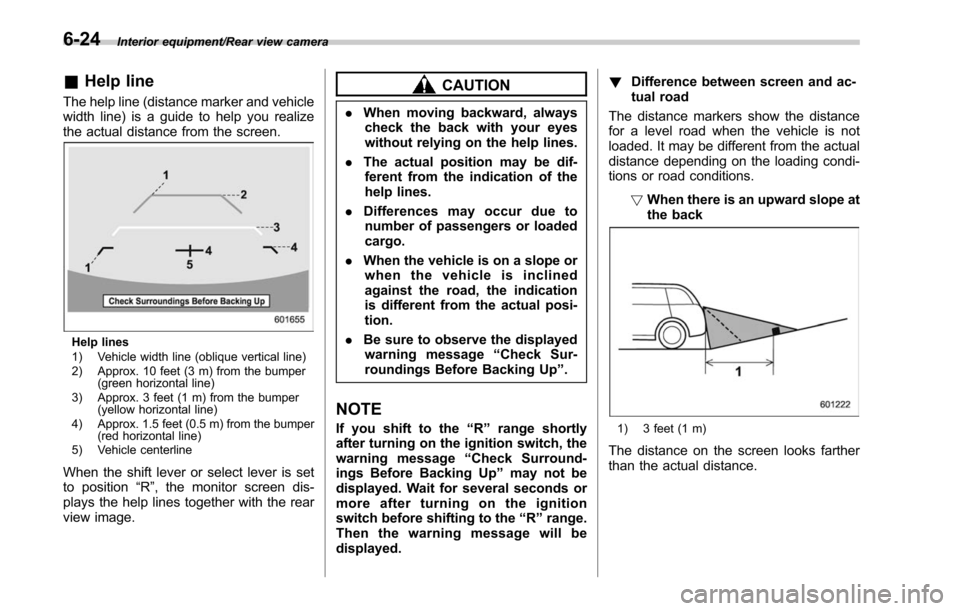
&Help line
The help line (distance marker and vehicle
width line) is a guide to help you realize
the actual distance from the screen.
Help lines
1) Vehicle width line (oblique vertical line)
2) Approx. 10 feet (3 m) from the bumper
(green horizontal line)
3) Approx. 3 feet (1 m) from the bumper (yellow horizontal line)
4) Approx. 1.5 feet (0.5 m) from the bumper (red horizontal line)
5) Vehicle centerline
When the shift lever or select lever is set
to position “R”, the monitor screen dis-
plays the help lines together with the rear
view image.
CAUTION
. When moving backward, always
check the back with your eyes
without relying on the help lines.
. The actual position may be dif-
ferent from the indication of the
help lines.
. Differences may occur due to
number of passengers or loaded
cargo.
. When the vehicle is on a slope or
when the vehicle is inclined
against the road, the indication
is different from the actual posi-
tion.
. Be sure to observe the displayed
warning message “Check Sur-
roundings Before Backing Up ”.
NOTE
If you shift to the “R ” range shortly
after turning on the ignition switch, the
warning message “Check Surround-
ings Before Backing Up” may not be
displayed. Wait for several seconds or
more after turning on the ignition
switch before shifting to the “R ” range.
Then the warning message will be
displayed. !
Difference between screen and ac-
tual road
The distance markers show the distance
for a level road when the vehicle is not
loaded. It may be different from the actual
distance depending on the loading condi-
tions or road conditions.
!When there is an upward slope at
the back1) 3 feet (1 m)
The distance on the screen looks farther
than the actual distance.
6-24
Page 370 of 610
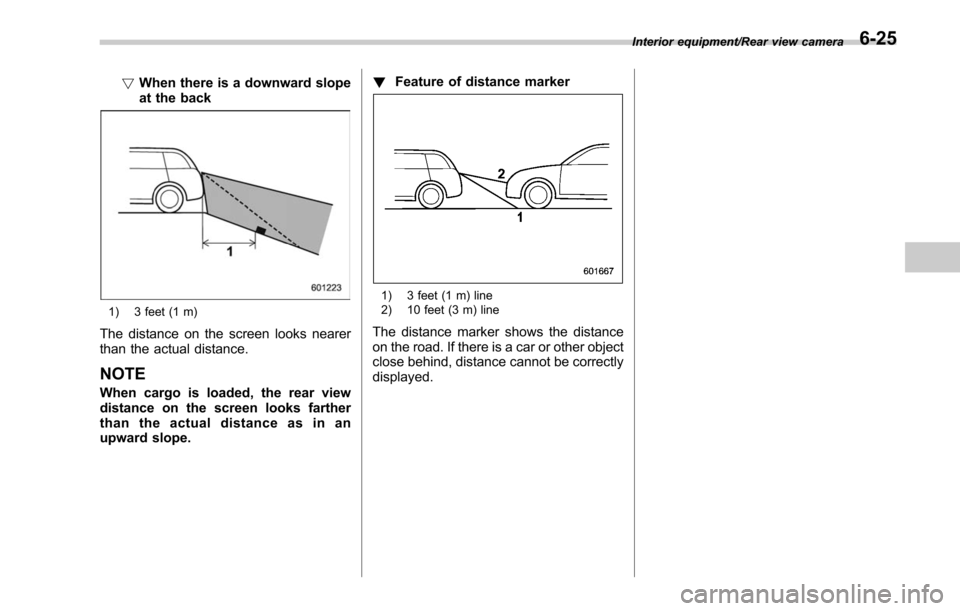
!When there is a downward slope
at the back
1) 3 feet (1 m)
The distance on the screen looks nearer
than the actual distance.
NOTE
When cargo is loaded, the rear view
distance on the screen looks farther
than the actual distance as in an
upward slope. !
Feature of distance marker
1) 3 feet (1 m) line
2) 10 feet (3 m) line
The distance marker shows the distance
on the road. If there is a car or other object
close behind, distance cannot be correctly
displayed.
Interior equipment/Rear view camera6-25
Page 397 of 610
Starting and operating/Continuously variable transmission
.Immediately after transmission fluid
is replaced, you may feel that the
transmission operation is somewhat
unusual. This results from invalidation
of data which the on-board computer
has collected and stored in memory to
allow the transmission to shift at the
most appropriate times for the current
condition of your vehicle. Optimized
shifting will be restored as the vehicle
continues to be driven for a while.
. When driving under continuous hea-
vy load conditions such as towing a
camper or climbing a long, steep hill,
the engine speed, vehicle speed and air
conditioning system cooling perfor-
mance may automatically be reduced.
This is not a malfunction. This phe-
nomenon results from the engine con-
trol function maintaining the cooling
performance of the vehicle. The engine
and vehicle speed will return to a
normal speed when the engine is able
to maintain the optimum cooling per-
formance after the heavy load de-
creases. Driving under a heavy load
must be performed with extreme care.
Do not try to pass a vehicle in front
when driving on an uphill slope while
towing.
. The continuously variable transmis-
sion is a chain type system that
provides superior transmission effi- ciency for maximum fuel economy. At
times, depending on varying driving
conditions, a chain operating noise
may be heard that is characteristic of
this type of system.
&
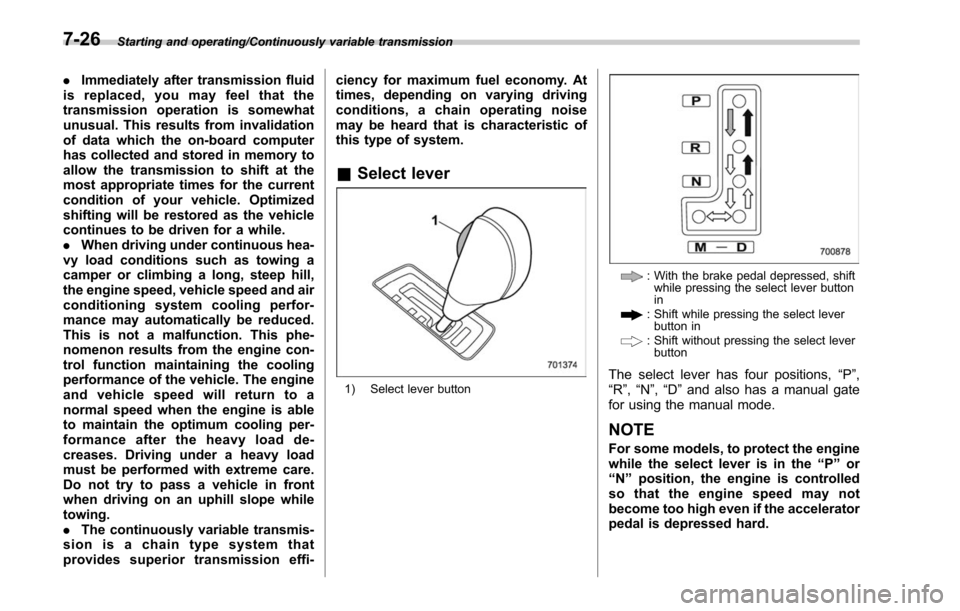
Select lever
1) Select lever button
: With the brake pedal depressed, shift
while pressing the select lever button
in
: Shift while pressing the select leverbutton in
: Shift without pressing the select leverbutton
The select lever has four positions, “P”,
“R ”,“N ”,“D ”and also has a manual gate
for using the manual mode.
NOTE
For some models, to protect the engine
while the select lever is in the “P ” or
“ N ” position, the engine is controlled
sothattheenginespeedmaynot
become too high even if the accelerator
pedal is depressed hard.
7-26
Page 405 of 610
Starting and operating/Electronic Brake Force Distribution (EBD) system
pump the brake pedal since
doing so may defeat the opera-
tion of the ABS.
The ABS prevents the lock-up of wheels
which may occur during sudden braking or
braking on slippery road surfaces. This
helps prevent the loss of steering control
and directional stability caused by wheel
lock-up.
When the ABS is operating, you may hear
a chattering noise or feel a slight vibration
in the brake pedal. This is normal when
the ABS operates.
The ABS will not operate when the vehicle
speed is below approximately 6 mph (10
km/h).
& ABS self-check
You may feel a slight shock in the brake
pedal and hear the operating noise of the
ABS from the engine compartment just
after the vehicle is started. This is caused
by an automatic functional test of the ABS
being carried out and does not indicate
any abnormal condition.
&ABS warning light
Refer to “ABS warning light ”F 3-19.
Electronic Brake Force Dis-
tribution (EBD) system
The EBD system maximizes the effective-
ness of the brakes by allowing the rear
brakes to supply a greater proportion of
the braking force. It functions by adjusting
the distribution of braking force to the rear
wheels in accordance with the vehicle’ s
loading condition and speed.
The EBD system is an integral part of the
ABS and uses some of the ABS compo-
nents to perform its function of optimizing
the distribution of braking force. If any of
the ABS components used by the EBD
function fails, the EBD system also stops
working.
When the EBD system is operating, you
may hear a chattering noise or feel a slight
vibration in the brake pedal. This is normal
and does not indicate a malfunction.
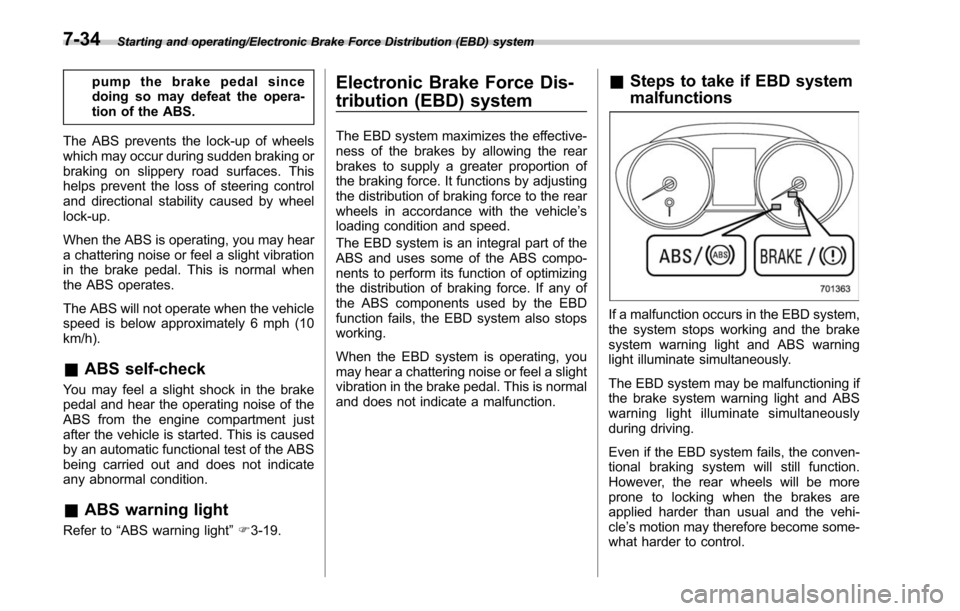
& Steps to take if EBD system
malfunctions
If a malfunction occurs in the EBD system,
the system stops working and the brake
system warning light and ABS warning
light illuminate simultaneously.
The EBD system may be malfunctioning if
the brake system warning light and ABS
warning light illuminate simultaneously
during driving.
Even if the EBD system fails, the conven-
tional braking system will still function.
However, the rear wheels will be more
prone to locking when the brakes are
applied harder than usual and the vehi-
cle’s motion may therefore become some-
what harder to control.
7-34
Page 417 of 610
Starting and operating/Parking your vehicle
Holder function is activated, a chirp
sound is heard, the Hill Holder indica-
tor light turns off and the brake system
warning light turns on.
.When the hill holder activates on a
slope, the electronic parking brake is
engaged. The electronic parking brake
will release when you accelerate from
the stop. If you manually release the
electronic parking brake while the hill
holder is activated, the hill holder
function is canceled and will not re-
engage until the vehicle has moved
some distance. In that case, you will
need to manually engage the electronic
parking brake if needed. !
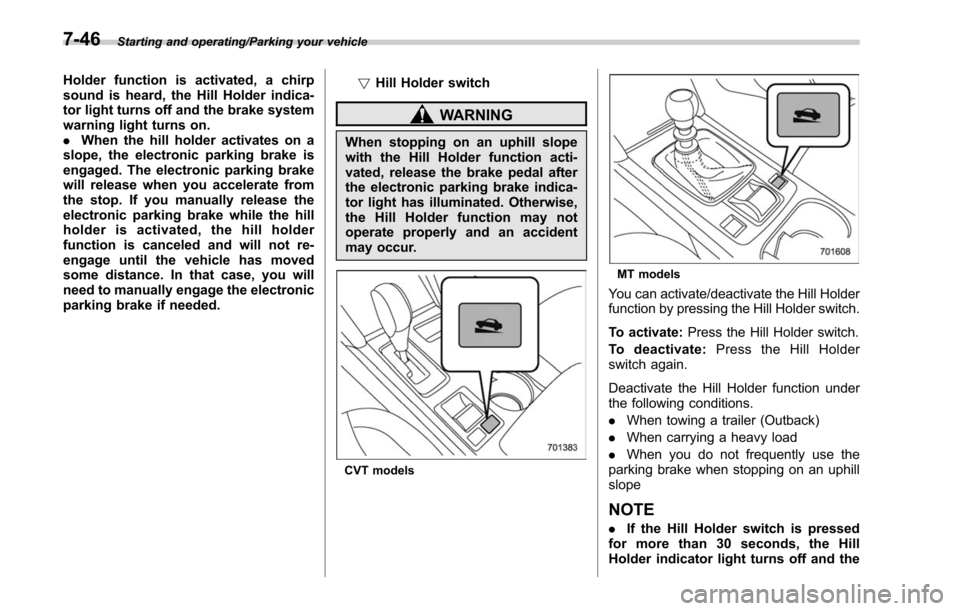
Hill Holder switch
WARNING
When stopping on an uphill slope
with the Hill Holder function acti-
vated, release the brake pedal after
the electronic parking brake indica-
tor light has illuminated. Otherwise,
the Hill Holder function may not
operate properly and an accident
may occur.
CVT models
MT models
You can activate/deactivate the Hill Holder
function by pressing the Hill Holder switch.
To activate: Press the Hill Holder switch.
To deactivate: Press the Hill Holder
switch again.
Deactivate the Hill Holder function under
the following conditions.
. When towing a trailer (Outback)
. When carrying a heavy load
. When you do not frequently use the
parking brake when stopping on an uphill
slope
NOTE
. If the Hill Holder switch is pressed
for more than 30 seconds, the Hill
Holder indicator light turns off and the
7-46
Page 429 of 610
Starting and operating/BSD/RCTA
tected.
The indicator light will
flash to warn the
driver of dangers under the following
conditions.
. While the indicator light is illuminating,
if the turn signal lever is operated toward
the side in which this light turned on
. When reversing the vehicle while the
system detects a vehicle approaching
from either side
! BSD/RCTA approach indicator
light dimming function
When the headlights are turned on, the
brightness of the BSD/RCTA approach
indicator light will be reduced.
NOTE
. You may have difficulty seeing the
BSD/RCTA approach indicator light
under the following conditions.
–When sunlight shines directly on
it
– When the headlight beams from a
vehicle traveling behind shines di-
rectly on it
. While the illumination brightness
control dial is in the fully upward
position, even if the headlights are
turned on, the brightness of the BSD/
RCTA approach indicator light will not
be reduced. For details about the illumination brightness control dial,
refer to
“Illumination brightness con-
trol” F3-55.
! BSD/RCTA approach warning buz-
zer (only when reversing)
A warning buzzer sounds along with
flashing of the BSD/RCTA approach in-
dicator light to warn the driver of dangers.
The setting of the warning buzzer volume
can be changed by operating the multi
information display of the combination
meter. For details, refer to “BSD/RCTA”
F 3-45.
! Safety tips regarding the BSD/RCTA
approach indicator light/warning
buzzer
. In the following cases, operation of the
BSD/RCTA approach indicator light and
the warning buzzer may be delayed or the
system may fail to issue these warnings.
–Whenavehiclemovestothe
neighboring lane from a lane next to
the neighboring lane
– When driving on a steep incline or
on repeated sharp uphill and downhill
grades
– When going beyond a pass
– When both your vehicle and a
vehicle driving on a neighboring lane
are driving on the far side of each lane. –
When several narrowly-spaced ve-
hicles are approaching in a row
– In low radius bends (tight bends or
when making turns at an intersection)
– When there is a difference in height
between your lane and the neighbor-
ing lane
– Immediately after the BSD/RCTA is
activated by pressing the BSD/RCTA
OFF switch
– Immediately after the shift lever/
select lever is shifted to the “R ”
position
– When extremely heavy cargo is
loaded in the trunk or cargo area
. During reversing, operation of the BSD/
RCTA approach indicator light and the
warning buzzer may be delayed or the
system may fail to issue these warnings
under the following conditions.
–When backing out of an angled
parking space
– When a large-sized vehicle is
parked next to your vehicle (That
vehicle prevents the propagation of
radar waves.)
– When reversing on sloped roads
– When reversing at a high speed
7-58