brake SUBARU OUTBACK 2017 6.G Repair Manual
[x] Cancel search | Manufacturer: SUBARU, Model Year: 2017, Model line: OUTBACK, Model: SUBARU OUTBACK 2017 6.GPages: 610, PDF Size: 10.28 MB
Page 422 of 610
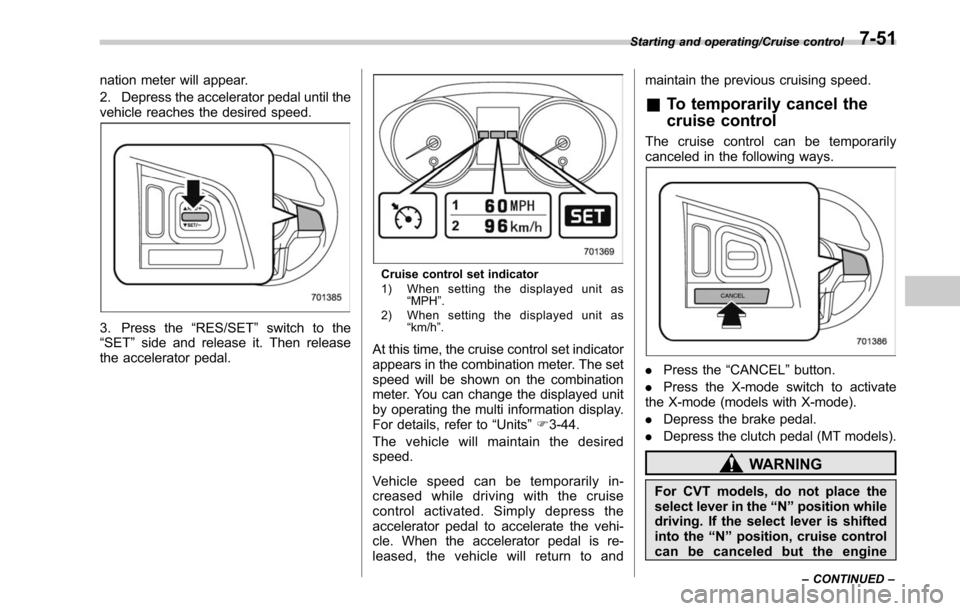
nation meter will appear.
2. Depress the accelerator pedal until the
vehicle reaches the desired speed.
3. Press the“RES/SET”switch to the
“SET ”side and release it. Then release
the accelerator pedal.
Cruise control set indicator
1) When setting the displayed unit as “MPH ”.
2) When setting the displayed unit as “km/h ”.
At this time, the cruise control set indicator
appears in the combination meter. The set
speed will be shown on the combination
meter. You can change the displayed unit
by operating the multi information display.
For details, refer to “Units”F 3-44.
The vehicle will maintain the desired
speed.
Vehicle speed can be temporarily in-
creased while driving with the cruise
control activated. Simply depress the
accelerator pedal to accelerate the vehi-
cle. When the accelerator pedal is re-
leased, the vehicle will return to and maintain the previous cruising speed.
&
To temporarily cancel the
cruise control
The cruise control can be temporarily
canceled in the following ways.
. Press the “CANCEL”button.
. Press the X-mode switch to activate
the X-mode (models with X-mode).
. Depress the brake pedal.
. Depress the clutch pedal (MT models).
WARNING
For CVT models, do not place the
select lever in the “N ” position while
driving. If the select lever is shifted
into the “N ” position, cruise control
can be canceled but the engine
Starting and operating/Cruise control
–CONTINUED –7-51
Page 423 of 610
Starting and operating/Cruise control
brake will no longer work. This
could result in an accident.
The cruise control set indicator in the
combination meter disappears when the
cruise control is canceled.
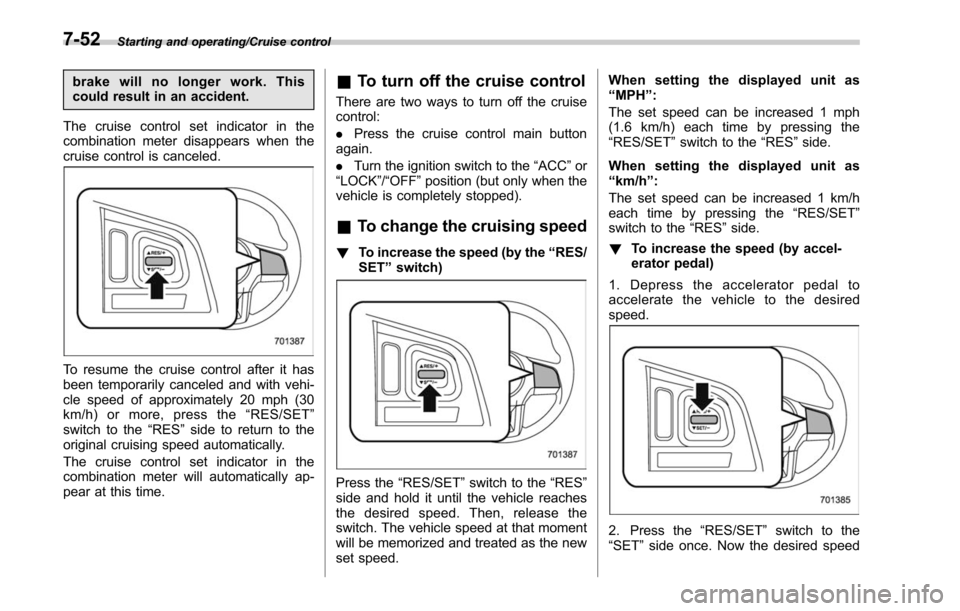
To resume the cruise control after it has
been temporarily canceled and with vehi-
cle speed of approximately 20 mph (30
km/h) or more, press the “RES/SET ”
switch to the “RES ”side to return to the
original cruising speed automatically.
The cruise control set indicator in the
combination meter will automatically ap-
pear at this time.
& To turn off the cruise control
There are two ways to turn off the cruise
control:
. Press the cruise control main button
again.
. Turn the ignition switch to the “ACC”or
“LOCK” /“OFF ”position (but only when the
vehicle is completely stopped).
& To change the cruising speed
! To increase the speed (by the “RES/
SET ”switch)
Press the “RES/SET ”switch to the “RES”
side and hold it until the vehicle reaches
the desired speed. Then, release the
switch. The vehicle speed at that moment
will be memorized and treated as the new
set speed. When setting the displayed unit as
“
MPH ”:
The set speed can be increased 1 mph
(1.6 km/h) each time by pressing the
“RES/SET ”switch to the “RES”side.
When setting the displayed unit as
“ km/h ”:
The set speed can be increased 1 km/h
each time by pressing the “RES/SET ”
switch to the “RES”side.
! To increase the speed (by accel-
erator pedal)
1. Depress the accelerator pedal to
accelerate the vehicle to the desired
speed.
2. Press the “RES/SET ”switch to the
“SET ”side once. Now the desired speed
7-52
Page 424 of 610
is set and the vehicle will keep running at
that speed without depressing the accel-
erator pedal.
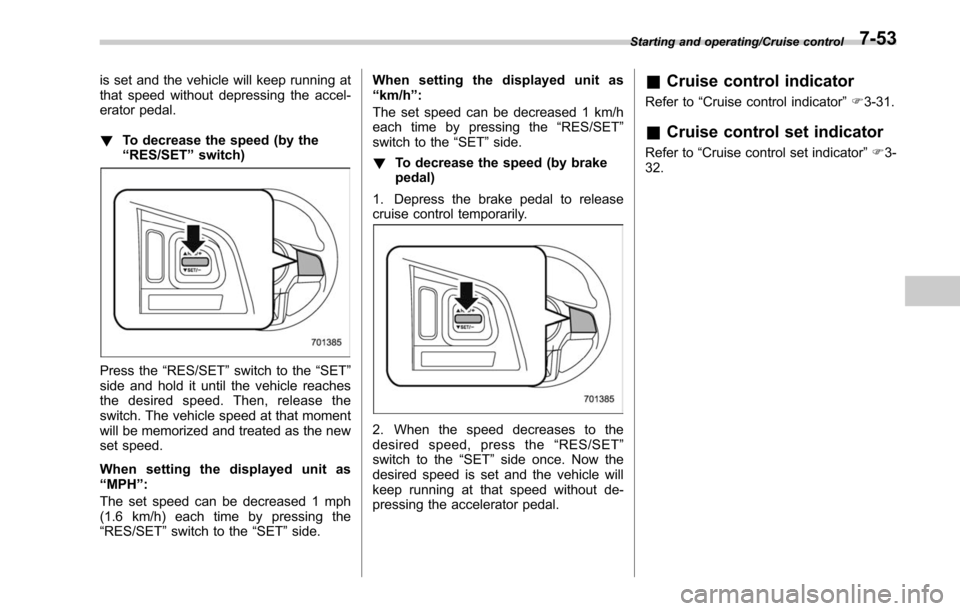
!To decrease the speed (by the
“RES/SET ”switch)
Press the “RES/SET ”switch to the “SET”
side and hold it until the vehicle reaches
the desired speed. Then, release the
switch. The vehicle speed at that moment
will be memorized and treated as the new
set speed.
When setting the displayed unit as
“ MPH ”:
The set speed can be decreased 1 mph
(1.6 km/h) each time by pressing the
“RES/SET ”switch to the “SET”side. When setting the displayed unit as
“
km/h ”:
The set speed can be decreased 1 km/h
each time by pressing the “RES/SET”
switch to the “SET ”side.
! To decrease the speed (by brake
pedal)
1. Depress the brake pedal to release
cruise control temporarily.
2. When the speed decreases to the
desired speed, press the “RES/SET ”
switch to the “SET”side once. Now the
desired speed is set and the vehicle will
keep running at that speed without de-
pressing the accelerator pedal.
& Cruise control indicator
Refer to “Cruise control indicator ”F 3-31.
& Cruise control set indicator
Refer to “Cruise control set indicator ”F 3-
32.
Starting and operating/Cruise control7-53
Page 434 of 610
Reverse Automatic Braking
System (if equipped)
Reverse Automatic Braking is a system
designed to help avoid collisions or reduce
collision damage when reversing the
vehicle. If a wall or an obstacle is detected
in the reversing direction, the system will
notify the driver with a warning sound and
may activate the vehicle’s brakes auto-
matically.
WARNING
. Reverse Automatic Braking is not
a system intended to replace the
driver ’s responsibility to check
their surroundings for vehicles
or obstacles to avoid a collision.
. The driver is responsible for
driving safely. Always be sure to
check the surroundings visually
when reversing the vehicle.
. Since the system operation has
various limitations, the warning
sound or automatic braking may
be delayed or may not operate at
all even when an obstacle is
present in the reversing direc-
tion.
. The system is not designed to detect people (including chil-
dren), animals or other moving
objects.
. Depending on the vehicle condi-
tion or the surrounding environ-
ment, the sonar sensor ’s ability
to detect objects may become
unstable.
NOTE
The Reverse Automatic Braking Sys-
tem records and stores the following
data when automatic braking operates.
It does not record conversations, per-
sonal information or other audio data.
. Distance from the object
. Vehicle speed
. Accelerator pedal operation status
. Brake pedal operation status
. Select lever position
. Outside temperature
. The sensitivity setting of the sonar
sensors
SUBARU and third parties contracted
by SUBARU may acquire and use the
recorded data for the purpose of vehi-
cle research and development.
SUBARU and third parties contracted
by SUBARU will not disclose or pro-
vide the acquired data to any other third party except under the following
conditions.
.
The vehicle owner has given his/her
consent.
. The disclosure/provision is based
on a court order or other legally
enforceable request.
. Data that has been modified so that
the user and vehicle cannot be identi-
fied is provided to a research institu-
tion for statistical processing or similar
purposes.
& Reverse Automatic Braking
System overview
The system detects objects using sonar
sensors installed in the rear bumper.
. If the system determines a possible
collision with an object in the reversing
direction, automatic deceleration will be
activated. Also, beeping sounds will acti-
vate.
. If the vehicle is further reversed, auto-
matic hard braking will be applied and a
continuous beeping sound will activate.
Starting and operating/Reverse Automatic Braking System
–CONTINUED –7-63
Page 435 of 610
Starting and operating/Reverse Automatic Braking System
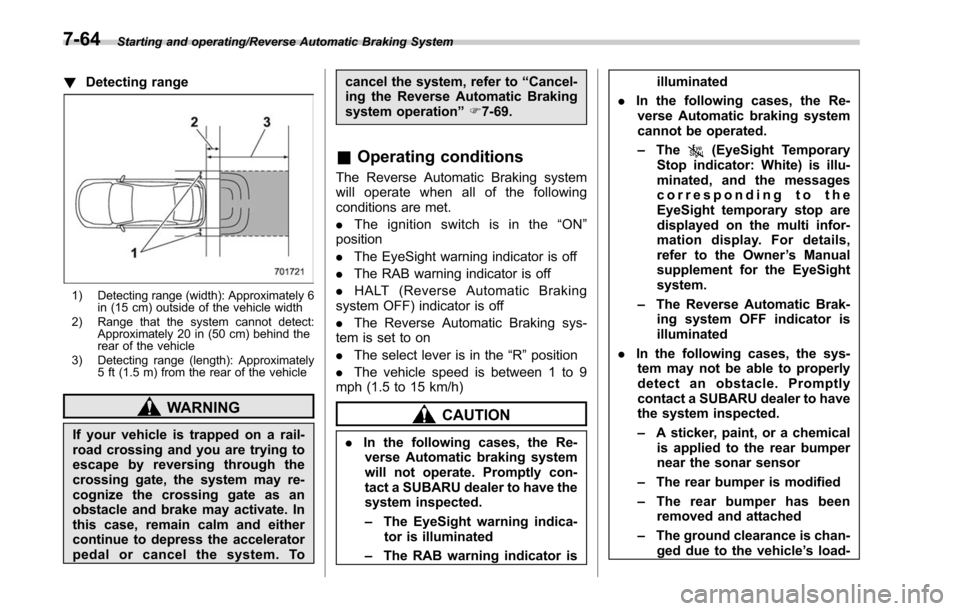
!Detecting range
1) Detecting range (width): Approximately 6
in (15 cm) outside of the vehicle width
2) Range that the system cannot detect: Approximately 20 in (50 cm) behind the
rear of the vehicle
3) Detecting range (length): Approximately 5 ft (1.5 m) from the rear of the vehicle
WARNING
If your vehicle is trapped on a rail-
road crossing and you are trying to
escape by reversing through the
crossing gate, the system may re-
cognize the crossing gate as an
obstacle and brake may activate. In
this case, remain calm and either
continue to depress the accelerator
pedal or cancel the system. To cancel the system, refer to
“Cancel-
ing the Reverse Automatic Braking
system operation ”F 7-69.
& Operating conditions
The Reverse Automatic Braking system
will operate when all of the following
conditions are met.
. The ignition switch is in the “ON ”
position
. The EyeSight warning indicator is off
. The RAB warning indicator is off
. HALT (Reverse Automatic Braking
system OFF) indicator is off
. The Reverse Automatic Braking sys-
tem is set to on
. The select lever is in the “R”position
. The vehicle speed is between 1 to 9
mph (1.5 to 15 km/h)
CAUTION
. In the following cases, the Re-
verse Automatic braking system
will not operate. Promptly con-
tact a SUBARU dealer to have the
system inspected.
– The EyeSight warning indica-
tor is illuminated
– The RAB warning indicator is illuminated
. In the following cases, the Re-
verse Automatic braking system
cannot be operated.
– The
(EyeSight Temporary
Stop indicator: White) is illu-
minated, and the messages
corresponding to the
EyeSight temporary stop are
displayed on the multi infor-
mation display. For details,
refer to the Owner ’s Manual
supplement for the EyeSight
system.
– The Reverse Automatic Brak-
ing system OFF indicator is
illuminated
. In the following cases, the sys-
tem may not be able to properly
detect an obstacle. Promptly
contact a SUBARU dealer to have
the system inspected.
– A sticker, paint, or a chemical
is applied to the rear bumper
near the sonar sensor
– The rear bumper is modified
– The rear bumper has been
removed and attached
– The ground clearance is chan-
ged due to the vehicle ’s load-
7-64
Page 436 of 610
ing condition or modification
– Ice, snow or mud is adhered
to the rear bumper near the
sonar sensor
– The rear bumper is exposed to
strong impact, or the rear
bumper is deformed
. On a steep hill, the system ’s
automatic braking ability will be
reduced.
. The system is designed to avoid
collisions by automatic hard
braking when the vehicle ’s rever-
sing speed is less than approxi-
mately 3 mph (5 km/h). However,
the system does not guarantee
that the vehicle will be able to
avoid collisions in any situation.
. If the vehicle is reversed at an
extremely slow speed, the dri-
ver ’s operation may be priori-
tized. In this case, automatic
braking will not operate.
. The system may not be able to
detect the following objects
– Sharp or thin objects such as
poles, fences and ropes which
may not reflect the sound
wave emitted from the sonar
sensor –
Objects that are too close to
the rear bumper when the
select lever is set to the “R ”
position
– Objects with a surface which
may not reflect the sound
wave emitted from the sonar
sensor such as a chain link
fence
. Objects the system is not de-
signed to detect
– Pedestrians
– Moving objects including
moving vehicles
– Objects which absorbs sound
waves such as cloth or snow
– Objects whose surface has a
diagonal angle
– Objects that are low to the
ground such as parking
blocks
– Objects that are high above
the ground such as objects
hanging from above
. When reversing the vehicle, the
system may not be able to prop-
erly detect objects or may cause
a system malfunction if the fol-
lowing conditions exist
High frequency sound from other sources are nearby
–
Horn sound from another ve-
hicle
– Engine sound from other ve-
hicles
– Sound of an air brake
– Vehicle detection equipment
or a sonar from another vehi-
cle
– A sound wave with a fre-
quency similar to the vehicle ’s
system is transmitted near by
– A vehicle equipped with the
same system is reversing to-
ward your reversing direction
Weather conditions – Extremely high or extremely
low temperatures in which the
area near the sonar sensor
becomes too hot or too cold
to operate
– The rear bumper near the
sonar sensors are exposed
to heavy rain or a significant
amount of water
– Fog, snow or sandstorm, etc.
– Air
is moving rapidly such as
when a strong wind is blowing
Parts attached to the rear bumper
Starting and operating/Reverse Automatic Braking System
–CONTINUED –7-65
Page 438 of 610
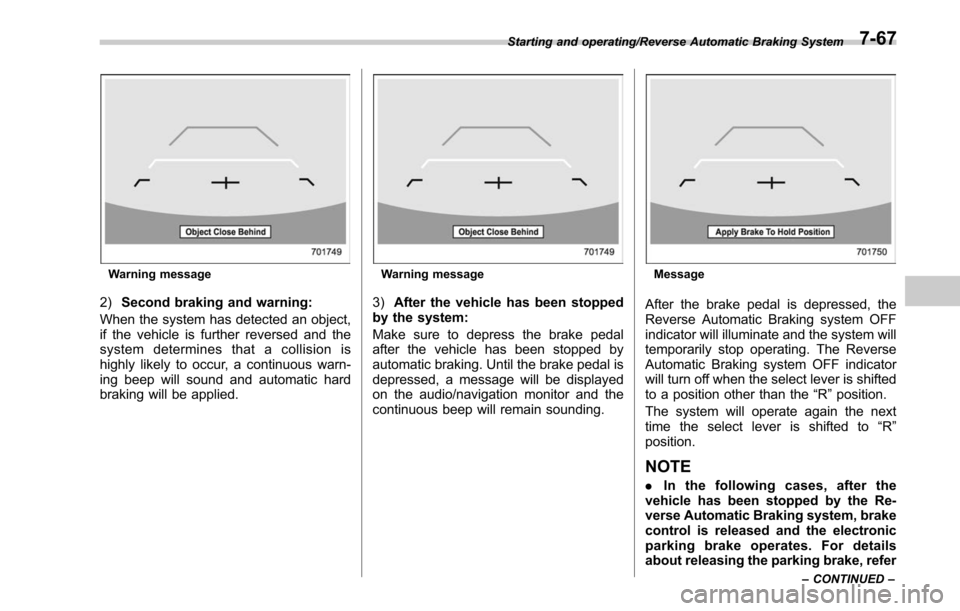
Warning message
2)Second braking and warning:
When the system has detected an object,
if the vehicle is further reversed and the
system determines that a collision is
highly likely to occur, a continuous warn-
ing beep will sound and automatic hard
braking will be applied.
Warning message
3) After the vehicle has been stopped
by the system:
Make sure to depress the brake pedal
after the vehicle has been stopped by
automatic braking. Until the brake pedal is
depressed, a message will be displayed
on the audio/navigation monitor and the
continuous beep will remain sounding.
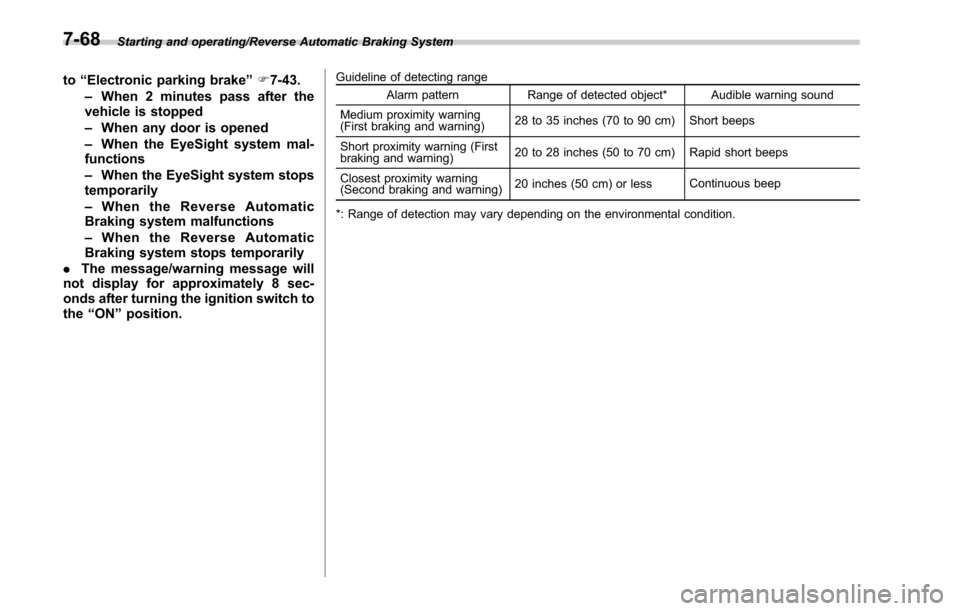
Message
After the brake pedal is depressed, the
Reverse Automatic Braking system OFF
indicator will illuminate and the system will
temporarily stop operating. The Reverse
Automatic Braking system OFF indicator
will turn off when the select lever is shifted
to a position other than the “R”position.
The system will operate again the next
time the select lever is shifted to “R”
position.
NOTE
. In the following cases, after the
vehicle has been stopped by the Re-
verse Automatic Braking system, brake
control is released and the electronic
parking brake operates. For details
about releasing the parking brake, refer
Starting and operating/Reverse Automatic Braking System
–CONTINUED –7-67
Page 439 of 610
Starting and operating/Reverse Automatic Braking System
to“Electronic parking brake ”F 7-43.
– When 2 minutes pass after the
vehicle is stopped
– When any door is opened
– When the EyeSight system mal-
functions
– When the EyeSight system stops
temporarily
– When the Reverse Automatic
Braking system malfunctions
– When the Reverse Automatic
Braking system stops temporarily
. The message/warning message will
not display for approximately 8 sec-
onds after turning the ignition switch to
the “ON ”position.Guideline of detecting range
Alarm pattern Range of detected object* Audible warning sound
Medium proximity warning
(First braking and warning) 28 to 35 inches (70 to 90 cm) Short beeps
Short proximity warning (First
braking and warning) 20 to 28 inches (50 to 70 cm) Rapid short beeps
Closest proximity warning
(Second braking and warning) 20 inches (50 cm) or less
Continuous beep
*: Range of detection may vary depending on the environmental condition.
7-68
Page 440 of 610
&Canceling the Reverse Auto-
matic Braking system opera-
tion
The Reverse Automatic Braking system
can be temporarily canceled by any of the
following operation.
. While automatic braking is in operation,
the brake pedal is depressed
. While automatic braking is in operation,
the accelerator pedal is depressed
. The accelerator pedal is depressed
hard (in this case, limited acceleration will
be canceled and the vehicle will continue
reversing)
. The select lever is shifted to a position
other than the “R”position
NOTE
Thesystemwillbecanceledifthe
object is no longer detected.
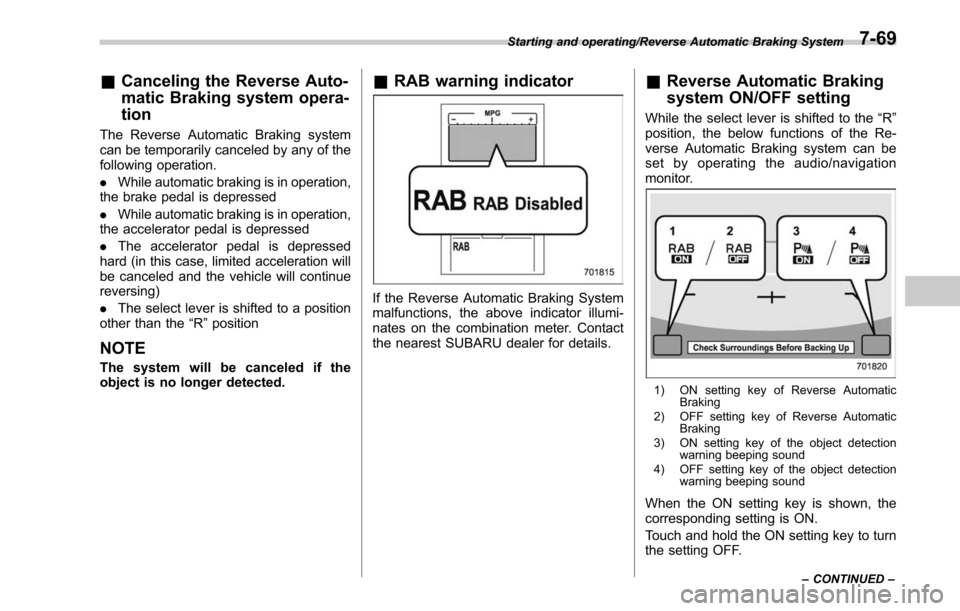
& RAB warning indicator
If the Reverse Automatic Braking System
malfunctions, the above indicator illumi-
nates on the combination meter. Contact
the nearest SUBARU dealer for details.
&Reverse Automatic Braking
system ON/OFF setting
While the select lever is shifted to the “R”
position, the below functions of the Re-
verse Automatic Braking system can be
set by operating the audio/navigation
monitor.
1) ON setting key of Reverse Automatic Braking
2) OFF setting key of Reverse Automatic Braking
3) ON setting key of the object detection warning beeping sound
4) OFF setting key of the object detection warning beeping sound
When the ON setting key is shown, the
corresponding setting is ON.
Touch and hold the ON setting key to turn
the setting OFF.
Starting and operating/Reverse Automatic Braking System
–CONTINUED –7-69
Page 445 of 610
Driving tips/New vehicle break–in driving –the first 1,000 miles (1,600 km)
New vehicle break-in driving
– the first 1,000 miles (1,600
km)
The performance and long life of your
vehicle are dependent on how you handle
and care for your vehicle while it is new.
Follow these instructions during the first
1,000 miles (1,600 km):
. Do not race the engine. And do not
allow engine speed to exceed 4,000 rpm
except in an emergency.
. Do not drive at one constant engine or
vehicle speed for a long time, either fast or
slow.
. Avoid starting suddenly and rapid
acceleration, except in an emergency.
. Avoid hard braking, except in an
emergency.
The same break-in procedures should be
applied to a newly installed or overhauled
engine or when brake pads or brake
linings are replaced with new ones.
Fuel economy hints
The following suggestions will help to save
your fuel.
. Select the proper gear position for the
speed and road conditions.
. Avoid sudden acceleration or decelera-
tion. Always accelerate gently until you
reach the desired speed. Then try to
maintain that speed for as long as
possible.
. Do not pump the accelerator and avoid
racing the engine.
. Avoid unnecessary engine idling.
. Keep the engine properly tuned.
. Keep the tires inflated to the correct
pressure shown on the tire placard, which
is located under the door latch on the
driver ’s side. Low pressure will increase
tire wear and fuel consumption.
. Use the air conditioner only when
necessary.
. Keep the front and rear wheels in
proper alignment.
. Avoid carrying unnecessary luggage or
cargo.
. The indication of the ECO gauge
shows a reference for saving fuel. For
details, refer to “ECO gauge”F 3-12.
Engine exhaust gas (carbon
monoxide)
WARNING
. Never inhale engine exhaust gas.
Engine exhaust gas contains
carbon monoxide, a colorless
and odorless gas which is dan-
gerous, or even lethal, if inhaled.
. Always properly maintain the en-
gine exhaust system to prevent
engine exhaust gas from enter-
ing the vehicle.
. Never run the engine in a closed
space, such as a garage, except
for the brief time needed to drive
the vehicle in or out of it.
. Avoid remaining in a parked
vehicle for a long time while the
engine is running. If that is
unavoidable, then use the venti-
lation fan to force fresh air into
the vehicle.
. Always keep the front ventilator
inlet grille free from snow, leaves
or other obstructions to ensure
that the ventilation system al-
ways works properly.
. If at any time you suspect that
8-2