high SUBARU OUTBACK 2020 Getting Started Guide
[x] Cancel search | Manufacturer: SUBARU, Model Year: 2020, Model line: OUTBACK, Model: SUBARU OUTBACK 2020Pages: 132, PDF Size: 5.99 MB
Page 12 of 132
SEATING
Manual Seats
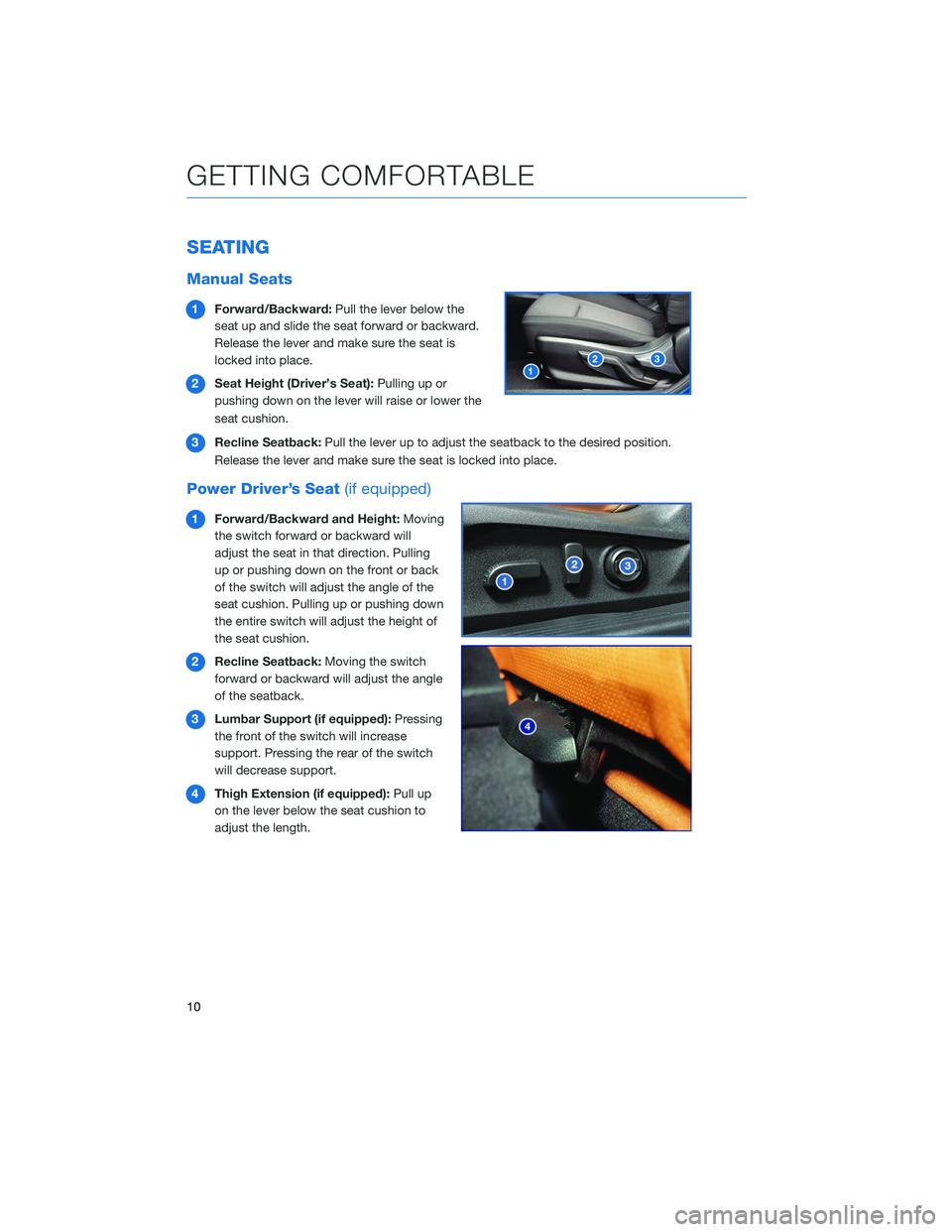
1Forward/Backward: Pull the lever below the
seat up and slide the seat forward or backward.
Release the lever and make sure the seat is
locked into place.
2 Seat Height (Driver’s Seat): Pulling up or
pushing down on the lever will raise or lower the
seat cushion.
3 Recline Seatback: Pull the lever up to adjust the seatback to the desired position.
Release the lever and make sure the seat is locked into place.
Power Driver’s Seat (if equipped)
1Forward/Backward and Height: Moving
the switch forward or backward will
adjust the seat in that direction. Pulling
up or pushing down on the front or back
of the switch will adjust the angle of the
seat cushion. Pulling up or pushing down
the entire switch will adjust the height of
the seat cushion.
2 Recline Seatback: Moving the switch
forward or backward will adjust the angle
of the seatback.
3 Lumbar Support (if equipped): Pressing
the front of the switch will increase
support. Pressing the rear of the switch
will decrease support.
4 Thigh Extension (if equipped): Pull up
on the lever below the seat cushion to
adjust the length.
GETTING COMFORTABLE
10
Page 21 of 132
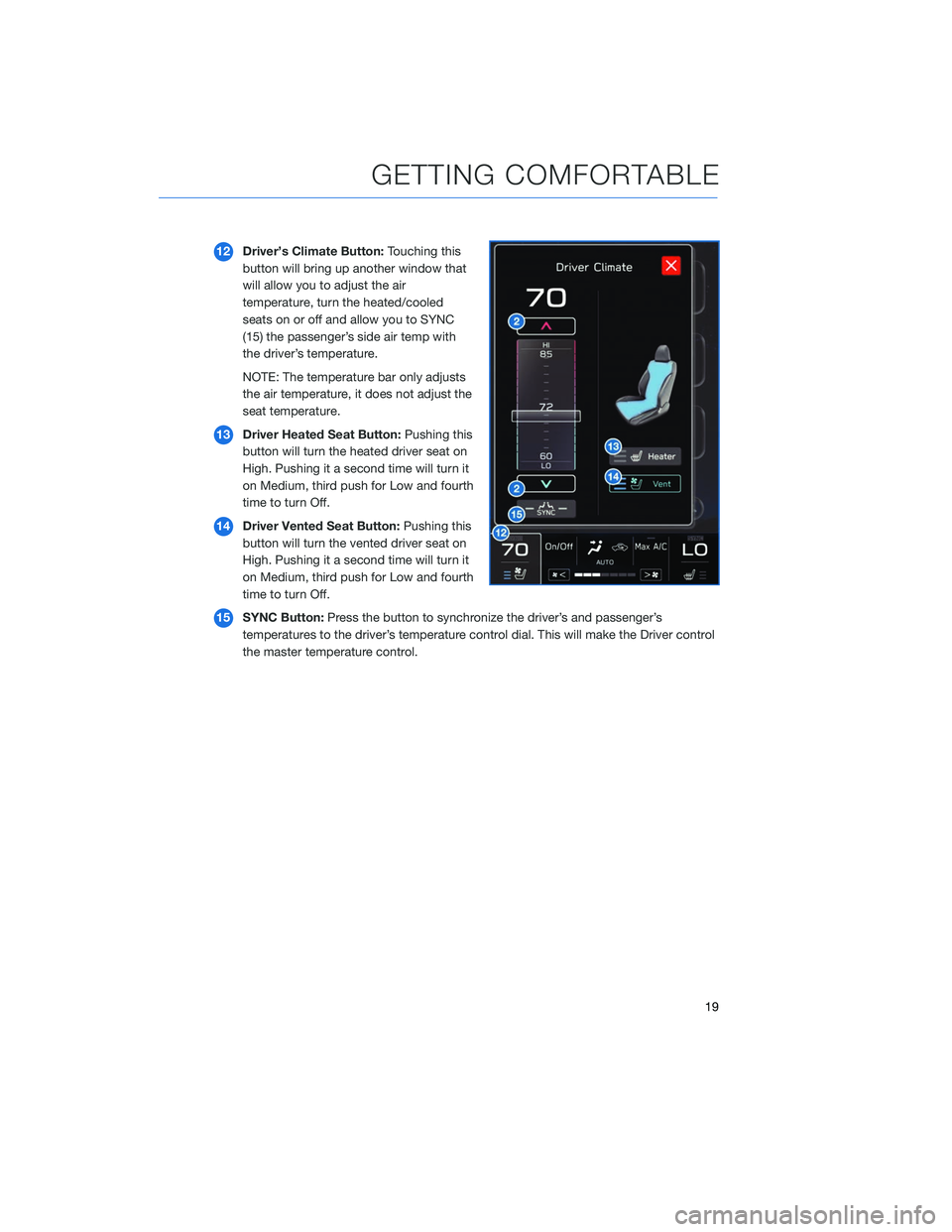
12Driver’s Climate Button: Touching this
button will bring up another window that
will allow you to adjust the air
temperature, turn the heated/cooled
seats on or off and allow you to SYNC
(15) the passenger’s side air temp with
the driver’s temperature.
NOTE: The temperature bar only adjusts
the air temperature, it does not adjust the
seat temperature.
13 Driver Heated Seat Button: Pushing this
button will turn the heated driver seat on
High. Pushing it a second time will turn it
on Medium, third push for Low and fourth
time to turn Off.
14 Driver Vented Seat Button: Pushing this
button will turn the vented driver seat on
High. Pushing it a second time will turn it
on Medium, third push for Low and fourth
time to turn Off.
15 SYNC Button: Press the button to synchronize the driver’s and passenger’s
temperatures to the driver’s temperature control dial. This will make the Driver control
the master temperature control.
GETTING COMFORTABLE
19
Page 22 of 132
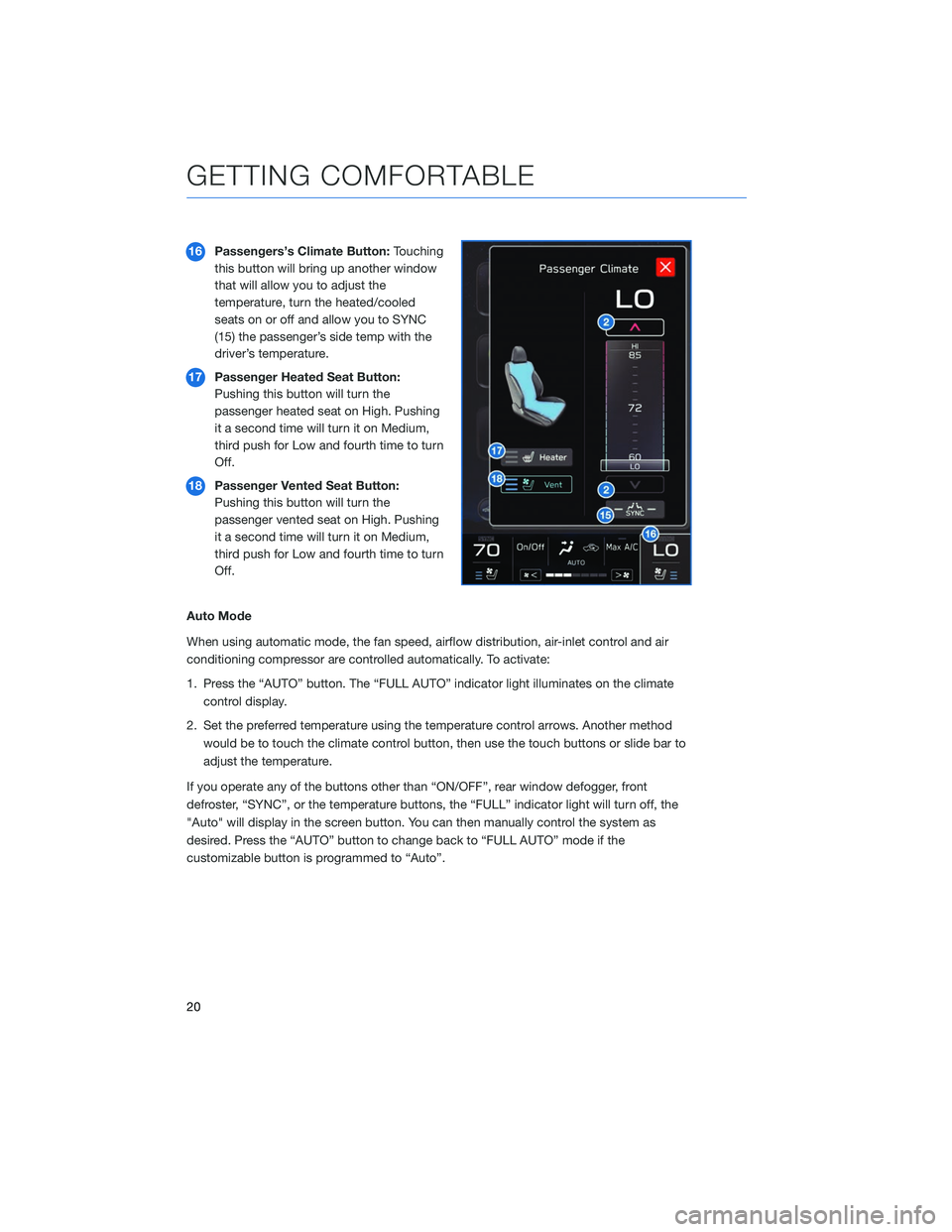
16Passengers’s Climate Button: Touching
this button will bring up another window
that will allow you to adjust the
temperature, turn the heated/cooled
seats on or off and allow you to SYNC
(15) the passenger’s side temp with the
driver’s temperature.
17 Passenger Heated Seat Button:
Pushing this button will turn the
passenger heated seat on High. Pushing
it a second time will turn it on Medium,
third push for Low and fourth time to turn
Off.
18 Passenger Vented Seat Button:
Pushing this button will turn the
passenger vented seat on High. Pushing
it a second time will turn it on Medium,
third push for Low and fourth time to turn
Off.
Auto Mode
When using automatic mode, the fan speed, airflow distribution, air-inlet control and air
conditioning compressor are controlled automatically. To activate:
1. Press the “AUTO” button. The “FULL AUTO” indicator light illuminates on the climate control display.
2. Set the preferred temperature using the temperature control arrows. Another method would be to touch the climate control button, then use the touch buttons or slide bar to
adjust the temperature.
If you operate any of the buttons other than “ON/OFF”, rear window defogger, front
defroster, “SYNC”, or the temperature buttons, the “FULL” indicator light will turn off, the
"Auto" will display in the screen button. You can then manually control the system as
desired. Press the “AUTO” button to change back to “FULL AUTO” mode if the
customizable button is programmed to “Auto”.
GETTING COMFORTABLE
20
Page 24 of 132
Ventilated Seats(if equipped)
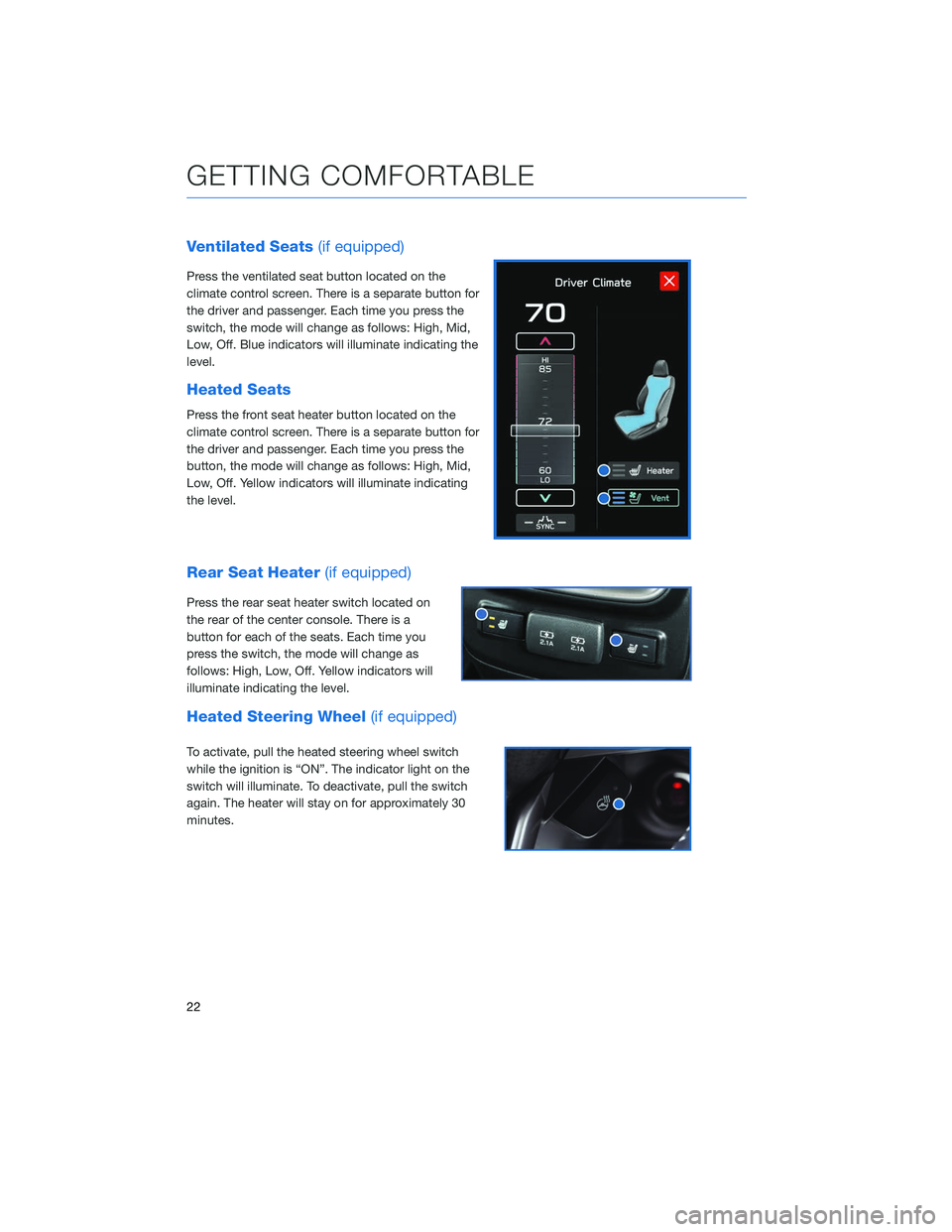
Press the ventilated seat button located on the
climate control screen. There is a separate button for
the driver and passenger. Each time you press the
switch, the mode will change as follows: High, Mid,
Low, Off. Blue indicators will illuminate indicating the
level.
Heated Seats
Press the front seat heater button located on the
climate control screen. There is a separate button for
the driver and passenger. Each time you press the
button, the mode will change as follows: High, Mid,
Low, Off. Yellow indicators will illuminate indicating
the level.
Rear Seat Heater (if equipped)
Press the rear seat heater switch located on
the rear of the center console. There is a
button for each of the seats. Each time you
press the switch, the mode will change as
follows: High, Low, Off. Yellow indicators will
illuminate indicating the level.
Heated Steering Wheel (if equipped)
To activate, pull the heated steering wheel switch
while the ignition is “ON”. The indicator light on the
switch will illuminate. To deactivate, pull the switch
again. The heater will stay on for approximately 30
minutes.
GETTING COMFORTABLE
22
Page 27 of 132
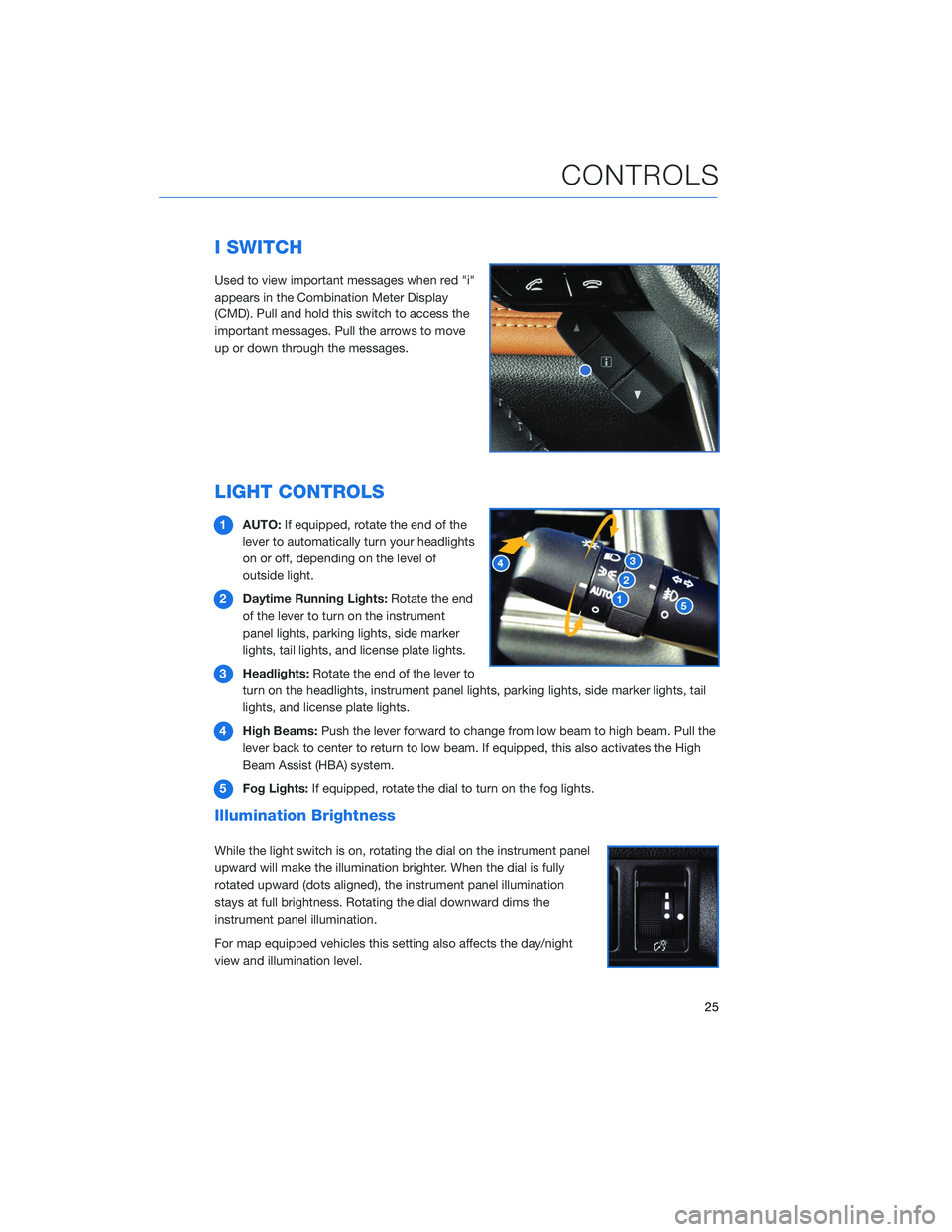
I SWITCH
Used to view important messages when red "i"
appears in the Combination Meter Display
(CMD). Pull and hold this switch to access the
important messages. Pull the arrows to move
up or down through the messages.
LIGHT CONTROLS
1AUTO: If equipped, rotate the end of the
lever to automatically turn your headlights
on or off, depending on the level of
outside light.
2 Daytime Running Lights: Rotate the end
of the lever to turn on the instrument
panel lights, parking lights, side marker
lights, tail lights, and license plate lights.
3 Headlights: Rotate the end of the lever to
turn on the headlights, instrument panel lights, parking lights, side marker lights, tail
lights, and license plate lights.
4 High Beams: Push the lever forward to change from low beam to high beam. Pull the
lever back to center to return to low beam. If equipped, this also activates the High
Beam Assist (HBA) system.
5 Fog Lights: If equipped, rotate the dial to turn on the fog lights.
Illumination Brightness
While the light switch is on, rotating the dial on the instrument panel
upward will make the illumination brighter. When the dial is fully
rotated upward (dots aligned), the instrument panel illumination
stays at full brightness. Rotating the dial downward dims the
instrument panel illumination.
For map equipped vehicles this setting also affects the day/night
view and illumination level.
CONTROLS
25
Page 28 of 132
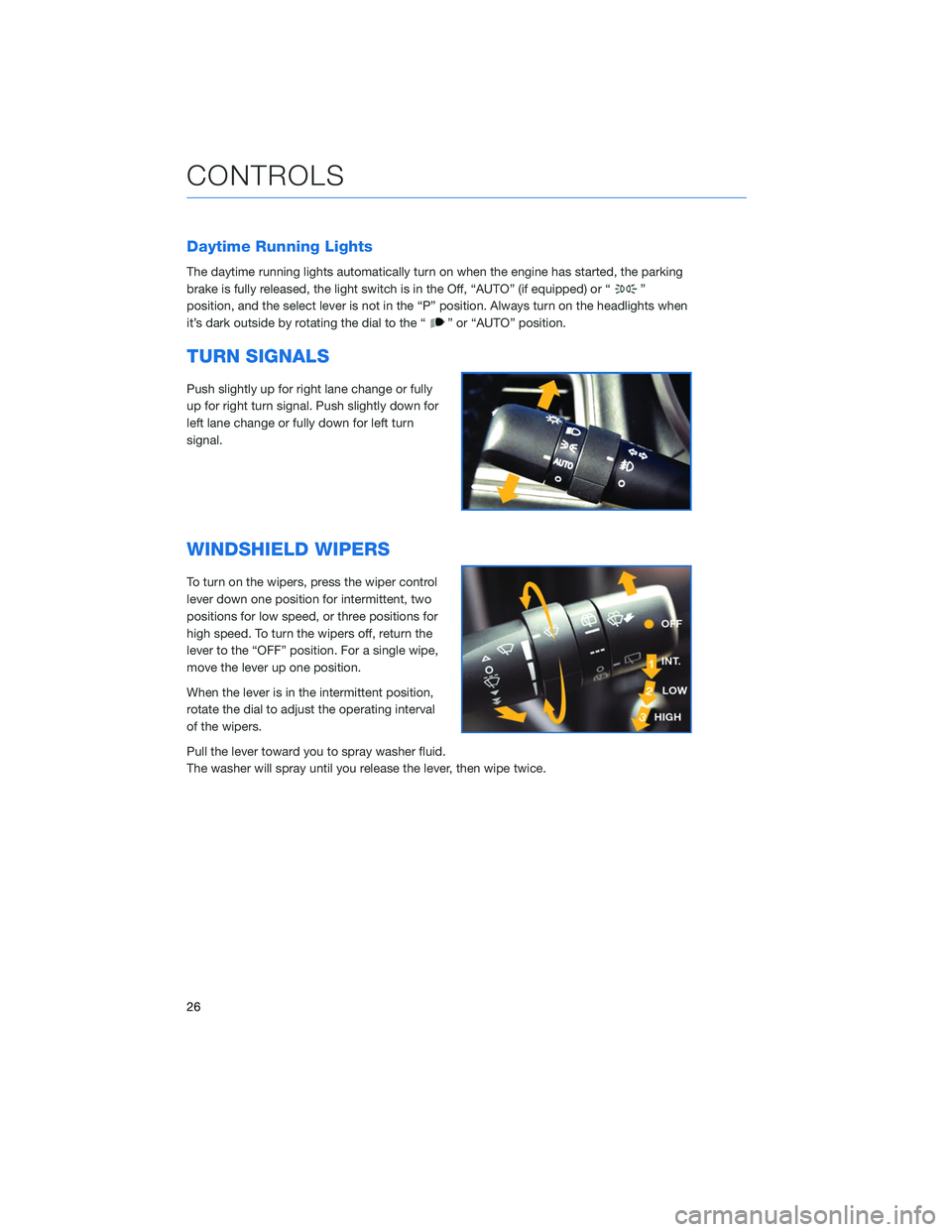
Daytime Running Lights
The daytime running lights automatically turn on when the engine has started, the parking
brake is fully released, the light switch is in the Off, “AUTO” (if equipped) or “
”
position, and the select lever is not in the “P” position. Always turn on the headlights when
it’s dark outside by rotating the dial to the “
” or “AUTO” position.
TURN SIGNALS
Push slightly up for right lane change or fully
up for right turn signal. Push slightly down for
left lane change or fully down for left turn
signal.
WINDSHIELD WIPERS
To turn on the wipers, press the wiper control
lever down one position for intermittent, two
positions for low speed, or three positions for
high speed. To turn the wipers off, return the
lever to the “OFF” position. For a single wipe,
move the lever up one position.
When the lever is in the intermittent position,
rotate the dial to adjust the operating interval
of the wipers.
Pull the lever toward you to spray washer fluid.
The washer will spray until you release the lever, then wipe twice.
CONTROLS
26
Page 31 of 132
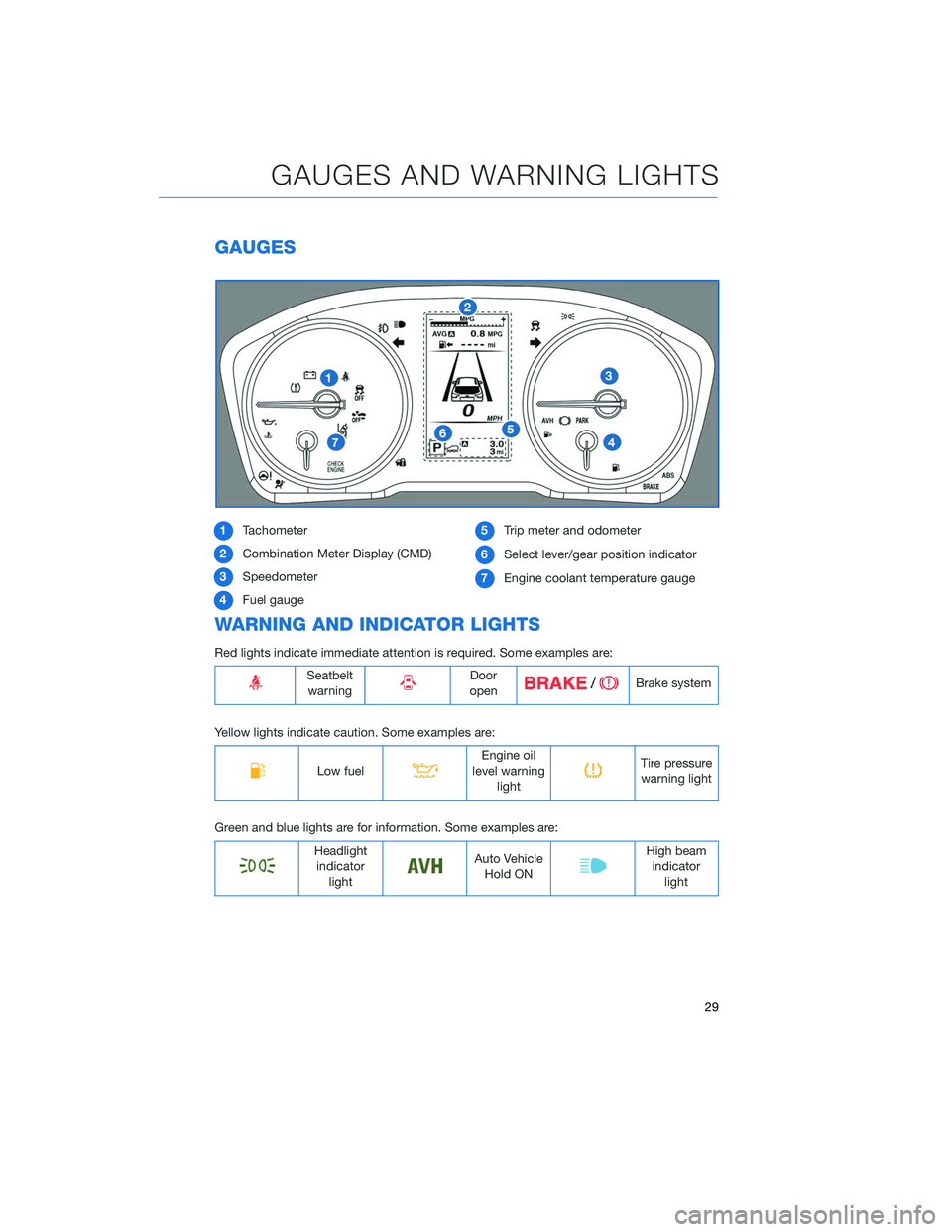
GAUGES
1Tachometer
2 Combination Meter Display (CMD)
3 Speedometer
4 Fuel gauge 5
Trip meter and odometer
6 Select lever/gear position indicator
7 Engine coolant temperature gauge
WARNING AND INDICATOR LIGHTS
Red lights indicate immediate attention is required. Some examples are:
Seatbelt
warningDoor
openBrake system
Yellow lights indicate caution. Some examples are:
Low fuelEngine oil
level warning lightTire pressurewarning light
Green and blue lights are for information. Some examples are:
Headlight indicator lightAuto VehicleHold ONHigh beamindicator light
GAUGES AND WARNING LIGHTS
29
Page 33 of 132
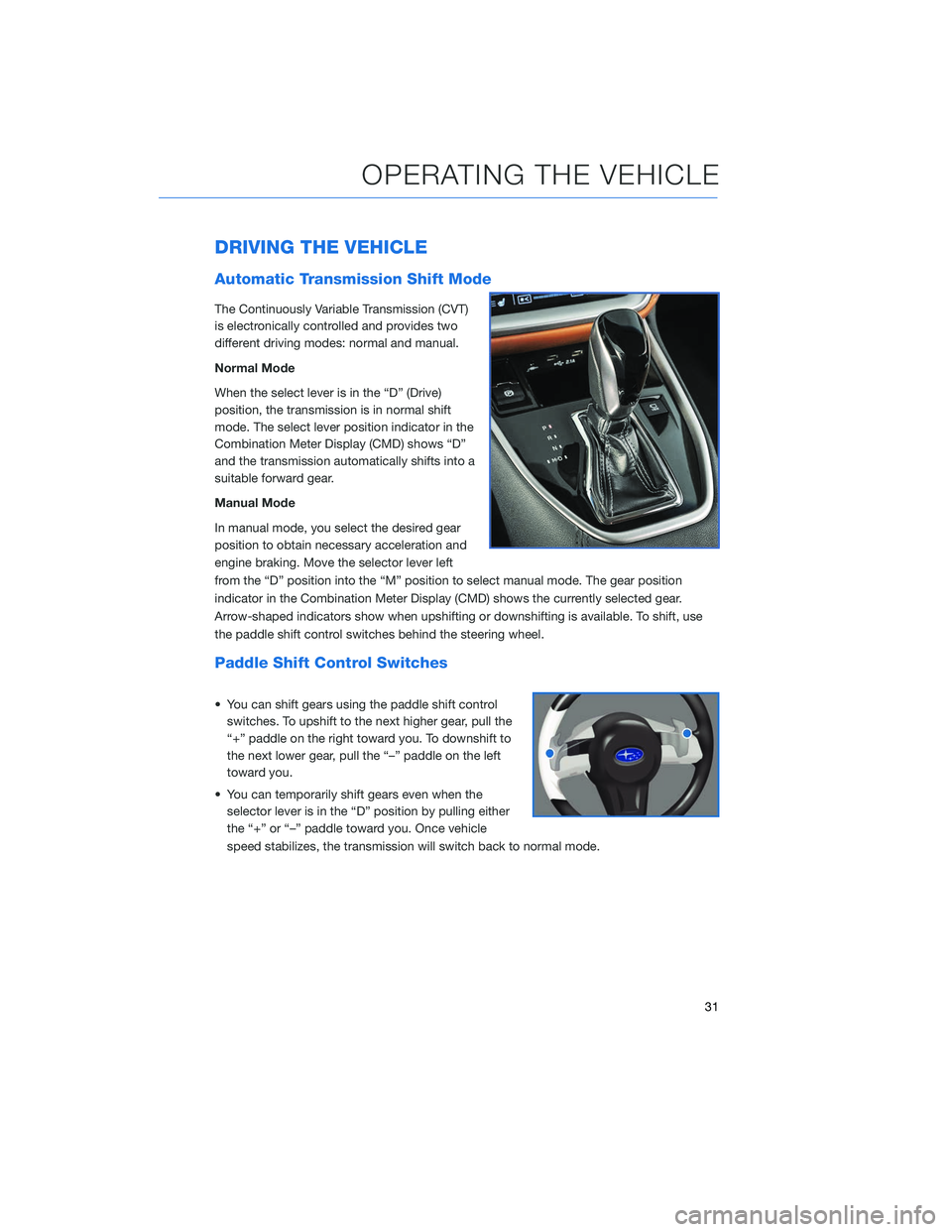
DRIVING THE VEHICLE
Automatic Transmission Shift Mode
The Continuously Variable Transmission (CVT)
is electronically controlled and provides two
different driving modes: normal and manual.
Normal Mode
When the select lever is in the “D” (Drive)
position, the transmission is in normal shift
mode. The select lever position indicator in the
Combination Meter Display (CMD) shows “D”
and the transmission automatically shifts into a
suitable forward gear.
Manual Mode
In manual mode, you select the desired gear
position to obtain necessary acceleration and
engine braking. Move the selector lever left
from the “D” position into the “M” position to select manual mode. The gear position
indicator in the Combination Meter Display (CMD) shows the currently selected gear.
Arrow-shaped indicators show when upshifting or downshifting is available. To shift, use
the paddle shift control switches behind the steering wheel.
Paddle Shift Control Switches
• You can shift gears using the paddle shift controlswitches. To upshift to the next higher gear, pull the
“+” paddle on the right toward you. To downshift to
the next lower gear, pull the “–” paddle on the left
toward you.
• You can temporarily shift gears even when the selector lever is in the “D” position by pulling either
the “+” or “–” paddle toward you. Once vehicle
speed stabilizes, the transmission will switch back to normal mode.
OPERATING THE VEHICLE
31
Page 40 of 132
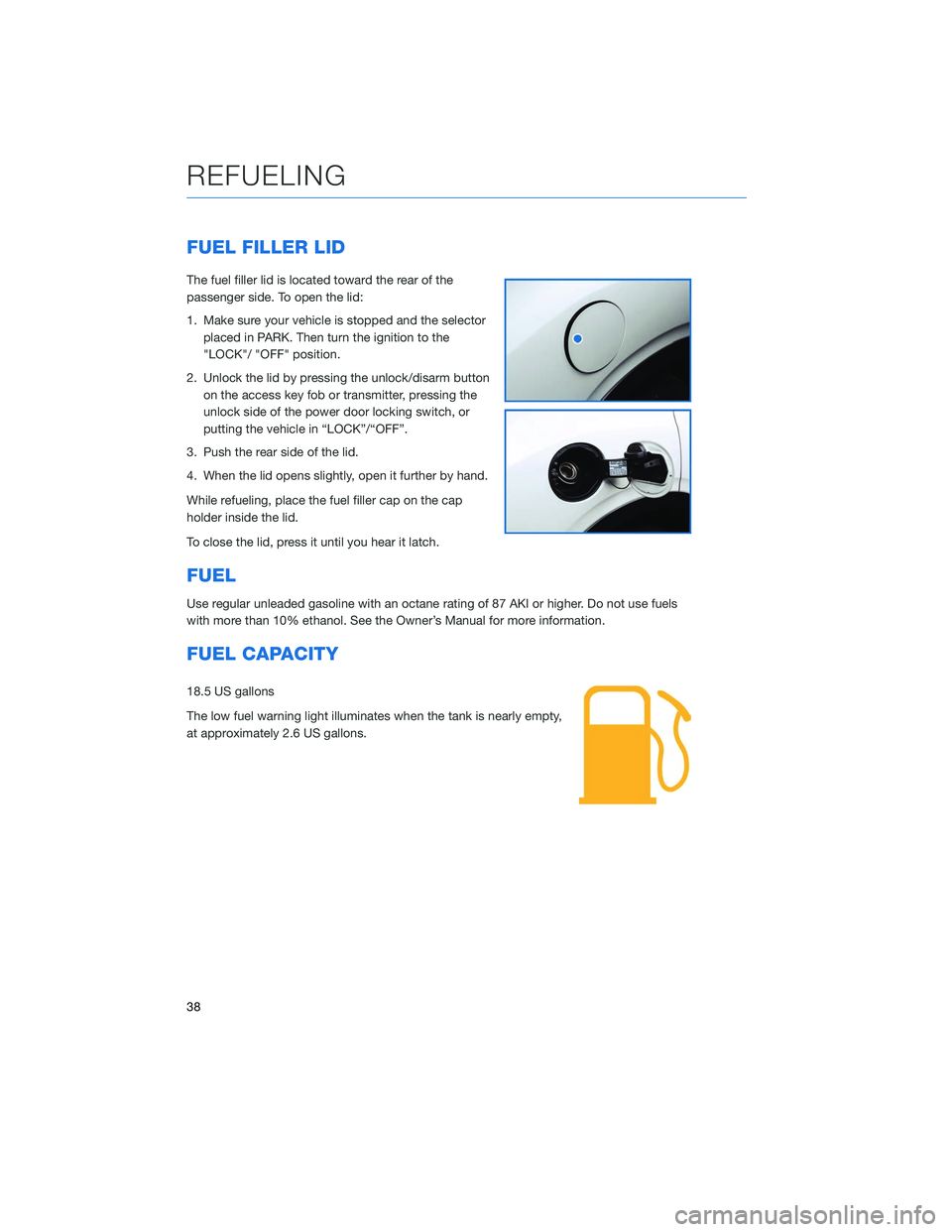
FUEL FILLER LID
The fuel filler lid is located toward the rear of the
passenger side. To open the lid:
1. Make sure your vehicle is stopped and the selectorplaced in PARK. Then turn the ignition to the
"LOCK"/ "OFF" position.
2. Unlock the lid by pressing the unlock/disarm button on the access key fob or transmitter, pressing the
unlock side of the power door locking switch, or
putting the vehicle in “LOCK”/“OFF”.
3. Push the rear side of the lid.
4. When the lid opens slightly, open it further by hand.
While refueling, place the fuel filler cap on the cap
holder inside the lid.
To close the lid, press it until you hear it latch.
FUEL
Use regular unleaded gasoline with an octane rating of 87 AKI or higher. Do not use fuels
with more than 10% ethanol. See the Owner’s Manual for more information.
FUEL CAPACITY
18.5 US gallons
The low fuel warning light illuminates when the tank is nearly empty,
at approximately 2.6 US gallons.
REFUELING
38
Page 57 of 132
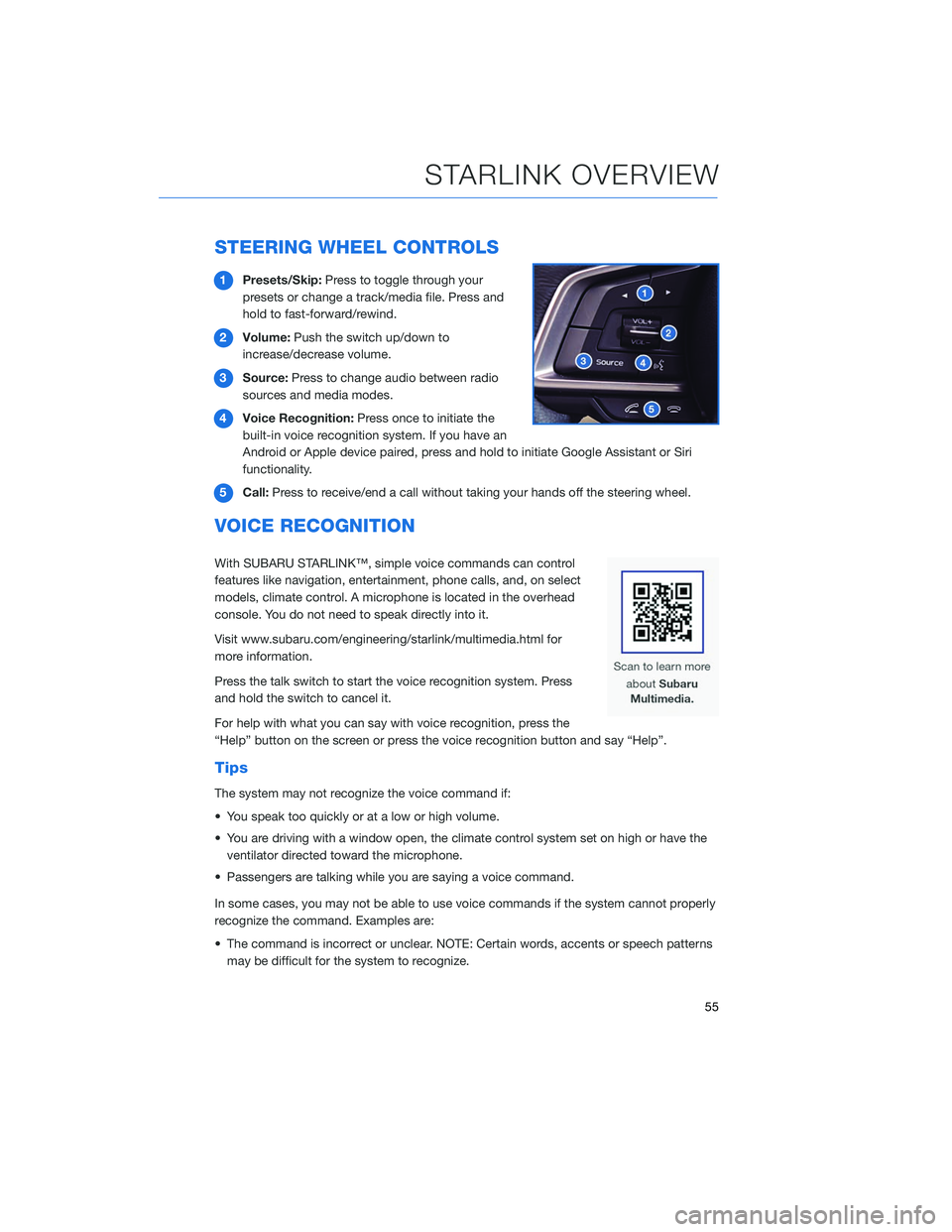
STEERING WHEEL CONTROLS
1Presets/Skip: Press to toggle through your
presets or change a track/media file. Press and
hold to fast-forward/rewind.
2 Volume: Push the switch up/down to
increase/decrease volume.
3 Source: Press to change audio between radio
sources and media modes.
4 Voice Recognition: Press once to initiate the
built-in voice recognition system. If you have an
Android or Apple device paired, press and hold to initiate Google Assistant or Siri
functionality.
5 Call: Press to receive/end a call without taking your hands off the steering wheel.
VOICE RECOGNITION
With SUBARU STARLINK™, simple voice commands can control
features like navigation, entertainment, phone calls, and, on select
models, climate control. A microphone is located in the overhead
console. You do not need to speak directly into it.
Visit www.subaru.com/engineering/starlink/multimedia.html for
more information.
Press the talk switch to start the voice recognition system. Press
and hold the switch to cancel it.
For help with what you can say with voice recognition, press the
“Help” button on the screen or press the voice recognition button and say “Help”.
Tips
The system may not recognize the voice command if:
• You speak too quickly or at a low or high volume.
• You are driving with a window open, the climate control system set on high or have the
ventilator directed toward the microphone.
• Passengers are talking while you are saying a voice command.
In some cases, you may not be able to use voice commands if the system cannot properly
recognize the command. Examples are:
• The command is incorrect or unclear. NOTE: Certain words, accents or speech patterns may be difficult for the system to recognize.
STARLINK OVERVIEW
55