air conditioning SUBARU SOLTERRA 2023 User Guide
[x] Cancel search | Manufacturer: SUBARU, Model Year: 2023, Model line: SOLTERRA, Model: SUBARU SOLTERRA 2023Pages: 628, PDF Size: 11.91 MB
Page 129 of 628
1292-2. Charging
Owners Manual_USA_M42C01_en
2
Electric Vehicle system
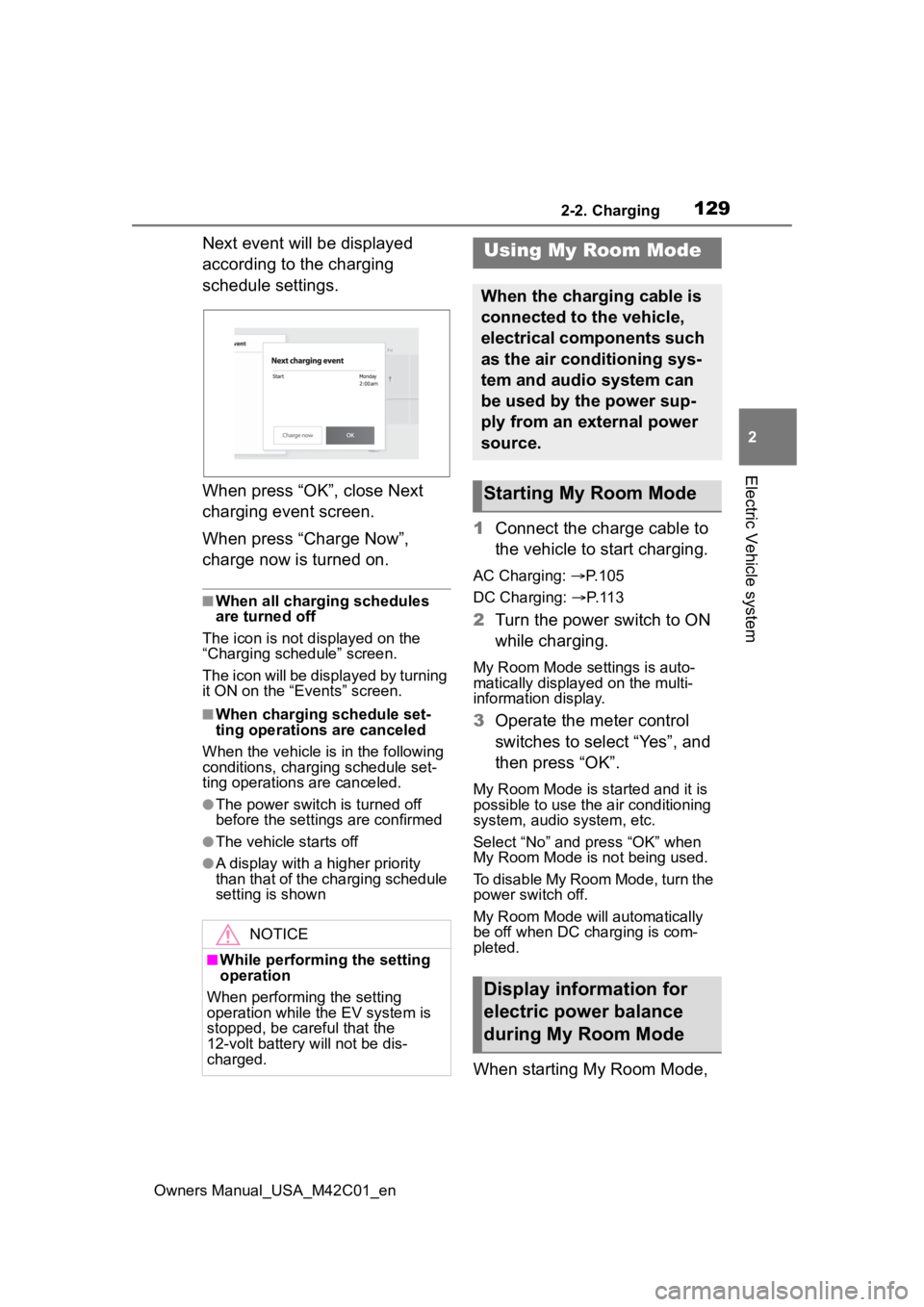
Next event will be displayed
according to the charging
schedule settings.
When press “OK”, close Next
charging event screen.
When press “Charge Now”,
charge now is turned on.
■When all charging schedules
are turned off
The icon is not displayed on the
“Charging schedule” screen.
The icon will be displayed by turning
it ON on the “Events” screen.
■When charging schedule set-
ting operations are canceled
When the vehicle is in the following
conditions, charging schedule set-
ting operations are canceled.
●The power switch is turned off
before the setting s are confirmed
●The vehicle starts off
●A display with a higher priority
than that of the charging schedule
setting is shown
1Connect the charge cable to
the vehicle to start charging.
AC Charging: P. 1 0 5
DC Charging: P. 1 1 3
2 Turn the power switch to ON
while charging.
My Room Mode settings is auto-
matically display ed on the multi-
information display.
3 Operate the meter control
switches to select “Yes”, and
then press “OK”.
My Room Mode is started and it is
possible to use the air conditioning
system, audio system, etc.
Select “No” and press “OK” when
My Room Mode is not being used.
To disable My Room Mode, turn the
power switch off.
My Room Mode will automatically
be off when DC charging is com-
pleted.
When starting My Room Mode,
NOTICE
■While performing the setting
operation
When performing the setting
operation while t he EV system is
stopped, be careful that the
12-volt battery will not be dis-
charged.
Using My Room Mode
When the charging cable is
connected to the vehicle,
electrical components such
as the air conditioning sys-
tem and audio system can
be used by the power sup-
ply from an external power
source.
Starting My Room Mode
Display information for
electric power balance
during My Room Mode
Page 130 of 628
1302-2. Charging
Owners Manual_USA_M42C01_en
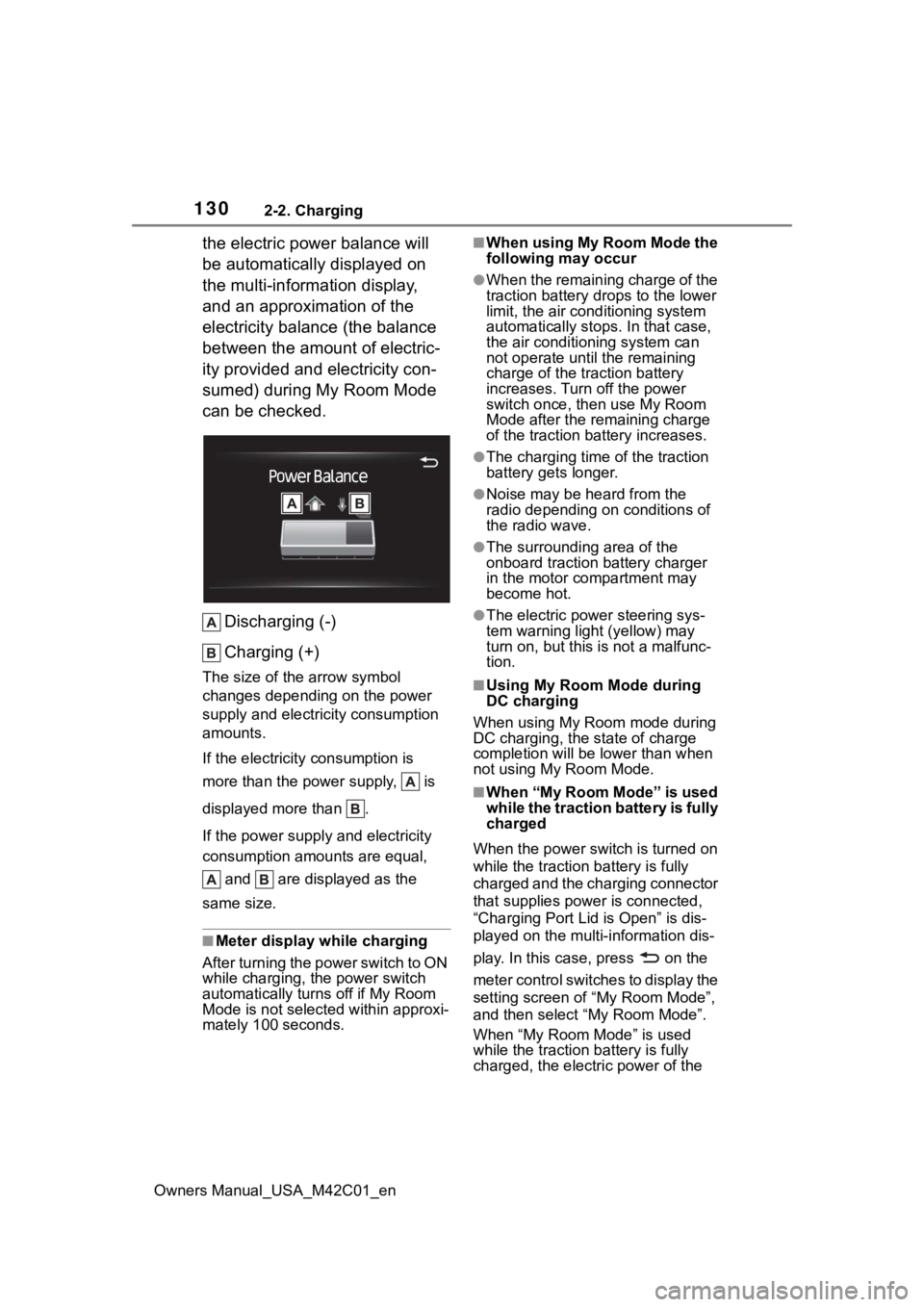
the electric power balance will
be automatically displayed on
the multi-information display,
and an approximation of the
electricity balance (the balance
between the amount of electric-
ity provided and electricity con-
sumed) during My Room Mode
can be checked.Discharging (-)
Charging (+)
The size of the arrow symbol
changes depending on the power
supply and electric ity consumption
amounts.
If the electricity consumption is
more than the power supply, is
displayed more than .
If the power supply and electricity
consumption amounts are equal,
and are displayed as the
same size.
■Meter display while charging
After turning the power switch to ON
while charging, the power switch
automatically turns off if My Room
Mode is not selected within approxi-
mately 100 seconds.
■When using My Room Mode the
following may occur
●When the remaining charge of the
traction battery d rops to the lower
limit, the air conditioning system
automatically stops. In that case,
the air conditioning system can
not operate until the remaining
charge of the traction battery
increases. Turn off the power
switch once, then use My Room
Mode after the remaining charge
of the traction battery increases.
●The charging time of the traction
battery gets longer.
●Noise may be heard from the
radio depending on conditions of
the radio wave.
●The surrounding area of the
onboard traction battery charger
in the motor compartment may
become hot.
●The electric power steering sys-
tem warning light (yellow) may
turn on, but this is not a malfunc-
tion.
■Using My Room Mode during
DC charging
When using My Room mode during
DC charging, the state of charge
completion will be lo wer than when
not using My Room Mode.
■When “My Room Mode” is used
while the traction battery is fully
charged
When the power switch is turned on
while the traction b attery is fully
charged and the charging connector
that supplies power is connected,
“Charging Port Lid is Open” is dis-
played on the multi-information dis-
play. In this cas e, press on the
meter control switches to display the
setting screen of “My Room Mode”,
and then select “My Room Mode”.
When “My Room Mode” is used
while the traction b attery is fully
charged, the electric power of the
Page 131 of 628
1312-2. Charging
Owners Manual_USA_M42C01_en
2
Electric Vehicle system
traction battery may be consumed.
In this case, charging may be per- formed again.
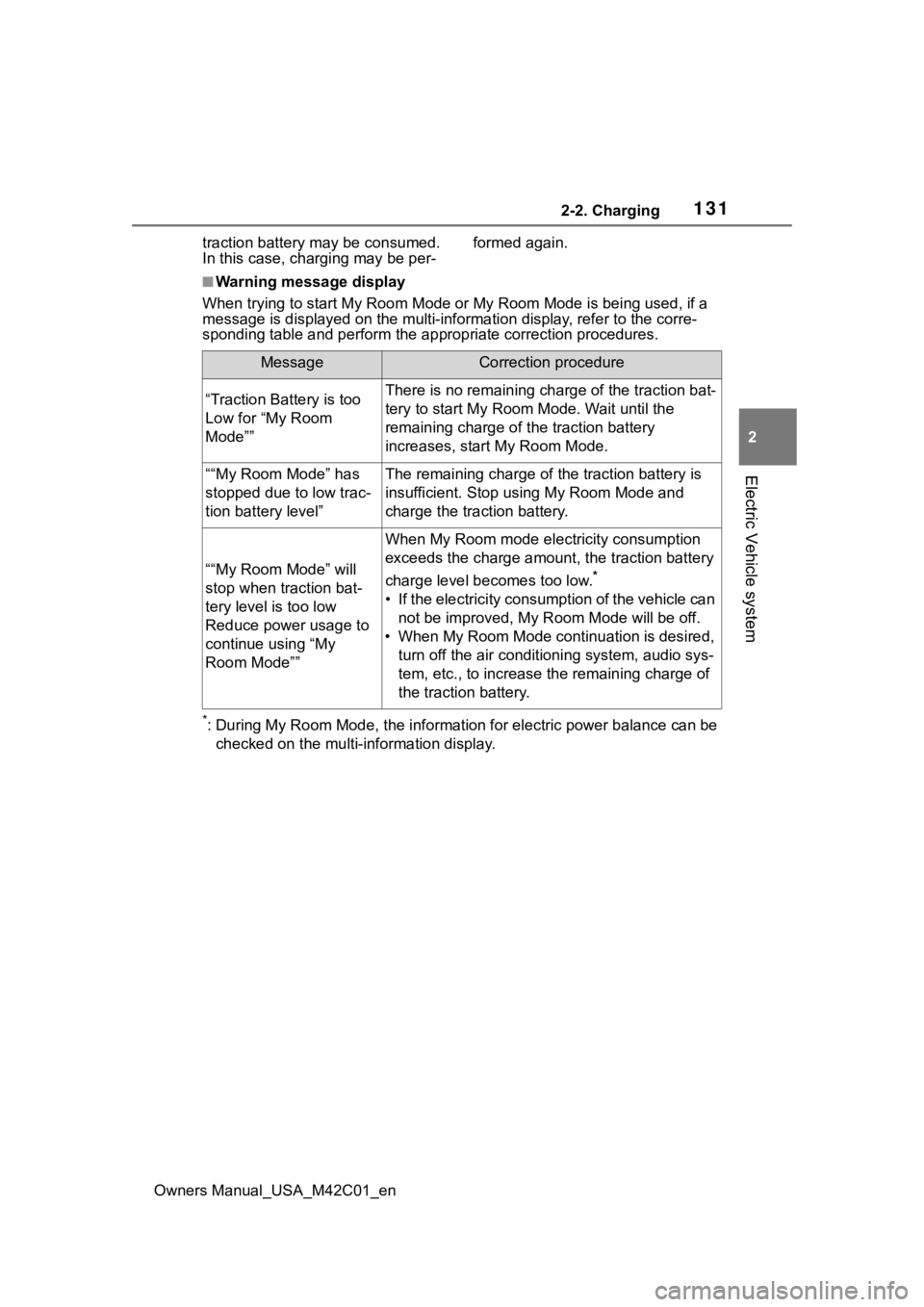
■Warning message display
When trying to start My Room Mode or My Room Mode is being used , if a
message is displayed on the multi -information display, refer to the corre-
sponding table and perform the app ropriate correction procedures.
*: During My Room Mode, the informa tion for electric power balance can be
checked on the multi-information display.
MessageCorrection procedure
“Traction Battery is too
Low for “My Room
Mode””There is no remaining charge of the traction bat-
tery to start M y Room Mode. Wait until the
remaining charge of the traction battery
increases, start My Room Mode.
““My Room Mode” has
stopped due to low trac-
tion battery level”The remaining charge of the traction battery is
insufficient. Stop using My Room Mode and
charge the traction battery.
““My Room Mode” will
stop when traction bat-
tery level is too low
Reduce power usage to
continue using “My
Room Mode””
When My Room mode electricity consumption
exceeds the charge amount, the traction battery
charge level becomes too low.
*
• If the electricity consumption of the vehicle can not be improved, My R oom Mode will be off.
• When My Room Mode continuation is desired, turn off the air conditioning system, audio sys-
tem, etc., to increase t he remaining charge of
the traction battery.
Page 137 of 628
1372-2. Charging
Owners Manual_USA_M42C01_en
2
Electric Vehicle system
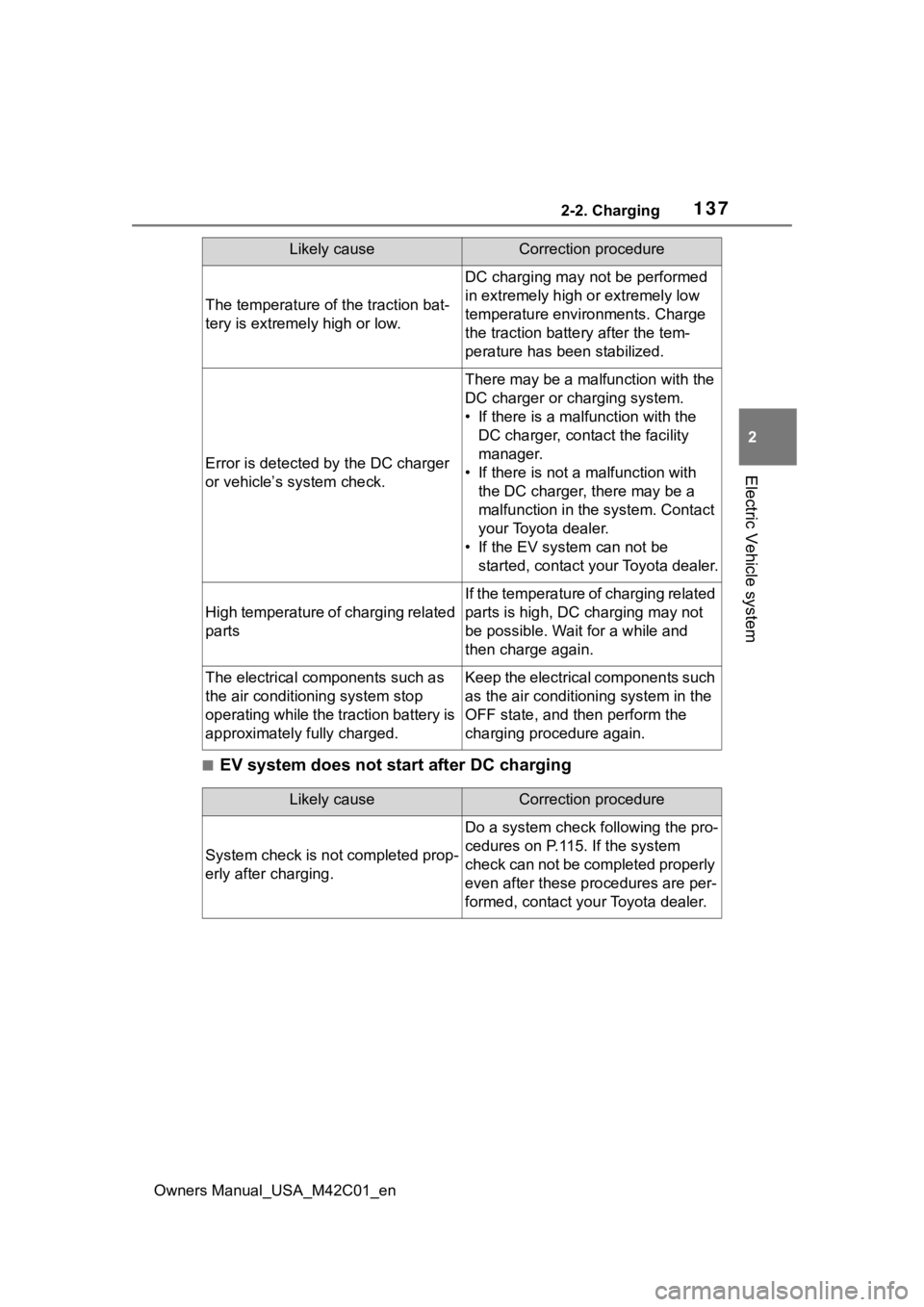
■EV system does not start after DC charging
The temperature of the traction bat-
tery is extremely high or low.
DC charging may not be performed
in extremely high or extremely low
temperature environments. Charge
the traction batte ry after the tem-
perature h as been stabilized.
Error is detected by the DC charger
or vehicle’s system check.
There may be a malfunction with the
DC charger or charging system.
• If there is a mal function with the
DC charger, conta ct the facility
manager.
• If there is not a malfunction with
the DC charger, there may be a
malfunction in the system. Contact
your Toyota dealer.
• If the EV system can not be started, contact your Toyota dealer.
High temperature of charging related
parts
If the temperature of charging related
parts is high, DC charging may not
be possible. Wait for a while and
then charge again.
The electrical components such as
the air conditioning system stop
operating while the traction battery is
approximately fully charged.Keep the electrical components such
as the air conditioning system in the
OFF state, and t hen perform the
charging procedure again.
Likely causeCorrection procedure
Likely causeCorrection procedure
System check is not completed prop-
erly after charging.
Do a system check following the pro-
cedures on P.115. If the system
check can not be completed properly
even after these procedures are per-
formed, contact your Toyota dealer.
Page 139 of 628
1392-2. Charging
Owners Manual_USA_M42C01_en
2
Electric Vehicle system
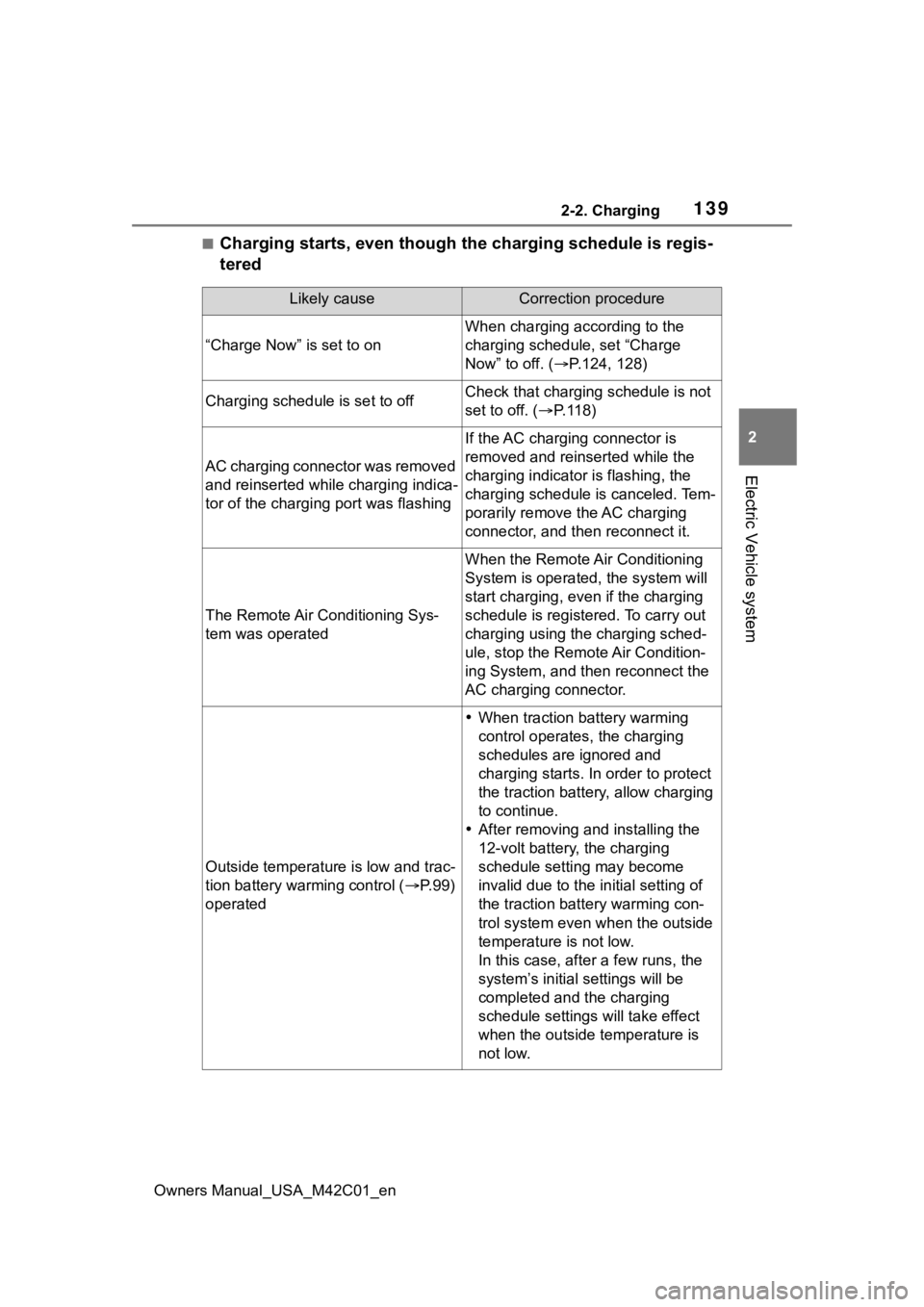
■Charging starts, even though the charging schedule is regis-
tered
Likely causeCorrection procedure
“Charge Now” is set to on
When charging according to the
charging schedule, set “Charge
Now” to off. ( P.124, 128)
Charging schedule is set to offCheck that charging schedule is not
set to off. ( P. 1 1 8 )
AC charging connector was removed
and reinserted while charging indica-
tor of the charging port was flashing
If the AC charging connector is
removed and reinserted while the
charging indicator is flashing, the
charging schedule is canceled. Tem-
porarily remove the AC charging
connector, and then reconnect it.
The Remote Air Conditioning Sys-
tem was operated
When the Remote Air Conditioning
System is operated, the system will
start charging, even if the charging
schedule is registered. To carry out
charging using the charging sched-
ule, stop the Remote Air Condition-
ing System, and then reconnect the
AC charging connector.
Outside temperature is low and trac-
tion battery warming control ( P. 9 9 )
operated
When traction battery warming
control operates, the charging
schedules are ignored and
charging starts. In order to protect
the traction battery , allow charging
to continue.
After removing and installing the
12-volt battery, the charging
schedule setting may become
invalid due to the in itial setting of
the traction battery warming con-
trol system even wh en the outside
temperature is not low.
In this case, after a few runs, the
system’s initial settings will be
completed and the charging
schedule settings will take effect
when the outside temperature is
not low.
Page 141 of 628
1412-2. Charging
Owners Manual_USA_M42C01_en
2
Electric Vehicle system
*: Electricity is consumed wh en operating battery heater ( P.99), the
Remote Air Conditioning System ( P.409).
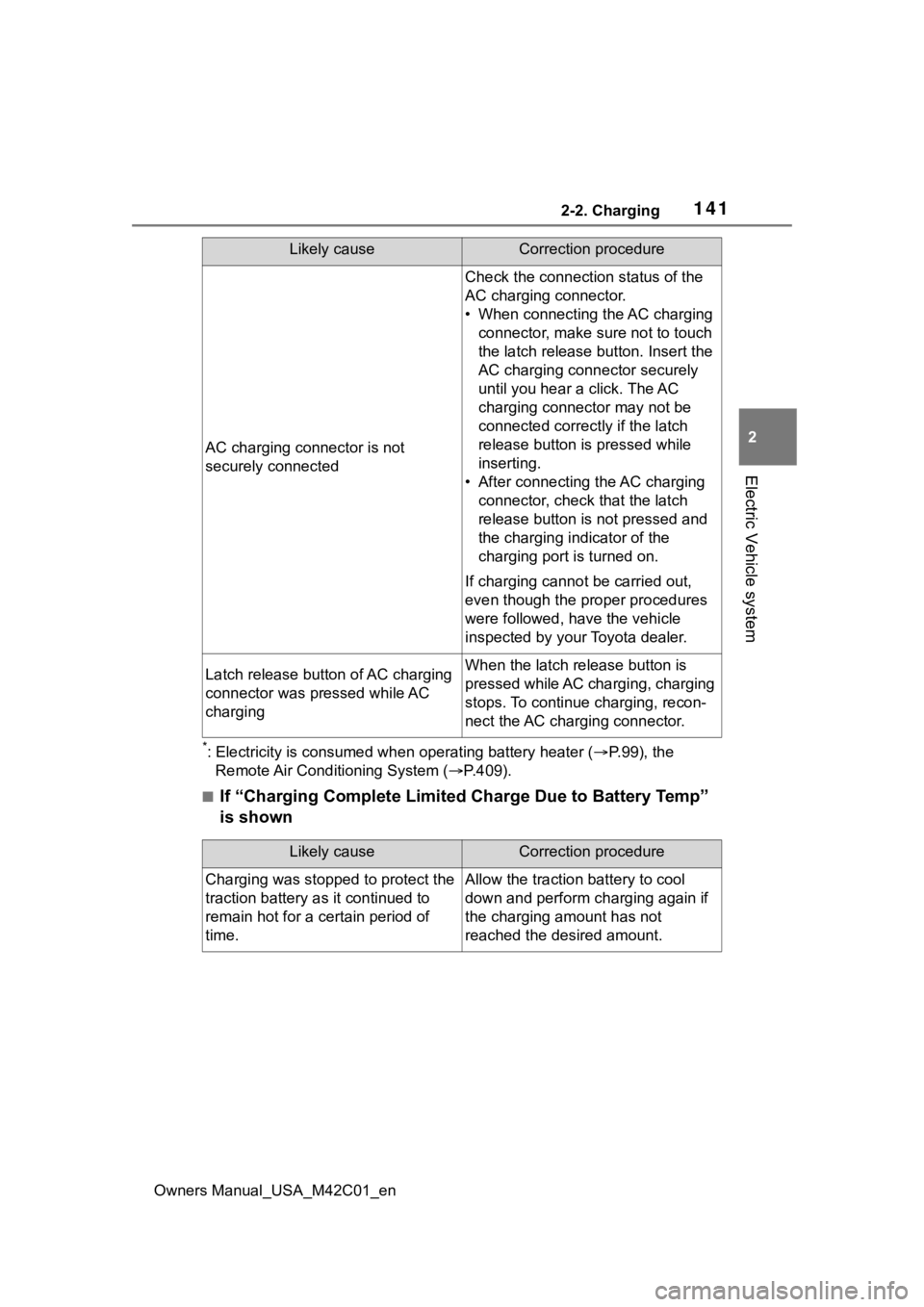
■If “Charging Complete Limited Charge Due to Battery Temp”
is shown
AC charging connector is not
securely connected
Check the connection status of the
AC charging connector.
• When connecting the AC charging
connector, make sure not to touch
the latch release button. Insert the
AC charging connector securely
until you hear a click. The AC
charging connector may not be
connected correctly if the latch
release button is pressed while
inserting.
• After connecting the AC charging connector, check that the latch
release button is not pressed and
the charging indicator of the
charging port is turned on.
If charging cannot be carried out,
even though the proper procedures
were followed, h ave the vehicle
inspected by your Toyota dealer.
Latch release button of AC charging
connector was pressed while AC
chargingWhen the latch release button is
pressed while AC charging, charging
stops. To continue charging, recon-
nect the AC charging connector.
Likely causeCorrection procedure
Likely causeCorrection procedure
Charging was stopped to protect the
traction battery as it continued to
remain hot for a certain period of
time.Allow the traction battery to cool
down and perform ch arging again if
the charging amount has not
reached the desired amount.
Page 153 of 628
1533-1. Instrument cluster
Owners Manual_USA_M42C01_en
3
Vehicle status information and indicators
Driving range
Displays driving range with remaining charge. ( P.236)
When the air conditioning system i s operating, and the driving range
with the air conditioning system on are displayed.
Odometer and trip meter display ( P.154)
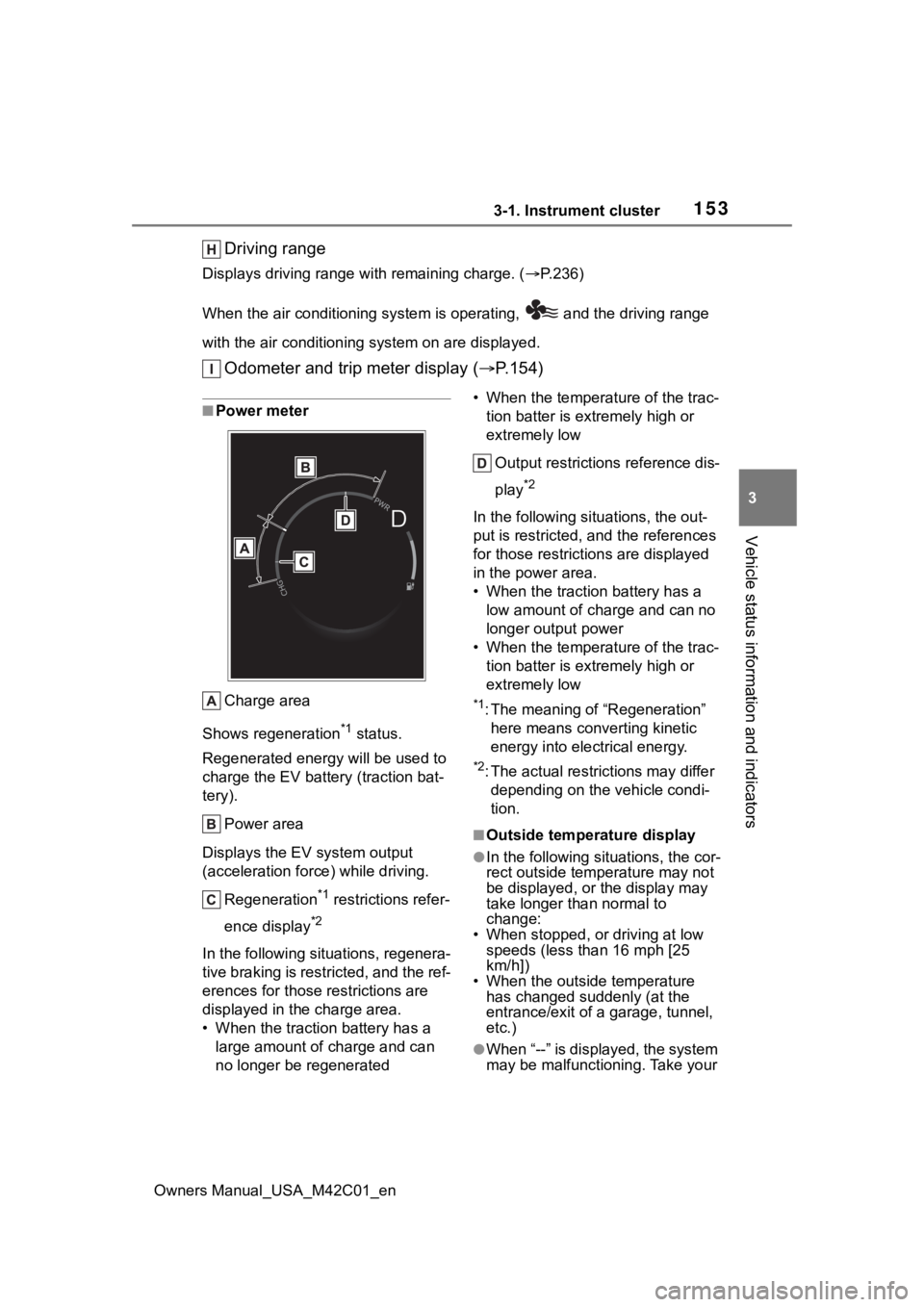
■Power meter
Charge area
Shows regeneration
*1 status.
Regenerated e nergy will be used to
charge the EV battery (traction bat-
tery).
Power area
Displays the EV system output
(acceleration force) while driving. Regeneration
*1 restrictions refer-
ence display
*2
In the following situ ations, regenera-
tive braking is restricted, and the ref-
erences for those restrictions are
displayed in the charge area.
• When the traction battery has a large amount of charge and can
no longer be regenerated • When the temperature of the trac-
tion batter is extremely high or
extremely low
Output restrictions reference dis-
play
*2
In the following situ ations, the out-
put is restricted, a nd the references
for those restricti ons are displayed
in the power area.
• When the traction battery has a low amount of charge and can no
longer output power
• When the temperature of the trac-
tion batter is extremely high or
extremely low
*1: The meaning of “Regeneration” here means converting kinetic
energy into electrical energy.
*2: The actual restrictions may differ depending on the vehicle condi-
tion.
■Outside temperature display
●In the following sit uations, the cor-
rect outside temperature may not
be displayed, or the display may
take longer than normal to
change:
• When stopped, or driving at low
speeds (less than 16 mph [25
km/h])
• When the outside temperature has changed suddenly (at the
entrance/exit of a garage, tunnel,
etc.)
●When “--” is displayed, the system
may be malfunctioning. Take your
Page 313 of 628
3135-4. Using the driving support systems
Owners Manual_USA_M42C01_en
5
Driving
■The system can be operated
when
●The power switch is in ON.
●Intuitive parking assist function is
on.
●The vehicle speed is less than
about 6 mph (10 km/h).
●A shift position other than P is
selected.
■Sensor detection information
●The sensor’s detection areas are
limited to the areas around the
vehicle’s front and rear bumpers.
●The following situations may occur
during use.
• Depending on the shape of the object and other factors, the
detection distance may shorten, or
detection may be impossible.
• Detection may be impossible if static objects draw too close to the
sensor.
• There will be a short delay between static object detection
and display (warning buzzer
sounds). Even at low speeds,
there is a possibility that the object
will come within 11.9 in. (30 cm)
before the display is shown and
the warning buzzer sounds.
• It might be diffic ult to hear the
buzzer due to the volume of the
audio system or air flow noise of
the air conditioning system.
• It may be diffi cult to hear the
sound of this sys tem due to the
buzzers of other systems.
WARNING
●Do not damage the sensors,
and always keep them clean.
●Do not attach a sticker or install
an electronic component, such
as a backlit license plate (espe-
cially fluorescent type), fog
lights, fender pole or wireless
antenna near a radar sensor.
●Do not subject the surrounding
area of the sensor to a strong
impact. If subjected to an
impact, have the vehicle
inspected by your Toyota
dealer. If the fr ont or rear
bumper needs to be
removed/installed or replaced,
contact your Toyota dealer.
●Do not modify, disassemble or
paint the sensors.
●Do not attach a license plate
cover.
●Keep your tires properly
inflated.
■When to disable the function
In the following situations, disable
the function as it may operate
even though there is no possibility
of a collision.
●Failing to observe the warnings
above.
●A non-genuine Toyota suspen-
sion (lowered suspension, etc.)
is installed.
■Notes when washing the vehi-
cle
Do not apply intensive bursts of
water or steam to the sensor
area.
Doing so may result in the sensor
malfunctioning.
●When using a high pressure
washer to wash the vehicle, do
not spray the sensors directly,
as doing so may cause a sensor
to malfunction.
●When using steam to clean the
vehicle, do not direct steam too
close to the sensors as doing so
may cause a sensor to malfunc-
tion.
Page 327 of 628
3275-4. Using the driving support systems
Owners Manual_USA_M42C01_en
5
Driving
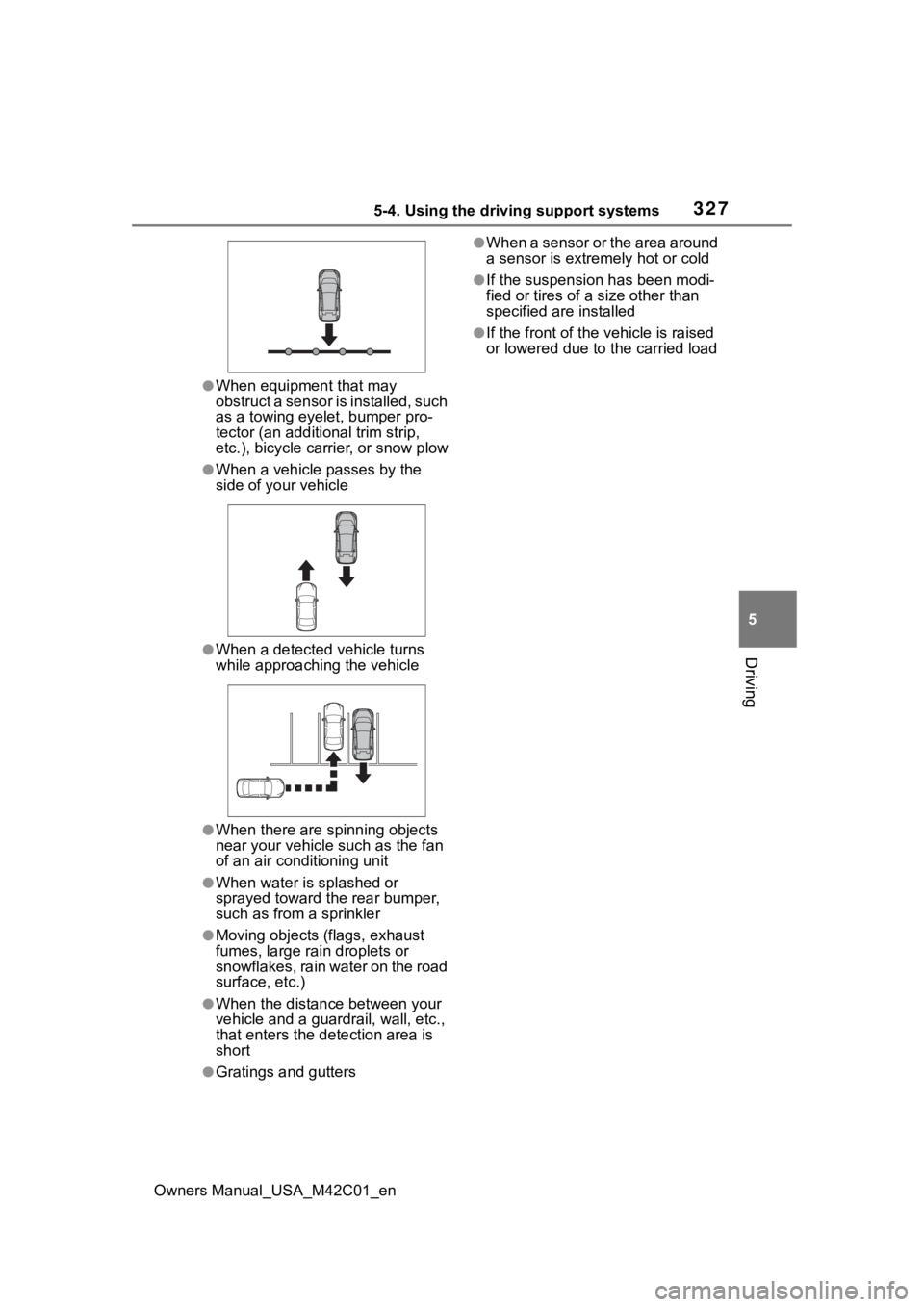
●When equipment that may
obstruct a sensor is installed, such
as a towing eyelet, bumper pro-
tector (an additi onal trim strip,
etc.), bicycle carrier, or snow plow
●When a vehicle passes by the
side of your vehicle
●When a detected vehicle turns
while approaching the vehicle
●When there are spinning objects
near your vehicle such as the fan
of an air conditioning unit
●When water is splashed or
sprayed toward t he rear bumper,
such as from a sprinkler
●Moving objects (flags, exhaust
fumes, large rain droplets or
snowflakes, rain water on the road
surface, etc.)
●When the distanc e between your
vehicle and a guardr ail, wall, etc.,
that enters the detection area is
short
●Gratings and gutters
●When a sensor or the area around
a sensor is extremely hot or cold
●If the suspension has been modi-
fied or tires of a size other than
specified are installed
●If the front of the v ehicle is raised
or lowered due to the carried load
Page 378 of 628

3785-4. Using the driving support systems
Owners Manual_USA_M42C01_en
changed
Brake control operates
Camera switch is pressed
The PKSB (Parking Support
Brake) PCS (Pre-Collision
System) has operates
■Remote control function
assistance will be canceled
when
In situations such as the follow-
ing, Remote control function
operation will be canceled.
As system operation has been
canceled, while carrying an
electronic key, enter the vehicle
and park the vehicle manually,
using the steering wheel.
When a condition for stopping
Advanced Park assistance is
met, with the exception sus-
pension due to a door being
opened or the driver’s seat
belt being released
When Remote control func-
tion is operated while the
remote air conditioning is
operating and the power
switch is changed to ON
before remote air conditioning
has ended
When 5 minutes have
elapsed since Remote con-
trol function operation was
started
When 3 minutes have
elapsed since any operation
was performed
When 30 seconds have
elapsed with the vehicle not
being able to be driven, even
though the screen of the
smartphone is being operated
to drive the vehicle
When the power button on the
screen of the smartphone is
selected
When the Remote Park app is
force closed
When the vehicle is on a
steep slope
When an electronic key is
detected inside the vehicle
while Remote control function
operation is suspended
When the ambient tempera-
ture is 14°F (-10°C) or less
■Remote control function
assistance will be sus-
pended when
In situations such as the follow-
ing, assistance will be sus-
pended.
When the Bluetooth commu-
nication between the smart-
phone and multimedia system
get lost
When smartphone continuous
operation is suspended
When the Remote Park app is
pushed to the background (a
call is received, the home but-
ton is pressed, etc.)
When electronic key does not
detected