air conditioning SUBARU SOLTERRA 2023 Service Manual
[x] Cancel search | Manufacturer: SUBARU, Model Year: 2023, Model line: SOLTERRA, Model: SUBARU SOLTERRA 2023Pages: 628, PDF Size: 11.91 MB
Page 496 of 628
4967-3. Do-it-yourself maintenance
Owners Manual_USA_M42C01_en
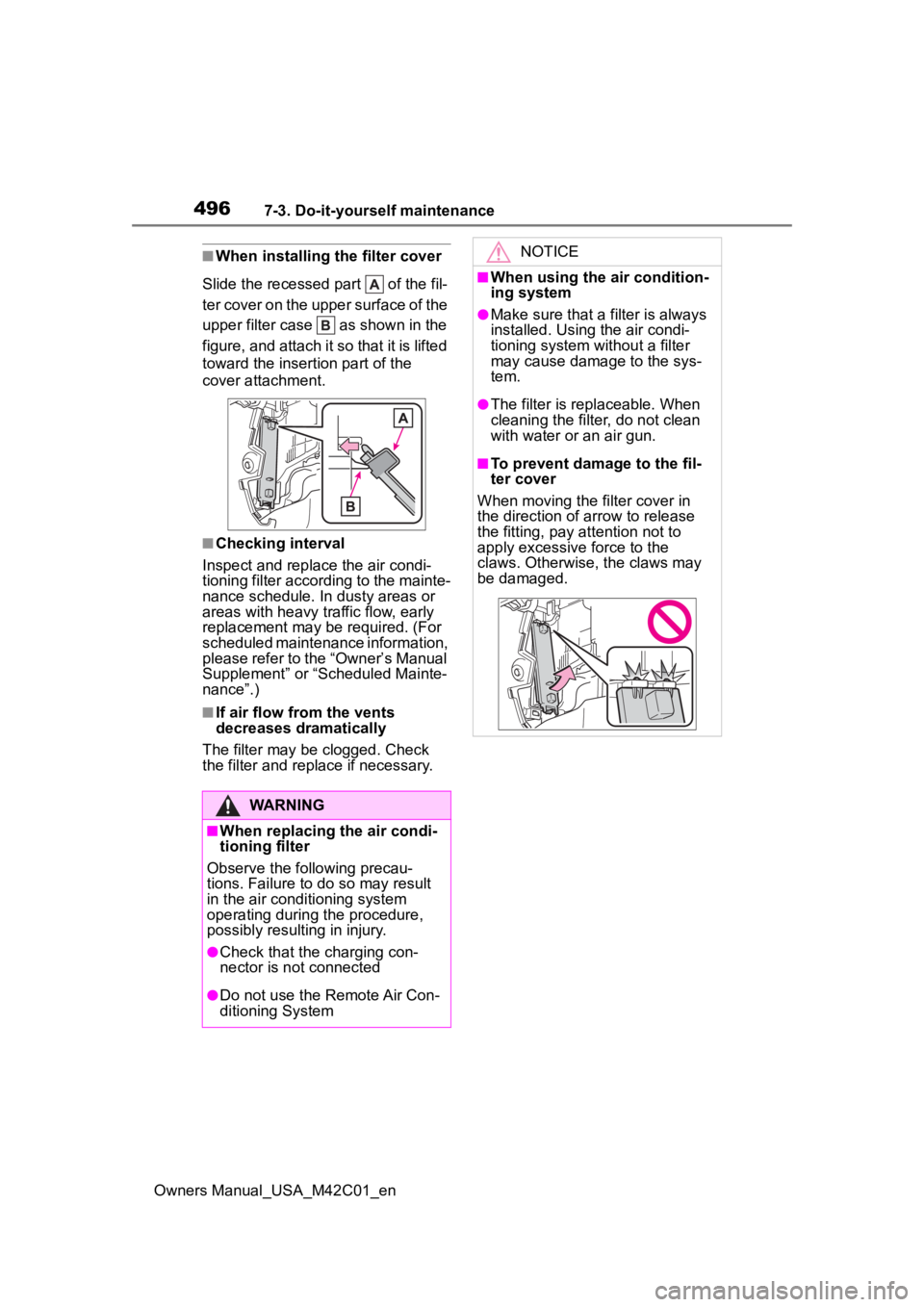
■When installing the filter cover
Slide the recessed part of the fil-
ter cover on the upper surface of the
upper filter case as shown in the
figure, and attach it so that it is lifted
toward the insertion part of the
cover attachment.
■Checking interval
Inspect and replace the air condi-
tioning filter according to the mainte-
nance schedule. In dusty areas or
areas with heavy traffic flow, early
replacement may be required. (For
scheduled maintenance information,
please refer to the “Owner’s Manual
Supplement” or “Scheduled Mainte-
nance”.)
■If air flow from the vents
decreases dramatically
The filter may be clogged. Check
the filter and replace if necessary.
WARNING
■When replacing the air condi-
tioning filter
Observe the following precau-
tions. Failure to do so may result
in the air conditioning system
operating during the procedure,
possibly resulting in injury.
●Check that the charging con-
nector is not connected
●Do not use the Remote Air Con-
ditioning System
NOTICE
■When using the air condition-
ing system
●Make sure that a filter is always
installed. Using the air condi-
tioning system without a filter
may cause damage to the sys-
tem.
●The filter is replaceable. When
cleaning the filter, do not clean
with water or an air gun.
■To prevent damage to the fil-
ter cover
When moving the filter cover in
the direction of arrow to release
the fitting, pay attention not to
apply excessive force to the
claws. Otherwise, the claws may
be damaged.
Page 499 of 628
4997-3. Do-it-yourself maintenance
Owners Manual_USA_M42C01_en
7
Maintenance and care
1 Turn the power switch off.
Confirm that the charging connec-
tor is not connect ed. Also, do not
use the Remote Air Conditioning
System during the procedure.
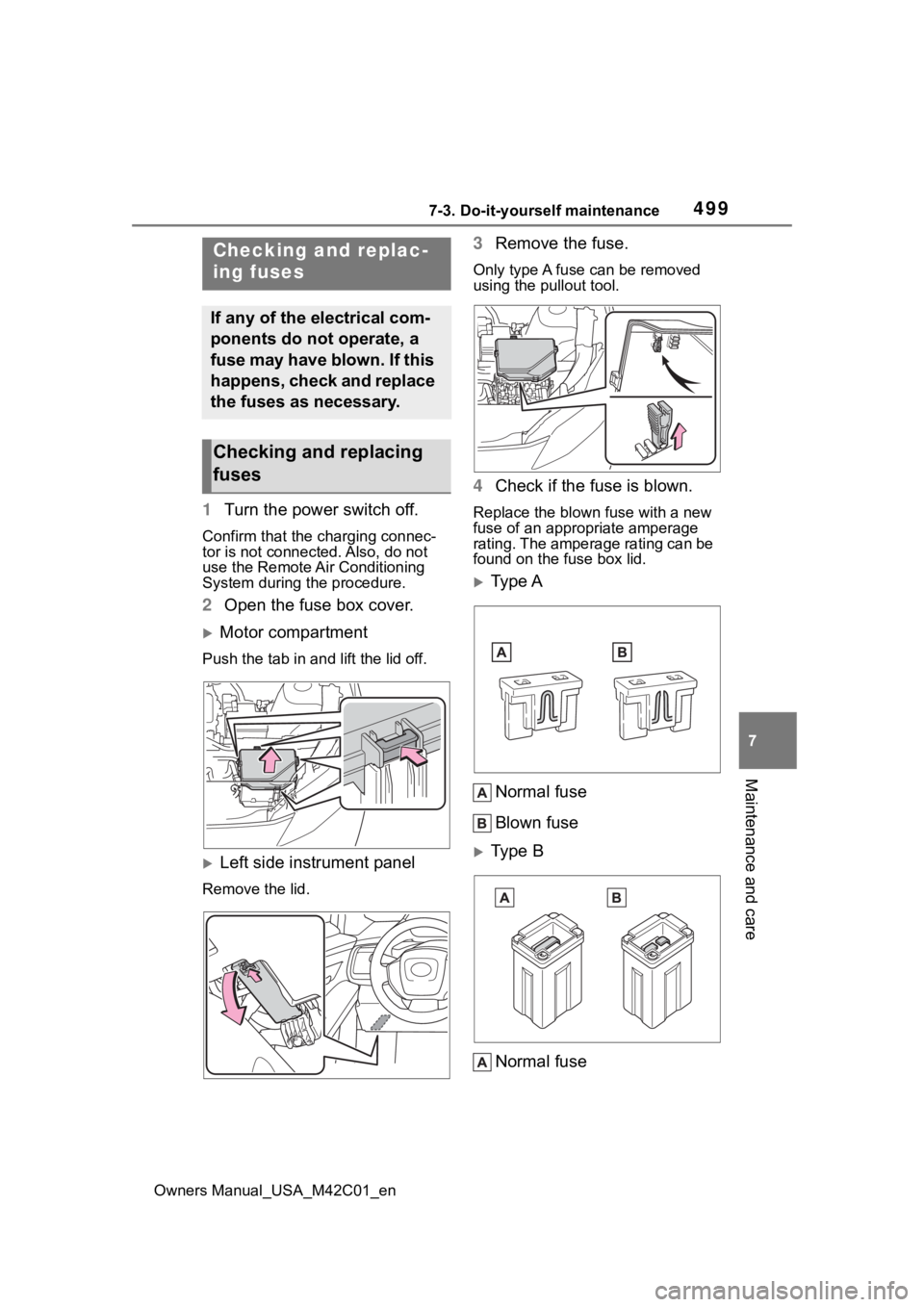
2 Open the fuse box cover.
Motor compartment
Push the tab in and lift the lid off.
Left side instrument panel
Remove the lid.
3Remove the fuse.
Only type A fuse can be removed
using the pullout tool.
4Check if the fuse is blown.
Replace the blown fuse with a new
fuse of an appropriate amperage
rating. The amperage rating can be
found on the fuse box lid.
Type A
Normal fuse
Blown fuse
Type B
Normal fuse
Checking and replac-
ing fuses
If any of the electrical com-
ponents do not operate, a
fuse may have blown. If this
happens, check and replace
the fuses as necessary.
Checking and replacing
fuses
Page 505 of 628
5058-1. Essential information
Owners Manual_USA_M42C01_en
8
When trouble arises
1 Steadily step on the brake
pedal with both feet and
firmly depress it.
Do not pump the brake pedal
repeatedly as this will increase the
effort required to slow the vehicle.
2Shift the shift position to N.
If the shift position is shifted to
N
3 After slowing down, stop the
vehicle in a safe place by the
road.
4 Stop the EV system.
If the shift position cannot be
shifted to N
3 Keep depressing the brake
pedal with both feet to reduce
vehicle speed as much as
possible.
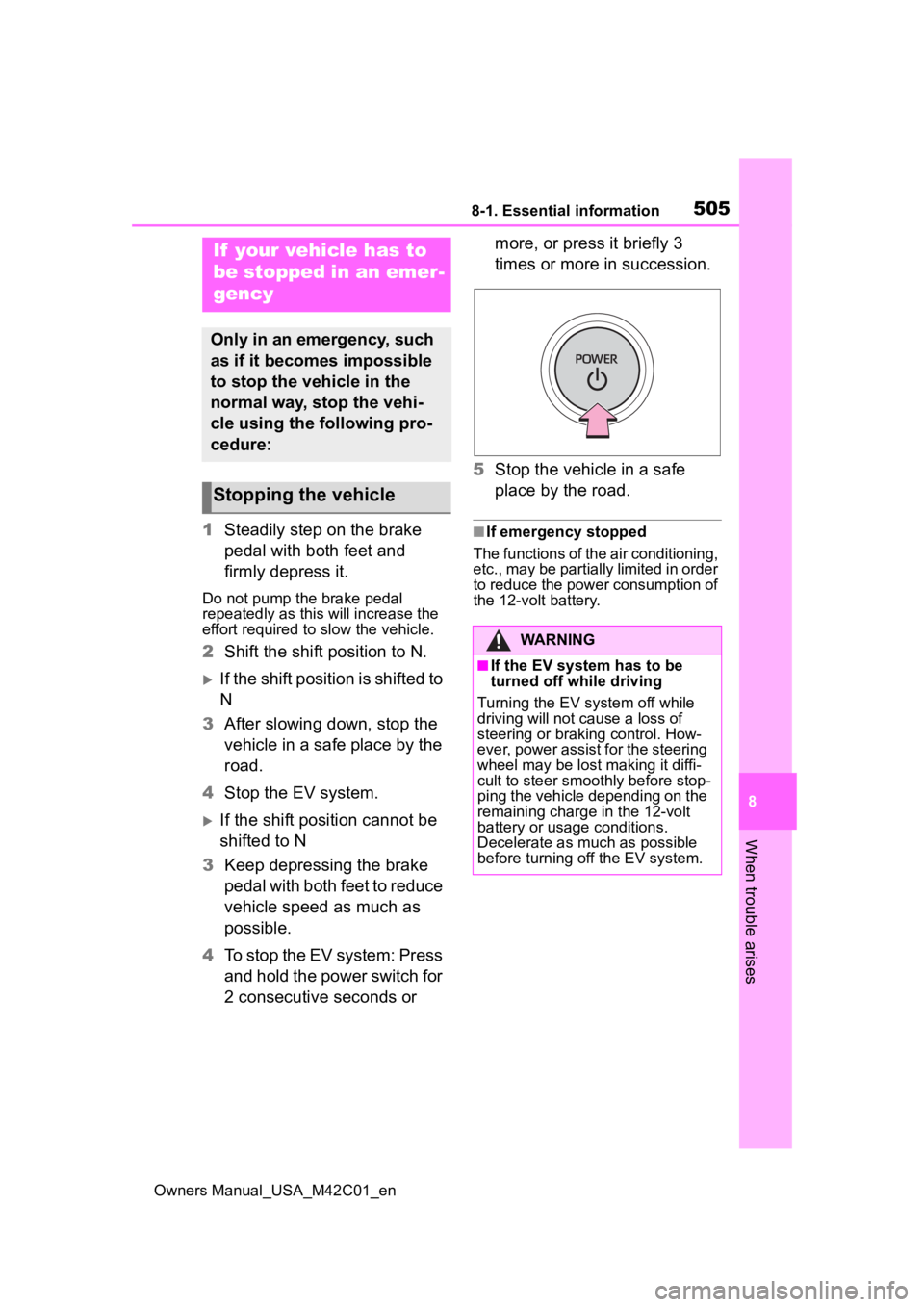
4 To stop the EV system: Press
and hold the power switch for
2 consecutive seconds or more, or press it briefly 3
times or more in succession.
5 Stop the vehicle in a safe
place by the road.
■If emergency stopped
The functions of the air conditioning,
etc., may be partially limited in order
to reduce the power consumption of
the 12-volt battery.
If your vehicle has to
be stopped in an emer-
gency
Only in an emergency, such
as if it becomes impossible
to stop the vehicle in the
normal way, stop the vehi-
cle using the following pro-
cedure:
Stopping the vehicle
WARNING
■If the EV system has to be
turned off while driving
Turning the EV system off while
driving will not cause a loss of
steering or braking control. How-
ever, power assist for the steering
wheel may be lost making it diffi-
cult to steer smoothly before stop-
ping the vehicle depending on the
remaining charge in the 12-volt
battery or usage conditions.
Decelerate as mu ch as possible
before turning off the EV system.
Page 511 of 628
5118-2. Steps to take in an emergency
Owners Manual_USA_M42C01_en
8
When trouble arises
Fluid leaks under the vehicle
(Water dripping from the air
conditioning after use is nor-
mal.)
Flat-looking tires or uneven
tire wear
Excessive tire squeal when
cornering
Strange noises related to the
suspension system
Other noises related to the EV
system
Stumbling or running roughly
Appreciable loss of power
Vehicle pulls heavily to one
side when braking
Vehicle pulls heavily to one
side when driving on a level
road
Loss of brake effectiveness,
WARNING
■While towing
●When towing using cables or
chains, avoid sudden starts,
etc., which place excessive
stress on the towing eyelets,
cables or chains. The towing
eyelets, cables or chains may
become damaged, broken
debris may hit people, and
cause serious damage.
●Do not perform any of the fol-
lowing as doing so may cause
the parking lock mechanism to
engage, locking the front
wheels and possibly leading to
an accident resulting in death or
serious injury:
• Unfasten the driver’s seat belt and open the driver’s door.
• Turn the power switch off.
■Installing towi ng eyelets to
the vehicle
Make sure that towing eyelets are
installed securely. If not securely
installed, towing eyelets may
come loose during towing.
NOTICE
■To prevent damage to the
vehicle during emergency
towing
Do not secure cables or chains to
the suspension components.
If you think something
is wrong
If you notice any of the fol-
lowing symptoms, your
vehicle probably needs
adjustment or repair. Con-
tact your Toyota dealer as
soon as possible.
Visible symptoms
Audible symptoms
Operational symptoms
Page 524 of 628

5248-2. Steps to take in an emergency
Owners Manual_USA_M42C01_en
■If “System Stopped Front Cam-
era Low Visibility See Owner’s
Manual” is displayed
Indicates one of the following sys-
tems is disabled.
●PCS (Pre-Collis ion System)
●LDA (Lane Departure Alert)
●LTA (Lane Tracing Assist)
●AHB (Automatic High Beam)
●Dynamic radar cruise control
●RSA (Road Sign Assist)
Follow the followi ng correction
methods.
• Follow the follo wing correction
methods.
• Using the windshield wipers, remove the dirt o r foreign matter
from the windshield.
• Using the air conditioning system, defog the windshield.
Close the hood, remove any stick-
ers, etc. to clear th e obstruction in
front of the front camera.
■If “System Stopped Front Cam-
era Out of Temperature Range
Wait until Normal Temperature”
is displayed
Indicates one of the following sys-
tems is disabled.
●PCS (Pre-Collis ion System)
●LDA (Lane Departure Alert)
●LTA (Lane Tracing Assist)
●AHB (Automatic High Beam)
●Dynamic radar cruise control
●RSA (Road Sign Assist)
Follow the followi ng correction
methods.
• If the front camera is hot, such as after the vehicle is parked in the
sun, use the air conditioning sys-
tem to decrease the temperature
around the front camera
• If a sunshade was used when the vehicle was parked, depending on
its type, the sunlight reflected from
the surface of the sunshade may
cause the temperature of the front
camera to become excessively
high
• If the front camera is cold, such after the vehicle is parked in an
extremely cold environment, use
the air conditioning system to
increase the temperature around
the front camera
■If “System Stopped Front Radar
Sensor Blocked Clean Radar
Sensor” is displayed
Indicates one of the following sys-
tems is disabled.
●PCS (Pre-Collision System)
●LDA (Lane Departure Alert)
●LTA (Lane Tracing Assist)
●AHB (Automatic High Beam)
●Dynamic radar cruise control
●RSA (Road Sign Assist)
Follow the following correction
methods.
• Check if there is any foreign mat- ter attached to the radar sensor or
radar sensor cover and clean
them if necessary ( P.261)
• This message may be displayed when driving in an open area with
few nearby vehicles or structures,
such as a desert, grasslands, sub-
urbs, etc.
The message may be cleared by
driving the vehicle in an area with
structures, vehicles, etc., nearby.
■If “System Stopped Front Radar
Sensor Out of Temperature
Range Wait until Normal Tem-
perature” is displayed
Indicates one of the following sys-
tems is disabled.
●PCS (Pre-Collision System)
●LDA (Lane Departure Alert)
●LTA (Lane Tracing Assist)
Page 543 of 628
5438-2. Steps to take in an emergency
Owners Manual_USA_M42C01_en
8
When trouble arises
6 Open and close any of the
doors of your vehicle with the
power switch OFF.
7 Maintain the engine speed of
the second vehicle and start
the EV system of your vehi-
cle by turning the power
switch to ON.
8 Make sure the “READY” indi-
cator comes on. If the indica-
tor light does not come on,
contact your Toyota dealer.
9 Once the EV system has
started, remove the jumper
cables in the exact reverse
order from which they were
connected.
10 Close the positive (+) battery
terminal cover.
Once the EV system starts,
have the vehicle inspected at
your Toyota dealer as soon as
possible.
■Starting the EV system when
the 12-volt battery is dis-
charged
The EV system cannot be started by
push-starting.
■To prevent 12-volt battery dis-
charge
●Turn off the headlights, the air
conditioning system, the audio
system, etc. while the EV system
is off.
●Turn off any unnecessary electri-
cal components when the vehicle
is running at a low speed for an
extended period, such as in heavy
traffic.
■Charging the 12-volt battery
The electricity stored in the 12-volt
battery will discha rge gradually even
when the vehicle i s not in use, due
to natural dischar ge and the drain-
ing effects of certain electrical appli-
ances. If the vehicle is left for a long
time, the 12-volt battery may dis-
charge, and the EV system may be
unable to start. (The 12-volt battery
recharges automatically while the
EV system is operating.)
■When the 12-volt battery is
removed or discharged
●Information stored in the ECU is
cleared. When the 12-volt battery
is depleted, have the vehicle
inspected at your Toyota dealer.
●In some cases, it may not be pos-
sible to unlock the doors using the
smart key system when the 12-
volt battery is discharged. Use the
wireless remote c ontrol or the
mechanical key to lock or unlock
the doors.
●The EV system may not start on
the first attempt a fter the 12-volt
battery has recharged but will start
normally after the second attempt.
This is not a malfunction.
●The power switch mode is memo-
rized by the vehicle. When the 12-
volt battery is reconnected, the
system will return to the mode it
was in before the 12-volt battery
was discharged. Before discon-
necting the 12-volt battery, turn
the power switch off.
If you are unsure what mode the
power switch was in before the
12-volt battery discharged, be
especially careful when recon-
necting the 12-volt battery.
●If the 12-volt battery discharges, it
may not be possible to shift the
shift position to o ther positions. In
this case, the vehicle cannot be
towed without lifting both front
wheels because the front wheels
will be locked.
●The power back door (if equipped)
Page 560 of 628
5609-1. Specifications
Owners Manual_USA_M42C01_enheat buildup and possible tire fail- ure.
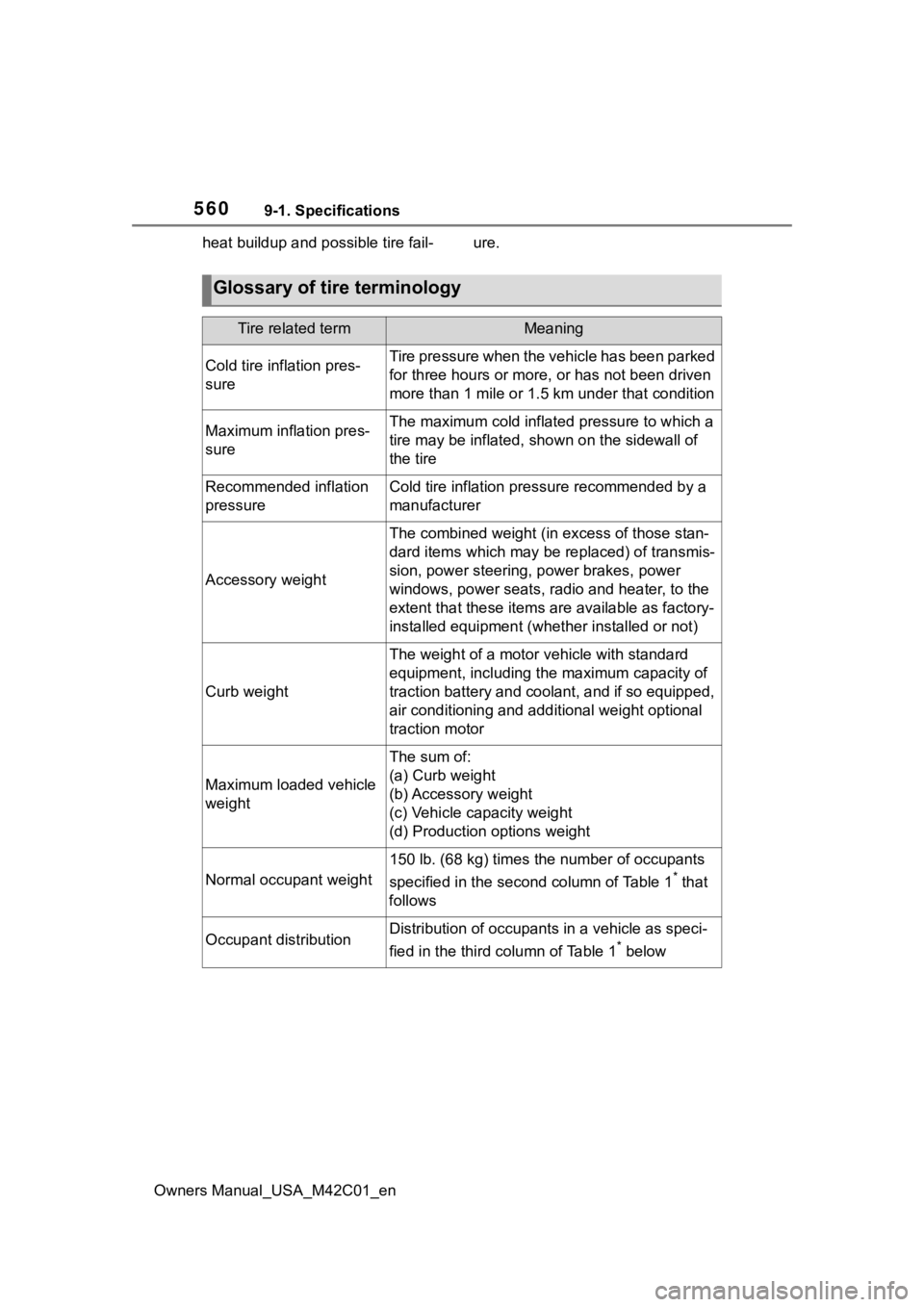
Glossary of tire terminology
Tire related termMeaning
Cold tire inflation pres-
sureTire pressure when the vehicle has been parked
for three hours or more, or has not been driven
more than 1 mile or 1.5 km under that condition
Maximum inflation pres-
sureThe maximum cold inflated pressure to which a
tire may be inflated, shown on the sidewall of
the tire
Recommended inflation
pressureCold tire inflation pressure recommended by a
manufacturer
Accessory weight
The combined weight (in
excess of those stan-
dard items which may be replaced) of transmis-
sion, power steering, power brakes, power
windows, power seats, radio and heater, to the
extent that these items are available as factory-
installed equipment (whether installed or not)
Curb weight
The weight of a motor vehicle with standard
equipment, including th e maximum capacity of
traction battery and coolant, and if so equipped,
air conditioning and additional weight optional
traction motor
Maximum loaded vehicle
weight
The sum of:
(a) Curb weight
(b) Accessory weight
(c) Vehicle capacity weight
(d) Production options weight
Normal occupant weight
150 lb. (68 kg) times the number of occupants
specified in the second column of Table 1
* that
follows
Occupant distributionDistribution of occupant s in a vehicle as speci-
fied in the third column of Table 1
* below
Page 575 of 628
5759-2. Customization
Owners Manual_USA_M42C01_en
9
Vehicle specifications
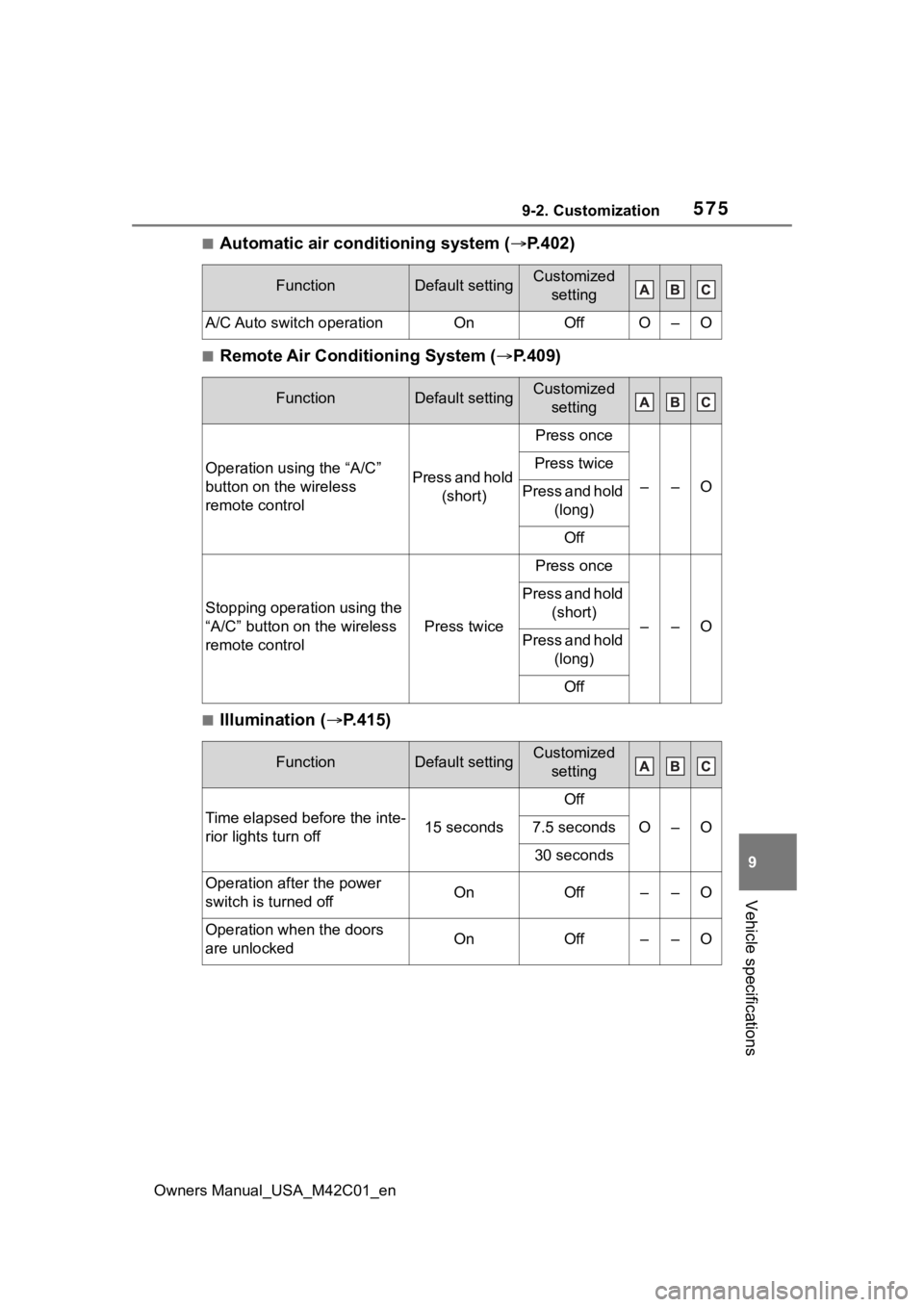
■Automatic air conditioning system ( P.402)
■Remote Air Conditioning System ( P.409)
■Illumination ( P.415)
FunctionDefault settingCustomized
setting
A/C Auto switch operationOnOffO–O
FunctionDefault settingCustomized setting
Operation using the “A/C”
button on the wireless
remote controlPress and hold (short)
Press once
––O
Press twice
Press and hold (long)
Off
Stopping operation using the
“A/C” button on the wireless
remote control
Press twice
Press once
––O
Press and hold (short)
Press and hold (long)
Off
FunctionDefault settingCustomized setting
Time elapsed before the inte-
rior lights turn off15 seconds
Off
O–O7.5 seconds
30 seconds
Operation after the power
switch is turned offOnOff––O
Operation when the doors
are unlockedOnOff––O
Page 597 of 628
Owners Manual_USA_M42C01_en
597Alphabetical Index
Alphabetical Index
A
A/C ........................................... 402Air conditioning filter ............. 494
Automatic air conditioning sys-tem ..................................... 402
Front seat concentrated airflow mode (S-FLOW) ................. 408
My Room Mode .................... 129
Remote Air Conditioning System ........................................... 409
“SYNC”mode ........................ 406
ABS (Anti-lock Brake System) ............................................... 387Function ............................... 387
Warning light ........................ 514
AC charging ............................ 105
AC charging cable .................... 87 CCID (Charging Circuit Interrupt-ing Device) ........................... 89
If the AC charging connector cannot be unlocked .............. 95
Indicator ................................. 90
Maintenance........................... 92
Safety functions...................... 89
ACA (Active Cornering Assist) ............................................... 387
Acoustic Vehicle Alerting Sys- tem ........................................... 74
Active Cornering Assist (ACA) ............................................... 387
Air conditioning filter ............. 494
Air conditioning system Air conditioning filter ............. 494
Automatic air conditioning sys-tem ..................................... 402
Front seat concentrated airflow mode (S-FLOW) ................. 408
Remote Air Conditioning System ........................................... 409
“SYNC” mode ....................... 406
Airbags ...................................... 34 Airbag operating conditions ....36
Airbag precautions for your child
.............................................39
Correct driving posture ...........27
Curtain shield airbag operating conditions .............................37
Curtain shield air bag precautions
.............................................39
Front passenger occupant clas- sification system ...................44
General airbag precautions ....39
Locations of airbags ...............34
Modification and disposal of air- bags......................................42
Side airbag operating conditions .............................................37
Side airbag precautions..........39
Side and curtain shield airbags operating conditions .............37
Side and curtain shield airbags precautions ...........................39
SRS airbag instructions for Canadian owners ...............583
SRS airbags ...........................34
SRS warning light .................514
Alarm .........................................69 Alarm ......................................69
Warning buzzer ....................513
ALL AUTO (“ECO”) control....400
Anchor brackets ... ..............52, 61
Antenna (smart key system)..187
Anti-lock Brake System (ABS) Warning light.........................514
Anti-lock brake system (ABS)387 Function................................387
Approach warning ..................294
Armrest ......... ......................... ..437
Assist grips .............................438
Audio system-linked display .157
Automatic air conditioning sys- tem .........................................402Air conditioning filter .............494
Page 598 of 628
598Alphabetical Index
Owners Manual_USA_M42C01_en
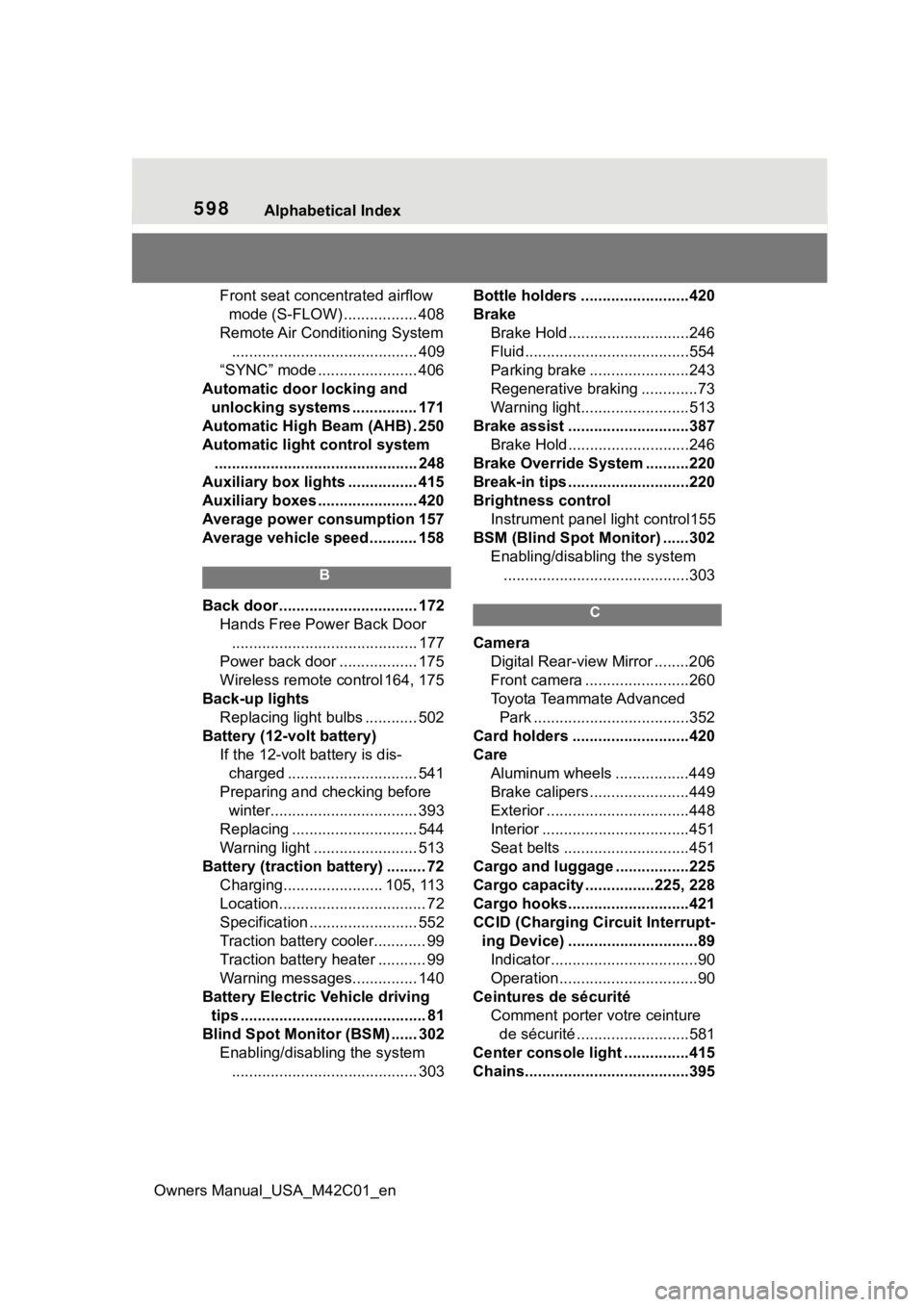
Front seat concentrated airflow mode (S-FLOW) ................. 408
Remote Air Conditioning System ........................................... 409
“SYNC” mode ....................... 406
Automatic door locking and unlocking systems ............... 171
Automatic High Beam (AHB) . 250
Automatic light control system ............................................... 248
Auxiliary box lights ................ 415
Auxiliary boxes ....................... 420
Average power consumption 157
Average vehicle speed........... 158
B
Back door ................................ 172 Hands Free Power Back Door........................................... 177
Power back door .................. 175
Wireless remote control 164, 175
Back-up lights Replacing light bulbs ............ 502
Battery (12-volt battery) If the 12-volt battery is dis-charged .............................. 541
Preparing and c hecking before
winter.................................. 393
Replacing ............................. 544
Warning light ........................ 513
Battery (traction battery) ......... 72 Charging....................... 105, 113
Location.................................. 72
Specification ......................... 552
Traction battery cooler............ 99
Traction battery heater ........... 99
Warning messages............... 140
Battery Electric Vehicle driving tips ........................................... 81
Blind Spot Monitor (BSM) ...... 302 Enabling/disabling the system........................................... 303 Bottle holders .........................420
Brake
Brake Hold ............................246
Fluid......................................554
Parking brake .......................243
Regenerative braking .............73
Warning light.........................513
Brake assist ............................387 Brake Hold ............................246
Brake Override System ..........220
Break-in tips ............................220
Brightness control Instrument panel light control155
BSM (Blind Spot Monitor) ......302 Enabling/disabling the system...........................................303C
Camera Digital Rear-view Mirror ........206
Front camera ........................260
Toyota Teammate Advanced Park ....................................352
Card holders ...........................420
Care Aluminum wheels .................449
Brake calipers.......................449
Exterior .................................448
Interior ..................................451
Seat belts .............................451
Cargo and luggage .................225
Cargo capacity ................225, 228
Cargo hooks............................421
CCID (Charging Circuit Interrupt- ing Device) ..............................89Indicator..................................90
Operation................................90
Ceintures de sécurité Comment porter votre ceinture de sécurité ..........................581
Center console light ...............415
Chains......................................395