tire SUBARU SOLTERRA 2023 User Guide
[x] Cancel search | Manufacturer: SUBARU, Model Year: 2023, Model line: SOLTERRA, Model: SUBARU SOLTERRA 2023Pages: 628, PDF Size: 11.91 MB
Page 149 of 628
1493-1. Instrument cluster
Owners Manual_USA_M42C01_en
3
Vehicle status information and indicators
*1: These lights come on when the power switch is turned to ON to
indicate that a system check is
being performed. They will turn
off after the EV system is started,
or after a few seconds. There
may be a malfunction in a sys-
tem if the lights do not come on,
or turn off. Have the vehicle
inspected by your Toyota dealer.
*2: This light illuminates on the multi-information display with a
message.
The indicators inform the driver
of the operating state of the
vehicle’s various systems.
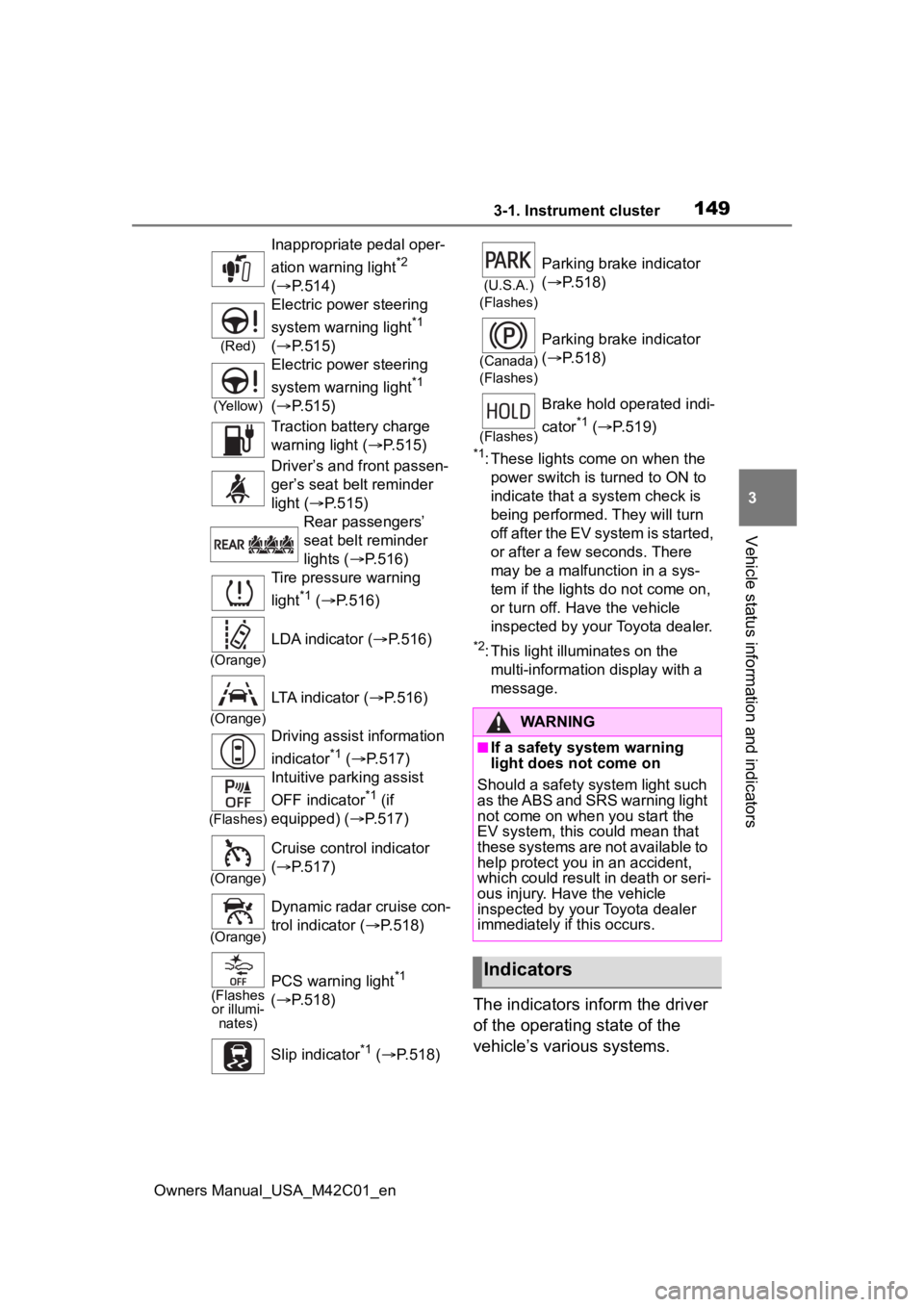
Inappropriate pedal oper-
ation warning light
*2
( P.514)
(Red)
Electric power steering
system warning light
*1
( P.515)
(Yellow)
Electric power steering
system warning light
*1
( P.515)
Traction battery charge
warning light ( P.515)
Driver’s and front passen-
ger’s seat belt reminder
light ( P.515)
Rear passengers’
seat belt reminder
lights ( P.516)
Tire pressure warning
light
*1 ( P.516)
(Orange)
LDA indicator ( P.516)
(Orange)
LTA indicator (P.516)
Driving assist information
indicator
*1 ( P.517)
(Flashes)
Intuitive parking assist
OFF indicator
*1 (if
equipped) ( P.517)
(Orange)
Cruise control indicator
( P.517)
(Orange)
Dynamic radar cruise con-
trol indicator ( P.518)
(Flashes
or illumi- nates)PCS warning light*1
( P.518)
Slip indicator
*1 ( P.518)
(U.S.A.)
(Flashes)
Parking brake indicator
( P.518)
(Canada)
(Flashes)
Parking brake indicator
( P.518)
(Flashes)
Brake hold operated indi-
cator
*1 ( P.519)
WARNING
■If a safety system warning
light does not come on
Should a safety system light such
as the ABS and SRS warning light
not come on when you start the
EV system, this c ould mean that
these systems are not available to
help protect you in an accident,
which could result in death or seri-
ous injury. Have the vehicle
inspected by you r Toyota dealer
immediately if this occurs.
Indicators
Page 158 of 628
1583-1. Instrument cluster
Owners Manual_USA_M42C01_en
meter using the meter control
switches.
This menu icon can be set to be
displayed/not displayed in .
■Display items
Drive information
Torque distribution (if
equipped)
Tire inflation pressure
■Drive information
2 items that are selected using
the “Drive Info. Items” setting
(average speed, distance and
total time) can be displayed ver-
tically.
The displayed information
changes according to the “Drive
Info. Type” setting (since the
system was started or between
resets). ( P.158)
Use the displayed information
as a reference only.
Following items will be dis-
played.
“Trip”
• “Average Speed”: Displays the
average vehicle speed since EV
system start
*
• “Distance”: Displ ays the distance
driven since EV system start
*
• “Total Time”: Displays the elapsed time since EV system start
* *
: These items are r
eset each time
the EV system stops.
“Total”
• “Average Speed”: Displays the
average vehicle speed since the
display was reset
*
• “Distance”: Displ ays the distance
driven since the display was
reset
*
• “Total Time”: Displays the elapsed
time since the display was reset
*
*
: To reset, display the desired item and press and hold the meter
control switch.
■Torque distribution (if
equipped)
Displays the drive status of each
wheel in 6 steps from 0 to 5.
■Tire inflation pressure
Displays inflation pressure of
each tire.
■Meter display settings that
can be changed
Clock setting
P.154
Language
Select to change the language dis-
played.
Units
Select to change the units of mea-
sure displayed.
Vehicle information dis-
play
Settings display
Page 178 of 628
1784-2. Opening, closing and locking the doors
Owners Manual_USA_M42C01_en
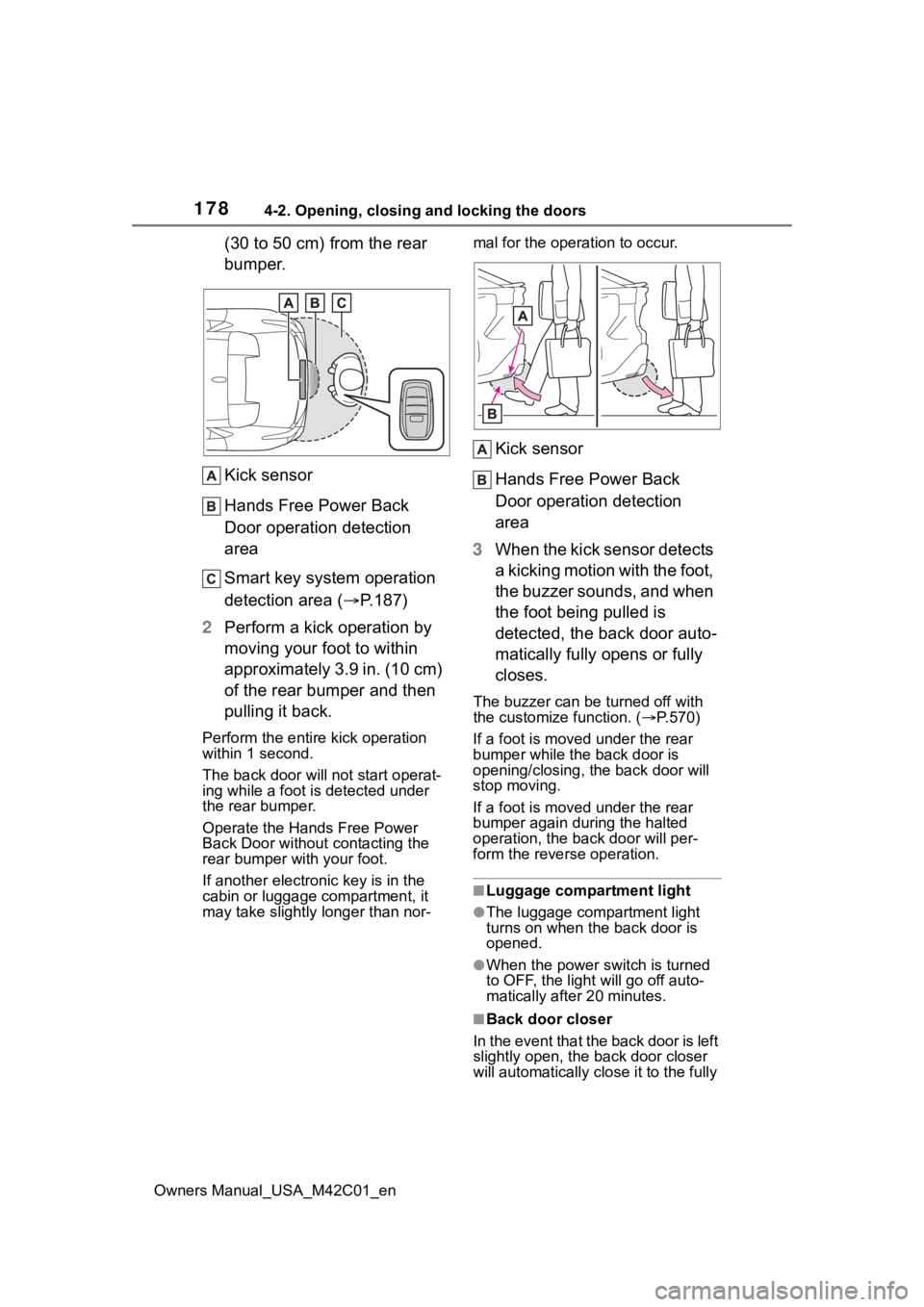
(30 to 50 cm) from the rear
bumper.
Kick sensor
Hands Free Power Back
Door operation detection
area
Smart key system operation
detection area (P.187)
2 Perform a kick operation by
moving your foot to within
approximately 3.9 in. (10 cm)
of the rear bumper and then
pulling it back.
Perform the entire kick operation
within 1 second.
The back door will not start operat-
ing while a foot is detected under
the rear bumper.
Operate the Hands Free Power
Back Door without contacting the
rear bumper with your foot.
If another electronic key is in the
cabin or luggage compartment, it
may take slightly longer than nor- mal for the operation to occur.
Kick sensor
Hands Free Power Back
Door operation detection
area
3 When the kick sensor detects
a kicking motion with the foot,
the buzzer sounds, and when
the foot being pulled is
detected, the back door auto-
matically fully opens or fully
closes.
The buzzer can be turned off with
the customize function. ( P.570)
If a foot is moved under the rear
bumper while the back door is
opening/closing, the back door will
stop moving.
If a foot is moved under the rear
bumper again during the halted
operation, the ba ck door will per-
form the rever se operation.
■Luggage compartment light
●The luggage compartment light
turns on when the back door is
opened.
●When the power switch is turned
to OFF, the light will go off auto-
matically after 20 minutes.
■Back door closer
In the event that the back door is left
slightly open, the back door closer
will automatically clo se it to the fully
Page 205 of 628
2054-4. Adjusting the steering wheel and mirrors
Owners Manual_USA_M42C01_en
4
Before driving
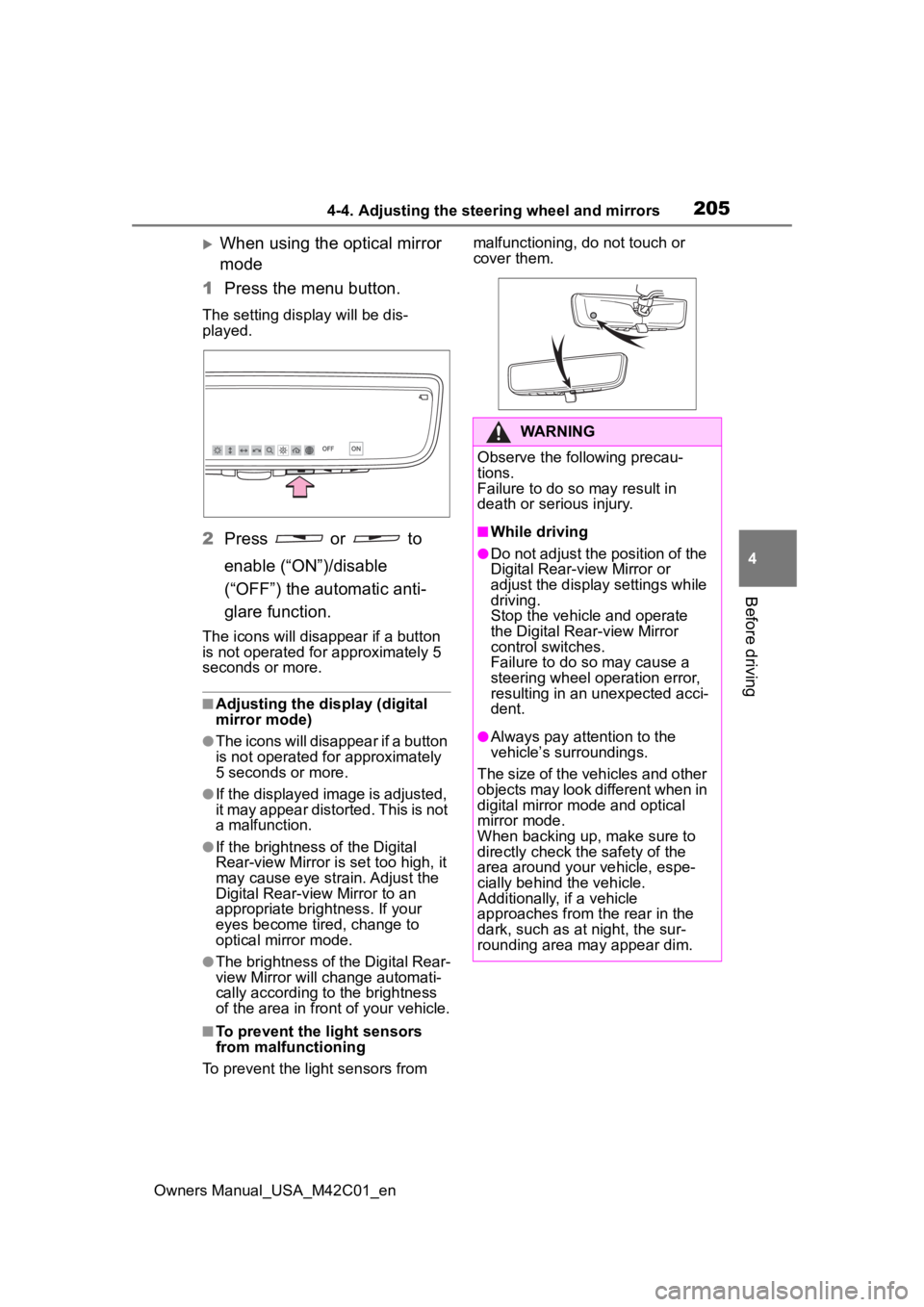
When using the optical mirror
mode
1 Press the menu button.
The setting display will be dis-
played.
2Press or to
enable (“ON”)/disable
(“OFF”) the automatic anti-
glare function.
The icons will disappear if a button
is not operated fo r approximately 5
seconds or more.
■Adjusting the display (digital
mirror mode)
●The icons will disappear if a button
is not operated for approximately
5 seconds or more.
●If the displayed image is adjusted,
it may appear distorted. This is not
a malfunction.
●If the brightness of the Digital
Rear-view Mirror is set too high, it
may cause eye strain. Adjust the
Digital Rear-view Mirror to an
appropriate brightness. If your
eyes become tired, change to
optical mirror mode.
●The brightness of the Digital Rear-
view Mirror will ch ange automati-
cally according to the brightness
of the area in front of your vehicle.
■To prevent the light sensors
from malfunctioning
To prevent the light sensors from malfunctioning, do not touch or
cover them.
WARNING
Observe the following precau-
tions.
Failure to do so may result in
death or serious injury.
■While driving
●Do not adjust the position of the
Digital Rear-view Mirror or
adjust the display settings while
driving.
Stop the vehicle and operate
the Digital Rear-view Mirror
control switches.
Failure to do so may cause a
steering wheel operation error,
resulting in an unexpected acci-
dent.
●Always pay attention to the
vehicle’s surroundings.
The size of the vehicles and other
objects may look different when in
digital mirror mode and optical
mirror mode.
When backing up, make sure to
directly check the safety of the
area around your vehicle, espe-
cially behind the vehicle.
Additionally, if a vehicle
approaches from the rear in the
dark, such as at night, the sur-
rounding area may appear dim.
Page 220 of 628
2205-1. Before driving
Owners Manual_USA_M42C01_en
■When starting off on a uphill
The hill-start assis t control will acti-
vate. ( P.387)
■Driving in the rain
●Drive carefully whe n it is raining,
because visibility will be reduced,
the windows may become fogged-
up, and the road will be slippery.
●Drive carefully whe n it starts to
rain, because the road surface will
be especially slippery.
●Refrain from high speeds when
driving on an expressway in the
rain, because there may be a
layer of water between the tires
and the road surface, preventing
the steering and brakes from
operating properly.
■Restraining the EV system out-
put (Brake Override System)
●When the accelerator and brake
pedals are depressed at the same
time, the EV system output may
be restrained.
●A warning messag e is displayed
on the multi-information display
while the system is operating.
■Breaking in your new Toyota
To extend the life of the vehicle,
observing the following precautions
is recommended:
●For the first 200 miles (300 km):
Avoid sudden stops.
●For the first 600 miles (1000 km):
• Do not drive at extremely high speeds.
• Avoid sudden acceleration.
• Do not drive at a constant speed for extended periods.
WARNING
Observe the following precau-
tions.
Failure to do so m ay result in
death or serious injury.
■When starting the vehicle
Always keep your foot on the
brake pedal while stopped with
the “READY” indica tor is illumi-
nated. This prevents the vehicle
from creeping.
■When driving the vehicle
●Do not drive if you are unfamil-
iar with the location of the brake
and accelerator pedals to avoid
depressing the wrong pedal.
• Accidentally depressing the accelerator pedal instead of the
brake pedal will result in sudden
acceleration that may lead to an
accident.
• When backing up, you may twist your body around, leading to a
difficulty in operating the pedals.
Make sure to operate the pedals
properly.
• Make sure to keep a correct driving posture even when mov-
ing the vehicle only slightly. This
allows you to depress the brake
and accelerator pedals properly.
• Depress the brake pedal using your right foot. Depressing the
brake pedal using your left foot
may delay response in an emer-
gency, resulting in an accident.
●The driver should pay extra
attention to pedestrians. As
there is no engine noise, the
pedestrians may misjudge the
vehicle’s movement. Even
though the vehicle is equipped
with the Acoustic Vehicle Alert-
ing System, driv e with care as
pedestrians in the vicinity may
still not notice the vehicle if the
surrounding area is noisy.
Page 221 of 628
2215-1. Before driving
Owners Manual_USA_M42C01_en
5
Driving
WARNING
●During normal driving, do not
turn off the EV system. Turning
the EV system off while driving
will not cause loss of steering or
braking control, however, power
assist to the steering will be lost.
This will make it more difficult to
steer smoothly, so you should
pull over and stop the vehicle as
soon as it is safe to do so.
In the event of an emergency,
such as if it becomes impossible
to stop the vehicle in the normal
way: P. 5 0 5
●Use regenerative braking to
maintain a safe speed when
driving down a steep hill.
Using the brakes continuously
may cause the brakes to over-
heat and lose effectiveness.
( P.240)
●If “Regenerative braking lim-
ited. Press brake to decelerate.”
appears on the multi-informa-
tion display, firmly depress the
brake pedal to decelerate the
vehicle. ( P.522)
●Do not adjust the position of the
steering wheel, the seat, or the
inside or outside rear view mir-
rors while driving.
Doing so may result in a loss of
vehicle control.
●Always check that all passen-
gers’ arms, heads or other parts
of their body are not outside the
vehicle.
●AWD models: Do not drive the
vehicle off-road.
This is not a AWD vehicle
designed for off-road driving.
Proceed with all due caution if it
becomes unavoidable to drive
off-road.
●Do not drive across a river or
through other bodies of water.
This may cause electric/elec-
tronic components to short cir-
cuit, damage the EV system or
cause other serious damage to
the vehicle.
●Do not drive in excess of the
speed limit. Even if the legal
speed limit permits it, do not
drive over 85 mph (140 km/h)
unless your vehicle has high-
speed capability tires. Driving
over 85 mph (140 km/h) may
result in tire fa ilure, loss of con-
trol and possible injury. Be sure
to consult a tire dealer to deter-
mine whether the tires on your
vehicle are high-speed capabil-
ity tires or not before driving at
such speeds.
■When driving on slippery
road surfaces
●Sudden braking, acceleration
and steering may cause tire
slippage and reduce your ability
to control the vehicle.
●Sudden acceleration or regen-
erative braking due to shift
changing could cause the vehi-
cle to skid, resulting in an acci-
dent.
●After driving through a puddle,
lightly depress the brake pedal
to make sure that the brakes
are functioning properly. Wet
brake pads may prevent the
brakes from functioning prop-
erly. If the brakes on only one
side are wet and not functioning
properly, steering control may
be affected.
Page 224 of 628
2245-1. Before driving
Owners Manual_USA_M42C01_en
When the following unusual
NOTICE
■When driving the vehicle
●Do not depress t he accelerator
and brake pedals at the same
time during drivin g, as this may
restrain the EV system output.
●Do not use the accelerator
pedal or depress the accelera-
tor and brake pedals at the
same time to hold the vehicle on
a hill.
■Avoiding damage to vehicle
parts
●Do not turn the steering wheel
fully in either direction and hold
it there for an extended period
of time.
Doing so may damage the
power steering motor.
●When driving over bumps in the
road, drive as slowly as possible
to avoid damagi ng the wheels,
underside of the vehicle, etc.
■If you get a flat tire while driv-
ing
A flat or damaged tire may cause
the following situations. Hold the
steering wheel firmly and gradu-
ally depress the brake pedal to
slow down the vehicle.
●It may be difficult to control your
vehicle.
●The vehicle will make abnormal
sounds or vibrations.
●The vehicle will lean abnor-
mally.
Information on what to do in case
of a flat tire ( P.527)
■When encountering flooded
roads
Do not drive on a road that has
flooded after heavy rain, etc.
Doing so may cause the following
serious damage to the vehicle:
●Short in electrical components
●Traction battery caused by
water immersion
In the event that you drive on a
flooded road and the vehicle is
flooded, be sure to have your Toy-
ota dealer check the following:
●Brake function
●Changes in quantity and quality
of transmission fluid, etc.
●Lubricant condition for the bear-
ings and suspension joints
(where possible), and the func-
tion of all joints, bearings, etc.
●Components connected to the
traction battery.
If the shift control system is dam-
aged by flooding, it may not be
possible to shift the shift position
to P, or from P to other positions.
In this case, contact your Toyota
dealer.
■When parking the vehicle
Always set the parking brake, and
shift the shift position to P. Failure
to do so may cause the vehicle to
move or the vehicle may acceler-
ate suddenly if t he accelerator
pedal is accidentally depressed.
■When involved in a minor
accident
Damage to the traction battery or
battery peripheral components
could cause malfunctions. Even if
it is a minor accident, have the
vehicle inspected by your Toyota
dealer.
Sudden start restraint
control (Drive-Start Con-
trol [DSC])
Page 228 of 628
2285-1. Before driving
Owners Manual_USA_M42C01_en
■Total load capacity and seating
capacity
These details are also described on
the tire and loading information
label. ( P.491)
WARNING
●If driving for a long distance, on
rough roads, or at high speeds,
stop the vehicle now and then
during the trip to make sure the
cargo remains in its place.
●Do not exceed 165.3 lb. (75 kg)
cargo weight on the roof lug-
gage carrier.
NOTICE
■When loading cargo on the
roof luggage carrier (if
equipped)
Be careful not to scratch the sur-
face of the panoramic moon roof
(if equipped).
Vehicle load limits
Vehicle load limits include
total load capacity, seating
capacity, TWR (Trailer
Weight Rating) and cargo
capacity.
Total load capacity (vehicle
capacity weight): P.550
Total load capacity means the
combined weight of occu-
pants, cargo and luggage.
Seating capacity: P.550
Seating capacity means the
maximum number of occu-
pants whose estimated aver-
age weight is 150 lb. (68 kg)
per person.
TWR (Trailer Weight Rat-
ing)
Toyota does not recommend
towing a trailer with your vehi-
cle.
Cargo capacity
Cargo capacity may increase
or decrease depending on the
weight and the number of
occupants.
Page 229 of 628
2295-1. Before driving
Owners Manual_USA_M42C01_en
5
Driving
WARNING
■Overloading the vehicle
Do not overload the vehicle. It
may not only cause damage to
the tires, but also degrade steer-
ing and braking ability, resulting in
an accident.
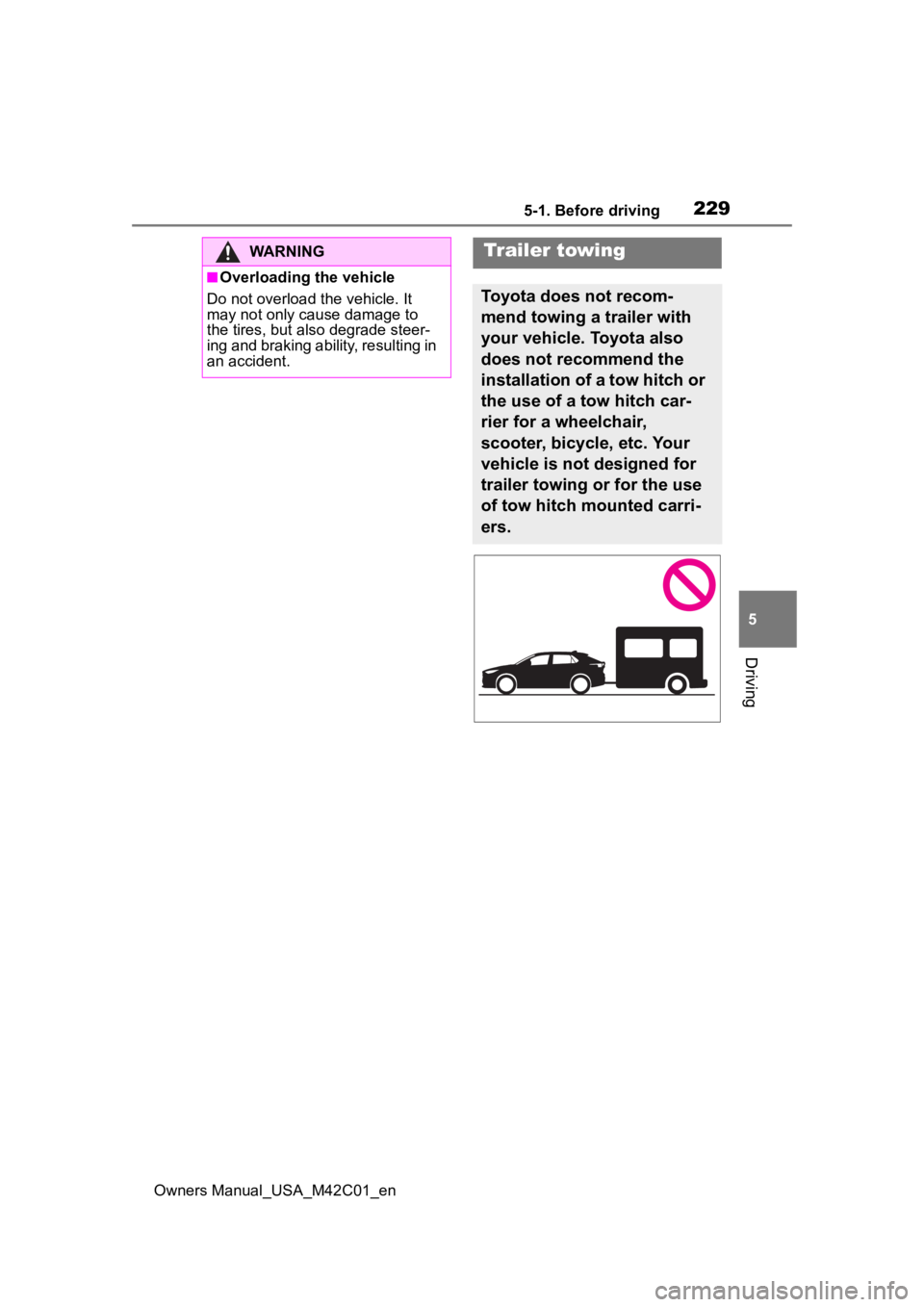
Trailer towing
Toyota does not recom-
mend towing a trailer with
your vehicle. Toyota also
does not recommend the
installation of a tow hitch or
the use of a tow hitch car-
rier for a wheelchair,
scooter, bicycle, etc. Your
vehicle is not designed for
trailer towing or for the use
of tow hitch mounted carri-
ers.
Page 235 of 628
2355-2. Driving procedures
Owners Manual_USA_M42C01_en
5
Driving
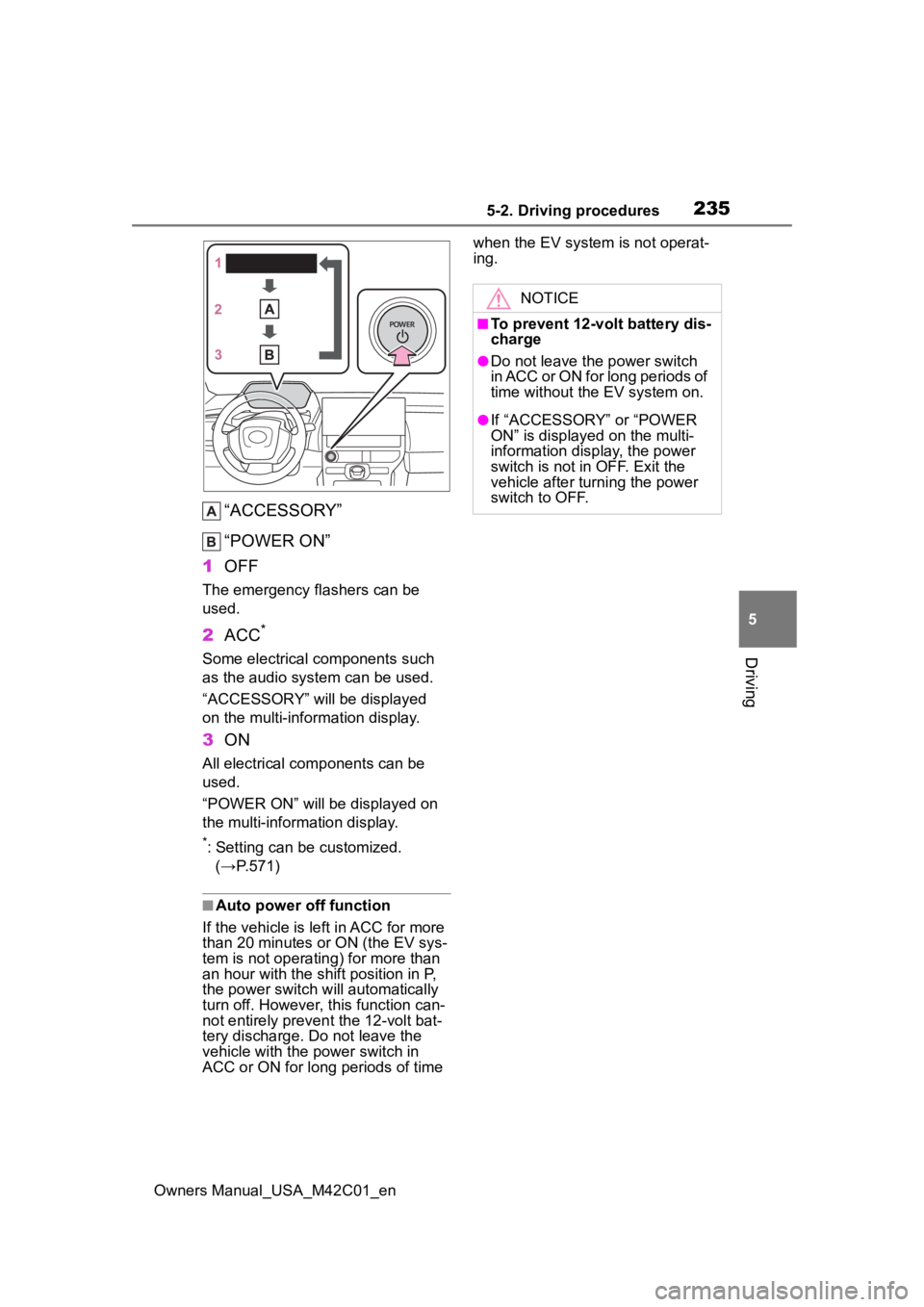
“ACCESSORY”
“POWER ON”
1 OFF
The emergency flashers can be
used.
2ACC*
Some electrical components such
as the audio system can be used.
“ACCESSORY” will be displayed
on the multi-information display.
3ON
All electrical com ponents can be
used.
“POWER ON” will be displayed on
the multi-information display.
*: Setting can be customized. (→P.571)
■Auto power off function
If the vehicle is le ft in ACC for more
than 20 minutes or ON (the EV sys-
tem is not operating) for more than
an hour with the shif t position in P,
the power switch will automatically
turn off. However, this function can-
not entirely prevent the 12-volt bat-
tery discharge. Do not leave the
vehicle with the power switch in
ACC or ON for long periods of time when the EV system is not operat-
ing.
NOTICE
■To prevent 12-volt battery dis-
charge
●Do not leave the power switch
in ACC or ON for long periods of
time without the EV system on.
●If “ACCESSORY” or “POWER
ON” is displayed on the multi-
information display, the power
switch is not in OFF. Exit the
vehicle after turning the power
switch to OFF.