change wheel SUBARU SOLTERRA 2023 Owner's Manual
[x] Cancel search | Manufacturer: SUBARU, Model Year: 2023, Model line: SOLTERRA, Model: SUBARU SOLTERRA 2023Pages: 628, PDF Size: 11.91 MB
Page 295 of 628
2955-4. Using the driving support systems
Owners Manual_USA_M42C01_en
5
Driving
When the accelerator pedal is
depressed
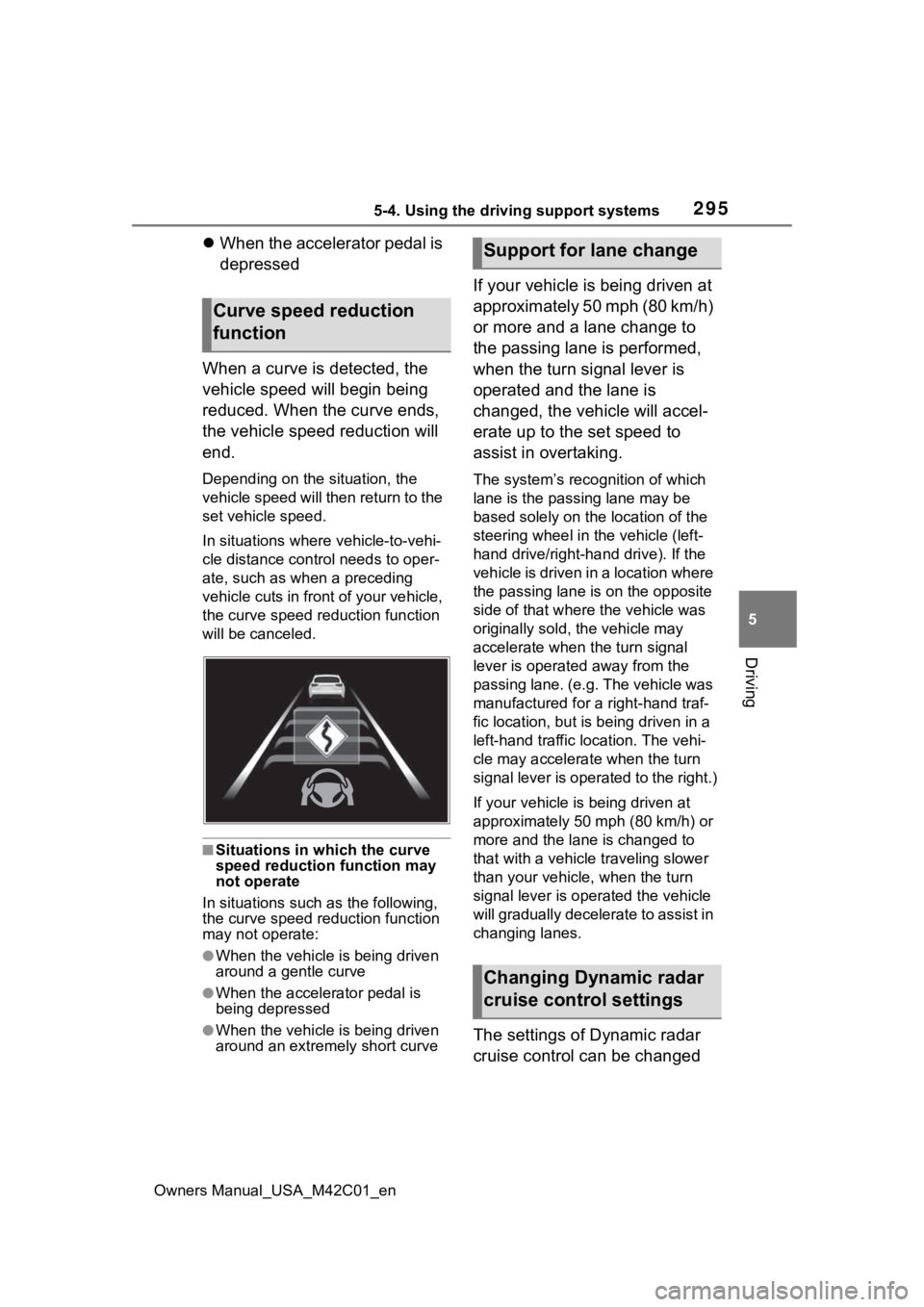
When a curve is detected, the
vehicle speed will begin being
reduced. When the curve ends,
the vehicle speed reduction will
end.
Depending on the situation, the
vehicle speed will then return to the
set vehicle speed.
In situations where vehicle-to-vehi-
cle distance control needs to oper-
ate, such as whe n a preceding
vehicle cuts in front of your vehicle,
the curve speed r eduction function
will be canceled.
■Situations in which the curve
speed reduction function may
not operate
In situations such as the following,
the curve speed r eduction function
may not operate:
●When the vehicle is being driven
around a gentle curve
●When the accelerator pedal is
being depressed
●When the vehicle is being driven
around an extremely short curve
If your vehicle is being driven at
approximately 50 mph (80 km/h)
or more and a lane change to
the passing lane is performed,
when the turn signal lever is
operated and the lane is
changed, the vehicle will accel-
erate up to the set speed to
assist in overtaking.
The system’s recognition of which
lane is the passing lane may be
based solely on the location of the
steering wheel in the vehicle (left-
hand drive/right-ha nd drive). If the
vehicle is driven in a location where
the passing lane i s on the opposite
side of that where the vehicle was
originally sold, the vehicle may
accelerate when the turn signal
lever is operated away from the
passing lane. (e.g. The vehicle was
manufactured for a right-hand traf-
fic location, but is being driven in a
left-hand traffic location. The vehi-
cle may accelera te when the turn
signal lever is operated to the right.)
If your vehicle is being driven at
approximately 50 mph (80 km/h) or
more and the lane is changed to
that with a vehicle traveling slower
than your vehicle, when the turn
signal lever is operated the vehicle
will gradually decelerate to assist in
changing lanes.
The settings of Dynamic radar
cruise control can be changed
Curve speed reduction
function
Support for lane change
Changing Dynamic radar
cruise control settings
Page 299 of 628
2995-4. Using the driving support systems
Owners Manual_USA_M42C01_en
5
Driving
Emergency Driving
Stop System
The emergency driving stop
system is a system which
automatically decelerates
and stops the vehicle within
its lane if the driver
becomes unable to con-
tinue driving the vehicle,
such as if they have suf-
fered a medical emergency,
etc.
During LTA (Lane Tracing
Assist) control, if the sys-
tem does not detect driving
operations, such as if the
driver is not holding the
steering wheel, and deter-
mines the driver is not
responsive, the vehicle will
be decelerated and stopped
within its current lane to
help avoid a collision or
reduce the impact of a colli-
sion.
WARNING
■For safe use
●Driving safely is solely the
responsibility of the driver. Pay
careful attent ion to the sur-
rounding conditions in order to
ensure safe driving. The emer-
gency driving stop system is
designed to provide support in
an emergency where it is diffi-
cult for the dri ver to continue
driving, such as if they have had
a medical emergency. It is not
designed to support driving
while drowsy or in poor physical
health, or inattentive driving.
●Although the emergency driv-
ing stop system is designed to
decelerate the vehicle within its
lane to help avoid or help
reduce the impact of a collision
if the system determines that it
is difficult for the driver to con-
tinue driving, its effectiveness
may change according to vari-
ous conditions. Therefore, it
may not always be able to
achieve the same level of per-
formance. Also, if the operating
conditions are not met, this
function will not operate.
●After the emergency driving
stop system operates, if driving
becomes possible again, imme-
diately begin driving again or, if
necessary, park the vehicle on
the shoulder of the road and set
a warning reflecto r and flare to
warn other drivers of your
stopped vehicle.
Page 354 of 628
3545-4. Using the driving support systems
Owners Manual_USA_M42C01_en
■Situations in which parking
assistance may not operate
even if there is no possibility of
a collision
P. 3 1 5
Press the Advanced Park main
switch.
If the switch is pr essed while assis-
tance is being performed, the assis-
tance will be canceled.
■Operating conditions of the
Advanced Park
Assistance will begin when all of the
following conditions are met:
●The brake pedal is depressed
●The vehicle is stopped
●The driver’s seat belt is fastened
●The steering wheel is not being
operated
●The accelerator pedal is not
depressed
●All of the doors are closed
●The outside rear view mirrors are
not folded
●The parking brake is not engaged
●The dynamic radar cruise control
are not operating
●ABS, VSC, TRAC, PCS and
PKSB are not operating
●The vehicle is not on a steep
slope
●The VSC and TRAC are not
turned off
If assistance can not be started,
check the message displayed on
the multimedia display ( P.380)
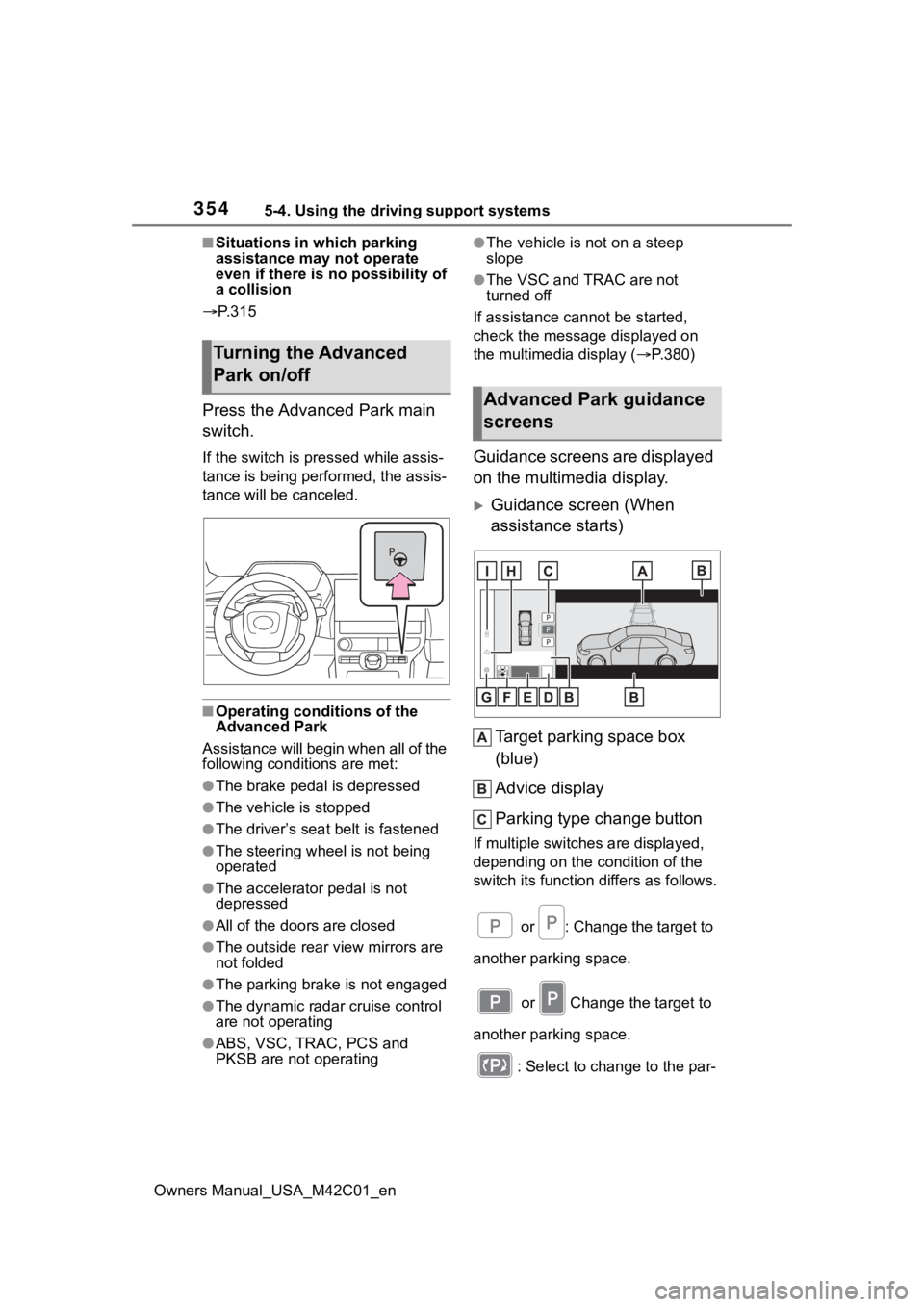
Guidance screens are displayed
on the multimedia display.
Guidance screen (When
assistance starts)
Target parking space box
(blue)
Advice display
Parking type change button
If multiple switches are displayed,
depending on the condition of the
switch its function differs as follows. or : Change the target to
another parking space.
or Change the target to
another parking space.
: Select to change to the par-
Turning the Advanced
Park on/off
Advanced Park guidance
screens
Page 360 of 628
3605-4. Using the driving support systems
Owners Manual_USA_M42C01_encel assistance, press the Advanced
Park main switch. If assistance is
canceled, “Advanced Park Can-
celled” will be displayed.
4
Perform operations as indi-
cated by the advice displays
until the vehicle is in a posi-
tion where exit is possible.
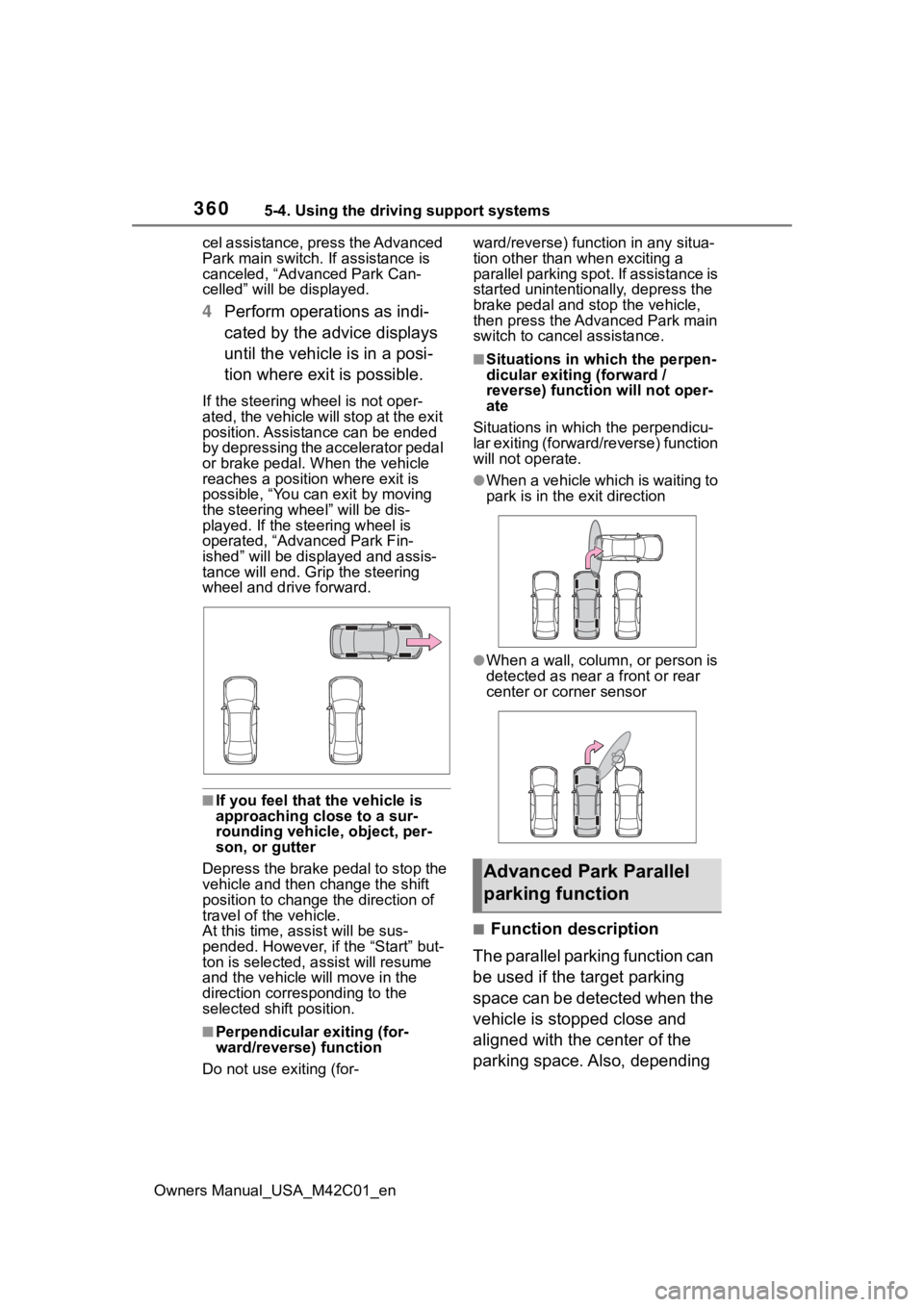
If the steering w heel is not oper-
ated, the vehicle will stop at the exit
position. Assistance can be ended
by depressing the accelerator pedal
or brake pedal. When the vehicle
reaches a position where exit is
possible, “You can exit by moving
the steering wheel” will be dis-
played. If the steering wheel is
operated, “Advanced Park Fin-
ished” will be displayed and assis-
tance will end. Gri p the steering
wheel and drive forward.
■If you feel that the vehicle is
approaching close to a sur-
rounding vehicle, object, per-
son, or gutter
Depress the brake pedal to stop the
vehicle and then ch ange the shift
position to change the direction of
travel of the vehicle.
At this time, assist will be sus-
pended. However, if the “Start” but-
ton is selected, assist will resume
and the vehicle will move in the
direction corresponding to the
selected shift position.
■Perpendicular exiting (for-
ward/reverse) function
Do not use exiting (for- ward/reverse) function in any situa-
tion other than when exciting a
parallel parking spot. If assistance is
started unintentionally, depress the
brake pedal and stop the vehicle,
then press the Advanced Park main
switch to cancel assistance.
■Situations in which the perpen-
dicular exiting (forward /
reverse) function will not oper-
ate
Situations in which the perpendicu-
lar exiting (forward/reverse) function
will not operate.
●When a vehicle which is waiting to
park is in the exit direction
●When a wall, column, or person is
detected as near a front or rear
center or corner sensor
■Function description
The parallel parking function can
be used if the target parking
space can be detected when the
vehicle is stopped close and
aligned with the center of the
parking space. Also, depending
Advanced Park Parallel
parking function
Page 365 of 628
3655-4. Using the driving support systems
Owners Manual_USA_M42C01_en
5
Driving
If assistance is canceled,
“Advanced Park Cancelled” will be
displayed.
If you feel that the vehicle is
approaching close to a surround-
ing vehicle, object, person, or gut-
ter: P. 3 6 5
4Perform operations as indi-
cated by the advice displays
until the vehicle is in a posi-
tion where exit is possible.
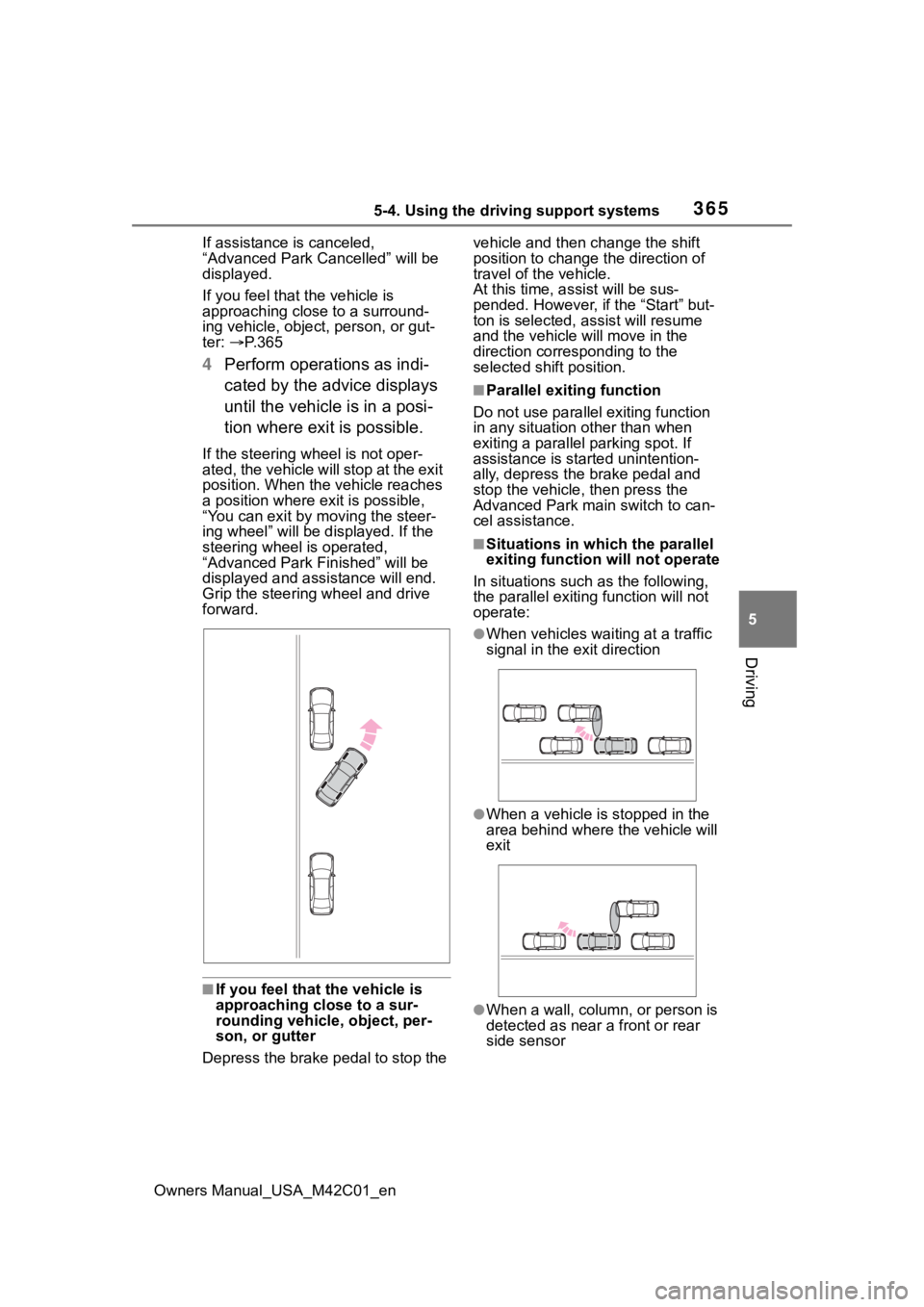
If the steering w heel is not oper-
ated, the vehicle will stop at the exit
position. When the vehicle reaches
a position where ex it is possible,
“You can exit by moving the steer-
ing wheel” will be displayed. If the
steering wheel is operated,
“Advanced Park Finished” will be
displayed and ass istance will end.
Grip the steering wheel and drive
forward.
■If you feel that the vehicle is
approaching close to a sur-
rounding vehicle, object, per-
son, or gutter
Depress the brake pedal to stop the vehicle and then change the shift
position to change
the direction of
travel of the vehicle.
At this time, assist will be sus-
pended. However, if the “Start” but-
ton is selected, a ssist will resume
and the vehicle will move in the
direction corresponding to the
selected shift position.
■Parallel exiting function
Do not use parallel exiting function
in any situation other than when
exiting a parallel parking spot. If
assistance is started unintention-
ally, depress the brake pedal and
stop the vehicle, then press the
Advanced Park main switch to can-
cel assistance.
■Situations in which the parallel
exiting function will not operate
In situations such as the following,
the parallel exiti ng function will not
operate:
●When vehicles waiting at a traffic
signal in the exit direction
●When a vehicle is stopped in the
area behind where the vehicle will
exit
●When a wall, column, or person is
detected as near a front or rear
side sensor
Page 377 of 628
3775-4. Using the driving support systems
Owners Manual_USA_M42C01_en
5
Driving■Assistance will be can-
celed when
In situations such as the follow-
ing, Advanced Park operation
will be canceled.
As system operation has been can-
celed, begin the operation again or
continue parking manually, using
the steering wheel.
The Advanced Park main
switch is pushed
The shift position has been
changed to P
The parking brake is engaged
A door or back door is opened
The driver’s seat belt is unfas-
tened
The outside rear view mirrors are folded
The TRAC or VSC is turned
off
The TRAC, VSC or ABS oper-
ates
The power switch is pushed
The system determines assis-
tance cannot be continued in
the current parking environ-
ment
The system malfunctions
While the vehicle was
stopped, “Cancel” was
selected on the multimedia
display
■Assistance will be sus-
pended when
In situations such as the follow-
ing, Advanced Park operation
will be suspended.
Assistance can be started again by
following the directions displayed
on the multimedia display.
Also, when assistance is sus-
pended, if the shift position is
changed twice with the brake pedal
depressed, assistance will be can-
celed in tha t shift position. How-
ever, if assistance is suspended by
changing the shift position, assis-
tance will be canceled if the shift
position is changed once.
The steering wheel is oper-
ated
The accelerator pedal is
depressed
The shift position has been
NOTICE
• The vehicle and area around
the vehicle are clearly visible
• There are no people, animals, or objects in the path of the
vehicle
• An appropriate distance from the vehicle can be maintained
and the safety of yourself and
others can be ensured
• Caution for the area around the vehicle is always maintained
and there is no potential for
danger
• You can cancel Remote control function immediately if neces-
sary
Advanced Park cancel-
ation/suspension
Page 378 of 628

3785-4. Using the driving support systems
Owners Manual_USA_M42C01_en
changed
Brake control operates
Camera switch is pressed
The PKSB (Parking Support
Brake) PCS (Pre-Collision
System) has operates
■Remote control function
assistance will be canceled
when
In situations such as the follow-
ing, Remote control function
operation will be canceled.
As system operation has been
canceled, while carrying an
electronic key, enter the vehicle
and park the vehicle manually,
using the steering wheel.
When a condition for stopping
Advanced Park assistance is
met, with the exception sus-
pension due to a door being
opened or the driver’s seat
belt being released
When Remote control func-
tion is operated while the
remote air conditioning is
operating and the power
switch is changed to ON
before remote air conditioning
has ended
When 5 minutes have
elapsed since Remote con-
trol function operation was
started
When 3 minutes have
elapsed since any operation
was performed
When 30 seconds have
elapsed with the vehicle not
being able to be driven, even
though the screen of the
smartphone is being operated
to drive the vehicle
When the power button on the
screen of the smartphone is
selected
When the Remote Park app is
force closed
When the vehicle is on a
steep slope
When an electronic key is
detected inside the vehicle
while Remote control function
operation is suspended
When the ambient tempera-
ture is 14°F (-10°C) or less
■Remote control function
assistance will be sus-
pended when
In situations such as the follow-
ing, assistance will be sus-
pended.
When the Bluetooth commu-
nication between the smart-
phone and multimedia system
get lost
When smartphone continuous
operation is suspended
When the Remote Park app is
pushed to the background (a
call is received, the home but-
ton is pressed, etc.)
When electronic key does not
detected
Page 397 of 628
3975-5. Driving tips
Owners Manual_USA_M42C01_en
5
Driving
road, please observe the follow-
ing precautions to ensure your
driving enjoyment and to help
prevent the closure of areas to
off-road vehicles:
Drive your vehicle only in
areas where off-road vehicles
are permitted to travel.
Respect private property. Get
owner’s permission before
entering private property.
Do not enter areas that are
closed. Honor gates, barriers
and signs that restrict travel.
Stay on established roads.
When conditions are wet,
driving techniques should be
changed or travel delayed to
prevent damage to roads.
■Additional information for off-
road driving
For owners in U.S. mainland and
Hawaii:
To obtain additional information per-
taining to driving your vehicle off-
road, consult the following organiza-
tions: • State and Local Parks and Recre-
ation Departments
• State Motor Vehicle Bureau
• Recreational Vehicle Clubs
• U.S. Forest Service and Bureau of Land Management
WARNING
■Off-road driving precautions
Always observe t he following pre-
cautions to minim ize the risk of
death, serious injury or damage to
your vehicle:
●Drive carefully when off the
road. Do not take unnecessary
risks by driving in dangerous
places.
●Do not grip the steering wheel
spokes when driving off-road. A
bad bump could jerk the wheel
and injure your hands. Keep
both hands and especially your
thumbs on the ou tside of the
rim.
●Always check your brakes for
effectiveness immediately after
driving in sand, mud, water or
snow.
●After driving through tall grass,
mud, rock, sand, rivers, etc.,
check that there is no grass,
bush, paper, rags, stone, sand,
etc. adhering or trapped on the
underbody. Clear off any such
matter from the underbody. If
the vehicle is used with these
materials trapped or adhering to
the underbody, a breakdown or
fire could occur.
Page 411 of 628
4116-1. Using the air conditioning system and defogger
Owners Manual_USA_M42C01_en
6
Interior features
■Electronic key battery depletion
P. 1 6 2
■When the electronic key bat-
tery is fully depleted
P. 4 9 7
■Customization
Setting (e.g. Operation using “A/C”
on the wireless remote control) can
be changed. (Customizable fea-
tures: P.575)*: If equipped
WARNING
■Precautions for the Remote
Air Conditioning System
●Do not use the system if people
are in the vehicle.
Even when the system is in use,
the internal temperature may
still reach a high or low level
due to features such as the
automatic shut-off. Children and
pets left inside the vehicle may
suffer heatstroke dehydration or
hypothermia, or could result in
death or serious injury.
●Depending on the surrounding
environment, signals from the
wireless switch may transmit
further than expected. Pay
appropriate attention to the
vehicle’s surroundings and use
the switch only when necessary.
●Do not operate “A/C” if the hood
is open. The air conditioning
may operate unintentionally and
objects may be drawn into the
electrical cooling fan.
NOTICE
■To prevent the traction bat-
tery from being discharged
through incorrect operation
Use “A/C” only when necessary.
Heated steering
wheel*/seat heat-
ers*/seat ventila-
tors*/radiant heater*
Heated steering wheel
Warms up the grip of the
steering wheel
Seat heaters
Warm up the seat upholstery
Seat ventilators
Maintain good airflow on the
seat upholstery by sucking air
into the seats
Radiant heaters
Warm up the feet of the front
seats
WARNING
■To prevent minor burn inju-
ries
Care should be taken if anyone in
the following categories comes in
contact with the steering wheel or
seats when the heater is on:
●Babies, small children, the
elderly, the sick and the physi-
cally challenged
●Persons with sensitive skin
●Persons who are fatigued
●Persons who have taken alco-
hol or drugs that induce sleep
(sleeping drugs, cold remedies,
etc.)
Page 412 of 628
4126-1. Using the air conditioning system and defogger
Owners Manual_USA_M42C01_en
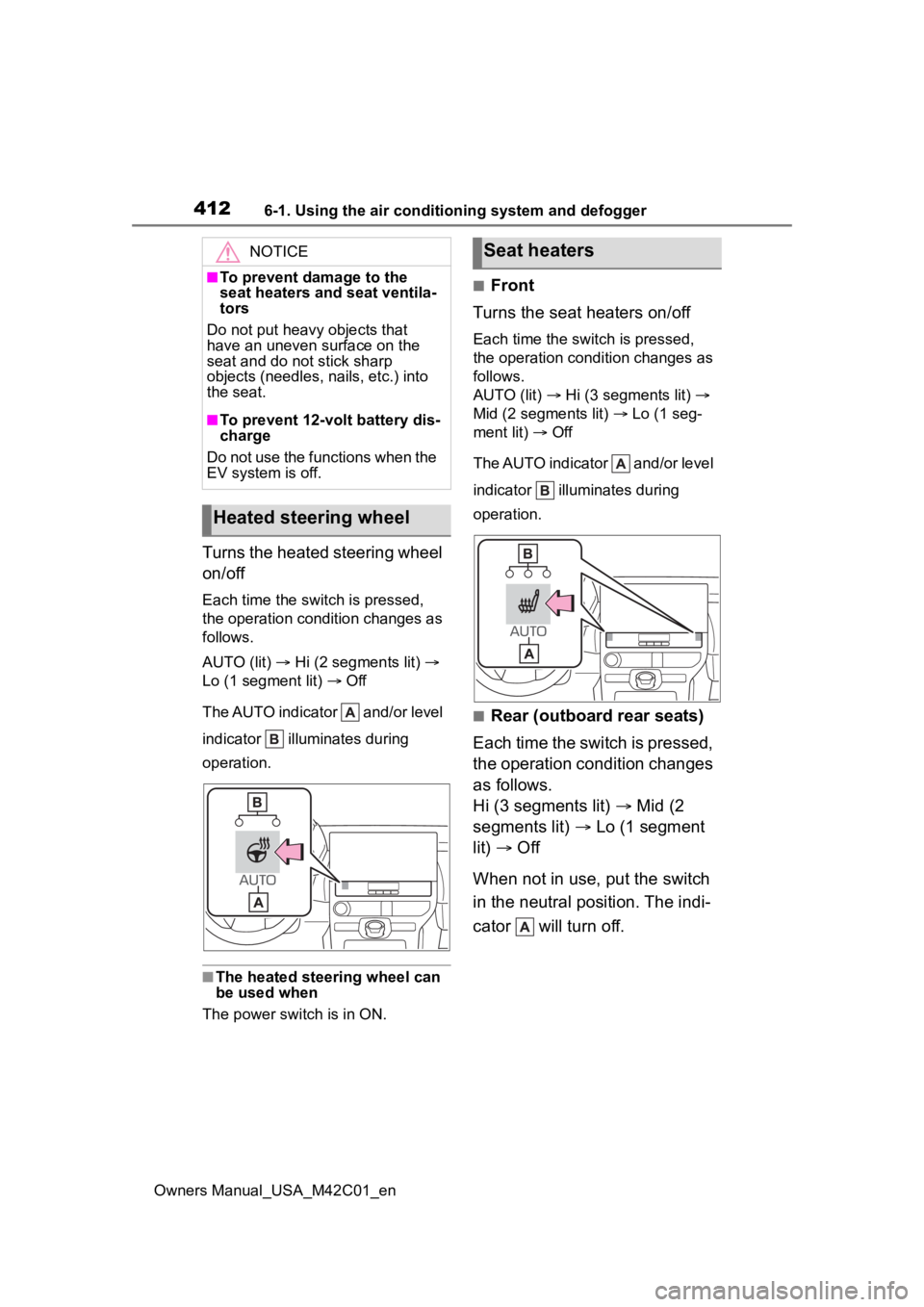
Turns the heated steering wheel
on/off
Each time the switch is pressed,
the operation condition changes as
follows.
AUTO (lit) Hi (2 segments lit)
Lo (1 segment lit) Off
The AUTO indicator and/or level
indicator illuminates during
operation.
■The heated steering wheel can
be used when
The power swit ch is in ON.
■Front
Turns the seat heaters on/off
Each time the switch is pressed,
the operation condition changes as
follows.
AUTO (lit) Hi (3 segments lit)
Mid (2 segments lit) Lo (1 seg-
ment lit) Off
The AUTO indicator and/or level
indicator illuminates during
operation.
■Rear (outboard rear seats)
Each time the switch is pressed,
the operation condition changes
as follows.
Hi (3 segments lit) Mid (2
segments lit) Lo (1 segment
lit) Off
When not in use, put the switch
in the neutral position. The indi-
cator will turn off.
NOTICE
■To prevent damage to the
seat heaters and seat ventila-
tors
Do not put heavy objects that
have an uneven surface on the
seat and do not stick sharp
objects (needles, nails, etc.) into
the seat.
■To prevent 12-volt battery dis-
charge
Do not use the functions when the
EV system is off.
Heated steering wheel
Seat heaters