warning SUBARU SOLTERRA 2023 Repair Manual
[x] Cancel search | Manufacturer: SUBARU, Model Year: 2023, Model line: SOLTERRA, Model: SUBARU SOLTERRA 2023Pages: 628, PDF Size: 11.91 MB
Page 112 of 628
1122-2. Charging
Owners Manual_USA_M42C01_en
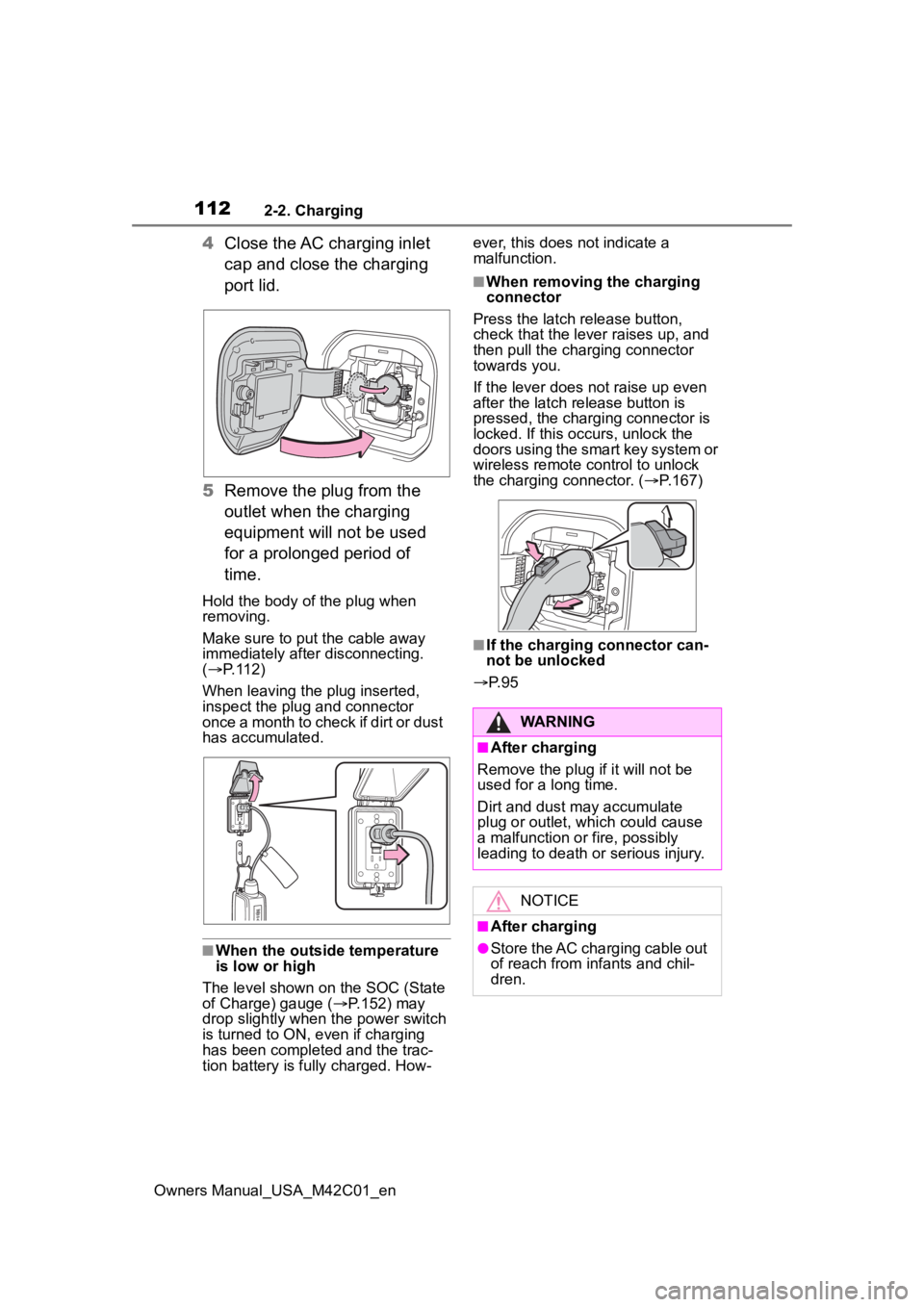
4Close the AC charging inlet
cap and close the charging
port lid.
5 Remove the plug from the
outlet when the charging
equipment will not be used
for a prolonged period of
time.
Hold the body of the plug when
removing.
Make sure to put the cable away
immediately afte r disconnecting.
( P. 1 1 2 )
When leaving the plug inserted,
inspect the plug and connector
once a month to check if dirt or dust
has accumulated.
■When the outside temperature
is low or high
The level shown on the SOC (State
of Charge) gauge ( P.152) may
drop slightly when the power switch
is turned to ON, e ven if charging
has been completed and the trac-
tion battery is fully charged. How- ever, this does not indicate a
malfunction.
■When removing the charging
connector
Press the latch release button,
check that the lever raises up, and
then pull the charging connector
towards you.
If the lever does not raise up even
after the latch release button is
pressed, the charging connector is
locked. If this occurs, unlock the
doors using the smart key system or
wireless remote control to unlock
the charging connector. ( P.167)
■If the charging connector can-
not be unlocked
P. 9 5
WARNING
■After charging
Remove the plug if it will not be
used for a long time.
Dirt and dust may accumulate
plug or outlet, which could cause
a malfunction or fire, possibly
leading to death or serious injury.
NOTICE
■After charging
●Store the AC charging cable out
of reach from infants and chil-
dren.
Page 113 of 628
1132-2. Charging
Owners Manual_USA_M42C01_en
2
Electric Vehicle system
P.102
1 Open the charging port lid.
( P.85)
The charging inlet light will illumi-
NOTICE
●After removing the plug from the
outlet, keep it in a safe place
free from moisture and dust.
The AC charging cable or plug
may be damaged if the cable is
stepped on or ridden over by
the vehicle.
●After disconnecting the charging
connector from the AC charging
inlet, make sure to close the AC
charging inlet cap and close the
charging port lid.
If the AC charging inlet cap is
left open, water or foreign
objects may enter the AC
charging inlet, which could lead
to vehicle damage.
How to use DC
charging
This section explains the
DC charging procedure for
the traction battery.
When using a DC charger,
make sure to check the
operation instructions of
the DC charger.
WARNING
■When using a DC charger
Observe the following precau-
tions.
Failure to do so may cause an
unexpected accident, resulting in
death or serious injury.
●Use a SAE J 1772 compliant
DC charger.
●Do not use the charging cable
longer than 30 meters.
Confirm the following
before charging
When charging
Page 116 of 628
1162-2. Charging
Owners Manual_USA_M42C01_en1
Be sure to engage the parking
brake and then turn the power
switch off.
2 Close the charging inlet cap,
close the charging port lid.
3 Check if “Checking Charging
System” is displayed on the
multi-information display when
the power switch is turned to ON.
Do not open the c harging port lid
while the charging system is check-
ing.
When the system check is com-
pleted, the power switch automati-
cally turns off.
4 Press the power switch while
depressing the brake pedal. The
“READY” indicator turns on.
Contact your Toyot a dealer if the
charging system check is done and
the message on the multi-informa-
tion display does not go off.
WARNING
■Warnings for DC charging
Be sure to observe the following
when using DC charging.
Failure to do so may cause an
accident that could lead to death
or serious injury.
●Check that the DC charger and
DC charging inlet are not dam-
aged. If there is any damage to
the DC charging inlet, do not
perform a DC charge and have
it inspected immediately at your
Toyota dealer.
●Do not touch the terminals of
the DC charging connector or
inlet with metallic sharp tips
(wires and needles), or allow a
short circuit to occur with foreign
objects.
●Do not insert anything other
than the DC charging connector
into the DC charging inlet.
●Check that the DC charging
cable is not coiled up or pinned
underneath heavy objects.
●Be sure the DC charging inlet
makes direct contact with the
DC charging connector.
Do not connect conversion
adapters, extension cords, etc.,
between the DC charging con-
nector and DC ch arging inlet.
●When DC charging is inter-
rupted, follow the handling pro-
cedures of the DC charger.
Immediately stop the DC
charging when the re is an out-
break of heat, smoke, strange
noises or smells, etc., during
charging.
●Check that the DC charging
connector and DC charging inlet
do not have foreign objects or
snow or ice attached to it. If any-
thing is attached t o the inlet, be
sure to complete ly remove the
material before connecting the
DC charging connector.
●Do not charge the vehicle when
there is a possibility of lightning.
If you notice lightning while
charging the vehicle, do not
touch the vehicle and the DC
charging cable.
●Do not get the DC charging inlet
terminals wet.
●Close the hood when using DC
charging. The cooling fan may
suddenly start to run. Keep
hands and clothing (especially a
tie, a scarf or a muffler) away
from the fan. Fa ilure to do so
may cause the hands or cloth-
ing to be caught, resulting in
serious injury.
Page 117 of 628
1172-2. Charging
Owners Manual_USA_M42C01_en
2
Electric Vehicle system
1 Operate the DC charger to
stop the charging.
DC charging connector will be
unlocked automatically when
charging is completed.
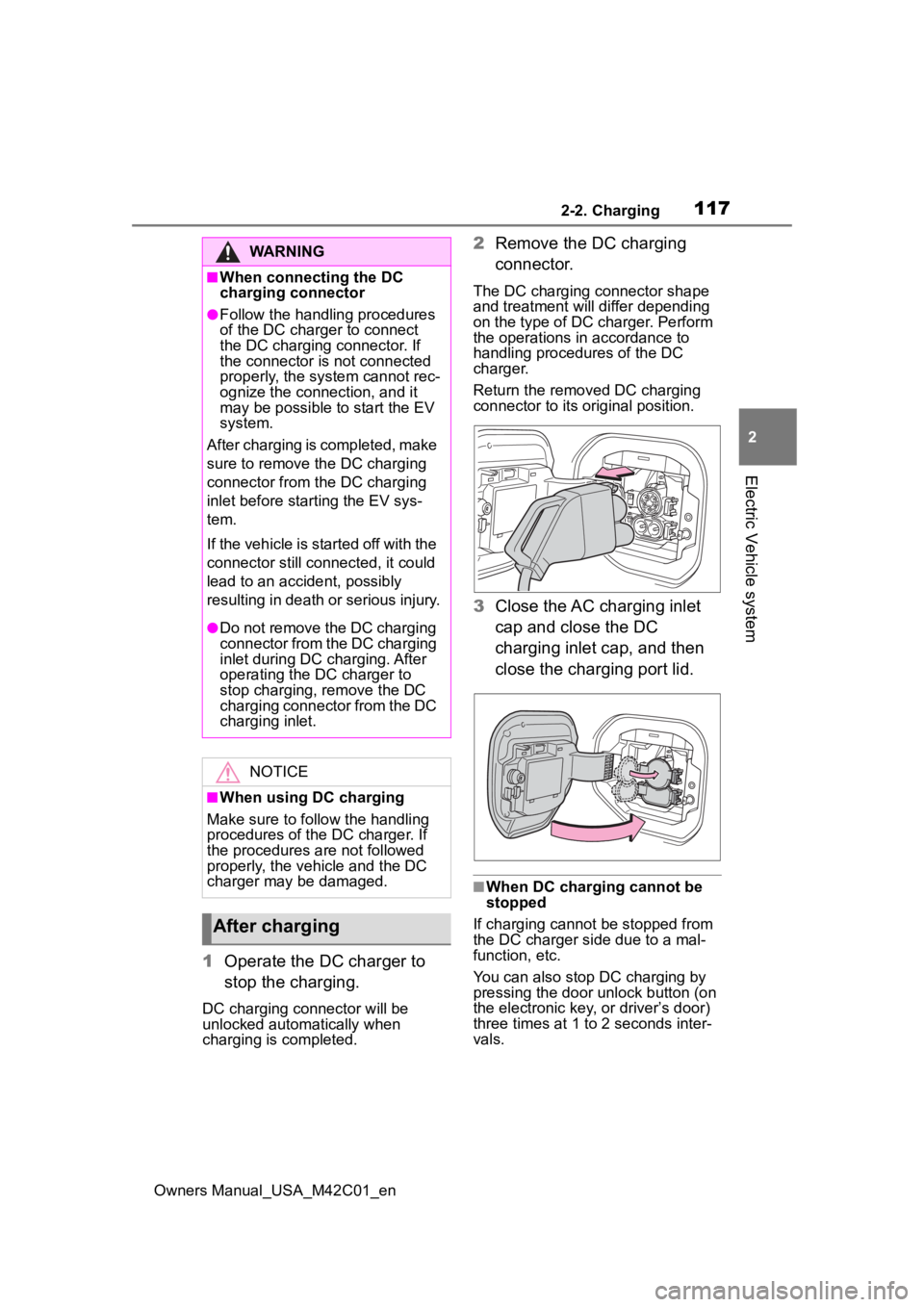
2Remove the DC charging
connector.
The DC charging connector shape
and treatment will differ depending
on the type of DC charger. Perform
the operations in accordance to
handling procedures of the DC
charger.
Return the removed DC charging
connector to its original position.
3Close the AC charging inlet
cap and close the DC
charging inlet cap, and then
close the charging port lid.
■When DC charging cannot be
stopped
If charging cannot be stopped from
the DC charger si de due to a mal-
function, etc.
You can also stop DC charging by
pressing the door unlock button (on
the electronic key, or driver’s door)
three times at 1 to 2 seconds inter-
vals.
WARNING
■When connecting the DC
charging connector
●Follow the handling procedures
of the DC charger to connect
the DC charging connector. If
the connector is not connected
properly, the system cannot rec-
ognize the connection, and it
may be possible to start the EV
system.
After charging is completed, make
sure to remove th e DC charging
connector from the DC charging
inlet before start ing the EV sys-
tem.
If the vehicle is started off with the
connector still connected, it could
lead to an accident, possibly
resulting in death or serious injury.
●Do not remove the DC charging
connector from the DC charging
inlet during DC charging. After
operating the DC charger to
stop charging, remove the DC
charging connector from the DC
charging inlet.
NOTICE
■When using DC charging
Make sure to follo w the handling
procedures of the DC charger. If
the procedures are not followed
properly, the vehicle and the DC
charger may be damaged.
After charging
Page 130 of 628
1302-2. Charging
Owners Manual_USA_M42C01_en
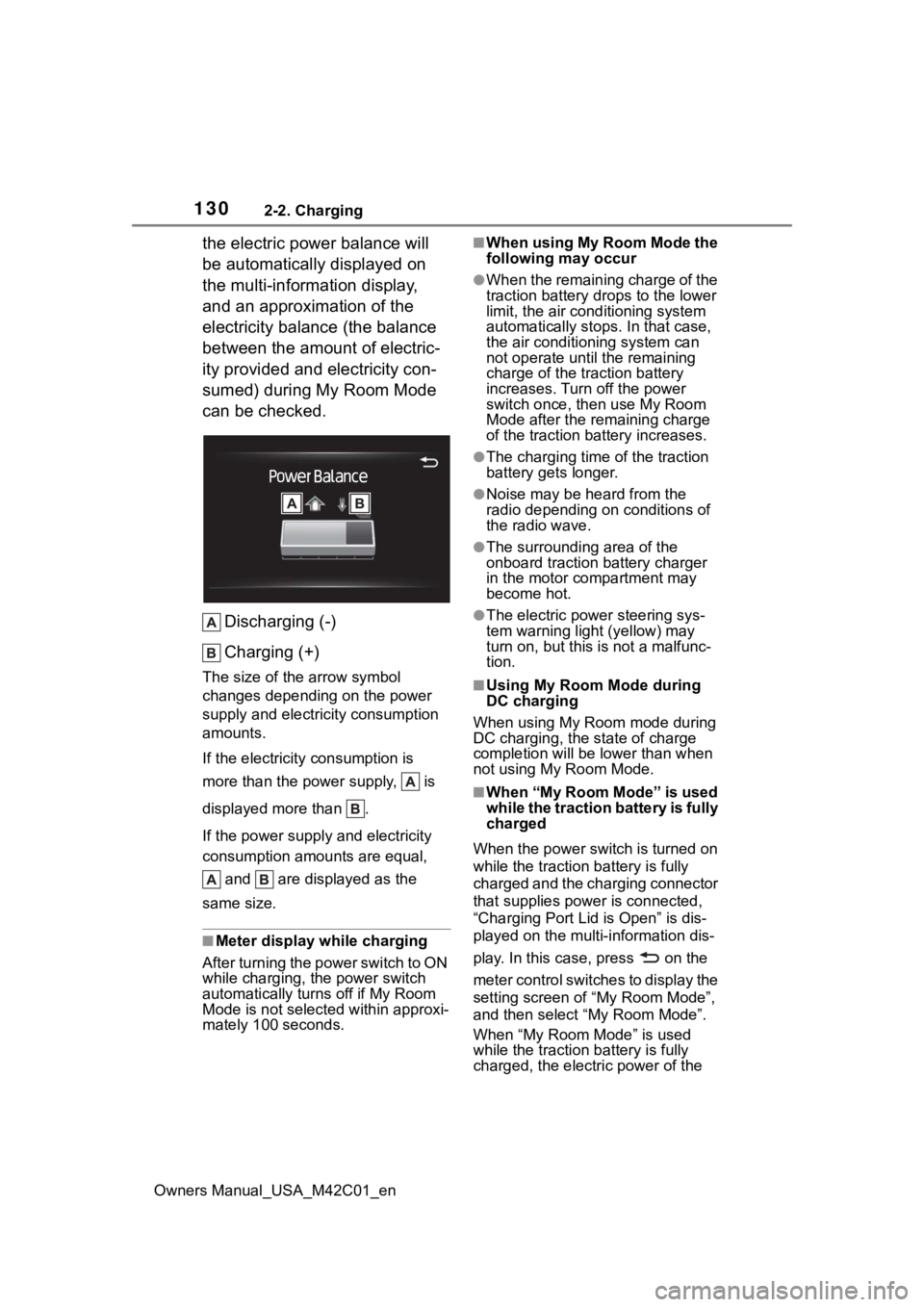
the electric power balance will
be automatically displayed on
the multi-information display,
and an approximation of the
electricity balance (the balance
between the amount of electric-
ity provided and electricity con-
sumed) during My Room Mode
can be checked.Discharging (-)
Charging (+)
The size of the arrow symbol
changes depending on the power
supply and electric ity consumption
amounts.
If the electricity consumption is
more than the power supply, is
displayed more than .
If the power supply and electricity
consumption amounts are equal,
and are displayed as the
same size.
■Meter display while charging
After turning the power switch to ON
while charging, the power switch
automatically turns off if My Room
Mode is not selected within approxi-
mately 100 seconds.
■When using My Room Mode the
following may occur
●When the remaining charge of the
traction battery d rops to the lower
limit, the air conditioning system
automatically stops. In that case,
the air conditioning system can
not operate until the remaining
charge of the traction battery
increases. Turn off the power
switch once, then use My Room
Mode after the remaining charge
of the traction battery increases.
●The charging time of the traction
battery gets longer.
●Noise may be heard from the
radio depending on conditions of
the radio wave.
●The surrounding area of the
onboard traction battery charger
in the motor compartment may
become hot.
●The electric power steering sys-
tem warning light (yellow) may
turn on, but this is not a malfunc-
tion.
■Using My Room Mode during
DC charging
When using My Room mode during
DC charging, the state of charge
completion will be lo wer than when
not using My Room Mode.
■When “My Room Mode” is used
while the traction battery is fully
charged
When the power switch is turned on
while the traction b attery is fully
charged and the charging connector
that supplies power is connected,
“Charging Port Lid is Open” is dis-
played on the multi-information dis-
play. In this cas e, press on the
meter control switches to display the
setting screen of “My Room Mode”,
and then select “My Room Mode”.
When “My Room Mode” is used
while the traction b attery is fully
charged, the electric power of the
Page 131 of 628
1312-2. Charging
Owners Manual_USA_M42C01_en
2
Electric Vehicle system
traction battery may be consumed.
In this case, charging may be per- formed again.
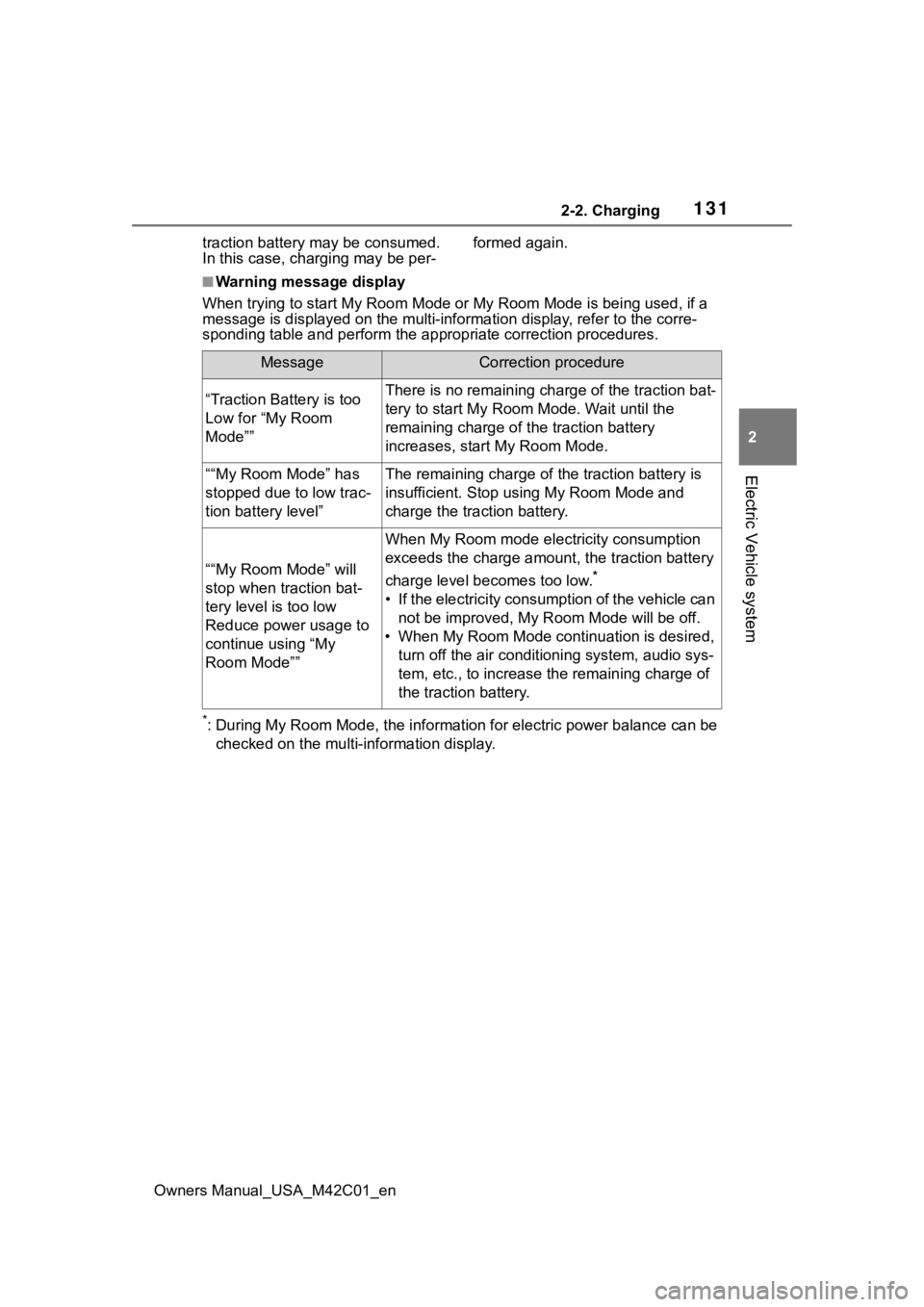
■Warning message display
When trying to start My Room Mode or My Room Mode is being used , if a
message is displayed on the multi -information display, refer to the corre-
sponding table and perform the app ropriate correction procedures.
*: During My Room Mode, the informa tion for electric power balance can be
checked on the multi-information display.
MessageCorrection procedure
“Traction Battery is too
Low for “My Room
Mode””There is no remaining charge of the traction bat-
tery to start M y Room Mode. Wait until the
remaining charge of the traction battery
increases, start My Room Mode.
““My Room Mode” has
stopped due to low trac-
tion battery level”The remaining charge of the traction battery is
insufficient. Stop using My Room Mode and
charge the traction battery.
““My Room Mode” will
stop when traction bat-
tery level is too low
Reduce power usage to
continue using “My
Room Mode””
When My Room mode electricity consumption
exceeds the charge amount, the traction battery
charge level becomes too low.
*
• If the electricity consumption of the vehicle can not be improved, My R oom Mode will be off.
• When My Room Mode continuation is desired, turn off the air conditioning system, audio sys-
tem, etc., to increase t he remaining charge of
the traction battery.
Page 132 of 628
1322-2. Charging
Owners Manual_USA_M42C01_en
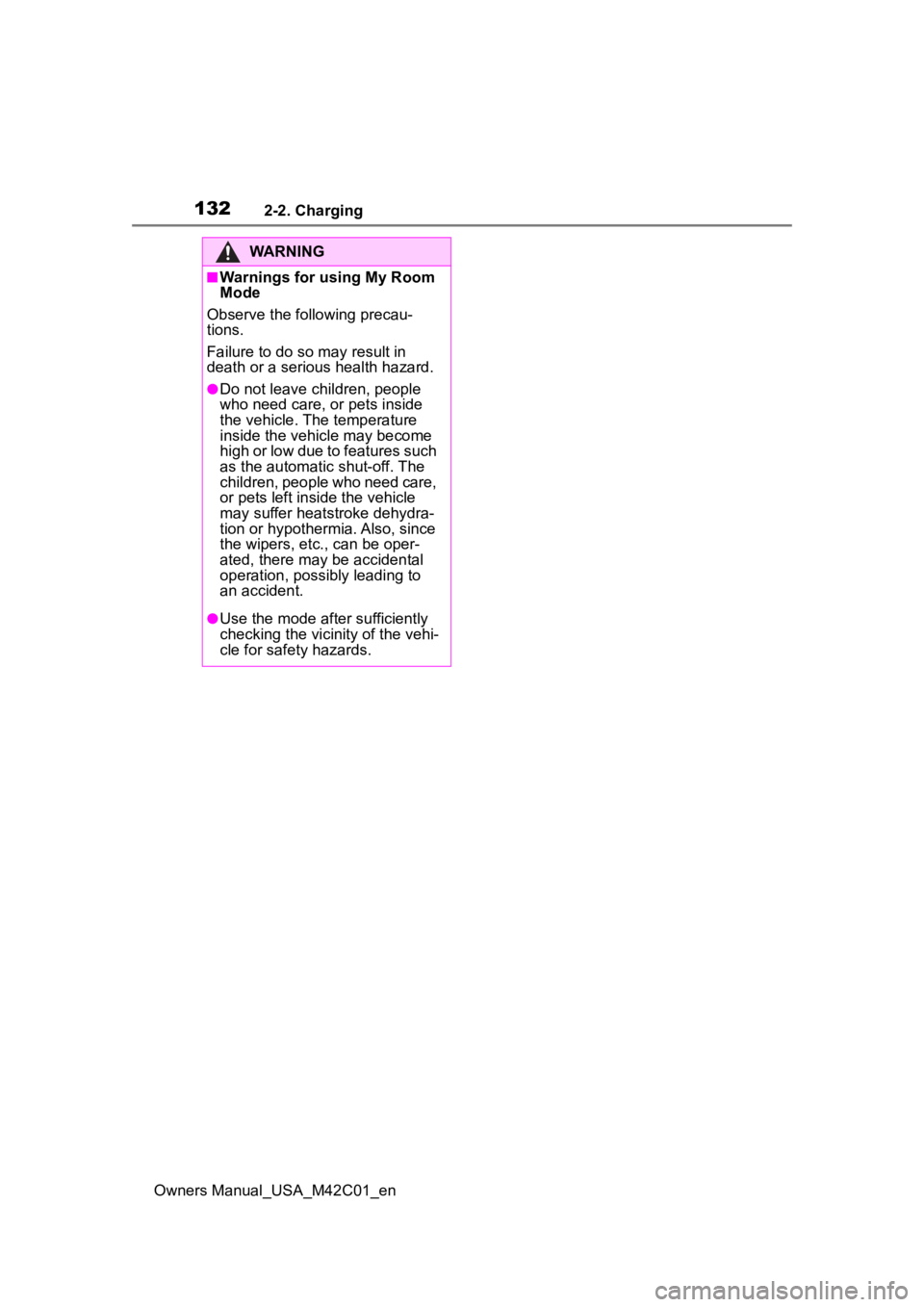
WARNING
■Warnings for using My Room
Mode
Observe the following precau-
tions.
Failure to do so m ay result in
death or a seri ous health hazard.
●Do not leave children, people
who need care, or pets inside
the vehicle. The temperature
inside the vehicle may become
high or low due to features such
as the automatic shut-off. The
children, people who need care,
or pets left inside the vehicle
may suffer heatstroke dehydra-
tion or hypothermia. Also, since
the wipers, etc., can be oper-
ated, there may be accidental
operation, possibly leading to
an accident.
●Use the mode after sufficiently
checking the vicinity of the vehi-
cle for safety hazards.
Page 133 of 628
1332-2. Charging
Owners Manual_USA_M42C01_en
2
Electric Vehicle system
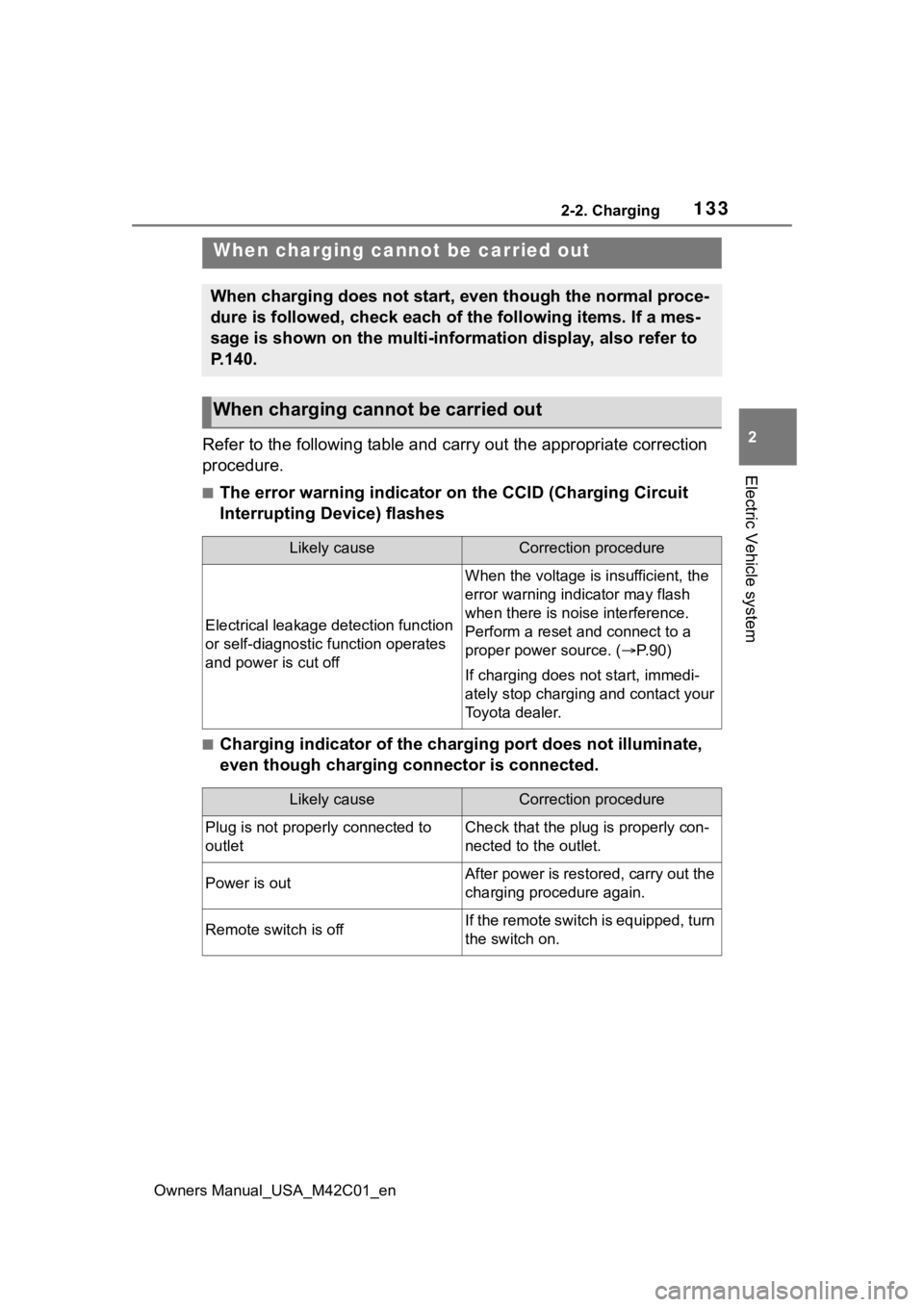
Refer to the following table and carry out the appropriate correction
procedure.
■The error warning indicator on the CCID (Charging Circuit
Interrupting Device) flashes
■Charging indicator of the charging port does not illuminate,
even though charging connector is connected.
When charging canno t be carried out
When charging does not start, even though the normal proce-
dure is followed, check each of the following items. If a mes-
sage is shown on the multi-information display, also refer to
P.140.
When charging cannot be carried out
Likely causeCorrection procedure
Electrical leakage detection function
or self-diagnostic function operates
and power is cut off
When the voltage is insufficient, the
error warning indi cator may flash
when there is noise interference.
Perform a reset and connect to a
proper power source. ( P. 9 0 )
If charging does not start, immedi-
ately stop charging and contact your
Toyota dealer.
Likely causeCorrection procedure
Plug is not properly connected to
outletCheck that the plug is properly con-
nected to the outlet.
Power is outAfter power is restored, carry out the
charging procedure again.
Remote switch is offIf the remote switch is equipped, turn
the switch on.
Page 142 of 628
1422-2. Charging
Owners Manual_USA_M42C01_en
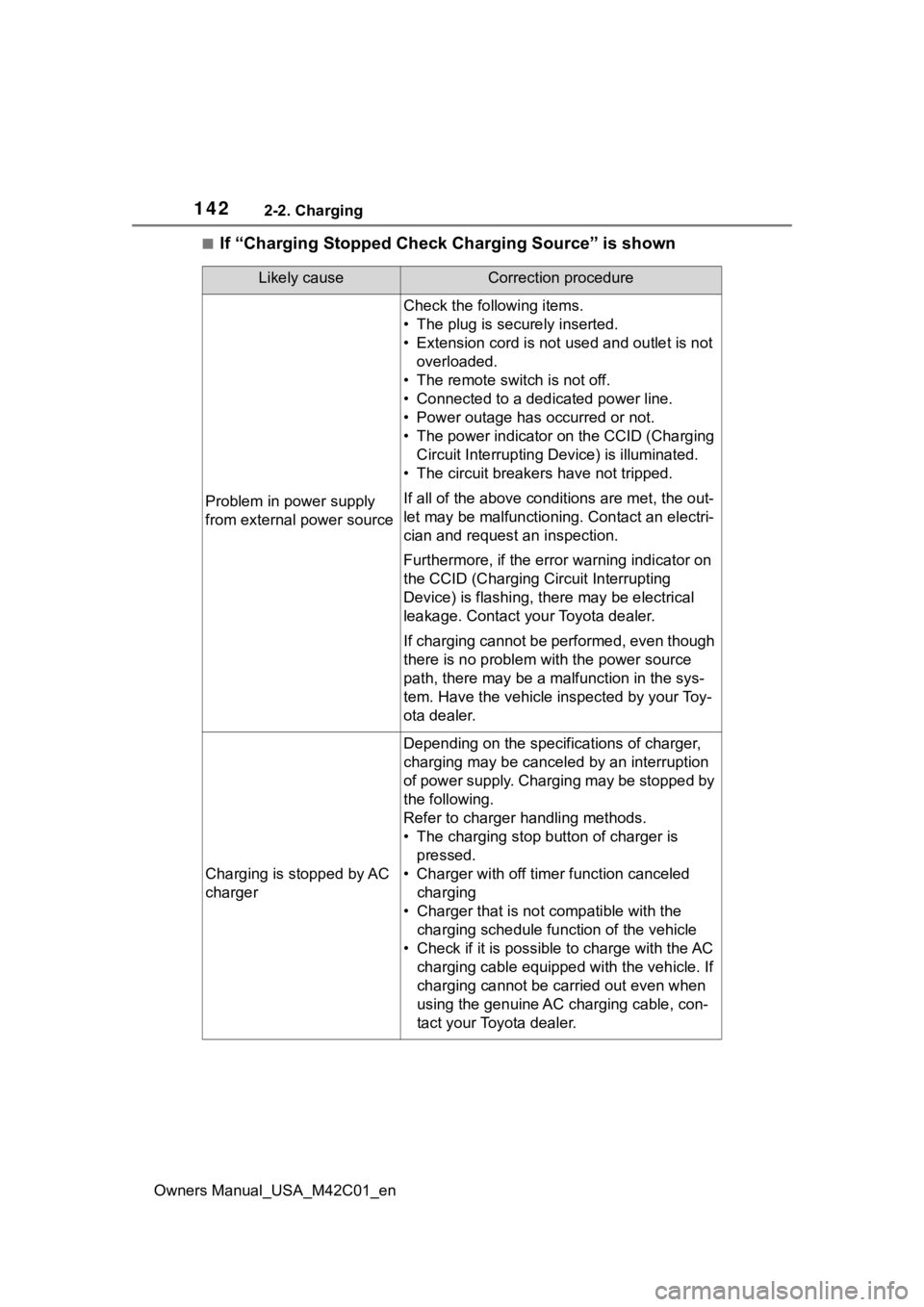
■If “Charging Stopped Check Charging Source” is shown
Likely causeCorrection procedure
Problem in power supply
from external power source
Check the following items.
• The plug is securely inserted.
• Extension cord is not used and outlet is not overloaded.
• The remote switch is not off.
• Connected to a dedicated power line.
• Power outage has occurred or not.
• The power indicator on the CCID (Charging Circuit Interrupting D evice) is illuminated.
• The circuit breakers have not tripped.
If all of the above condit ions are met, the out-
let may be malfunctioni ng. Contact an electri-
cian and request an inspection.
Furthermore, if the error warning indicator on
the CCID (Charging Circuit Interrupting
Device) is flash ing, there may be electrical
leakage. Contact your Toyota dealer.
If charging cannot be performed, even though
there is no problem with the power source
path, there may be a malfunction in the sys-
tem. Have the vehicle inspected by your Toy-
ota dealer.
Charging is stopped by AC
charger
Depending on the specifications of charger,
charging may be canceled by an interruption
of power supply. Charging may be stopped by
the following.
Refer to charger handling methods.
• The charging stop bu tton of charger is
pressed.
• Charger with off timer function canceled charging
• Charger that is not compatible with the charging schedule function of the vehicle
• Check if it is possible to charge with the AC charging cable equipped with the vehicle. If
charging cannot be carried out even when
using the genuine AC charging cable, con-
tact your Toyota dealer.
Page 147 of 628
147
Owners Manual_USA_M42C01_en
3
3
Vehicle status information and indicators
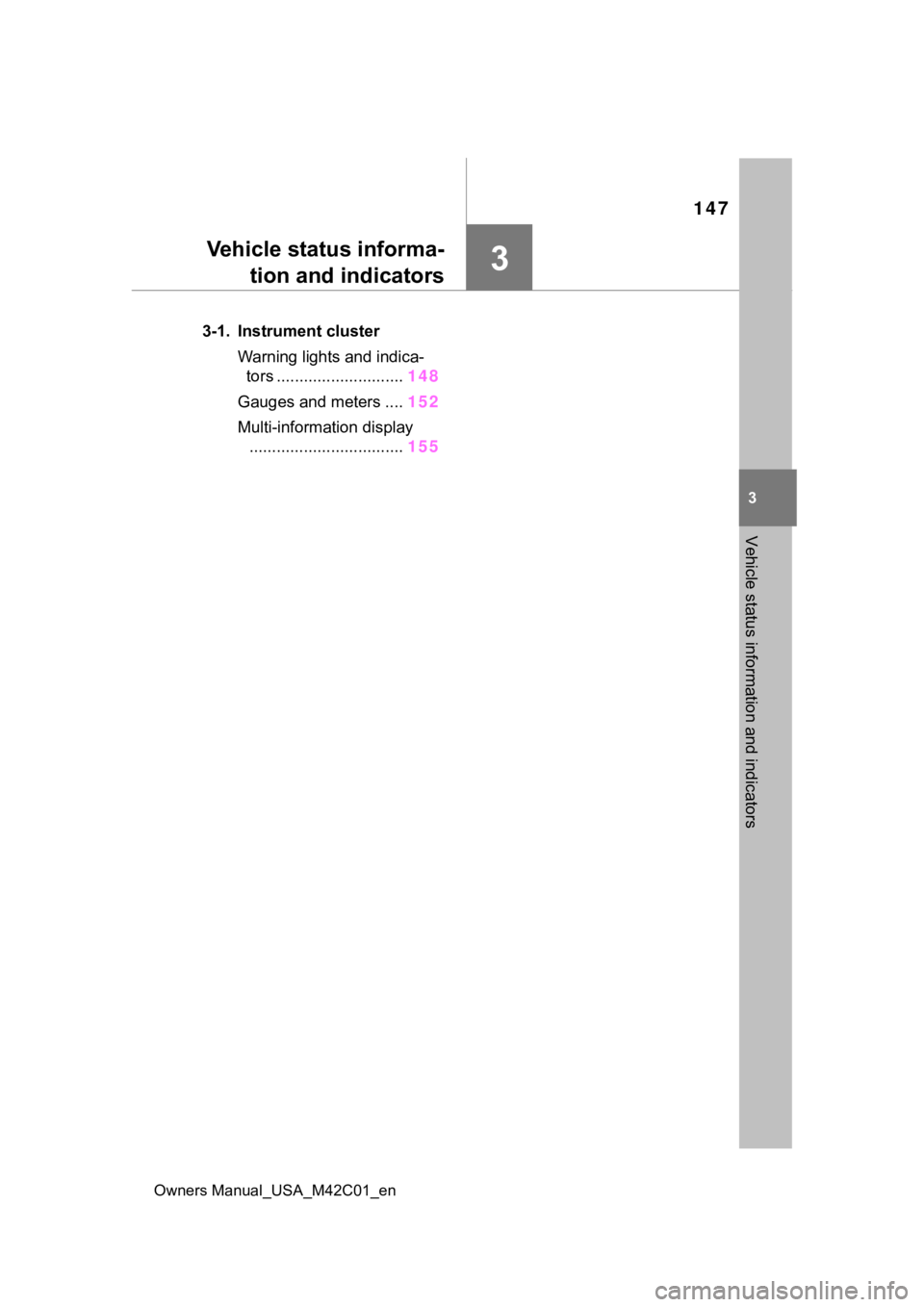
Vehicle status informa-tion and indicators
3-1. Instrument cluster
Warning lights and indica-tors ............................ 148
Gauges and meters .... 152
Multi-information display .................................. 155