warning SUBARU SOLTERRA 2023 Workshop Manual
[x] Cancel search | Manufacturer: SUBARU, Model Year: 2023, Model line: SOLTERRA, Model: SUBARU SOLTERRA 2023Pages: 628, PDF Size: 11.91 MB
Page 91 of 628
912-2. Charging
Owners Manual_USA_M42C01_en
2
Electric Vehicle system
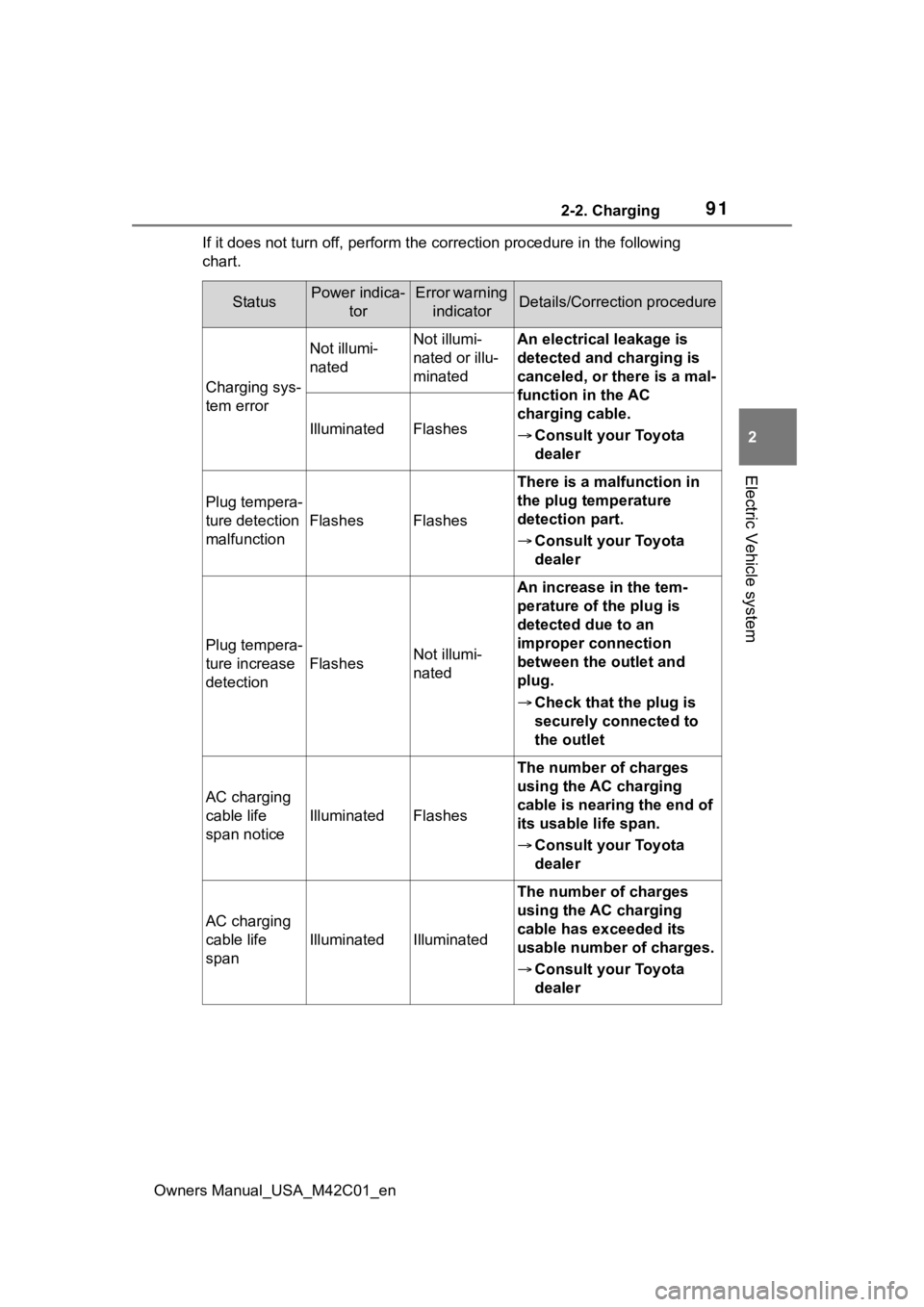
If it does not turn off, perform t he correction procedure in the following
chart.
StatusPower indica- torError warning indicatorDetails/Correction procedure
Charging sys-
tem error
Not illumi-
natedNot illumi-
nated or illu-
minatedAn electrical leakage is
detected and charging is
canceled, or there is a mal-
function in the AC
charging cable.
Consult your Toyota
dealer
IlluminatedFlashes
Plug tempera-
ture detection
malfunction
FlashesFlashes
There is a malfunction in
the plug temperature
detection part.
Consult your Toyota
dealer
Plug tempera-
ture increase
detection
FlashesNot illumi-
nated
An increase in the tem-
perature of the plug is
detected due to an
improper connection
between the outlet and
plug.
Check that the plug is
securely connected to
the outlet
AC charging
cable life
span notice
IlluminatedFlashes
The number of charges
using the AC charging
cable is nearing the end of
its usable life span.
Consult your Toyota
dealer
AC charging
cable life
span
IlluminatedIlluminated
The number of charges
using the AC charging
cable has exceeded its
usable number of charges.
Consult your Toyota
dealer
Page 92 of 628
922-2. Charging
Owners Manual_USA_M42C01_en
For safety, inspect the AC
charging cable on a routine
basis.
Inspecting the AC
charging cable
WARNING
■Routine inspection
Check the following points regu-
larly.
Failure to do so may cause an
unexpected accident, resulting in
death or serious injury.
●The AC charging cable, plug,
charging connector, CCID
(Charging Circuit Interrupting
Device), etc., have not been
damaged
●The outlet has not been dam-
aged.
●The plug can be securely
inserted into the outlet.
●The plug does not get extremely
hot during use
●The tip of the plug has not been
deformed.
●The plug is not dirtied by dust,
etc.
Remove the plug from the outlet
before inspecting it. If any abnor-
malities are found in the AC
charging cable as a result of the
inspection, immediately stop use
and consult your Toyota dealer.
■Maintaining the AC charging
cable
When the AC charging cable is
dirty, first remove the dirt with a
hard, wringed cloth, and then
wipe the cable with a dry cloth.
However, never wash it with
water. If the AC charging cable is
washed with water, fire or electric
shock may occur du ring charging,
possibly resulting in death or seri-
ous injury.
■When not using the AC
charging cable for a long time
Remove the plug fr om the outlet.
Dust could accumulate on the
plug or in the outlet, possibly
causing overheating which could
lead to a fire.
Also, keep the cable in a place
free from moisture.
Page 96 of 628
962-2. Charging
Owners Manual_USA_M42C01_en
Connect to an AC 120 V out-
let (NEMA 5-15R) with a
Ground-Fault Circuit-Inter-
rupter (GFCI) and a circuit
breaker. Use of a 15A individ-
ual circuit is strongly recom-
mended to ensure AC
charging cable will operate
properly.
When charging outdoors,
make sure to connect to a
weatherproof outlet that is
certified for outdoor use.
Checking Ground-Fault Cir-
cuit-Interrupter (GFCI) opera-
tion before its use is
recommended.
WARNING
■When connecting the AC
charging connector to the AC
charging inlet
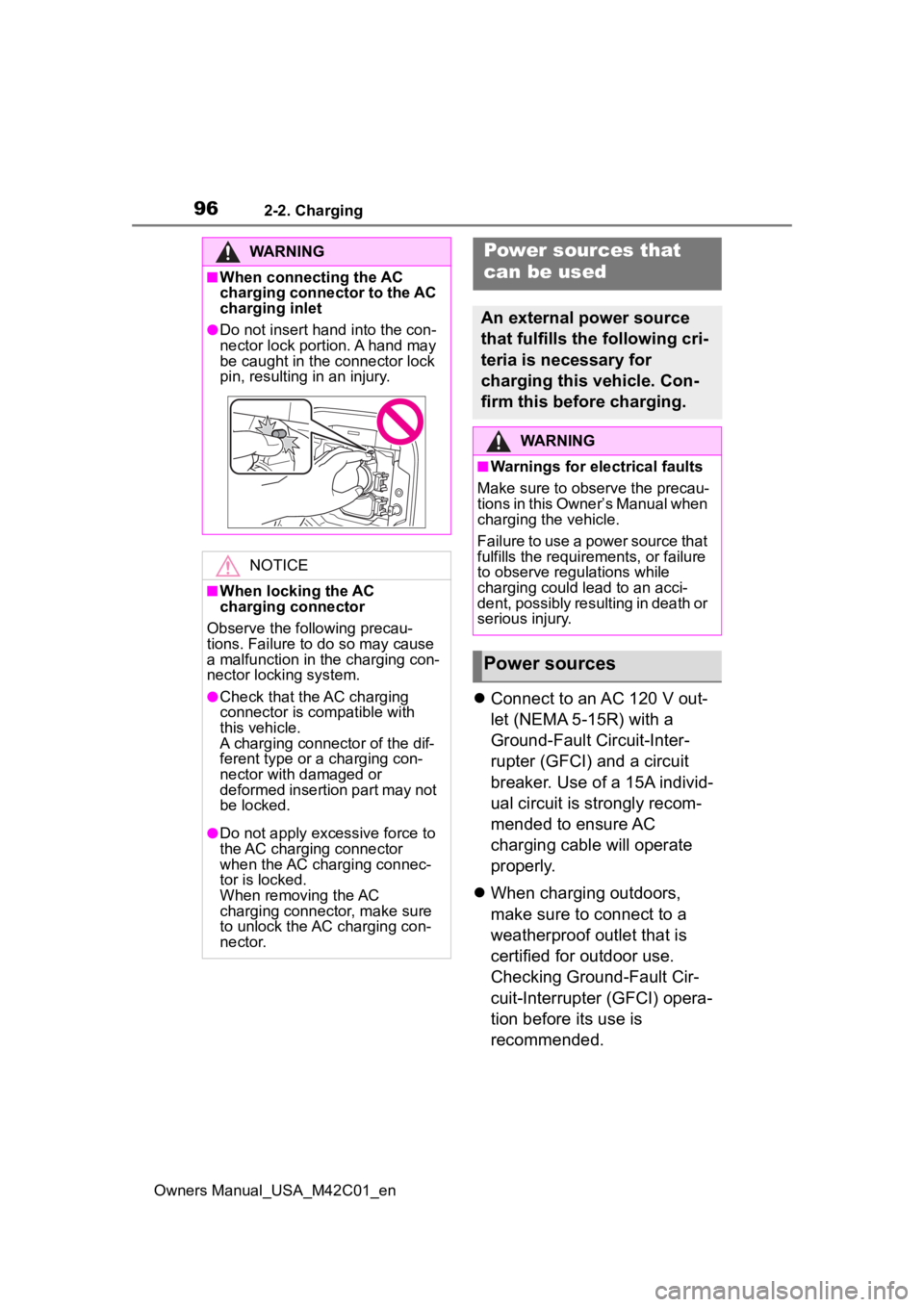
●Do not insert hand into the con-
nector lock portion. A hand may
be caught in the connector lock
pin, resulting in an injury.
NOTICE
■When locking the AC
charging connector
Observe the following precau-
tions. Failure to do so may cause
a malfunction in the charging con-
nector locking system.
●Check that the AC charging
connector is compatible with
this vehicle.
A charging connector of the dif-
ferent type or a charging con-
nector with damaged or
deformed insertion part may not
be locked.
●Do not apply excessive force to
the AC charging connector
when the AC charging connec-
tor is locked.
When removing the AC
charging connector, make sure
to unlock the AC charging con-
nector.
Power sources that
can be used
An external power source
that fulfills the following cri-
teria is necessary for
charging this vehicle. Con-
firm this before charging.
WARNING
■Warnings for electrical faults
Make sure to observe the precau-
tions in this Owner’s Manual when
charging the vehicle.
Failure to use a power source that
fulfills the requirements, or failure
to observe regulations while
charging could lead to an acci-
dent, possibly resulting in death or
serious injury.
Power sources
Page 97 of 628
972-2. Charging
Owners Manual_USA_M42C01_en
2
Electric Vehicle system
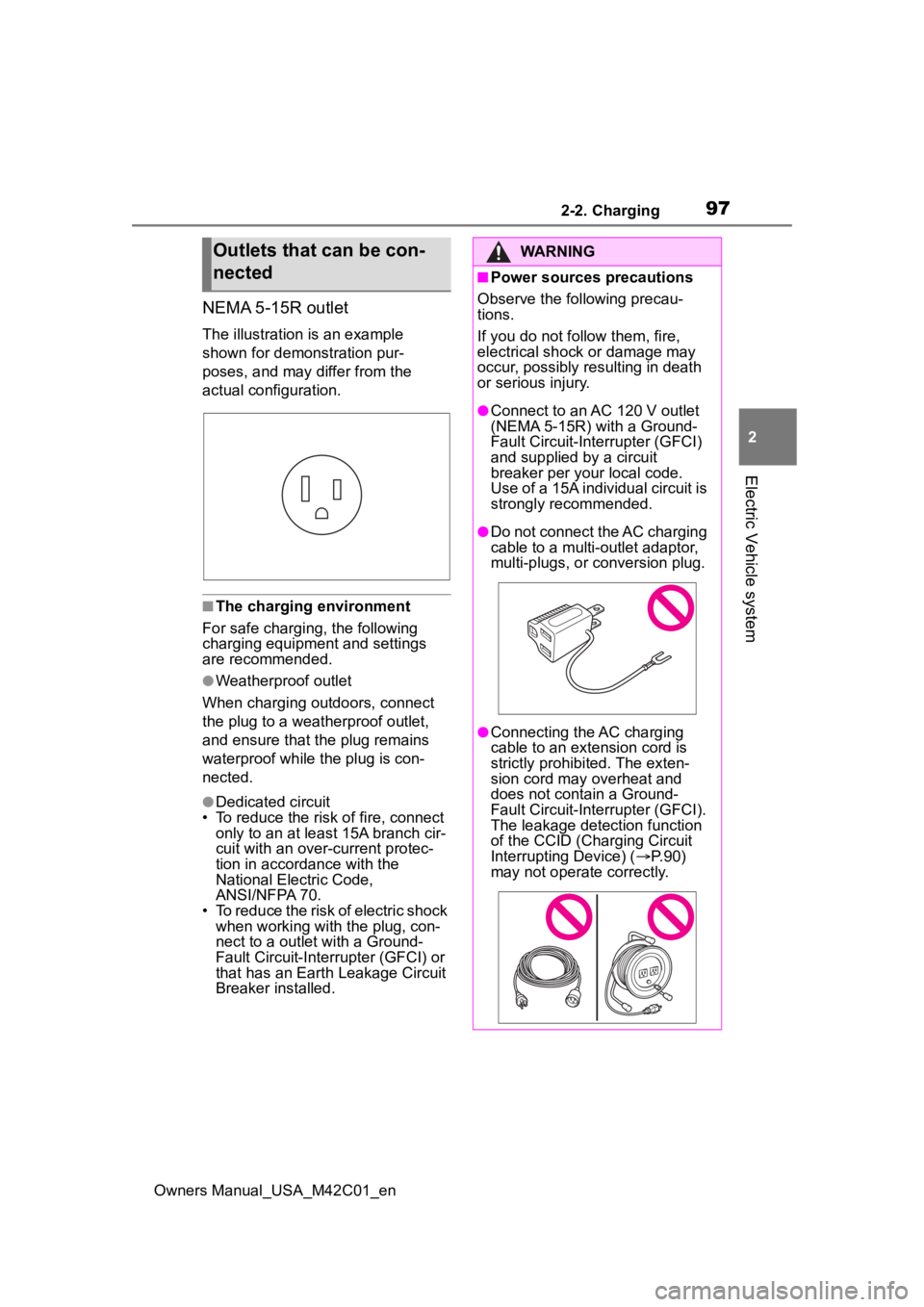
NEMA 5-15R outlet
The illustration is an example
shown for demonstration pur-
poses, and may differ from the
actual configuration.
■The charging environment
For safe charging, the following
charging equipment and settings
are recommended.
●Weatherproof outlet
When charging outdoors, connect
the plug to a weatherproof outlet,
and ensure that the plug remains
waterproof while the plug is con-
nected.
●Dedicated circuit
• To reduce the risk of fire, connect
only to an at least 15A branch cir-
cuit with an over- current protec-
tion in accordance with the
National Electric Code,
ANSI/NFPA 70.
• To reduce the risk of electric shock when working with the plug, con-
nect to a outlet with a Ground-
Fault Circuit-Interrupter (GFCI) or
that has an Earth Leakage Circuit
Breaker installed.
Outlets that can be con-
nectedWARNING
■Power sources precautions
Observe the following precau-
tions.
If you do not fo llow them, fire,
electrical shock or damage may
occur, possibly resulting in death
or serious injury.
●Connect to an AC 120 V outlet
(NEMA 5-15R) with a Ground-
Fault Circuit-Interrupter (GFCI)
and supplied by a circuit
breaker per your local code.
Use of a 15A individual circuit is
strongly recommended.
●Do not connect the AC charging
cable to a multi-outlet adaptor,
multi-plugs, or conversion plug.
●Connecting the AC charging
cable to an extension cord is
strictly prohibited. The exten-
sion cord may overheat and
does not contain a Ground-
Fault Circuit-Interrupter (GFCI).
The leakage detection function
of the CCID (Charging Circuit
Interrupting Device) ( P.90)
may not operate correctly.
Page 98 of 628
982-2. Charging
Owners Manual_USA_M42C01_en
■AC charging (P.105)
This is a charging method used
when charging from an AC out-
let with the AC charging cable or
charging that uses AC charger.
By setting charging schedule, it is
also possible to charge at the
desired date and time. ( P. 1 1 8 )
■DC charging ( P.113)
This is a charging method that
uses a DC charger that com-
plies with SAE J 1772. The trac-
tion battery can be charged in a
shorter time than AC charging.
SAE is an abbreviation for an
industrial standard issued by the
Society of Automotive Engi-
neers.
This vehicle is equipped with
several functions that are linked
with charging.
■My Room Mode ( P.129)
When the charging cable is con-
nected to the vehicle, electrical
components such as the air con-
ditioning system and audio sys-
WARNING
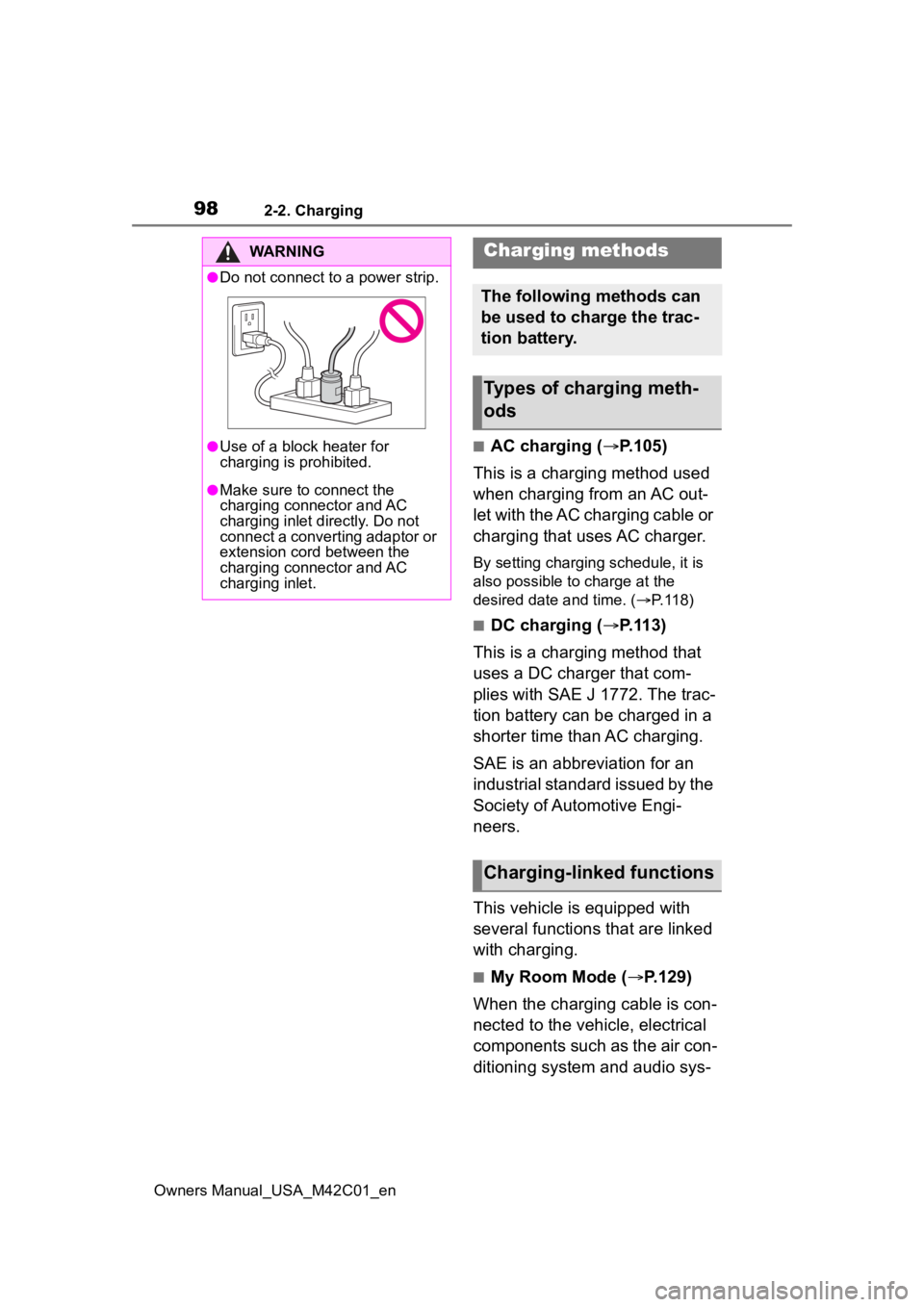
●Do not connect to a power strip.
●Use of a block heater for
charging is prohibited.
●Make sure to connect the
charging connector and AC
charging inlet directly. Do not
connect a converting adaptor or
extension cord between the
charging connector and AC
charging inlet.
Charging methods
The following methods can
be used to charge the trac-
tion battery.
Types of charging meth-
ods
Charging-linked functions
Page 102 of 628
1022-2. Charging
Owners Manual_USA_M42C01_en
■Safety functions
●The EV system will not start while
the charging cable is attached to
the vehicle, even if the power
switch is operated.
●If the charging cable is connected
while the “READY” indicator is illu-
minated, the EV system will stop
automatically and driving will not
be possible.
Things to know before
charging
Make sure to read the fol-
lowing precautions before
charging the traction bat-
tery.
WARNING
■Caution when charging
People with implantable cardiac
pacemakers or cardiac resynchro-
nization therapy-pacemakers
should not carry out the charging
procedure. Ask someone else to
do it.
●Do not approach the charger
and charging cable while
charging.
Charging procedure may affect
the operation of such devices.
●Do not remain in the vehicle
during charging.
Charging procedure may affect
the operation of such devices.
●Do not enter the vehicle even to
take something out of the lug-
gage compartment.
Charging procedure may affect
the operation of such devices.
■When the charg ing cable is
connected to the vehicle
Do not change the shift position
from P.
In the unlikely event that the
charging cable has been dam-
aged, the shift position may
change from P to another position
and the vehicle could move, pos-
sibly leading to an accident.
■Charging precautions
This vehicle has been designed to
allow charging from an external
power source using an AC
charging cable for exclusive use
with standard household AC out-
lets.
However, the vehicle differs
greatly from standard household
electrical goods in the following
ways, and incorrect usage could
cause fire or electric shock, possi-
bly leading to d eath or serious
injury.
●When 240V charging, a large
amount of current will flow for a
long time.
●Charging can be conducted out-
doors.
NOTICE
■Charging precautions
To charge properly, follow the pro-
cedure after reading the explana-
tion below. Charging is intended
to be carried out by licensed driv-
ers only who properly understand
the charging procedure.
●Do not allow people who is not
used to charging, such as chil-
dren, to perform charging with-
out supervision.
Also, keep the AC charging
cable out of reach of infants.
Page 107 of 628
1072-2. Charging
Owners Manual_USA_M42C01_en
2
Electric Vehicle system
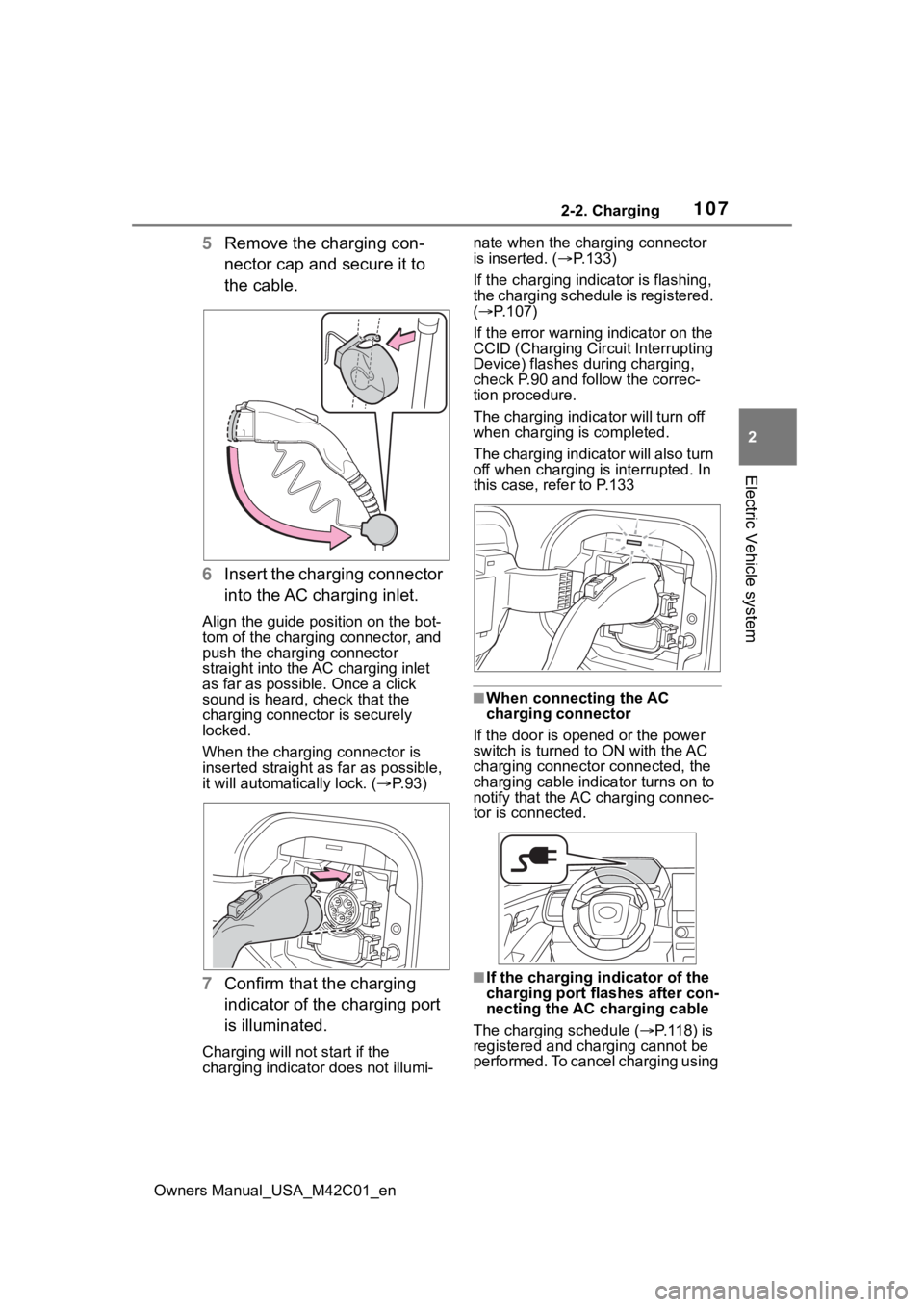
5 Remove the charging con-
nector cap and secure it to
the cable.
6 Insert the charging connector
into the AC charging inlet.
Align the guide position on the bot-
tom of the charging connector, and
push the charging connector
straight into the AC charging inlet
as far as possible. Once a click
sound is heard, check that the
charging connector is securely
locked.
When the charging connector is
inserted straight as far as possible,
it will automatically lock. ( P. 9 3 )
7 Confirm that the charging
indicator of the charging port
is illuminated.
Charging will not start if the
charging indicator does not illumi- nate when the charging connector
is inserted. (
P.133)
If the charging indicator is flashing,
the charging schedule is registered.
( P.107)
If the error warning indicator on the
CCID (Charging Cir cuit Interrupting
Device) flashes during charging,
check P.90 and follow the correc-
tion procedure.
The charging indicator will turn off
when charging is completed.
The charging indicator will also turn
off when charging is interrupted. In
this case, refer to P.133
■When connecting the AC
charging connector
If the door is opene d or the power
switch is turned to ON with the AC
charging connector connected, the
charging cable indicator turns on to
notify that the AC charging connec-
tor is connected.
■If the charging i ndicator of the
charging port flashes after con-
necting the AC charging cable
The charging schedule ( P. 1 1 8 ) i s
registered and charging cannot be
performed. To cancel charging using
Page 109 of 628
1092-2. Charging
Owners Manual_USA_M42C01_en
2
Electric Vehicle system
1 Press or of the meter
control switches to select .
2 Press or of the meter
control switches to select “Vehi-
cle Settings”, and then press and
hold .
3 Press or of the meter
control switches to select
“Charging Settings”, and then
press .
The “Charging Sett ings” screen will
be displayed.
4 Press or of the meter
control switches to select
“Charging Limit”, and then press
.
The “Charging Limit” screen will be
displayed.
5 Select “Full”, “90%”, “80%”,
“70%”, “60%” or “50%” and then
press .
●Setting operations on multimedia
1 Select .
2 Select “Vehicle customize”.
3 Select “Charging”.
4 Select “Charging limit”.
5 Select “Full”, “90%”, “80%”,
“70%”, “60%” or “50%”.
If the setting is changed during DC
charging, charging may stop due to
the operation of the DC charger
timer and the traction battery cannot
be fully charged.
■Protection function of AC
charging inlet overheating
By installing a temp erature sensor
to the AC charging inlet, prevents
parts from melting when the tem-
perature rises due to foreign matter
entering the charging connector. When a certain temperature
increase is detected, charging is
stopped immediately.
After this, when the power switch is
off, a message will be displayed on
the multi-information display
(
P.140)
WARNING
■When charging
Observe the following precau-
tions.
Failure to do so may cause an
unexpected accident, resulting in
death or serious injury.
●Connect to a power source suit-
able for charging. ( P. 9 6 )
●Check that the AC charging
cable, plug and outlet are free of
foreign matter.
●Before charging, check that the
AC charging inlet is not
deformed, damaged or cor-
roded, and check that the inlet
is free of foreign matter such as
dirt, snow and ice.
If there is dirt or dust in these
areas, remove completely
before inserting the charging
connector.
●Do not get the te rminals of the
AC charging inlet wet.
●Only use outlets where the plug
can be securely inserted.
●Do not bundle or wind the AC
charging cable while charging,
as doing so may result in over-
heating.
●Do not touch the terminals of
the charging connector and AC
charging inlet with a sharp metal
objects (needles, etc.,) or
hands, or short them with for-
eign objects.
Page 110 of 628
1102-2. Charging
Owners Manual_USA_M42C01_en
WARNING
●When charging outdoors, make
sure to connect to a weather-
proof outlet for outdoor use.
Ensure the weatherproof outlet
cover closes completely. If the
weatherproof outlet cover can-
not be closed, install a weather-
proof outlet cover that will close.
●In order to stop charging at the
charging station, follow the
instructions of the charger.
●If any heat, smoke, odors, noise
or other abnormalities are
noticed during charging, stop
charging immediately.
●Do not insert the plug if the out-
let is submerged in water or
snow.
●When charging while it is raining
or snowing, do not connect or
disconnect the plug if your
hands are wet. Also, do not get
the plug or outlet wet.
●Do not charge the vehicle
during a lightning storm.
●Prevent the AC charging cable
from being caught in the door or
back door.
●Do not let the wheels on the AC
charging cable, plug, charging
connector and CCID (Charging
Circuit Interrupting Device).
●Firmly insert the plug into the
outlet.
●Do not use an extension cord
and converting adaptor.
●Close the hood before using the
charging system.
The cooling fan may start oper-
ating suddenly. Touching or get-
ting close to rotating parts such
as the fan may cause your
hands or clothes (especially a
necktie or scarf) to become
caught and result in a serious
injury.
●After connecting the charging
cable, confirm that it is not
wound around anything.
●If the power indicator on the
CCID (Charging Circuit Inter-
rupting Device) does not illumi-
nate after plugging the AC
charging cable into the outlet,
unplug it immediately.
■If the error warn ing indicator
on the CCID (Charging Circuit
Interrupting Device) illumi-
nates or flashes during
charging
There may be an electrical leak-
age in the power source path, or
there may be a malfunction in the
AC charging cable or CCID
(Charging Circuit Interrupting
Device).
Refer to P.90 and follow the cor-
rection procedure. If the error
warning indicator does not turn off
even after performing the correc-
tion procedure, immediately stop
charging, remove the AC
charging cable and contact your
Toyota dealer. Continuing to
charge the vehicle in that condi-
tion may lead to u nforeseen acci-
dents or serious injury.
Page 111 of 628
1112-2. Charging
Owners Manual_USA_M42C01_en
2
Electric Vehicle system
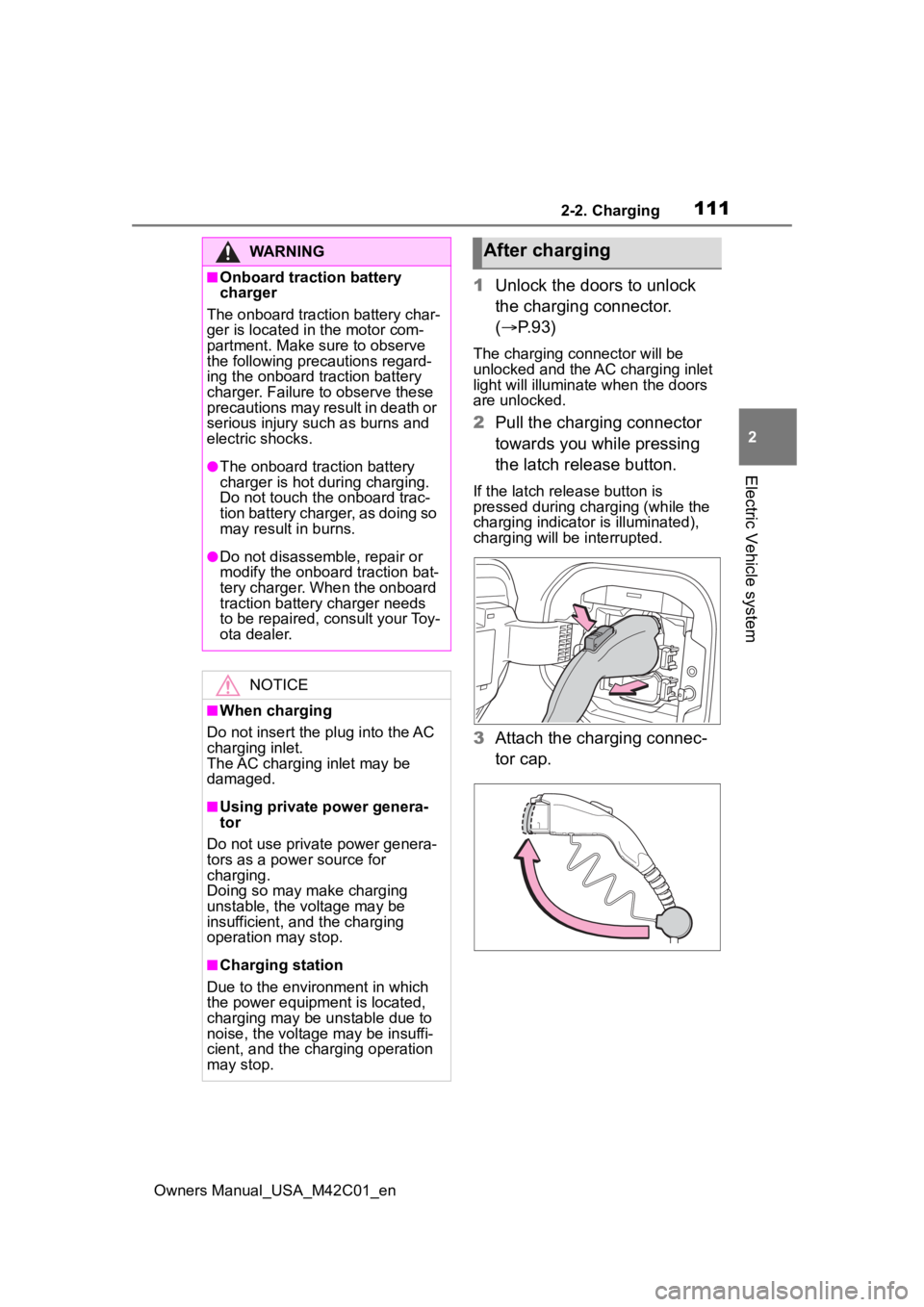
1 Unlock the doors to unlock
the charging connector.
( P.93)
The charging connector will be
unlocked and the AC charging inlet
light will illuminate when the doors
are unlocked.
2Pull the charging connector
towards you while pressing
the latch release button.
If the latch release button is
pressed during charging (while the
charging indicator is illuminated),
charging will be interrupted.
3 Attach the charging connec-
tor cap.
WARNING
■Onboard traction battery
charger
The onboard traction battery char-
ger is located in the motor com-
partment. Make sure to observe
the following precautions regard-
ing the onboard traction battery
charger. Failure to observe these
precautions may result in death or
serious injury suc h as burns and
electric shocks.
●The onboard traction battery
charger is hot during charging.
Do not touch the onboard trac-
tion battery charger, as doing so
may result in burns.
●Do not disassemble, repair or
modify the onboard traction bat-
tery charger. When the onboard
traction battery charger needs
to be repaired, consult your Toy-
ota dealer.
NOTICE
■When charging
Do not insert the p lug into the AC
charging inlet.
The AC charging inlet may be
damaged.
■Using private power genera-
tor
Do not use private power genera-
tors as a power source for
charging.
Doing so may make charging
unstable, the voltage may be
insufficient, and the charging
operation may stop.
■Charging station
Due to the environment in which
the power equipme nt is located,
charging may be unstable due to
noise, the voltage may be insuffi-
cient, and the charging operation
may stop.
After charging