Reverse SUBARU TRIBECA 2009 1.G Service Owners Manual
[x] Cancel search | Manufacturer: SUBARU, Model Year: 2009, Model line: TRIBECA, Model: SUBARU TRIBECA 2009 1.GPages: 2453, PDF Size: 46.32 MB
Page 369 of 2453
AC-43
Ambient Sensor (Auto A/C Model)
HVAC SYSTEM (HEATER, VENTILATOR AND A/C)
22.Ambient Sensor (Auto A/C
Model)
A: REMOVAL
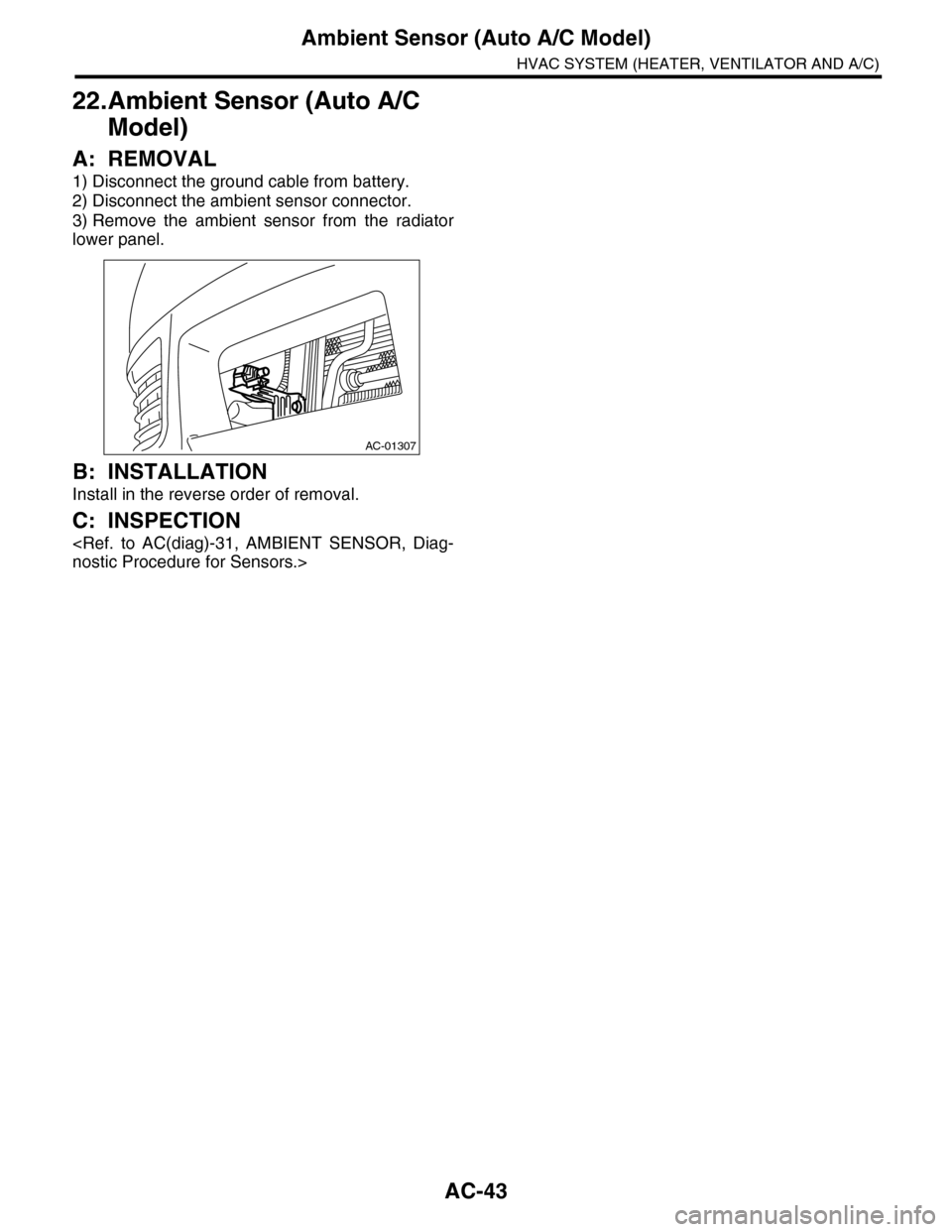
1) Disconnect the ground cable from battery.
2) Disconnect the ambient sensor connector.
3) Remove the ambient sensor from the radiator
lower panel.
B: INSTALLATION
Install in the reverse order of removal.
C: INSPECTION
AC-01307
Page 370 of 2453
AC-44
Sunload Sensor (Auto A/C Model)
HVAC SYSTEM (HEATER, VENTILATOR AND A/C)
23.Sunload Sensor (Auto A/C
Model)
A: REMOVAL
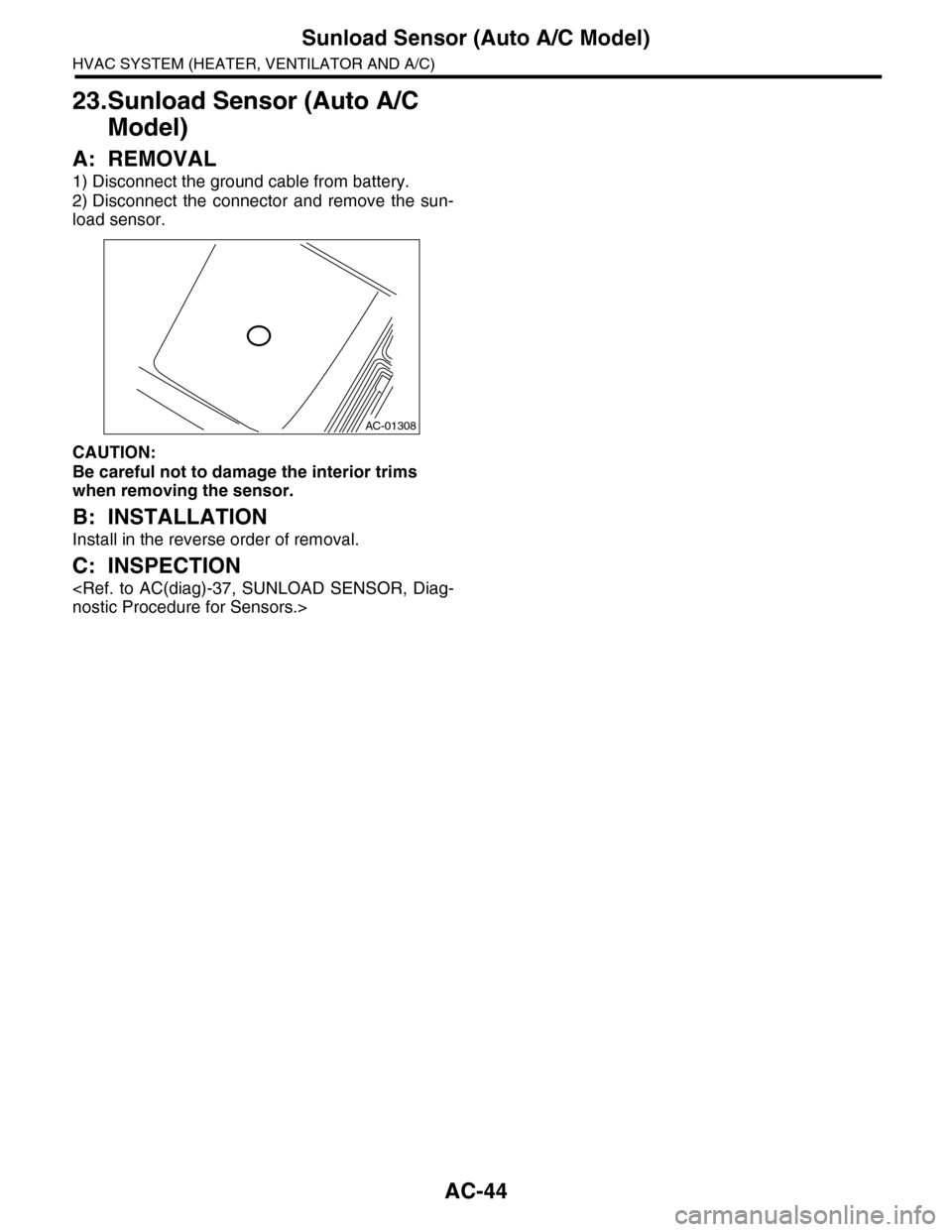
1) Disconnect the ground cable from battery.
2) Disconnect the connector and remove the sun-
load sensor.
CAUTION:
Be careful not to damage the interior trims
when removing the sensor.
B: INSTALLATION
Install in the reverse order of removal.
C: INSPECTION
AC-01308
Page 371 of 2453
AC-45
In-vehicle Sensor (Auto A/C Model)
HVAC SYSTEM (HEATER, VENTILATOR AND A/C)
24.In-vehicle Sensor (Auto A/C
Model)
A: REMOVAL
1) Disconnect the ground cable from battery.
2) Remove the instrument panel lower panel on
driver’s side.
3) Disconnect the connector and aspirator hose,
remove the catch hook and remove the interior
temperature sensor from the knee guard plate.
CAUTION:
Be careful not to damage the sensors and inte-
rior trim when removing.
B: INSTALLATION
Install in the reverse order of removal.
C: INSPECTION
Page 372 of 2453
AC-46
Air Vent Grille
HVAC SYSTEM (HEATER, VENTILATOR AND A/C)
25.Air Vent Grille
A: REMOVAL
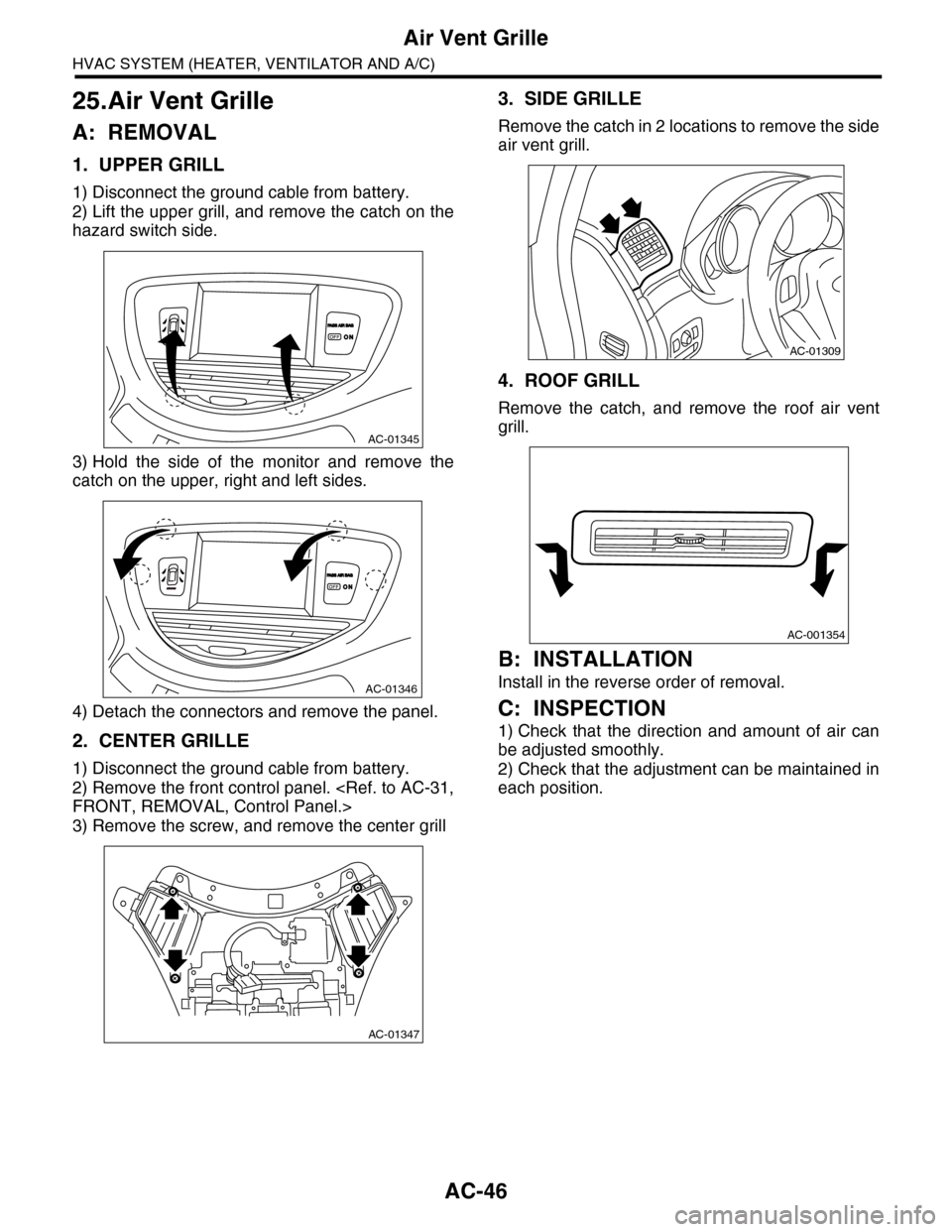
1. UPPER GRILL
1) Disconnect the ground cable from battery.
2) Lift the upper grill, and remove the catch on the
hazard switch side.
3) Hold the side of the monitor and remove the
catch on the upper, right and left sides.
4) Detach the connectors and remove the panel.
2. CENTER GRILLE
1) Disconnect the ground cable from battery.
2) Remove the front control panel.
3) Remove the screw, and remove the center grill
3. SIDE GRILLE
Remove the catch in 2 locations to remove the side
air vent grill.
4. ROOF GRILL
Remove the catch, and remove the roof air vent
grill.
B: INSTALLATION
Install in the reverse order of removal.
C: INSPECTION
1) Check that the direction and amount of air can
be adjusted smoothly.
2) Check that the adjustment can be maintained in
each position.
AC-01345
AC-01346
AC-01347
AC-01309
AC-001354
Page 373 of 2453
AC-47
Heater Duct
HVAC SYSTEM (HEATER, VENTILATOR AND A/C)
26.Heater Duct
A: REMOVAL
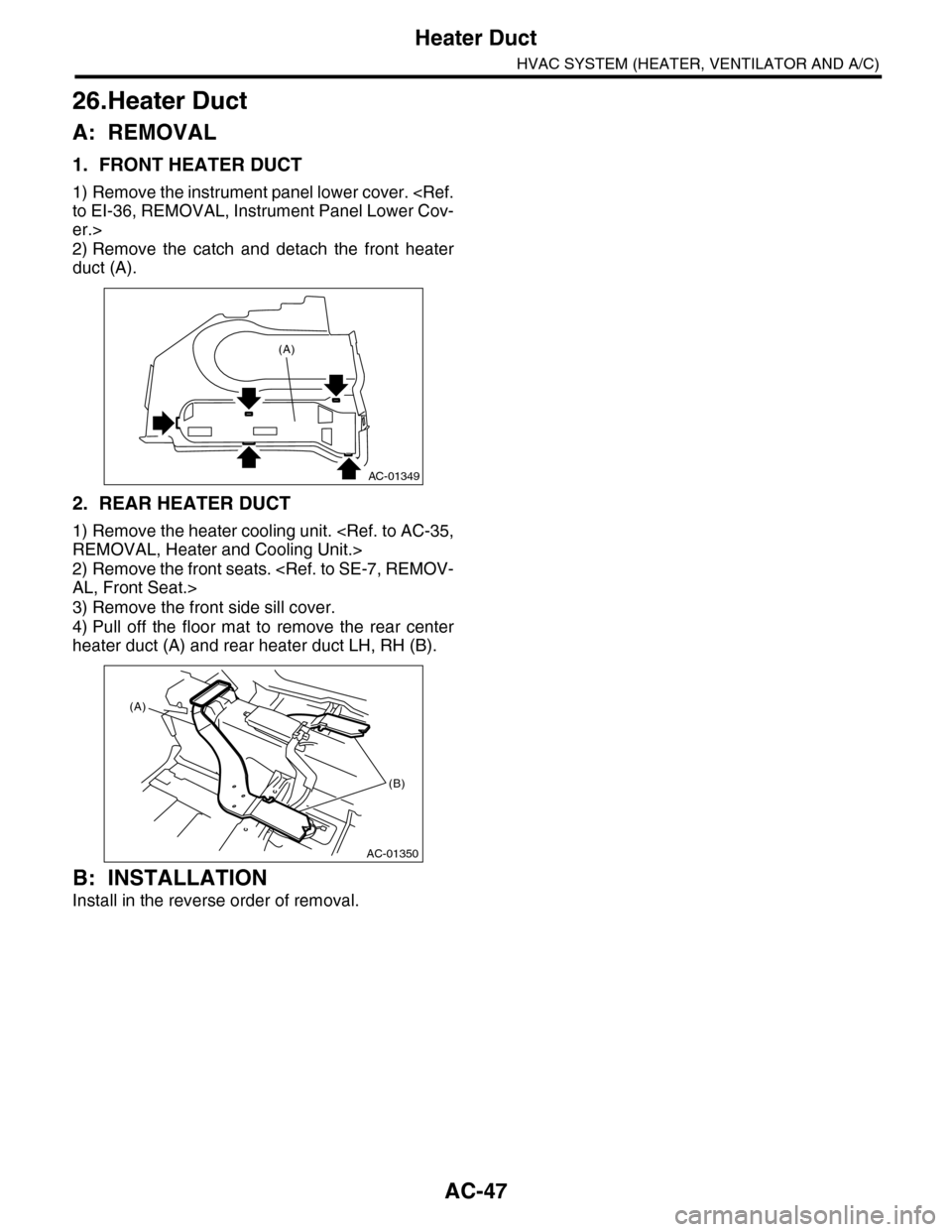
1. FRONT HEATER DUCT
1) Remove the instrument panel lower cover.
er.>
2) Remove the catch and detach the front heater
duct (A).
2. REAR HEATER DUCT
1) Remove the heater cooling unit.
2) Remove the front seats.
3) Remove the front side sill cover.
4) Pull off the floor mat to remove the rear center
heater duct (A) and rear heater duct LH, RH (B).
B: INSTALLATION
Install in the reverse order of removal.
AC-01349
(A)
AC-01350
(A)
(B)
Page 374 of 2453
AC-48
Heater Vent Duct
HVAC SYSTEM (HEATER, VENTILATOR AND A/C)
27.Heater Vent Duct
A: REMOVAL
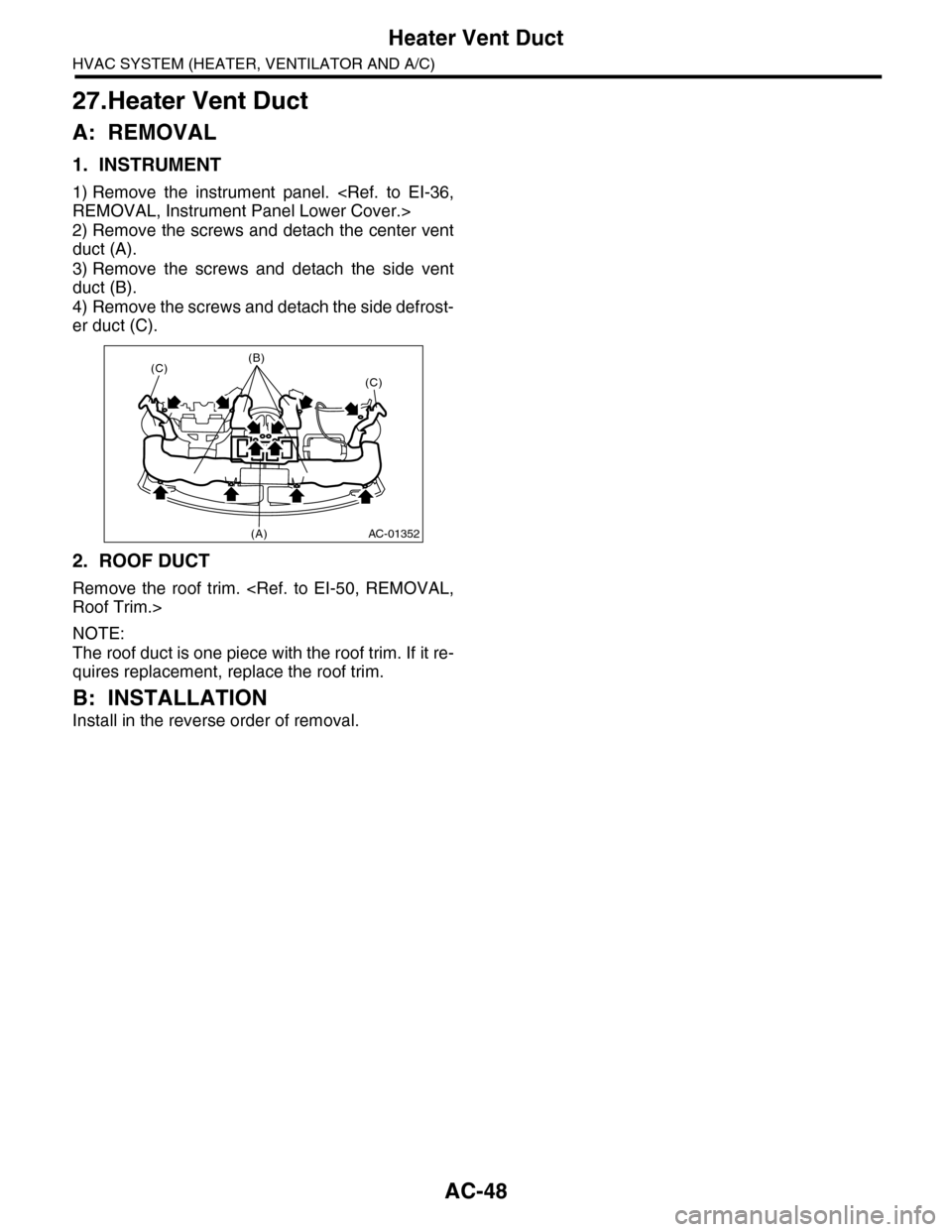
1. INSTRUMENT
1) Remove the instrument panel.
2) Remove the screws and detach the center vent
duct (A).
3) Remove the screws and detach the side vent
duct (B).
4) Remove the screws and detach the side defrost-
er duct (C).
2. ROOF DUCT
Remove the roof trim.
NOTE:
The roof duct is one piece with the roof trim. If it re-
quires replacement, replace the roof trim.
B: INSTALLATION
Install in the reverse order of removal.
AC-01352
(C)(B)
(C)
(A)
Page 375 of 2453
AC-49
A/C Filter
HVAC SYSTEM (HEATER, VENTILATOR AND A/C)
28.A/C Filter
A: REPLACEMENT
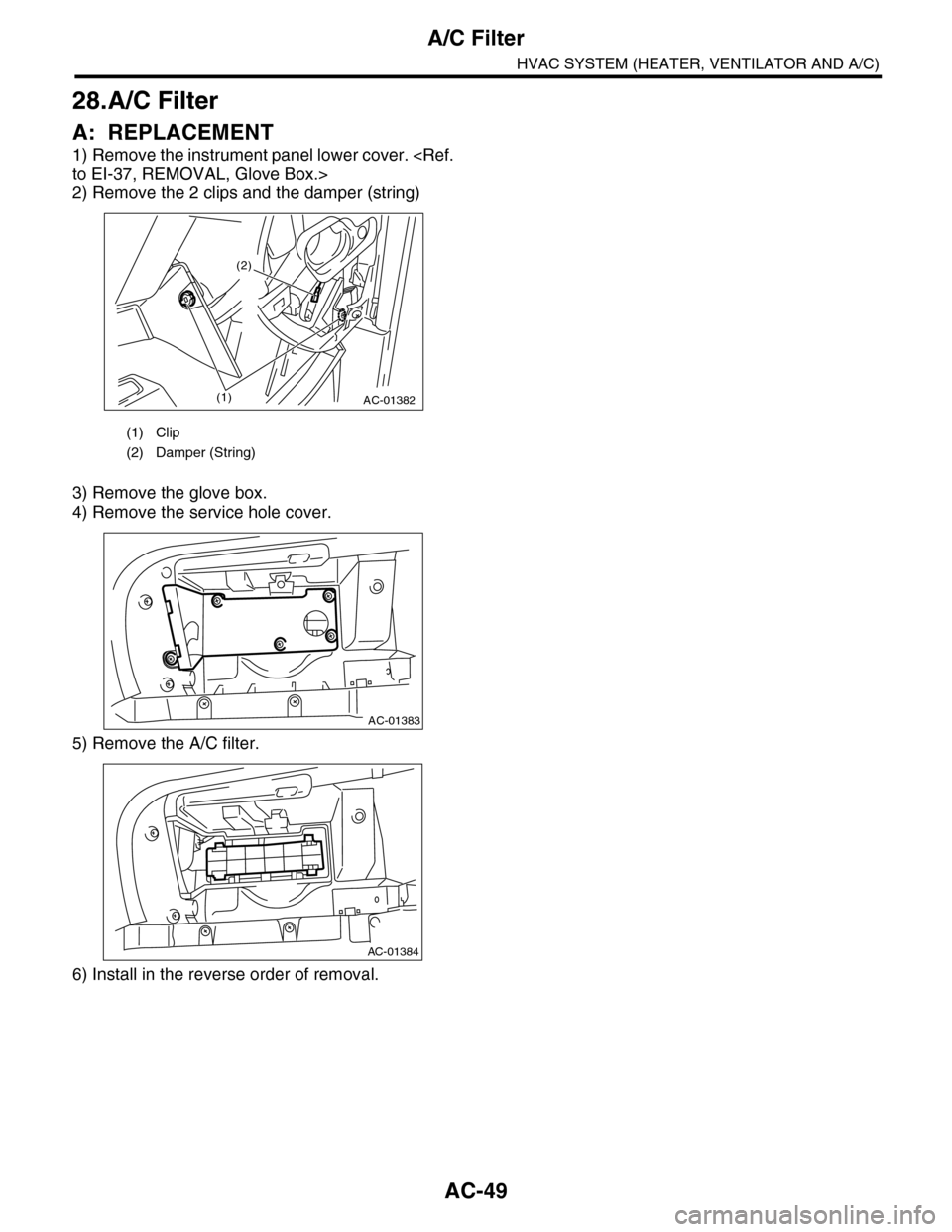
1) Remove the instrument panel lower cover.
2) Remove the 2 clips and the damper (string)
3) Remove the glove box.
4) Remove the service hole cover.
5) Remove the A/C filter.
6) Install in the reverse order of removal.
(1) Clip
(2) Damper (String)
AC-01382(1)
(2)
AC-01383
AC-01384
Page 380 of 2453
AC(diag)-3
General Description
HVAC SYSTEM (AUTO A/C) (DIAGNOSTICS)
2. General Description
A: CAUTION
1) Never connect the battery in reverse polarity.
•Auto A/C control module may be destroyed in-
stantly.
2) Do not disconnect the battery terminals while the
engine is running.
•A large counter electromotive force will be gener-
ated in the generator, and this voltage may damage
electronic parts such as auto A/C control module
etc.
3) Before disconnecting the connectors of each
sensor and the auto A/C control module, be sure to
turn the ignition switch to OFF.
•Auto A/C control module may be damaged.
4) Every A/C-related part is a precision part. Do not
drop them.
5) Airbag system wiring harness is routed near the
A/C control panel and junction box.
CAUTION:
•For airbag system, yellow-colored wiring har-
ness and connectors are all used. Do not use
the electrical test equipment on these circuits.
•Be careful not to damage the airbag system
wiring harness when servicing the A/C control
panel and junction box.
B: INSPECTION
Before performing the diagnosis, check the follow-
ing items which might affect A/C system problems.
1. BATTERY
1) Measure the battery voltage and specific gravity
of electrolyte.
Standard voltage: 12 V
Specific gravity: 1.260 or more
2) Check the condition of the fuses for A/C system
power supply and other fuses.
3) Check the condition of harness and harness
connector connections.
2. ASPIRATOR HOSE
1) Turn the ignition switch to ON, and press the A/
C switch.
2) Turn the temperature control dial to maximum
hot position.
3) Turn the air flow control dial to “DEF” position.
4) Turn the fan speed control dial to 4th position.
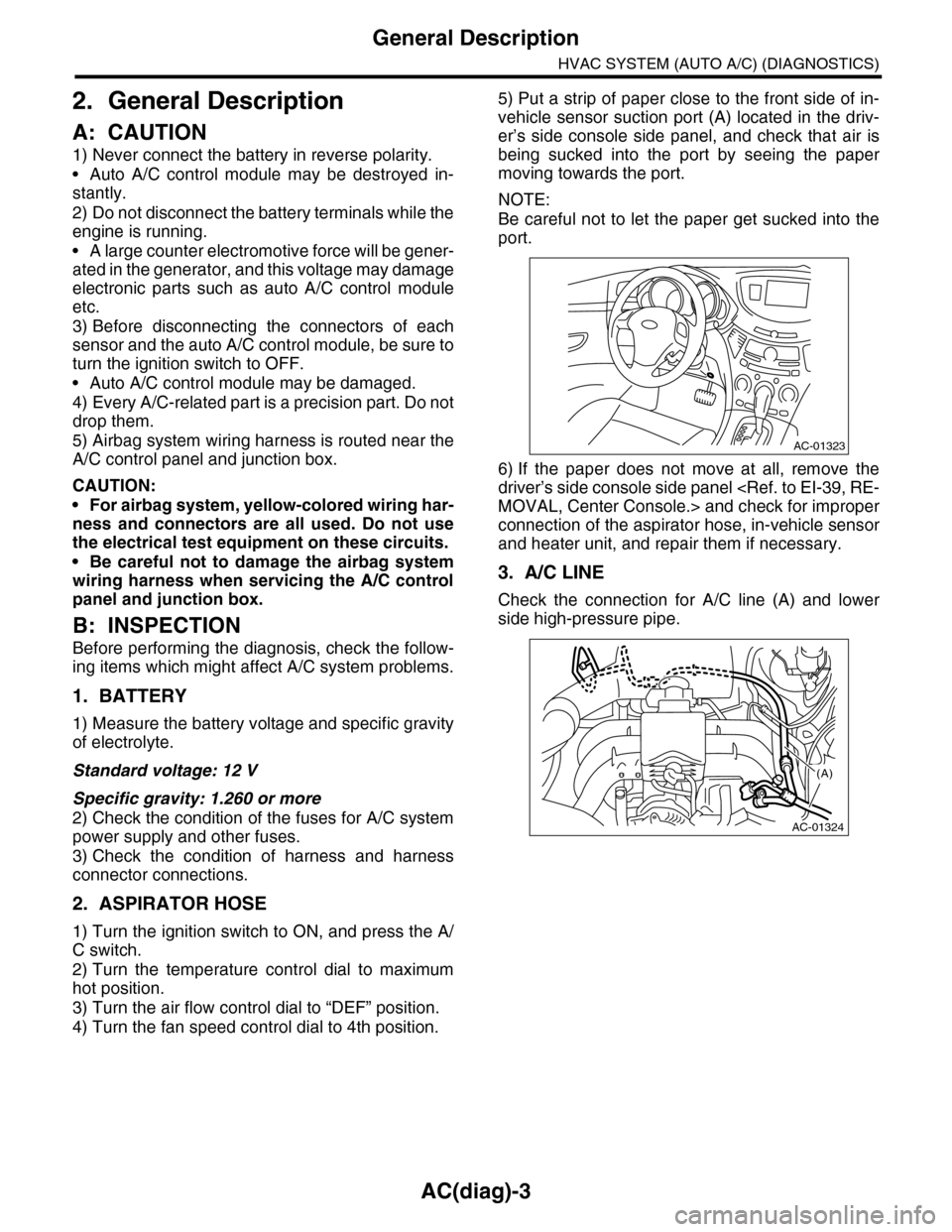
5) Put a strip of paper close to the front side of in-
vehicle sensor suction port (A) located in the driv-
er’s side console side panel, and check that air is
being sucked into the port by seeing the paper
moving towards the port.
NOTE:
Be careful not to let the paper get sucked into the
port.
6) If the paper does not move at all, remove the
driver’s side console side panel
connection of the aspirator hose, in-vehicle sensor
and heater unit, and repair them if necessary.
3. A/C LINE
Check the connection for A/C line (A) and lower
side high-pressure pipe.
AC-01323
AC-01324
(A)
Page 381 of 2453
AC(diag)-4
General Description
HVAC SYSTEM (AUTO A/C) (DIAGNOSTICS)
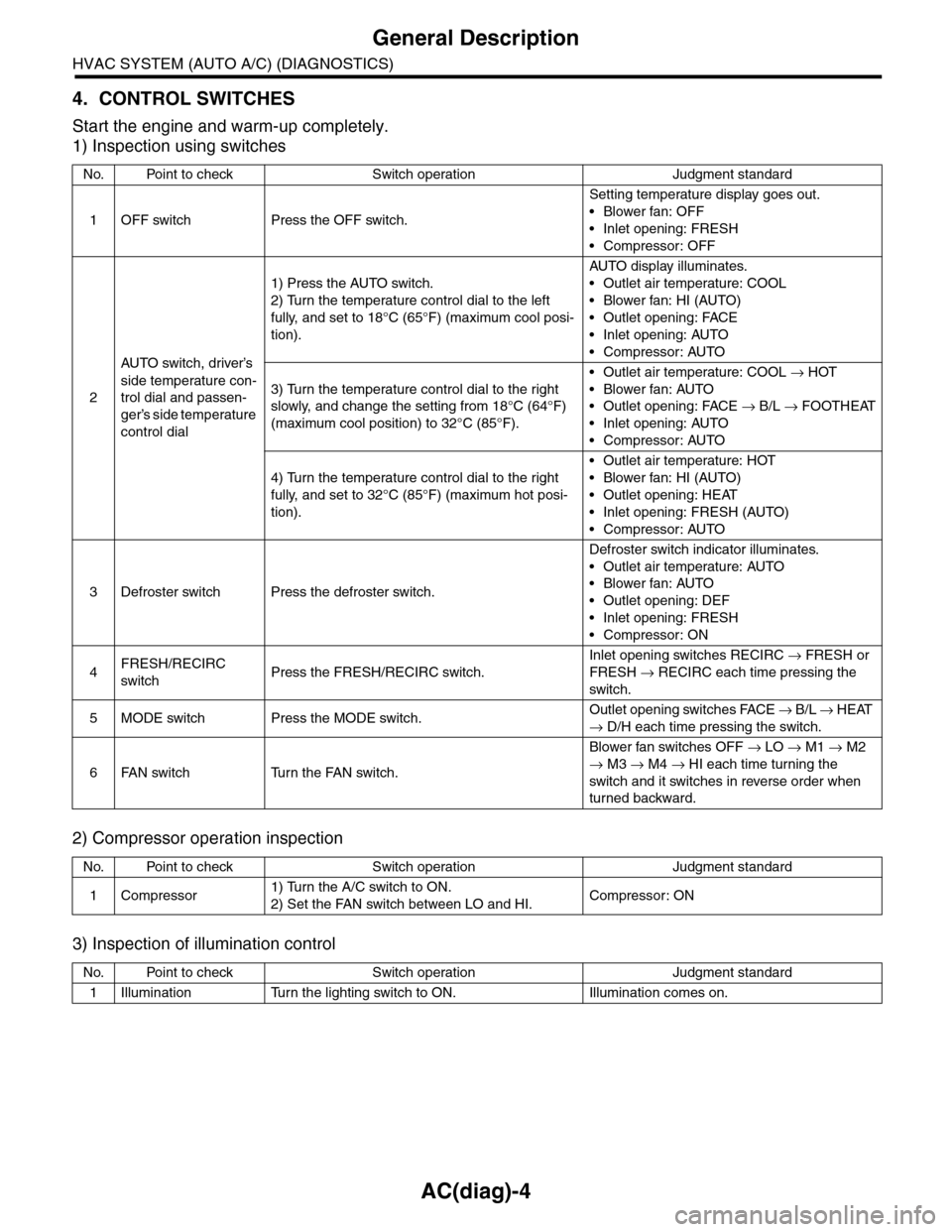
4. CONTROL SWITCHES
Start the engine and warm-up completely.
1) Inspection using switches
2) Compressor operation inspection
3) Inspection of illumination control
No. Point to check Switch operation Judgment standard
1OFF switch Press the OFF switch.
Setting temperature display goes out.
•Blower fan: OFF
•Inlet opening: FRESH
•Compressor: OFF
2
AU TO sw it c h, d r iver ’s
side temperature con-
trol dial and passen-
ger’s side temperature
control dial
1) Press the AUTO switch.
2) Turn the temperature control dial to the left
fully, and set to 18°C (65°F) (maximum cool posi-
tion).
AU TO di sp l ay i l lu mi n at e s.
•Outlet air temperature: COOL
•Blower fan: HI (AUTO)
•Outlet opening: FACE
•Inlet opening: AUTO
•Compressor: AUTO
3) Turn the temperature control dial to the right
slowly, and change the setting from 18°C (64°F)
(maximum cool position) to 32°C (85°F).
•Outlet air temperature: COOL → HOT
•Blower fan: AUTO
•Outlet opening: FACE → B/L → FOOTHEAT
•Inlet opening: AUTO
•Compressor: AUTO
4) Turn the temperature control dial to the right
fully, and set to 32°C (85°F) (maximum hot posi-
tion).
•Outlet air temperature: HOT
•Blower fan: HI (AUTO)
•Outlet opening: HEAT
•Inlet opening: FRESH (AUTO)
•Compressor: AUTO
3Defroster switch Press the defroster switch.
Defroster switch indicator illuminates.
•Outlet air temperature: AUTO
•Blower fan: AUTO
•Outlet opening: DEF
•Inlet opening: FRESH
•Compressor: ON
4FRESH/RECIRC
switchPress the FRESH/RECIRC switch.
Inlet opening switches RECIRC → FRESH or
FRESH → RECIRC each time pressing the
switch.
5MODE switch Press the MODE switch.Outlet opening switches FACE → B / L → HEAT
→ D/H each time pressing the switch.
6FAN switch Turn the FAN switch.
Blower fan switches OFF → LO → M1 → M2
→ M3 → M4 → HI each time turning the
switch and it switches in reverse order when
turned backward.
No. Point to check Switch operation Judgment standard
1Compressor1) Turn the A/C switch to ON.
2) Set the FAN switch between LO and HI.Compressor: ON
No. Point to check Switch operation Judgment standard
1Illumination Turn the lighting switch to ON. Illumination comes on.
Page 382 of 2453
AC(diag)-5
General Description
HVAC SYSTEM (AUTO A/C) (DIAGNOSTICS)
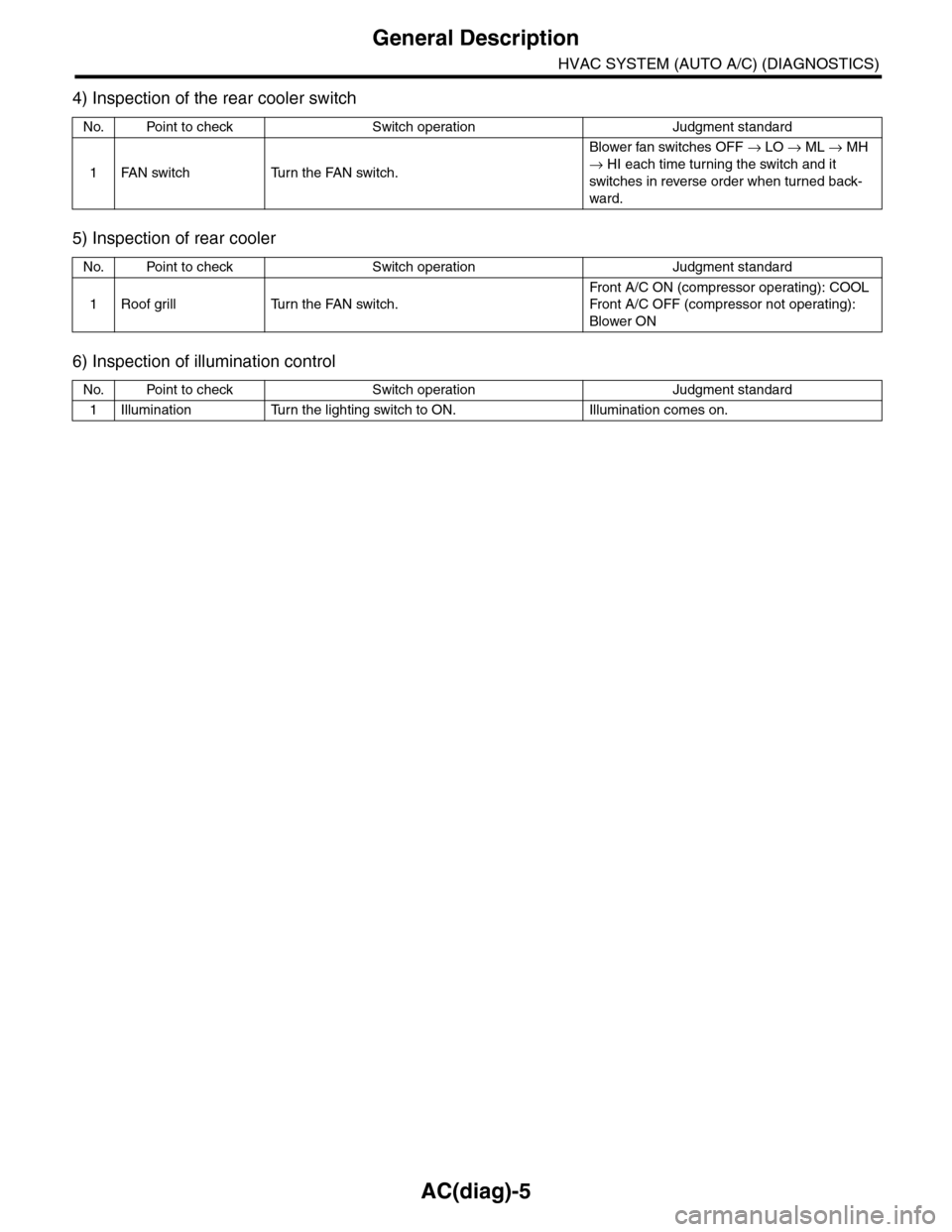
4) Inspection of the rear cooler switch
5) Inspection of rear cooler
6) Inspection of illumination control
No. Point to check Switch operation Judgment standard
1FAN switch Turn the FAN switch.
Blower fan switches OFF → LO → ML → MH
→ HI each time turning the switch and it
switches in reverse order when turned back-
ward.
No. Point to check Switch operation Judgment standard
1Roof grill Turn the FAN switch.
Fr on t A / C O N ( co mp r es so r op e rat i ng ) : COOL
Fr on t A / C O FF ( co mp r e ss or n ot o pe ra t in g) :
Blower ON
No. Point to check Switch operation Judgment standard
1Illumination Turn the lighting switch to ON. Illumination comes on.