harness SUBARU TRIBECA 2009 1.G Service Workshop Manual
[x] Cancel search | Manufacturer: SUBARU, Model Year: 2009, Model line: TRIBECA, Model: SUBARU TRIBECA 2009 1.GPages: 2453, PDF Size: 46.32 MB
Page 429 of 2453
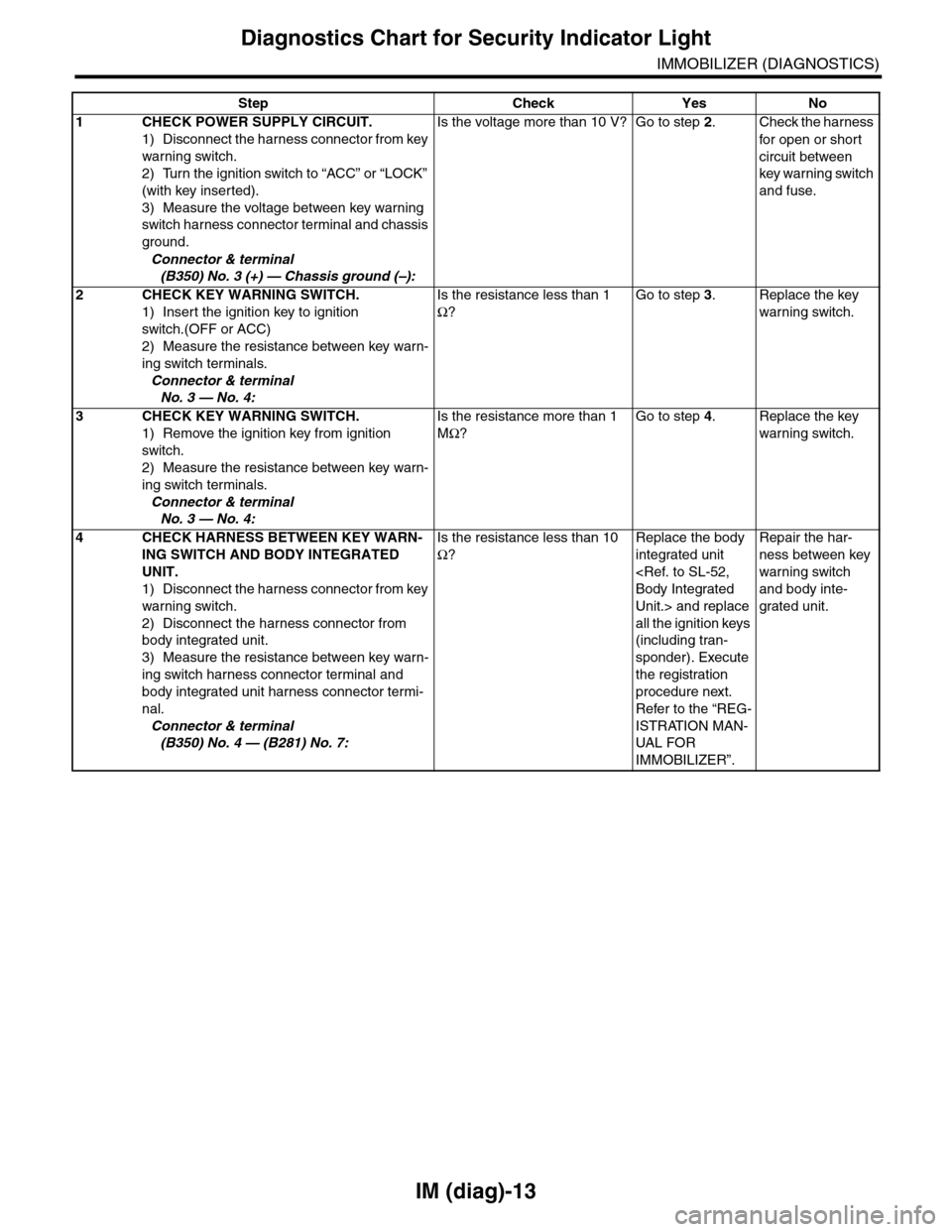
IM (diag)-13
Diagnostics Chart for Security Indicator Light
IMMOBILIZER (DIAGNOSTICS)
Step Check Yes No
1CHECK POWER SUPPLY CIRCUIT.
1) Disconnect the harness connector from key
warning switch.
2) Turn the ignition switch to “ACC” or “LOCK”
(with key inserted).
3) Measure the voltage between key warning
switch harness connector terminal and chassis
ground.
Connector & terminal
(B350) No. 3 (+) — Chassis ground (–):
Is the voltage more than 10 V? Go to step 2.Check the harness
for open or shor t
circuit between
key warning switch
and fuse.
2 CHECK KEY WARNING SWITCH.
1) Insert the ignition key to ignition
switch.(OFF or ACC)
2) Measure the resistance between key warn-
ing switch terminals.
Connector & terminal
No. 3 — No. 4:
Is the resistance less than 1
Ω?
Go to step 3.Replace the key
warning switch.
3 CHECK KEY WARNING SWITCH.
1) Remove the ignition key from ignition
switch.
2) Measure the resistance between key warn-
ing switch terminals.
Connector & terminal
No. 3 — No. 4:
Is the resistance more than 1
MΩ?
Go to step 4.Replace the key
warning switch.
4CHECK HARNESS BETWEEN KEY WARN-
ING SWITCH AND BODY INTEGRATED
UNIT.
1) Disconnect the harness connector from key
warning switch.
2) Disconnect the harness connector from
body integrated unit.
3) Measure the resistance between key warn-
ing switch harness connector terminal and
body integrated unit harness connector termi-
nal.
Connector & terminal
(B350) No. 4 — (B281) No. 7:
Is the resistance less than 10
Ω?
Replace the body
integrated unit
Unit.> and replace
all the ignition keys
(including tran-
sponder). Execute
the registration
procedure next.
Refer to the “REG-
ISTRATION MAN-
UAL FO R
IMMOBILIZER”.
Repair the har-
ness between key
warning switch
and body inte-
grated unit.
Page 434 of 2453
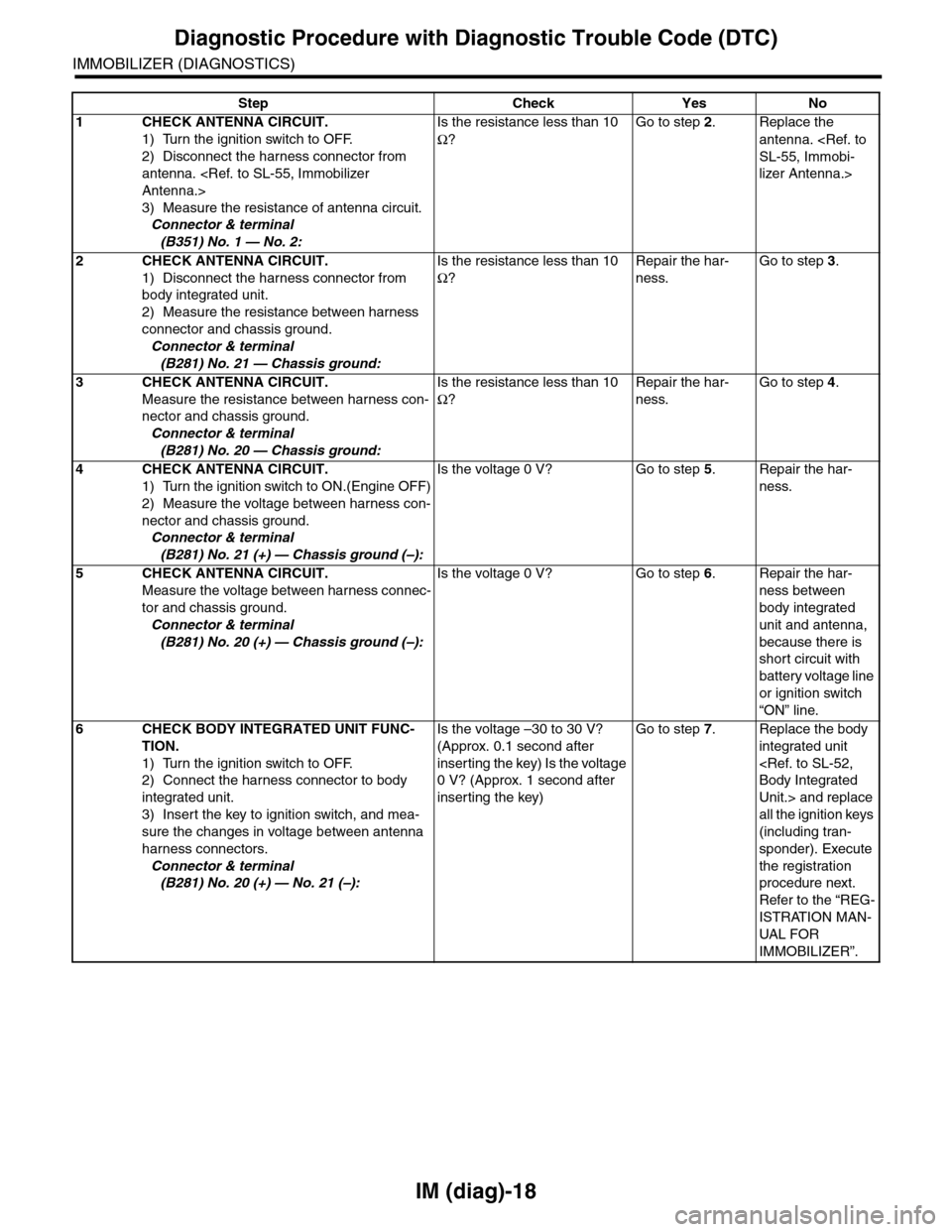
IM (diag)-18
Diagnostic Procedure with Diagnostic Trouble Code (DTC)
IMMOBILIZER (DIAGNOSTICS)
Step Check Yes No
1CHECK ANTENNA CIRCUIT.
1) Turn the ignition switch to OFF.
2) Disconnect the harness connector from
antenna.
3) Measure the resistance of antenna circuit.
Connector & terminal
(B351) No. 1 — No. 2:
Is the resistance less than 10
Ω?
Go to step 2.Replace the
antenna.
lizer Antenna.>
2CHECK ANTENNA CIRCUIT.
1) Disconnect the harness connector from
body integrated unit.
2) Measure the resistance between harness
connector and chassis ground.
Connector & terminal
(B281) No. 21 — Chassis ground:
Is the resistance less than 10
Ω?
Repair the har-
ness.
Go to step 3.
3CHECK ANTENNA CIRCUIT.
Measure the resistance between harness con-
nector and chassis ground.
Connector & terminal
(B281) No. 20 — Chassis ground:
Is the resistance less than 10
Ω?
Repair the har-
ness.
Go to step 4.
4CHECK ANTENNA CIRCUIT.
1) Turn the ignition switch to ON.(Engine OFF)
2) Measure the voltage between harness con-
nector and chassis ground.
Connector & terminal
(B281) No. 21 (+) — Chassis ground (–):
Is the voltage 0 V? Go to step 5.Repair the har-
ness.
5CHECK ANTENNA CIRCUIT.
Measure the voltage between harness connec-
tor and chassis ground.
Connector & terminal
(B281) No. 20 (+) — Chassis ground (–):
Is the voltage 0 V? Go to step 6.Repair the har-
ness between
body integrated
unit and antenna,
because there is
short circuit with
battery voltage line
or ignition switch
“ON” line.
6CHECK BODY INTEGRATED UNIT FUNC-
TION.
1) Turn the ignition switch to OFF.
2) Connect the harness connector to body
integrated unit.
3) Insert the key to ignition switch, and mea-
sure the changes in voltage between antenna
harness connectors.
Connector & terminal
(B281) No. 20 (+) — No. 21 (–):
Is the voltage –30 to 30 V?
(Approx. 0.1 second after
inserting the key) Is the voltage
0 V? (Approx. 1 second after
inserting the key)
Go to step 7.Replace the body
integrated unit
Unit.> and replace
all the ignition keys
(including tran-
sponder). Execute
the registration
procedure next.
Refer to the “REG-
ISTRATION MAN-
UAL FOR
IMMOBILIZER”.
Page 436 of 2453
IM (diag)-20
Diagnostic Procedure with Diagnostic Trouble Code (DTC)
IMMOBILIZER (DIAGNOSTICS)
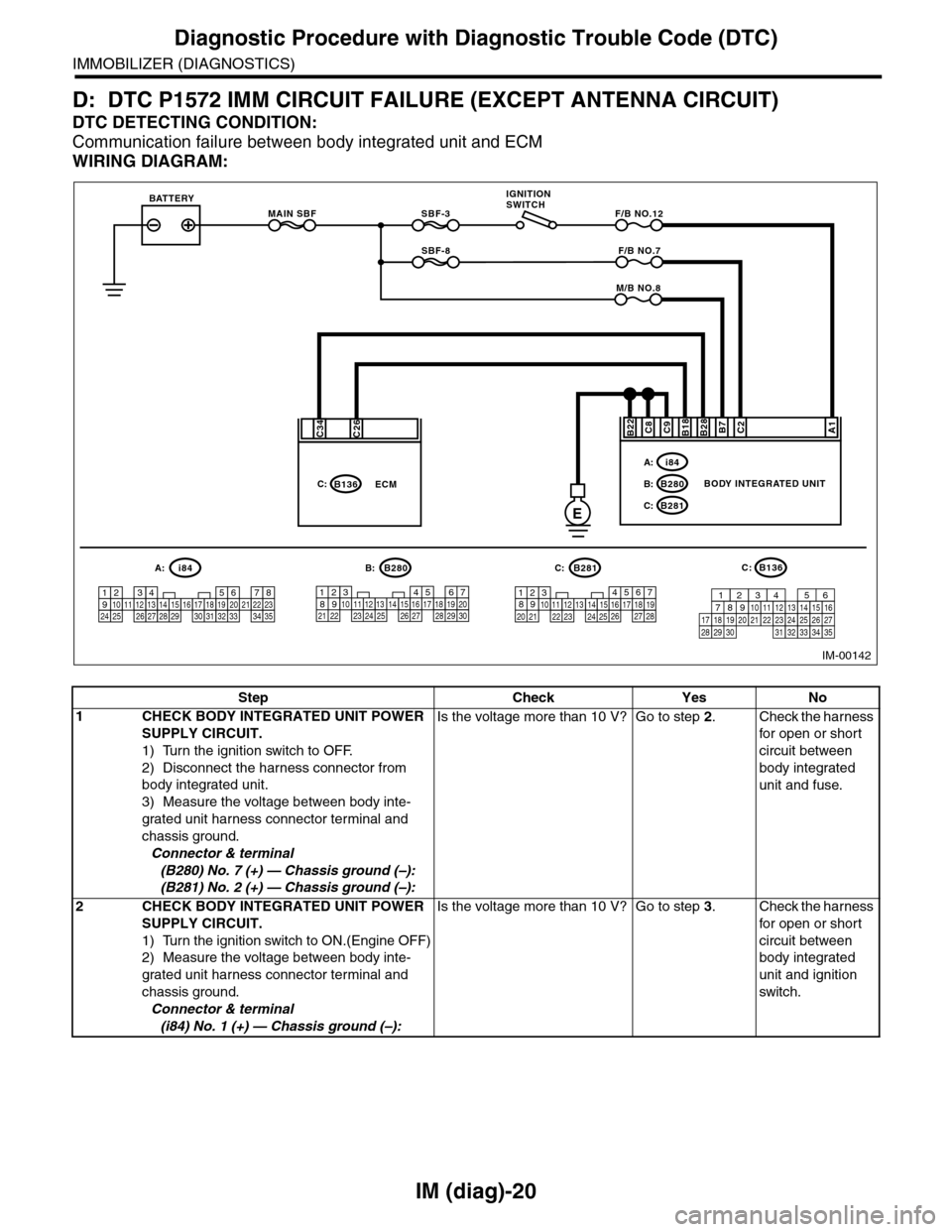
D: DTC P1572 IMM CIRCUIT FAILURE (EXCEPT ANTENNA CIRCUIT)
DTC DETECTING CONDITION:
Communication failure between body integrated unit and ECM
WIRING DIAGRAM:
MAIN SBF
SBF-8
SBF-3BATTERYF/B NO.12
IGNITIONSWITCH
A1B28B18C9C2B7C8
E
F/B NO.7
M/B NO.8
BODY INTEGRATED UNIT
i84A:
B280B:
B281C:
B22
567821943102422 23 25111213141526 27281617181920 21
B281i84
1234567891011121314151617181920212223242526272829303132333435
5467821931022 231112131415242526 2716171828 29192021 30
B280A:C:B:B136C:
C26C34
B136C:ECM
IM-00142
16101112131415252430
9871718192028212223293231
123456
2726333435
Step Check Yes No
1CHECK BODY INTEGRATED UNIT POWER
SUPPLY CIRCUIT.
1) Turn the ignition switch to OFF.
2) Disconnect the harness connector from
body integrated unit.
3) Measure the voltage between body inte-
grated unit harness connector terminal and
chassis ground.
Connector & terminal
(B280) No. 7 (+) — Chassis ground (–):
(B281) No. 2 (+) — Chassis ground (–):
Is the voltage more than 10 V? Go to step 2.Check the harness
for open or shor t
circuit between
body integrated
unit and fuse.
2CHECK BODY INTEGRATED UNIT POWER
SUPPLY CIRCUIT.
1) Turn the ignition switch to ON.(Engine OFF)
2) Measure the voltage between body inte-
grated unit harness connector terminal and
chassis ground.
Connector & terminal
(i84) No. 1 (+) — Chassis ground (–):
Is the voltage more than 10 V? Go to step 3.Check the harness
for open or shor t
circuit between
body integrated
unit and ignition
switch.
Page 437 of 2453
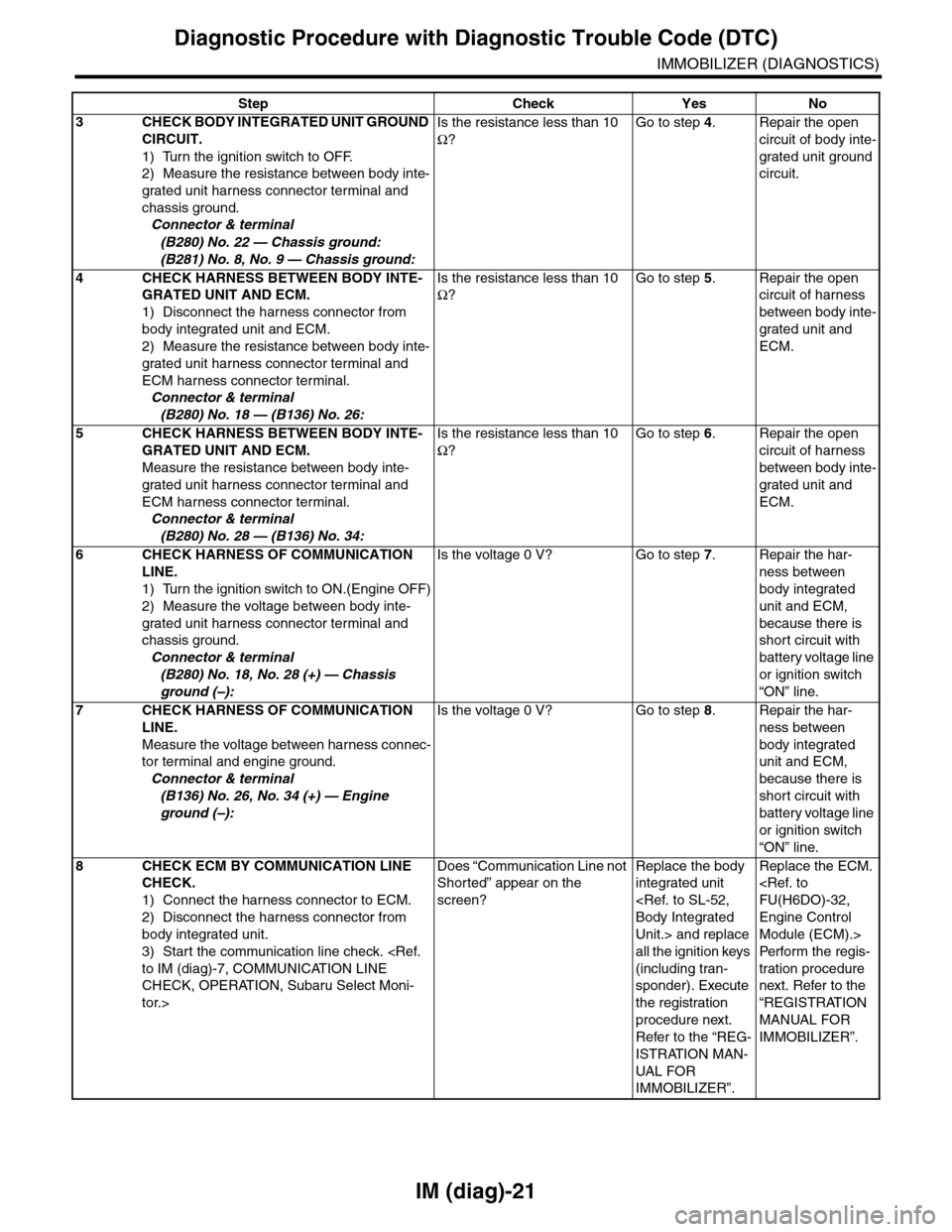
IM (diag)-21
Diagnostic Procedure with Diagnostic Trouble Code (DTC)
IMMOBILIZER (DIAGNOSTICS)
3CHECK BODY INTEGRATED UNIT GROUND
CIRCUIT.
1) Turn the ignition switch to OFF.
2) Measure the resistance between body inte-
grated unit harness connector terminal and
chassis ground.
Connector & terminal
(B280) No. 22 — Chassis ground:
(B281) No. 8, No. 9 — Chassis ground:
Is the resistance less than 10
Ω?
Go to step 4.Repair the open
circuit of body inte-
grated unit ground
circuit.
4CHECK HARNESS BETWEEN BODY INTE-
GRATED UNIT AND ECM.
1) Disconnect the harness connector from
body integrated unit and ECM.
2) Measure the resistance between body inte-
grated unit harness connector terminal and
ECM harness connector terminal.
Connector & terminal
(B280) No. 18 — (B136) No. 26:
Is the resistance less than 10
Ω?
Go to step 5.Repair the open
circuit of harness
between body inte-
grated unit and
ECM.
5CHECK HARNESS BETWEEN BODY INTE-
GRATED UNIT AND ECM.
Measure the resistance between body inte-
grated unit harness connector terminal and
ECM harness connector terminal.
Connector & terminal
(B280) No. 28 — (B136) No. 34:
Is the resistance less than 10
Ω?
Go to step 6.Repair the open
circuit of harness
between body inte-
grated unit and
ECM.
6CHECK HARNESS OF COMMUNICATION
LINE.
1) Turn the ignition switch to ON.(Engine OFF)
2) Measure the voltage between body inte-
grated unit harness connector terminal and
chassis ground.
Connector & terminal
(B280) No. 18, No. 28 (+) — Chassis
ground (–):
Is the voltage 0 V? Go to step 7.Repair the har-
ness between
body integrated
unit and ECM,
because there is
short circuit with
battery voltage line
or ignition switch
“ON” line.
7CHECK HARNESS OF COMMUNICATION
LINE.
Measure the voltage between harness connec-
tor terminal and engine ground.
Connector & terminal
(B136) No. 26, No. 34 (+) — Engine
ground (–):
Is the voltage 0 V? Go to step 8.Repair the har-
ness between
body integrated
unit and ECM,
because there is
short circuit with
battery voltage line
or ignition switch
“ON” line.
8CHECK ECM BY COMMUNICATION LINE
CHECK.
1) Connect the harness connector to ECM.
2) Disconnect the harness connector from
body integrated unit.
3) Start the communication line check.
CHECK, OPERATION, Subaru Select Moni-
tor.>
Does “Communication Line not
Shorted” appear on the
screen?
Replace the body
integrated unit
Unit.> and replace
all the ignition keys
(including tran-
sponder). Execute
the registration
procedure next.
Refer to the “REG-
ISTRATION MAN-
UAL FO R
IMMOBILIZER”.
Replace the ECM.
Engine Control
Module (ECM).>
Per fo r m th e re g is -
tration procedure
next. Refer to the
“REGISTRATION
MANUAL FOR
IMMOBILIZER”.
Step Check Yes No
Page 446 of 2453
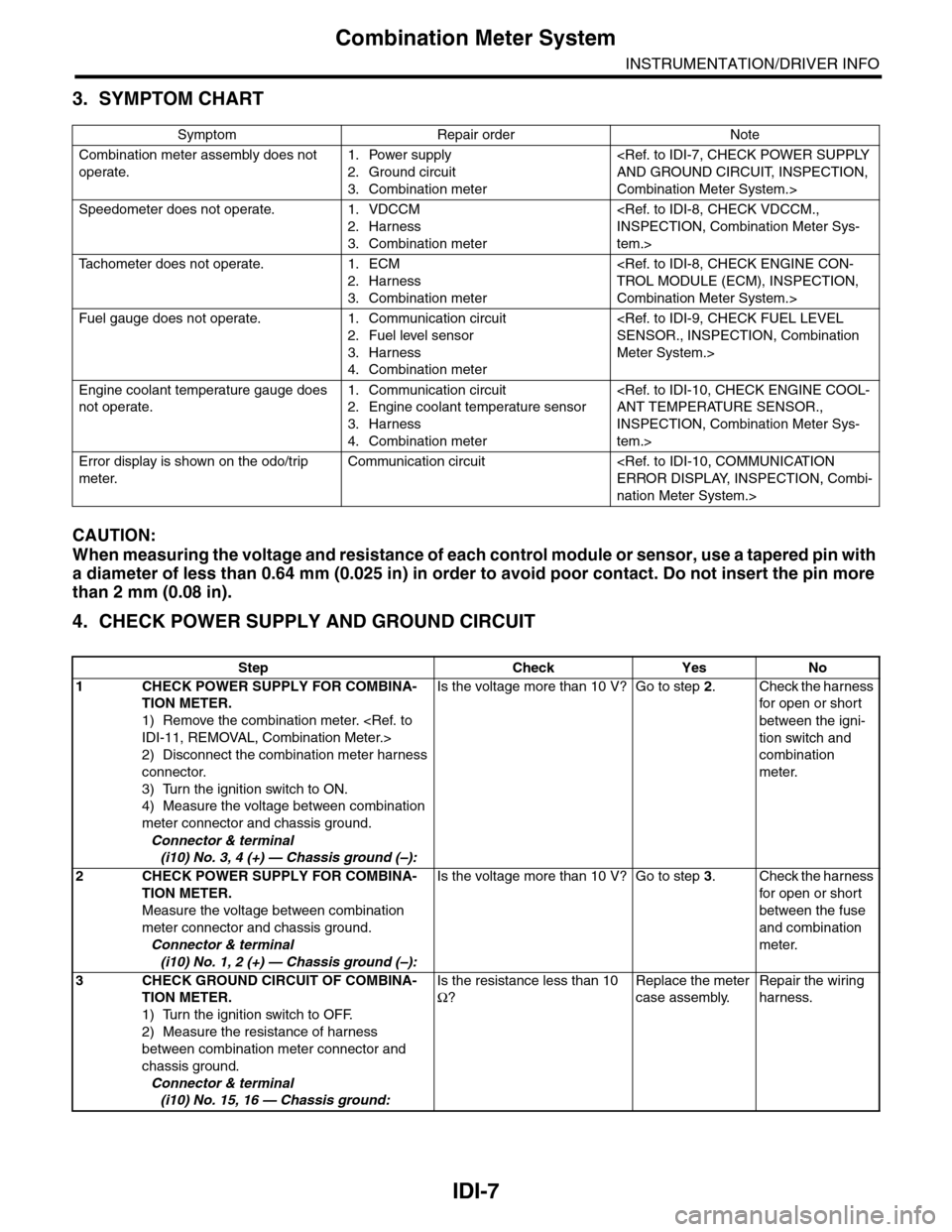
IDI-7
Combination Meter System
INSTRUMENTATION/DRIVER INFO
3. SYMPTOM CHART
CAUTION:
When measuring the voltage and resistance of each control module or sensor, use a tapered pin with
a diameter of less than 0.64 mm (0.025 in) in order to avoid poor contact. Do not insert the pin more
than 2 mm (0.08 in).
4. CHECK POWER SUPPLY AND GROUND CIRCUIT
Symptom Repair order Note
Combination meter assembly does not
operate.
1. Power supply
2. Ground circuit
3. Combination meter
Combination Meter System.>
Speedometer does not operate. 1. VDCCM
2. Harness
3. Combination meter
tem.>
Ta c h o m e t e r d o e s n o t o p e r a t e . 1 . E C M
2. Harness
3. Combination meter
Combination Meter System.>
Fuel gauge does not operate. 1. Communication circuit
2. Fuel level sensor
3. Harness
4. Combination meter
Meter System.>
Engine coolant temperature gauge does
not operate.
1. Communication circuit
2. Engine coolant temperature sensor
3. Harness
4. Combination meter
INSPECTION, Combination Meter Sys-
tem.>
Error display is shown on the odo/trip
meter.
Communication circuit
nation Meter System.>
Step Check Yes No
1CHECK POWER SUPPLY FOR COMBINA-
TION METER.
1) Remove the combination meter.
2) Disconnect the combination meter harness
connector.
3) Turn the ignition switch to ON.
4) Measure the voltage between combination
meter connector and chassis ground.
Connector & terminal
(i10) No. 3, 4 (+) — Chassis ground (–):
Is the voltage more than 10 V? Go to step 2.Check the harness
for open or shor t
between the igni-
tion switch and
combination
meter.
2CHECK POWER SUPPLY FOR COMBINA-
TION METER.
Measure the voltage between combination
meter connector and chassis ground.
Connector & terminal
(i10) No. 1, 2 (+) — Chassis ground (–):
Is the voltage more than 10 V? Go to step 3.Check the harness
for open or shor t
between the fuse
and combination
meter.
3CHECK GROUND CIRCUIT OF COMBINA-
TION METER.
1) Turn the ignition switch to OFF.
2) Measure the resistance of harness
between combination meter connector and
chassis ground.
Connector & terminal
(i10) No. 15, 16 — Chassis ground:
Is the resistance less than 10
Ω?
Replace the meter
case assembly.
Repair the wiring
harness.
Page 447 of 2453
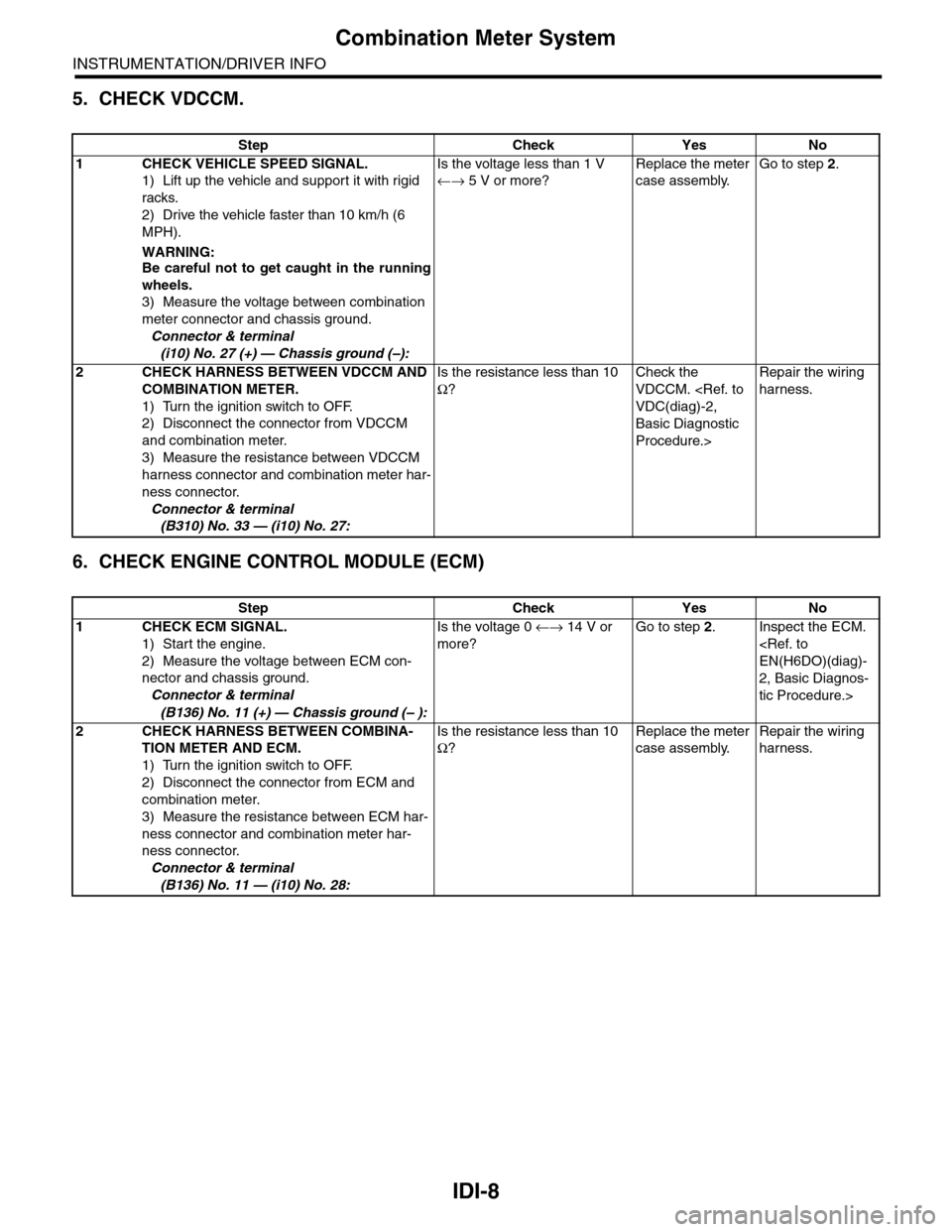
IDI-8
Combination Meter System
INSTRUMENTATION/DRIVER INFO
5. CHECK VDCCM.
6. CHECK ENGINE CONTROL MODULE (ECM)
Step Check Yes No
1CHECK VEHICLE SPEED SIGNAL.
1) Lift up the vehicle and support it with rigid
racks.
2) Drive the vehicle faster than 10 km/h (6
MPH).
WARNING:Be careful not to get caught in the running
wheels.
3) Measure the voltage between combination
meter connector and chassis ground.
Connector & terminal
(i10) No. 27 (+) — Chassis ground (–):
Is the voltage less than 1 V
←→ 5 V or more?
Replace the meter
case assembly.
Go to step 2.
2CHECK HARNESS BETWEEN VDCCM AND
COMBINATION METER.
1) Turn the ignition switch to OFF.
2) Disconnect the connector from VDCCM
and combination meter.
3) Measure the resistance between VDCCM
harness connector and combination meter har-
ness connector.
Connector & terminal
(B310) No. 33 — (i10) No. 27:
Is the resistance less than 10
Ω?
Check the
VDCCM.
Basic Diagnostic
Procedure.>
Repair the wiring
harness.
Step Check Yes No
1CHECK ECM SIGNAL.
1) Start the engine.
2) Measure the voltage between ECM con-
nector and chassis ground.
Connector & terminal
(B136) No. 11 (+) — Chassis ground (– ):
Is the voltage 0 ←→ 14 V or
more?
Go to step 2.Inspect the ECM.
2, Basic Diagnos-
tic Procedure.>
2CHECK HARNESS BETWEEN COMBINA-
TION METER AND ECM.
1) Turn the ignition switch to OFF.
2) Disconnect the connector from ECM and
combination meter.
3) Measure the resistance between ECM har-
ness connector and combination meter har-
ness connector.
Connector & terminal
(B136) No. 11 — (i10) No. 28:
Is the resistance less than 10
Ω?
Replace the meter
case assembly.
Repair the wiring
harness.
Page 448 of 2453
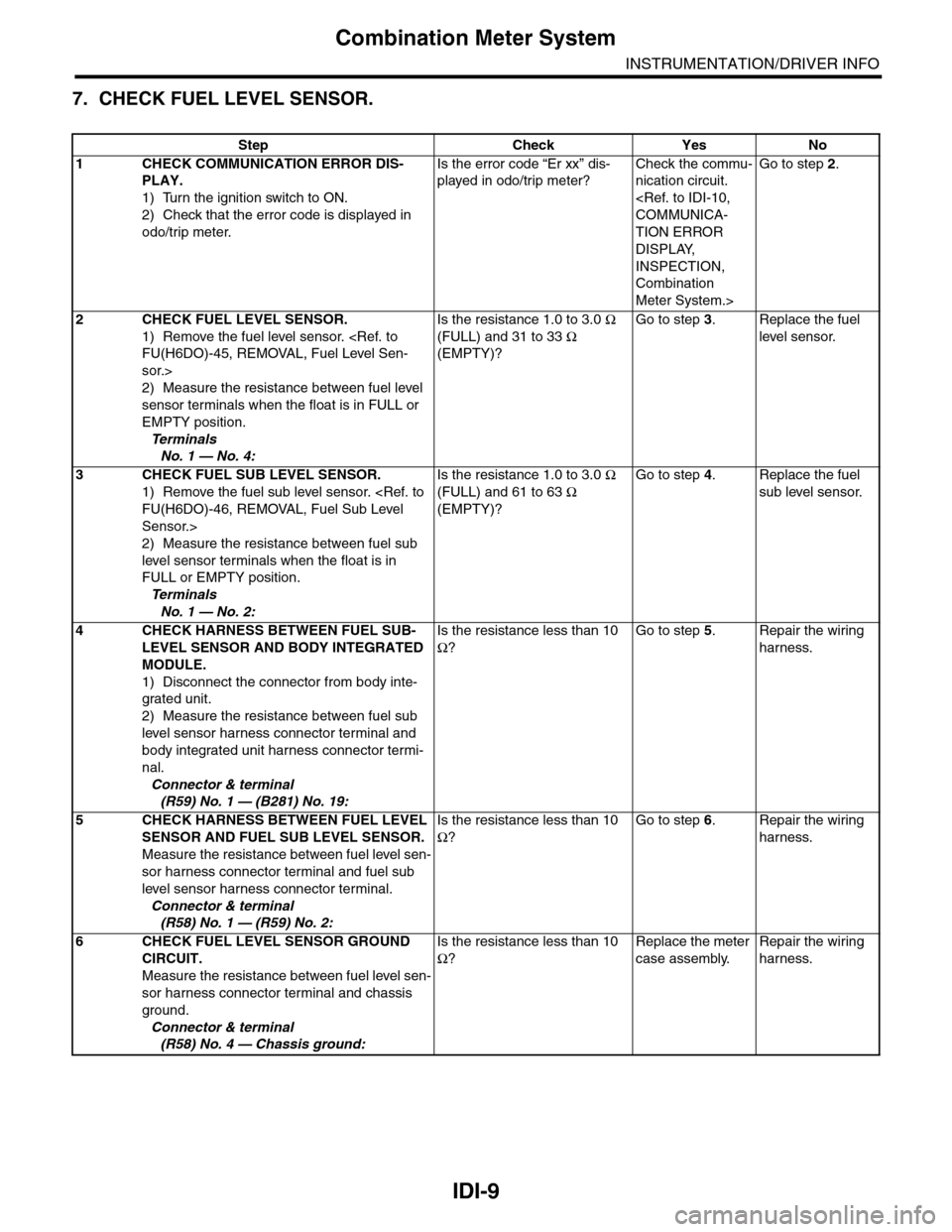
IDI-9
Combination Meter System
INSTRUMENTATION/DRIVER INFO
7. CHECK FUEL LEVEL SENSOR.
Step Check Yes No
1CHECK COMMUNICATION ERROR DIS-
PLAY.
1) Turn the ignition switch to ON.
2) Check that the error code is displayed in
odo/trip meter.
Is the error code “Er xx” dis-
played in odo/trip meter?
Check the commu-
nication circuit.
TION ERROR
DISPLAY,
INSPECTION,
Combination
Meter System.>
Go to step 2.
2CHECK FUEL LEVEL SENSOR.
1) Remove the fuel level sensor.
sor.>
2) Measure the resistance between fuel level
sensor terminals when the float is in FULL or
EMPTY position.
Te r m i n a l s
No. 1 — No. 4:
Is the resistance 1.0 to 3.0 Ω
(FULL) and 31 to 33 Ω
(EMPTY)?
Go to step 3.Replace the fuel
level sensor.
3CHECK FUEL SUB LEVEL SENSOR.
1) Remove the fuel sub level sensor.
Sensor.>
2) Measure the resistance between fuel sub
level sensor terminals when the float is in
FULL or EMPTY position.
Te r m i n a l s
No. 1 — No. 2:
Is the resistance 1.0 to 3.0 Ω
(FULL) and 61 to 63 Ω
(EMPTY)?
Go to step 4.Replace the fuel
sub level sensor.
4CHECK HARNESS BETWEEN FUEL SUB-
LEVEL SENSOR AND BODY INTEGRATED
MODULE.
1) Disconnect the connector from body inte-
grated unit.
2) Measure the resistance between fuel sub
level sensor harness connector terminal and
body integrated unit harness connector termi-
nal.
Connector & terminal
(R59) No. 1 — (B281) No. 19:
Is the resistance less than 10
Ω?
Go to step 5.Repair the wiring
harness.
5CHECK HARNESS BETWEEN FUEL LEVEL
SENSOR AND FUEL SUB LEVEL SENSOR.
Measure the resistance between fuel level sen-
sor harness connector terminal and fuel sub
level sensor harness connector terminal.
Connector & terminal
(R58) No. 1 — (R59) No. 2:
Is the resistance less than 10
Ω?
Go to step 6.Repair the wiring
harness.
6CHECK FUEL LEVEL SENSOR GROUND
CIRCUIT.
Measure the resistance between fuel level sen-
sor harness connector terminal and chassis
ground.
Connector & terminal
(R58) No. 4 — Chassis ground:
Is the resistance less than 10
Ω?
Replace the meter
case assembly.
Repair the wiring
harness.
Page 458 of 2453
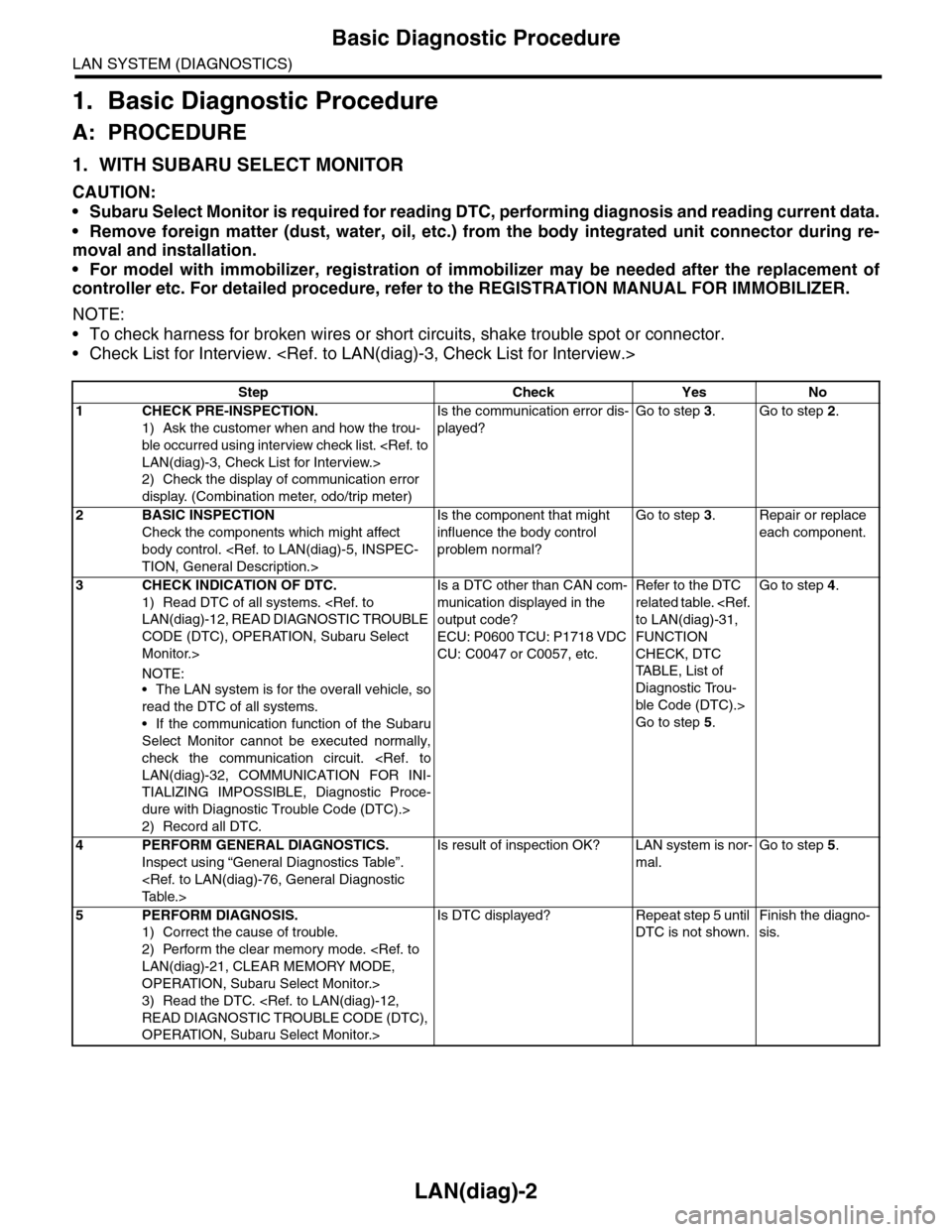
LAN(diag)-2
Basic Diagnostic Procedure
LAN SYSTEM (DIAGNOSTICS)
1. Basic Diagnostic Procedure
A: PROCEDURE
1. WITH SUBARU SELECT MONITOR
CAUTION:
•Subaru Select Monitor is required for reading DTC, performing diagnosis and reading current data.
•Remove foreign matter (dust, water, oil, etc.) from the body integrated unit connector during re-
moval and installation.
•For model with immobilizer, registration of immobilizer may be needed after the replacement of
controller etc. For detailed procedure, refer to the REGISTRATION MANUAL FOR IMMOBILIZER.
NOTE:
•To check harness for broken wires or short circuits, shake trouble spot or connector.
•Check List for Interview.
Step Check Yes No
1CHECK PRE-INSPECTION.
1) Ask the customer when and how the trou-
ble occurred using interview check list.
2) Check the display of communication error
display. (Combination meter, odo/trip meter)
Is the communication error dis-
played?
Go to step 3.Go to step 2.
2BASIC INSPECTION
Check the components which might affect
body control.
Is the component that might
influence the body control
problem normal?
Go to step 3.Repair or replace
each component.
3CHECK INDICATION OF DTC.
1) Read DTC of all systems.
CODE (DTC), OPERATION, Subaru Select
Monitor.>
NOTE:•The LAN system is for the overall vehicle, so
read the DTC of all systems.
•If the communication function of the Subaru
Select Monitor cannot be executed normally,
check the communication circuit.
TIALIZING IMPOSSIBLE, Diagnostic Proce-
dure with Diagnostic Trouble Code (DTC).>
2) Record all DTC.
Is a DTC other than CAN com-
munication displayed in the
output code?
ECU: P0600 TCU: P1718 VDC
CU: C0047 or C0057, etc.
Refer to the DTC
related table.
FUNCTION
CHECK, DTC
TA B L E , L i s t o f
Diagnostic Trou-
ble Code (DTC).>
Go to step 5.
Go to step 4.
4PERFORM GENERAL DIAGNOSTICS.
Inspect using “General Diagnostics Table”.
Is result of inspection OK? LAN system is nor-
mal.
Go to step 5.
5PERFORM DIAGNOSIS.
1) Correct the cause of trouble.
2) Perform the clear memory mode.
OPERATION, Subaru Select Monitor.>
3) Read the DTC.
OPERATION, Subaru Select Monitor.>
Is DTC displayed? Repeat step 5 until
DTC is not shown.
Finish the diagno-
sis.
Page 461 of 2453
LAN(diag)-5
General Description
LAN SYSTEM (DIAGNOSTICS)
3. General Description
A: CAUTION
1. SRS AIRBAG SYSTEM
Airbag system wiring harness is routed near the
body integrated unit and twisted pair line.
CAUTION:
•All airbag system wiring harness and con-
nectors are colored yellow. Do not use the elec-
trical test equipment on these circuits.
•Be careful not to damage the airbag system
wiring harness when servicing the body inte-
grated unit and LAN system.
•Refer to “Airbag System” when disconnect-
ing the air bag system connector.
2. LAN SYSTEM
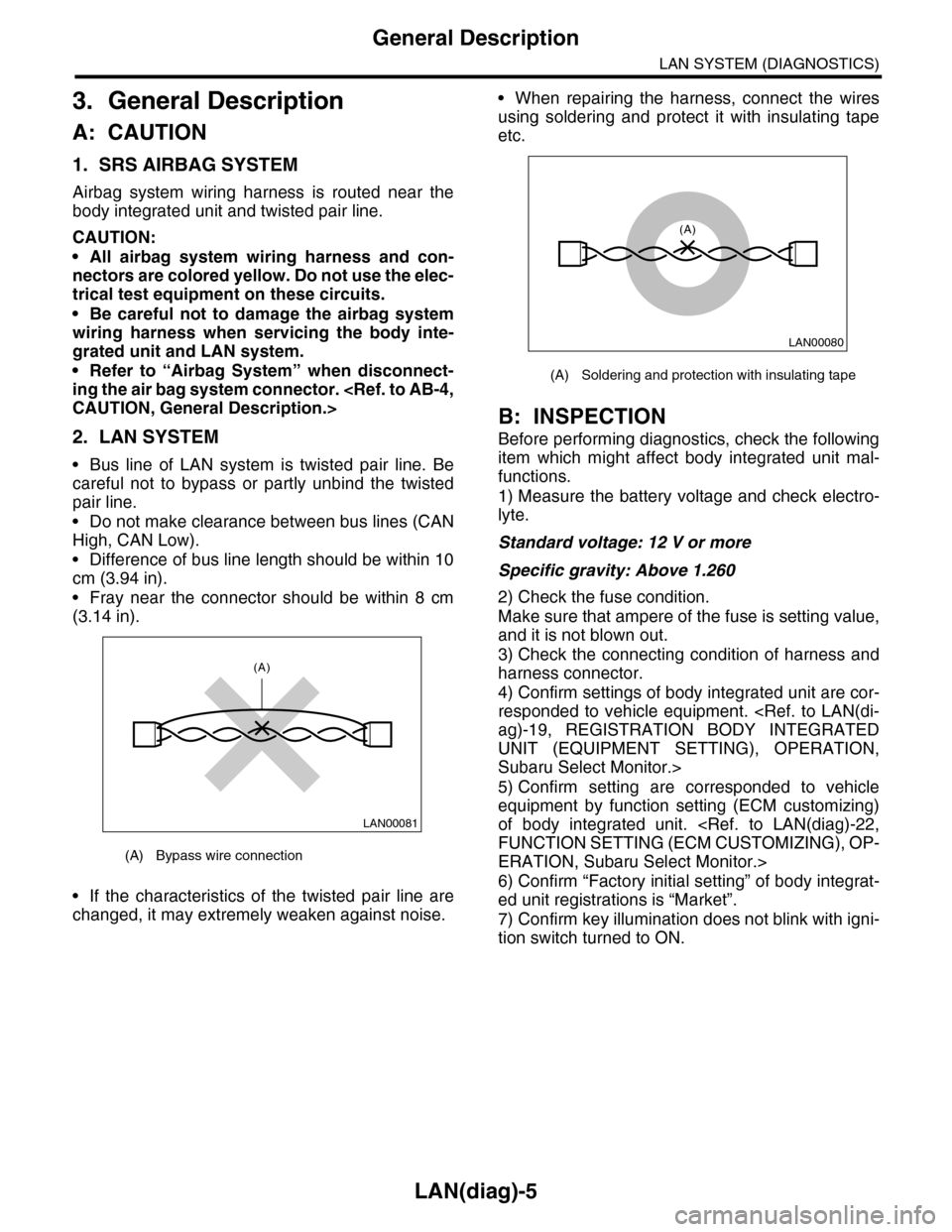
•Bus line of LAN system is twisted pair line. Be
careful not to bypass or partly unbind the twisted
pair line.
•Do not make clearance between bus lines (CAN
High, CAN Low).
•Difference of bus line length should be within 10
cm (3.94 in).
•Fray near the connector should be within 8 cm
(3.14 in).
•If the characteristics of the twisted pair line are
changed, it may extremely weaken against noise.
•When repairing the harness, connect the wires
using soldering and protect it with insulating tape
etc.
B: INSPECTION
Before performing diagnostics, check the following
item which might affect body integrated unit mal-
functions.
1) Measure the battery voltage and check electro-
lyte.
Standard voltage: 12 V or more
Specific gravity: Above 1.260
2) Check the fuse condition.
Make sure that ampere of the fuse is setting value,
and it is not blown out.
3) Check the connecting condition of harness and
harness connector.
4) Confirm settings of body integrated unit are cor-
responded to vehicle equipment.
UNIT (EQUIPMENT SETTING), OPERATION,
Subaru Select Monitor.>
5) Confirm setting are corresponded to vehicle
equipment by function setting (ECM customizing)
of body integrated unit.
ERATION, Subaru Select Monitor.>
6) Confirm “Factory initial setting” of body integrat-
ed unit registrations is “Market”.
7) Confirm key illumination does not blink with igni-
tion switch turned to ON.
(A) Bypass wire connection
LAN00081
(A)
(A) Soldering and protection with insulating tape
LAN00080
(A)
Page 489 of 2453
LAN(diag)-33
Diagnostic Procedure with Diagnostic Trouble Code (DTC)
LAN SYSTEM (DIAGNOSTICS)
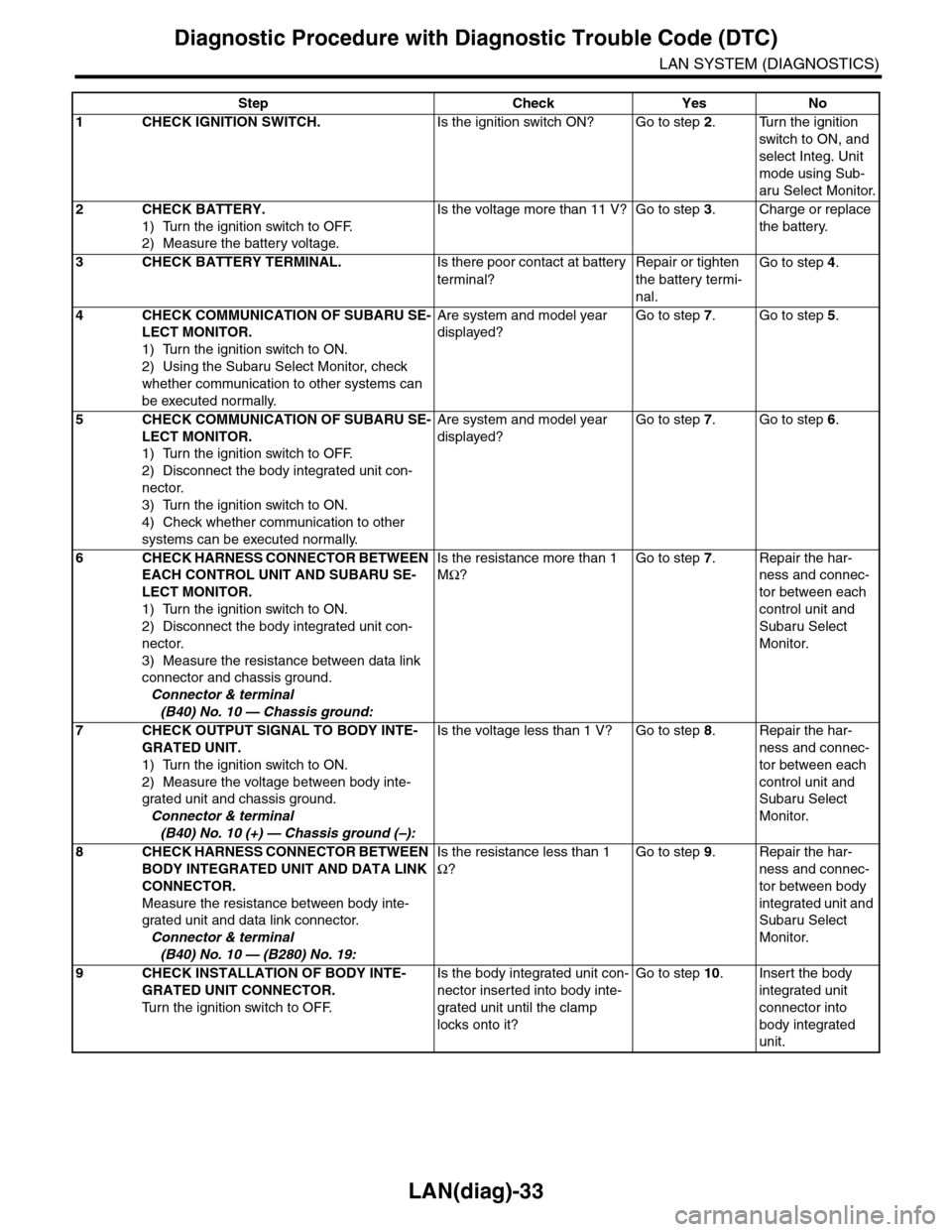
Step Check Yes No
1CHECK IGNITION SWITCH.Is the ignition switch ON? Go to step 2.Turn the ignition
switch to ON, and
select Integ. Unit
mode using Sub-
aru Select Monitor.
2CHECK BATTERY.
1) Turn the ignition switch to OFF.
2) Measure the battery voltage.
Is the voltage more than 11 V? Go to step 3.Charge or replace
the battery.
3CHECK BATTERY TERMINAL.Is there poor contact at battery
terminal?
Repair or tighten
the battery termi-
nal.
Go to step 4.
4CHECK COMMUNICATION OF SUBARU SE-
LECT MONITOR.
1) Turn the ignition switch to ON.
2) Using the Subaru Select Monitor, check
whether communication to other systems can
be executed normally.
Are system and model year
displayed?
Go to step 7.Go to step 5.
5CHECK COMMUNICATION OF SUBARU SE-
LECT MONITOR.
1) Turn the ignition switch to OFF.
2) Disconnect the body integrated unit con-
nector.
3) Turn the ignition switch to ON.
4) Check whether communication to other
systems can be executed normally.
Are system and model year
displayed?
Go to step 7.Go to step 6.
6CHECK HARNESS CONNECTOR BETWEEN
EACH CONTROL UNIT AND SUBARU SE-
LECT MONITOR.
1) Turn the ignition switch to ON.
2) Disconnect the body integrated unit con-
nector.
3) Measure the resistance between data link
connector and chassis ground.
Connector & terminal
(B40) No. 10 — Chassis ground:
Is the resistance more than 1
MΩ?
Go to step 7.Repair the har-
ness and connec-
tor between each
control unit and
Subaru Select
Monitor.
7CHECK OUTPUT SIGNAL TO BODY INTE-
GRATED UNIT.
1) Turn the ignition switch to ON.
2) Measure the voltage between body inte-
grated unit and chassis ground.
Connector & terminal
(B40) No. 10 (+) — Chassis ground (–):
Is the voltage less than 1 V? Go to step 8.Repair the har-
ness and connec-
tor between each
control unit and
Subaru Select
Monitor.
8CHECK HARNESS CONNECTOR BETWEEN
BODY INTEGRATED UNIT AND DATA LINK
CONNECTOR.
Measure the resistance between body inte-
grated unit and data link connector.
Connector & terminal
(B40) No. 10 — (B280) No. 19:
Is the resistance less than 1
Ω?
Go to step 9.Repair the har-
ness and connec-
tor between body
integrated unit and
Subaru Select
Monitor.
9CHECK INSTALLATION OF BODY INTE-
GRATED UNIT CONNECTOR.
Tu r n t h e i g n i t i o n s w i t c h t o O F F.
Is the body integrated unit con-
nector inserted into body inte-
grated unit until the clamp
locks onto it?
Go to step 10.Insert the body
integrated unit
connector into
body integrated
unit.