audio SUBARU TRIBECA 2009 1.G Service User Guide
[x] Cancel search | Manufacturer: SUBARU, Model Year: 2009, Model line: TRIBECA, Model: SUBARU TRIBECA 2009 1.GPages: 2453, PDF Size: 46.32 MB
Page 200 of 2453
ET-14
Audio
ENTERTAINMENT
9. Audio
A: REMOVAL
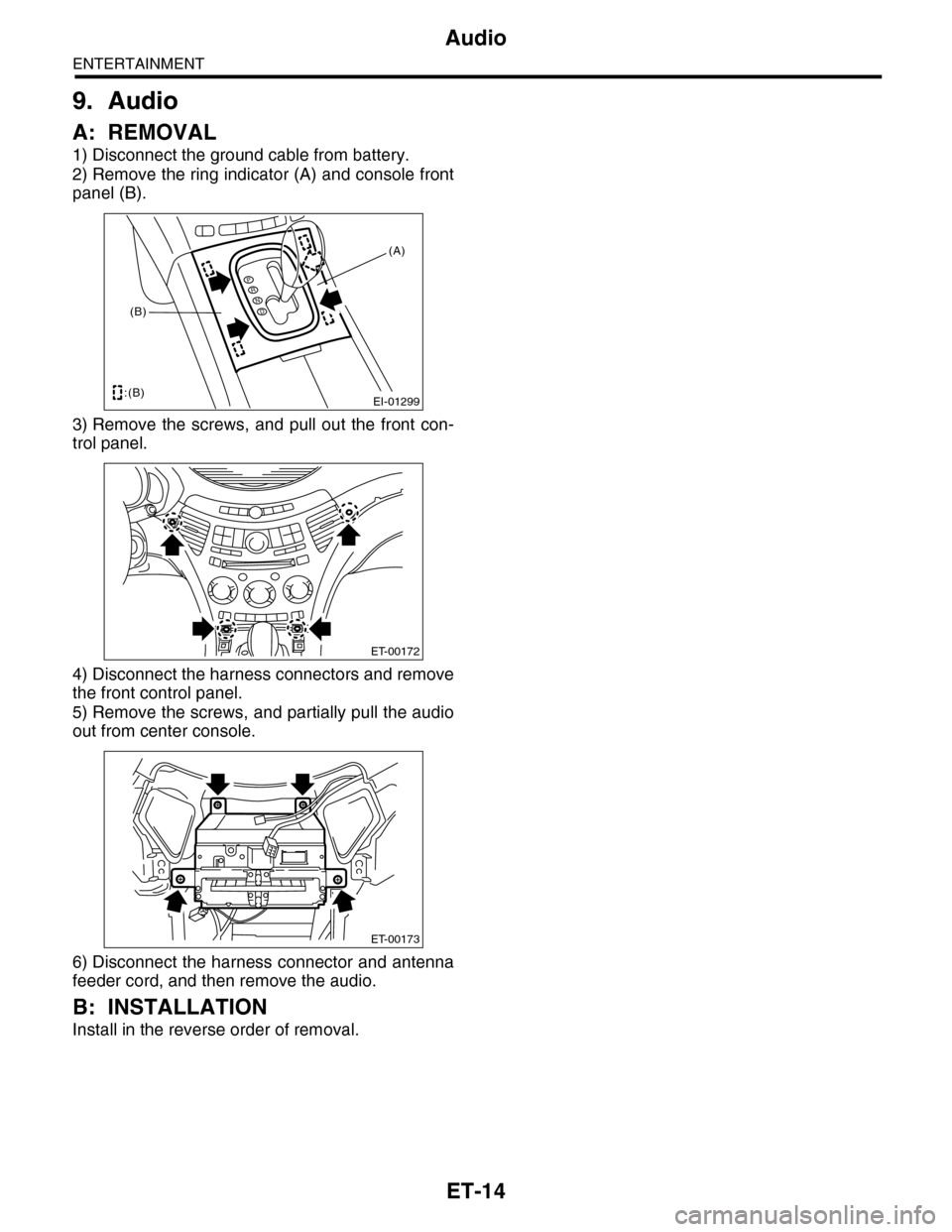
1) Disconnect the ground cable from battery.
2) Remove the ring indicator (A) and console front
panel (B).
3) Remove the screws, and pull out the front con-
trol panel.
4) Disconnect the harness connectors and remove
the front control panel.
5) Remove the screws, and partially pull the audio
out from center console.
6) Disconnect the harness connector and antenna
feeder cord, and then remove the audio.
B: INSTALLATION
Install in the reverse order of removal.
EI-01299
PRND
:(B)
(B)
(A)
ET-00172
ET-00173
Page 210 of 2453
ET-25
GPS Antenna
ENTERTAINMENT
20.GPS Antenna
A: REMOVAL
1) Disconnect the ground cable from battery.
2) Remove the combination meter.
3) Remove the audio.
4) Remove the navigation display.
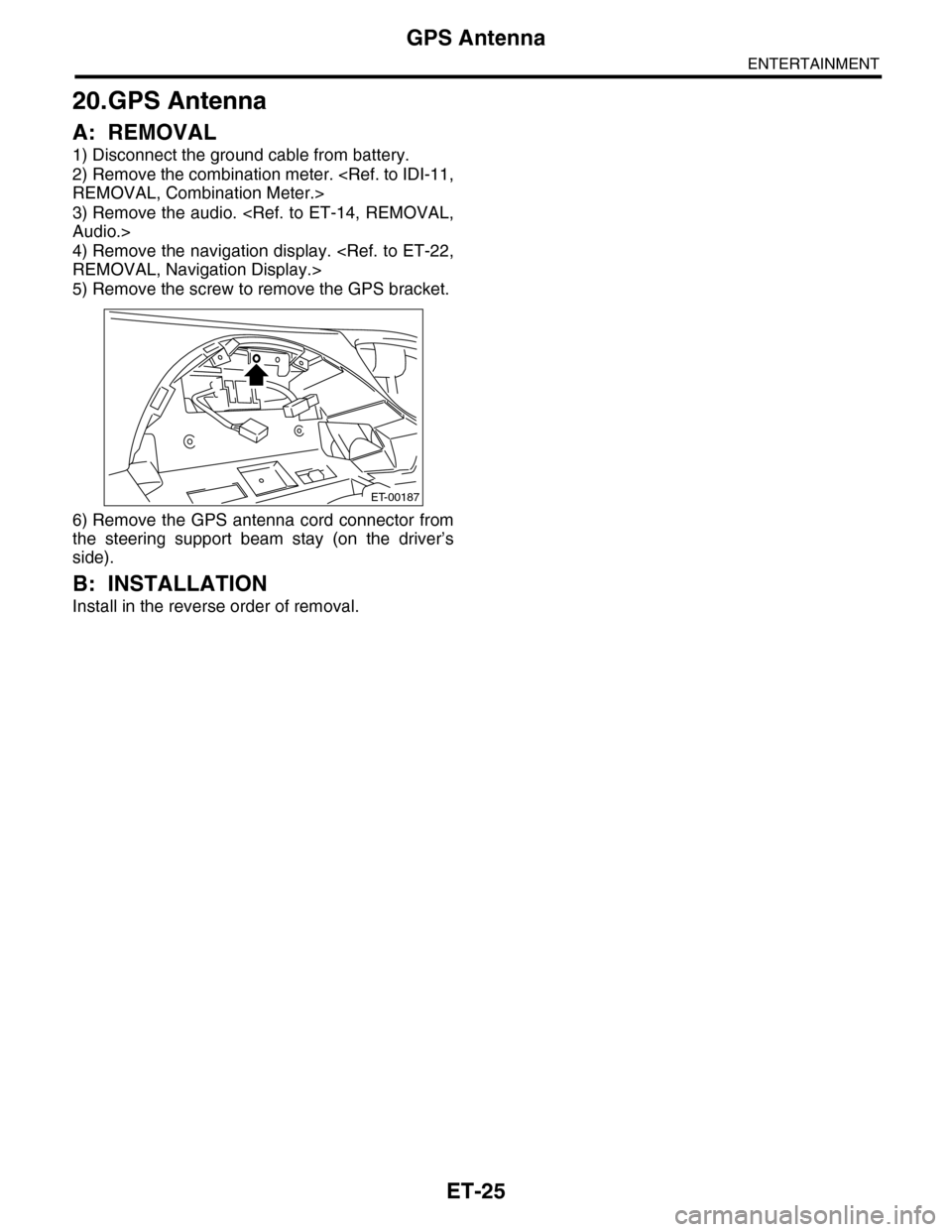
5) Remove the screw to remove the GPS bracket.
6) Remove the GPS antenna cord connector from
the steering support beam stay (on the driver’s
side).
B: INSTALLATION
Install in the reverse order of removal.
ET-00187
Page 282 of 2453
EI-40
Instrument Panel Assembly
EXTERIOR/INTERIOR TRIM
17.Instrument Panel Assembly
A: REMOVAL
CAUTION:
Take care of the following when removing the
instrument panel from the vehicle body.
•Refer to “CAUTION” of “General Description”
before starting the work.
•Be sure to disconnect each harness connec-
tor. Applying excessive pulling force may dam-
age the harness.
•Be careful to the harness of airbag system.
Damage of the harness may cause the air bag
system malfunction.
•Take care not to damage the interior trims
when removing the instrument panel from the
vehicle body.
NOTE:
•Putting alignment marks to each connector as
necessary facilitates the reassembly work.
•When storing the removed instrument panel, be
sure to prepare a table or the like to put the instru-
ment panel on in order to prevent damage.
1. INSTRUMENT PANEL UPPER
1) Disconnect the ground cable from battery and
wait for at least 20 seconds before starting work.
2) Remove the console box.
3) Remove the instrument panel lower cover.
er.>
4) Remove the glove box.
5) Remove the center console.
6) Remove the audio unit.
7) Remove the combination meter assembly.
8) Remove the upper grille.
9) Remove the multi function display or navigation
monitor, and warning box.
10) Remove the front pillar upper trim.
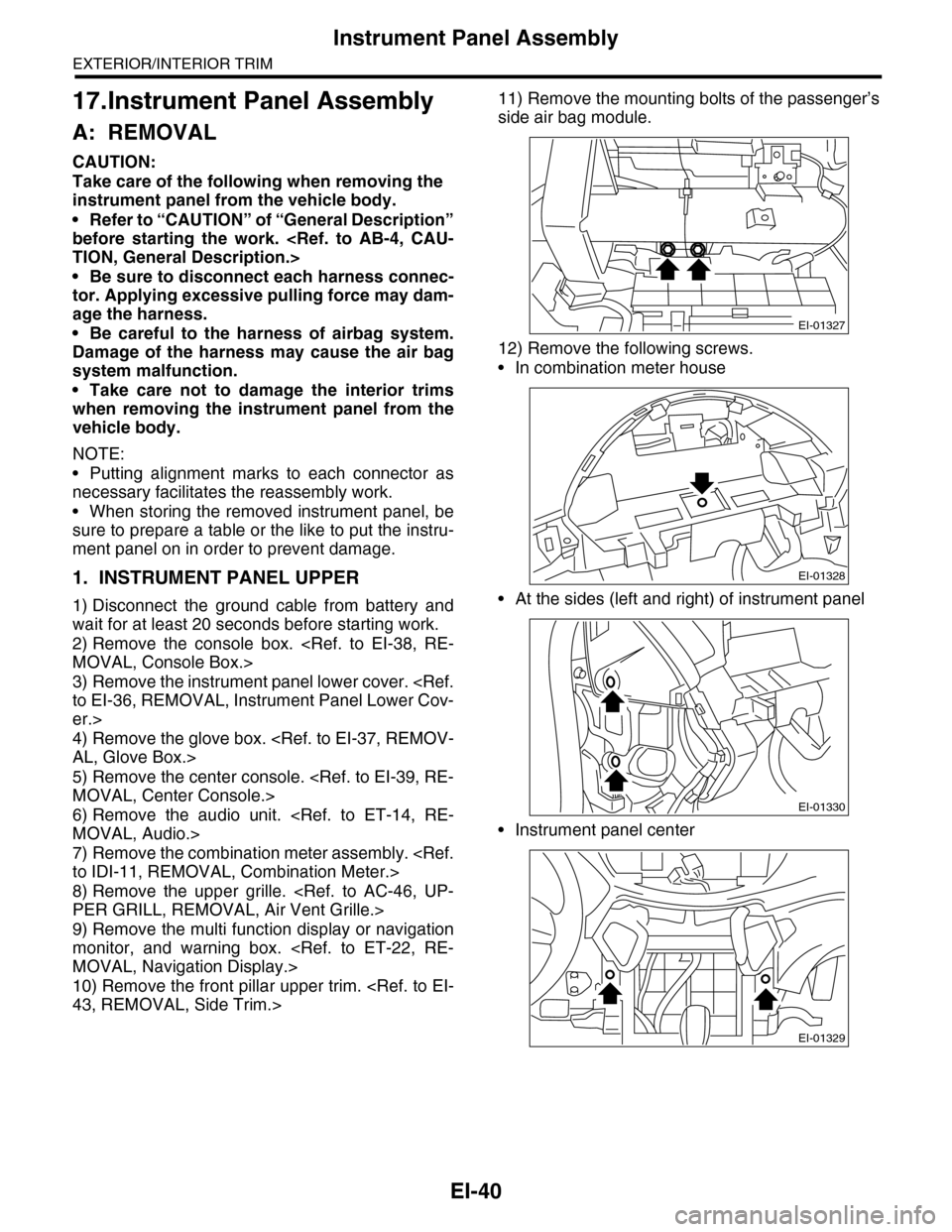
11) Remove the mounting bolts of the passenger’s
side air bag module.
12) Remove the following screws.
•In combination meter house
•At the sides (left and right) of instrument panel
•Instrument panel center
EI-01327
EI-01328
EI-01330
EI-01329
Page 335 of 2453
AC-9
General Description
HVAC SYSTEM (HEATER, VENTILATOR AND A/C)
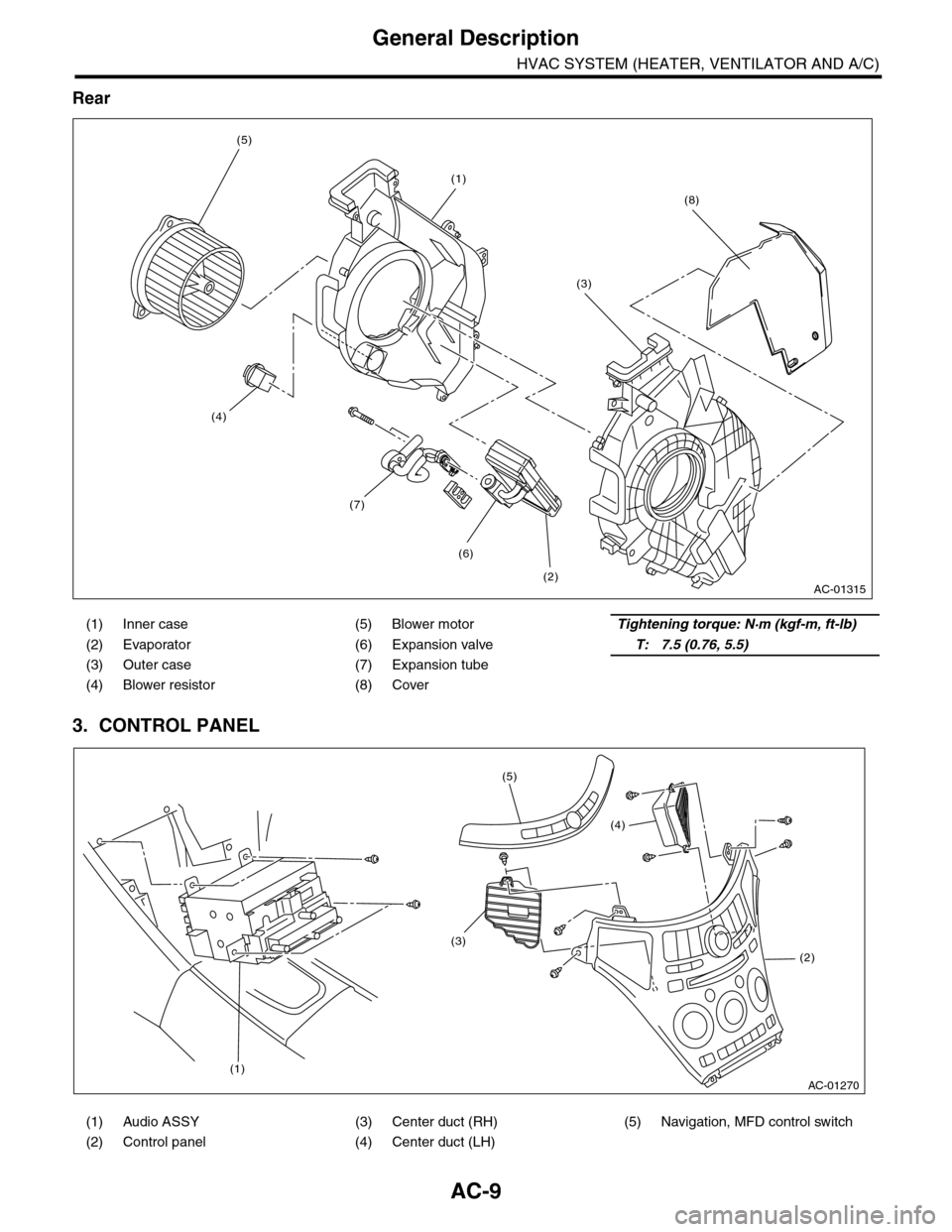
Rear
3. CONTROL PANEL
(1) Inner case (5) Blower motorTightening torque: N·m (kgf-m, ft-lb)
(2) Evaporator (6) Expansion valveT: 7.5 (0.76, 5.5)
(3) Outer case (7) Expansion tube
(4) Blower resistor (8) Cover
(1) Audio ASSY (3) Center duct (RH) (5) Navigation, MFD control switch
(2) Control panel (4) Center duct (LH)
AC-01315
(1)
(2)
(6)
(7)
(3)
(5)
(4)
(8)
AC-01270
(1)
(2)
(3)
(4)
(5)
Page 357 of 2453
AC-31
Control Panel
HVAC SYSTEM (HEATER, VENTILATOR AND A/C)
12.Control Panel
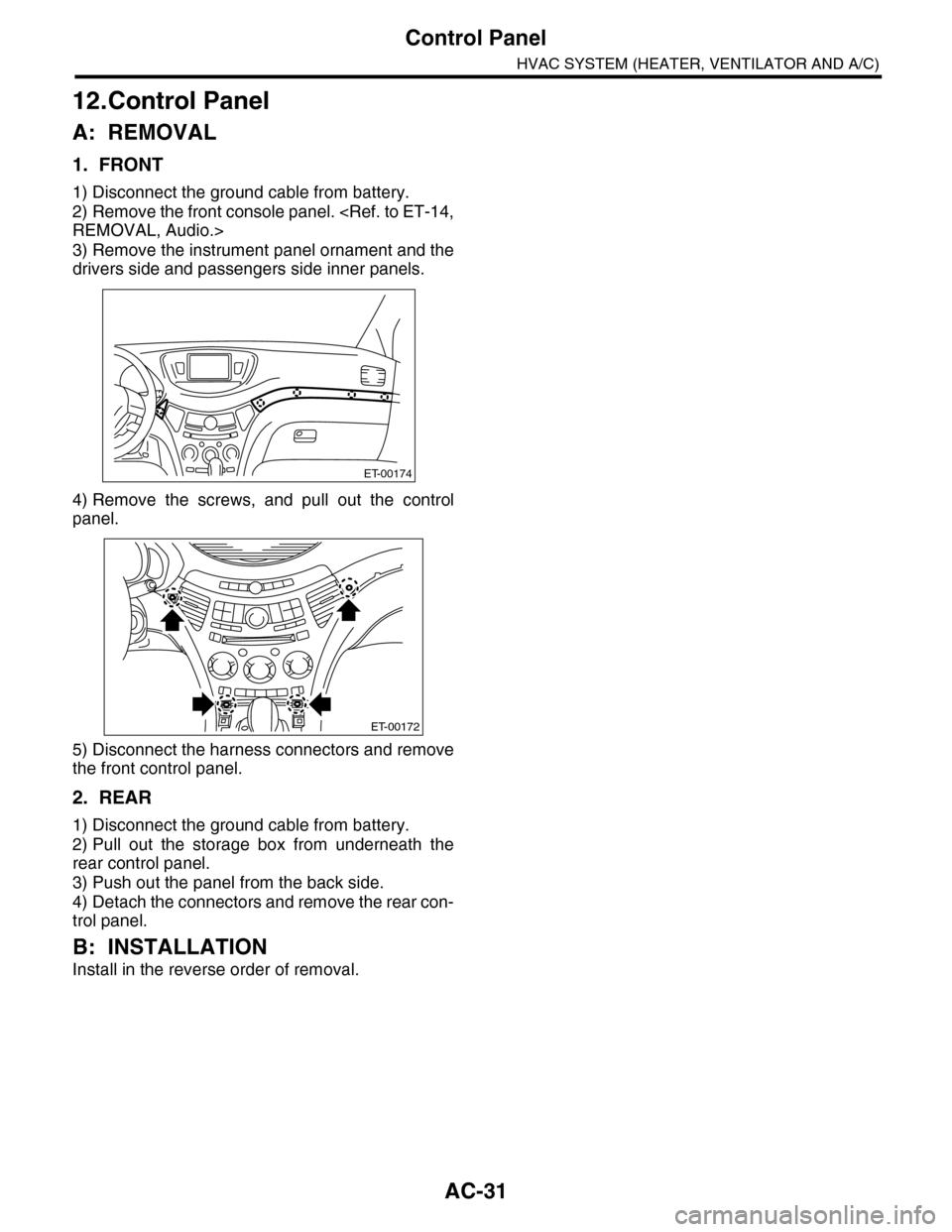
A: REMOVAL
1. FRONT
1) Disconnect the ground cable from battery.
2) Remove the front console panel.
3) Remove the instrument panel ornament and the
drivers side and passengers side inner panels.
4) Remove the screws, and pull out the control
panel.
5) Disconnect the harness connectors and remove
the front control panel.
2. REAR
1) Disconnect the ground cable from battery.
2) Pull out the storage box from underneath the
rear control panel.
3) Push out the panel from the back side.
4) Detach the connectors and remove the rear con-
trol panel.
B: INSTALLATION
Install in the reverse order of removal.
ET-00174
ET-00172
Page 465 of 2453
LAN(diag)-9
Control Module I/O Signal
LAN SYSTEM (DIAGNOSTICS)
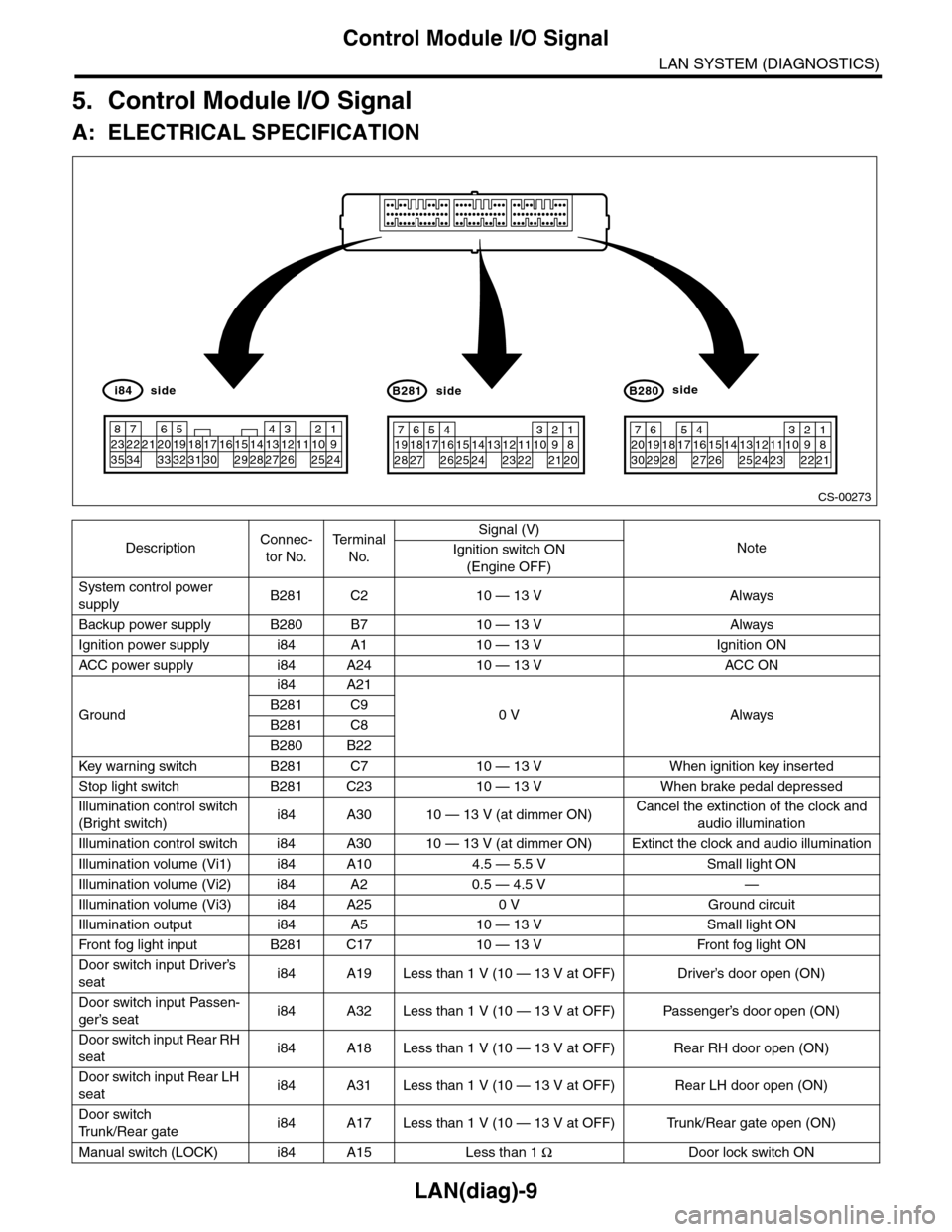
5. Control Module I/O Signal
A: ELECTRICAL SPECIFICATION
DescriptionConnec-
tor No.
Te r m i n a l
No.
Signal (V)
NoteIgnition switch ON
(Engine OFF)
System control power
supplyB281 C2 10 — 13 V Always
Backup power supply B280 B7 10 — 13 V Always
Ignition power supply i84 A1 10 — 13 V Ignition ON
ACC power supply i84 A24 10 — 13 V AC C ON
Ground
i84 A21
0 V AlwaysB281 C9
B281 C8
B280 B22
Key war ning switch B281 C7 10 — 13 V When ignition key inser ted
Stop light switch B281 C23 10 — 13 V When brake pedal depressed
Illumination control switch
(Bright switch)i84 A30 10 — 13 V (at dimmer ON)Cancel the extinction of the clock and
audio illumination
Illumination control switch i84 A30 10 — 13 V (at dimmer ON) Extinct the clock and audio illumination
Illumination volume (Vi1) i84 A10 4.5 — 5.5 V Small light ON
Illumination volume (Vi2) i84 A2 0.5 — 4.5 V —
Illumination volume (Vi3) i84 A25 0 V Ground circuit
Illumination output i84 A5 10 — 13 V Small light ON
Fr o nt fog li g ht in p ut B 28 1 C1 7 1 0 — 1 3 V Fr o nt fo g l i gh t ON
Door switch input Driver’s
seati84 A19 Less than 1 V (10 — 13 V at OFF) Driver’s door open (ON)
Door switch input Passen-
ger’s seati84 A32 Less than 1 V (10 — 13 V at OFF) Passenger’s door open (ON)
Door switch input Rear RH
seati84 A18 Less than 1 V (10 — 13 V at OFF) Rear RH door open (ON)
Door switch input Rear LH
seati84 A31 Less than 1 V (10 — 13 V at OFF) Rear LH door open (ON)
Door switch
Tr u n k / R e a r g a t ei84 A17 Less than 1 V (10 — 13 V at OFF) Trunk/Rear gate open (ON)
Manual switch (LOCK) i84 A15 Less than 1 ΩDoor lock switch ON
CS-00273
71928
61827
51741626152514241312231122
3102921
1820
B281side
72030
619291828
51741627152614132512241123
3102922
1821
B280side
82335
722342162033
51932183117301615291428
41327
312261121025
1924
i84side
Page 535 of 2453
LI-2
General Description
LIGHTING SYSTEM
1. General Description
A: SPECIFICATION
B: CAUTION
•Before removing or installing parts, always disconnect the battery ground cable from battery. When replac-
ing the audio, control module and other parts provided with memory functions, record the memory contents
before disconnecting the battery ground cable. Otherwise, the memory is cleared.
•Reassemble the parts in the reverse order of disassembly procedure unless otherwise indicated.
•Adjust parts to the given specifications.
•Connect the connectors securely during reassembly.
•After reassembly, make sure functional parts operate smoothly.
WARNING:
•The air bag system wiring harness is routed near electrical parts and switches. Airbag system
wiring harnesses and connectors are yellow. Do not use electrical test equipment on these cir-
cuits.
•Be careful not to damage the air bag system wiring harness when servicing electrical parts and
switches.
C: PREPARATION TOOL
1. GENERAL TOOL
HeadlightHalogen type low beam 12 V — 55 W
Halogen type high beam 12 V — 65 W
Fr o nt t ur n si gn a l, p ar k in g 1 2 V — 27 / 8 W
Fr o nt si d e m ar ke r li gh t12 V — 5 W
Fr o nt fog li g ht12 V — 55 W
Side turn signal light 12 V — 2.7 W (LED)
Rear combination lightStop/Tail light/Rear side marker light 12 V — 21/5 W
Tu r n s i g n a l l i g h t 1 2 V — 2 1 W
Rear finisher light12 V — 3.8 W
Back-up light12 V — 16 W
License plate light12 V — 5 W
High-mounted stop light 12 V — 1.3 W (LED)
Room light12 V — 8 W
Spot map light12 V — 8 W
Luggage room light12 V — 13 W
Rear gate light12 V — 5 W
Glove box light12 V — 1.4 W
Door step light12 V — 3.5 W
TOOL NAME REMARKS
Circuit tester Used for measuring resistance and voltage.
Page 635 of 2453
SL-6
General Description
SECURITY AND LOCKS
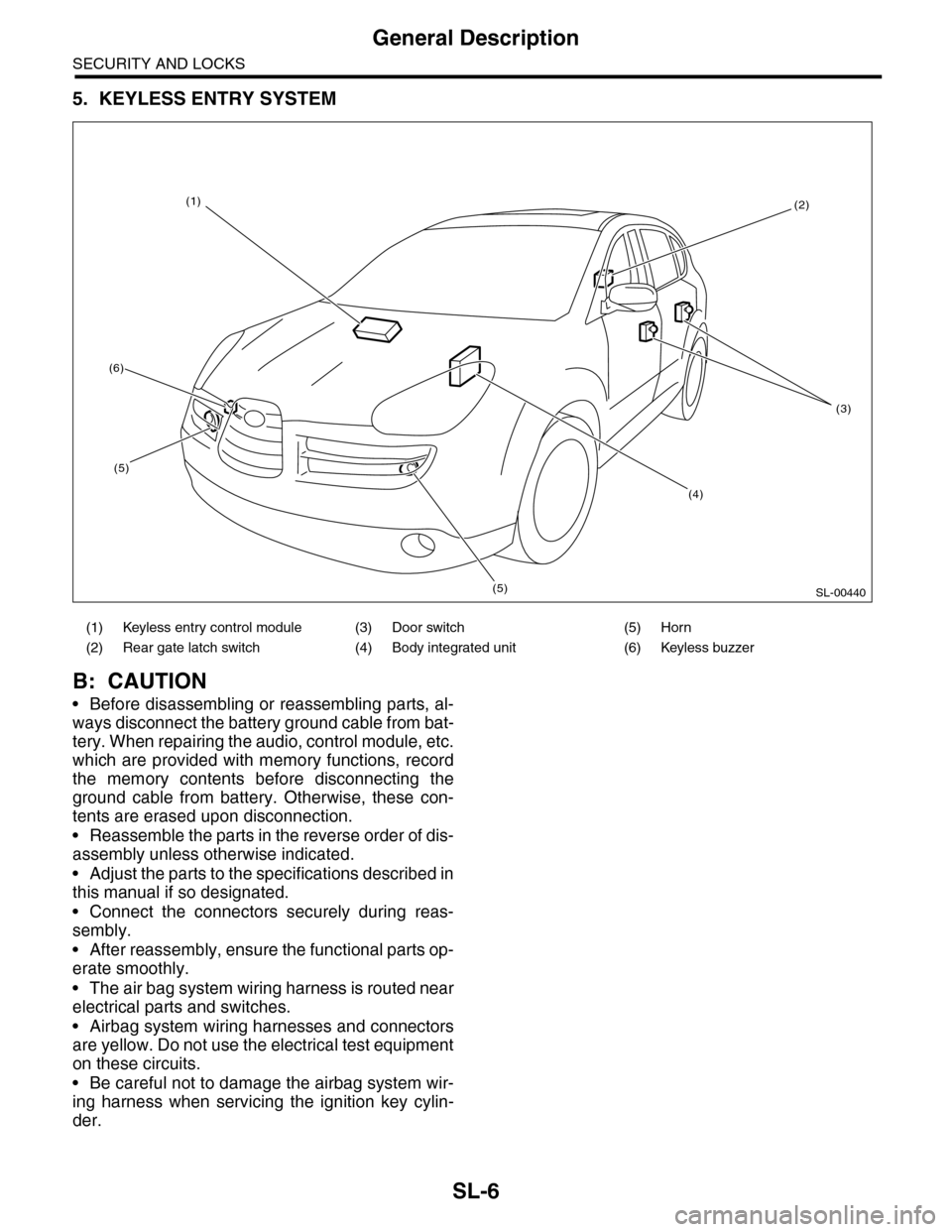
5. KEYLESS ENTRY SYSTEM
B: CAUTION
•Before disassembling or reassembling parts, al-
ways disconnect the battery ground cable from bat-
tery. When repairing the audio, control module, etc.
which are provided with memory functions, record
the memory contents before disconnecting the
ground cable from battery. Otherwise, these con-
tents are erased upon disconnection.
•Reassemble the parts in the reverse order of dis-
assembly unless otherwise indicated.
•Adjust the parts to the specifications described in
this manual if so designated.
•Connect the connectors securely during reas-
sembly.
•After reassembly, ensure the functional parts op-
erate smoothly.
•The air bag system wiring harness is routed near
electrical parts and switches.
•Airbag system wiring harnesses and connectors
are yellow. Do not use the electrical test equipment
on these circuits.
•Be careful not to damage the airbag system wir-
ing harness when servicing the ignition key cylin-
der.
(1) Keyless entry control module (3) Door switch (5) Horn
(2) Rear gate latch switch (4) Body integrated unit (6) Keyless buzzer
SL-00440
(2)
(3)
(4)
(5)
(5)
(6)
(1)
Page 687 of 2453
SR-3
General Description
SUNROOF/T-TOP/CONVERTIBLE TOP (SUNROOF)
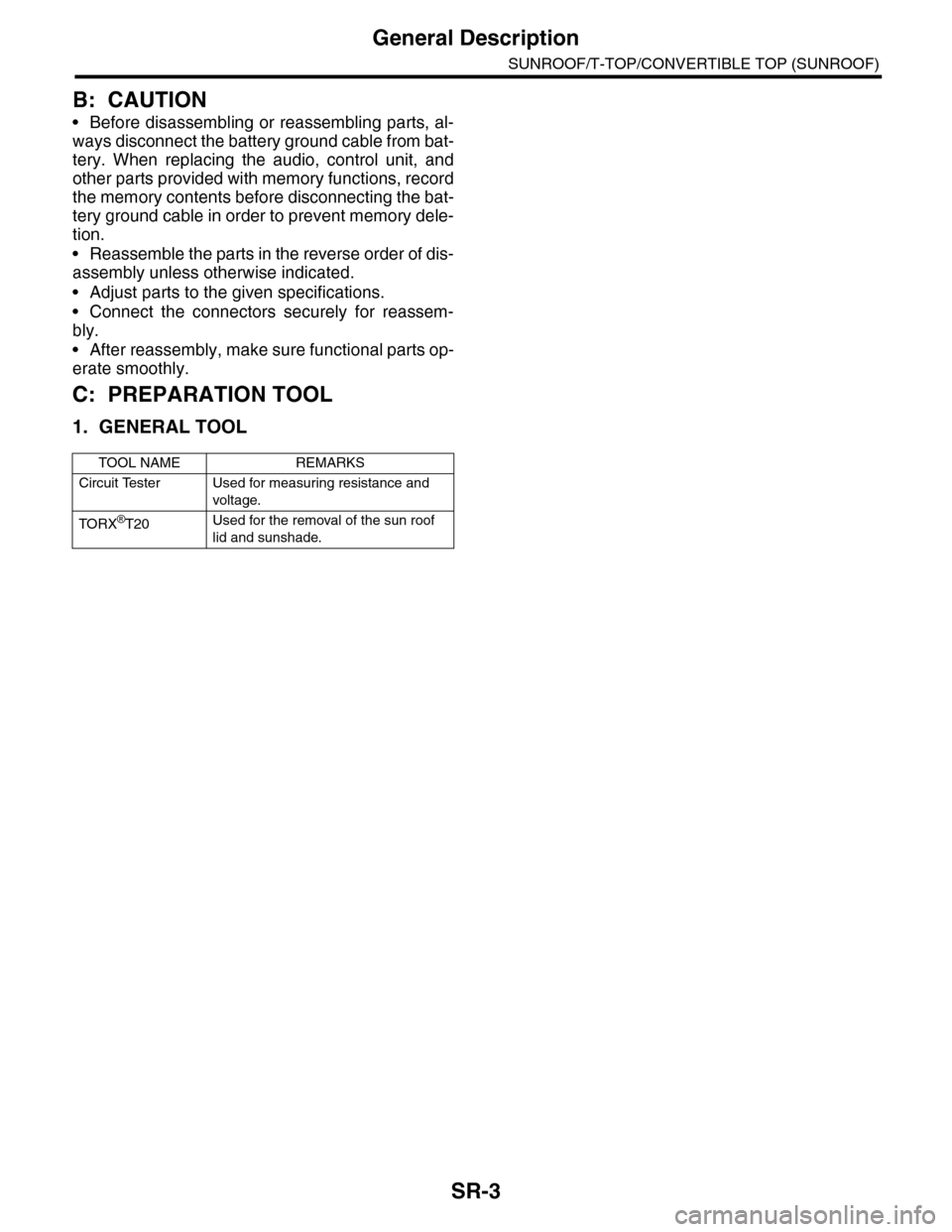
B: CAUTION
•Before disassembling or reassembling parts, al-
ways disconnect the battery ground cable from bat-
tery. When replacing the audio, control unit, and
other parts provided with memory functions, record
the memory contents before disconnecting the bat-
tery ground cable in order to prevent memory dele-
tion.
•Reassemble the parts in the reverse order of dis-
assembly unless otherwise indicated.
•Adjust parts to the given specifications.
•Connect the connectors securely for reassem-
bly.
•After reassembly, make sure functional parts op-
erate smoothly.
C: PREPARATION TOOL
1. GENERAL TOOL
TOOL NAME REMARKS
Circuit Tester Used for measuring resistance and
voltage.
TO RX®T20Used for the removal of the sun roof
lid and sunshade.
Page 1164 of 2453
EN(H6DO)(diag)-3
Check List for Interview
ENGINE (DIAGNOSTICS)
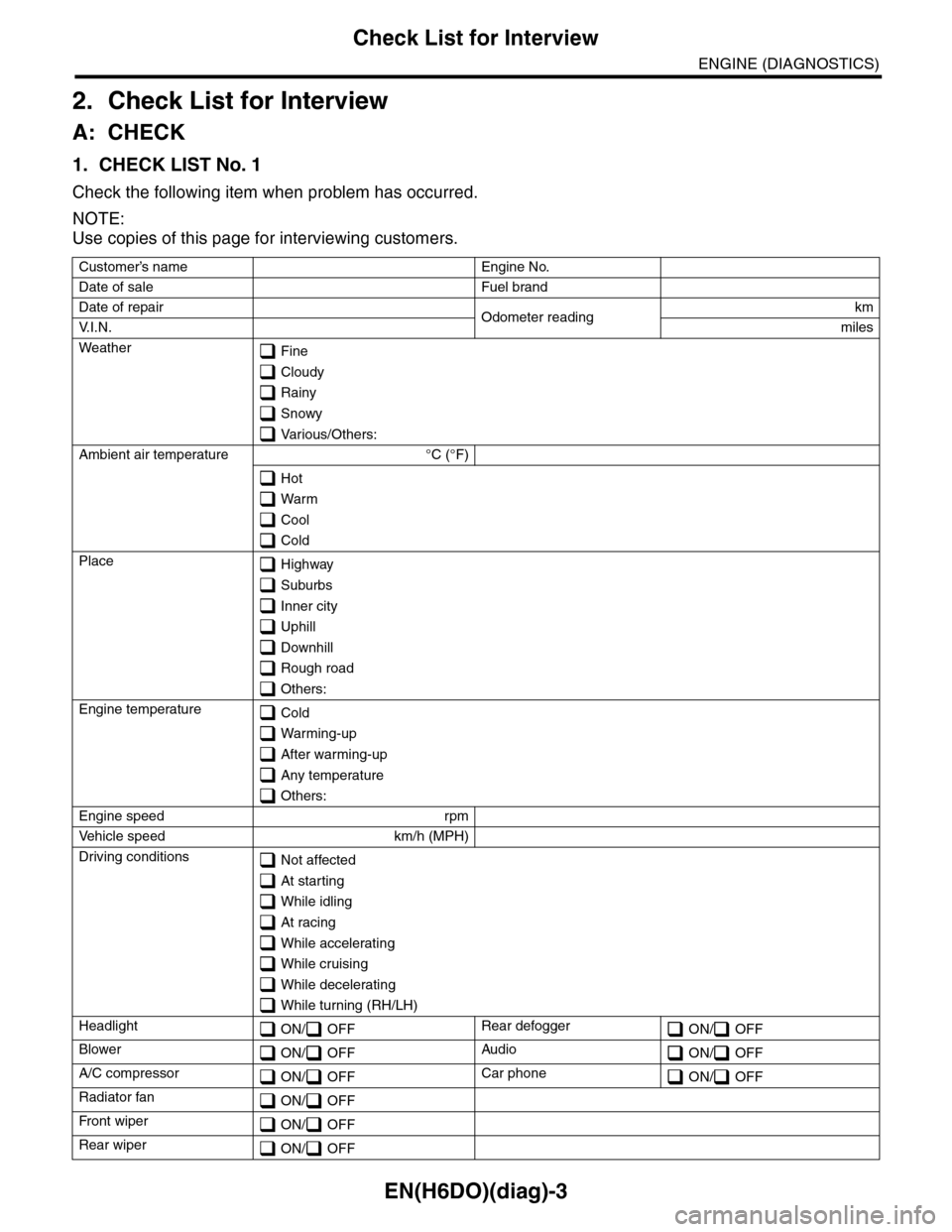
2. Check List for Interview
A: CHECK
1. CHECK LIST No. 1
Check the following item when problem has occurred.
NOTE:
Use copies of this page for interviewing customers.
Customer’s name Engine No.
Date of sale Fuel brand
Date of repair Odometer readingkm
V. I . N . miles
Weather Fine
Cloudy
Rainy
Snowy
Various/Others:
Ambient air temperature °C (°F)
Hot
Warm
Cool
Cold
Place Highway
Suburbs
Inner city
Uphill
Downhill
Rough road
Others:
Engine temperature Cold
Warming-up
After warming-up
Any temperature
Others:
Engine speed rpm
Ve h i c l e s p e e d k m / h ( M P H )
Driving conditions Not affected
At starting
While idling
At racing
While accelerating
While cruising
While decelerating
While turning (RH/LH)
Headlight ON/ OFFRear defogger ON/ OFF
Blower ON/ OFFAudio ON/ OFF
A/C compressor ON/ OFFCar phone ON/ OFF
Radiator fan ON/ OFF
Fr o nt wi pe r ON/ OFF
Rear wiper ON/ OFF