ignition SUBARU TRIBECA 2009 1.G Service Workshop Manual
[x] Cancel search | Manufacturer: SUBARU, Model Year: 2009, Model line: TRIBECA, Model: SUBARU TRIBECA 2009 1.GPages: 2453, PDF Size: 46.32 MB
Page 662 of 2453
SL-33
Security System
SECURITY AND LOCKS
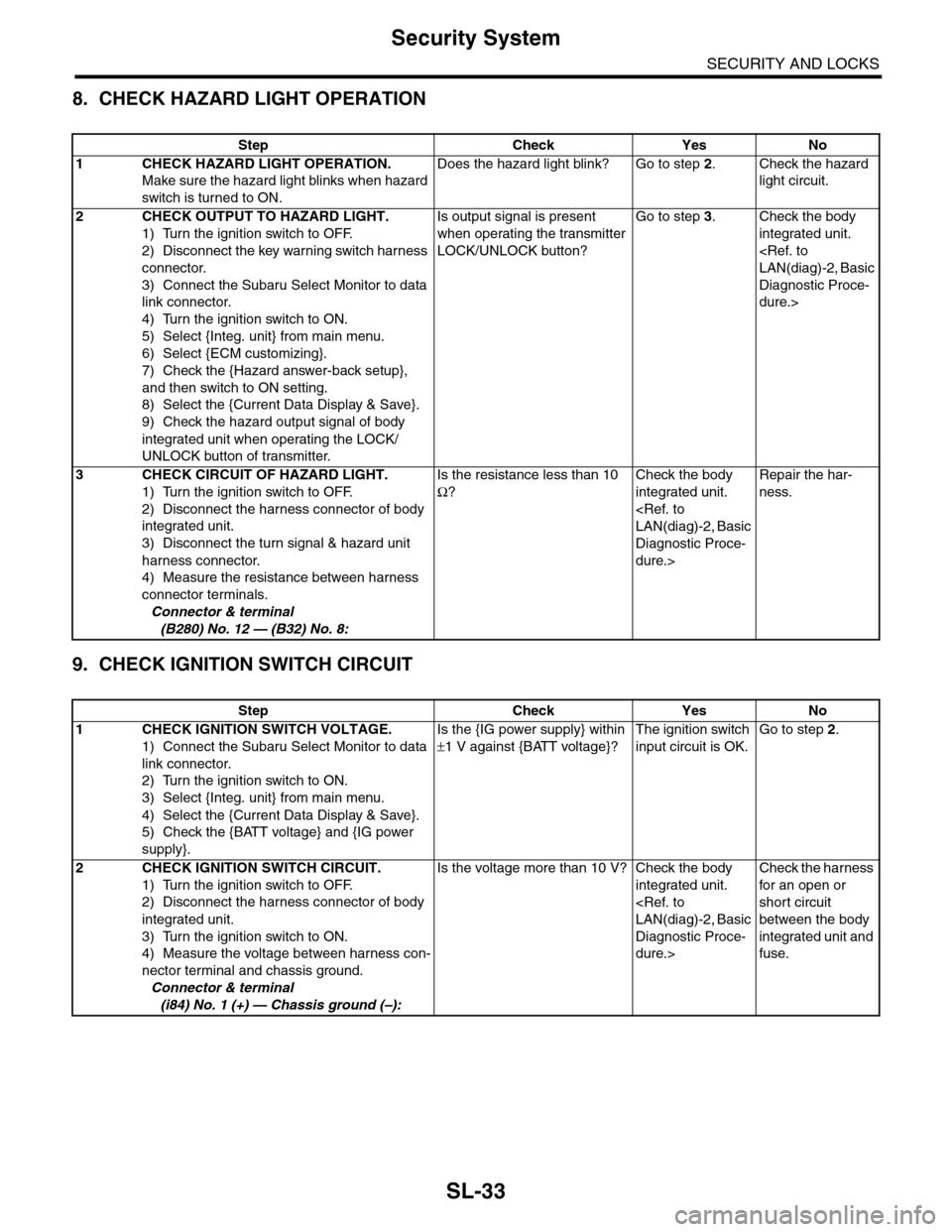
8. CHECK HAZARD LIGHT OPERATION
9. CHECK IGNITION SWITCH CIRCUIT
Step Check Yes No
1CHECK HAZARD LIGHT OPERATION.
Make sure the hazard light blinks when hazard
switch is turned to ON.
Does the hazard light blink? Go to step 2.Check the hazard
light circuit.
2CHECK OUTPUT TO HAZARD LIGHT.
1) Turn the ignition switch to OFF.
2) Disconnect the key warning switch harness
connector.
3) Connect the Subaru Select Monitor to data
link connector.
4) Turn the ignition switch to ON.
5) Select {Integ. unit} from main menu.
6) Select {ECM customizing}.
7) Check the {Hazard answer-back setup},
and then switch to ON setting.
8) Select the {Current Data Display & Save}.
9) Check the hazard output signal of body
integrated unit when operating the LOCK/
UNLOCK button of transmitter.
Is output signal is present
when operating the transmitter
LOCK/UNLOCK button?
Go to step 3.Check the body
integrated unit.
Diagnostic Proce-
dure.>
3CHECK CIRCUIT OF HAZARD LIGHT.
1) Turn the ignition switch to OFF.
2) Disconnect the harness connector of body
integrated unit.
3) Disconnect the turn signal & hazard unit
harness connector.
4) Measure the resistance between harness
connector terminals.
Connector & terminal
(B280) No. 12 — (B32) No. 8:
Is the resistance less than 10
Ω?
Check the body
integrated unit.
Diagnostic Proce-
dure.>
Repair the har-
ness.
Step Check Yes No
1CHECK IGNITION SWITCH VOLTAGE.
1) Connect the Subaru Select Monitor to data
link connector.
2) Turn the ignition switch to ON.
3) Select {Integ. unit} from main menu.
4) Select the {Current Data Display & Save}.
5) Check the {BATT voltage} and {IG power
supply}.
Is the {IG power supply} within
±1 V against {BATT voltage}?
The ignition switch
input circuit is OK.
Go to step 2.
2 CHECK IGNITION SWITCH CIRCUIT.
1) Turn the ignition switch to OFF.
2) Disconnect the harness connector of body
integrated unit.
3) Turn the ignition switch to ON.
4) Measure the voltage between harness con-
nector terminal and chassis ground.
Connector & terminal
(i84) No. 1 (+) — Chassis ground (–):
Is the voltage more than 10 V? Check the body
integrated unit.
Diagnostic Proce-
dure.>
Check the harness
for an open or
short circuit
between the body
integrated unit and
fuse.
Page 675 of 2453
SL-46
Ignition Key Lock
SECURITY AND LOCKS
17.Ignition Key Lock
A: REPLACEMENT
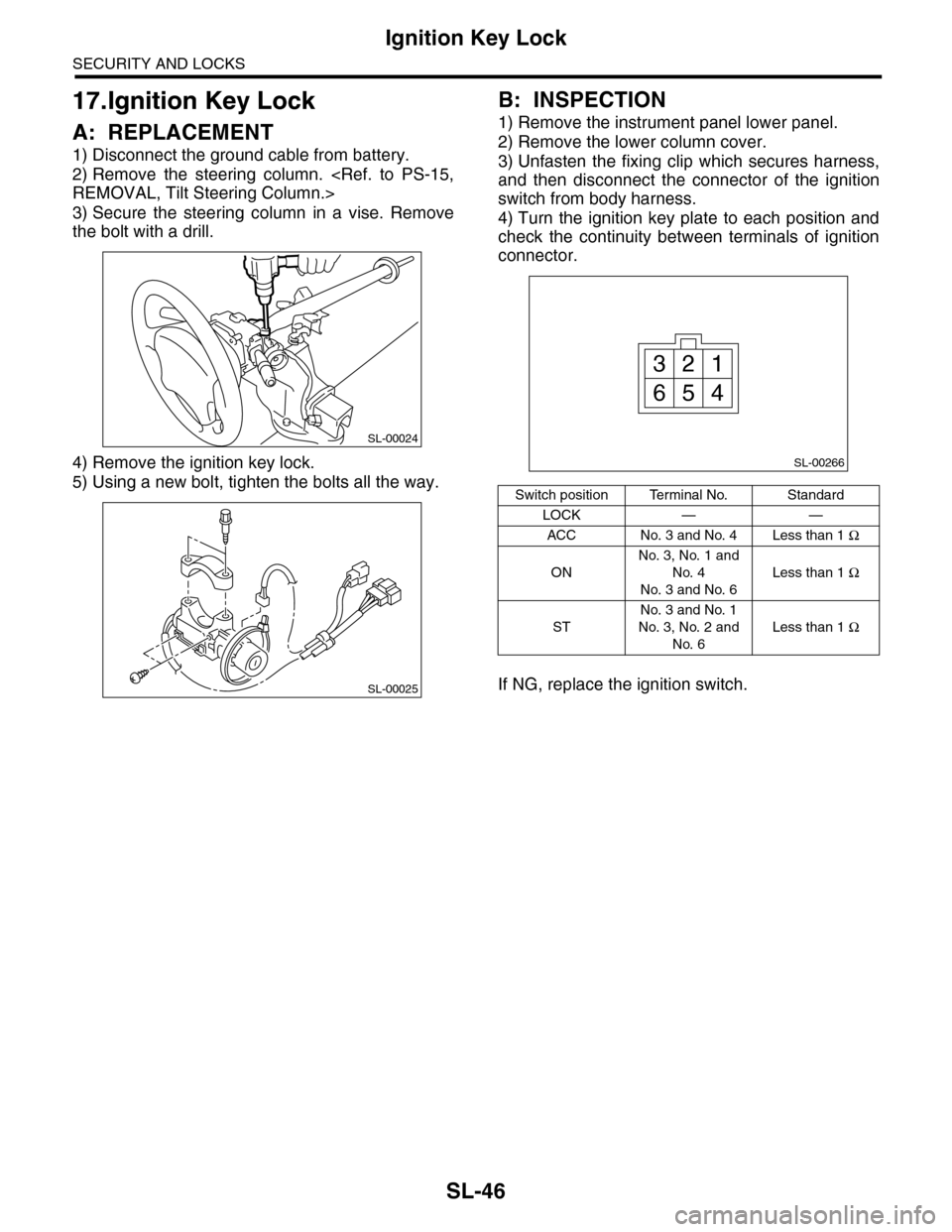
1) Disconnect the ground cable from battery.
2) Remove the steering column.
3) Secure the steering column in a vise. Remove
the bolt with a drill.
4) Remove the ignition key lock.
5) Using a new bolt, tighten the bolts all the way.
B: INSPECTION
1) Remove the instrument panel lower panel.
2) Remove the lower column cover.
3) Unfasten the fixing clip which secures harness,
and then disconnect the connector of the ignition
switch from body harness.
4) Turn the ignition key plate to each position and
check the continuity between terminals of ignition
connector.
If NG, replace the ignition switch.
SL-00024
SL-00025
Switch position Terminal No. Standard
LOCK — —
ACC No. 3 and No. 4 Less than 1 Ω
ON
No. 3, No. 1 and
No. 4
No. 3 and No. 6
Less than 1 Ω
ST
No. 3 and No. 1
No. 3, No. 2 and
No. 6
Less than 1 Ω
SL-00266
13
456
2
Page 678 of 2453
SL-49
Impact Sensor
SECURITY AND LOCKS
20.Impact Sensor
A: REMOVAL
1) Remove the key from ignition switch.
2) Close all doors and the rear gate.
3) Press the UNLOCK button of the keyless trans-
mitter.
4) Change the setting of impact sensor using Sub-
aru Select Monitor.
5) Disconnect the ground cable from battery.
6) Remove the impact sensor.
B: INSTALLATION
1) Remove the key from ignition switch.
2) Close all doors and the rear gate.
3) Press the UNLOCK button of the keyless trans-
mitter.
4) Disconnect the ground cable from battery.
5) Install the impact sensor.
6) Connect the ground cable to the battery.
7) Change the setting of impact sensor using Sub-
aru Select Monitor.
C: OPERATION
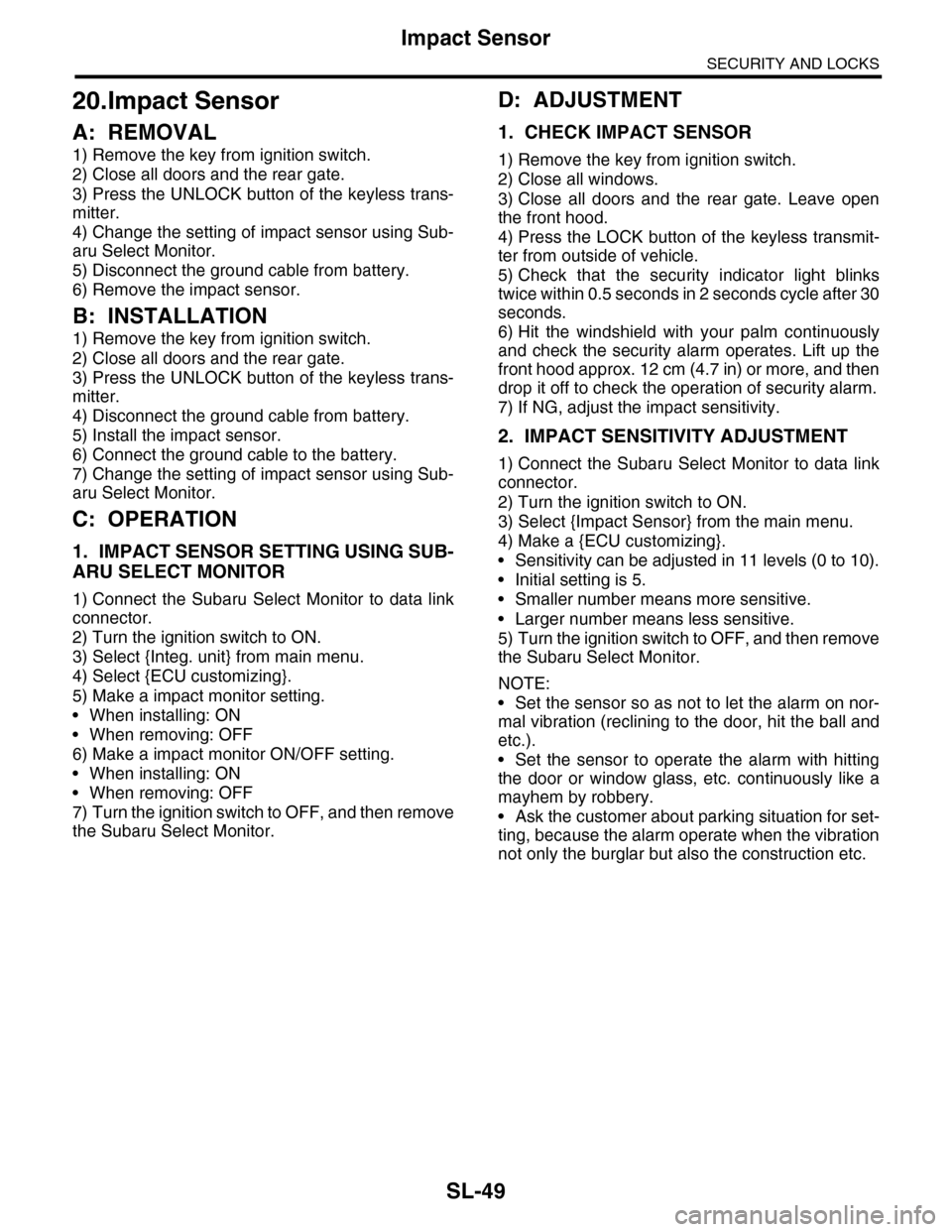
1. IMPACT SENSOR SETTING USING SUB-
ARU SELECT MONITOR
1) Connect the Subaru Select Monitor to data link
connector.
2) Turn the ignition switch to ON.
3) Select {Integ. unit} from main menu.
4) Select {ECU customizing}.
5) Make a impact monitor setting.
•When installing: ON
•When removing: OFF
6) Make a impact monitor ON/OFF setting.
•When installing: ON
•When removing: OFF
7) Turn the ignition switch to OFF, and then remove
the Subaru Select Monitor.
D: ADJUSTMENT
1. CHECK IMPACT SENSOR
1) Remove the key from ignition switch.
2) Close all windows.
3) Close all doors and the rear gate. Leave open
the front hood.
4) Press the LOCK button of the keyless transmit-
ter from outside of vehicle.
5) Check that the security indicator light blinks
twice within 0.5 seconds in 2 seconds cycle after 30
seconds.
6) Hit the windshield with your palm continuously
and check the security alarm operates. Lift up the
front hood approx. 12 cm (4.7 in) or more, and then
drop it off to check the operation of security alarm.
7) If NG, adjust the impact sensitivity.
2. IMPACT SENSITIVITY ADJUSTMENT
1) Connect the Subaru Select Monitor to data link
connector.
2) Turn the ignition switch to ON.
3) Select {Impact Sensor} from the main menu.
4) Make a {ECU customizing}.
•Sensitivity can be adjusted in 11 levels (0 to 10).
•Initial setting is 5.
•Smaller number means more sensitive.
•Larger number means less sensitive.
5) Turn the ignition switch to OFF, and then remove
the Subaru Select Monitor.
NOTE:
•Set the sensor so as not to let the alarm on nor-
mal vibration (reclining to the door, hit the ball and
etc.).
•Set the sensor to operate the alarm with hitting
the door or window glass, etc. continuously like a
mayhem by robbery.
•Ask the customer about parking situation for set-
ting, because the alarm operate when the vibration
not only the burglar but also the construction etc.
Page 682 of 2453
SL-53
Transmitter
SECURITY AND LOCKS
24.Transmitter
A: REMOVAL
1. TRANSMITTER BATTERY
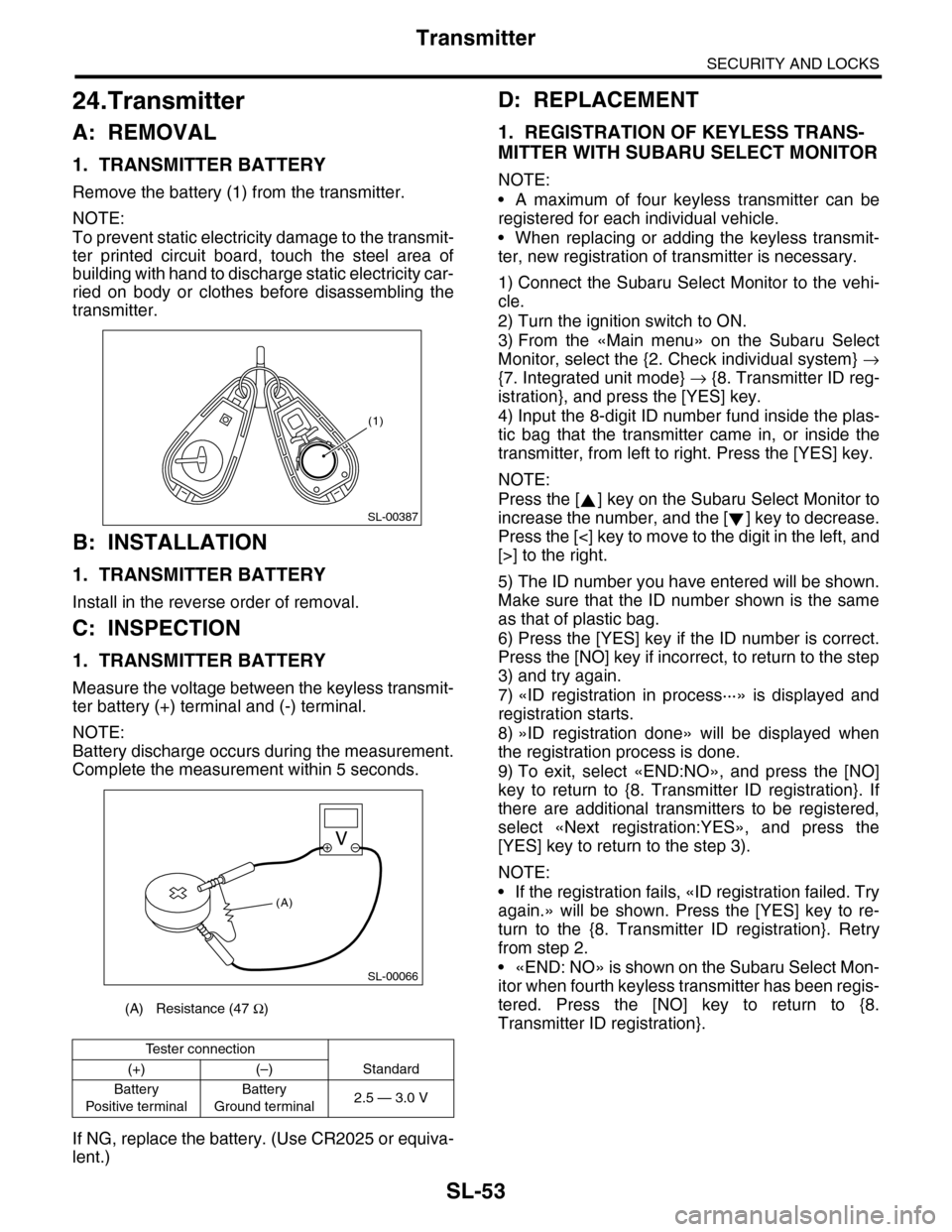
Remove the battery (1) from the transmitter.
NOTE:
To prevent static electricity damage to the transmit-
ter printed circuit board, touch the steel area of
building with hand to discharge static electricity car-
ried on body or clothes before disassembling the
transmitter.
B: INSTALLATION
1. TRANSMITTER BATTERY
Install in the reverse order of removal.
C: INSPECTION
1. TRANSMITTER BATTERY
Measure the voltage between the keyless transmit-
ter battery (+) terminal and (-) terminal.
NOTE:
Battery discharge occurs during the measurement.
Complete the measurement within 5 seconds.
If NG, replace the battery. (Use CR2025 or equiva-
lent.)
D: REPLACEMENT
1. REGISTRATION OF KEYLESS TRANS-
MITTER WITH SUBARU SELECT MONITOR
NOTE:
•A maximum of four keyless transmitter can be
registered for each individual vehicle.
•When replacing or adding the keyless transmit-
ter, new registration of transmitter is necessary.
1) Connect the Subaru Select Monitor to the vehi-
cle.
2) Turn the ignition switch to ON.
3) From the «Main menu» on the Subaru Select
Monitor, select the {2. Check individual system} →
{7. Integrated unit mode} → {8. Transmitter ID reg-
istration}, and press the [YES] key.
4) Input the 8-digit ID number fund inside the plas-
tic bag that the transmitter came in, or inside the
transmitter, from left to right. Press the [YES] key.
NOTE:
Press the [ ] key on the Subaru Select Monitor to
increase the number, and the [ ] key to decrease.
Press the [<] key to move to the digit in the left, and
[>] to the right.
5) The ID number you have entered will be shown.
Make sure that the ID number shown is the same
as that of plastic bag.
6) Press the [YES] key if the ID number is correct.
Press the [NO] key if incorrect, to return to the step
3) and try again.
7) «ID registration in process···» is displayed and
registration starts.
8) »ID registration done» will be displayed when
the registration process is done.
9) To exit, select «END:NO», and press the [NO]
key to return to {8. Transmitter ID registration}. If
there are additional transmitters to be registered,
select «Next registration:YES», and press the
[YES] key to return to the step 3).
NOTE:
•If the registration fails, «ID registration failed. Try
again.» will be shown. Press the [YES] key to re-
turn to the {8. Transmitter ID registration}. Retry
from step 2.
•«END: NO» is shown on the Subaru Select Mon-
itor when fourth keyless transmitter has been regis-
tered. Press the [NO] key to return to {8.
Transmitter ID registration}.(A) Resistance (47 Ω)
Te s t e r c o n n e c t i o n
(+) (–) Standard
Battery
Po si t ive t e r mi na l
Battery
Ground terminal2.5 — 3.0 V
(1)
SL-00387
SL-00066
(A)
Page 684 of 2453
SL-55
Immobilizer Antenna
SECURITY AND LOCKS
26.Immobilizer Antenna
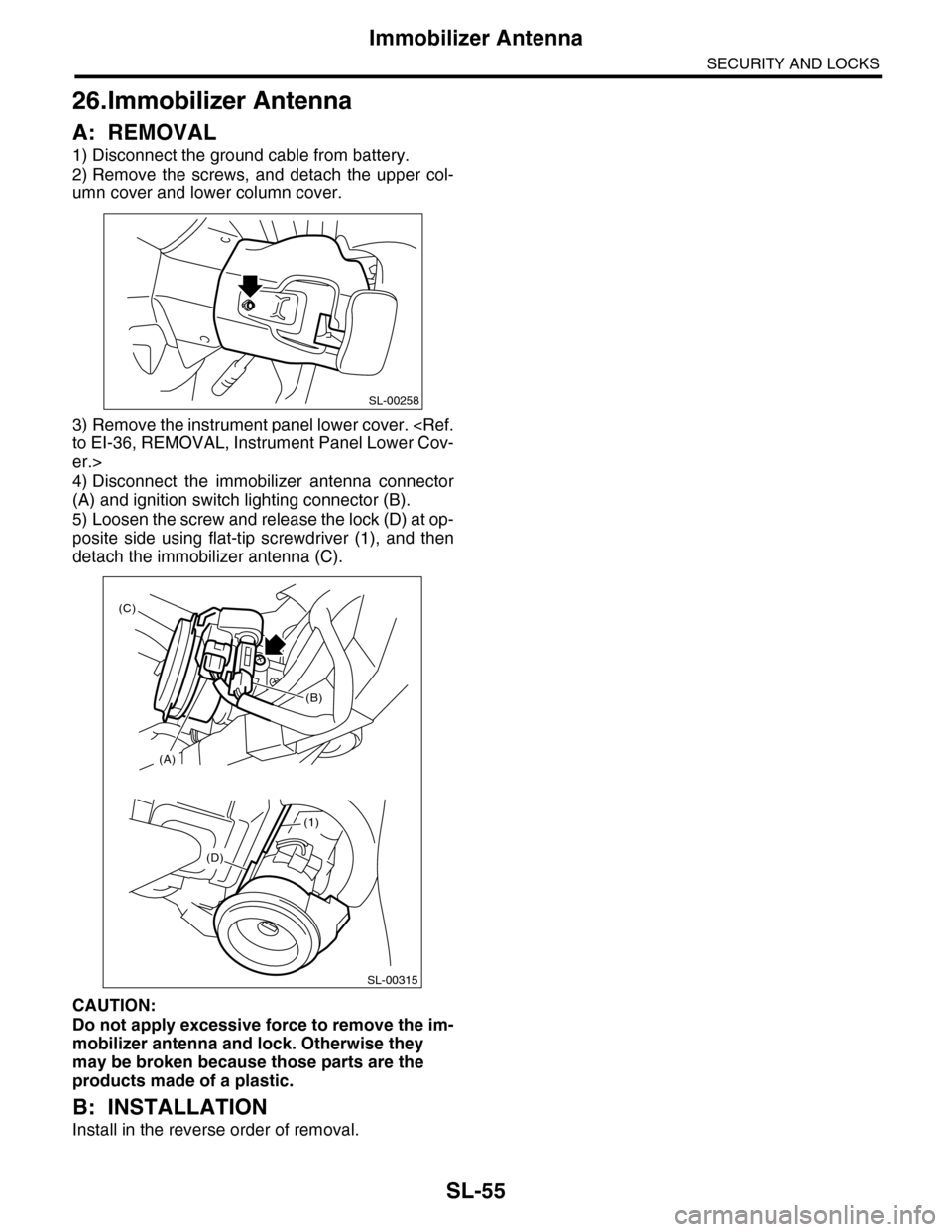
A: REMOVAL
1) Disconnect the ground cable from battery.
2) Remove the screws, and detach the upper col-
umn cover and lower column cover.
3) Remove the instrument panel lower cover.
er.>
4) Disconnect the immobilizer antenna connector
(A) and ignition switch lighting connector (B).
5) Loosen the screw and release the lock (D) at op-
posite side using flat-tip screwdriver (1), and then
detach the immobilizer antenna (C).
CAUTION:
Do not apply excessive force to remove the im-
mobilizer antenna and lock. Otherwise they
may be broken because those parts are the
products made of a plastic.
B: INSTALLATION
Install in the reverse order of removal.
SL-00258
(D)
(1)
SL-00315
(A)
(C)
(B)
Page 702 of 2453
WW-7
Combination Switch (Wiper)
WIPER AND WASHER SYSTEMS
2. FRONT WIPER
1) Check with Subaru Select Monitor
2) Check the intermittent operation (inspection of
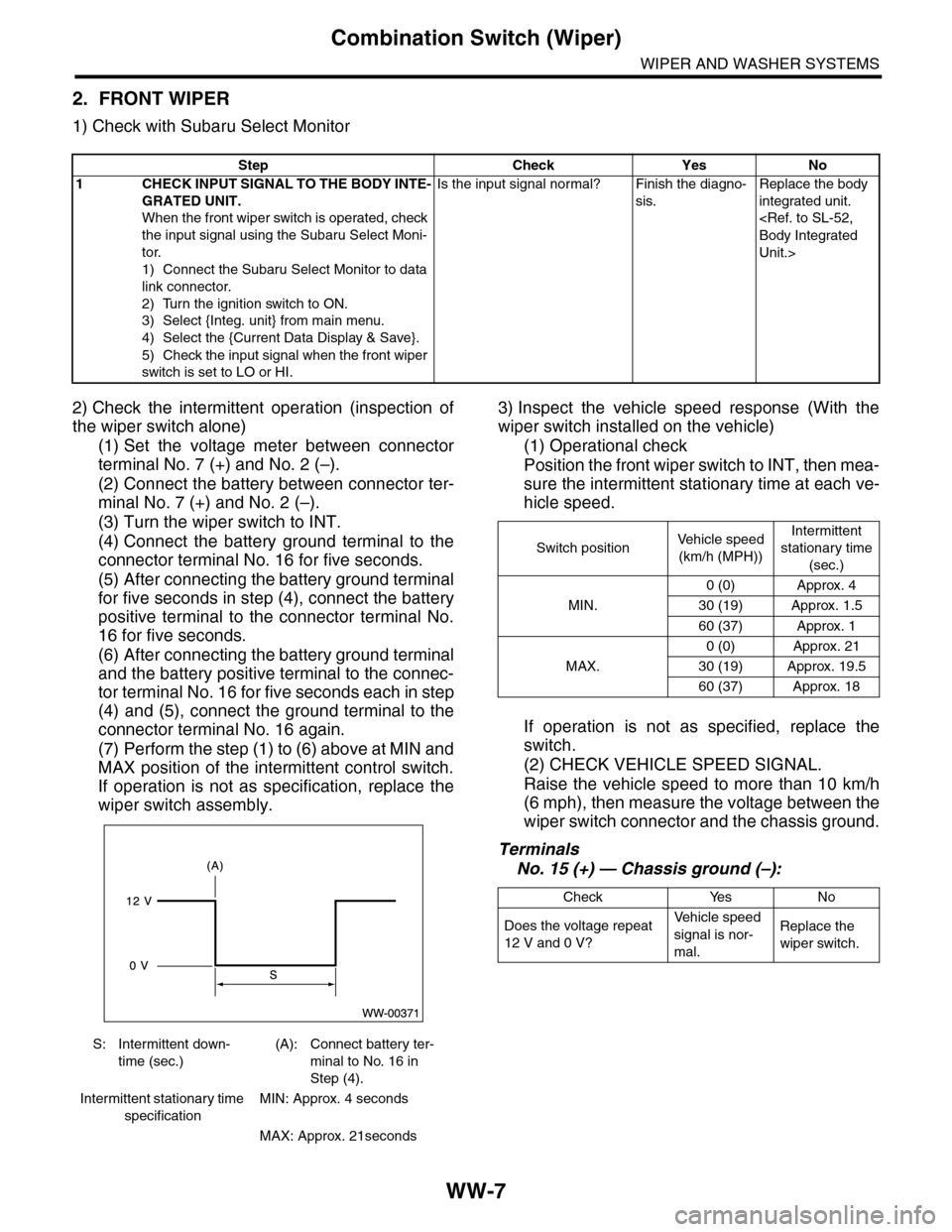
the wiper switch alone)
(1) Set the voltage meter between connector
terminal No. 7 (+) and No. 2 (–).
(2) Connect the battery between connector ter-
minal No. 7 (+) and No. 2 (–).
(3) Turn the wiper switch to INT.
(4) Connect the battery ground terminal to the
connector terminal No. 16 for five seconds.
(5) After connecting the battery ground terminal
for five seconds in step (4), connect the battery
positive terminal to the connector terminal No.
16 for five seconds.
(6) After connecting the battery ground terminal
and the battery positive terminal to the connec-
tor terminal No. 16 for five seconds each in step
(4) and (5), connect the ground terminal to the
connector terminal No. 16 again.
(7) Perform the step (1) to (6) above at MIN and
MAX position of the intermittent control switch.
If operation is not as specification, replace the
wiper switch assembly.
3) Inspect the vehicle speed response (With the
wiper switch installed on the vehicle)
(1) Operational check
Position the front wiper switch to INT, then mea-
sure the intermittent stationary time at each ve-
hicle speed.
If operation is not as specified, replace the
switch.
(2) CHECK VEHICLE SPEED SIGNAL.
Raise the vehicle speed to more than 10 km/h
(6 mph), then measure the voltage between the
wiper switch connector and the chassis ground.
Terminals
No. 15 (+) — Chassis ground (–):
Step Check Yes No
1CHECK INPUT SIGNAL TO THE BODY INTE-
GRATED UNIT.
When the front wiper switch is operated, check
the input signal using the Subaru Select Moni-
tor.
1) Connect the Subaru Select Monitor to data
link connector.
2) Turn the ignition switch to ON.
3) Select {Integ. unit} from main menu.
4) Select the {Current Data Display & Save}.
5) Check the input signal when the front wiper
switch is set to LO or HI.
Is the input signal normal? Finish the diagno-
sis.
Replace the body
integrated unit.
Unit.>
S: Intermittent down-
time (sec.)
(A): Connect battery ter-
minal to No. 16 in
Step (4).
Intermittent stationary time
specification
MIN: Approx. 4 seconds
MAX: Approx. 21seconds
Switch positionVe h i c l e s p e e d
(km/h (MPH))
Intermittent
stationary time
(sec.)
MIN.
0 (0) Approx. 4
30 (19) Approx. 1.5
60 (37) Approx. 1
MAX.
0 (0) Approx. 21
30 (19) Approx. 19.5
60 (37) Approx. 18
Check Yes No
Does the voltage repeat
12 V and 0 V?
Ve h i c l e s p e e d
signal is nor-
mal.
Replace the
wiper switch.
Page 703 of 2453
WW-8
Combination Switch (Wiper)
WIPER AND WASHER SYSTEMS
(3) CHECK THE VEHICLE SPEED SIGNAL
HARNESS.
Measure the resistance between the wiper
switch connector and the VDC control module.
Terminals
Wiper switch connector No. 15 — VDC con-
trol module No. 33:
3. REAR WIPER
1) Check with Subaru Select Monitor
Check Yes No
Is the resistance 0 Ω?Replace the
wiper switch.
Repair the har-
ness.
Step Check Yes No
1 CHECK INPUT OF REAR WIPER SWITCH.
Check the input from body integrated unit
using the Subaru Select Monitor.
1) Connect the Subaru Select Monitor to data
link connector.
2) Turn the ignition switch to ON.
3) Select {Integ. unit} from main menu.
4) Select the {Current Data Display & Save}.
5) Check the input of the rear wiper switch.
Is the input normal? Go to step 2.Check the rear
wiper switch.
INSPECTION,
Combination
Switch (Wiper).>
2CHECK OUTPUT OF BODY INTEGRATED
UNIT.
When the rear wiper switch is operated, check
the output using the Subaru Select Monitor.
1) Turn the ignition switch to ON.
2) Operate the rear wiper switch and set to
each position of ON and INT.
3) At this time, check the body integrated unit
output.
When set to ON, is ON output
continuous? When set to INT,
is ON/OFF output repeated?
(INT OFF time (when vehicle
parked): 12 seconds)
Check the rear
wiper motor.
INSPECTION,
Rear Wiper
Motor.>
Replace the body
integrated unit.
Unit.>
Page 704 of 2453
WW-9
Combination Switch (Wiper)
WIPER AND WASHER SYSTEMS
2) Check rear wiper motor circuit
Step Check Yes No
1CHECK POWER SUPPLY CIRCUIT OF THE
REAR WIPER MOTOR.
1) Disconnect the harness connector of the
rear wiper motor.
2) Turn the ignition switch to ACC.
3) Measure the voltage between the rear
wiper motor harness connector terminal and
chassis ground.
Connector & terminal
(D43) No. 1 (+) — Chassis ground (–):
Is the voltage more than 10 V? Go to step 2.•Check the fuse
(No. 23 in fuse &
relay box).
•Check the fus-
ible link (No. 6 in
main fuse box).
2CHECK GROUND CIRCUIT OF REAR WIPER
MOTOR.
1) Turn the ignition switch to OFF.
2) Measure the resistance between the rear
wiper motor harness connector terminal and
chassis ground.
Connector & terminal
(D43) No. 3 — Chassis ground:
Is the resistance less than 10
Ω?
Go to step 3.Repair the open
circuit of the rear
wiper motor
ground circuit.
3CHECK HARNESS BETWEEN BODY INTE-
GRATED UNIT AND REAR WIPER MOTOR.
1) Turn the ignition switch to OFF.
2) Disconnect the harness connector of body
integrated unit.
3) Disconnect the harness connector of the
rear wiper motor.
4) Measure the resistance between the har-
ness connector terminals of the body inte-
grated unit and rear wiper motor.
Connector & terminal
(B280) No. 1 — (D43) No. 2:
(B280) No. 8 — (D43) No. 4:
Is the resistance less than 10
Ω?
Go to step 4.Repair the open
circuit of the har-
ness between
body integrated
unit and rear wiper
motor.
4CHECK OPERATION OF REAR WIPER MO-
TOR.
1) Remove the rear wiper motor.
2) Check the rear wiper motor.
Does the rear wiper motor
rotate normally?
End. Replace the rear
wiper motor.
Page 757 of 2453
BVC(diag)-2
Basic Diagnostic Procedure
BRAKE VACUUM CONTROL (BVC) (DIAGNOSTICS)
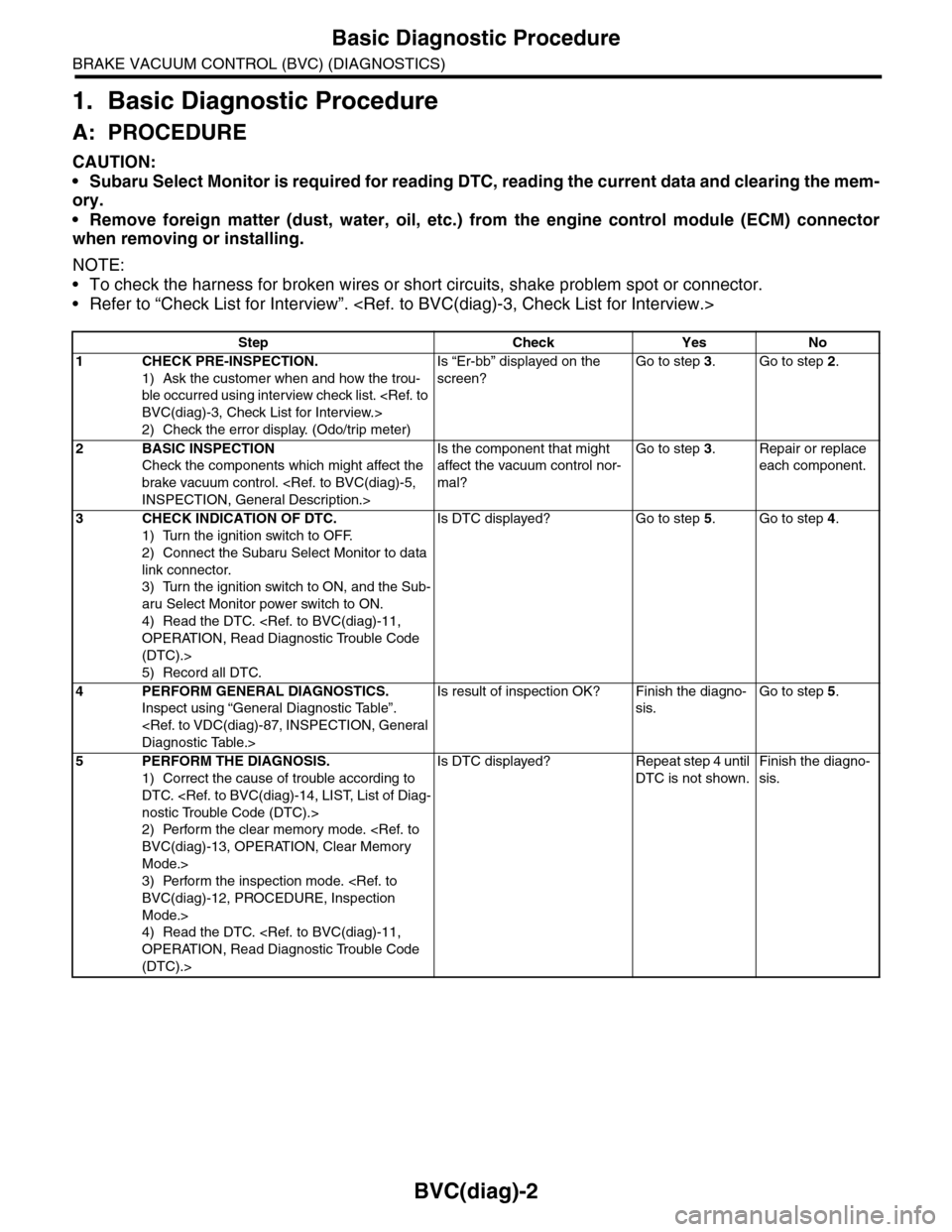
1. Basic Diagnostic Procedure
A: PROCEDURE
CAUTION:
•Subaru Select Monitor is required for reading DTC, reading the current data and clearing the mem-
ory.
•Remove foreign matter (dust, water, oil, etc.) from the engine control module (ECM) connector
when removing or installing.
NOTE:
•To check the harness for broken wires or short circuits, shake problem spot or connector.
•Refer to “Check List for Interview”.
Step Check Yes No
1CHECK PRE-INSPECTION.
1) Ask the customer when and how the trou-
ble occurred using interview check list.
2) Check the error display. (Odo/trip meter)
Is “Er-bb” displayed on the
screen?
Go to step 3.Go to step 2.
2BASIC INSPECTION
Check the components which might affect the
brake vacuum control.
Is the component that might
affect the vacuum control nor-
mal?
Go to step 3.Repair or replace
each component.
3CHECK INDICATION OF DTC.
1) Turn the ignition switch to OFF.
2) Connect the Subaru Select Monitor to data
link connector.
3) Turn the ignition switch to ON, and the Sub-
aru Select Monitor power switch to ON.
4) Read the DTC.
(DTC).>
5) Record all DTC.
Is DTC displayed? Go to step 5.Go to step 4.
4PERFORM GENERAL DIAGNOSTICS.
Inspect using “General Diagnostic Table”.
Is result of inspection OK? Finish the diagno-
sis.
Go to step 5.
5PERFORM THE DIAGNOSIS.
1) Correct the cause of trouble according to
DTC.
2) Perform the clear memory mode.
Mode.>
3) Perform the inspection mode.
Mode.>
4) Read the DTC.
(DTC).>
Is DTC displayed? Repeat step 4 until
DTC is not shown.
Finish the diagno-
sis.
Page 758 of 2453
BVC(diag)-3
Check List for Interview
BRAKE VACUUM CONTROL (BVC) (DIAGNOSTICS)
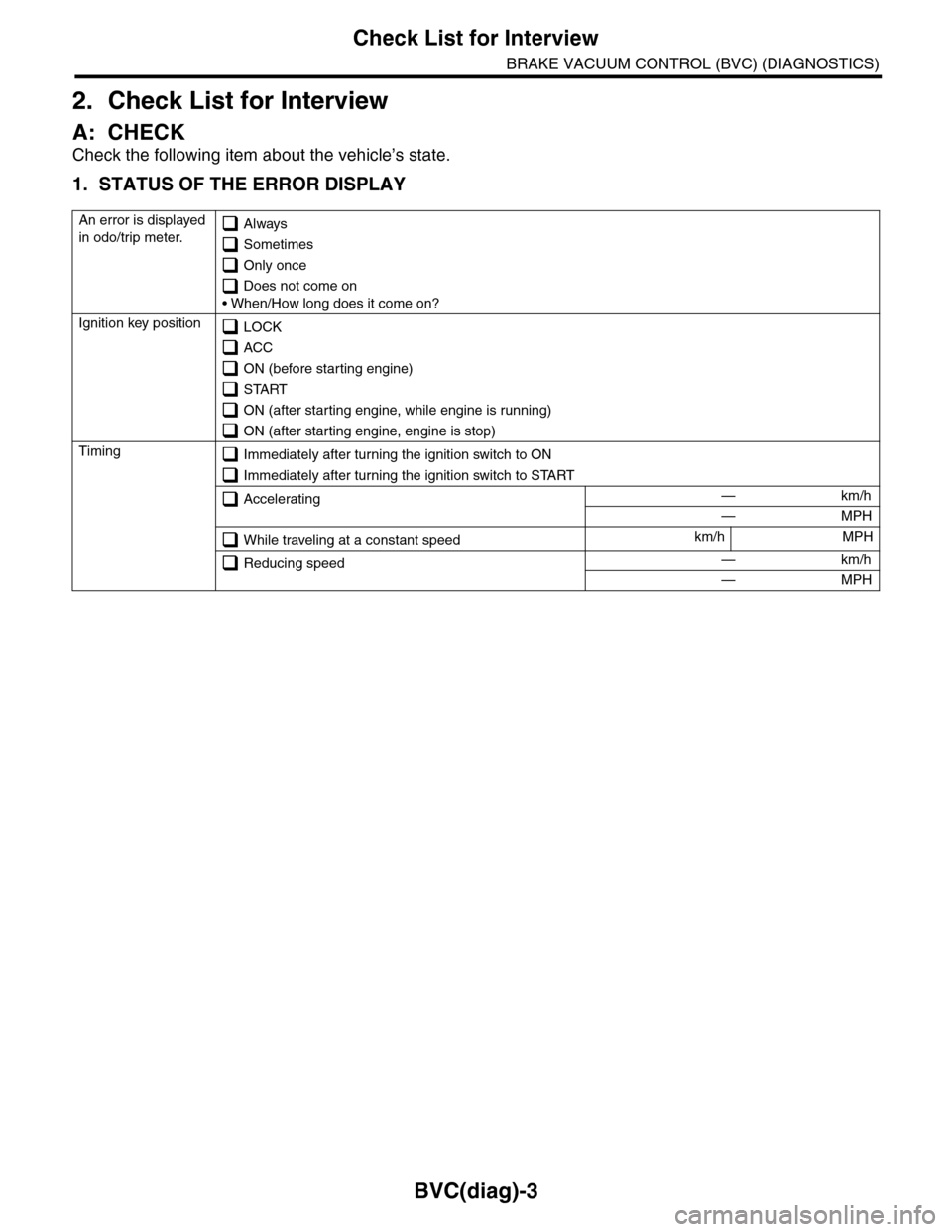
2. Check List for Interview
A: CHECK
Check the following item about the vehicle’s state.
1. STATUS OF THE ERROR DISPLAY
An error is displayed
in odo/trip meter. Always
Sometimes
Only once
Does not come on
• When/How long does it come on?
Ignition key position LOCK
ACC
ON (before starting engine)
START
ON (after starting engine, while engine is running)
ON (after starting engine, engine is stop)
Timing Immediately after turning the ignition switch to ON
Immediately after turning the ignition switch to START
Accelerating — km/h
— MPH
While traveling at a constant speedkm/h MPH
Reducing speed — km/h
— MPH