Combination meter SUBARU TRIBECA 2009 1.G Service Owner's Manual
[x] Cancel search | Manufacturer: SUBARU, Model Year: 2009, Model line: TRIBECA, Model: SUBARU TRIBECA 2009 1.GPages: 2453, PDF Size: 46.32 MB
Page 445 of 2453
IDI-6
Combination Meter System
INSTRUMENTATION/DRIVER INFO
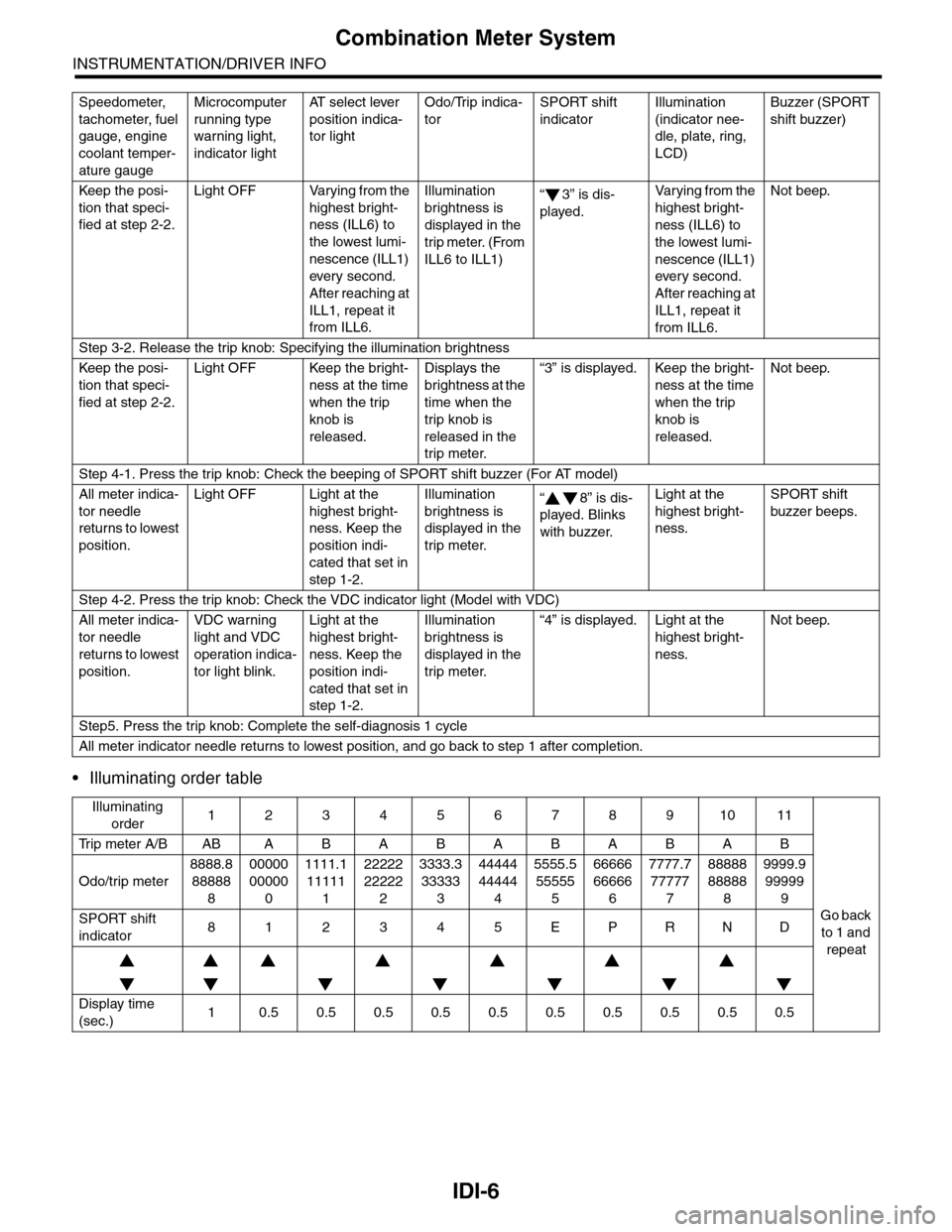
•Illuminating order table
Keep the posi-
tion that speci-
fied at step 2-2.
Light OFF Varying from the
highest bright-
ness (ILL6) to
the lowest lumi-
nescence (ILL1)
ever y second.
After reaching at
ILL1, repeat it
from ILL6.
Illumination
brightness is
displayed in the
trip meter. (From
ILL6 to ILL1)
“3” is dis-
played.
Va r y i n g f r o m t h e
highest bright-
ness (ILL6) to
the lowest lumi-
nescence (ILL1)
every second.
After reaching at
ILL1, repeat it
from ILL6.
Not beep.
Step 3-2. Release the trip knob: Specifying the illumination brightness
Keep the posi-
tion that speci-
fied at step 2-2.
Light OFF Keep the bright-
ness at the time
when the trip
knob is
released.
Displays the
brightness at the
time when the
trip knob is
released in the
trip meter.
“3” is displayed. Keep the bright-
ness at the time
when the trip
knob is
released.
Not beep.
Step 4-1. Press the trip knob: Check the beeping of SPORT shift buzzer (For AT model)
All meter indica-
tor needle
returns to lowest
position.
Light OFF Light at the
highest bright-
ness. Keep the
position indi-
cated that set in
step 1-2.
Illumination
brightness is
displayed in the
trip meter.
“8” is dis-
played. Blinks
with buzzer.
Light at the
highest bright-
ness.
SPORT shift
buzzer beeps.
Step 4-2. Press the trip knob: Check the VDC indicator light (Model with VDC)
All meter indica-
tor needle
returns to lowest
position.
VDC warning
light and VDC
operation indica-
tor light blink.
Light at the
highest bright-
ness. Keep the
position indi-
cated that set in
step 1-2.
Illumination
brightness is
displayed in the
trip meter.
“4” is displayed. Light at the
highest bright-
ness.
Not beep.
Step5. Press the trip knob: Complete the self-diagnosis 1 cycle
All meter indicator needle returns to lowest position, and go back to step 1 after completion.
Illuminating
order1234567891011
Tr i p m e t e r A / B A B A B A B A B A B A B
Go back
to 1 and
repeat
Odo/trip meter
8888.8
88888
8
00000
00000
0
1111.1
11111
1
22222
22222
2
3333.3
33333
3
44444
44444
4
5555.5
55555
5
66666
66666
6
7777.7
77777
7
88888
88888
8
9999.9
99999
9
SPORT shift
indicator812345EPRND
Display time
(sec.)10.50.50.50.50.50.50.50.50.50.5
Speedometer,
tachometer, fuel
gauge, engine
coolant temper-
ature gauge
Microcomputer
running type
warning light,
indicator light
AT s e l e c t l e v e r
position indica-
tor light
Odo/Trip indica-
tor
SPORT shift
indicator
Illumination
(indicator nee-
dle, plate, ring,
LCD)
Buzzer (SPORT
shift buzzer)
Page 446 of 2453
IDI-7
Combination Meter System
INSTRUMENTATION/DRIVER INFO
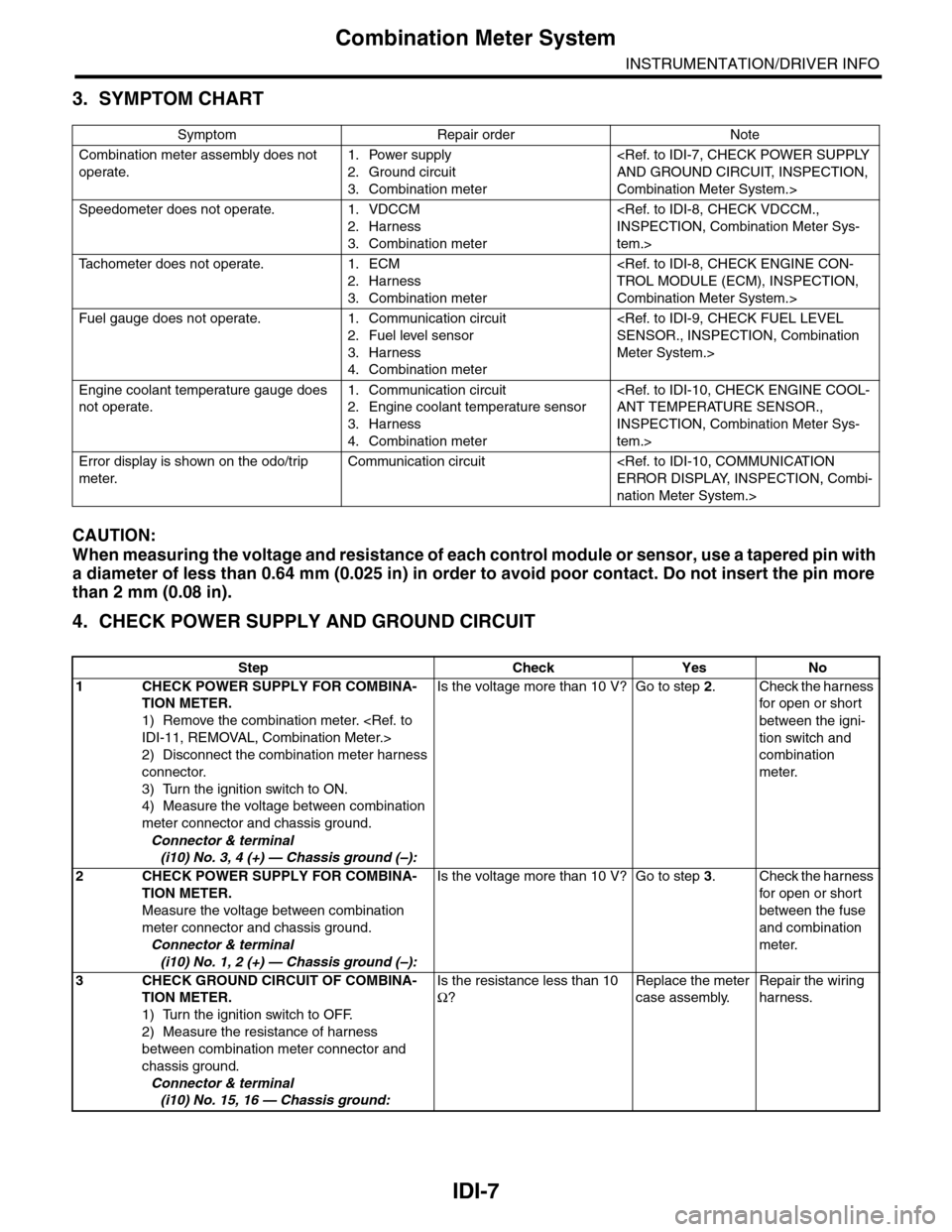
3. SYMPTOM CHART
CAUTION:
When measuring the voltage and resistance of each control module or sensor, use a tapered pin with
a diameter of less than 0.64 mm (0.025 in) in order to avoid poor contact. Do not insert the pin more
than 2 mm (0.08 in).
4. CHECK POWER SUPPLY AND GROUND CIRCUIT
Symptom Repair order Note
Combination meter assembly does not
operate.
1. Power supply
2. Ground circuit
3. Combination meter
Combination Meter System.>
Speedometer does not operate. 1. VDCCM
2. Harness
3. Combination meter
tem.>
Ta c h o m e t e r d o e s n o t o p e r a t e . 1 . E C M
2. Harness
3. Combination meter
Combination Meter System.>
Fuel gauge does not operate. 1. Communication circuit
2. Fuel level sensor
3. Harness
4. Combination meter
Meter System.>
Engine coolant temperature gauge does
not operate.
1. Communication circuit
2. Engine coolant temperature sensor
3. Harness
4. Combination meter
INSPECTION, Combination Meter Sys-
tem.>
Error display is shown on the odo/trip
meter.
Communication circuit
nation Meter System.>
Step Check Yes No
1CHECK POWER SUPPLY FOR COMBINA-
TION METER.
1) Remove the combination meter.
2) Disconnect the combination meter harness
connector.
3) Turn the ignition switch to ON.
4) Measure the voltage between combination
meter connector and chassis ground.
Connector & terminal
(i10) No. 3, 4 (+) — Chassis ground (–):
Is the voltage more than 10 V? Go to step 2.Check the harness
for open or shor t
between the igni-
tion switch and
combination
meter.
2CHECK POWER SUPPLY FOR COMBINA-
TION METER.
Measure the voltage between combination
meter connector and chassis ground.
Connector & terminal
(i10) No. 1, 2 (+) — Chassis ground (–):
Is the voltage more than 10 V? Go to step 3.Check the harness
for open or shor t
between the fuse
and combination
meter.
3CHECK GROUND CIRCUIT OF COMBINA-
TION METER.
1) Turn the ignition switch to OFF.
2) Measure the resistance of harness
between combination meter connector and
chassis ground.
Connector & terminal
(i10) No. 15, 16 — Chassis ground:
Is the resistance less than 10
Ω?
Replace the meter
case assembly.
Repair the wiring
harness.
Page 447 of 2453
IDI-8
Combination Meter System
INSTRUMENTATION/DRIVER INFO
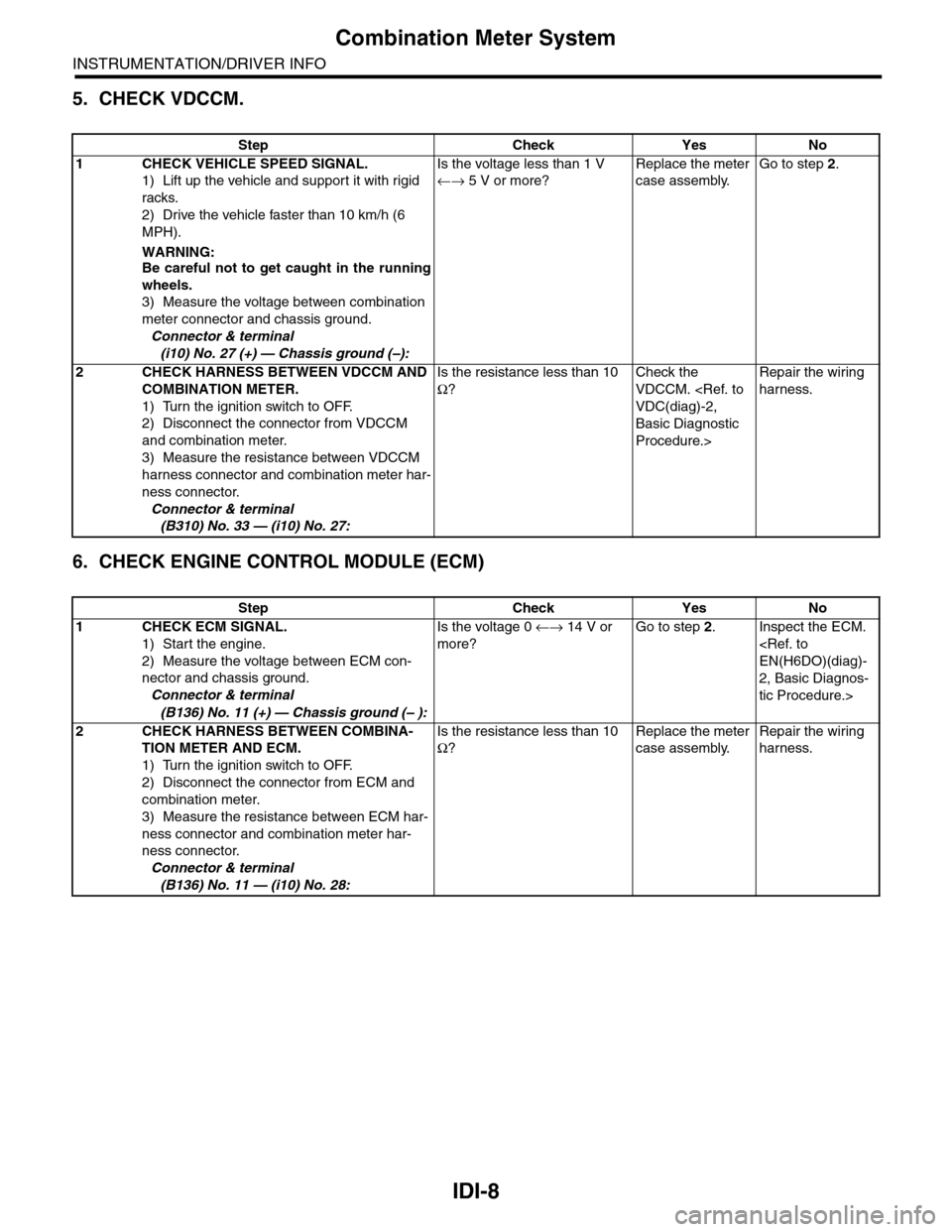
5. CHECK VDCCM.
6. CHECK ENGINE CONTROL MODULE (ECM)
Step Check Yes No
1CHECK VEHICLE SPEED SIGNAL.
1) Lift up the vehicle and support it with rigid
racks.
2) Drive the vehicle faster than 10 km/h (6
MPH).
WARNING:Be careful not to get caught in the running
wheels.
3) Measure the voltage between combination
meter connector and chassis ground.
Connector & terminal
(i10) No. 27 (+) — Chassis ground (–):
Is the voltage less than 1 V
←→ 5 V or more?
Replace the meter
case assembly.
Go to step 2.
2CHECK HARNESS BETWEEN VDCCM AND
COMBINATION METER.
1) Turn the ignition switch to OFF.
2) Disconnect the connector from VDCCM
and combination meter.
3) Measure the resistance between VDCCM
harness connector and combination meter har-
ness connector.
Connector & terminal
(B310) No. 33 — (i10) No. 27:
Is the resistance less than 10
Ω?
Check the
VDCCM.
Basic Diagnostic
Procedure.>
Repair the wiring
harness.
Step Check Yes No
1CHECK ECM SIGNAL.
1) Start the engine.
2) Measure the voltage between ECM con-
nector and chassis ground.
Connector & terminal
(B136) No. 11 (+) — Chassis ground (– ):
Is the voltage 0 ←→ 14 V or
more?
Go to step 2.Inspect the ECM.
2, Basic Diagnos-
tic Procedure.>
2CHECK HARNESS BETWEEN COMBINA-
TION METER AND ECM.
1) Turn the ignition switch to OFF.
2) Disconnect the connector from ECM and
combination meter.
3) Measure the resistance between ECM har-
ness connector and combination meter har-
ness connector.
Connector & terminal
(B136) No. 11 — (i10) No. 28:
Is the resistance less than 10
Ω?
Replace the meter
case assembly.
Repair the wiring
harness.
Page 448 of 2453
IDI-9
Combination Meter System
INSTRUMENTATION/DRIVER INFO
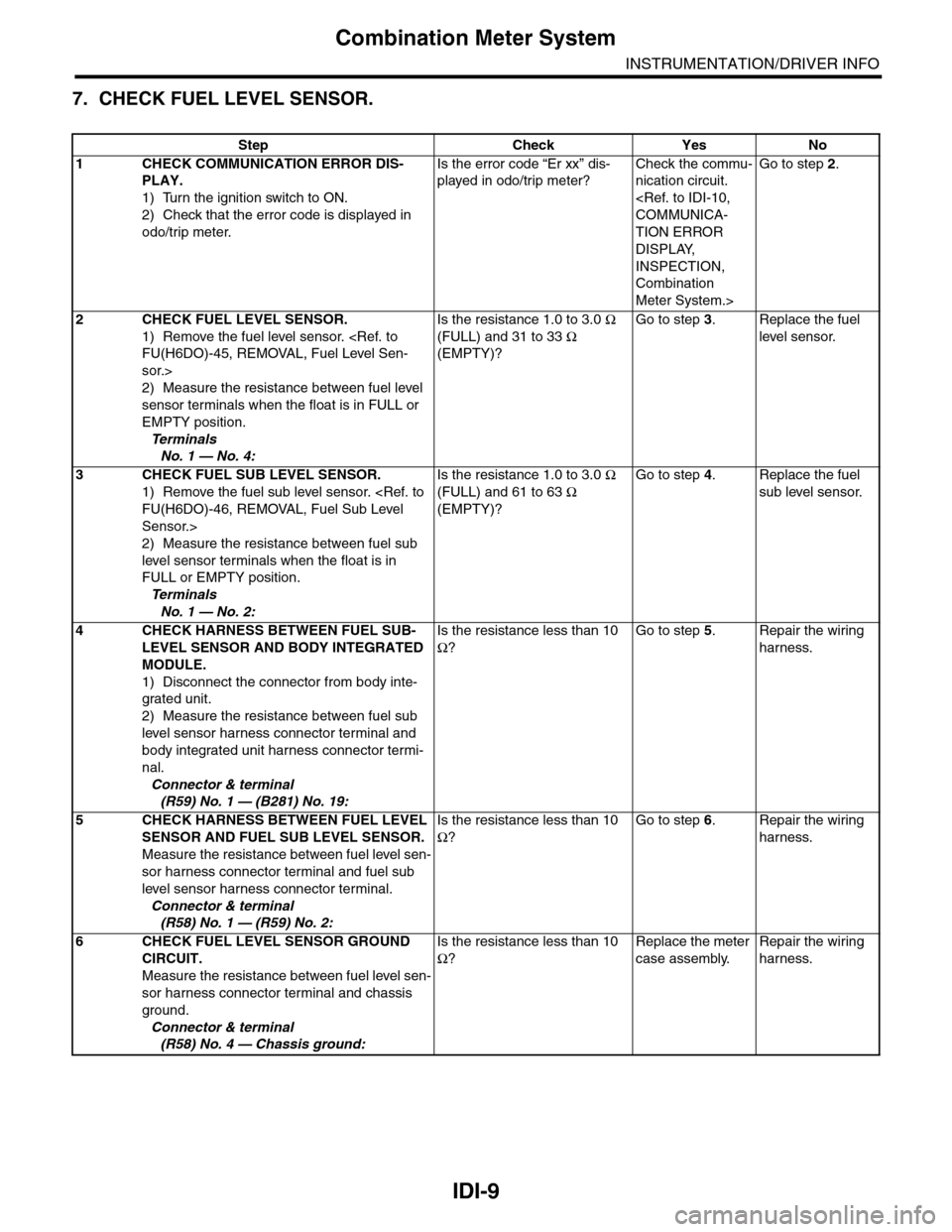
7. CHECK FUEL LEVEL SENSOR.
Step Check Yes No
1CHECK COMMUNICATION ERROR DIS-
PLAY.
1) Turn the ignition switch to ON.
2) Check that the error code is displayed in
odo/trip meter.
Is the error code “Er xx” dis-
played in odo/trip meter?
Check the commu-
nication circuit.
TION ERROR
DISPLAY,
INSPECTION,
Combination
Meter System.>
Go to step 2.
2CHECK FUEL LEVEL SENSOR.
1) Remove the fuel level sensor.
sor.>
2) Measure the resistance between fuel level
sensor terminals when the float is in FULL or
EMPTY position.
Te r m i n a l s
No. 1 — No. 4:
Is the resistance 1.0 to 3.0 Ω
(FULL) and 31 to 33 Ω
(EMPTY)?
Go to step 3.Replace the fuel
level sensor.
3CHECK FUEL SUB LEVEL SENSOR.
1) Remove the fuel sub level sensor.
Sensor.>
2) Measure the resistance between fuel sub
level sensor terminals when the float is in
FULL or EMPTY position.
Te r m i n a l s
No. 1 — No. 2:
Is the resistance 1.0 to 3.0 Ω
(FULL) and 61 to 63 Ω
(EMPTY)?
Go to step 4.Replace the fuel
sub level sensor.
4CHECK HARNESS BETWEEN FUEL SUB-
LEVEL SENSOR AND BODY INTEGRATED
MODULE.
1) Disconnect the connector from body inte-
grated unit.
2) Measure the resistance between fuel sub
level sensor harness connector terminal and
body integrated unit harness connector termi-
nal.
Connector & terminal
(R59) No. 1 — (B281) No. 19:
Is the resistance less than 10
Ω?
Go to step 5.Repair the wiring
harness.
5CHECK HARNESS BETWEEN FUEL LEVEL
SENSOR AND FUEL SUB LEVEL SENSOR.
Measure the resistance between fuel level sen-
sor harness connector terminal and fuel sub
level sensor harness connector terminal.
Connector & terminal
(R58) No. 1 — (R59) No. 2:
Is the resistance less than 10
Ω?
Go to step 6.Repair the wiring
harness.
6CHECK FUEL LEVEL SENSOR GROUND
CIRCUIT.
Measure the resistance between fuel level sen-
sor harness connector terminal and chassis
ground.
Connector & terminal
(R58) No. 4 — Chassis ground:
Is the resistance less than 10
Ω?
Replace the meter
case assembly.
Repair the wiring
harness.
Page 449 of 2453
IDI-10
Combination Meter System
INSTRUMENTATION/DRIVER INFO
8. CHECK ENGINE COOLANT TEMPERATURE SENSOR.
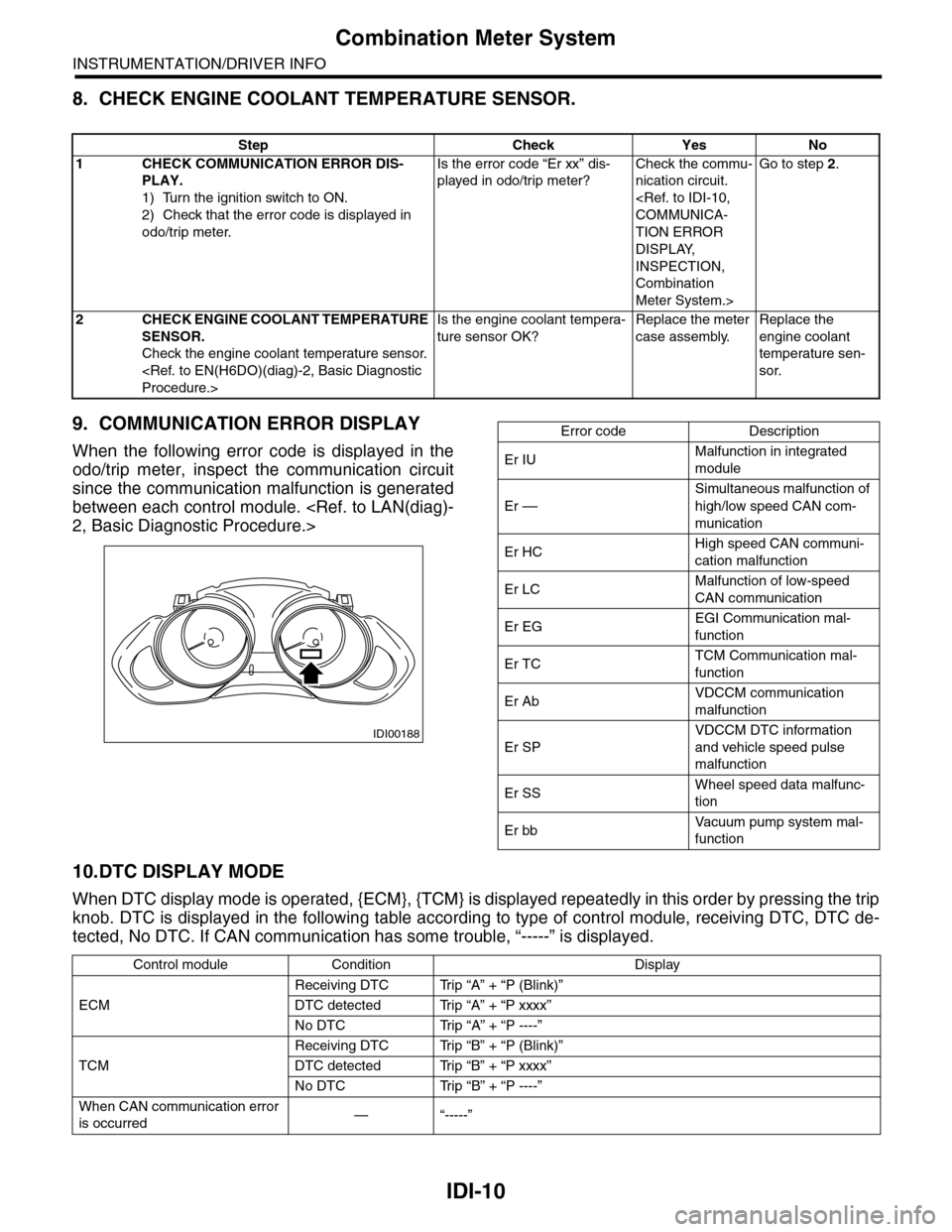
9. COMMUNICATION ERROR DISPLAY
When the following error code is displayed in the
odo/trip meter, inspect the communication circuit
since the communication malfunction is generated
between each control module.
10.DTC DISPLAY MODE
When DTC display mode is operated, {ECM}, {TCM} is displayed repeatedly in this order by pressing the trip
knob. DTC is displayed in the following table according to type of control module, receiving DTC, DTC de-
tected, No DTC. If CAN communication has some trouble, “-----” is displayed.
Step Check Yes No
1CHECK COMMUNICATION ERROR DIS-
PLAY.
1) Turn the ignition switch to ON.
2) Check that the error code is displayed in
odo/trip meter.
Is the error code “Er xx” dis-
played in odo/trip meter?
Check the commu-
nication circuit.
TION ERROR
DISPLAY,
INSPECTION,
Combination
Meter System.>
Go to step 2.
2CHECK ENGINE COOLANT TEMPERATURE
SENSOR.
Check the engine coolant temperature sensor.
Is the engine coolant tempera-
ture sensor OK?
Replace the meter
case assembly.
Replace the
engine coolant
temperature sen-
sor.
IDI00188
Error code Description
Er IUMalfunction in integrated
module
Er ––
Simultaneous malfunction of
high/low speed CAN com-
munication
Er HCHigh speed CAN communi-
cation malfunction
Er LCMalfunction of low-speed
CAN communication
Er EGEGI Communication mal-
function
Er TCTCM Communication mal-
function
Er AbVDCCM communication
malfunction
Er SP
VDCCM DTC information
and vehicle speed pulse
malfunction
Er SSWheel speed data malfunc-
tion
Er bbVa c u u m p u m p s y s t e m m a l -
function
Control module Condition Display
ECM
Receiving DTC Trip “A” + “P (Blink)”
DTC detected Trip “A” + “P xxxx”
No DTC Trip “A” + “P ----”
TCM
Receiving DTC Trip “B” + “P (Blink)”
DTC detected Trip “B” + “P xxxx”
No DTC Trip “B” + “P ----”
When CAN communication error
is occurred—“-----”
Page 450 of 2453
IDI-11
Combination Meter
INSTRUMENTATION/DRIVER INFO
3. Combination Meter
A: REMOVAL
1) Disconnect the ground cable from battery.
2) Set the tilt steering at the lowest position.
3) Remove the console box.
4) Remove the control panel.
5) Remove the instrument panel lower cover.
er.>
6) Remove the console side panel.
7) Remove the meter hood.
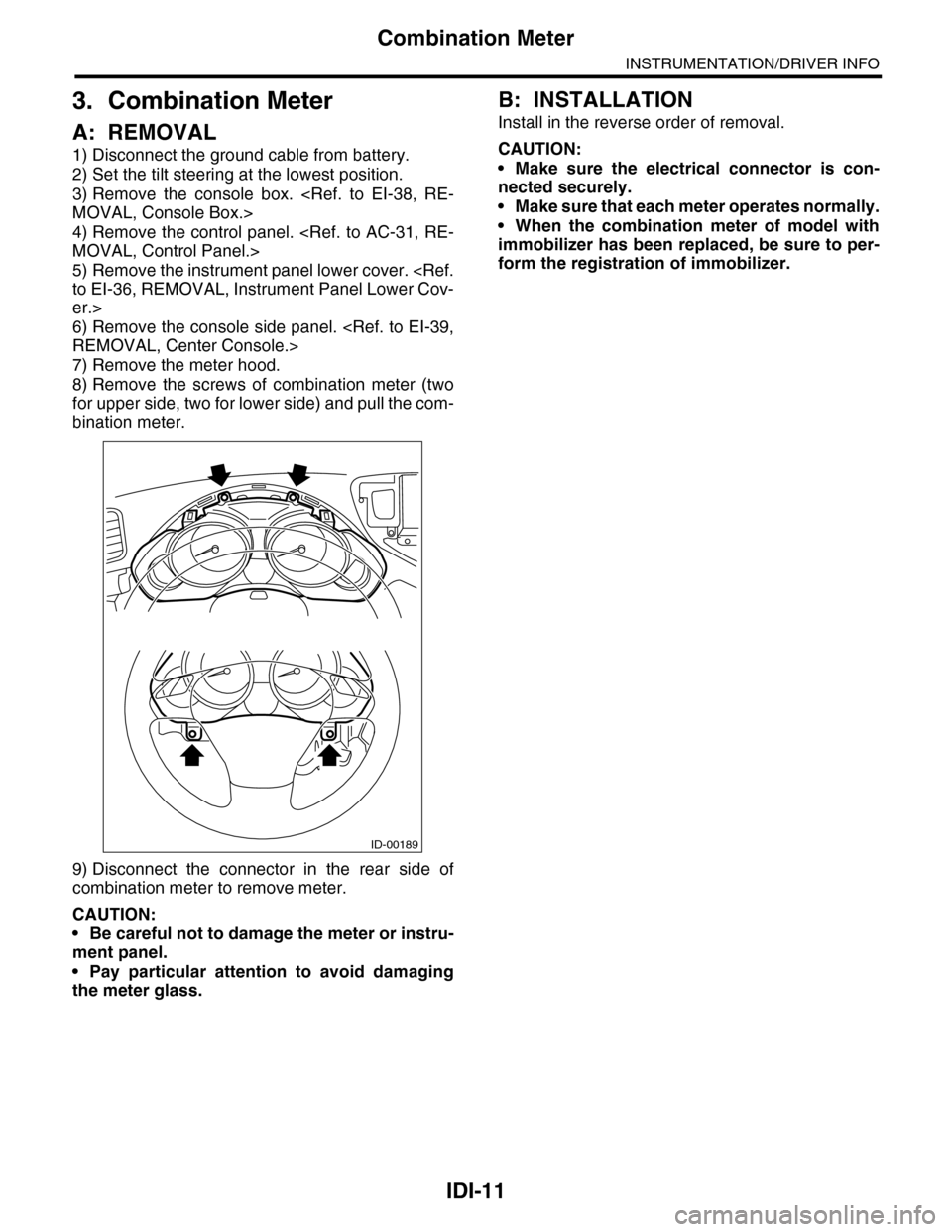
8) Remove the screws of combination meter (two
for upper side, two for lower side) and pull the com-
bination meter.
9) Disconnect the connector in the rear side of
combination meter to remove meter.
CAUTION:
•Be careful not to damage the meter or instru-
ment panel.
•Pay particular attention to avoid damaging
the meter glass.
B: INSTALLATION
Install in the reverse order of removal.
CAUTION:
•Make sure the electrical connector is con-
nected securely.
•Make sure that each meter operates normally.
•When the combination meter of model with
immobilizer has been replaced, be sure to per-
form the registration of immobilizer.
ID-00189
Page 451 of 2453
IDI-12
Combination Meter
INSTRUMENTATION/DRIVER INFO
C: DISASSEMBLY
CAUTION:
•Use gloves to avoid damage and getting fingerprints on the glass surface and meter surfaces.
•Be careful not to apply excessive force to the trip knob.
•Be sure not to touch the meter indicator needle.
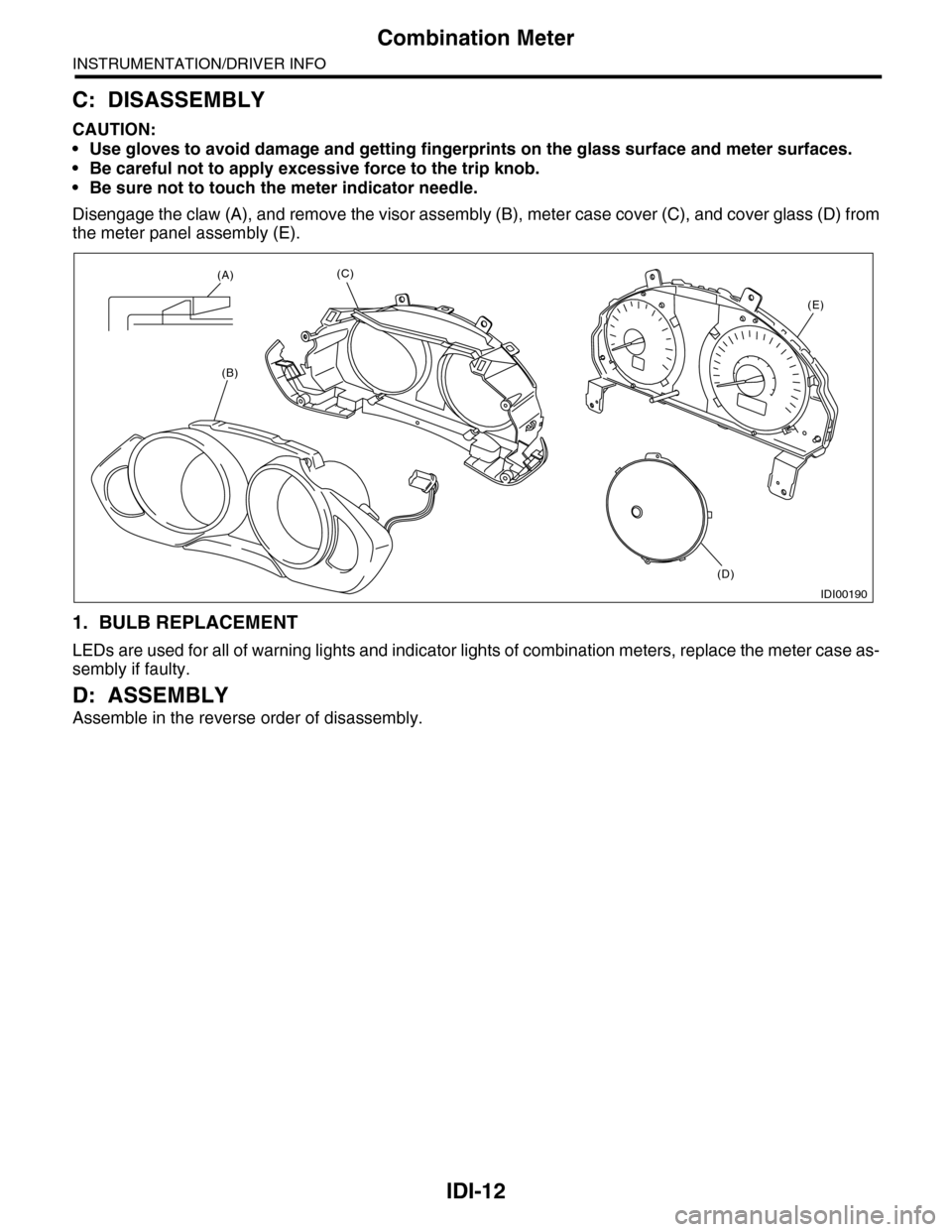
Disengage the claw (A), and remove the visor assembly (B), meter case cover (C), and cover glass (D) from
the meter panel assembly (E).
1. BULB REPLACEMENT
LEDs are used for all of warning lights and indicator lights of combination meters, replace the meter case as-
sembly if faulty.
D: ASSEMBLY
Assemble in the reverse order of disassembly.
IDI00190
(A)
(B)
(C)
(D)
(E)
Page 458 of 2453
LAN(diag)-2
Basic Diagnostic Procedure
LAN SYSTEM (DIAGNOSTICS)
1. Basic Diagnostic Procedure
A: PROCEDURE
1. WITH SUBARU SELECT MONITOR
CAUTION:
•Subaru Select Monitor is required for reading DTC, performing diagnosis and reading current data.
•Remove foreign matter (dust, water, oil, etc.) from the body integrated unit connector during re-
moval and installation.
•For model with immobilizer, registration of immobilizer may be needed after the replacement of
controller etc. For detailed procedure, refer to the REGISTRATION MANUAL FOR IMMOBILIZER.
NOTE:
•To check harness for broken wires or short circuits, shake trouble spot or connector.
•Check List for Interview.
Step Check Yes No
1CHECK PRE-INSPECTION.
1) Ask the customer when and how the trou-
ble occurred using interview check list.
2) Check the display of communication error
display. (Combination meter, odo/trip meter)
Is the communication error dis-
played?
Go to step 3.Go to step 2.
2BASIC INSPECTION
Check the components which might affect
body control.
Is the component that might
influence the body control
problem normal?
Go to step 3.Repair or replace
each component.
3CHECK INDICATION OF DTC.
1) Read DTC of all systems.
CODE (DTC), OPERATION, Subaru Select
Monitor.>
NOTE:•The LAN system is for the overall vehicle, so
read the DTC of all systems.
•If the communication function of the Subaru
Select Monitor cannot be executed normally,
check the communication circuit.
TIALIZING IMPOSSIBLE, Diagnostic Proce-
dure with Diagnostic Trouble Code (DTC).>
2) Record all DTC.
Is a DTC other than CAN com-
munication displayed in the
output code?
ECU: P0600 TCU: P1718 VDC
CU: C0047 or C0057, etc.
Refer to the DTC
related table.
FUNCTION
CHECK, DTC
TA B L E , L i s t o f
Diagnostic Trou-
ble Code (DTC).>
Go to step 5.
Go to step 4.
4PERFORM GENERAL DIAGNOSTICS.
Inspect using “General Diagnostics Table”.
Is result of inspection OK? LAN system is nor-
mal.
Go to step 5.
5PERFORM DIAGNOSIS.
1) Correct the cause of trouble.
2) Perform the clear memory mode.
OPERATION, Subaru Select Monitor.>
3) Read the DTC.
OPERATION, Subaru Select Monitor.>
Is DTC displayed? Repeat step 5 until
DTC is not shown.
Finish the diagno-
sis.
Page 459 of 2453
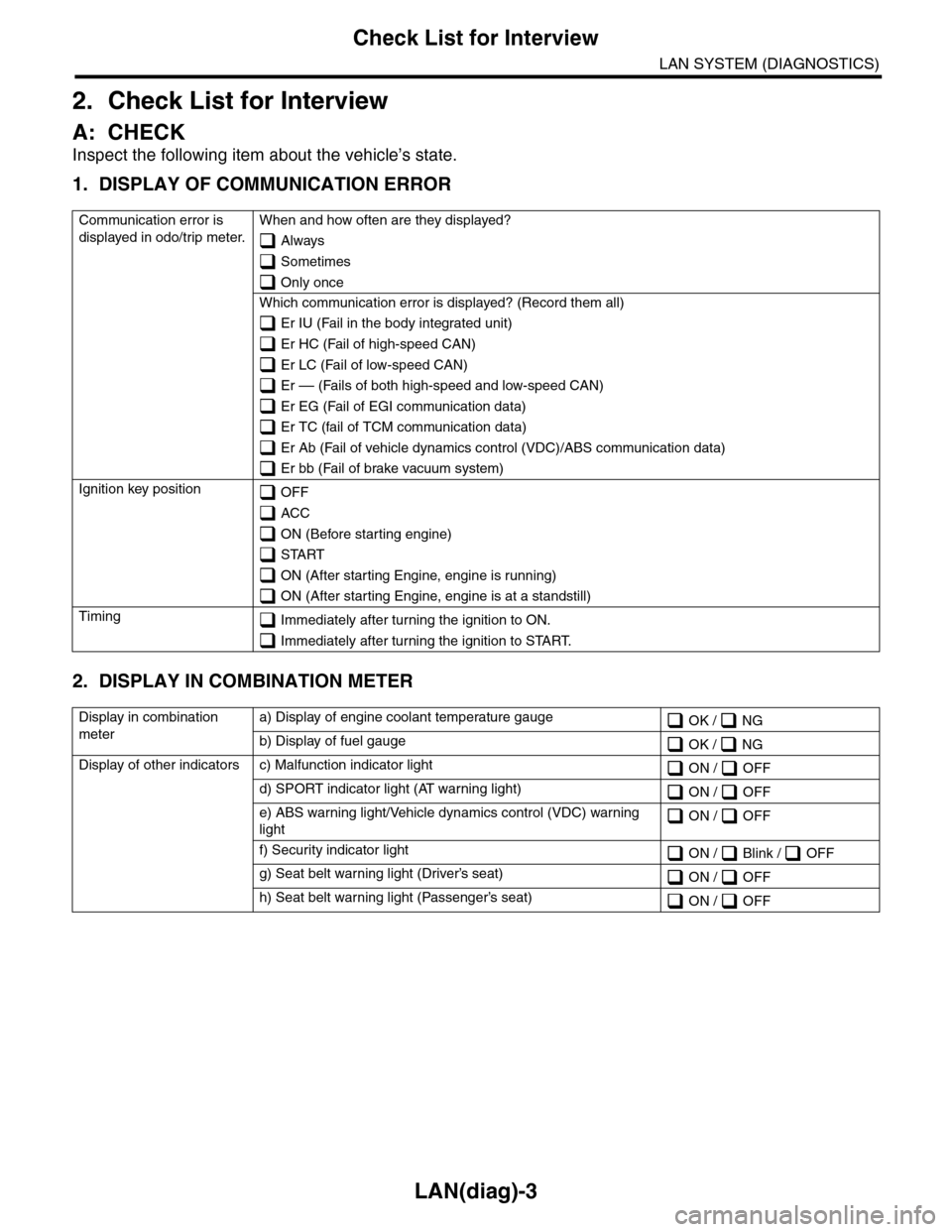
LAN(diag)-3
Check List for Interview
LAN SYSTEM (DIAGNOSTICS)
2. Check List for Interview
A: CHECK
Inspect the following item about the vehicle’s state.
1. DISPLAY OF COMMUNICATION ERROR
2. DISPLAY IN COMBINATION METER
Communication error is
displayed in odo/trip meter.
When and how often are they displayed?
Always
Sometimes
Only once
Which communication error is displayed? (Record them all)
Er IU (Fail in the body integrated unit)
Er HC (Fail of high-speed CAN)
Er LC (Fail of low-speed CAN)
Er –– (Fails of both high-speed and low-speed CAN)
Er EG (Fail of EGI communication data)
Er TC (fail of TCM communication data)
Er Ab (Fail of vehicle dynamics control (VDC)/ABS communication data)
Er bb (Fail of brake vacuum system)
Ignition key position OFF
ACC
ON (Before starting engine)
START
ON (After starting Engine, engine is running)
ON (After starting Engine, engine is at a standstill)
Timing Immediately after turning the ignition to ON.
Immediately after turning the ignition to START.
Display in combination
meter
a) Display of engine coolant temperature gauge OK / NG
b) Display of fuel gauge OK / NG
Display of other indicators c) Malfunction indicator light ON / OFF
d) SPORT indicator light (AT warning light) ON / OFF
e) ABS warning light/Vehicle dynamics control (VDC) warning
light ON / OFF
f) Security indicator light ON / Blink / OFF
g) Seat belt warning light (Driver’s seat) ON / OFF
h) Seat belt warning light (Passenger’s seat) ON / OFF
Page 463 of 2453
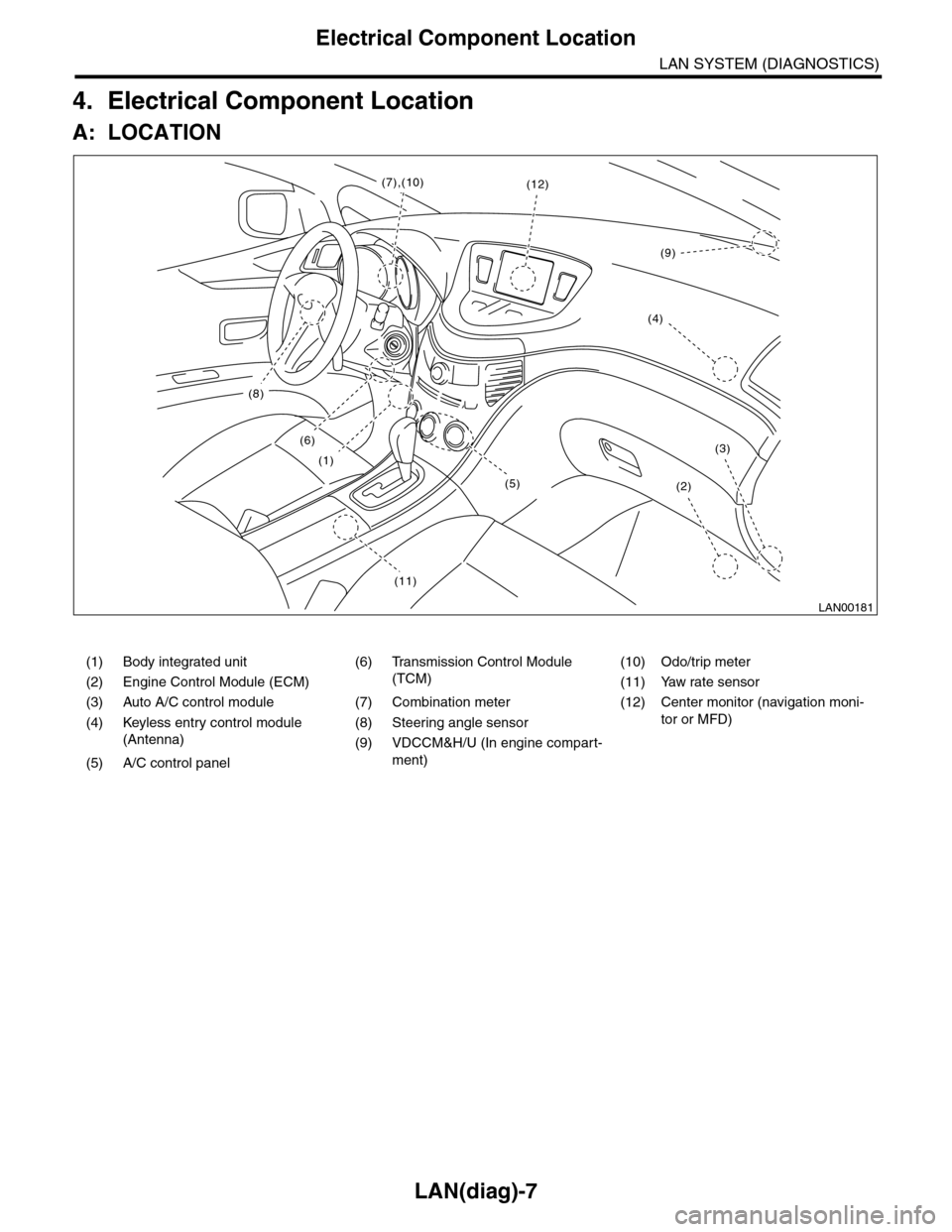
LAN(diag)-7
Electrical Component Location
LAN SYSTEM (DIAGNOSTICS)
4. Electrical Component Location
A: LOCATION
(1) Body integrated unit (6) Transmission Control Module
(TCM)
(10) Odo/trip meter
(2) Engine Control Module (ECM) (11) Yaw rate sensor
(3) Auto A/C control module (7) Combination meter (12) Center monitor (navigation moni-
tor or MFD)(4) Keyless entry control module
(Antenna)
(8) Steering angle sensor
(9) VDCCM&H/U (In engine compart-
ment)(5) A/C control panel
LAN00181
(8)
(6)
(1)
(11)
(2)
(3)
(12)(7),(10)
(4)
(9)
(5)