connector SUBARU TRIBECA 2009 1.G Service Owner's Manual
[x] Cancel search | Manufacturer: SUBARU, Model Year: 2009, Model line: TRIBECA, Model: SUBARU TRIBECA 2009 1.GPages: 2453, PDF Size: 46.32 MB
Page 26 of 2453
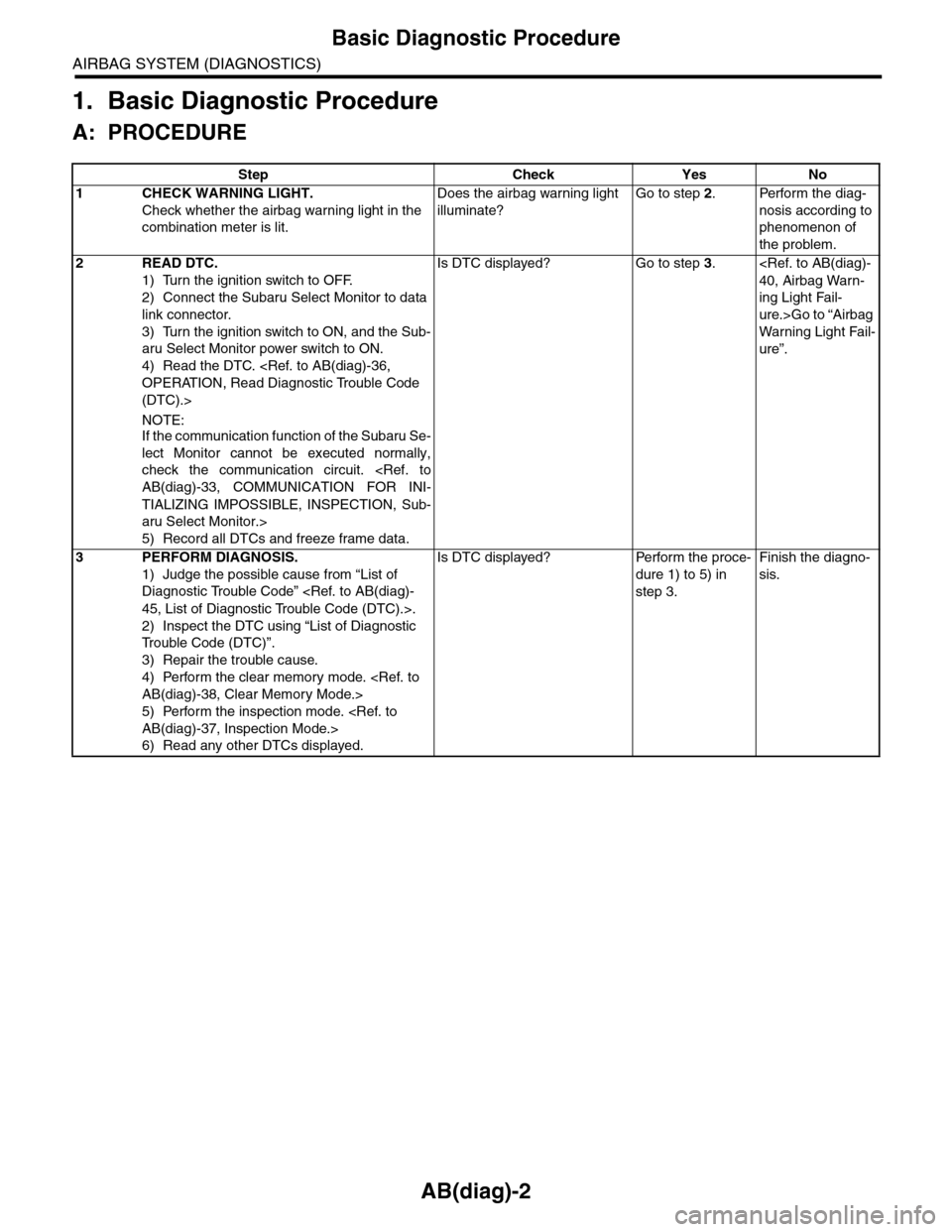
AB(diag)-2
Basic Diagnostic Procedure
AIRBAG SYSTEM (DIAGNOSTICS)
1. Basic Diagnostic Procedure
A: PROCEDURE
Step Check Yes No
1CHECK WARNING LIGHT.
Check whether the airbag warning light in the
combination meter is lit.
Does the airbag warning light
illuminate?
Go to step 2.Perform the diag-
nosis according to
phenomenon of
the problem.
2READ DTC.
1) Turn the ignition switch to OFF.
2) Connect the Subaru Select Monitor to data
link connector.
3) Turn the ignition switch to ON, and the Sub-
aru Select Monitor power switch to ON.
4) Read the DTC.
(DTC).>
NOTE:If the communication function of the Subaru Se-
lect Monitor cannot be executed normally,
check the communication circuit.
TIALIZING IMPOSSIBLE, INSPECTION, Sub-
aru Select Monitor.>
5) Record all DTCs and freeze frame data.
Is DTC displayed? Go to step 3.
ing Light Fail-
ure.>Go to “Airbag
Wa r ni n g L ig h t Fa i l-
ure”.
3PERFORM DIAGNOSIS.
1) Judge the possible cause from “List of
Diagnostic Trouble Code”
2) Inspect the DTC using “List of Diagnostic
Tr o u b l e C o d e ( D T C ) ” .
3) Repair the trouble cause.
4) Perform the clear memory mode.
5) Perform the inspection mode.
6) Read any other DTCs displayed.
Is DTC displayed? Perform the proce-
dure 1) to 5) in
step 3.
Finish the diagno-
sis.
Page 28 of 2453
AB(diag)-4
General Description
AIRBAG SYSTEM (DIAGNOSTICS)
3. General Description
A: CAUTION
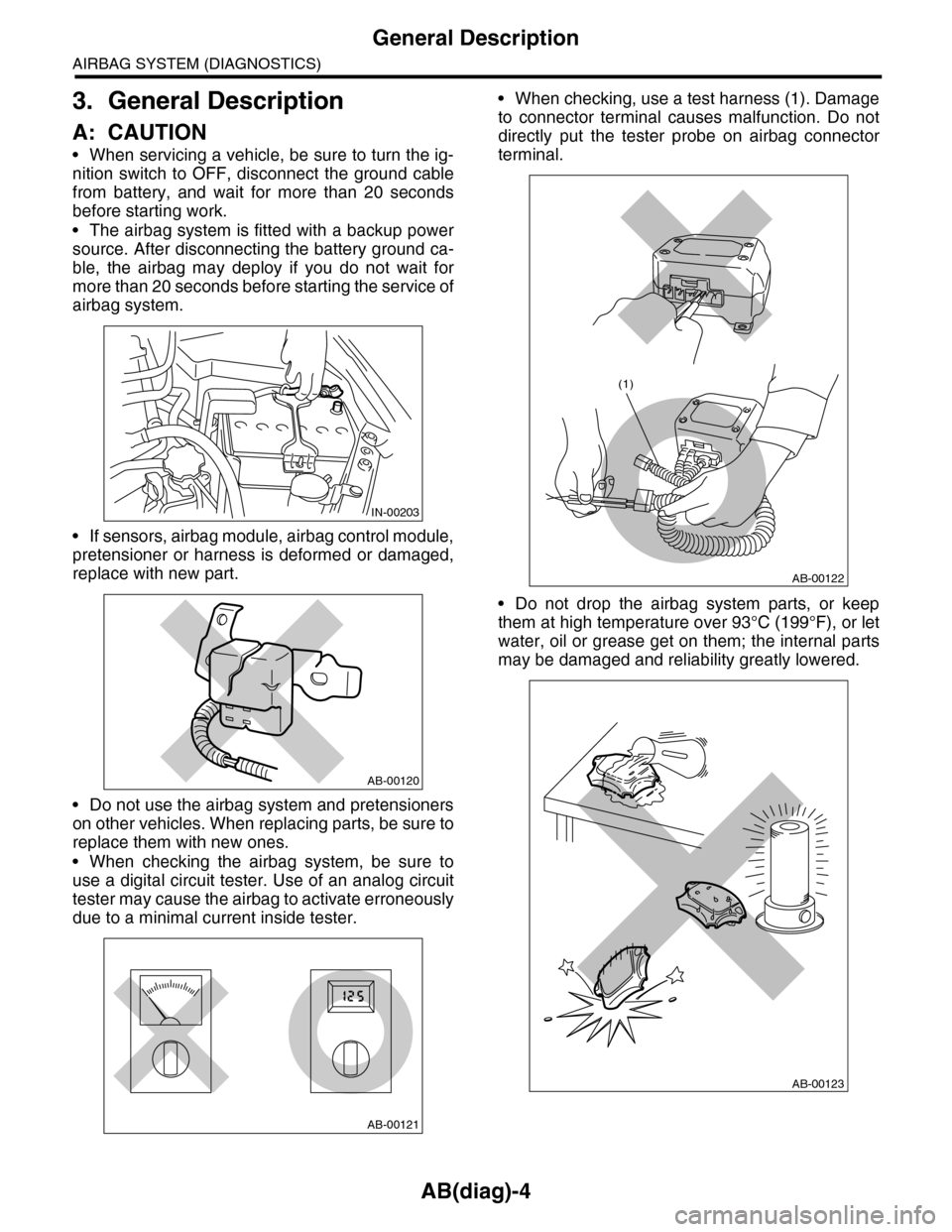
•When servicing a vehicle, be sure to turn the ig-
nition switch to OFF, disconnect the ground cable
from battery, and wait for more than 20 seconds
before starting work.
•The airbag system is fitted with a backup power
source. After disconnecting the battery ground ca-
ble, the airbag may deploy if you do not wait for
more than 20 seconds before starting the service of
airbag system.
•If sensors, airbag module, airbag control module,
pretensioner or harness is deformed or damaged,
replace with new part.
•Do not use the airbag system and pretensioners
on other vehicles. When replacing parts, be sure to
replace them with new ones.
•When checking the airbag system, be sure to
use a digital circuit tester. Use of an analog circuit
tester may cause the airbag to activate erroneously
due to a minimal current inside tester.
•When checking, use a test harness (1). Damage
to connector terminal causes malfunction. Do not
directly put the tester probe on airbag connector
terminal.
•Do not drop the airbag system parts, or keep
them at high temperature over 93°C (199°F), or let
water, oil or grease get on them; the internal parts
may be damaged and reliability greatly lowered.
IN-00203
AB-00120
AB-00121
AB-00122
(1)
AB-00123
Page 29 of 2453
AB(diag)-5
General Description
AIRBAG SYSTEM (DIAGNOSTICS)
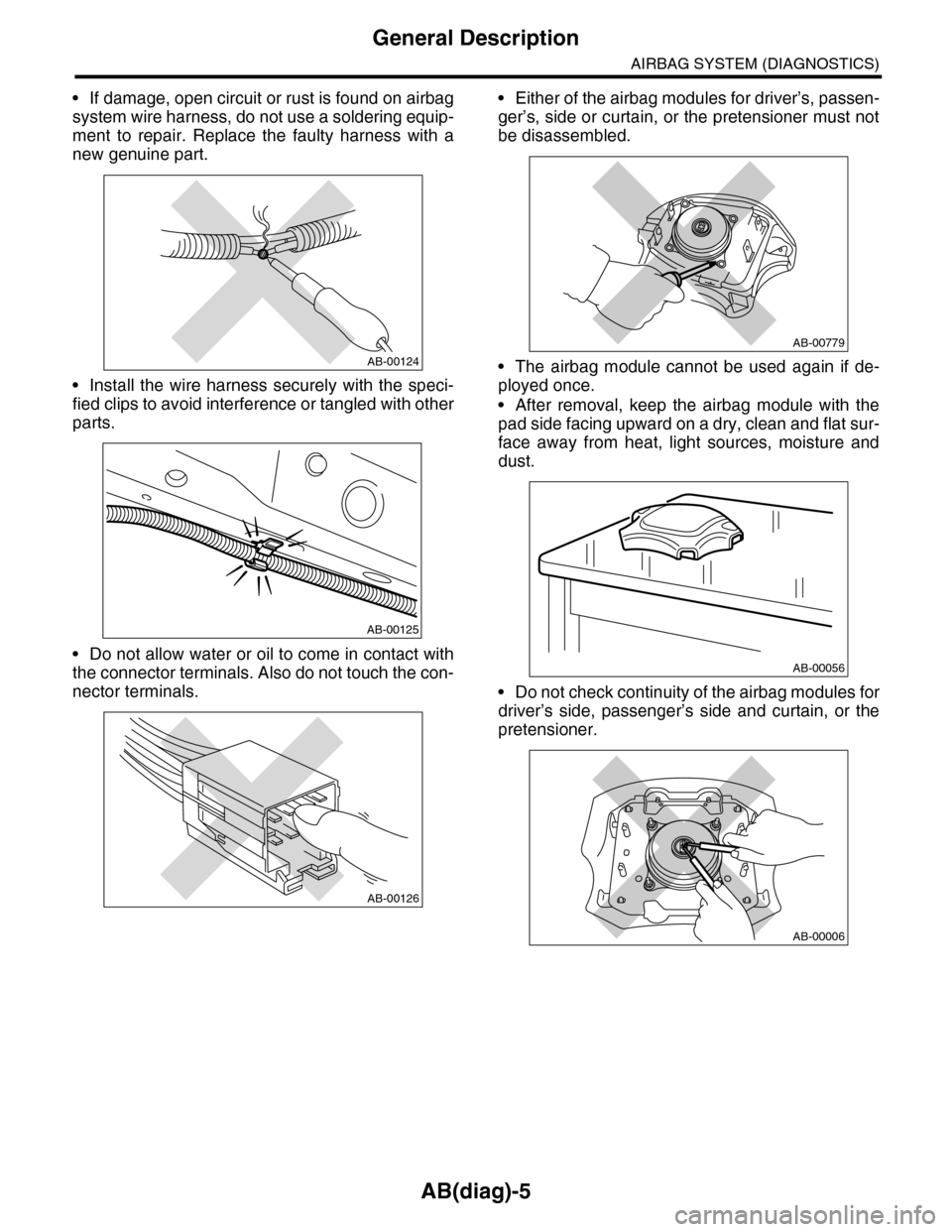
•If damage, open circuit or rust is found on airbag
system wire harness, do not use a soldering equip-
ment to repair. Replace the faulty harness with a
new genuine part.
•Install the wire harness securely with the speci-
fied clips to avoid interference or tangled with other
parts.
•Do not allow water or oil to come in contact with
the connector terminals. Also do not touch the con-
nector terminals.
•Either of the airbag modules for driver’s, passen-
ger’s, side or curtain, or the pretensioner must not
be disassembled.
•The airbag module cannot be used again if de-
ployed once.
•After removal, keep the airbag module with the
pad side facing upward on a dry, clean and flat sur-
face away from heat, light sources, moisture and
dust.
•Do not check continuity of the airbag modules for
driver’s side, passenger’s side and curtain, or the
pretensioner.
AB-00124
AB-00125
AB-00126
AB-00779
AB-00056
AB-00006
Page 48 of 2453
AB(diag)-24
Electrical Component Location
AIRBAG SYSTEM (DIAGNOSTICS)
4. Electrical Component Location
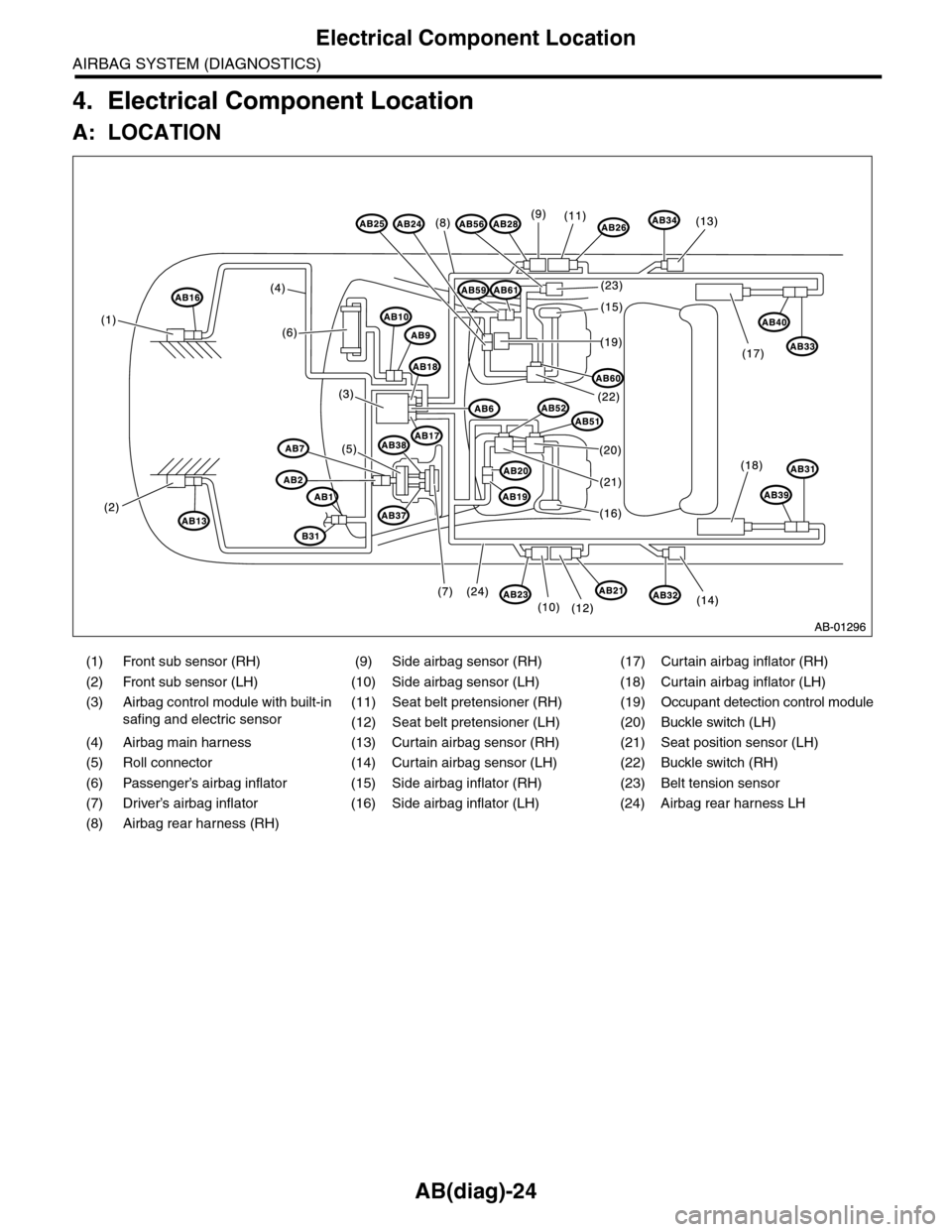
A: LOCATION
(1) Front sub sensor (RH) (9) Side airbag sensor (RH) (17) Curtain airbag inflator (RH)
(2) Front sub sensor (LH) (10) Side airbag sensor (LH) (18) Curtain airbag inflator (LH)
(3)
Airbag control module with built-in
safing and electric sensor
(11) Seat belt pretensioner (RH) (19) Occupant detection control module
(12) Seat belt pretensioner (LH) (20) Buckle switch (LH)
(4) Airbag main harness (13) Curtain airbag sensor (RH) (21) Seat position sensor (LH)
(5) Roll connector (14) Curtain airbag sensor (LH) (22) Buckle switch (RH)
(6) Passenger’s airbag inflator (15) Side airbag inflator (RH) (23) Belt tension sensor
(7) Driver’s airbag inflator (16) Side airbag inflator (LH) (24) Airbag rear harness LH
(8) Airbag rear harness (RH)
Page 49 of 2453
AB(diag)-25
Electrical Component Location
AIRBAG SYSTEM (DIAGNOSTICS)
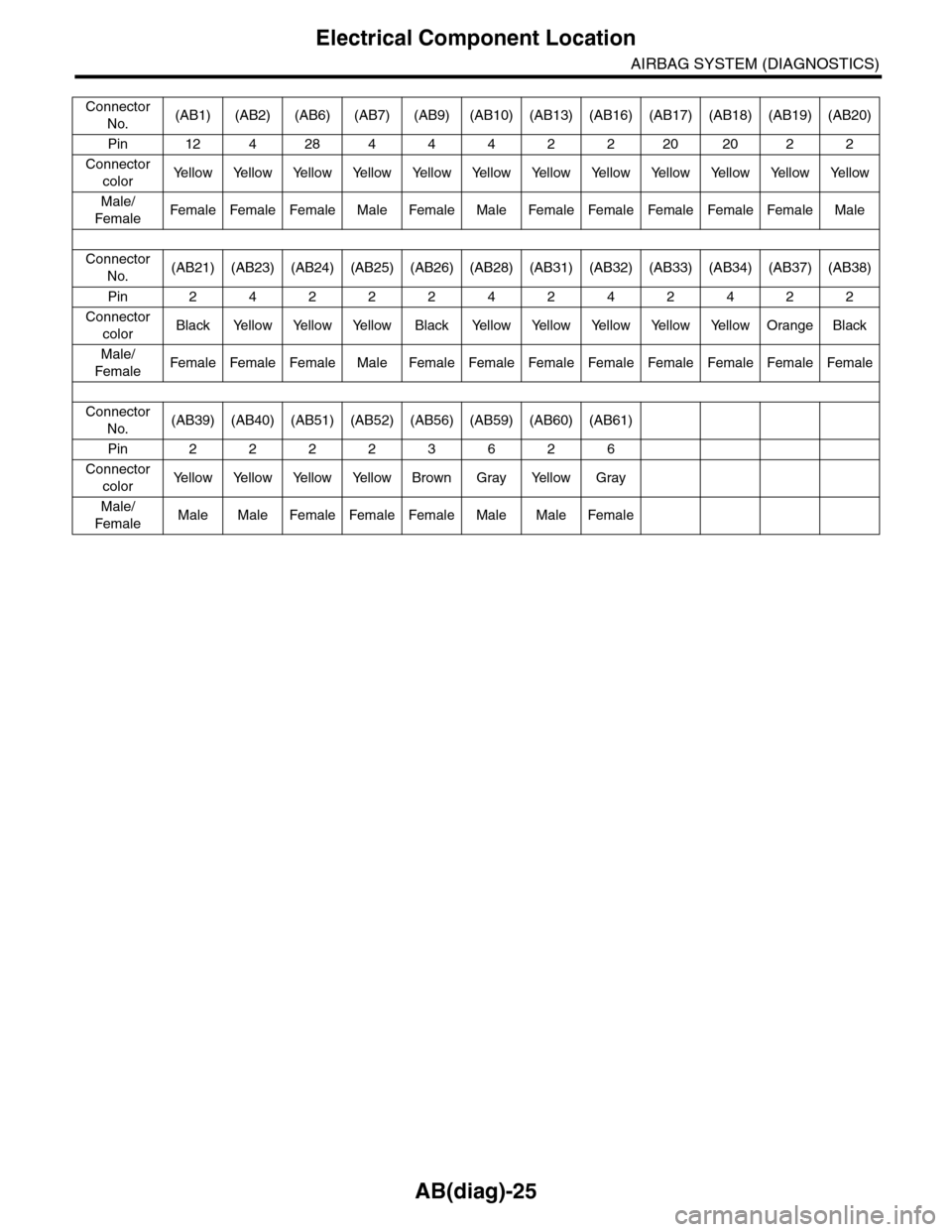
Connector
No.(AB1) (AB2) (AB6) (AB7) (AB9) (AB10) (AB13) (AB16) (AB17) (AB18) (AB19) (AB20)
Pin 12 4 28 4 4 4 2 2 20 20 2 2
Connector
colorYe l l o w Ye l l o w Ye l l o w Ye l l o w Ye l l o w Ye l l o w Ye l l o w Ye l l o w Ye l l o w Ye l l o w Ye l l o w Ye l l o w
Male/
FemaleFemale Female Female Male Female Male Female Female Female Female Female Male
Connector
No.(AB21) (AB23) (AB24) (AB25) (AB26) (AB28) (AB31) (AB32) (AB33) (AB34) (AB37) (AB38)
Pin 2 4 2 2 2 4 2 4 2 4 2 2
Connector
colorBlack Yellow Yellow Yellow Black Yellow Yellow Yellow Yellow Yellow Orange Black
Male/
FemaleFemale Female Female Male Female Female Female Female Female Female Female Female
Connector
No.(AB39) (AB40) (AB51) (AB52) (AB56) (AB59) (AB60) (AB61)
Pin 2 2 2 2 3 6 2 6
Connector
colorYe l l o w Ye l l o w Ye l l o w Ye l l o w B r o w n G r a y Ye l l o w G r a y
Male/
FemaleMale Male Female Female Female Male Male Female
Page 50 of 2453
AB(diag)-26
Airbag Connector
AIRBAG SYSTEM (DIAGNOSTICS)
5. Airbag Connector
A: PROCEDURE
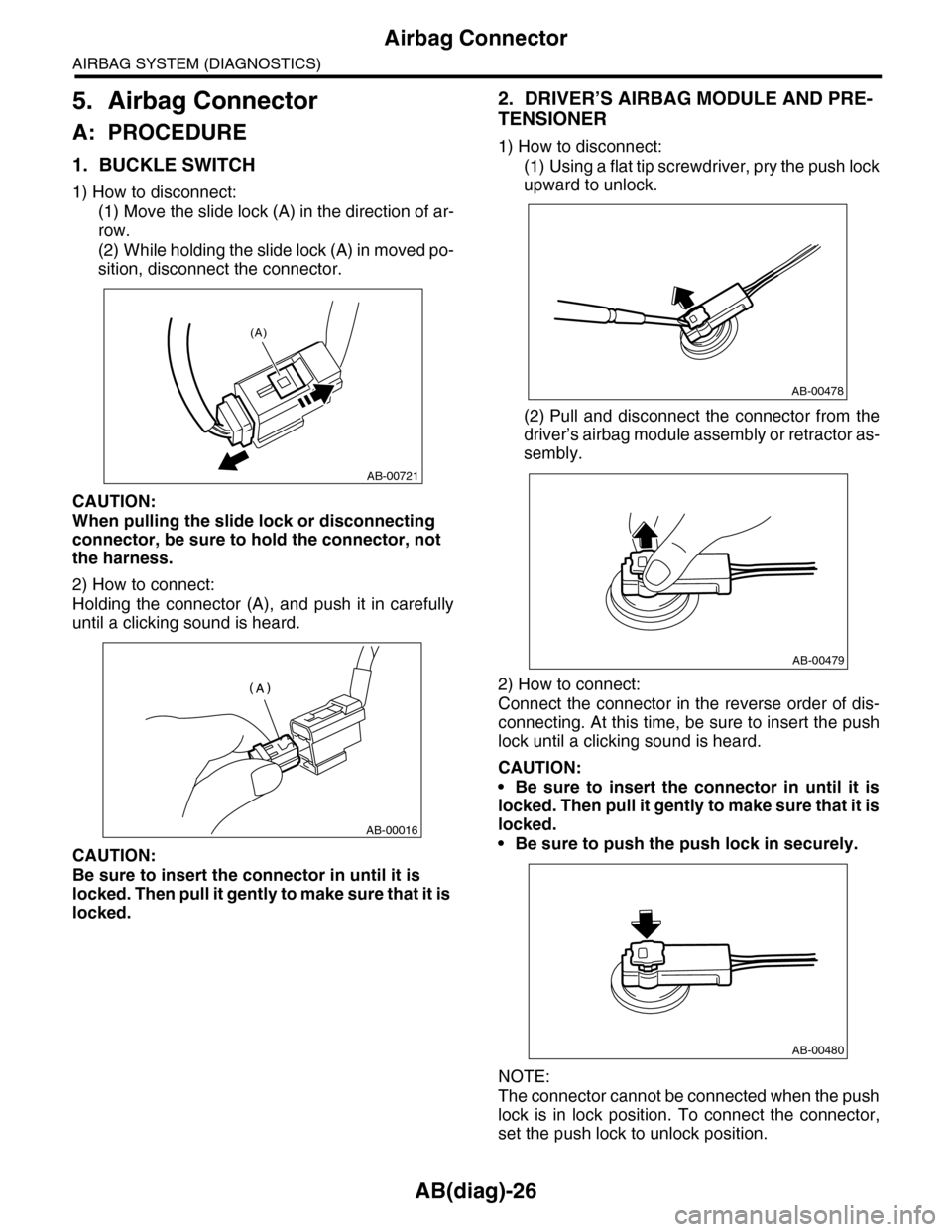
1. BUCKLE SWITCH
1) How to disconnect:
(1) Move the slide lock (A) in the direction of ar-
row.
(2) While holding the slide lock (A) in moved po-
sition, disconnect the connector.
CAUTION:
When pulling the slide lock or disconnecting
connector, be sure to hold the connector, not
the harness.
2) How to connect:
Holding the connector (A), and push it in carefully
until a clicking sound is heard.
CAUTION:
Be sure to insert the connector in until it is
locked. Then pull it gently to make sure that it is
locked.
2. DRIVER’S AIRBAG MODULE AND PRE-
TENSIONER
1) How to disconnect:
(1) Using a flat tip screwdriver, pry the push lock
upward to unlock.
(2) Pull and disconnect the connector from the
driver’s airbag module assembly or retractor as-
sembly.
2) How to connect:
Connect the connector in the reverse order of dis-
connecting. At this time, be sure to insert the push
lock until a clicking sound is heard.
CAUTION:
•Be sure to insert the connector in until it is
locked. Then pull it gently to make sure that it is
locked.
•Be sure to push the push lock in securely.
NOTE:
The connector cannot be connected when the push
lock is in lock position. To connect the connector,
set the push lock to unlock position.
AB-00721
(A)
AB-00016
AB-00478
AB-00479
AB-00480
Page 51 of 2453
AB(diag)-27
Airbag Connector
AIRBAG SYSTEM (DIAGNOSTICS)
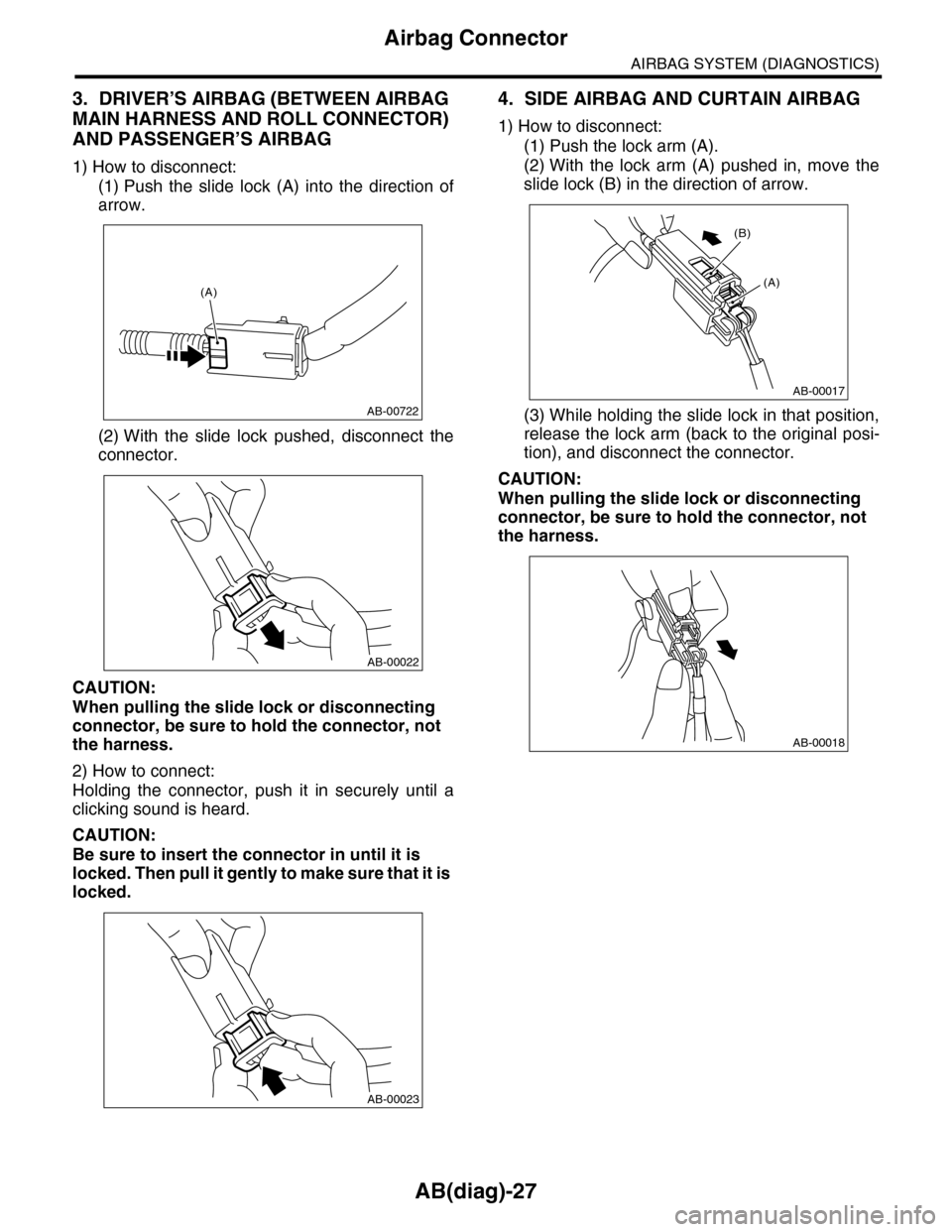
3. DRIVER’S AIRBAG (BETWEEN AIRBAG
MAIN HARNESS AND ROLL CONNECTOR)
AND PASSENGER’S AIRBAG
1) How to disconnect:
(1) Push the slide lock (A) into the direction of
arrow.
(2) With the slide lock pushed, disconnect the
connector.
CAUTION:
When pulling the slide lock or disconnecting
connector, be sure to hold the connector, not
the harness.
2) How to connect:
Holding the connector, push it in securely until a
clicking sound is heard.
CAUTION:
Be sure to insert the connector in until it is
locked. Then pull it gently to make sure that it is
locked.
4. SIDE AIRBAG AND CURTAIN AIRBAG
1) How to disconnect:
(1) Push the lock arm (A).
(2) With the lock arm (A) pushed in, move the
slide lock (B) in the direction of arrow.
(3) While holding the slide lock in that position,
release the lock arm (back to the original posi-
tion), and disconnect the connector.
CAUTION:
When pulling the slide lock or disconnecting
connector, be sure to hold the connector, not
the harness.
AB-00722
(A)
AB-00022
AB-00023
AB-00017
(A)
(B)
AB-00018
Page 52 of 2453
AB(diag)-28
Airbag Connector
AIRBAG SYSTEM (DIAGNOSTICS)
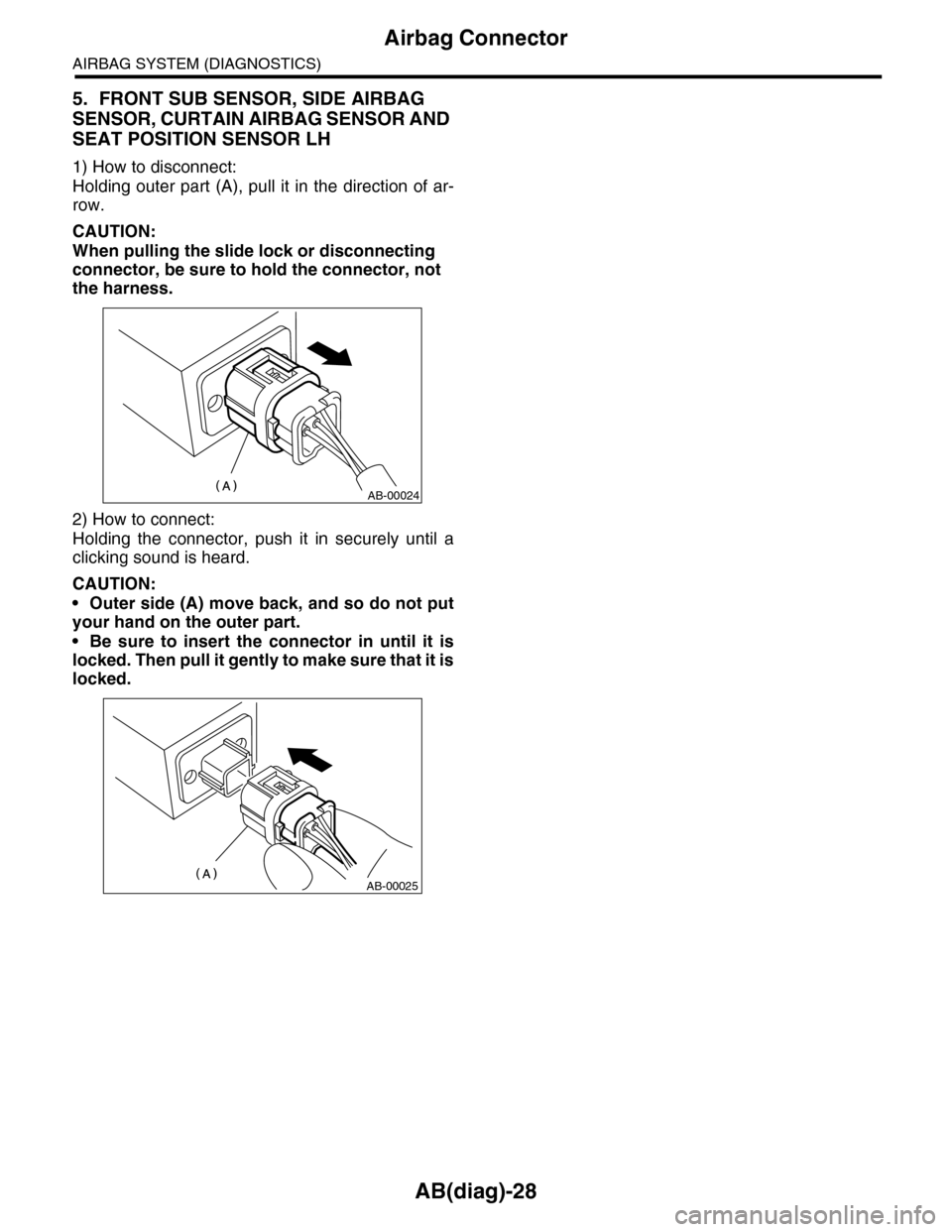
5. FRONT SUB SENSOR, SIDE AIRBAG
SENSOR, CURTAIN AIRBAG SENSOR AND
SEAT POSITION SENSOR LH
1) How to disconnect:
Holding outer part (A), pull it in the direction of ar-
row.
CAUTION:
When pulling the slide lock or disconnecting
connector, be sure to hold the connector, not
the harness.
2) How to connect:
Holding the connector, push it in securely until a
clicking sound is heard.
CAUTION:
•Outer side (A) move back, and so do not put
your hand on the outer part.
•Be sure to insert the connector in until it is
locked. Then pull it gently to make sure that it is
locked.
AB-00024
AB-00025
Page 53 of 2453
AB(diag)-29
Airbag Control Module I/O Signal
AIRBAG SYSTEM (DIAGNOSTICS)
6. Airbag Control Module I/O Signal
A: ELECTRICAL SPECIFICATION
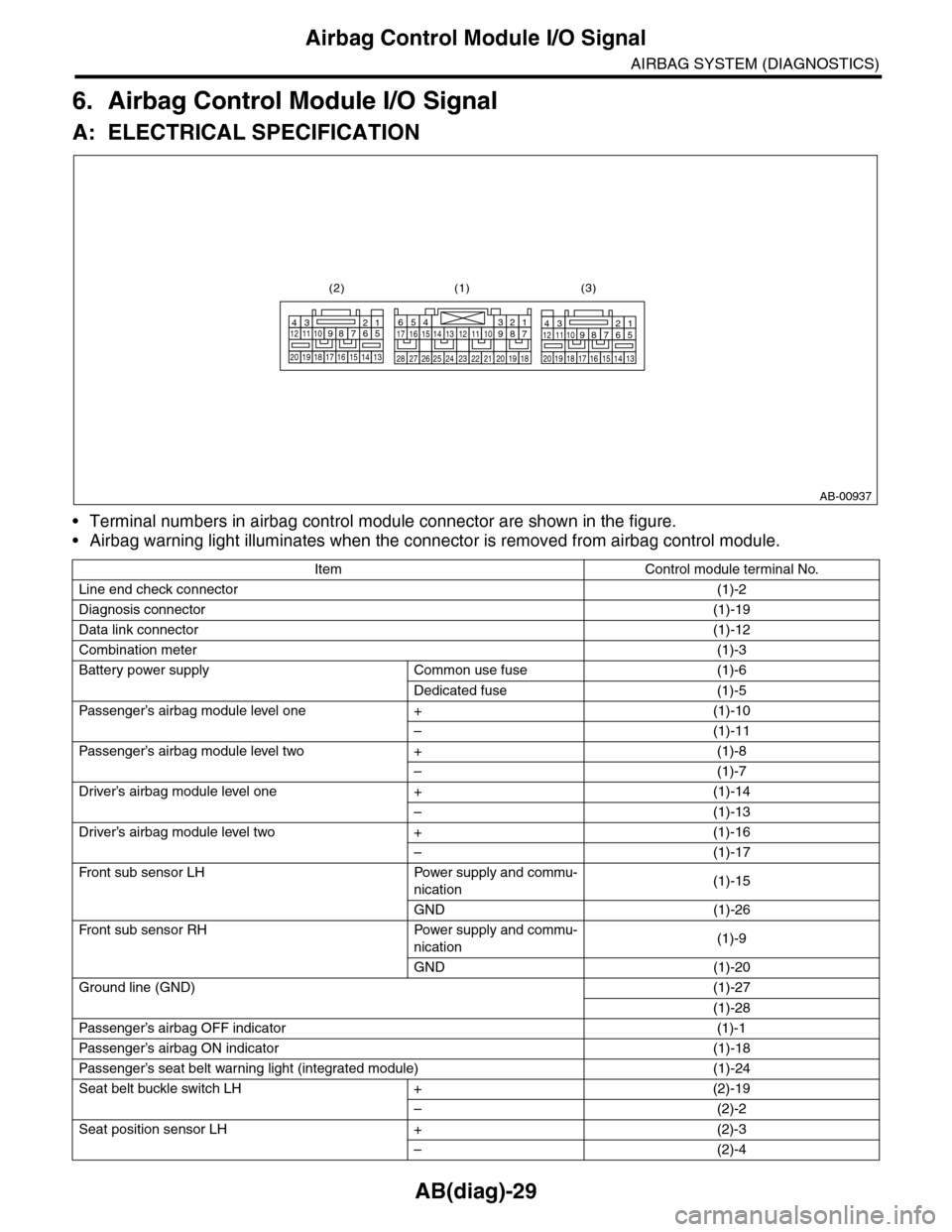
•Terminal numbers in airbag control module connector are shown in the figure.
•Airbag warning light illuminates when the connector is removed from airbag control module.
Item Control module terminal No.
Line end check connector(1)-2
Diagnosis connector(1)-19
Data link connector(1)-12
Combination meter(1)-3
Battery power supply Common use fuse (1)-6
Dedicated fuse (1)-5
Passenger’s airbag module level one + (1)-10
–(1)-11
Passenger’s airbag module level two + (1)-8
–(1)-7
Driver’s airbag module level one + (1)-14
–(1)-13
Driver’s airbag module level two + (1)-16
–(1)-17
Fr o nt su b se ns or L H Powe r su p pl y a n d co mmu-
nication(1)-15
GND (1)-26
Fr o nt su b se ns or RH Powe r su p pl y a n d co mmu-
nication(1)-9
GND (1)-20
Ground line (GND)(1)-27
(1)-28
Passenger’s airbag OFF indicator (1)-1
Passenger’s airbag ON indicator (1)-18
Passenger’s seat belt war ning light (integrated module) (1)-24
Seat belt buckle switch LH + (2)-19
–(2)-2
Seat position sensor LH + (2)-3
–(2)-4
AB-00937
123456789101112
1314151617181920
123456789101112
1314151617181920
1234567891011121314151617
1819202122232425262728
(1)(2) (3)
Page 55 of 2453
AB(diag)-31
Subaru Select Monitor
AIRBAG SYSTEM (DIAGNOSTICS)
7. Subaru Select Monitor
A: OPERATION
1. READ DIAGNOSTIC TROUBLE CODE
(DTC)
When malfunction of airbag system occurs, the
DTC stored in airbag control module will be read
out.
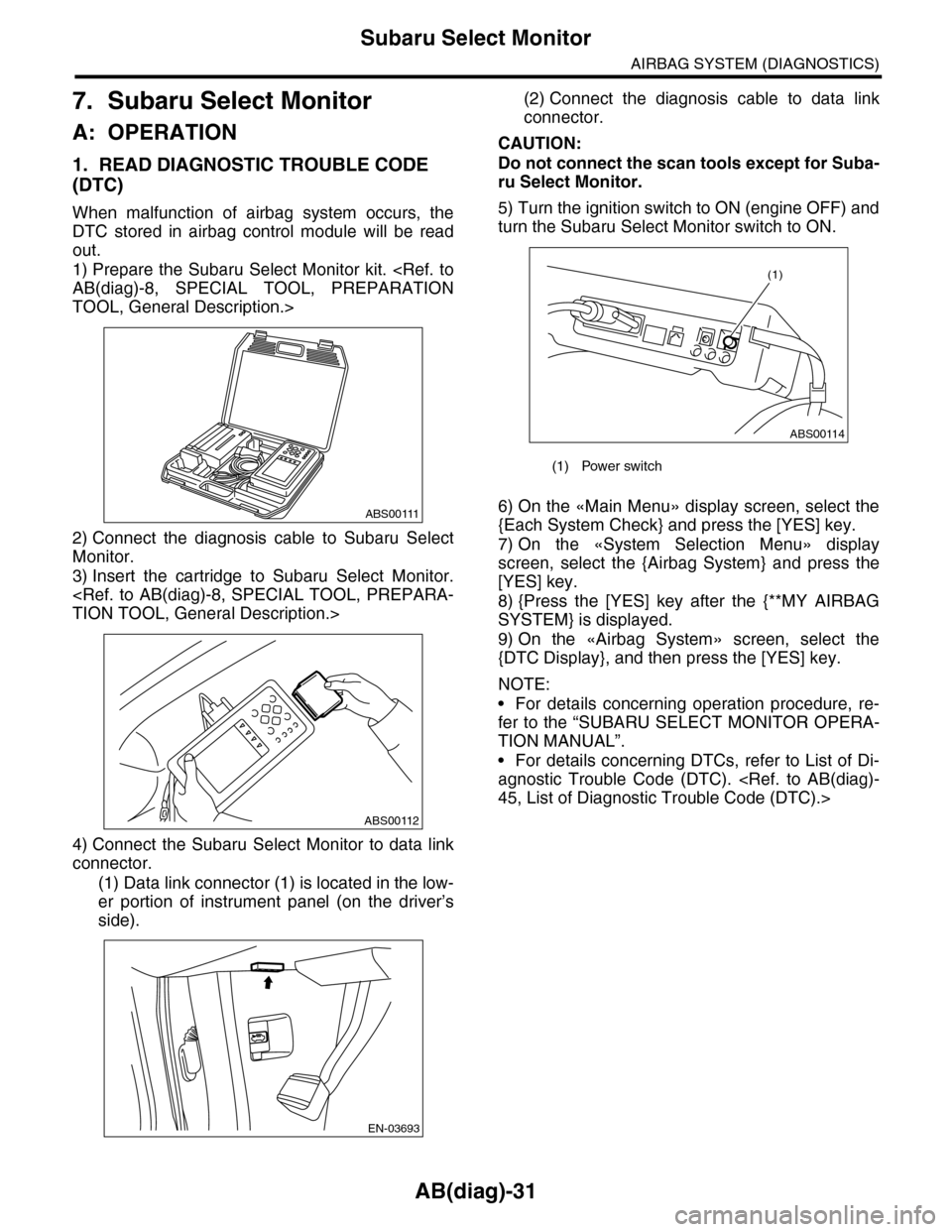
1) Prepare the Subaru Select Monitor kit.
TOOL, General Description.>
2) Connect the diagnosis cable to Subaru Select
Monitor.
3) Insert the cartridge to Subaru Select Monitor.
4) Connect the Subaru Select Monitor to data link
connector.
(1) Data link connector (1) is located in the low-
er portion of instrument panel (on the driver’s
side).
(2) Connect the diagnosis cable to data link
connector.
CAUTION:
Do not connect the scan tools except for Suba-
ru Select Monitor.
5) Turn the ignition switch to ON (engine OFF) and
turn the Subaru Select Monitor switch to ON.
6) On the «Main Menu» display screen, select the
{Each System Check} and press the [YES] key.
7) On the «System Selection Menu» display
screen, select the {Airbag System} and press the
[YES] key.
8) {Press the [YES] key after the {**MY AIRBAG
SYSTEM} is displayed.
9) On the «Airbag System» screen, select the
{DTC Display}, and then press the [YES] key.
NOTE:
•For details concerning operation procedure, re-
fer to the “SUBARU SELECT MONITOR OPERA-
TION MANUAL”.
•For details concerning DTCs, refer to List of Di-
agnostic Trouble Code (DTC).
ABS00111
ABS00112
EN-03693
(1) Power switch
ABS00114
(1)