diagnostic menu SUBARU TRIBECA 2009 1.G Service Owner's Manual
[x] Cancel search | Manufacturer: SUBARU, Model Year: 2009, Model line: TRIBECA, Model: SUBARU TRIBECA 2009 1.GPages: 2453, PDF Size: 46.32 MB
Page 659 of 2453
SL-30
Security System
SECURITY AND LOCKS
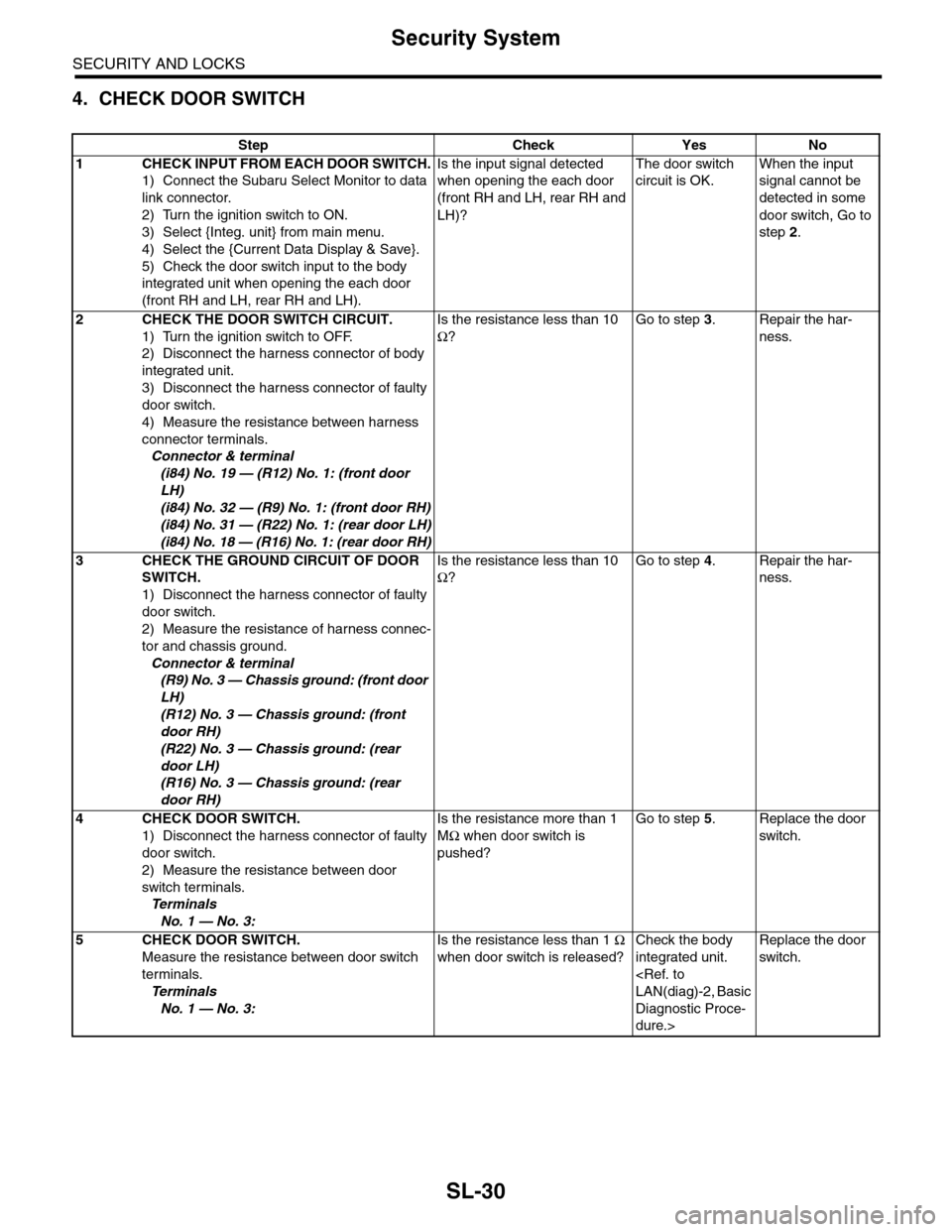
4. CHECK DOOR SWITCH
Step Check Yes No
1CHECK INPUT FROM EACH DOOR SWITCH.
1) Connect the Subaru Select Monitor to data
link connector.
2) Turn the ignition switch to ON.
3) Select {Integ. unit} from main menu.
4) Select the {Current Data Display & Save}.
5) Check the door switch input to the body
integrated unit when opening the each door
(front RH and LH, rear RH and LH).
Is the input signal detected
when opening the each door
(front RH and LH, rear RH and
LH)?
The door switch
circuit is OK.
When the input
signal cannot be
detected in some
door switch, Go to
step 2.
2CHECK THE DOOR SWITCH CIRCUIT.
1) Turn the ignition switch to OFF.
2) Disconnect the harness connector of body
integrated unit.
3) Disconnect the harness connector of faulty
door switch.
4) Measure the resistance between harness
connector terminals.
Connector & terminal
(i84) No. 19 — (R12) No. 1: (front door
LH)
(i84) No. 32 — (R9) No. 1: (front door RH)
(i84) No. 31 — (R22) No. 1: (rear door LH)
(i84) No. 18 — (R16) No. 1: (rear door RH)
Is the resistance less than 10
Ω?
Go to step 3.Repair the har-
ness.
3CHECK THE GROUND CIRCUIT OF DOOR
SWITCH.
1) Disconnect the harness connector of faulty
door switch.
2) Measure the resistance of harness connec-
tor and chassis ground.
Connector & terminal
(R9) No. 3 — Chassis ground: (front door
LH)
(R12) No. 3 — Chassis ground: (front
door RH)
(R22) No. 3 — Chassis ground: (rear
door LH)
(R16) No. 3 — Chassis ground: (rear
door RH)
Is the resistance less than 10
Ω?
Go to step 4.Repair the har-
ness.
4CHECK DOOR SWITCH.
1) Disconnect the harness connector of faulty
door switch.
2) Measure the resistance between door
switch terminals.
Te r m i n a l s
No. 1 — No. 3:
Is the resistance more than 1
MΩ when door switch is
pushed?
Go to step 5.Replace the door
switch.
5CHECK DOOR SWITCH.
Measure the resistance between door switch
terminals.
Te r m i n a l s
No. 1 — No. 3:
Is the resistance less than 1 Ω
when door switch is released?
Check the body
integrated unit.
Diagnostic Proce-
dure.>
Replace the door
switch.
Page 660 of 2453
SL-31
Security System
SECURITY AND LOCKS
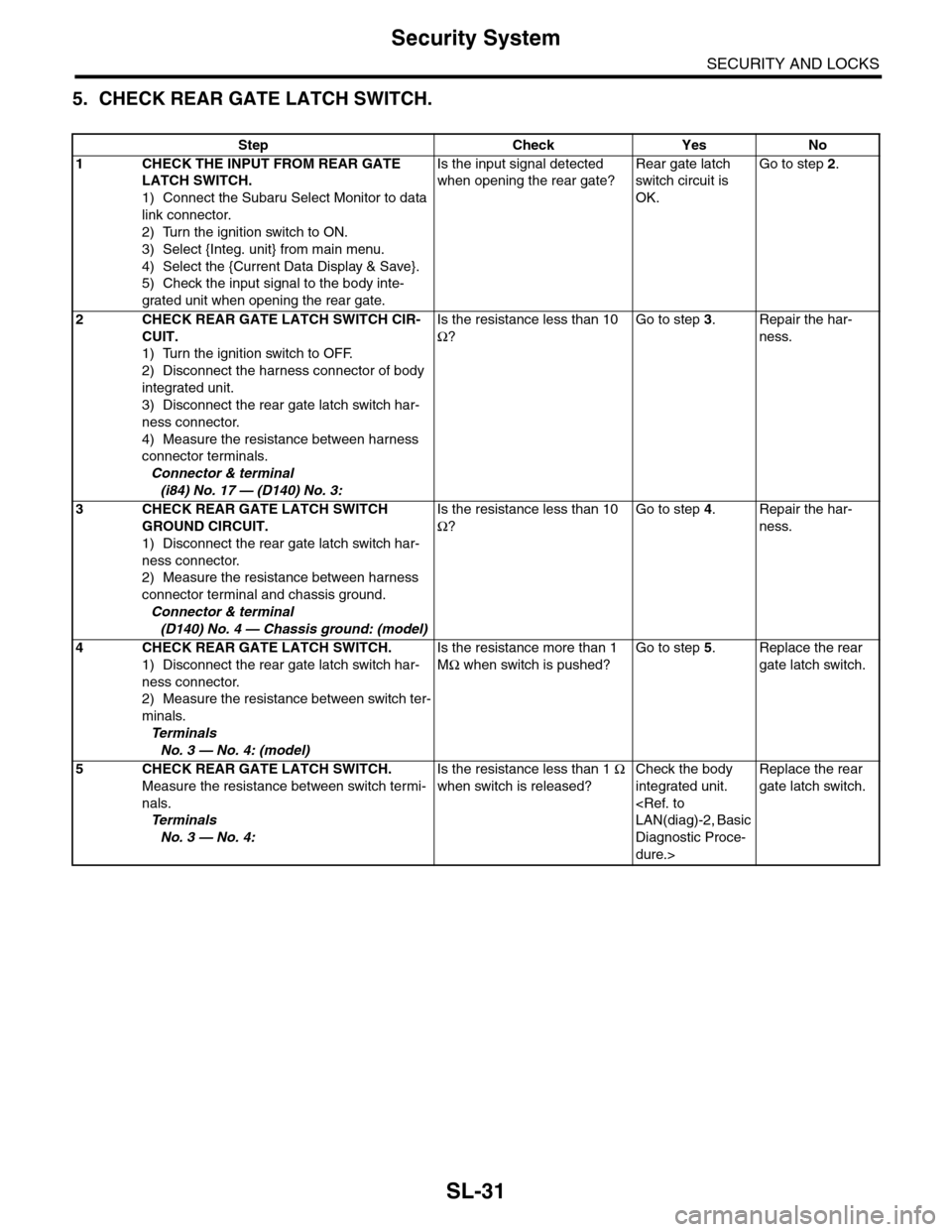
5. CHECK REAR GATE LATCH SWITCH.
Step Check Yes No
1CHECK THE INPUT FROM REAR GATE
LATCH SWITCH.
1) Connect the Subaru Select Monitor to data
link connector.
2) Turn the ignition switch to ON.
3) Select {Integ. unit} from main menu.
4) Select the {Current Data Display & Save}.
5) Check the input signal to the body inte-
grated unit when opening the rear gate.
Is the input signal detected
when opening the rear gate?
Rear gate latch
switch circuit is
OK.
Go to step 2.
2CHECK REAR GATE LATCH SWITCH CIR-
CUIT.
1) Turn the ignition switch to OFF.
2) Disconnect the harness connector of body
integrated unit.
3) Disconnect the rear gate latch switch har-
ness connector.
4) Measure the resistance between harness
connector terminals.
Connector & terminal
(i84) No. 17 — (D140) No. 3:
Is the resistance less than 10
Ω?
Go to step 3.Repair the har-
ness.
3CHECK REAR GATE LATCH SWITCH
GROUND CIRCUIT.
1) Disconnect the rear gate latch switch har-
ness connector.
2) Measure the resistance between harness
connector terminal and chassis ground.
Connector & terminal
(D140) No. 4 — Chassis ground: (model)
Is the resistance less than 10
Ω?
Go to step 4.Repair the har-
ness.
4CHECK REAR GATE LATCH SWITCH.
1) Disconnect the rear gate latch switch har-
ness connector.
2) Measure the resistance between switch ter-
minals.
Te r m i n a l s
No. 3 — No. 4: (model)
Is the resistance more than 1
MΩ when switch is pushed?
Go to step 5.Replace the rear
gate latch switch.
5CHECK REAR GATE LATCH SWITCH.
Measure the resistance between switch termi-
nals.
Te r m i n a l s
No. 3 — No. 4:
Is the resistance less than 1 Ω
when switch is released?
Check the body
integrated unit.
Diagnostic Proce-
dure.>
Replace the rear
gate latch switch.
Page 661 of 2453
SL-32
Security System
SECURITY AND LOCKS
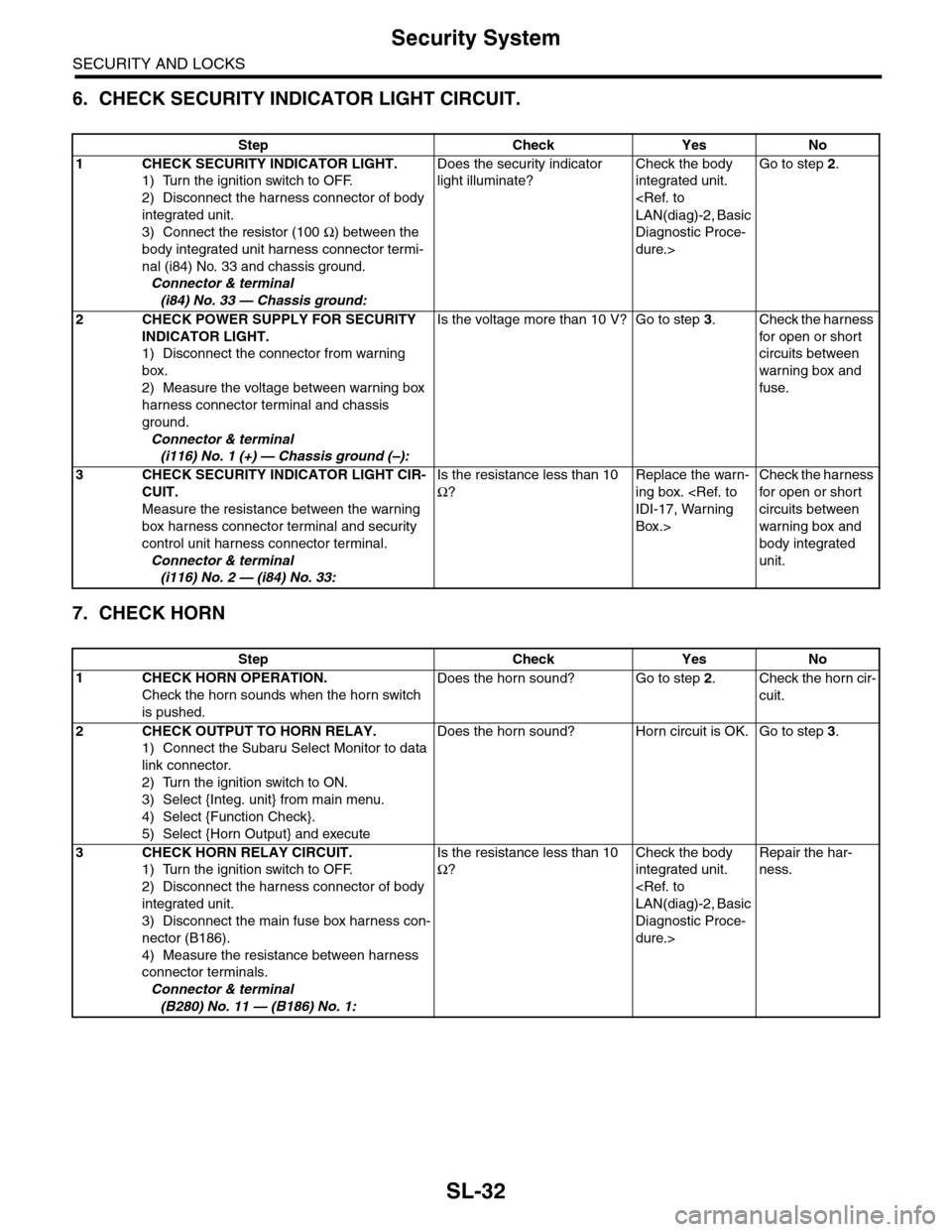
6. CHECK SECURITY INDICATOR LIGHT CIRCUIT.
7. CHECK HORN
Step Check Yes No
1CHECK SECURITY INDICATOR LIGHT.
1) Turn the ignition switch to OFF.
2) Disconnect the harness connector of body
integrated unit.
3) Connect the resistor (100 Ω) between the
body integrated unit harness connector termi-
nal (i84) No. 33 and chassis ground.
Connector & terminal
(i84) No. 33 — Chassis ground:
Does the security indicator
light illuminate?
Check the body
integrated unit.
Diagnostic Proce-
dure.>
Go to step 2.
2CHECK POWER SUPPLY FOR SECURITY
INDICATOR LIGHT.
1) Disconnect the connector from warning
box.
2) Measure the voltage between warning box
harness connector terminal and chassis
ground.
Connector & terminal
(i116) No. 1 (+) — Chassis ground (–):
Is the voltage more than 10 V? Go to step 3.Check the harness
for open or shor t
circuits between
warning box and
fuse.
3CHECK SECURITY INDICATOR LIGHT CIR-
CUIT.
Measure the resistance between the warning
box harness connector terminal and security
control unit harness connector terminal.
Connector & terminal
(i116) No. 2 — (i84) No. 33:
Is the resistance less than 10
Ω?
Replace the warn-
ing box.
Box.>
Check the harness
for open or shor t
circuits between
warning box and
body integrated
unit.
Step Check Yes No
1CHECK HORN OPERATION.
Check the horn sounds when the horn switch
is pushed.
Does the horn sound? Go to step 2.Check the horn cir-
cuit.
2CHECK OUTPUT TO HORN RELAY.
1) Connect the Subaru Select Monitor to data
link connector.
2) Turn the ignition switch to ON.
3) Select {Integ. unit} from main menu.
4) Select {Function Check}.
5) Select {Horn Output} and execute
Does the horn sound? Horn circuit is OK. Go to step 3.
3CHECK HORN RELAY CIRCUIT.
1) Turn the ignition switch to OFF.
2) Disconnect the harness connector of body
integrated unit.
3) Disconnect the main fuse box harness con-
nector (B186).
4) Measure the resistance between harness
connector terminals.
Connector & terminal
(B280) No. 11 — (B186) No. 1:
Is the resistance less than 10
Ω?
Check the body
integrated unit.
Diagnostic Proce-
dure.>
Repair the har-
ness.
Page 662 of 2453
SL-33
Security System
SECURITY AND LOCKS
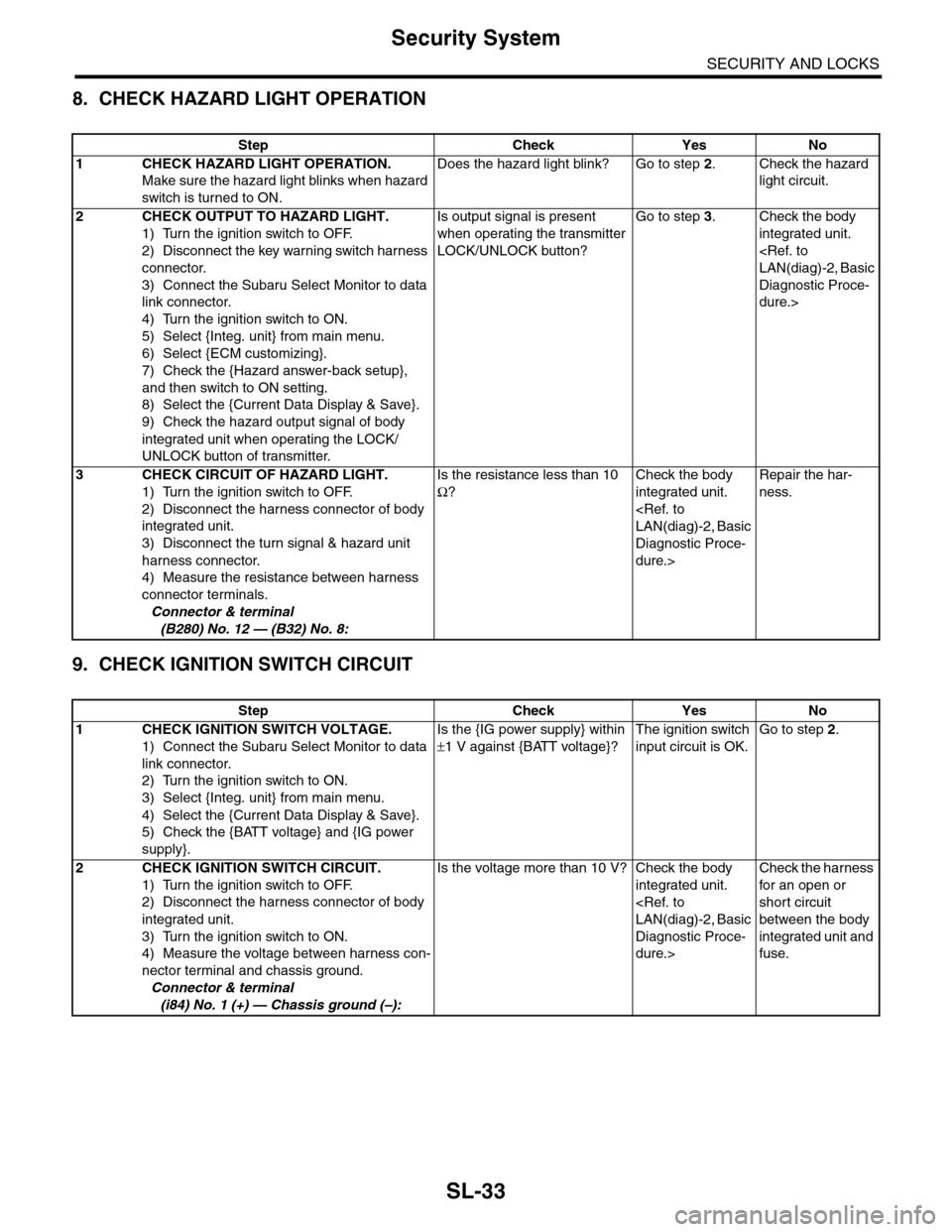
8. CHECK HAZARD LIGHT OPERATION
9. CHECK IGNITION SWITCH CIRCUIT
Step Check Yes No
1CHECK HAZARD LIGHT OPERATION.
Make sure the hazard light blinks when hazard
switch is turned to ON.
Does the hazard light blink? Go to step 2.Check the hazard
light circuit.
2CHECK OUTPUT TO HAZARD LIGHT.
1) Turn the ignition switch to OFF.
2) Disconnect the key warning switch harness
connector.
3) Connect the Subaru Select Monitor to data
link connector.
4) Turn the ignition switch to ON.
5) Select {Integ. unit} from main menu.
6) Select {ECM customizing}.
7) Check the {Hazard answer-back setup},
and then switch to ON setting.
8) Select the {Current Data Display & Save}.
9) Check the hazard output signal of body
integrated unit when operating the LOCK/
UNLOCK button of transmitter.
Is output signal is present
when operating the transmitter
LOCK/UNLOCK button?
Go to step 3.Check the body
integrated unit.
Diagnostic Proce-
dure.>
3CHECK CIRCUIT OF HAZARD LIGHT.
1) Turn the ignition switch to OFF.
2) Disconnect the harness connector of body
integrated unit.
3) Disconnect the turn signal & hazard unit
harness connector.
4) Measure the resistance between harness
connector terminals.
Connector & terminal
(B280) No. 12 — (B32) No. 8:
Is the resistance less than 10
Ω?
Check the body
integrated unit.
Diagnostic Proce-
dure.>
Repair the har-
ness.
Step Check Yes No
1CHECK IGNITION SWITCH VOLTAGE.
1) Connect the Subaru Select Monitor to data
link connector.
2) Turn the ignition switch to ON.
3) Select {Integ. unit} from main menu.
4) Select the {Current Data Display & Save}.
5) Check the {BATT voltage} and {IG power
supply}.
Is the {IG power supply} within
±1 V against {BATT voltage}?
The ignition switch
input circuit is OK.
Go to step 2.
2 CHECK IGNITION SWITCH CIRCUIT.
1) Turn the ignition switch to OFF.
2) Disconnect the harness connector of body
integrated unit.
3) Turn the ignition switch to ON.
4) Measure the voltage between harness con-
nector terminal and chassis ground.
Connector & terminal
(i84) No. 1 (+) — Chassis ground (–):
Is the voltage more than 10 V? Check the body
integrated unit.
Diagnostic Proce-
dure.>
Check the harness
for an open or
short circuit
between the body
integrated unit and
fuse.
Page 764 of 2453
BVC(diag)-9
Subaru Select Monitor
BRAKE VACUUM CONTROL (BVC) (DIAGNOSTICS)
6. Subaru Select Monitor
A: OPERATION
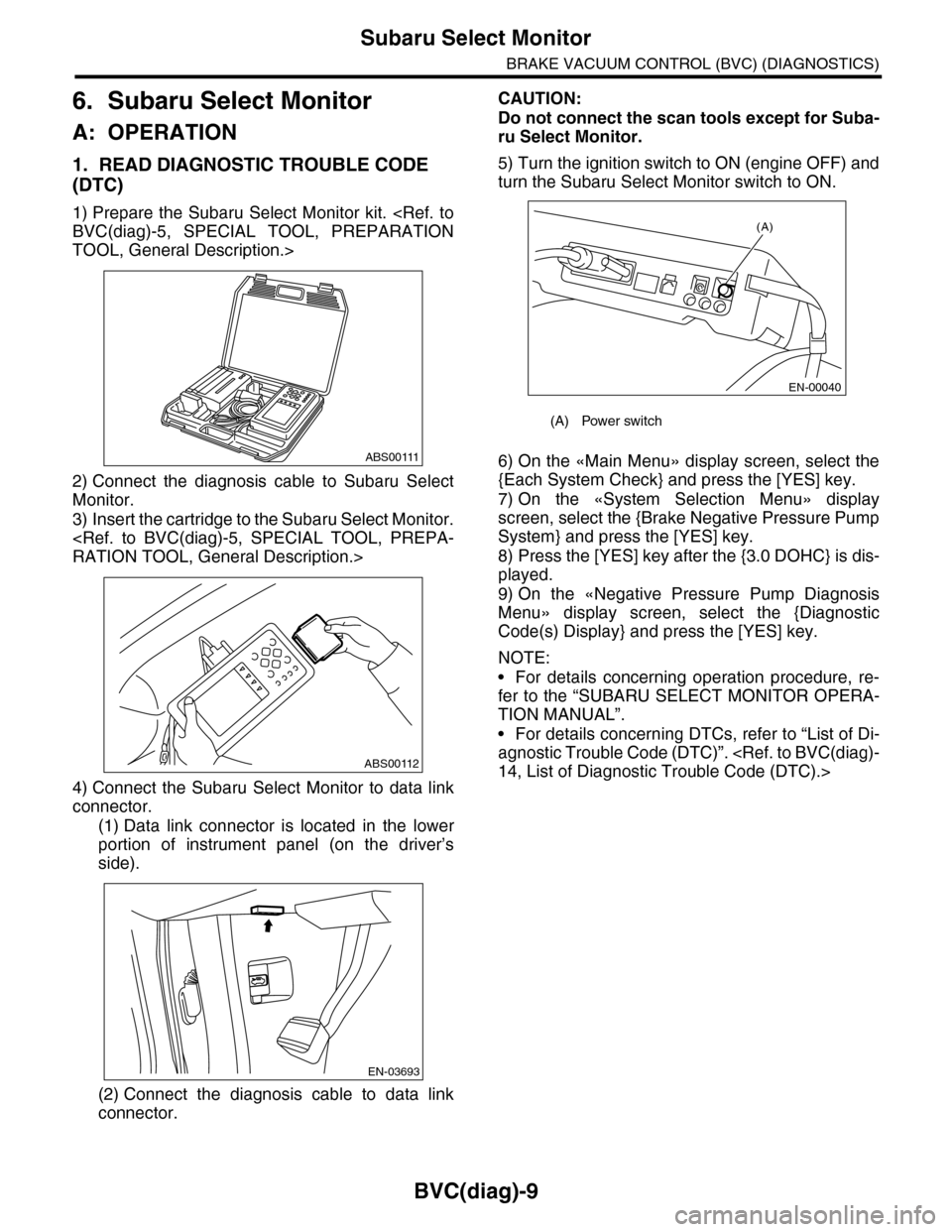
1. READ DIAGNOSTIC TROUBLE CODE
(DTC)
1) Prepare the Subaru Select Monitor kit.
TOOL, General Description.>
2) Connect the diagnosis cable to Subaru Select
Monitor.
3) Insert the cartridge to the Subaru Select Monitor.
4) Connect the Subaru Select Monitor to data link
connector.
(1) Data link connector is located in the lower
portion of instrument panel (on the driver’s
side).
(2) Connect the diagnosis cable to data link
connector.
CAUTION:
Do not connect the scan tools except for Suba-
ru Select Monitor.
5) Turn the ignition switch to ON (engine OFF) and
turn the Subaru Select Monitor switch to ON.
6) On the «Main Menu» display screen, select the
{Each System Check} and press the [YES] key.
7) On the «System Selection Menu» display
screen, select the {Brake Negative Pressure Pump
System} and press the [YES] key.
8) Press the [YES] key after the {3.0 DOHC} is dis-
played.
9) On the «Negative Pressure Pump Diagnosis
Menu» display screen, select the {Diagnostic
Code(s) Display} and press the [YES] key.
NOTE:
•For details concerning operation procedure, re-
fer to the “SUBARU SELECT MONITOR OPERA-
TION MANUAL”.
•For details concerning DTCs, refer to “List of Di-
agnostic Trouble Code (DTC)”.
ABS00111
ABS00112
EN-03693
(A) Power switch
(A)
EN-00040
Page 765 of 2453
![SUBARU TRIBECA 2009 1.G Service Owners Manual BVC(diag)-10
Subaru Select Monitor
BRAKE VACUUM CONTROL (BVC) (DIAGNOSTICS)
2. READ CURRENT DATA
1) On the «Main Menu» display screen, select the {Each System Check} and press the [YES] key.
2) On t](/img/17/7322/w960_7322-764.png "SUBARU TRIBECA 2009 1.G Service Owners Manual BVC(diag)-10
Subaru Select Monitor
BRAKE VACUUM CONTROL (BVC) (DIAGNOSTICS)
2. READ CURRENT DATA
1) On the «Main Menu» display screen, select the {Each System Check} and press the [YES] key.
2) On t")
BVC(diag)-10
Subaru Select Monitor
BRAKE VACUUM CONTROL (BVC) (DIAGNOSTICS)
2. READ CURRENT DATA
1) On the «Main Menu» display screen, select the {Each System Check} and press the [YES] key.
2) On the «System Selection Menu» display screen, select the {Brake Negative Pressure Pump System} and
press the [YES] key.
3) Press the [YES] key after the {3.0 DOHC} is displayed.
4) On the «Negative Pressure Diagnosis Menu» display screen, select the {Current Data Display/Save}, and
then press the [YES] key.
5) On the «Data Display Menu» screen, select the {Data Display} and press the [YES] key.
6) Using a scroll key, scroll the display screen up or down until necessary data is shown.
•A list of the support data is shown in the following table.
NOTE:
For details concerning operation procedure, refer to the “SUBARU SELECT MONITOR OPERATION MAN-
UAL”.
3. CLEAR MEMORY MODE
1) On the «Main Menu» display screen, select the
{Each System Check} and press the [YES] key.
2) On the «System Selection Menu» display
screen, select the {Brake Negative Pressure Pump
System} and press the [YES] key.
3) Press the [YES] key after the {3.0 DOHC} is dis-
played.
4) On the «Negative Pressure Pump Diagnosis
Menu» display screen, select the {Clear Memory}
and press the [YES] key.
5) When “Done” and “Turn ignition switch OFF” are
shown on the display screen, turn the Subaru Se-
lect Monitor and ignition switch to OFF.
NOTE:
For details concerning operation procedure, refer
to the “SUBARU SELECT MONITOR OPERATION
MANUAL”.
4. FUNCTION CHECK MODE
1) Connect the test mode connector located under
the glove box.
2) Turn the ignition switch to ON (engine OFF) and
turn the Subaru Select Monitor switch to ON.
3) On the «Main Menu» display screen, select the
{Each System Check} and press the [YES] key.
4) On the «System Selection Menu» display
screen, select the {Brake Negative Pressure Pump
System} and press the [YES] key.
5) Press the [YES] key after the {3.0 DOHC} is dis-
played.
6) On the «Negative Pressure Pump Diagnosis
Menu» display screen, select the {Function Check
Mode} and press the [YES] key.
7) When the “Start Function Check Mode” is shown
on the screen, press the [YES] key.
8) When the “Depress the Brake Pedal 5 Times” is
shown on the screen, depress the brake pedal 5
times, and press the [YES] key while brake pedal is
not depressed.
9) Press the [YES] key after the {OK} is displayed.
Display Contents to be monitored Unit of measure
Atmospheric pressure Atmospheric pressure is displayed. mmHg, kPa or psig
Brake booster pressure Brake booster pressure is displayed. mmHg, kPa or psig
Te s t m o d e t e r m i n a l Te s t m o d e t e r m i n a l c o n n e c t i o n s t a t u s i s d i s p l a y e d . D C h e c k o r U C h e c k
Negative pressure pump motor Negative pressure motor operating status is displayed. ON or OFF
Negative pressure pump motor relay Negative pressure pump motor relay operating status is displayed. ON or OFF
Display Contents to be monitored
Clear Memory? DTC deleting function
(A) Test mode connector
EN-03694
(4)
Page 958 of 2453
TPM(diag)-8
Subaru Select Monitor
TIRE PRESSURE MONITORING SYSTEM (DIAGNOSTICS)
5. Subaru Select Monitor
A: OPERATION
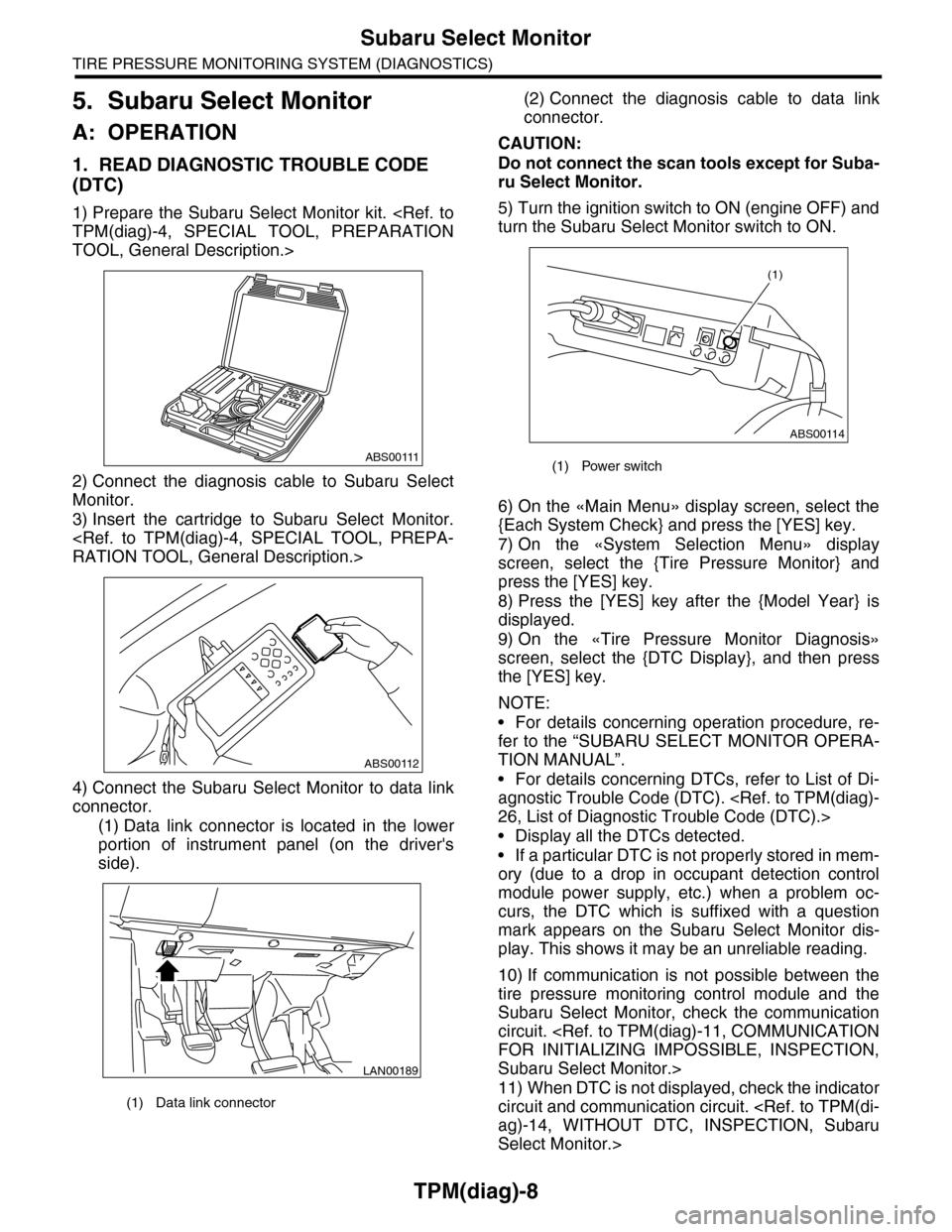
1. READ DIAGNOSTIC TROUBLE CODE
(DTC)
1) Prepare the Subaru Select Monitor kit.
TOOL, General Description.>
2) Connect the diagnosis cable to Subaru Select
Monitor.
3) Insert the cartridge to Subaru Select Monitor.
4) Connect the Subaru Select Monitor to data link
connector.
(1) Data link connector is located in the lower
portion of instrument panel (on the driver's
side).
(2) Connect the diagnosis cable to data link
connector.
CAUTION:
Do not connect the scan tools except for Suba-
ru Select Monitor.
5) Turn the ignition switch to ON (engine OFF) and
turn the Subaru Select Monitor switch to ON.
6) On the «Main Menu» display screen, select the
{Each System Check} and press the [YES] key.
7) On the «System Selection Menu» display
screen, select the {Tire Pressure Monitor} and
press the [YES] key.
8) Press the [YES] key after the {Model Year} is
displayed.
9) On the «Tire Pressure Monitor Diagnosis»
screen, select the {DTC Display}, and then press
the [YES] key.
NOTE:
•For details concerning operation procedure, re-
fer to the “SUBARU SELECT MONITOR OPERA-
TION MANUAL”.
•For details concerning DTCs, refer to List of Di-
agnostic Trouble Code (DTC).
•Display all the DTCs detected.
•If a particular DTC is not properly stored in mem-
ory (due to a drop in occupant detection control
module power supply, etc.) when a problem oc-
curs, the DTC which is suffixed with a question
mark appears on the Subaru Select Monitor dis-
play. This shows it may be an unreliable reading.
10) If communication is not possible between the
tire pressure monitoring control module and the
Subaru Select Monitor, check the communication
circuit.
Subaru Select Monitor.>
11) When DTC is not displayed, check the indicator
circuit and communication circuit.
Select Monitor.>
(1) Data link connector
ABS00111
ABS00112
LAN00189
(1) Power switch
ABS00114
(1)
Page 959 of 2453
![SUBARU TRIBECA 2009 1.G Service Owners Manual TPM(diag)-9
Subaru Select Monitor
TIRE PRESSURE MONITORING SYSTEM (DIAGNOSTICS)
2. DATA DISPLAY
1) On the «Main Menu» display screen, select the {Each System Check} and press the [YES] key.
2) On th](/img/17/7322/w960_7322-958.png "SUBARU TRIBECA 2009 1.G Service Owners Manual TPM(diag)-9
Subaru Select Monitor
TIRE PRESSURE MONITORING SYSTEM (DIAGNOSTICS)
2. DATA DISPLAY
1) On the «Main Menu» display screen, select the {Each System Check} and press the [YES] key.
2) On th")
TPM(diag)-9
Subaru Select Monitor
TIRE PRESSURE MONITORING SYSTEM (DIAGNOSTICS)
2. DATA DISPLAY
1) On the «Main Menu» display screen, select the {Each System Check} and press the [YES] key.
2) On the «System Selection Menu» display screen, select the {Tire Pressure Monitor} and press the [YES]
key.
3) Press the [YES] key after the {Tire Pressure Monitor} is displayed.
4) On the «Tire pressure monitor diagnosis» display screen, select the {Data Display}, and then press the
[YES] key, then necessary data will be displayed.
•A list of the support data is shown in the following table.
3. CLEAR MEMORY
1) On the «Main Menu», select the {2. Each Sys-
tem Check} and press the [YES] key.
2) On the «System Selection Menu» display
screen, select the {Tire Pressure Monitor} and
press the [YES] key.
3) Press the [YES] key after the {Tire Pressure
Monitor} is displayed.
4) On the «Tire Pressure Monitor Diagnosis» dis-
play screen, select the {Memory Clear} and press
the [YES] key.
5) When «Done» and «Turn ignition switch OFF»
are shown on the display screen, turn the Subaru
Select Monitor and ignition switch to OFF.
NOTE:
For details concerning operation procedure, refer
to the “SUBARU SELECT MONITOR OPERATION
MANUAL”.
4. REGISTER TRANSMITTER ID
Perform the procedures below to register the trans-
mitter.
•Transmitter replaced.
•Switched the position of the transmitter (rotated
tires)
•Replaced the tire pressure monitoring control
module.
NOTE:
•If registration of the transmitter ID is not possible
after 2 attempts, replace the tire pressure monitor-
ing control module.
REMOVAL, Tire Pressure Monitoring System.>
•If the ignition switch and Subaru Select Monitor
power are turned OFF while registering the trans-
mitter, or if registration is not possible for more than
5 minutes, the registration mode is cancelled.
•When rotating tires, there is no affect on the per-
formance or functions of the tire pressure monitor-
ing control module even if the transmitter (ID) is not
registered, however, the tire position displayed on
the Subaru Select Monitor will be incorrect.
1) Adjust all tire pressures to the specifications.
NOTE:
Refer to the tire caution label on the driver's side
door for the correct tire pressure.
Display Contents to be monitored Unit of measure
FR FN Code
LEARN, LOW BAT, OFF, WAKE, RE ME, NOR-
MAL
LEARN: Transmitted transmitter ID using the transmit-
ter registration tool
LOW BAT: Transmitter battery voltage running low
OFF: Transmitter function stops (no data transmission)
RE ME: Tire air changes ±8.4 kPa
WA K E : S t a r t ed tr an sm it t i ng da t a f r o m a s t op p ed st a te
NORMAL: Conditions other than above
FL FN Code
RR FN Code
RL FN Code
FR tire pressureVa l u e c o nve r t e d t o t i r e p r e s s u r e f r o m d a t a d e l i v -
ered from transmitter is displayed.
(It may be different from values measured by the
direct contact meter.)
kPa, psig, mmHg, inHg
FL tire pressurekPa, psig, mmHg, inHg
RR tire pressurekPa, psig, mmHg, inHg
RL tire pressurekPa, psig, mmHg, inHg
Ve h i c l e S p e e dVe h i c l e s p e e d s i g n a l w h i c h i s i n p u t i n c o n t r o l
module.km/h, MPH
Pressure warning Threshold where tire pressure warning light lights kPa, psig, mmHg, inHg
Return pressureThreshold where tire pressure warning light goes
outkPa, psig, mmHg, inHg
Page 960 of 2453
TPM(diag)-10
Subaru Select Monitor
TIRE PRESSURE MONITORING SYSTEM (DIAGNOSTICS)
2) Connect the Subaru Select Monitor, on the
«Main Menu» display screen, select the {2. Each
System Check} and press the [YES] key.
3) On the «System Selection Menu» display
screen, select the {Tire Pressure Monitor} and
press the [YES] key.
4) Press the [YES] key after the {Tire Pressure
Monitor} is displayed.
5) On the «Tire Pressure Monitor Diagnosis» dis-
play screen, select the {Transmitter ID regist con-
firm} and press the [YES] key.
6) {When ID registration mode execute, Registered
ID is deleted Proceed?} is displayed then press the
[YES] key.
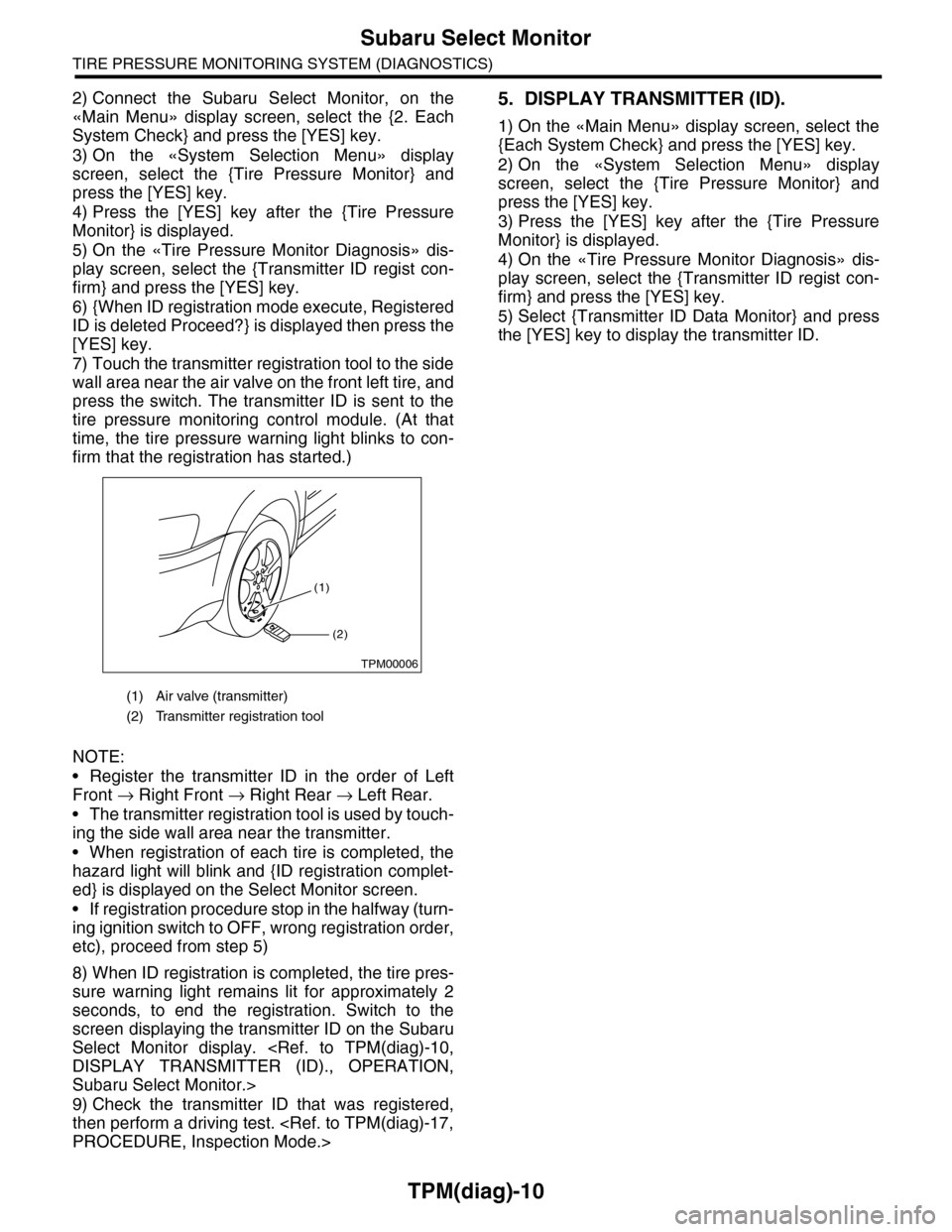
7) Touch the transmitter registration tool to the side
wall area near the air valve on the front left tire, and
press the switch. The transmitter ID is sent to the
tire pressure monitoring control module. (At that
time, the tire pressure warning light blinks to con-
firm that the registration has started.)
NOTE:
•Register the transmitter ID in the order of Left
Front → Right Front → Right Rear → Left Rear.
•The transmitter registration tool is used by touch-
ing the side wall area near the transmitter.
•When registration of each tire is completed, the
hazard light will blink and {ID registration complet-
ed} is displayed on the Select Monitor screen.
•If registration procedure stop in the halfway (turn-
ing ignition switch to OFF, wrong registration order,
etc), proceed from step 5)
8) When ID registration is completed, the tire pres-
sure warning light remains lit for approximately 2
seconds, to end the registration. Switch to the
screen displaying the transmitter ID on the Subaru
Select Monitor display.
Subaru Select Monitor.>
9) Check the transmitter ID that was registered,
then perform a driving test.
5. DISPLAY TRANSMITTER (ID).
1) On the «Main Menu» display screen, select the
{Each System Check} and press the [YES] key.
2) On the «System Selection Menu» display
screen, select the {Tire Pressure Monitor} and
press the [YES] key.
3) Press the [YES] key after the {Tire Pressure
Monitor} is displayed.
4) On the «Tire Pressure Monitor Diagnosis» dis-
play screen, select the {Transmitter ID regist con-
firm} and press the [YES] key.
5) Select {Transmitter ID Data Monitor} and press
the [YES] key to display the transmitter ID.
(1) Air valve (transmitter)
(2) Transmitter registration tool
(1)
(2)
TPM00006
Page 1008 of 2453
VDC(diag)-16
Subaru Select Monitor
VEHICLE DYNAMICS CONTROL (VDC) (DIAGNOSTICS)
6. Subaru Select Monitor
A: OPERATION
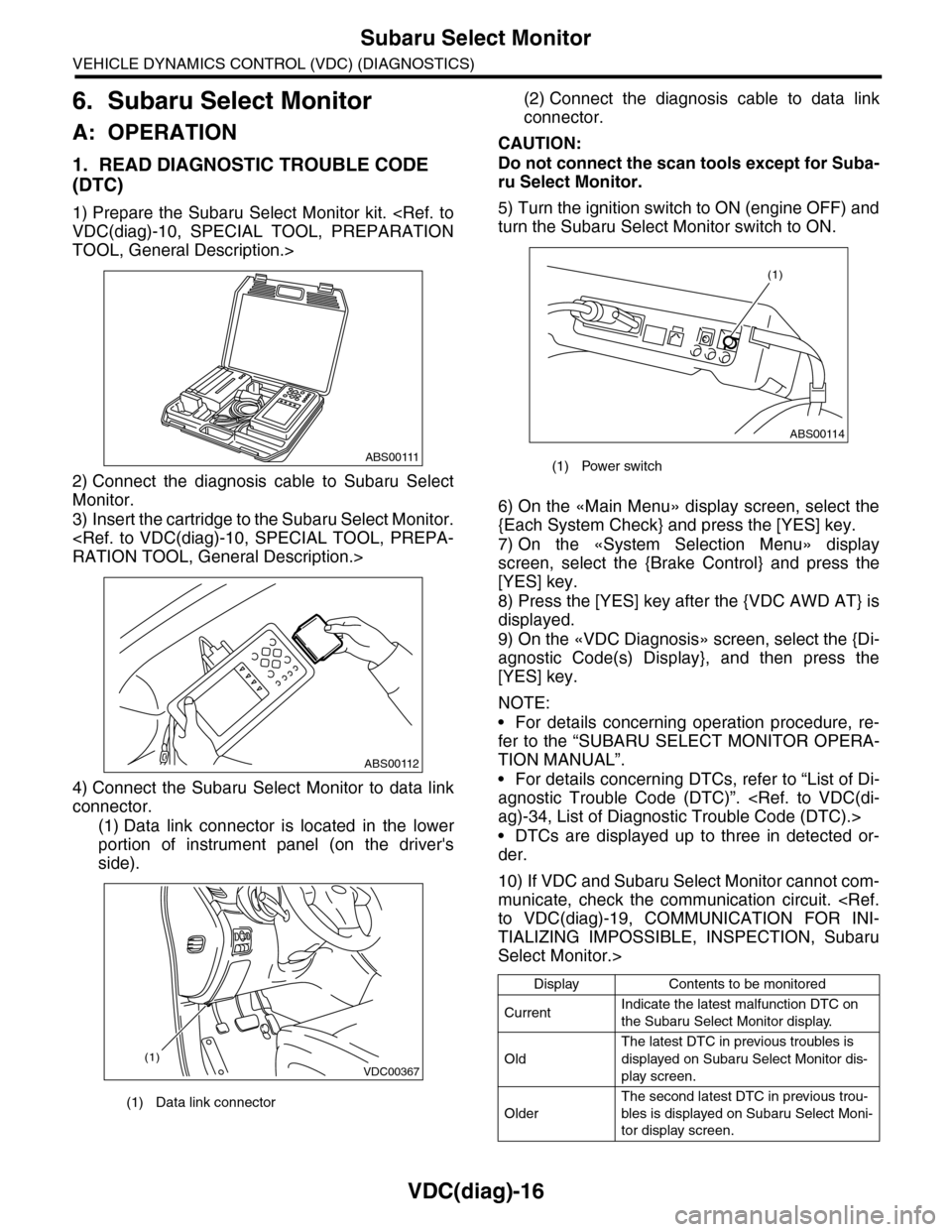
1. READ DIAGNOSTIC TROUBLE CODE
(DTC)
1) Prepare the Subaru Select Monitor kit.
TOOL, General Description.>
2) Connect the diagnosis cable to Subaru Select
Monitor.
3) Insert the cartridge to the Subaru Select Monitor.
4) Connect the Subaru Select Monitor to data link
connector.
(1) Data link connector is located in the lower
portion of instrument panel (on the driver's
side).
(2) Connect the diagnosis cable to data link
connector.
CAUTION:
Do not connect the scan tools except for Suba-
ru Select Monitor.
5) Turn the ignition switch to ON (engine OFF) and
turn the Subaru Select Monitor switch to ON.
6) On the «Main Menu» display screen, select the
{Each System Check} and press the [YES] key.
7) On the «System Selection Menu» display
screen, select the {Brake Control} and press the
[YES] key.
8) Press the [YES] key after the {VDC AWD AT} is
displayed.
9) On the «VDC Diagnosis» screen, select the {Di-
agnostic Code(s) Display}, and then press the
[YES] key.
NOTE:
•For details concerning operation procedure, re-
fer to the “SUBARU SELECT MONITOR OPERA-
TION MANUAL”.
•For details concerning DTCs, refer to “List of Di-
agnostic Trouble Code (DTC)”.
•DTCs are displayed up to three in detected or-
der.
10) If VDC and Subaru Select Monitor cannot com-
municate, check the communication circuit.
TIALIZING IMPOSSIBLE, INSPECTION, Subaru
Select Monitor.>
(1) Data link connector
ABS00111
ABS00112
VDC00367(1)
(1) Power switch
Display Contents to be monitored
CurrentIndicate the latest malfunction DTC on
the Subaru Select Monitor display.
Old
The latest DTC in previous troubles is
displayed on Subaru Select Monitor dis-
play screen.
Older
The second latest DTC in previous trou-
bles is displayed on Subaru Select Moni-
tor display screen.
ABS00114
(1)