diagnostic menu SUBARU TRIBECA 2009 1.G Service User Guide
[x] Cancel search | Manufacturer: SUBARU, Model Year: 2009, Model line: TRIBECA, Model: SUBARU TRIBECA 2009 1.GPages: 2453, PDF Size: 46.32 MB
Page 475 of 2453
LAN(diag)-19
Subaru Select Monitor
LAN SYSTEM (DIAGNOSTICS)
6. REGISTRATION BODY INTEGRATED
UNIT (EQUIPMENT SETTING)
CAUTION:
Body integrated unit is core of LAN system, and
also can select the function of all vehicle sys-
tem control. It is possible to control the original
functions of vehicle when registrations of body
integrated unit and function setting are corre-
sponded to vehicle equipment.
If registrations and function setting are differ-
ent from vehicle equipment, vehicle system
does not operate normally and diagnosis can-
not be performed correctly. Pay attention to fol-
lowing item.
•Be sure to correspond registrations and
function settings to vehicle equipment.
•Do not change the settings of vehicle improp-
erly.
•Confirm key illumination does not blink or
“Factory initial setting” of body integrated unit
registrations is “Market.” If “Factory initial set-
ting” is set to “Factory,” key illumination blinks
with ignition key turned to ON to give warning
of unconfirmed settings.
•Key illumination does not blink with ignition
switch turned to ON and go off with door
closed.
•Be sure to register immobilizer if body inte-
grated unit is replaced with a new one. (Model
with immobilizer)
•Make a registration of immobilizer when the
parts related to immobilizer have been re-
placed. Refer to the “REGISTRATION MANUAL
FOR IMMOBILIZER”.
•Do not install or register an immobilizer relat-
ed module of other registered vehicles to diag-
nose failures or inspect functions.
1) Turn the ignition switch to OFF.
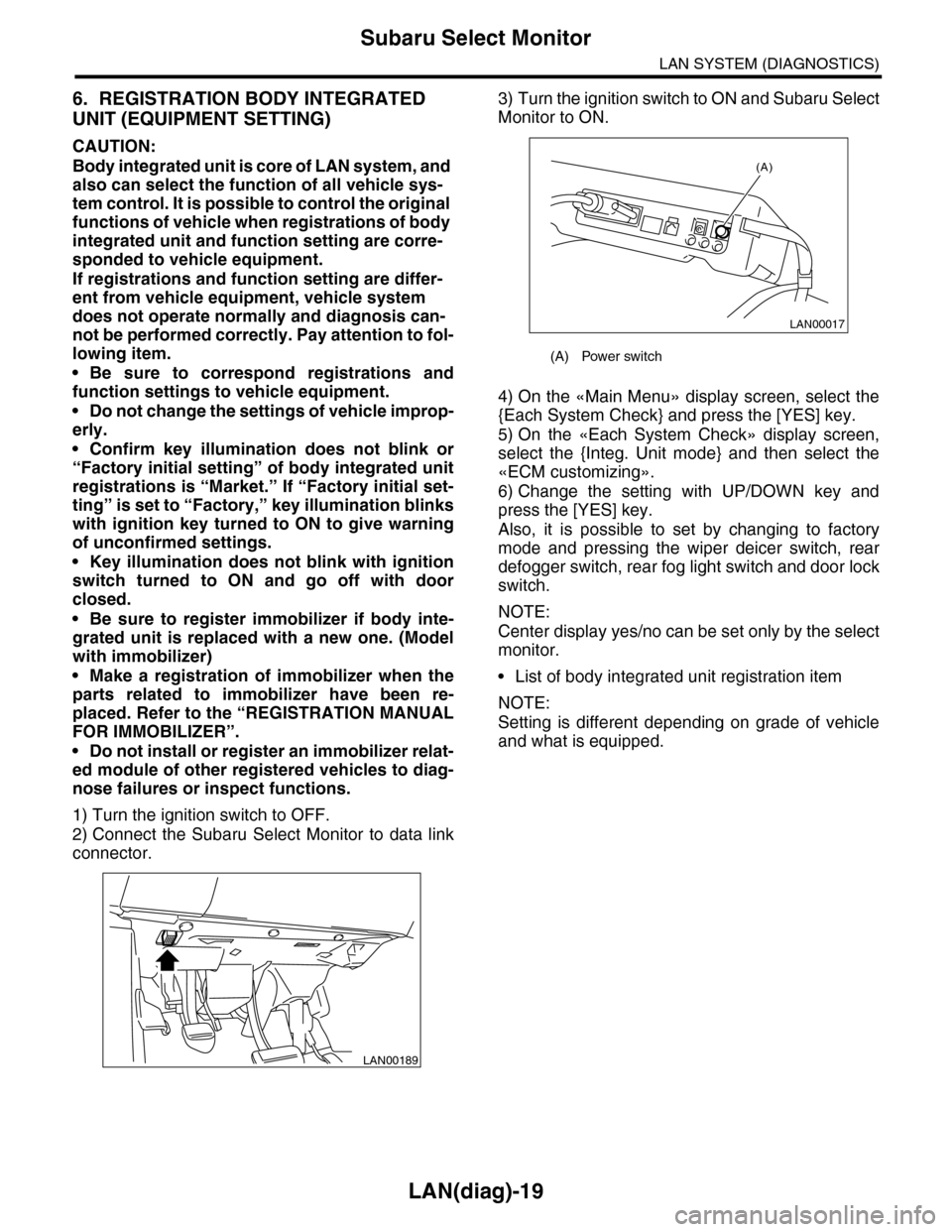
2) Connect the Subaru Select Monitor to data link
connector.
3) Turn the ignition switch to ON and Subaru Select
Monitor to ON.
4) On the «Main Menu» display screen, select the
{Each System Check} and press the [YES] key.
5) On the «Each System Check» display screen,
select the {Integ. Unit mode} and then select the
«ECM customizing».
6) Change the setting with UP/DOWN key and
press the [YES] key.
Also, it is possible to set by changing to factory
mode and pressing the wiper deicer switch, rear
defogger switch, rear fog light switch and door lock
switch.
NOTE:
Center display yes/no can be set only by the select
monitor.
•List of body integrated unit registration item
NOTE:
Setting is different depending on grade of vehicle
and what is equipped.
LAN00189
(A) Power switch
LAN00017
(A)
Page 477 of 2453
![SUBARU TRIBECA 2009 1.G Service User Guide LAN(diag)-21
Subaru Select Monitor
LAN SYSTEM (DIAGNOSTICS)
7. CLEAR MEMORY MODE
1) On the «Main Menu» display screen, select the
{2. Each System Check} and press the [YES] key.
2) On the «System](/img/17/7322/w960_7322-476.png "SUBARU TRIBECA 2009 1.G Service User Guide LAN(diag)-21
Subaru Select Monitor
LAN SYSTEM (DIAGNOSTICS)
7. CLEAR MEMORY MODE
1) On the «Main Menu» display screen, select the
{2. Each System Check} and press the [YES] key.
2) On the «System")
LAN(diag)-21
Subaru Select Monitor
LAN SYSTEM (DIAGNOSTICS)
7. CLEAR MEMORY MODE
1) On the «Main Menu» display screen, select the
{2. Each System Check} and press the [YES] key.
2) On the «System Selection Menu» display
screen, select the {Integ. Unit mode} and press the
[YES] key.
3) Press the [YES] key after the information of body
integrated unit type is displayed.
4) On the «Integ. Unit mode failure diag» display
screen, select the {Clear Memory} and press the
[YES] key.
5) When “Done” is shown on the display screen,
turn the ignition switch to OFF.
NOTE:
For details concerning operation procedure, refer
to the “SUBARU SELECT MONITOR OPERATION
MANUAL”.
8. FREEZE FRAME DATA
NOTE:
•Data stored at the time of trouble occurrence is
shown on display.
•Freeze frame data will be memorized maximum
to 20.
•If freeze frame data is not stored in memory cor-
rectly (caused by low power supply of body inte-
grated unit), DTC will be displayed with “?” on the
head of it in the Subaru Select Monitor display. This
shows it may be an unreliable reading.
Display Contents to be monitored
Clear memory?Clear function of DTC and
freeze frame data
Page 478 of 2453
![SUBARU TRIBECA 2009 1.G Service User Guide LAN(diag)-22
Subaru Select Monitor
LAN SYSTEM (DIAGNOSTICS)
9. FUNCTION SETTING (ECM CUSTOMIZING)
1) On the «Main Menu» display screen, select the {Each System Check} and press the [YES] key.
2) On](/img/17/7322/w960_7322-477.png "SUBARU TRIBECA 2009 1.G Service User Guide LAN(diag)-22
Subaru Select Monitor
LAN SYSTEM (DIAGNOSTICS)
9. FUNCTION SETTING (ECM CUSTOMIZING)
1) On the «Main Menu» display screen, select the {Each System Check} and press the [YES] key.
2) On")
LAN(diag)-22
Subaru Select Monitor
LAN SYSTEM (DIAGNOSTICS)
9. FUNCTION SETTING (ECM CUSTOMIZING)
1) On the «Main Menu» display screen, select the {Each System Check} and press the [YES] key.
2) On the «System Selection Menu» display screen, select the {Integ. Unit mode} and press the [YES] key.
3) On the «Integ. Unit mode failure diag» display screen, select the {ECM customizing} and press the [YES] key.
4) Change the setting with UP/DOWN key and press the [YES] key.
•List of function setting item (ECM customizing)
NOTE:
Even if changes are made to items that are not equipped, the contents are not confirmed and do not operate.
DataInitial set-
ting value
Customize
settingRemarksDestination
Specifications
Off delay time Normal
Delay time below can be selected by setting.
After door closed After key unlock
OFF 0 sec. 0 sec.
Short 3 sec. 10 sec.
Normal 5 sec. 20 sec.
Long 8 sec. 30 sec.
Auto lock time 30 sec.0 — 60
sec.
Workable when Auto locking is set to “ON” and Automatic
locking setup is “ON”. Time can be changed by 10 sec-
onds: 0 (OFF) — 60 (maximum).
Not supported by North
American specifications
Rr defogger op.
mode15 min.
15 min.Rear defogger stops in 15 minutes automatically after
switch is turned to ON.
ContinuousRear defogger repeats active condition for 15 minutes and
inactive condition for 2 minutes until switch is turned to OFF.
Wiper deicer op.
mode15 min.
15 min.Wiper deicer stops in 15 minutes automatically after
switch is turned to ON.
ContinuousWiper deicer repeats active condition for 15 minutes and
inactive condition for 2 minutes until switch is turned to OFF.
Security Alarm
SetupONON Security alarm (hazard, horn or siren) in active condition
OFF Security alarm in inactive condition
Impact Sensor
SetupOFF
ONWorkable when Impact Sensor Setup is set to “ON”
Impact sensor in active condition
OFFImpact sensor in inactive condition (Set Impact Sensor
Setup of model without impact sensor to “OFF”.)
Alarm monitor
delay settingON
After doors are locked by keyless entry system operated,
Alarm monitor starts in following time.
ON Delay time is 30 seconds.
OFF Delay time is 0 seconds.
Lockout preven-
tionONONLockout prevention in inactive condition (Lockout preven-
tion does not operate if safety knob is locked by hand.)
OFF Lockout prevention in inactive condition
Impact Sensor OFFON
Ve h i c l e i s c o n t r o l l e d i n i m p a c t s e n s o r e q u i p p e d m o d e .
(Set impact sensor to “OFF” in model without impact sen-
sor. If impact sensor is set to “ON”, hazard, horn or siren
operate after doors are locked by keyless entry system
operated (Alarm monitor starting).
Set to “ON” when an
optional impact sensor
is installed.
OFF Vehicle is controlled in impact sensor no-equipped mode.
Siren setting OFFON
Siren sounds when alarm operates. (Set siren setting to
“OFF” in model without siren. Horn does not sound if siren
setting is set to “ON”.)
Set to “ON” when an
optional siren is
installed.OFF Horn sounds when alarm operates.
Answer-back
buzzer setupON
ON
Workable when answer-back buzzer setup is set to “ON”.
When lock/unlock is selected by keyless entry system
operated, hazard answer-back buzzer operates.
OFFWhen lock/unlock is selected by keyless entry system
operated, answer-back buzzer does not sound.
Page 480 of 2453
LAN(diag)-24
Subaru Select Monitor
LAN SYSTEM (DIAGNOSTICS)
10.FUNCTION CHECK
In order to check the body integrated unit function,
inspect the body integrated unit and actuator using
Subaru Select Monitor without operating switches.
1) On the «Main Menu» display screen, select the
{Each System Check} and press the [YES] key.
2) On the «System Selection Menu» display
screen, select the {Integ. Unit mode} and press the
[YES] key.
3) On the «Integ. Unit mode failure diag» display
screen, select the {Function Check} and press the
[YES] key.
4) Select the item to be operated on the «Function
Check» display screen with «UP/Down key» and
press the [YES] key.
5) Pressing [YES] starts, [NO] cancels the opera-
tion and [YES] returns to the System Operation
Check Mode display screen.
NOTE:
If not equipped (based on area or condition), pro-
cess will not go on.
Page 483 of 2453
![SUBARU TRIBECA 2009 1.G Service User Guide LAN(diag)-27
Read Current Data
LAN SYSTEM (DIAGNOSTICS)
9. Read Current Data
A: OPERATION
1) On the «Main Menu» display screen, select the
{Each System Check} and press the [YES] key.
2) On the «](/img/17/7322/w960_7322-482.png "SUBARU TRIBECA 2009 1.G Service User Guide LAN(diag)-27
Read Current Data
LAN SYSTEM (DIAGNOSTICS)
9. Read Current Data
A: OPERATION
1) On the «Main Menu» display screen, select the
{Each System Check} and press the [YES] key.
2) On the «")
LAN(diag)-27
Read Current Data
LAN SYSTEM (DIAGNOSTICS)
9. Read Current Data
A: OPERATION
1) On the «Main Menu» display screen, select the
{Each System Check} and press the [YES] key.
2) On the «System Selection Menu» display
screen, select the {Integ. Unit mode} and press the
[YES] key.
3) On the «Integ. unit mode failure diag» display
screen, select the {Current Data Display & Save}
and press the [YES] key.
4) On the «Data Display Menu» screen, select the
{12 Data Display} and press the [YES] key.
5) Using the scroll key, scroll the display screen up
or down until the desired data is shown.
OPERATION, Subaru Select Monitor.>
SETTING, OPERATION, Subaru Select Monitor.>
Page 585 of 2453
OD(diag)-17
Subaru Select Monitor
OCCUPANT DETECTION SYSTEM (DIAGNOSTICS)
7. Subaru Select Monitor
A: OPERATION
1. READ DIAGNOSTIC TROUBLE CODE (DTC)
When malfunction of the airbag system and the occupant detection system occur, the DTC stored in airbag
control module will be read out.
Refer to the DTC readout of the airbag system (diagnosis).
NOTE:
•For details concerning operation procedure, refer to the “SUBARU SELECT MONITOR OPERATION
MANUAL”.
•For details concerning DTCs, refer to the “List of Diagnostic Trouble Code (Airbag system, Occupant de-
tection system).”
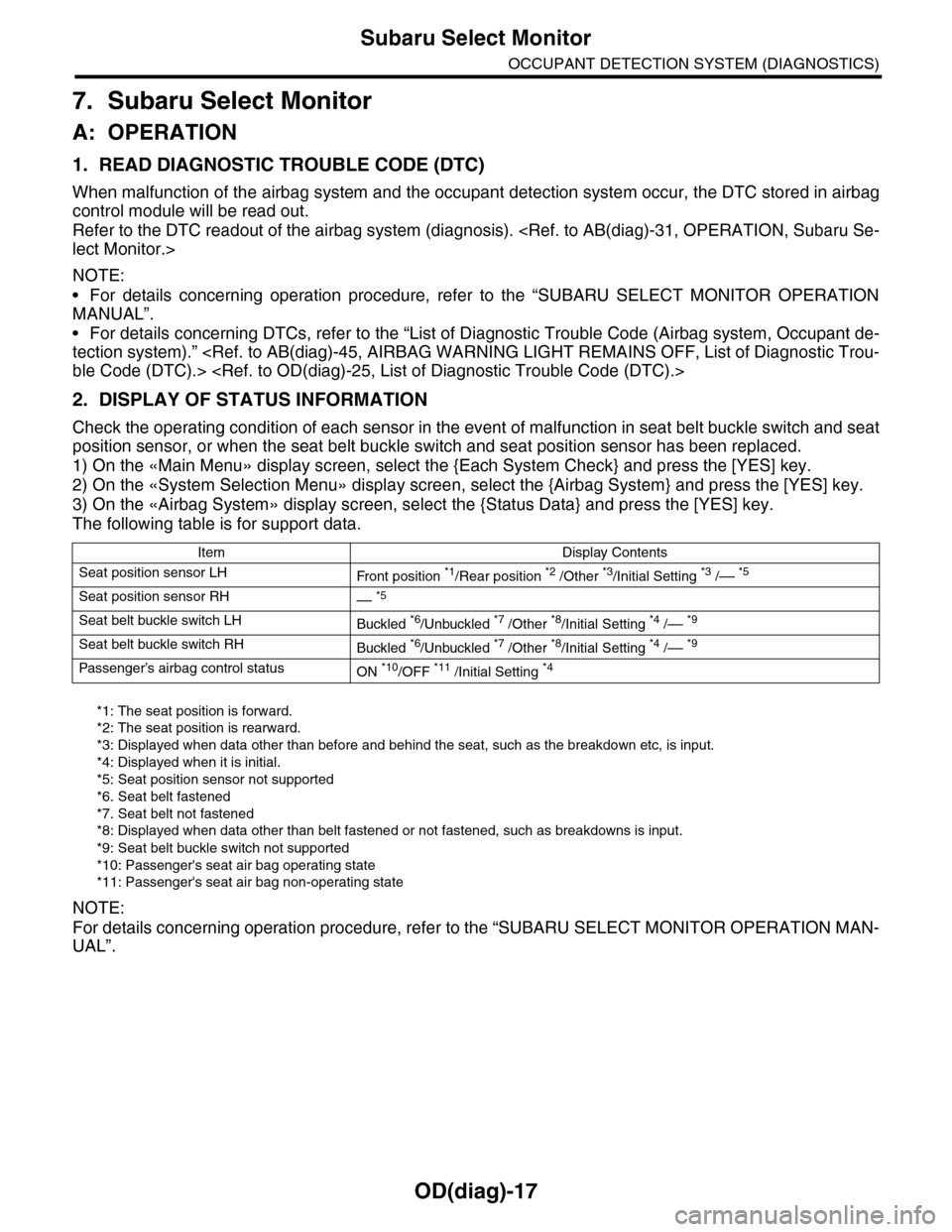
2. DISPLAY OF STATUS INFORMATION
Check the operating condition of each sensor in the event of malfunction in seat belt buckle switch and seat
position sensor, or when the seat belt buckle switch and seat position sensor has been replaced.
1) On the «Main Menu» display screen, select the {Each System Check} and press the [YES] key.
2) On the «System Selection Menu» display screen, select the {Airbag System} and press the [YES] key.
3) On the «Airbag System» display screen, select the {Status Data} and press the [YES] key.
The following table is for support data.
*1: The seat position is forward.
*2: The seat position is rearward.
*3: Displayed when data other than before and behind the seat, such as the breakdown etc, is input.
*4: Displayed when it is initial.
*5: Seat position sensor not supported
*6. Seat belt fastened
*7. Seat belt not fastened
*8: Displayed when data other than belt fastened or not fastened, such as breakdowns is input.
*9: Seat belt buckle switch not supported
*10: Passenger's seat air bag operating state
*11: Passenger's seat air bag non-operating state
NOTE:
For details concerning operation procedure, refer to the “SUBARU SELECT MONITOR OPERATION MAN-
UAL”.
Item Display Contents
Seat position sensor LHFr o nt p os it i on *1/Rear position *2 /Other *3/Initial Setting *3 /–– *5
Seat position sensor RH–– *5
Seat belt buckle switch LHBuckled *6/Unbuckled *7 /Other *8/Initial Setting *4 /–– *9
Seat belt buckle switch RHBuckled *6/Unbuckled *7 /Other *8/Initial Setting *4 /–– *9
Passenger’s airbag control statusON *10/OFF *11 /Initial Setting *4
Page 586 of 2453
OD(diag)-18
Subaru Select Monitor
OCCUPANT DETECTION SYSTEM (DIAGNOSTICS)
3. CLEAR MEMORY MODE
Clear the DTC stored in the airbag control module
after repairing the airbag system and occupant de-
tection system. (After the breakdown is recovered,
the breakdown code for completed recoveries are
read out when the next breakdown occurs if the
memory clear work is not performed.)
1) On the «Main Menu» display screen, select the
{Each System Check} and press the [YES] key.
2) On the «System Selection Menu» display
screen, select the {Airbag System} and press the
[YES] key.
3) On the {Airbag System} menu screen, select the
{Clear Memory} and press the [YES] key.
4) When the “Clear Memory?” is shown on the
screen, press the [YES] key.
5) When “Done” is displayed, turn the Subaru Se-
lect Monitor to OFF.
NOTE:
For details concerning operation procedure, refer
to the “SUBARU SELECT MONITOR OPERATION
MANUAL”.
4. SYSTEM CALIBRATION (REZEROING)
NOTE:
When replacing the occupant detection system, or
removing and disassembling the passenger’s seat,
always perform the system calibration after install-
ing a seat in the vehicle.
CAUTION:
When the trouble occurs in the system during
calibration process, “Occupant detection cali-
bration failure” is detected in the DTC 2A of the
airbag system and the airbag warning light
lights. In this case, after turning the ignition
switch to OFF once, redo the system calibration
(Rezeroing), or after clearing the cause of the
failure, perform the system calibration again.
1) Park empty vehicle on a level surface.
2) On the «Main Menu» display screen, select the
{Each System Check} and press the [YES] key.
3) On the «System Selection Menu» display
screen, select the {Occupant Detection System}
and press the [YES] key.
4) On the Occupant Detection System display
screen, select the {Zero Point Adjustment} and
press the [YES] key.
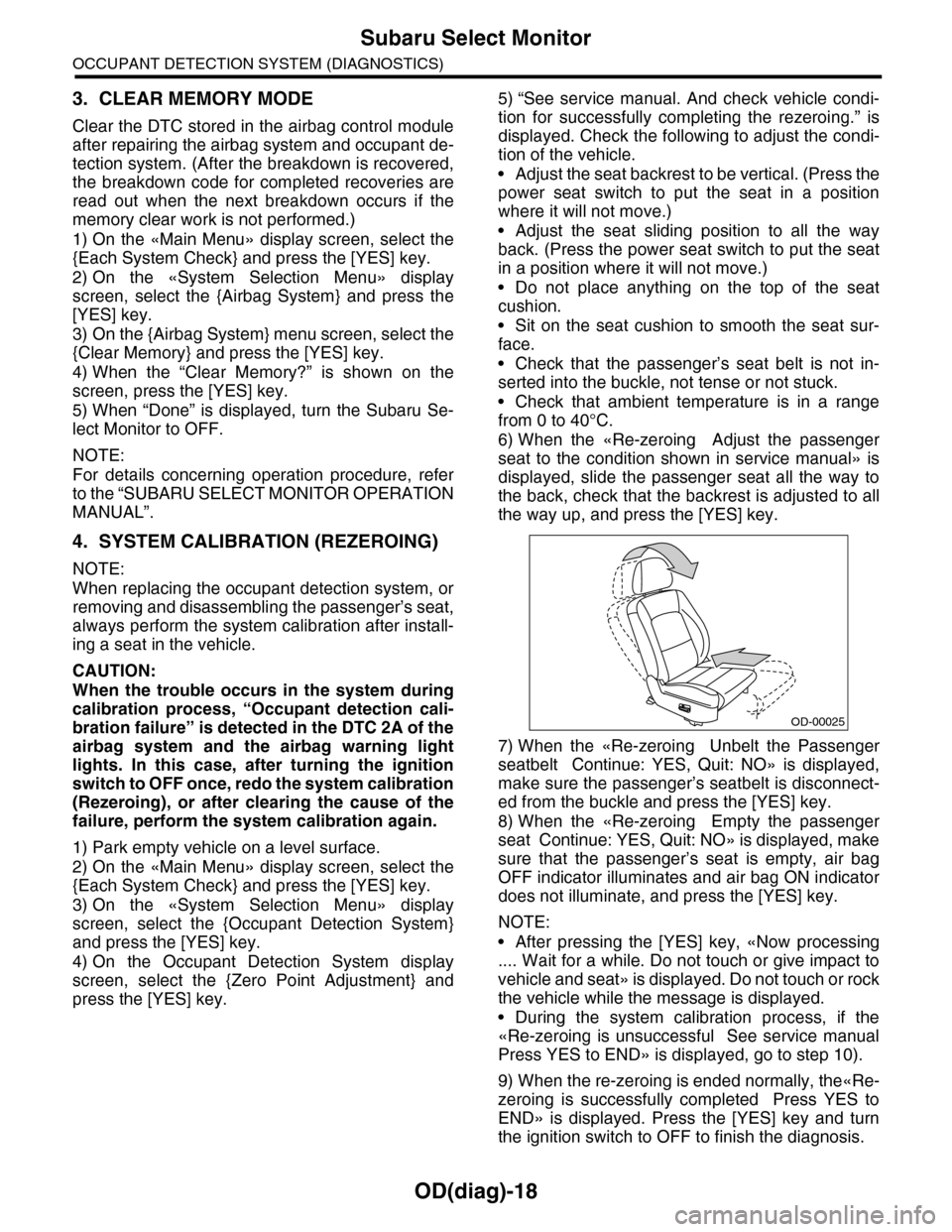
5) “See service manual. And check vehicle condi-
tion for successfully completing the rezeroing.” is
displayed. Check the following to adjust the condi-
tion of the vehicle.
•Adjust the seat backrest to be vertical. (Press the
power seat switch to put the seat in a position
where it will not move.)
•Adjust the seat sliding position to all the way
back. (Press the power seat switch to put the seat
in a position where it will not move.)
•Do not place anything on the top of the seat
cushion.
•Sit on the seat cushion to smooth the seat sur-
face.
•Check that the passenger’s seat belt is not in-
serted into the buckle, not tense or not stuck.
•Check that ambient temperature is in a range
from 0 to 40°C.
6) When the «Re-zeroing Adjust the passenger
seat to the condition shown in service manual» is
displayed, slide the passenger seat all the way to
the back, check that the backrest is adjusted to all
the way up, and press the [YES] key.
7) When the «Re-zeroing Unbelt the Passenger
seatbelt Continue: YES, Quit: NO» is displayed,
make sure the passenger’s seatbelt is disconnect-
ed from the buckle and press the [YES] key.
8) When the «Re-zeroing Empty the passenger
seat Continue: YES, Quit: NO» is displayed, make
sure that the passenger’s seat is empty, air bag
OFF indicator illuminates and air bag ON indicator
does not illuminate, and press the [YES] key.
NOTE:
•After pressing the [YES] key, «Now processing
.... Wait for a while. Do not touch or give impact to
vehicle and seat» is displayed. Do not touch or rock
the vehicle while the message is displayed.
•During the system calibration process, if the
«Re-zeroing is unsuccessful See service manual
Press YES to END» is displayed, go to step 10).
9) When the re-zeroing is ended normally, the«Re-
zeroing is successfully completed Press YES to
END» is displayed. Press the [YES] key and turn
the ignition switch to OFF to finish the diagnosis.
OD-00025
Page 645 of 2453
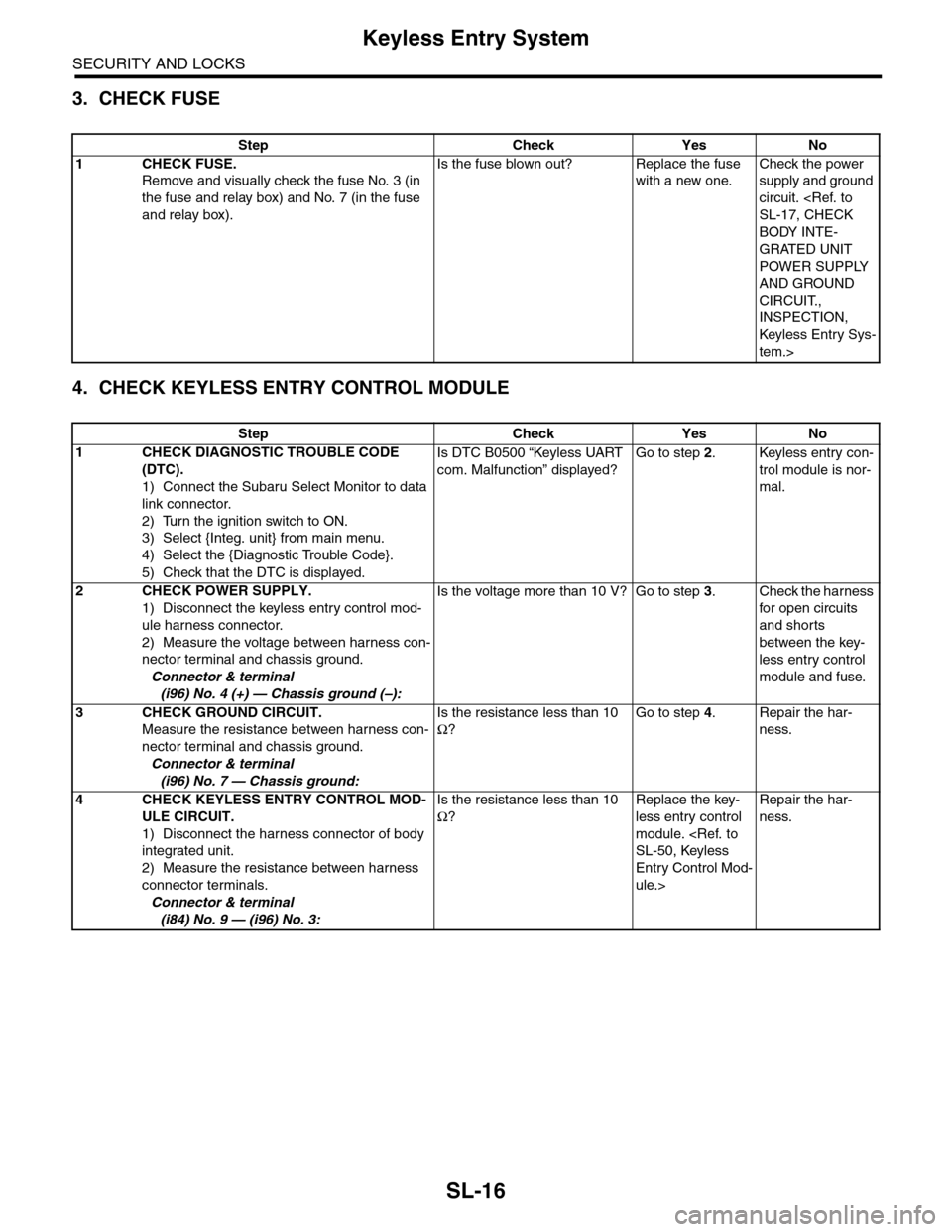
SL-16
Keyless Entry System
SECURITY AND LOCKS
3. CHECK FUSE
4. CHECK KEYLESS ENTRY CONTROL MODULE
Step Check Yes No
1CHECK FUSE.
Remove and visually check the fuse No. 3 (in
the fuse and relay box) and No. 7 (in the fuse
and relay box).
Is the fuse blown out? Replace the fuse
with a new one.
Check the power
supply and ground
circuit.
BODY INTE-
GRATED UNIT
POWER SUPPLY
AND GROUND
CIRCUIT.,
INSPECTION,
Keyless Entr y Sys-
tem.>
Step Check Yes No
1CHECK DIAGNOSTIC TROUBLE CODE
(DTC).
1) Connect the Subaru Select Monitor to data
link connector.
2) Turn the ignition switch to ON.
3) Select {Integ. unit} from main menu.
4) Select the {Diagnostic Trouble Code}.
5) Check that the DTC is displayed.
Is DTC B0500 “Keyless UART
com. Malfunction” displayed?
Go to step 2.Keyless entry con-
trol module is nor-
mal.
2CHECK POWER SUPPLY.
1) Disconnect the keyless entry control mod-
ule harness connector.
2) Measure the voltage between harness con-
nector terminal and chassis ground.
Connector & terminal
(i96) No. 4 (+) — Chassis ground (–):
Is the voltage more than 10 V? Go to step 3.Check the harness
for open circuits
and shorts
between the key-
less entry control
module and fuse.
3CHECK GROUND CIRCUIT.
Measure the resistance between harness con-
nector terminal and chassis ground.
Connector & terminal
(i96) No. 7 — Chassis ground:
Is the resistance less than 10
Ω?
Go to step 4.Repair the har-
ness.
4CHECK KEYLESS ENTRY CONTROL MOD-
ULE CIRCUIT.
1) Disconnect the harness connector of body
integrated unit.
2) Measure the resistance between harness
connector terminals.
Connector & terminal
(i84) No. 9 — (i96) No. 3:
Is the resistance less than 10
Ω?
Replace the key-
less entry control
module.
Entry Control Mod-
ule.>
Repair the har-
ness.
Page 649 of 2453
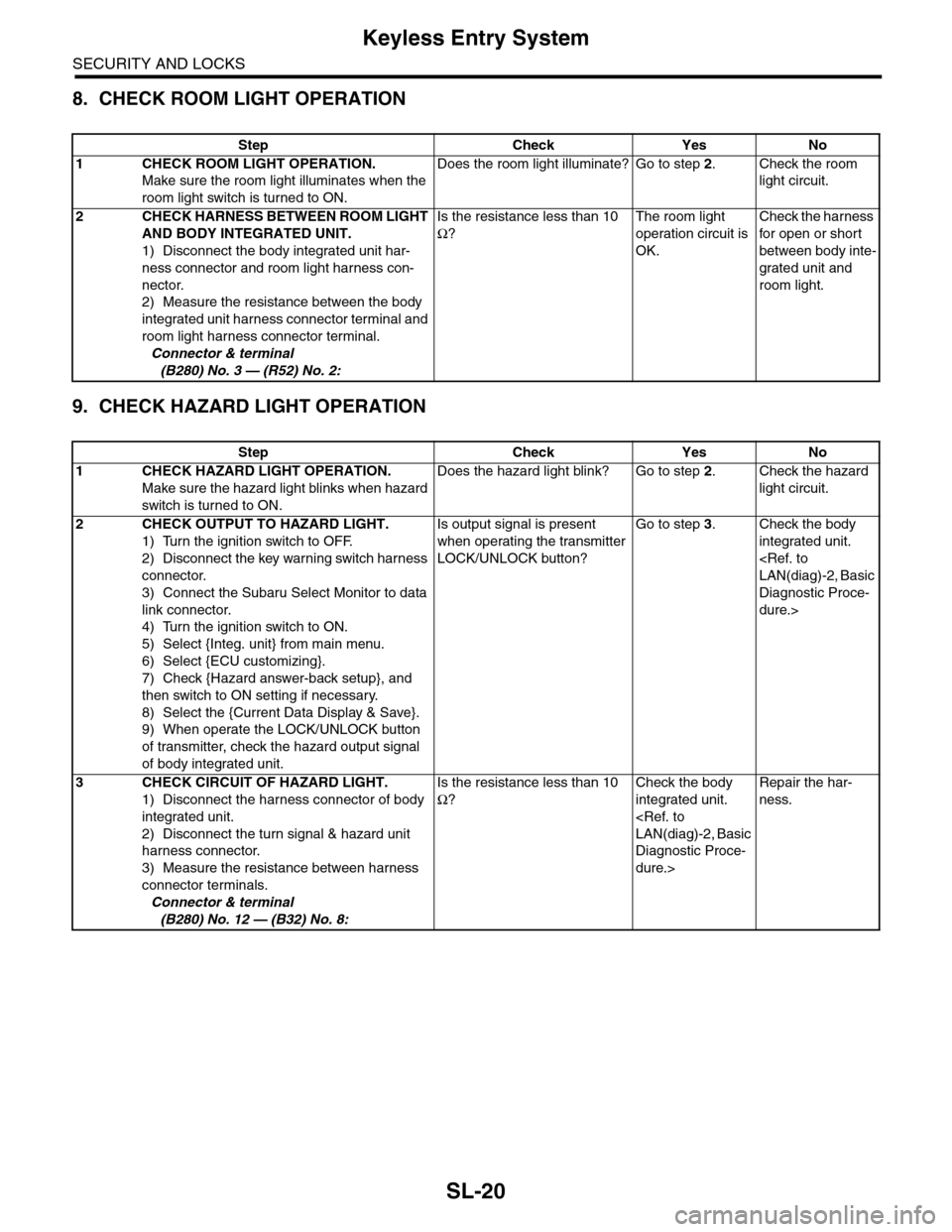
SL-20
Keyless Entry System
SECURITY AND LOCKS
8. CHECK ROOM LIGHT OPERATION
9. CHECK HAZARD LIGHT OPERATION
Step Check Yes No
1CHECK ROOM LIGHT OPERATION.
Make sure the room light illuminates when the
room light switch is turned to ON.
Does the room light illuminate? Go to step 2.Check the room
light circuit.
2CHECK HARNESS BETWEEN ROOM LIGHT
AND BODY INTEGRATED UNIT.
1) Disconnect the body integrated unit har-
ness connector and room light harness con-
nector.
2) Measure the resistance between the body
integrated unit harness connector terminal and
room light harness connector terminal.
Connector & terminal
(B280) No. 3 — (R52) No. 2:
Is the resistance less than 10
Ω?
The room light
operation circuit is
OK.
Check the harness
for open or shor t
between body inte-
grated unit and
room light.
Step Check Yes No
1CHECK HAZARD LIGHT OPERATION.
Make sure the hazard light blinks when hazard
switch is turned to ON.
Does the hazard light blink? Go to step 2.Check the hazard
light circuit.
2CHECK OUTPUT TO HAZARD LIGHT.
1) Turn the ignition switch to OFF.
2) Disconnect the key warning switch harness
connector.
3) Connect the Subaru Select Monitor to data
link connector.
4) Turn the ignition switch to ON.
5) Select {Integ. unit} from main menu.
6) Select {ECU customizing}.
7) Check {Hazard answer-back setup}, and
then switch to ON setting if necessary.
8) Select the {Current Data Display & Save}.
9) When operate the LOCK/UNLOCK button
of transmitter, check the hazard output signal
of body integrated unit.
Is output signal is present
when operating the transmitter
LOCK/UNLOCK button?
Go to step 3.Check the body
integrated unit.
Diagnostic Proce-
dure.>
3CHECK CIRCUIT OF HAZARD LIGHT.
1) Disconnect the harness connector of body
integrated unit.
2) Disconnect the turn signal & hazard unit
harness connector.
3) Measure the resistance between harness
connector terminals.
Connector & terminal
(B280) No. 12 — (B32) No. 8:
Is the resistance less than 10
Ω?
Check the body
integrated unit.
Diagnostic Proce-
dure.>
Repair the har-
ness.
Page 650 of 2453
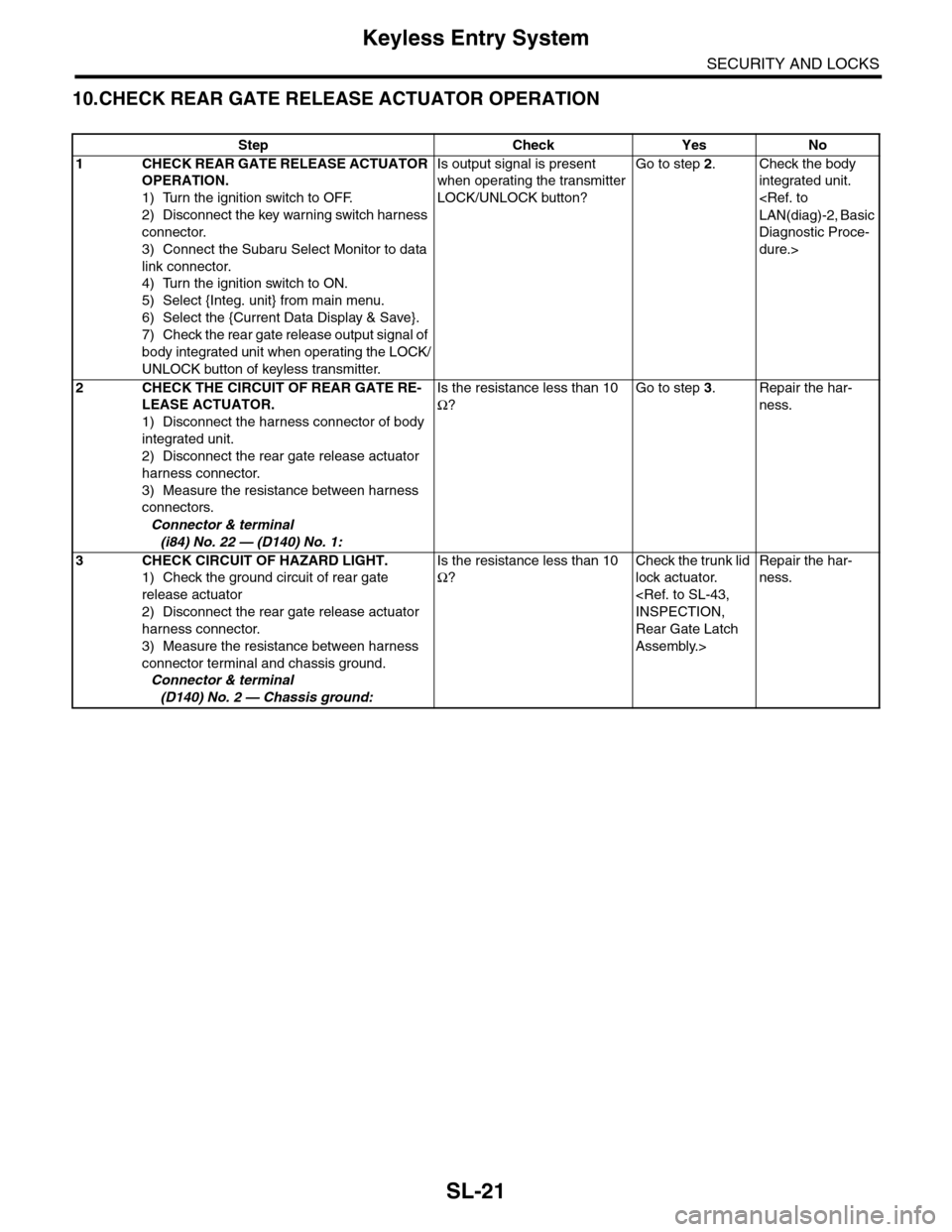
SL-21
Keyless Entry System
SECURITY AND LOCKS
10.CHECK REAR GATE RELEASE ACTUATOR OPERATION
Step Check Yes No
1CHECK REAR GATE RELEASE ACTUATOR
OPERATION.
1) Turn the ignition switch to OFF.
2) Disconnect the key warning switch harness
connector.
3) Connect the Subaru Select Monitor to data
link connector.
4) Turn the ignition switch to ON.
5) Select {Integ. unit} from main menu.
6) Select the {Current Data Display & Save}.
7) Check the rear gate release output signal of
body integrated unit when operating the LOCK/
UNLOCK button of keyless transmitter.
Is output signal is present
when operating the transmitter
LOCK/UNLOCK button?
Go to step 2.Check the body
integrated unit.
Diagnostic Proce-
dure.>
2CHECK THE CIRCUIT OF REAR GATE RE-
LEASE ACTUATOR.
1) Disconnect the harness connector of body
integrated unit.
2) Disconnect the rear gate release actuator
harness connector.
3) Measure the resistance between harness
connectors.
Connector & terminal
(i84) No. 22 — (D140) No. 1:
Is the resistance less than 10
Ω?
Go to step 3.Repair the har-
ness.
3CHECK CIRCUIT OF HAZARD LIGHT.
1) Check the ground circuit of rear gate
release actuator
2) Disconnect the rear gate release actuator
harness connector.
3) Measure the resistance between harness
connector terminal and chassis ground.
Connector & terminal
(D140) No. 2 — Chassis ground:
Is the resistance less than 10
Ω?
Check the trunk lid
lock actuator.
Rear Gate Latch
Assembly.>
Repair the har-
ness.