steering SUBARU TRIBECA 2009 1.G Service Owner's Manual
[x] Cancel search | Manufacturer: SUBARU, Model Year: 2009, Model line: TRIBECA, Model: SUBARU TRIBECA 2009 1.GPages: 2453, PDF Size: 46.32 MB
Page 283 of 2453
EI-41
Instrument Panel Assembly
EXTERIOR/INTERIOR TRIM
13) Make sure that the instrument panel upper is
removed from the steering support beam
14) Disconnect the connectors, and remove the in-
strument panel from vehicle body.
15) Remove the heater vent duct.
16) Remove the air vent grille.
17) Remove the passenger airbag module.
ule.>
2. STEERING SUPPORT BEAM
1) Remove the instrument panel upper.
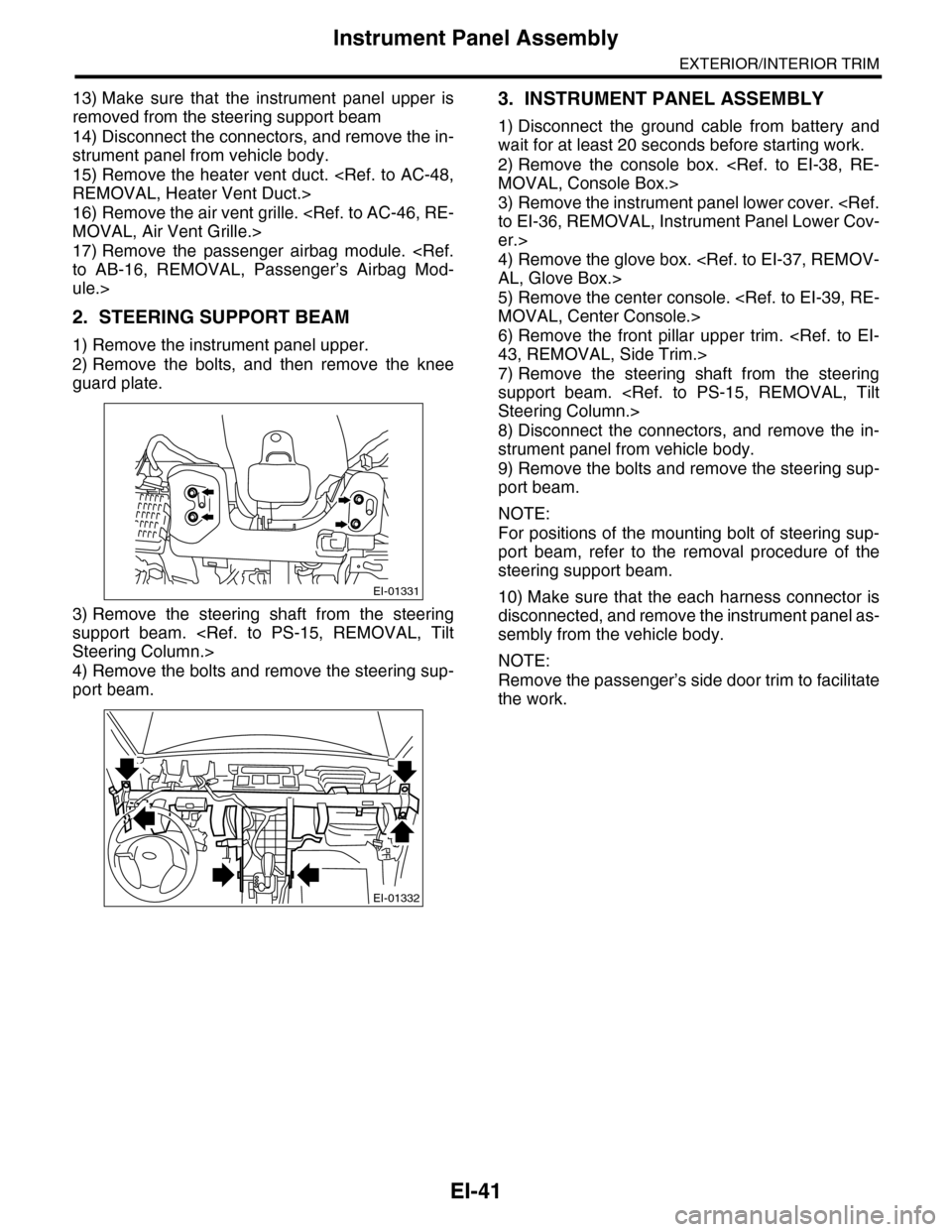
2) Remove the bolts, and then remove the knee
guard plate.
3) Remove the steering shaft from the steering
support beam.
4) Remove the bolts and remove the steering sup-
port beam.
3. INSTRUMENT PANEL ASSEMBLY
1) Disconnect the ground cable from battery and
wait for at least 20 seconds before starting work.
2) Remove the console box.
3) Remove the instrument panel lower cover.
er.>
4) Remove the glove box.
5) Remove the center console.
6) Remove the front pillar upper trim.
7) Remove the steering shaft from the steering
support beam.
8) Disconnect the connectors, and remove the in-
strument panel from vehicle body.
9) Remove the bolts and remove the steering sup-
port beam.
NOTE:
For positions of the mounting bolt of steering sup-
port beam, refer to the removal procedure of the
steering support beam.
10) Make sure that the each harness connector is
disconnected, and remove the instrument panel as-
sembly from the vehicle body.
NOTE:
Remove the passenger’s side door trim to facilitate
the work.
EI-01331
EI-01332
Page 284 of 2453
EI-42
Instrument Panel Assembly
EXTERIOR/INTERIOR TRIM
B: INSTALLATION
1. INSTRUMENT PANEL UPPER
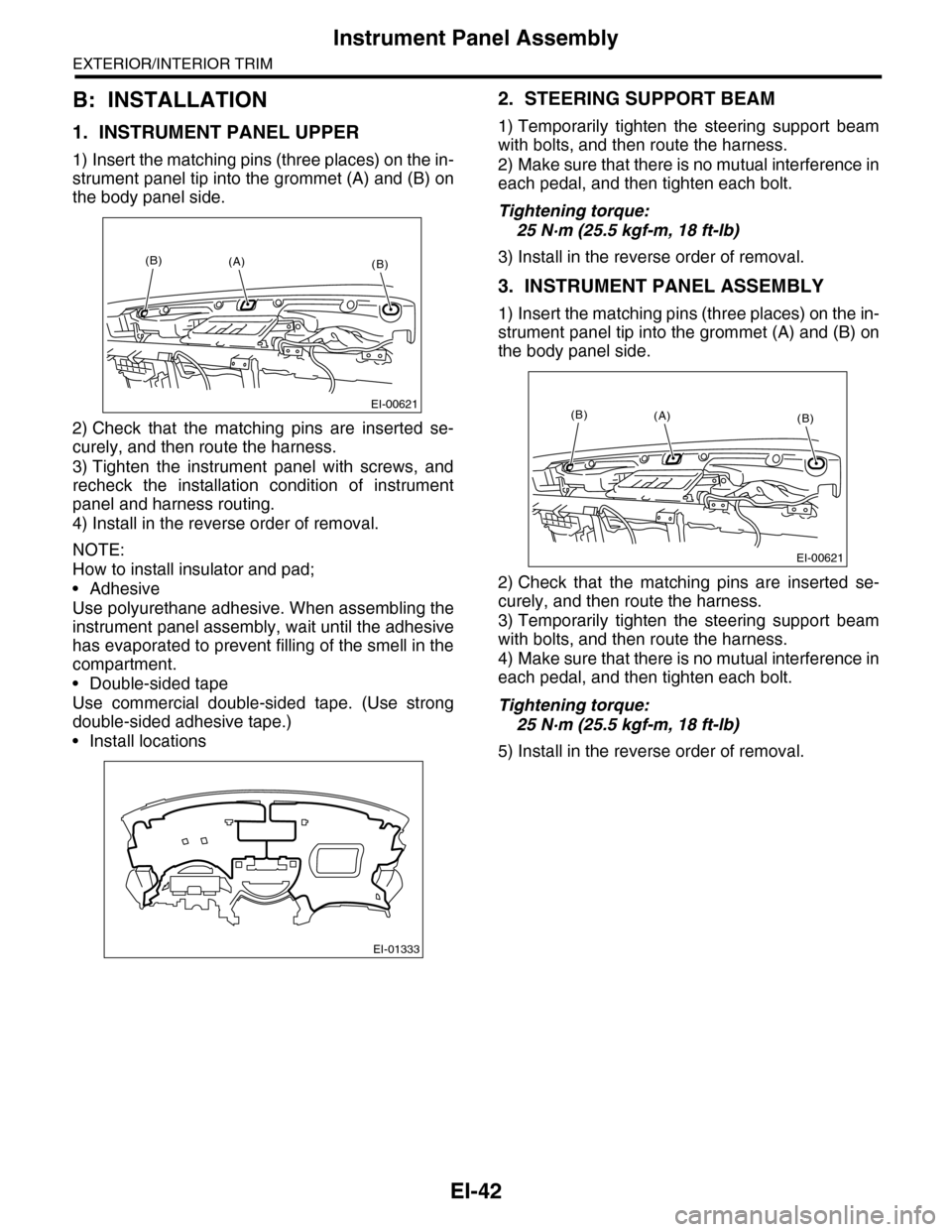
1) Insert the matching pins (three places) on the in-
strument panel tip into the grommet (A) and (B) on
the body panel side.
2) Check that the matching pins are inserted se-
curely, and then route the harness.
3) Tighten the instrument panel with screws, and
recheck the installation condition of instrument
panel and harness routing.
4) Install in the reverse order of removal.
NOTE:
How to install insulator and pad;
•Adhesive
Use polyurethane adhesive. When assembling the
instrument panel assembly, wait until the adhesive
has evaporated to prevent filling of the smell in the
compartment.
•Double-sided tape
Use commercial double-sided tape. (Use strong
double-sided adhesive tape.)
•Install locations
2. STEERING SUPPORT BEAM
1) Temporarily tighten the steering support beam
with bolts, and then route the harness.
2) Make sure that there is no mutual interference in
each pedal, and then tighten each bolt.
Tightening torque:
25 N·m (25.5 kgf-m, 18 ft-lb)
3) Install in the reverse order of removal.
3. INSTRUMENT PANEL ASSEMBLY
1) Insert the matching pins (three places) on the in-
strument panel tip into the grommet (A) and (B) on
the body panel side.
2) Check that the matching pins are inserted se-
curely, and then route the harness.
3) Temporarily tighten the steering support beam
with bolts, and then route the harness.
4) Make sure that there is no mutual interference in
each pedal, and then tighten each bolt.
Tightening torque:
25 N·m (25.5 kgf-m, 18 ft-lb)
5) Install in the reverse order of removal.
EI-00621
(B)(B)(A)
EI-01333
EI-00621
(B)(B)(A)
Page 450 of 2453
IDI-11
Combination Meter
INSTRUMENTATION/DRIVER INFO
3. Combination Meter
A: REMOVAL
1) Disconnect the ground cable from battery.
2) Set the tilt steering at the lowest position.
3) Remove the console box.
4) Remove the control panel.
5) Remove the instrument panel lower cover.
er.>
6) Remove the console side panel.
7) Remove the meter hood.
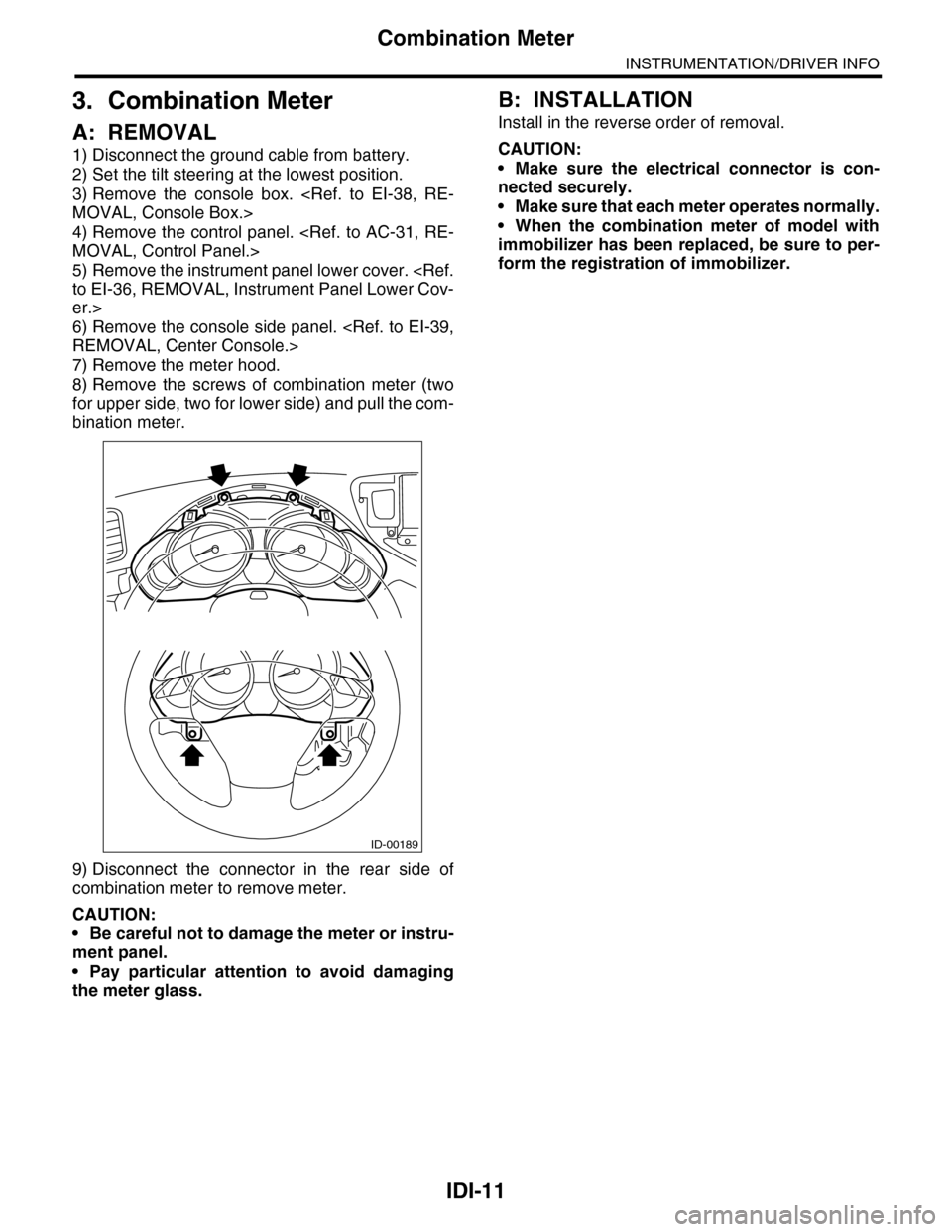
8) Remove the screws of combination meter (two
for upper side, two for lower side) and pull the com-
bination meter.
9) Disconnect the connector in the rear side of
combination meter to remove meter.
CAUTION:
•Be careful not to damage the meter or instru-
ment panel.
•Pay particular attention to avoid damaging
the meter glass.
B: INSTALLATION
Install in the reverse order of removal.
CAUTION:
•Make sure the electrical connector is con-
nected securely.
•Make sure that each meter operates normally.
•When the combination meter of model with
immobilizer has been replaced, be sure to per-
form the registration of immobilizer.
ID-00189
Page 463 of 2453
LAN(diag)-7
Electrical Component Location
LAN SYSTEM (DIAGNOSTICS)
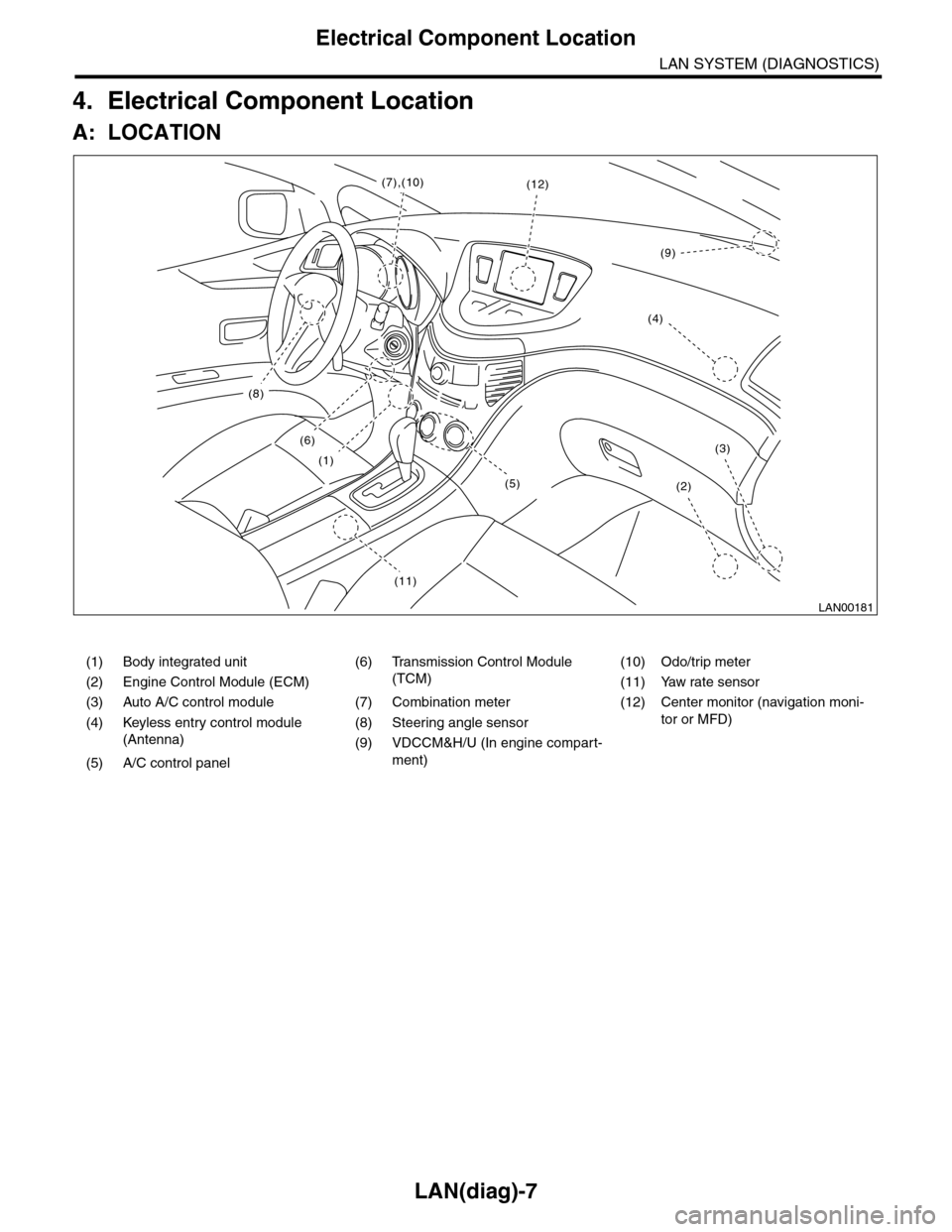
4. Electrical Component Location
A: LOCATION
(1) Body integrated unit (6) Transmission Control Module
(TCM)
(10) Odo/trip meter
(2) Engine Control Module (ECM) (11) Yaw rate sensor
(3) Auto A/C control module (7) Combination meter (12) Center monitor (navigation moni-
tor or MFD)(4) Keyless entry control module
(Antenna)
(8) Steering angle sensor
(9) VDCCM&H/U (In engine compart-
ment)(5) A/C control panel
LAN00181
(8)
(6)
(1)
(11)
(2)
(3)
(12)(7),(10)
(4)
(9)
(5)
Page 473 of 2453
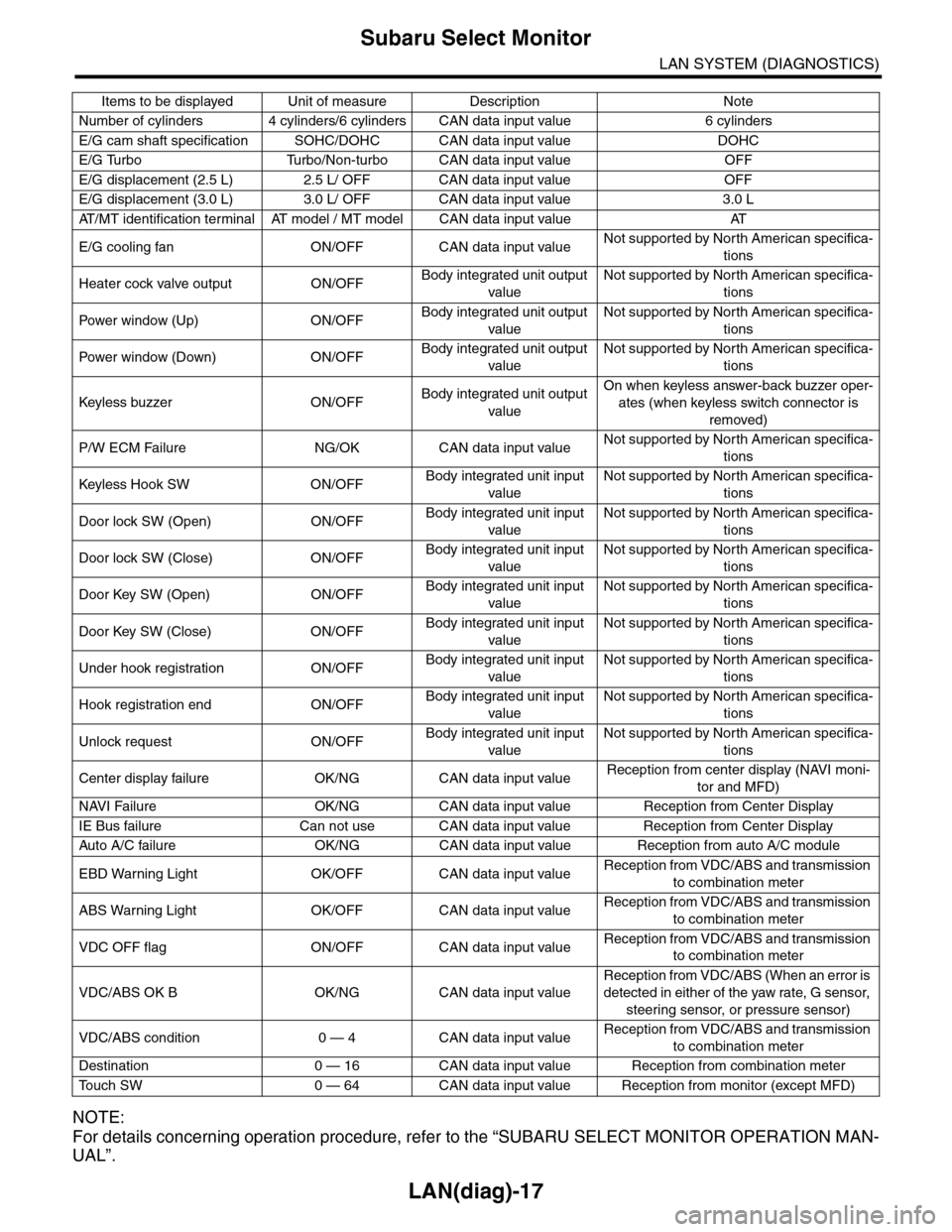
LAN(diag)-17
Subaru Select Monitor
LAN SYSTEM (DIAGNOSTICS)
NOTE:
For details concerning operation procedure, refer to the “SUBARU SELECT MONITOR OPERATION MAN-
UAL”.
Number of cylinders 4 cylinders/6 cylinders CAN data input value 6 cylinders
E/G cam shaft specification SOHC/DOHC CAN data input value DOHC
E/G Turbo Turbo/Non-turbo CAN data input value OFF
E/G displacement (2.5 L) 2.5 L/ OFF CAN data input value OFF
E/G displacement (3.0 L) 3.0 L/ OFF CAN data input value 3.0 L
AT / M T i d e n t i f i c a t i o n t e r m i n a l AT m o d e l / M T m o d e l C A N d a t a i n p u t v a l u e AT
E/G cooling fan ON/OFF CAN data input valueNot supported by North American specifica-
tions
Heater cock valve output ON/OFFBody integrated unit output
value
Not supported by North American specifica-
tions
Pow er w i nd ow (U p) O N /O FFBody integrated unit output
value
Not supported by North American specifica-
tions
Pow er w i nd ow (D ow n ) O N /O FFBody integrated unit output
value
Not supported by North American specifica-
tions
Keyless buzzer ON/OFFBody integrated unit output
value
On when keyless answer-back buzzer oper-
ates (when keyless switch connector is
removed)
P/W ECM Failure NG/OK CAN data input valueNot supported by North American specifica-
tions
Keyless Hook SW ON/OFFBody integrated unit input
value
Not supported by North American specifica-
tions
Door lock SW (Open) ON/OFFBody integrated unit input
value
Not supported by North American specifica-
tions
Door lock SW (Close) ON/OFFBody integrated unit input
value
Not supported by North American specifica-
tions
Door Key SW (Open) ON/OFFBody integrated unit input
value
Not supported by North American specifica-
tions
Door Key SW (Close) ON/OFFBody integrated unit input
value
Not supported by North American specifica-
tions
Under hook registration ON/OFFBody integrated unit input
value
Not supported by North American specifica-
tions
Hook registration end ON/OFFBody integrated unit input
value
Not supported by North American specifica-
tions
Unlock request ON/OFFBody integrated unit input
value
Not supported by North American specifica-
tions
Center display failure OK/NG CAN data input valueReception from center display (NAVI moni-
tor and MFD)
NAVI Failure OK/NG CAN data input value Reception from Center Display
IE Bus failure Can not use CAN data input value Reception from Center Display
Auto A/C failure OK/NG C AN data input value Reception from auto A/C module
EBD Warning Light OK/OFF CAN data input valueReception from VDC/ABS and transmission
to combination meter
ABS Warning Light OK/OFF CAN data input valueReception from VDC/ABS and transmission
to combination meter
VDC OFF flag ON/OFF CAN data input valueReception from VDC/ABS and transmission
to combination meter
VDC/ABS OK B OK/NG CAN data input value
Reception from VDC/ABS (When an error is
detected in either of the yaw rate, G sensor,
steering sensor, or pressure sensor)
VDC/ABS condition 0 — 4 CAN data input valueReception from VDC/ABS and transmission
to combination meter
Destination 0 — 16 CAN data input value Reception from combination meter
To u c h S W 0 — 6 4 C A N d a t a i n p u t v a l u e R e c e p t i o n f r o m m o n i t o r ( e x c e p t M F D )
Items to be displayed Unit of measure Description Note
Page 502 of 2453
LAN(diag)-46
Diagnostic Procedure with Diagnostic Trouble Code (DTC)
LAN SYSTEM (DIAGNOSTICS)
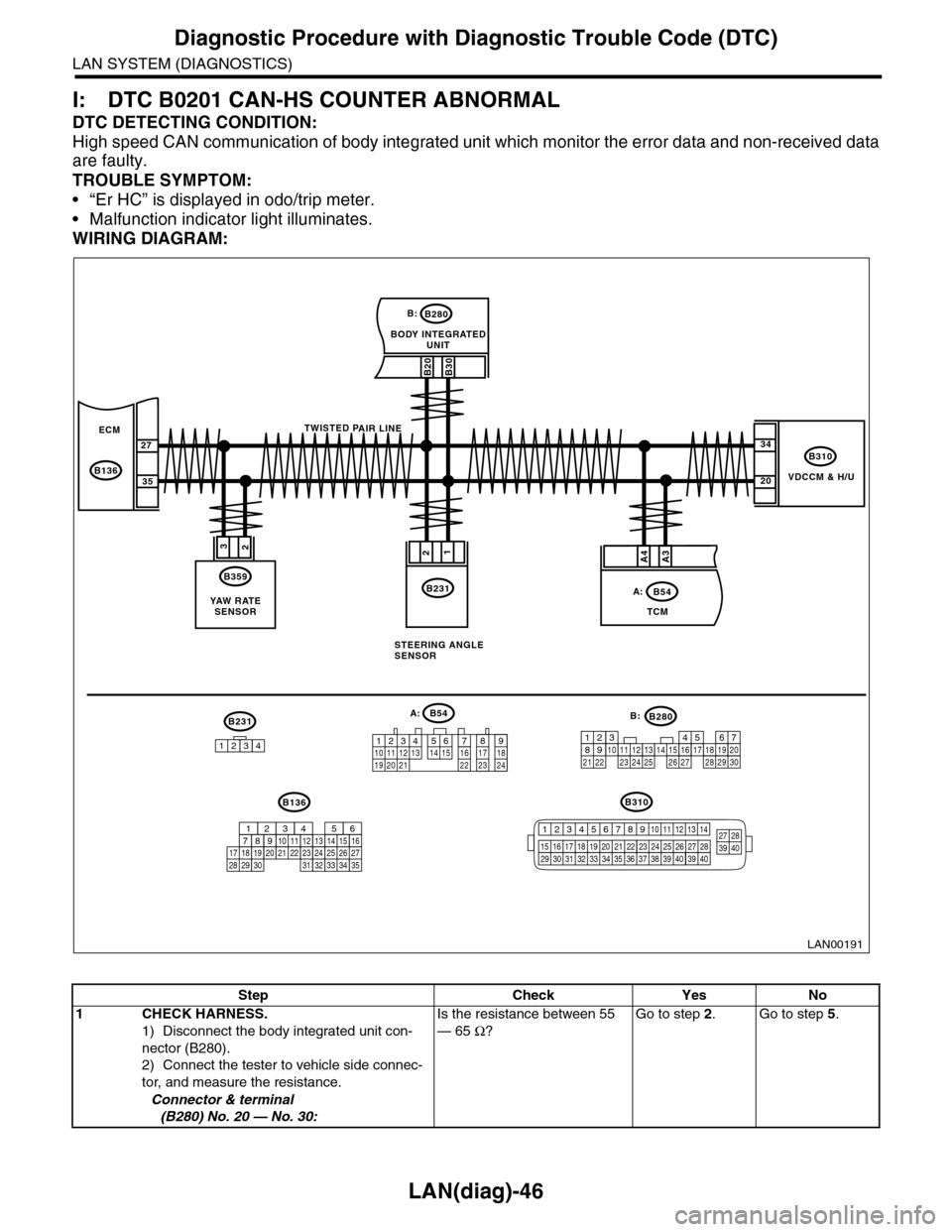
I: DTC B0201 CAN-HS COUNTER ABNORMAL
DTC DETECTING CONDITION:
High speed CAN communication of body integrated unit which monitor the error data and non-received data
are faulty.
TROUBLE SYMPTOM:
•“Er HC” is displayed in odo/trip meter.
•Malfunction indicator light illuminates.
WIRING DIAGRAM:
VDCCM & H/U
B310
B20B30
BODY INTEGRATEDUNIT
B280B:
TCM
B54A:
23
B359
YAW R AT ESENSOR
34
20
B231
21
STEERING ANGLESENSOR
B231
1234
B54A:
12 7 8 9563410 11 1219 20 2113 14 15 16 17 1822 23 24
B136B310
B280B:
5467821931022 23111213141524 25 26 2716171828 29192021 30
ECM
B136
27
35
A3A4
TWISTED PAIR LINE
12345678910 11 12 13 14
15 16 17 18 19 2021 22 23 24 25 26 27 2829 30 31 32 33 3435 36 37 38 39403940
27 28394016101112131415252430
9871718192028212223293231
123456
2726333435
LAN00191
Step Check Yes No
1CHECK HARNESS.
1) Disconnect the body integrated unit con-
nector (B280).
2) Connect the tester to vehicle side connec-
tor, and measure the resistance.
Connector & terminal
(B280) No. 20 — No. 30:
Is the resistance between 55
— 65 Ω?
Go to step 2.Go to step 5.
Page 503 of 2453
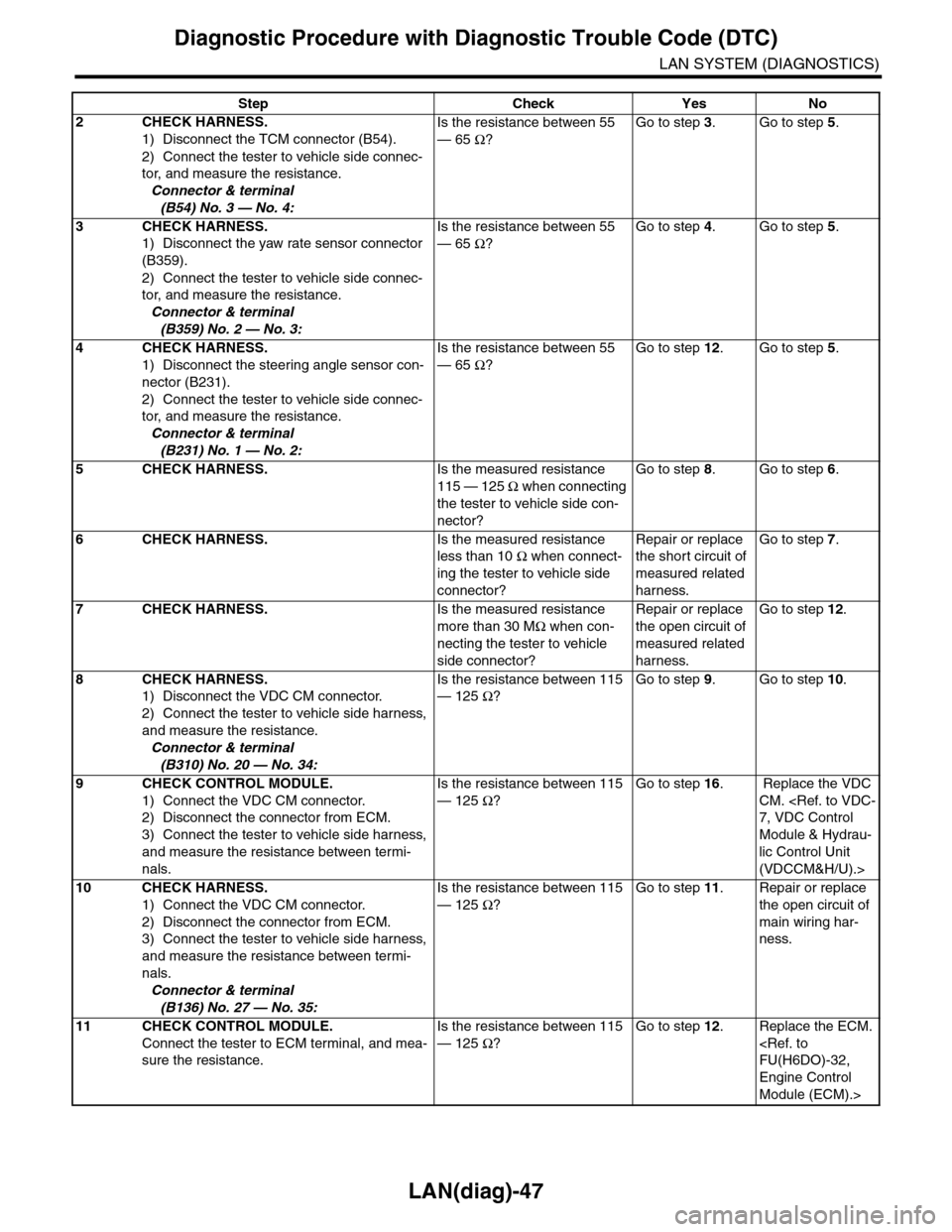
LAN(diag)-47
Diagnostic Procedure with Diagnostic Trouble Code (DTC)
LAN SYSTEM (DIAGNOSTICS)
2CHECK HARNESS.
1) Disconnect the TCM connector (B54).
2) Connect the tester to vehicle side connec-
tor, and measure the resistance.
Connector & terminal
(B54) No. 3 — No. 4:
Is the resistance between 55
— 65 Ω?
Go to step 3.Go to step 5.
3CHECK HARNESS.
1) Disconnect the yaw rate sensor connector
(B359).
2) Connect the tester to vehicle side connec-
tor, and measure the resistance.
Connector & terminal
(B359) No. 2 — No. 3:
Is the resistance between 55
— 65 Ω?
Go to step 4.Go to step 5.
4CHECK HARNESS.
1) Disconnect the steering angle sensor con-
nector (B231).
2) Connect the tester to vehicle side connec-
tor, and measure the resistance.
Connector & terminal
(B231) No. 1 — No. 2:
Is the resistance between 55
— 65 Ω?
Go to step 12.Go to step 5.
5CHECK HARNESS.Is the measured resistance
115 — 125 Ω when connecting
the tester to vehicle side con-
nector?
Go to step 8.Go to step 6.
6CHECK HARNESS.Is the measured resistance
less than 10 Ω when connect-
ing the tester to vehicle side
connector?
Repair or replace
the short circuit of
measured related
harness.
Go to step 7.
7CHECK HARNESS.Is the measured resistance
more than 30 MΩ when con-
necting the tester to vehicle
side connector?
Repair or replace
the open circuit of
measured related
harness.
Go to step 12.
8CHECK HARNESS.
1) Disconnect the VDC CM connector.
2) Connect the tester to vehicle side harness,
and measure the resistance.
Connector & terminal
(B310) No. 20 — No. 34:
Is the resistance between 115
— 125 Ω?
Go to step 9.Go to step 10.
9CHECK CONTROL MODULE.
1) Connect the VDC CM connector.
2) Disconnect the connector from ECM.
3) Connect the tester to vehicle side harness,
and measure the resistance between termi-
nals.
Is the resistance between 115
— 125 Ω?
Go to step 16. Replace the VDC
CM.
Module & Hydrau-
lic Control Unit
(VDCCM&H/U).>
10 CHECK HARNESS.
1) Connect the VDC CM connector.
2) Disconnect the connector from ECM.
3) Connect the tester to vehicle side harness,
and measure the resistance between termi-
nals.
Connector & terminal
(B136) No. 27 — No. 35:
Is the resistance between 115
— 125 Ω?
Go to step 11.Repair or replace
the open circuit of
main wiring har-
ness.
11 CHECK CONTROL MODULE.
Connect the tester to ECM terminal, and mea-
sure the resistance.
Is the resistance between 115
— 125 Ω?
Go to step 12.Replace the ECM.
Engine Control
Module (ECM).>
Step Check Yes No
Page 504 of 2453
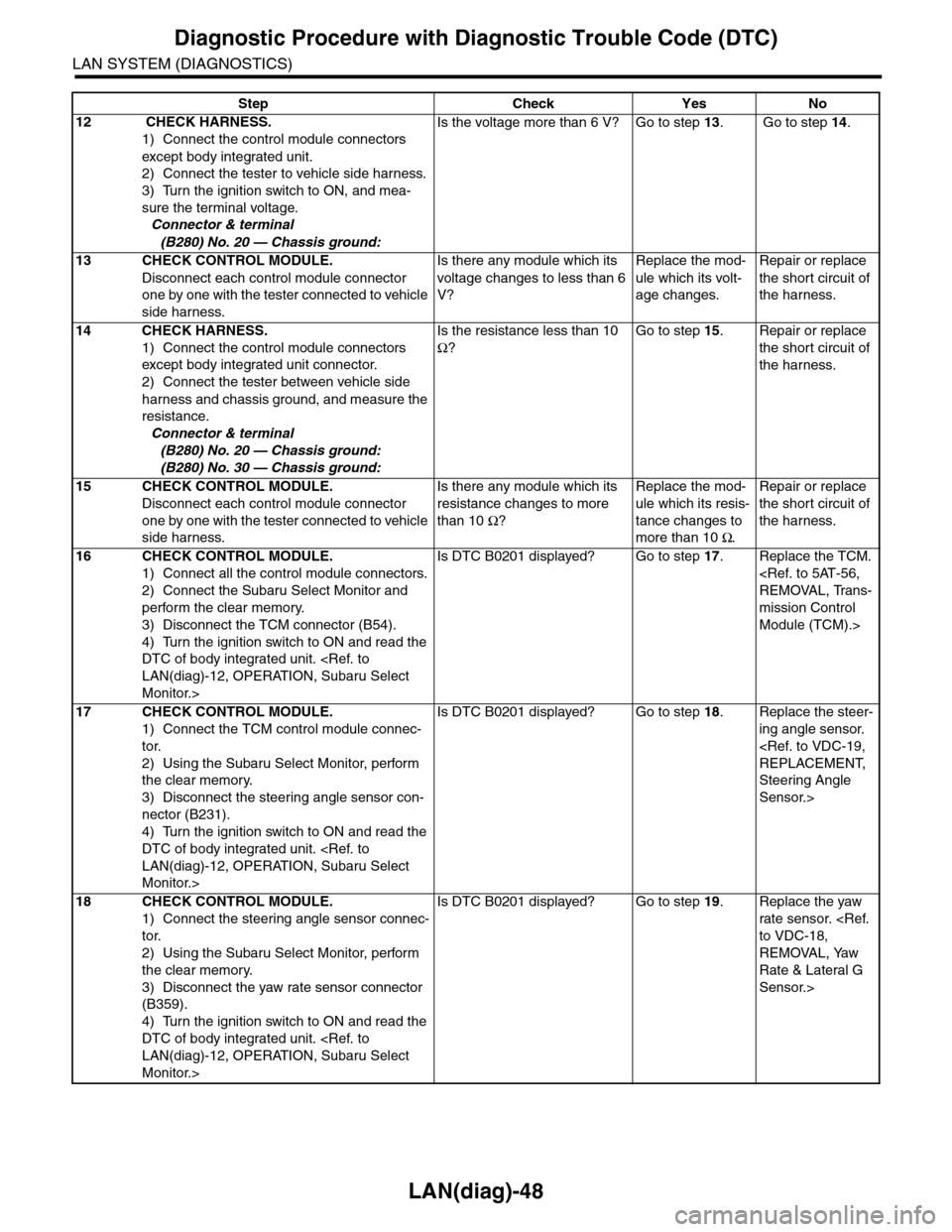
LAN(diag)-48
Diagnostic Procedure with Diagnostic Trouble Code (DTC)
LAN SYSTEM (DIAGNOSTICS)
12 CHECK HARNESS.
1) Connect the control module connectors
except body integrated unit.
2) Connect the tester to vehicle side harness.
3) Turn the ignition switch to ON, and mea-
sure the terminal voltage.
Connector & terminal
(B280) No. 20 — Chassis ground:
Is the voltage more than 6 V? Go to step 13. Go to step 14.
13 CHECK CONTROL MODULE.
Disconnect each control module connector
one by one with the tester connected to vehicle
side harness.
Is there any module which its
voltage changes to less than 6
V?
Replace the mod-
ule which its volt-
age changes.
Repair or replace
the shor t circuit of
the harness.
14 CHECK HARNESS.
1) Connect the control module connectors
except body integrated unit connector.
2) Connect the tester between vehicle side
harness and chassis ground, and measure the
resistance.
Connector & terminal
(B280) No. 20 — Chassis ground:
(B280) No. 30 — Chassis ground:
Is the resistance less than 10
Ω?
Go to step 15.Repair or replace
the shor t circuit of
the harness.
15 CHECK CONTROL MODULE.
Disconnect each control module connector
one by one with the tester connected to vehicle
side harness.
Is there any module which its
resistance changes to more
than 10 Ω?
Replace the mod-
ule which its resis-
tance changes to
more than 10 Ω.
Repair or replace
the shor t circuit of
the harness.
16 CHECK CONTROL MODULE.
1) Connect all the control module connectors.
2) Connect the Subaru Select Monitor and
perform the clear memory.
3) Disconnect the TCM connector (B54).
4) Turn the ignition switch to ON and read the
DTC of body integrated unit.
Monitor.>
Is DTC B0201 displayed? Go to step 17.Replace the TCM.
mission Control
Module (TCM).>
17 CHECK CONTROL MODULE.
1) Connect the TCM control module connec-
tor.
2) Using the Subaru Select Monitor, perform
the clear memory.
3) Disconnect the steering angle sensor con-
nector (B231).
4) Turn the ignition switch to ON and read the
DTC of body integrated unit.
Monitor.>
Is DTC B0201 displayed? Go to step 18.Replace the steer-
ing angle sensor.
Steering Angle
Sensor.>
18 CHECK CONTROL MODULE.
1) Connect the steering angle sensor connec-
tor.
2) Using the Subaru Select Monitor, perform
the clear memory.
3) Disconnect the yaw rate sensor connector
(B359).
4) Turn the ignition switch to ON and read the
DTC of body integrated unit.
Monitor.>
Is DTC B0201 displayed? Go to step 19.Replace the yaw
rate sensor.
REMOVAL, Yaw
Rate & Lateral G
Sensor.>
Step Check Yes No
Page 506 of 2453
LAN(diag)-50
Diagnostic Procedure with Diagnostic Trouble Code (DTC)
LAN SYSTEM (DIAGNOSTICS)
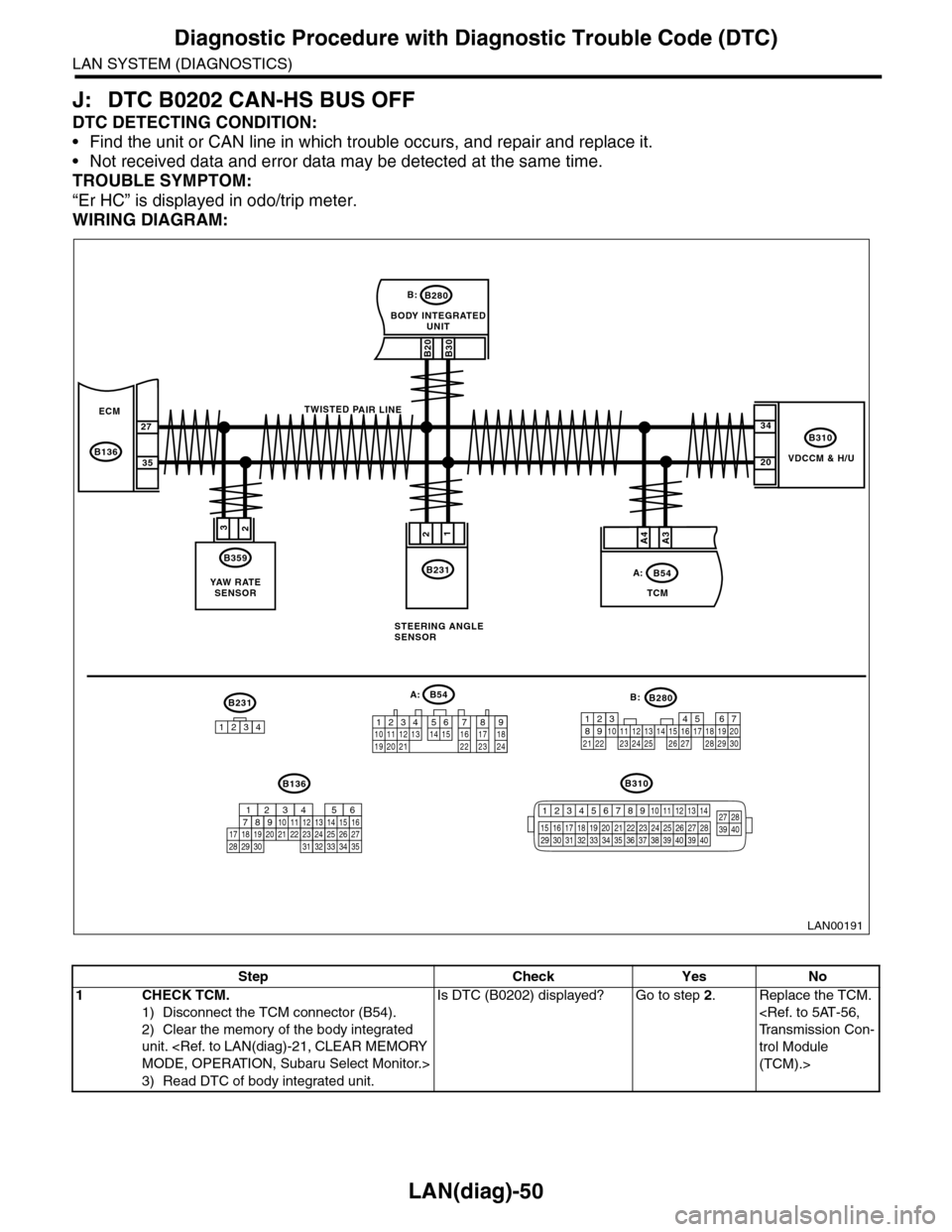
J: DTC B0202 CAN-HS BUS OFF
DTC DETECTING CONDITION:
•Find the unit or CAN line in which trouble occurs, and repair and replace it.
•Not received data and error data may be detected at the same time.
TROUBLE SYMPTOM:
“Er HC” is displayed in odo/trip meter.
WIRING DIAGRAM:
VDCCM & H/U
B310
B20B30
BODY INTEGRATEDUNIT
B280B:
TCM
B54A:
23
B359
YAW R AT ESENSOR
34
20
B231
21
STEERING ANGLESENSOR
B231
1234
B54A:
12 7 8 9563410 11 1219 20 2113 14 15 16 17 1822 23 24
B136B310
B280B:
5467821931022 23111213141524 25 26 2716171828 29192021 30
ECM
B136
27
35
A3A4
TWISTED PAIR LINE
12345678910 11 12 13 14
15 16 17 18 19 2021 22 23 24 25 26 27 2829 30 31 32 33 3435 36 37 38 39403940
27 28394016101112131415252430
9871718192028212223293231
123456
2726333435
LAN00191
Step Check Yes No
1CHECK TCM.
1) Disconnect the TCM connector (B54).
2) Clear the memory of the body integrated
unit.
3) Read DTC of body integrated unit.
Is DTC (B0202) displayed? Go to step 2.Replace the TCM.
trol Module
(TCM).>
Page 507 of 2453
LAN(diag)-51
Diagnostic Procedure with Diagnostic Trouble Code (DTC)
LAN SYSTEM (DIAGNOSTICS)
2CHECK STEERING ANGLE SENSOR.
1) Disconnect the steering angle sensor con-
nector (B231).
2) Perform the clear memory mode of body
integrated unit.
Select Monitor.>
3) Read DTC of body integrated unit.
Is DTC (B0202) displayed? Go to step 3.Replace the steer-
ing angle sensor.
Steering Angle
Sensor.>
3CHECK YAW RATE SENSOR
1) Disconnect the yaw rate sensor connector
(B359).
2) Perform the clear memory mode of body
integrated unit.
3) Read DTC of body integrated unit.
Is DTC (B0202) displayed? Go to step 4.Replace the yaw
rate sensor.
REMOVAL, Yaw
Rate & Lateral G
Sensor.>
4CHECK THE BODY INTEGRATED UNIT.
1) Disconnect the body integrated unit con-
nector (B280).
2) Read the data between VDC/ABSCM and
ECM.
Check item:
•Engine speed
•Average front wheel speed (value on con-
stant driving)
Engine speed and front wheel
speed are correctly communi-
cated. (Appears same value)
Replace the body
integrated unit.
Unit.>
Go to step 5.
5CHECK HARNESS.
1) Disconnect the body integrated unit con-
nector (B280).
2) Measure the resistance between harness
connector terminals.
Connector & terminal
(B280) No. 20 — No. 30:
Is the resistance between 55
— 65 Ω?
Go to step 11.Go to step 6.
6CHECK HARNESS.
1) Disconnect the body integrated unit con-
nector (B280).
2) Measure the resistance between harness
connector terminals.
Connector & terminal
(B280) No. 20 — No. 30:
Is the resistance between 115
— 125 Ω?
Go to step 8.Go to step 7.
7CHECK HARNESS.
1) Disconnect the harness connector of body
integrated unit.
2) Measure the resistance between harness
connector terminals.
Connector & terminal
(B280) No. 20 — No. 30:
Is the resistance more than 30
MΩ?
Open circuit in
related line of body
integrated unit.
Repair the open
circuit of harness
or replace har-
ness.
Go to step 8.
8CHECK HARNESS.
1) Disconnect the VDC CM (B310) connector.
2) Measure the resistance between harness
connector terminals.
Connector & terminal
(B310) No. 13 — No. 29:
Is the resistance between 115
— 125 Ω?
Go to step 9.Go to step 10.
9CHECK VDC CM.
1) Disconnect the VDC CM (B310) connector.
2) Measure the resistance between VDC CM
terminals.
Connector & terminal
(B310) No. 20 — No. 34:
Is the resistance between 115
— 125 Ω?
Go to step 10.Open circuit in end
resistance of VDC
CM. Replace the
VDC CM.
trol Module &
Hydraulic Control
Unit (VDCCM&H/
U).>
Step Check Yes No