er ss displayed SUBARU TRIBECA 2009 1.G Service Repair Manual
[x] Cancel search | Manufacturer: SUBARU, Model Year: 2009, Model line: TRIBECA, Model: SUBARU TRIBECA 2009 1.GPages: 2453, PDF Size: 46.32 MB
Page 198 of 2453
ET-12
Control Panel
ENTERTAINMENT
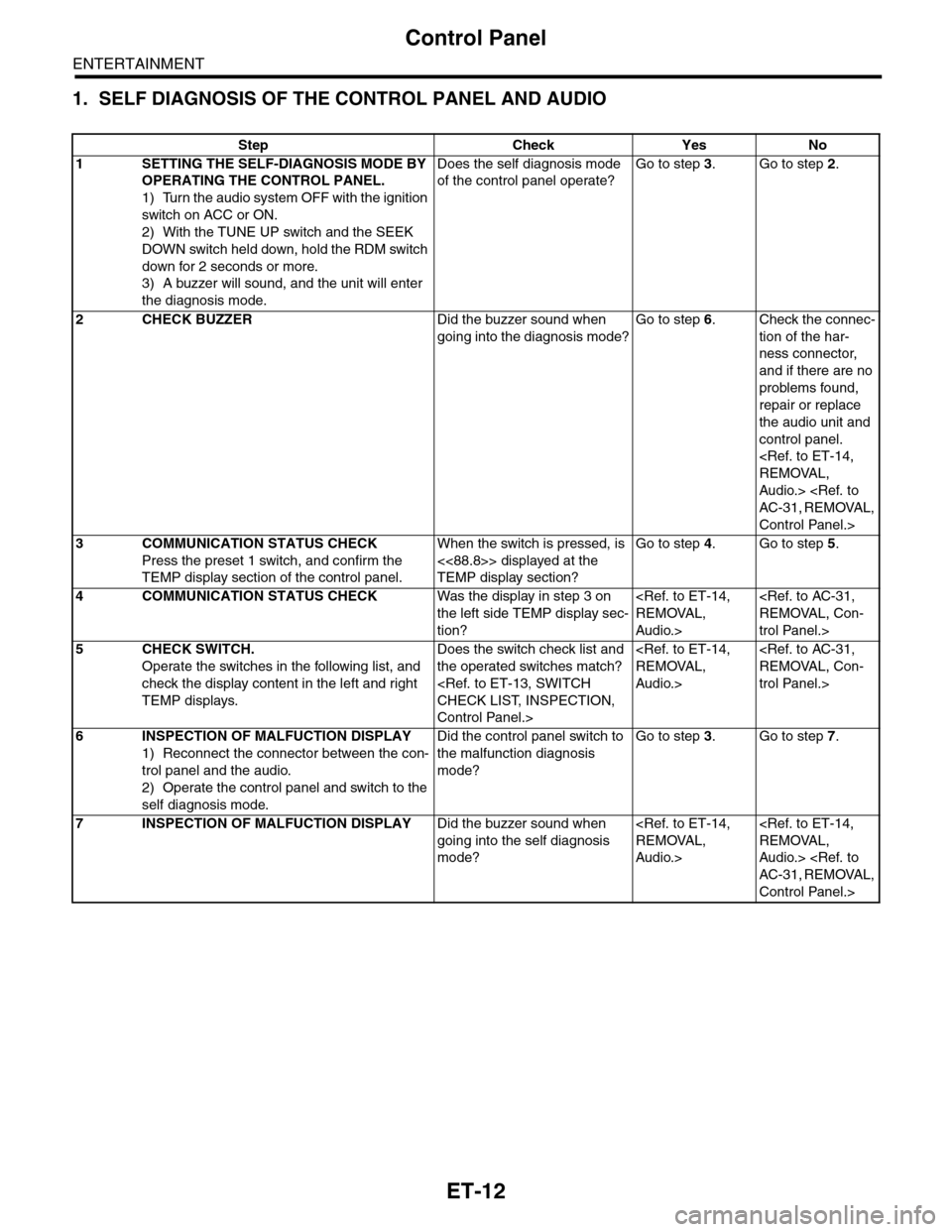
1. SELF DIAGNOSIS OF THE CONTROL PANEL AND AUDIO
Step Check Yes No
1SETTING THE SELF-DIAGNOSIS MODE BY
OPERATING THE CONTROL PANEL.
1) Turn the audio system OFF with the ignition
switch on ACC or ON.
2) With the TUNE UP switch and the SEEK
DOWN switch held down, hold the RDM switch
down for 2 seconds or more.
3) A buzzer will sound, and the unit will enter
the diagnosis mode.
Does the self diagnosis mode
of the control panel operate?
Go to step 3.Go to step 2.
2CHECK BUZZERDid the buzzer sound when
going into the diagnosis mode?
Go to step 6.Check the connec-
tion of the har-
ness connector,
and if there are no
problems found,
repair or replace
the audio unit and
control panel.
Audio.>
Control Panel.>
3COMMUNICATION STATUS CHECK
Press the preset 1 switch, and confirm the
TEMP display section of the control panel.
When the switch is pressed, is
<<88.8>> displayed at the
TEMP display section?
Go to step 4.Go to step 5.
4COMMUNICATION STATUS CHECKWas the display in step 3 on
the left side TEMP display sec-
tion?
Audio.>
trol Panel.>
5CHECK SWITCH.
Operate the switches in the following list, and
check the display content in the left and right
TEMP displays.
Does the switch check list and
the operated switches match?
Control Panel.>
Audio.>
trol Panel.>
6INSPECTION OF MALFUCTION DISPLAY
1) Reconnect the connector between the con-
trol panel and the audio.
2) Operate the control panel and switch to the
self diagnosis mode.
Did the control panel switch to
the malfunction diagnosis
mode?
Go to step 3.Go to step 7.
7INSPECTION OF MALFUCTION DISPLAYDid the buzzer sound when
going into the self diagnosis
mode?
Audio.>
Audio.>
Control Panel.>
Page 388 of 2453
AC(diag)-11
Diagnostic Chart for Self-diagnosis
HVAC SYSTEM (AUTO A/C) (DIAGNOSTICS)
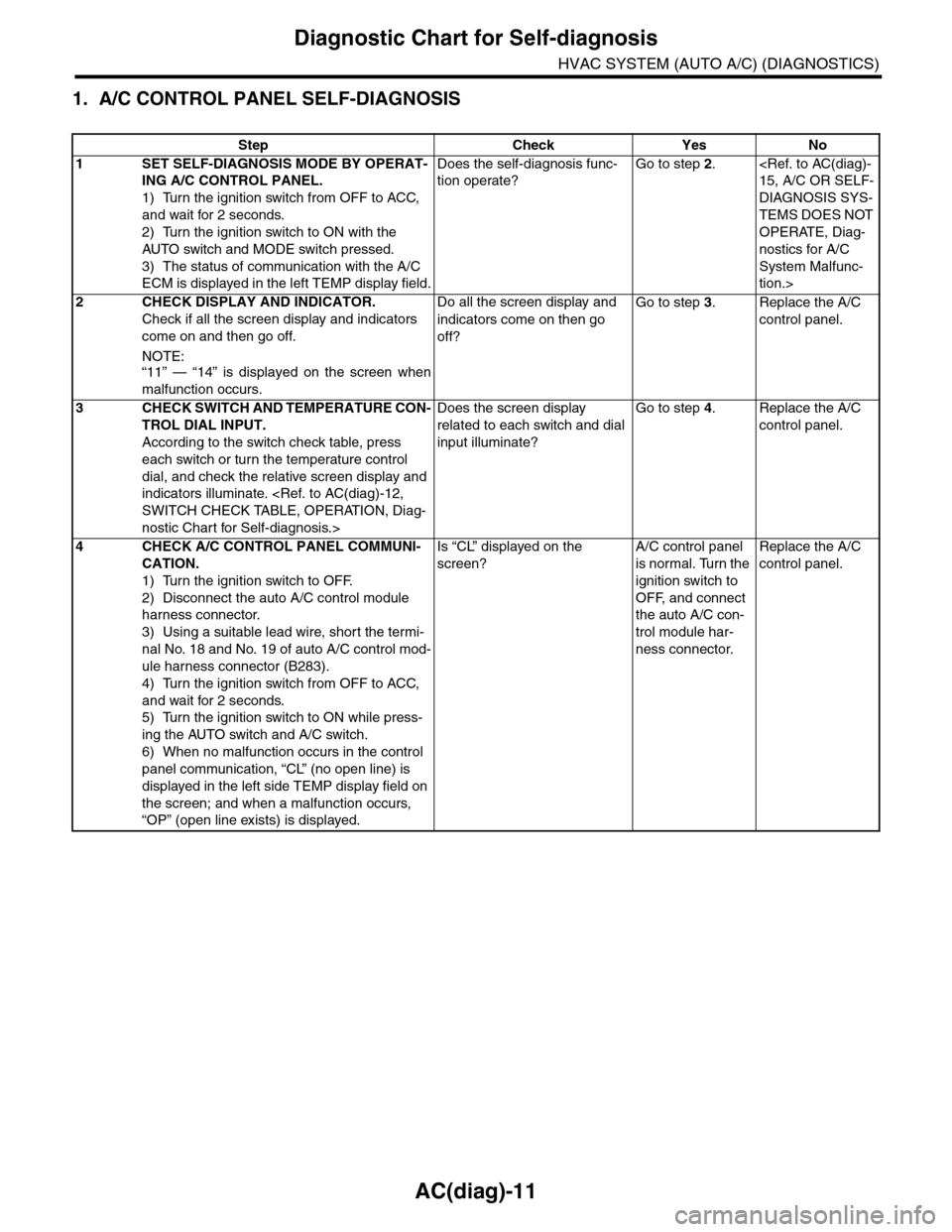
1. A/C CONTROL PANEL SELF-DIAGNOSIS
Step Check Yes No
1SET SELF-DIAGNOSIS MODE BY OPERAT-
ING A/C CONTROL PANEL.
1) Turn the ignition switch from OFF to ACC,
and wait for 2 seconds.
2) Turn the ignition switch to ON with the
AUTO switch and MODE switch pressed.
3) The status of communication with the A/C
ECM is displayed in the left TEMP display field.
Does the self-diagnosis func-
tion operate?
Go to step 2.
DIAGNOSIS SYS-
TEMS DOES NOT
OPERATE, Diag-
nostics for A/C
System Malfunc-
tion.>
2CHECK DISPLAY AND INDICATOR.
Check if all the screen display and indicators
come on and then go off.
NOTE:“11” — “14” is displayed on the screen when
malfunction occurs.
Do all the screen display and
indicators come on then go
off?
Go to step 3.Replace the A/C
control panel.
3CHECK SWITCH AND TEMPERATURE CON-
TROL DIAL INPUT.
According to the switch check table, press
each switch or turn the temperature control
dial, and check the relative screen display and
indicators illuminate.
nostic Chart for Self-diagnosis.>
Does the screen display
related to each switch and dial
input illuminate?
Go to step 4.Replace the A/C
control panel.
4CHECK A/C CONTROL PANEL COMMUNI-
CATION.
1) Turn the ignition switch to OFF.
2) Disconnect the auto A/C control module
harness connector.
3) Using a suitable lead wire, short the termi-
nal No. 18 and No. 19 of auto A/C control mod-
ule harness connector (B283).
4) Turn the ignition switch from OFF to ACC,
and wait for 2 seconds.
5) Turn the ignition switch to ON while press-
ing the AUTO switch and A/C switch.
6) When no malfunction occurs in the control
panel communication, “CL” (no open line) is
displayed in the left side TEMP display field on
the screen; and when a malfunction occurs,
“OP” (open line exists) is displayed.
Is “CL” displayed on the
screen?
A/C control panel
is normal. Turn the
ignition switch to
OFF, and connect
the auto A/C con-
trol module har-
ness connector.
Replace the A/C
control panel.
Page 390 of 2453
AC(diag)-13
Diagnostic Chart for Self-diagnosis
HVAC SYSTEM (AUTO A/C) (DIAGNOSTICS)
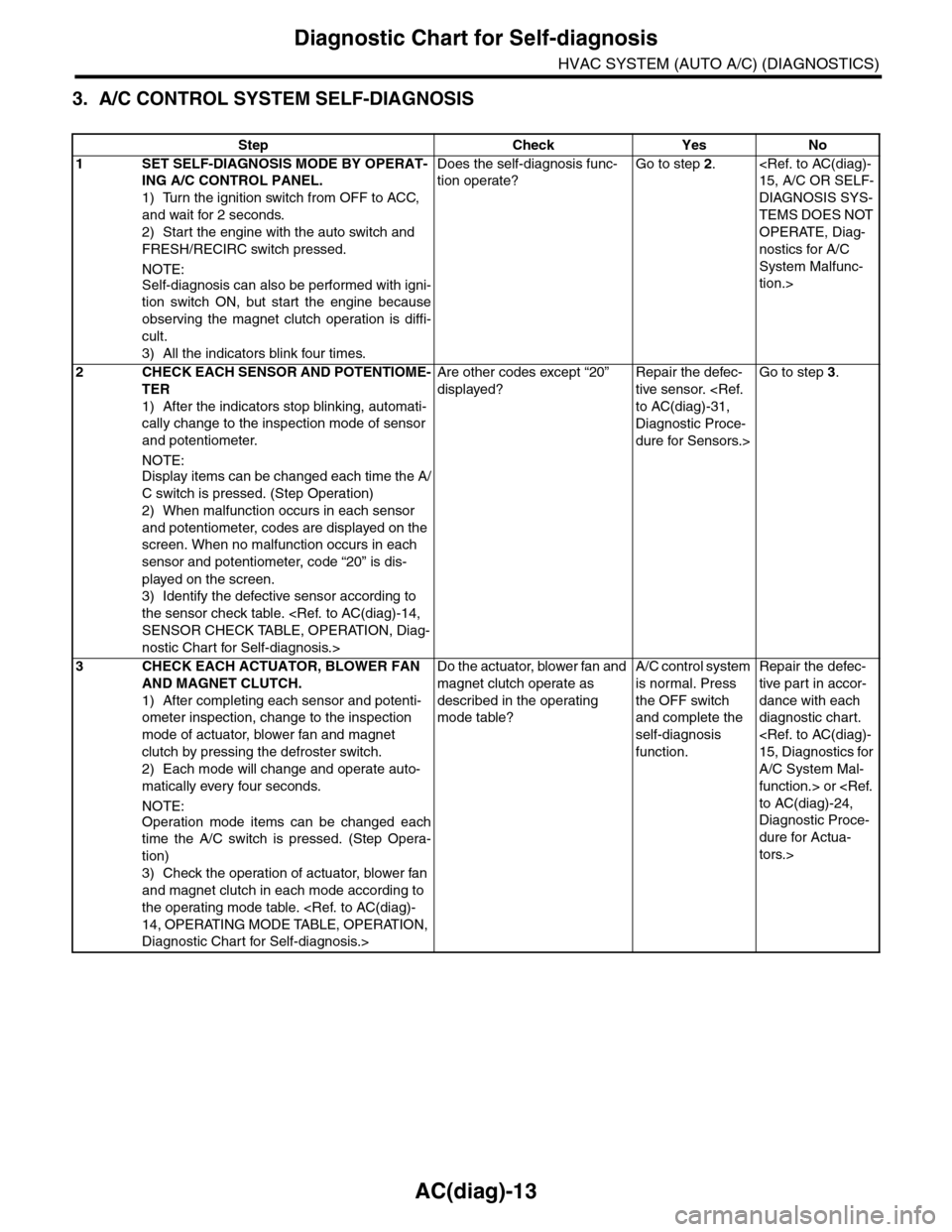
3. A/C CONTROL SYSTEM SELF-DIAGNOSIS
Step Check Yes No
1SET SELF-DIAGNOSIS MODE BY OPERAT-
ING A/C CONTROL PANEL.
1) Turn the ignition switch from OFF to ACC,
and wait for 2 seconds.
2) Start the engine with the auto switch and
FRESH/RECIRC switch pressed.
NOTE:
Self-diagnosis can also be performed with igni-
tion switch ON, but start the engine because
observing the magnet clutch operation is diffi-
cult.
3) All the indicators blink four times.
Does the self-diagnosis func-
tion operate?
Go to step 2.
DIAGNOSIS SYS-
TEMS DOES NOT
OPERATE, Diag-
nostics for A/C
System Malfunc-
tion.>
2CHECK EACH SENSOR AND POTENTIOME-
TER
1) After the indicators stop blinking, automati-
cally change to the inspection mode of sensor
and potentiometer.
NOTE:
Display items can be changed each time the A/
C switch is pressed. (Step Operation)
2) When malfunction occurs in each sensor
and potentiometer, codes are displayed on the
screen. When no malfunction occurs in each
sensor and potentiometer, code “20” is dis-
played on the screen.
3) Identify the defective sensor according to
the sensor check table.
nostic Chart for Self-diagnosis.>
Are other codes except “20”
displayed?
Repair the defec-
tive sensor.
Diagnostic Proce-
dure for Sensors.>
Go to step 3.
3CHECK EACH ACTUATOR, BLOWER FAN
AND MAGNET CLUTCH.
1) After completing each sensor and potenti-
ometer inspection, change to the inspection
mode of actuator, blower fan and magnet
clutch by pressing the defroster switch.
2) Each mode will change and operate auto-
matically every four seconds.
NOTE:
Operation mode items can be changed each
time the A/C switch is pressed. (Step Opera-
tion)
3) Check the operation of actuator, blower fan
and magnet clutch in each mode according to
the operating mode table.
Diagnostic Chart for Self-diagnosis.>
Do the actuator, blower fan and
magnet clutch operate as
described in the operating
mode table?
A/C control system
is normal. Press
the OFF switch
and complete the
self-diagnosis
function.
Repair the defec-
tive par t in accor-
dance with each
diagnostic chart.
A/C System Mal-
function.> or
Diagnostic Proce-
dure for Actua-
tors.>
Page 391 of 2453
AC(diag)-14
Diagnostic Chart for Self-diagnosis
HVAC SYSTEM (AUTO A/C) (DIAGNOSTICS)
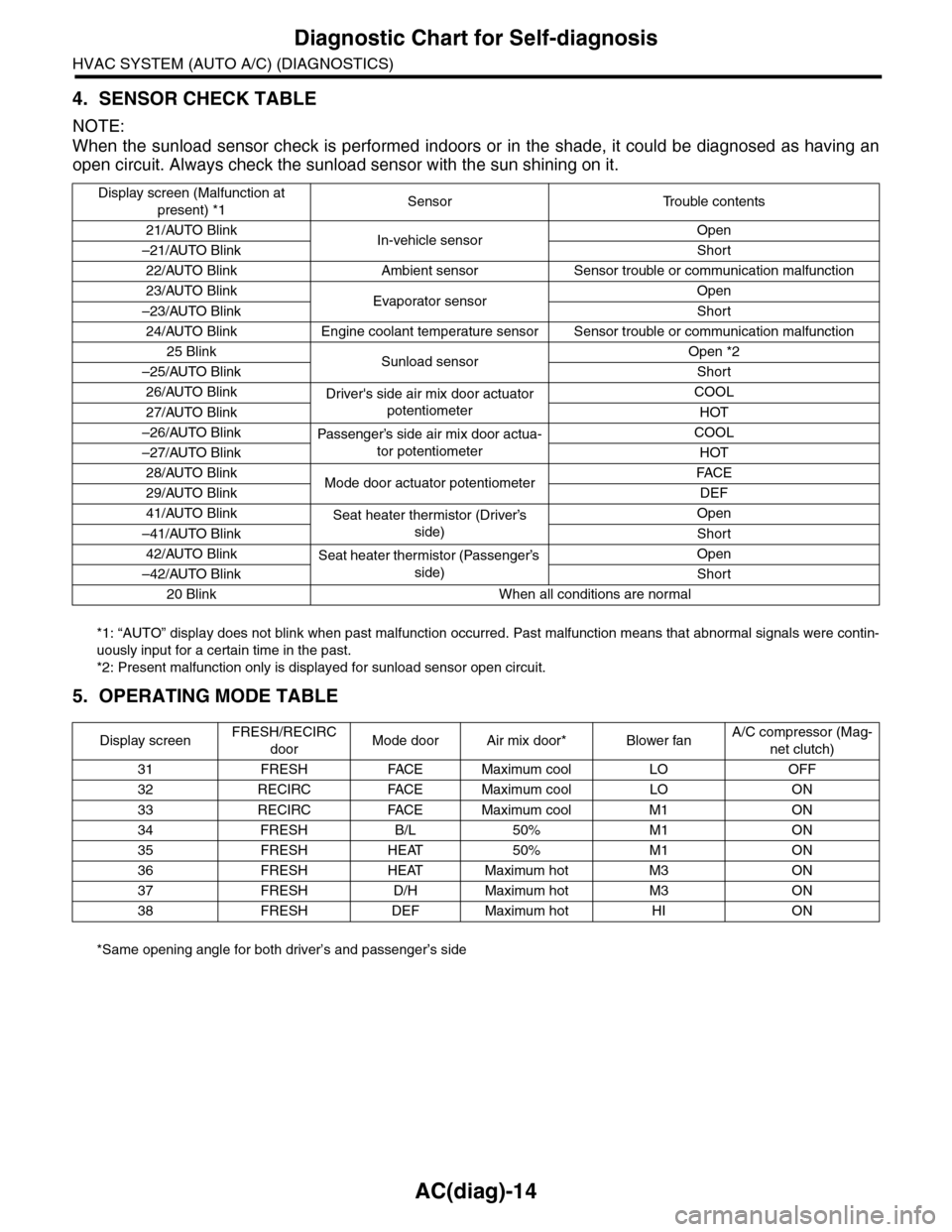
4. SENSOR CHECK TABLE
NOTE:
When the sunload sensor check is performed indoors or in the shade, it could be diagnosed as having an
open circuit. Always check the sunload sensor with the sun shining on it.
*1: “AUTO” display does not blink when past malfunction occurred. Past malfunction means that abnormal signals were contin-
uously input for a certain time in the past.
*2: Present malfunction only is displayed for sunload sensor open circuit.
5. OPERATING MODE TABLE
*Same opening angle for both driver’s and passenger’s side
Display screen (Malfunction at
present) *1Sensor Trouble contents
21/AUTO BlinkIn-vehicle sensorOpen
–21/AUTO BlinkShort
22/AUTO Blink Ambient sensor Sensor trouble or communication malfunction
23/AUTO BlinkEvaporator sensorOpen
–23/AUTO BlinkShort
24/AUTO Blink Engine coolant temperature sensor Sensor trouble or communication malfunction
25 BlinkSunload sensorOpen *2
–25/AUTO BlinkShort
26/AUTO BlinkDriver's side air mix door actuator
potentiometer
COOL
27/AUTO BlinkHOT
–26/AUTO BlinkPassenger’s side air mix door actua-
tor potentiometer
COOL
–27/AUTO BlinkHOT
28/AUTO BlinkMode door actuator potentiometerFA C E
29/AUTO BlinkDEF
41/AUTO BlinkSeat heater thermistor (Driver’s
side)
Open
–41/AUTO BlinkShort
42/AUTO BlinkSeat heater thermistor (Passenger’s
side)
Open
–42/AUTO BlinkShort
20 Blink When all conditions are normal
Display screenFRESH/RECIRC
doorMode door Air mix door* Blower fanA/C compressor (Mag-
net clutch)
31 FRESH FACE Maximum cool LO OFF
32 RECIRC FACE Maximum cool LO ON
33 RECIRC FACE Maximum cool M1 ON
34 FRESH B/L 50% M1 ON
35 FRESH HEAT 50% M1 ON
36 FRESH HEAT Maximum hot M3 ON
37 FRESH D/H Maximum hot M3 ON
38 FRESH DEF Maximum hot HI ON
Page 409 of 2453
AC(diag)-32
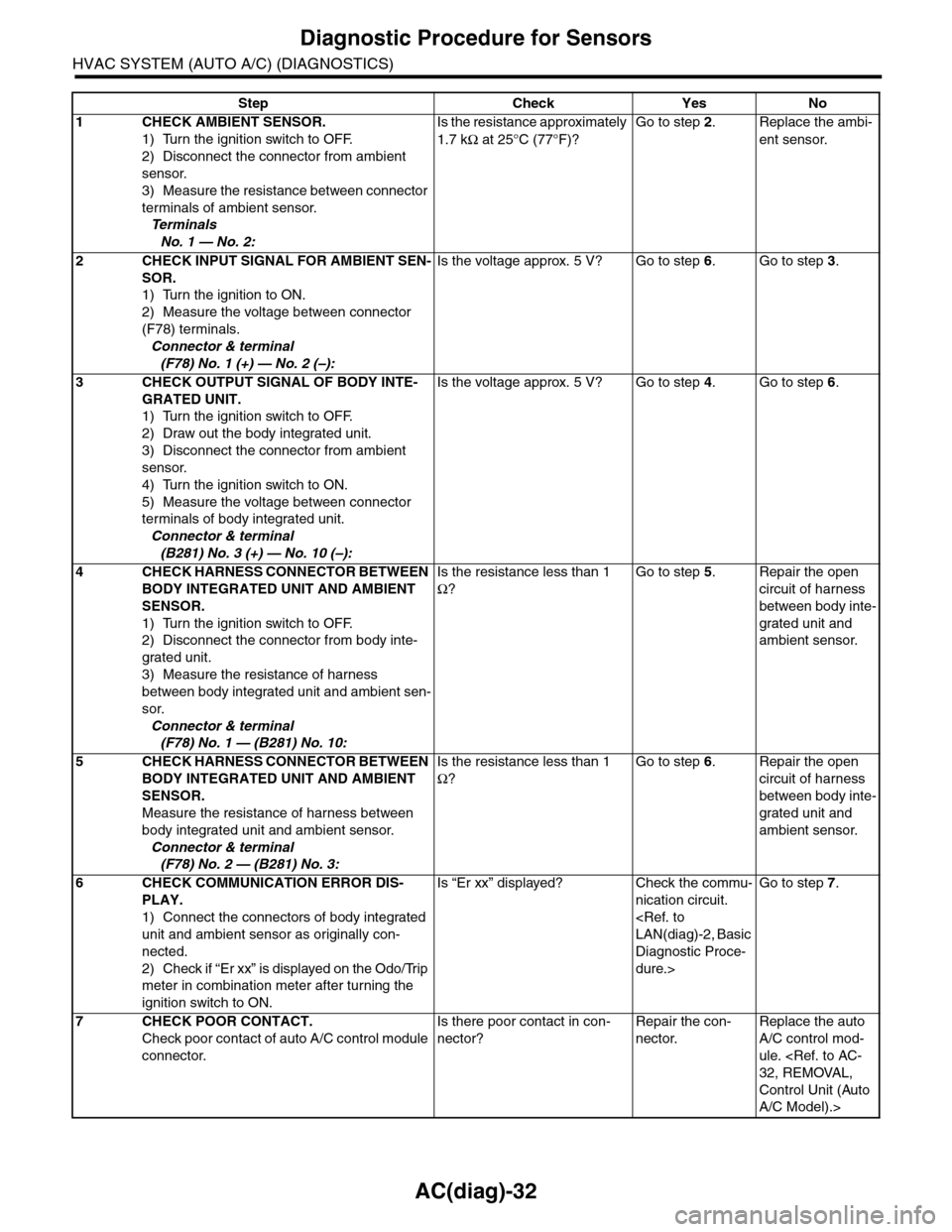
Diagnostic Procedure for Sensors
HVAC SYSTEM (AUTO A/C) (DIAGNOSTICS)
Step Check Yes No
1CHECK AMBIENT SENSOR.
1) Turn the ignition switch to OFF.
2) Disconnect the connector from ambient
sensor.
3) Measure the resistance between connector
terminals of ambient sensor.
Te r m i n a l s
No. 1 — No. 2:
Is the resistance approximately
1.7 kΩ at 25°C (77°F)?
Go to step 2.Replace the ambi-
ent sensor.
2CHECK INPUT SIGNAL FOR AMBIENT SEN-
SOR.
1) Turn the ignition to ON.
2) Measure the voltage between connector
(F78) terminals.
Connector & terminal
(F78) No. 1 (+) — No. 2 (–):
Is the voltage approx. 5 V? Go to step 6.Go to step 3.
3CHECK OUTPUT SIGNAL OF BODY INTE-
GRATED UNIT.
1) Turn the ignition switch to OFF.
2) Draw out the body integrated unit.
3) Disconnect the connector from ambient
sensor.
4) Turn the ignition switch to ON.
5) Measure the voltage between connector
terminals of body integrated unit.
Connector & terminal
(B281) No. 3 (+) — No. 10 (–):
Is the voltage approx. 5 V? Go to step 4.Go to step 6.
4CHECK HARNESS CONNECTOR BETWEEN
BODY INTEGRATED UNIT AND AMBIENT
SENSOR.
1) Turn the ignition switch to OFF.
2) Disconnect the connector from body inte-
grated unit.
3) Measure the resistance of harness
between body integrated unit and ambient sen-
sor.
Connector & terminal
(F78) No. 1 — (B281) No. 10:
Is the resistance less than 1
Ω?
Go to step 5.Repair the open
circuit of harness
between body inte-
grated unit and
ambient sensor.
5CHECK HARNESS CONNECTOR BETWEEN
BODY INTEGRATED UNIT AND AMBIENT
SENSOR.
Measure the resistance of harness between
body integrated unit and ambient sensor.
Connector & terminal
(F78) No. 2 — (B281) No. 3:
Is the resistance less than 1
Ω?
Go to step 6.Repair the open
circuit of harness
between body inte-
grated unit and
ambient sensor.
6CHECK COMMUNICATION ERROR DIS-
PLAY.
1) Connect the connectors of body integrated
unit and ambient sensor as originally con-
nected.
2) Check if “Er xx” is displayed on the Odo/Trip
meter in combination meter after turning the
ignition switch to ON.
Is “Er xx” displayed? Check the commu-
nication circuit.
Diagnostic Proce-
dure.>
Go to step 7.
7CHECK POOR CONTACT.
Check poor contact of auto A/C control module
connector.
Is there poor contact in con-
nector?
Repair the con-
nector.
Replace the auto
A/C control mod-
ule.
Control Unit (Auto
A/C Model).>
Page 418 of 2453
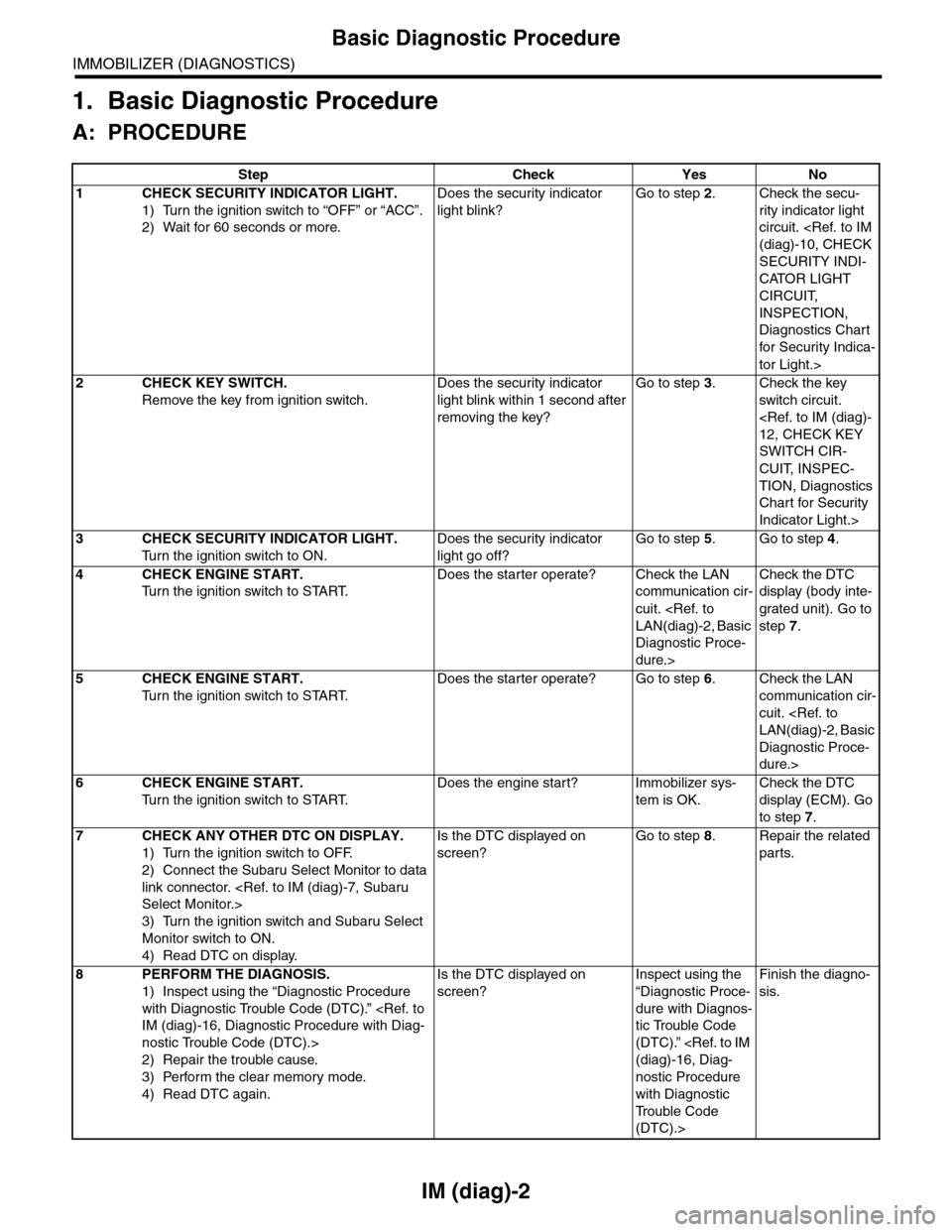
IM (diag)-2
Basic Diagnostic Procedure
IMMOBILIZER (DIAGNOSTICS)
1. Basic Diagnostic Procedure
A: PROCEDURE
Step Check Yes No
1CHECK SECURITY INDICATOR LIGHT.
1) Turn the ignition switch to “OFF” or “ACC”.
2) Wait for 60 seconds or more.
Does the security indicator
light blink?
Go to step 2.Check the secu-
rity indicator light
circuit.
SECURITY INDI-
CATOR LIGHT
CIRCUIT,
INSPECTION,
Diagnostics Chart
for Secur ity Indica-
tor Light.>
2CHECK KEY SWITCH.
Remove the key from ignition switch.
Does the security indicator
light blink within 1 second after
removing the key?
Go to step 3.Check the key
switch circuit.
SWITCH CIR-
CUIT, INSPEC-
TION, Diagnostics
Chart for Security
Indicator Light.>
3CHECK SECURITY INDICATOR LIGHT.
Tu r n t h e i g n i t i o n s w i t c h t o O N .
Does the security indicator
light go off?
Go to step 5.Go to step 4.
4CHECK ENGINE START.
Tu r n t h e i g n i t i o n s w i t c h t o S TA R T.
Does the starter operate? Check the LAN
communication cir-
cuit.
Diagnostic Proce-
dure.>
Check the DTC
display (body inte-
grated unit). Go to
step 7.
5CHECK ENGINE START.
Tu r n t h e i g n i t i o n s w i t c h t o S TA R T.
Does the starter operate? Go to step 6.Check the LAN
communication cir-
cuit.
Diagnostic Proce-
dure.>
6CHECK ENGINE START.
Tu r n t h e i g n i t i o n s w i t c h t o S TA R T.
Does the engine start? Immobilizer sys-
tem is OK.
Check the DTC
display (ECM). Go
to step 7.
7CHECK ANY OTHER DTC ON DISPLAY.
1) Turn the ignition switch to OFF.
2) Connect the Subaru Select Monitor to data
link connector.
3) Turn the ignition switch and Subaru Select
Monitor switch to ON.
4) Read DTC on display.
Is the DTC displayed on
screen?
Go to step 8.Repair the related
parts.
8PERFORM THE DIAGNOSIS.
1) Inspect using the “Diagnostic Procedure
with Diagnostic Trouble Code (DTC).”
nostic Trouble Code (DTC).>
2) Repair the trouble cause.
3) Perform the clear memory mode.
4) Read DTC again.
Is the DTC displayed on
screen?
Inspect using the
“Diagnostic Proce-
dure with Diagnos-
tic Trouble Code
(DTC).”
nostic Procedure
with Diagnostic
Tr o u b l e C o d e
(DTC).>
Finish the diagno-
sis.
Page 423 of 2453
IM (diag)-7
Subaru Select Monitor
IMMOBILIZER (DIAGNOSTICS)
5. Subaru Select Monitor
A: OPERATION
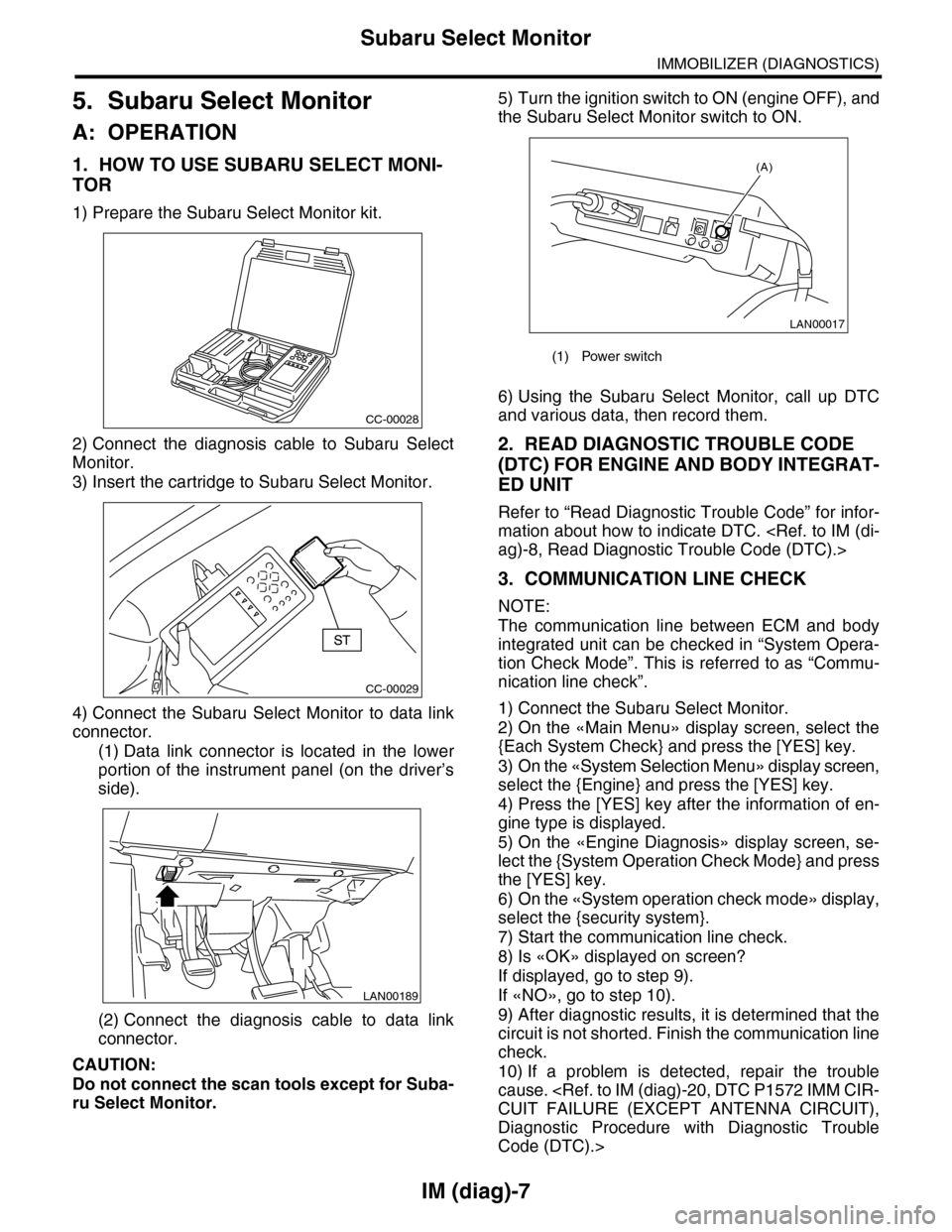
1. HOW TO USE SUBARU SELECT MONI-
TOR
1) Prepare the Subaru Select Monitor kit.
2) Connect the diagnosis cable to Subaru Select
Monitor.
3) Insert the cartridge to Subaru Select Monitor.
4) Connect the Subaru Select Monitor to data link
connector.
(1) Data link connector is located in the lower
portion of the instrument panel (on the driver’s
side).
(2) Connect the diagnosis cable to data link
connector.
CAUTION:
Do not connect the scan tools except for Suba-
ru Select Monitor.
5) Turn the ignition switch to ON (engine OFF), and
the Subaru Select Monitor switch to ON.
6) Using the Subaru Select Monitor, call up DTC
and various data, then record them.
2. READ DIAGNOSTIC TROUBLE CODE
(DTC) FOR ENGINE AND BODY INTEGRAT-
ED UNIT
Refer to “Read Diagnostic Trouble Code” for infor-
mation about how to indicate DTC.
3. COMMUNICATION LINE CHECK
NOTE:
The communication line between ECM and body
integrated unit can be checked in “System Opera-
tion Check Mode”. This is referred to as “Commu-
nication line check”.
1) Connect the Subaru Select Monitor.
2) On the «Main Menu» display screen, select the
{Each System Check} and press the [YES] key.
3) On the «System Selection Menu» display screen,
select the {Engine} and press the [YES] key.
4) Press the [YES] key after the information of en-
gine type is displayed.
5) On the «Engine Diagnosis» display screen, se-
lect the {System Operation Check Mode} and press
the [YES] key.
6) On the «System operation check mode» display,
select the {security system}.
7) Start the communication line check.
8) Is «OK» displayed on screen?
If displayed, go to step 9).
If «NO», go to step 10).
9) After diagnostic results, it is determined that the
circuit is not shorted. Finish the communication line
check.
10) If a problem is detected, repair the trouble
cause.
Diagnostic Procedure with Diagnostic Trouble
Code (DTC).>
CC-00028
CC-00029
LAN00189
(1) Power switch
LAN00017
(A)
Page 424 of 2453
IM (diag)-8
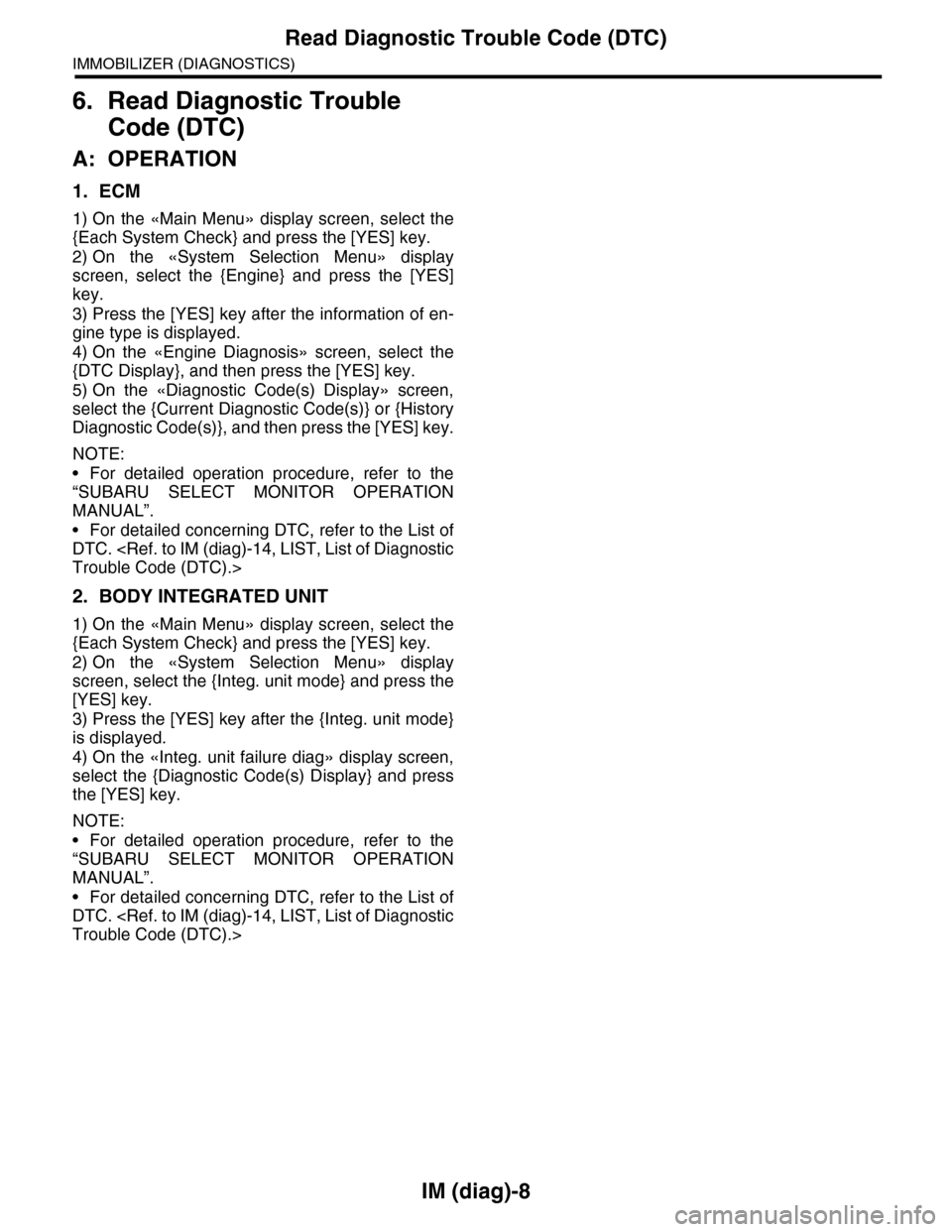
Read Diagnostic Trouble Code (DTC)
IMMOBILIZER (DIAGNOSTICS)
6. Read Diagnostic Trouble
Code (DTC)
A: OPERATION
1. ECM
1) On the «Main Menu» display screen, select the
{Each System Check} and press the [YES] key.
2) On the «System Selection Menu» display
screen, select the {Engine} and press the [YES]
key.
3) Press the [YES] key after the information of en-
gine type is displayed.
4) On the «Engine Diagnosis» screen, select the
{DTC Display}, and then press the [YES] key.
5) On the «Diagnostic Code(s) Display» screen,
select the {Current Diagnostic Code(s)} or {History
Diagnostic Code(s)}, and then press the [YES] key.
NOTE:
•For detailed operation procedure, refer to the
“SUBARU SELECT MONITOR OPERATION
MANUAL”.
•For detailed concerning DTC, refer to the List of
DTC.
2. BODY INTEGRATED UNIT
1) On the «Main Menu» display screen, select the
{Each System Check} and press the [YES] key.
2) On the «System Selection Menu» display
screen, select the {Integ. unit mode} and press the
[YES] key.
3) Press the [YES] key after the {Integ. unit mode}
is displayed.
4) On the «Integ. unit failure diag» display screen,
select the {Diagnostic Code(s) Display} and press
the [YES] key.
NOTE:
•For detailed operation procedure, refer to the
“SUBARU SELECT MONITOR OPERATION
MANUAL”.
•For detailed concerning DTC, refer to the List of
DTC.
Page 425 of 2453
![SUBARU TRIBECA 2009 1.G Service Repair Manual IM (diag)-9
Clear Memory Mode
IMMOBILIZER (DIAGNOSTICS)
7. Clear Memory Mode
A: OPERATION
1. ECM
1) On the «Main Menu» display screen, select the
{Each System Check} and press the [YES] key.
2) On](/img/17/7322/w960_7322-424.png "SUBARU TRIBECA 2009 1.G Service Repair Manual IM (diag)-9
Clear Memory Mode
IMMOBILIZER (DIAGNOSTICS)
7. Clear Memory Mode
A: OPERATION
1. ECM
1) On the «Main Menu» display screen, select the
{Each System Check} and press the [YES] key.
2) On")
IM (diag)-9
Clear Memory Mode
IMMOBILIZER (DIAGNOSTICS)
7. Clear Memory Mode
A: OPERATION
1. ECM
1) On the «Main Menu» display screen, select the
{Each System Check} and press the [YES] key.
2) On the «System Selection Menu» display
screen, select the {Engine} and press the [YES]
key.
3) Press the [YES] key after the information of en-
gine type is displayed.
4) On the «Engine Diagnosis» display screen, se-
lect the {Memory Clear} and press the [YES] key.
5) When the ‘Done’ are shown on the display
screen, turn the Subaru Select Monitor and ignition
switch to OFF.
NOTE:
•After the memory has been cleared, the idle air
control solenoid valve must be initialized. To exe-
cute this procedure, turn the ignition switch to ON.
Wait for 3 seconds before starting the engine.
•For detailed operation procedure, refer to the
“SUBARU SELECT MONITOR OPERATION
MANUAL”.
2. BODY INTEGRATED UNIT
1) On the «Main Menu» display screen, select the
{Each System Check} and press the [YES] key.
2) On the «System Selection Menu» display
screen, select the {Integ. unit mode} and press the
[YES] key.
3) Press the [YES] key after the {Integ. unit mode}
is displayed.
4) On the «Integ. unit mode failure diag» display
screen, select the {Clear Memory} and press the
[YES] key.
5) When the ‘Done’ are shown on the display
screen, turn the Subaru Select Monitor and ignition
switch to OFF.
NOTE:
For detailed operation procedure, refer to the
“SUBARU SELECT MONITOR OPERATION
MANUAL”.
Page 435 of 2453
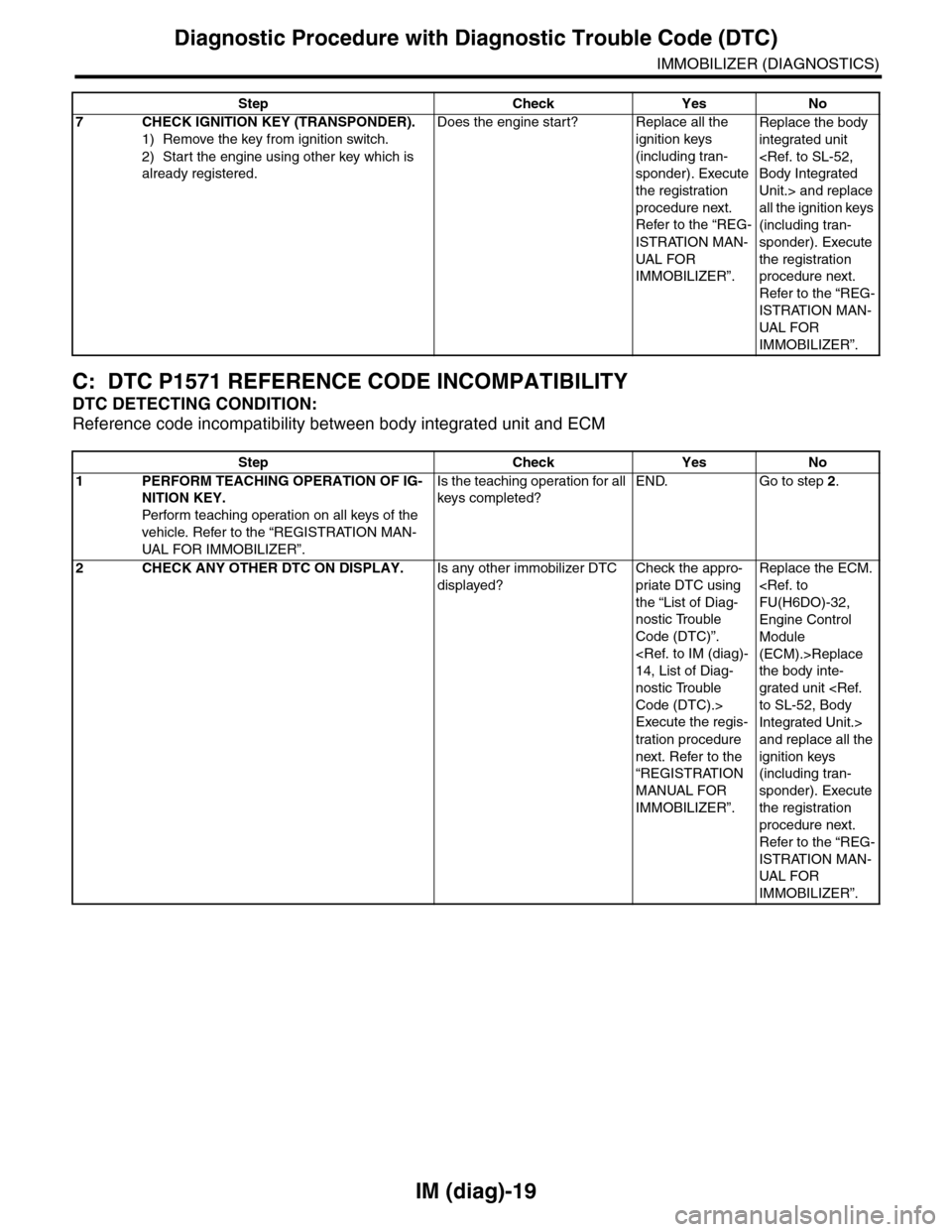
IM (diag)-19
Diagnostic Procedure with Diagnostic Trouble Code (DTC)
IMMOBILIZER (DIAGNOSTICS)
C: DTC P1571 REFERENCE CODE INCOMPATIBILITY
DTC DETECTING CONDITION:
Reference code incompatibility between body integrated unit and ECM
7CHECK IGNITION KEY (TRANSPONDER).
1) Remove the key from ignition switch.
2) Start the engine using other key which is
already registered.
Does the engine start? Replace all the
ignition keys
(including tran-
sponder). Execute
the registration
procedure next.
Refer to the “REG-
ISTRATION MAN-
UAL FO R
IMMOBILIZER”.
Replace the body
integrated unit
Unit.> and replace
all the ignition keys
(including tran-
sponder). Execute
the registration
procedure next.
Refer to the “REG-
ISTRATION MAN-
UAL FOR
IMMOBILIZER”.
Step Check Yes No
Step Check Yes No
1PERFORM TEACHING OPERATION OF IG-
NITION KEY.
Perfor m teaching operation on all keys of the
vehicle. Refer to the “REGISTRATION MAN-
UAL FOR IMMO BILIZER”.
Is the teaching operation for all
keys completed?
END. Go to step 2.
2CHECK ANY OTHER DTC ON DISPLAY.Is any other immobilizer DTC
displayed?
Check the appro-
priate DTC using
the “List of Diag-
nostic Trouble
Code (DTC)”.
nostic Trouble
Code (DTC).>
Execute the regis-
tration procedure
next. Refer to the
“REGISTRATION
MANUAL FOR
IMMOBILIZER”.
Replace the ECM.
Engine Control
Module
(ECM).>Replace
the body inte-
grated unit
Integrated Unit.>
and replace all the
ignition keys
(including tran-
sponder). Execute
the registration
procedure next.
Refer to the “REG-
ISTRATION MAN-
UAL FOR
IMMOBILIZER”.