Display SUBARU TRIBECA 2009 1.G Service Repair Manual
[x] Cancel search | Manufacturer: SUBARU, Model Year: 2009, Model line: TRIBECA, Model: SUBARU TRIBECA 2009 1.GPages: 2453, PDF Size: 46.32 MB
Page 210 of 2453
ET-25
GPS Antenna
ENTERTAINMENT
20.GPS Antenna
A: REMOVAL
1) Disconnect the ground cable from battery.
2) Remove the combination meter.
3) Remove the audio.
4) Remove the navigation display.
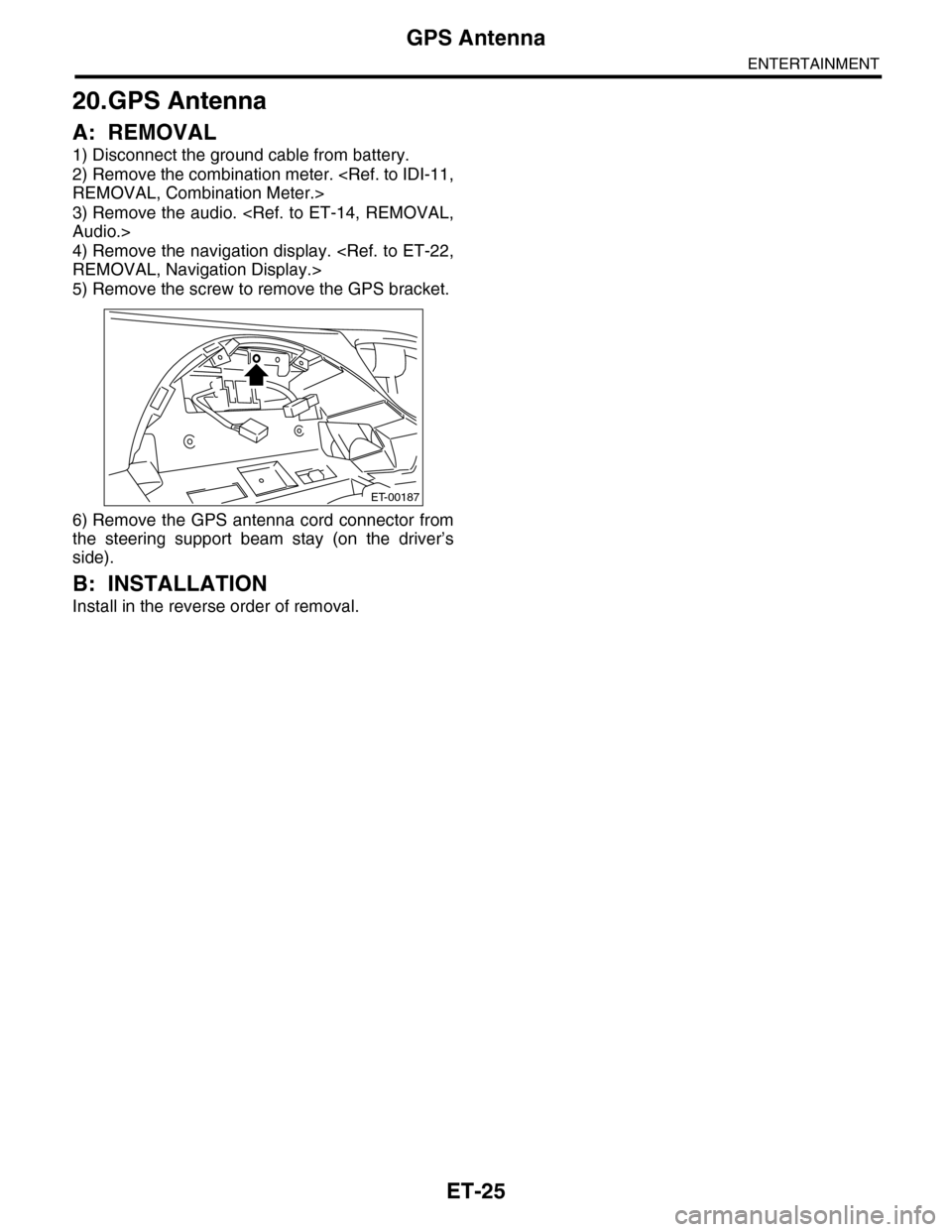
5) Remove the screw to remove the GPS bracket.
6) Remove the GPS antenna cord connector from
the steering support beam stay (on the driver’s
side).
B: INSTALLATION
Install in the reverse order of removal.
ET-00187
Page 211 of 2453
ET-26
Multi Function Display (MFD)
ENTERTAINMENT
21.Multi Function Display (MFD)
A: REMOVAL
B: INSTALLATION
Install in the reverse order of removal.
Page 282 of 2453
EI-40
Instrument Panel Assembly
EXTERIOR/INTERIOR TRIM
17.Instrument Panel Assembly
A: REMOVAL
CAUTION:
Take care of the following when removing the
instrument panel from the vehicle body.
•Refer to “CAUTION” of “General Description”
before starting the work.
•Be sure to disconnect each harness connec-
tor. Applying excessive pulling force may dam-
age the harness.
•Be careful to the harness of airbag system.
Damage of the harness may cause the air bag
system malfunction.
•Take care not to damage the interior trims
when removing the instrument panel from the
vehicle body.
NOTE:
•Putting alignment marks to each connector as
necessary facilitates the reassembly work.
•When storing the removed instrument panel, be
sure to prepare a table or the like to put the instru-
ment panel on in order to prevent damage.
1. INSTRUMENT PANEL UPPER
1) Disconnect the ground cable from battery and
wait for at least 20 seconds before starting work.
2) Remove the console box.
3) Remove the instrument panel lower cover.
er.>
4) Remove the glove box.
5) Remove the center console.
6) Remove the audio unit.
7) Remove the combination meter assembly.
8) Remove the upper grille.
9) Remove the multi function display or navigation
monitor, and warning box.
10) Remove the front pillar upper trim.
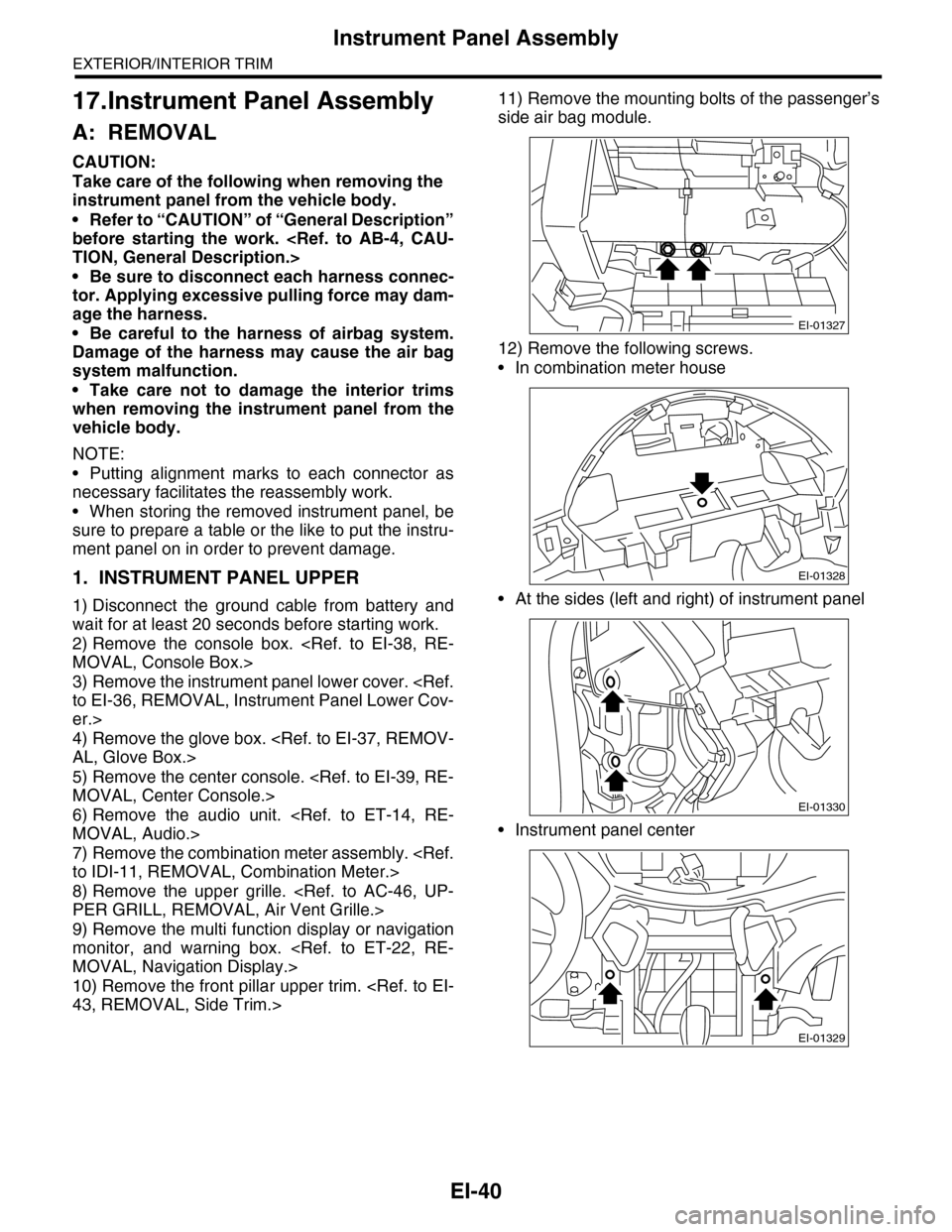
11) Remove the mounting bolts of the passenger’s
side air bag module.
12) Remove the following screws.
•In combination meter house
•At the sides (left and right) of instrument panel
•Instrument panel center
EI-01327
EI-01328
EI-01330
EI-01329
Page 320 of 2453
GW-25
Rear Window Defogger
GLASS/WINDOWS/MIRRORS
17.Rear Window Defogger
A: INSPECTION
1. CHECK WITH SUBARU SELECT MONITOR
CAUTION:
Check that the rear window defogger timer is in initial setting or customize setting before performing
inspection.
2. HEAT WIRE INSPECTION
CAUTION:
Use a dry and soft cloth when wiping dirt off the
glass. Move the cloth along the heat wire to
avoid damaging it.
1) Turn the ignition switch to ON.
2) Turn the defogger switch to ON.
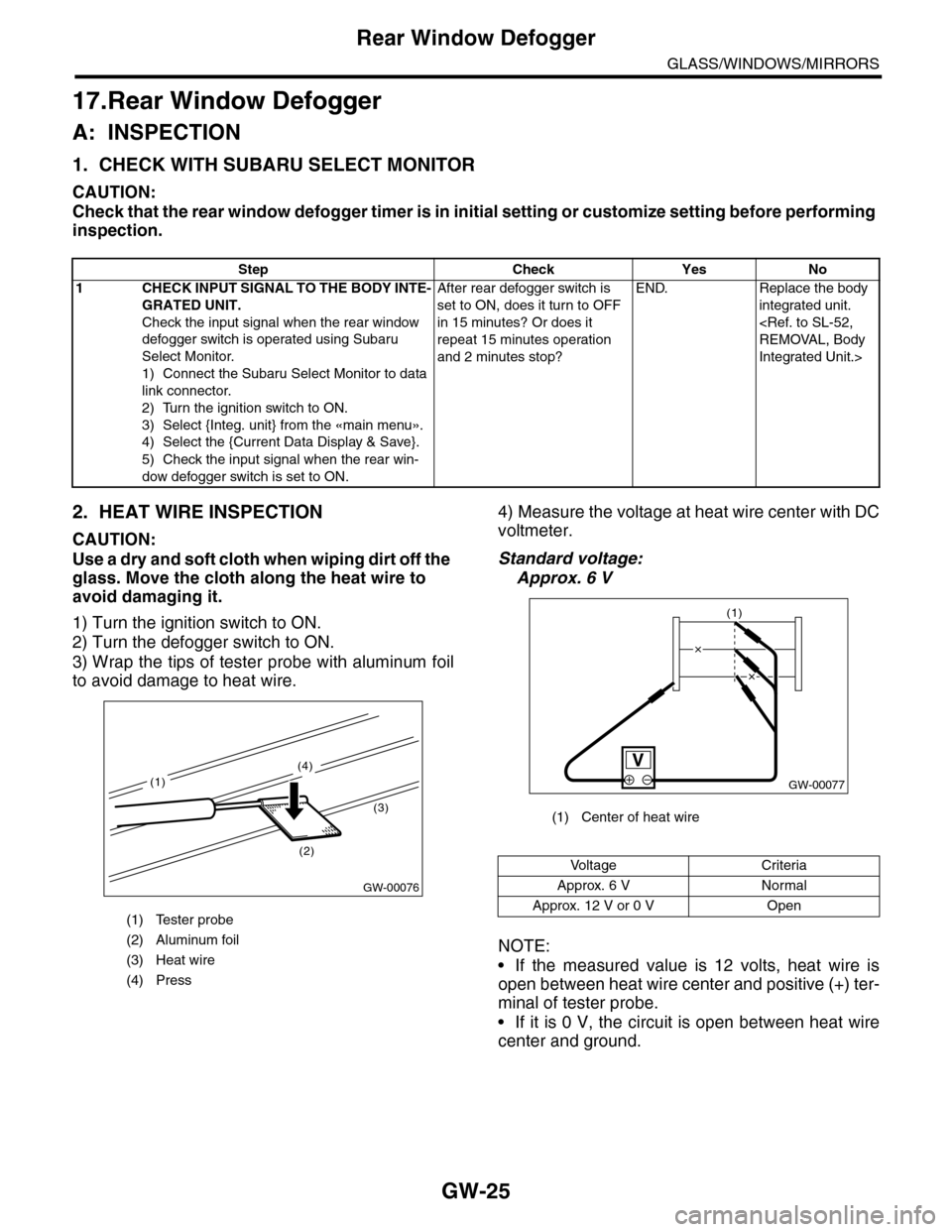
3) Wrap the tips of tester probe with aluminum foil
to avoid damage to heat wire.
4) Measure the voltage at heat wire center with DC
voltmeter.
Standard voltage:
Approx. 6 V
NOTE:
•If the measured value is 12 volts, heat wire is
open between heat wire center and positive (+) ter-
minal of tester probe.
•If it is 0 V, the circuit is open between heat wire
center and ground.
Step Check Yes No
1CHECK INPUT SIGNAL TO THE BODY INTE-
GRATED UNIT.
Check the input signal when the rear window
defogger switch is operated using Subaru
Select Monitor.
1) Connect the Subaru Select Monitor to data
link connector.
2) Turn the ignition switch to ON.
3) Select {Integ. unit} from the «main menu».
4) Select the {Current Data Display & Save}.
5) Check the input signal when the rear win-
dow defogger switch is set to ON.
After rear defogger switch is
set to ON, does it turn to OFF
in 15 minutes? Or does it
repeat 15 minutes operation
and 2 minutes stop?
END. Replace the body
integrated unit.
Integrated Unit.>
(1) Tester probe
(2) Aluminum foil
(3) Heat wire
(4) Press
GW-00076
(2)
(3)
(4)
(1)
(1) Center of heat wire
Vo l t a g e C r i t e r i a
Approx. 6 V Normal
Approx. 12 V or 0 V Open
GW-00077
(1)
Page 326 of 2453
GW-31
Wiper Deicer Switch
GLASS/WINDOWS/MIRRORS
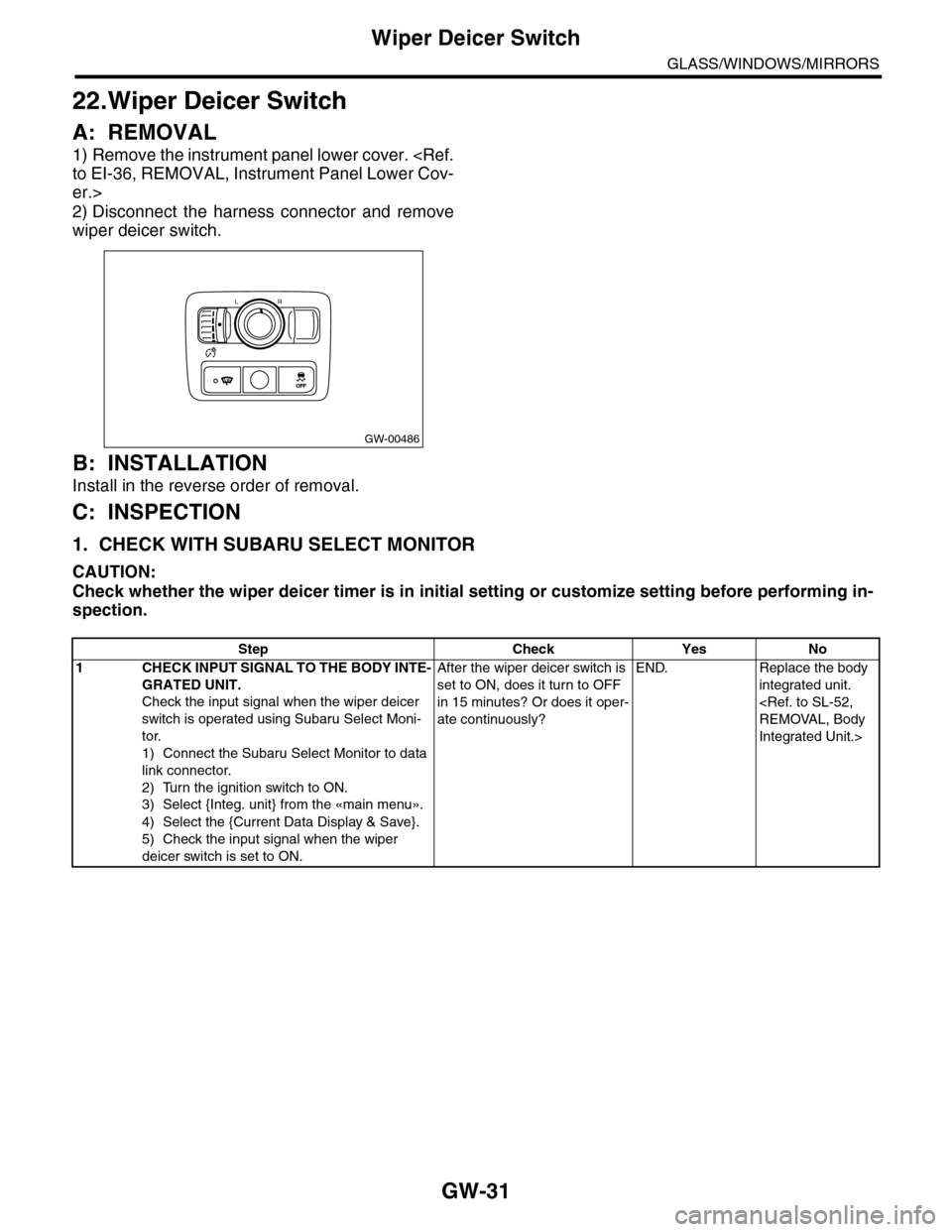
22.Wiper Deicer Switch
A: REMOVAL
1) Remove the instrument panel lower cover.
er.>
2) Disconnect the harness connector and remove
wiper deicer switch.
B: INSTALLATION
Install in the reverse order of removal.
C: INSPECTION
1. CHECK WITH SUBARU SELECT MONITOR
CAUTION:
Check whether the wiper deicer timer is in initial setting or customize setting before performing in-
spection.
GW-00486
LR
OFFOFF
Step Check Yes No
1CHECK INPUT SIGNAL TO THE BODY INTE-
GRATED UNIT.
Check the input signal when the wiper deicer
switch is operated using Subaru Select Moni-
tor.
1) Connect the Subaru Select Monitor to data
link connector.
2) Turn the ignition switch to ON.
3) Select {Integ. unit} from the «main menu».
4) Select the {Current Data Display & Save}.
5) Check the input signal when the wiper
deicer switch is set to ON.
After the wiper deicer switch is
set to ON, does it turn to OFF
in 15 minutes? Or does it oper-
ate continuously?
END. Replace the body
integrated unit.
Integrated Unit.>
Page 344 of 2453
AC-18
General Description
HVAC SYSTEM (HEATER, VENTILATOR AND A/C)
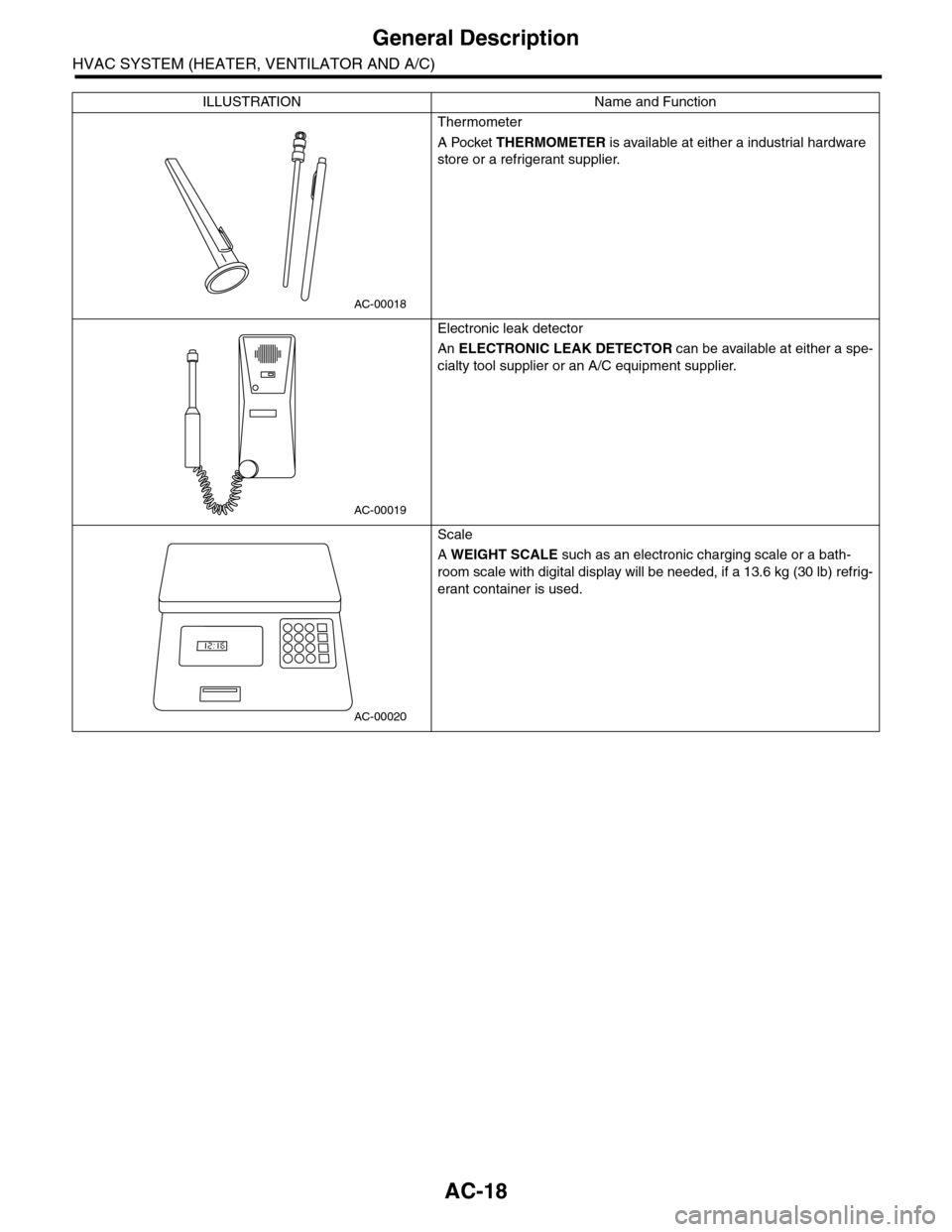
Thermometer
A Pocket THERMOMETER is available at either a industrial hardware
store or a refrigerant supplier.
Electronic leak detector
An ELECTRONIC LEAK DETECTOR can be available at either a spe-
cialty tool supplier or an A/C equipment supplier.
Scale
A WEIGHT SCALE such as an electronic charging scale or a bath-
room scale with digital display will be needed, if a 13.6 kg (30 lb) refrig-
erant container is used.
ILLUSTRATION Name and Function
AC-00018
AC-00019
AC-00020
Page 381 of 2453
AC(diag)-4
General Description
HVAC SYSTEM (AUTO A/C) (DIAGNOSTICS)
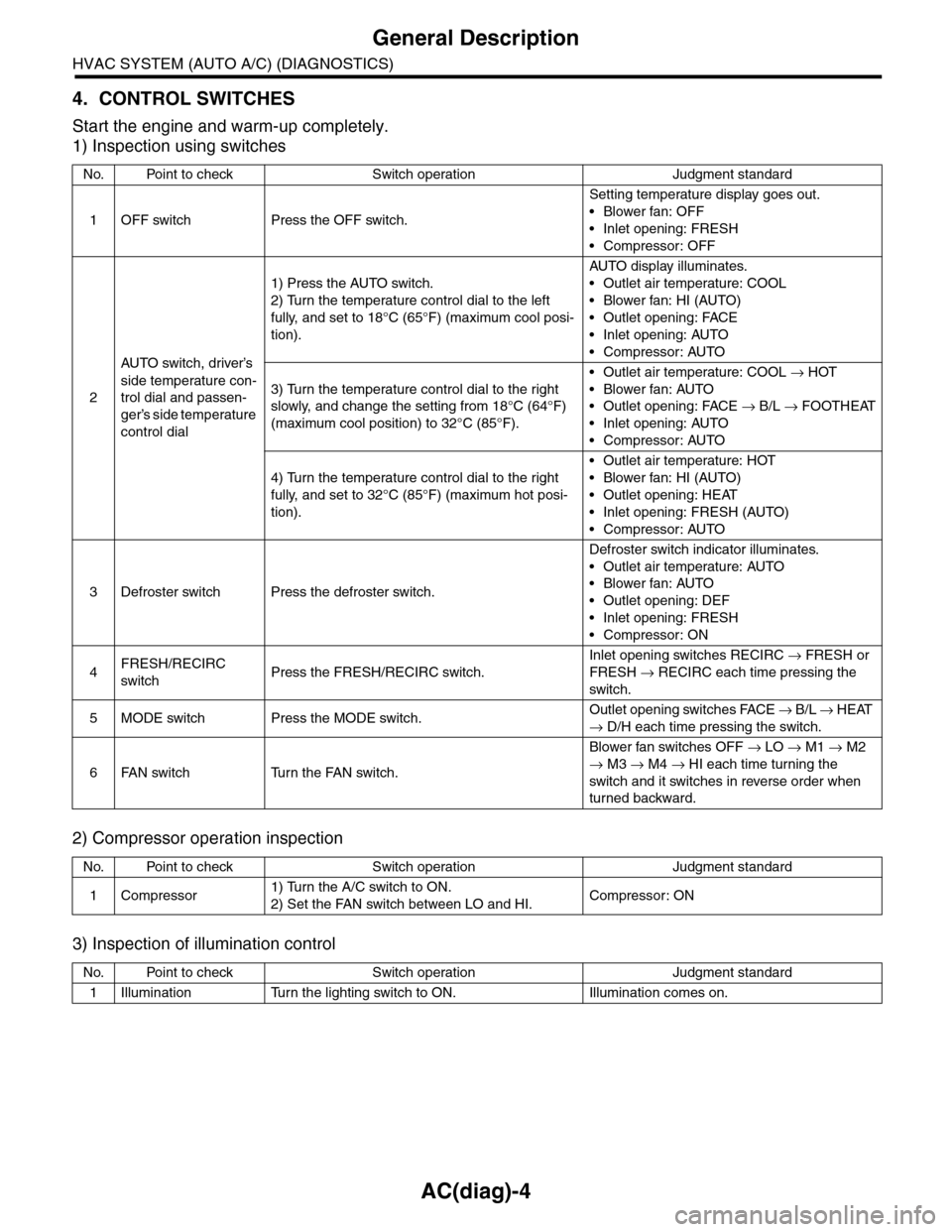
4. CONTROL SWITCHES
Start the engine and warm-up completely.
1) Inspection using switches
2) Compressor operation inspection
3) Inspection of illumination control
No. Point to check Switch operation Judgment standard
1OFF switch Press the OFF switch.
Setting temperature display goes out.
•Blower fan: OFF
•Inlet opening: FRESH
•Compressor: OFF
2
AU TO sw it c h, d r iver ’s
side temperature con-
trol dial and passen-
ger’s side temperature
control dial
1) Press the AUTO switch.
2) Turn the temperature control dial to the left
fully, and set to 18°C (65°F) (maximum cool posi-
tion).
AU TO di sp l ay i l lu mi n at e s.
•Outlet air temperature: COOL
•Blower fan: HI (AUTO)
•Outlet opening: FACE
•Inlet opening: AUTO
•Compressor: AUTO
3) Turn the temperature control dial to the right
slowly, and change the setting from 18°C (64°F)
(maximum cool position) to 32°C (85°F).
•Outlet air temperature: COOL → HOT
•Blower fan: AUTO
•Outlet opening: FACE → B/L → FOOTHEAT
•Inlet opening: AUTO
•Compressor: AUTO
4) Turn the temperature control dial to the right
fully, and set to 32°C (85°F) (maximum hot posi-
tion).
•Outlet air temperature: HOT
•Blower fan: HI (AUTO)
•Outlet opening: HEAT
•Inlet opening: FRESH (AUTO)
•Compressor: AUTO
3Defroster switch Press the defroster switch.
Defroster switch indicator illuminates.
•Outlet air temperature: AUTO
•Blower fan: AUTO
•Outlet opening: DEF
•Inlet opening: FRESH
•Compressor: ON
4FRESH/RECIRC
switchPress the FRESH/RECIRC switch.
Inlet opening switches RECIRC → FRESH or
FRESH → RECIRC each time pressing the
switch.
5MODE switch Press the MODE switch.Outlet opening switches FACE → B / L → HEAT
→ D/H each time pressing the switch.
6FAN switch Turn the FAN switch.
Blower fan switches OFF → LO → M1 → M2
→ M3 → M4 → HI each time turning the
switch and it switches in reverse order when
turned backward.
No. Point to check Switch operation Judgment standard
1Compressor1) Turn the A/C switch to ON.
2) Set the FAN switch between LO and HI.Compressor: ON
No. Point to check Switch operation Judgment standard
1Illumination Turn the lighting switch to ON. Illumination comes on.
Page 388 of 2453
AC(diag)-11
Diagnostic Chart for Self-diagnosis
HVAC SYSTEM (AUTO A/C) (DIAGNOSTICS)
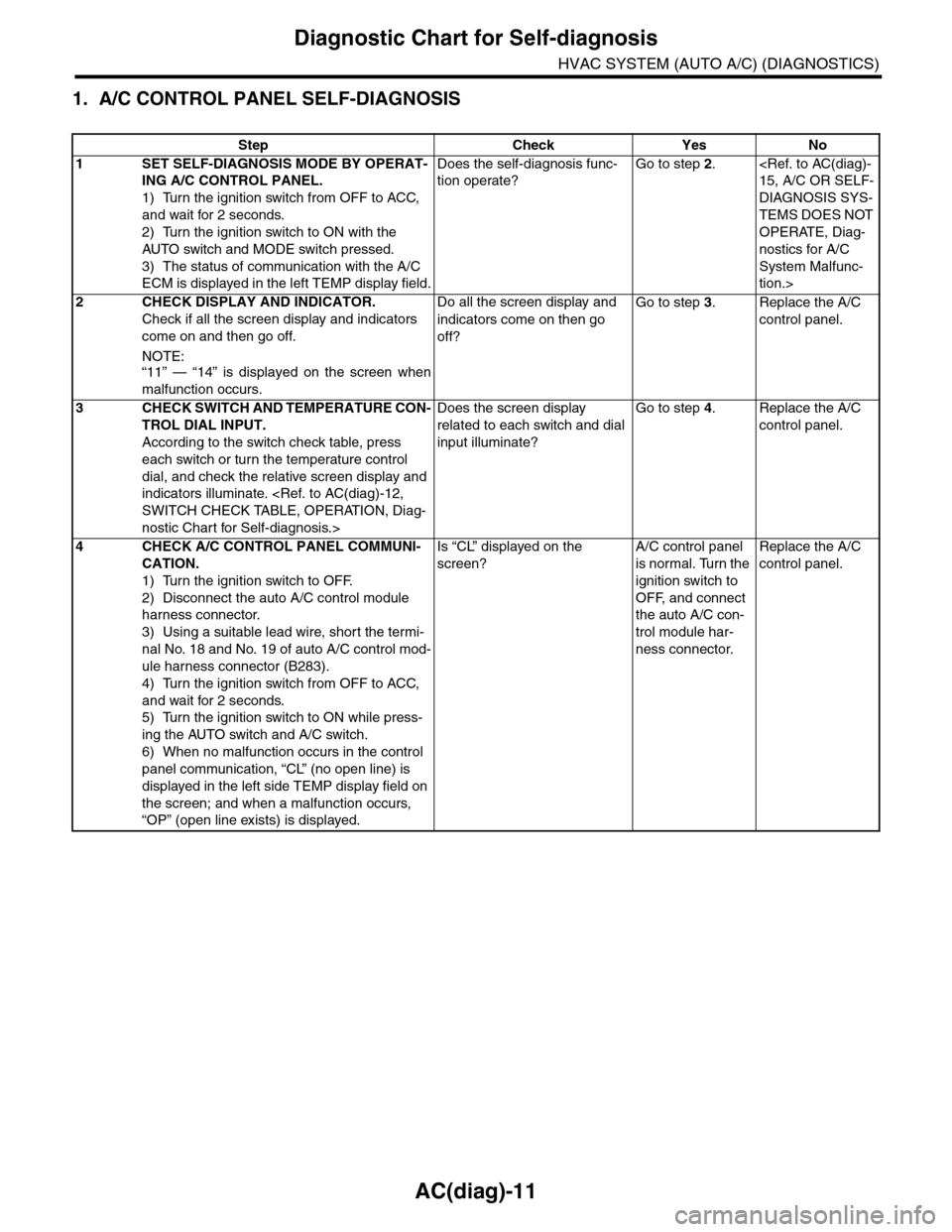
1. A/C CONTROL PANEL SELF-DIAGNOSIS
Step Check Yes No
1SET SELF-DIAGNOSIS MODE BY OPERAT-
ING A/C CONTROL PANEL.
1) Turn the ignition switch from OFF to ACC,
and wait for 2 seconds.
2) Turn the ignition switch to ON with the
AUTO switch and MODE switch pressed.
3) The status of communication with the A/C
ECM is displayed in the left TEMP display field.
Does the self-diagnosis func-
tion operate?
Go to step 2.
DIAGNOSIS SYS-
TEMS DOES NOT
OPERATE, Diag-
nostics for A/C
System Malfunc-
tion.>
2CHECK DISPLAY AND INDICATOR.
Check if all the screen display and indicators
come on and then go off.
NOTE:“11” — “14” is displayed on the screen when
malfunction occurs.
Do all the screen display and
indicators come on then go
off?
Go to step 3.Replace the A/C
control panel.
3CHECK SWITCH AND TEMPERATURE CON-
TROL DIAL INPUT.
According to the switch check table, press
each switch or turn the temperature control
dial, and check the relative screen display and
indicators illuminate.
nostic Chart for Self-diagnosis.>
Does the screen display
related to each switch and dial
input illuminate?
Go to step 4.Replace the A/C
control panel.
4CHECK A/C CONTROL PANEL COMMUNI-
CATION.
1) Turn the ignition switch to OFF.
2) Disconnect the auto A/C control module
harness connector.
3) Using a suitable lead wire, short the termi-
nal No. 18 and No. 19 of auto A/C control mod-
ule harness connector (B283).
4) Turn the ignition switch from OFF to ACC,
and wait for 2 seconds.
5) Turn the ignition switch to ON while press-
ing the AUTO switch and A/C switch.
6) When no malfunction occurs in the control
panel communication, “CL” (no open line) is
displayed in the left side TEMP display field on
the screen; and when a malfunction occurs,
“OP” (open line exists) is displayed.
Is “CL” displayed on the
screen?
A/C control panel
is normal. Turn the
ignition switch to
OFF, and connect
the auto A/C con-
trol module har-
ness connector.
Replace the A/C
control panel.
Page 389 of 2453
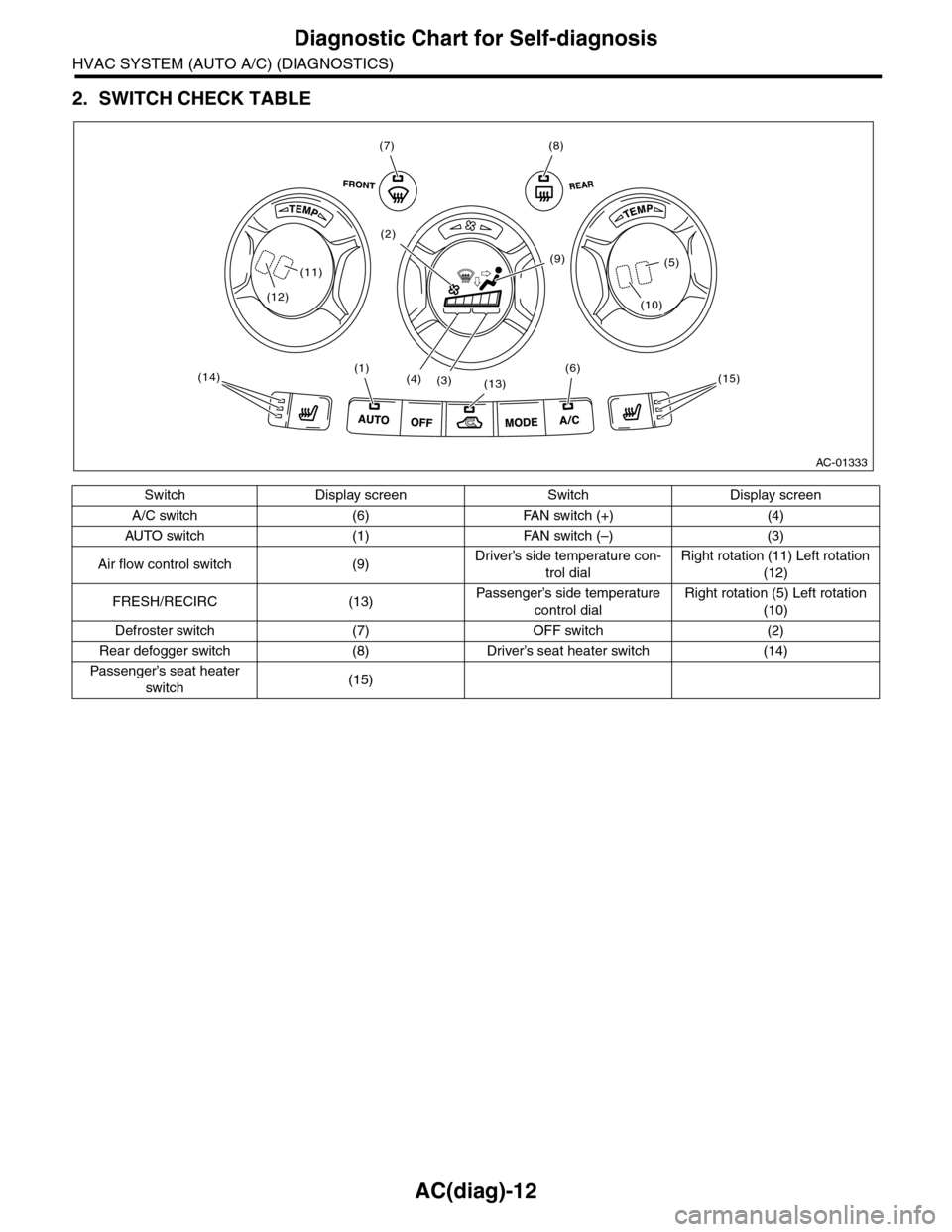
AC(diag)-12
Diagnostic Chart for Self-diagnosis
HVAC SYSTEM (AUTO A/C) (DIAGNOSTICS)
2. SWITCH CHECK TABLE
Switch Display screen Switch Display screen
A/C switch (6) FAN switch (+) (4)
AU TO sw i t ch ( 1 ) FA N sw it ch ( –) (3 )
Air flow control switch (9)Driver’s side temperature con-
trol dial
Right rotation (11) Left rotation
(12)
FRESH/RECIRC (13)Passenger’s side temperature
control dial
Right rotation (5) Left rotation
(10)
Defroster switch (7) OFF switch (2)
Rear defogger switch (8) Driver’s seat heater switch (14)
Passenger’s seat heater
switch(15)
AC-01333
(7)(8)
(6)(1)
(13)(4)(3)
(9)
(2)
(15)(14)
(12)
(11)
(10)
(5)
Page 390 of 2453
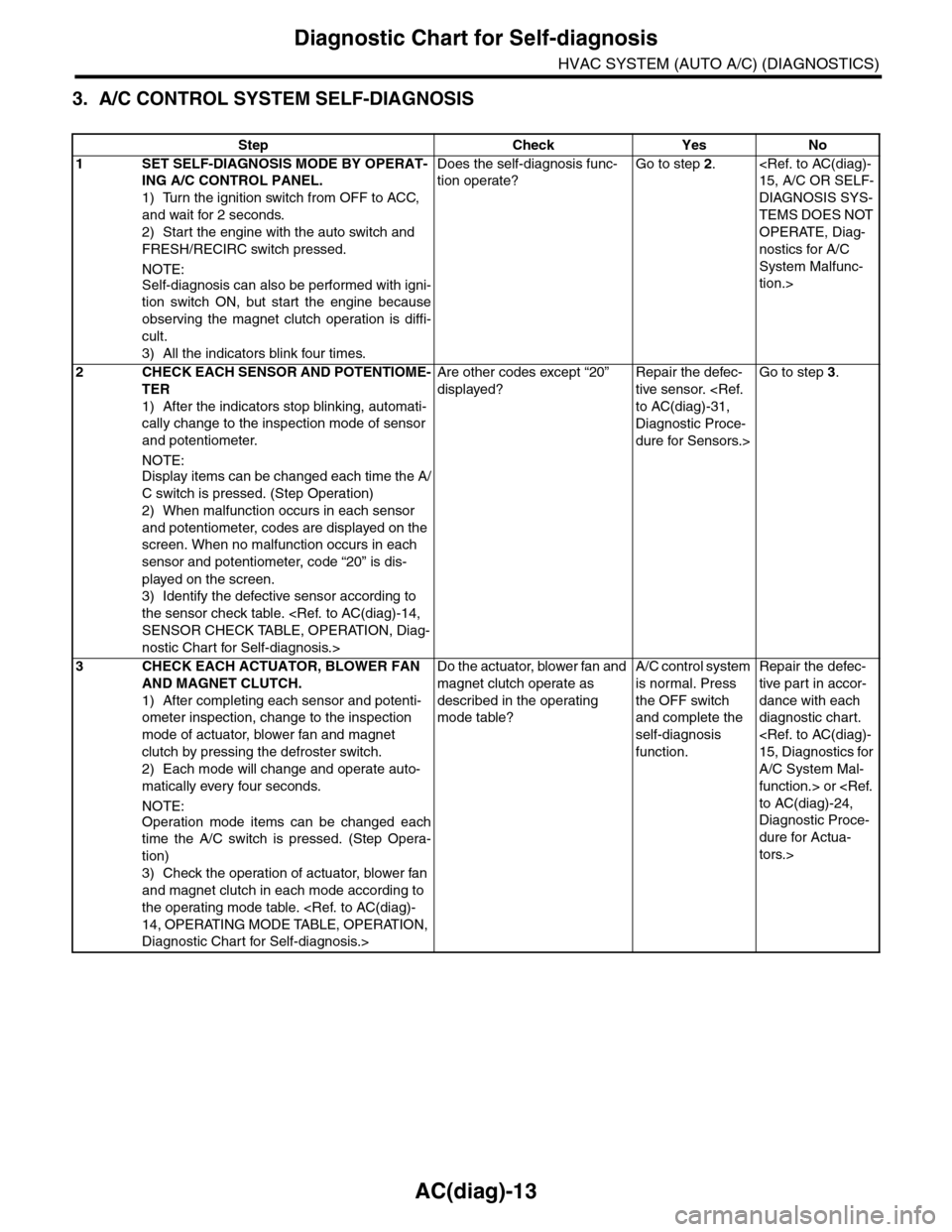
AC(diag)-13
Diagnostic Chart for Self-diagnosis
HVAC SYSTEM (AUTO A/C) (DIAGNOSTICS)
3. A/C CONTROL SYSTEM SELF-DIAGNOSIS
Step Check Yes No
1SET SELF-DIAGNOSIS MODE BY OPERAT-
ING A/C CONTROL PANEL.
1) Turn the ignition switch from OFF to ACC,
and wait for 2 seconds.
2) Start the engine with the auto switch and
FRESH/RECIRC switch pressed.
NOTE:
Self-diagnosis can also be performed with igni-
tion switch ON, but start the engine because
observing the magnet clutch operation is diffi-
cult.
3) All the indicators blink four times.
Does the self-diagnosis func-
tion operate?
Go to step 2.
DIAGNOSIS SYS-
TEMS DOES NOT
OPERATE, Diag-
nostics for A/C
System Malfunc-
tion.>
2CHECK EACH SENSOR AND POTENTIOME-
TER
1) After the indicators stop blinking, automati-
cally change to the inspection mode of sensor
and potentiometer.
NOTE:
Display items can be changed each time the A/
C switch is pressed. (Step Operation)
2) When malfunction occurs in each sensor
and potentiometer, codes are displayed on the
screen. When no malfunction occurs in each
sensor and potentiometer, code “20” is dis-
played on the screen.
3) Identify the defective sensor according to
the sensor check table.
nostic Chart for Self-diagnosis.>
Are other codes except “20”
displayed?
Repair the defec-
tive sensor.
Diagnostic Proce-
dure for Sensors.>
Go to step 3.
3CHECK EACH ACTUATOR, BLOWER FAN
AND MAGNET CLUTCH.
1) After completing each sensor and potenti-
ometer inspection, change to the inspection
mode of actuator, blower fan and magnet
clutch by pressing the defroster switch.
2) Each mode will change and operate auto-
matically every four seconds.
NOTE:
Operation mode items can be changed each
time the A/C switch is pressed. (Step Opera-
tion)
3) Check the operation of actuator, blower fan
and magnet clutch in each mode according to
the operating mode table.
Diagnostic Chart for Self-diagnosis.>
Do the actuator, blower fan and
magnet clutch operate as
described in the operating
mode table?
A/C control system
is normal. Press
the OFF switch
and complete the
self-diagnosis
function.
Repair the defec-
tive par t in accor-
dance with each
diagnostic chart.
A/C System Mal-
function.> or
Diagnostic Proce-
dure for Actua-
tors.>