warning SUBARU TRIBECA 2009 1.G Service Manual Online
[x] Cancel search | Manufacturer: SUBARU, Model Year: 2009, Model line: TRIBECA, Model: SUBARU TRIBECA 2009 1.GPages: 2453, PDF Size: 46.32 MB
Page 444 of 2453
IDI-5
Combination Meter System
INSTRUMENTATION/DRIVER INFO
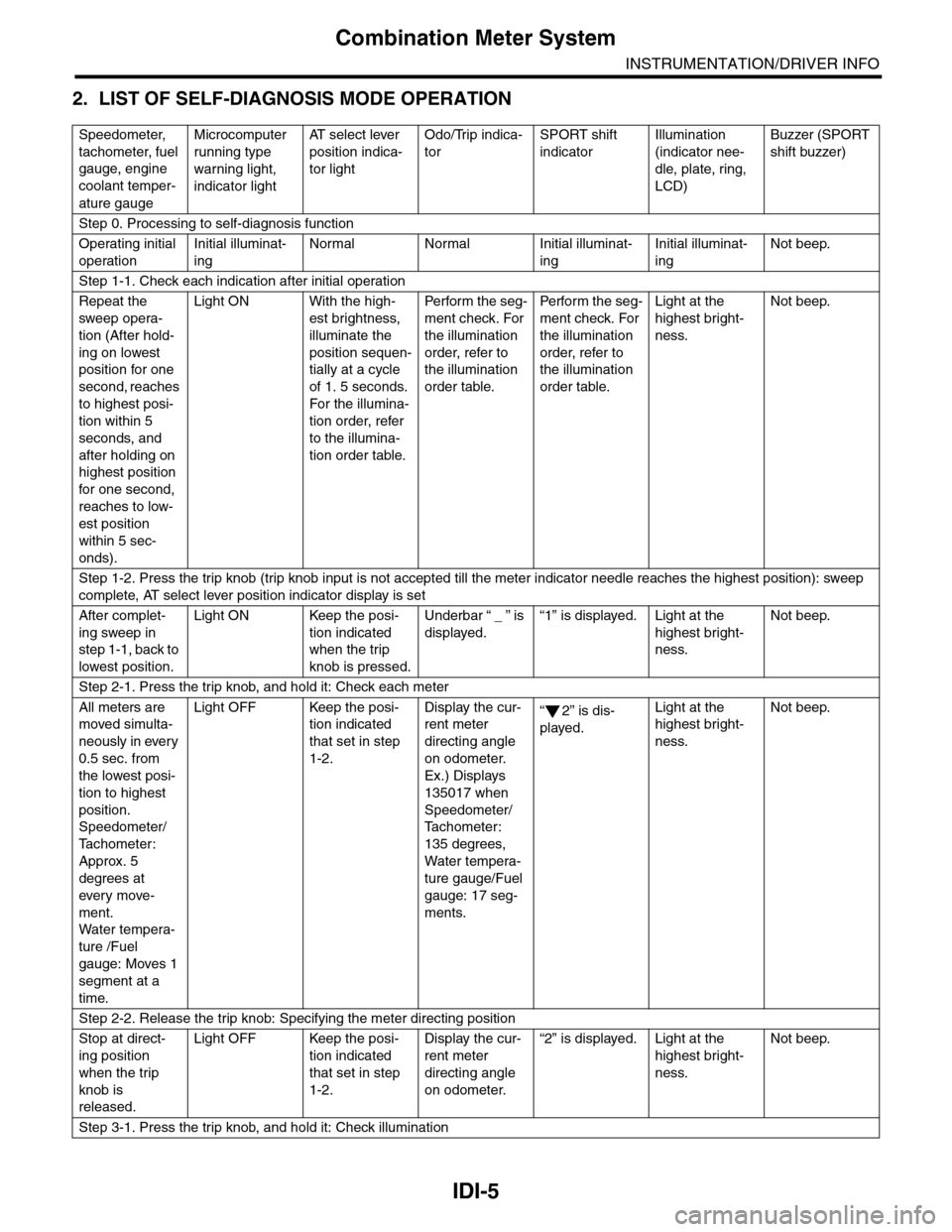
2. LIST OF SELF-DIAGNOSIS MODE OPERATION
Speedometer,
tachometer, fuel
gauge, engine
coolant temper-
ature gauge
Microcomputer
running type
warning light,
indicator light
AT s e l e c t l e v e r
position indica-
tor light
Odo/Trip indica-
tor
SPORT shift
indicator
Illumination
(indicator nee-
dle, plate, ring,
LCD)
Buzzer (SPORT
shift buzzer)
Step 0. Processing to self-diagnosis function
Operating initial
operation
Initial illuminat-
ing
Normal Normal Initial illuminat-
ing
Initial illuminat-
ing
Not beep.
Step 1-1. Check each indication after initial operation
Repeat the
sweep opera-
tion (After hold-
ing on lowest
position for one
second, reaches
to highest posi-
tion within 5
seconds, and
after holding on
highest position
for one second,
reaches to low-
est position
within 5 sec-
onds).
Light ON With the high-
est brightness,
illuminate the
position sequen-
tially at a cycle
of 1. 5 seconds.
For the illumina-
tion order, refer
to the illumina-
tion order table.
Pe r for m t he s eg -
ment check. For
the illumination
order, refer to
the illumination
order table.
Pe rfo r m t h e se g -
ment check. For
the illumination
order, refer to
the illumination
order table.
Light at the
highest bright-
ness.
Not beep.
Step 1-2. Press the trip knob (trip knob input is not accepted till the meter indicator needle reaches the highest position): sweep
complete, AT select lever position indicator display is set
After complet-
ing sweep in
step 1-1, back to
lowest position.
Light ON Keep the posi-
tion indicated
when the trip
knob is pressed.
Underbar “ _ ” is
displayed.
“1” is displayed. Light at the
highest bright-
ness.
Not beep.
Step 2-1. Press the trip knob, and hold it: Check each meter
All meters are
moved simulta-
neously in every
0.5 sec. from
the lowest posi-
tion to highest
position.
Speedometer/
Ta c h o m e t e r :
Approx. 5
degrees at
ever y move-
ment.
Wa t er t e mp er a-
ture /Fuel
gauge: Moves 1
segment at a
time.
Light OFF Keep the posi-
tion indicated
that set in step
1-2.
Display the cur-
rent meter
directing angle
on odometer.
Ex.) Displays
135017 when
Speedometer/
Ta c h o m e t e r :
135 degrees,
Water tempera-
ture gauge/Fuel
gauge: 17 seg-
ments.
“2” is dis-
played.
Light at the
highest bright-
ness.
Not beep.
Step 2-2. Release the trip knob: Specifying the meter directing position
Stop at direct-
ing position
when the trip
knob is
released.
Light OFF Keep the posi-
tion indicated
that set in step
1-2.
Display the cur-
rent meter
directing angle
on odometer.
“2” is displayed. Light at the
highest bright-
ness.
Not beep.
Step 3-1. Press the trip knob, and hold it: Check illumination
Page 445 of 2453
IDI-6
Combination Meter System
INSTRUMENTATION/DRIVER INFO
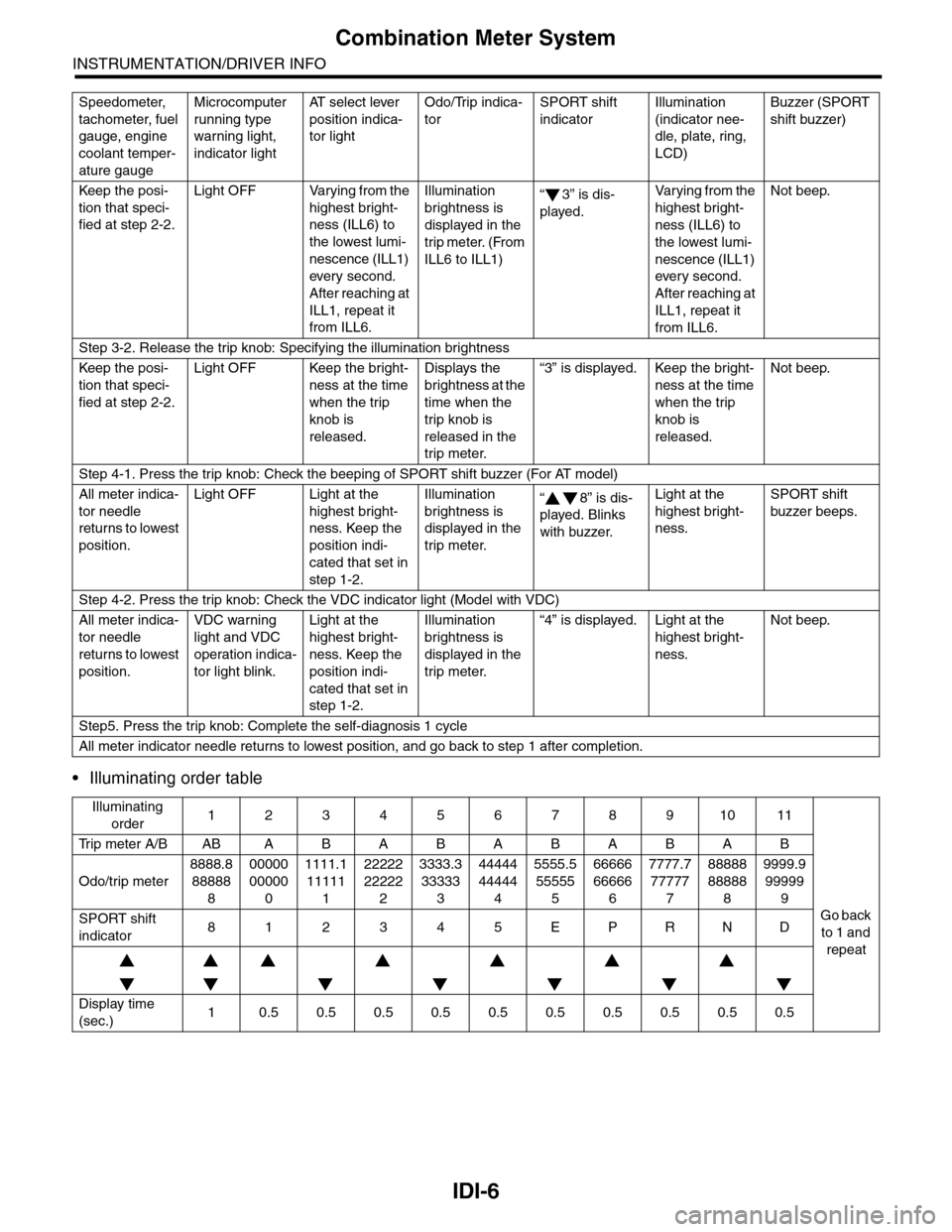
•Illuminating order table
Keep the posi-
tion that speci-
fied at step 2-2.
Light OFF Varying from the
highest bright-
ness (ILL6) to
the lowest lumi-
nescence (ILL1)
ever y second.
After reaching at
ILL1, repeat it
from ILL6.
Illumination
brightness is
displayed in the
trip meter. (From
ILL6 to ILL1)
“3” is dis-
played.
Va r y i n g f r o m t h e
highest bright-
ness (ILL6) to
the lowest lumi-
nescence (ILL1)
every second.
After reaching at
ILL1, repeat it
from ILL6.
Not beep.
Step 3-2. Release the trip knob: Specifying the illumination brightness
Keep the posi-
tion that speci-
fied at step 2-2.
Light OFF Keep the bright-
ness at the time
when the trip
knob is
released.
Displays the
brightness at the
time when the
trip knob is
released in the
trip meter.
“3” is displayed. Keep the bright-
ness at the time
when the trip
knob is
released.
Not beep.
Step 4-1. Press the trip knob: Check the beeping of SPORT shift buzzer (For AT model)
All meter indica-
tor needle
returns to lowest
position.
Light OFF Light at the
highest bright-
ness. Keep the
position indi-
cated that set in
step 1-2.
Illumination
brightness is
displayed in the
trip meter.
“8” is dis-
played. Blinks
with buzzer.
Light at the
highest bright-
ness.
SPORT shift
buzzer beeps.
Step 4-2. Press the trip knob: Check the VDC indicator light (Model with VDC)
All meter indica-
tor needle
returns to lowest
position.
VDC warning
light and VDC
operation indica-
tor light blink.
Light at the
highest bright-
ness. Keep the
position indi-
cated that set in
step 1-2.
Illumination
brightness is
displayed in the
trip meter.
“4” is displayed. Light at the
highest bright-
ness.
Not beep.
Step5. Press the trip knob: Complete the self-diagnosis 1 cycle
All meter indicator needle returns to lowest position, and go back to step 1 after completion.
Illuminating
order1234567891011
Tr i p m e t e r A / B A B A B A B A B A B A B
Go back
to 1 and
repeat
Odo/trip meter
8888.8
88888
8
00000
00000
0
1111.1
11111
1
22222
22222
2
3333.3
33333
3
44444
44444
4
5555.5
55555
5
66666
66666
6
7777.7
77777
7
88888
88888
8
9999.9
99999
9
SPORT shift
indicator812345EPRND
Display time
(sec.)10.50.50.50.50.50.50.50.50.50.5
Speedometer,
tachometer, fuel
gauge, engine
coolant temper-
ature gauge
Microcomputer
running type
warning light,
indicator light
AT s e l e c t l e v e r
position indica-
tor light
Odo/Trip indica-
tor
SPORT shift
indicator
Illumination
(indicator nee-
dle, plate, ring,
LCD)
Buzzer (SPORT
shift buzzer)
Page 447 of 2453
IDI-8
Combination Meter System
INSTRUMENTATION/DRIVER INFO
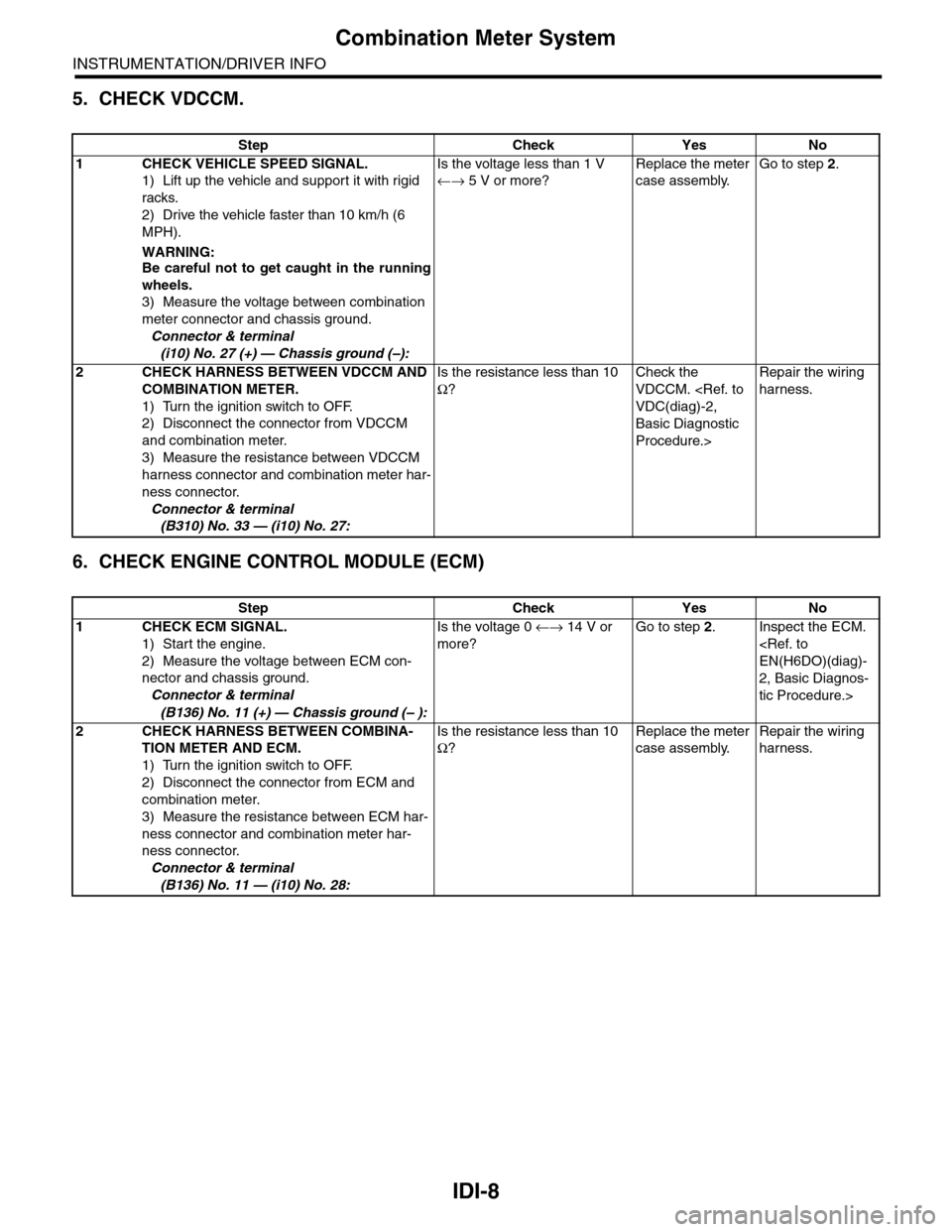
5. CHECK VDCCM.
6. CHECK ENGINE CONTROL MODULE (ECM)
Step Check Yes No
1CHECK VEHICLE SPEED SIGNAL.
1) Lift up the vehicle and support it with rigid
racks.
2) Drive the vehicle faster than 10 km/h (6
MPH).
WARNING:Be careful not to get caught in the running
wheels.
3) Measure the voltage between combination
meter connector and chassis ground.
Connector & terminal
(i10) No. 27 (+) — Chassis ground (–):
Is the voltage less than 1 V
←→ 5 V or more?
Replace the meter
case assembly.
Go to step 2.
2CHECK HARNESS BETWEEN VDCCM AND
COMBINATION METER.
1) Turn the ignition switch to OFF.
2) Disconnect the connector from VDCCM
and combination meter.
3) Measure the resistance between VDCCM
harness connector and combination meter har-
ness connector.
Connector & terminal
(B310) No. 33 — (i10) No. 27:
Is the resistance less than 10
Ω?
Check the
VDCCM.
Basic Diagnostic
Procedure.>
Repair the wiring
harness.
Step Check Yes No
1CHECK ECM SIGNAL.
1) Start the engine.
2) Measure the voltage between ECM con-
nector and chassis ground.
Connector & terminal
(B136) No. 11 (+) — Chassis ground (– ):
Is the voltage 0 ←→ 14 V or
more?
Go to step 2.Inspect the ECM.
2, Basic Diagnos-
tic Procedure.>
2CHECK HARNESS BETWEEN COMBINA-
TION METER AND ECM.
1) Turn the ignition switch to OFF.
2) Disconnect the connector from ECM and
combination meter.
3) Measure the resistance between ECM har-
ness connector and combination meter har-
ness connector.
Connector & terminal
(B136) No. 11 — (i10) No. 28:
Is the resistance less than 10
Ω?
Replace the meter
case assembly.
Repair the wiring
harness.
Page 451 of 2453
IDI-12
Combination Meter
INSTRUMENTATION/DRIVER INFO
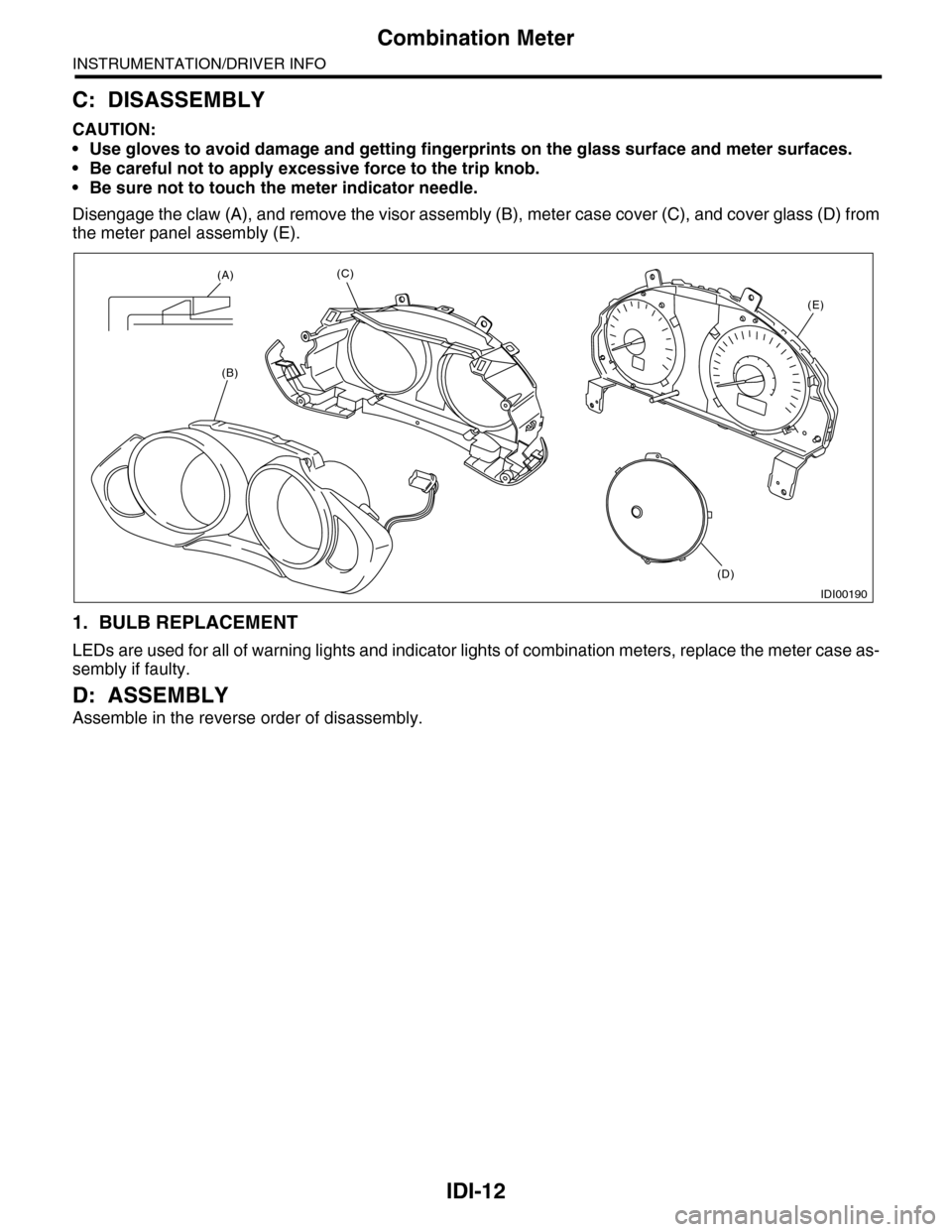
C: DISASSEMBLY
CAUTION:
•Use gloves to avoid damage and getting fingerprints on the glass surface and meter surfaces.
•Be careful not to apply excessive force to the trip knob.
•Be sure not to touch the meter indicator needle.
Disengage the claw (A), and remove the visor assembly (B), meter case cover (C), and cover glass (D) from
the meter panel assembly (E).
1. BULB REPLACEMENT
LEDs are used for all of warning lights and indicator lights of combination meters, replace the meter case as-
sembly if faulty.
D: ASSEMBLY
Assemble in the reverse order of disassembly.
IDI00190
(A)
(B)
(C)
(D)
(E)
Page 456 of 2453
IDI-17
Warning Box
INSTRUMENTATION/DRIVER INFO
8. Warning Box
A: REMOVAL
1) Disconnect the ground cable from battery.
2) Remove the upper grille.
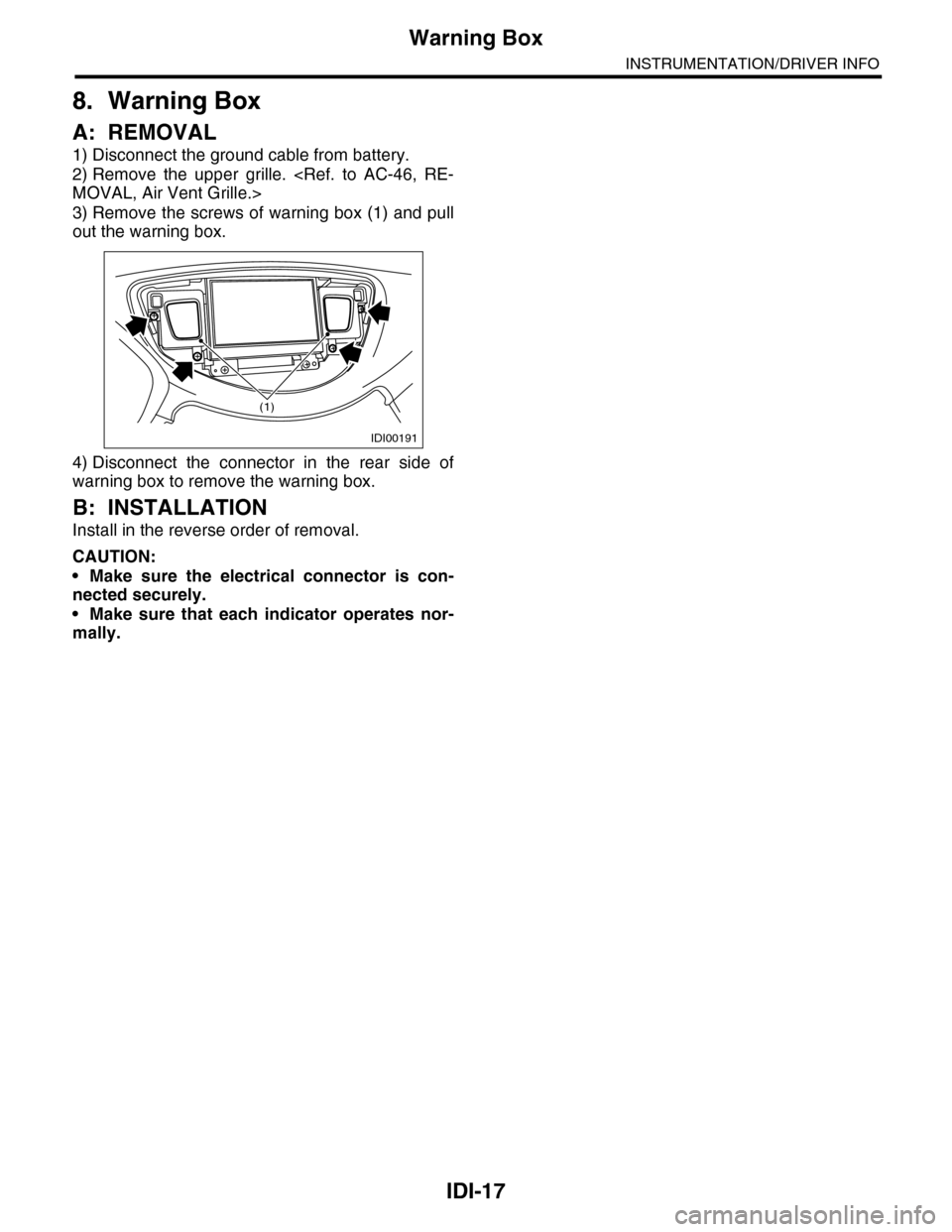
3) Remove the screws of warning box (1) and pull
out the warning box.
4) Disconnect the connector in the rear side of
warning box to remove the warning box.
B: INSTALLATION
Install in the reverse order of removal.
CAUTION:
•Make sure the electrical connector is con-
nected securely.
•Make sure that each indicator operates nor-
mally.
IDI00191
(1)
Page 457 of 2453
IDI-18
Warning Box
INSTRUMENTATION/DRIVER INFO
Page 459 of 2453
LAN(diag)-3
Check List for Interview
LAN SYSTEM (DIAGNOSTICS)
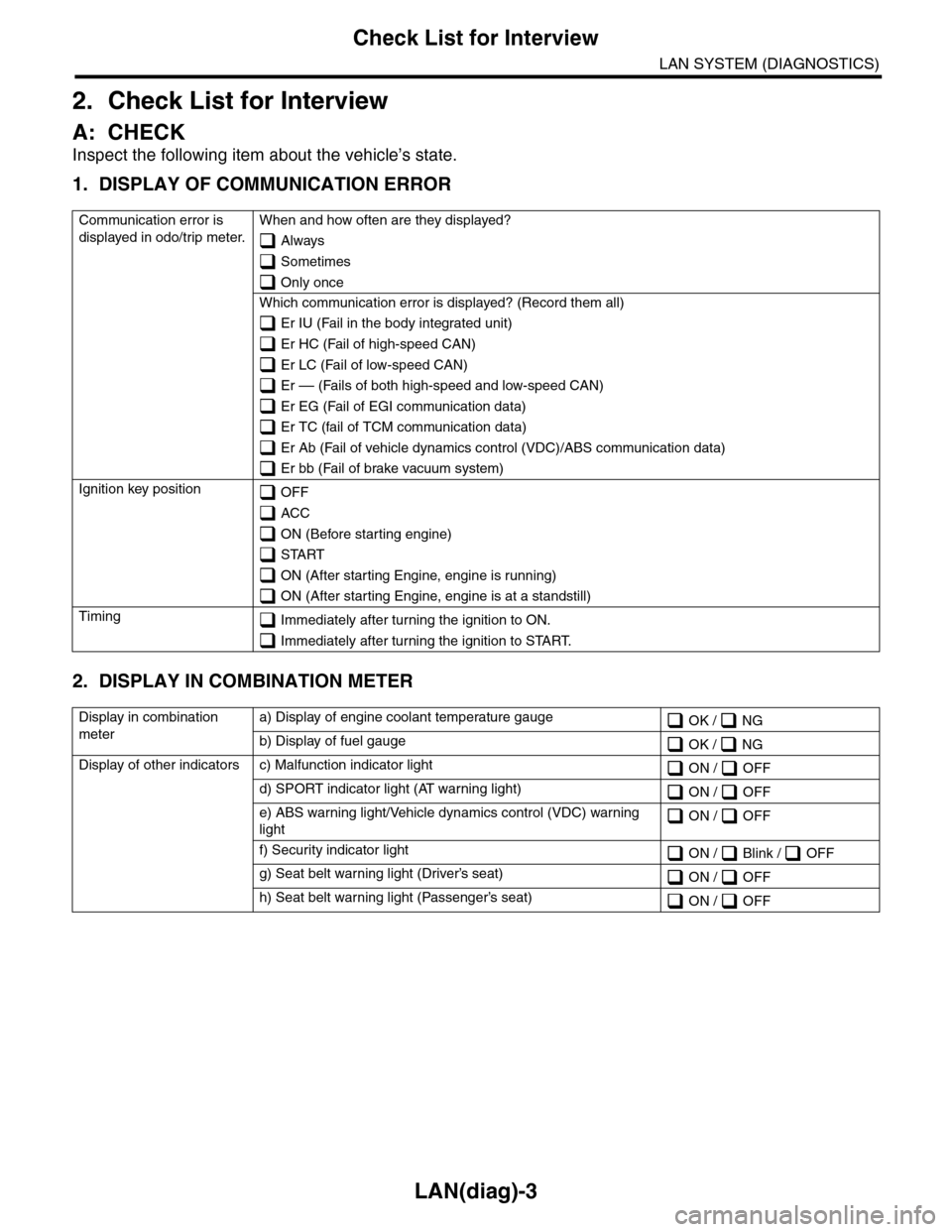
2. Check List for Interview
A: CHECK
Inspect the following item about the vehicle’s state.
1. DISPLAY OF COMMUNICATION ERROR
2. DISPLAY IN COMBINATION METER
Communication error is
displayed in odo/trip meter.
When and how often are they displayed?
Always
Sometimes
Only once
Which communication error is displayed? (Record them all)
Er IU (Fail in the body integrated unit)
Er HC (Fail of high-speed CAN)
Er LC (Fail of low-speed CAN)
Er –– (Fails of both high-speed and low-speed CAN)
Er EG (Fail of EGI communication data)
Er TC (fail of TCM communication data)
Er Ab (Fail of vehicle dynamics control (VDC)/ABS communication data)
Er bb (Fail of brake vacuum system)
Ignition key position OFF
ACC
ON (Before starting engine)
START
ON (After starting Engine, engine is running)
ON (After starting Engine, engine is at a standstill)
Timing Immediately after turning the ignition to ON.
Immediately after turning the ignition to START.
Display in combination
meter
a) Display of engine coolant temperature gauge OK / NG
b) Display of fuel gauge OK / NG
Display of other indicators c) Malfunction indicator light ON / OFF
d) SPORT indicator light (AT warning light) ON / OFF
e) ABS warning light/Vehicle dynamics control (VDC) warning
light ON / OFF
f) Security indicator light ON / Blink / OFF
g) Seat belt warning light (Driver’s seat) ON / OFF
h) Seat belt warning light (Passenger’s seat) ON / OFF
Page 466 of 2453
LAN(diag)-10
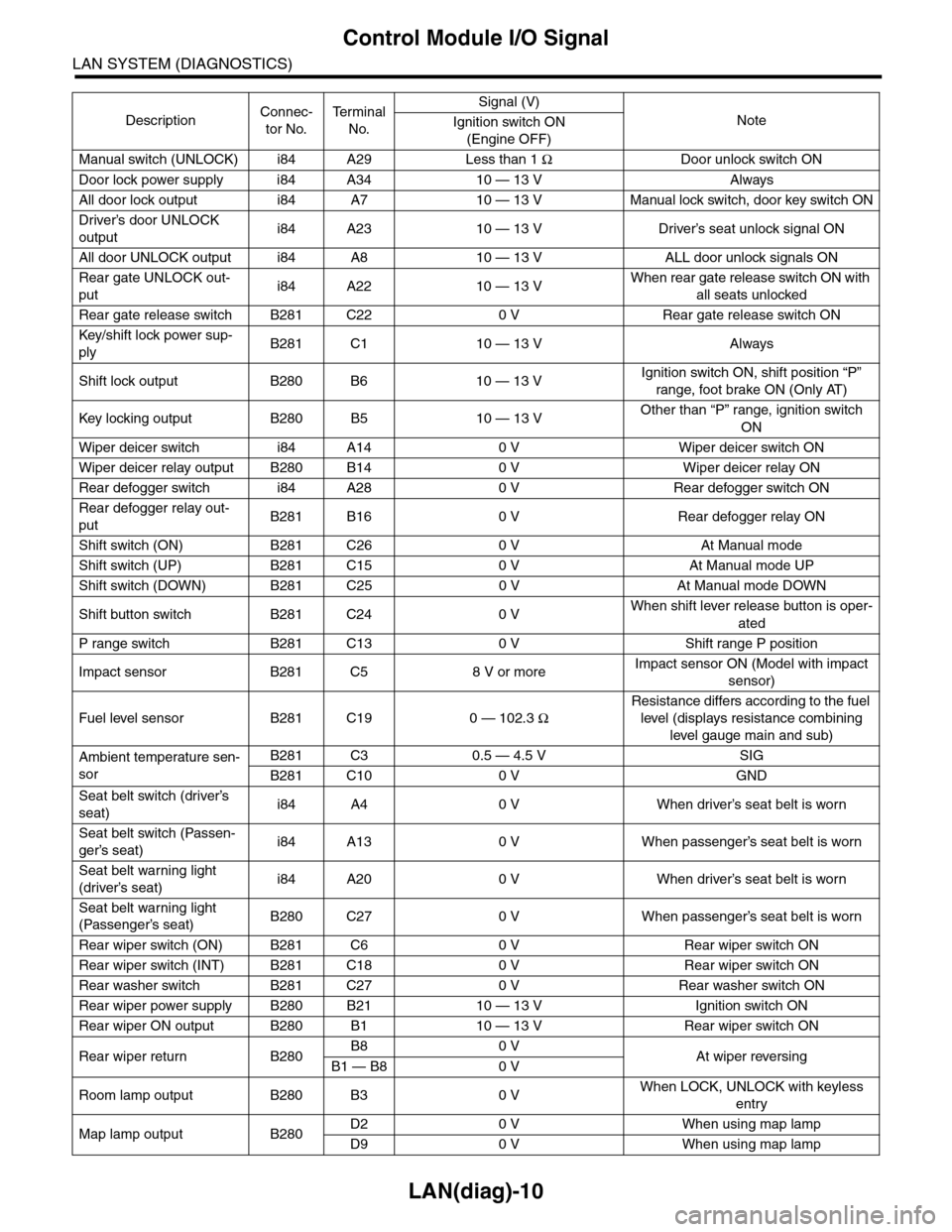
Control Module I/O Signal
LAN SYSTEM (DIAGNOSTICS)
Manual switch (UNLOCK) i84 A29 Less than 1 ΩDoor unlock switch ON
Door lock power supply i84 A34 10 — 13 V Always
All door lock output i84 A7 10 — 13 V Manual lock switch, door key switch ON
Driver’s door UNLOCK
outputi84 A23 10 — 13 V Driver’s seat unlock signal ON
All door UNLOCK output i84 A8 10 — 13 V ALL door unlock signals ON
Rear gate UNLOCK out-
puti84 A22 10 — 13 VWhen rear gate release switch ON with
all seats unlocked
Rear gate release switch B281 C22 0 V Rear gate release switch ON
Key/shift lock power sup-
plyB281 C1 10 — 13 V Always
Shift lock output B280 B6 10 — 13 VIgnition switch ON, shift position “P”
range, foot brake ON (Only AT)
Key locking output B280 B5 10 — 13 VOther than “P” range, ignition switch
ON
Wiper deicer switch i84 A14 0 V Wiper deicer switch ON
Wiper deicer relay output B280 B14 0 V Wiper deicer relay ON
Rear defogger switch i84 A28 0 V Rear defogger switch ON
Rear defogger relay out-
putB281 B16 0 V Rear defogger relay ON
Shift switch (ON) B281 C26 0 V At Manual mode
Shift switch (UP) B281 C15 0 V At Manual mode UP
Shift switch (DOWN) B281 C25 0 V At Manual mode DOWN
Shift button switch B281 C24 0 VWhen shift lever release button is oper-
ated
P range switch B281 C13 0 V Shift range P position
Impact sensor B281 C5 8 V or moreImpact sensor ON (Model with impact
sensor)
Fuel level sensor B281 C19 0 — 102.3 Ω
Resistance differs according to the fuel
level (displays resistance combining
level gauge main and sub)
Ambient temperature sen-
sor
B281 C3 0.5 — 4.5 V SIG
B281 C10 0 V GND
Seat belt switch (driver’s
seat)i84 A4 0 V When driver’s seat belt is worn
Seat belt switch (Passen-
ger’s seat)i84 A13 0 V When passenger’s seat belt is worn
Seat belt warning light
(driver’s seat)i84 A20 0 V When driver’s seat belt is worn
Seat belt warning light
(Passenger’s seat)B280 C27 0 V When passenger’s seat belt is worn
Rear wiper switch (ON) B281 C6 0 V Rear wiper switch ON
Rear wiper switch (INT) B281 C18 0 V Rear wiper switch ON
Rear washer switch B281 C27 0 V Rear washer switch ON
Rear wiper power supply B280 B21 10 — 13 V Ignition switch ON
Rear wiper ON output B280 B1 10 — 13 V Rear wiper switch ON
Rear wiper return B280B8 0 VAt wiper reversingB1 — B8 0 V
Room lamp output B280 B3 0 VWhen LOCK, UNLOCK with keyless
entry
Map lamp output B280D2 0 V When using map lamp
D9 0 V When using map lamp
DescriptionConnec-
tor No.
Te r m i n a l
No.
Signal (V)
NoteIgnition switch ON
(Engine OFF)
Page 470 of 2453
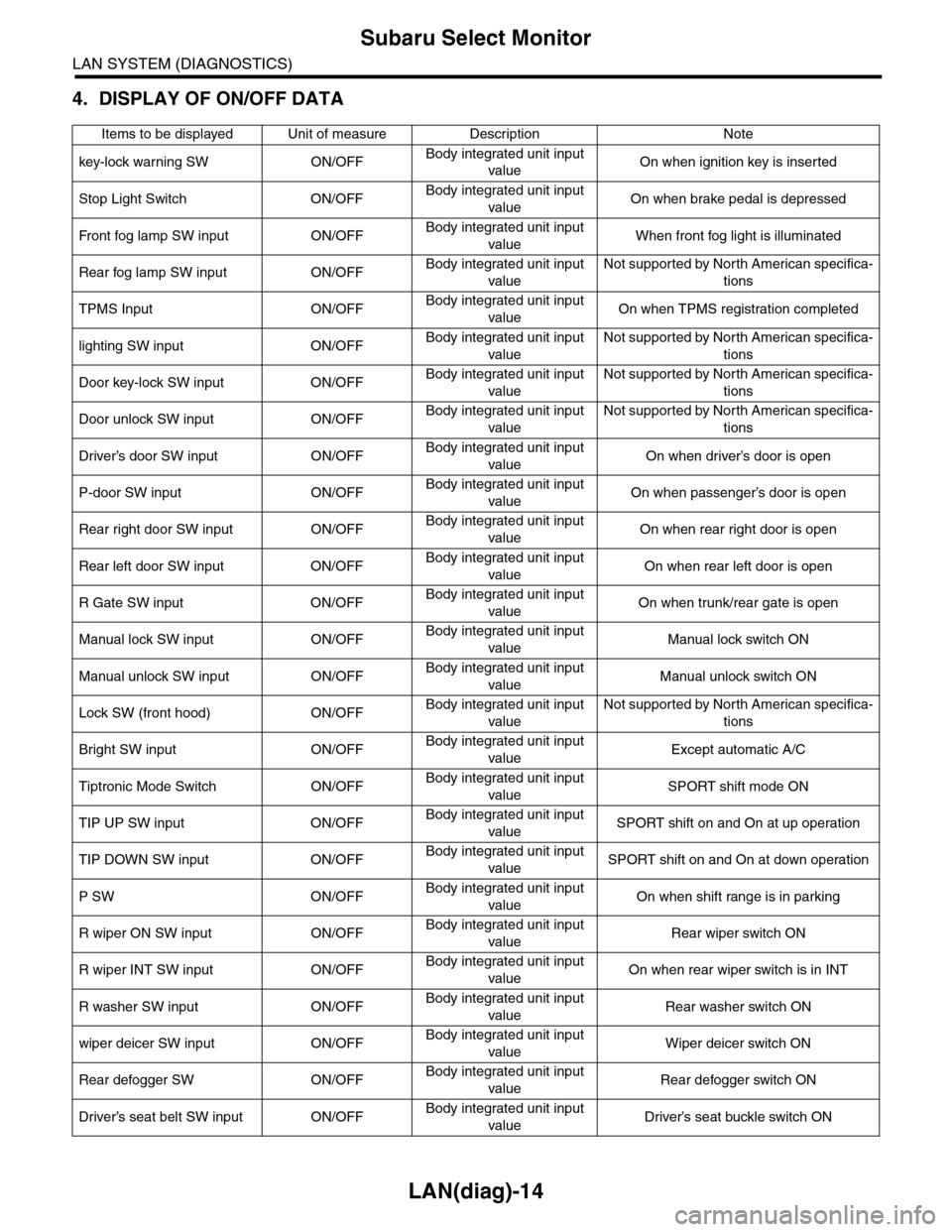
LAN(diag)-14
Subaru Select Monitor
LAN SYSTEM (DIAGNOSTICS)
4. DISPLAY OF ON/OFF DATA
Items to be displayed Unit of measure Description Note
key-lock warning SW ON/OFFBody integrated unit input
valueOn when ignition key is inserted
Stop Light Switch ON/OFFBody integrated unit input
valueOn when brake pedal is depressed
Fr o nt fog la mp S W i n pu t O N/O FFBody integrated unit input
valueWhen front fog light is illuminated
Rear fog lamp SW input ON/OFFBody integrated unit input
value
Not supported by North American specifica-
tions
TPMS Input ON/OFFBody integrated unit input
valueOn when TPMS registration completed
lighting SW input ON/OFFBody integrated unit input
value
Not supported by North American specifica-
tions
Door key-lock SW input ON/OFFBody integrated unit input
value
Not supported by North American specifica-
tions
Door unlock SW input ON/OFFBody integrated unit input
value
Not supported by North American specifica-
tions
Driver’s door SW input ON/OFFBody integrated unit input
valueOn when driver’s door is open
P-door SW input ON/OFFBody integrated unit input
valueOn when passenger’s door is open
Rear right door SW input ON/OFFBody integrated unit input
valueOn when rear right door is open
Rear left door SW input ON/OFFBody integrated unit input
valueOn when rear left door is open
R Gate SW input ON/OFFBody integrated unit input
valueOn when trunk/rear gate is open
Manual lock SW input ON/OFFBody integrated unit input
valueManual lock switch ON
Manual unlock SW input ON/OFFBody integrated unit input
valueManual unlock switch ON
Lock SW (front hood) ON/OFFBody integrated unit input
value
Not supported by North American specifica-
tions
Bright SW input ON/OFFBody integrated unit input
valueExcept automatic A/C
Tiptronic Mode Switch ON/OFFBody integrated unit input
valueSPORT shift mode ON
TIP UP SW input ON/OFFBody integrated unit input
valueSPORT shift on and On at up operation
TIP DOWN SW input ON/OFFBody integrated unit input
valueSPORT shift on and On at down operation
P SW ON/OFFBody integrated unit input
valueOn when shift range is in parking
R wiper ON SW input ON/OFFBody integrated unit input
valueRear wiper switch ON
R wiper INT SW input ON/OFFBody integrated unit input
valueOn when rear wiper switch is in INT
R washer SW input ON/OFFBody integrated unit input
valueRear washer switch ON
wiper deicer SW input ON/OFFBody integrated unit input
valueWiper deicer switch ON
Rear defogger SW ON/OFFBody integrated unit input
valueRear defogger switch ON
Driver’s seat belt SW input ON/OFFBody integrated unit input
valueDriver’s seat buckle switch ON
Page 471 of 2453
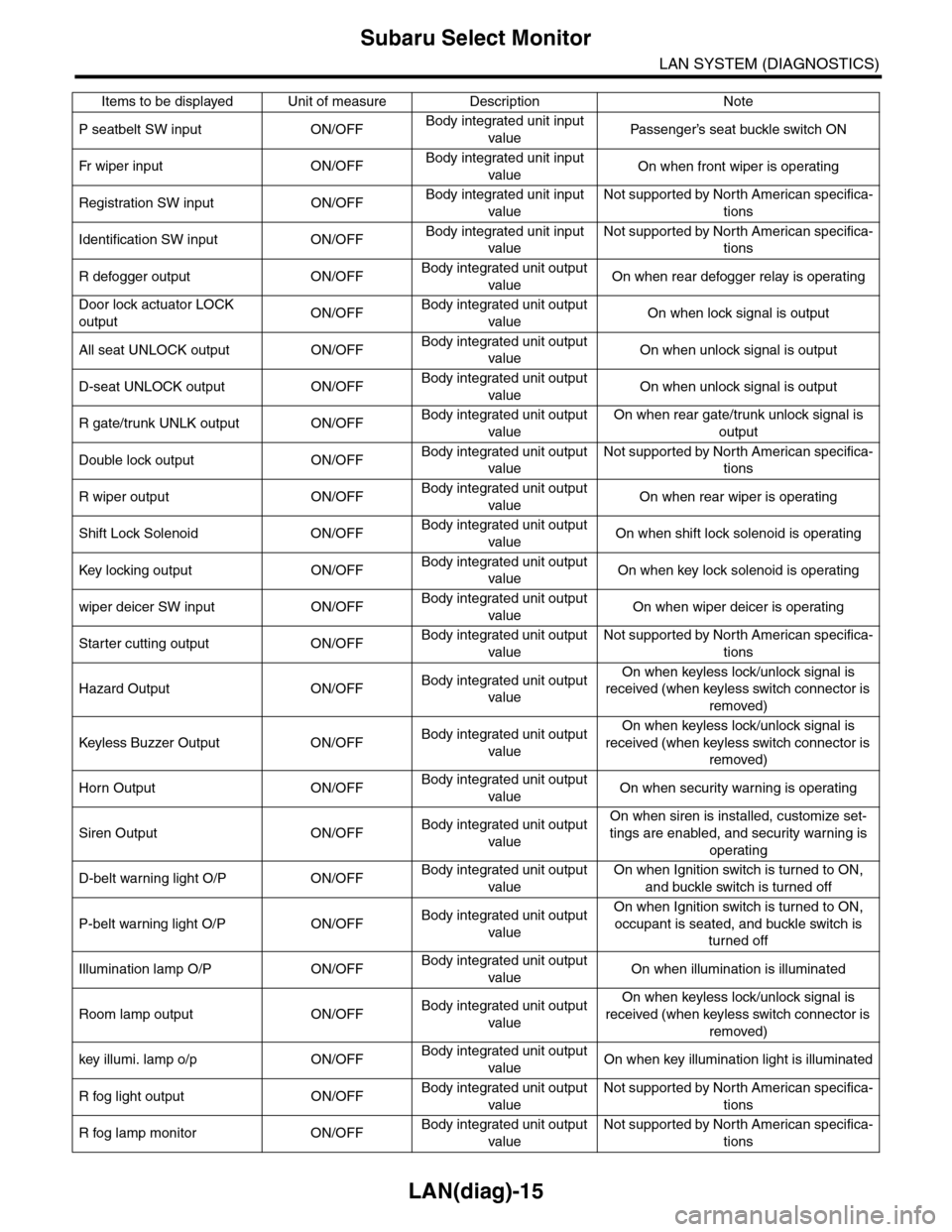
LAN(diag)-15
Subaru Select Monitor
LAN SYSTEM (DIAGNOSTICS)
P seatbelt SW input ON/OFFBody integrated unit input
valuePa s se ng e r ’s se at bu ckl e sw it c h ON
Fr wi pe r in p ut O N/O FFBody integrated unit input
valueOn when front wiper is operating
Registration SW input ON/OFFBody integrated unit input
value
Not supported by North American specifica-
tions
Identification SW input ON/OFFBody integrated unit input
value
Not supported by North American specifica-
tions
R defogger output ON/OFFBody integrated unit output
valueOn when rear defogger relay is operating
Door lock actuator LOCK
outputON/OFFBody integrated unit output
valueOn when lock signal is output
All seat UNLOCK output ON/OFFBody integrated unit output
valueOn when unlock signal is output
D-seat UNLOCK output ON/OFFBody integrated unit output
valueOn when unlock signal is output
R gate/trunk UNLK output ON/OFFBody integrated unit output
value
On when rear gate/trunk unlock signal is
output
Double lock output ON/OFFBody integrated unit output
value
Not supported by North American specifica-
tions
R wiper output ON/OFFBody integrated unit output
valueOn when rear wiper is operating
Shift Lock Solenoid ON/OFFBody integrated unit output
valueOn when shift lock solenoid is operating
Key locking output ON/OFFBody integrated unit output
valueOn when key lock solenoid is operating
wiper deicer SW input ON/OFFBody integrated unit output
valueOn when wiper deicer is operating
Starter cutting output ON/OFFBody integrated unit output
value
Not supported by North American specifica-
tions
Hazard Output ON/OFFBody integrated unit output
value
On when keyless lock/unlock signal is
received (when keyless switch connector is
removed)
Keyless Buzzer Output ON/OFFBody integrated unit output
value
On when keyless lock/unlock signal is
received (when keyless switch connector is
removed)
Horn Output ON/OFFBody integrated unit output
valueOn when security warning is operating
Siren Output ON/OFFBody integrated unit output
value
On when siren is installed, customize set-
tings are enabled, and security warning is
operating
D-belt warning light O/P ON/OFFBody integrated unit output
value
On when Ignition switch is turned to ON,
and buckle switch is turned off
P-belt warning light O/P ON/OFFBody integrated unit output
value
On when Ignition switch is turned to ON,
occupant is seated, and buckle switch is
turned off
Illumination lamp O/P ON/OFFBody integrated unit output
valueOn when illumination is illuminated
Room lamp output ON/OFFBody integrated unit output
value
On when keyless lock/unlock signal is
received (when keyless switch connector is
removed)
key illumi. lamp o/p ON/OFFBody integrated unit output
valueOn when key illumination light is illuminated
R fog light output ON/OFFBody integrated unit output
value
Not supported by North American specifica-
tions
R fog lamp monitor ON/OFFBody integrated unit output
value
Not supported by North American specifica-
tions
Items to be displayed Unit of measure Description Note