navi SUBARU TRIBECA 2009 1.G Service Workshop Manual
[x] Cancel search | Manufacturer: SUBARU, Model Year: 2009, Model line: TRIBECA, Model: SUBARU TRIBECA 2009 1.GPages: 2453, PDF Size: 46.32 MB
Page 192 of 2453
ET-6
Navigation System
ENTERTAINMENT
5. Navigation System
A: WIRING DIAGRAM
B: INSPECTION
1. CHECK THE OPERATION OF THE NAVI-
GATION.
Start the engine, and then inspect that the opening
screen is displayed.
Standard value: The opening screen should be dis-
played.
OK: Normal
NG: When not displayed, check the signal line con-
nector and the audio connector. If there are no
problems in the connecting lines or the lines were
repaired, check that the opening screen is dis-
played.
At this point, if the display is not viewable, the unit is
defective.
2. CHECK THE DVD-ROM.
An opening screen is displayed, then it switches to
the map screen after a while.
When a screen other than the opening screen is
displayed, press the «MAP» key.
Standard value: The map screen should be dis-
played.
OK: Normal
NG: If the map screen is not displayed, check
whether the DVD-ROM is set in the navigation sys-
tem, whether the correct side is set, type of the
DVD-ROM, the existence of any scratches, etc. If
there are no problems on the DVD-ROM, the main
body is defective.
3. CHECK EACH CONNECTION
If there are no problems in the inspections of 1 and
2 above, use “
vice to perform inspection.
4. SWITCHING TO CONNECTION INSPEC-
TION MODE
1) Press the menu key.
2) Select navigation setup from the menu screen.
3) Select navigation information from the naviga-
tion setup screen.
4) Select the vehicle signal from the navigation in-
formation screen.
5) The display will switch to the vehicle signal (for
connection inspection) screen.
6) Check that the display changes according to
each operation
ON: Normal
NG: Check the circuit when the display does not
change.
5. CHECK THE GPS ANTENNA
NOTE:
When checking the GPS antenna, perform the
check operation outdoors to improve the receiver
sensitivity.
Make sure that a value other than “zero” is dis-
played in the GPS item.
OK: Normal
NG: If “No positioning” is displayed, check the GPS
antenna connection.
If the GPS display is red, the main unit could be
faulty.
6. CHECK THE BACK SENSOR
NOTE:
Before starting inspections, inspect the safety
around the rear end of the vehicle.
1) Turn the ignition switch to ON.
2) Pull the parking brake and depress the brake,
then put the gear in reverse.
3) Make sure that “On” is lit in the back sensor item.
Standard Value: “On” should be lit.
On: Normal
NG: If “On” does not light, check the signal line con-
nection. If there are no problems, the unit could be
faulty.
7. CHECK THE ILLUMINATION
1) Turn the lighting switch to level 1.
NOTE:
Make sure that the bright switch is not turned ON at
this time.
2) Make sure that “On” lights in the illumination
item, then the screen fades out.
Standard Value: “On” should be lit.
OK: Normal
NG: If “On” does not light, check the signal line con-
nection. If there are no problems, the unit could be
faulty.
8. CHECK THE PARKING SIGNAL
NOTE:
The side brake signal is normally “OFF”, so operat-
ing it will produce no change.
Page 193 of 2453
ET-7
Navigation System
ENTERTAINMENT
9. CHECK SPEED SENSOR
NOTE:
•Before starting inspections, inspect the safety
around the vehicle.
•Lift-up the vehicle as necessary.
•When the diagnostic trouble code is input in the
VDC CM, clear the memory.
1) Move the vehicle 2 to 3 meters (6.6 to 9.8 ft).
2) Check that the numbers from the speed sensor
are displayed.
Standard value: Vehicle speed is to be shown in
numbers.
OK: Normal
NG: If vehicle speed is not displayed, check the sig-
nal line connection. If there are no problems, the
unit could be faulty.
Page 207 of 2453
ET-22
Navigation Display
ENTERTAINMENT
17.Navigation Display
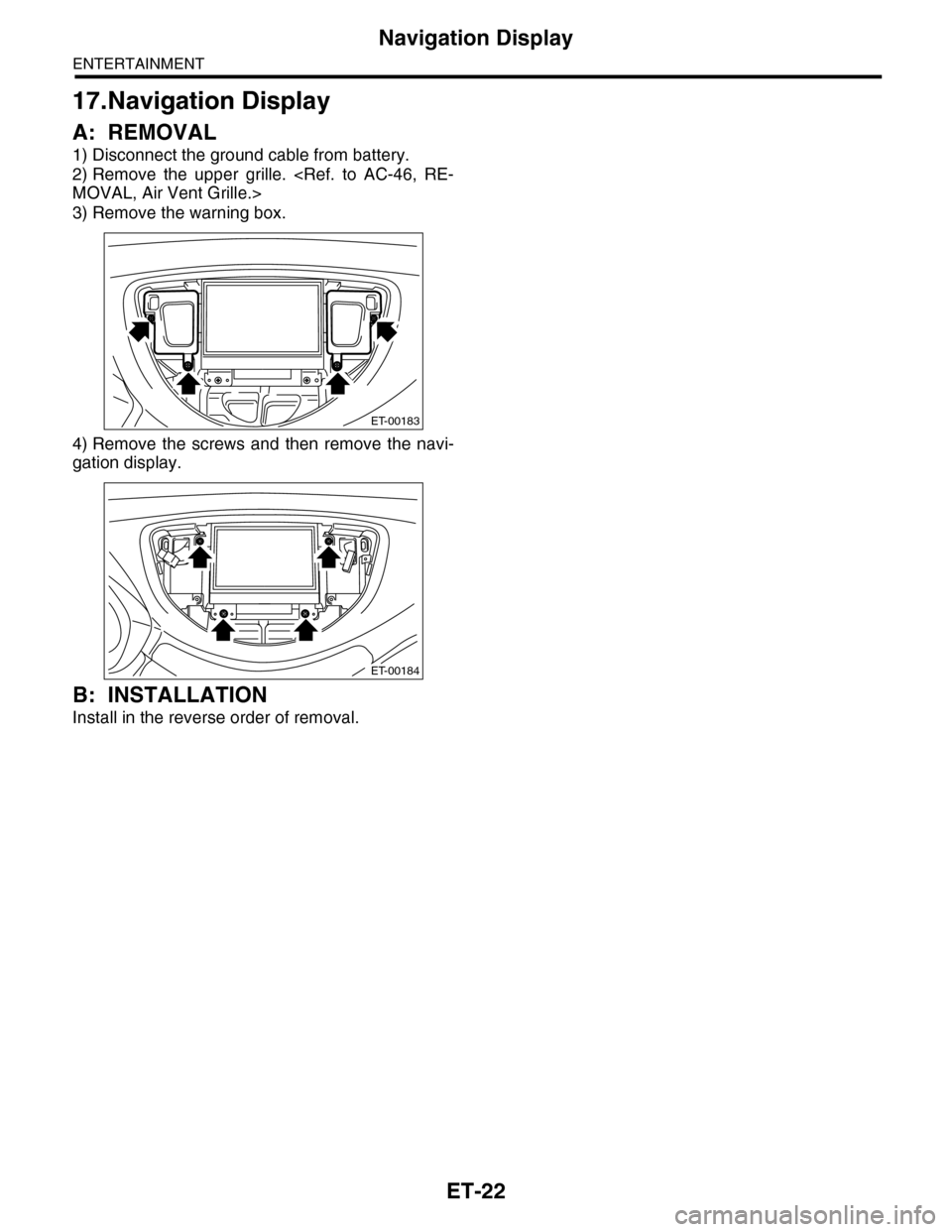
A: REMOVAL
1) Disconnect the ground cable from battery.
2) Remove the upper grille.
3) Remove the warning box.
4) Remove the screws and then remove the navi-
gation display.
B: INSTALLATION
Install in the reverse order of removal.
ET-00183
ET-00184
Page 208 of 2453
ET-23
Navigation Body
ENTERTAINMENT
18.Navigation Body
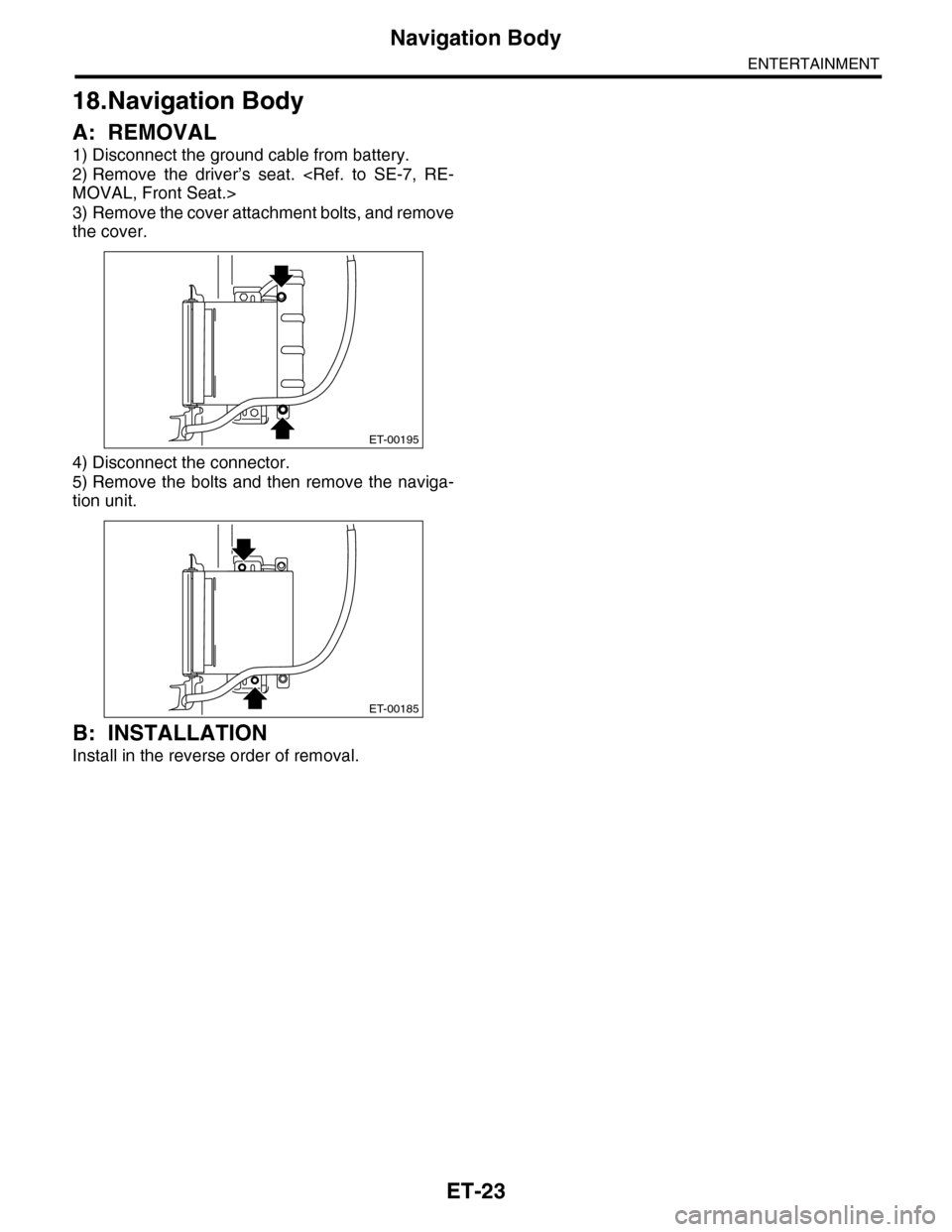
A: REMOVAL
1) Disconnect the ground cable from battery.
2) Remove the driver’s seat.
3) Remove the cover attachment bolts, and remove
the cover.
4) Disconnect the connector.
5) Remove the bolts and then remove the naviga-
tion unit.
B: INSTALLATION
Install in the reverse order of removal.
ET-00195
ET-00185
Page 209 of 2453
ET-24
Navigation Switch
ENTERTAINMENT
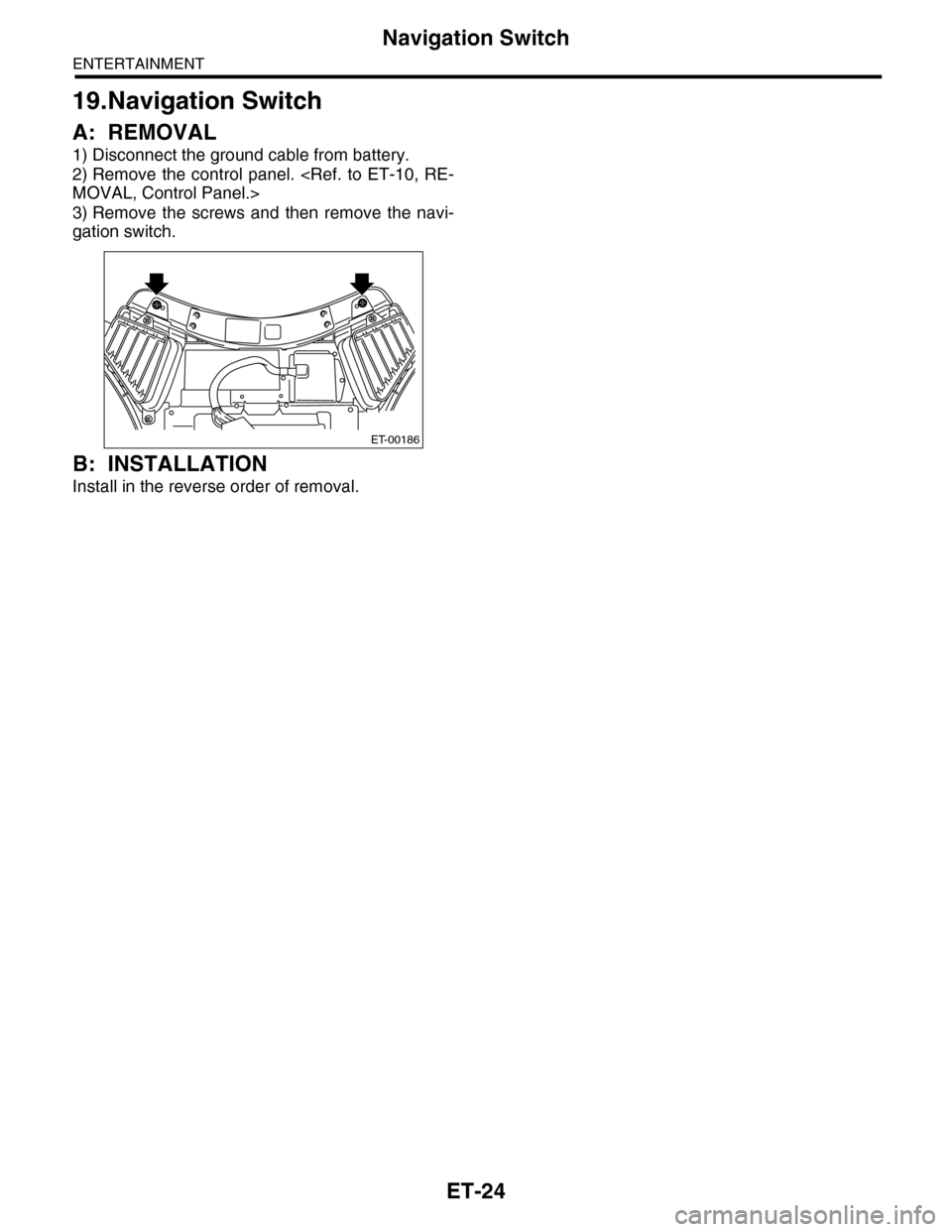
19.Navigation Switch
A: REMOVAL
1) Disconnect the ground cable from battery.
2) Remove the control panel.
3) Remove the screws and then remove the navi-
gation switch.
B: INSTALLATION
Install in the reverse order of removal.
ET-00186
Page 210 of 2453
ET-25
GPS Antenna
ENTERTAINMENT
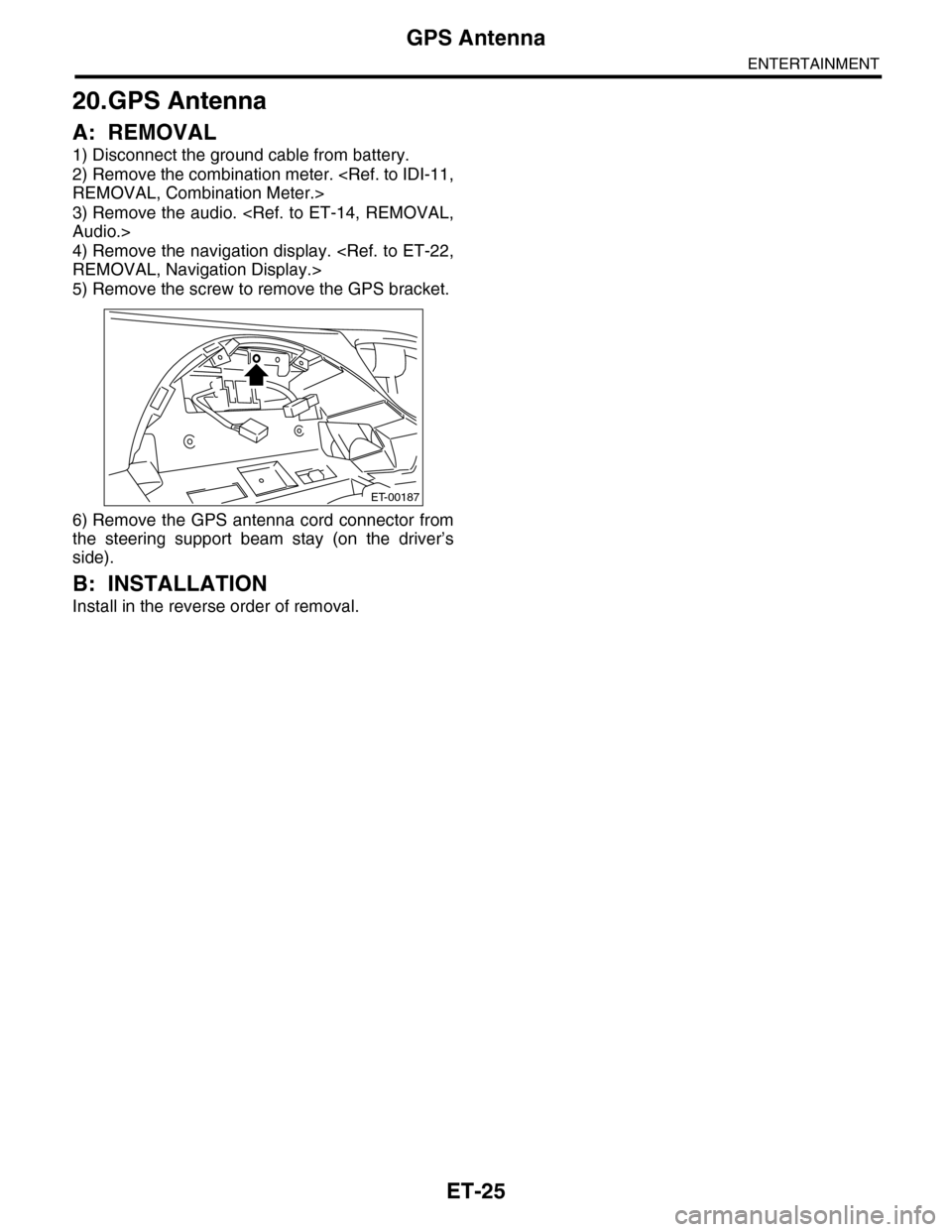
20.GPS Antenna
A: REMOVAL
1) Disconnect the ground cable from battery.
2) Remove the combination meter.
3) Remove the audio.
4) Remove the navigation display.
5) Remove the screw to remove the GPS bracket.
6) Remove the GPS antenna cord connector from
the steering support beam stay (on the driver’s
side).
B: INSTALLATION
Install in the reverse order of removal.
ET-00187
Page 211 of 2453
ET-26
Multi Function Display (MFD)
ENTERTAINMENT
21.Multi Function Display (MFD)
A: REMOVAL
B: INSTALLATION
Install in the reverse order of removal.
Page 212 of 2453
ET-27
Multi Function Switch
ENTERTAINMENT
22.Multi Function Switch
A: REMOVAL
B: INSTALLATION
Install in the reverse order of removal.
Page 282 of 2453
EI-40
Instrument Panel Assembly
EXTERIOR/INTERIOR TRIM
17.Instrument Panel Assembly
A: REMOVAL
CAUTION:
Take care of the following when removing the
instrument panel from the vehicle body.
•Refer to “CAUTION” of “General Description”
before starting the work.
•Be sure to disconnect each harness connec-
tor. Applying excessive pulling force may dam-
age the harness.
•Be careful to the harness of airbag system.
Damage of the harness may cause the air bag
system malfunction.
•Take care not to damage the interior trims
when removing the instrument panel from the
vehicle body.
NOTE:
•Putting alignment marks to each connector as
necessary facilitates the reassembly work.
•When storing the removed instrument panel, be
sure to prepare a table or the like to put the instru-
ment panel on in order to prevent damage.
1. INSTRUMENT PANEL UPPER
1) Disconnect the ground cable from battery and
wait for at least 20 seconds before starting work.
2) Remove the console box.
3) Remove the instrument panel lower cover.
er.>
4) Remove the glove box.
5) Remove the center console.
6) Remove the audio unit.
7) Remove the combination meter assembly.
8) Remove the upper grille.
9) Remove the multi function display or navigation
monitor, and warning box.
10) Remove the front pillar upper trim.
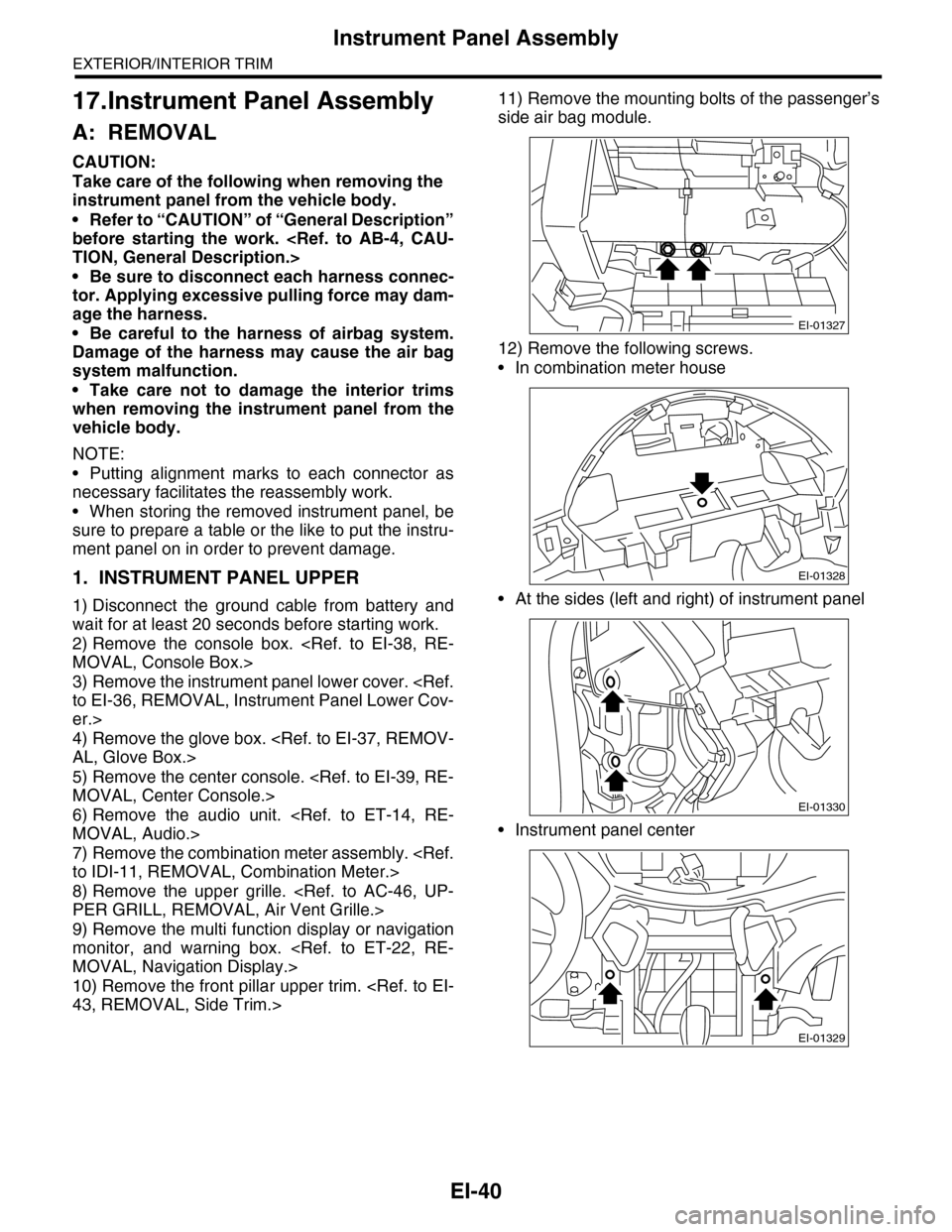
11) Remove the mounting bolts of the passenger’s
side air bag module.
12) Remove the following screws.
•In combination meter house
•At the sides (left and right) of instrument panel
•Instrument panel center
EI-01327
EI-01328
EI-01330
EI-01329
Page 289 of 2453
EI-47
Floor Mat
EXTERIOR/INTERIOR TRIM
20.Floor Mat
A: REMOVAL
1. FRONT FLOOR MAT
1) Remove the front seats.
2) Remove the second–row seats.
3) Remove the console box.
4) Remove the instrument panel lower cover.
er.>
5) Remove the glove box.
6) Remove the following trims.
•Front door scuff plate
•Rear door scuff plate
•Front pillar lower trim
•Center pillar lower trim
7) Remove the remote opener cover.
8) Remove the navigation unit.
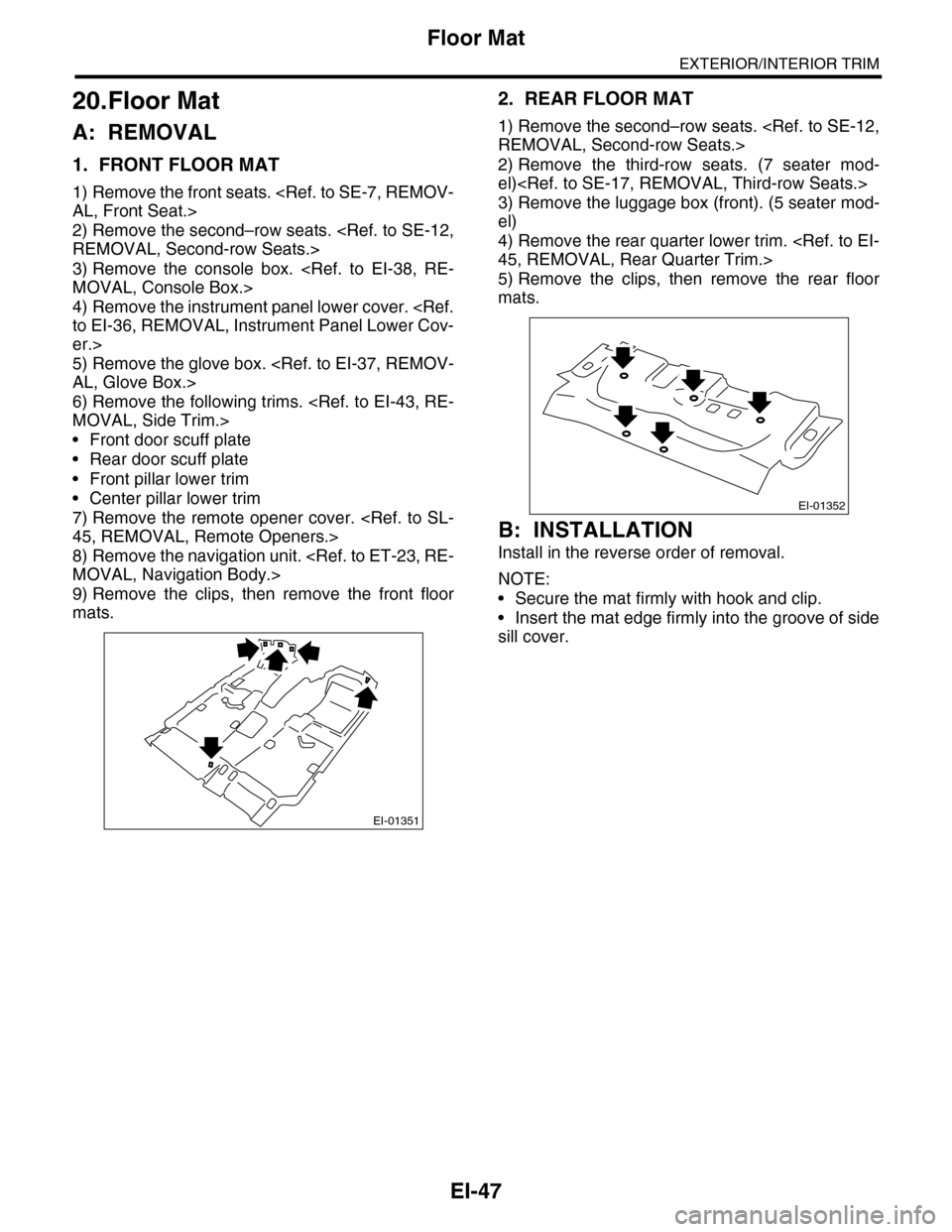
9) Remove the clips, then remove the front floor
mats.
2. REAR FLOOR MAT
1) Remove the second–row seats.
2) Remove the third-row seats. (7 seater mod-
el)
3) Remove the luggage box (front). (5 seater mod-
el)
4) Remove the rear quarter lower trim.
5) Remove the clips, then remove the rear floor
mats.
B: INSTALLATION
Install in the reverse order of removal.
NOTE:
•Secure the mat firmly with hook and clip.
•Insert the mat edge firmly into the groove of side
sill cover.
EI-01351
EI-01352