window SUBARU TRIBECA 2014 1.G Owner's Manual
[x] Cancel search | Manufacturer: SUBARU, Model Year: 2014, Model line: TRIBECA, Model: SUBARU TRIBECA 2014 1.GPages: 426, PDF Size: 6.37 MB
Page 126 of 426
Child safety locks
WARNING
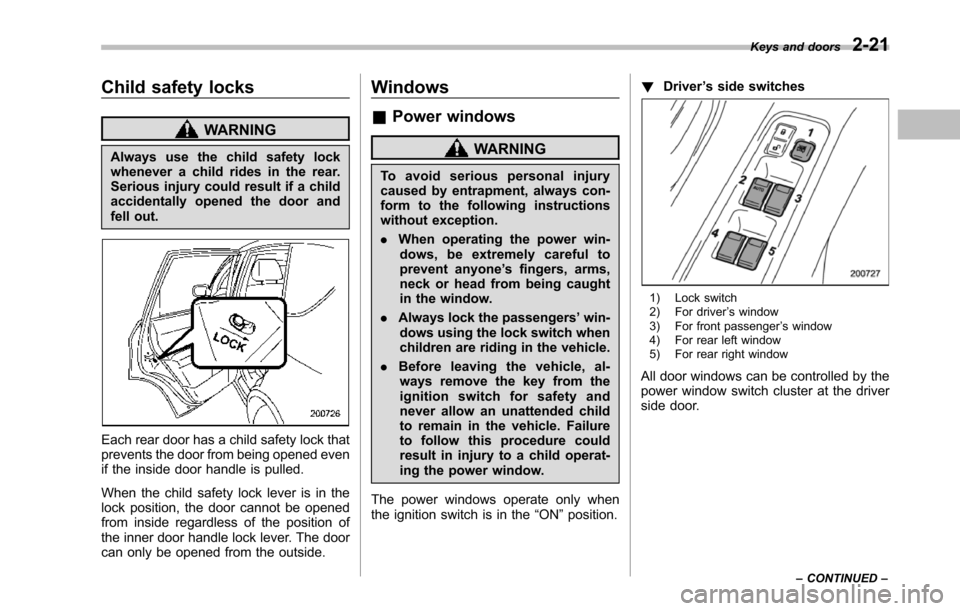
Always use the child safety lockwhenever a child rides in the rear.Serious injury could result if a childaccidentally opened the door andfell out.
Each rear door has a child safety lock thatprevents the door from being opened evenif the inside door handle is pulled.
When the child safety lock lever is in thelock position, the door cannot be openedfrom inside regardless of the position ofthe inner door handle lock lever. The doorcan only be opened from the outside.
Windows
&Power windows
WARNING
To a v o i d s e r i o u s p e r s o n a l i n j u r ycausedby entrapment, always con-form to the following instructionswithout exception.
.When operating the power win-dows, be extremely careful toprevent anyone’s fingers, arms,neck or head from being caughtin the window.
.Always lockthe passengers’win-dows using the lock switch whenchildren are riding in the vehicle.
.Before leaving the vehicle, al-ways remove the key from theignition switch for safety andnever allow an unattended childto remain in the vehicle. Failureto follow this procedure couldresult in injury to a child operat-ing the power window.
The power windows operate only whentheignition switch is in the“ON”position.
!Driver’s side switches
1) Lock switch2) For driver’s window3) For front passenger’s window4) For rear left window5) For rear right window
All door windows can be controlled by thepower window switch cluster at the driverside door.
Keys and doors2-21
–CONTINUED–
Page 127 of 426
2-22Keys and doors
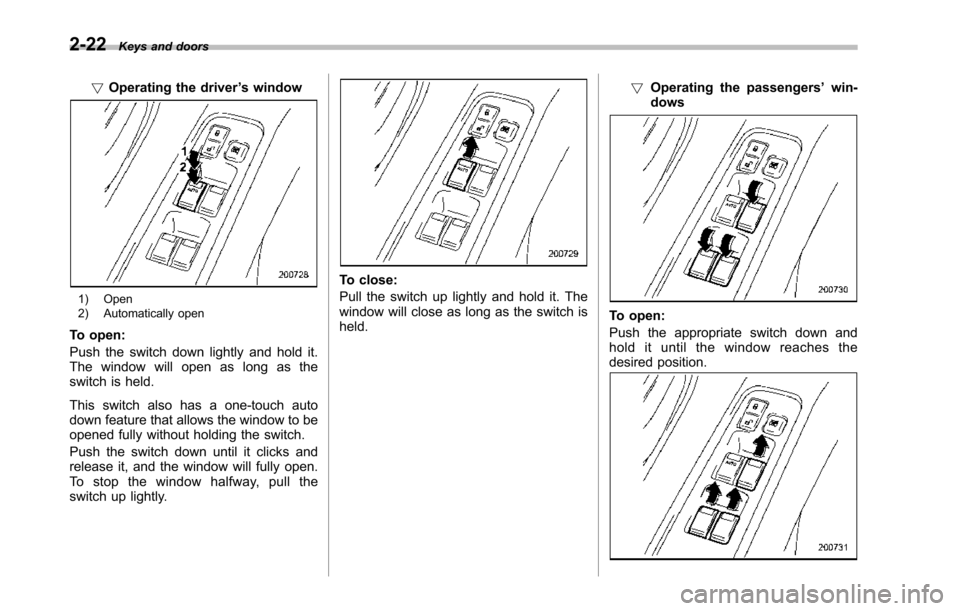
!Operating the driver’s window
1) Open2) Automatically open
To open:
Push the switch down lightly and hold it.The window will open as long as theswitch is held.
This switch also has a one-touch autodown feature that allows the window to beopened fully without holding the switch.
Push the switch down until it clicks andrelease it, and the window will fully open.To s t o p t h e w i n d o w h a l f w a y, p u l l t h eswitch up lightly.
To close:
Pull the switch up lightly and hold it. Thewindow will close as long as the switch isheld.
!Operating the passengers’win-dows
To open:
Pushthe appropriate switch down andhold it until the window reaches thedesired position.
Page 128 of 426
To close:
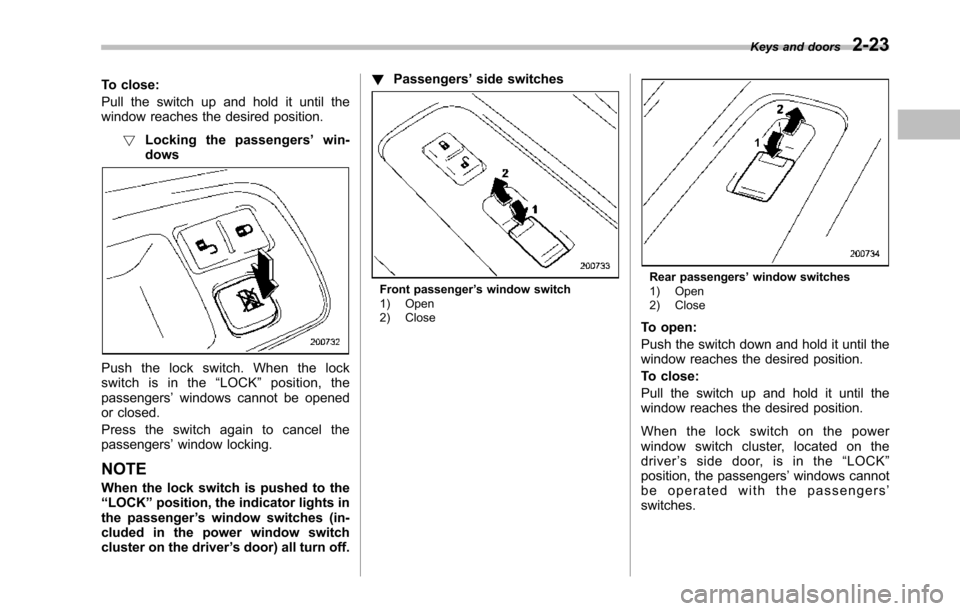
Pull the switch up and hold it until thewindow reaches the desired position.
!Locking the passengers’win-dows
Push the lock switch. When the lockswitch is in the“LOCK”position, thepassengers’windows cannot be openedor closed.
Press the switch again to cancel thepassengers’window locking.
NOTE
When the lockswitch is pushed to the“LOCK”position,the indicator lights inthe passenger’s window switches (in-cluded in the power window switchcluster on the driver’s door) all turn off.
!Passengers’side switches
Front passenger’s window switch1) Open2) Close
Rear passengers’window switches1) Open2) Close
To open:
Push the switch down and hold it until thewindow reaches the desired position.
To close:
Pull the switch up and hold it until thewindow reaches the desired position.
When the lock switch on the powerwindow switch cluster, located on thedriver’ssidedoor,isinthe“LOCK”position, the passengers’windows cannotbe operated with the passengers’switches.
Keys and doors2-23
Page 135 of 426
Instruments and controls
Multi function display (vehicles without agenuine SUBARU navigation system)........... 3-24Current fuel consumption................................... 3-25Average fuel consumption.................................. 3-25Driving range on remaining fuel.......................... 3-26Journey time...................................................... 3-27
Light control switch........................................... 3-27Headlights.......................................................... 3-28High/low beam change (dimmer)......................... 3-28Headlight flasher................................................ 3-28Daytime running light system............................. 3-29
Turn signal lever................................................ 3-29
Illumination brightness control......................... 3-29
Headlight beam leveler (if equipped)................ 3-30
Parking light switch........................................... 3-32
Front fog light switch........................................ 3-32
Wiper and washer.............................................. 3-33Windshield wiper and washer switches.............. 3-34Rear window wiper and washer switch............... 3-35
Windshield wiper deicer.................................... 3-36
Rear window defogger button.......................... 3-37
Mirrors................................................................ 3-38Type A inside mirror (if equipped) ...................... 3-38Type B inside mirror (if equipped) ...................... 3-38Type C inside mirror (if equipped) ...................... 3-41Outside mirrors................................................. 3-42
Tilt steering wheel............................................. 3-44
Horn.................................................................... 3-44
Page 136 of 426
Ignition switch
WARNING
.Never turn the ignition switch to“LOCK”while the vehicle isbeing driven or towed becausethat will lock the steering wheel,preventing steering control. Andwhen the engine is turned off, ittakes a much greater effort thanusual to steer.
.Before leaving the vehicle, al-ways removethe key from theignition switch for safety andnever allow an unattended childto remain in the vehicle. Failureto follow this procedure couldresult in injury to a child orothers. Children could operatethe power windows, the moon-roof or other controls or evenmake the vehicle move.
CAUTION
Do not attach a large key holder orkey case to either key. If it bangedagainst your knees or hands whileyou were driving, it could turn theignition switch from the“ON”posi-
tion to the“Acc”or“LOCK”posi-tion, thereby stopping the engine.Also, if the key is attached to akeyholder or to a large bunch ofother keys, centrifugal force may acton it as the vehicle moves, resultingin unwanted turning of the ignitionswitch.
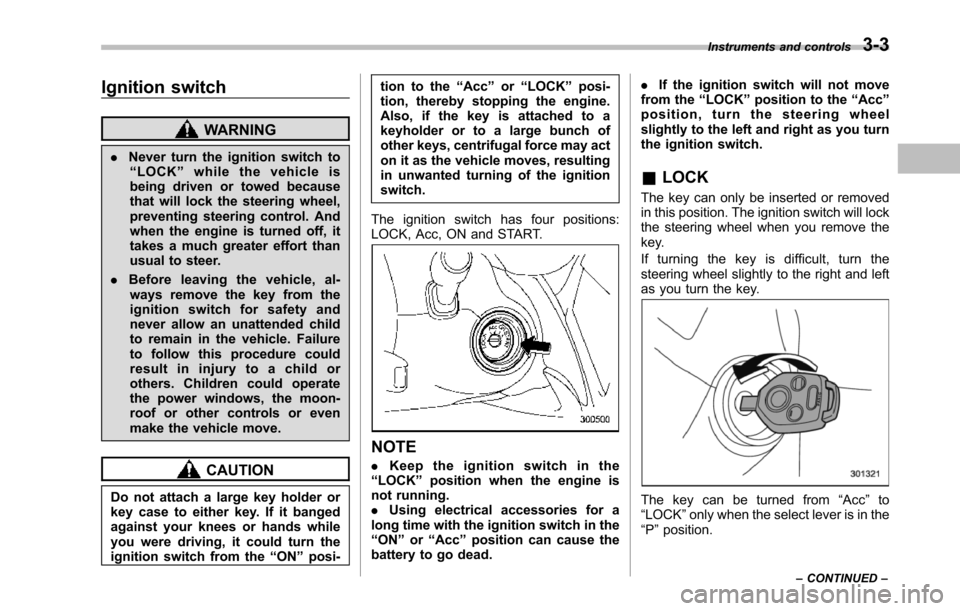
The ignition switch has four positions:LOCK, Acc, ON and START.
NOTE
.Keep the ignition switch in the“LOCK”position when the engine isnot running..Using electrical accessories for along time with the ignition switch in the“ON”or“Acc”position can cause thebattery to go dead.
.If the ignition switch will not movefrom the“LOCK”position to the“Acc”position, turn the steering wheelslightly to the left and right as you turnthe ignition switch.
&LOCK
The key can only be inserted or removedin this position. The ignition switch will lockthe steering wheel when you remove thekey.
If turning the key is difficult, turn thesteering wheel slightly to the right and leftas you turn the key.
The key can be turned from“Acc”to“LOCK”only when the select lever is in the“P”position.
Instruments and controls3-3
–CONTINUED–
Page 166 of 426
Wiper and washer
WARNING
In freezing weather, do not use thewindshield washer until the wind-shield is sufficiently warmed by thedefroster.
Otherwise the washer fluid canfreeze on the windshield, blockingyour view.
CAUTION
.Do not operate the washer con-tinuously for more than 10 sec-onds, or when the washer fluidtank is empty. This may causeoverheating of the washer motor.Check the washer fluid levelfrequently, such as at fuel stops.
.Do not operate the wipers whenthe windshieldor rear window isdry. This may scratch the glass,damage the wiper blades andcause the wiper motor to burnout. Before operating the wiperon a dry windshield or rearwindow, always use the wind-shield washer.
.In freezing weather, be sure thatthe wiper blades are not frozen tothe windshield or rear windowbefore switching on the wipers.Attempting to operate the wiperwith the blades frozen to thewindow glass could cause notonly the wiper blades to bedamagedbut also the wiper mo-tor to burn out. If the wiperblades are frozen to the windowglass, be sure to operate thedefroster, wiper deicer (ifequipped) or rear window defog-ger before turning on the wiper.
.If the wipers stop during opera-tion because of ice or some otherobstruction on the window, thewiper motor could burn out evenif the wiper switch is turned off. Ifthis occurs, promptly stop thevehicle in a safe place, turn theignition switch to the“LOCK”position and clean the windowglass to allow proper wiper op-eration.
.Use clean water if windshieldwasher fluid is unavailable. Inareas where water freezes inwinter, use SUBARU WindshieldWasher Fluid or the equivalent.Refer to“Windshield washer
fluid”F11-28.
Also, when driving the vehiclewhen there are freezing tempera-tures, use non-freezing type wi-per blades.
.Do not clean the wiper bladeswith gasoline or a solvent, suchas paint thinner or benzine. Thiswill cause deterioration of thewiper blades.
NOTE
.The front wiper motor is protectedagainst overloads by a circuit breaker.The motor operates continuously un-der an unusually heavy load, the circuitbreaker may trip to stop the motortemporarily. If this happens, park yourvehicle in a safe place, turn off thewiper switch, and wait for approxi-mately 10 minutes. The circuit breakerwill reset itself, and the wipers willagain operate normally..Clean your wiper blades and win-dow glass periodically with a washersolution to prevent streaking, and toremove accumulations of road salt orroad film. Operate the windshieldwasher for at least 1 second so thatwasher solution will be sprinkled allover the windshield or rear window.
Instruments and controls3-33
–CONTINUED–
Page 167 of 426
3-34Instruments and controls
.Grease, wax, insects or other mate-rial on the windshield or the wiperblades results in jerky wiper operationand streaking on the glass. If youcannot remove those streaks afteroperating the washer or if the wiperoperation is jerky, clean the outer sur-face of the windshield or rear windowand the wiper blades using a sponge orsoft cloth with a neutral detergent ormild abrasive cleaner. After cleaning,rinse the window glass and wiperblades with clean water. The glass iscleanif no beads form on the glasswhen you rinse with water..If you cannot eliminate the streakingeven after following this procedure,replace the wiper blades with newones. For replacement instructions,refer to“Replacementof wiper blades”F11-29.
&Windshield wiper and washer
switches
The wiper operates only when the ignitionswitch is in the“ON”or“Acc”position.
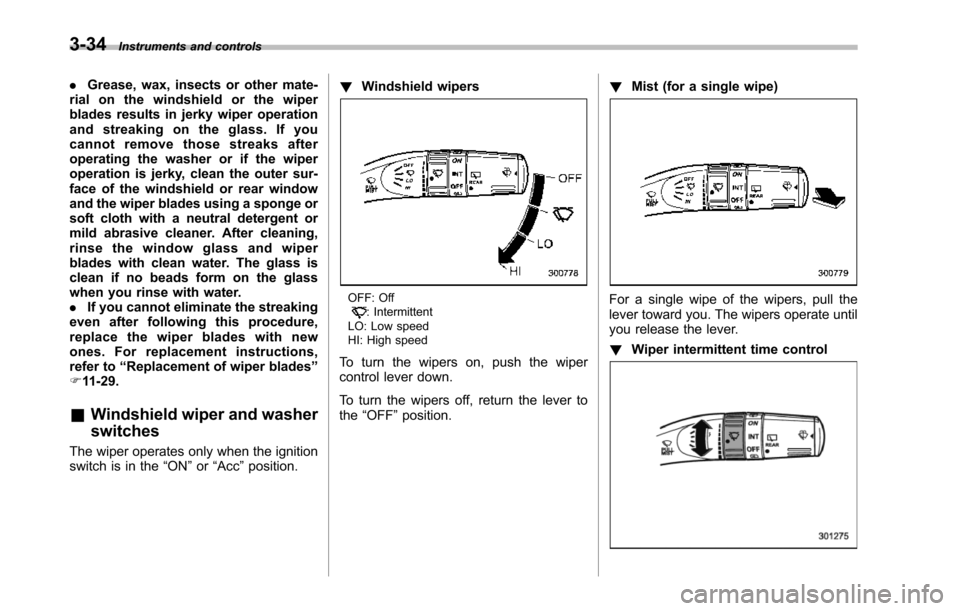
!Windshield wipers
OFF: Off: IntermittentLO: LowspeedHI: High speed
To turn the wipers on, push the wipercontrol lever down.
To turn the wipers off, return the lever tothe“OFF”position.
!Mist (for a single wipe)
For a single wipe of the wipers, pull thelever toward you. The wipers operate untilyou release the lever.
!Wiper intermittent time control
Page 168 of 426
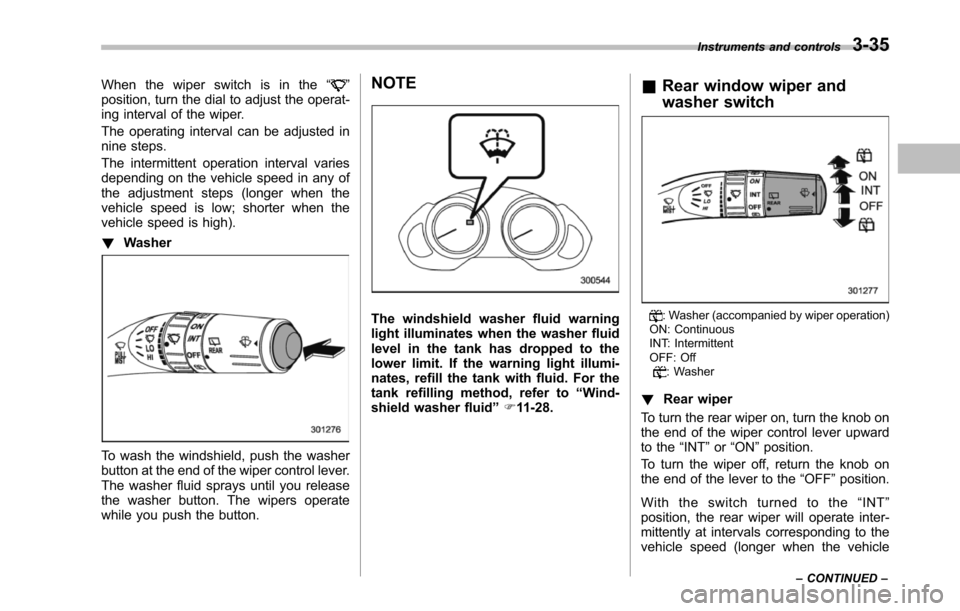
When the wiper switch is in the“”position, turn the dial to adjust the operat-ing interval of the wiper.
The operating interval can be adjusted innine steps.
The intermittent operation interval variesdepending on the vehicle speed in any ofthe adjustment steps (longer when thevehicle speed is low; shorter when thevehicle speed is high).
!Washer
To wash the windshield, push the washerbutton at the end of the wiper control lever.The washer fluid sprays until you releasethe washer button. The wipers operatewhile you push the button.
NOTE
The windshield washer fluid warninglightilluminates when the washer fluidlevel in the tank has dropped to thelower limit. If the warning light illumi-nates, refill the tank with fluid. For thetank refilling method, refer to“Wind-shield washerfluid”F11-28.
&Rear window wiper and
washer switch
: Washer (accompanied by wiper operation)ON: ContinuousINT: IntermittentOFF: Off: Washer
!Rear wiper
To turn the rear wiper on, turn the knob onthe end of the wiper control lever upwardto the“INT”or“ON”position.
To turn the wiper off, return the knob onthe end of the lever to the“OFF”position.
With the switch turned to the“INT”position, the rear wiper will operate inter-mittently at intervals corresponding to thevehicle speed (longer when the vehicle
Instruments and controls3-35
–CONTINUED–
Page 169 of 426
3-36Instruments and controls
speed is low; shorter when the vehiclespeed is high).
When you subsequently move the selectlever of the automatic transmission to the“R”position, the rear wiper will switch tocontinuous operation. When you move theselect lever from the“R”position to someother position, the rear wiper will return tointermittent operation.
!Washer
To wash the rear window while the rearwiperis operating, turn the knob on theend of the wiper control lever upward tothe“”position. The washer fluid spraysuntil you release the knob.
To wash the rear window when the rearwiper is not in use, turn the knob on theend of the wiper control lever downward tothe“”position. The washer fluid spraysand the wiper operates until you releasetheknob.
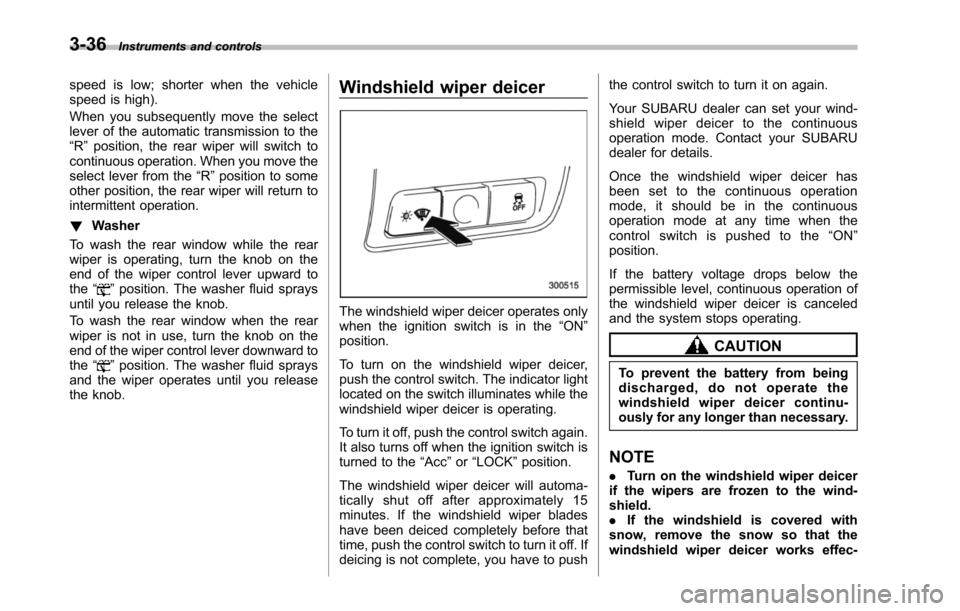
Windshield wiper deicer
The windshield wiper deicer operates onlywhen the ignition switch is in the“ON”position.
To turn on the windshield wiper deicer,push the control switch. The indicator lightlocated on the switch illuminates while thewindshield wiper deicer is operating.
To turn it off, push the control switch again.It also turns off when the ignition switch isturned to the“Acc”or“LOCK”position.
The windshield wiper deicer will automa-tically shut off after approximately 15minutes. If the windshield wiper bladeshave been deiced completely before thattime, push the control switch to turn it off. Ifdeicing is not complete, you have to push
the control switch to turn it on again.
Your SUBARU dealer can set your wind-shield wiper deicer to the continuousoperation mode. Contact your SUBARUdealer for details.
Once the windshield wiper deicer hasbeen set to the continuous operationmode, it should be in the continuousoperation mode at any time when thecontrol switch is pushed to the“ON”position.
If the battery voltage drops below thepermissible level, continuous operation ofthe windshield wiper deicer is canceledand the system stops operating.
CAUTION
To prevent the battery from beingdischarged, do not operate thewindshield wiper deicer continu-ously for any longer than necessary.
NOTE
.Turn on the windshield wiper deicerif the wipers are frozen to the wind-shield..If the windshield is covered withsnow, remove the snow so that thewindshield wiper deicer works effec-
Page 170 of 426
tively..While the windshield wiper deicer isin the continuous operation mode, ifthe vehicle speed remains at 9 mph (15km/h) or less for 15 minutes, the wind-shield wiper deicer automatically stopsoperating.
Rear window defogger but-
ton
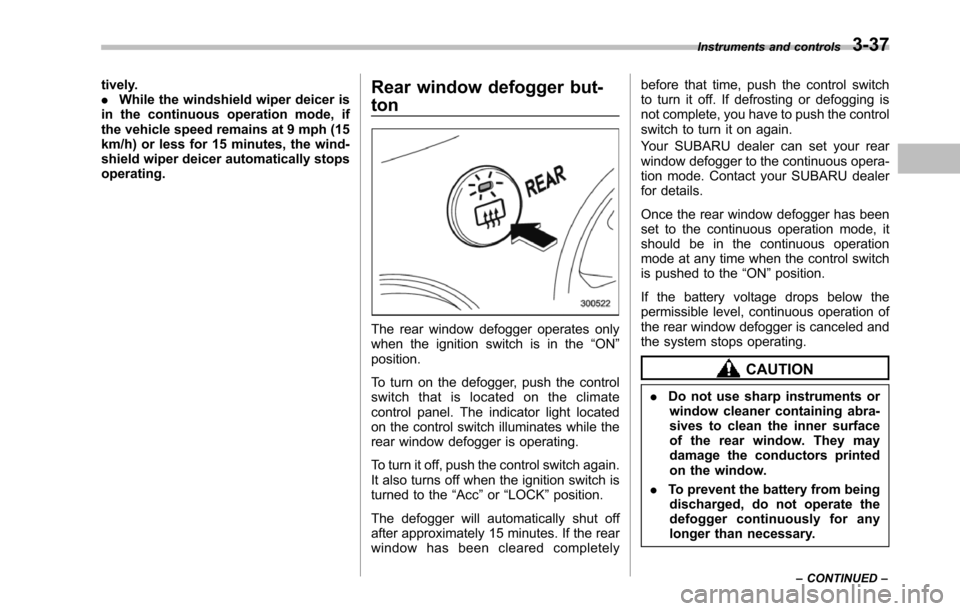
The rear window defogger operates onlywhen the ignition switch is in the“ON”position.
To turn on the defogger, push the controlswitch that is located on the climatecontrol panel. The indicator light locatedon the control switch illuminates while therear window defogger is operating.
To turn it off, push the control switch again.It also turns off when the ignition switch isturned to the“Acc”or“LOCK”position.
The defogger will automatically shut offafter approximately 15 minutes. If the rearwindow has been cleared completely
before that time, push the control switchto turn it off. If defrosting or defogging isnot complete, you have to push the controlswitch to turn it on again.
Your SUBARU dealer can set your rearwindow defogger to the continuous opera-tion mode. Contact your SUBARU dealerfor details.
Once the rear window defogger has beenset to the continuous operation mode, itshould be in the continuous operationmode at any time when the control switchis pushed to the“ON”position.
If the battery voltage drops below thepermissible level, continuous operation oftherear window defogger is canceled andthe system stops operating.
CAUTION
.Do not use sharp instruments orwindow cleaner containing abra-sives to clean the inner surfaceof the rear window. They maydamage the conductors printedon the window.
.To prevent the battery from beingdischarged, do not operate thedefogger continuously for anylonger than necessary.
Instruments and controls3-37
–CONTINUED–