lights SUBARU TRIBECA 2014 1.G Owners Manual
[x] Cancel search | Manufacturer: SUBARU, Model Year: 2014, Model line: TRIBECA, Model: SUBARU TRIBECA 2014 1.GPages: 426, PDF Size: 6.37 MB
Page 6 of 426
Warranties
&Warranties for U.S.A.
All SUBARU vehicles distributed bySubaru of America, Inc. and sold at retailby an authorized SUBARU dealer in theUnited States come with the followingwarranties.
.SUBARU Limited Warranty
.Emission Control Systems Warranty
.Emissions Performance Warranty
All warranty information, including detailsof coverage and exclusions, is in the“Warranty and Maintenance Booklet”.Please read these warranties carefully.
&Warranties for Canada
All SUBARU vehicles distributed bySubaru Canada, Inc. and sold at retail byan authorized SUBARU dealer in Canadacome with the following warranties.
.SUBARU Limited Warranty
.Anti-CorrosionWarranty
.Emission Control Warranty
All warranty information, including detailsof coverage and exclusions, is in the“Warranty and Service Booklet”. Pleaseread these warranties carefully.
CAUTION
.If your vehicle is equipped with anavigation system and/or RearSeat Entertainment System, thedisplays contain mercury. There-fore, the displays of the naviga-tion system and/or Rear SeatEntertainment System must beremoved beforevehicle disposal.Once the displays have beenremoved, please reuse, recycleor dispose of them as hazardouswaste.
.If your vehicle is equipped withHigh Intensity Discharge (HID)headlights, the HID headlightscontain mercury. Therefore, it isnecessary to remove HID head-lights before vehicle disposal.Once removed, please reuse, re-cycle or dispose of the HID head-lights as hazardous waste.
How to use this Owner’s
Manual
&Using your Owner’s Manual
Before you operate your vehicle, carefullyread this manual. To protect yourself andextend the service life of your vehicle,follow the instructions in this manual.Failure to observe these instructions mayresult in serious injury and damage to yourvehicle.
This manual is composed of fourteenchapters. Each chapter begins with a brieftable of contents, so you can usually tell ataglanceifthatchaptercontainstheinformation you want.
Chapter 1: Seat, seatbelt and SRSairbags
This chapter informs you how to use theseat and seatbelt and contains precau-tions for the SRS airbags.
Chapter 2: Keys and doors
This chapter informs you how to operatethe keys, locks and windows.
Chapter 3: Instruments and controls
This chapter informs you about the opera-tion of instrument panel indicators andhow to use the instruments and otherswitches.
1
–CONTINUED–
Page 8 of 426
&Abbreviation list
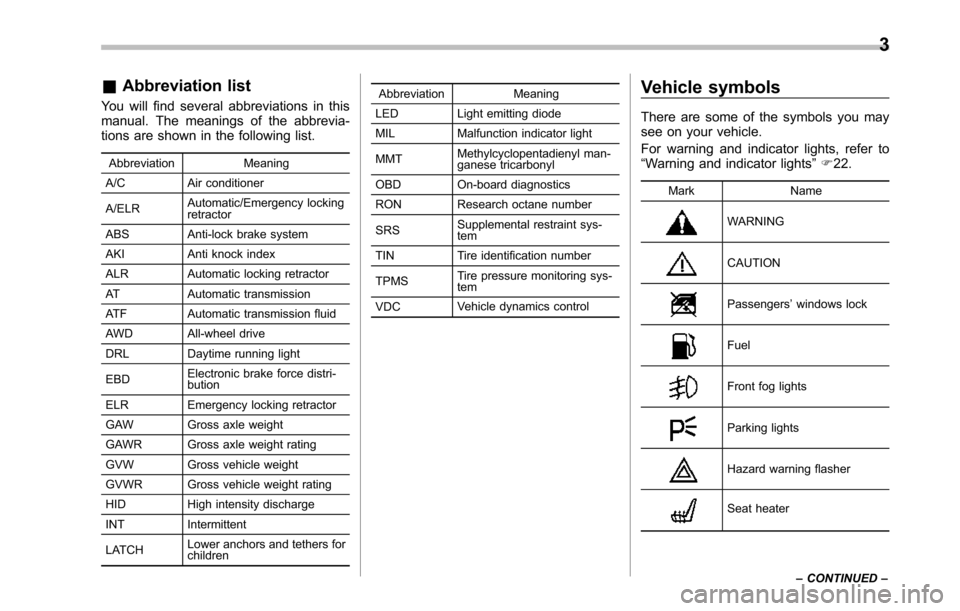
You will find several abbreviations in thismanual. The meanings of the abbrevia-tions are shown in the following list.
Abbreviation Meaning
A/C Air conditioner
A/ELRAutomatic/Emergency lockingretractor
ABSAnti-lock brake system
AKI Anti knock index
ALR Automatic locking retractor
AT Automatic transmission
ATF Automatic transmission fluid
AWD All-wheel drive
DRL Daytime running light
EBDElectronicbrake force distri-bution
ELR Emergency locking retractor
GAW Gross axle weight
GAWR Gross axle weight rating
GVW Gross vehicle weight
GVWRGross vehicle weight rating
HID Highintensity discharge
INT Intermittent
LATCHLower anchors and tethers forchildren
Abbreviation Meaning
LED Light emitting diode
MIL Malfunction indicator light
MMTMethylcyclopentadienyl man-ganese tricarbonyl
OBD On-board diagnostics
RON Research octane number
SRSSupplemental restraint sys-tem
TIN Tire identification number
TPMSTire pressure monitoring sys-tem
VDCVehicle dynamics control
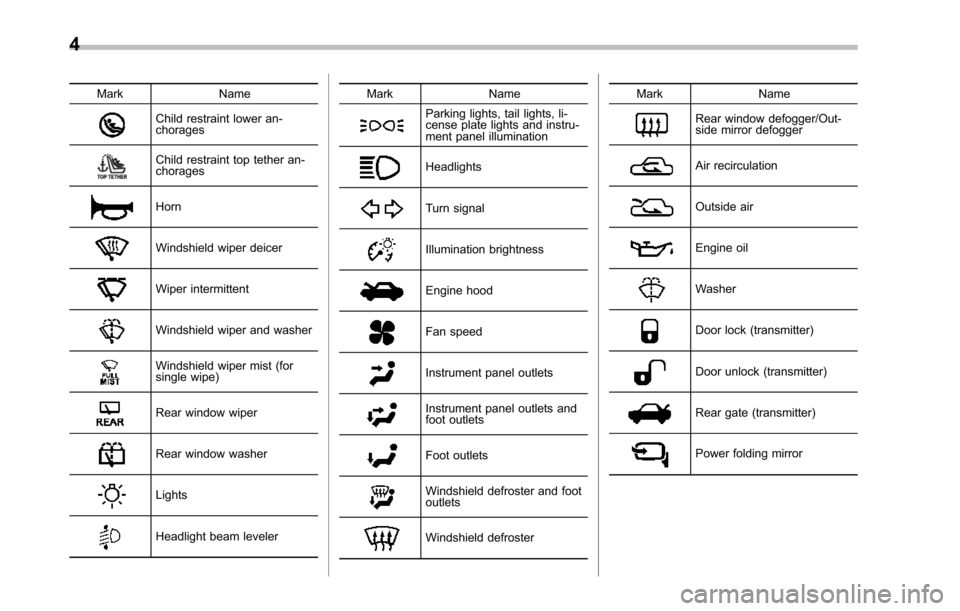
Vehicle symbols
There are some of the symbols you maysee on your vehicle.
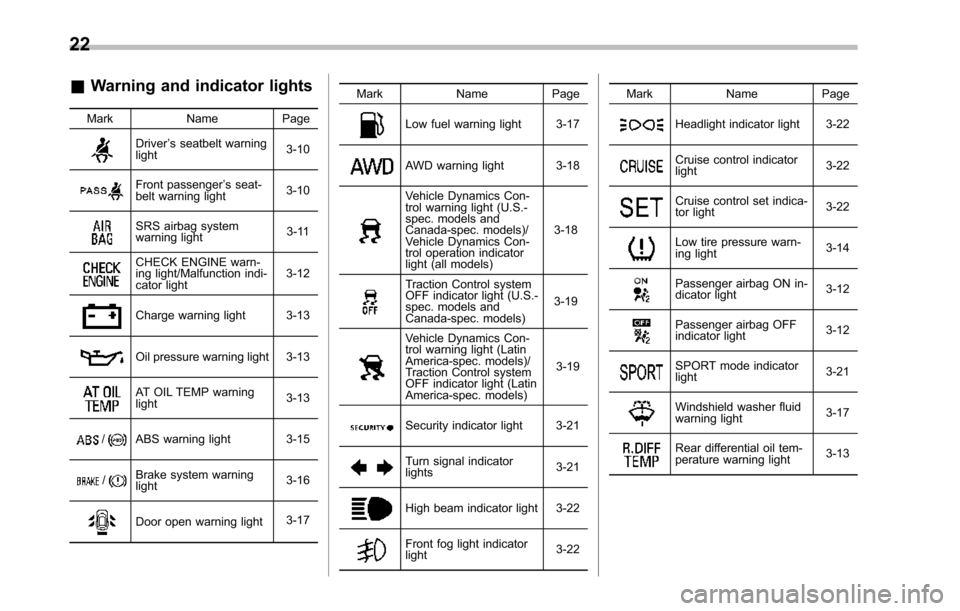
For warning and indicator lights, refer to“Warning and indicator lights”F22.
Mark Name
WARNING
CAUTION
Passengers’windows lock
Fuel
Front fog lights
Parking lights
Hazard warning flasher
Seat heater
3
–CONTINUED–
Page 9 of 426
4
Mark Name
Child restraint lower an-chorages
Child restraint top tether an-chorages
Horn
Windshield wiper deicer
Wiper intermittent
Windshield wiper and washer
Windshield wiper mist (forsingle wipe)
Rear window wiper
Rear window washer
Lights
Headlight beam leveler
Mark Name
Parking lights, tail lights, li-cense plate lights and instru-ment panel illumination
Headlights
Turn signal
Illumination brightness
Engine hood
Fan speed
Instrument panel outlets
Instrument panel outlets andfoot outlets
Foot outlets
Windshield defroster and footoutlets
Windshield defroster
Mark Name
Rear window defogger/Out-side mirror defogger
Air recirculation
Outside air
Engine oil
Washer
Door lock (transmitter)
Door unlock (transmitter)
Rear gate (transmitter)
Power folding mirror
Page 20 of 426
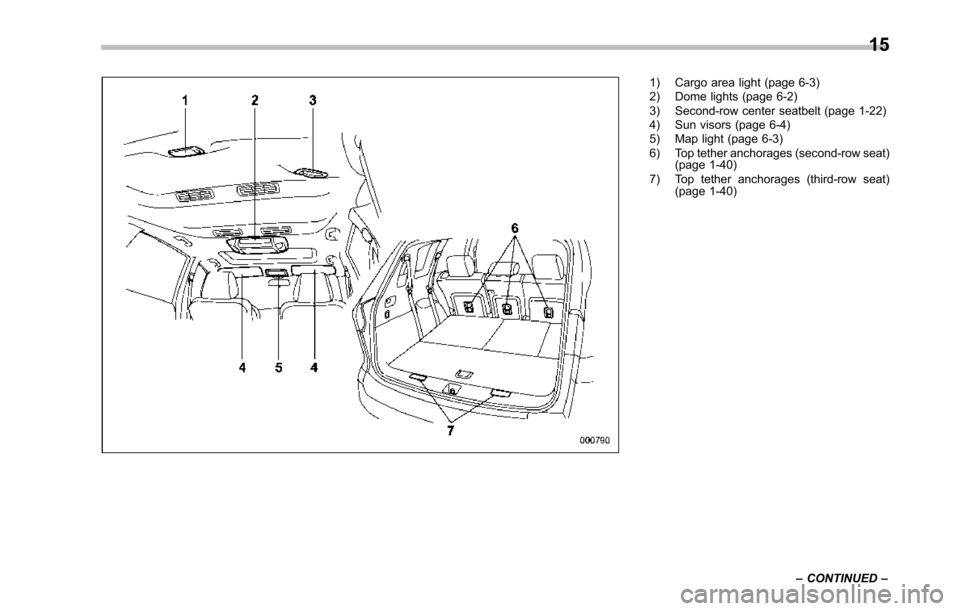
1) Cargo area light (page 6-3)2) Dome lights (page 6-2)3) Second-row center seatbelt (page 1-22)4) Sun visors (page 6-4)5) Map light (page 6-3)6) Top tether anchorages (second-row seat)(page 1-40)7) Top tether anchorages (third-row seat)(page 1-40)
15
–CONTINUED–
Page 27 of 426
22
&Warning and indicator lights
Mark Name Page
Driver’s seatbelt warninglight3-10
Front passenger’s seat-belt warning light3-10
SRS airbag systemwarning light3-11
CHECK ENGINE warn-ing light/Malfunction indi-cator light3-12
Charge warning light 3-13
Oil pressure warning light3-13
AT OIL TEMP warninglight3-13
/ABS warning light 3-15
/Brake system warninglight3-16
Door open warning light3-17
Mark Name Page
Low fuel warning light 3-17
AWD warning light 3-18
Vehicle Dynamics Con-trol warning light (U.S.-spec. models andCanada-spec. models)/Vehicle Dynamics Con-trol operation indicatorlight (all models)
3-18
Traction Control systemOFF indicatorlight (U.S.-spec. models andCanada-spec. models)
3-19
Vehicle Dynamics Con-trol warning light (LatinAmerica-spec. models)/Traction Control systemOFF indicator light (LatinAmerica-spec. models)
3-19
Security indicator light 3-21
Turn signal indicatorlights3-21
High beam indicator light3-22
Front fog light indicatorlight3-22
Mark Name Page
Headlight indicator light 3-22
Cruise control indicatorlight3-22
Cruise control set indica-tor light3-22
Low tire pressure warn-ing light3-14
Passengerairbag ON in-dicator light3-12
Passenger airbag OFFindicator light3-12
SPORT mode indicatorlight3-21
Windshield washer fluidwarning light3-17
Rear differential oil tem-perature warning light3-13
Page 29 of 426
24
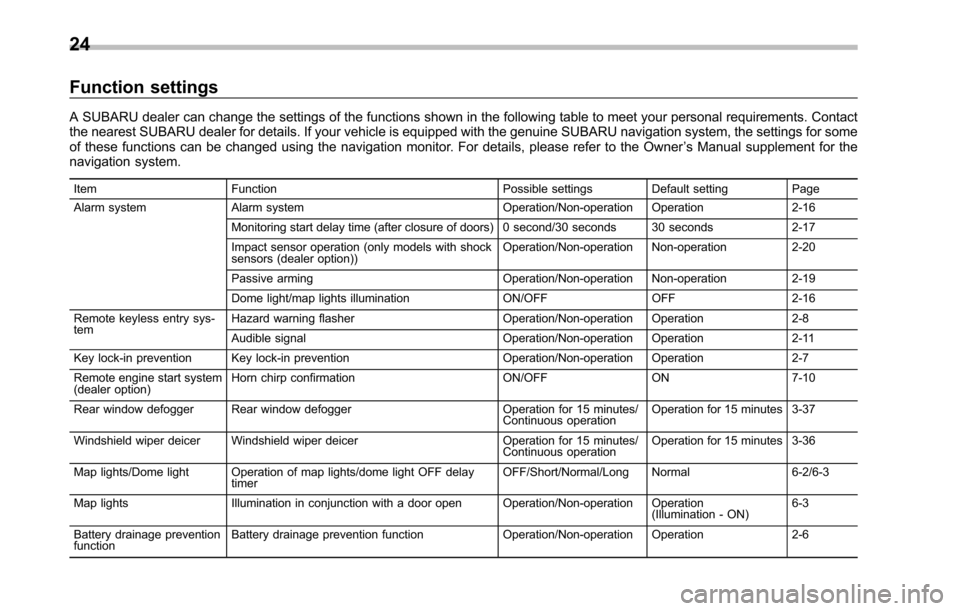
Function settings
A SUBARU dealer can change the settings of the functions shown in the following table to meet your personal requirements. Contactthe nearest SUBARU dealer for details. If your vehicle is equipped with the genuine SUBARU navigation system, the settings for someof these functions can be changed using the navigation monitor. For details, please refer to the Owner’s Manual supplement for thenavigation system.
Item Function Possible settings Default setting Page
Alarm system Alarm system Operation/Non-operation Operation 2-16
Monitoring start delay time (after closure of doors) 0 second/30 seconds 30 seconds 2-17
Impact sensor operation (only models with shocksensors (dealer option))Operation/Non-operation Non-operation 2-20
Passive arming Operation/Non-operation Non-operation 2-19
Dome light/map lights illuminationON/OFFOFF 2-16
Remote keyless entry sys-temHazard warning flasher Operation/Non-operation Operation 2-8
Audible signal Operation/Non-operation Operation 2-11
Key lock-in prevention Key lock-in preventionOperation/Non-operationOperation2-7
Remote engine start system(dealer option)Horn chirp confirmation ON/OFF ON 7-10
Rear window defogger Rear window defoggerOperation for 15 minutes/Continuous operationOperation for 15 minutes 3-37
Windshield wiper deicer Windshield wiper deicer Operation for 15 minutes/Continuous operationOperation for 15 minutes 3-36
Map lights/Dome light Operation of map lights/dome light OFF delaytimerOFF/Short/Normal/Long Normal 6-2/6-3
Map lights Illumination in conjunction with a door open Operation/Non-operation Operation(Illumination - ON)6-3
Battery drainage preventionfunctionBattery drainage prevention function Operation/Non-operation Operation 2-6
Page 111 of 426
2-6Keys and doors
It also helps prevent passengersfrom falling out if a door is acciden-tally opened, and intruders fromunexpectedly opening doors andentering your vehicle.
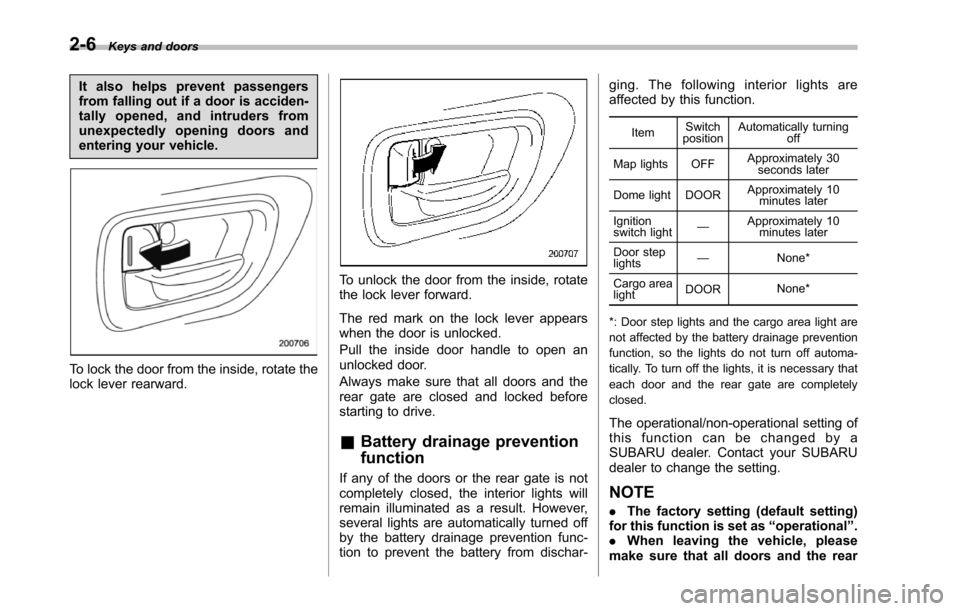
To lock the door from the inside, rotate thelock lever rearward.
To unlock the door from the inside, rotatethe lock lever forward.
The red mark on the lock lever appearswhen the door is unlocked.
Pull the inside door handle to open anunlocked door.
Always make sure that all doors and therear gate are closed and locked beforestarting to drive.
&Battery drainage prevention
function
If any of the doors or the rear gate is notcompletely closed, the interior lights willremain illuminated as a result. However,several lights are automatically turned offby the battery drainage prevention func-tion to prevent the battery from dischar-
ging. The following interior lights areaffected by this function.
ItemSwitchpositionAutomatically turningoff
Map lights OFFApproximately 30seconds later
Dome light DOORApproximately 10minutes later
Ignitionswitch light—Approximately 10minutes later
Door steplights—None*
Cargo arealightDOORNone*
*: Door step lights and the cargo area light arenot affected by the battery drainage preventionfunction, so the lights do not turn off automa-tically. To turn off the lights, it is necessary thateach door and the rear gate are completelyclosed.
The operational/non-operational setting ofthis function can be changed by aSUBARU dealer. Contact your SUBARUdealer to change the setting.
NOTE
.The factory setting (default setting)for this function is set as“operational”..When leaving the vehicle, pleasemakesure that all doors and the rear
Page 114 of 426
to the following two conditions: (1) Thisdevice may not cause harmful inter-ference, and (2) this device mustaccept any interference received, in-cluding interference that may causeundesired operation.
Changes or modifications not ex-pressly approved by the party respon-sible for compliance could void theuser’s authority to operate the equip-ment.
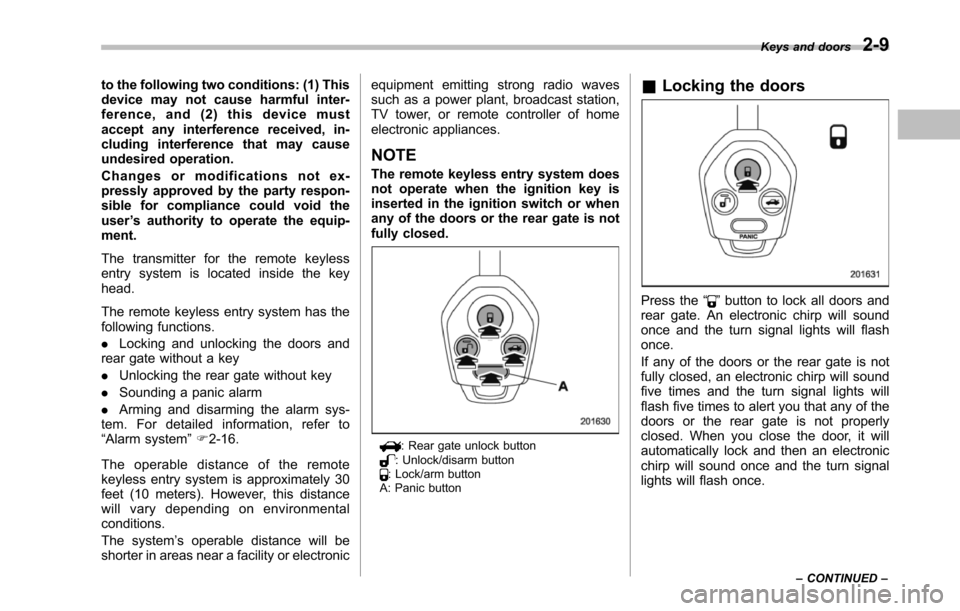
The transmitter for the remote keylessentry system is located inside the keyhead.
The remote keyless entry system has thefollowing functions.
.Locking and unlocking the doors andrear gatewithout a key
.Unlocking the rear gate without key
.Sounding a panic alarm
.Arming and disarming the alarm sys-tem. For detailed information, refer to“Alarm system”F2-16.
The operable distance of the remotekeyless entry system is approximately 30feet (10 meters). However, this distancewill vary depending on environmentalconditions.
The system’s operable distance will beshorter in areas near a facility or electronic
equipment emitting strong radio wavessuch as a power plant, broadcast station,TV tower, or remote controller of homeelectronic appliances.
NOTE
The remote keyless entry system doesnot operate when the ignition key isinserted in the ignition switch or whenany of the doors or the rear gate is notfully closed.
: Rear gate unlock button: Unlock/disarm button: Lock/arm buttonA: Panic button
&Locking the doors
Press the“”button to lock all doors andrear gate. An electronic chirp will soundonce and the turn signal lights will flashonce.
If any of the doors or the rear gate is notfully closed, an electronic chirp will soundfive times and the turn signal lights willflash five times to alert you that any of thedoorsor the rear gate is not properlyclosed. When you close the door, it willautomatically lock and then an electronicchirp will sound once and the turn signallights will flash once.
Keys and doors2-9
–CONTINUED–
Page 115 of 426
2-10Keys and doors
&Unlocking the doors
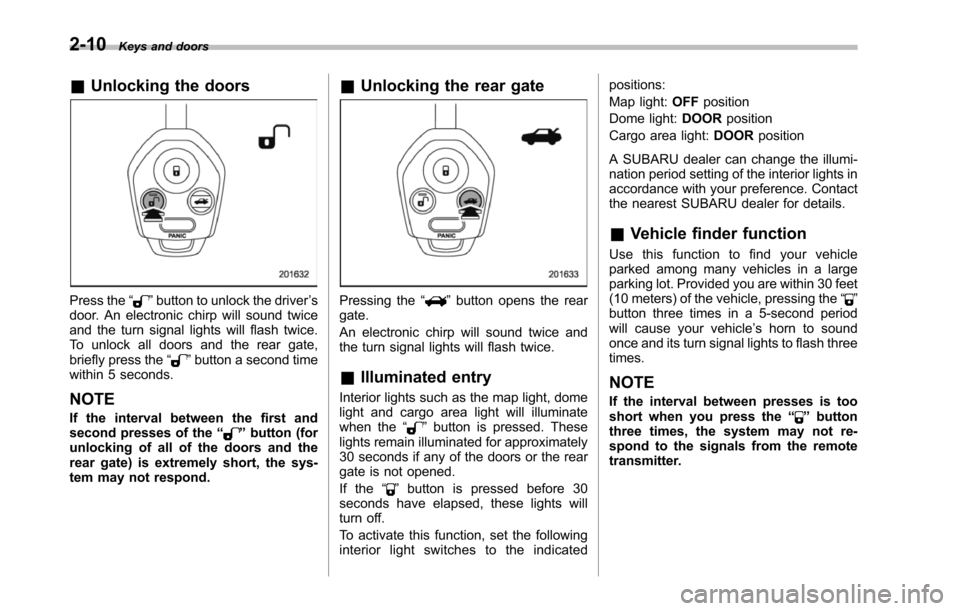
Press the“”button to unlock the driver’sdoor. An electronic chirp will sound twiceand the turn signal lights will flash twice.To unlock all doors and the rear gate,briefly press the“”button a second timewithin 5 seconds.
NOTE
If the interval between the first andsecond presses of the“”button (forunlocking of all of the doors and therear gate) is extremely short, the sys-tem may not respond.
&Unlocking the rear gate
Pressing the“”button opens the reargate.
An electronic chirp will sound twice andthe turn signal lights will flash twice.
&Illuminated entry
Interior lights such as the map light, domelight and cargo area light will illuminatewhen the“”button is pressed. Theselights remain illuminated for approximately30 seconds if any of the doors or the reargate is not opened.
If the“”button is pressed before 30seconds have elapsed, these lights willturn off.
To activate this function, set the followinginterior light switches to the indicated
positions:
Map light:OFFposition
Dome light:DOORposition
Cargo area light:DOORposition
A SUBARU dealer can change the illumi-nationperiod setting of the interior lights inaccordance with your preference. Contactthe nearest SUBARU dealer for details.
&Vehicle finder function
Use this function to find your vehicleparked among many vehicles in a largeparking lot. Provided you are within 30 feet(10 meters) of the vehicle, pressing the“”buttonthree times in a 5-second periodwill cause your vehicle’s horn to soundonce and its turn signal lights to flash threetimes.
NOTE
If the interval between presses is tooshort when you press the“”buttonthree times, the system may not re-spond to the signals from the remotetransmitter.
Page 116 of 426
&Sounding a panic alarm
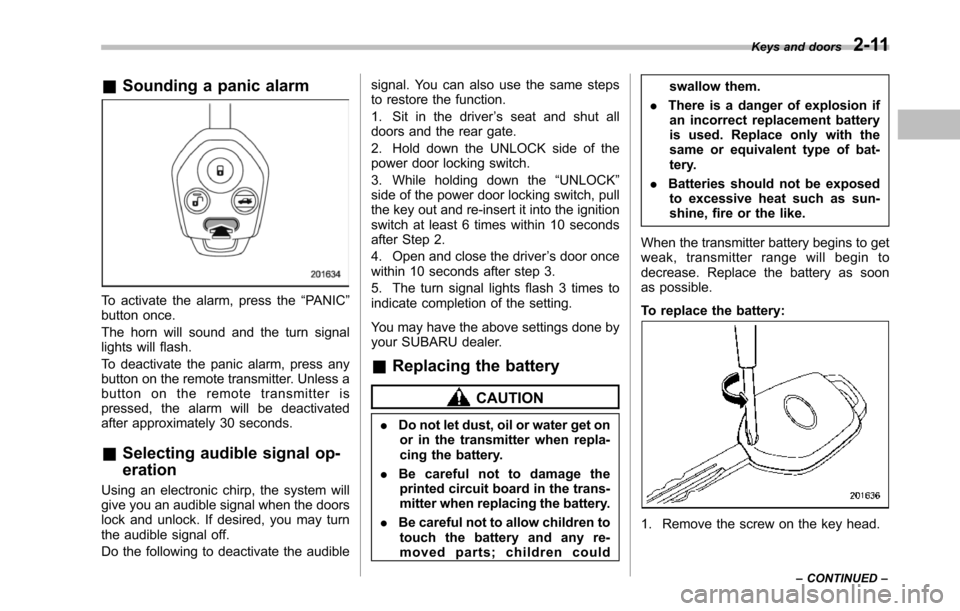
To activate the alarm, press the“PANIC”button once.
The horn will sound and the turn signallights will flash.
To deactivate the panic alarm, press anybuttonon the remote transmitter. Unless abutton on the remote transmitter ispressed, the alarm will be deactivatedafter approximately 30 seconds.
&Selecting audible signal op-
eration
Using an electronic chirp, the system willgive you an audible signal when the doorslock and unlock. If desired, you may turnthe audible signal off.
Do the following to deactivate the audible
signal. You can also use the same stepsto restore the function.
1. Sit in the driver’s seat and shut alldoors and the rear gate.
2. Hold down the UNLOCK side of thepower door locking switch.
3. While holding down the“UNLOCK”sideof the power door locking switch, pullthe key out and re-insert it into the ignitionswitch at least 6 times within 10 secondsafter Step 2.
4. Open and close the driver’s door oncewithin 10 seconds after step 3.
5. The turn signal lights flash 3 times toindicate completion of the setting.
You may have the above settings done byyour SUBARU dealer.
&Replacing the battery
CAUTION
.Do not let dust, oil or water get onor in the transmitter when repla-cing the battery.
.Be careful not to damage theprinted circuit board in the trans-mitter when replacing the battery.
.Be careful not to allow children totouch the battery and any re-moved parts; children could
swallow them.
.There is a danger of explosion ifan incorrect replacement batteryis used. Replace only with thesame or equivalent type of bat-tery.
.Batteries should not be exposedto excessive heat such as sun-shine, fire or the like.
When the transmitter battery begins to getweak, transmitter range will begin todecrease. Replace the battery as soonas possible.
To replace the battery:
1. Remove the screw on the key head.
Keys and doors2-11
–CONTINUED–