engine SUBARU WRX 2016 Owners Manual
[x] Cancel search | Manufacturer: SUBARU, Model Year: 2016, Model line: WRX, Model: SUBARU WRX 2016Pages: 594, PDF Size: 19.43 MB
Page 434 of 594
WARNING. Before exiting the vehicle, make
sure that you turn off the engine.
Otherwise, the parking brake
may be released and an accident
may occur.
. If the brake system warning light
turns on, the electronic parking
brake system may be malfunc-
tioning. Immediately stop your
vehicle in a safe location, use
tire stops under the tires to
prevent the vehicle from moving
and contact your SUBARU deal-
er.
. If the electronic parking brake is
operated when the brake is over-
heated or the vehicle is on a
steep slope, the electronic park-
ing brake indicator light may
flash. In this case, the vehicle
may start to move and it may lead
to an accident. Always use the
tire stops.
CAUTION
. When the electronic parking
brake system has a malfunction
and the parking brake cannot be applied, contact your SUBARU
dealer immediately for an inspec-
tion. If you have to park your
vehicle in such conditions, per-
form the following procedure.
– Stop your vehicle in a flat
location.
– Shift the select lever in the “ P ”
position. When the select le-
ver cannot be shifted into the
“ P ” position, you must re-
lease shift lock. Refer to “ Shift
lock function ” F 7-27.
– Use tire stops under the tires
to prevent the vehicle from
moving.
. Never drive while the parking
brake is applied because this will
cause unnecessary wear on the
brake linings. Before starting to
drive, always make sure that the
parking brake has been released
and the brake system warning
light has turned off.
Your vehicle is equipped with an electronic
parking brake. You can apply/release the
parking brake by operating the parking
brake switch.
To apply: Depress the brake pedal and
pull up the parking brake switch. To release: Press the parking brake
switch firmly while the ignition switch is
in the “ ON ” position and the brake pedal is
depressed.
When the parking brake is applied while
the ignition switch is in the “ ON ” position,
the electronic parking brake indicator light
and the indicator light on the parking brake
switch illuminate. Refer to “ Brake system
warning light ” F 3-21.
NOTE . If the parking brake switch is
pressed with the ignition switch in the
“ ACC ” or “ LOCK ” / “ OFF ” position, the
parking brake is not released.
. If the parking brake switch is
pressed without depressing the brake
pedal, the parking brake is not re-
leased.
. The electronic parking brake system
uses motors to apply the parking
brake. Therefore, operating sounds
from the motors will be heard when
applying or releasing the parking
brake. Make sure that the motor
sounds are heard when applying or
releasing the parking brake.
. When the electronic parking brake
system has a malfunction or the elec-
tronic parking brake operation is pro-
hibited temporarily, if the parking brake Starting and operating/Parking your vehicle
– CONTINUED –7-45
Page 436 of 594
dicator light illuminates.
. Depending on the condition of the
road surface and braking force, the
brakes operate temporarily and feel
different than usual.
. When the electronic parking brake
system has a malfunction while the Hill
Holder function is activated, a chirp
sound is heard, the Hill Holder indica-
tor light turns off and the brake system
warning light turns on.
. When the hill holder activates on a
slope, the electronic parking brake is
engaged. The electronic parking brake
will release when you accelerate from
the stop. If you manually release the
electronic parking brake while the hill
holder is activated, the hill holder
function is cancelled and will not re-
engage until the vehicle has moved
some distance. In that case, you will
need to manually engage the electronic
parking brake if needed. ! Hill Holder switch
WARNINGWhen stopping on an uphill slope
with the Hill Holder function acti-
vated, release the brake pedal after
the electronic parking brake indica-
tor light has illuminated. Otherwise,
the Hill Holder function may not
operate properly and an accident
may occur.
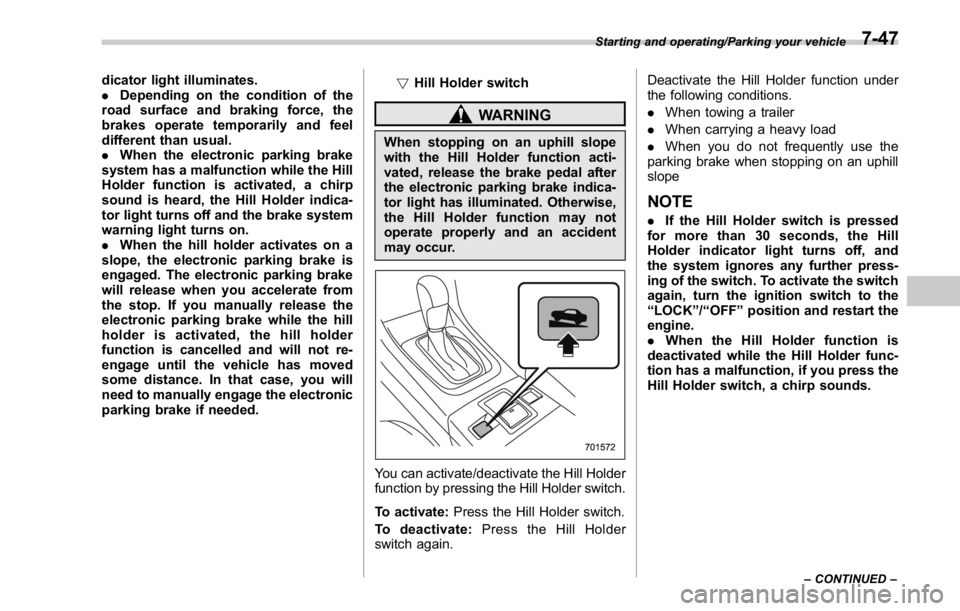
You can activate/deactivate the Hill Holder
function by pressing the Hill Holder switch.
To activate: Press the Hill Holder switch.
To deactivate: Press the Hill Holder
switch again. Deactivate the Hill Holder function under
the following conditions.
. When towing a trailer
. When carrying a heavy load
. When you do not frequently use the
parking brake when stopping on an uphill
slope
NOTE . If the Hill Holder switch is pressed
for more than 30 seconds, the Hill
Holder indicator light turns off, and
the system ignores any further press-
ing of the switch. To activate the switch
again, turn the ignition switch to the
“ LOCK ” / “ OFF ” position and restart the
engine.
. When the Hill Holder function is
deactivated while the Hill Holder func-
tion has a malfunction, if you press the
Hill Holder switch, a chirp sounds. Starting and operating/Parking your vehicle
– CONTINUED –7-47
Page 437 of 594
Starting and operating/Parking your vehicle
! Hill Holder indicator light
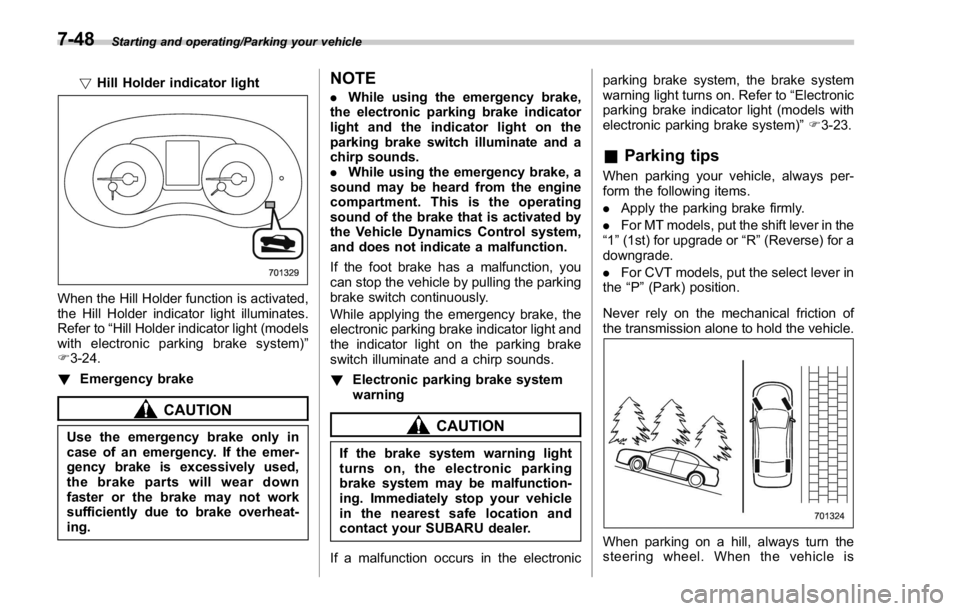
When the Hill Holder function is activated,
the Hill Holder indicator light illuminates.
Refer to “ Hill Holder indicator light (models
with electronic parking brake system) ”
F 3-24.
! Emergency brake
CAUTION
Use the emergency brake only in
case of an emergency. If the emer-
gency brake is excessively used,
the brake parts will wear down
faster or the brake may not work
sufficiently due to brake overheat-
ing. NOTE . While using the emergency brake,
the electronic parking brake indicator
light and the indicator light on the
parking brake switch illuminate and a
chirp sounds.
. While using the emergency brake, a
sound may be heard from the engine
compartment. This is the operating
sound of the brake that is activated by
the Vehicle Dynamics Control system,
and does not indicate a malfunction.
If the foot brake has a malfunction, you
can stop the vehicle by pulling the parking
brake switch continuously.
While applying the emergency brake, the
electronic parking brake indicator light and
the indicator light on the parking brake
switch illuminate and a chirp sounds.
! Electronic parking brake system
warning
CAUTION
If the brake system warning light
turns on, the electronic parking
brake system may be malfunction-
ing. Immediately stop your vehicle
in the nearest safe location and
contact your SUBARU dealer.
If a malfunction occurs in the electronic parking brake system, the brake system
warning light turns on. Refer to “ Electronic
parking brake indicator light (models with
electronic parking brake system) ” F 3-23.
& Parking tips When parking your vehicle, always per-
form the following items.
. Apply the parking brake firmly.
. For MT models, put the shift lever in the
“ 1 ” (1st) for upgrade or “ R ” (Reverse) for a
downgrade.
. For CVT models, put the select lever in
the “ P ” (Park) position.
Never rely on the mechanical friction of
the transmission alone to hold the vehicle.
When parking on a hill, always turn the
steering wheel. When the vehicle is7-48
Page 438 of 594
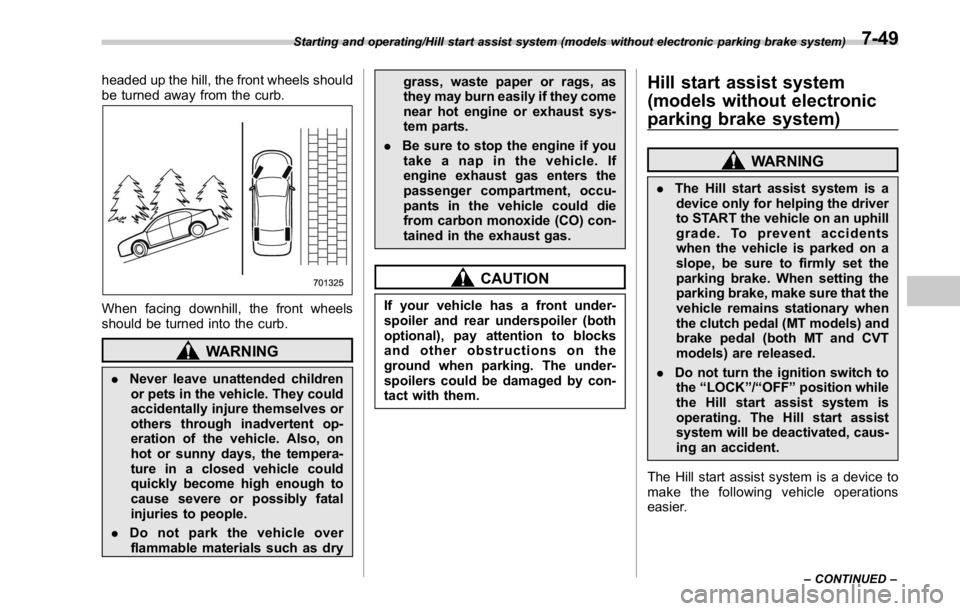
headed up the hill, the front wheels should
be turned away from the curb.
When facing downhill, the front wheels
should be turned into the curb.
WARNING
. Never leave unattended children
or pets in the vehicle. They could
accidentally injure themselves or
others through inadvertent op-
eration of the vehicle. Also, on
hot or sunny days, the tempera-
ture in a closed vehicle could
quickly become high enough to
cause severe or possibly fatal
injuries to people.
. Do not park the vehicle over
flammable materials such as dry grass, waste paper or rags, as
they may burn easily if they come
near hot engine or exhaust sys-
tem parts.
. Be sure to stop the engine if you
take a nap in the vehicle. If
engine exhaust gas enters the
passenger compartment, occu-
pants in the vehicle could die
from carbon monoxide (CO) con-
tained in the exhaust gas.
CAUTIONIf your vehicle has a front under-
spoiler and rear underspoiler (both
optional), pay attention to blocks
and other obstructions on the
ground when parking. The under-
spoilers could be damaged by con-
tact with them. Hill start assist system
(models without electronic
parking brake system) WARNING. The Hill start assist system is a
device only for helping the driver
to START the vehicle on an uphill
grade. To prevent accidents
when the vehicle is parked on a
slope, be sure to firmly set the
parking brake. When setting the
parking brake, make sure that the
vehicle remains stationary when
the clutch pedal (MT models) and
brake pedal (both MT and CVT
models) are released.
. Do not turn the ignition switch to
the “ LOCK ” / “ OFF ” position while
the Hill start assist system is
operating. The Hill start assist
system will be deactivated, caus-
ing an accident.
The Hill start assist system is a device to
make the following vehicle operations
easier.Starting and operating/Hill start assist system (models without electronic parking brake system)
– CONTINUED –7-49
Page 440 of 594
Hill start assist OFF indicator light is
illuminated
When using the Hill start assist system, a
braking effect may be felt even after the
brake pedal has been released. However,
this braking effect should disappear once
the clutch pedal is released.
NOTE A slight jolt may be felt when the
vehicle begins to move forward after
being reversed.
& To activate/deactivate the Hill
start assist system
CAUTIONWhile the Hill start assist system is
deactivated, when starting on an
uphill grade, braking power is not
maintained if the brake pedal is
released. Start on an uphill grade
by using the parking brake.
You can activate/deactivate the Hill start
assist system according to the following
procedure.
NOTE
If you make an error when performing
any steps in the following procedure, place the ignition switch in the
“ LOCK ” / “ OFF ” position once and then
start over again.
! To deactivate
1. Park your vehicle in a flat and safe
location and apply the parking brake.
2. Turn the ignition switch to the “ LOCK ” /
“ OFF ” position.
3. Restart the engine.
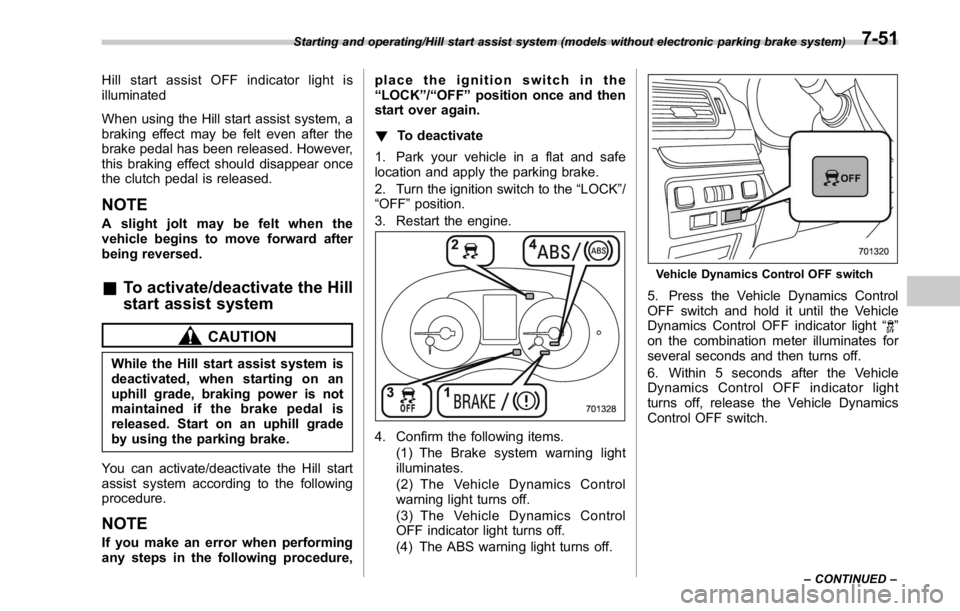
4. Confirm the following items.
(1) The Brake system warning light
illuminates.
(2) The Vehicle Dynamics Control
warning light turns off.
(3) The Vehicle Dynamics Control
OFF indicator light turns off.
(4) The ABS warning light turns off. Vehicle Dynamics Control OFF switch
5. Press the Vehicle Dynamics Control
OFF switch and hold it until the Vehicle
Dynamics Control OFF indicator light “
”
on the combination meter illuminates for
several seconds and then turns off.
6. Within 5 seconds after the Vehicle
Dynamics Control OFF indicator light
turns off, release the Vehicle Dynamics
Control OFF switch.Starting and operating/Hill start assist system (models without electronic parking brake system)
– CONTINUED –7-51
Page 443 of 594
Starting and operating/Cruise control
(S#) mode is selected, the select lever/
gear position indicator will change
from the current gear position indica-
tion to the “ D ” indication.
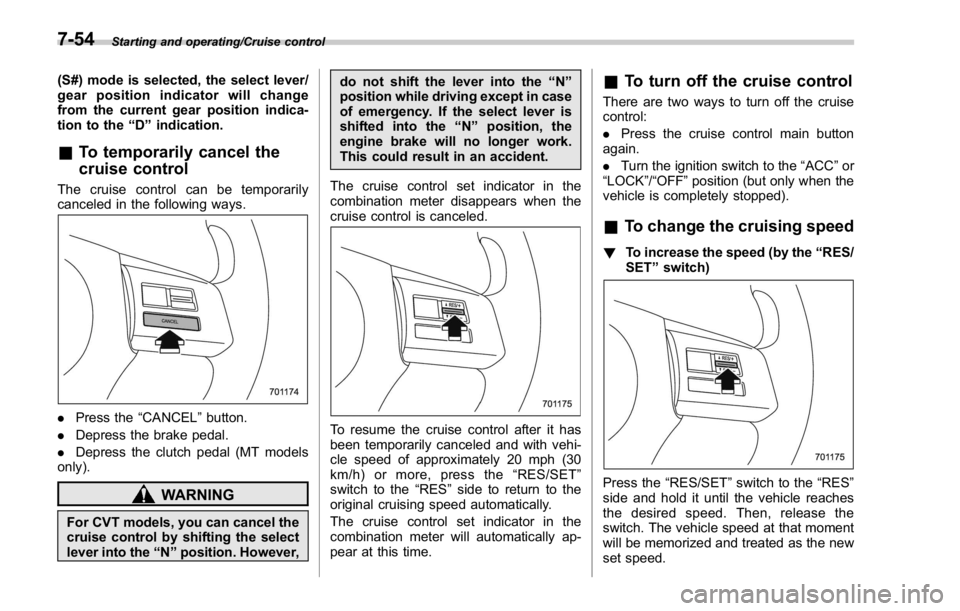
& To temporarily cancel the
cruise controlThe cruise control can be temporarily
canceled in the following ways.
. Press the “ CANCEL ” button.
. Depress the brake pedal.
. Depress the clutch pedal (MT models
only).
WARNING
For CVT models, you can cancel the
cruise control by shifting the select
lever into the “ N ” position. However, do not shift the lever into the “ N ”
position while driving except in case
of emergency. If the select lever is
shifted into the “ N ” position, the
engine brake will no longer work.
This could result in an accident.
The cruise control set indicator in the
combination meter disappears when the
cruise control is canceled.
To resume the cruise control after it has
been temporarily canceled and with vehi-
cle speed of approximately 20 mph (30
km/h) or more, press the “ RES/SET ”
switch to the “ RES ” side to return to the
original cruising speed automatically.
The cruise control set indicator in the
combination meter will automatically ap-
pear at this time. & To turn off the cruise control There are two ways to turn off the cruise
control:
. Press the cruise control main button
again.
. Turn the ignition switch to the “ ACC ” or
“ LOCK ” / “ OFF ” position (but only when the
vehicle is completely stopped).
& To change the cruising speed ! To increase the speed (by the “ RES/
SET ” switch)
Press the “ RES/SET ” switch to the “ RES ”
side and hold it until the vehicle reaches
the desired speed. Then, release the
switch. The vehicle speed at that moment
will be memorized and treated as the new
set speed.7-54
Page 451 of 594

Starting and operating/BSD/RCTA
nation meter, and the BSD/RCTA is
deactivated.
Press the switch again to activate the
BSD/RCTA. The BSD/RCTA OFF indica-
tor disappears.
NOTE . In the following cases, press the
BSD/RCTA OFF switch to deactivate
the system. The system may not oper-
ate properly due to blocked radar
waves.
– When towing a trailer
– When a bicycle carrier or other
item is fitted to the rear of the
vehicle
– When using a chassis dynam-
ometer or free roller device, etc.
– When running the engine and
makingthewheelsrotatewhile
lifting up the vehicle
. If the ignition switch is turned to the
“ LOCK ” / “ OFF ” position, the last known
status of the system is maintained. For
example, if the ignition switch is turned
to the “ LOCK ” / “ OFF ” position with the
BSD/RCTA deactivated, the BSD/RCTA
remains deactivated the next time the
ignition switch is turned to the “ ON ”
position.
. If the vehicle battery is disconnected
due to situations such as battery terminal or fuse replacement, after the
battery is reconnected, the BSD/RCTA
will be activated.
& Certification for the BSD/
RCTA . U.S.-spec. models
FCC ID: OAYSRR2A
CAUTIONFCC WARNING
Changes or modifications not ex-
pressly approved by the party re-
sponsible for compliance could void
the user ’ s authority to operate the
equipment.
This device complies with part 15 of the
FCC Rules. Operation is subject to the
following two conditions: (1) This device
may not cause harmful interference, and
(2) this device must accept any interfer-
ence received, including interference that
may cause undesired operation.
. Canada-spec. models
This device complies with Industry
Canada licence-exempt RSS standard
(s). Operation is subject to the following
two conditions: (1) this device may not cause interference, and (2) this device
must accept any interference, including
interference that may cause undesired
operation of the device.
Le présent appareil est conforme aux
CNR d ’ Industrie Canada applicables aux
appareils radio exempts de licence. L ’ ex-
ploitation est autorisée aux deux condi-
tions suivantes: (1) l ’ appareil ne doit pas
produire de brouillage, et (2) l ’ utilisateur
de l ’ appareil doit accepter tout brouillage
radioélectrique subi, même si le brouillage
est susceptible d ’ en compromettre le
fonctionnement.7-62
Page 454 of 594

New vehicle break-in driving – the first
1,000 miles (1,600 km) ..................................... 8-2
Fuel economy hints ............................................ 8-2
Engine exhaust gas (carbon monoxide) ............ 8-2
Catalytic converter .............................................. 8-3
Periodic inspections ........................................... 8-4
Driving in foreign countries ............................... 8-4
Driving tips for AWD models .............................. 8-5
Driving precaution ............................................... 8-6
Winter driving ...................................................... 8-6Operation during cold weather ............................. 8-6 Driving on snowy and icy roads ........................... 8-8
Corrosion protection ............................................ 8-9
Snow tires ........................................................... 8-9
Tire chains ........................................................ 8-10
Rocking the vehicle ........................................... 8-10
Loading your vehicle ......................................... 8-10Vehicle capacity weight ...................................... 8-11
GVWR and GAWR (Gross Vehicle Weight Rating
and Gross Axle Weight Rating) ........................ 8-12
Trailer towing ..................................................... 8-12
Driving tips
8
Page 455 of 594
Driving tips/New vehicle break – in driving – the first 1,000 miles (1,600 km)
New vehicle break-in driving
– the first 1,000 miles (1,600
km) The performance and long life of your
vehicle are dependent on how you handle
and care for your vehicle while it is new.
Follow these instructions during the first
1,000 miles (1,600 km):
. Do not race the engine. And do not
allow engine speed to exceed 4,000 rpm
except in an emergency.
. Do not drive at one constant engine or
vehicle speed for a long time, either fast or
slow.
. Avoid starting suddenly and rapid
acceleration, except in an emergency.
. Avoid hard braking, except in an
emergency.
The same break-in procedures should be
applied to an overhauled engine, newly
mounted engine or when brake pads or
brake linings are replaced with new ones. Fuel economy hints The following suggestions will help to save
fuel.
. Select the proper gear position for the
speed and road conditions.
. Avoid sudden acceleration or decelera-
tion. Always accelerate gently until you
reach the desired speed. Then try to
maintain that speed for as long as
possible.
. Do not pump the accelerator and avoid
racing the engine.
. Avoid unnecessary engine idling.
. Keep the engine properly tuned.
. Keep the tires inflated to the correct
pressure shown on the tire placard, which
is located under the door latch on the
driver ’ s side. Low pressure will increase
tire wear and fuel consumption.
. Use the air conditioner only when
necessary.
. Keep the front and rear wheels in
proper alignment.
. Avoid carrying unnecessary luggage or
cargo.
. The indication of the ECO gauge
shows a reference for saving fuel. For
details, refer to “ ECO gauge ” F 3-12.Engine exhaust gas (carbon
monoxide) WARNING. Never inhale engine exhaust gas.
Engine exhaust gas contains
carbon monoxide, a colorless
and odorless gas which is dan-
gerous, or even lethal, if inhaled.
. Always properly maintain the en-
gine exhaust system to prevent
engine exhaust gas from enter-
ing the vehicle.
. Never run the engine in a closed
space, such as a garage, except
for the brief time needed to drive
the vehicle in or out of it.
. Avoid remaining in a parked
vehicle for a lengthy time while
the engine is running. If that is
unavoidable, then use the venti-
lation fan to force fresh air into
the vehicle.
. Always keep the front ventilator
inlet grille free from snow, leaves
or other obstructions to ensure
that the ventilation system al-
ways works properly.
. If at any time you suspect that8-2
Page 456 of 594
exhaust fumes are entering the
vehicle, have the problem
checked and corrected as soon
as possible. If you must drive
under these conditions, drive
only with all windows fully open.
. Keep the trunk lid closed while
driving to prevent exhaust gas
from entering the vehicle.
NOTE Due to the expansion and contraction
of the metals used in the manufacture
of the exhaust system, you may hear a
crackling sound coming from the ex-
haust system for a short time after the
engine has been shut off. This sound is
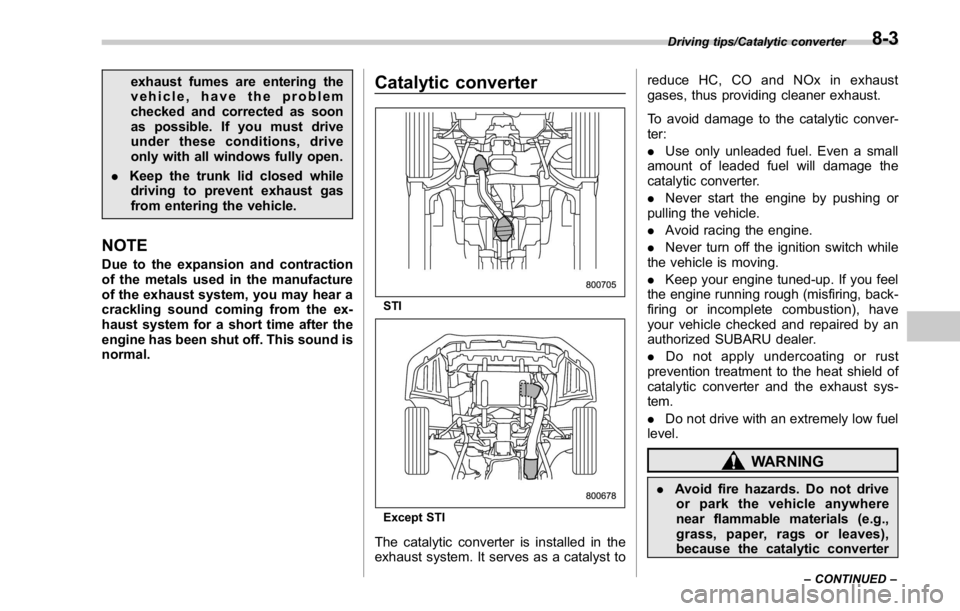
normal. Catalytic converter
STI
Except STI
The catalytic converter is installed in the
exhaust system. It serves as a catalyst to reduce HC, CO and NOx in exhaust
gases, thus providing cleaner exhaust.
To avoid damage to the catalytic conver-
ter:
. Use only unleaded fuel. Even a small
amount of leaded fuel will damage the
catalytic converter.
. Never start the engine by pushing or
pulling the vehicle.
. Avoid racing the engine.
. Never turn off the ignition switch while
the vehicle is moving.
. Keep your engine tuned-up. If you feel
the engine running rough (misfiring, back-
firing or incomplete combustion), have
your vehicle checked and repaired by an
authorized SUBARU dealer.
. Do not apply undercoating or rust
prevention treatment to the heat shield of
catalytic converter and the exhaust sys-
tem.
. Do not drive with an extremely low fuel
level.
WARNING
. Avoid fire hazards. Do not drive
or park the vehicle anywhere
near flammable materials (e.g.,
grass, paper, rags or leaves),
because the catalytic converter Driving tips/Catalytic converter
– CONTINUED –8-3