lock SUBARU WRX 2016 Owners Manual
[x] Cancel search | Manufacturer: SUBARU, Model Year: 2016, Model line: WRX, Model: SUBARU WRX 2016Pages: 594, PDF Size: 19.43 MB
Page 192 of 594
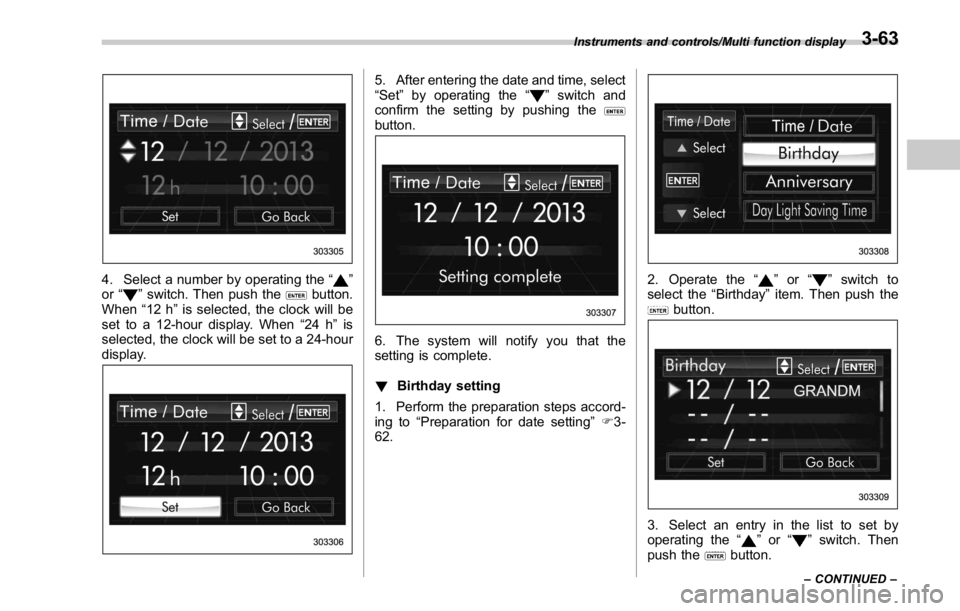
4. Select a number by operating the “ ”
or “
” switch. Then push the button.
When “ 12 h ” is selected, the clock will be
set to a 12-hour display. When “ 24 h ” is
selected, the clock will be set to a 24-hour
display. 5. After entering the date and time, select
“ Set ” by operating the “
” switch and
confirm the setting by pushing the
button.
6. The system will notify you that the
setting is complete.
! Birthday setting
1. Perform the preparation steps accord-
ing to “ Preparation for date setting ” F 3-
62. 2. Operate the “ ” or “ ” switch to
select the “ Birthday ” item. Then push the
button.
3. Select an entry in the list to set by
operating the “
” or “ ” switch. Then
push the
button.Instruments and controls/Multi function display
– CONTINUED –3-63
Page 205 of 594
Instruments and controls/Multi function display
switch, and confirm the setting by pushing
the
button.
6. The system will notify you that the
setting is complete.
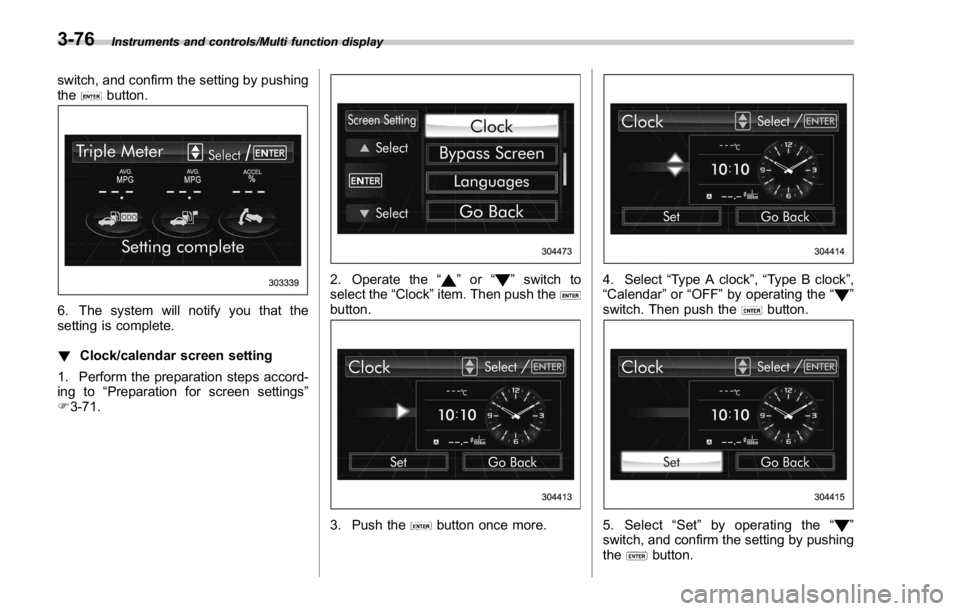
! Clock/calendar screen setting
1. Perform the preparation steps accord-
ing to “ Preparation for screen settings ”
F 3-71. 2. Operate the “ ” or “ ” switch to
select the “ Clock ” item. Then push the
button.
3. Push the button once more. 4. Select “ Type A clock ” , “ Type B clock ” ,
“ Calendar ” or “ OFF ” by operating the “
”
switch. Then push the
button.
5. Select “ Set ” by operating the “ ”
switch, and confirm the setting by pushing
the
button.3-76
Page 218 of 594
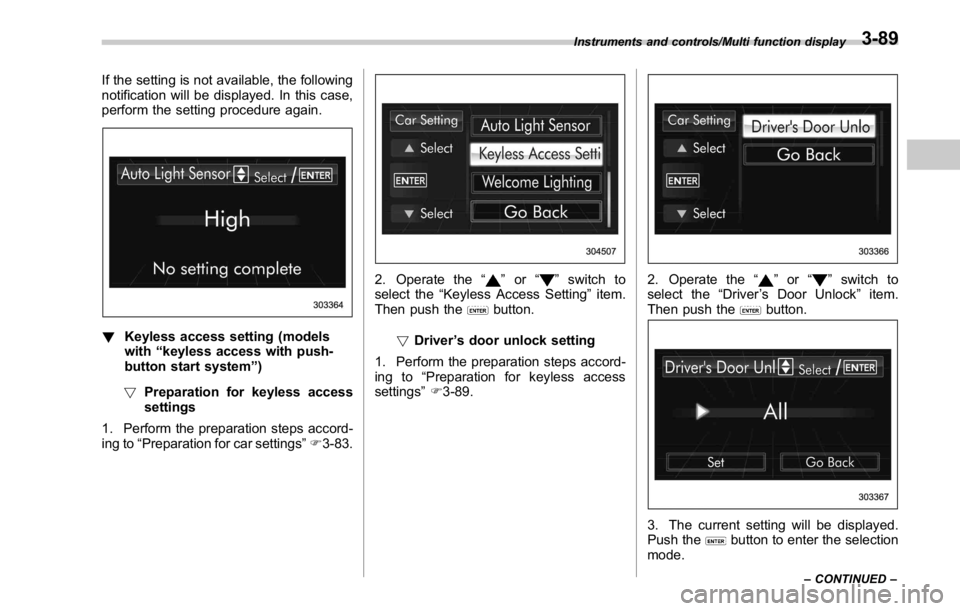
If the setting is not available, the following
notification will be displayed. In this case,
perform the setting procedure again.
! Keyless access setting (models
with “ keyless access with push-
button start system ” )
! Preparation for keyless access
settings
1. Perform the preparation steps accord-
ing to “ Preparation for car settings ” F 3-83. 2. Operate the “ ” or “ ” switch to
select the “ Keyless Access Setting ” item.
Then push the
button.
! Driver ’ s door unlock setting
1. Perform the preparation steps accord-
ing to “ Preparation for keyless access
settings ” F 3-89. 2. Operate the “ ” or “ ” switch to
select the “ Driver ’ s Door Unlock ” item.
Then push the
button.
3. The current setting will be displayed.
Push the
button to enter the selection
mode.Instruments and controls/Multi function display
– CONTINUED –3-89
Page 227 of 594
Instruments and controls/Illumination brightness control
& One-touch lane changerTo flash the turn signal and turn signal
indicator light three times, push the turn
signal lever up or down slightly and
immediately release it.
The operational/non-operational setting of
the one-touch lane changer ’ s can be
changed by a SUBARU dealer. Contact
the nearest SUBARU dealer for details. Illumination brightness con-
trol
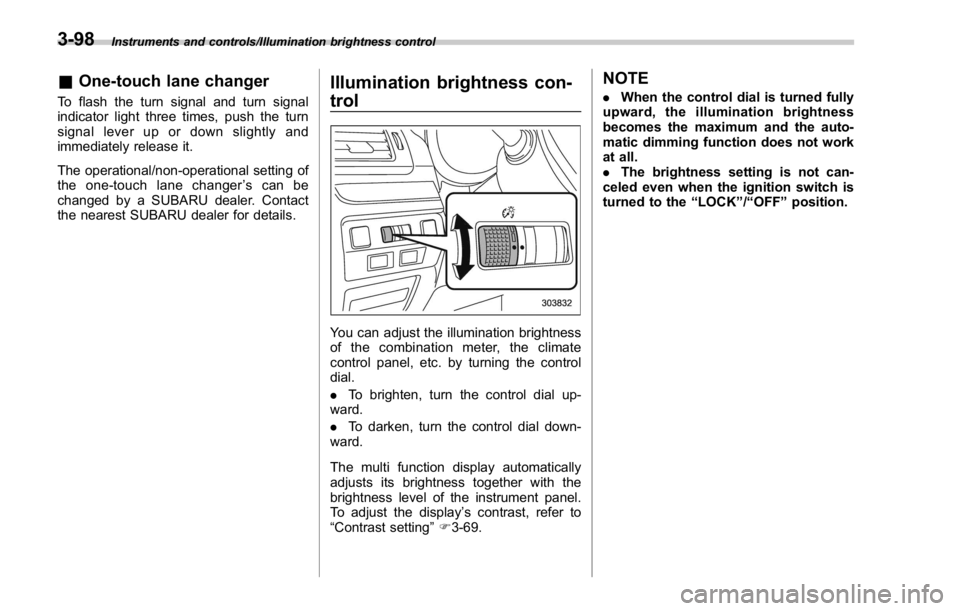
You can adjust the illumination brightness
of the combination meter, the climate
control panel, etc. by turning the control
dial.
. To brighten, turn the control dial up-
ward.
. To darken, turn the control dial down-
ward.
The multi function display automatically
adjusts its brightness together with the
brightness level of the instrument panel.
To adjust the display ’ s contrast, refer to
“ Contrast setting ” F 3-69. NOTE . When the control dial is turned fully
upward, the illumination brightness
becomes the maximum and the auto-
matic dimming function does not work
at all.
. The brightness setting is not can-
celed even when the ignition switch is
turned to the “ LOCK ” / “ OFF ” position.3-98
Page 230 of 594
Wiper and washer WARNINGIn freezing weather, do not use the
windshield washer until the wind-
shield is sufficiently warmed by the
defroster.
Otherwise the washer fluid can
freeze on the windshield, blocking
your view.
CAUTION. Do not operate the washer con-
tinuously for more than 10 sec-
onds, or when the washer fluid
tank is empty. This may cause
overheating of the washer motor.
Check the washer fluid level
frequently, such as at fuel stops.
. Do not operate the wipers when
the windshield or rear window is
dry. This may scratch the glass,
damage the wiper blades and
might cause the wiper motor to
fail. Before operating the wiper
on a dry windshield or rear
window, always use the wind-
shield washer. . In freezing weather, be sure that
the wiper blades are not frozen to
the windshield or rear window
before switching on the wipers.
Attempting to operate the wiper
with the blades frozen to the
window glass could cause not
only the wiper blades to be
damaged but also might cause
the wiper motor to fail. If the
wiper blades are frozen to the
window glass, be sure to operate
the defroster, windshield wiper
deicer (if equipped) or rear win-
dow defogger before turning on
the wiper.
. If the wipers stop during opera-
tion because of ice or some other
obstruction on the window, this
might cause the wiper motor to
fail even if the wiper switch is
turned off. If this occurs,
promptly stop the vehicle in a
safe place, turn the ignition
switch to the “ LOCK ” / “ OFF ” po-
sition and clean the window
glass to allow proper wiper op-
eration.
. Use clean water if windshield
washer fluid is unavailable. In
areas where water freezes in
winter, use SUBARU Windshield Washer Fluid or the equivalent.
Refer to “ Windshield washer
fluid ” F 11-38.
Also, when driving the vehicle
when there are freezing tempera-
tures, use non-freezing type wi-
per blades.
. Do not clean the wiper blades
with gasoline or a solvent, such
as paint thinner or benzine. This
will cause deterioration of the
wiper blades.
NOTE . The windshield wiper motor is pro-
tected against overloads by a circuit
breaker. If the motor operates continu-
ously under an unusually heavy load,
the circuit breaker may trip to stop the
motor temporarily. If this happens, park
your vehicle in a safe place, turn off the
wiper switch, and wait for approxi-
mately 10 minutes. The circuit breaker
will reset itself, and the wipers will
again operate normally.
. Clean your wiper blades and win-
dow glass periodically with a washer
solution to prevent streaking, and to
remove accumulations of road salt or
road film. Operate the windshield
washer for at least 1 second so that Instruments and controls/Wiper and washer
– CONTINUED –3-101
Page 235 of 594
Instruments and controls/Mirrors
! Photosensors
The mirror has a photosensor attached on
both the front and back sides. During
nighttime driving, these sensors detect
distracting glare from vehicle headlights
behind you and automatically dim the
mirror to eliminate glare and preserve
your vision. For this reason, use care not
to cover the sensors with stickers, or other
similar items. Periodically wipe the sen-
sors clean using a piece of dry soft cotton
cloth or an applicator. ! Compass zone adjustment
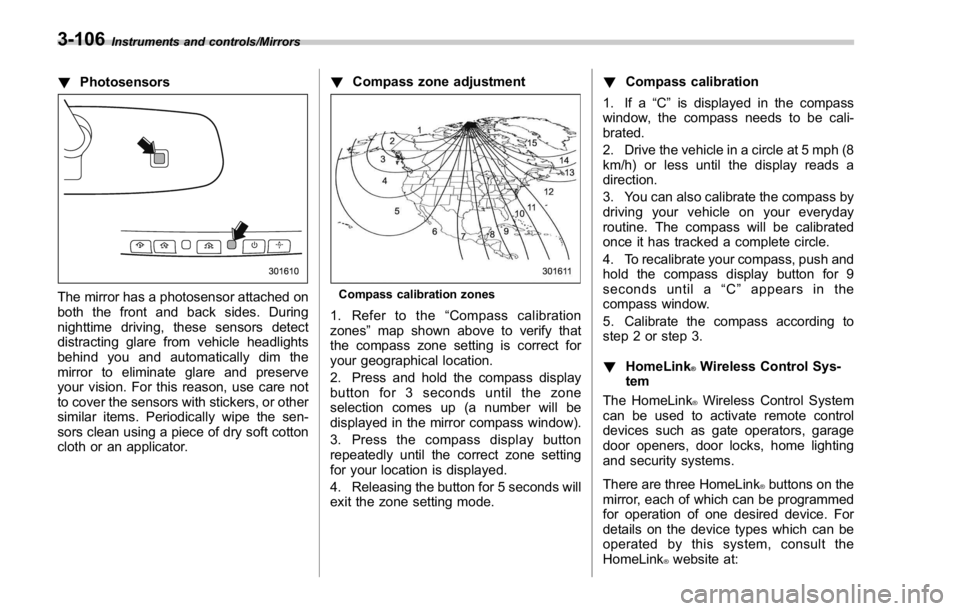
Compass calibration zones
1. Refer to the “ Compass calibration
zones ” map shown above to verify that
the compass zone setting is correct for
your geographical location.
2. Press and hold the compass display
button for 3 seconds until the zone
selection comes up (a number will be
displayed in the mirror compass window).
3. Press the compass display button
repeatedly until the correct zone setting
for your location is displayed.
4. Releasing the button for 5 seconds will
exit the zone setting mode. ! Compass calibration
1. If a “ C ” is displayed in the compass
window, the compass needs to be cali-
brated.
2. Drive the vehicle in a circle at 5 mph (8
km/h) or less until the display reads a
direction.
3. You can also calibrate the compass by
driving your vehicle on your everyday
routine. The compass will be calibrated
once it has tracked a complete circle.
4. To recalibrate your compass, push and
hold the compass display button for 9
seconds until a “ C ” appears in the
compass window.
5. Calibrate the compass according to
step 2 or step 3.
! HomeLink ®
Wireless Control Sys-
tem
The HomeLink ®
Wireless Control System
can be used to activate remote control
devices such as gate operators, garage
door openers, door locks, home lighting
and security systems.
There are three HomeLink ®
buttons on the
mirror, each of which can be programmed
for operation of one desired device. For
details on the device types which can be
operated by this sys tem, consult the
HomeLink ®
website at:3-106
Page 239 of 594
Instruments and controls/Mirrors
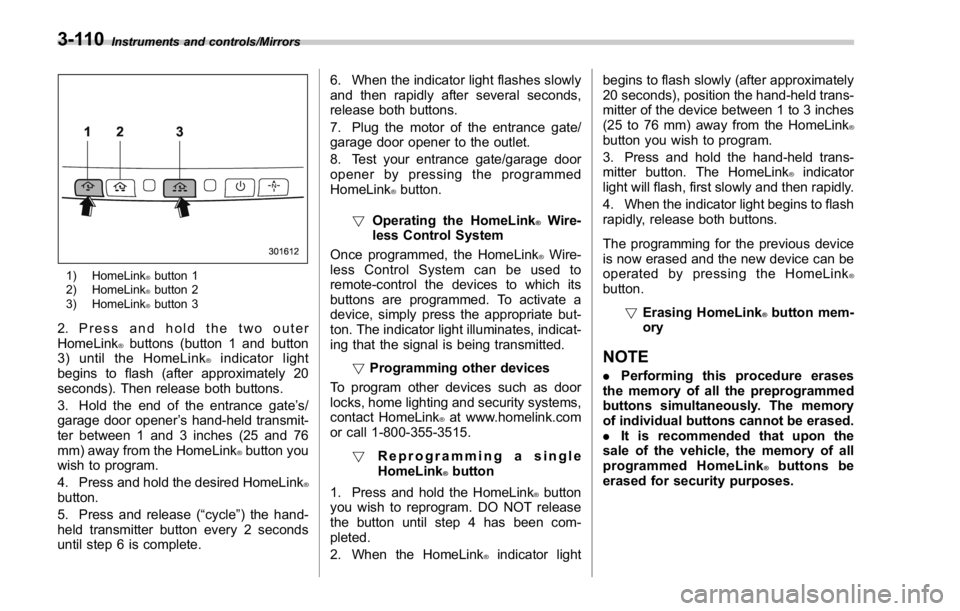
1) HomeLink ®
button 1
2) HomeLink ®
button 2
3) HomeLink ®
button 3
2. Press and hold the two outer
HomeLink ®
buttons (button 1 and button
3) until the HomeLink ®
indicator light
begins to flash (after approximately 20
seconds). Then release both buttons.
3. Hold the end of the entrance gate ’ s/
garage door opener ’ s hand-held transmit-
ter between 1 and 3 inches (25 and 76
mm) away from the HomeLink ®
button you
wish to program.
4. Press and hold the desired HomeLink ®
button.
5. Press and release ( “ cycle ” ) the hand-
held transmitter button every 2 seconds
until step 6 is complete. 6. When the indicator light flashes slowly
and then rapidly after several seconds,
release both buttons.
7. Plug the motor of the entrance gate/
garage door opener to the outlet.
8. Test your entrance gate/garage door
opener by pressing the programmed
HomeLink ®
button.
! Operating the HomeLink ®
Wire-
less Control System
Once programmed, the HomeLink ®
Wire-
less Control System can be used to
remote-control the devices to which its
buttons are programmed. To activate a
device, simply press the appropriate but-
ton. The indicator light illuminates, indicat-
ing that the signal is being transmitted.
! Programming other devices
To program other devices such as door
locks, home lighting and security systems,
contact HomeLink ®
at www.homelink.com
or call 1-800-355-3515.
! Reprogramming a single
HomeLink ®
button
1. Press and hold the HomeLink ®
button
you wish to reprogram. DO NOT release
the button until step 4 has been com-
pleted.
2. When the HomeLink ®
indicator light begins to flash slowly (after approximately
20 seconds), position the hand-held trans-
mitter of the device between 1 to 3 inches
(25 to 76 mm) away from the HomeLink ®
button you wish to program.
3. Press and hold the hand-held trans-
mitter button. The HomeLink ®
indicator
light will flash, first slowly and then rapidly.
4. When the indicator light begins to flash
rapidly, release both buttons.
The programming for the previous device
is now erased and the new device can be
operated by pressing the HomeLink ®
button.
! Erasing HomeLink ®
button mem-
ory
NOTE . Performing this procedure erases
the memory of all the preprogrammed
buttons simultaneously. The memory
of individual buttons cannot be erased.
. It is recommended that upon the
sale of the vehicle, the memory of all
programmed HomeLink ®
buttons be
erased for security purposes.3-110
Page 241 of 594
Instruments and controls/Defogger and deicer
Defogger and deicer
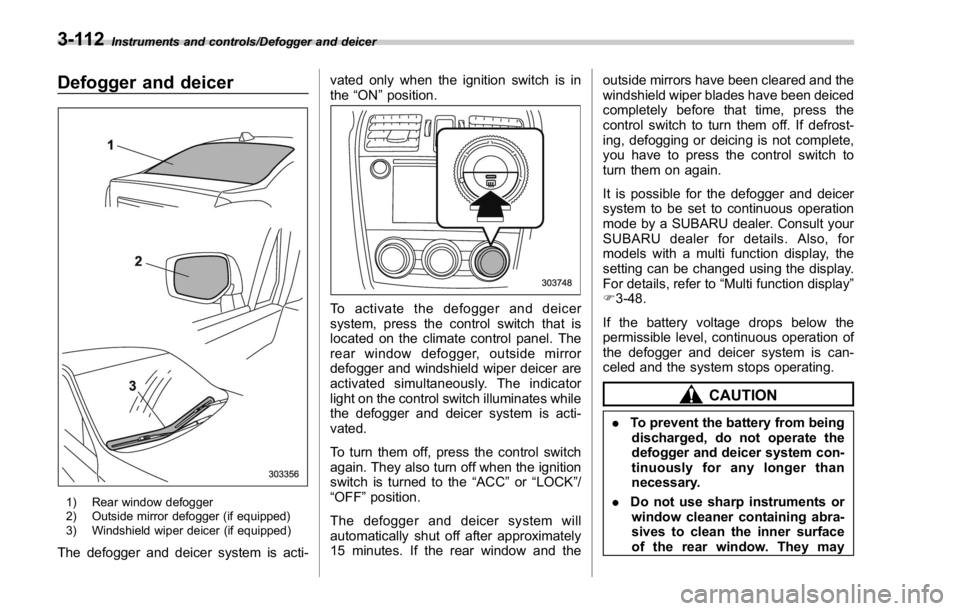
1) Rear window defogger
2) Outside mirror defogger (if equipped)
3) Windshield wiper deicer (if equipped)
The defogger and deicer system is acti- vated only when the ignition switch is in
the “ ON ” position.
To activate the defogger and deicer
system, press the control switch that is
located on the climate control panel. The
rear window defogger, outside mirror
defogger and windshield wiper deicer are
activated simultaneously. The indicator
light on the control switch illuminates while
the defogger and deicer system is acti-
vated.
To turn them off, press the control switch
again. They also turn off when the ignition
switch is turned to the “ ACC ” or “ LOCK ” /
“ OFF ” position.
The defogger and deicer system will
automatically shut off after approximately
15 minutes. If the rear window and the outside mirrors have been cleared and the
windshield wiper blades have been deiced
completely before that time, press the
control switch to turn them off. If defrost-
ing, defogging or deicing is not complete,
you have to press the control switch to
turn them on again.
It is possible for the defogger and deicer
system to be set to continuous operation
mode by a SUBARU dealer. Consult your
SUBARU dealer for details. Also, for
models with a multi function display, the
setting can be changed using the display.
For details, refer to “ Multi function display ”
F 3-48.
If the battery voltage drops below the
permissible level, continuous operation of
the defogger and deicer system is can-
celed and the system stops operating.
CAUTION
. To prevent the battery from being
discharged, do not operate the
defogger and deicer system con-
tinuously for any longer than
necessary.
. Do not use sharp instruments or
window cleaner containing abra-
sives to clean the inner surface
of the rear window. They may3-112
Page 242 of 594
damage the conductors printed
on the window.
NOTE . Turn on the defogger and deicer
system if the wipers are frozen to the
windshield.
. If the windshield is covered with
snow, remove the snow so that the
windshield wiper deicer works effec-
tively.
. While the defogger and deicer sys-
tem is in the continuous operation
mode, if the vehicle speed remains at
9mph(15km/h)orlowerfor15
minutes, the windshield wiper deicer
automatically stops operating, though
the rear window defogger and outside
mirror defogger maintain continuous
operation in this condition.
. While the defogger and deicer sys-
tem is in the continuous operation
mode, if the battery voltage drops
below the permissible level, continu-
ous operation of the defogger and
deicer system is canceled and the
system stops operating. Tilt/telescopic steering wheel WARNING. Do not adjust the steering wheel
tilt/telescopic position while driv-
ing. This may cause loss of
vehicle control and result in
personal injury.
. If the lever cannot be raised to
the fixed position, adjust the
steering wheel again. It is dan-
gerous to drive without locking
the steering wheel. This may
cause loss of vehicle control
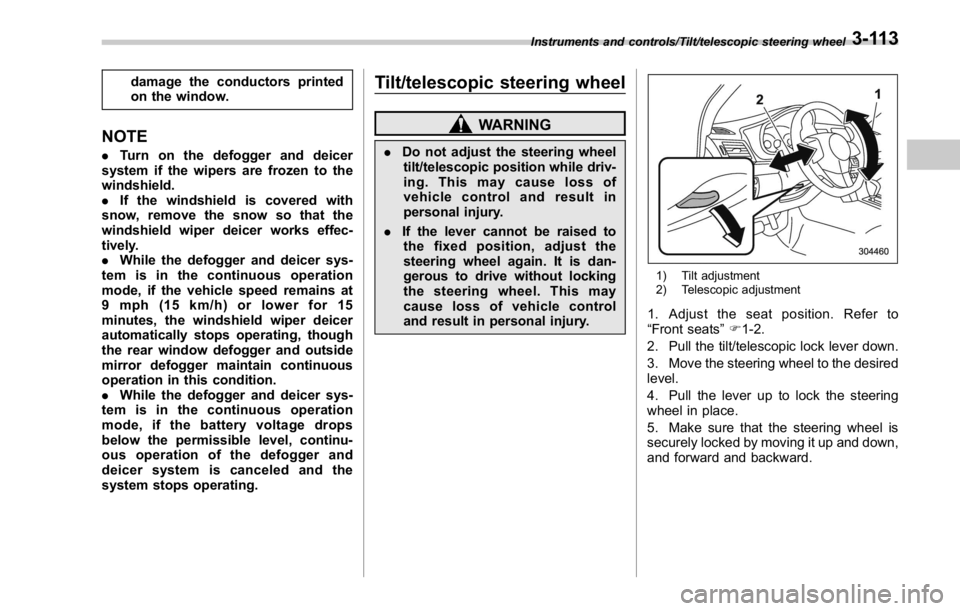
and result in personal injury. 1) Tilt adjustment
2) Telescopic adjustment
1. Adjust the seat position. Refer to
“ Front seats ” F 1-2.
2. Pull the tilt/telescopic lock lever down.
3. Move the steering wheel to the desired
level.
4. Pull the lever up to lock the steering
wheel in place.
5. Make sure that the steering wheel is
securely locked by moving it up and down,
and forward and backward.Instruments and controls/Tilt/telescopic steering wheel
3-113
Page 250 of 594

both side windows to prevent fogging.)
(Heat-def): Windshield defroster outlets,
foot outlets and both side outlets of the
instrument panel (Refer to “ Defrosting ”
F 4-9.)
(Defrost): Windshield defroster outlets and both side outlets of the instrument
panel (Refer to “ Defrosting ” F 4-9.)
NOTE When the “ ” or “ ” mode is se-
lected, the air conditioner compressor
operates automatically regardless of
the position of the air conditioner
button to defrost the windshield more
quickly. However the indicator on the
air conditioner button will not illumi-
nate. At the same time, the air inlet
selection is automatically set to the
outside air mode. After defrosting the
windshield by pressing the defroster
button “
” , pressing the button again
returns the system to the setting that
had been selected before the defroster
was activated.
& Temperature control Turn the temperature control dial to set the
preferred interior temperature. With the
dial set to your preferred temperature, the
system automatically adjusts the tempera-
ture of air supplied from the outlets so that
the preferred temperature is achieved and
maintained.
If the dial is turned fully counterclockwise,
the system provides maximum cooling
performance. If the dial is turned fully
clockwise, the system provides maximum heating performance.
NOTE The controllable temperature range
may vary depending on the regional
specifications of the vehicle.
! “ DUAL ” mode (type B)
a) Front passenger ’ s side temperature
b) Driver ’ s side temperature
You can change the setting of the driver ’ s
side and front passenger ’ s side tempera-
ture independently by selecting the
“ DUAL ” mode.
You can select the “ DUAL ” mode by
performing either of the following proce-
dures.
. Press the “ DUAL ” buttonClimate control/Manual climate control operation
– CONTINUED –4-7