lock SUBARU WRX 2016 Owners Manual
[x] Cancel search | Manufacturer: SUBARU, Model Year: 2016, Model line: WRX, Model: SUBARU WRX 2016Pages: 594, PDF Size: 19.43 MB
Page 407 of 594
Starting and operating/Manual transmission
& Shifting speeds! Recommended shifting speeds
The best compromise between fuel econ-
omy and vehicle performance during
normal driving is ensured by shifting up
at the speeds listed in the following table. Shift up mph (km/h)
1st to 2nd 15 (24)
2nd to 3rd 25 (40)
3rd to 4th 40 (64)
4th to 5th 45 (72)
5th to 6th 50 (80)
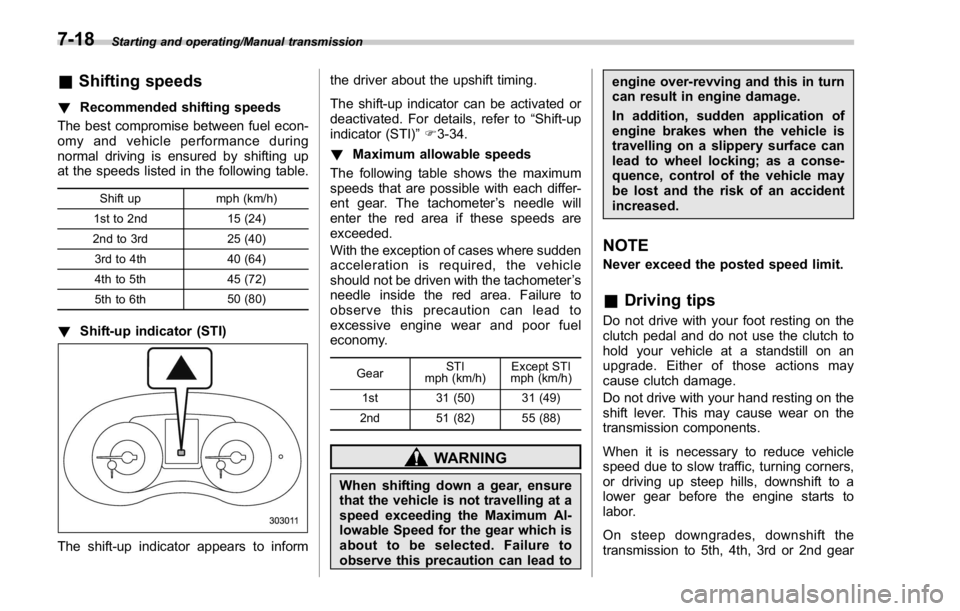
! Shift-up indicator (STI)
The shift-up indicator appears to inform the driver about the upshift timing.
The shift-up indicator can be activated or
deactivated. For details, refer to “ Shift-up
indicator (STI) ” F 3-34.
! Maximum allowable speeds
The following table shows the maximum
speeds that are possible with each differ-
ent gear. The tachometer ’ s needle will
enter the red area if these speeds are
exceeded.
With the exception of cases where sudden
acceleration is required, the vehicle
should not be driven with the tachometer ’ s
needle inside the red area. Failure to
observe this precaution can lead to
excessive engine wear and poor fuel
economy.
Gear STI
mph (km/h) Except STI
mph (km/h)
1st 31 (50) 31 (49)
2nd 51 (82) 55 (88)
WARNING
When shifting down a gear, ensure
that the vehicle is not travelling at a
speed exceeding the Maximum Al-
lowable Speed for the gear which is
about to be selected. Failure to
observe this precaution can lead to engine over-revving and this in turn
can result in engine damage.
In addition, sudden application of
engine brakes when the vehicle is
travelling on a slippery surface can
lead to wheel locking; as a conse-
quence, control of the vehicle may
be lost and the risk of an accident
increased.
NOTE Never exceed the posted speed limit.
& Driving tips Do not drive with your foot resting on the
clutch pedal and do not use the clutch to
hold your vehicle at a standstill on an
upgrade. Either of those actions may
cause clutch damage.
Do not drive with your hand resting on the
shift lever. This may cause wear on the
transmission components.
When it is necessary to reduce vehicle
speed due to slow traffic, turning corners,
or driving up steep hills, downshift to a
lower gear before the engine starts to
labor.
On steep downgrades, downshift the
transmission to 5th, 4th, 3rd or 2nd gear7-18
Page 411 of 594
Starting and operating/Driver ’ s Control Center Differential (C.DIFF/DCCD) (STI)
! Center differential control switch
and indicator
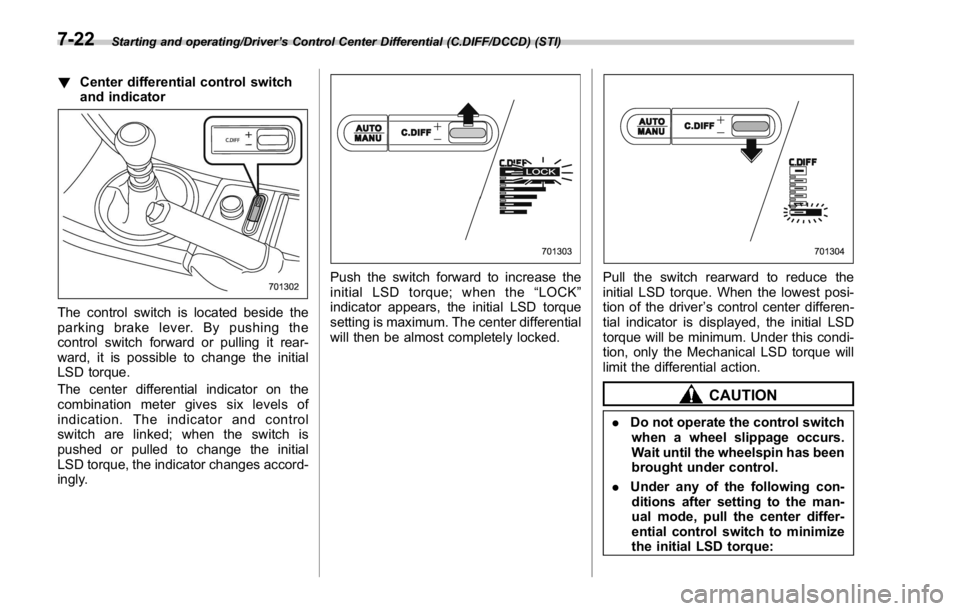
The control switch is located beside the
parking brake lever. By pushing the
control switch forward or pulling it rear-
ward, it is possible to change the initial
LSD torque.
The center differential indicator on the
combination meter gives six levels of
indication. The indicator and control
switch are linked; when the switch is
pushed or pulled to change the initial
LSD torque, the indicator changes accord-
ingly. Push the switch forward to increase the
initial LSD torque; when the “ LOCK ”
indicator appears, the initial LSD torque
setting is maximum. The center differential
will then be almost completely locked. Pull the switch rearward to reduce the
initial LSD torque. When the lowest posi-
tion of the driver ’ s control center differen-
tial indicator is displayed, the initial LSD
torque will be minimum. Under this condi-
tion, only the Mechanical LSD torque will
limit the differential action.
CAUTION
. Do not operate the control switch
when a wheel slippage occurs.
Wait until the wheelspin has been
brought under control.
. Under any of the following con-
ditions after setting to the man-
ual mode, pull the center differ-
ential control switch to minimize
the initial LSD torque:7-22
Page 412 of 594
– When a temporary spare tire
is installed
– When your vehicle is towed
– When the vehicle is stopped
with the manual mode se-
lected
NOTE . A higher initial LSD torque setting
gives the vehicle greater traction when
driving straight ahead but makes cor-
nering more difficult. Remember this
when adjusting the initial LSD torque.
In general, higher initial LSD torque
settings assist driving on slippery
roads and lower settings for non-slip-
pery roads. When the vehicle is stuck
in snow or mud, setting the initial LSD
torque to the maximum will help to free
the vehicle.
. The setting of the initial LSD torque
will remain even when the auto mode is
selected or the ignition switch is turned
to the “ LOCK ” / “ OFF ” position. How-
ever, the initial LSD torque will be
minimized when the battery is discon-
nected and reconnected.
. During cornering or when making
turns (especially when going into the
garage), the rotational difference be-
tween the front and rear wheels may cause a braking effect accompanied by
vibration and noise. This does not
indicate a problem. The phenomenon
will disappear when setting the initial
LSD torque to the minimum.
In the auto mode, it controls the initial
LSD torque automatically. While in the
auto mode, this phenomenon some-
times occurs depending on the driving
condition, however, it does not indicate
a problem.
. Use the center differential indicator
only as a rough indication of the initial
LSD torque.
. If you operate the center differential
control switch while quickly accelerat-
ing or turning a tight corner, you may
feel slight shocks. This is due to
differential action by the center differ-
ential and does not indicate a problem.
& Temporary release When the driver stops the vehicle and
pulls the parking brake lever after manu-
ally setting the initial LSD torque, the LSD
torque is temporarily minimized. However
the indicator on the combination meter
continues to show the driver ’ s selected
initial LSD torque. When the driver re-
leases the parking brake lever, the initial
LSD torque set by the driver is restored. Continuously variable trans-
mission The continuously variable transmission is
electronically controlled and provides an
infinite number of forward speeds and 1
reverse speed. It also has a manual mode.
WARNINGDo not shift from the “ P ” or “ N ”
position into the “ D ” or “ R ” position
while depressing the accelerator
pedal. This may cause the vehicle
to jump forward or backward.
CAUTION. Shift into the “ P ” or “ R ” position
only after the vehicle is comple-
tely stopped. Shifting while the
vehicle is moving may cause
damage to the transmission.
. Do not race the engine for more
than 5 seconds in any position
except the “ N ” or “ P ” position
when the brake is applied or
when chocks are used in the
wheels. This may cause the
transmission fluid to overheat.
. Never move the vehicle rearwardStarting and operating/Continuously variable transmission
– CONTINUED –7-23
Page 414 of 594
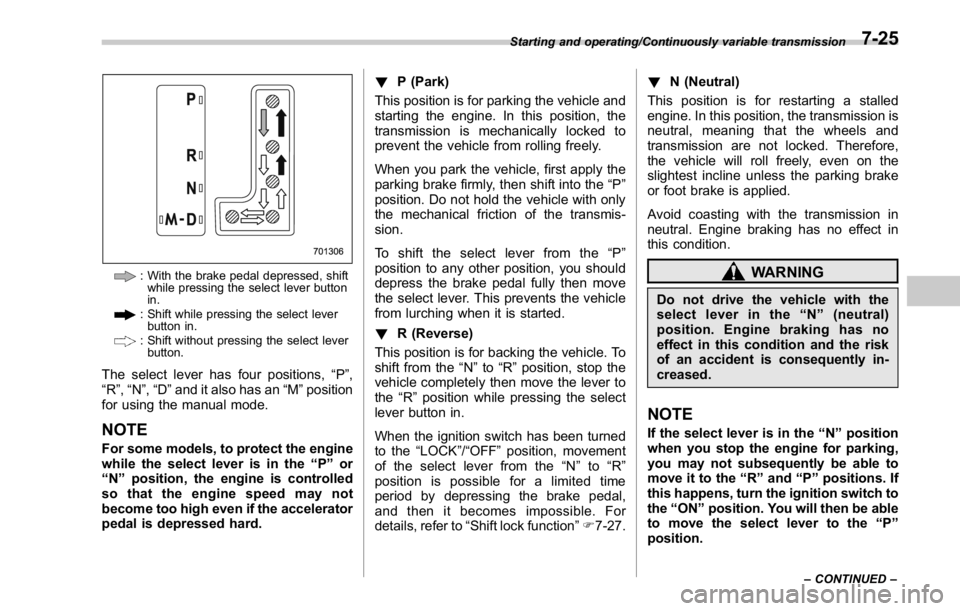
: With the brake pedal depressed, shift
while pressing the select lever button
in.
: Shift while pressing the select lever
button in.
: Shift without pressing the select lever
button.
The select lever has four positions, “ P ” ,
“ R ” , “ N ” , “ D ” and it also has an “ M ” position
for using the manual mode.
NOTE For some models, to protect the engine
while the select lever is in the “ P ” or
“ N ” position, the engine is controlled
so that the engine speed may not
become too high even if the accelerator
pedal is depressed hard. ! P (Park)
This position is for parking the vehicle and
starting the engine. In this position, the
transmission is mechanically locked to
prevent the vehicle from rolling freely.
When you park the vehicle, first apply the
parking brake firmly, then shift into the “ P ”
position. Do not hold the vehicle with only
the mechanical friction of the transmis-
sion.
To shift the select lever from the “ P ”
position to any other position, you should
depress the brake pedal fully then move
the select lever. This prevents the vehicle
from lurching when it is started.
! R (Reverse)
This position is for backing the vehicle. To
shift from the “ N ” to “ R ” position, stop the
vehicle completely then move the lever to
the “ R ” position while pressing the select
lever button in.
When the ignition switch has been turned
to the “ LOCK ” / “ OFF ” position, movement
of the select lever from the “ N ” to “ R ”
position is possible for a limited time
period by depressing the brake pedal,
and then it becomes impossible. For
details, refer to “ Shift lock function ” F 7-27. ! N (Neutral)
This position is for restarting a stalled
engine. In this position, the transmission is
neutral, meaning that the wheels and
transmission are not locked. Therefore,
the vehicle will roll freely, even on the
slightest incline unless the parking brake
or foot brake is applied.
Avoid coasting with the transmission in
neutral. Engine braking has no effect in
this condition.
WARNINGDo not drive the vehicle with the
select lever in the “ N ” (neutral)
position. Engine braking has no
effect in this condition and the risk
of an accident is consequently in-
creased.
NOTE If the select lever is in the “ N ” position
when you stop the engine for parking,
you may not subsequently be able to
move it to the “ R ” and “ P ” positions. If
this happens, turn the ignition switch to
the “ ON ” position. You will then be able
to move the select lever to the “ P ”
position.Starting and operating/Continuously variable transmission
– CONTINUED –7-25
Page 416 of 594
“ ” appears, downshifting is possible.
When both indicators appear, upshifting
and downshifting are both possible. When
the vehicle stops (for example, at traffic
signals), the downshift indicator turns off.
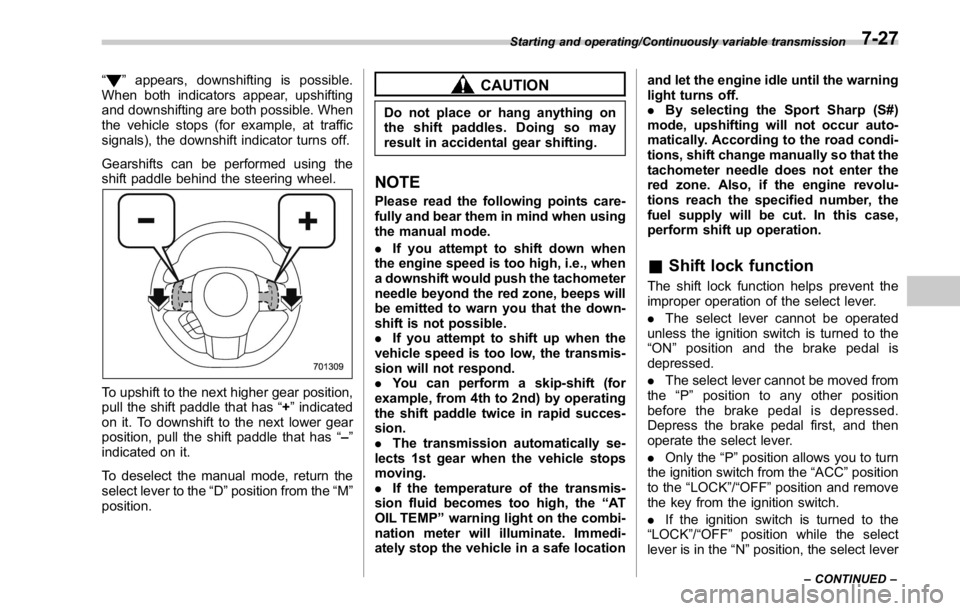
Gearshifts can be performed using the
shift paddle behind the steering wheel.
To upshift to the next higher gear position,
pull the shift paddle that has “ + ” indicated
on it. To downshift to the next lower gear
position, pull the shift paddle that has “ – ”
indicated on it.
To deselect the manual mode, return the
select lever to the “ D ” position from the “ M ”
position. CAUTIONDo not place or hang anything on
the shift paddles. Doing so may
result in accidental gear shifting.
NOTE Please read the following points care-
fully and bear them in mind when using
the manual mode.
. If you attempt to shift down when
the engine speed is too high, i.e., when
a downshift would push the tachometer
needle beyond the red zone, beeps will
be emitted to warn you that the down-
shift is not possible.
. If you attempt to shift up when the
vehicle speed is too low, the transmis-
sion will not respond.
. You can perform a skip-shift (for
example, from 4th to 2nd) by operating
the shift paddle twice in rapid succes-
sion.
. The transmission automatically se-
lects 1st gear when the vehicle stops
moving.
. If the temperature of the transmis-
sion fluid becomes too high, the “ AT
OIL TEMP ” warning light on the combi-
nation meter will illuminate. Immedi-
ately stop the vehicle in a safe location and let the engine idle until the warning
light turns off.
. By selecting the Sport Sharp (S#)
mode, upshifting will not occur auto-
matically. According to the road condi-
tions, shift change manually so that the
tachometer needle does not enter the
red zone. Also, if the engine revolu-
tions reach the specified number, the
fuel supply will be cut. In this case,
perform shift up operation.
& Shift lock function The shift lock function helps prevent the
improper operation of the select lever.
. The select lever cannot be operated
unless the ignition switch is turned to the
“ ON ” position and the brake pedal is
depressed.
. The select lever cannot be moved from
the “ P ” position to any other position
before the brake pedal is depressed.
Depress the brake pedal first, and then
operate the select lever.
. Only the “ P ” position allows you to turn
the ignition switch from the “ ACC ” position
to the “ LOCK ” / “ OFF ” position and remove
the key from the ignition switch.
. If the ignition switch is turned to the
“ LOCK ” / “ OFF ” position while the select
lever is in the “ N ” position, the select leverStarting and operating/Continuously variable transmission
– CONTINUED –7-27
Page 417 of 594
Starting and operating/Continuously variable transmission
may not be moved to the “ P ” position after
a period of time. Therefore, move the
select lever to the “ P ” position with the
brake pedal depressed soon after the
ignition switch is turned to the “ LOCK ” /
“ OFF ” position.
! Shift lock release
If the select lever cannot be operated, turn
the ignition switch back to the “ ON ”
position then move the select lever to the
“ P ” position with the select lever button
pressed and brake pedal depressed.
If the select lever does not move after
performing the above procedure, perform
the following steps.
. When the select lever cannot be
shifted from “ P ” to “ N ” :
Refer to “ Shift lock release using the shift
lock release button ” F 7-28.
. When the select lever cannot be
shifted from “ N ” to “ R ” , “ P ” :
Within 60 seconds after placing the igni-
tion switch in the “ ACC ” position, move the
select lever to the “ P ” position with the
select lever button pressed and brake
pedal depressed.
If you must perform the above procedure,
the shift lock system (or the vehicle control
system) may be malfunctioning. Contact a SUBARU dealer for an inspection as soon
as possible.
If the select lever does not move after
performing the above procedure, refer to
“ Shift lock release using the shift lock
release button ” F 7-28.
! Shift lock release using the shift
lock release button
Perform the following procedure to release
the shift lock.
1. Apply the parking brake and stop the
engine.
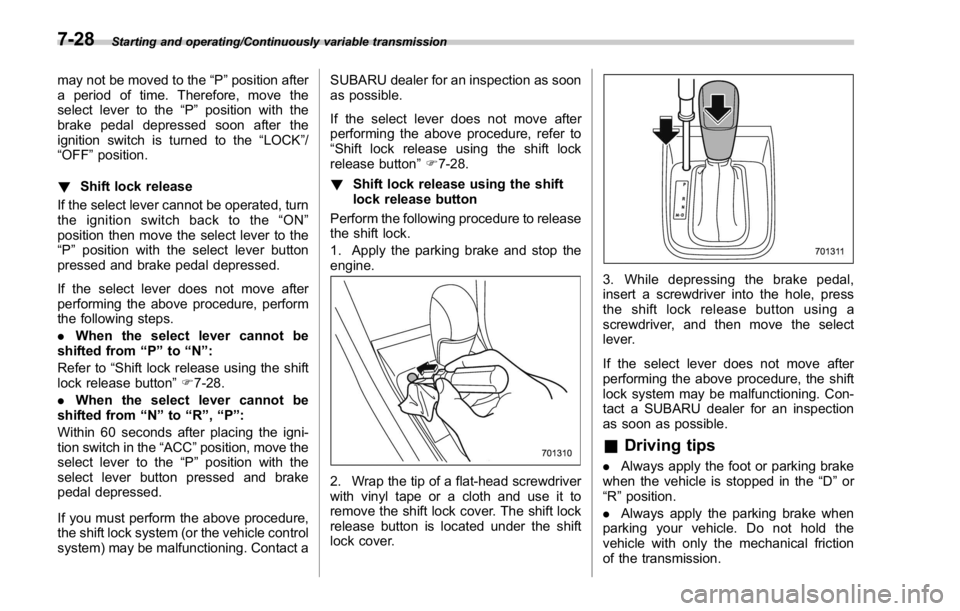
2. Wrap the tip of a flat-head screwdriver
with vinyl tape or a cloth and use it to
remove the shift lock cover. The shift lock
release button is located under the shift
lock cover. 3. While depressing the brake pedal,
insert a screwdriver into the hole, press
the shift lock release button using a
screwdriver, and then move the select
lever.
If the select lever does not move after
performing the above procedure, the shift
lock system may be malfunctioning. Con-
tact a SUBARU dealer for an inspection
as soon as possible.
& Driving tips . Always apply the foot or parking brake
when the vehicle is stopped in the “ D ” or
“ R ” position.
. Always apply the parking brake when
parking your vehicle. Do not hold the
vehicle with only the mechanical friction
of the transmission.7-28
Page 422 of 594

other than Sport Sharp (S#) mode is
selected.
NOTE . The next time you turn on the
engine, after you turned off the engine
in the Sport Sharp (S#) mode, the SI-
DRIVE mode changes to the Sport (S)
mode.
. The next time you turn on the
engine, after you turned off the engine
in the Sport (S) mode or Intelligent (I)
mode, the SI-DRIVE mode will stay in
the same mode as when the engine
was turned off.
. While the engine is running, if the
CHECK ENGINE warning light/malfunc-
tion indicator light illuminates, the SI-
DRIVE mode changes to the Sport (S)
mode. In this case, it is not possible to
change to another mode.
. If there is a possibility that the
engine could overheat because of a
temperature increase of the engine
coolant, it is not possible to change to
the Sport Sharp (S#) mode. While the
vehicle is in the Sport Sharp (S#) mode,
it changes to the Sport (S) mode when
the engine coolant temperature in-
creases.
. While the engine is cool, you cannot
change to Sport Sharp (S#) mode. Limited slip differential (LSD)
(STI) The LSD provides optimum distribution of
power according to the difference in
revolutions between the right and left
wheels that may be caused by certain
driving conditions, thereby improving driv-
ing stability on snow-covered, muddy or
other slippery roads or when high speed
driving.
CAUTION. Never start the engine while a tire
on one side is jacked up, as the
vehicle may move.
. If one tire is spinning in mud,
avoid continued spinning at high
speed as this could adversely
affect the LSD.
. If you use a temporary spare tire
to replace a flat tire, be sure to
use the original temporary spare
tire stored in the vehicle. Using
other sizes will adversely affect
the LSD. Power steering & STI The vehicle is equipped with a hydraulic
power steering system. The power steer-
ing system operates only when the engine
is running.
If you lose power steering assist because
the engine stops or the system fails to
function, you can steer but it will take
much more effort.
CAUTIONDo not hold the steering wheel at the
fully locked position left or right for
more than 5 seconds. This may
damage the power steering pump.
NOTE Right after the engine has been started
and before it has warmed up, you may
hear a noise coming from areas adja-
cent to the power steering pump which
is located at the right-front area of the
engine compartment. This noise is
normal. It does not indicate power
steering system trouble.Starting and operating/Limited slip differential (LSD) (STI)
– CONTINUED –7-33
Page 425 of 594
Starting and operating/ABS (Anti – lock Brake System)
cate any malfunctions, and the brake
assist system is operating properly.
. You might feel that the brake pedal
is applied by lighter force and gener-
ates a greater braking force.
. You might hear an ABS operating
noise from the engine compartment.
& Disc brake pad wear warning
indicators
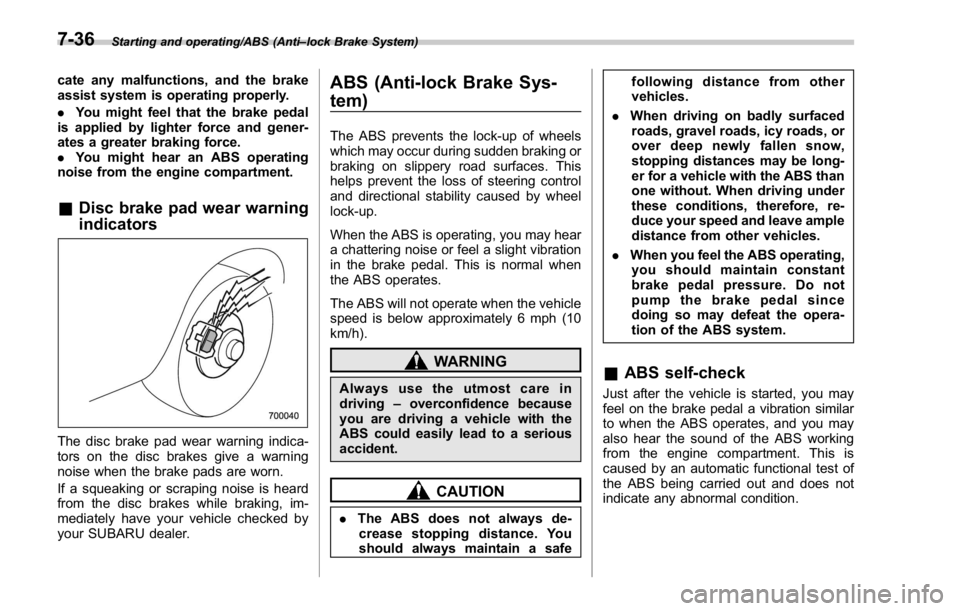
The disc brake pad wear warning indica-
tors on the disc brakes give a warning
noise when the brake pads are worn.
If a squeaking or scraping noise is heard
from the disc brakes while braking, im-
mediately have your vehicle checked by
your SUBARU dealer. ABS (Anti-lock Brake Sys-
tem) The ABS prevents the lock-up of wheels
which may occur during sudden braking or
braking on slippery road surfaces. This
helps prevent the loss of steering control
and directional stability caused by wheel
lock-up.
When the ABS is operating, you may hear
a chattering noise or feel a slight vibration
in the brake pedal. This is normal when
the ABS operates.
The ABS will not operate when the vehicle
speed is below approximately 6 mph (10
km/h).
WARNING
Always use the utmost care in
driving – overconfidence because
you are driving a vehicle with the
ABS could easily lead to a serious
accident.
CAUTION
. The ABS does not always de-
crease stopping distance. You
should always maintain a safe following distance from other
vehicles.
. When driving on badly surfaced
roads, gravel roads, icy roads, or
over deep newly fallen snow,
stopping distances may be long-
er for a vehicle with the ABS than
one without. When driving under
these conditions, therefore, re-
duce your speed and leave ample
distance from other vehicles.
. When you feel the ABS operating,
you should maintain constant
brake pedal pressure. Do not
pump the brake pedal since
doing so may defeat the opera-
tion of the ABS system.
& ABS self-check Just after the vehicle is started, you may
feel on the brake pedal a vibration similar
to when the ABS operates, and you may
also hear the sound of the ABS working
from the engine compartment. This is
caused by an automatic functional test of
the ABS being carried out and does not
indicate any abnormal condition.7-36
Page 426 of 594
& ABS warning light Refer to “ ABS warning light ” F 3-20.
Electronic Brake Force Dis-
tribution (EBD) system The EBD system maximizes the effective-
ness of the brakes by allowing the rear
brakes to supply a greater proportion of
the braking force. It functions by adjusting
the distribution of braking force to the rear
wheels in accordance with the vehicle ’ s
loading condition and speed.
The EBD system is an integral part of the
ABS and uses some of the ABS compo-
nents to perform its function of optimizing
the distribution of braking force. If any of
the ABS components used by the EBD
system malfunction, the EBD system also
stops working.
When the EBD system is operating, you
may hear a chattering noise or feel a slight
vibration in the brake pedal. This is normal
and does not indicate a malfunction. & Steps to take if EBD system
malfunctions
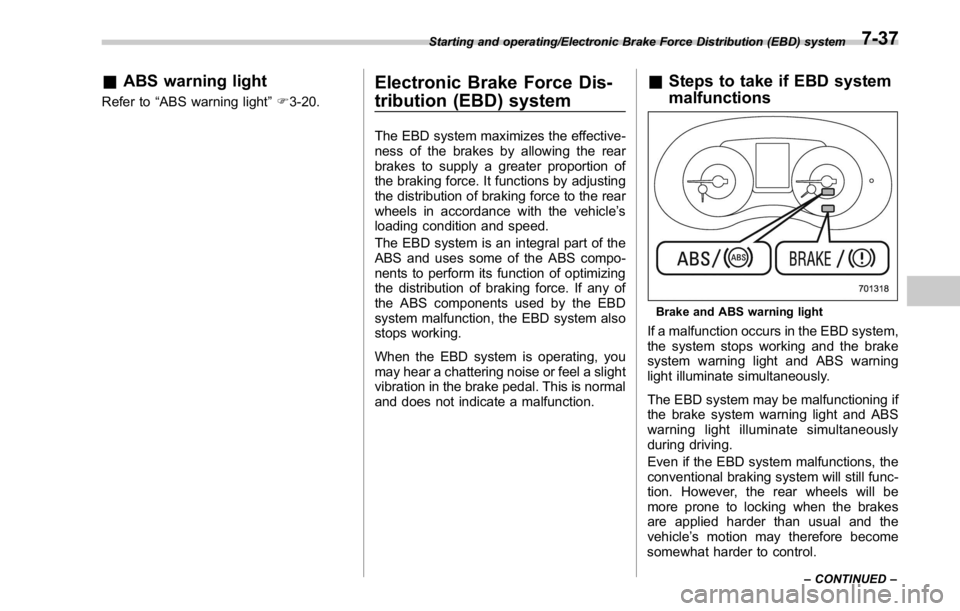
Brake and ABS warning light
If a malfunction occurs in the EBD system,
the system stops working and the brake
system warning light and ABS warning
light illuminate simultaneously.
The EBD system may be malfunctioning if
the brake system warning light and ABS
warning light illuminate simultaneously
during driving.
Even if the EBD system malfunctions, the
conventional braking system will still func-
tion. However, the rear wheels will be
more prone to locking when the brakes
are applied harder than usual and the
vehicle ’ s motion may therefore become
somewhat harder to control.Starting and operating/Electronic Brake Force Distribution (EBD) system
– CONTINUED –7-37
Page 430 of 594
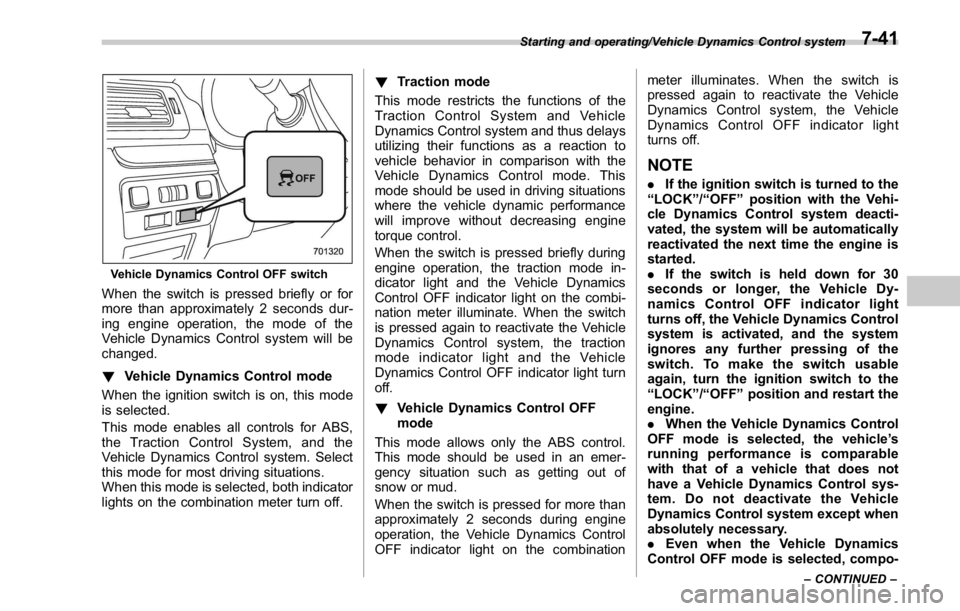
Vehicle Dynamics Control OFF switch
When the switch is pressed briefly or for
more than approximately 2 seconds dur-
ing engine operation, the mode of the
Vehicle Dynamics Control system will be
changed.
! Vehicle Dynamics Control mode
When the ignition switch is on, this mode
is selected.
This mode enables all controls for ABS,
the Traction Control System, and the
Vehicle Dynamics Control system. Select
this mode for most driving situations.
When this mode is selected, both indicator
lights on the combination meter turn off. ! Traction mode
This mode restricts the functions of the
Traction Control System and Vehicle
Dynamics Control system and thus delays
utilizing their functions as a reaction to
vehicle behavior in comparison with the
Vehicle Dynamics Control mode. This
mode should be used in driving situations
where the vehicle dynamic performance
will improve without decreasing engine
torque control.
When the switch is pressed briefly during
engine operation, the traction mode in-
dicator light and the Vehicle Dynamics
Control OFF indicator light on the combi-
nation meter illuminate. When the switch
is pressed again to reactivate the Vehicle
Dynamics Control system, the traction
mode indicator light and the Vehicle
Dynamics Control OFF indicator light turn
off.
! Vehicle Dynamics Control OFF
mode
This mode allows only the ABS control.
This mode should be used in an emer-
gency situation such as getting out of
snow or mud.
When the switch is pressed for more than
approximately 2 seconds during engine
operation, the Vehicle Dynamics Control
OFF indicator light on the combination meter illuminates. When the switch is
pressed again to reactivate the Vehicle
Dynamics Control system, the Vehicle
Dynamics Control OFF indicator light
turns off.
NOTE . If the ignition switch is turned to the
“ LOCK ” / “ OFF ” position with the Vehi-
cle Dynamics Control system deacti-
vated, the system will be automatically
reactivated the next time the engine is
started.
. If the switch is held down for 30
seconds or longer, the Vehicle Dy-
namics Control OFF indicator light
turns off, the Vehicle Dynamics Control
system is activated, and the system
ignores any further pressing of the
switch. To make the switch usable
again, turn the ignition switch to the
“ LOCK ” / “ OFF ” position and restart the
engine.
. When the Vehicle Dynamics Control
OFF mode is selected, the vehicle ’ s
running performance is comparable
with that of a vehicle that does not
have a Vehicle Dynamics Control sys-
tem. Do not deactivate the Vehicle
Dynamics Control system except when
absolutely necessary.
. Even when the Vehicle Dynamics
Control OFF mode is selected, compo-Starting and operating/Vehicle Dynamics Control system
– CONTINUED –7-41