ignition SUBARU WRX 2016 Owners Manual
[x] Cancel search | Manufacturer: SUBARU, Model Year: 2016, Model line: WRX, Model: SUBARU WRX 2016Pages: 594, PDF Size: 19.43 MB
Page 439 of 594
Starting and operating/Hill start assist system (models without electronic parking brake system)
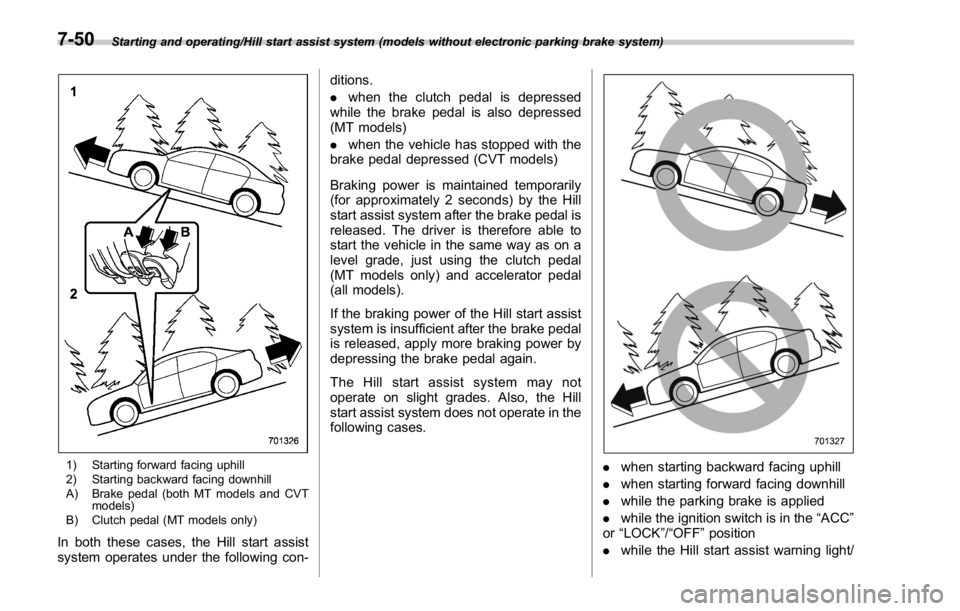
1) Starting forward facing uphill
2) Starting backward facing downhill
A) Brake pedal (both MT models and CVT
models)
B) Clutch pedal (MT models only)
In both these cases, the Hill start assist
system operates under the following con- ditions.
. when the clutch pedal is depressed
while the brake pedal is also depressed
(MT models)
. when the vehicle has stopped with the
brake pedal depressed (CVT models)
Braking power is maintained temporarily
(for approximately 2 seconds) by the Hill
start assist system after the brake pedal is
released. The driver is therefore able to
start the vehicle in the same way as on a
level grade, just using the clutch pedal
(MT models only) and accelerator pedal
(all models).
If the braking power of the Hill start assist
system is insufficient after the brake pedal
is released, apply more braking power by
depressing the brake pedal again.
The Hill start assist system may not
operate on slight grades. Also, the Hill
start assist system does not operate in the
following cases.
. when starting backward facing uphill
. when starting forward facing downhill
. while the parking brake is applied
. while the ignition switch is in the “ ACC ”
or “ LOCK ” / “ OFF ” position
. while the Hill start assist warning light/7-50
Page 440 of 594
Hill start assist OFF indicator light is
illuminated
When using the Hill start assist system, a
braking effect may be felt even after the
brake pedal has been released. However,
this braking effect should disappear once
the clutch pedal is released.
NOTE A slight jolt may be felt when the
vehicle begins to move forward after
being reversed.
& To activate/deactivate the Hill
start assist system
CAUTIONWhile the Hill start assist system is
deactivated, when starting on an
uphill grade, braking power is not
maintained if the brake pedal is
released. Start on an uphill grade
by using the parking brake.
You can activate/deactivate the Hill start
assist system according to the following
procedure.
NOTE
If you make an error when performing
any steps in the following procedure, place the ignition switch in the
“ LOCK ” / “ OFF ” position once and then
start over again.
! To deactivate
1. Park your vehicle in a flat and safe
location and apply the parking brake.
2. Turn the ignition switch to the “ LOCK ” /
“ OFF ” position.
3. Restart the engine.
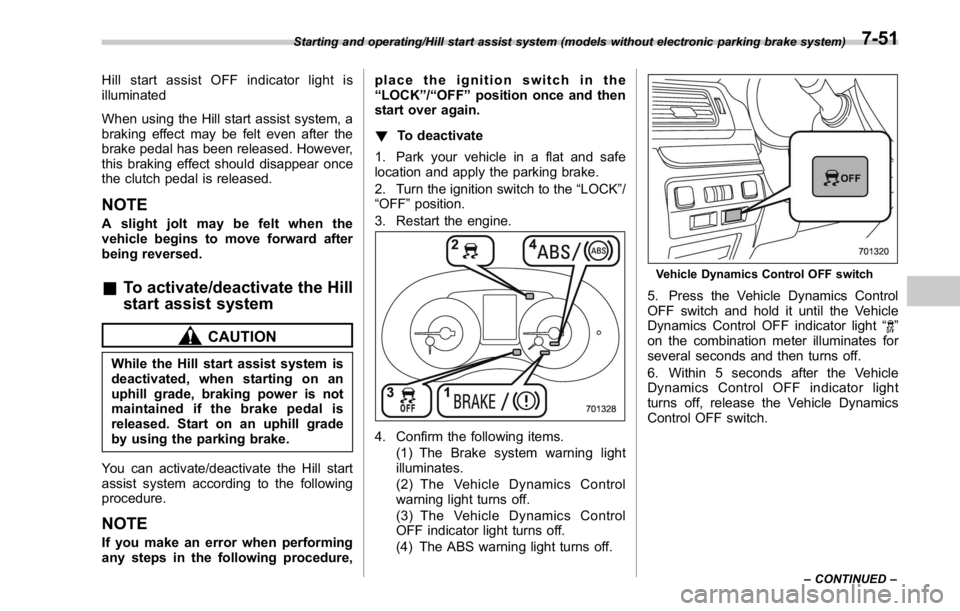
4. Confirm the following items.
(1) The Brake system warning light
illuminates.
(2) The Vehicle Dynamics Control
warning light turns off.
(3) The Vehicle Dynamics Control
OFF indicator light turns off.
(4) The ABS warning light turns off. Vehicle Dynamics Control OFF switch
5. Press the Vehicle Dynamics Control
OFF switch and hold it until the Vehicle
Dynamics Control OFF indicator light “
”
on the combination meter illuminates for
several seconds and then turns off.
6. Within 5 seconds after the Vehicle
Dynamics Control OFF indicator light
turns off, release the Vehicle Dynamics
Control OFF switch.Starting and operating/Hill start assist system (models without electronic parking brake system)
– CONTINUED –7-51
Page 441 of 594
Starting and operating/Cruise control
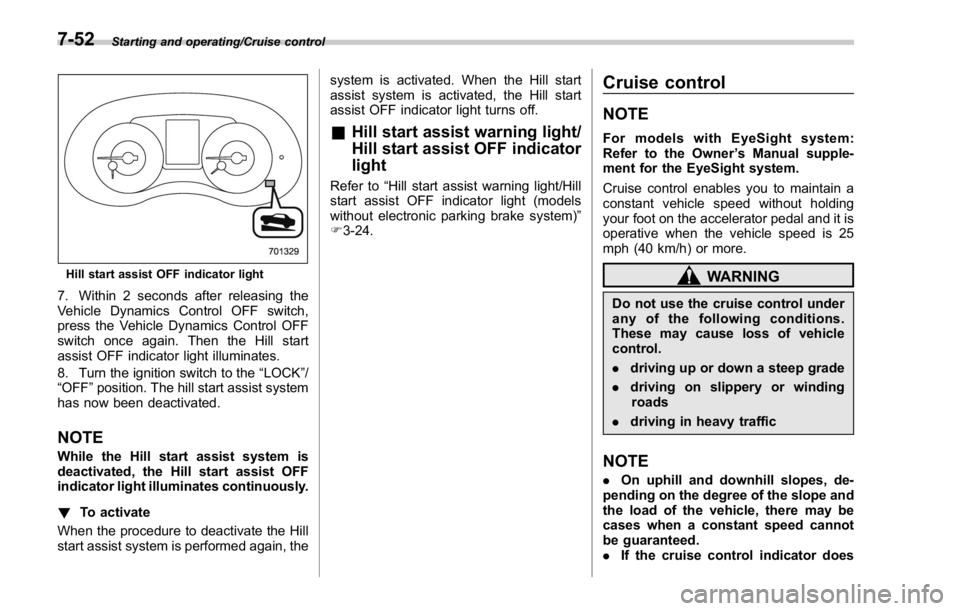
Hill start assist OFF indicator light
7. Within 2 seconds after releasing the
Vehicle Dynamics Control OFF switch,
press the Vehicle Dynamics Control OFF
switch once again. Then the Hill start
assist OFF indicator light illuminates.
8. Turn the ignition switch to the “ LOCK ” /
“ OFF ” position. The hill start assist system
has now been deactivated.
NOTE While the Hill start assist system is
deactivated, the Hill start assist OFF
indicator light illuminates continuously.
! To activate
When the procedure to deactivate the Hill
start assist system is performed again, the system is activated. When the Hill start
assist system is activated, the Hill start
assist OFF indicator light turns off.
& Hill start assist warning light/
Hill start assist OFF indicator
light Refer to “ Hill start assist warning light/Hill
start assist OFF indicator light (models
without electronic parking brake system) ”
F 3-24. Cruise control NOTE For models with EyeSight system:
Refer to the Owner ’ s Manual supple-
ment for the EyeSight system.
Cruise control enables you to maintain a
constant vehicle speed without holding
your foot on the accelerator pedal and it is
operative when the vehicle speed is 25
mph (40 km/h) or more.
WARNINGDo not use the cruise control under
any of the following conditions.
These may cause loss of vehicle
control.
. driving up or down a steep grade
. driving on slippery or winding
roads
. driving in heavy traffic
NOTE . On uphill and downhill slopes, de-
pending on the degree of the slope and
the load of the vehicle, there may be
cases when a constant speed cannot
be guaranteed.
. If the cruise control indicator does7-52
Page 443 of 594
Starting and operating/Cruise control
(S#) mode is selected, the select lever/
gear position indicator will change
from the current gear position indica-
tion to the “ D ” indication.
& To temporarily cancel the
cruise controlThe cruise control can be temporarily
canceled in the following ways.
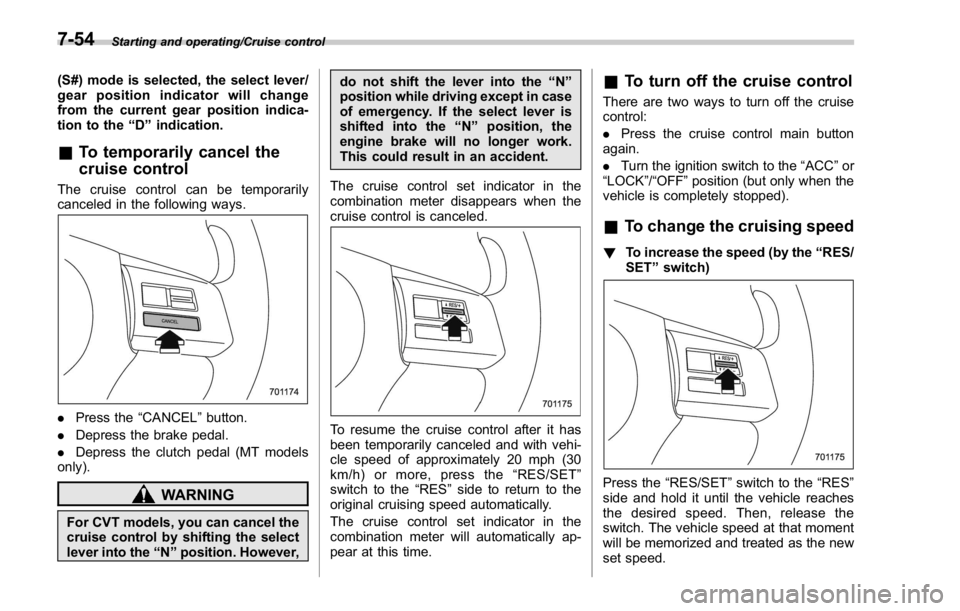
. Press the “ CANCEL ” button.
. Depress the brake pedal.
. Depress the clutch pedal (MT models
only).
WARNING
For CVT models, you can cancel the
cruise control by shifting the select
lever into the “ N ” position. However, do not shift the lever into the “ N ”
position while driving except in case
of emergency. If the select lever is
shifted into the “ N ” position, the
engine brake will no longer work.
This could result in an accident.
The cruise control set indicator in the
combination meter disappears when the
cruise control is canceled.
To resume the cruise control after it has
been temporarily canceled and with vehi-
cle speed of approximately 20 mph (30
km/h) or more, press the “ RES/SET ”
switch to the “ RES ” side to return to the
original cruising speed automatically.
The cruise control set indicator in the
combination meter will automatically ap-
pear at this time. & To turn off the cruise control There are two ways to turn off the cruise
control:
. Press the cruise control main button
again.
. Turn the ignition switch to the “ ACC ” or
“ LOCK ” / “ OFF ” position (but only when the
vehicle is completely stopped).
& To change the cruising speed ! To increase the speed (by the “ RES/
SET ” switch)
Press the “ RES/SET ” switch to the “ RES ”
side and hold it until the vehicle reaches
the desired speed. Then, release the
switch. The vehicle speed at that moment
will be memorized and treated as the new
set speed.7-54
Page 446 of 594
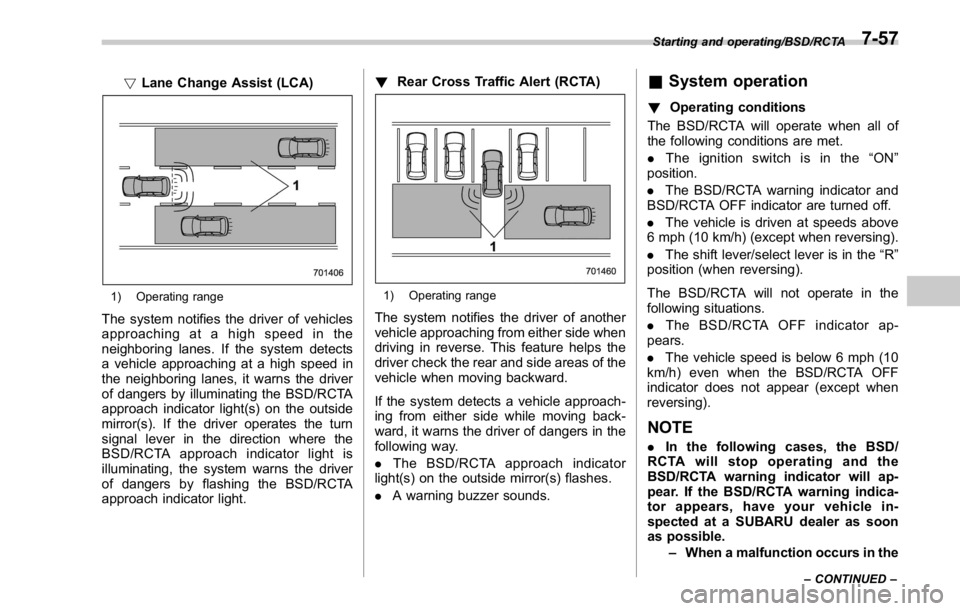
! Lane Change Assist (LCA)
1) Operating range
The system notifies the driver of vehicles
approaching at a high speed in the
neighboring lanes. If the system detects
a vehicle approaching at a high speed in
the neighboring lanes, it warns the driver
of dangers by illuminating the BSD/RCTA
approach indicator light(s) on the outside
mirror(s). If the driver operates the turn
signal lever in the direction where the
BSD/RCTA approach indicator light is
illuminating, the system warns the driver
of dangers by flashing the BSD/RCTA
approach indicator light. ! Rear Cross Traffic Alert (RCTA)
1) Operating range
The system notifies the driver of another
vehicle approaching from either side when
driving in reverse. This feature helps the
driver check the rear and side areas of the
vehicle when moving backward.
If the system detects a vehicle approach-
ing from either side while moving back-
ward, it warns the driver of dangers in the
following way.
. The BSD/RCTA approach indicator
light(s) on the outside mirror(s) flashes.
. A warning buzzer sounds. & System operation ! Operating conditions
The BSD/RCTA will operate when all of
the following conditions are met.
. The ignition switch is in the “ ON ”
position.
. The BSD/RCTA warning indicator and
BSD/RCTA OFF indicator are turned off.
. The vehicle is driven at speeds above
6 mph (10 km/h) (except when reversing).
. The shift lever/select lever is in the “ R ”
position (when reversing).
The BSD/RCTA will not operate in the
following situations.
. The BSD/RCTA OFF indicator ap-
pears.
. The vehicle speed is below 6 mph (10
km/h) even when the BSD/RCTA OFF
indicator does not appear (except when
reversing).
NOTE . In the following cases, the BSD/
RCTA will stop operating and the
BSD/RCTA warning indicator will ap-
pear. If the BSD/RCTA warning indica-
tor appears, have your vehicle in-
spected at a SUBARU dealer as soon
as possible.
– When a malfunction occurs in the Starting and operating/BSD/RCTA
– CONTINUED –7-57
Page 451 of 594

Starting and operating/BSD/RCTA
nation meter, and the BSD/RCTA is
deactivated.
Press the switch again to activate the
BSD/RCTA. The BSD/RCTA OFF indica-
tor disappears.
NOTE . In the following cases, press the
BSD/RCTA OFF switch to deactivate
the system. The system may not oper-
ate properly due to blocked radar
waves.
– When towing a trailer
– When a bicycle carrier or other
item is fitted to the rear of the
vehicle
– When using a chassis dynam-
ometer or free roller device, etc.
– When running the engine and
makingthewheelsrotatewhile
lifting up the vehicle
. If the ignition switch is turned to the
“ LOCK ” / “ OFF ” position, the last known
status of the system is maintained. For
example, if the ignition switch is turned
to the “ LOCK ” / “ OFF ” position with the
BSD/RCTA deactivated, the BSD/RCTA
remains deactivated the next time the
ignition switch is turned to the “ ON ”
position.
. If the vehicle battery is disconnected
due to situations such as battery terminal or fuse replacement, after the
battery is reconnected, the BSD/RCTA
will be activated.
& Certification for the BSD/
RCTA . U.S.-spec. models
FCC ID: OAYSRR2A
CAUTIONFCC WARNING
Changes or modifications not ex-
pressly approved by the party re-
sponsible for compliance could void
the user ’ s authority to operate the
equipment.
This device complies with part 15 of the
FCC Rules. Operation is subject to the
following two conditions: (1) This device
may not cause harmful interference, and
(2) this device must accept any interfer-
ence received, including interference that
may cause undesired operation.
. Canada-spec. models
This device complies with Industry
Canada licence-exempt RSS standard
(s). Operation is subject to the following
two conditions: (1) this device may not cause interference, and (2) this device
must accept any interference, including
interference that may cause undesired
operation of the device.
Le présent appareil est conforme aux
CNR d ’ Industrie Canada applicables aux
appareils radio exempts de licence. L ’ ex-
ploitation est autorisée aux deux condi-
tions suivantes: (1) l ’ appareil ne doit pas
produire de brouillage, et (2) l ’ utilisateur
de l ’ appareil doit accepter tout brouillage
radioélectrique subi, même si le brouillage
est susceptible d ’ en compromettre le
fonctionnement.7-62
Page 456 of 594
exhaust fumes are entering the
vehicle, have the problem
checked and corrected as soon
as possible. If you must drive
under these conditions, drive
only with all windows fully open.
. Keep the trunk lid closed while
driving to prevent exhaust gas
from entering the vehicle.
NOTE Due to the expansion and contraction
of the metals used in the manufacture
of the exhaust system, you may hear a
crackling sound coming from the ex-
haust system for a short time after the
engine has been shut off. This sound is
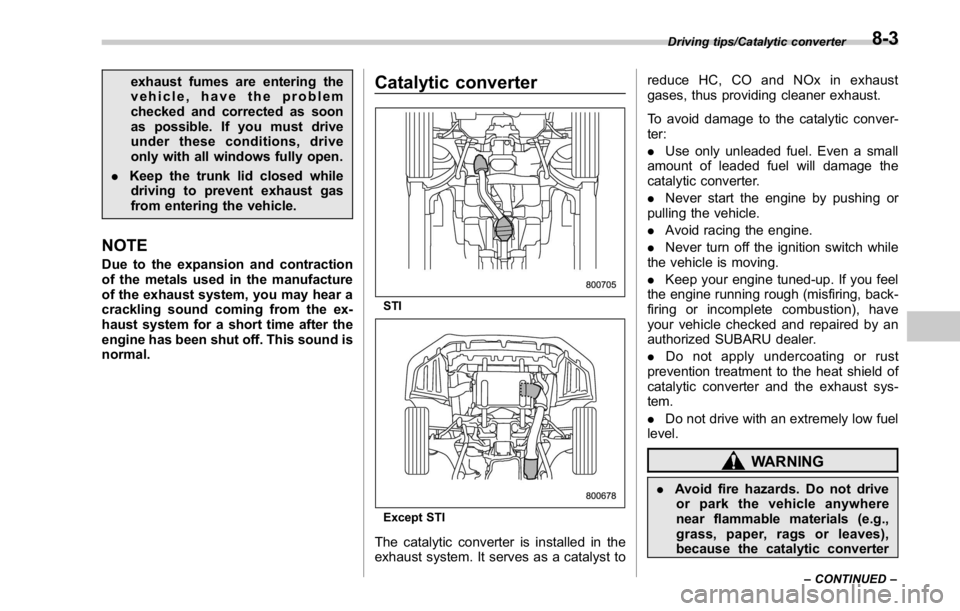
normal. Catalytic converter
STI
Except STI
The catalytic converter is installed in the
exhaust system. It serves as a catalyst to reduce HC, CO and NOx in exhaust
gases, thus providing cleaner exhaust.
To avoid damage to the catalytic conver-
ter:
. Use only unleaded fuel. Even a small
amount of leaded fuel will damage the
catalytic converter.
. Never start the engine by pushing or
pulling the vehicle.
. Avoid racing the engine.
. Never turn off the ignition switch while
the vehicle is moving.
. Keep your engine tuned-up. If you feel
the engine running rough (misfiring, back-
firing or incomplete combustion), have
your vehicle checked and repaired by an
authorized SUBARU dealer.
. Do not apply undercoating or rust
prevention treatment to the heat shield of
catalytic converter and the exhaust sys-
tem.
. Do not drive with an extremely low fuel
level.
WARNING
. Avoid fire hazards. Do not drive
or park the vehicle anywhere
near flammable materials (e.g.,
grass, paper, rags or leaves),
because the catalytic converter Driving tips/Catalytic converter
– CONTINUED –8-3
Page 467 of 594
In case of emergency/If you park your vehicle in case of an emergency
If you park your vehicle in
case of an emergency
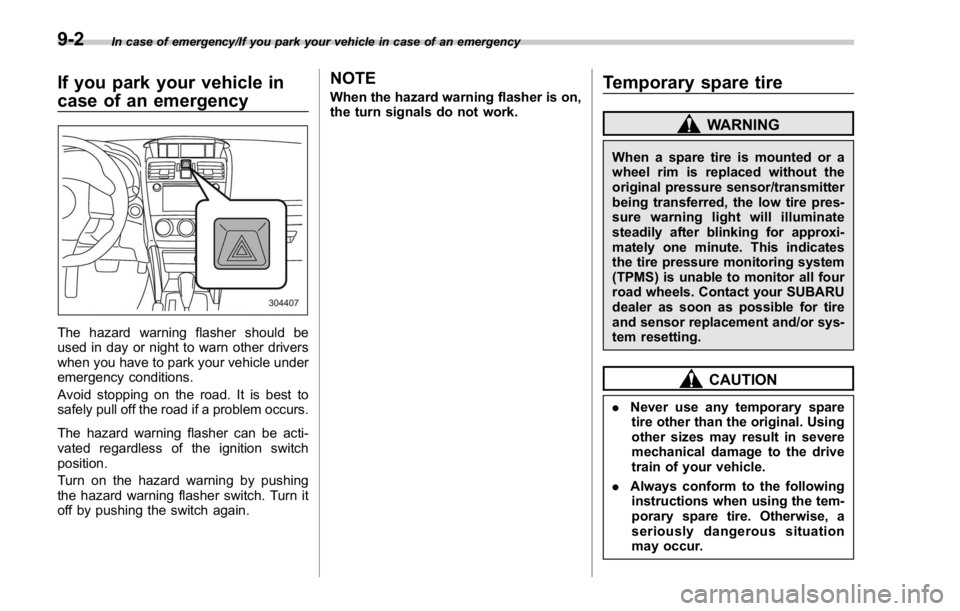
The hazard warning flasher should be
used in day or night to warn other drivers
when you have to park your vehicle under
emergency conditions.
Avoid stopping on the road. It is best to
safely pull off the road if a problem occurs.
The hazard warning flasher can be acti-
vated regardless of the ignition switch
position.
Turn on the hazard warning by pushing
the hazard warning flasher switch. Turn it
off by pushing the switch again. NOTE When the hazard warning flasher is on,
the turn signals do not work.
Temporary spare tire WARNINGWhen a spare tire is mounted or a
wheel rim is replaced without the
original pressure sensor/transmitter
being transferred, the low tire pres-
sure warning light will illuminate
steadily after blinking for approxi-
mately one minute. This indicates
the tire pressure monitoring system
(TPMS) is unable to monitor all four
road wheels. Contact your SUBARU
dealer as soon as possible for tire
and sensor replacement and/or sys-
tem resetting.
CAUTION
. Never use any temporary spare
tire other than the original. Using
other sizes may result in severe
mechanical damage to the drive
train of your vehicle.
. Always conform to the following
instructions when using the tem-
porary spare tire. Otherwise, a
seriously dangerous situation
may occur.9-2
Page 480 of 594
position for CVT models. Shift the shift
lever into the “ 1st ” position for MT models.
2. Apply the parking brake firmly.
3. Secure the vehicle onto the carrier
properly with safety chains. Each safety
chain should be equally tightened and
care must be taken not to pull the chains
so tightly that the suspension bottoms out.
CAUTIONIf your vehicle has a front under-
spoiler and rear underspoiler (both
optional), be careful not to scrape
them when placing the vehicle on
the carrier and when removing the
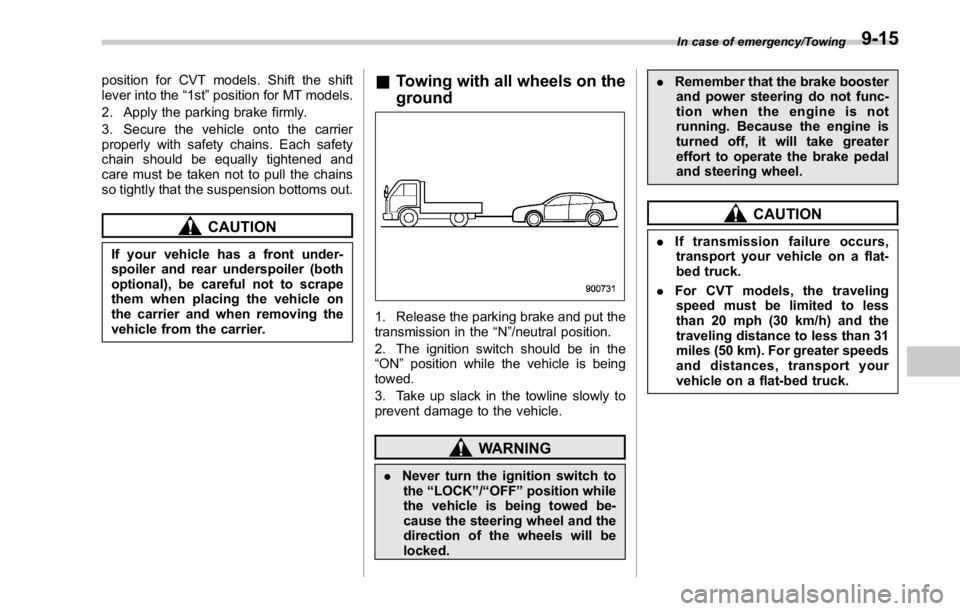
vehicle from the carrier. & Towing with all wheels on the
ground
1. Release the parking brake and put the
transmission in the “ N ” /neutral position.
2. The ignition switch should be in the
“ ON ” position while the vehicle is being
towed.
3. Take up slack in the towline slowly to
prevent damage to the vehicle.
WARNING
. Never turn the ignition switch to
the “ LOCK ” / “ OFF ” position while
the vehicle is being towed be-
cause the steering wheel and the
direction of the wheels will be
locked. . Remember that the brake booster
and power steering do not func-
tion when the engine is not
running. Because the engine is
turned off, it will take greater
effort to operate the brake pedal
and steering wheel.
CAUTION. If transmission failure occurs,
transport your vehicle on a flat-
bed truck.
. For CVT models, the traveling
speed must be limited to less
than 20 mph (30 km/h) and the
traveling distance to less than 31
miles (50 km). For greater speeds
and distances, transport your
vehicle on a flat-bed truck. In case of emergency/Towing
9-15
Page 481 of 594
In case of emergency/Electronic parking brake – if the electronic parking brake cannot be released (models with electronic parking
brake system)
Electronic parking brake – if
the electronic parking brake
cannot be released (models
with electronic parking brake
system) Contact your SUBARU dealer and have
your SUBARU dealer release the electro-
nic parking brake. Access key – if access key
does not operate properly CAUTIONKeep metallic objects, magnetic
sources and signal transmitters
away from the area between the
access key and the push-button
ignition switch. They may interfere
with the communication between
the access key and the push-button
ignition switch.
If the locking/unlocking procedures, power
switch procedures or engine start proce-
dures cannot be operated because of
strong radio signals in the surrounding
area or a low battery condition of the
access key, perform the following proce-
dure. When the battery of the access key
is discharged, replace it with a new one.
Refer to “ Replacing battery of access key ”
F 11-50. & Locking and unlocking
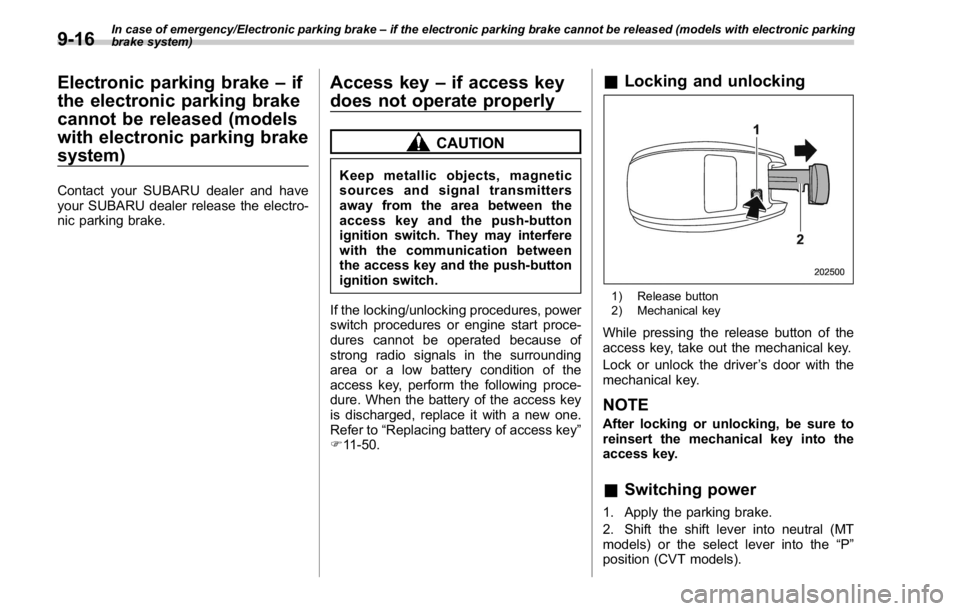
1) Release button
2) Mechanical key
While pressing the release button of the
access key, take out the mechanical key.
Lock or unlock the driver ’ s door with the
mechanical key.
NOTE After locking or unlocking, be sure to
reinsert the mechanical key into the
access key.
& Switching power
1. Apply the parking brake.
2. Shift the shift lever into neutral (MT
models) or the select lever into the “ P ”
position (CVT models).9-16