clutch SUBARU WRX 2016 Owners Manual
[x] Cancel search | Manufacturer: SUBARU, Model Year: 2016, Model line: WRX, Model: SUBARU WRX 2016Pages: 594, PDF Size: 19.43 MB
Page 136 of 594
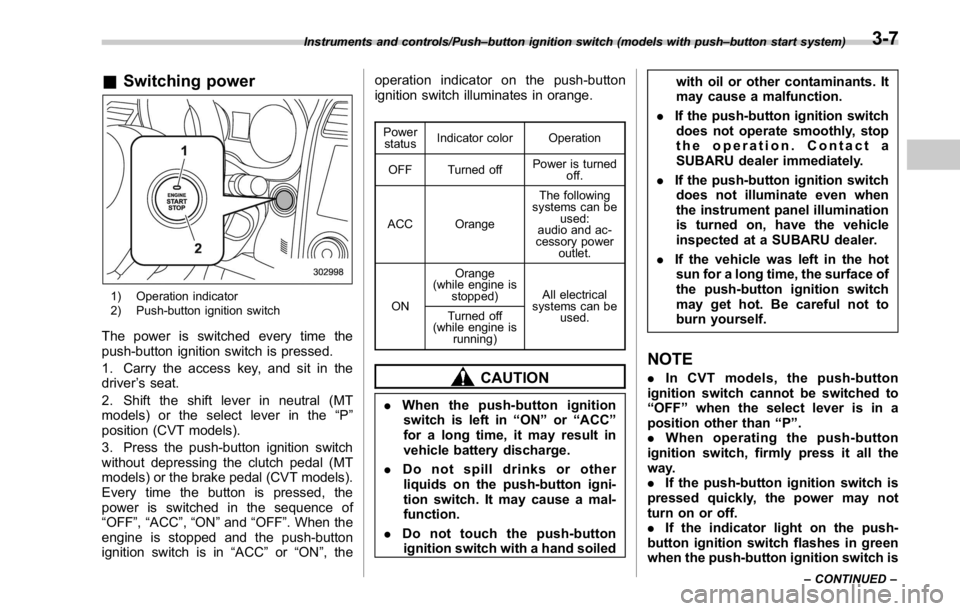
& Switching power
1) Operation indicator
2) Push-button ignition switch
The power is switched every time the
push-button ignition switch is pressed.
1. Carry the access key, and sit in the
driver ’ s seat.
2. Shift the shift lever in neutral (MT
models) or the select lever in the “ P ”
position (CVT models).
3. Press the push-button ignition switch
without depressing the clutch pedal (MT
models) or the brake pedal (CVT models).
Every time the button is pressed, the
power is switched in the sequence of
“ OFF ” , “ ACC ” , “ ON ” and “ OFF ” . When the
engine is stopped and the push-button
ignition switch is in “ ACC ” or “ ON ” , the operation indicator on the push-button
ignition switch illuminates in orange. Power
status Indicator color Operation
OFF Turned off Power is turned
off.
ACC Orange The following
systems can be
used:
audio and ac-
cessory power
outlet.
ON Orange
(while engine is
stopped) All electrical
systems can be
used.Turned off
(while engine is
running)
CAUTION
. When the push-button ignition
switch is left in “ ON ” or “ ACC ”
for a long time, it may result in
vehicle battery discharge.
. Do not spill drinks or other
liquids on the push-button igni-
tion switch. It may cause a mal-
function.
. Do not touch the push-button
ignition switch with a hand soiled with oil or other contaminants. It
may cause a malfunction.
. If the push-button ignition switch
does not operate smoothly, stop
the operation. Contact a
SUBARU dealer immediately.
. If the push-button ignition switch
does not illuminate even when
the instrument panel illumination
is turned on, have the vehicle
inspected at a SUBARU dealer.
. If the vehicle was left in the hot
sun for a long time, the surface of
the push-button ignition switch
may get hot. Be careful not to
burn yourself.
NOTE . In CVT models, the push-button
ignition switch cannot be switched to
“ OFF ” when the select lever is in a
position other than “ P ” .
. When operating the push-button
ignition switch, firmly press it all the
way.
. If the push-button ignition switch is
pressed quickly, the power may not
turn on or off.
. If the indicator light on the push-
button ignition switch flashes in green
when the push-button ignition switch isInstruments and controls/Push – button ignition switch (models with push – button start system)
– CONTINUED –3-7
Page 399 of 594

Starting and operating/Starting and stopping the engine (models without push – button start system)
. When starting the engine, be sure
to sit in the driver ’ s seat (except
when using the remote engine
start system).
NOTE . Avoid rapid racing and rapid accel-
eration immediately after the engine
has started.
. For a short time after the engine has
started, the engine speed is kept high.
When the warm-up is completed, the
engine speed lowers automatically.
. On rare occasions, it may be difficult
to start the engine depending on the
fuel and the usage condition (repeated
driving of a distance in which the
engine has not warmed up sufficiently).
In such a case, it is recommended that
you change to a different brand of fuel.
. On rare occasions, transient knock-
ing may be heard from the engine when
the accelerator is operated rapidly
such as a rapid start-up and a rapid
acceleration. This is not a malfunction.
. The engine starts more easily when
the headlights, air conditioner and rear
window defogger are turned off.
. After the engine starts, the engine
speed will be kept high until the engine
has warmed up sufficiently. ! MT models
1. Apply the parking brake.
2. Turn off unnecessary lights and ac-
cessories.
3. Depress the clutch pedal to the floor
and shift the shift lever into neutral. Hold
the clutch pedal to the floor while starting
the engine.
The starter motor will only operate when
the clutch pedal is depressed fully to the
floor.
4. Turn the ignition switch to the “ ON ”
position and check the operation of the
warning and indicator lights. Refer to
“ Warning and indicator lights ” F 3-13.
5. Turn the ignition switch to the “ START ”
position without depressing the accelera-
tor pedal. Release the key immediately
after the engine has started.
If the engine does not start, try the
following.
(1) Turn the ignition switch to the
“ LOCK ” position and wait for at least
10 seconds. After checking that the
parking brake is firmly set, turn the
ignition switch to the “ START ” position
while depressing the accelerator pedal
slightly (approximately a quarter of the
full stroke). Release the accelerator
pedal as soon as the engine starts.
(2) If this fails to start the engine, turn the ignition switch back to the “ LOCK ”
position and wait for at least 10
seconds. Then fully depress the accel-
erator pedal and turn the ignition
switch to the “ START ” position. If the
engine starts, quickly release the
accelerator pedal.
(3) If this fails to start the engine, turn
the ignition switch again to the “ LOCK ”
position. After waiting for 10 seconds
or longer, turn the ignition switch to the
“ START ” position without depressing
the accelerator pedal.
(4) If the engine still refuses to start,
contact your nearest SUBARU dealer
for assistance.
6. Confirm that all warning and indicator
lights have turned off after the engine has
started. The fuel injection system auto-
matically lowers the idle speed as the
engine warms up.
! CVT models
1. Apply the parking brake.
2. Turn off unnecessary lights and ac-
cessories.
3. Shift the select lever to the “ P ” or
“ N ”
position
(preferably the “ P ” position).
The starter motor will only operate when
the select lever is at the “ P ” or “ N ” position.
4. Turn the ignition switch to the “ ON ”7-10
Page 401 of 594
Starting and operating/Starting and stopping engine (models with push – button start system)
Starting and stopping engine
(models with push-button
start system) & Safety precautionsRefer to “ Safety precautions ” F 2-10.
& Operating range for push-
button start systemRefer to “ Operating range for push-button
start system ” F 3-6.
& Starting engine
WARNING. There are some general precau-
tions when starting the engine.
Carefully read the precautions
described in “ General precau-
tions when starting engine ” F 7-
9.
. If the indicator on the push-
button ignition switch flashes in
green after the engine has
started, never drive the vehicle.
The steering is still locked, and it
may result in an accident. CAUTION. When the operation indicator on
the push-button ignition switch is
flashing in orange, there may be
a malfunction with the vehicle.
Contact a SUBARU dealer imme-
diately.
. If the indicator on the push-
button ignition switch is flashing
in green after the engine has
started, it means that the steering
is still locked. Depress the brake
pedal while moving the steering
wheel to the right and left, and
press the push-button ignition
switch.
. Do not continue pushing the
push-button ignition switch for
more than 10 seconds. Doing so
could cause a malfunction. If the
engine does not start, stop push-
ing the push-button ignition
switch and turn off the engine.
Wait 10 seconds, and then push
the push-button ignition switch
to start the engine.
NOTE
. When the push-button ignition
switch is pressed while depressing the clutch pedal (MT models) or the
brake pedal (CVT models), the engine
starter operates for a maximum of 10
seconds and after starting the engine,
the starter stops automatically.
. When the push-button ignition
switch is pressed while depressing
the clutch pedal (MT models) or the
brake pedal (CVT models), the engine
can be started regardless of the status
of the push-button ignition switch.
. If the security indicator light illumi-
nates when you attempt to start the
engine but the engine does not start,
press the push-button ignition switch
to switch the power to “ OFF ” and then
try to start the engine again.
. If the engine does not start, press
the push-button ignition switch without
depressing the clutch pedal (MT mod-
els) or the brake pedal (CVT models) to
switch the power to “ OFF ” . Then, while
depressing the clutch pedal (MT mod-
els) or the brake pedal (CVT models)
more forcefully, press the push-button
ignition switch.
. The engine start procedures may
not function depending on the radio
wave conditions around the vehicle. In
such a case, refer to “ Starting engine ”
F 9-17.
. If the vehicle battery is discharged,
the steering cannot be unlocked.7-12
Page 402 of 594
Charge the battery.
. After the engine starts, the engine
speed will be kept high until the engine
has warmed up sufficiently.
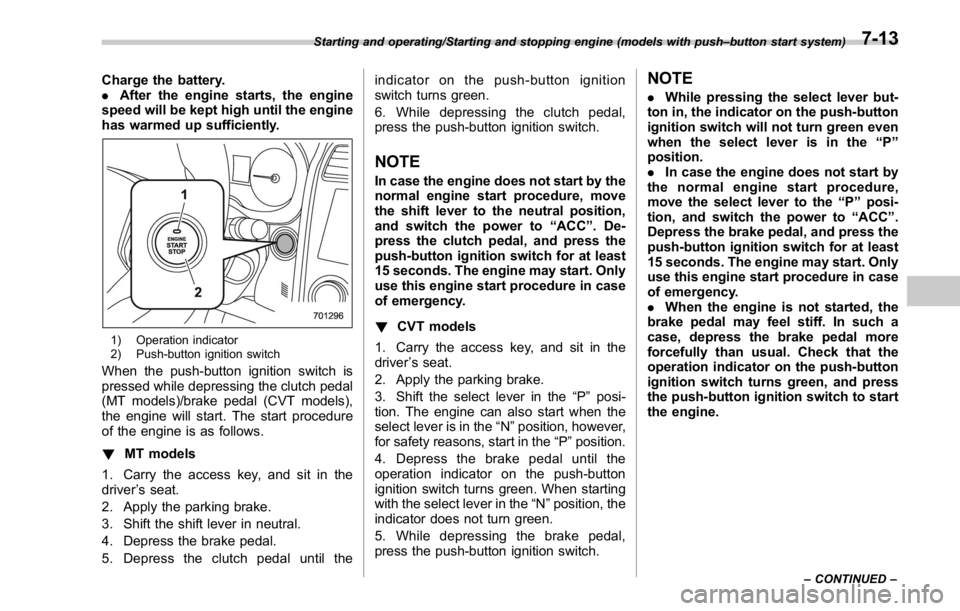
1) Operation indicator
2) Push-button ignition switch
When the push-button ignition switch is
pressed while depressing the clutch pedal
(MT models)/brake pedal (CVT models),
the engine will start. The start procedure
of the engine is as follows.
! MT models
1. Carry the access key, and sit in the
driver ’ s seat.
2. Apply the parking brake.
3. Shift the shift lever in neutral.
4. Depress the brake pedal.
5. Depress the clutch pedal until the indicator on the push-button ignition
switch turns green.
6. While depressing the clutch pedal,
press the push-button ignition switch.
NOTE In case the engine does not start by the
normal engine start procedure, move
the shift lever to the neutral position,
and switch the power to “ ACC ” . De-
press the clutch pedal, and press the
push-button ignition switch for at least
15 seconds. The engine may start. Only
use this engine start procedure in case
of emergency.
! CVT models
1. Carry the access key, and sit in the
driver ’ s seat.
2. Apply the parking brake.
3. Shift the select lever in the “ P ” posi-
tion. The engine can also start when the
select lever is in the “ N ” position, however,
for safety reasons, start in the “ P ” position.
4. Depress the brake pedal until the
operation indicator on the push-button
ignition switch turns green. When starting
with the select lever in the “ N ” position, the
indicator does not turn green.
5. While depressing the brake pedal,
press the push-button ignition switch. NOTE . While pressing the select lever but-
ton in, the indicator on the push-button
ignition switch will not turn green even
when the select lever is in the “ P ”
position.
. In case the engine does not start by
the normal engine start procedure,
move the select lever to the “ P ” posi-
tion, and switch the power to “ ACC ” .
Depress the brake pedal, and press the
push-button ignition switch for at least
15 seconds. The engine may start. Only
use this engine start procedure in case
of emergency.
. When the engine is not started, the
brake pedal may feel stiff. In such a
case, depress the brake pedal more
forcefully than usual. Check that the
operation indicator on the push-button
ignition switch turns green, and press
the push-button ignition switch to start
the engine.Starting and operating/Starting and stopping engine (models with push – button start system)
– CONTINUED –7-13
Page 406 of 594
Manual transmission
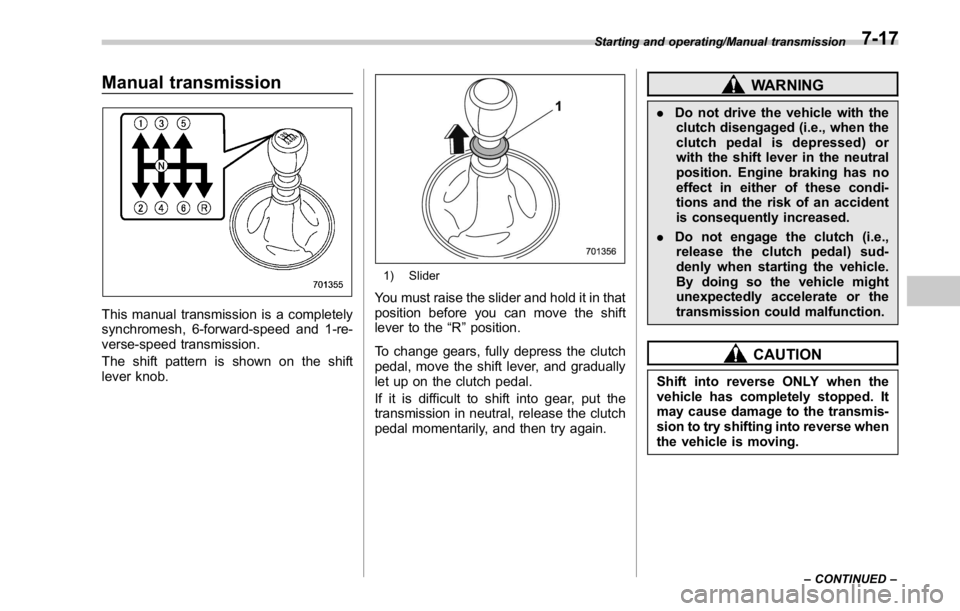
This manual transmission is a completely
synchromesh, 6-forward-speed and 1-re-
verse-speed transmission.
The shift pattern is shown on the shift
lever knob. 1) Slider
You must raise the slider and hold it in that
position before you can move the shift
lever to the “ R ” position.
To change gears, fully depress the clutch
pedal, move the shift lever, and gradually
let up on the clutch pedal.
If it is difficult to shift into gear, put the
transmission in neutral, release the clutch
pedal momentarily, and then try again. WARNING. Do not drive the vehicle with the
clutch disengaged (i.e., when the
clutch pedal is depressed) or
with the shift lever in the neutral
position. Engine braking has no
effect in either of these condi-
tions and the risk of an accident
is consequently increased.
. Do not engage the clutch (i.e.,
release the clutch pedal) sud-
denly when starting the vehicle.
By doing so the vehicle might
unexpectedly accelerate or the
transmission could malfunction.
CAUTION
Shift into reverse ONLY when the
vehicle has completely stopped. It
may cause damage to the transmis-
sion to try shifting into reverse when
the vehicle is moving. Starting and operating/Manual transmission
– CONTINUED –7-17
Page 407 of 594
Starting and operating/Manual transmission
& Shifting speeds! Recommended shifting speeds
The best compromise between fuel econ-
omy and vehicle performance during
normal driving is ensured by shifting up
at the speeds listed in the following table. Shift up mph (km/h)
1st to 2nd 15 (24)
2nd to 3rd 25 (40)
3rd to 4th 40 (64)
4th to 5th 45 (72)
5th to 6th 50 (80)
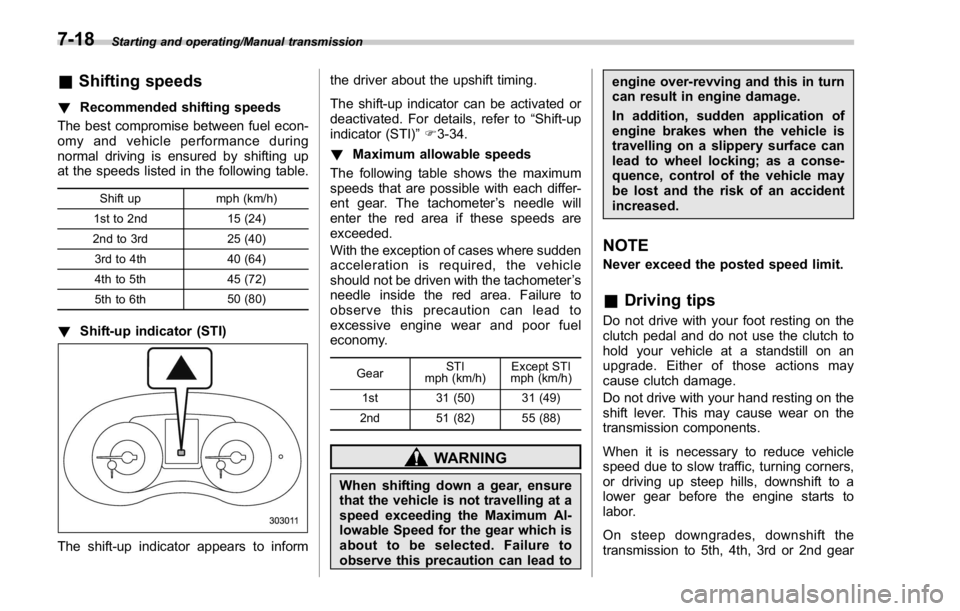
! Shift-up indicator (STI)
The shift-up indicator appears to inform the driver about the upshift timing.
The shift-up indicator can be activated or
deactivated. For details, refer to “ Shift-up
indicator (STI) ” F 3-34.
! Maximum allowable speeds
The following table shows the maximum
speeds that are possible with each differ-
ent gear. The tachometer ’ s needle will
enter the red area if these speeds are
exceeded.
With the exception of cases where sudden
acceleration is required, the vehicle
should not be driven with the tachometer ’ s
needle inside the red area. Failure to
observe this precaution can lead to
excessive engine wear and poor fuel
economy.
Gear STI
mph (km/h) Except STI
mph (km/h)
1st 31 (50) 31 (49)
2nd 51 (82) 55 (88)
WARNING
When shifting down a gear, ensure
that the vehicle is not travelling at a
speed exceeding the Maximum Al-
lowable Speed for the gear which is
about to be selected. Failure to
observe this precaution can lead to engine over-revving and this in turn
can result in engine damage.
In addition, sudden application of
engine brakes when the vehicle is
travelling on a slippery surface can
lead to wheel locking; as a conse-
quence, control of the vehicle may
be lost and the risk of an accident
increased.
NOTE Never exceed the posted speed limit.
& Driving tips Do not drive with your foot resting on the
clutch pedal and do not use the clutch to
hold your vehicle at a standstill on an
upgrade. Either of those actions may
cause clutch damage.
Do not drive with your hand resting on the
shift lever. This may cause wear on the
transmission components.
When it is necessary to reduce vehicle
speed due to slow traffic, turning corners,
or driving up steep hills, downshift to a
lower gear before the engine starts to
labor.
On steep downgrades, downshift the
transmission to 5th, 4th, 3rd or 2nd gear7-18
Page 438 of 594
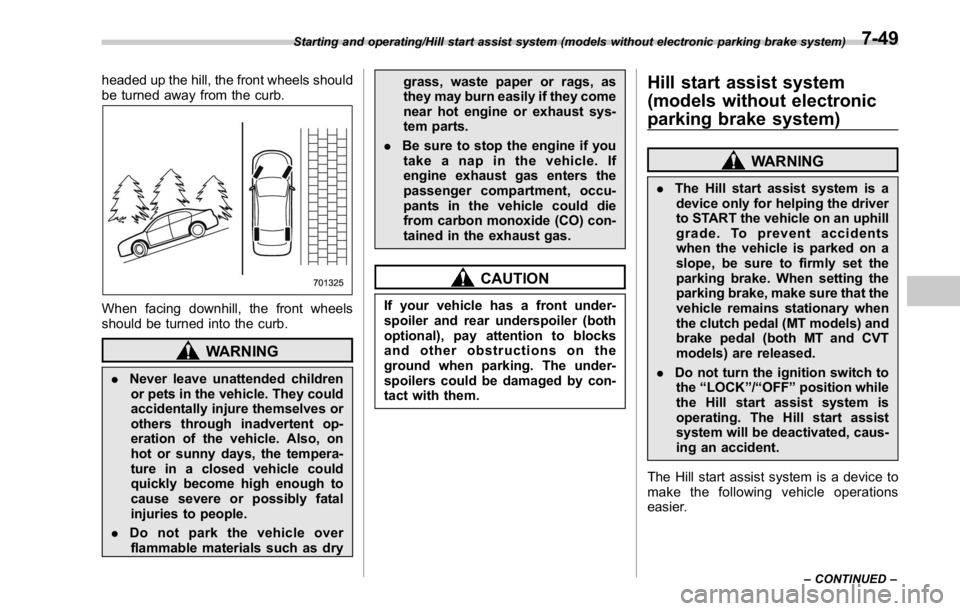
headed up the hill, the front wheels should
be turned away from the curb.
When facing downhill, the front wheels
should be turned into the curb.
WARNING
. Never leave unattended children
or pets in the vehicle. They could
accidentally injure themselves or
others through inadvertent op-
eration of the vehicle. Also, on
hot or sunny days, the tempera-
ture in a closed vehicle could
quickly become high enough to
cause severe or possibly fatal
injuries to people.
. Do not park the vehicle over
flammable materials such as dry grass, waste paper or rags, as
they may burn easily if they come
near hot engine or exhaust sys-
tem parts.
. Be sure to stop the engine if you
take a nap in the vehicle. If
engine exhaust gas enters the
passenger compartment, occu-
pants in the vehicle could die
from carbon monoxide (CO) con-
tained in the exhaust gas.
CAUTIONIf your vehicle has a front under-
spoiler and rear underspoiler (both
optional), pay attention to blocks
and other obstructions on the
ground when parking. The under-
spoilers could be damaged by con-
tact with them. Hill start assist system
(models without electronic
parking brake system) WARNING. The Hill start assist system is a
device only for helping the driver
to START the vehicle on an uphill
grade. To prevent accidents
when the vehicle is parked on a
slope, be sure to firmly set the
parking brake. When setting the
parking brake, make sure that the
vehicle remains stationary when
the clutch pedal (MT models) and
brake pedal (both MT and CVT
models) are released.
. Do not turn the ignition switch to
the “ LOCK ” / “ OFF ” position while
the Hill start assist system is
operating. The Hill start assist
system will be deactivated, caus-
ing an accident.
The Hill start assist system is a device to
make the following vehicle operations
easier.Starting and operating/Hill start assist system (models without electronic parking brake system)
– CONTINUED –7-49
Page 439 of 594
Starting and operating/Hill start assist system (models without electronic parking brake system)
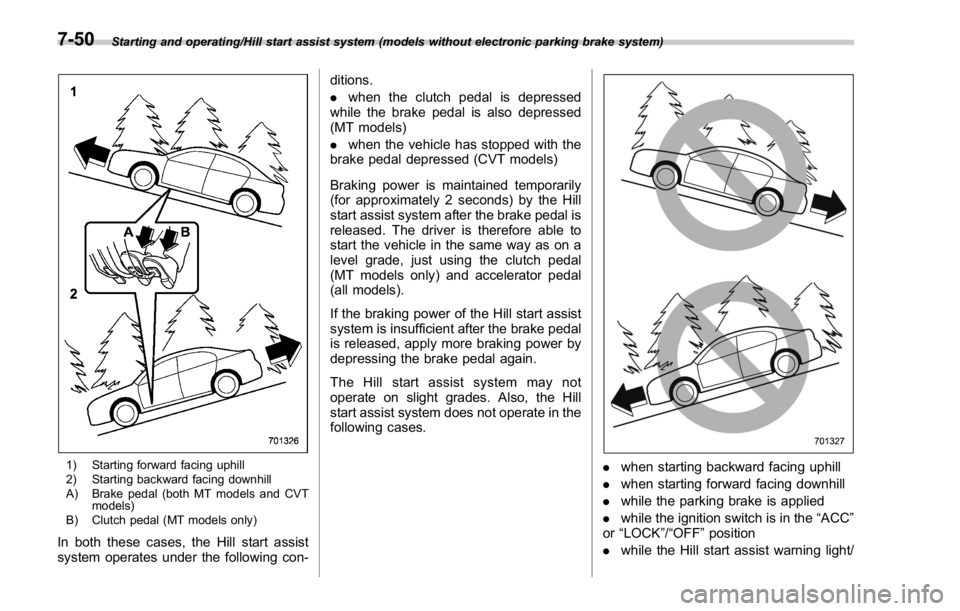
1) Starting forward facing uphill
2) Starting backward facing downhill
A) Brake pedal (both MT models and CVT
models)
B) Clutch pedal (MT models only)
In both these cases, the Hill start assist
system operates under the following con- ditions.
. when the clutch pedal is depressed
while the brake pedal is also depressed
(MT models)
. when the vehicle has stopped with the
brake pedal depressed (CVT models)
Braking power is maintained temporarily
(for approximately 2 seconds) by the Hill
start assist system after the brake pedal is
released. The driver is therefore able to
start the vehicle in the same way as on a
level grade, just using the clutch pedal
(MT models only) and accelerator pedal
(all models).
If the braking power of the Hill start assist
system is insufficient after the brake pedal
is released, apply more braking power by
depressing the brake pedal again.
The Hill start assist system may not
operate on slight grades. Also, the Hill
start assist system does not operate in the
following cases.
. when starting backward facing uphill
. when starting forward facing downhill
. while the parking brake is applied
. while the ignition switch is in the “ ACC ”
or “ LOCK ” / “ OFF ” position
. while the Hill start assist warning light/7-50
Page 440 of 594
Hill start assist OFF indicator light is
illuminated
When using the Hill start assist system, a
braking effect may be felt even after the
brake pedal has been released. However,
this braking effect should disappear once
the clutch pedal is released.
NOTE A slight jolt may be felt when the
vehicle begins to move forward after
being reversed.
& To activate/deactivate the Hill
start assist system
CAUTIONWhile the Hill start assist system is
deactivated, when starting on an
uphill grade, braking power is not
maintained if the brake pedal is
released. Start on an uphill grade
by using the parking brake.
You can activate/deactivate the Hill start
assist system according to the following
procedure.
NOTE
If you make an error when performing
any steps in the following procedure, place the ignition switch in the
“ LOCK ” / “ OFF ” position once and then
start over again.
! To deactivate
1. Park your vehicle in a flat and safe
location and apply the parking brake.
2. Turn the ignition switch to the “ LOCK ” /
“ OFF ” position.
3. Restart the engine.
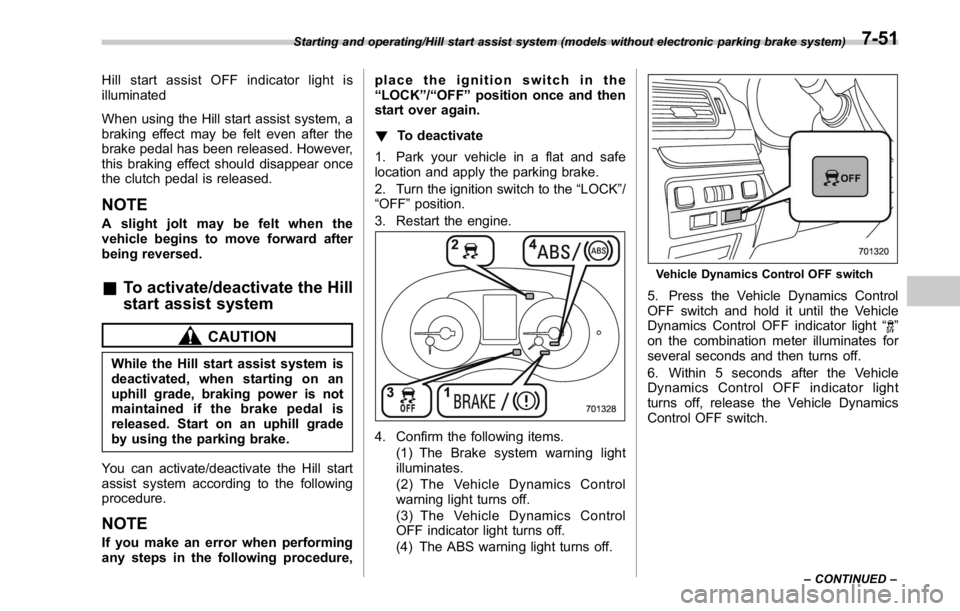
4. Confirm the following items.
(1) The Brake system warning light
illuminates.
(2) The Vehicle Dynamics Control
warning light turns off.
(3) The Vehicle Dynamics Control
OFF indicator light turns off.
(4) The ABS warning light turns off. Vehicle Dynamics Control OFF switch
5. Press the Vehicle Dynamics Control
OFF switch and hold it until the Vehicle
Dynamics Control OFF indicator light “
”
on the combination meter illuminates for
several seconds and then turns off.
6. Within 5 seconds after the Vehicle
Dynamics Control OFF indicator light
turns off, release the Vehicle Dynamics
Control OFF switch.Starting and operating/Hill start assist system (models without electronic parking brake system)
– CONTINUED –7-51
Page 443 of 594
Starting and operating/Cruise control
(S#) mode is selected, the select lever/
gear position indicator will change
from the current gear position indica-
tion to the “ D ” indication.
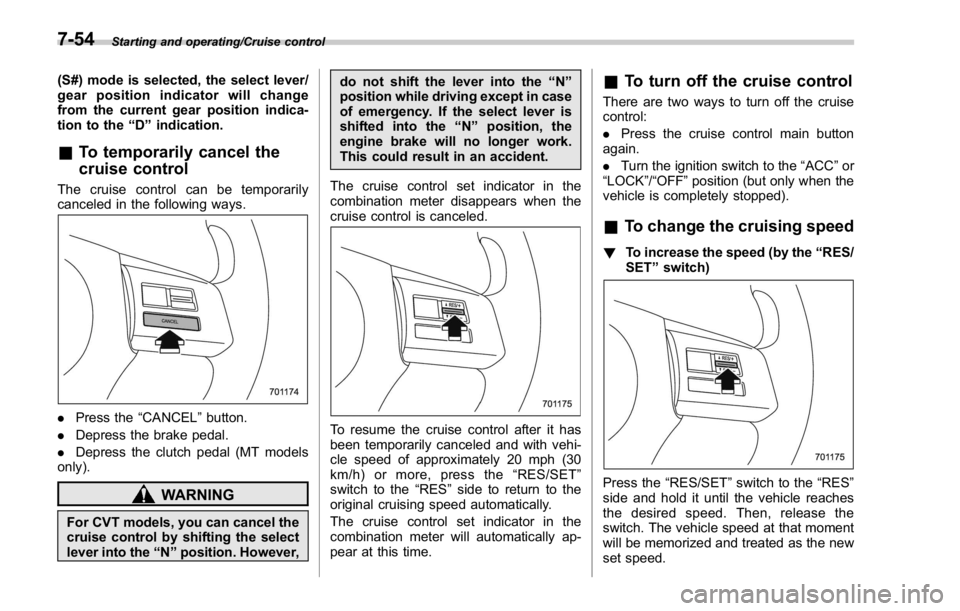
& To temporarily cancel the
cruise controlThe cruise control can be temporarily
canceled in the following ways.
. Press the “ CANCEL ” button.
. Depress the brake pedal.
. Depress the clutch pedal (MT models
only).
WARNING
For CVT models, you can cancel the
cruise control by shifting the select
lever into the “ N ” position. However, do not shift the lever into the “ N ”
position while driving except in case
of emergency. If the select lever is
shifted into the “ N ” position, the
engine brake will no longer work.
This could result in an accident.
The cruise control set indicator in the
combination meter disappears when the
cruise control is canceled.
To resume the cruise control after it has
been temporarily canceled and with vehi-
cle speed of approximately 20 mph (30
km/h) or more, press the “ RES/SET ”
switch to the “ RES ” side to return to the
original cruising speed automatically.
The cruise control set indicator in the
combination meter will automatically ap-
pear at this time. & To turn off the cruise control There are two ways to turn off the cruise
control:
. Press the cruise control main button
again.
. Turn the ignition switch to the “ ACC ” or
“ LOCK ” / “ OFF ” position (but only when the
vehicle is completely stopped).
& To change the cruising speed ! To increase the speed (by the “ RES/
SET ” switch)
Press the “ RES/SET ” switch to the “ RES ”
side and hold it until the vehicle reaches
the desired speed. Then, release the
switch. The vehicle speed at that moment
will be memorized and treated as the new
set speed.7-54