display SUBARU WRX 2016 User Guide
[x] Cancel search | Manufacturer: SUBARU, Model Year: 2016, Model line: WRX, Model: SUBARU WRX 2016Pages: 594, PDF Size: 19.43 MB
Page 113 of 594

Keys and doors/Remote keyless entry system
function display.
& Replacing the batteryRefer to “ Replacing battery ” F 11-50.
& Replacing lost transmittersIf you lose a transmitter or want to
purchase additional transmitters (up to
four can be programmed), your transmit-
ters should be reprogrammed for security
reasons. For details, contact your
SUBARU dealer and have the transmitters
programmed into the remote keyless entry
system.
& Welcome lighting (if
equipped)The welcome lighting turns on the head-
lights, interior lights, etc. for smooth
approaching to or exiting from the vehicle
at night or in a dark place.
NOTE . For the operation of the interior
lights, refer to “ Interior lights ” F 6-2.
. The factory setting (default setting)
of the operation duration of the head-
lights and the exterior lights is 30
seconds for both approaching and
exiting. This setting can be changed
to OFF (no operation), 30 seconds, 60
seconds, or 90 seconds, respectively for approaching and exiting at
SUBARU dealers. For more details,
contact a SUBARU dealer.
! Approaching
When it is dark and the light control switch
is in the “ AUTO ” position, if the doors are
unlocked using the unlock button on the
transmitter, the headlight low beams and
some exterior lights will illuminate. The
interior lights will also illuminate if the
dome light switch is in the “ DOOR ”
position.
The headlight low beams and the exterior
lights will illuminate for 30 seconds.
NOTE If the doors are locked using the lock
button on the transmitter or the lock
sensor on the door handle, the head-
lights and exterior lights will turn off.
! Exiting
When the light control switch is in the
“ AUTO ” position and the headlight indica-
tor light is on, if the ignition switch is turned
off or the key is removed from the ignition
switch, the headlight low beams and some
exterior lights will continue illuminating.
The headlights and exterior lights will turn
off under either of the following conditions. . 30 seconds have elapsed since the
driver ’ s door was opened and closed.
. The lock button on the transmitter or
the lock sensor on the door handle is
operated two times successively.
NOTE . If the light control switch is set to a
position other than “ AUTO ” position,
the headlights and the exterior lights
will turn off.
. When exiting from the vehicle, the
headlights and exterior lights will turn
off if the driver ’ s door is not opened
and closed within 3 minutes from turn-
ing on of the welcome lighting.
& Certification for Remote key-
less entry system ! U.S.-spec. models
FCC ID: CWTWB1U811
FCC ID: CWTWD1U781
CAUTION
FCC CAUTION
Changes or modifications not ex-
pressly approved by the party re-
sponsible for compliance could void
the user ’ s authority to operate the
equipment.2-24
Page 115 of 594

Keys and doors/Alarm system
& System operationThe alarm system will give the following
alarms when triggered.
. The vehicle ’ s horn will sound for 30
seconds.
. The hazard warning flashers will flash
for 30 seconds.
If any of the doors or the trunk lid remains
open after the 30-second period, the horn
will continue to sound for a maximum of 3
minutes. If the door or the trunk lid is
closed while the horn is sounding, the
horn will stop sounding with a delay of up
to 30 seconds.
The alarm is triggered by:
. Opening any of the doors or the trunk
lid
. Physical impact to the vehicle, such as
forced entry (only models with shock
sensors (dealer option))
NOTE The alarm system can be set to trigger
the illumination of the following interior
lights.
. Map lights (for models with moon-
roof)
. Dome light (illuminates only when
the dome light switch is in the “ DOOR ”
position) The notifications regarding the map
lights (for models with moonroof) and
dome light are deactivated as the
factory setting. A SUBARU dealer can
activate the system. Contact your
SUBARU dealer for details.
& Activating and deactivating
the alarm system To change the setting of your vehicle ’ s
alarm system for activation or deactiva-
tion, do the following.
1. Disarm the alarm system. Refer to
“ Disarming the system ” F 2-29.
2. Sit in the driver ’ s seat and shut all
doors and the trunk lid.
3. Turn the ignition switch to the “ ON ”
position.
4. Hold down the REAR (UNLOCK) side
of the driver ’ s power door locking switch,
open the driver ’ s door within the following
1 second, and wait 10 seconds without
releasing the switch. The setting will then
be changed as follows.
If the system was previously activated:
The odometer/trip meter screen displays
“ AL OF ” and the horn sounds twice,
indicating that the system is now deacti-
vated. If the system was previously deacti-
vated:
The odometer/trip meter screen displays
“ AL ON ” and the horn sounds once,
indicating that the system is now acti-
vated.
NOTE You may have the above setting
change done by your SUBARU dealer.
& If you have accidentally trig-
gered the alarm system ! To stop the alarm
Perform any of the following operations.
. Press any button on the access key/
remote transmitter.
. Turn the ignition switch to the “ ON ”
position (models without “ keyless access
with push-button start system ” ).
. Turn the push-button ignition to the
“ ACC ” position (models with “ keyless
access with push-button start system ” ).
NOTE Only registered keys will stop the
alarm. If the key is not registered, the
alarm will not stop.2-26
Page 131 of 594

Instruments and controls
Warning chimes and warning indicator of the
keyless access with push-button start system (if
equipped) ......................................................... 3-28
Security indicator light ....................................... 3-33
SI-DRIVE indicator (if equipped) .......................... 3-34
Shift-up indicator (STI) ........................................ 3-34
Select lever/gear position indicator (CVT
models). ........................................................... 3-34
Turn signal indicator lights ................................. 3-35
High beam indicator light ................................... 3-35
Cruise control indicator ...................................... 3-35
Cruise control set indicator ................................ 3-35
Automatic headlight beam leveler warning light
(models with LED headlights) ........................... 3-35
Front fog light indicator light (if equipped) .......... 3-35
Headlight indicator light ..................................... 3-35
Driver ’ s control center differential auto indicator
(STI) ................................................................. 3-35
Driver ’ s control center differential indicator and
warning (STI) .................................................... 3-36
REV indicator light (STI) ..................................... 3-37
Steering responsive fog lights warning indicator/
Steering responsive fog lights OFF indicator (if
equipped) ......................................................... 3-37
BSD/RCTA warning indicator (if equipped) .......... 3-37
BSD/RCTA OFF indicator (if equipped) ................ 3-37
Multi information display ................................... 3-37
Basic operation .................................................. 3-38
Welcome screen ................................................. 3-38
Good-bye screen ................................................ 3-39
Warning screen .................................................. 3-39
Basic screens .................................................... 3-44 Menu screens .................................................... 3-45
Multi function display ........................................ 3-48Basic operation ................................................. 3-49
Welcome screen ................................................ 3-49
Date screen ....................................................... 3-50
Ending screen ................................................... 3-50
Self-check screen .............................................. 3-50
Interruption screen ............................................ 3-52
Basic screens .................................................... 3-52
Selection screen ................................................ 3-58
Date and time settings ....................................... 3-62
Image quality and volume settings ..................... 3-69
Screen settings. ................................................. 3-71
Maintenance settings ......................................... 3-79
Driving history registration ................................. 3-82
Car settings ....................................................... 3-83
Initialize ............................................................. 3-92
Light control switch ........................................... 3-94Headlights ......................................................... 3-95
High/low beam change (dimmer) ... ..................... 3-96
Headlight flasher ............................................... 3-96
Daytime running light system ............................. 3-97
Turn signal lever ................................................ 3-97
One-touch lane changer ..................................... 3-98
Illumination brightness control ......................... 3-98
Headlight beam leveler (if equipped) ............... 3-99
Automatic headlight beam leveler (models with
LED headlights) ............................................... 3-99
Fog light switch (if equipped) ........................... 3-99
Steering responsive fog lights system (models
with EyeSight system) ..................................... 3-99
Page 137 of 594
Instruments and controls/Hazard warning flasher
pressed, steering is locked. When this
occurs, press the push-button ignition
switch while turning the steering wheel
left and right.
! Battery drainage prevention func-
tion
When the push-button ignition switch is
left in the “ ACC ” or “ ON ” position for
approximately 1 hour, the push-button
ignition switch will be automatically
switched to “ OFF ” to prevent the battery
from going dead. (In CVT models, this
function is activated when the select lever
is in the “ P ” position.)
& When access key does not
operate properlyRefer to “ Access key – if access key does
not operate properly ” F 9-16. Hazard warning flasher
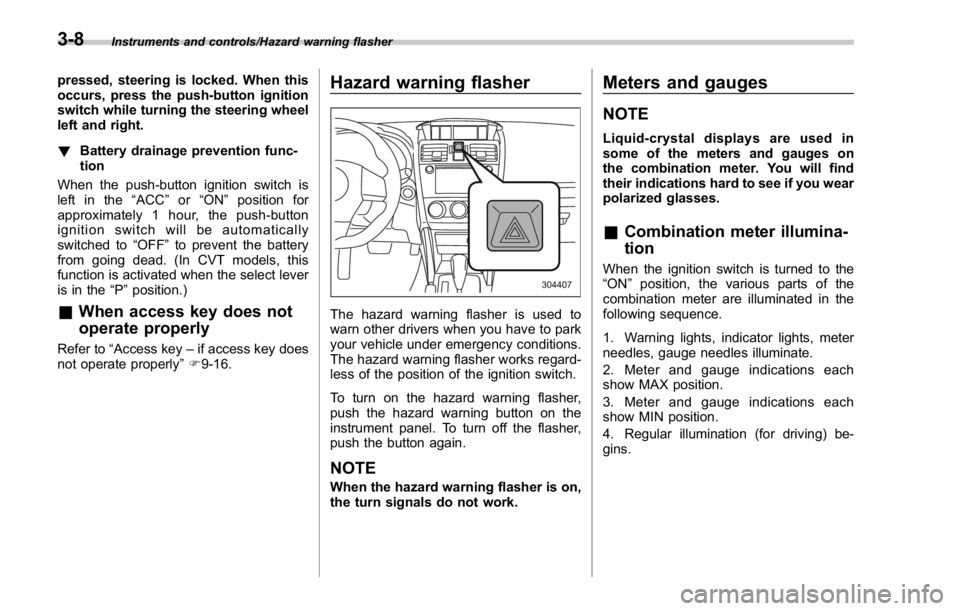
The hazard warning flasher is used to
warn other drivers when you have to park
your vehicle under emergency conditions.
The hazard warning flasher works regard-
less of the position of the ignition switch.
To turn on the hazard warning flasher,
push the hazard warning button on the
instrument panel. To turn off the flasher,
push the button again.
NOTE When the hazard warning flasher is on,
the turn signals do not work. Meters and gauges NOTE Liquid-crystal displays are used in
some of the meters and gauges on
the combination meter. You will find
their indications hard to see if you wear
polarized glasses.
& Combination meter illumina-
tion When the ignition switch is turned to the
“ ON ” position, the various parts of the
combination meter are illuminated in the
following sequence.
1. Warning lights, indicator lights, meter
needles, gauge needles illuminate.
2. Meter and gauge indications each
show MAX position.
3. Meter and gauge indications each
show MIN position.
4. Regular illumination (for driving) be-
gins.3-8
Page 138 of 594
NOTE This sequence of operations may not
take place if you quickly turn the
ignition switch to start the engine. This
is not a malfunction.
& Canceling the function for
meter/gauge needle move-
ment upon turning on the
ignition switch It is possible to activate or deactivate the
movement of the meter needles and
gauge needles that takes place when the
ignition switch is turned to the “ ON ”
position. To change the setting, perform
the procedures described in “ Gauge Initial
Movement ” F 3-47.
& Speedometer The speedometer shows the vehicle
speed. The digital speedometer can be
also displayed on the multi information
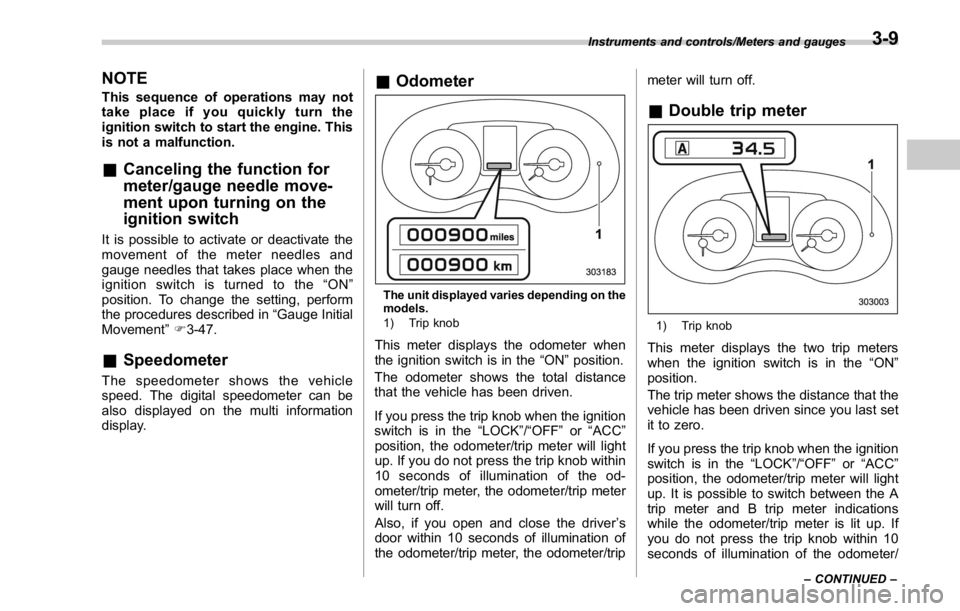
display. & Odometer
The unit displayed varies depending on the
models.
1) Trip knob
This meter displays the odometer when
the ignition switch is in the “ ON ” position.
The odometer shows the total distance
that the vehicle has been driven.
If you press the trip knob when the ignition
switch is in the “ LOCK ” / “ OFF ” or “ ACC ”
position, the odometer/trip meter will light
up. If you do not press the trip knob within
10 seconds of illumination of the od-
ometer/trip meter, the odometer/trip meter
will turn off.
Also, if you open and close the driver ’ s
door within 10 seconds of illumination of
the odometer/trip meter, the odometer/trip meter will turn off.
& Double trip meter
1) Trip knob
This meter displays the two trip meters
when the ignition switch is in the “ ON ”
position.
The trip meter shows the distance that the
vehicle has been driven since you last set
it to zero.
If you press the trip knob when the ignition
switch is in the “ LOCK ” / “ OFF ” or “ ACC ”
position, the odometer/trip meter will light
up. It is possible to switch between the A
trip meter and B trip meter indications
while the odometer/trip meter is lit up. If
you do not press the trip knob within 10
seconds of illumination of the odometer/ Instruments and controls/Meters and gauges
– CONTINUED –3-9
Page 139 of 594

Instruments and controls/Meters and gauges
trip meter, the odometer/trip meter will turn
off.
Also, if you open and close the driver ’ s
door within 10 seconds of illumination of
the odometer/trip meter, the odometer/trip
meter will turn off.
The display can be switched as shown in
the following sequence by pressing the
trip knob.
To set the trip meter to zero, select the A
trip or B trip meter by pressing the knob
and keep the knob pressed for more than
2 seconds.
CAUTIONTo ensure safety, do not attempt to
change the function of the indicator
during driving, as an accident could
result.
NOTE If the connection between the combina-
tion meter and battery is broken for any
reason such as vehicle maintenance or
fuse replacement, the data recorded on
the trip meter will be lost. & Tachometer The tachometer shows the engine speed
in thousands of revolutions per minute.
CAUTIONDo not operate the engine with the
pointer of the tachometer in the red
zone. In this range, fuel injection will
be cut by the engine control module
to protect the engine from overrev-
ving. The engine will resume run-
ning normally after the engine speed
is reduced below the red zone.
NOTE To protect the engine/transmission
while the select lever is in the “ P ” or
“ N ” position (CVT models) or the shift
lever is in the neutral position (MT
models), the engine is controlled so
that the engine speed may not become
too high even if the accelerator pedal is
depressed hard. & Fuel gauge
1) Low fuel warning light
The fuel gauge shows the approximate
amount of fuel remaining in the tank.
When the ignition switch is in the “ LOCK ” /
“ OFF ” or “ ACC ” position, the fuel gauge
shows “ E ” even if the fuel tank contains
fuel.
The gauge may move slightly during
braking, turning or acceleration due to fuel
level movement in the tank.
If you press the trip knob while the ignition
switch is in the “ LOCK ” / “ OFF ” or “ ACC ”
position, the fuel gauge ’ s dial will light up
and the needle will indicate the amount of
fuel remaining in the tank.
If, while the fuel gauge needle is indicating
the amount of fuel remaining in the tank,3-10
Page 141 of 594

Instruments and controls/REV indicator light and buzzer (STI)
& ECO gauge
The unit displayed varies depending on the
models.
The ECO gauge shows the difference
between the average rate of fuel con-
sumption since the trip meter was last
reset and the current rate of fuel con-
sumption.
The ECO gauge indicates the current fuel
efficiency as shown in the following chart.
Displayed
unit Needle position
“ + ” side “ - ” side
MPG Better Poorer
l/100km Poorer Better
km/l Better PoorerNOTE . The ECO gauge shows only an
approximate indication.
. After resetting the trip meter, the
average rate of fuel consumption is not
shown until driving 0.6 mile (1 km).
Until that time, the ECO gauge does not
operate.
REV indicator light and buz-
zer (STI)
1) REV indicator light
The REV alarm system has the following
functions.
. When the engine speed reaches the
level that was previously set, the REV
indicator light illuminates to inform you. At
this time, a buzzer also sounds if the
buzzer setting is activated.
. Whenever the engine speed enters the
red zone of the tachometer, the REV
indicator light flashes.
NOTE
Even if the REV alarm system is not set,
the REV indicator light will flash when-3-12
Page 166 of 594
& REV indicator light
(STI)This indicator light illuminates when the
engine speed reaches the level that was
previously set. This indicator light also
flashes when the tachometer needle en-
ters the red zone. For details, refer to
“ REV indicator light and buzzer (STI) ” F 3-
12.
& Steering responsive
fog lights warning indi-
cator/Steering respon-
sive fog lights OFF in-
dicator (if equipped)
NOTE For details about the steering respon-
sive fog lights system, refer to “ Steer-
ing responsive fog lights system (mod-
els with EyeSight system) ” F 3-99.
! Steering responsive fog lights
warning indicator
This indicator starts blinking when the
steering responsive fog lights system
malfunctions. When this indicator appears
while the system is activated, contact your
SUBARU dealer for an inspection. ! Steering responsive fog lights OFF
indicator
This indicator appears when the steering
responsive fog lights system is deacti-
vated. This indicator disappears when the
system is activated.
& BSD/RCTA warning in-
dicator (if equipped) This warning indicator appears when the
BSD/RCTA is malfunctioning. In this case
the BSD/RCTA warning indicator will be
shown on the multi information display of
the combination meter. When this indica-
tor appears, have your vehicle inspected
by your SUBARU dealer as soon as
possible.
& BSD/RCTA OFF indica-
tor (if equipped) The indicator appears when the BSD/
RCTA OFF switch is pressed to deactivate
the BSD/RCTA. In this case the BSD/
RCTA OFF indicator will be shown on the
multi information display of the combina-
tion meter. For details, refer to “ BSD/
RCTA ” F 7-56. Multi information display WARNINGAlways pay adequate attention to
safe driving when operating the
multi information display while the
vehicle is in motion. When operation
of the multi information display
interferes with your ability to con-
centrate on driving, stop the vehicle
before performing operations on the
screen. Also, do not concentrate on
the display while driving. Doing so
may cause you to look away from
the road and could result in an
accident.
Various information will be shown on the
multi information display. Also, a warning
message will appear on the display if a
malfunction, etc. is detected. In addition,
several settings for the displayed content
can be performed.Instruments and controls/Multi information display
– CONTINUED –3-37
Page 167 of 594
Instruments and controls/Multi information display
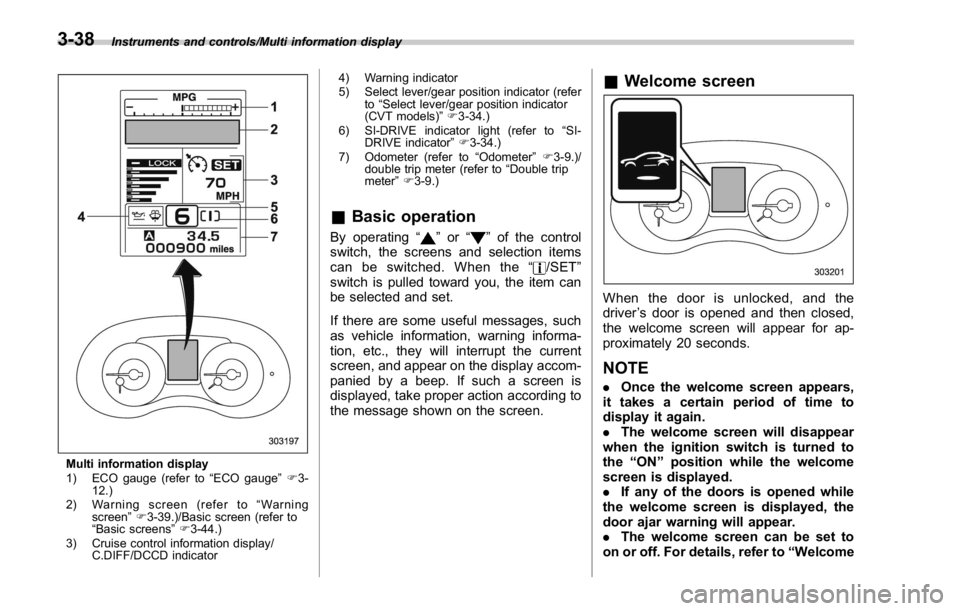
Multi information display
1) ECO gauge (refer to “ ECO gauge ” F 3-
12.)
2) Warning screen (refer to “ Warning
screen ” F 3-39.)/Basic screen (refer to
“ Basic screens ” F 3-44.)
3) Cruise control information display/
C.DIFF/DCCD indicator 4) Warning indicator
5) Select lever/gear position indicator (refer
to “ Select lever/gear position indicator
(CVT models) ” F 3-34.)
6) SI-DRIVE indicator light (refer to “ SI-
DRIVE indicator ” F 3-34.)
7) Odometer (refer to “ Odometer ” F 3-9.)/
double trip meter (refer to “ Double trip
meter ” F 3-9.)
& Basic operation By operating “ ” or “ ” of the control
switch, the screens and selection items
can be switched. When the “
/SET ”
switch is pulled toward you, the item can
be selected and set.
If there are some useful messages, such
as vehicle information, warning informa-
tion, etc., they will interrupt the current
screen, and appear on the display accom-
panied by a beep. If such a screen is
displayed, take proper action according to
the message shown on the screen. & Welcome screen
When the door is unlocked, and the
driver ’ s door is opened and then closed,
the welcome screen will appear for ap-
proximately 20 seconds.
NOTE . Once the welcome screen appears,
it takes a certain period of time to
display it again.
. The welcome screen will disappear
when the ignition switch is turned to
the “ ON ” position while the welcome
screen is displayed.
. If any of the doors is opened while
the welcome screen is displayed, the
door ajar warning will appear.
. The welcome screen can be set to
on or off. For details, refer to “ Welcome3-38
Page 168 of 594
Good-bye Screen ” F 3-47.
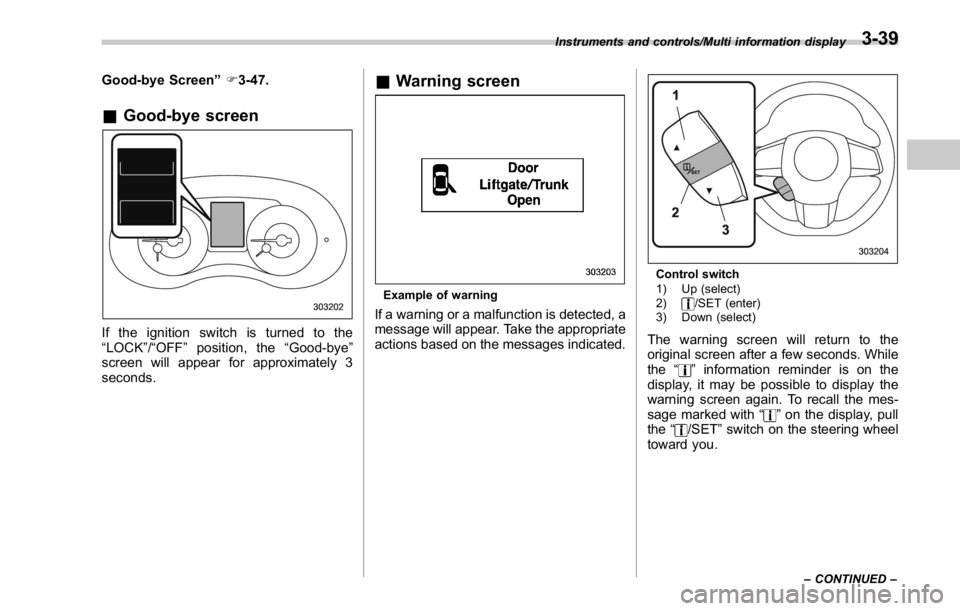
& Good-bye screen
If the ignition switch is turned to the
“ LOCK ” / “ OFF ” position, the “ Good-bye ”
screen will appear for approximately 3
seconds. & Warning screen
Example of warning
If a warning or a malfunction is detected, a
message will appear. Take the appropriate
actions based on the messages indicated. Control switch
1) Up (select)
2) /SET (enter)
3) Down (select)
The warning screen will return to the
original screen after a few seconds. While
the “
” information reminder is on the
display, it may be possible to display the
warning screen again. To recall the mes-
sage marked with “
” on the display, pull
the “ /SET ” switch on the steering wheel
toward you.Instruments and controls/Multi information display
– CONTINUED –3-39