display SUBARU WRX 2016 Workshop Manual
[x] Cancel search | Manufacturer: SUBARU, Model Year: 2016, Model line: WRX, Model: SUBARU WRX 2016Pages: 594, PDF Size: 19.43 MB
Page 199 of 594
Instruments and controls/Multi function display
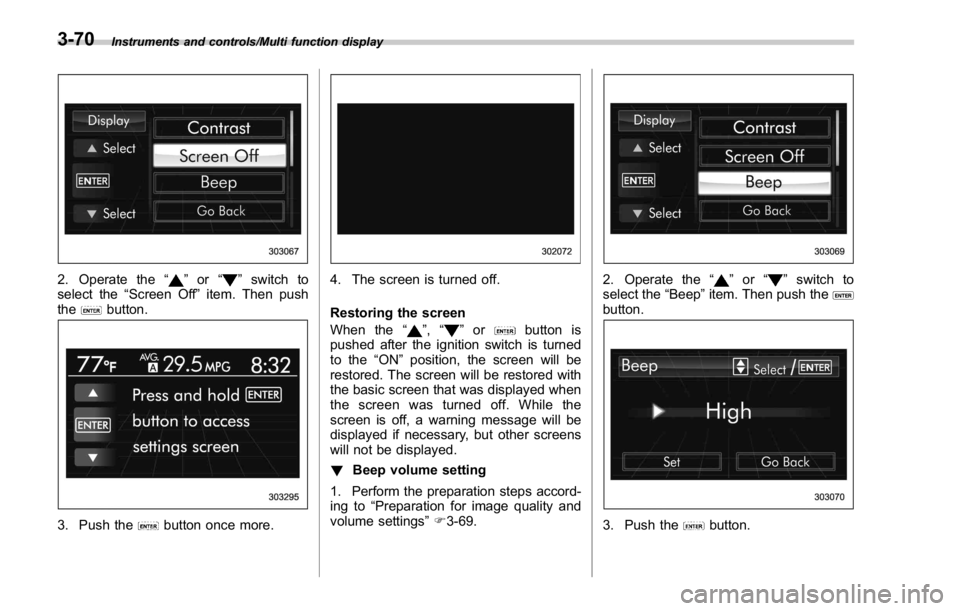
2. Operate the “ ” or “ ” switch to
select the “ Screen Off ” item. Then push
the
button.
3. Push the button once more. 4. The screen is turned off.
Restoring the screen
When the “
” , “ ” or button is
pushed after the ignition switch is turned
to the “ ON ” position, the screen will be
restored. The screen will be restored with
the basic screen that was displayed when
the screen was turned off. While the
screen is off, a warning message will be
displayed if necessary, but other screens
will not be displayed.
! Beep volume setting
1. Perform the preparation steps accord-
ing to “ Preparation for image quality and
volume settings ” F 3-69. 2. Operate the “ ” or “ ” switch to
select the “ Beep ” item. Then push the
button.
3. Push the button.3-70
Page 200 of 594
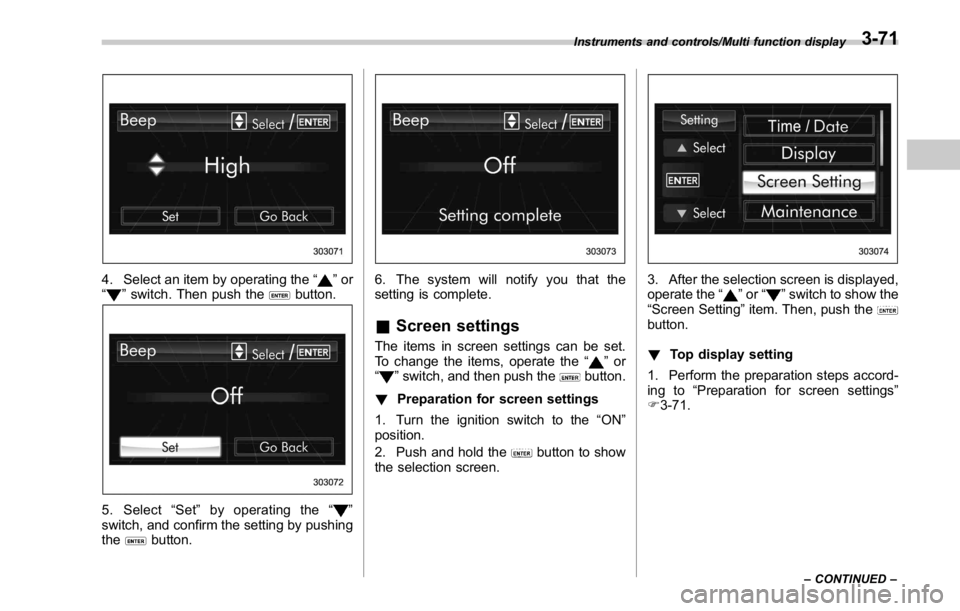
4. Select an item by operating the “ ” or
“
” switch. Then push the button.
5. Select “ Set ” by operating the “ ”
switch, and confirm the setting by pushing
the
button. 6. The system will notify you that the
setting is complete.
& Screen settings The items in screen settings can be set.
To change the items, operate the “
” or
“
” switch, and then push the button.
! Preparation for screen settings
1. Turn the ignition switch to the “ ON ”
position.
2. Push and hold the
button to show
the selection screen. 3. After the selection screen is displayed,
operate the “
” or “ ” switch to show the
“ Screen Setting ” item. Then, push the
button.
! Top display setting
1. Perform the preparation steps accord-
ing to “ Preparation for screen settings ”
F 3-71.Instruments and controls/Multi function display
– CONTINUED –3-71
Page 201 of 594
Instruments and controls/Multi function display
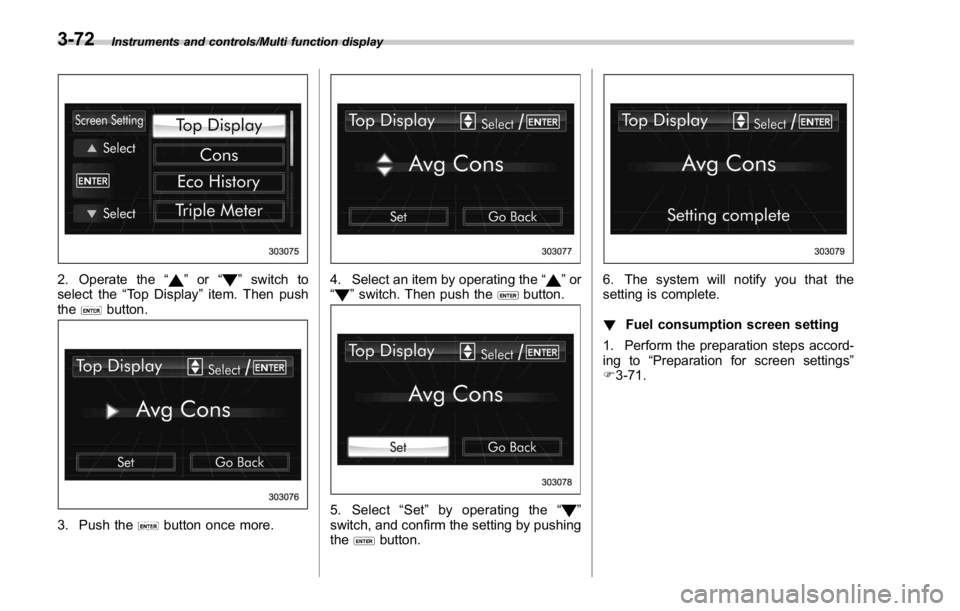
2. Operate the “ ” or “ ” switch to
select the “ Top Display ” item. Then push
the
button.
3. Push the button once more. 4. Select an item by operating the “ ” or
“
” switch. Then push the button.
5. Select “ Set ” by operating the “ ”
switch, and confirm the setting by pushing
the
button. 6. The system will notify you that the
setting is complete.
! Fuel consumption screen setting
1. Perform the preparation steps accord-
ing to “ Preparation for screen settings ”
F 3-71.3-72
Page 202 of 594
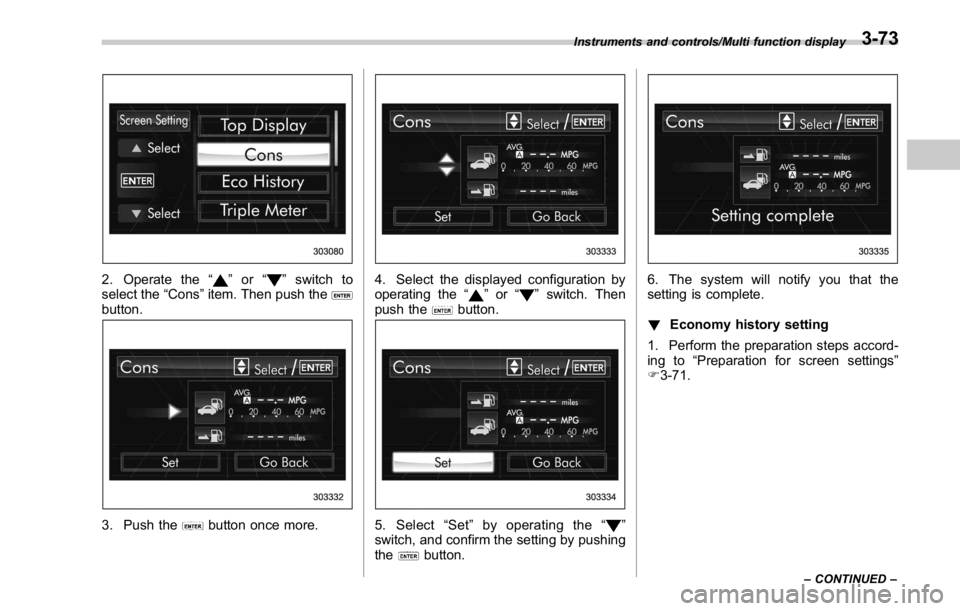
2. Operate the “ ” or “ ” switch to
select the “ Cons ” item. Then push the
button.
3. Push the button once more. 4. Select the displayed configuration by
operating the “
” or “ ” switch. Then
push the
button.
5. Select “ Set ” by operating the “ ”
switch, and confirm the setting by pushing
the
button. 6. The system will notify you that the
setting is complete.
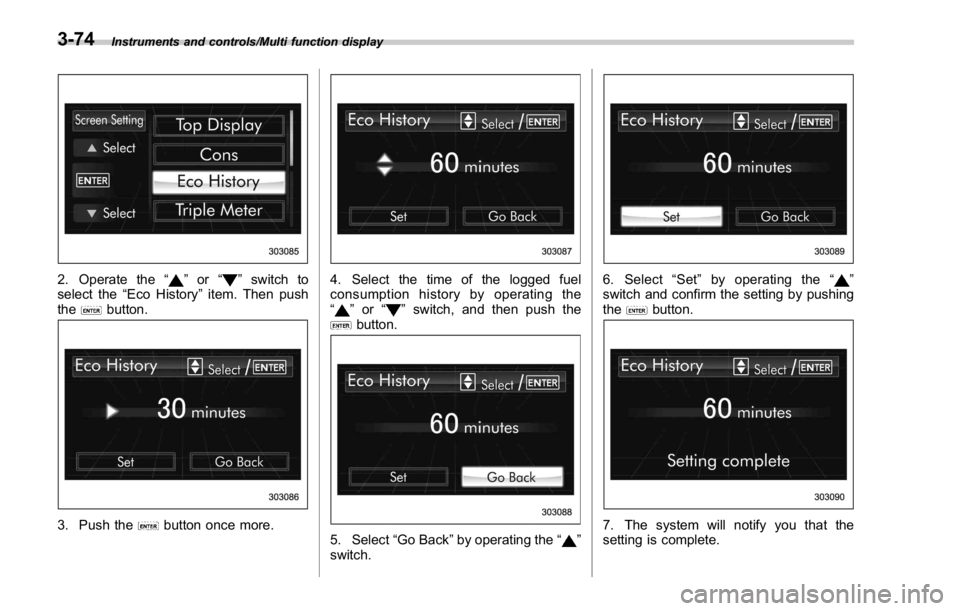
! Economy history setting
1. Perform the preparation steps accord-
ing to “ Preparation for screen settings ”
F 3-71.Instruments and controls/Multi function display
– CONTINUED –3-73
Page 203 of 594
Instruments and controls/Multi function display
2. Operate the “ ” or “ ” switch to
select the “ Eco History ” item. Then push
the
button.
3. Push the button once more. 4. Select the time of the logged fuel
consumption history by operating the
“
” or “ ” switch, and then push the
button.
5. Select “ Go Back ” by operating the “ ”
switch. 6. Select “ Set ” by operating the “ ”
switch and confirm the setting by pushing
the
button.
7. The system will notify you that the
setting is complete.3-74
Page 204 of 594
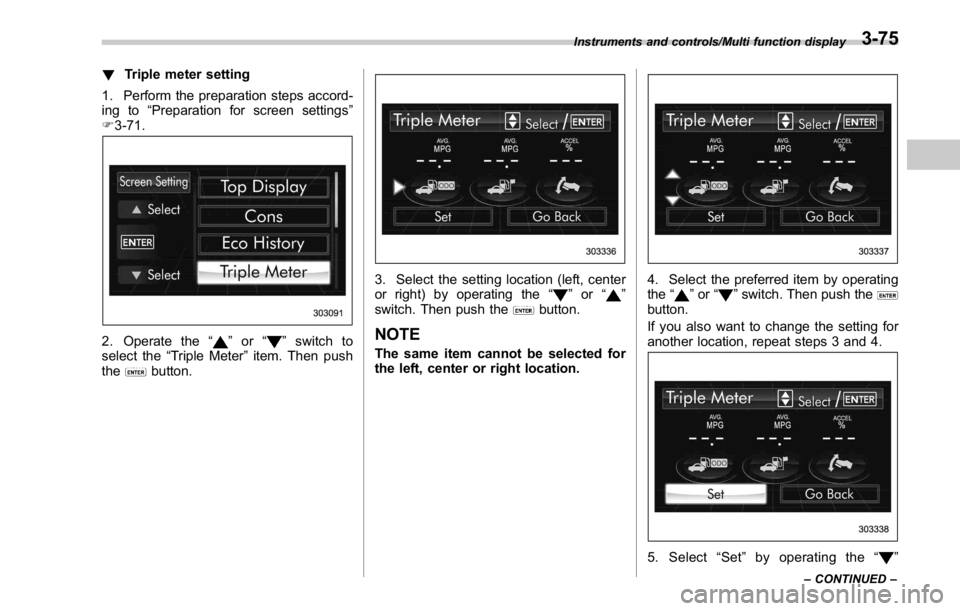
! Triple meter setting
1. Perform the preparation steps accord-
ing to “ Preparation for screen settings ”
F 3-71.
2. Operate the “ ” or “ ” switch to
select the “ Triple Meter ” item. Then push
the
button. 3. Select the setting location (left, center
or right) by operating the “
” or “ ”
switch. Then push the
button.
NOTE The same item cannot be selected for
the left, center or right location. 4. Select the preferred item by operating
the “
” or “ ” switch. Then push the
button.
If you also want to change the setting for
another location, repeat steps 3 and 4.
5. Select “ Set ” by operating the “ ”Instruments and controls/Multi function display
– CONTINUED –3-75
Page 205 of 594
Instruments and controls/Multi function display
switch, and confirm the setting by pushing
the
button.
6. The system will notify you that the
setting is complete.
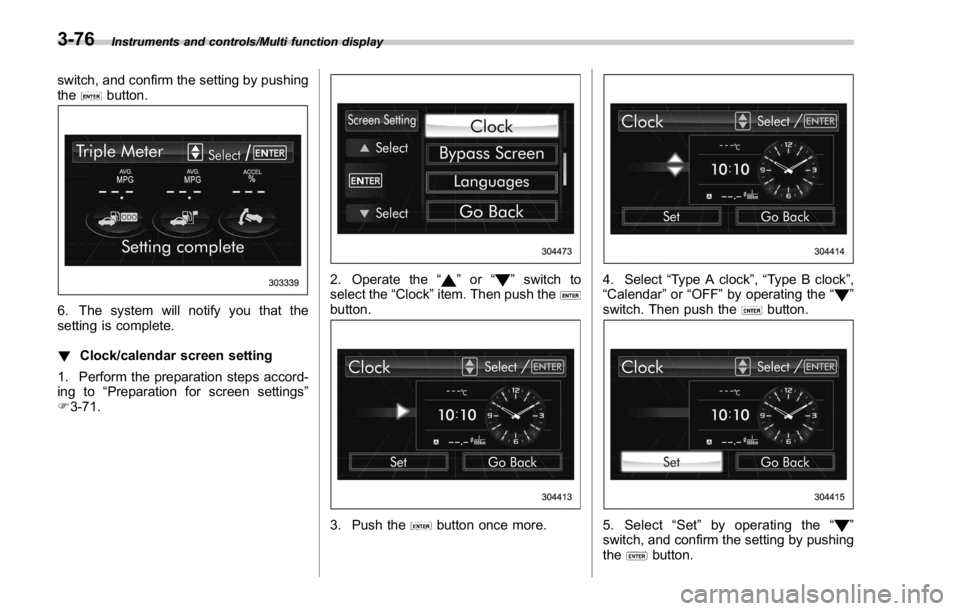
! Clock/calendar screen setting
1. Perform the preparation steps accord-
ing to “ Preparation for screen settings ”
F 3-71. 2. Operate the “ ” or “ ” switch to
select the “ Clock ” item. Then push the
button.
3. Push the button once more. 4. Select “ Type A clock ” , “ Type B clock ” ,
“ Calendar ” or “ OFF ” by operating the “
”
switch. Then push the
button.
5. Select “ Set ” by operating the “ ”
switch, and confirm the setting by pushing
the
button.3-76
Page 206 of 594
6. The system will notify you that the
setting is complete.
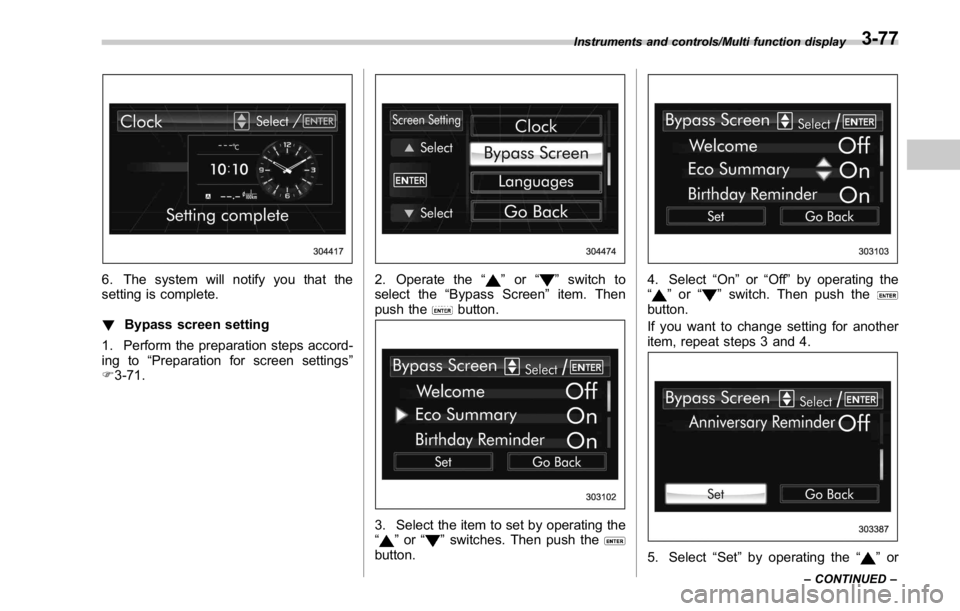
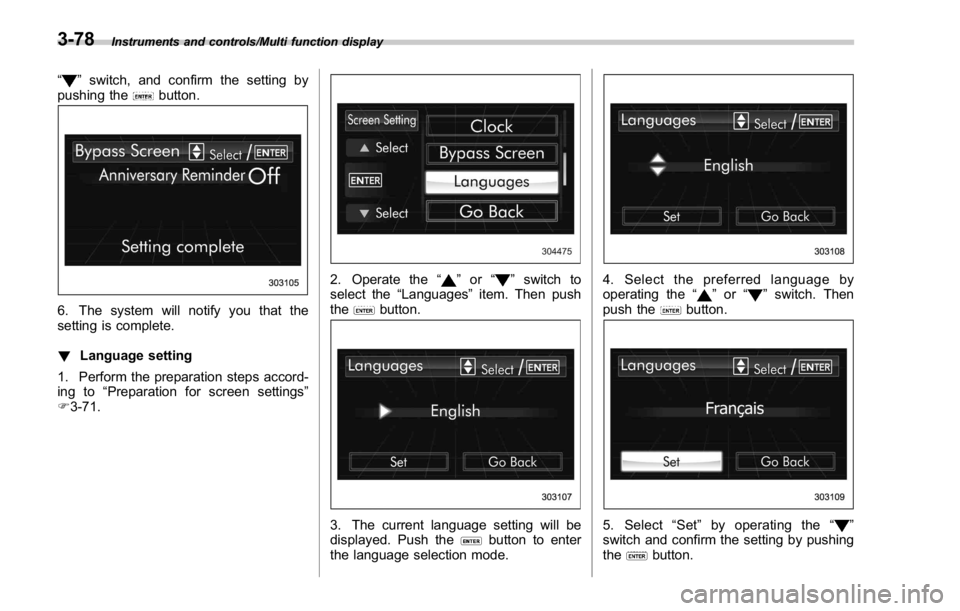
! Bypass screen setting
1. Perform the preparation steps accord-
ing to “ Preparation for screen settings ”
F 3-71. 2. Operate the “ ” or “ ” switch to
select the “ Bypass Screen ” item. Then
push the
button.
3. Select the item to set by operating the
“
” or “ ” switches. Then push the
button. 4. Select “ On ” or “ Off ” by operating the
“
” or “ ” switch. Then push the
button.
If you want to change setting for another
item, repeat steps 3 and 4.
5. Select “ Set ” by operating the “ ” orInstruments and controls/Multi function display
– CONTINUED –3-77
Page 207 of 594
Instruments and controls/Multi function display
“ ” switch, and confirm the setting by
pushing the
button.
6. The system will notify you that the
setting is complete.
! Language setting
1. Perform the preparation steps accord-
ing to “ Preparation for screen settings ”
F 3-71. 2. Operate the “ ” or “ ” switch to
select the “ Languages ” item. Then push
the
button.
3. The current language setting will be
displayed. Push the
button to enter
the language selection mode. 4. Select the preferred language by
operating the “
” or “ ” switch. Then
push the
button.
5. Select “ Set ” by operating the “ ”
switch and confirm the setting by pushing
the
button.3-78
Page 208 of 594
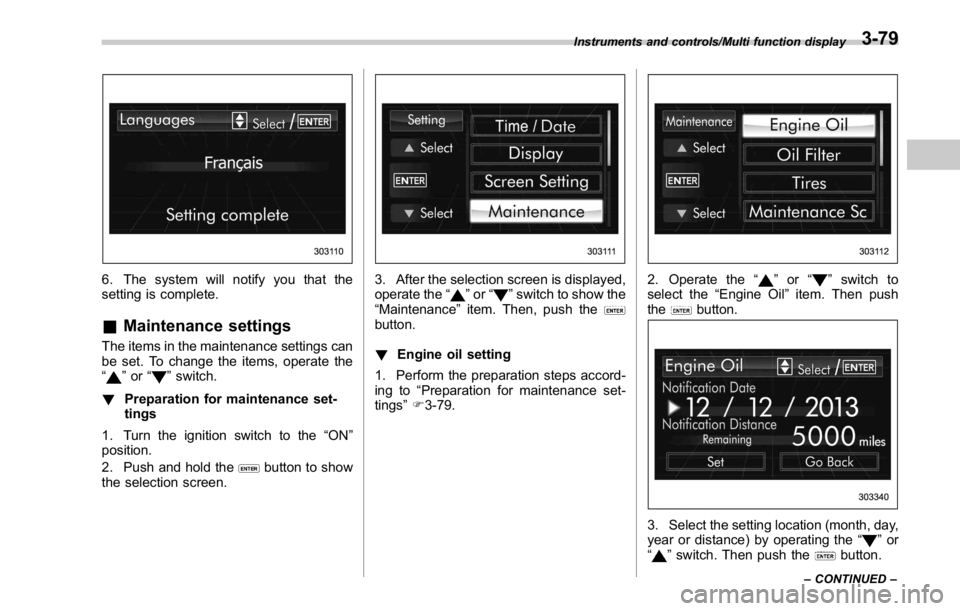
6. The system will notify you that the
setting is complete.
& Maintenance settings The items in the maintenance settings can
be set. To change the items, operate the
“
” or “ ” switch.
! Preparation for maintenance set-
tings
1. Turn the ignition switch to the “ ON ”
position.
2. Push and hold the
button to show
the selection screen. 3. After the selection screen is displayed,
operate the “
” or “ ” switch to show the
“ Maintenance ” item. Then, push the
button.
! Engine oil setting
1. Perform the preparation steps accord-
ing to “ Preparation for maintenance set-
tings ” F 3-79. 2. Operate the “ ” or “ ” switch to
select the “ Engine Oil ” item. Then push
the
button.
3. Select the setting location (month, day,
year or distance) by operating the “
” or
“
” switch. Then push the button.Instruments and controls/Multi function display
– CONTINUED –3-79