power steering SUBARU WRX 2016 User Guide
[x] Cancel search | Manufacturer: SUBARU, Model Year: 2016, Model line: WRX, Model: SUBARU WRX 2016Pages: 594, PDF Size: 19.43 MB
Page 184 of 594
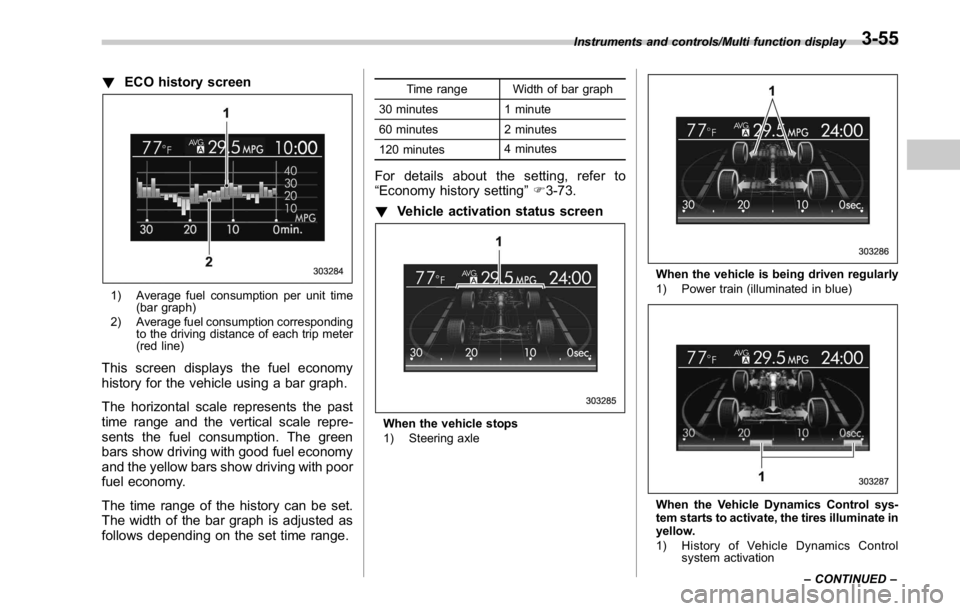
! ECO history screen
1) Average fuel consumption per unit time
(bar graph)
2) Average fuel consumption corresponding
to the driving distance of each trip meter
(red line)
This screen displays the fuel economy
history for the vehicle using a bar graph.
The horizontal scale represents the past
time range and the vertical scale repre-
sents the fuel consumption. The green
bars show driving with good fuel economy
and the yellow bars show driving with poor
fuel economy.
The time range of the history can be set.
The width of the bar graph is adjusted as
follows depending on the set time range. Time range Width of bar graph
30 minutes 1 minute
60 minutes 2 minutes
120 minutes 4 minutes
For details about the setting, refer to
“ Economy history setting ” F 3-73.
! Vehicle activation status screen
When the vehicle stops
1) Steering axle When the vehicle is being driven regularly
1) Power train (illuminated in blue)
When the Vehicle Dynamics Control sys-
tem starts to activate, the tires illuminate in
yellow.
1) History of Vehicle Dynamics Control
system activationInstruments and controls/Multi function display
– CONTINUED –3-55
Page 390 of 594

Fuel ...................................................................... 7-3Fuel requirements ............................................... 7-3
Fuel filler lid and cap ........................................... 7-5
State emission testing (U.S. only) ...................... 7-7
Preparing to drive ............................................... 7-8
Starting and stopping the engine (models
without push-button start system) .................. 7-9Starting engine .................................................... 7-9
Stopping the engine ........................................... 7-11
Starting and stopping engine (models with
push-button start system) .............................. 7-12Safety precautions ............................................. 7-12
Operating range for push-button start
system ............................................................. 7-12
Starting engine ................................................... 7-12
Stopping engine ................................................. 7-14
When access key does not operate properly ....... 7-14
Remote engine start system (dealer
option) .............................................................. 7-14Models with “ keyless access with push-button
start system ” ................................................... 7-15
Entering the vehicle while it is running via remote
start ................................................................. 7-16
Entering the vehicle following remote engine start
shutdown ......................................................... 7-16
Pre-heating or pre-cooling the interior of the
vehicle ............................................................. 7-16
System maintenance .......................................... 7-16
Manual transmission .......................................... 7-17
Shifting speeds .................................................. 7-18
Driving tips ........................................................ 7-18 Driver ’ s Control Center Differential (C.DIFF/
DCCD) (STI) ..................................................... 7-19To change mode of driver ’ s control center
differential ....................................................... 7-20
Auto mode ........................................................ 7-20
Manual mode ..................................................... 7-21
Temporary release ............................................. 7-23
Continuously variable transmission ................. 7-23Select lever ....................................................... 7-24
Selection of manual mode .................................. 7-26
Shift lock function ............................................. 7-27
Driving tips ........................................................ 7-28
SI-DRIVE (STI) .................................................... 7-29Intelligent (I) mode ............................................. 7-29
Sport (S) mode .................................................. 7-30
Sport Sharp (S#) mode. ...................................... 7-30
SI-DRIVE selector .............................................. 7-30
SI-DRIVE (except STI: CVT models) ................. 7-31Intelligent (I) mode ............................................. 7-31
Sport (S) mode .................................................. 7-31
Sport Sharp (S#) mode. ...................................... 7-32
SI-DRIVE switches ............................................. 7-32
Limited slip differential (LSD) (STI) .................. 7-33
Power steering ................................................... 7-33
STI .................................................................... 7-33
Except STI ......................................................... 7-34
Braking ............................................................... 7-35
Braking tips ....................................................... 7-35
Brake system .................................................... 7-35
Disc brake pad wear warning indicators ............. 7-36Starting and operating
7
Page 400 of 594
position and check the operation of the
warning and indicator lights. Refer to
“ Warning and indicator lights ” F 3-13.
5. Turn the ignition switch to the “ START ”
position without depressing the accelera-
tor pedal. Release the key immediately
after the engine has started.
If the engine does not start, try the
following.
(1) Turn the ignition switch to the
“ LOCK ” position and wait for at least
10 seconds. After checking that the
parking brake is firmly set, turn the
ignition switch to the “ START ” position
while depressing the accelerator pedal
slightly (approximately a quarter of the
full stroke). Release the accelerator
pedal as soon as the engine starts.
(2) If this fails to start the engine, turn
the ignition switch back to the “ LOCK ”
position and wait for at least 10
seconds. Then fully depress the accel-
erator pedal and turn the ignition
switch to the “ START ” position. If the
engine starts, quickly release the
accelerator pedal.
(3) If this fails to start the engine, turn
the ignition switch again to the “ LOCK ”
position. After waiting for 10 seconds
or longer, turn the ignition switch to the
“ START ” position without depressing
the accelerator pedal. (4) If the engine still refuses to start,
contact your nearest SUBARU dealer
for assistance.
6. Confirm that all warning and indicator
lights have turned off after the engine has
started. The fuel injection system auto-
matically lowers the idle speed as the
engine warms up.
While the engine is warming up, make
sure that the select lever is at the “ P ” or
“ N ” position and that the parking brake is
applied.
CAUTIONIf you restart the engine while the
vehicle is moving, shift the select
lever into the “ N ” position. Do not
attempt to place the select lever of a
moving vehicle into the “ P ” posi-
tion.
& Stopping the engine The ignition switch should be turned off
only when the vehicle is stopped and the
engine is idling.
WARNING
Do not stop the engine when the
vehicle is moving. This will cause
loss of power to the power steering and the brake booster, making steer-
ing and braking more difficult. It
could also result in accidental acti-
vation of the “ LOCK ” position on the
ignition switch, causing the steering
wheel to lock.Starting and operating/Starting and stopping the engine (models without push – button start system)
7-11
Page 401 of 594
Starting and operating/Starting and stopping engine (models with push – button start system)
Starting and stopping engine
(models with push-button
start system) & Safety precautionsRefer to “ Safety precautions ” F 2-10.
& Operating range for push-
button start systemRefer to “ Operating range for push-button
start system ” F 3-6.
& Starting engine
WARNING. There are some general precau-
tions when starting the engine.
Carefully read the precautions
described in “ General precau-
tions when starting engine ” F 7-
9.
. If the indicator on the push-
button ignition switch flashes in
green after the engine has
started, never drive the vehicle.
The steering is still locked, and it
may result in an accident. CAUTION. When the operation indicator on
the push-button ignition switch is
flashing in orange, there may be
a malfunction with the vehicle.
Contact a SUBARU dealer imme-
diately.
. If the indicator on the push-
button ignition switch is flashing
in green after the engine has
started, it means that the steering
is still locked. Depress the brake
pedal while moving the steering
wheel to the right and left, and
press the push-button ignition
switch.
. Do not continue pushing the
push-button ignition switch for
more than 10 seconds. Doing so
could cause a malfunction. If the
engine does not start, stop push-
ing the push-button ignition
switch and turn off the engine.
Wait 10 seconds, and then push
the push-button ignition switch
to start the engine.
NOTE
. When the push-button ignition
switch is pressed while depressing the clutch pedal (MT models) or the
brake pedal (CVT models), the engine
starter operates for a maximum of 10
seconds and after starting the engine,
the starter stops automatically.
. When the push-button ignition
switch is pressed while depressing
the clutch pedal (MT models) or the
brake pedal (CVT models), the engine
can be started regardless of the status
of the push-button ignition switch.
. If the security indicator light illumi-
nates when you attempt to start the
engine but the engine does not start,
press the push-button ignition switch
to switch the power to “ OFF ” and then
try to start the engine again.
. If the engine does not start, press
the push-button ignition switch without
depressing the clutch pedal (MT mod-
els) or the brake pedal (CVT models) to
switch the power to “ OFF ” . Then, while
depressing the clutch pedal (MT mod-
els) or the brake pedal (CVT models)
more forcefully, press the push-button
ignition switch.
. The engine start procedures may
not function depending on the radio
wave conditions around the vehicle. In
such a case, refer to “ Starting engine ”
F 9-17.
. If the vehicle battery is discharged,
the steering cannot be unlocked.7-12
Page 403 of 594
Starting and operating/Remote engine start system (dealer option)
& Stopping engine1. Stop the vehicle completely.
2. Move the select lever to the “ P ”
position (CVT models).
3. Press the push-button ignition switch.
The engine will stop, and the power will be
switched to “ OFF ” .
WARNING. Do not touch the push-button
ignition switch during driving.
When the push-button ignition
switch is operated as follows,
the engine will stop.
– The switch is pressed and held
for 3 seconds or longer.
– The switch is pressed briefly 3
times or more in succession.
When the engine stops, the brake
booster will not function. A great-
er foot pressure will be required
on the brake pedal.
The power steering system will
not operate either. A greater
force will be required to steer,
and it may result in an accident.
. If the engine stops during driving,
do not operate the push-button
ignition switch or open any of the doors until the vehicle is stopped
in a safe location. It is dangerous
because the steering lock may be
activated. Stop the vehicle in a
safe location, and contact a
SUBARU dealer immediately.
CAUTIONFor CVT models:
. Do not stop the engine while the
select lever is in a position other
than the “ P ” position.
. If the engine is stopped while the
select lever is in a position other
than the “ P ” position, the power
will be in “ ACC ” . If the vehicle is
left in this condition, the battery
may be discharged.
NOTE Although you can stop the engine by
operating the push-button ignition
switch, do not stop the engine during
driving except in an emergency.
& When access key does not
operate properly
Refer to “ Access key – if access key does
not operate properly ” F 9-16.Remote engine start system
(dealer option) WARNING. There are some general precau-
tions when starting the engine.
Carefully read the precautions
described in “ General precau-
tions when starting engine ” F 7-
9.
. Do not remote start a vehicle in
an enclosed environment (e.g.
closed garage). Prolonged opera-
tion of a motor vehicle in an
enclosed environment can cause
a harmful build-up of Carbon
Monoxide. Carbon Monoxide is
harmful to your health. Exposure
to high levels of Carbon Monox-
ide can cause headaches, dizzi-
ness or in extreme cases uncon-
sciousness and/or death.
. Before performing any servicing
of the vehicle, temporarily place
the remote engine start system in
service mode to prevent the
system from unexpectedly start-
ing the engine.
The remote engine start system allows7-14
Page 422 of 594

other than Sport Sharp (S#) mode is
selected.
NOTE . The next time you turn on the
engine, after you turned off the engine
in the Sport Sharp (S#) mode, the SI-
DRIVE mode changes to the Sport (S)
mode.
. The next time you turn on the
engine, after you turned off the engine
in the Sport (S) mode or Intelligent (I)
mode, the SI-DRIVE mode will stay in
the same mode as when the engine
was turned off.
. While the engine is running, if the
CHECK ENGINE warning light/malfunc-
tion indicator light illuminates, the SI-
DRIVE mode changes to the Sport (S)
mode. In this case, it is not possible to
change to another mode.
. If there is a possibility that the
engine could overheat because of a
temperature increase of the engine
coolant, it is not possible to change to
the Sport Sharp (S#) mode. While the
vehicle is in the Sport Sharp (S#) mode,
it changes to the Sport (S) mode when
the engine coolant temperature in-
creases.
. While the engine is cool, you cannot
change to Sport Sharp (S#) mode. Limited slip differential (LSD)
(STI) The LSD provides optimum distribution of
power according to the difference in
revolutions between the right and left
wheels that may be caused by certain
driving conditions, thereby improving driv-
ing stability on snow-covered, muddy or
other slippery roads or when high speed
driving.
CAUTION. Never start the engine while a tire
on one side is jacked up, as the
vehicle may move.
. If one tire is spinning in mud,
avoid continued spinning at high
speed as this could adversely
affect the LSD.
. If you use a temporary spare tire
to replace a flat tire, be sure to
use the original temporary spare
tire stored in the vehicle. Using
other sizes will adversely affect
the LSD. Power steering & STI The vehicle is equipped with a hydraulic
power steering system. The power steer-
ing system operates only when the engine
is running.
If you lose power steering assist because
the engine stops or the system fails to
function, you can steer but it will take
much more effort.
CAUTIONDo not hold the steering wheel at the
fully locked position left or right for
more than 5 seconds. This may
damage the power steering pump.
NOTE Right after the engine has been started
and before it has warmed up, you may
hear a noise coming from areas adja-
cent to the power steering pump which
is located at the right-front area of the
engine compartment. This noise is
normal. It does not indicate power
steering system trouble.Starting and operating/Limited slip differential (LSD) (STI)
– CONTINUED –7-33
Page 423 of 594
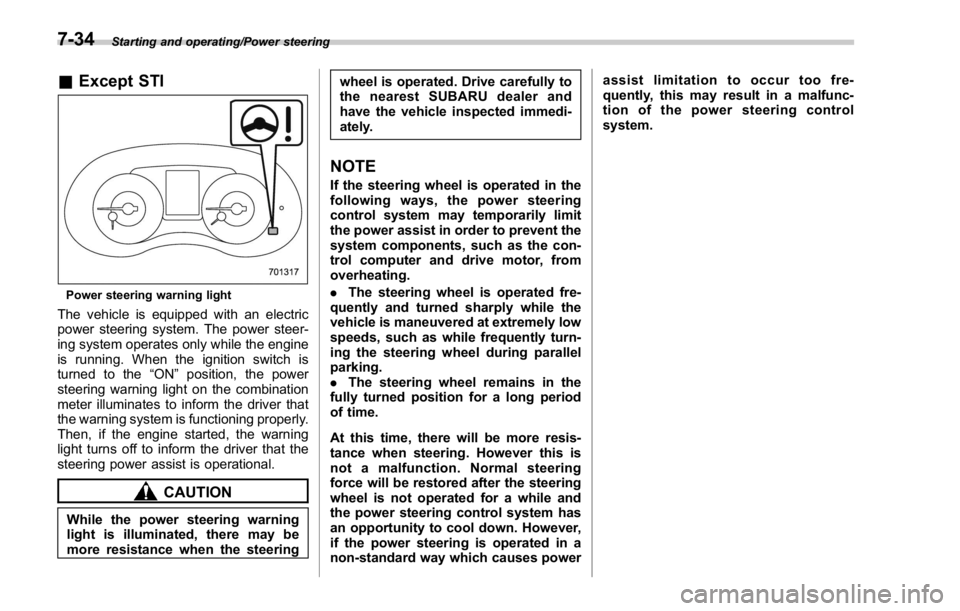
Starting and operating/Power steering
& Except STI
Power steering warning light
The vehicle is equipped with an electric
power steering system. The power steer-
ing system operates only while the engine
is running. When the ignition switch is
turned to the “ ON ” position, the power
steering warning light on the combination
meter illuminates to inform the driver that
the warning system is functioning properly.
Then, if the engine started, the warning
light turns off to inform the driver that the
steering power assist is operational.
CAUTION
While the power steering warning
light is illuminated, there may be
more resistance when the steering wheel is operated. Drive carefully to
the nearest SUBARU dealer and
have the vehicle inspected immedi-
ately.
NOTE If the steering wheel is operated in the
following ways, the power steering
control system may temporarily limit
the power assist in order to prevent the
system components, such as the con-
trol computer and drive motor, from
overheating.
. The steering wheel is operated fre-
quently and turned sharply while the
vehicle is maneuvered at extremely low
speeds, such as while frequently turn-
ing the steering wheel during parallel
parking.
. The steering wheel remains in the
fully turned position for a long period
of time.
At this time, there will be more resis-
tance when steering. However this is
not a malfunction. Normal steering
force will be restored after the steering
wheel is not operated for a while and
the power steering control system has
an opportunity to cool down. However,
if the power steering is operated in a
non-standard way which causes power assist limitation to occur too fre-
quently, this may result in a malfunc-
tion of the power steering control
system.
7-34
Page 428 of 594
namics Control is no guarantee
that full vehicle control will be
maintained at all times and under
all conditions, its activation
should be seen as a sign that
the speed of the vehicle should
be reduced considerably.
. Whenever suspension compo-
nents, steering components, or
an axle are removed from a
vehicle, have an inspection of
that system performed by an
authorized SUBARU dealer.
. The following precautions should
be observed in order to ensure
that the Vehicle Dynamics Con-
trol system is operating properly:
– All four wheels should be
fitted with tires of the same
size, type, and brand. Further-
more, the amount of wear
should be the same for all
four tires.
– Keep the tire pressure at the
proper level as shown on the
vehicle placard attached to
the driver ’ s side door pillar.
– Use only the specified tem-
porary spare tire to replace a
flat tire. With a temporary
spare tire, the effectiveness of the Vehicle Dynamics Con-
trol system is reduced and
this should be taken into ac-
count when driving the vehi-
cle in such a condition.
. If non-matching tires are used,
the Vehicle Dynamics Control
system may not operate cor-
rectly.
. The Vehicle Dynamics Control
system helps prevent unstable
vehicle motion such as skidding
using control of the brakes and
engine power. Do not turn off the
Vehicle Dynamics Control sys-
tem unless it is absolutely ne-
cessary. If you must turn off the
Vehicle Dynamics Control sys-
tem, drive very carefully accord-
ing to the road surface condition.
In the event of wheelspin and/or skidding
on a slippery road surface and/or during
cornering and/or an evasive maneuver,
the Vehicle Dynamics Control system
adjusts the engine ’ s output and the
wheels ’ respective braking forces to help
maintain traction and directional control.
. Traction Control Function
The traction control function is designed to
prevent spinning of the driving wheels on slippery road surfaces, thereby helping to
maintain traction and directional control.
Activation of this function is shown by
flashing the Vehicle Dynamics Control
operation indicator light.
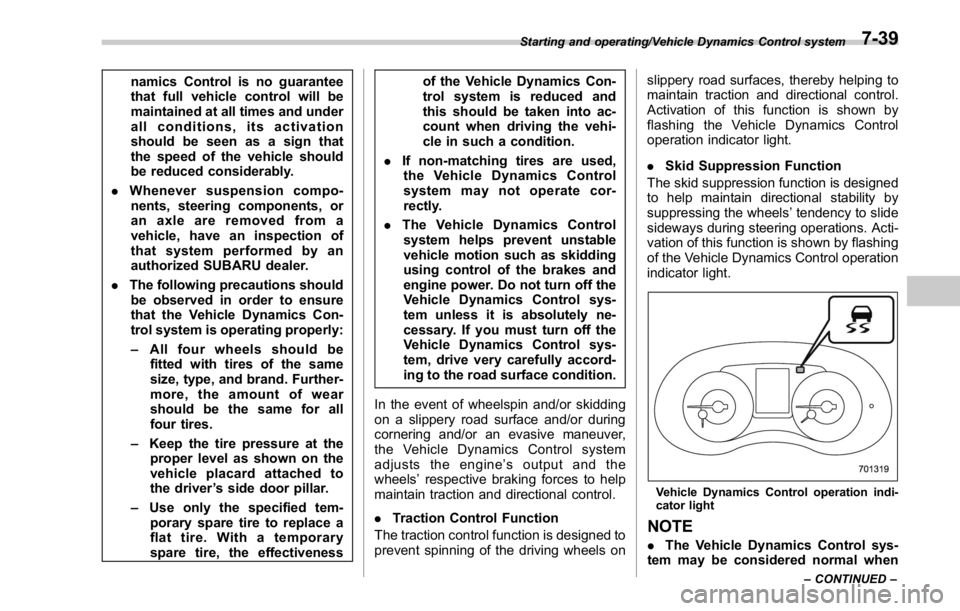
. Skid Suppression Function
The skid suppression function is designed
to help maintain directional stability by
suppressing the wheels ’ tendency to slide
sideways during steering operations. Acti-
vation of this function is shown by flashing
of the Vehicle Dynamics Control operation
indicator light.
Vehicle Dynamics Control operation indi-
cator light
NOTE
. The Vehicle Dynamics Control sys-
tem may be considered normal whenStarting and operating/Vehicle Dynamics Control system
– CONTINUED –7-39
Page 480 of 594
position for CVT models. Shift the shift
lever into the “ 1st ” position for MT models.
2. Apply the parking brake firmly.
3. Secure the vehicle onto the carrier
properly with safety chains. Each safety
chain should be equally tightened and
care must be taken not to pull the chains
so tightly that the suspension bottoms out.
CAUTIONIf your vehicle has a front under-
spoiler and rear underspoiler (both
optional), be careful not to scrape
them when placing the vehicle on
the carrier and when removing the
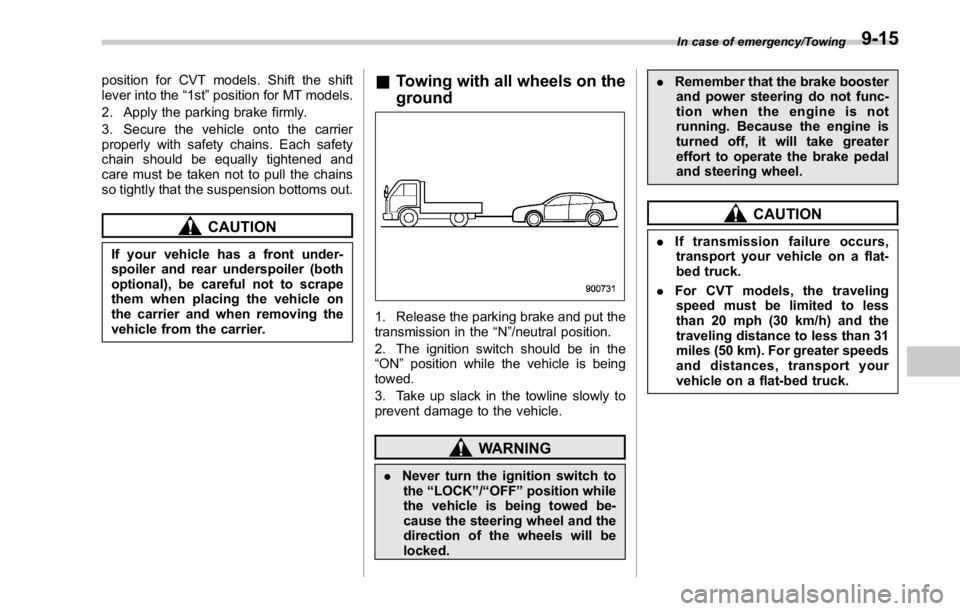
vehicle from the carrier. & Towing with all wheels on the
ground
1. Release the parking brake and put the
transmission in the “ N ” /neutral position.
2. The ignition switch should be in the
“ ON ” position while the vehicle is being
towed.
3. Take up slack in the towline slowly to
prevent damage to the vehicle.
WARNING
. Never turn the ignition switch to
the “ LOCK ” / “ OFF ” position while
the vehicle is being towed be-
cause the steering wheel and the
direction of the wheels will be
locked. . Remember that the brake booster
and power steering do not func-
tion when the engine is not
running. Because the engine is
turned off, it will take greater
effort to operate the brake pedal
and steering wheel.
CAUTION. If transmission failure occurs,
transport your vehicle on a flat-
bed truck.
. For CVT models, the traveling
speed must be limited to less
than 20 mph (30 km/h) and the
traveling distance to less than 31
miles (50 km). For greater speeds
and distances, transport your
vehicle on a flat-bed truck. In case of emergency/Towing
9-15
Page 490 of 594

Maintenance schedule ....................................... 11-3
Maintenance precautions ................................... 11-3Before checking or servicing in the engine
compartment .................................................... 11-4
When checking or servicing in the engine
compartment .................................................... 11-5
When checking or servicing in the engine
compartment while the engine is running .......... 11-5
Maintenance tips ................................................ 11-6Removing and reinstalling clips .......................... 11-6
Engine hood ....................................................... 11-9
Engine compartment overview ........................ 11-11STI................................................................... 11-11
Except STI ....................................................... 11-12
Engine oil .......................................................... 11-13Engine oil consumption .................................... 11-13
Checking the oil level ....................................... 11-13
Changing the oil and oil filter ............................ 11-15
Recommended grade and viscosity .................. 11-16
Synthetic oil ..................................................... 11-16
Cooling system ................................................ 11-17Cooling fan, hose and connections ................... 11-17
Engine coolant ................................................. 11-18
Air cleaner element .......................................... 11-19
Replacing the air cleaner element ..................... 11-19
Spark plugs ...................................................... 11-21
Recommended spark plugs .............................. 11-21
Drive belts ........................................................ 11-22
Manual transmission oil .................................. 11-23
Recommended grade and viscosity .................. 11-23 Continuously variable transmission fluid ...... 11-23
Front differential gear oil (CVT models) and
rear differential gear oil ................................ 11-23Recommended grade and viscosity .................. 11-23
Power steering fluid (STI) ............................... 11-24Checking the fluid level .................................... 11-24
Recommended fluid ......................................... 11-24
Brake fluid ........................................................ 11-25Checking the fluid level .................................... 11-25
Recommended brake fluid ............................... 11-25
Clutch fluid (MT models) ................................. 11-26Checking the fluid level .................................... 11-26
Recommended clutch fluid ............................... 11-26
Brake booster .................................................. 11-27
Brake pedal ...................................................... 11-27Checking the brake pedal free play .................. 11-27
Checking the brake pedal reserve distance ....... 1 1-28
Clutch pedal (MT models) ............................... 11-28Checking the clutch function ............................ 11-28
Checking the clutch pedal free play .................. 11-28
Hill start assist system .................................... 11-29
Replacement of brake pad and lining ............ 11-29Breaking-in of new brake pads (models with
electronic parking brake system) .................... 11-29
Breaking-in of new brake pads and linings
(models without electronic parking brake
system) ......................................................... 11-30
Parking brake stroke (models without
electronic parking brake system) ................ 11-30Maintenance and service
11