battery SUBARU WRX 2016 Owner's Manual
[x] Cancel search | Manufacturer: SUBARU, Model Year: 2016, Model line: WRX, Model: SUBARU WRX 2016Pages: 594, PDF Size: 19.43 MB
Page 136 of 594
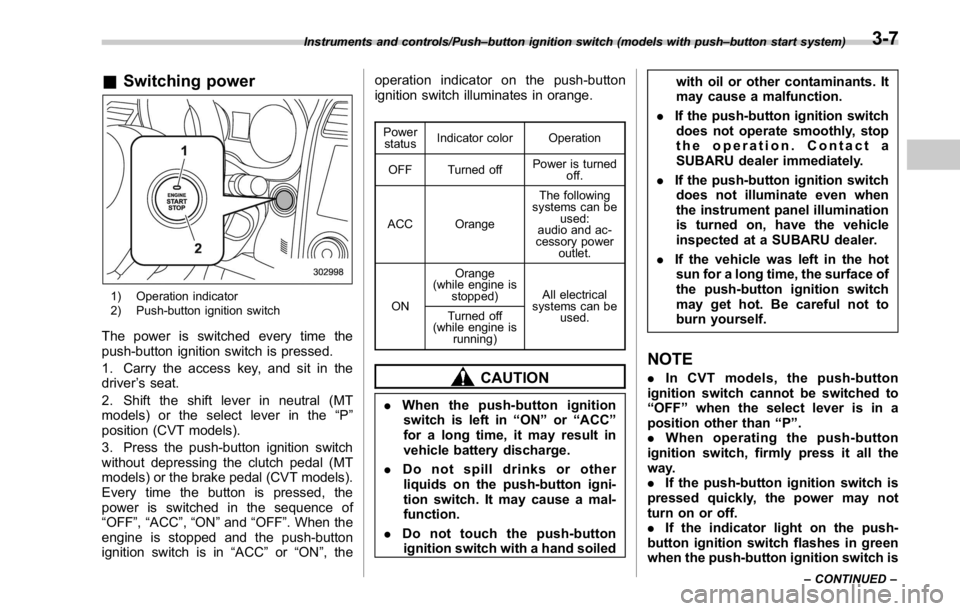
& Switching power
1) Operation indicator
2) Push-button ignition switch
The power is switched every time the
push-button ignition switch is pressed.
1. Carry the access key, and sit in the
driver ’ s seat.
2. Shift the shift lever in neutral (MT
models) or the select lever in the “ P ”
position (CVT models).
3. Press the push-button ignition switch
without depressing the clutch pedal (MT
models) or the brake pedal (CVT models).
Every time the button is pressed, the
power is switched in the sequence of
“ OFF ” , “ ACC ” , “ ON ” and “ OFF ” . When the
engine is stopped and the push-button
ignition switch is in “ ACC ” or “ ON ” , the operation indicator on the push-button
ignition switch illuminates in orange. Power
status Indicator color Operation
OFF Turned off Power is turned
off.
ACC Orange The following
systems can be
used:
audio and ac-
cessory power
outlet.
ON Orange
(while engine is
stopped) All electrical
systems can be
used.Turned off
(while engine is
running)
CAUTION
. When the push-button ignition
switch is left in “ ON ” or “ ACC ”
for a long time, it may result in
vehicle battery discharge.
. Do not spill drinks or other
liquids on the push-button igni-
tion switch. It may cause a mal-
function.
. Do not touch the push-button
ignition switch with a hand soiled with oil or other contaminants. It
may cause a malfunction.
. If the push-button ignition switch
does not operate smoothly, stop
the operation. Contact a
SUBARU dealer immediately.
. If the push-button ignition switch
does not illuminate even when
the instrument panel illumination
is turned on, have the vehicle
inspected at a SUBARU dealer.
. If the vehicle was left in the hot
sun for a long time, the surface of
the push-button ignition switch
may get hot. Be careful not to
burn yourself.
NOTE . In CVT models, the push-button
ignition switch cannot be switched to
“ OFF ” when the select lever is in a
position other than “ P ” .
. When operating the push-button
ignition switch, firmly press it all the
way.
. If the push-button ignition switch is
pressed quickly, the power may not
turn on or off.
. If the indicator light on the push-
button ignition switch flashes in green
when the push-button ignition switch isInstruments and controls/Push – button ignition switch (models with push – button start system)
– CONTINUED –3-7
Page 137 of 594
Instruments and controls/Hazard warning flasher
pressed, steering is locked. When this
occurs, press the push-button ignition
switch while turning the steering wheel
left and right.
! Battery drainage prevention func-
tion
When the push-button ignition switch is
left in the “ ACC ” or “ ON ” position for
approximately 1 hour, the push-button
ignition switch will be automatically
switched to “ OFF ” to prevent the battery
from going dead. (In CVT models, this
function is activated when the select lever
is in the “ P ” position.)
& When access key does not
operate properlyRefer to “ Access key – if access key does
not operate properly ” F 9-16. Hazard warning flasher
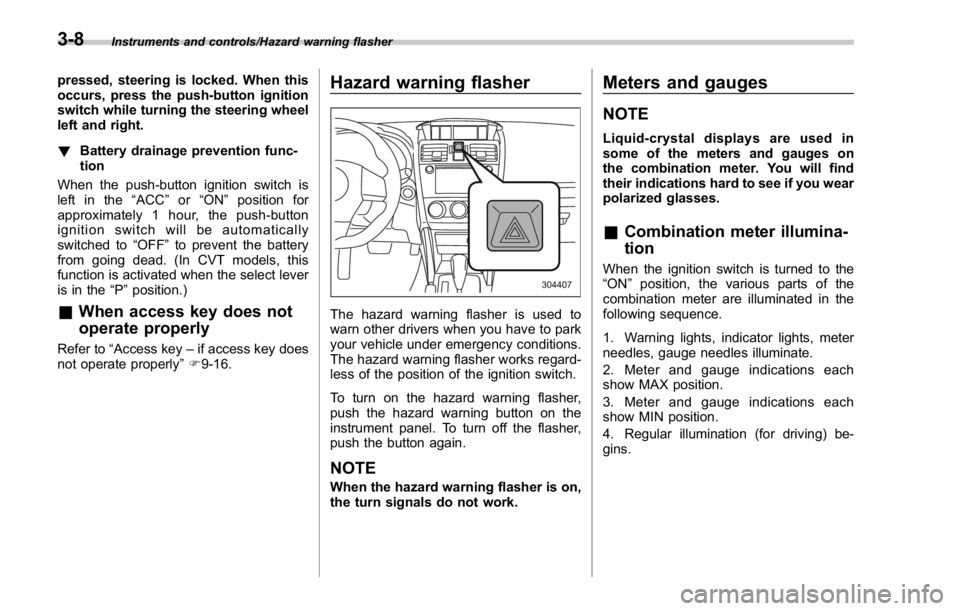
The hazard warning flasher is used to
warn other drivers when you have to park
your vehicle under emergency conditions.
The hazard warning flasher works regard-
less of the position of the ignition switch.
To turn on the hazard warning flasher,
push the hazard warning button on the
instrument panel. To turn off the flasher,
push the button again.
NOTE When the hazard warning flasher is on,
the turn signals do not work. Meters and gauges NOTE Liquid-crystal displays are used in
some of the meters and gauges on
the combination meter. You will find
their indications hard to see if you wear
polarized glasses.
& Combination meter illumina-
tion When the ignition switch is turned to the
“ ON ” position, the various parts of the
combination meter are illuminated in the
following sequence.
1. Warning lights, indicator lights, meter
needles, gauge needles illuminate.
2. Meter and gauge indications each
show MAX position.
3. Meter and gauge indications each
show MIN position.
4. Regular illumination (for driving) be-
gins.3-8
Page 139 of 594

Instruments and controls/Meters and gauges
trip meter, the odometer/trip meter will turn
off.
Also, if you open and close the driver ’ s
door within 10 seconds of illumination of
the odometer/trip meter, the odometer/trip
meter will turn off.
The display can be switched as shown in
the following sequence by pressing the
trip knob.
To set the trip meter to zero, select the A
trip or B trip meter by pressing the knob
and keep the knob pressed for more than
2 seconds.
CAUTIONTo ensure safety, do not attempt to
change the function of the indicator
during driving, as an accident could
result.
NOTE If the connection between the combina-
tion meter and battery is broken for any
reason such as vehicle maintenance or
fuse replacement, the data recorded on
the trip meter will be lost. & Tachometer The tachometer shows the engine speed
in thousands of revolutions per minute.
CAUTIONDo not operate the engine with the
pointer of the tachometer in the red
zone. In this range, fuel injection will
be cut by the engine control module
to protect the engine from overrev-
ving. The engine will resume run-
ning normally after the engine speed
is reduced below the red zone.
NOTE To protect the engine/transmission
while the select lever is in the “ P ” or
“ N ” position (CVT models) or the shift
lever is in the neutral position (MT
models), the engine is controlled so
that the engine speed may not become
too high even if the accelerator pedal is
depressed hard. & Fuel gauge
1) Low fuel warning light
The fuel gauge shows the approximate
amount of fuel remaining in the tank.
When the ignition switch is in the “ LOCK ” /
“ OFF ” or “ ACC ” position, the fuel gauge
shows “ E ” even if the fuel tank contains
fuel.
The gauge may move slightly during
braking, turning or acceleration due to fuel
level movement in the tank.
If you press the trip knob while the ignition
switch is in the “ LOCK ” / “ OFF ” or “ ACC ”
position, the fuel gauge ’ s dial will light up
and the needle will indicate the amount of
fuel remaining in the tank.
If, while the fuel gauge needle is indicating
the amount of fuel remaining in the tank,3-10
Page 150 of 594
but it turns off while driving.
. The warning light illuminates during
driving, but it turns off immediately and
remains off.
When driving with an insufficient battery
voltage such as when the engine is jump
started, the ABS warning light may illumi-
nate. This is due to the low battery voltage
and does not indicate a malfunction.
When the battery becomes fully charged,
the light will turn off.
& Brake system
warning light WARNING. Driving with the brake system
warning light on is dangerous.
This indicates your brake system
may not be working properly. If
the light remains illuminated,
have the brakes inspected by a
SUBARU dealer immediately.
. If at all in doubt about whether
the brakes are operating prop-
erly, do not drive the vehicle.
Have your vehicle towed to the
nearest SUBARU dealer for re-
pair.
. If the brake system warning light
illuminates, the electronic park- ing brake system may be mal-
functioning. Immediately stop
your vehicle in a safe location,
use tire stops under the tires to
prevent the vehicle from moving
and contact your SUBARU deal-
er. For details, refer to “ Electro-
nic parking brake (models with
electronic parking brake sys-
tem) ” F 7-44.
NOTE . Even if the brake system warning
light illuminates, if the warning light
behavior is as described in the follow-
ing examples, the electronic parking
brake system is not malfunctioning.
– The warning light turns off when
the electronic parking brake is ap-
plied or released.
– The warning light turns off when
the ignition switch is turned to the
“ ON ” position again.
. The brake system warning light may
illuminate immediately after the engine
is started. However, it is not malfunc-
tioning if the warning light turns off
after the electronic parking brake is
released.
. The brake system warning light may
illuminate after the electronic parking brake is frequently applied and re-
leased. However, the electronic parking
brake system is not malfunctioning if
the light turns off for a short period of
time.
. When the engine is started while the
electronic parking brake is applied/
released, the system may judge an
abnormal situation and the warning
light may illuminate. If the warning light
illuminates, turn the ignition switch
once to the “ LOCK/OFF ” position and
then restart the engine. Then, apply/
release the electronic parking brake. If
the warning light turns off, the system
will be restored.
This light has the following functions.
! Parking brake indicator (models
without electronic parking brake
system)
This light illuminates with the parking
brake applied while the ignition switch is
in the “ ON ” position. It turns off when the
parking brake is fully released.
! Brake fluid level warning
This light illuminates when the brake fluid
level has dropped to near the “ MIN ” level
of the brake fluid reservoir with the ignition
switch in the “ ON ” position and with the
parking brake fully released.Instruments and controls/Warning and indicator lights
– CONTINUED –3-21
Page 161 of 594

Instruments and controls/Warning and indicator lights
Inside warning
chime Outside warning
chime Operation indicator
on push-button igni-
tion switch Status Action
Long beep
(continuous) —— Select lever position warning:
The driver ’ s door was opened while the
push-button ignition switch is in a posi-
tion other than “ OFF ” and the select
lever is in a position other than the “ P ”
position. Shift the select lever to the “ P ” position,
switch the push-button ignition switch to
“ OFF ” and exit the vehicle.
Ding —— The battery of the access key is low. Replace the battery of the access key.
Ding — Flashes in green (15
seconds max.) Steering lock warning:
The engine start procedure was per-
formed, but the steering is still locked. While turning the steering wheel right
and left lightly, depress the brake pedal
and press the push-button ignition
switch.
Ding — Flashes in orange System malfunction warning:
A malfunction was detected in the power
system or steering lock. Contact a SUBARU dealer immediately
and have the vehicle inspected.
NOTE An electronic chirp will sound while the select lever is in the “ R ” position. In this case, the select lever position warning chime
will not sound.3-32
Page 171 of 594

Instruments and controls/Multi information display
Item Icon “ ” information reminder Refer to page
Automatic headlight beam leveler system malfunction warning
(models with LED headlights) Yellow 3-35
LED low beam headlight system malfunction warning (if equipped) Yellow 3-25
The keyless access with push-button start system malfunction
warning* ——
Low battery warning of the access key* — 3-28
Driver ’ s control center differential system malfunction warning Yellow 3-35
Deactivation of switching SI-DRIVE mode — 7-29, 7-31
Windshield washer fluid warning Yellow 11-38
BSD/RCTA halt or warning (if equipped) Yellow 7-56
*: Models with keyless access with push-button start system3-42
Page 182 of 594
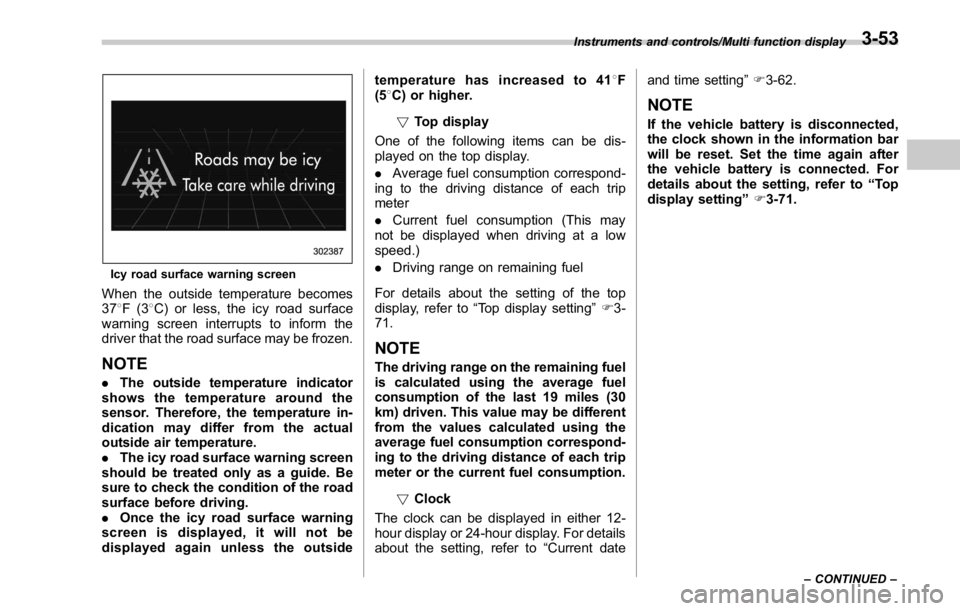
Icy road surface warning screen
When the outside temperature becomes
37 8 F(3 8 C) or less, the icy road surface
warning screen interrupts to inform the
driver that the road surface may be frozen.
NOTE . The outside temperature indicator
shows the temperature around the
sensor. Therefore, the temperature in-
dication may differ from the actual
outside air temperature.
. The icy road surface warning screen
should be treated only as a guide. Be
sure to check the condition of the road
surface before driving.
. Once the icy road surface warning
screen is displayed, it will not be
displayed again unless the outside temperature has increased to 41 8 F
(5 8 C) or higher.
! Top display
One of the following items can be dis-
played on the top display.
. Average fuel consumption correspond-
ing to the driving distance of each trip
meter
. Current fuel consumption (This may
not be displayed when driving at a low
speed.)
. Driving range on remaining fuel
For details about the setting of the top
display, refer to “ Top display setting ” F 3-
71.
NOTE The driving range on the remaining fuel
is calculated using the average fuel
consumption of the last 19 miles (30
km) driven. This value may be different
from the values calculated using the
average fuel consumption correspond-
ing to the driving distance of each trip
meter or the current fuel consumption.
! Clock
The clock can be displayed in either 12-
hour display or 24-hour display. For details
about the setting, refer to “ Current date and time setting ” F 3-62.
NOTE If the vehicle battery is disconnected,
the clock shown in the information bar
will be reset. Set the time again after
the vehicle battery is connected. For
details about the setting, refer to “ To p
display setting ” F 3-71.Instruments and controls/Multi function display
– CONTINUED –3-53
Page 223 of 594
Instruments and controls/Light control switch
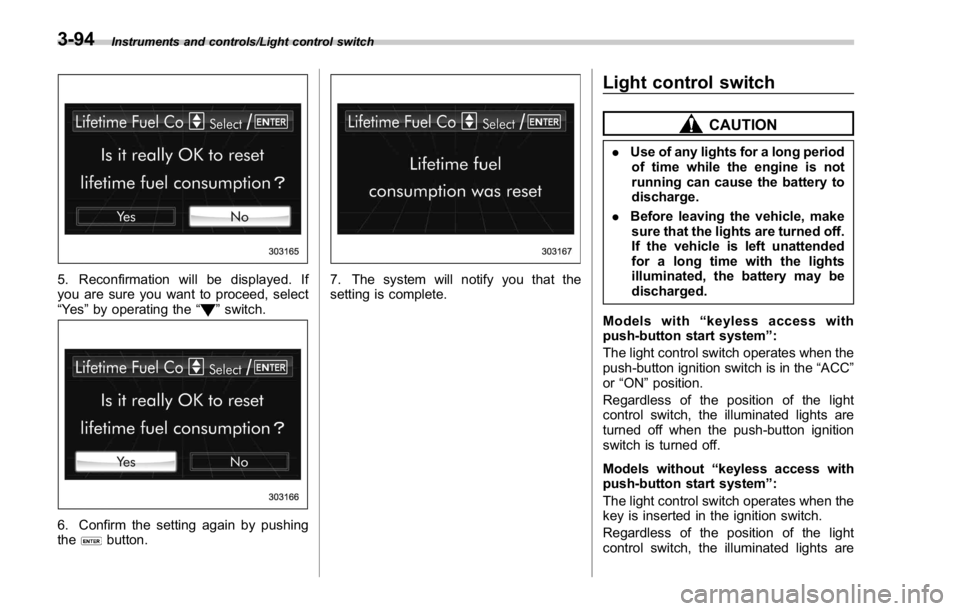
5. Reconfirmation will be displayed. If
you are sure you want to proceed, select
“ Ye s ” by operating the “
” switch.
6. Confirm the setting again by pushing
the
button. 7. The system will notify you that the
setting is complete. Light control switch CAUTION. Use of any lights for a long period
of time while the engine is not
running can cause the battery to
discharge.
. Before leaving the vehicle, make
sure that the lights are turned off.
If the vehicle is left unattended
for a long time with the lights
illuminated, the battery may be
discharged.
Models with “ keyless access with
push-button start system ” :
The light control switch operates when the
push-button ignition switch is in the “ ACC ”
or “ ON ” position.
Regardless of the position of the light
control switch, the illuminated lights are
turned off when the push-button ignition
switch is turned off.
Models without “ keyless access with
push-button start system ” :
The light control switch operates when the
key is inserted in the ignition switch.
Regardless of the position of the light
control switch, the illuminated lights are3-94
Page 237 of 594
Instruments and controls/Mirrors
. It is recommended that you insert a
new battery in the hand-held transmit-
ter of a device to ensure correct
programming.
! Garage door opener program-
ming in the U.S.A.
NOTE When programming the HomeLink ®
Wireless Control System for a garage
door opener, it is suggested that you
park the vehicle outside the garage.
1. Unplug the motor of the garage door
opener from the outlet.
NOTE If any of the HomeLink ®
buttons are
already programmed for other devices,
skip step 2 because it clears the
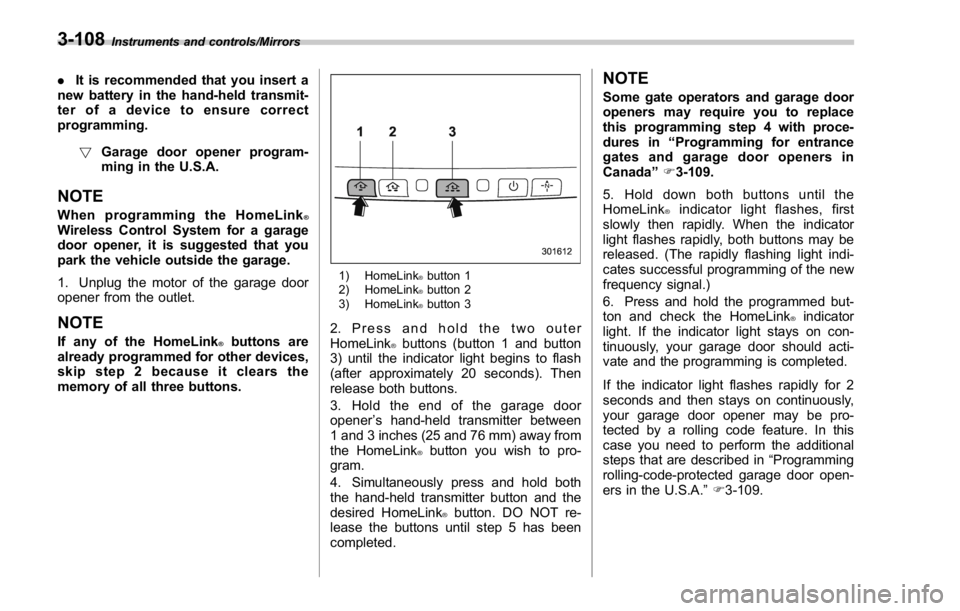
memory of all three buttons. 1) HomeLink ®
button 1
2) HomeLink ®
button 2
3) HomeLink ®
button 3
2. Press and hold the two outer
HomeLink ®
buttons (button 1 and button
3) until the indicator light begins to flash
(after approximately 20 seconds). Then
release both buttons.
3. Hold the end of the garage door
opener ’ s hand-held transmitter between
1 and 3 inches (25 and 76 mm) away from
the HomeLink ®
button you wish to pro-
gram.
4. Simultaneously press and hold both
the hand-held transmitter button and the
desired HomeLink ®
button. DO NOT re-
lease the buttons until step 5 has been
completed. NOTE Some gate operators and garage door
openers may require you to replace
this programming step 4 with proce-
dures in “ Programming for entrance
gates and garage door openers in
Canada ” F 3-109.
5. Hold down both buttons until the
HomeLink ®
indicator light flashes, first
slowly then rapidly. When the indicator
light flashes rapidly, both buttons may be
released. (The rapidly flashing light indi-
cates successful programming of the new
frequency signal.)
6. Press and hold the programmed but-
ton and check the HomeLink ®
indicator
light. If the indicator light stays on con-
tinuously, your garage door should acti-
vate and the programming is completed.
If the indicator light flashes rapidly for 2
seconds and then stays on continuously,
your garage door opener may be pro-
tected by a rolling code feature. In this
case you need to perform the additional
steps that are described in “ Programming
rolling-code-protected garage door open-
ers in the U.S.A. ” F 3-109.3-108
Page 241 of 594
Instruments and controls/Defogger and deicer
Defogger and deicer
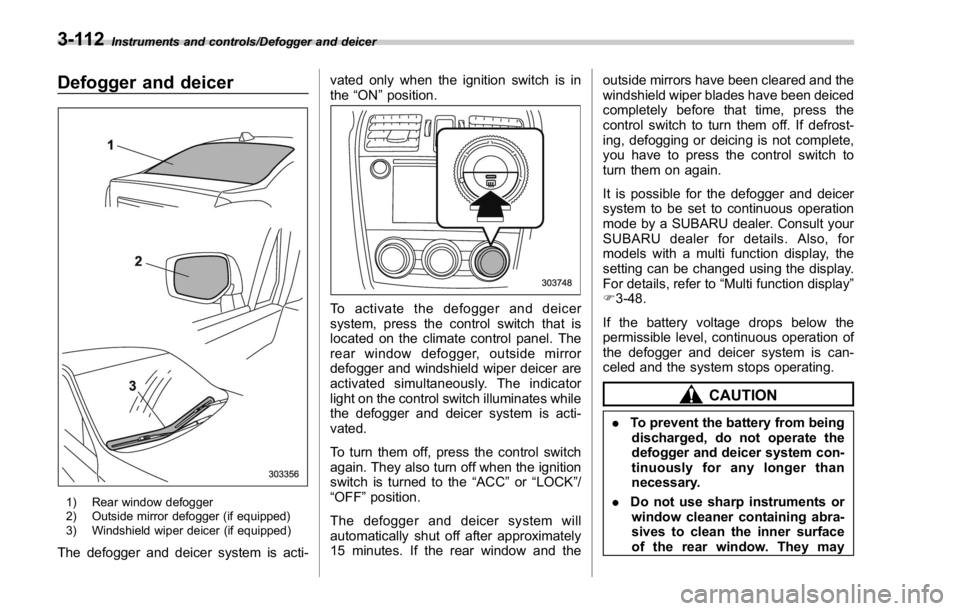
1) Rear window defogger
2) Outside mirror defogger (if equipped)
3) Windshield wiper deicer (if equipped)
The defogger and deicer system is acti- vated only when the ignition switch is in
the “ ON ” position.
To activate the defogger and deicer
system, press the control switch that is
located on the climate control panel. The
rear window defogger, outside mirror
defogger and windshield wiper deicer are
activated simultaneously. The indicator
light on the control switch illuminates while
the defogger and deicer system is acti-
vated.
To turn them off, press the control switch
again. They also turn off when the ignition
switch is turned to the “ ACC ” or “ LOCK ” /
“ OFF ” position.
The defogger and deicer system will
automatically shut off after approximately
15 minutes. If the rear window and the outside mirrors have been cleared and the
windshield wiper blades have been deiced
completely before that time, press the
control switch to turn them off. If defrost-
ing, defogging or deicing is not complete,
you have to press the control switch to
turn them on again.
It is possible for the defogger and deicer
system to be set to continuous operation
mode by a SUBARU dealer. Consult your
SUBARU dealer for details. Also, for
models with a multi function display, the
setting can be changed using the display.
For details, refer to “ Multi function display ”
F 3-48.
If the battery voltage drops below the
permissible level, continuous operation of
the defogger and deicer system is can-
celed and the system stops operating.
CAUTION
. To prevent the battery from being
discharged, do not operate the
defogger and deicer system con-
tinuously for any longer than
necessary.
. Do not use sharp instruments or
window cleaner containing abra-
sives to clean the inner surface
of the rear window. They may3-112